Disclosure: As an Amazon Associate, kajuandouglas.com earns from qualifying purchases. Links on this page are affiliate links; they cost you nothing extra. Prices and availability change often, so check the current Amazon listing before you buy.
The honest answer to “are wireless keyboards good for gaming” is yes — with one condition that matters more than any spec sheet: the board has to use a proper 2.4 GHz gaming connection rather than plain Bluetooth. Modern 2.4 GHz links from the major gaming brands poll fast enough that the delay between your finger and the screen is smaller than the delay your monitor adds on its own, which is why so many tournament players now compete on wireless boards without thinking twice about it. Bluetooth is a different story, and confusing the two is where most of the bad reputation around wireless gaming keyboards actually comes from.
Key takeaways: A 2.4 GHz dongle connection on a gaming-grade board is, for practical purposes, as responsive as a cable. Bluetooth is fine for menus, chat and slow-paced games but is the weakest link for fast play. Battery habits, not latency, are the real day-to-day difference between wired and wireless. And the board’s switches, polling rate and firmware matter more than whether a cable exists at all.
Are Wireless Keyboards Good for Gaming? The Short Answer First
Yes, for the large majority of players, in the large majority of games. The qualification is about which wireless technology you use and what you play. A first-person shooter played at a high refresh rate is the most demanding case a keyboard ever faces, and even there, a current 2.4 GHz board with a 1000 Hz polling rate delivers keystrokes to the PC within roughly a millisecond of a wired board doing the same job. Strategy games, RPGs, MMOs, racing titles and everything played on a couch are far less demanding, and in those settings the practical difference between a good wireless board and a wired one is not performance at all — it is whether you have to think about charging.
There is also a generational point that older advice columns miss. The wireless keyboards that built the “wireless is laggy” reputation were office products: Bluetooth-only, low polling rates, firmware designed to sip power rather than respond quickly, and radios that went to sleep aggressively between keystrokes. Gaming brands spent the last several years engineering exactly those weaknesses away, with dedicated low-latency radio protocols, full-speed polling over the dongle, and wake behaviour tuned for play. Judging a 2025 gaming board by the behaviour of a 2015 office keyboard is like judging modern SSDs by the speed of a spinning hard drive.
What has not changed is physics at the margins. A cable will always be the simplest, most interference-proof path between a switch and a PC, and it never needs charging. Wireless wins on desk freedom, clean setups, couch play and multi-device life. The rest of this guide walks through the numbers, the scenarios where the answer changes, five boards that demonstrate what good wireless looks like, and the habits that stop a wireless board from dying mid-match.
In this guide
Where the Delay Actually Lives: A Latency Walk-Through
When you press a key, several small delays stack up before anything changes on screen. The switch itself has to actuate and the board’s controller has to notice, which involves a scanning matrix and a debounce window that filters out electrical noise. Then the keystroke travels — by cable or by radio — to the PC, where the operating system and the game engine pick it up on their own schedules. After that, the game renders a frame and the monitor displays it. The travel step, the one wireless critics focus on, is one of the smallest parts of that chain on a modern board.
Polling rate is the number to understand first. A board polling at 1000 Hz reports its state to the PC a thousand times per second, so a keystroke waits, on average, half a millisecond for the next report slot. At 125 Hz — the rate of many older office boards — the average wait is four milliseconds and the worst case is eight. That gap is the entire basis of the “wireless feels mushy” complaint, and it is a polling problem, not a wireless problem: a wired board at 125 Hz feels exactly as sluggish as a wireless one at 125 Hz.
The radio link adds its own small cost. Gaming-grade 2.4 GHz protocols are engineered to add roughly a millisecond or less, keeping the total within a whisker of USB. Standard Bluetooth, by contrast, was designed for power saving and interoperability, and its connection intervals and sleep behaviour can add a clearly larger and less consistent delay — the kind you can feel in a fast shooter as a faint disconnect between intention and action. This is why the connection you choose in the moment matters more than the connection printed on the box: many tri-mode boards offer Bluetooth, 2.4 GHz and wired modes, and they are not interchangeable for gaming.
For a fuller treatment of how the three connection types differ — pairing, range, multi-device behaviour and battery drain — the companion explainer on Bluetooth vs 2.4GHz keyboards and tri-mode connections goes deeper than this guide can. Here, the working rule is simple: game on the dongle, chat and browse on Bluetooth, and treat the cable as a charging lead that doubles as a backup connection.
| Connection | Typical polling | Feel in fast games | Battery behaviour | Best use |
|---|---|---|---|---|
| 2.4 GHz gaming dongle | 1000 Hz or higher | Indistinguishable from wired for most players | Moderate drain; RGB is the big cost | All gaming, including competitive play |
| Bluetooth | Low and variable | Noticeable softness in fast titles | Gentlest drain; weeks to months | Office work, tablets, menus, slow-paced games |
| Wired USB | 1000 Hz or higher | The reference point | No battery at all | Permanent desks, troubleshooting, charging while playing |
One more variable deserves honesty: your own perception. Human reaction time sits around 150–250 milliseconds, and display lag on a typical monitor adds several milliseconds more. A one-millisecond difference in the keyboard link is real on an oscilloscope and irrelevant to your K/D ratio. What players actually notice is inconsistency — a board that sleeps and wakes with a stutter, or a radio fighting interference from a crowded desk. Consistency, not raw speed, is what the good boards below are chosen for.
Four Gaming Scenarios, Walked Through One at a Time
Scenario one: competitive shooters at a desk
This is the hardest test and the one most people picture. You are playing a tactical shooter or a battle royale at 144 Hz or above, making constant small corrections, counter-strafing, and hitting ability keys in tight windows. On a gaming-grade 2.4 GHz board, the keyboard link is not your bottleneck; your monitor, your mouse sensor and your own hands all contribute more delay and more variance. The practical risks are different: a battery that dies mid-session, and interference if the dongle is buried behind a metal PC case at the far side of the desk. Both are solved with habits covered later in this guide — charge on a schedule, and put the dongle on a short USB extension near the board. Players shopping specifically for this style of play should also look at the boards gathered in the guide to the best keyboards for MOBA games like LoL and Dota, where rapid-trigger switches and compact layouts get the full treatment.
Scenario two: MMOs and long raid sessions
MMO play asks different things of a keyboard: dozens of keybinds, modifier layers, long sessions, and a lot of chat typing between pulls. Latency demands are modest — raid mechanics are timed in tenths of seconds, not milliseconds — so wireless is an easy yes here, and the deciding factors become key count, macro support and comfort over three hours. A full-size or tenkeyless board with remappable keys suits this better than a minimalist 60 percent deck, and a wireless board means the raid setup can move between a desk PC and a laptop without re-cabling. The dedicated roundup of keyboards for MMO games like WoW and FFXIV covers macro-heavy boards in detail; in this guide the Keychron K8 Pro below is the MMO-friendly pick because of its programmability.
Scenario three: the couch and the big TV
Wireless is not merely good here — it is the only sensible option. A cable across a living room is a trip hazard and a hard length limit, while a 2.4 GHz board on your lap or a coffee table handles everything from RPGs to platformers without compromise. Bluetooth also becomes acceptable in this scenario for slower games, since the TV itself usually adds more display lag than the keyboard link does. The boards that shine on a couch are low-profile and lap-friendly, which is why the Razer DeathStalker V2 Pro TKL appears in the picks: it is slim enough to live on a coffee table without looking like cockpit equipment.
Scenario four: travel, LANs and shared desks
A wireless board that pairs with three devices turns one keyboard into the keyboard for a gaming PC, a work laptop and a tablet, switched with a key press. For LAN events and tournaments, wireless removes cable routing from a crowded desk, though you should bring the cable anyway as a fallback and check event rules — a few organisers still mandate wired peripherals. For shared or hot-desking setups, the dongle is the detail to protect: it is small, losable, and paired to your board, so a board with onboard dongle storage earns real points. The travel-focused picks in the best travel keyboards for laptops and mobile work take this scenario further.
The Five Boards That Prove the Point
Talking about wireless in the abstract only goes so far, so here are five boards, each verified against Amazon catalogue data through the site’s Creators API connection before being linked, that show what current wireless gaming hardware actually looks like. They are not ranked best-to-worst; each one is the right answer to a slightly different question, and the verdicts say which question that is. If you are comparing the big gaming brands against each other more broadly, the head-to-head of Corsair vs Razer vs Logitech gaming keyboards is the natural next read.
| Board | Layout | Connection | Switch feel | Standout trait |
|---|---|---|---|---|
| Logitech G915 X LIGHTSPEED TKL | Tenkeyless, low profile | LIGHTSPEED 2.4 GHz, Bluetooth, wired | Low-profile mechanical, tactile option | The esports-grade all-rounder |
| Razer DeathStalker V2 Pro TKL | Tenkeyless, very slim | HyperSpeed 2.4 GHz, Bluetooth, wired | Low-profile optical, linear | Couch and clean-desk favourite |
| Keychron K8 Pro | Tenkeyless | Bluetooth, wired (dongle-free design) | Hot-swappable mechanical | Programmability for MMO and work |
| SteelSeries Apex Pro Mini Wireless | 60 percent | Quantum 2.0 2.4 GHz, Bluetooth, wired | Adjustable-actuation magnetic/optical | Smallest desk footprint, fastest feel |
| Corsair K70 CORE TKL Wireless | Tenkeyless | 2.4 GHz, Bluetooth, wired | Pre-lubed linear mechanical | Sound-damped, media-dial equipped |

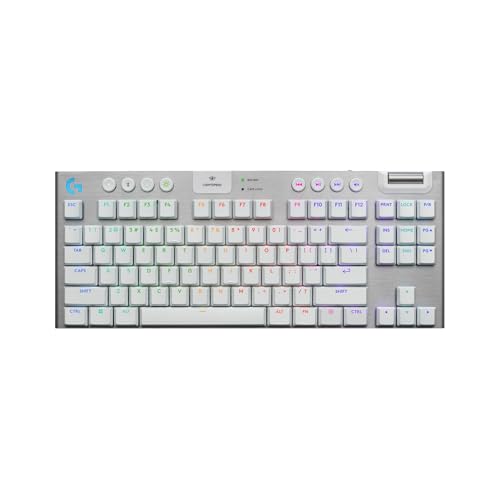
Logitech G915 X LIGHTSPEED TKL — the safe answer
Badge: Best all-round wireless gaming board
- Layout: tenkeyless, low profile
- Connection: LIGHTSPEED 2.4 GHz, Bluetooth, USB wired
- Switches: low-profile mechanical (tactile variant listed)
- Keycaps: double-shot PBT
- Extras: RGB backlighting, media controls, aluminium top case
The G915 line is the board that normalised wireless in serious gaming setups, and the X revision refines the formula rather than reinventing it: a slim aluminium chassis, low-profile mechanical switches, double-shot PBT keycaps that will not shine smooth, and Logitech’s LIGHTSPEED radio, which is the benchmark the rest of the industry measures itself against. In play it feels exactly like a wired board, because at 1000 Hz over a well-engineered radio link there is nothing left to feel. The tenkeyless layout leaves mouse room without giving up the function row, which matters for games that bind abilities to F-keys.
Its low-profile switches are the one genuine decision point. They actuate fast and suit gaming beautifully, but typists raised on tall mechanical boards sometimes find the short travel less satisfying for long writing sessions. The tactile variant listed here gives a small bump that helps; if you type as much as you game, it is the version to pick. Battery life is strong with lighting moderated and drops fast at full RGB brightness — a pattern every board in this guide shares.
- Strengths: benchmark-grade 2.4 GHz link; premium build with PBT keycaps; easy multi-device switching between dongle and Bluetooth
- Strengths: low-profile speed suits shooters and fast ability rotations
- Strengths: mature software and wide availability of replacement parts
- Trade-offs: premium price tier; low-profile switches divide opinion for typing
- Trade-offs: charging cable is a desk fixture if you run full-brightness RGB
- Trade-offs: no hot-swap sockets, so switch changes mean a new board
Best for: players who want one wireless board that is simply right for every game they own. Not suited for: tinkerers who want to swap switches and rebuild their board over time.

Razer DeathStalker V2 Pro TKL — the slim one
Badge: Best for couch play and minimal desks
- Layout: tenkeyless, ultra-slim low profile
- Connection: HyperSpeed 2.4 GHz, Bluetooth, USB wired
- Switches: low-profile optical, linear red variant listed
- Case: aluminium top plate
- Extras: multi-device pairing, detachable cable for charging
Razer’s DeathStalker V2 Pro TKL takes the optical route: its low-profile switches register keystrokes with light rather than metal contacts, which removes debounce delay from the equation and gives the board a strikingly immediate feel in fast games. The linear red variant listed here is smooth from top to bottom of the press, which shooter players tend to love and heavy-handed typists tend to bottom out noisily. The board’s party trick is its silhouette — it is thin enough to sit on a lap desk or coffee table without dominating it, and its aluminium top plate keeps it rigid despite the slim frame.
HyperSpeed is Razer’s answer to LIGHTSPEED and in practice the two are peers: game on the dongle and the link disappears from your attention entirely. Bluetooth pairing covers the laptop-and-tablet side of life. The honest limitation is the same low-profile trade-off as the Logitech, sharpened: optical low-profile switches feel fast and a little hollow compared with a deep mechanical board, and there is no hot-swap path if your taste changes.
- Strengths: optical actuation feels exceptionally immediate; genuinely slim and lap-friendly
- Strengths: HyperSpeed link is tournament-grade; Bluetooth covers second devices
- Strengths: aluminium top plate keeps a thin board feeling solid
- Trade-offs: linear-only feel will not suit tactile fans; no switch swapping
- Trade-offs: coated keycaps on some variants wear faster than PBT
- Trade-offs: premium pricing for a tenkeyless board
Best for: couch gamers and minimal-desk players who want optical speed in a slim board. Not suited for: buyers who want deep, traditional mechanical travel or hot-swap flexibility.

Keychron K8 Pro — the programmer’s gaming board
Badge: Best for MMO binds and custom layouts
- Layout: tenkeyless, standard height
- Connection: Bluetooth 5.1, USB wired (no 2.4 GHz dongle)
- Switches: hot-swappable mechanical
- Software: QMK/VIA remapping and macros
- Extras: Mac/Windows keycaps in the box, south-facing RGB
The K8 Pro is included deliberately as the exception that teaches the rule. It is a superb keyboard — hot-swappable, QMK/VIA programmable down to every key, comfortable for all-day typing, and brilliant for MMO players who want macro layers and per-game layouts. But its wireless mode is Bluetooth only, and that makes it the weakest gaming link in this line-up for fast titles. For raid nights, turn-based games, and anything where a few milliseconds genuinely do not matter, it is flawless over Bluetooth. For competitive shooters, plug in its cable and it becomes a wired board with elite programmability — which is a perfectly good way to own it.
That honesty is the point of including it: “wireless” on a spec sheet is not one thing. The K8 Pro’s strengths are real — the remapping alone can transform how an MMO hotbar feels — and its wireless limitation is specific and manageable. If your gaming is mostly MMOs, RPGs and strategy, and your days involve serious typing, this may be the best board here for you precisely because its priorities match yours.
- Strengths: QMK/VIA remapping and macros are best in class; hot-swap sockets future-proof the feel
- Strengths: excellent typing board for work as well as play
- Strengths: Mac and Windows support done properly, with keycaps for both
- Trade-offs: Bluetooth-only wireless is not for competitive shooters
- Trade-offs: heavier than the low-profile boards here
- Trade-offs: no dongle storage because there is no dongle
Best for: MMO and RPG players who customise layouts and type all day. Not suited for: ranked shooter players who need a 2.4 GHz link — unless they are happy gaming wired.

SteelSeries Apex Pro Mini Wireless — the small rocket
Badge: Best compact board for fast play
- Layout: 60 percent
- Connection: Quantum 2.0 2.4 GHz, Bluetooth, USB wired
- Switches: OmniPoint 2.0 adjustable actuation
- Keycaps: double-shot PBT
- Extras: per-key actuation adjustment in software
The Apex Pro Mini Wireless exists for players who measure their mouse space in feet and want actuation they can tune. Its OmniPoint 2.0 switches let you set how far a key travels before it registers, per key: hair-trigger shallow for movement keys in a shooter, deeper for an ultimate ability you never want to fat-finger. That adjustability is the feature wired and wireless rivals have spent years copying. At 60 percent, the board gives up dedicated arrow and function keys — they live on a layer — which is a genuine lifestyle decision: wonderful for gaming posture and desk space, annoying if your day job lives in spreadsheets.
SteelSeries’ Quantum 2.0 radio is a proper gaming link, and in this tiny chassis the wireless freedom compounds the space saving: no cable drag across a small desk, and the board can slide anywhere. Battery expectations should be modest with RGB on; this is a charge-it-weekly board for heavy users. If you are curious about building something this small yourself instead, the from-scratch route is covered in the guide to building your first custom keyboard.
- Strengths: adjustable actuation is a real competitive feature; tiny footprint frees the mouse hand
- Strengths: PBT keycaps and a solid frame at this size
- Strengths: full tri-mode connectivity despite the small case
- Trade-offs: layered arrows and F-keys frustrate productivity work
- Trade-offs: battery life is the shortest here with lighting on
- Trade-offs: premium price for the smallest board in the guide
Best for: shooter players who want maximum mouse room and tuned actuation. Not suited for: anyone who needs a number pad, dedicated arrows, or a one-board work-and-play setup.

Corsair K70 CORE TKL Wireless — the quiet storm
Badge: Best sound-damped wireless board
- Layout: tenkeyless
- Connection: 2.4 GHz, Bluetooth, USB wired
- Switches: pre-lubed MLX Red v2 linear mechanical
- Sound: internal sound-dampening layers
- Extras: rotary media dial, RGB backlighting
Corsair’s K70 CORE TKL Wireless is the board for players whose gaming happens within earshot of other people. Its pre-lubed linear switches and internal dampening make it noticeably quieter and softer-sounding than the typical gaming deck, without giving up the 2.4 GHz link or the tenkeyless layout. The rotary dial is the kind of feature you dismiss until you own it — volume adjustments mid-game without touching a function layer become second nature within a week.
In performance terms it sits comfortably with the Logitech and Razer: the link is not the story, the acoustics are. Linear switches will not give tactile feedback for typing, and Corsair’s software ecosystem is a commitment in itself, but as a shared-space gaming board it solves a problem the others ignore. Shared-space comfort matters more broadly, too — posture and wrist position over long sessions are covered in the guide to ergonomic mechanical keyboards and wrist comfort.
- Strengths: damped, pre-lubed switches sound and feel refined; media dial is genuinely useful
- Strengths: full tri-mode connectivity with a proper gaming dongle
- Strengths: tenkeyless layout keeps F-keys for game binds
- Trade-offs: linear-only switch choice; software is heavier than rivals’
- Trade-offs: sound-damped boards feel slightly softer on bottom-out
- Trade-offs: no hot-swap sockets for later switch experiments
Best for: players in shared rooms, flats and dorms who game at night. Not suited for: tactile-switch loyalists or buyers planning to mod their switches later.
Battery Reality: The One Real Cost of Cutting the Cord
Every advantage wireless gives you is paid for in one currency: charge management. A wired board is ready every second of every day; a wireless board is ready as long as you have been minimally organised. The good news is that the numbers are friendly. With backlighting off or low, most gaming boards in this class run for weeks of daily play between charges. With RGB at full brightness, that collapses to days — lighting, not the radio, is the hungry component, and the single most effective battery decision you can make is turning brightness down to the point where the legends are readable and no further.
The habit that works is boring: charge on a schedule, not on a warning. Pick a night — Sunday, say — and plug the board in while you do something else. Boards that charge over USB-C top up quickly, and most let you keep playing wired while they charge, so a flat battery is a two-minute inconvenience rather than a ruined session, provided the cable lives within reach. Keep the cable in a desk drawer permanently. The players who suffer with wireless are the ones whose charging cable is in another room when the low-battery light starts blinking during a ranked match.
Sleep behaviour deserves a setting check on any new board. Aggressive sleep timers save battery but add a wake-up beat to the first keystroke after a pause — noticeable in a game menu, irrelevant in a match, and usually adjustable in the board’s software. Set sleep to something sane like ten minutes, and if your board supports it, let the dongle connection stay warm while Bluetooth devices sleep faster; the two radios do not have to share one policy.
Interference, Solved as a Troubleshooting Tree
When a wireless board misbehaves, the cause is almost never “wireless is bad” — it is one of a handful of fixable setup issues. Work through them in this order, because the list runs from most common to least. If your board is not responding at all rather than merely lagging, the broader walk-through at how to fix a keyboard that is not working covers the dead-keyboard cases step by step.
Step one: move the dongle. A receiver plugged into the back of a metal PC case, on the floor, behind a monitor, is trying to hear your keyboard through furniture and shielding. Plug it into a front port, or better, into a short USB extension cable that places it on the desk within a metre or so of the board, with a clear line between them. This single change fixes the majority of “my wireless keyboard lags” reports.
Step two: check what else is shouting on 2.4 GHz. Wi-Fi routers, other wireless peripherals, USB 3 hubs and even some poorly shielded external drives all crowd the same band. Moving the router a metre away from the desk, separating dongles from USB 3 ports, and avoiding a cluster of receivers in adjacent ports all reduce the noise floor your keyboard has to punch through.
Step three: confirm you are actually on the dongle. Tri-mode boards make it easy to be on Bluetooth without realising — a mode switch knocked during cleaning is a classic. Check the board’s mode indicator before blaming the radio. Step four: update the firmware and re-pair; manufacturers quietly fix radio bugs in firmware updates that many owners never install. Step five: test wired. If the problem persists on a cable, the issue was never wireless — it is the board, the port, or the PC, and you have just saved yourself a pointless replacement purchase.
Myth vs Fact: Four Claims That Refuse to Die
Myth: “Wireless always adds noticeable lag”
Fact: a 1000 Hz 2.4 GHz gaming link adds around a millisecond or less, which sits far below the delay contributed by your monitor and your own reaction time. What people remember as wireless lag usually traces to Bluetooth office boards or 125 Hz polling — real problems, wrong culprit.
Myth: “Pros don’t use wireless”
Fact: wireless boards and mice are now common in top-level play precisely because the leading radio protocols closed the gap. Some pros still choose wired out of habit, superstition or event rules, which is a preference, not a performance verdict.
Myth: “Wireless keyboards die mid-game constantly”
Fact: they die mid-game exactly as often as their owners ignore weeks of low-battery indicators. With lighting moderated, a charge lasts long enough that running dry is a planning failure, not a technology failure — and every board here can play while charging over its cable.
Myth: “Bluetooth and 2.4 GHz are the same thing with different names”
Fact: they are different radios with different design goals. Bluetooth optimises for compatibility and power saving across thousands of device types; gaming 2.4 GHz protocols optimise for one thing — getting your keystroke to one specific receiver as fast and consistently as possible. The distinction is the entire subject of this guide.
When Wired Still Wins, Honestly
Balanced advice has to include the cases where the cable is genuinely the better tool. If your desk is permanent and you never move the board, wired removes charging, pairing and interference from your life at zero cost. If you are buying on a tight budget, wired boards put more of your money into switches and build quality because none of it is spent on radios and batteries — the budget tier is where wireless still involves real compromise. If you compete at events, check the rules and bring a wired-capable setup regardless. And if you are troubleshooting a PC — BIOS screens, recovery menus, a fresh OS install — a wired board is the one that always answers. Every board recommended above can run wired, which is not a coincidence: that fallback is part of what makes them safe recommendations.
How to Choose: A Five-Minute Decision Path
Start with the connection, because it cannot be upgraded later: for gaming, insist on a 2.4 GHz dongle mode, and treat Bluetooth as a bonus for other devices. Next, pick the layout by your games and your desk — tenkeyless is the sweet spot for most players, 60 percent for shooter specialists with small desks, full-size for MMO players who bind the numpad. Then choose switches by feel and by household: linear for speed, tactile for feedback, low-profile if the board must also live on a couch or in a bag. Fourth, decide your lighting honesty: if you will run RGB at full blast, plan a weekly charge and keep the cable close; if you will dim it, expect weeks. Finally, set a budget tier and stay inside it — wireless boards exist at entry, mid and premium tiers, and the mid tier is where most players should land, because it buys a proper gaming radio and PBT keycaps without paying for exotic materials.
If the choice still feels abstract, anchor it to your main game. Shooter-first players: the SteelSeries or the Logitech. MMO-first: the Keychron wired for ranked, wireless for everything else, or the Logitech for a no-compromise link. Couch-first: the Razer. Shared-room-first: the Corsair. That mapping, plus the connection rule, will land you on a board you will not think about again — which is the real definition of a good gaming keyboard, wireless or otherwise.
Polling Rates and Actuation: The Two Specs That Actually Change Feel
Once the connection is settled, two specifications decide how a wireless board feels under your fingers, and both are widely misunderstood. The first is polling rate, already introduced above: it is how often the board reports to the PC, and 1000 Hz is the standard to insist on for gaming. Some newer boards advertise 8000 Hz polling, wired and occasionally wireless. The honest reading of that number is that it shrinks an already tiny delay by a fraction of a millisecond. It does no harm, and on a high-refresh monitor with a fast game engine the whole chain benefits slightly, but no player should choose a board on this number alone, and nobody should expect to feel the difference in isolation. Treat anything above 1000 Hz as a bonus, never a reason.
The second spec is actuation — how the switch decides a press happened. Traditional mechanical switches close a metal contact at a fixed point in the key travel. Optical switches interrupt a light beam instead, which removes the debounce delay mechanical contacts need, and magnetic (Hall effect) switches measure the magnet’s position continuously, which enables adjustable actuation points and rapid-trigger behaviour, where a key resets the instant it starts moving upward rather than at a fixed point. For gaming, rapid trigger is the one that players genuinely feel, in counter-strafing and fast repeated inputs; it is why the SteelSeries board in this guide, and the dedicated picks in the MOBA guide, lean on adjustable switches. For typing, fixed mechanical actuation remains the most satisfying and predictable, which is why the “best” switch technology depends entirely on what the board is for.
There is a wireless-specific footnote here: high polling rates and always-on magnetic sensing cost battery. A board polling at extreme rates over the radio drains faster than the same board at 1000 Hz, and some boards quietly reduce their wireless polling in battery-saving modes. When you set up a new board, check the software for separate wired and wireless polling settings — the defaults are not always the maximums, and a board that feels oddly soft wirelessly is sometimes just a settings page away from feeling right.
Setting Up a Wireless Board Properly: A Step-by-Step
Step one: charge it fully before the first session, and update its firmware while it is plugged in. Firmware updates for gaming boards frequently include radio and sleep-behaviour fixes, and installing them on day one avoids diagnosing problems that were solved months ago.
Step two: place the dongle properly from the start. Use the USB extension or adapter most gaming boards include, position the receiver on the desk roughly a metre from the board with nothing metal between them, and keep it away from USB 3 hubs and external drives. Do not bury it in the rear I/O of a tower case sitting on the floor.
Step three: pair your secondary devices over Bluetooth and label them in the board’s software if it allows — knowing that slot one is the work laptop and slot two is the tablet prevents the small daily friction of connecting to the wrong machine.
Step four: set your lighting and sleep policies deliberately. Choose a brightness you can live with permanently, set sleep to around ten minutes, and set wireless polling to its gaming rate. Then leave the settings alone; a board that is constantly being reconfigured never becomes invisible, and invisible is the goal.
Step five: establish the charging ritual and the cable’s home. Cable in the desk drawer, charge on a fixed day, and a spare cable in your travel bag if the board travels. Five minutes of setup discipline is the entire difference between wireless owners who rave about it and wireless owners who went back to a cable.
Common Buying Mistakes With Wireless Gaming Keyboards
The most common mistake is buying a Bluetooth-only board for gaming because the product page said “wireless gaming keyboard” in large letters. The K8 Pro in this guide shows the nuance — a great board whose wireless mode is not the gaming kind — and the budget tier is full of boards where that distinction is the whole product. Always confirm a 2.4 GHz dongle mode exists before buying for play. The second mistake is choosing by RGB and silhouette while ignoring switch feel; you will press these switches hundreds of thousands of times, and a board that looks perfect but feels wrong is a return waiting to happen. The third is ignoring layout consequences: a 60 percent board is a commitment to layered arrows and function keys, and buyers who do not understand that before purchase blame the board for their own mismatch.
Fourth: assuming all “tri-mode” boards game equally well on every mode. Tri-mode describes connectivity, not performance per mode — the dongle is the gaming mode, full stop. Fifth: forgetting the dongle in a laptop bag or losing it entirely, then discovering replacements are board-specific. If your board has onboard receiver storage, use it from day one; if it does not, the dongle lives in one port or one pouch, always. Sixth and last: paying flagship prices for extreme polling rates while playing on a 60 Hz monitor, where the display is a far larger source of delay than the keyboard could ever be. Balance the chain; the keyboard is one link in it.
Genre by Genre: Where Wireless Earns Its Keep and Where It Merely Survives
Rhythm games are the strictest latency critics in all of gaming, because the entire genre is timing judged in milliseconds against a scrolling chart. Even here, the honest answer is layered: the game’s audio offset calibration matters more than the input device, and most rhythm titles let you calibrate the whole chain. A 2.4 GHz board at 1000 Hz calibrates into the same window as a wired board for all but the most extreme high-level play, where some players still prefer a cable for the last fraction of consistency. Fighting games are similar: frame-perfect inputs sound terrifying, but a frame is sixteen milliseconds at sixty frames per second, and a good wireless link’s variance sits far inside that budget. The fighting community’s lingering wired preference is largely about event logistics — hundreds of consoles and dongles in one hall — rather than home performance.
Real-time strategy and MOBAs reward reliability over raw speed: hundreds of commands per game, hotkeys everywhere, and zero tolerance for a dropped input during a team fight. Wireless passes easily on the dongle, and the bigger choice is layout — you need your F-row or a comfortable layer for it. Simulation and racing barely tax a keyboard at all, since wheels and sticks do the work; the keyboard is a button box for menus and camera controls, and wireless wins on pure convenience, a point the roundup of keyboards for sim racing and flight sim setups explores from the cockpit side. Single-player and story games impose no meaningful latency demands whatsoever; play them on whatever board feels best, from the couch, over Bluetooth if you like. The pattern across every genre is the same: the dongle connection erases the debate, and the debate only survives where Bluetooth or bargain radios are involved.
What Wireless Ownership Actually Costs You Over Two Years
Not money — attention, in three small recurring payments. The first is charging, handled above. The second is firmware and software: gaming boards increasingly live inside brand ecosystems that want an account, a background process and periodic updates. This is not a wireless problem specifically, but wireless boards lean harder on software for battery reporting, mode management and sleep settings, so budget ten minutes a few times a year for updates, and install them, because radio fixes ship there. The third is the dongle as a single point of failure. Lose it and most boards lose their best connection; some brands sell replacements and some do not, and re-pairing a replacement is not always possible. Treat the receiver like a key: one home, always the same home.
Set against that, weigh what the cable used to cost you. Cable drag is real for low-sensitivity mouse players sharing the desk’s right side — less relevant to the keyboard itself, but a wireless board usually arrives as part of a wireless desk, and the combined freedom changes how a setup feels to use and to clean. Desk reconfiguration — moving from gaming layout to work layout, clearing space for a drawing tablet or a wheel — takes seconds without cables to route. And a wireless board follows you: to the couch, to a laptop across the room, to a friend’s house, in a way a wired board tethered to one machine never does. For most owners the ledger is not close. The attention costs are small, scheduled and boring; the freedom is daily.
The Work-and-Play Desk: Where Wireless Quietly Wins Twice
There is a scenario this debate usually ignores because it is not purely about gaming: the desk that has to be an office from nine to five and a gaming setup after dinner. A tri-mode wireless board is the single easiest upgrade for that desk. It stays paired to the work laptop over Bluetooth, flips to the gaming PC’s dongle with one key press, and removes the second keyboard that dual-desk households otherwise keep in a drawer. Typing feel matters more in this scenario than in pure gaming — eight hours of reports will judge a board more harshly than any shooter — which is why the low-profile tactile option on the Logitech and the traditional-height Keychron both earn their places in this guide’s picks. If your desk lives this double life, weight the typing sections of each review above the gaming ones; a board that is merely good for gaming but excellent for typing will make you happier across a whole week than the reverse.
Reading a Wireless Spec Sheet Without Being Fooled
Product pages for wireless boards are written to blur exactly the distinctions this guide has drawn, so here is how to read one critically. Find the connection list first and look for the words “2.4 GHz” with a USB receiver explicitly mentioned; “wireless” alone, or “Bluetooth 5.1” alone, tells you the gaming-grade link is absent. Find the polling rate second, and check whether it is quoted for the wireless mode or only for wired — some boards poll at full speed on the cable and step down on the radio to save battery, which is a legitimate design choice that should be disclosed, not discovered. Third, read the battery claim with its conditions attached: battery figures are almost always quoted with lighting off, so a huge hour count tells you about the radio’s efficiency, not about your RGB-lit reality. Fourth, check what the mode switch actually switches — boards that require a physical toggle between Bluetooth devices are slower to live with than boards with quick-switch keys. Fifth, confirm the board can operate wired and charge simultaneously; a small number of designs cannot, and that single detail converts every flat battery into downtime. A listing that answers all five points clearly is a listing written by a company that expects informed buyers, which is itself a signal worth weighting.
Frequently Asked Questions
Is a wireless keyboard noticeably slower than a wired one for gaming?
On a gaming-grade 2.4 GHz connection, no — the added delay is around a millisecond or less, well below what your monitor and reaction time contribute. On Bluetooth, yes, the softness can be felt in fast games. The technology you select on the board matters far more than the absence of a cable.
Which connection should I use for gaming: Bluetooth or 2.4 GHz?
Use the 2.4 GHz dongle for gaming, always. Save Bluetooth for your laptop, tablet and phone, where its multi-device convenience and gentle battery use are advantages and its extra latency does not matter. Use the cable when charging or troubleshooting.
How long do wireless gaming keyboards last on a charge?
It depends overwhelmingly on lighting. With RGB off or dim, expect weeks of daily play from boards of this class; with RGB at full brightness, expect days. A weekly charging habit makes the question moot for most players.
Can I use a wireless keyboard while it is charging?
Yes — every board recommended in this guide can run over its USB cable while charging, so a flat battery becomes a brief wired session rather than a cancelled one. Keep the cable in your desk so this fallback is always within reach.
Do wireless keyboards work for competitive and ranked play?
Yes, on the dongle connection. The leading gaming radios were designed for exactly this use, and wireless peripherals are now common in professional play. Check individual event rules if you compete in person, and bring the cable as a backup regardless.
Why does my wireless keyboard sometimes stutter or drop inputs?
Almost always it is placement or interference, not the board: a dongle hidden behind a metal case, a crowded 2.4 GHz environment, or USB 3 devices near the receiver. Move the dongle onto the desk with an extension cable, separate it from USB 3 hubs, confirm you are not accidentally on Bluetooth, and update the firmware before concluding anything is broken.
Wireless keyboards are good for gaming — full stop, with the dongle caveat — and for many players they are simply better than wired, because the freedom changes how a desk, a couch setup and a travel bag work. Choose the connection first, the layout second and the switches third, charge on a schedule, and the cable you removed will never be missed.