Disclosure: As an Amazon Associate, kajuandouglas.com earns from qualifying purchases. Links on this page are affiliate links; they cost you nothing extra. Prices and availability change often, so check the current Amazon listing before you buy.
The best keyboards sim racing flight sim enthusiasts can buy are not the stars of their setups, and that is exactly the point. In a rig, the wheel or the yoke does the driving and flying; the keyboard is the indispensable supporting instrument — the thing that runs menus, chat, pit strategy, camera views, replays and the hundred small commands no button box has buttons for. It must live where a keyboard was never designed to live: on a tray beside a wheel stand, balanced on a lap in a racing seat, glowing in a darkened room, within reach of a driver wearing gloves or a pilot mid-approach. This guide recommends five keyboards, each verified against Amazon catalogue data before being linked, chosen for that supporting role — compact, wireless where it counts, backlit, and honest about the fact that in a cockpit, the keyboard serves the rig.
Key takeaways: Small and wireless wins in a rig, because the keyboard’s home is a tray, a lap or a side mount, not a desk. A separate wireless number pad is the sim world’s secret weapon — a fully bindable button box that happens to have numbers on it. Backlighting is a functional feature in dark sim rooms, not decoration. And the keyboard must never compete with the wheel for space, cables or attention.
Best Keyboards Sim Racing Flight Sim: The Keyboard’s Real Job in a Sim Setup
Inventory what a keyboard actually does across a sim session and its specification writes itself. Before the session: launching titles, adjusting settings, typing in setup notes and server passwords. During: pit requests and strategy calls, brake bias and differential adjustments beyond the wheel’s encoders, camera and replay controls, push-to-talk discipline, and the occasional urgent Esc. In flight simulation the load is heavier still — autopilot modes, radio frequencies, transponder codes, checklist items — a steady drip of keyboard work woven through the flying. After: saving replays, naming setups, chatting with the league. None of this requires esports actuation or a macro column. All of it requires a board that is where your hand expects it, readable in the dark, untethered enough to live on a tray, and small enough not to fight the wheel for the rig’s limited geography.
The geography deserves emphasis, because it inverts ordinary keyboard advice. A desk keyboard is centred and permanent; a rig keyboard is peripheral and mobile. It gets picked up, moved aside for entry and exit, balanced, dropped occasionally, and used at angles no office would tolerate. Wireless stops being a convenience in that environment and becomes the enabling feature — a cable across a cockpit is a snag waiting for a pedal stroke. Size follows the same logic: the board shares its tray with a mouse, a drink the driver should not have placed there, and the rig’s other small instruments. Compact and tenkeyless boards are not a compromise in a rig; they are the correct engineering. Flight-sim desks, which are more desk than cockpit, relax the constraints somewhat — and this guide’s picks note which boards serve the desk-based pilot better than the rig-based driver.
In this guide
Quick Picks for the Cockpit
| Keyboard | Layout | Connection | Rig virtue | Best for |
|---|---|---|---|---|
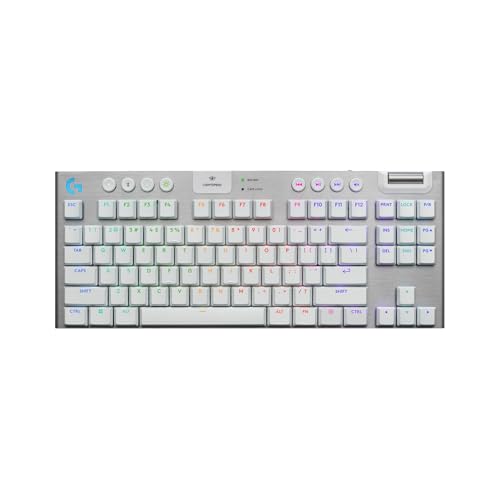
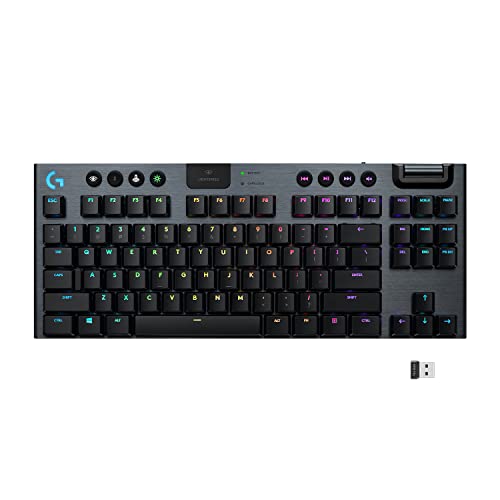
| Logitech G915 TKL | Tenkeyless, low profile | LIGHTSPEED 2.4 GHz, Bluetooth, wired | Proven wireless, slim, backlit | The all-round rig board |
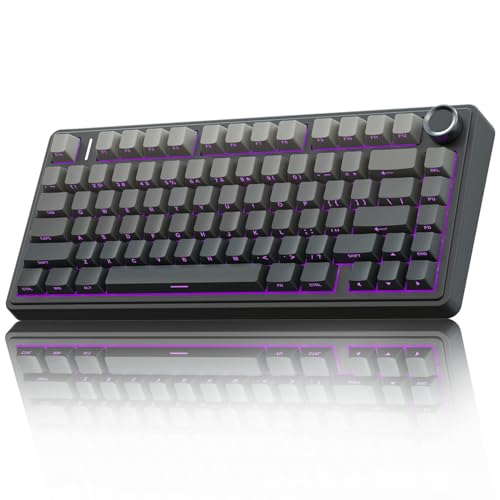
| Keychron K3 | 75 percent, low profile | Bluetooth, wired | Smallest footprint, three-device pairing | Tight rigs and shared desks |
| Razer BlackWidow V3 Mini HyperSpeed | 65 percent | HyperSpeed 2.4 GHz, Bluetooth, wired | Compact wireless with long battery | Drivers who want mechanical depth |
| Keychron K0 Max number pad | Standalone pad | 2.4 GHz, Bluetooth, wired | A bindable button box in pad form | Pit commands and flight systems |
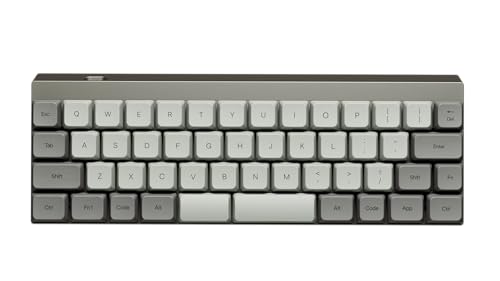
| Logitech MX Keys Mini | Compact, low profile | Bluetooth, 3 devices | Superb backlight, quiet, refined | Desk-based flight sim and mixed use |
How the Picks Were Chosen
The gates were rig-shaped: compact or tenkeyless footprints; wireless with a gaming-grade or receiver-based link where the board must move; backlighting readable in a dark room; build that tolerates being handled, moved and occasionally knocked; and, for the pad, full programmability. Each linked product was verified in Amazon’s catalogue data through the site’s Creators API connection on 2026-11-23. Dedicated sim button boxes and stream decks are discussed in prose where they belong — as complements the keyboard works alongside — rather than linked, because this guide’s promise is keyboards, and because the pad pick below deliberately blurs that line in the most useful way.
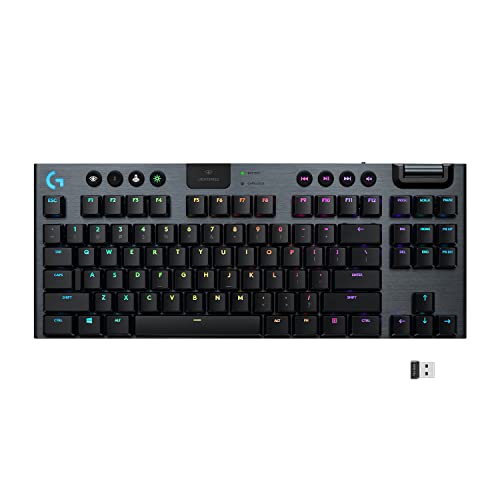
Logitech G915 TKL — the all-round rig board
Badge: Best overall for sim rigs
- Layout: tenkeyless, low profile
- Connection: LIGHTSPEED 2.4 GHz, Bluetooth, USB wired
- Switches: low-profile mechanical, tactile variant listed
- Backlight: per-key RGB
- Extras: aluminium case, media roller and controls
The original G915 TKL has become the default rig keyboard for reasons that compound. Its LIGHTSPEED connection is the proven, interference-proof link you want when the board lives metres from the PC on a tray. The low-profile case sits flat and stable on a keyboard tray or a lap board, and its slim aluminium body survives the handling a rig imposes better than taller plastic boards. Per-key backlighting, adjustable down to a dim glow, makes it readable in the darkened rooms sim racers favour without flooding the driver’s night vision. And the tenkeyless layout keeps the function row — where sims park their camera and session commands — while surrendering the pad the rig does not miss.
The tactile variant listed here suits gloved and ungloved use alike: a defined actuation you can feel without looking, which is the whole game when your eyes are on an apex. Its compromises are a flagship price, a battery to keep in rhythm, and low-profile switches that typists raised on full-depth boards find less satisfying at a desk — a trade a rig makes happily. For a one-board answer to the whole guide’s question, this is it.
- Strengths: benchmark wireless link and tray-friendly slim build
- Strengths: backlighting tuned for dark rooms
- Strengths: tactile feel you can find without looking
- Trade-offs: flagship price
- Trade-offs: battery discipline required
- Trade-offs: low-profile feel is wasted on desk typing purists
Best for: dedicated racing rigs and mixed sim desks. Not suited for: buyers who need a number pad on the main board.

Keychron K3 — the smallest serious option
Badge: Best for tight rigs and shared spaces
- Layout: 75 percent, low profile
- Connection: Bluetooth for 3 devices, USB-C wired
- Switches: low-profile mechanical, Red linear variant listed
- Backlight: white LED
- Extras: Mac/Windows support, slim travel-ready case
Where the rig is a wheel stand in a corner, a desk that converts, or a seat that folds away, the keyboard’s size budget shrinks to whatever the tray forgives — and the K3 is the smallest board in this guide that remains a real keyboard. Its 75 percent layout keeps the function row and arrows in a case barely larger than the keys themselves, its low profile sits happily on narrow trays, and its three-device Bluetooth pairing serves the convertible setup beautifully: one slot for the sim PC, one for the everyday machine the same desk hosts by day. The Red linear variant listed here is smooth and undemanding — well suited to quick, eyes-up inputs.
The trade-offs are Bluetooth-only wireless, which for menu, chat and systems work in a sim is entirely sufficient — the keyboard is not the control device, and its latency demands are those of a supporting instrument, a point the gaming-focused analysis in are wireless keyboards good for gaming makes in full — and a compactness that asks a day of adjustment from full-size hands. For the space-starved rig, those are the right prices.
- Strengths: fits trays and corners nothing else can
- Strengths: three-device pairing for convertible setups
- Strengths: honest keyboard feel in a tiny case
- Trade-offs: Bluetooth only
- Trade-offs: white backlight only, no per-key colour
- Trade-offs: compact layout needs adjustment
Best for: folding rigs, wheel stands and dual-purpose desks. Not suited for: pilots who want a full-size board at a dedicated sim desk.

Razer BlackWidow V3 Mini HyperSpeed — the compact mechanical
Badge: Best compact board with full-depth switches
- Layout: 65 percent
- Connection: HyperSpeed 2.4 GHz, Bluetooth, USB wired
- Switches: Razer Green mechanical, tactile and clicky (variant listed)
- Keycaps: doubleshot ABS
- Battery: long-life wireless design
Some drivers dislike low-profile boards on principle — the keystroke feels like a laptop’s, and a rig built around mechanical directness deserves better. The BlackWidow V3 Mini is their answer: a 65 percent board with full-depth mechanical switches, a proper gaming-grade HyperSpeed link plus Bluetooth for the second machine, and battery life measured generously enough that charging is a monthly thought. At 65 percent it keeps dedicated arrows — genuinely useful for menu navigation — while staying tray-sized.
The listed variant’s Green switches are tactile and clicky, and the click deserves an honest sentence: in a solo rig it is satisfying and confirms every input audibly, which some drivers love when wearing a headset over one ear; in a shared room at midnight, it is the loudest object in this guide. Razer’s ecosystem and software come with the board. Judge it by your room as much as by your rig.
- Strengths: full-depth mechanical feel in a tray-sized board
- Strengths: excellent wireless link and battery life
- Strengths: dedicated arrows for menus
- Trade-offs: clicky variant is loud for shared rooms
- Trade-offs: ABS keycaps
- Trade-offs: 65 percent still layers the function row
Best for: drivers who want real mechanical depth in a compact wireless board. Not suited for: quiet rooms or pad-dependent flight workflows.

Keychron K0 Max — the button box in disguise
Badge: Best companion device for sim commands
- Layout: standalone wireless number pad
- Connection: 2.4 GHz, Bluetooth, USB-C wired
- Switches: low-profile, hot-swappable (Brown variant listed)
- Software: QMK/VIA programmable — every key bindable
- Extras: RGB backlighting
This is the guide’s most sim-brained recommendation: a standalone number pad, bought not for numbers but for buttons. Because the K0 Max is fully QMK/VIA programmable, every one of its keys can be bound to whatever the sim needs — pit limiter, pit request, brake bias steps, wipers, lights, camera views in racing; autopilot modes, radio tuning, transponder digits in flight — and because it is a separate wireless unit, it mounts or sits exactly where the rig wants it: on the left of the wheel, on the shifter side, on the yoke desk’s right. It is, in effect, a button box with the enormous advantage of also being a number pad when the sim asks for digits, as flight sims constantly do.
Paired with any compact board in this guide, it completes the cockpit pattern: small keyboard for text and menus, dedicated pad for commands, each in its proper place. The cautions are that it is a companion, not a keyboard — it complements the shortlist rather than replacing it — and that its programmability asks an evening of setup, repaid every session afterwards. Sim enthusiasts who enjoy the building side of the hobby will recognise the philosophy from the guide to building your first custom keyboard: the best control is the one arranged around your own hands.
- Strengths: a fully bindable command cluster, placeable anywhere
- Strengths: tri-mode wireless suits rig mounting
- Strengths: still a real number pad when digits are needed
- Trade-offs: a companion device, not a standalone keyboard
- Trade-offs: programmability requires setup time
- Trade-offs: one more battery to keep in rhythm
Best for: racers and pilots who bind many secondary commands. Not suited for: buyers looking for a single all-in-one board.
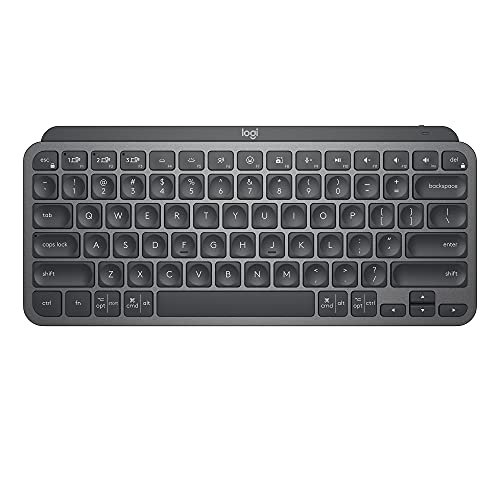
Logitech MX Keys Mini — the desk pilot’s board
Badge: Best for desk-based flight simulation
- Layout: compact, low profile
- Connection: Bluetooth, up to 3 devices
- Keys: quiet scissor keys with smart backlighting
- Battery: USB-C rechargeable
- Extras: premium metal build, multi-OS support
Flight simulation’s centre of gravity is the desk, not the rig: a yoke or stick, throttle quadrant, and a keyboard that lives a double life as the machine’s everyday board. The MX Keys Mini is the connoisseur’s version of that board — compact enough to sit beneath or beside the flight controls, with the best backlighting behaviour in this guide (it wakes as your hands approach, a small miracle on a night approach in a dark room), quiet keys that keep a shared household at peace, and three-device pairing for the pilot who flies on one machine and works on another.
It is not a mechanical board and makes no pretence of being a gaming one: Bluetooth only, no 2.4 GHz link, and a price that buys refinement rather than features. For the desk pilot whose keyboard work is frequencies, checklists and flight plans — and whose other hours are ordinary computing — that refinement is precisely the product. Racers with dedicated rigs should take the G915 TKL instead; this board’s home is the desk that flies.
- Strengths: superb backlight and typing refinement
- Strengths: compact footprint suits flight desks
- Strengths: three-device pairing for mixed-use machines
- Trade-offs: Bluetooth only
- Trade-offs: not mechanical; feel is fixed
- Trade-offs: premium price for a compact board
Best for: desk-based flight simmers and mixed-use setups. Not suited for: dedicated racing rigs or mechanical loyalists.
Where the Keyboard Lives: Rig Layout Patterns That Work
The hardware is only half the answer; the other half is placement, and sim rigs have evolved a few proven patterns. The keyboard tray — a sliding or fixed shelf beneath or beside the wheel deck — is the classic: the board lives flat, slides away for entry and exit, and pairs naturally with the compact boards in this guide. Its discipline is that the tray must be rigid; a flexing tray turns every keystroke into a small earthquake the wheel can feel. The lap board pattern serves racing seats without trays: a low-profile wireless board on a cushion or a simple plank across the seat, used for menus and setup between stints, then set aside for driving — the G915 TKL’s slim case is built for exactly this life. The side-table pattern, common in flight desks and hybrid rigs, parks the keyboard on a surface at the dominant hand’s side, angled toward the screens; it suits the MX Keys Mini’s desk life and the K0 Max’s role as a command cluster mounted or placed within a hand’s reach of the controls. And the mounted-pad pattern deserves its own sentence: sim builders increasingly fix a programmable pad like the K0 Max directly to the rig’s upright or button-box panel, where it becomes part of the cockpit rather than a peripheral on it — the highest compliment a keyboard accessory can earn in this hobby.
Whichever pattern you choose, honour two rules. The keyboard must be reachable without unbuckling, leaning out of the seat or taking your eyes off the screen for more than a glance — if it is not, it will not be used, and unused controls do not exist. And its cable, if it has one in play, must never cross the pedal zone or the wheel’s rotation arc; wireless exists in this guide’s shortlist precisely to make that rule effortless.
Binding the Pad: A Worked Example for Racers and Pilots
The K0 Max recommendation earns a worked example, because a programmable pad is only as good as its layout. For a racing driver, a proven arrangement runs by frequency and panic-value. The top row takes session controls: Esc-equivalents, pause, and the replay toggle. The middle block takes car adjustments in a spatial pattern that mirrors the car — brake bias up and down as a vertical pair, differential beside it, engine braking below — so the pad becomes a tiny map of the systems it controls. The bottom row takes the pit commands: request, confirm, and the limiter, placed on the largest, most findable keys because they are pressed at speed, on a straight, with gloves. For a pilot, the same logic arranges differently: frequencies and transponder digits keep the pad’s native numbers (the one case where the printed legends are the feature), while the surrounding keys take autopilot modes in the order the flight phases use them — heading, altitude, approach — so the pad reads like the flight itself. In both cases, write the map down, keep it stable across sessions, and resist re-binding weekly: a command surface is a memory instrument, and its value compounds with every session it stays the same. Players who prefer their commands on the main board instead will find the modifier-system method in the MMO guide — the best keyboards for MMO games — translates surprisingly well to sim binding philosophy.
Flight Sim’s Heavier Keyboard Load, Taken Seriously
Racing asks the keyboard to be a servant; flight simulation asks it to be a junior crew member, and the difference should shape the purchase. A study-level airliner workflow involves constant keyboard mediation: FMC entries on some setups, radio and transponder management, autopilot mode selections, view systems, checklist and EFB interactions, and a steady traffic of simulator-level commands — time acceleration, slew, pause, weather. Desk pilots should therefore weight typing quality and layout completeness more heavily than racers do: the MX Keys Mini’s refinement, or even a full-size board at a spacious flight desk, is a rational choice that this guide’s compact-first framing should not bully anyone out of. The pad-as-button-box pattern also inverts for pilots: where the racer binds commands to a pad, the pilot often keeps the pad for its digits — frequencies are numbers, and entering them on a real pad, eyes up, is a small daily luxury — while the main board carries the systems. VR pilots are the extreme case of the whole guide’s philosophy: in a headset, the keyboard is a blind instrument, and the winners are boards and pads whose keys can be found entirely by touch — defined actuation, standard geography, and a layout the hands have memorised. If you fly in VR, buy for your fingers, not your eyes, and treat backlighting as the feature you are politely declining.
Common Mistakes in Sim Keyboard Buying
The first is buying a desk keyboard for a rig — full-size, wired, tall — and spending a season fighting its geography before admitting the tray was the specification. The second is the reverse: buying a tiny board for a flight desk that had room and need for a complete one, then layering every third command. The third is ignoring the dark: sim rooms run dim, and a board without backlighting becomes a guessing game at the exact hours simmers keep. The fourth is cabling across the rig — a wire over the pedals or through the wheel’s arc is not an inconvenience but an incident with a date. The fifth is treating the keyboard as beneath the rig’s dignity and buying the cheapest board available, then discovering that menus, chat, setup work and replays — a substantial share of sim life — all flow through the one component that was never chosen. The rig’s keyboard is a supporting instrument, and supporting instruments are chosen, not inherited.
Two Cockpits Compared: What Racing and Flying Really Do Differently
It is worth drawing the two disciplines’ keyboard profiles side by side, because buyers who do both — a large population — need to know which discipline should drive the purchase. The racer’s keyboard work is bursty and time-critical in a peculiar way: long stretches of no keyboard at all, punctuated by seconds in which a pit request, a strategy call or a damage check must happen at racing speed, on a straight, without a glance. That profile favours few, findable, high-confidence inputs — the pad-as-button-box, the function row memorised, the board positioned for a hand that leaves the wheel reluctantly. The pilot’s keyboard work is continuous and conversational: a steady interleaving of flying and typing across hours, where the keyboard is a colleague rather than an emergency tool. That profile favours typing quality, complete layouts and the refinements of a board you converse with — backlight, quiet keys, a pad for the endless digits. A dual-discipline buyer should therefore ask which cockpit hosts the longer sessions and let that discipline choose the main board, while the pad pattern serves both: bound one way for the car, another for the aircraft, with profiles keeping the two maps from ever meeting. The boards in this guide were shortlisted to make that compromise painless — every main-board pick is competent in both cockpits, and the specialisation lives in the placement and the bindings, where it belongs.
The League Racer’s Week, and Where the Keyboard Fits in It
Consider the keyboard’s actual week in organised sim racing, because purchase decisions should be made against a calendar rather than a highlight. Monday is practice: setup work, telemetry comparisons, notes typed between stints — the keyboard as a notebook, where typing comfort quietly matters. Wednesday is qualifying and a sprint race: the keyboard as a session tool, launching, screenshotting, chatting in the lobby. The weekend is the endurance event or the league feature race: the keyboard as an emergency instrument and a strategy desk, used at speed, in the dark, possibly by a teammate in a driver-swap household where the rig is shared and the board must be instantly legible to a second pair of hands. Shared rigs are an under-discussed buying case: they argue for standard layouts over personalised ones, for backlighting that needs no software to behave, and against exotic boards whose quirks live in one driver’s head. If your rig hosts more than one driver or pilot, buy the board a guest can use — the G915 TKL’s conventional excellence is the pattern — and keep the personalisation in the pad and the profiles, where it can be switched rather than explained.
Gloves, VR and the Other Edge Cases
Three edge cases test every recommendation in this guide, and a complete guide should face them. Racing gloves first: they blunt fine touch and reward larger targets and defined actuation, which is why the tactile G915 and the full-depth Razer exist in this shortlist, and why a driver who races gloved should test any board gloved before judging it — a board that is perfect bare-handed can be vague through Nomex. VR second: covered in the flight section, but the racing version deserves its sentence — in a headset, the keyboard’s job shrinks to a handful of memorised keys, and the winners are standard geography and a board that never moves from its home position, because your hands navigate by the tray’s edges and the board’s corners. Button boxes and pads gain value in VR precisely because they can be learned as pure geography. Third, the convertible household rig — the wheel stand that folds into a cupboard, the desk that is an office by day: here the keyboard’s virtues are storability and multi-device manners, the K3’s home ground, and the discipline that matters is a setup ritual quick enough that the rig actually gets used on a weeknight. Edge cases are where sim setups succeed or gather dust, and a keyboard chosen with them in mind is chosen for the hobby as it is actually lived.
Endurance Events and Shared Rigs: The Keyboard as Team Equipment
Endurance sim racing — the 12- and 24-hour team events that have become the hobby’s pinnacle — turns the keyboard into team equipment, and team equipment has its own rules. Across a day of driver swaps, the board serves four or five drivers, a spotter, and the team’s strategy chatter, in the dark, at 4 a.m., by people in varying states of fatigue. The boards that serve that night are the legible ones: standard layouts, honest backlighting, a connection that has never once needed troubleshooting, and bindings documented somewhere visible rather than living in the team captain’s memory. This is the strongest form of the argument made throughout this guide — that in simulation, the keyboard’s highest virtue is not speed but trustworthiness at the moment of need — and it is why the guide’s flagship pick is a proven, conventional board rather than an exotic one. Teams should also plan the humble redundancies: a spare cable in the rig’s drawer, the board’s charging handled between stints as part of the swap ritual, and the pad’s profile backed up like any other setup file. The teams that finish endurance events are the teams whose equipment never becomes a story; the keyboard should aspire to exactly that anonymity.
From Zero: Assembling the Keyboard Side of a First Rig
For the reader building a first setup, the keyboard decisions sequence themselves sensibly. Begin with the main board sized to your space — measure the tray or desk first, then choose between the tenkeyless flagship pattern and the compact patterns in this guide — and resist buying the pad or any accessory in the same order. Live with the basic setup for a month of sessions; the commands you actually reach for, and the places your hand wishes a button existed, will announce themselves with a clarity no guide can simulate. Then add the programmable pad, bound to that evidence rather than to a template, and give it a month to become memory. Only then consider the refinements: a mount for the pad, a lap board for the seat, a second board for the desk if the rig and the workstation have divorced. This staged approach mirrors how the wider hobby builds rigs — wheel, then pedals, then the cockpit itself — and it applies the same wisdom the travel-keyboard world teaches in the best travel keyboards for laptops and mobile work: the right portable setup is the one assembled from your own trips, not from a checklist. Sim gear bought in stages is gear bought once; sim gear bought all at once is gear bought twice.
Comfort in the Seat: The Body Across a Long Stint
A closing physical note, because sim sessions are long and the body keeps the score. The keyboard’s contribution to stint comfort is mostly about reach: every control placed within the seated, belted posture’s easy arc is a control that does not cost a shoulder or a twisted lean, repeated hundreds of times across an endurance event. Trays should sit at a height that lets the forearms rest level, echoing the same neutral-geometry principle that governs desk ergonomics — readers building a combined desk-and-rig life will find the fuller treatment in ergonomic mechanical keyboards and wrist comfort — and the board itself should be light enough to move aside without a wrestle when the driver climbs out. None of this is glamorous, and all of it is the difference between a rig that gets used for the long events it was built for and a rig that quietly becomes furniture. The keyboard is the smallest part of that equation and, characteristically, the part most often placed by accident rather than by decision. Place it by decision.
The Verdict, by Cockpit
| Your setup | Buy | The one-line reason |
|---|---|---|
| Dedicated racing rig with a tray | Logitech G915 TKL | Slim, wireless, backlit and proven — the default rig board |
| Folding stand or convertible desk | Keychron K3 | The smallest real keyboard, paired to every machine you own |
| Rig that wants full-depth mechanical feel | Razer BlackWidow V3 Mini HyperSpeed | Real switches and a gaming-grade link in a tray-sized case |
| Any rig with many secondary commands | Keychron K0 Max (as a companion) | A programmable button box that also happens to type numbers |
| Desk-based flight simulation | Logitech MX Keys Mini | Refinement, backlight and quiet for the desk that flies |
Read the table as a geography quiz rather than a ranking: every row is a place, and the right board is the one whose shape matches the place your keyboard actually lives. Sim enthusiasts are systems builders by temperament — the same instinct that sequences a wheel, pedals and cockpit purchase should sequence this one, and the same scepticism they apply to a too-good force-feedback claim should apply to a keyboard listing that promises racing performance from a typing tool. The keyboard will never win you a race or land the aircraft. It will, chosen well, remove a hundred small frictions from every session for years — and in a hobby measured in thousands of laps and hours, that is a championship-sized contribution from the smallest instrument in the rig.
Keeping Sim Keyboards Alive
Rigs are dusty, vibrating, occasionally drink-adjacent environments, and the keyboard absorbs all of it. The maintenance that matters is brief: a monthly brush-and-air pass, because cockpit dust is largely the fine debris of a room that hosts a machine under load; a quarterly check of the tray or mount, because vibration loosens what hands installed; and a charging rhythm for the wireless boards that is tied to the rig’s own rituals — plugged in when the wheel is calibrated, topped up when setups are saved — so the battery is never a session’s surprise. Keep the board’s cable in the rig even if you never use it: the day a receiver is lost or a battery dies before an event, the cable turns a crisis into a shrug, which is the same spare-and-backup philosophy this cluster’s other guides apply to every desk they touch. Treat the keyboard as rig equipment — maintained with the rig, stored with the rig, documented with the rig’s other settings — and it will serve as long as the wheel does, which is the only lifespan that matters in a hobby where the controls are kept for years and the PCs beneath them come and go.
The Rig on Camera: Streaming and Content Considerations
A growing share of sim setups live a second life on camera, and the keyboard’s role quietly changes when the cockpit is also a set. On stream, the board is visible, audible and operational all at once: it runs the stream’s behind-the-scenes commands between races, types the replies the chat can see being typed, and contributes its sound to the broadcast’s texture. Those duties reorder this guide’s priorities in instructive ways. Switch noise becomes a broadcast variable — the Razer’s clicky variant, charming in a solo rig, becomes a microphone event on stream, while the quiet boards and low-profile tactiles keep the audio clean. Backlighting becomes partly aesthetic, matched to the rig’s colour story, though its functional job in a dark room remains primary. And the pad-as-button-box pattern finds its second calling: streamers already think in labelled command surfaces, and a programmable pad beside the wheel can serve the sim and the stream from one geography, with profiles keeping the two jobs separate. None of this overturns the guide’s recommendations — the same five products cover the streaming cockpit — but it changes which review to read first, and it explains why so many broadcast rigs converge on the G915 pattern: slim, quiet-ish, wireless, and presentable, in a hobby where the equipment is increasingly part of the show.
Two Logitechs, One Decision
Because this guide recommends two boards from the same maker for different cockpits, the distinction deserves a direct paragraph. The G915 TKL is a gaming instrument: mechanical switches with a tactile option, a gaming-grade radio, per-key RGB, and a case built to be handled by a rig. The MX Keys Mini is a computing instrument: scissor keys tuned for typing, smart backlighting tuned for rooms, Bluetooth tuned for multi-device office life. The racing rig should take the first without hesitation — its keyboard work is bursty, gloved, in the dark, and intolerant of a merely adequate link. The flight desk should take the second unless it is also a racing rig — its keyboard work is conversational, its room is shared, and its pilot types flight plans and forum posts with the same hands that fly. Buyers with both cockpits and one budget should let the longer sessions decide, and remember the pad: a K0 Max beside either board covers the other discipline’s command load surprisingly well, which is the closest thing this guide offers to a universal donor.
The Bindings Every Sim Setup Should Have, Whatever the Title
Close the practical side of this guide with the keyboard bindings that transcend individual titles, because every sim — circuit, rally, truck, airliner or fighter — asks for the same categories of help. Session control first: pause, restart, return to pits or menu, and the screenshot and replay captures, all on keys your hand can find blind, because they are pressed in emotional moments. View control second: the camera cycle, the look-back, the free-look toggle and the HUD toggle, grouped together so your hand learns one neighbourhood for everything visual. Vehicle systems third, and here the pad pattern takes over for anything beyond a handful: the adjustments you make weekly belong on the main board, the ones you make per-stint belong on the pad, and the ones you make per-lap belong on the wheel or yoke, never the keyboard — the keyboard is the wrong tool at racing speed, and a setup that respects that boundary is a setup that understands itself. Communication last: push-to-talk on a key that cannot be confused with anything else, ideally isolated at a cluster’s edge, because an open microphone is the one keyboard error the whole server hears about. Bind these categories once, keep them constant across titles, and every new sim you install will feel half-learned on its first evening — which is the deepest convenience a keyboard setup can offer a hobbyist whose library spans the whole garage and half the sky.
A Word on Budget: Where the Keyboard Sits in a Rig’s Economics
Sim hardware is bought in a rough hierarchy of glory — wheel bases and load-cell pedals and direct-drive dreams at the top — and the keyboard sits near the bottom of the budget queue, which is correct and also a trap. Correct, because the keyboard genuinely contributes the least to lap time or landing quality of any component in the rig. A trap, because the bottom of the queue is where false economies breed: the unbranded board with a sleepy Bluetooth link and no backlight will tax every session it serves, in the dark, at the tray, for years, and its replacement — bought within the year, at the price of the right board plus the wrong one — is the most expensive keyboard in this guide’s whole discussion. The rational budget is a real board from this shortlist’s patterns, bought once: the mid-tier compacts cost a fraction of a single load-cell pedal set and serve every session the pedals do. Enthusiasts who would never bolt a bargain wheel to a serious cockpit should extend the same logic one shelf down. The keyboard is the rig’s smallest instrument, and the rig deserves a real one.
The One-Paragraph Version
For the reader standing in the rig with a phone in one hand: buy the board that fits your cockpit’s geography. A tray or lap in a racing rig wants the Logitech G915 TKL — slim, wireless, backlit, tactile. A folding or shared setup wants the Keychron K3’s tiny tri-device footprint. Full-depth mechanical loyalists take the Razer BlackWidow V3 Mini and accept its click in exchange for its feel. Every cockpit with a long command list adds the Keychron K0 Max pad as a bindable button box. And the desk that flies more than it races takes the MX Keys Mini and enjoys the finest backlight in the business. Place whichever you choose where a belted hand can reach it, keep its cable out of the pedals, charge it with the rig’s rituals, and then forget it exists — which, for a supporting instrument, is the whole review in one sentence.
What Sim Veterans Know That New Builders Learn the Hard Way
Ask experienced sim builders what they would tell their first-year selves about keyboards and the answers converge with suspicious consistency. They would buy wireless first and argue about switches later, because the cable was the enemy all along. They would put the keyboard on a tray or a mount in the first month rather than the second year, because placement turned out to be the feature. They would bind fewer keys and bind them permanently, because the elaborate command empire of month one collapsed into the dozen commands of every session by month three. They would keep the old board as the spare instead of selling it, because the night it was needed arrived on schedule. And they would spend less time choosing the keyboard than this guide spent recommending it — not because the choice does not matter, but because its consequences are all in the placement, the bindings and the habits, which no purchase can make for you. That is the fitting place for a sim keyboard guide to end its argument: the board is a small, honest tool, and the craft is in the cockpit you build around it.
Frequently Asked Questions
Do I need a gaming keyboard for sim racing or flight sim?
You need a keyboard with the right shape for the rig, not a gaming spec sheet. The keyboard in a sim is a supporting instrument — menus, chat, systems — so compact size, wireless freedom, backlighting and reliable keys matter more than actuation technology or polling rates. The picks in this guide are gaming-adjacent because those boards happen to offer the size and wireless features rigs need.
Wireless or wired in a cockpit?
Wireless, for most rigs: the board lives on a tray, a lap or a side mount, gets moved constantly, and must never cable across the pedals or wheel arc. A gaming-grade 2.4 GHz link or a solid Bluetooth connection both serve the keyboard’s supporting role. Desk-based flight setups can happily run wired or Bluetooth — choose by the desk’s other duties.
Why buy a separate number pad for a sim?
Because a programmable pad is a button box that also types numbers. Bound to pit commands or flight systems and placed where the rig wants it, it gives you a dedicated, stable command surface — while still entering frequencies and values natively. It is the highest-value accessory pattern in sim setups, and it pairs with any compact main board.
What size keyboard fits a wheel stand or tray?
Tenkeyless is the safe ceiling; 75 and 65 percent boards fit narrow trays and folding stands best. Measure the tray before buying — the board should sit flat with room for a mouse beside it — and favour low-profile cases, which sit stably and store easily when the rig folds away.
Is backlighting really important for sim use?
In a darkened sim room, yes — it is the difference between reading a key and guessing at one during a night race or a dark approach. Smart backlighting that wakes on approach, as on the Logitech boards here, is the refined version. VR users are the exception: in a headset, buy for touch rather than light.
Can one keyboard serve both my rig and my everyday desk?
Yes — multi-device boards exist for exactly that double life. The Keychron K3 pairs with three machines over Bluetooth, and the MX Keys Mini does the same with a more refined typing feel. The pattern that works is one board, two homes: a tray in the rig and a place at the desk, with the pairing slots keeping the machines straight.
Choose the board for the rig’s geography, not the desk’s habits: compact, wireless, readable in the dark, and — if your sim’s command load justifies it — paired with a programmable pad that turns buttons into a cockpit. The wheel and the yoke will get the glory, as they should. The keyboard’s job is to make sure nothing else in the session ever has to wait for it. Buy it once, place it deliberately, bind it sparingly and permanently, and maintain it with the rig — and the smallest instrument in your cockpit will repay that modest respect every single session, in the currency simmers actually spend: uninterrupted time in the seat, doing the thing the whole expensive, wonderful apparatus exists to do.