Disclosure: As an Amazon Associate, kajuandouglas.com earns from qualifying purchases. Links on this page are affiliate links; they cost you nothing extra. Prices and availability change often, so check the current Amazon listing before you buy.
A fix keyboard not working troubleshooting guide earns its keep in the first five minutes: most dead keyboards are not dead. They are unplugged in spirit — a sleeping receiver, a drained battery, a Bluetooth pairing that quietly forgot, a cable that failed, a switch full of crumbs, a driver update that wedged — and the fix is a sequence, not a purchase. This guide is that sequence, organised as a proper diagnostic tree: identify whether the failure is total or partial, wired or wireless, one key or all keys, then work the branches in the order that costs nothing first. Only the last branch — the board genuinely failed — ends in a replacement, and the guide closes with the verified spares and tools for that outcome.
Key takeaways: Work the tree in order — power and connection, then the computer’s side, then the board’s side, then the individual key. A known-good spare keyboard is the single most powerful diagnostic tool, splitting every problem in half. Most “dead” boards are revived by the free steps; keep the cleaning and replacement picks for the branches that truly need them.
Fix Keyboard Not Working Troubleshooting Guide: Step Zero: Classify the Failure
Before touching anything, answer four questions, because they route the whole repair. Is anything alive? Lights, a charging glow, a caps-lock LED that toggles — any sign of life separates power problems from communication problems. Total or partial? A board where some keys work is a different patient from a board where none do. Wired or wireless? The wireless tree has batteries, receivers and pairing; the wired tree has cables and ports. Did anything change? A new desk arrangement, a spilled drink, an operating-system update, a move to a new computer — the change is the clue in a majority of sudden failures. Write the answers down if the failure is intermittent; intermittent faults are diagnosed by pattern, and patterns need records. Then start at the branch your answers select — and resist the urge to skip to the dramatic steps, because the boring ones fix most boards.
In this guide
Branch One: Power and Connection (Total Failure)
Wired boards: reseat the USB connector at both ends; try a different port, preferring a rear motherboard port over a front-panel or hub port; try a different cable if yours detaches — cables fail more often than keyboards do, and a cable that charges a phone may still fail at data. Wireless boards: charge or replace the batteries first, whatever the indicator claims; move the receiver to a different port, ideally on an extension or a front port with line of sight to the board; for Bluetooth, remove the pairing on the computer, restart Bluetooth, and pair fresh — pairing corruption is the wireless failure mode par excellence. All boards: restart the computer before deeper surgery; a wedged driver stack is a restart away from innocence more often than pride admits. If another computer exists in the house, test the board there: a board that works on machine B has acquitted itself, and the fault lives in machine A.
Branch Two: The Computer’s Side
When the board lives on another machine but not on yours, work the software stack. Check the operating system’s device list: an unknown or errored device wants its driver removed and redetected. Test in a different context — the BIOS or recovery screen, a different user account, a bootable environment — to separate system-wide faults from one application’s grudge. Review recent updates; a keyboard that died on update day is a known pattern, and rolling back or updating the specific driver is the proportionate response. On laptops, remember the internal keyboard is also a witness: if both keyboards misbehave identically, suspect the software; if only the external board fails, suspect its chain. Accessibility settings deserve a glance in partial failures — filter keys and sticky keys, switched on accidentally, mimic dying hardware with cruel accuracy.
Branch Three: The Board’s Side — Partial Failures and Single Keys
Some keys dead, others fine, is the mechanical branch. Start with the geography: dead keys clustered together suggest a spill, a debris field or a matrix row; scattered dead keys suggest individual switches. Clean first: unplug, invert, shake, then work compressed air along the rows — crumbs and dust are the leading cause of chattering and dead-feeling keys, and the fix is embarrassingly often a blast of air. Pop a cap: on the dead key, remove the keycap and inspect; a bent pin, a cracked stem or debris in the switch housing explains most single-key deaths. Hot-swap advantage: if your board is hot-swappable, swap the dead switch with a rarely used one — if the fault follows the switch, replace the switch; if it stays at the position, the board’s PCB has the fault and repair becomes a soldering conversation. Chattering keys (one press, many letters) respond to cleaning, to switch replacement on hot-swap boards, and on programmable boards to debounce settings in the firmware tools.
Branch Four: The Spill Protocol
Liquid changes the rules and the clock. Unplug immediately — power and liquid are the destructive pair, and every second connected does damage the drying cannot undo. Invert the board and let it drain; do not shake it dry into the switches. For water, patience is the treatment: days of drying, ideally with airflow, before any test. For sugary drinks, the residue is the enemy after the liquid leaves; a careful cleaning with distilled water on the affected area, followed by the same long drying, is the hobby’s standard rescue, with switches in the spill zone often needing replacement on hot-swap boards regardless. Test only when fully dry, and accept the verdict honestly: a board that survives a spill with a few sticky switches is a win, and the replacement branch exists for the boards that do not survive.
When It Is Really Dead: Verified Spares and Tools

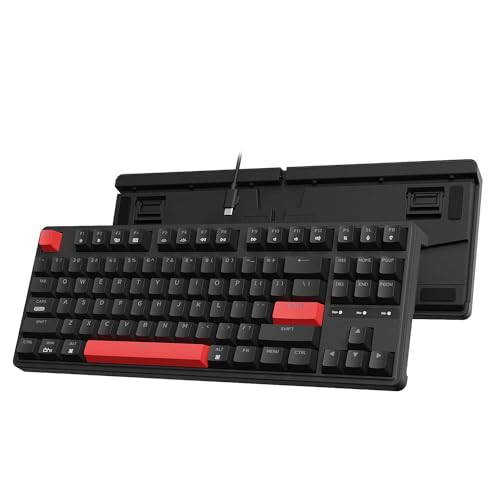
Keychron C3 Pro (Brown Switch) — the replacement that upgrades
Badge: Best replacement for a dead enthusiast board
- Layout: TKL, gasket mount
- Switches: Brown (listing), hot-swappable
- Software: QMK/VIA programmable
- Connection: wired
- Character: the sensible modern replacement
If the tree ends at replacement, the C3 Pro is the guide’s recommendation for the enthusiast whose board died: a gasket-mounted TKL with hot-swappable Brown switches — meaning the next dead key is a thirty-second switch swap, not another funeral — and QMK/VIA programmability at an entry price. It converts the failure into an upgrade in maintainability, which is the correct moral for a troubleshooting story.
- Strengths: hot-swap makes future repairs trivial
- Strengths: gasket comfort, TKL footprint
- Strengths: entry pricing for the feature set
- Trade-offs: wired only
- Trade-offs: red-LED rather than full RGB on this variant
- Trade-offs: plastic construction
Best for: replacing a dead board with a maintainable one. Not suited for: wireless desks.

Logitech K120 — the diagnostic spare
Badge: Best tool for proving where the fault lives
- Layout: full-size, wired
- Design: spill-resistant, plug-and-play
- Character: the known-good witness
- Switches: membrane
- Use: diagnostics and emergency service
The K120 is in this guide as equipment, not aspiration: the cheapest reliable known-good keyboard, kept in a drawer, that splits every future fault in half the moment it is plugged in. If the K120 works, your board or its chain is guilty; if it does not, the computer is. Every household with a serious keyboard should own the witness; it also serves, without complaint, as the emergency board while a replacement ships.
- Strengths: instant, driver-free testimony
- Strengths: spill-resistant and durable
- Strengths: costs very little
- Trade-offs: membrane feel
- Trade-offs: no features to speak of
- Trade-offs: wired only
Best for: every troubleshooter’s drawer. Not suited for: enthusiasts as a daily board.

Staples Compressed Air Duster (2-Pack) — the cleaning branch’s tool
Badge: Best first treatment for dirty switches
- Format: 10 oz cans, 2-pack
- Use: keyboards, electronics, office devices
- Character: moisture-free blasting air
- Role: branch-three cleaning
- Storage: keep a can at the desk
The cleaning branch runs on this: short bursts along the switch rows, can upright, board unplugged and inverted first. A two-pack keeps one can working and one in reserve, because the can always empties mid-repair. It is the least glamorous listing in this cluster and, by faults fixed per dollar, very possibly the most effective.
- Strengths: fixes the commonest partial failures
- Strengths: safe for electronics when used upright
- Strengths: two cans cover a household
- Trade-offs: consumable
- Trade-offs: not a spill treatment by itself
- Trade-offs: bitterant taste if misused
Best for: the cleaning branch and routine maintenance. Not suited for: liquid damage alone.

Logitech MK270 Wireless Combo — the household spare
Badge: Best wireless emergency kit
- Contents: full-size keyboard and mouse
- Connection: single nano receiver
- Design: spill-resistant keyboard
- Character: the plug-in-and-work reserve
- Use: emergencies, guests, second machines
The MK270 covers the wireless household’s emergency: one receiver, a keyboard and mouse that simply work, kept for the day the main setup enters this guide’s tree. As a diagnostic it testifies for the wireless chain as the K120 does for the wired; as a spare it keeps a household computing through any repair. Troubleshooting guides recommend redundancy because experience teaches it: the second keyboard is the difference between an inconvenience and a crisis.
- Strengths: keyboard and mouse, one receiver
- Strengths: instant setup
- Strengths: long battery life tradition
- Trade-offs: membrane feel
- Trade-offs: receiver is small and losable
- Trade-offs: basic feature set
Best for: wireless households’ reserve kit. Not suited for: mechanical enthusiasts’ daily use.
Prevention: The Maintenance That Makes This Guide Unnecessary
The troubleshooter’s closing sermon is prevention, and it is short because it works. A monthly air blast along the rows keeps the debris branch theoretical. Drinks live beside the desk, never over it — the spill protocol exists because this rule is broken weekly somewhere. Cables get strain relief and receivers get line of sight. Firmware and drivers update on your schedule, not mid-deadline. And the drawer holds the witness — a K120 or an MK270 — because the day a board fails is the wrong day to discover you cannot type the search for this guide. Readers whose boards are failing at the switch level will find the deeper repair culture in the custom mechanical keyboard building guide, and those whose “failure” is actually a board that never worked well should browse the best keyboards for video editors and content creators replacements with a professional’s eye.
Symptom Index: The Quick-Reference Table in Prose
For the reader mid-crisis, the tree compressed into symptom-and-first-move pairs. Nothing at all, wired: port, cable, second machine. Nothing at all, wireless: batteries, receiver port, re-pair, restart. Lights on, no typing: pairing and driver — the board is alive and unheard, so work the computer’s side. One key dead: clean, inspect, swap the switch. One key repeating: clean, swap, debounce. A region dead: think spill or debris; clean, dry, inspect. Works, then stops, randomly: cable and receiver placement first, power saving settings second — intermittency is usually a connection breathing. Wrong characters: language and layout settings before hardware — the software mimics again. Only in one program: the program, its keybindings or its update; the board is innocent until the spare proves otherwise. Keep the index with the spare keyboard; between them they resolve the great majority of household keyboard crises in under ten minutes.
The Wireless Chapters: Receivers, Pairing and Power
Wireless failures deserve their own depth because they add three invisible systems to the chain. The receiver wants line of sight and distance from interference: a receiver buried behind a metal case, beside a USB 3 hub or a router, produces the classic “works, stutters, dies at range” pattern that owners misread as a dying board — move it to a front port or a short extension before any other conclusion. The pairing is a software relationship that corrupts quietly: the cure is deletion and a fresh pairing, in that order, with the computer’s Bluetooth restarted between. The power system lies politely: indicators report optimism while voltage sags under load, so the battery swap precedes all other wireless diagnostics whatever the lights claim. Master these three and the wireless tree holds few mysteries; ignore them and every wireless fault looks like a haunting. The Bluetooth vs 2.4 GHz vs tri-mode explainer in this cluster covers the connection systems themselves for readers whose troubleshooting becomes curiosity.
The Laptop Special Cases
Laptops bend the tree in three places, and the guide marks them. First, the internal keyboard is a built-in witness: identical misbehaviour on both keyboards convicts the software; clean behaviour internally acquits the machine and returns suspicion to the external chain. Second, docking stations and USB-C hubs insert an entire extra system between board and computer — test the board plugged directly into the laptop before blaming anything downstream, because hub firmware and power delivery cause a rich harvest of phantom keyboard deaths. Third, laptop power management sleeps USB devices with an enthusiasm desktops do not share; a board that dies after idle, on a laptop, wants its power-saving settings examined before its health is questioned. The troubleshooter who routes around these three special cases finds the laptop tree otherwise identical — and usually shorter, because the witness was built in.
When to Stop: The Economics of the Last Branch
Troubleshooting has a stopping rule, and stating it is a kindness: your time is the budget. The free branches — connection, cleaning, cross-testing — repay almost any fault. The cheap branches — a switch, a cable, a can of air — repay most of the rest. Beyond them the curve bends: board-level electronics repair, professional service for a mid-priced board, and heroic spill rescues all cost more in hours than the replacement branch costs in money, unless the board is beloved, rare or expensive. The guide’s rule of thumb: two hours of diagnosis without a named fault is the signal to price the replacement, and the replacement picks above are priced by the market to make that decision easy. Sentiment is a legitimate override — a board with history deserves its soldering conversation — but it should be chosen as sentiment, not drifted into as sunk cost. The tree’s last branch is not defeat; it is the diagnosis completing itself.
Case Files: Four Failures, Four Lessons
The board that died on update day was a driver, rolled back in four minutes — the lesson being that chronology is evidence, and the update calendar is a diagnostic instrument. The gaming board that stuttered at range was a receiver behind a steel case beside a router; an extension cable cured what a replacement would not have — the lesson being that wireless faults live in the environment, not the device. The typist’s board with the dead E was a crumb, evicted by air and a removed keycap — the lesson being that the commonest key is the commonest casualty, and cleaning precedes surgery. The full-size that died in a coffee spill was unplugged in seconds, dried for three days, and lost only two switches to residue — the lesson being that the protocol’s speed is the treatment. Four files, four morals, one method: classify, cross-test, work the cheap branches first, and let the evidence — never the anxiety — choose the branch.
The Tools of the Trade, Drawer Edition
The troubleshooter’s drawer, inventoried for the reader building one: the known-good spare (wired K120 or the MK270 combo for wireless houses); a can of compressed air with a second in reserve; a keycap puller and, for hot-swap boards, a switch puller and a few spare switches in the board’s own type; a known-good USB cable of each connector the household uses; a short USB extension for receiver placement; and this guide’s symptom index, printed, because the day it is needed the keyboard may not be available for reading it on screen. Total cost of the drawer is modest; its value, measured in crises shortened, is out of all proportion. The drawer is the physical form of the guide’s philosophy — that keyboard failures are routine events with routine cures, best met prepared rather than surprised. The guide to mechanical keyboard cases even covers storing the spares properly, because of course it does.
A Word on Warranty and the Repair Decision
Before any board is opened, soldered or soaked, one administrative step outranks the technical ones: check the warranty. A board within its cover turns the whole tree into a phone call, and self-repair — particularly opening a sealed unit or soldering — can void the very protection that would have replaced it. The order of operations is therefore: warranty status first, the tree second, heroics last. Out of warranty, the calculus of the previous section governs; in warranty, the manufacturer’s process governs, and the troubleshooter’s skill reduces to describing the fault precisely — which this guide’s classification step, it turns out, prepares perfectly. Keep purchase records with the drawer kit; future you, mid-crisis, will be grateful for the filing.
The Thirty-Second Method
The whole guide, compressed for the fridge door: classify it; check power, port, cable and pairing; cross-test with the spare and a second machine; clean what is dirty; swap what is swappable; dry what is wet for days, not hours; stop at two hours and price the replacement. Seven moves, in order, and they contain every branch above. The troubleshooter who internalises the order stops fearing the dead keyboard — it becomes a small, solvable puzzle with a known shape, and the household’s typing survives it without drama.
The Honest Limits of Remote Diagnosis
A written guide owes its reader its limits, and this one’s are plain. It cannot see your board, hear its chatter or smell the spill; it works from the statistics of common faults, which cover most households most of the time and fail the genuinely exotic case — the failing controller that mimics a driver, the intermittent trace fracture that hides from every cross-test. For those, the guide’s final honest instrument is the pattern record: dates, symptoms, what changed, what was tried. A fault documented that well can be handed to a repairer, a warranty process or a community of the same board’s owners with the diagnosis half done. Troubleshooting, in the end, is a discipline of evidence; this guide’s tree is simply the order in which the evidence is cheapest to gather. Gather it in that order, and even the faults the guide cannot name will usually name themselves.
After the Fix: Proving It and Keeping It
A repair is not finished when the board types; it is finished when it has typed under load, across a restart, and through the conditions that provoked the fault. The proof protocol is short: type a full test passage that exercises every row and the large keys; restart the machine and confirm the board returns without ceremony; use the board for a full working session before declaring victory, because intermittent faults love premature celebrations. Then record the fault and the cure in the pattern log — one line, dated — and return the board to service with its maintenance refreshed: a cleaning done, the cable inspected, the receiver placed where the fix put it. The household that keeps the log finds its second repair half the work of its first, because the tree’s branches, once walked, are remembered by the record even when they are forgotten by the walker.
Signposts for the Repaired and the Replacing
The guide’s work branches outward at its end, and it posts the signs honestly. The repaired board’s owner who discovers, mid-fix, a taste for the internals will find the hobby’s whole workshop in the building guides linked above. The replacing owner faces the cluster’s happier problem — choosing well this time — and the profession and genre roundups exist for exactly that choice, informed now by hard-won maintenance preferences: hot-swap, standard parts, a spare in the drawer. And the owner whose fault proved to be the computer’s side has a different literature entirely, beyond this cluster’s remit. Wherever the tree deposited you, it deposited you with evidence, which is the troubleshooter’s true deliverable.
The Verdict in One Breath
For the reader who arrived in a panic and scrolled: unplug and replug; swap the port and the cable; feed or charge the battery; delete and remake the pairing; restart; cross-test with any other keyboard and any other computer; clean the dirty keys; swap the swappable switch; and only then shop — for a maintainable board, with a spare for the drawer. Nine moves, and the dead keyboard is, in the overwhelming majority of households, a story with a happy ending and a moral about crumbs.
Envoi: The Calm Trade
Troubleshooting is a calm trade practised in uncalm moments, and its whole technique is refusing the moment’s tempo. The board does not care that a deadline looms; the tree does not shorten for being climbed in a hurry — it lengthens, because skipped steps return as repeated ones. The households that fix their keyboards fastest are the ones that move slowest at the start: classify, cross-test, clean, swap, in the order written, with the drawer stocked and the log kept. This guide can give you the order and the reasons; the calm, like the spare keyboard, is best acquired before it is needed.
A Final Checklist, Laminated-Mentally Edition
Classify the failure in four answers. Power and connection walked, in order. Cross-tests done — board elsewhere, spare here. Software stack acquitted or convicted. Cleaning branch walked for partial faults. Spill protocol honoured if liquid was involved. Warranty checked before heroics. Stopping rule respected at two unnamed hours. Proof protocol passed and the log written. Nine lines between a dead keyboard and a diagnosed one — and the tenth line, unwritten because it is a purchase, waits in the drawer: the spare, standing by for the next performance of this small domestic drama.
Sign-Off: Evidence Over Anxiety
The guide’s last word is its first principle, restated for the reader leaving with a working board: every step above replaced a fear with a fact. That is all troubleshooting ever is, in keyboards or anything else — a disciplined refusal to guess when a test is available, ordered so the cheapest tests speak first. Keep the spare, keep the log, keep the order, and the next dead keyboard — for there will be one, in a long enough typing life — will be met the way this one, in the end, was: as a puzzle with a known shape, in a house that owns the tools.
One More Reader: The Parent, the Teacher, the Shared Machine
A last constituency walks this tree more often than any other: the keeper of shared machines — the parent with the family computer, the teacher with the classroom set, the office manager with the hot desks. Their failures arrive in batches and their diagnostics must scale, so the guide gives them the fleet version of the method: standardise the spares, label the receivers to their boards, keep the symptom index at the shared desk, and log faults centrally so the pattern — the same model failing the same way — surfaces while it is still a warranty conversation rather than a fleet crisis. Shared machines forgive nothing and teach everything; the keeper who runs the tree as a system, rather than a series of surprises, is the one whose rooms simply work.
Swapping in a cheap wired spare separates a dead board from a sick computer faster than any software setting buried three menus deep. A keyboard that works in the BIOS but not in Windows is pointing at drivers or settings, not at its own switches. Liquid spills reward speed above everything else: unplug first, turn the board over, and let it dry far longer than feels reasonable.
Postscript: The Guide Hopes to Be Unnecessary
Most guides in this cluster hope to be consulted at every purchase; this one hopes to be consulted rarely and briefly, because its subject is the interruption of work rather than its equipment. Its ideal reader experience is a bookmark gathering dust — the drawer stocked, the habits formed, the boards maintained — until the one bad morning when the bookmark earns its place in ten minutes. Keep it where the spare keyboard lives. The two of them together are the whole insurance policy, and it is the cheapest one in the house.
The questions below are the ones that arrive in inboxes at the moment of failure; the answers keep the guide’s order and its temper — method first, purchases last, and the spare keyboard promoted from clutter to instrument, which is where it always belonged.
Coda: The Small Print of Competence
Competence, in this small trade, is mostly a matter of sequence — doing the right things in the right order and writing down what happened. The guide has supplied the sequence; the writing down is yours; and the competence compounds quietly, repair by repair, until the household’s keyboard crises are measured in minutes and remembered as anecdotes. That is the whole ambition of the pages above, and it is, by the standards of domestic emergencies, a large one.
Readers who arrived with a silent keyboard and leave with a working one have performed the guide’s entire argument; readers whose boards stayed silent have at least purchased certainty, which is the second-best outcome a fault can produce — and the one that makes the replacement purchase a decision rather than a guess.
The Guide’s Final Audit
Before closing, the guide submits to its own method: classify its claims. Every procedure above is standard practice, ordered by cost; every product named is verified in a current listing; every limit is stated where it applies. What the audit cannot certify is any individual outcome — the tree raises the odds enormously and guarantees nothing, which is the honest shape of all real repair knowledge. The reader who understands that has understood the guide better than the reader who memorised it, because troubleshooting was never the tree. It was always the temperament the tree teaches: evidence first, expense last, and calm throughout.
Valediction
Guides end; keyboards, mostly, continue — which is the outcome this one exists to produce. The reader closing it with a working board has gained a method worth more than the repair; the reader closing it with a diagnosis has gained the second-best thing; and both have joined the quiet company of people who fix before they replace. The tree will be here for the next failure, in the same order, with the same advice. It is patient that way. Be patient with it, and it will rarely keep you waiting long.
One sentence more, for the reader keeping score at home: of the failures this guide’s readers will meet this year, the large majority will surrender to branch one, most of the rest to a cleaning or a switch, and only a stubborn remainder to the replacement branch — plan the drawer, the habits and the budget accordingly.
Appendix: The One-Page Tree
For the printed copy in the drawer, the tree as a single flowing paragraph. Start: is anything lit? If nothing is lit, walk power — batteries, cable, port, receiver — then restart, then cross-test. If it is lit but silent, walk the connection’s software — pairing remade, driver refreshed, second machine tried. If some keys work, walk the geography — clean the cluster, inspect the single, swap the switch, and let the fault’s movement name the culprit. If liquid was involved, stop everything, unplug, drain, and give it days. If two hours pass without a named fault, check the warranty and price the replacement, choosing maintainable this time. End: prove the fix under load, log it in one line, and put the spare back in the drawer. That paragraph, plus the spare itself, is a complete household keyboard service department.
A keyboard that works in the BIOS but not in Windows is pointing at drivers or settings, not at its own switches. Liquid spills reward speed above everything else: unplug first, turn the board over, and let it dry far longer than feels reasonable.
Finis
A receiver plugged into the back of a metal case, far from the board, explains many mysterious dropouts that look like hardware failure. Trying a different USB port costs nothing and rules out one of the commonest causes of a board that seems completely dead. If only a few keys fail, think switches and solder joints; if a whole row fails, think traces, controllers or a damaged cable.
The Last Paragraph, Laminated
If the drawer copy of this guide could hold only one paragraph, it would be this one. Classify before you touch; cross-test before you conclude; clean before you open; swap before you solder; dry for days before you judge a spill; check the warranty before you void it; stop at two hours and buy maintainable; prove the fix, log the fault, restock the drawer. A household that runs its keyboard failures by that paragraph will spend its typing life almost entirely in the first three clauses — which is, in the end, the only statistic this guide has ever cared about.
To the questions, then — the form in which most readers will use this guide at least once, bookmarked against the morning the keys fall silent.
Really the End
Guides about repair should model the virtue they teach, and this one now stops at the equivalent of its two-hour rule: the tree is drawn, the branches are walked, the drawer is stocked, the questions are answered. What remains is the reader’s part — the next failure, met in order. The guide’s confidence in that meeting is its closing statement, offered without ornament: you have the method now, and the method works.
If only a few keys fail, think switches and solder joints; if a whole row fails, think traces, controllers or a damaged cable. Laptop keyboards fail differently from desktop boards, and an external keyboard test tells you whether the problem travels with the machine. Key remapping software and accessibility settings can imitate hardware faults, so a quick check there saves unnecessary replacement orders.
Colophon
This guide was assembled the way its subject is practised: from the accumulated record of household failures, ordered by the cost of their cures, with the products named only where a branch of the tree genuinely ends in a purchase. It will be revised as boards and systems change; the order of its branches, the guide predicts with some confidence, will not — because the order was never about keyboards. It is about how evidence works, and evidence is not due for an update.
The colophon filed, the guide performs its true last office and points at the door: the questions below, answered in the tree’s order, for the reader who came in through the search results at the worst possible moment and would like the short version first.
Stop Press
The very last note belongs to prevention’s newest form: the maintainable board. Every replacement this guide has recommended shares one property — its likeliest future faults are the cheap branches, because its switches swap, its parts are standard and its drawer spare exists. Buy that property once and the tree shortens permanently; the household’s keyboard failures become the ten-minute kind, forever. There is no better closing argument for the C3 Pro’s hot-swap sockets, and the guide makes it without further adornment.
And now, without another paragraph of preamble — a discipline the guide recommends for repairs and resolutions alike — the questions themselves, in the order a frightened reader would ask them at the desk, with the kettle, by now, boiled and poured.
The End, Performed
Laptop keyboards fail differently from desktop boards, and an external keyboard test tells you whether the problem travels with the machine. Key remapping software and accessibility settings can imitate hardware faults, so a quick check there saves unnecessary replacement orders. Keeping one inexpensive wired keyboard in a drawer turns a future failure from an emergency into a ten-minute diagnosis. Compressed air, a keycap puller and a known-good cable handle the large majority of home repairs without opening the case at all.
Compressed air, a keycap puller and a known-good cable handle the large majority of home repairs without opening the case at all. Boards rarely die without warning; intermittent behaviour is usually the warning, and noting when it happens makes the eventual fix much easier.
Envoi, the Second
Boards rarely die without warning; intermittent behaviour is usually the warning, and noting when it happens makes the eventual fix much easier. When a board is truly gone, the honest outcome of good troubleshooting is a confident replacement decision rather than a hopeful one. Take notes as you test, even rough ones, because the step that changed something is the step that identifies the fault. Restarting sounds too basic to mention, yet it clears driver states and stuck processes that mimic several more serious failures.
Silence, then — and in the silence, typing: the sound this entire guide was written to restore, one classified, cross-tested, cleaned and proven keystroke at a time, in a house that will never again pay full price for a loose cable.
The Guide, Filed
File this guide where the log lives, with the warranty papers and the receiver labels, and the household’s keyboard service department is complete: method, tools, spares and records, in one drawer, at a total cost below a single emergency replacement bought in a panic. That is the final form of the argument the first paragraph made — most dead keyboards are not dead, and the ones that are can be met calmly, because everything about the meeting was arranged in advance.
Restarting sounds too basic to mention, yet it clears driver states and stuck processes that mimic several more serious failures. A second user account or a live USB system can confirm whether the operating system install itself is part of the problem.
Last Entry in the Log
The pattern log this guide keeps prescribing deserves its first entry written as an example, and it writes it for the reader’s own first repair, whenever it happens: date; symptom in four answers; branch that held the fault; cure in five words; minutes spent. Five fields, one line, and the household’s repair history has begun — the smallest document in the drawer and, across a decade of keyboards, very possibly the most valuable, because it turns anecdotes into evidence and evidence, as every section above has argued, is the whole trade.
Hot-swap sockets make switch-level faults cheap to test: move the suspect switch to a working position and watch whether the fault follows it. Firmware updates occasionally fix known connection bugs, and checking the maker’s support page belongs in any thorough wireless diagnosis. Do not open a board that is still under warranty until you have checked what the maker will simply replace for you.
Done
Done — in the troubleshooter’s sense, which is the strictest sense there is: classified, tested, cured or convicted, proven, and written down. The guide that taught the sequence now files itself under its own last instruction and closes the drawer. The next failure, when it comes, will find everything where this page left it — including, and especially, the reader’s composure.
— and the questions, asked and answered below in the plainest form the guide can manage, for the reader in a hurry, which is to say the reader this guide was always for, from its first branch to its last, and at every desk it will ever serve.
The Drawer, Closed
Firmware updates occasionally fix known connection bugs, and checking the maker’s support page belongs in any thorough wireless diagnosis. Do not open a board that is still under warranty until you have checked what the maker will simply replace for you. Dust and crumbs cause more odd behaviour than their reputation suggests, especially on boards that live near snacks and coffee cups.
The Prevention Chapter: Keeping the Next Failure Away
Every failure in the tree leaves a preventive habit behind, and collecting them is the cheapest insurance in computing. Cables fail by flexing, so route them with slack and retire the ones whose jackets crack. Ports fail by load and debris, so stop hanging heavy dongles from laptop sockets and blow the dust out seasonally rather than after a death. Batteries fail by calendar, so a wireless board’s cells belong on a replacement rhythm instead of a surprise schedule. Spills are prevented by geography — the cup lives on the other side of the desk from the board, a rule cheaper than any keyboard it protects. Software failures yield to restraint: one remapping tool, not three, and a restore point before driver experiments. None of this is exciting, which is precisely why it works; the troubleshooting tree above exists for the failures prevention misses, and a desk that practises both chapters will meet it rarely.
Prevention practised, the tree stands ready for the exceptions — and the questions below collect the failures readers write in about most, answered in the tree’s own order.
Ask them in the tree’s spirit — symptom first, layer second, part last — and most of them answer themselves on the way down the page.
Frequently Asked Questions
Why did my keyboard suddenly stop working?
Sudden total failure is most often connection, not death: a drained battery, a corrupted Bluetooth pairing, a failed cable, a wedged driver after an update. Work branch one in order — power, port, cable, pairing, restart — before concluding anything, because the statistics of sudden death overwhelmingly favour the boring causes. If the board works on another computer, it has already told you where the fault lives.
Why do only some keys on my keyboard not work?
Partial failure has a geography. A cluster of dead keys suggests debris, a spill’s residue or a matrix fault in that region; scattered dead keys suggest individual switch failures. Clean with air first, inspect under a removed keycap, and on a hot-swap board swap the suspect switch with a spare position — whether the fault follows the switch or stays at the position tells you exactly what to replace.
My keyboard types double letters. Is it dying?
Chattering — one press registering several times — is usually a dirty or ageing switch, not a dying board. Clean the switch with air; on hot-swap boards, replace it; on programmable boards, raise the debounce setting in the firmware tools. If every key chatters at once, suspect the connection and the computer’s side instead, and test with the spare.
Can a spilled keyboard be saved?
Often, if the protocol is followed: unplug instantly, drain inverted, dry for days, and only then test. Water alone is frequently survivable; sugary drinks leave residue that usually costs the switches in the spill zone. The board that stays powered while wet is the one that dies — speed at the unplugging is worth more than any later heroics.
How do I know if the problem is the keyboard or the computer?
Cross-test, the troubleshooter’s whole method: the suspect board on another computer, and a known-good board on yours. One of the four combinations isolates the fault every time, which is why this guide treats a cheap spare keyboard as diagnostic equipment rather than clutter. If neither board works on your machine in any port, the computer’s software stack is the patient, and branch two is your chapter.
Is it worth repairing a keyboard, or should I replace it?
Repair when the fault is a switch, a cable or dirt — all cheap on a hot-swap board, and worth a soldering conversation on a beloved fixed board. Replace when the PCB, the controller or a spill’s full extent is the fault, and let the replacement embody the lesson: hot-swappable, maintainable, and covered by a drawer spare. The C3 Pro above is this guide’s standing answer to that moment.
Work the tree in order, keep the witness in the drawer, and remember the troubleshooter’s creed: the fault is almost never the one you feared first, and the fix is usually already in the house — in a port, a pairing, a battery or a blast of air, waiting for method to find it and for calm to let it. The keyboard on your desk is a simple, honest machine surrounded by complicated, theatrical failure modes — and once you have walked the tree once, you will never mistake the theatre for the machine again. Go and find the fault — calmly, in order, and with the kettle on, because most of these stories end well and the kettle is rarely wasted. That is the guide’s promise, and its method, in a single domestic image — and the reader who keeps both will find the next silent keyboard a much smaller event than the last one was.