Disclosure: As an Amazon Associate, kajuandouglas.com earns from qualifying purchases. Links on this page are affiliate links; they cost you nothing extra. Prices and availability change often, so check the current Amazon listing before you buy.
If you are shopping ergonomic mechanical keyboards wrist pain is probably what brought you here — long days at a standard board can leave wrists and forearms feeling tired and strained, and a keyboard that lets your hands rest in a more natural position can make the working day feel noticeably kinder. This guide explains the comfort ideas behind ergonomic mechanical keyboards in plain, wellness-focused terms — split layouts that let the hands sit shoulder-width, tenting that reduces the flat-palm twist, negative tilt, palm support, and lighter, well-chosen switches — and reviews five verified boards that put those ideas into practice at different budgets and commitment levels. A note before we begin: this guide talks about comfort and everyday ease, not medicine. Persistent pain deserves a conversation with a qualified professional; a better keyboard is a comfort upgrade, not a treatment.
Key takeaways: The biggest comfort lever is geometry: a split board lets each hand rest where your shoulders naturally place it, and tenting (raising the middle) keeps the palms from flattening. Start with adjustability — a board you can angle, separate and tent to your own body beats any fixed “ergonomic” claim. Pair the board with habits: float the wrists while typing, rest the palms only between bursts, keep the board flat or negatively tilted, and take movement breaks. Switch choice matters for comfort too — lighter linears and tactiles reduce finger effort over long days.
Ergonomic Mechanical Keyboards Wrist Pain: The Comfort Ideas, Explained Simply
Splitting separates the keyboard into two halves so each hand can sit at shoulder width with the elbows relaxed — the posture your arms choose when no keyboard is dictating terms. Tenting raises the inner edge of each half, so the palms face each other slightly rather than flattening onto the desk; most people find a gentle tent more restful than a flat board. Tilt should generally run flat to negative (front edge higher than the back is the direction to avoid); many comfort-focused typists remove the rear feet entirely. Palm support is for resting between typing bursts — while you type, the comfortable technique is to float the hands lightly rather than planting the wrists and reaching. Layout plays a role too: compact and column-friendly designs reduce how far fingers travel, and programmable layers can move hard-working keys under strong fingers. None of these ideas requires a medical vocabulary — they are the same common-sense adjustments as raising a monitor or setting a chair height, applied to the object your hands touch all day.
In this guide
Five Comfort-Focused Boards, Reviewed

Kinesis Freestyle Edge RGB Plus (Tactile) — the adjustable split flagship
Badge: Best overall for comfort-led buyers
- Layout: split, fully separable halves
- Switches: hot-swap tactile (listing)
- Support: detachable palm supports included
- Extras: lift kit included, fully programmable, Mac keycaps included
- Lighting: RGB
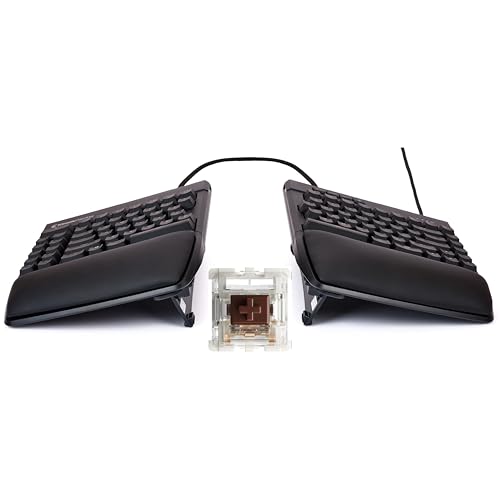
The Freestyle Edge RGB Plus is the comfort category’s complete answer: two halves you can separate to your own shoulder width, tenting via the included lift kit, cushioned palm supports, hot-swap mechanical switches and full programmability to move keys where your hands prefer them. It is the board this guide recommends to the buyer whose comfort is the purchase’s whole purpose, because every comfort variable — separation, tent, support, switch, layout — is adjustable rather than asserted. The adjustment takes an unhurried first week; the payoff is a keyboard fitted to one specific body: yours.
- Strengths: every comfort variable adjustable
- Strengths: palm supports and lift kit included
- Strengths: hot-swap switches and programmability
- Trade-offs: premium price
- Trade-offs: desk footprint when fully separated
- Trade-offs: adjustment learning curve
Best for: comfort-first buyers and long typing days. Not suited for: small desks or travellers.

Keychron Q11 Ultra — the enthusiast split
Badge: Best for enthusiasts who want a split
- Layout: split 75 percent, aluminium
- Connection: 2.4 GHz, Bluetooth 5.3, USB-C
- Firmware: ZMK programmable, dual knobs
- Switches: hot-swap
- Keycaps: PBT, RGB
The Q11 Ultra brings the split idea into the modern enthusiast world: an aluminium split 75 percent board with tri-mode wireless, hot-swap switches, dual knobs and deep ZMK programmability. For the buyer who wants comfort geometry without leaving the custom-keyboard hobby — its switches, caps and keymaps all open — it is the natural bridge, and its wireless freedom suits desks that rearrange themselves often.
- Strengths: split comfort with enthusiast platform
- Strengths: aluminium build, tri-mode
- Strengths: deep programmability
- Trade-offs: tenting accessories are separate purchases
- Trade-offs: premium pricing
- Trade-offs: ZMK learning curve for beginners
Best for: enthusiasts adding split comfort. Not suited for: plug-and-play purists.

Cloud Nine ErgoTKL — the approachable split TKL
Badge: Best first split board
- Layout: split tenkeyless
- Switches: Kailh Red linear (listing)
- Lighting: RGB backlit
- Character: split comfort in a familiar TKL shape
- Connection: wired
The ErgoTKL is the gentle introduction: a tenkeyless board split down the middle, keeping the familiar TKL geography while letting the halves angle and separate to a more natural hand position. Its linear switches keep finger effort low, and the learning curve is the shortest in this guide — the board for the comfort-curious buyer who wants the split benefit without relearning the keyboard.
- Strengths: familiar layout, split benefits
- Strengths: light linear switches
- Strengths: approachable price for the category
- Trade-offs: wired only
- Trade-offs: less adjustable than the flagship
- Trade-offs: TKL footprint still substantial
Best for: first-time split buyers. Not suited for: numpad users.

Mistel MD770 RGB — the compact split
Badge: Best compact split
- Layout: split 75 percent class
- Switches: Cherry MX Red (listing)
- Keycaps: PBT doubleshot
- Compatibility: Mac and Windows
- Lighting: RGB, Bluetooth 5.0
The MD770 compresses the split idea into a 75 percent frame with Cherry MX switches and doubleshot PBT — a board for the smaller desk that still wants shoulder-width hands. Mistel’s split line is one of the category’s established names, and the MD770’s combination of compactness, quality switches and dual-system manners makes it the guide’s pick where space and comfort must share a small desk.
- Strengths: split comfort in a compact frame
- Strengths: Cherry switches, doubleshot PBT
- Strengths: Mac and Windows friendly
- Trade-offs: compact layout adjustments
- Trade-offs: tenting options limited
- Trade-offs: specialist availability
Best for: small desks wanting split comfort. Not suited for: full-size loyalists.
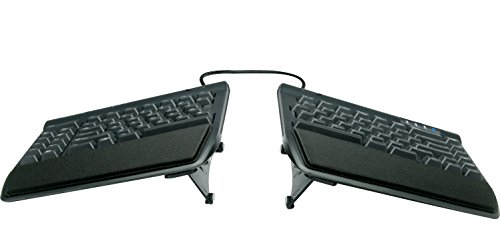
Kinesis Freestyle2 (with VIP3 lifters) — the classic starter split
Badge: Best budget-friendly way to try splitting
- Layout: split, 9-inch separation (listing)
- Accessories: VIP3 lifters for tenting
- Switches: low-force membrane-class (non-mechanical)
- Connection: USB wired
- Character: the long-running comfort classic
An honest inclusion: the Freestyle2 is not a mechanical board — it is the long-running split classic whose low-force keys and VIP3 tenting lifters have introduced more typists to split comfort than any other product. It belongs in this guide as the low-commitment way to learn whether splitting suits your body before investing in a mechanical flagship: if the geometry delights you, the Freestyle Edge above is its mechanical heir. Buyers who know they want mechanical switches should start with the mechanical picks; buyers unsure about splitting itself should start here.
- Strengths: the proven split geometry
- Strengths: tenting lifters included in this configuration
- Strengths: gentle on the purchase budget
- Trade-offs: not mechanical switches
- Trade-offs: wired and utilitarian
- Trade-offs: a trial step, not a destination, for enthusiasts
Best for: testing split comfort affordably. Not suited for: mechanical-switch seekers.
The Comfort Habits That Matter as Much as the Board
A comfort-focused keyboard works best inside comfort-focused habits, and this guide would be incomplete without the short list every ergonomic specialist repeats. Float while typing: keep the wrists lightly raised and neutral while the fingers work; use palm supports for the pauses, not as a typing posture. Set the geometry once, properly: board flat or tilted slightly away, halves at shoulder width, tent gentle, elbows near a right angle, screen at arm’s length — then leave it alone for a fortnight while the body learns it. Lighten the load: lighter switches and a lighter touch — bottoming out hard on every key is effort the day does not need. Move: brief, regular breaks and hand movement through the day do more for end-of-day comfort than any single product. Listen early: discomfort that persists, sharpens, or travels is a reason to talk to a professional, not to buy a more expensive keyboard. The boards in this guide make the comfortable posture easy to choose; the habits make it pay off.
Setting Up a Split Board: The First Fortnight, Day by Day
The adjustment period decides whether a split board becomes a decade’s companion or a returned experiment, and it rewards a plan. Days one to three: set the halves at shoulder width, tent gently, supports in place, and type slowly without judging — the hands are surveying new territory and speed is not the metric. Days four to seven: make one adjustment at a time — a little more separation, a degree more tent — and live with each for a full day, because comfort judgements made in an hour are noise. Week two: move one hard-working key if the board allows it (a layer or a remap that puts Backspace or Enter under a stronger finger is the classic first edit), and notice that the board is becoming yours. End of fortnight: the honest assessment — typing speed mostly recovered, end-of-day hands feeling the way the purchase hoped, and the old board, if you test it for an hour, feeling oddly narrow. That last sensation is the signature of a successful fitting, and it is why split owners so rarely go back: the body has updated its idea of normal.
The Mouse Side of the Story
A comfort guide that ends at the keyboard’s edge has told half the story, because the mouse hand works the same long day. The split board’s quiet ergonomic triumph is positional: with the halves at shoulder width and no numpad block forcing the mouse outward, the pointing hand can live close to the body’s centre, in the same neutral territory as the typing hands. Compact split layouts amplify the effect. The mouse itself deserves the same comfort logic — a shape that lets the hand rest rather than grip, buttons that do not demand force — and the desk’s geometry should place it at the same height as the keys, on the same plane, within an easy reach that never asks the shoulder to travel. Buyers auditing a whole desk’s comfort should measure the mouse’s home position before and after the split arrives; the improvement there is often the one the body notices first, and it costs nothing but arrangement.
Switch Choice as a Comfort Decision
The switch is usually shopped as a feel preference; in a comfort guide it is an effort budget, and the budgeting deserves a section. Every keystroke’s force, multiplied by a working day’s tens of thousands, is the largest single number in the comfort ledger — which is why the reviewed boards cluster around lighter linears and moderate tactiles. The calibration method is personal and simple: choose the lightest switch on which you can type accurately for an hour without accidental presses or a sense of fighting the keys, then consider one step lighter for the pinky-served keys if your board’s hot-swap sockets allow a mixed layout — a trick the programmable splits make easy and their owners swear by. Heavy clicky switches are the comfort ledger’s luxury tax: delightful in a private room, expensive across a long day. And the landing matters as well as the spring — a board whose case cushions the bottom-out (gaskets, padding, palm support geometry) spreads the day’s effort more kindly than a hard plate does. Comfort, in the end, is arithmetic the body does whether the buyer does or not; the switch choice is where the buyer gets to do it first.
The Ladder of Commitment: From Habits to Full Split
Comfort upgrades have a natural order, and spending in that order saves money and regret. Rung one is free: the habits — float the wrists, flatten the tilt, centre the board, take the breaks — on the keyboard you already own. Rung two is small: a palm support used correctly and a lighter-touch typing style, plus the mouse moved closer. Rung three is the angled middle: an Alice-layout or lightly sculpted board that improves hand position without a relearn. Rung four is the split: an approachable split like the ErgoTKL, or the trial-geometry Freestyle2, to learn whether separation is your body’s preference. Rung five is the fitted flagship: the fully adjustable mechanical split, programmed to your hands, when the earlier rungs have proven the direction. Most buyers should climb rather than leap — each rung’s evidence informs the next purchase — but the buyer whose discomfort is already a daily companion is justified in starting at rung four, with the flagship’s adjustability as the destination the trial points to. The ladder’s only rule is that no rung is wasted: every step’s comfort carries upward.
What “Ergonomic” on a Box Does and Does Not Promise
A buyer’s literacy section, because the word ergonomic is unregulated and the category’s marketing ranges from engineering to upholstery. A shaped board with a wave in it may be more comfortable than a rectangle for some hands — or merely differently uncomfortable, because its geometry is fixed to a designer’s idea of a body rather than adjusted to yours. The claims worth trusting are the adjustable ones: separation you set, tenting you set, supports you can remove, switches you can lighten, keys you can move. The claims worth discounting are the absolute ones — any board that promises an outcome for every body is selling the word rather than the geometry. This guide’s reviews were chosen on that principle: every pick’s comfort mechanism is a physical adjustment the owner controls. Read any comfort board’s listing with the same test — name the adjustment, or discount the adjective — and the category becomes navigable without a medical degree or a leap of faith.
The Home Office Audit: Everything Around the Board
The keyboard is one variable in a system, and a comfort buyer’s audit should sweep the whole desk once. The chair’s height sets the elbow angle that the board’s position must match; the desk’s height — or a keyboard tray — decides whether the board can sit at that angle without the shoulders rising; the monitor’s height decides whether the head’s posture lets the shoulders relax at all. A split board placed on a too-high desk will underperform a rectangle at the right height, which is why the audit precedes the purchase in every serious comfort plan. The good news is that the audit is a tape measure and twenty minutes: elbows at rest near ninety degrees with the hands floating over the keys, feet supported, screen top near eye level. Fix the heights first, then let the board’s geometry do its finer work. Employers’ ergonomic assessments, where available, do exactly this audit professionally, and a comfort-led buyer should take one when offered — the board in this guide will fit into its recommendations naturally.
Gaming and Creative Work on a Split
Comfort boards are usually reviewed as office equipment, but their owners also play and create, and the split’s performance in those shifts deserves a paragraph. For gaming, the split’s gift is positional: the left half can be angled and placed exactly where the WASD hand wants it, the right half pushed aside for mouse room — a freedom one-piece boards cannot offer — while the mechanical switches and NKRO keep the inputs honest. Fast, competitive play on a fully split layout asks the same fortnight’s adaptation as typing does, and most players complete it without thinking about it. For creative work — editing, design, music — the programmable layers are the asset: timelines’ tools under the strong fingers, macros on the near keys, the knob-and-layer workflows this cluster’s best keyboards for video editors and content creators guide builds around standard boards, translated onto a geometry the body prefers. Comfort, in other words, is not a work-only feature; it is the platform every shift of the day stands on.
Common Setup Mistakes, and Their One-Line Fixes
Tenting too aggressively on day one — start gentle; the palms should rest, not grip. Separating the halves by the photograph rather than by your shoulders — measure with your arms hanging relaxed. Planting the wrists on the supports while typing — supports are for pauses; float while the fingers work. Keeping the rear feet raised out of habit — flat or negative tilt is the comfort default. Judging the board in the first three days — the fortnight is the trial; the first days are the survey. Changing everything at once — one adjustment per day, so the body can file its report on each. Ignoring the mouse’s position — bring it into the same neutral territory. Seven mistakes, seven one-line fixes, and the difference between a split board that transforms a working day and one that gets returned in week two is almost entirely contained in them.
What the Owners Report: The Comfort Curve
Owner reports in this category follow a curve so consistent it deserves charting in prose. The first days bring novelty and a speed tax. The second week brings the first end-of-day comparison — the hands at 6 p.m. feeling like they belong to a shorter day — and that comparison, more than any specification, is what converts sceptics. The first month brings fluency and the beginning of customisation: a tent angle settled, a layer edited, a switch lightened under the pinkies. The first quarter brings the quiet endpoint the whole category promises: the keyboard stops being a topic. Owners stop posting about their boards, because comfort, achieved, is not a story — it is an absence of one. The curve’s lesson for the new buyer is patience with its early slope: judge the board at the month, not the weekend, and keep the adjustments small and single while the body files its reports. Every pick in this guide has carried thousands of owners along that curve; the curve, not the unboxing, is the product.
Buying With a Body in Mind: The Pre-Purchase Checklist
The comfort purchase deserves its own drill, because the variables are bodily rather than electronic. Measure your shoulder width as your arms hang — that is the separation your board must be able to reach. Note your current board’s tilt habit — if the rear feet are up, plan the fortnight of unlearning. Inventory your desk’s depth — split halves plus supports need room, and a shallow desk may argue for the compact MD770 over the flagship. Decide your switch effort honestly — an hour’s accurate typing on light switches is the test, and hot-swap picks forgive a wrong first answer. Confirm the accessories — tenting kits and palm supports are included on some picks and separate on others, and the comfort they provide is not optional garnish but the mechanism itself. Set the trial expectation — a fortnight, one adjustment at a time. Six checks, none electronic, and the board that arrives will be fitted to the only specification that finally matters in this category: yours.
The Honest Limits of This Guide
A comfort guide owes its reader a clear statement of what it is not. It is not medical advice, and nothing in it diagnoses, treats or promises relief from any condition. Wrist and hand discomfort has many causes, some of which have nothing to do with keyboards, and the right response to persistent, worsening, numb or sharp symptoms is a consultation with a qualified professional — a clinician, or an ergonomics specialist for the workplace assessment — not a product purchase. What this guide can honestly offer is the comfort consensus of the keyboard world: that hand position, effort and habits are real variables in how a typing day feels, that adjustable geometry is the soundest way to explore them, and that the boards reviewed here implement that geometry well. Buy for comfort, set up with care, keep the habits, and escalate to professional advice whenever the body’s reports say to. That division of labour — products for comfort, professionals for pain — is the most important sentence in this article.
Travel, Shared Desks and Other Realities
Comfort setups live in real lives, and three realities deserve planning rather than surprise. Travel: a full split is a desk fixture; the travelling comfort typist’s answers are the compact split carried in a case, or a laptop-side Alice board for the road with the flagship waiting at home — consistency of switch feel between the two softens the commute between setups. Shared and hot desks: a fitted split is a personal instrument, and hot-desking argues for saving your geometry notes (separation, tent, layer file) so a borrowed setup can be refitted in minutes; programmable boards that store profiles onboard are the practical choice. Households: a split board invites curiosity; a second, standard board for guests and family saves your fitting from well-meaning rearrangement. None of these realities argues against the purchase — they argue for buying the board as the personal equipment it is, with the same expectations you would bring to a fitted chair or a good pair of shoes.
The Verdict in One Breath
Everything above, compressed: the Freestyle Edge RGB Plus is the fitted flagship and the guide’s comfort-first recommendation; the Q11 Ultra is the enthusiast’s split; the ErgoTKL is the gentle first step; the MD770 is the compact answer; and the Freestyle2 is the affordable geometry trial, honestly labelled as non-mechanical. Around whichever board you choose, the habits — floating wrists, flat tilt, close mouse, regular movement — are half the product, and they are free. Buy the adjustability, climb the ladder at your own pace, and give the fortnight its fair chance to work.
A Word on Key Layouts: QWERTY Stays, the Extras Move
One reassurance belongs in a comfort guide, because fear of relearning stops many buyers at the door: the letter layout does not change. Every board in this guide types QWERTY in the order your fingers know; what moves, on the programmable models, are the extras — and they move only if you move them. The split itself changes nothing about which finger strikes which letter; it changes where the two hands sit while they do it. The honest adjustment list is therefore short: the hands’ separation, any keys a particular compact model relocates, and the thumb’s new opportunities on boards that give it real work. Most typists keep their speed’s dignity throughout and recover the rest within the fortnight. Comfort, in this category, is not a new language — it is the old one, spoken from a better chair.
When the Standard Board Is Still the Right Answer
Balance requires the counter-case, and this guide makes it gladly: a standard board, well set up, serves many typists comfortably for entire careers. If your days are short at the keys, your posture habits are sound, your board sits flat and close with a light switch under your fingers, and your hands end the day unremarkable, the ergonomic category may have nothing you need — and money spent chasing comfort you already have is money the rest of the desk could use. The category earns its place for the typist whose days are long, whose hands report effort, whose posture a rectangle keeps compromising — and for the enthusiast who simply prefers the split’s freedom. Knowing which typist you are is the guide’s first and cheapest recommendation, and it costs one honest week of paying attention to your own hands at 6 p.m.
The Price of Comfort, Framed Kindly
Ergonomic mechanical boards cost more than rectangles, and the framing matters because the purchase is often made in a moment of discomfort. The premium buys adjustability — the mechanisms, supports and programmability that let one product fit many bodies — and low production volumes, not magic. The honest budgeting rule is the ladder’s: spend first on the free habits and the audit, then on the rung your evidence justifies, and treat the flagship’s price as the cost of a fitted instrument amortised over the years of days it will serve. A board that makes a decade of working days kinder is, by the arithmetic of hours, among the cheapest comforts a desk can buy — and a board bought in a panic, at the wrong rung, is expensive at any price. Buy in the ladder’s order, with the fortnight’s patience budgeted alongside the money.
Keeping the Setup: Maintenance for a Fitted Board
A fitted board deserves keeping, and its maintenance has one comfort-specific note among the standard ones. The standard ones apply in full: washable caps, swappable switches on the hot-swap models, cables and radios maintained as this cluster’s guides describe. The specific note is documentation: a fitted board’s value lives in its settings — the separation, the tent angle, the layer edits, the switch map — and those settings should be written down or exported while they are fresh, because a board reset, a desk move or a borrowed setup can scatter a month of fitting in a minute. Owners who keep the little record refit in minutes; owners who do not serve a second apprenticeship. Five lines in a notes file is the entire cost, and it converts the fitting from a fragile achievement into a portable specification — your hands’ own documentation, kept with the same care as the board itself.
The Thirty-Second Comfort Method
The guide compressed for the reader whose hands are tired tonight: audit the desk heights first; flatten the board and float the wrists for a week on what you own; if the days still end with effort, climb one rung — an approachable split, set at shoulder width, tented gently, judged at the fortnight; lighten the switches to the lightest you can type accurately; keep the mouse close and the breaks regular; and treat anything persistent or sharp as a professional’s question, not a product’s. Six lines, in order, and they contain the whole article — the reviews above merely furnish the rungs with names and prices.
A Note on Sound, of All Things
Comfort has an acoustic footnote that surprises buyers: a quieter board is often a more comfortable board to spend a day with, not for the ears’ sake alone but because sound is effort’s echo — a board that clatters is usually a board being bottomed out hard. The comfort picks’ lighter switches and cushioned landings therefore pay twice, once in the fingers and once in the room’s peace, and shared-space buyers should weigh the silent and linear configurations with that double dividend in mind. The point generalises the guide’s philosophy: comfort is the sum of small kindnesses, each too minor to headline, compounding across ten thousand keystrokes into the difference between a day that tires and a day that does not.
The Employer’s Angle, Briefly
Many comfort purchases are partly an employer’s story, and a short paragraph of practicalities can save a buyer a negotiation. Workplaces commonly fund ergonomic equipment through accommodations or wellness budgets, and the paperwork usually wants the same things this guide wants: a named need, a specific product, and a setup plan. A buyer preparing that case should bring the audit (desk heights, current setup), the ladder (what has been tried), and the specific board with its accessories itemised — tenting kits and supports included, since they are the mechanism, not the garnish. None of this is guaranteed by any policy, and this guide offers it as orientation rather than advice about any particular employer. It is included because comfort equipment sits at the friendly end of workplace spending: the sums are small, the benefit is daily, and the ask, properly documented, is one of the easiest a facilities budget ever approves.
Signposts for Further Reading in This Cluster
The comfort conversation continues in three directions within this cluster, and the guide closes by posting the signs. For the angle question in its pure form — whether a keyboard should sit flat or angled, and what the hands prefer — the flat vs angled keyboard for typing explainer works the geometry through with the same comfort-first framing. For palm support as a product category, the wrist rest review linked earlier covers materials, heights and the keyboard-and-mouse pairing. And for the buyer whose comfort upgrade grows into a full custom build — split kits included — the building guide’s planning chapters apply. Comfort is a system; these are its other rooms.
The Last Word on Patience
Every section of this guide has quietly argued the same virtue, and it deserves naming at the end: patience. Comfort is not unboxed; it is fitted, across a fortnight of small adjustments and honest reports from your own hands. The buyers who succeed in this category are not the ones who bought the most expensive board but the ones who gave their board the trial it asked for — one change at a time, judged at the month, documented in five lines. If you take one sentence from this article to the purchase, take that one. The geometry is ready when you are, and the build your first custom keyboard guide will be there later if the fitting turns into a hobby, as it has a way of doing.
Envoi: The Unremarkable Day
The comfort category’s success has no photograph: it is a Tuesday that ends without the hands filing a report. That is the outcome every section above has been engineering toward — the audit, the ladder, the fitting, the habits — and it is worth stating plainly because it reframes the purchase. You are not buying a keyboard with features; you are buying back the unremarkable day, at the price of a fortnight’s patience and a board that fits. Readers who want the posture question explored from the travel desk’s angle will find kindred thinking in the best travel keyboards for laptops and mobile work roundup, whose compact picks obey the same body-first logic in miniature. Wherever the work happens, the standard is the same: the day should end with the work remembered and the wrists forgotten.
A Final Checklist, to Take to the Desk
Before the questions, the article as a pocket list. Desk audited: heights set, elbows easy, screen placed. Habits started: wrists floating, board flat, mouse close, breaks moving. Ladder located: the rung your evidence justifies, no higher. Board chosen: adjustability named — separation, tent, support, switch, keys. Accessories confirmed: the tenting and supports in the box or in the order. Trial set: a fortnight, one adjustment a day, settings documented. Escalation known: persistent or sharp symptoms go to a professional, not a shopping cart. Seven lines, and a comfort purchase made the way comfort itself works — methodically, kindly, and without drama.
Sign-Off: Fit the Tool to the Body
Every other guide in this cluster fits a keyboard to a task — a game, a genre, a profession. This one has fitted a keyboard to a person, and the difference is the category’s whole dignity. Tasks change by the season; the body is the constant under every desk you will ever own, and it keeps the only ledger that matters at 6 p.m. Buy for the ledger. Set up with the patience the fitting deserves. Keep the habits that cost nothing and pay daily. And when the body’s reports change — as bodies, honestly attended, will tell you — adjust again, in the same order, with the same calm. That is the complete method, and it will serve longer than any single board in this guide.
One More Reader in Mind: The Returning Typist
A last constituency deserves direct address: the typist returning to heavy keyboard work after time away — a new job, a finished degree, a recovered routine — whose hands meet the old rectangle and report the reunion unfavourably within a week. The returning typist’s advantage is a clean slate: no entrenched setup to unlearn, and a body’s reports arriving fresh. The ladder was written for exactly this reader — start with the audit and the habits in the first week of the new routine, let the evidence accumulate honestly, and climb only as high as it points. Many returning typists find the habits alone restore the unremarkable day; those who climb find the split’s fitting easier without a decade of rectangle loyalty to overcome. Either way, the return is the right moment to fit the tool to the body, before the body’s complaints become the routine’s furniture.
And a genuinely final word, because comfort purchases are often made anxiously and this guide would like to lower the temperature: you do not have to solve this today, and you do not have to solve it perfectly. The habits cost nothing and start tonight. The ladder has no deadline. The boards will be in stock next month, in much the same variants, at much the same prices. What deserves urgency is only the professional question, if your symptoms raise it — everything else can proceed at the pace of a fortnight’s honest trial, which is the pace at which bodies actually change their minds. Buy calmly, fit patiently, and let the unremarkable days accumulate.
Postscript: The Category’s Quiet Success
It is worth recording, as this guide’s true last word, that the ergonomic mechanical category exists at all because the mechanical revival met the comfort tradition halfway: the switches, caps and programmability of the enthusiast world, fitted to the geometries the comfort world spent decades refining. The five boards above are that meeting’s current state — imperfect, adjustable, and genuinely kinder to spend a working life on than the rectangles they replace. The category will keep refining. The body’s requirements will not change. Buy to the body, and you will not have to buy often.
The questions below are the ones comfort buyers actually ask at the point of purchase; the answers keep this guide’s discipline — comfort language throughout, adjustability over adjectives, and the professional referral wherever a symptom deserves one.
Readers who arrived with a single aching question — will a different keyboard make my days feel better? — deserve the summary before the detail: for a great many typists, yes, measurably in the only currency that matters, which is how the hands feel at the end of the day; and the route there is methodical rather than miraculous, which is why it works.
Take your time with the questions, as with the fitting itself: comfort, in keyboards as in most things worth having, rewards the unhurried and the methodical.
The Adaptation Diary: What the First Month Actually Feels Like
New split-board owners should expect a honest fortnight of clumsiness, and budgeting for it is the difference between an adaptation and an abandonment. Days one to three run slow — the hands hunt for keys that moved an inch, and the error count climbs exactly where the old posture was laziest. By the end of week one the shoulders report first, usually as an absence: the end-of-day tightness that prompted the purchase simply fails to arrive on schedule. Week two restores speed on familiar text while new combinations still stumble; week three is when most owners stop noticing the board, which is the entire point. The comfort framing of this guide asks only that the trial be given its month and judged by the diary rather than the first afternoon — persistent or worsening pain remains a clinician’s territory, not a keyboard’s, and this article’s scope stops, deliberately, at comfort.
A month, honestly kept — the questions below are for readers standing at the diary’s first page.
Comfort first, claims nowhere — the questions follow, in that spirit and no other.
Frequently Asked Questions
Can an ergonomic keyboard help my wrists feel better at work?
Many typists find that a board which lets the hands rest in a more natural position — split, gently tented, at the right height — makes long typing days feel more comfortable and less tiring. Comfort is personal and habit-dependent, and no keyboard is a medical treatment: if you have persistent or worsening pain, please see a qualified professional. Think of the board as one part of a comfort setup that also includes posture, breaks and workload.
How long does it take to get used to a split keyboard?
Most typists feel clumsy for the first several days and fluent within two to three weeks of regular use. The adjustment is mostly about the split’s hand separation and, on some boards, moved keys. Starting with a familiar layout — the ErgoTKL’s approach — shortens the curve; fully programmable boards let you ease the transition by keeping your most-used keys where your hands expect them at first.
What tenting angle should I use?
Start gentle — a modest raise of the inner edge — and adjust by feel over the first fortnight. The comfortable angle is the one where your palms feel like they are resting rather than flattening or gripping; there is no universal number, which is exactly why adjustable lift kits beat fixed claims. If a position feels like effort, it is not your angle yet.
Are lighter switches better for comfort?
For many long-day typists, yes: lighter switches ask less force per keystroke, and across tens of thousands of keystrokes the savings are real. Light linears and gentle tactiles are the common comfort choices. The counterpoint is control — very light switches can invite accidental presses — so the comfortable switch is the lightest one you can type accurately on, which is a personal calibration the hot-swap boards in this guide make easy to test.
Should I use a wrist rest?
As a resting place between bursts, a palm support is a comfort plus — the flagship in this guide includes detachable supports for exactly that role. While actively typing, the comfortable technique is to float the hands rather than plant the wrists and reach, which keeps the wrists in a neutral line. A separate Glorious wrist rest review in this cluster covers rest selection for standard boards.
Split or Alice layout — which is more comfortable?
They address the same idea at different commitment levels. An Alice board angles the two halves on a single frame — a fixed, gentle improvement that needs no desk rearrangement. A true split lets you set separation and tent independently, which fits more bodies more precisely, at the cost of setup effort and desk space. Comfort-led buyers with persistent discomfort generally graduate to the split; the Alice is the comfortable first step, as this cluster’s layout guides discuss.
Comfort at the keyboard is mostly geometry plus habits: hands where the shoulders want them, palms unflattened, wrists floating, breaks taken — and a purchase made in that order, habits first and hardware second, is the one this guide would sign its name to. Do the free parts tonight, shop the adjustable parts calmly, and let a fortnight of ordinary days cast the deciding vote. Start where you stand, climb only as high as your own evidence points, and remember that the goal was never a remarkable keyboard — it was a remarkable number of unremarkable days. None of it is exotic, none of it requires faith, and all of it is testable within a fortnight by the only instrument qualified to judge — your own hands, at the end of an ordinary day, with nothing to report. It is not a luxury category or a medical one; it is the ordinary craft of fitting a tool to the body that uses it, practised with the same common sense as adjusting a chair — and rewarded, on the evidence of everyone who has made the fitting, with the most valuable property a working day can have: nothing to report. Choose the board that makes that geometry adjustable — split first, tenting second, support third — give it a fair fortnight, and let your working days feel the way they should: unremarkable, in the best possible way.
One more encouragement, addressed to the reader who has typed through discomfort for a long time and half-believes it is simply the price of the work: it is worth testing that belief, cheaply and in the ladder’s order, because the belief is often wrong. A week of habits costs nothing; a trial split costs a modest sum and a fortnight; and the information either way — this helps, this does not, this needs a professional’s eye — is worth more than another year of assuming. Your hands do the day’s most skilled work. They deserve, at minimum, an investigation.