Disclosure: As an Amazon Associate, kajuandouglas.com earns from qualifying purchases. Links on this page are affiliate links; they cost you nothing extra. Prices and availability change often, so check the current Amazon listing before you buy.
The best keyboards mmo games wow ffxiv players can buy are not simply gaming keyboards with more lights. An MMO makes a keyboard carry a second job: thirty or more abilities, consumables, mounts, markers and social macros, all expected to be reachable without looking down, in fights where looking down is how characters die. Add raid nights measured in hours, a chat box that never sleeps, and two games — World of Warcraft and Final Fantasy XIV — with distinct control cultures, and the right board becomes a genuine performance decision. This guide starts from what MMO play actually demands, then recommends five keyboards, each verified against Amazon catalogue data before being linked, from macro-key flagships to a wireless board for the couch-and-desk hybrid player.
Key takeaways: Reachable keys beat raw key count — a disciplined modifier system on a tenkeyless board outperforms a sprawling board used badly. Dedicated macro keys are a genuine advantage, but only if you build a system around them. Comfort across a three-hour progression session is a performance feature, not a luxury. And the board must serve the game’s second life — chat, crafting and housing — as well as its raids.
Best Keyboards Mmo Games Wow Ffxiv: What MMO Play Actually Demands From a Keyboard
Start with the arithmetic of an MMO hotbar. A high-level character in either of the genre’s two flagship games commands more abilities than a keyboard has easily reachable keys: rotations, cooldowns, defensives, interrupts, potions, mounts, target markers, focus macros. The genre’s solution has never been more keys alone; it is keys multiplied by modifiers — Shift, Ctrl and Alt layers turning a dozen reachable positions into forty commands — supported by hardware that makes those modifiers comfortable to hold for hours. A keyboard serves MMO play when its modifier keys are full-size and well-placed, when its left-hand cluster is stable under constant use, and when its switches actuate consistently enough that a rotation feels identical on pull fifty as on pull one.
The two games lean on the board differently, and the difference matters for buyers. WoW’s culture is macro-native: the game’s own macro system rewards players who encode target logic, mouseover healing and stance conditionals, and its faster, interrupt-driven combat prizes instant, reliable actuation. FFXIV’s culture is the global-cooldown waltz: a slightly slower, highly choreographed combat rhythm where the challenge is weaving off-global abilities between globals across long, mechanically dense encounters — a game that rewards comfort, consistency and a layout your hands can run on autopilot while your eyes read the arena. Both games also ask the keyboard to be a social instrument: guild chat, party coordination, crafting sessions and, in FFXIV’s case, a housing system that has consumed more evenings than some raids. A board that is brilliant for ninety minutes of combat and miserable for an evening of everything else is the wrong board for this genre.
Session length is the third demand, and it is physical. Progression raiding is measured in hours of high-concentration play, often several nights a week, and the keyboard is the surface your hands rest on for all of it. Wrist support, switch fatigue, keycap texture under slightly sweaty hands, a cable or battery that never becomes a mid-pull event — these are raid-performance variables in the most literal sense, because the pull that fails at hour three often fails in a tired hand before it fails in a slow mind. The comfort sections of this guide are therefore not softness; they are progression advice. Readers for whom wrist comfort is already a live issue should also see the guide to ergonomic mechanical keyboards and wrist comfort, and players whose main game is a MOBA rather than an MMO will find their faster, smaller brief answered in the best keyboards for MOBA games like LoL and Dota.
In this guide
Quick Picks for Azeroth and Eorzea
| Keyboard | Layout | Connection | MMO weapon | Best for |
|---|---|---|---|---|
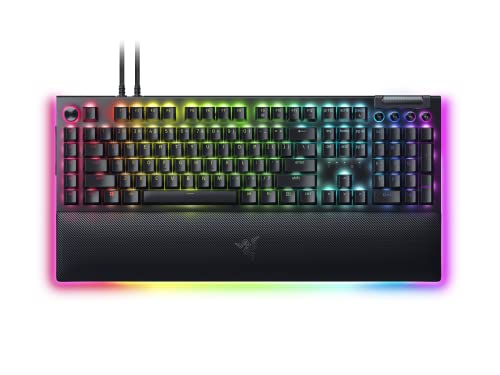
| Razer BlackWidow V4 Pro | Full-size plus macro column | Wired | 8 dedicated macro keys, command dial | The macro maximalist |
| Corsair GALLEON 100 SD | Full-size | Wired | Integrated Stream Deck keys | The streamer-raider |
| Razer BlackWidow V4 X | Full-size plus macro column | Wired | 6 dedicated macro keys | Macro keys at a step down |
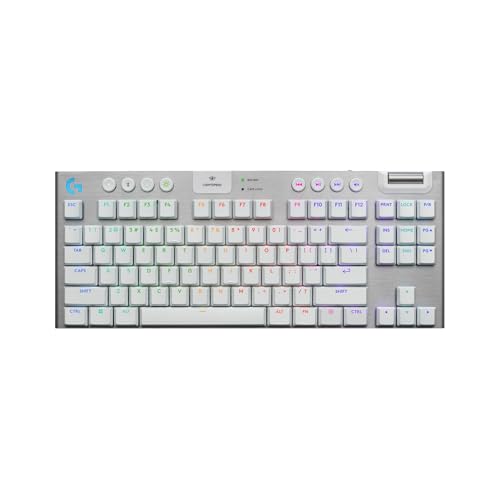
| Logitech G915 X LIGHTSPEED TKL | Tenkeyless | 2.4 GHz, Bluetooth, wired | Wireless freedom, low profile | The couch-and-desk player |
| SteelSeries Apex Pro TKL Gen 3 | Tenkeyless | Wired | Adjustable actuation, rapid trigger | The precision minimalist |
How the Picks Were Chosen
The gates for this genre: macro capacity, whether through dedicated keys, deep software or firmware; modifier comfort and full-size left-hand clusters; switch consistency over long sessions; wrist-rest provision or compatibility; and software that handles per-game profiles without fighting the games themselves. Every linked board was verified in Amazon’s catalogue data through the site’s Creators API connection on 2026-11-23. One beloved MMO accessory is discussed in prose rather than linked — the dedicated one-handed gaming keypad — because it is a companion device rather than a keyboard, and this guide keeps its links to keyboards while giving the keypad its full due in its own section below.

Razer BlackWidow V4 Pro — the macro maximalist
Badge: Best overall for MMO players
- Layout: full-size with a dedicated macro column
- Connection: wired
- Switches: Razer Yellow linear, silent (variant listed)
- Macro hardware: 8 dedicated macro keys plus a command dial
- Extras: magnetic plush wrist rest, Chroma RGB, media roller
The BlackWidow V4 Pro is the board that treats the MMO keybind problem as a hardware brief and answers it in full. Eight dedicated macro keys down the left edge give your pinky-side hand a column of commands that require no modifier gymnastics — interrupts, defensives, mounts, the oh-no buttons — while the command dial and media roller absorb the session’s secondary controls. The Yellow switches in the listed variant are linear and quiet, which suits both fast repeated presses in a rotation and a voice channel that does not want to hear them. The included magnetic wrist rest is not a garnish on a raid night; it is the difference between a hand that rests between pulls and a hand that hovers for three hours.
Razer’s software carries per-game profiles, so the WoW layout and the FFXIV layout can coexist and switch with the game — a small feature that becomes the whole product for two-game players. The trade-offs are size and commitment: this is a wide, desk-dominating board that assumes a permanent setup, its keycaps are doubleshot ABS rather than PBT, and its ecosystem asks you to live inside Razer’s software for the macro features to shine. For the player it is designed for — the progression raider with a fixed desk and a forty-command rotation — those are the right trades, made openly.
- Strengths: the most dedicated macro hardware in the guide
- Strengths: quiet linear switches suit voice-chat raiding
- Strengths: included wrist rest built for long sessions
- Trade-offs: very wide; needs a big, permanent desk
- Trade-offs: ABS keycaps where rivals offer PBT
- Trade-offs: macro value depends on Razer’s software
Best for: progression raiders who will actually build a macro system. Not suited for: small desks, travellers, or minimalist setups.

Corsair GALLEON 100 SD — the streamer-raider
Badge: Best for raiders who stream or run overlays
- Layout: full-size
- Connection: wired, high polling
- Switches: pre-lubed MLX Pulse, hot-swappable
- Signature feature: integrated Stream Deck keys with display
- Keycaps: PBT double-shot
The GALLEON 100 SD merges two devices that share many desks: a full-size mechanical keyboard and a Stream Deck, embedding the Deck’s programmable, display-backed keys into the board itself. For the raider who streams, records or simply runs a busy desktop, those keys become a control surface for everything around the game — scene switches, recording, mute discipline, timers, application launching — while the keyboard underneath remains a serious MMO instrument with hot-swappable switches and PBT caps. Even for non-streamers, a row of labelled, icon-bearing macro keys solves the oldest macro problem, which is remembering what your own macros do.
Its MMO case rests on that labelled-macro advantage plus honest fundamentals: full-size layout, consistent pre-lubed switches, and Corsair’s software for profiles. The cautions are that the Stream Deck integration ties you to Elgato’s ecosystem and software stack, that the board is a premium, desk-committing purchase, and that players who will never use the display keys are paying for the guide’s most expensive feature to leave it dark. For the streaming raider it is close to a category of one; for everyone else, the BlackWidow above is the straighter answer.
- Strengths: labelled macro keys you can actually remember
- Strengths: merges two desk devices into one
- Strengths: hot-swap switches and PBT caps underneath
- Trade-offs: premium price for the integration
- Trade-offs: value depends on using the Stream Deck side
- Trade-offs: another software ecosystem to maintain
Best for: streaming raiders and overlay-heavy players. Not suited for: players who want a keyboard and only a keyboard.

Razer BlackWidow V4 X — macro keys, one step down
Badge: Best value with dedicated macro keys
- Layout: full-size with macro column
- Connection: wired
- Switches: Razer Yellow linear, silent (variant listed)
- Macro hardware: 6 dedicated macro keys
- Extras: media roller and controls, Chroma RGB
The V4 X is the BlackWidow formula with the flagship trimmings removed and the MMO essentials kept: six dedicated macro keys in the same left-hand column, the same quiet Yellow linear switches in the listed variant, and the media roller for session control. What you give up against the Pro is the command dial, two macro keys and the included plush wrist rest — losses a value buyer can price precisely, especially since a wrist rest can be added separately (the subject of the review at the Glorious gaming wrist rest review, for players building comfort à la carte).
For many MMO players this is the honest sweet spot: six macro keys cover the core use — interrupt, defensive, potion, mount and two flex slots — without the flagship’s width or price, and the modifier system carries the rest of the rotation as it does on any board. The same ABS-keycap and software-ecosystem notes from the Pro apply. If your macro ambitions are real but bounded, this is the board that respects them without upselling you a dial.
- Strengths: six real macro keys where it matters
- Strengths: quiet linears for voice-chat play
- Strengths: the macro formula at a friendlier tier
- Trade-offs: no included wrist rest or command dial
- Trade-offs: ABS keycaps
- Trade-offs: still a wide, permanent-desk board
Best for: raiders who want macro keys without flagship pricing. Not suited for: buyers who want the full Pro control set included.

Logitech G915 X LIGHTSPEED TKL — the wireless exception
Badge: Best wireless board for MMO play
- Layout: tenkeyless, low profile
- Connection: LIGHTSPEED 2.4 GHz, Bluetooth, wired
- Switches: low-profile mechanical, tactile variant listed
- Keycaps: double-shot PBT
- Extras: aluminium case, media controls
Not every MMO life happens at a shrine desk. The G915 X TKL is for the player whose raiding happens from a living-room-adjacent setup, a laptop that moves between rooms, or a desk that must clear for work by morning — and it refuses to make wireless feel like a compromise tier. The LIGHTSPEED link is the proven gaming-grade connection (the full latency case is made in are wireless keyboards good for gaming), the low-profile tactile switches keep long sessions defined without noise, and the tenkeyless layout is the size a modifier-disciplined MMO player actually needs: the rotation lives on the number row and letter cluster with modifiers, not on a macro column this board does not have.
That absence is the honest trade: no dedicated macro keys means your system must be modifier-based, which this guide’s keybind section teaches as the genre’s core skill in any case. What you gain is freedom of placement, a board that can move to the couch for crafting and social sessions, and PBT keycaps that survive years of raid nights without shining smooth. For the two-game player, Logitech’s profiles handle the switching; for the battery, a weekly charge rhythm makes it a non-event.
- Strengths: genuine wireless freedom with a gaming-grade link
- Strengths: PBT caps and aluminium build for the long term
- Strengths: low-profile comfort across long sessions
- Trade-offs: no dedicated macro keys
- Trade-offs: tenkeyless only; no full-size variant in this pick
- Trade-offs: battery discipline required
Best for: MMO players whose setup moves or multi-purposes. Not suited for: macro-column devotees or set-and-forget wired loyalists.

SteelSeries Apex Pro TKL Gen 3 — the precision minimalist
Badge: Best for players who value actuation control
- Layout: tenkeyless
- Connection: wired
- Switches: OmniPoint 3.0 adjustable magnetic, rapid trigger
- Keycaps: double-shot PBT
- Extras: OLED smart display, per-key actuation settings
The Apex Pro TKL Gen 3 approaches the MMO problem from the opposite end to Razer: no macro column, no extra width — instead, switches whose actuation point you set per key. For MMO play that buys two real things. Movement and frequently-spammed abilities can sit on a hair-trigger shallow actuation for instant response, while the long-cooldown, high-regret keys — the defensive you must never waste, the battle-res you must never fat-finger — can be set deep, so they fire only on a deliberate press. Rapid trigger keeps repeated inputs crisp during the genre’s many spam-the-button-as-it-comes-off-cooldown moments. It is a subtler instrument than the macro boards, and for the mechanically minded player it is the more elegant one.
The costs are the absence of dedicated macro keys (your system is modifiers plus actuation design), a wired-only life, and a price that buys precision rather than size. FFXIV players in particular should note the fit: the game’s choreographed weaving rewards exactly this kind of per-key intentionality, and the tenkeyless footprint leaves the desk calm for the long, social evenings between raids. Players comparing the two philosophies head-to-head will find the brand-level version of the argument in Corsair vs Razer vs Logitech gaming keyboards compared.
- Strengths: per-key actuation is a real MMO advantage
- Strengths: rapid trigger suits cooldown-spam moments
- Strengths: PBT caps, compact footprint, OLED utility
- Trade-offs: no macro keys; system must be modifier-based
- Trade-offs: wired only
- Trade-offs: premium price for a tenkeyless board
Best for: precision players who design their binds deliberately. Not suited for: players who want physical macro keys to press.
Building a Raid-Ready Keybind System: The Method
Hardware chosen, the performance is in the system, and MMO keybinding has a method that separates players who fight their binds from players who forget them. Begin with the reachable zone: with your left hand in its natural position, the keys you can strike without stretching or looking are roughly the number row through the middle letter rows, out to about the T-G-B column, plus the modifier keys your pinky and thumb own. Everything in your rotation must live in that zone, multiplied by modifiers — a dozen positions times three modifiers is a full MMO vocabulary, on any board in this guide, including the tenkeyless ones. Assign by frequency and by consequence: the rotation’s core goes on unmodified keys, because it cannot wait for a chord; cooldowns and situational abilities go on Shift-modified keys, where they are fast but deliberate; the rare, the social and the quality-of-life — mounts, markers, food, toys — go on Ctrl and Alt layers, or on the macro column if your board has one. Keep the panic buttons — interrupt, major defensive, healthstone — in the same place across every character you play, because in the moment you need them, you are not playing a character, you are playing your hands.
Two disciplines protect the system over time. First, mirror the layout across alts wherever the roles allow: a healer’s cleanse and a tank’s interrupt want the same key, because your hands should learn one emergency language per account, not one per character. Second, change binds in small batches between raid nights, never on the night itself — a new bind needs a week of dungeons and world content to become a reflex, and progression is the worst classroom in the genre. The macro-key boards in this guide accelerate this method but do not replace it: a macro column used without a system is just a second, smaller place to lose your abilities, while a modifier system used without macro keys is complete in itself. Buy hardware for the system you will actually maintain.
The Keypad Question: One-Handed Gamepads, Considered Fairly
No MMO keyboard guide is honest without addressing the device many raiders swear by: the one-handed gaming keypad, exemplified by Razer’s Tartarus line, which puts twenty-odd programmable keys, a thumb stick or D-pad and a scroll click under the left hand in a sculpted, wrist-rested unit. The case for it is real — every key is reachable, the thumb gains jobs beyond the spacebar, and the whole rotation can live in a space your hand never leaves. The case against is equally real: it is a second device to buy, learn and keep beside a keyboard you still need for chat, and its learning curve is measured in weeks of clumsy play. This guide treats keypads as a legitimate endgame for players whose bind ambitions outgrow a keyboard — and as an unnecessary detour for everyone else, because a disciplined modifier system on any board above covers the genre’s demands. If you go the keypad route, keep your keyboard standard and comfortable for the game’s social half; the keypad replaces your binds, not your keyboard.
Comfort Across Progression: The Three-Hour Test
Judge every board in this guide by a test no review unit performs: the third hour of a progression night, when the encounter is finally coming together, your focus is total, and your hands have been working for two hours already. In that hour, switch fatigue is real — heavy switches tax the fingers that spam a filler ability hundreds of times, which is why this guide’s picks favour linears and moderate tactiles over stiff or clicky options. Keycap texture matters as hands warm; PBT’s slight grain keeps its grip where smooth ABS begins to feel slick, which is a concrete point in the SteelSeries’ and Logitech’s favour and the Razer boards’ one material concession. The wrist question is posture, not padding alone: a rest should meet your palms when they rest, not prop your wrists while you type, and the board’s height should let your forearms run level — the low-profile Logitech is the easiest board here on that geometry, while the full-size wired boards reward a proper rest, included or added. Finally, the session’s invisible hardware: a cable that drags, a battery that fades, a dongle placed behind a metal case. MMO sessions are long enough for every small friction to compound, and the professional habit — wired or wireless — is to make the connection boring before the raid, not during it. Players who feel these sessions in their wrists despite good geometry should escalate to the ergonomic guide linked earlier rather than buying another conventional board and hoping.
Common Mistakes MMO Players Make With Keyboards
The first is buying key count instead of reach — a sprawling board whose far keys are never used, while the reachable zone stays overcrowded. The second is binding by copying a streamer’s layout wholesale: their binds encode their hands, their class history and their hardware, and importing them imports the mismatch. The third is putting rare, high-consequence abilities on easily-fumbled keys and common abilities on awkward ones — the frequency-and-consequence method exists precisely to prevent the battle-res that fires on a stretch and the interrupt that hides behind a chord. The fourth is neglecting the social half: a board that is superb for combat and miserable for typing will quietly tax every guild conversation, crafting session and housing evening, which together are most of the game’s hours. The fifth is changing everything at once — new board, new binds, new class, progression night — a combination that guarantees a bad week and usually blames the board. Change one variable, let it settle, and let the genre’s long rhythms work for you instead of against you.
Two Games, Two Keyboard Cultures: WoW and FFXIV Up Close
Because this guide serves both games, it owes their differences a section of their own. WoW’s combat is the faster and more reactive of the two: interrupts on short windows, frequent movement, and a macro system that lets players encode real logic — mouseover targeting, conditional modifiers, focus casts — into single keys. The WoW keyboard therefore earns its keep through macro capacity and actuation reliability, and its player benefits most from this guide’s macro-hardware picks and from a bind system that puts the interrupt and the defensive on keys that cannot be missed in a scramble. WoW also changes: expansions rebalance classes, prune abilities and return others, and the wise player’s bind system is built to be rearranged — documented, modular, and never so precious that a patch note becomes a crisis.
FFXIV’s combat is the more choreographed: a global cooldown rhythm with abilities woven between beats, encounters designed as dances of position and timing, and jobs whose rotations are long, exact sequences. The FFXIV keyboard earns its keep through consistency and comfort — the same actuation on the fortieth repetition of a rotation as on the first, across a four-hour savage session — and its player benefits most from per-key actuation design, from switches that do not fatigue, and from a desk that stays calm. FFXIV also asks more of the keyboard’s second life than any game in the genre: its crafting, gathering, housing and social systems are full games in themselves, and the FFXIV player’s keyboard is a lifestyle instrument in a way the raid-only framing misses. A board that serves Eorzea serves an evening, not a pull.
The practical consequence for buyers is a weighting, not a fork: both games need the reachable-zone system, both punish discomfort at hour three, and both are served by every pick in this guide. WoW-first players should weight the macro sections; FFXIV-first players should weight the comfort and actuation sections; two-game players should weight per-game profiles, because the fastest way to die in either game is to reach for the other game’s binds.
Healing, Tanking and the Roles’ Different Hands
Roles load the keyboard differently, and a guide that ignores it recommends blind. Healers in both games live on targeting: mouseover macros in WoW, party-list targeting and swiftcast-rescue discipline in FFXIV, and in both cases a premium on keys that can be hit accurately while the eyes are on health bars rather than on the hand. For healers, bind geography should be designed eyes-free above all — clusters with tactile landmarks, emergencies on the most findable keys, and nothing critical on a stretch. Tanks live on mitigation timing and positioning: their critical keys are few but absolute, and the actuation argument applies at full strength — a defensive that fires on a deliberate press and never on a brush is a tanking feature, which is the Apex Pro’s deepest setting doing quiet, important work. Damage dealers live on volume: the rotation’s hundreds of presses, where switch fatigue and consistency dominate and where linears earn their popularity honestly. None of this changes the shortlist — the same five boards serve all three roles — but it changes which review to read first and which features to interrogate hardest, and a player who knows their role’s hands buys once instead of twice.
The Alt Problem: One System, Many Characters
MMO players rarely play one character, and the keyboard system that serves a roster is a design problem of its own. The governing principle is correspondence: keys should mean the same category of thing on every character — this key is always the interrupt, that one always the major defensive, the other always the mobility tool — even though the abilities themselves differ. Correspondence is what lets a player swap characters mid-evening without swapping instincts, and it is worth more than any per-character optimisation, because the cost of a wrong-category press in a critical moment dwarfs the benefit of a theoretically perfect layout on one character. Hardware supports correspondence in two ways: profiles, which let each character’s exact assignments coexist without overwriting, and restraint — the discipline of not using every available key just because it exists. The macro-column boards tempt players to fill all eight keys per character with unrelated meanings; resist, and keep the column’s jobs consistent across the roster. Your alts will thank you in the only currency that matters, which is pulls that do not end with someone explaining that their interrupt was on a different key on this character.
The Social Keyboard: Chat, Crafting, Housing and the Other Ninety Percent
It is worth pausing on how an MMO keyboard actually spends its life. Even a progression raider’s hours divide into a minority of combat and a majority of everything else: guild and party chat, crafting rotations and market boards, gathering routes, housing projects, glamour sessions, waiting for queues in capital cities with the chat window scrolling. A keyboard chosen purely as a combat instrument will spend most of its life as a mediocre social one, and the mismatch is not trivial — chat is typing, with all the ergonomic and comfort demands typing brings, and crafting in FFXIV is its own macro-driven discipline that rewards exactly the programmable hardware this guide recommends for combat. This is the deeper reason the picks here are complete keyboards rather than combat peripherals: full layouts or honest tenkeyless designs, switches you can type an evening on, and software that treats a crafting macro with the same respect as a raid cooldown. When you evaluate any board for this genre, run the evening test in your imagination, not just the pull test: picture hour four, which is not a boss but a housing plot, a market board and a conversation, and ask whether the board under your hands is the one you would choose for that hour too. The boards above were chosen so the answer survives both tests.
Day One to Raid Night: A Setup Calendar
A new MMO keyboard should be introduced to your play the way a new bind should: gradually, and never on progression night. Day one is hardware: position the board, set its height and rest, connect it the way it will live — dongle placed properly if wireless, cable routed if wired — and type on it in the world, in dungeons, in chat, letting your hands learn its spacing at low stakes. Days two and three are the system audit: play your main content, note every reach that feels wrong and every key your hand searches for, and adjust the bind map in one deliberate pass rather than in dribbles. Day four is the macro session: build the column or layer assignments by frequency and consequence, write them down where you can see them, and run the content that exercises them until the reaching is thoughtless. The first raid on the new board should be a farm night or a normal-mode clear — content you can carry while a percentage of your attention is still on your hands. Only then, typically a week in, does the board go to progression. This calendar sounds conservative until it is priced against the alternative, which every guild has watched: a player unveiling a new board and a new bind system on a progression night, and spending the evening apologising to nineteen or seven other people. The genre is a team sport; your setup schedule is a courtesy as well as a performance plan.
Reliability, Spares and the Night Everything Is Due
Raid teams understand redundancy instinctively — a bench, a backup caller, a second player who knows the mechanic — and the keyboard deserves the same thinking, because its failure mode is not hypothetical: it is a Tuesday, twenty minutes before pull time, with a board that has chosen this evening to chatter, disconnect or die. The professional setup plans for that evening in advance. A spare board lives in the room — it need not be good, only present and standard — and the main board’s profile or keymap is exported and backed up, so a replacement board becomes your board within minutes rather than after a week of relearning. Wired boards fail by cable and connector, which a spare cable solves; wireless boards fail by battery and receiver, which a charging rhythm and a dongle that lives in one known place solve. Hot-swappable boards, like the Corsair in this guide, convert the most common mechanical failure — one bad switch — into a thirty-second repair with a spare switch, which is an underappreciated argument for sockets in a genre where a single chattering key can double-cast a cooldown into a wipe. None of this is pessimism; it is the same respect for the team’s time that makes players repair their gear and stock their consumables before the raid rather than during it.
Reading MMO Keyboard Marketing Without Being Played
Finally, a defence kit for the genre’s marketing, which is fluent in the language of advantages no MMO can use. Polling rates beyond the standard gaming grade are the clearest example: an MMO’s server tick and global cooldowns operate on timescales that make extreme polling a rounding error, and no rotation in either flagship game has ever failed for want of a faster report rate — the full millisecond accounting, for readers who enjoy it, sits in the wireless explainer linked earlier. Macro counts deserve the same scepticism: forty programmable keys are worth less than eight reachable ones, because the reachable zone is the binding constraint the marketing never mentions. Even switch speed claims invert in this genre: the fastest actuation is valuable on a handful of keys and a liability on the high-consequence ones, which is why this guide’s precision pick sells adjustability rather than raw speed. The questions that sort MMO boards honestly are the unglamorous ones asked throughout this guide — where do the macro keys sit, how do the modifiers feel at hour three, what do the caps feel like under warm hands, what happens when one switch dies — and a listing that answers them plainly is a listing written for players rather than for benchmarks.
The Verdict, by Player
| Player | Buy | Why |
|---|---|---|
| Progression raider, fixed desk, macro ambitions | Razer BlackWidow V4 Pro | Eight macro keys, a dial and a rest, built for the long night |
| Raider who streams or runs a busy desktop | Corsair GALLEON 100 SD | Labelled Stream Deck keys merge the control surface into the board |
| Macro-curious player on a saner budget | Razer BlackWidow V4 X | Six macro keys keep the system; the trimmings are what you skip |
| Player whose desk moves or multi-purposes | Logitech G915 X LIGHTSPEED TKL | Wireless freedom with a modifier system doing the work |
| Precision player who designs every press | SteelSeries Apex Pro TKL Gen 3 | Per-key actuation turns intention into a hardware setting |
Behind the table sits the guide’s one-sentence summary, which applies whichever row is yours: in this genre, the keyboard is a system for making forty commands feel like twelve, and the best board is the one whose hardware — macro column, labelled keys, actuation design or sheer wireless convenience — best supports the system your hands will actually learn. Buy the support, build the system, keep a spare, and let the board disappear into the pull. That disappearance, somewhere around the third hour of a good raid night, is the moment every recommendation in this guide was designed to produce.
A Necessary Aside: FFXIV’s Controller Question
FFXIV players will notice this guide assumes a keyboard in a game famous for being fully playable on a controller, and the assumption deserves defending rather than hiding. The controller is a legitimate, well-supported way to play FFXIV — its cross-hotbar is a design triumph — and nothing here argues otherwise. The keyboard case rests on three things. Chat and communication are keyboard activities in practice, and the game’s social life runs through them. Targeting precision in large pulls and rapid marker placement favour a mouse-and-keyboard pairing for many players. And the players this guide serves — those searching for an MMO keyboard — have already answered the question with their desk. What the keyboard buyer can learn from the controller culture is worth taking, though: the cross-hotbar’s genius is layered access to many commands from few controls, which is precisely the modifier philosophy this guide teaches for keyboards, and FFXIV players moving from controller to keyboard often build the most elegant bind systems in the genre because they think in layers from the start. WoW players, whose game has added controller support more recently and more partially, face the simpler version of the same choice, and the same lesson applies: whichever device you choose, the system is the skill.
Maintaining the Board That Carries Your Static
A last, practical word on keeping an MMO board at raid standard across the years these games demand. The genre’s usage pattern is brutal in a specific way: a small set of keys — the rotation cluster, the spacebar, the modifiers — absorbs the overwhelming majority of millions of presses, while the rest of the board idles. Maintenance should follow the wear. Keep spare switches if your board is hot-swappable, and swap the hardest-worked positions at the first sign of inconsistency rather than after the first double-cast in a pull. Clean under the keycaps of the working cluster a few times a year; raid-night snacks are a fact of the culture, and their residue migrates exactly where your fingers live. Treat the wrist rest as a consumable — it compresses and wears, and replacing it restores more comfort than replacing the board would. Export your profiles and bind documentation every time you change them, because the system you have built is worth more than the hardware it runs on, and hardware is replaceable on a day’s notice while a lost system takes a season to rebuild. Do these unglamorous things and the board you buy from this guide will still be carrying your static, accurately and comfortably, when the next expansion’s progression begins — which is the only durability claim this genre truly cares about.
What About the Games Beyond the Big Two?
The genre is wider than its flagships, and the principles travel well. Elder Scrolls Online’s action-leaning combat and five-ability bars ask less of the keyboard’s capacity and more of its movement comfort; Guild Wars 2’s weapon-swap system rewards a compact, fast left hand and a well-placed swap key; Lost Ark’s eight-skill rotations with combo modifiers sit between the two flagships in demand; and the genre’s many classic and private-server revivals run happily on any board here, since their bind counts are gentler. The lesson generalises: audit your game’s actual command count and rhythm, then weight this guide’s sections accordingly — capacity for the macro-heavy games, actuation and comfort for the fast ones, and the social-half test for all of them, because every MMO ever made is secretly a chat client with a combat system attached. A player moving between several titles should build the shared emergency language first and let each game’s profile diverge only where the games themselves do.
A Deeper Note on Switch Feel Across a Rotation
One variable deserves more precision than it usually gets, because MMO play exposes it mercilessly: what a switch feels like on its five-hundredth press of the evening. A rotation is a rhythm before it is a sequence, and the switches are its percussion. Linears keep the rhythm smooth and unbroken, which is why they dominate this guide’s picks for sustained play; their risk is the accidental press, the brush that fires an ability early, managed by bind placement and, on the Apex Pro, by deliberate actuation depth on the dangerous keys. Tactiles insert a small confirmation into the rhythm — many players time their presses to it, particularly in FFXIV’s weave windows — at the cost of a little more finger work per press, multiplied by thousands. Clickies add sound to the confirmation and are the genre’s social error: your rotation becomes your voice channel’s soundtrack. None of these is a hierarchy; they are tempos. The player who knows their game’s rhythm, and their own hands’ honesty at hour three, will choose correctly among this guide’s options — and will understand why the same board can be one raider’s endgame and another’s return.
One More Desk Reality: The Second Monitor and the Chat Window
Modern MMO play is a two-screen activity even for players with one monitor: the game owns the display, but Discord, a browser of guides, a damage meter and a stream or recording tool all compete for attention and for keys. A keyboard with per-application or per-game profiles quietly manages this ecology — one personality for the game, another for the desktop — and media controls earn their place not as decoration but as the fastest way to manage a video guide or a music stream between pulls without alt-tabbing out of a ready check. Players building a new setup should plan the keyboard’s job across that whole ecology rather than inside the game client alone; it is the one input device every part of the evening shares, and the boards in this guide were chosen partly for how gracefully they serve the hours when the game is technically in the background and the community is in the foreground.
Frequently Asked Questions
Do I need dedicated macro keys for WoW or FFXIV?
No — a disciplined modifier system covers both games completely, and many top players use ordinary tenkeyless boards. Dedicated macro keys are a convenience and a memory aid, most valuable for high-consequence abilities you want on their own physical key. Buy them if you will build a system around them; do not buy them as a substitute for one.
Which is better for MMOs: full-size or tenkeyless?
Both work, because MMO binds live in the left-hand reachable zone rather than on the number pad. Full-size boards suit players who also use the pad for other work or who want macro columns, which usually come with the size. Tenkeyless boards suit modifier-based systems and smaller desks, and bring the mouse closer for the genre’s camera work. Choose by desk and by whether you want macro hardware, not by fear of missing keys.
Linear or tactile switches for raiding?
Most raiders settle on linear or light tactile switches: linears for fast, repeated rotation presses with minimal fatigue, light tactiles for players who want confirmation of each press. Heavy and clicky switches are the common regrets — fatiguing across a long night and audible to your entire voice channel.
How many keybinds do I actually need for high-end play?
Fewer than the panic suggests. A typical high-level setup uses roughly thirty to forty bound commands, of which perhaps a dozen are pressed constantly. A dozen reachable positions with two comfortable modifiers covers that vocabulary on any board in this guide. The skill is in the assignment — frequency and consequence — not in the inventory.
Is wireless reliable enough for progression raiding?
On a gaming-grade 2.4 GHz link, yes — the connection is not the weak point of a raid night. The disciplines are battery and placement: charge on a rhythm, keep the receiver close and clear of obstruction, and keep the cable within reach as the universal backup. Bluetooth is for the social sessions, not for progression.
Should I use the same keybinds in WoW and FFXIV?
Where the abilities correspond — interrupt, defensive, mobility, potion — yes, absolutely; a shared emergency language across games is a genuine performance asset. Where the games’ structures differ, let the binds differ, and use per-game profiles, which every board in this guide supports, to keep each game’s layout intact rather than forcing a false uniformity.
Pick the board that matches your system: macro hardware if you will build around it, actuation design if your precision is per-key, wireless if your life moves between desks. Then do the unglamorous work — assign by frequency and consequence, mirror your emergencies across characters, and change nothing on raid night. The keyboard is the instrument; the system is the music, and progression belongs to the players who practise both.