Disclosure: As an Amazon Associate, kajuandouglas.com earns from qualifying purchases. Links on this page are affiliate links; they cost you nothing extra. Prices and availability change often, so check the current Amazon listing before you buy.
The best travel keyboards laptops mobile work setups can rely on are the ones that disappear into a bag and reappear as a real workstation wherever you land — a café table, a client’s meeting room, a train’s fold-down tray, a hotel desk that was designed by someone who never used one. Mobile work punishes keyboards in specific ways: they are packed against screens, typed on at odd angles, paired and re-paired with laptops, tablets and phones, and expected to feel like your desk when your desk is three time zones away. This guide recommends five keyboards, each verified against Amazon catalogue data before being linked, spanning the premium mini, the featherweight all-rounder, the mechanical traveller, the folding specialist and the slim professional — and it starts, as travel gear should, with the bag.
Key takeaways: Weight and packed size are real specifications — a travel keyboard is carried far more than it is typed on. Multi-device pairing is the feature that turns one board into a workstation for laptop, tablet and phone. Typing feel still matters: a board that saves 200 grams and costs you accuracy on every email is a bad trade. And the keyboard must survive the bag — build and case design are travel features, not luxuries.
Best Travel Keyboards Laptops Mobile Work: What Mobile Work Actually Demands From a Keyboard
Start with the physics of travel. A keyboard in a bag is dead weight with a job interview: every gram and millimetre must justify itself against the laptop, the charger and the clothes it displaces. That pressure explains the category’s shape — compact layouts, slim cases, scissor or low-profile switches — but it should not be allowed to explain away typing quality, because the entire point of carrying a keyboard is to type better than the alternatives: the laptop’s own keyboard at a bad screen height, the tablet’s glass, the hotel’s mercy. A travel board earns its place in the bag only when the work done on it is materially better than the work done without it, which is a higher bar than “small and cheap” and the bar this guide applies.
The second demand is chameleon connectivity. Mobile work is a rotation of machines: the laptop for the heavy work, the tablet for the review on the train, the phone for the message that cannot wait. A travel keyboard that pairs with three devices and switches between them from a key turns that rotation into one continuous desk; a single-device board forces a pairing ritual at every transition, and rituals are what travel days do not have time for. Bluetooth is the category’s native connection — no receiver to lose, works with every tablet and phone — and its latency, a live question in gaming, is a non-issue for the typing work travel involves.
The third demand is environmental range. The mobile desk is a café table with wobble, a tray table at altitude, a co-working hot desk, a client’s glass conference table where a loud keyboard announces itself to the room. Quiet keys are a professional courtesy in shared spaces; a slim, stable case types on surfaces a tall mechanical board would rock on; backlighting earns its place in dim cabins and evening hotel rooms. And the fourth demand is the one brochures skip: survivability. Travel keyboards are crushed, dropped, coffee-adjacent and occasionally left in another country. Build quality, a protective sleeve habit, and a price that would sting rather than devastate if the worst happens are all legitimate selection criteria — and they are weighted openly in the reviews below.
In this guide
Quick Picks for the Road
| Keyboard | Packed character | Connection | Typing character | Best for |
|---|---|---|---|---|
| Logitech MX Keys Mini | Compact, premium, solid | Bluetooth, 3 devices | Refined scissor keys, backlit | The professional’s travel board |
| Logitech Pebble Keys 2 K380s | Slim, light, playful | Bluetooth, 3 devices | Quiet round-key scissor | The weight-watcher’s all-rounder |
| Keychron K3 | 75 percent, low-profile mechanical | Bluetooth, 3 devices, wired | Real mechanical switches | The typist who refuses to compromise |
| ProtoArc XK01 | Full-size that folds | Bluetooth, 3 devices | Full layout with number pad | The number-pad traveller |
| Microsoft Designer Compact | Ultra-slim professional | Bluetooth | Low-profile scissor, quiet | The minimalist business traveller |
How the Picks Were Chosen
The gates were travel-shaped: packed size and weight that respect a carry-on; multi-device Bluetooth pairing; typing feel good enough to justify the bag space; quiet operation for shared spaces; and build that tolerates being carried daily. Each linked board was verified in Amazon’s catalogue data through the site’s Creators API connection on 2026-11-23. Laptop-stand and case accessories are discussed in prose as part of the mobile system, because the keyboard is one component of a portable desk — but the links here are keyboards only, as promised.
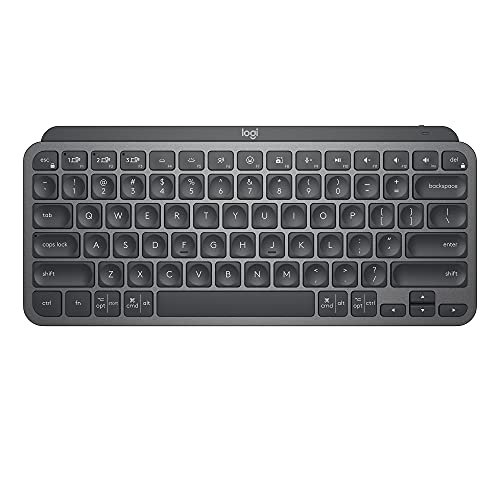
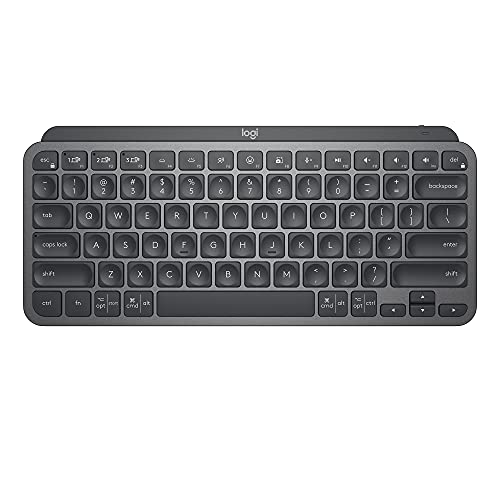
Logitech MX Keys Mini — the professional’s travel board
Badge: Best overall travel keyboard
- Layout: compact tenkeyless-style, low profile
- Connection: Bluetooth, up to 3 devices
- Keys: spherically-dished scissor keys, smart backlighting
- Battery: USB-C rechargeable
- Extras: metal build, multi-OS legends
The MX Keys Mini is what happens when a flagship desk keyboard is shrunk by people who understand travel. The typing feel is the best in this guide — dished keys that centre your fingers, a backlight that wakes as your hands approach and adjusts to the room, and a metal-bodied solidity that makes café tables feel like desks. It pairs with three devices, charges over the same USB-C cable as everything else in a modern bag, and its compact footprint still keeps a sane, standard-feeling layout that your hands already know from its full-size sibling. For the professional whose travel work is real work — documents, spreadsheets, long emails in departure lounges — it is the board that never makes you miss your desk.
Its travel compromises are weight and price: it is the heaviest board here, because metal and a serious battery are not free, and it sits at the premium tier. Ultralight packers should read the Pebble Keys next. Everyone else should weigh what the weight buys: this is the only board in the guide that feels like equipment rather than like a compromise, and across a year of trips that feeling compounds.
- Strengths: best typing feel and backlight in the guide
- Strengths: three-device pairing and USB-C charging
- Strengths: build quality that shrugs off the bag
- Trade-offs: heaviest pick here
- Trade-offs: premium price
- Trade-offs: no number pad, by design
Best for: professionals whose travel work is their real work. Not suited for: ultralight packers counting every gram.

Logitech Pebble Keys 2 K380s — the weight-watcher’s all-rounder
Badge: Best lightweight travel keyboard
- Layout: compact with round keys
- Connection: Bluetooth, up to 3 devices with Easy-Switch
- Keys: quiet scissor keys
- Battery: long-life replaceable cells (per design)
- Extras: customisable shortcut keys, multi-OS support
The Pebble Keys 2 is the board that understands the assignment: slim enough to slide into a laptop sleeve’s outer pocket, light enough to forget, quiet enough for a library car, and cheerful enough — round keys, soft colours — to make a hotel desk feel less like exile. Its three-device Easy-Switch pairing covers the laptop-tablet-phone rotation, its keys are properly quiet for shared spaces, and its battery life is measured on a scale that removes charging from the travel checklist almost entirely. For students, writers and hybrid workers whose travel is frequent and whose typing is prose-shaped, it is the easiest recommendation in the guide.
The compromises are feel and ambition: the round keys and light build type well but not luxuriously, and this is a board for getting work done rather than for savouring it. It also lacks backlighting, which evening workers will notice. Within its brief — maximum portability per unit of money and weight — it is close to flawless, and it is the board most likely to actually be in the bag when the trip happens, which is the first virtue of travel gear.
- Strengths: genuinely light and slim
- Strengths: quiet keys and three-device switching
- Strengths: battery life that removes a worry
- Trade-offs: no backlight
- Trade-offs: typing feel is good, not great
- Trade-offs: light build feels less substantial
Best for: frequent travellers, students and writers who pack light. Not suited for: backlight-dependent evening workers or feel-first typists.

Keychron K3 — the mechanical traveller
Badge: Best travel keyboard for typing feel
- Layout: 75 percent, low profile
- Connection: Bluetooth for 3 devices, USB-C wired
- Switches: low-profile mechanical, Brown tactile variant listed
- Backlight: white LED
- Extras: Mac/Windows keycaps, slim aluminium-accented case
Some travellers refuse to let the road demote their typing, and the K3 is their board: real low-profile mechanical switches — the Brown tactile variant listed here gives a defined bump that scissor boards cannot imitate — in a slim 75 percent case that keeps the function row and arrows a working day needs. It pairs with three devices over Bluetooth, works wired when a desk allows, and carries the Mac/Windows bilingualism that mixed-ecosystem travellers need. In the hand it feels like a small piece of your real setup came with you, which for writers, developers and heavy typists is the entire point of carrying a keyboard at all.
The costs are the mechanical ones: it is thicker and heavier than the scissor boards here, its battery life is the shortest in the guide, and its switches, while low-profile, are audible in the quietest shared spaces in a way the Pebble is not. It is also the pick most worth protecting with a case, as the sim-rig guide’s small-board logic — keyboards for sim racing and flight sim setups — also concluded for its own tight spaces. For the typist-first traveller, none of that outweighs arriving with your hands’ favourite instrument.
- Strengths: genuine mechanical feel that travels
- Strengths: full working layout in a slim case
- Strengths: three-device pairing, Mac and Windows ready
- Trade-offs: shortest battery life here
- Trade-offs: heavier and thicker than scissor rivals
- Trade-offs: audible in very quiet spaces
Best for: writers, developers and typists who travel with their standards. Not suited for: ultralight packers or silent-carriage workers.

ProtoArc XK01 — the full-size board that folds
Badge: Best for number-pad travellers
- Layout: full-size, 105 keys with number pad — folding design
- Connection: Bluetooth, up to 3 devices
- Keys: scissor keys, standard full-size spacing
- Form factor: folds for packing
- Audience: finance and data travellers
The XK01 attacks the travel category’s oldest compromise — the missing number pad — with origami: a full-size, 105-key board with a real pad that folds down for the bag. For the finance professional, the auditor, the data-heavy traveller whose work is numbers, it is the only board in this guide that asks for no workflow compromise at all: the same layout as the desk, folded into a travel footprint. Three-device Bluetooth pairing covers the machine rotation, and the scissor keys type quietly and conventionally.
The folding mechanism is both the product and the caveat. A hinge is a moving part in a category that punishes moving parts, and the fold line crosses the board’s middle, which some typists feel and others never notice — the honest summary is that it types like a good travel board and packs like no other full-size board can. It is also the least premium-feeling pick here. For its specific audience, none of that matters next to the pad; for everyone else, the compact boards above are the straighter answer. Finance travellers comparing it against desk-bound options should also see the profession’s main roundup at the best keyboards for accountants and finance professionals.
- Strengths: a real number pad that travels
- Strengths: full-size spacing, no layout retraining
- Strengths: three-device Bluetooth pairing
- Trade-offs: the hinge is a long-term question mark
- Trade-offs: build feel is functional, not premium
- Trade-offs: folded size still exceeds the smallest compacts
Best for: number-pad-dependent professionals who travel. Not suited for: minimalists or buyers who never touch a pad.

Microsoft Designer Compact Keyboard — the minimalist professional
Badge: Best slim board for business travel
- Layout: compact, low profile
- Connection: Bluetooth
- Keys: quiet scissor keys
- Design: ultra-slim, understated professional aesthetic
- Extras: multi-device pairing support
Microsoft’s Designer Compact is the board that disappears twice: into the slimmest laptop bags, thanks to a case that is barely there, and into client meeting rooms, thanks to an aesthetic that reads as professional equipment rather than as a gadget. Its scissor keys are quiet and precise, its layout is sensibly compact without eccentricity, and its whole demeanour suits the traveller whose work happens in other people’s offices, where the equipment should be invisible and the work should not. For the business traveller whose typing is email, documents and decks, it is a deeply rational object.
Its limits are the minimalist’s limits: no backlight, no mechanical option, no number pad, and a feature set that stops where the Pebble’s playfulness and the MX Mini’s luxury begin. It will not excite anyone, and it is not trying to. In a category full of character, it is the pick for the traveller who wants the keyboard to have none — just competence, thinness and silence, in a bag that closes.
- Strengths: exceptionally slim and light
- Strengths: quiet, professional, unobtrusive
- Strengths: sensible layout with no learning curve
- Trade-offs: no backlight
- Trade-offs: single-feel scissor keys only
- Trade-offs: minimal extras of any kind
Best for: business travellers and client-facing professionals. Not suited for: typists who want mechanical feel or evening backlight.
The Portable Desk: Building a Mobile Workstation Around the Keyboard
A travel keyboard is one component of a portable desk, and the system deserves a method. The core problem of laptop work is geometry: the screen and keyboard are joined, so one of them is always at the wrong height. The travel keyboard is what breaks that join — it lets the laptop rise onto a stand, a stack of books or a windowsill at eye level while your hands stay at elbow level, which transforms a hunching laptop session into something resembling a workstation. Build the kit in that order: the keyboard first, because it defines the typing position; a light laptop stand second, because it defines the screen position; the mouse or trackpad your work needs third; and a single charging cable that serves everything last, because cable sprawl is the tax that makes mobile kits stay home. Packed as a system — keyboard in its sleeve against the laptop, stand flat, one cable — the whole desk assembles in two minutes in any location, and two minutes is the threshold that decides whether a traveller actually works well or merely works.
Two habits protect the system. Keep the kit packed as a unit rather than harvested for desk use at home, because a kit that must be reassembled before every trip will eventually be left behind. And standardise the pairing map — laptop on slot one, tablet on slot two, phone on slot three — across every trip, so that switching machines in a departure lounge is a keypress you have made a hundred times rather than a settings menu you are reading for the first. Mobile work rewards the boring virtues: the same kit, the same slots, the same two-minute setup, in every city.
Working From Trains, Cafés and Client Sites: Field Notes
Each mobile environment taxes a keyboard differently, and experience prices them honestly. The train is a vibration and space problem: tray tables are small and move, which favours the slim, stable boards and punishes tall ones — and the quiet-carriage social contract favours the Pebble and the Designer Compact over anything with a mechanical voice. The café is a surface and spill problem: wobbling tables reward low-profile boards that sit flat, and the keyboard’s proximity to coffee argues for the sleeve habit and against the most precious board you own. The client site is a presentation problem: your equipment is part of your professional surface, pairing must work the first time in front of an audience, and the board should look like it belongs in the room — the MX Keys Mini and the Designer Compact were chosen with that room in mind. The hotel room is a lighting and furniture problem: desks are afterthoughts, chairs are worse, and the backlight you dismissed at home becomes the feature that lets you finish the report at midnight. A travel keyboard is therefore not one product but a bet about which of these rooms your work actually happens in — and the honest traveller buys for their most common room, not their most glamorous trip.
What to Do When the Travel Keyboard Fails Far From Home
Travel gear fails at travel distances, so a resilience plan belongs in a travel guide. The failure hierarchy is reassuring: most “dead” travel keyboards are flat batteries, Bluetooth pairings lost to a new device, or a mode switch knocked in the bag — all curable in minutes with a charging cable (which is why the cable lives in the kit permanently) and a re-pair. The diagnostic order in the keyboard not working troubleshooting guide applies in a hotel room exactly as at a desk. For genuine hardware failure, the mobile worker’s ladder is: the laptop’s own keyboard as the bridge, a borrowed or hotel business-centre board for the day, and a same-day delivery replacement in most cities — a realistic plan precisely because the boards in this guide are mainstream products rather than exotics. The deeper lesson is to travel with a keyboard whose loss you can absorb: the traveller carrying a limited-edition board through a multi-city itinerary is carrying a single point of failure with a price tag, and the professionals in this guide’s audience standardise on replaceable excellence instead.
Common Mistakes in Travel Keyboard Buying
The first is buying by packed size alone and discovering that a keyboard can be too small to work on — the board that saves the most space and costs you speed on every sentence has the economics backwards. The second is the opposite: travelling with a beloved full-size mechanical board “because the work matters”, and quietly leaving it at home by the third trip because the bag voted. The third is ignoring the pairing map — buying a single-device board for a three-device life. The fourth is forgetting the environment: the clicky board in the quiet carriage, the unlit board in the dark hotel room, the tall board on the wobbling café table. And the fifth is treating the keyboard as the whole purchase, without the sleeve, the stand and the cable that turn it into a workstation — the board alone is a component, and travellers who buy the system work well in more places than travellers who buy the component.
Carry-On Economics: What the Grams Actually Buy
Travel gear is an economy of grams, and a keyboard guide should do its arithmetic openly. The spread between this guide’s lightest and heaviest picks is a few hundred grams — roughly a paperback book, or a change of clothes’ worth of packing discipline. Whether that spread matters depends entirely on the traveller’s constraint. For the one-bag traveller living under an airline’s weight limit for weeks, every gram is budgeted and the Pebble Keys’ lightness is a genuine feature that buys a day’s flexibility elsewhere in the bag. For the business traveller with a roller case and a laptop bag, the same grams are beneath notice, and the MX Keys Mini’s solidity is free. The mistake is applying one traveller’s arithmetic to another’s trip: ultralight dogma makes the consultant’s work worse, and premium indifference makes the backpacker’s bag heavier than their itinerary allows. Weigh your actual constraint — weigh the bag, if necessary — and let the number, not the marketing category, decide which end of this guide’s range is yours. The same honesty applies to size: a board that fits the sleeve you already own is worth more than a marginally better board that demands a new bag.
The Longer Game: Nomads, Field Workers and the Semester Abroad
Beyond the business trip lies the longer displacement — the remote-work month in another country, the field assignment, the semester abroad — and the keyboard’s role deepens there in ways a trip-based guide should acknowledge. Over months, the travel board stops being an accessory and becomes the desk: the one constant surface in a rotation of rented apartments and co-working spaces, and the component of the setup that your hands know when everything else is foreign. That argues for buying up the feel scale for long displacements — the K3’s mechanical honesty or the MX Mini’s refinement — because a board that is merely adequate for a three-day trip can become a daily tax across a season. It also argues for repairability and replaceability in the place you will actually be: mainstream boards from global brands can be replaced in most cities on earth, which matters more in month two than any specification. And it argues for the multi-device system at full strength, since the long-displacement worker’s tablet and phone graduate from companions to primary machines for whole categories of the day. The traveller’s calculus and the nomad’s calculus share a shortlist — this one — but weight its virtues differently, and knowing which traveller you are is the real first step of the purchase.
Pairing, Security and Shared Machines on the Road
A practical section the brochures omit: travel keyboards live in a security landscape. Pairing a keyboard to a shared or client machine leaves a Bluetooth relationship behind; the tidy habit is to unpair from machines that are not yours as part of leaving, the same discipline as signing out of accounts on a borrowed computer. Sensitive work on public machines deserves the wired mode where a board offers it — the K3’s cable is a security feature in that context — and the general principle that a keyboard is an input device worthy of the same suspicion as any other peripheral you plug into a stranger’s computer. None of this should alarm the ordinary traveller; all of it belongs in the professional’s checklist alongside the pairing map and the charging cable. The connection technologies themselves — why Bluetooth behaves as it does, and how the receiver-based alternatives differ — are explained in full in Bluetooth vs 2.4GHz keyboards and tri-mode connections explained, which is the right next read for anyone whose travel kit is growing into a system.
At Home Between Trips: The Travel Board’s Second Life
A travel keyboard spends most of its calendar at home, and what happens there decides whether it is in the bag, charged and paired, when the next trip arrives. The failure pattern is familiar: the board is borrowed for the home desk, its pairing slots are overwritten by home machines, its battery dies in a drawer, and the night before a flight becomes a small logistics crisis. The professionals’ answer is boring and total: the travel kit lives packed, as a kit, in the bag it travels in — board, sleeve, cable, stand — and home borrowing is forbidden by the only authority that matters, which is your own rule made in a calm moment. If the home desk genuinely needs a compact board, buy the home desk its own; the travel board’s readiness is worth more than the saving. Charge the kit when you unpack from a trip, not when you pack for one, because arrival-you is tired and departure-you is hurried, and the ritual belongs to the version of you with time. These are the logistics that separate travellers whose gear works from travellers whose gear is a recurring apology, and they cost nothing but the decision to run them.
A Packing Walk-Through: The Night Before, Done Right
Make the abstract concrete with the ten minutes that decide a trip’s working comfort. The board comes out of its drawer or off its hook and is checked, not assumed: a few keystrokes on each paired device, a glance at the battery indicator, a wipe if the last trip was dusty. It goes into its sleeve — sleeve first, always, because the one trip you skip it is the trip the bag is dropped — and the sleeve goes flat against the laptop in the bag’s computer compartment, where the board rides protected and cannot wander. The cable coils into the kit pouch with the stand; the pouch has a home pocket so its absence is visible at a glance. The pairing map is already standardised, so no slot work is needed; if a new device has joined the rotation since the last trip, it is paired now, at the desk, rather than in a departure lounge with a boarding call as accompaniment. And the home desk is left in a state that welcomes you back — because the final, underrated virtue of a dedicated travel kit is that leaving and returning stop being projects. Ten minutes, the same ten minutes, every trip: that is the entire secret of people whose mobile work looks effortless from the outside.
Tablet-First Travel: When the Keyboard Is the Main Event
A distinct and growing travel pattern deserves its own analysis: the tablet-first trip, where the laptop stays home and a tablet plus keyboard carries the work. In that pattern the keyboard graduates from accessory to primary input device, and its choice hardens accordingly. Typing feel matters at full weight, because there is no laptop keyboard to fall back on; the board’s stability on café tables matters, because the tablet’s own stand is doing the screen’s work and cannot help the board; and battery discipline matters doubly, because two devices now drain in parallel. The picks reorder themselves under this light: the MX Keys Mini’s refinement and the K3’s mechanical honesty gain, the Pebble’s featherweight charm holds for message-and-review trips but thins across a writing week, and the folding ProtoArc becomes interesting to a new audience — the tablet user who needs a full layout in a bag built around a tablet’s smaller footprint. Tablet-first travellers should also decide the stand question honestly: a tablet in a folio case at a fixed angle is a screen position you accept rather than choose, and a small separate stand, packed with the keyboard as one kit, returns the geometry that makes long work possible. The category’s lesson generalises beyond tablets: the lighter the computer you carry, the more the keyboard matters, until at the limit — the phone-only trip, which is real for some communicators — the keyboard is quite literally the workstation, and everything in this guide applies at double strength.
The Verdict, by Traveller
| Traveller | Buy | Why |
|---|---|---|
| The professional whose trips are work | Logitech MX Keys Mini | Desk-grade feel, backlight and build, in a bag-sized case |
| The one-bag and ultralight traveller | Logitech Pebble Keys 2 K380s | The lightest complete answer, with battery that outlasts itineraries |
| The writer or developer on the road | Keychron K3 | Real mechanical typing that travels in a slim case |
| The numbers professional | ProtoArc XK01 | A full-size layout with a pad, folded into the bag |
| The client-facing minimalist | Microsoft Designer Compact | Slim, silent and invisible in other people’s meeting rooms |
The table’s rows share a foundation worth stating once: every board here pairs with three devices, types quietly enough for shared spaces, and was chosen to survive the bag as well as to serve the desk. What separates them is which travel virtue you price highest — feel, weight, layout completeness or invisibility — and that pricing is a fact about your trips, not about the products. Audit your last three journeys honestly: where you worked, what you typed, what annoyed you. The board that answers those annoyances is the right row, and buying it is the end of a recurring friction rather than the start of a new gadget’s honeymoon.
Ergonomics on the Road: Protecting the Body That Travels
Travel is already an ergonomic insult — aircraft seats, unfamiliar beds, hours of sitting — and mobile work adds its own if the portable desk is assembled carelessly. The keyboard’s contribution is position: with the laptop raised and the board flat at elbow height, the wrists can stay neutral in a way the laptop alone never permits, which is the entire ergonomic argument for carrying one. The slim boards in this guide serve that neutrality naturally, since their low front edges do not force the wrists upward; travellers with existing wrist or forearm sensitivity should treat that geometry as a selection criterion rather than a comfort note, and the fuller discussion of angles and posture in flat vs angled keyboards for typing translates directly to the road. Two field habits complete the picture: work in the portable setup for bounded stretches with real breaks, because a hotel room invites a six-hour slump that an office would interrupt; and resist the bed-and-sofa workstation for anything longer than email, because no keyboard can rescue a posture the furniture has already ruined. The travellers who work for decades are the ones who treat the portable desk as equipment for the body first and for the itinerary second.
What Frequent Travellers Replace, and Why
Close with the replacement diary, because it reveals what actually wears out in this category. Travel keyboards are rarely replaced for failed switches; they are replaced for lost receivers (another argument for Bluetooth), for batteries that no longer hold a trip’s worth of charge, for key legends worn by a specific owner’s fingers, and — most honestly — for the arrival of a lighter or better-feeling board that re-prices the bag. The boards in this guide were chosen to push those replacement triggers as far out as possible: receiver-free connections, batteries measured in weeks or months, legends and builds from makers with long product lives, and — in the MX Keys Mini’s case — a metal body that treats the bag’s violence as a design condition. When replacement does come, the old board’s second life is usually honourable: the home desk’s spare, the partner’s tablet board, the drawer at the office you visit monthly. Travel gear that cascades gracefully through an owner’s ecosystem is gear that was bought well, and a keyboard that begins as the road’s instrument and ends as the household’s spare has repaid its grams many times over.
Layouts, Languages and Buying Abroad
International travel adds a wrinkle that domestic guides skip: keyboard layouts are national, and the traveller who works in more than one language lives the consequences. A board’s printed legends follow its home market — the traveller who touches-types in one layout and occasionally writes in another should buy the board printed for the layout their fingers know, and let the operating system handle the language switching, rather than buying a locally-printed board abroad whose legends argue with their muscle memory. The boards in this guide are mainstream enough to exist in major regional variants, which matters at replacement time: losing a US-layout board in Europe means replacing it with a European-legend board or waiting for shipping, and the pragmatic traveller accepts the local legends for the trip’s remainder rather than losing working days. There is also a quiet argument here for the boards with dual-printed or multi-OS legends, and for touch-typists to prefer the boards whose physical layout — the shape of the Enter key, the length of the left Shift — matches their home board, since physical geometry, unlike legends, cannot be remapped in settings. None of this will matter to the domestic traveller; to the international one it is the difference between a replacement that works and a replacement that teaches bad habits for a month.
The Budget Traveller and the Student
A word for the readers whose travel budget is a real constraint, because this guide’s range has a deliberate floor. The Pebble Keys 2 is the honest budget answer: it gives up backlight and luxury feel, and keeps the three virtues that matter — light, quiet, multi-device — at the friendliest price in the guide. Below that floor, the market fills with unbranded boards whose pairing is flaky, whose batteries are optimistic and whose legends wear in a semester; for a student, the saving can still be rational for a single trip, but for anyone who travels monthly it is the classic false economy, repaid in a second purchase within the year. The student-specific pattern worth copying from the professionals is the kit discipline, which costs nothing: one board, packed as a system, slots standardised, cable coiled in the same pouch. Discipline is the one travel upgrade that is free at every budget, and it is worth more than the difference between any two boards in this guide.
The One-Paragraph Version for the Departure Lounge
For the reader packing tonight: take the board that matches your work’s shape, not the smallest board in the shop. If your trips are documents and decisions, the MX Keys Mini turns any table into your desk and its weight is the price of never missing home. If your bag is audited in grams, the Pebble Keys 2 gives up luxury and keeps everything that matters. If typing is the work itself, the Keychron K3 carries your standards with you. If the work is numbers, the ProtoArc folds a full-size desk into your luggage. And if your work happens in other people’s meeting rooms, the Microsoft Designer Compact is the board nobody notices, which is its entire eloquence. Whichever you choose: sleeve it, standardise its slots, coil its cable into the same pouch every time, and charge it when you come home rather than when you leave. Do those four things and the keyboard will be the least interesting part of every trip — which, for the equipment that carries the work, is the highest available praise.
What Changes When the Trip Is the Job
One population remains: the people for whom travel is not an interruption of work but the work itself — field engineers, auditors on rotation, journalists, consultants living on engagements, aid and sales professionals measured in territories rather than desks. For them the travel keyboard is not a travel accessory at all; it is the primary keyboard, and the home desk is the accessory. That inversion settles several of this guide’s debates by itself. Feel outranks grams, because the board is typed on for thousands of hours rather than dozens. Replaceability outranks novelty, because the board will eventually fail in a specific city on a specific Tuesday and must be substitutable there. And the kit discipline stops being a travel tip and becomes asset management: a packed, standardised, backed-up mobile workstation whose owner can lose any single component — including the laptop — and be working again within a day. If that description matches your life, read this guide’s premium sections as its main text, keep a spare board at your home base, and treat the whole kit with the seriousness your employer would apply to any other tool your income depends on. The road is your office; furnish it like one.
A Last Word on the Laptop’s Own Keyboard
Fairness requires closing the loop on the device this whole category competes with: the keyboard already attached to your laptop. Modern laptop keyboards are better than their reputation — the best are genuinely good — and for the traveller whose work is an hour of email between meetings, carrying a separate board is indefensible weight. The travel keyboard’s case begins where the laptop’s compromises begin: when the screen must rise for your neck’s sake, when the work stretches to hours, when a tablet or phone joins the rotation, or when the laptop’s own board is one of the shallow, fatiguing designs that manufacturers periodically inflict on their customers. Know which side of that line your trips fall on, and buy — or deliberately do not buy — accordingly. The travellers mocked in airport lounges are not the ones with keyboards in their bags; they are the ones whose bags contain a keyboard they never use, bought for a kind of trip they never take. This guide’s five boards are for the trips you actually take, and the most professional sentence in it may be this one: if your work does not need a travel keyboard, the best travel keyboard is the one you leave in the shop.
The Hotel Desk, Redeemed: A Small Ritual
End the practical guidance where most travel work actually happens: the hotel desk at the end of a travel day, with a report due and a room that was not designed for any of it. The ritual that redeems that desk takes four minutes. The laptop goes up — on the stand from the kit, or on the ice bucket’s tray, a book, anything stable — until the screen’s centre meets your eyes. The keyboard comes out of its sleeve and takes the position your elbows dictate, not the position the desk’s lamp and telephone suggest; move the furniture’s ornaments without ceremony, because the desk works for you tonight. The room’s lighting is arranged for the screen rather than for the décor, and if it cannot be, the board’s backlight — or its absence, priced honestly in the reviews above — decides whether the session is comfortable. Water goes on the floor-side table, never beside the keyboard, because hotel desks are small and travel keyboards are irreplaceable at midnight. Four minutes of this, and the worst desk in the building becomes a workstation; skip it, and the same desk produces the hunched, squinting session that travellers blame on the road. The road is rarely the problem. The ritual is the product.
Frequently Asked Questions
Is a travel keyboard really better than my laptop’s keyboard?
Yes, when it is paired with a raised laptop: the travel keyboard lets the screen sit at eye level while your hands stay low, which fixes the laptop’s built-in ergonomic compromise, and it gives you a consistent typing surface across every machine you own. If you never raise the laptop and only ever work at proper desks, the advantage shrinks — the keyboard’s value is in the mobile system, not in isolation.
Bluetooth or a receiver for travel?
Bluetooth, for almost all travellers: it pairs with laptops, tablets and phones alike, and there is no small receiver to lose in a hotel room. Receiver-based boards make sense only for a single-laptop traveller whose machine’s Bluetooth is unreliable — and even then, the receiver should live permanently in the laptop’s port.
Do I need a number pad when travelling?
Only if your work is number-shaped: finance, data entry, heavy spreadsheet modelling. That audience should look hard at the folding ProtoArc XK01 in this guide, or pair a compact board with a travel day organised around the pad’s absence. Writers, communicators and most professionals will not miss it and should take the smaller board.
How do I stop my travel keyboard being damaged in my bag?
Give it a sleeve or a hard case, pack it flat against the laptop rather than loose among chargers, and keep liquids in a separate compartment as a rule rather than a hope. Mechanical boards like the K3 benefit most from a case, because their keycaps and switches sit proud; slim scissor boards tolerate a sleeve alone.
Can one travel keyboard serve my laptop, tablet and phone?
Yes — every pick in this guide pairs with up to three devices and switches between them from a key or button. Set the slots once (laptop, tablet, phone is the natural order) and the rotation becomes a keypress. This multi-device ability is the single feature that most separates a travel keyboard from a merely small one.
Mechanical or scissor keys for travel?
Scissor keys win on weight, thinness, quiet and battery; mechanical keys win on feel and on the morale of typists who write for a living. The Keychron K3 exists to prove the mechanical route is viable in a slim case. Decide by what your travel days are made of: if they are mostly typing, feel can justify the grams; if they are mostly meetings and messages, it cannot.
Buy for your most common room, pack the system rather than the component, and standardise the little rituals — slots, sleeve, cable — until the portable desk assembles itself in any city. The five boards above cover the travelling life from the ultralight to the uncompromising; choose the one whose compromises point away from your work, and the road will feel remarkably like your desk.