Disclosure: As an Amazon Associate, kajuandouglas.com earns from qualifying purchases. Links on this page are affiliate links; they cost you nothing extra. Prices and availability change often, so check the current Amazon listing before you buy.
Bluetooth vs 2 4ghz keyboards tri mode explained is the comparison behind almost every modern keyboard purchase, and it is usually explained badly — as a speed contest with a winner. The truth is more useful: Bluetooth and 2.4 GHz are different tools with different design goals, and the tri-mode keyboards that offer both, plus a wired fallback, are not hedging — they are giving you the right connection for each of your machines and moments. This explainer walks through how each connection actually works, what it costs in latency, battery and convenience, where each one fails, and how to use a tri-mode board’s three personalities deliberately. Four tri-mode boards, each verified against Amazon catalogue data before being linked, illustrate the points with real hardware.
Key takeaways: Use the 2.4 GHz dongle for gaming and for any machine where a USB port is free and responsiveness matters. Use Bluetooth for tablets, phones, laptops that move, and second and third devices — its convenience is the point and its latency is irrelevant for typing work. Wired mode is not a failure state; it is the charging cable, the troubleshooter and the zero-variable fallback in one. And the board you buy should be judged on how gracefully it switches between the three, because you will switch constantly.
Bluetooth vs 2 4ghz Keyboards Tri Mode Explained: How Each Connection Actually Works
Bluetooth is a standard, maintained by an industry consortium, spoken by essentially every computing device made in the last fifteen years. A Bluetooth keyboard pairs with a host — laptop, tablet, phone, TV — and the two maintain a low-energy radio conversation designed from the ground up for interoperability and frugality. There is no dongle, because the radio is already inside every host. The design trade is written into the standard’s priorities: Bluetooth Low Energy sips power, sleeps aggressively, and negotiates connection intervals that favour battery life over immediacy. For typing, whose events are human-paced, that trade is invisible. For fast gaming, it is the softness players feel — which is why this guide, like the gaming-focused analysis in are wireless keyboards good for gaming, keeps Bluetooth out of the competitive conversation while defending it everywhere else.
2.4 GHz, in keyboard marketing, means a proprietary radio link between the board and a small USB receiver — the dongle. Same frequency band as Bluetooth and Wi-Fi, entirely different conversation: the manufacturer controls both ends, tunes the protocol for one job, and typically polls at a full gaming-grade 1000 Hz. Logitech’s LIGHTSPEED and Logi Bolt, Razer’s HyperSpeed, and the various own-brand links in tri-mode boards are all dialects of this idea. The costs are a USB port, a small losable object, and a pairing that belongs to that dongle rather than to the world. The benefit is a connection that behaves, for practical purposes, like a wire.
Wired is the third mode and the oldest: a USB cable, zero radio, zero battery, and a connection that works in BIOS menus, recovery screens and every other place wireless stacks have not loaded yet. On a tri-mode board the cable also charges, which makes wired mode the natural home of the weekly top-up. Treating it as a legitimate third personality rather than as an admission of defeat is the mark of a user who understands their own equipment.
In this guide
The Comparison That Matters, Criterion by Criterion
| Criterion | Bluetooth | 2.4 GHz dongle | Wired |
|---|---|---|---|
| Latency character | Highest and most variable; fine for typing | Lowest wireless; effectively wired-feeling | The reference standard |
| Battery life | Longest — weeks to months | Moderate — days to weeks, lighting-dependent | No battery involved |
| Devices per board | Usually 3 paired hosts | One host per dongle | One host |
| Hardware needed | Nothing — radio is in the host | A USB port and the dongle | A USB port and the cable |
| Works with phones/tablets | Yes, natively | Rarely, and awkwardly | With adapters, gracelessly |
| BIOS / pre-boot use | No | Yes — the dongle looks like a wired board | Yes |
| Interference behaviour | Frequency-hops; generally robust | Depends on placement; dongle position matters | Immune |
| Failure mode | Pairing confusion, sleep lag | Lost dongle, crowded band | A damaged cable |
Read the table as a division of labour rather than a league table. Bluetooth owns mobility and multiplicity. The dongle owns performance and pre-boot reliability. The cable owns certainty. A tri-mode board is a keyboard that holds all three jobs at once, and the skill this explainer teaches is assigning each of your machines and moments to the connection that owns it.
Four Tri-Mode Boards That Show the System Working

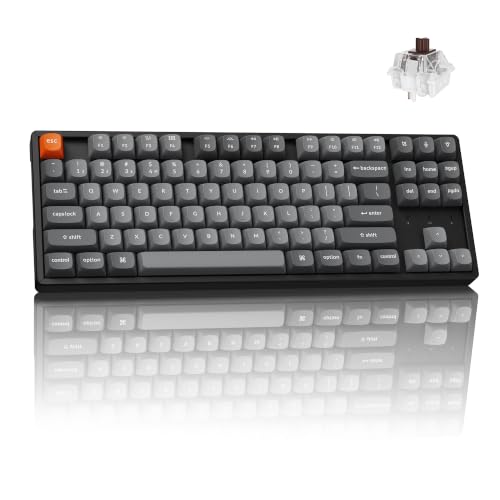
Keychron K8 Max — the complete tri-mode tenkeyless
Badge: Best illustration of tri-mode done fully
- Layout: tenkeyless
- Connection: 2.4 GHz, Bluetooth 5.1, USB-C wired
- Switches: hot-swappable (Brown variant listed)
- Frame: aluminium
- Software: QMK programmability
The K8 Max is the reference student for this explainer: a tenkeyless board that implements all three modes without hierarchy confusion — dongle for the gaming or main machine, Bluetooth slots for the laptop and tablet, cable for charging and for the BIOS screen — and switches between them with the physical directness the system needs. Its aluminium frame and hot-swap switches make it a long-term platform, and QMK support means its keymap, like its connections, is yours. If you buy one board to learn the tri-mode life on, this is the syllabus.
- Strengths: all three modes, properly implemented
- Strengths: aluminium build and hot-swap longevity
- Strengths: QMK keymaps travel with the board
- Trade-offs: tenkeyless only
- Trade-offs: premium tier for a TKL
- Trade-offs: heavier than travel-first boards
Best for: one-board desks with several machines and mixed duties. Not suited for: number-pad users or ultralight travellers.
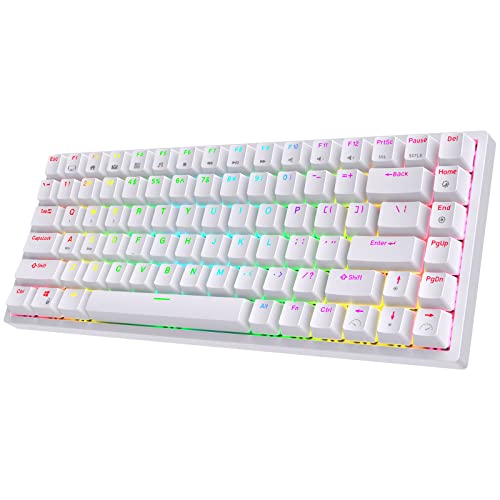
RK Royal Kludge RK84 — tri-mode at a value price
Badge: Best budget tri-mode board
- Layout: 75 percent, 84 keys
- Connection: Bluetooth 5.0, 2.4 GHz, USB-C wired
- Switches: hot-swappable
- Battery: high-capacity cell (design focus)
- Extras: RGB backlighting
The RK84 is the proof that tri-mode is a solved, affordable technology rather than a premium feature: all three connections, hot-swap sockets and a large battery in a 75 percent board at a value tier. It is the board to recommend to the buyer whose desk is a laptop, a tablet and a gaming PC in rotation and whose budget is a fact. Its compromises are polish — software, documentation and finish sit a tier below the Keychron — but the connections themselves, which are this guide’s subject, are complete and honest.
- Strengths: the full tri-mode system at a value price
- Strengths: hot-swap and a big battery
- Strengths: compact 75 percent footprint
- Trade-offs: software polish trails the leaders
- Trade-offs: finish and documentation are budget-tier
- Trade-offs: Bluetooth version is the older 5.0
Best for: multi-device users on a budget. Not suited for: buyers who want premium finish and software.

Logitech MX Keys S — the receiver done professionally
Badge: Best for secure, managed multi-device work
- Layout: full-size, low profile
- Connection: Bluetooth and Logi Bolt receiver, 3 devices
- Keys: quiet scissor keys, smart backlighting
- Software: Logi Options+ with Smart Actions
- Battery: USB-C rechargeable
The MX Keys S represents the professional dialect of the dongle idea: Logi Bolt, a receiver standard built on Bluetooth Low Energy technology with enterprise security and reliability as its design brief. It teaches an important nuance for this explainer — “2.4 GHz” on a spec sheet is a band, not a protocol, and what matters is the engineering of the link, which in Bolt’s case targets crowded offices and managed fleets rather than gaming speed. For the multi-device professional, its three-device switching across Bluetooth and Bolt is the smoothest implementation in this guide, and its full-size layout serves the desk-bound end of the tri-mode life. It lacks a wired playing mode in the gaming sense — its cable charges — which is precisely the kind of distinction this explainer exists to make visible.
- Strengths: the most polished multi-device switching here
- Strengths: Bolt’s security suits managed workplaces
- Strengths: superb typing feel and backlight
- Trade-offs: not a gaming link; no wired play mode
- Trade-offs: not mechanical
- Trade-offs: premium price
Best for: professionals pairing across work machines. Not suited for: gamers who need the dongle’s speed.
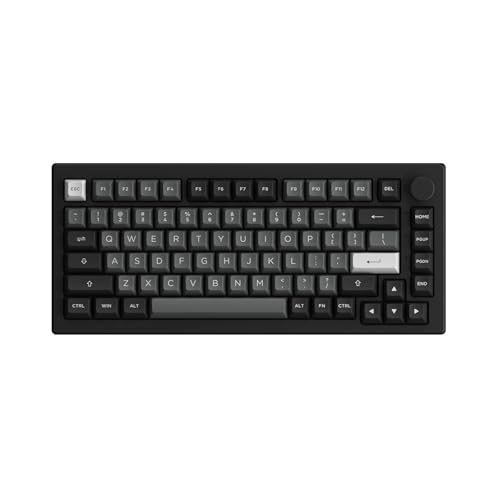
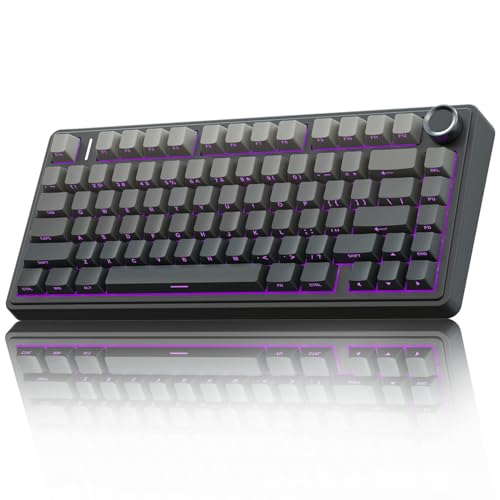
Akko 5075B Plus — tri-mode in the enthusiast dialect
Badge: Best tri-mode board for keyboard enthusiasts
- Layout: 75 percent with knob
- Connection: 2.4 GHz, Bluetooth, USB-C wired
- Switches: hot-swappable, V3 Creamy Yellow Pro (variant listed)
- Keycaps: PBT double-shot, ASA profile
- Extras: gasket-era sound tuning, RGB
The Akko shows what tri-mode looks like when an enthusiast brand builds it: the three connections wrapped around a sound-tuned, hot-swappable 75 percent board with a knob and PBT caps — the board from the pilot programme’s own guide family, and a reminder that connection technology and keyboard craft are separate axes. A board can have every mode and a mediocre typing feel, or one mode and a glorious one; the 5075B Plus refuses the trade. Its dongle serves a gaming-capable link for the main machine while its Bluetooth slots carry the laptop and tablet, which is the tri-mode pattern in its natural habitat.
- Strengths: full tri-mode plus enthusiast typing craft
- Strengths: knob, PBT caps and hot-swap platform
- Strengths: sound-tuned build
- Trade-offs: 75 percent layout compromises apply
- Trade-offs: software is functional, not class-leading
- Trade-offs: variant sprawl when buying
Best for: enthusiasts who want connections and craft together. Not suited for: full-size loyalists or software-first buyers.
Assigning Your Machines: A Worked Tri-Mode Setup
Theory becomes useful when it is assigned, so here is the canonical tri-mode desk, mapped. The main machine — the gaming PC or the primary workstation — takes the dongle: it gets the fastest, pre-boot-capable link, and the dongle lives in a front or desk-level port, never buried behind a tower, because placement is half the link’s quality. The laptop takes Bluetooth slot one: it moves, it travels, it docks and undocks, and Bluetooth’s pairing survives all of that without a receiver to transplant. The tablet or phone takes Bluetooth slot two, for the couch, the kitchen and the second-screen work where a keyboard turns a consumption device into a writing one. The cable lives in the desk drawer and comes out for two jobs: the weekly charge, during which the board simply becomes wired and keeps working, and any moment of doubt — a pairing confusion, a firmware update, a BIOS screen on a machine whose dongle is elsewhere. Set up this way, mode switching becomes a small set of habits rather than a settings adventure: dongle at the desk, Bluetooth on the move, cable when in doubt. The boards above all support some version of this map; the differences are in how many Bluetooth slots they offer and how the switching is invoked, which is why those details, boring as they look on a spec sheet, deserve a buyer’s attention.
Battery: The Hidden Axis of the Comparison
Battery life is where the three connections’ personalities show most plainly, and where product-page numbers mislead most reliably. The figures manufacturers quote are almost always Bluetooth figures with lighting off — the most flattering combination — and the same board on its dongle with RGB at full brightness can drain in a small fraction of that time. The honest mental model: the radio mode sets the floor of consumption, and lighting spends the rest. Bluetooth’s frugality is real and structural, which is why travel boards lean on it and why a tri-mode board used mostly on Bluetooth can go months between charges. The dongle’s cost is the price of its polling — a thousand reports a second is a conversation that never pauses — and it is worth paying exactly where responsiveness matters. The practical discipline is unchanged by the chemistry: charge on a rhythm, dim the lighting to the point of legibility, and know which mode your board is in before blaming its battery. A board that “dies fast” is very often a board living on its dongle with its lighting at maximum, owned by someone who believes they bought a Bluetooth keyboard.
Interference and Range: The Physics Nobody Can Market Away
Both wireless modes share the 2.4 GHz band with Wi-Fi, microwaves, baby monitors and every other wireless peripheral in the building, and both cope by hopping frequencies and retrying — which is why wireless keyboards work at all in a modern apartment block. Their failure modes differ in texture. Bluetooth’s robustness is its design centre, and its typical failure is not interference but sleep: a board that dozes to save power and takes a perceptible beat to wake on the first key. Dongle links fail by placement: a receiver behind a metal case, under a desk, beside a USB 3 hub radiating noise into the band — the fix is a short extension cable and a metre of clear air, the single highest-value troubleshooting step in this entire subject, as the diagnostic guide at fix keyboard not working troubleshooting guide also concludes from the repair side. Range follows the same logic: both modes are honest across a room, both resent walls and metal, and the couch-distance use case is exactly where Bluetooth’s design brief and the dongle’s power meet comfortably. Buyers in genuinely hostile radio environments — dense offices, server rooms — should weight the wired mode and receiver-based professional links (Bolt and its kin) more heavily, and treat any wireless promise, from any brand, as a statement about a normal room.
Myth vs Fact, Connection Edition
Myth: “2.4 GHz and Bluetooth are the same thing at different speeds”
Fact: they share a frequency band and nothing else — different protocols, different pairing models, different design goals. The band is a street; the protocols are different languages spoken on it. This is also why a board can be excellent at one and ordinary at the other, and why “wireless” alone on a listing tells you almost nothing.
Myth: “Bluetooth keyboards always lag”
Fact: Bluetooth adds latency that matters in fast gaming and is undetectable in typing, browsing and media control — the tasks it was designed for. The lag stories come from gaming contexts and from very old Bluetooth implementations; a modern Bluetooth board on a laptop is a non-event, which is why every travel board in this cluster’s guides is Bluetooth-first.
Myth: “The dongle is outdated technology”
Fact: the dongle is how manufacturers take control of both ends of a link, and it remains the only wireless route to gaming-grade polling, pre-boot operation and receiver-standard security. It survives because it does jobs Bluetooth’s standard deliberately does not.
Myth: “Tri-mode means three times the problems”
Fact: tri-mode means three tools with a switch. The problems attributed to it are almost always mode confusion — a board on the wrong connection for the machine in front of it — which a labelled switch and a standardised slot map cure permanently.
Common Mistakes With Tri-Mode Boards
The first is gaming on Bluetooth because the board connected that way first, then blaming the board’s responsiveness. The second is burying the dongle and blaming interference. The third is treating all three Bluetooth slots as interchangeable and re-pairing constantly, instead of assigning slots to machines once and letting the map become memory. The fourth is judging battery life without noting the mode and lighting the judgement was made under. And the fifth is buying a Bluetooth-only board for a desk that needed pre-boot access or a dongle’s reliability — or the reverse, buying a dongle-dependent setup for a tablet-centred life. Every one of these mistakes is an assignment error, not a hardware error, which is the hopeful news this explainer exists to deliver: the technology is already good enough, and the skill is in the matching.
How the Switching Works: The Feature You Will Use Every Day
Specifications list connections; ownership is lived in the switching between them, and boards differ more here than in any radio specification. The best implementations make the active connection visible at a glance — an indicator light, a labelled switch position, an on-screen note — and make changing it a single deliberate action: a dedicated key, a slider with detents, a short key combination printed on the board itself. The worst implementations bury the mode in an unlabelled function combination, leave the user guessing which of three identical Bluetooth slots is live, and punish every machine change with a small ceremony of doubt. When you evaluate a tri-mode board, rehearse your actual day on it: desk PC to laptop to tablet and back, in the dark, in a hurry. The board whose switching you can perform blind is the board whose connections you will actually use as designed; the board whose switching requires the manual will live its life on one mode, and its other two connections might as well not exist. This is also why the canonical slot map matters: slot one is always the laptop, slot two is always the tablet, in every week and every room, because a map that changes is a map you must read, and a map you must read is a map that will eventually be read wrong in front of an audience.
Security: The Connection Property Nobody Markets
A keyboard is the most sensitive peripheral you own — everything you type, including every password, crosses its link — and the connections differ in their security posture in ways worth one clear paragraph. Modern Bluetooth pairing is encrypted, and current implementations are sound for ordinary life; the practical risks are procedural rather than cryptographic, like pairing in crowded radio environments or leaving stale pairings on shared machines. Receiver standards diverge by intent: gaming dongles prioritise speed, while Logitech’s Bolt was designed explicitly to enterprise security requirements, which is why managed workplaces that ban unknown receivers will often approve Bolt by name. Wired mode, as ever, is the zero-question option, and it is the right choice for the genuinely sensitive session on a genuinely untrusted machine. The balanced conclusion for ordinary buyers: any modern board in this guide is safe for home and professional life, the workplace’s own policy outranks any guide, and the user habit that matters most is housekeeping — remove pairings from machines you no longer own or no longer use, exactly as you would sign out of accounts on them.
A Short History of How Keyboards Lost Their Cables
The present system makes more sense with its past attached. The first wireless keyboards used infrared, like a television remote, and failed for the reason remotes fail: line of sight is a tyrant at a desk. Radio-frequency boards followed, proprietary and dongle-bound, and established the pattern the 2.4 GHz gaming link still follows — a private conversation between a board and its receiver. Bluetooth’s arrival in keyboards was slower than its arrival everywhere else, because early Bluetooth stacks were pairing theatre: dropped connections, forgotten devices, wake-up lag that taught a generation of users that wireless keyboards were unreliable, a reputation the technology spent a decade outliving. The modern settlement — Bluetooth Low Energy for convenience, perfected proprietary links for performance, and tri-mode boards refusing to choose — is less a compromise than a maturity: each technology finally doing the job its design brief always described. Understanding that history inoculates a buyer against two opposite errors: dismissing Bluetooth for sins its grandparents committed, and assuming the dongle is a legacy crutch rather than a deliberate engineering choice that outlived infrared, early Bluetooth and several fashion cycles by being right about one thing — a controlled link is a fast link.
Four Desks, Four Correct Answers
The comparison resolves differently at every desk, and walking four of them is the fastest way to make the system intuitive. The gaming desk is the dongle’s home turf: the PC is fixed, the port is free, the games are fast, and Bluetooth’s role is the honourable second shift — the phone on the desk stand, the tablet on the couch later. A gaming-first tri-mode board, or even a dongle-and-wired board, serves this desk completely, and the travel boards’ Bluetooth elegance would be wasted on it. The hybrid work desk is tri-mode’s natural habitat and this explainer’s centre of gravity: a work laptop that docks and travels, a personal machine, a tablet — the canonical map from the setup section, with Bolt-class receivers earning their premium where an employer’s security policy is a real character in the story. The travelling desk inverts the hierarchy: Bluetooth is the primary citizen, the dongle is dead weight in the bag, and the cable is the insurance — the pattern the travel roundup at the best travel keyboards for laptops and mobile work builds its whole shortlist around. The cockpit and the couch — the sim rig and the living room — split the difference: distance and obstruction argue for the dongle’s robustness where a receiver can live near the board, while the sheer device-hopping of a media setup argues for Bluetooth’s universality, and the sim guide’s placements in keyboards for sim racing and flight sim setups show the dongle winning that argument at tray distance. Four desks, four weightings, one technology set: that is the actual content of the phrase “tri-mode”, and a buyer who can name their desk can skip most of the comparison shopping the phrase usually generates.
What the Words on the Box Don’t Tell You: A Buyer’s Checklist
Finish the explainer with the questions that sort honest tri-mode boards from decorated ones, because the label is now applied generously. First: how many Bluetooth slots, really — one, or the three the system wants? A single-slot Bluetooth board wearing a tri-mode badge is a dual-mode board with ambitions. Second: is the wired mode a playing mode or a charging mode? Both are legitimate; only one serves the BIOS-and-backup role, and the listing rarely volunteers the distinction. Third: where does the dongle live when it travels — a storage slot in the board is a small feature that prevents the category’s most common obituary. Fourth: how is the active mode indicated and changed, per the switching section above? Fifth: are the quoted battery figures Bluetooth figures, and is the lighting’s cost acknowledged anywhere? Sixth: does the board remember its mode, or does it wake on a default that fights your map? A board that answers all six plainly — in its manual if not on its box — is a board designed by people who use the system they sell. The four boards reviewed in this guide each pass that audit in their own dialect and at their own price, which is precisely why they were chosen to carry an explainer rather than merely a roundup. Readers speccing a wireless-first desk build from scratch will find the board-selection side of the same questions worked through as a full buying exercise in the build your first custom keyboard guide, whose connectivity chapter applies this explainer’s system to a parts list.
Latency, Stated Precisely Enough to Be Useful
Because this comparison is so often reduced to a latency contest, the numbers deserve one careful, hedged paragraph rather than a slogan. A wired or gaming-dongle keyboard polling at 1000 Hz delivers a keystroke to the computer with a delay whose variable part is on the order of a millisecond. A Bluetooth keyboard’s delay is larger and, more importantly, less consistent — connection intervals and sleep behaviour make it a range rather than a point, and in fast games that inconsistency, more than the average, is what players feel as softness. Human perception and the rest of the chain put both figures in context: a display adds several milliseconds, a game engine’s frame adds more, and the typist’s own neurology adds hundreds. The conclusion the numbers actually support is the one this guide has argued throughout: for typing and general computing the difference is below any threshold that matters, for competitive gaming the dongle and the wire are the correct tools, and anyone selling a keyboard for office work on the basis of its latency is selling you a number your work cannot perceive. Precision about small numbers is a virtue; pretending they dominate every use is a marketing strategy.
Living With Dongles: A Small Organisational Discipline
The dongle is the system’s one physical liability — small, dark, identical to its cousins, and essential — and households that run several wireless peripherals accumulate a drawer of anonymous receivers and a folklore of loss. The disciplines that civilise it are brief. The dongle’s home is the machine it serves, permanently, in a port chosen once; it travels only when the board travels, and then it travels in the board’s own storage slot or in the same pouch as the board’s cable, never loose in a bag’s general population. Label the spares: a dot of paint or a strip of tape distinguishes the keyboard’s receiver from the mouse’s in the drawer, and the five seconds that takes is repaid the first time a pairing must be rebuilt under time pressure. Know your board’s replacement policy before you need it — some makers sell and re-pair replacement receivers, others treat a lost dongle as a lost mode — because that policy, invisible at purchase, is a real component of a tri-mode board’s long-term value. And keep the cable: the wired mode is the dongle’s understudy, and a household that keeps it coiled in the desk drawer has quietly insured itself against the entire category of receiver misfortune.
When a Mode Misbehaves: A Diagnostic Order for Each Connection
Each connection fails in its own dialect, and diagnosing by dialect is faster than diagnosing by hope. Bluetooth troubles announce themselves as pairing confusion — the board connected to the wrong machine, a slot overwritten, a host that has forgotten the relationship. The cure order is: confirm the slot, confirm the host’s Bluetooth is on and not connected to a stale entry, remove and re-pair as the last step rather than the first, and check the board’s battery before any of it, because a dying cell impersonates a radio fault convincingly. Dongle troubles announce themselves as range and interference — stutters, dropped keys, behaviour that changes when you move. The cure order is placement, placement, placement: receiver out of the rear I/O, onto the desk, away from USB 3 hubs and metal, within a metre or so of the board; then firmware; then a different port. Wired troubles are the rarest and the plainest: a cable, a port, or a board in the wrong mode — swap the cable before suspecting anything deeper, because cables are the one component in the whole system designed by physics to fail first. Across all three dialects, one master key unlocks most mysteries: switch the board to a different mode and see whether the fault follows the board or stays with the connection. That single test, thirty seconds long, separates a sick board from a sick link, and it is available only because your keyboard has three modes to compare — tri-mode’s hidden diagnostic dividend.
What Comes Next: The Direction of Keyboard Connections
The system’s future is visible in outline, and a buyer planning a multi-year board should know the weather. Bluetooth itself keeps improving in the directions that matter here — lower energy, better coexistence, faster wake — and each revision narrows the convenience gap without touching the gaming argument. Proprietary links are pushing polling higher and radios smarter, mostly for gaming’s benefit. The more interesting movement is convergence at the desk: receiver standards that unify a household’s peripherals under one dongle, boards that hand off between machines by proximity or by software rather than by slot keys, and operating systems that treat a keyboard as a roaming citizen of all your devices rather than a subject of one. None of it obsoletes a good tri-mode board bought today, because the underlying division of labour — a standard for the world, a private link for speed, a wire for certainty — is a property of physics and institutions, not of this year’s product cycle. Buy the system as it stands, from a maker whose firmware support has a track record, and the board will remain a citizen of your desk’s future rather than a refugee from its past.
One Board, One Day: The System in Motion
Abstractions settle when they are walked through a day, so here is the tri-mode board’s ordinary epic. Morning: the board sits at the desk on its dongle, waking the main PC — pre-boot capable, so it types the login password that a Bluetooth board could not — and the workday runs on the fast link without a thought spared. Midday: the laptop is undocked for a meeting; the board switches to Bluetooth slot one and goes along, because in this household the board, not the laptop’s own keyboard, is where the hands live. Afternoon: back at the desk, dongle again, and a firmware update arrives; the cable comes out of the drawer for the update and stays for an hour’s charging, during which the board is simply a wired keyboard and the work never notices. Evening: the tablet on the couch takes Bluetooth slot two for messages and a document review, at a distance and a pace where Bluetooth’s design brief is exactly right. Night: the board sleeps, in whichever mode it was left, sipping almost nothing. Nothing in that day was a feature demonstration; all of it was the absence of friction, repeated. That is what the three connections are for — not a specification to admire, but a day that never once asks you to think about how your keyboard is attached to your life.
Polling, for Readers Who Do Not Game
One term in this comparison intimidates non-gamers unnecessarily, and it deserves a demystifying paragraph of its own. Polling rate is simply how often per second the keyboard reports its state to the computer: a thousand times a second at the gaming standard, far fewer in power-saving designs. Its only consequence is a ceiling on responsiveness — a key pressed just after a report waits, on average, half the interval for the next one. For a typist producing perhaps eight keystrokes a second, even a modest polling rate is a motorway built for a bicycle: the capacity is not the constraint, and never will be. Polling matters where inputs arrive in bursts faster than intention — competitive games, and essentially nowhere else in ordinary computing. The non-gaming buyer should therefore read polling figures as a gaming credential only, and should never let a heroic polling number outrank the things their work can actually feel: the switching quality, the slot count, the battery honesty and the keys themselves. Specifications are a language, and like any language, fluency is knowing which words in the sentence are the load-bearing ones for you.
The Decision, Compressed for the Buyer in a Hurry
Everything above reduces to a short procedure. Count your machines. If the honest answer is one fixed computer, you do not need this explainer’s full system — a wired board or a dongle board will serve you completely, and your money belongs in the keys. If the answer is two or more, and one of them is a tablet or a phone, you need Bluetooth with multiple slots, and the only remaining question is whether the main machine also games or demands pre-boot access — if it does, tri-mode with a proper dongle is your category, and the four boards reviewed here are its representatives at four prices and personalities. If your work is managed by an employer’s security policy, start from the approved-receiver list rather than from any guide, and let the MX Keys S pattern — Bolt plus Bluetooth — be your template. Then, whichever board arrives, spend the first ten minutes on the unglamorous setup that this explainer has argued is the actual product: assign the slots, place the dongle, coil the cable into its drawer, and write the map down where the household can find it. The connections are engineering; the map is yours, and it is the part that will still be working perfectly when the board is old.
Why This Comparison Will Outlive Every Board in It
Explainers date themselves when they attach to products; this one has tried to attach to a structure, and the structure is worth naming plainly at the end. There will always be a universal standard, maintained for everyone’s benefit, optimised for compatibility and efficiency — that is Bluetooth’s institutional role, and no proprietary link will ever replace it, because the world’s devices cannot each carry a hundred dongles. There will always be private links, built by makers who control both ends, optimised for the one job their customers care most about — that is the dongle’s role, and no standard will ever replace it, because standards are negotiated compromises and speed is not negotiable. And there will always be the wire, which asks nothing, negotiates nothing and works in the dark before anything has booted. A keyboard that offers all three is not indecisive; it is literate in the structure of the problem. Readers who internalise that structure will be able to read any future keyboard’s connection list — including technologies this explainer has not named, because they have not been announced — and know within a minute which jobs it can own and which it is merely visiting. That literacy, more than any of the four boards above, is what this guide was written to deliver.
A Final Practical Note: Firmware, the Invisible Fourth Connection
One component of the system never appears in the comparison tables, because it is not a connection — it is the software inside the board that decides how all three connections behave. Firmware governs the sleep timers that make Bluetooth feel sleepy or alert, the switching logic that makes tri-mode graceful or clumsy, the battery reporting that makes charging a plan or a surprise, and the radio behaviour that firmware updates quietly improve for years after purchase. Two boards with identical connection lists can therefore live completely differently, and the difference is usually firmware maturity. The buying consequence is simple and worth the paragraph: favour makers with a visible firmware track record — updates that exist, release notes that say something, a support page that treats the board as a living product. The boards chosen for this explainer’s reviews all come from makers with that record, which is not a coincidence but a criterion. And the ownership consequence matches it: install the updates, particularly in a board’s first year, because the connection you bought is partly a promise, and firmware is where the promise is kept.
The Glossary, for the Reader Who Skipped to the End
Tri-mode: a keyboard offering Bluetooth, a 2.4 GHz dongle link and a wired USB connection, switchable by the user. Dongle: the small USB receiver that speaks a proprietary 2.4 GHz protocol to its paired keyboard. Pairing: the one-time introduction after which a Bluetooth device and a host remember each other. Slot: one of a board’s stored Bluetooth pairings, each assigned to one host. Polling rate: how many times per second the keyboard reports its state to the computer. Connection interval: Bluetooth’s negotiated rhythm of check-ins between board and host — the hidden variable behind its latency and its battery life alike. Pre-boot: the state before an operating system loads, where dongle and wired keyboards work and Bluetooth does not. Logi Bolt / LIGHTSPEED / HyperSpeed: makers’ names for their receiver links — the first engineered for enterprise security, the latter two for gaming speed. Keep this glossary beside the comparison table and every keyboard listing you meet from now on will read like a plain description rather than a spell.
One Last Distinction: “Wireless” Is Not a Specification
If this explainer leaves a single habit behind, let it be suspicion of the word “wireless” standing alone. On a listing, “wireless” can mean Bluetooth only, dongle only, both, or — in the budget tier’s darker corners — a proprietary link with no Bluetooth at all, sold into a tablet-shaped disappointment. The specification that matters is always the enumerated one: which connections, how many Bluetooth slots, whether the cable plays or merely charges, and what the dongle’s protocol is engineered for. Every frustration in this subject’s history — the gaming board that felt soft, the tablet that would not pair, the BIOS screen that would not answer — traces back to a purchase made on the word rather than on the enumeration. Read listings the way this guide has read the technology: as a division of labour waiting to be assigned. Do that, and the phrase that titles this article stops being a comparison to memorise and becomes what it should have been all along — a description of your own desk, in your own words, with the right connection on every machine in it.
Frequently Asked Questions
Which connection is best for gaming: Bluetooth or 2.4 GHz?
2.4 GHz, via the dongle, without qualification. Its polling and latency are engineered for play and effectively match a wired board. Bluetooth is for your other machines and your typing life. Most tri-mode boards make the choice a physical switch — learn where it is before your first match, not during it.
Why do tri-mode keyboards exist if one connection were enough?
Because no single connection owns every job: Bluetooth owns mobility and multi-device convenience, the dongle owns speed and pre-boot reliability, and the cable owns certainty and charging. A modern desk needs all three jobs done, and a tri-mode board is simply a keyboard that refuses to make you choose which job to abandon.
Does using the 2.4 GHz dongle drain the battery faster than Bluetooth?
Yes — the dongle’s high polling rate is a continuous conversation, while Bluetooth Low Energy is designed to sip. Lighting usually matters even more than the radio mode. Expect Bluetooth battery life to be measured in weeks or months and dongle life in days or weeks, and charge on a rhythm rather than on warnings.
Will a 2.4 GHz dongle work in the BIOS or on a login screen?
Yes — to the computer, a dongle keyboard looks like a wired USB keyboard, so it works before the operating system and its Bluetooth stack load. This is a decisive advantage for anyone who maintains their own PC, and a reason to keep the dongle paired to your main machine even if you type on Bluetooth day to day.
Does the brand of dongle link matter, or are they all the same?
The engineering quality varies more than the shared “2.4 GHz” label suggests: the leading gaming links and the enterprise Bolt standard are mature, heavily tested systems, while the cheapest no-name links can be noticeably less robust in crowded radio environments. The practical rule is to buy the link from a maker whose name is on the protocol — or whose boards are widely used enough that the link’s reputation is public knowledge — and to treat an unbranded “2.4G” claim on a bargain board as a promise to verify in your own room during the return window.
How many devices can a tri-mode keyboard really serve?
Typically four homes: one via the dongle, up to three paired over Bluetooth (board-dependent), and any machine via the cable. In practice, most owners settle into the canonical map — dongle for the main machine, Bluetooth for the laptop and tablet, cable for charging and doubt — and the switching becomes a habit rather than a feature they think about.
Match the connection to the job and the tri-mode board stops being a specification and becomes a system: dongle where speed and certainty live, Bluetooth where your life moves, cable where doubt goes to die. The four boards above each implement that system at a different price and personality — choose the implementation that fits your desk, assign your slots once, and the wireless question will never need asking again. That is the whole subject, honestly stated: three connections, three jobs, one keyboard that holds them all, and an owner who knows which job is which. Everything else — the brands, the protocols’ names, the polling figures — is commentary on that single, durable arrangement, and you are now equipped to read the commentary without mistaking it for the text.