Disclosure: As an Amazon Associate, kajuandouglas.com earns from qualifying purchases. Links on this page are affiliate links; they cost you nothing extra. Prices and availability change often, so check the current Amazon listing before you buy.
Steelseries Keyboards Complete Guide Apex Series Explained: The Family, Decoded
Readers who land on a steelseries keyboards complete guide apex series explained are usually stuck on the same puzzle: SteelSeries sells keyboards that all say Apex, span an enormous price range, and differ mainly in a switch technology with a trademarked name. This guide untangles the family properly. The Apex line is organized by a simple logic once you see it: the number tells you the tier, the switch tells you the philosophy, and the size tells you the desk. Apex Pro models carry OmniPoint adjustable magnetic switches, the company’s flagship sensing technology. Apex 9 carries fast optical switches. Apex 3 carries quiet membrane-style gaming switches at the entry tier. Five verified models are reviewed below, covering each branch, so the guide can be concrete about what your money buys at every step of the ladder.
The short version: buy Apex Pro Gen 3 if you want the fullest expression of the brand, adjustable actuation, rapid trigger class features, and an OLED smart display; buy the Apex Pro TKL Gen 3 for the same technology in the competitive size; buy the Apex 9 TKL for optical speed with hot-swappable switches; and buy the Apex 3 models, TKL or full-size, when quiet, simple, spill-resistant value is the brief. Everything below expands those sentences into the detail a purchase deserves, including the honest limits of each tier.
In this guide
OmniPoint, Explained Without The Trademark Fog
SteelSeries’ signature technology deserves a plain-English paragraph, because it is the reason the Pro models cost what they cost. OmniPoint switches are magnetic: a sensor measures the key’s position continuously rather than waiting for a contact to close. That single design enables the family’s headline behaviors. Actuation can be adjusted per key, so WASD can fire at a hair’s touch while the ultimate ability key demands a deliberate press. Rapid trigger behavior can reset a key the instant it begins to rise, enabling faster repeated inputs and the counter-strafing technique movement shooters reward. Presets can be saved per game, protection modes can guard against accidental double inputs, and features like Rapid Tap prioritize the most recent directional input. The Gen 3 generation, in both Pro models below, refines this system with its HyperMagnetic implementation and bundles it with the OLED display and PBT keycaps. None of this is magic; it is sensing, and its value is exactly proportional to how much your games reward input nuance, a proportionality this guide will keep repeating because it is the family’s central buying truth.
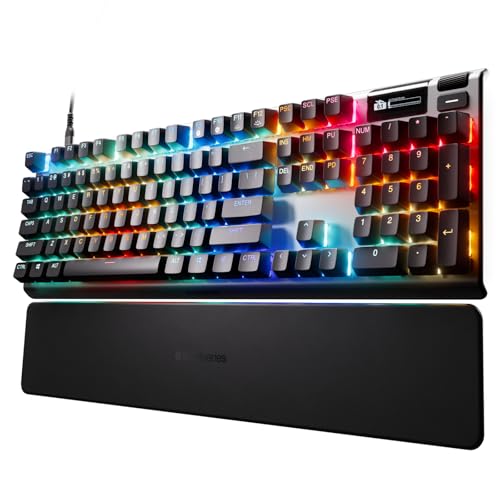
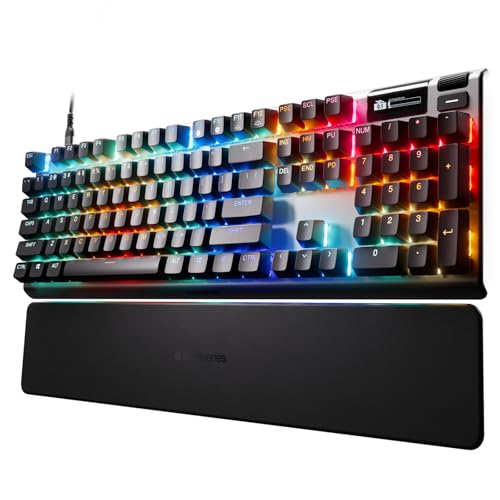
SteelSeries Apex Pro Gen 3 (Full-Size)
Badge: The flagship, complete. The full-size Apex Pro Gen 3 is the line’s maximal statement: OmniPoint 3.0 HyperMagnetic switches with adjustable actuation, rapid trigger, game-ready presets, protection mode, Rapid Tap, an OLED smart display, per-key RGB, doubleshot PBT keycaps, and USB-C connection. It is built for the player who wants every feature the brand sells, in the size that keeps the numpad.
- Layout: full-size
- Switches: OmniPoint 3.0 magnetic, adjustable actuation
- Extras: OLED display, rapid trigger, presets, protection mode
- Keycaps: doubleshot PBT
- Positioning: flagship tier
Strengths
- The most complete input-tuning toolkit in the family, per key and per game.
- The OLED display is genuinely useful for settings, profiles, and system glances.
- PBT caps and flagship build make it the line’s best long-term desk anchor.
Trade-offs
- Flagship pricing buys sensing that casual players will underuse.
- Full-size footprint costs the mouse room competitive players guard.
- The feature depth demands setup time to repay its price.
Best for: enthusiasts and competitive players who will actually tune actuation per game. Not suited for: value buyers or compact desks. Check price on Amazon

SteelSeries Apex Pro TKL Gen 3
Badge: The flagship, tournament-sized. The TKL Gen 3 carries the same OmniPoint 3.0 analog magnetic system, rapid trigger, Rapid Tap, protection mode, OLED, RGB, and PBT caps into the tenkeyless frame competitive players actually travel with. For most serious players, this, not the full-size, is the flagship that matters, because nothing in the sensing story is surrendered to the smaller size.
- Layout: tenkeyless
- Switches: OmniPoint 3.0 magnetic, adjustable
- Extras: OLED, rapid trigger, protection mode
- Keycaps: doubleshot PBT
- Positioning: flagship competitive tier
Strengths
- Full flagship sensing in the size that maximizes mouse room.
- The competitive community’s reference feature set, presets included.
- Travels to events without the full-size board’s bulk.
Trade-offs
- No numpad, which hybrid workers will feel in spreadsheets.
- Same flagship price logic as its big sibling.
- Analog features remain only as valuable as the games you play.
Best for: competitive players who want the complete Pro technology. Not suited for: numpad-dependent work. Check price on Amazon

SteelSeries Apex 9 TKL (Optical)
Badge: Optical speed, hot-swap freedom. The Apex 9 TKL takes the other fast road: OptiPlex optical switches that actuate with light, in a hot-swappable TKL esports frame with an aluminum alloy body and doubleshot PBT caps. It trades the Pro’s analog adjustability for optical simplicity and the ability to swap switches, a trade many players prefer once it is stated plainly.
- Layout: tenkeyless esports
- Switches: optical, hot-swappable
- Build: aluminum alloy frame
- Keycaps: doubleshot PBT
- Positioning: premium optical tier
Strengths
- Optical actuation is fast, consistent, and free of contact wear.
- Hot-swap optical sockets keep switch experimentation alive, rare in this class.
- The metal frame gives it a solidity the entry models cannot imitate.
Trade-offs
- No per-key adjustable actuation or analog presets; speed is the whole story.
- Optical switch selection is narrower than the mechanical ecosystem.
- Premium pricing sits close to the Pro TKL’s territory on sale days.
Best for: players who want optical speed with a metal build and swap freedom. Not suited for: analog tuners. Check price on Amazon

SteelSeries Apex 3 TKL
Badge: The quiet value TKL. The Apex 3 TKL is the family’s diplomat: whisper-quiet gaming switches, 8-zone RGB, an IP32 water and dust resistance rating for the spill-prone desk, and the tenkeyless size, at the entry tier of the line. It is not mechanical in the purist sense and does not pretend to be; it is a gaming keyboard engineered for quiet rooms and shared spaces.
- Layout: tenkeyless
- Switches: Whisper Quiet gaming switches
- Extras: 8-zone RGB, IP32 resistance
- Positioning: entry tier
Strengths
- Genuinely quiet, the Apex a household or dorm can share.
- Spill and dust resistance is a practical virtue few gaming boards offer.
- The TKL size keeps the competitive footprint at an entry price.
Trade-offs
- The switch feel is membrane-adjacent; mechanical purists should look up the ladder.
- Zone lighting rather than per-key RGB.
- No sensing features of any kind; this is the simple end of the family.
Best for: quiet rooms, first gaming boards, and spill-prone desks. Not suited for: switch enthusiasts. Check price on Amazon

SteelSeries Apex 3 (Full-Size)
Badge: The quiet value full-size. The full-size Apex 3 adds the numpad, 10-zone RGB, the same IP32 resistance and whisper-quiet switches, and a premium magnetic wrist rest that its TKL sibling omits. It is the family’s answer for the home desk that works all day and games at night without waking anyone.
- Layout: full-size
- Switches: Whisper Quiet gaming switches
- Extras: 10-zone RGB, IP32 resistance, magnetic wrist rest
- Positioning: entry tier
Strengths
- The complete quiet desk package, numpad and wrist rest included.
- Spill resistance suits family and kitchen-adjacent desks honestly.
- The wrist rest is a real ergonomic inclusion at this tier.
Trade-offs
- Same membrane-adjacent feel caveat as the TKL.
- Full-size footprint returns the mouse-space question.
- Gaming performance features are basic by design.
Best for: home offices and family desks that game quietly. Not suited for: competitive or mechanical-first buyers. Check price on Amazon
The Ladder, Explained As Money
Read the family as three purchases wearing five bodies. The Apex 3 purchase buys quiet, resistance, and the SteelSeries look at the price of a nice office keyboard; its value is measured in household peace. The Apex 9 purchase buys speed hardware, optical actuation in a metal frame, for players who want performance without a software-defined switch. The Apex Pro purchase buys a sensing platform: the board as an instrument you tune per game, with the display and presets as its interface. Neither purchase is the others’ failure. The mistake the ladder invites is buying the Pro for the logo while playing games that cannot hear its features, or buying the Apex 3 for a competitive habit it was never built to serve. Match the purchase to the play, and every rung is honest.
Buying Guide: Placing Yourself In The Family
Start with your loudest constraint. If it is noise, the family has already decided for you: Apex 3, in the size your desk wants. If it is competitive performance in movement shooters or rhythm titles, the decision is between the Pro TKL’s analog tuning and the Apex 9’s optical directness, and the tiebreaker is temperament: tuners take the Pro, minimalists take the 9. If it is one board for everything at the highest level, the full-size Pro is the family’s flagship for a reason. If it is budget with dignity, the Apex 3 models are not consolation prizes but the correct engineering for quiet value. Software comfort matters too: the Pro line repays owners who enjoy configuration, while the Apex 3 asks almost nothing, and that difference in daily friction is worth as much as any switch specification.
How To Set Up An Apex Pro For Your Games
- Begin with one game and one profile; resist configuring the whole library on day one.
- Set movement keys to a shallow actuation and deliberate keys, grenades, ultimates, to a deeper one, so excitement cannot misfire them.
- Enable rapid trigger on the movement cluster and play a full session before judging; the technique change is physical and takes matches to settle.
- Use protection mode where accidental double inputs have actually cost you, not everywhere by default.
- Save the profile, name it for the game, and duplicate it as the starting point for the next title rather than starting from zero.
- Revisit after a week of play and adjust in small steps; actuation tuning is a dial, not a switch, and small turns are how dials are learned.
Common Mistakes When Buying Into The Apex Line
The first mistake is buying the flagship Pro for a game library of strategy, simulation, and single-player titles whose inputs cannot use analog nuance, then concluding the technology is hype. The second is dismissing the Apex 3 as not a real gaming keyboard when its buyer’s actual constraints, noise and spills and budget, make it the realest one in the family. The third is choosing full-size for the numpad you use twice a year while paying the mouse-room tax daily. The fourth is ignoring the OLED and presets after paying for them; the Pro line’s value is realized in software sessions, and owners who never open them bought the Apex 9’s board at the Pro’s price. The fifth is comparing the family only against itself, when the wider market’s Hall effect and optical boards, covered elsewhere on this site, set the prices SteelSeries must answer.
Final Recommendation
For most competitive players, the Apex Pro TKL Gen 3 is the family’s center of gravity: full sensing, correct size, nothing wasted. For the enthusiast who wants everything including the numpad, the full-size Pro Gen 3 is the flagship entire. For optical purists, the Apex 9 TKL. For quiet homes and first gaming desks, the Apex 3 in either size, chosen by numpad need. The Apex line rewards buyers who name their constraint first, because each of its tiers is a precise answer to a different one. Name it, buy the answer, configure it during its first week, and the family’s famous complexity collapses into what it was designed to be: one keyboard, correctly chosen, that disappears into your games and your work for years while its sensing quietly does things no ordinary switch can do.
The Wider Apex Family Tree
The five linked models are the current spine, but the family’s history explains its shape, and a complete guide should sketch the branches a shopper may meet in listings and older stock. The Apex 5 introduced a hybrid mechanical idea, pairing a membrane base with a mechanical-feeling click, aimed at buyers who wanted theatre at a mid price. The Apex 7 line carried traditional mechanical switches with the OLED display, and many owners still type on them happily; in the current range its role has been absorbed upward by the Pro models and downward by the 9. The Apex Pro’s earlier generations established OmniPoint’s reputation and remain common on the second-hand market, where the generational differences, refined sensing, updated presets, better caps on Gen 3, should be priced accordingly. Reading the family historically prevents two errors: paying current money for yesterday’s tier because the names rhyme, and dismissing a well-priced older Pro whose sensing remains formidable. The name Apex is a decade of keyboards, not a model, and this guide’s five are its present tense.
GG Software And The Engine Ecosystem
SteelSeries boards live inside the GG software platform and its Engine configuration layer, and the ecosystem is part of what each tier buys. At the Pro end, Engine is where actuation maps, rapid trigger settings, presets, and OLED content are authored, and it integrates with the company’s broader peripheral family for unified profiles and lighting. The honest assessment matches the pattern of all brand ecosystems: depth and integration in exchange for a substantial application that must be present for full value, with onboard storage softening the dependency for travel and second machines. Apex 3 owners need the software least, which is part of their tier’s simplicity dividend. Buyers allergic to vendor software should weight the Apex 9’s hardware-direct character and the whole market’s open-firmware alternatives, while buyers already inside the SteelSeries ecosystem, headsets, mice, and all, will find the Pro line’s integration a genuine multiplier rather than a tax.
Typing Feel And Sound, Tier By Tier
The family’s voices are as tiered as its prices. The Apex 3 models are the quiet ones by design, a soft, damped press that shared rooms and microphones forgive, with a feel that prioritizes smoothness over mechanical eventfulness. The Apex 9’s optical switches type with a clean, consistent linear character and the solidity its metal frame lends the whole board, a voice closer to a well-built mechanical TKL than its switch technology might suggest. The Pro models type with the confidence of the flagship tier: PBT caps, composed case sound, and the peculiar satisfaction of keys whose behavior you have personally tuned, which subtly changes how a board feels even when the hardware is identical. None of the five is a thock-tuned enthusiast board in the custom sense, and buyers chasing that specific acoustic should cross-shop the gasket world; the Apex family spends its engineering on sensing and completeness first, and its sound, while respectable throughout, is the supporting actor rather than the lead.
Travel, Tournaments, And The Second Desk
The TKL models are the family’s travelers, and the Pro TKL in particular is built for the circuit: compact frame, detachable-class convenience through USB-C, onboard profiles that carry your tuning to a tournament PC without its software stack, and sensing that stays identical on any machine. The Apex 9 TKL travels nearly as well and adds the hot-swap party trick of a switch swap in a hotel room. The full-size models are anchors, and the Apex 3 full-size in particular is the board a household buys once and arranges a room around. For the two-desk life, the family’s software profiles make a Pro at the main desk and an Apex 3 at the quiet desk a coherent, cost-aware pairing within one ecosystem, a strategy this guide recommends more readily than two flagships, because the second desk’s constraints are usually noise and budget rather than sensing.
Presets, Protection Mode, And Rapid Tap In Real Play
The Pro line’s software features deserve translation into match language, because their value is situational in ways spec sheets flatten. Game-ready presets are starting configurations for popular titles, useful less for their exact values than for teaching new owners what tunable means; most players will personalize within a week, and the presets’ real gift is the first evening’s head start. Protection mode addresses a specific heartbreak, the accidental double activation on ultra-shallow keys, by requiring cleaner intent on chosen keys; players who have ever thrown the wrong ability in a final fight understand its worth instantly, and players who have not should leave it off and keep the speed. Rapid Tap, the SOCD-style prioritization of the latest directional input, is the feature with the most direct competitive consequence in movement titles, cleaning up counter-strafes in a way that is felt within one session. The pattern across all three is the Pro line’s thesis restated: the hardware gives you input behaviors that binary switches cannot express, and each behavior is worth exactly the number of rounds it has ever decided for you, which every serious player can estimate more honestly than any reviewer can.
Durability And The Ownership Horizon
SteelSeries builds the Apex line to be kept, and the tiers age differently in ways worth projecting. The Pro models’ PBT caps will out-look the Apex 3’s caps across years of play, and their sensing has no contact surfaces to wear in the traditional sense, so their aging is mostly cosmetic and cable-deep. The Apex 9’s optical switches share that wear-free logic, with its metal frame aging the most gracefully of the five. The Apex 3 models trade those horizons for their price and their spill resistance, which is its own durability philosophy: surviving the accident beats aging beautifully in a drawer of good intentions. Across the family, the realistic service items are cables, caps, and wrist rests, all replaceable, and the brand’s retail scale makes support a more predictable experience than the boutique market offers. Buy the tier whose aging pattern matches your replacement temperament: the Pro for the decade desk, the 3 for the household that replaces on need.
When The Right Answer Is A Different Brand
A complete guide earns its authority at the exits. Leave SteelSeries if your first love is acoustic tuning, because the gasket-and-foam world builds boards whose sound is the headline in a way the sensing-first Apex line does not attempt. Leave if open firmware is a requirement, since the family’s intelligence lives in GG. Leave if wireless is non-negotiable at the flagship level and your chosen size or tier here is wired, because rival flagships have made wireless their summit feature. And leave if your budget is firmly entry-level and your room is private, where the wider market’s mechanical value boards give a switch feel the Apex 3 deliberately does not. None of these exits diminishes the family; they define its borders, and a guide that cannot draw its subject’s borders cannot be trusted inside them either.
Gift Buying And First-Board Buying In This Family
The Apex line contains both the safest and the riskiest gifts in gaming keyboards, and the difference is configuration burden. The Apex 3 models are the safe gifts: quiet, complete, spill-resistant, and immediately legible to any recipient, with the full-size’s wrist rest making it feel considered rather than merely purchased. The Pro models are the connoisseur’s gift, magnificent for the player who will tune them and faintly burdensome for the player who wanted a keyboard rather than an instrument. First-board buyers should apply the same logic to themselves with unusual honesty: the Apex 3 teaches gaming on a board that asks nothing, the Apex 9 teaches it on hardware that rewards curiosity, and the Pro line teaches it as a discipline. None of the three educations is wasted, but they are sequential in most players’ lives, and buying the third first is the family’s most common and most correctable error, correctable because the resale market for current Apex models is liquid and kind.
The First Week With Any Apex: A Setup Calendar
Day one belongs to the hardware: placement, wrist rest, cable routing, and a full evening of stock play or work before any setting is touched, so the board’s baseline registers in your hands. Day two is lighting and basics, a static profile you can live with rather than a light show you will disable by Friday. Days three and four, on the Pro line, are for one game’s actuation profile, built by the method in this guide’s setup section and judged across real matches rather than in the settings screen. Day five is the household test: the loudest call, the latest session, the closest microphone, with adjustments to desk and profile rather than apologies afterward. The weekend is for the second game or the work profile, and for the decision every new owner owes the board: which of its features have already become invisible infrastructure, and which remain unused ornaments that a different tier would not have charged you for. That inventory, honestly taken, tells you whether you bought your tier correctly, while returns are still a formality rather than a negotiation.
Comparing The Five At A Glance, In Words
The full-size Pro Gen 3 is the completionist’s board, every feature present, every key present, priced like it knows. The Pro TKL Gen 3 is the competitor’s board, the same brain in the fighting weight class. The Apex 9 TKL is the purist’s board, speed without software-defined switches, in metal. The Apex 3 TKL is the diplomat’s board, quiet and compact and spill-proofed. The Apex 3 full-size is the household’s board, numpad, wrist rest, and peace treaty in one box. A family that can be summarized as five temperaments rather than five prices is a family that has been designed rather than merely extended, and it is why the Apex name has survived a decade of gaming fashion that buried most of its contemporaries.
Ergonomics Across The Range
The family’s comfort story is honest mid-market rather than exotic, and it is worth stating without inflation. The full-size Apex 3’s included magnetic wrist rest is the range’s most direct ergonomic act, setting the wrists at a supported angle for the long hybrid days that model is bought for. The Pro and 9 models rely on standard board geometry, where comfort is assembled by the owner: desk height, chair, a rest bought separately if the habit forms, and the compact TKLs contributing their real ergonomic gift, the closer mouse and the unburdened right shoulder. Adjustable actuation carries a subtle comfort dividend on the Pro line, since keys can be set to fire without bottoming force, and typists who learn to ride a shallow actuation report less finger impact across a day, a benefit that deserves mention precisely because it is a side effect rather than a headline. No Apex will fix a bad chair or a monitor at the wrong height, and the guide’s consistent position is that keyboards are the third ergonomic purchase, after the chair and the desk setup, a ranking the Pro line’s price makes especially worth remembering.
What To Check On The Specific Listing
Because the Apex name spans generations on retail shelves simultaneously, listing literacy is a survival skill in this family. Confirm the generation, Gen 3 in the Pro line’s current case, because OmniPoint’s refinements are generational and the price difference between generations is smaller than the feature difference. Confirm the size in the title rather than the photograph, since TKL and full-size product images are routinely near-identical at thumbnail scale. Confirm the switch family in words, OmniPoint, optical, or Whisper Quiet, because that single line predicts the board’s entire character more reliably than its price does. Confirm the keycap material on Pro and 9 models, where PBT is part of the value story. And confirm the wrist rest’s inclusion on the models that list it, since accessory contents vary by region and bundle in ways that photographs smooth over. Five checks, each a sentence in the listing, and the family’s only real buying hazard, generational confusion, is disarmed.
The Apex Line In The Wider Market
Placed against the industry this site surveys elsewhere, the Apex family’s identity clarifies by contrast. Razer’s comparable line answers sensing with optical and analog optical switches inside a louder, more theatrical design language and a comparably deep ecosystem. The value brands answer with mounting and acoustics, selling feel per dollar that SteelSeries does not contest. The custom world answers with everything at once at prices and patience levels the retail family never asks. SteelSeries’ distinct wager is that sensing, tuned per key and per game, presented through a display and presets a mainstream buyer can actually operate, is the flagship feature most worth owning. The sales durability of the Pro line suggests the wager is sound for its audience. A buyer cross-shopping should therefore decide the philosophical question first, sensing versus acoustics versus ecosystem, because within each philosophy the champion is fairly clear, and across philosophies the comparison is apples arguing with architecture.
Closing: The Family’s One-Sentence User Manual
If the whole guide must compress into the advice you would give a friend in a store aisle, it is this: buy the Apex 3 for your room, the Apex 9 for your reflexes, and the Apex Pro for your games’ futures, in the size your desk measures, and spend the first week actually configuring what you paid for. The family rewards that sequence, size by measurement, tier by constraint, setup by calendar, more reliably than it rewards any amount of specification comparison, because SteelSeries built the line as a set of answers and the questions, noise, speed, and nuance, are ones every buyer can ask themselves honestly in under a minute.
Resale, Upgrades, And The Family Ladder In Practice
Owners move within this family more than most, and the pattern is worth knowing before the first purchase. The commonest journey starts at an Apex 3 bought for a household desk, graduates to an Apex 9 or Pro TKL when a competitive title takes hold, and keeps the 3 as the household’s second board, a role its quiet and spill resistance suit perfectly. The reverse journey also exists: a Pro bought in a tournament season retires to the main desk when life changes, and an Apex 3 full-size takes over the family room. Resale values for current-generation Pros are supported by the sensing’s reputation, while Apex 3s circulate as the used market’s default recommendation for a first board. The practical advice is to buy the tier your current season needs without anguish about the next one, because this family’s internal ladder is climbable in both directions at fair prices, and the board you outgrow remains useful somewhere in the house.
A Note On Names: Pro, Prime, And The Ghost Models
Long-running families accumulate naming ghosts, and shoppers searching older reviews will meet Apex Pro variants, special editions, and regional models that share words with the current five. The discipline that protects you is the one this guide has applied throughout: identify any Apex by three coordinates, its switch family, its size, and its generation, and treat every other word in its name as decoration. A keyboard identified that way can be placed on the ladder instantly, compared against the five verified models here without confusion, and priced by what it actually is rather than by the company its name keeps. That three-coordinate habit will outlast this product cycle and the next, which is more than can be said for any individual model in the family, however excellent.
What Owners Say After A Season, Synthesized
Without inventing a single quotation, the recurring themes of Apex ownership are consistent enough to report as patterns. Pro owners talk about their profiles the way musicians talk about tunings, per game, per character, occasionally per map, and the board’s identity becomes inseparable from the library of settings they have built on it, which is the deepest lock-in in the industry and, for its fans, the point. Apex 9 owners talk about consistency, the board as an appliance of speed that never asks for attention. Apex 3 owners talk about peace: the household that stopped hearing the keyboard, the spill that became a non-event, the wrist rest that came in the box. Read those three testimonies as the family’s real segmentation and the marketing tiers fall away: you are not choosing a price, you are choosing which paragraph you will be writing in a season, and the choice is easier, and more honest, in that form.
Decision Worksheet: Three Questions, One Apex
First: how loud may your keyboard be in its actual room, at its actual worst hour? If the answer involves other people’s sleep, work, or sanity, your Apex is a 3, and only its size remains to be chosen. Second: do your main games reward input nuance that binary switches cannot express, and will you spend the setup evenings to claim it? If yes with conviction, your Apex is a Pro, sized by your desk. Third: if neither constraint binds, do you want speed as a property of the hardware or as a project of configuration? Hardware speed is the Apex 9; the project is the Pro again, entered with open eyes. Three questions, honestly answered in order, place every buyer this guide has imagined, and the placement survives sales, bundles, and seasonal refreshes, because it is built from rooms, games, and temperaments rather than from prices.
Maintenance Notes For The Family
Apex boards ask for the standard mechanical-era care with two family footnotes. The PBT caps on the Pro and 9 models clean exactly as this site’s keycap guides describe, warm water, mild soap, complete drying, and they reward the effort by looking new for years. The Apex 3’s spill resistance should be treated as insurance rather than as an invitation: rinse accidents promptly, let the board dry thoroughly before reconnecting, and remember that resistance ratings describe survival, not a cleaning method. The OLED on Pro models needs nothing but an occasional microfiber pass, and its burn-in risk is managed by the software’s own brightness and idle behaviors, which owners should leave enabled rather than overriding for spectacle. Wrist rests, magnetic and otherwise, want a wipe-down on the same schedule as the caps. None of this is burdensome, and all of it compounds: a flagship sensing platform that is cleaned quarterly will be configured, current, and composed in year five, which is the ownership horizon its price assumes.
The Guide’s Verdicts, Ranked By Buyer Rather Than By Board
For the tournament-aspiring player, the Pro TKL Gen 3 is the family’s answer and one of the market’s reference boards. For the flagship completionist, the full-size Pro Gen 3, with its numpad and its completeness, is worth its summit price exactly to the buyer who will configure it. For the optical purist, the Apex 9 TKL’s metal, speed, and swap freedom make it the connoisseur’s quiet choice. For the shared household, the Apex 3 full-size is the peace treaty with a numpad. For the compact quiet desk, the Apex 3 TKL. Five buyers, five correct boards, one family name: that is the explained part of this guide’s title, and it is why the Apex series, for all its trademarked fog, resolves into clarity the moment a buyer names their room, their game, and their temperament in that order.
Postscript: Why This Family Endures
Gaming peripheral lines usually live as long as their marketing budgets, and the Apex name has outlived several generations of rivals because its organizing idea was a technology rather than a season’s styling. Adjustable, sensed input gave the flagship a reason to exist that refreshes could refine rather than replace, while the tiers below it solved the unglamorous problems, noise, spills, price, that decide most real purchases. A complete guide should end by acknowledging that structure, because it predicts the family’s future better than any roadmap: the Pro line will keep absorbing the sensing frontier, the 9 will keep the purist’s seat, and the 3 will keep the household’s, and buyers who learned the three-question worksheet in this guide will be able to place themselves in that future without reading another word.
Before You Order: The Five-Line Confirmation
Say your room’s noise rule out loud. Name the game whose inputs you are really buying for. Measure the desk space the board may have, numpad included in the measurement or excluded by decision. Confirm the generation and switch family on the specific listing you are about to buy. Plan the first week’s configuration sessions if the board is a Pro, or congratulate yourself on their absence if it is a 3. A buyer who can complete those five lines has extracted everything this guide knows, and the Apex that arrives will be the Apex they meant, which is the entire ambition of a complete guide to a family this size.
One More Distinction: Apex For Work Versus Apex For Play
Because so many desks now do both, a final sorting by primary duty is worth the space. If the board’s paid hours outnumber its play hours, the ranking inverts in an instructive way: the Apex 3 full-size leads on quiet, completeness, and the included rest; the Pro full-size follows for the worker whose evenings are competitive and whose employer tolerates a flagship’s price as a personal purchase; the TKLs trail, exiled by the missing numpad that work keeps requesting. If play hours dominate, the ranking is the one the rest of this guide built: Pro TKL, Pro full-size, Apex 9, then the 3s as the quiet specialists. Neither ranking is the true one; the ratio of your own hours is, and computing it honestly, from last month’s actual calendar rather than from the identity you prefer, is the last analytical act this guide asks of you before the enjoyable one of ordering.
The Short Version, For The Friend Who Asked
SteelSeries’ Apex family is three ideas wearing five keyboards: the Pro models are tunable instruments for players whose games reward input nuance, the Apex 9 is a fast, metal, optical board for purists, and the Apex 3 models are quiet, spill-resistant value for real households. Buy by your room’s noise, your game’s demands, and your desk’s measurements, in that order, and configure what you bought during its first week. That paragraph, plus the five verified listings above, is the complete guide in miniature; everything else in these pages exists to defend it, detail it, and save you from the family’s few genuine traps, generational confusion chief among them.
And If You Are Upgrading From An Older Apex
Owners of earlier Apex generations face the family’s most specific question, and it deserves a direct answer to close the guide’s practical business. Upgrade for the sensing generation if your games have grown into analog features your current board cannot express, and for the PBT caps and refined presets that accompany Gen 3. Stay where you are if your current Pro’s profiles are a library you rely on and its hardware remains sound, because settings migrate imperfectly and a tuned older flagship beats an untuned new one for exactly as long as the tuning takes. Either way, keep the old board in the household if you can; this family’s tiers make excellent second boards, and the hand-me-down path described earlier is how most Apex keyboards eventually serve two owners and three desks before anyone calls them old.
Setting Up An Apex Board Properly
A guide to a software-defined lineup owes its readers a setup protocol, because an Apex board at defaults is a fraction of the product purchased. Begin in the SteelSeries software by setting actuation per key group rather than globally, quicker on the movement and primary action keys, deeper on keys whose accidental presses are costly, and save the profile to the board where the model allows it so the tuning travels. Configure Rapid Trigger next on the same primary keys and test it in a practice environment before trusting it in ranked play, since the feel of release-reset actuation is genuinely different for the first sessions. Set the per-key lighting last and functionally, grouping by role rather than decorating, because on this lineup lighting is a legibility tool for glancing at states and layers. Finally, export or note the profile, because a tuned board whose settings exist in one place is one reinstall away from being a stock board again. Twenty minutes of this discipline is the difference between owning an Apex and merely possessing one.
Apex Ownership Over Time
The ownership arc of an Apex board differs from a conventional board’s in one instructive way: its value concentrates in its configuration, so its second year depends on habits formed in its first week. Owners who documented their actuation maps and kept their profiles backed up experience the board as a stable, personal instrument. Owners who tuned by feel and never recorded anything experience every software reinstall as a small loss and gradually stop trusting the features they paid for. The hardware itself, aluminum frames and PBT on the models that carry it, ages at the category’s normal stately pace. Buy the board, by all means, but buy the notebook habit with it; on this lineup, the settings file is part of the product.
Frequently Asked Questions
What is OmniPoint and is it worth it?
OmniPoint is SteelSeries’ magnetic switch system that measures key position continuously, enabling adjustable actuation per key, rapid trigger behavior, and per-game presets. It is worth its premium exactly when your games reward input nuance, movement shooters and rhythm titles chief among them. For typing, strategy, and casual play, its advantages narrow to preference, and the family’s cheaper tiers serve better.
What is the difference between Apex Pro and Apex 9?
Sensing philosophy. The Pro’s magnetic switches are analog and adjustable, a tuning platform. The Apex 9’s optical switches are binary and fast, with hot-swappable sockets the Pro experience does not emphasize. Choose the Pro to configure, the 9 to simplify, and expect both to be quick in the ways their players actually feel.
Is the Apex 3 a mechanical keyboard?
Not in the switch sense: its Whisper Quiet switches are a membrane-style gaming design chosen for silence and spill resistance. That is a feature for its buyers, not an apology, but purists shopping for mechanical feel should climb to the Apex 9 or Pro tiers, where the family’s mechanical and sensed switches live.
Which Apex is best for an office that games?
The full-size Apex 3 is the quiet, complete, wrist-rested answer for shared and professional spaces. If the office is private and the gaming is serious, the Pro TKL with a separate numpad habit, or the full-size Pro, serves better. Let the room’s noise tolerance arbitrate before the game’s demands do.
Does the OLED display actually get used?
Owners who configure profiles use it constantly for settings confirmation, profile switching, and glanceable system information; owners who never configure find it a handsome clock. Its value is therefore a self-fulfilling property of the buyer, which is why this guide keeps returning to temperament as the Pro line’s true specification.
TKL or full-size in the Pro line?
Identical sensing, different desks. Competitive players and small desks take the TKL and its mouse room. Numpad workers and completionists take the full-size. Because the technology is the same, this is the family’s easiest decision, and it should be made by measuring your desk and your spreadsheet habits rather than by price hunting.
How should I set up an Apex board differently for work during the day and games at night?
Use separate profiles for the two contexts and make the difference functional, not just decorative lighting. Your work profile can keep actuation at a more forgiving setting, leave media controls prominent, and avoid aggressive macros near keys you use for passwords or spreadsheets. Your game profile can then use the faster response settings and game-specific bindings without contaminating the board you rely on for work. Switch profiles deliberately when you change context, ideally as part of the same routine as opening or closing your work programs. Test the work profile after every experiment made for gaming, because a setting that feels exciting in a match can become tiring or error-prone across a full document. Separation is what makes one adjustable board serve both lives well.
What maintenance does the Apex line need that simpler boards do not?
The extra features need occasional checking rather than constant care. Keep the companion software updated from the primary computer, confirm that your saved profiles still load after an update, and test any display, knob or secondary control you rely on before an important session rather than during it. Dust collects around taller gaming caps and along the front edge, so a brush and a careful cap pull for the spacebar area every few months keeps the board feeling consistent. If your model is wireless, notice battery behaviour over a full week instead of trusting a single percentage reading. None of this is burdensome, but an Apex rewards an owner who treats firmware and profiles as part of the keyboard, not as an afterthought. A short monthly check of that kind keeps the more complex board feeling as dependable as the simplest keyboard on your desk.
Related Guides
Compare across brands with the Razer keyboard lineup guide and optical vs mechanical keyboards compared, or see the Apex Pro in action in keyboards pro Fortnite players use. More context lives in the mechanical keyboards ultimate guide and the best USB-C keyboards.