Disclosure: As an Amazon Associate, kajuandouglas.com earns from qualifying purchases. Links on this page are affiliate links; they cost you nothing extra. Prices and availability change often, so check the current Amazon listing before you buy.
Finding the best budget gaming keyboards used to mean accepting a membrane board with spongy keys and hoping the WASD cluster survived a season of ranked play. That bargain has quietly expired. The six boards in this guide are all genuinely mechanical, all built by makers who publish real switch and layout information, and all pitched at the wallet-friendly end of the market — the tier where a careful buyer gets a metal frame, hot-swappable sockets or proper per-key lighting instead of compromises dressed up as features. None of them asks you to pretend that a low price excuses a keyboard that fights back.
What separates a smart budget purchase from a regrettable one is rarely the headline specification. It is the second-order stuff: whether the stabilisers rattle through every spacebar press, whether the cable is detachable when it frays, whether the software remembers your lighting after a reboot, and whether the switch under your fingers suits the games you actually play rather than the ones in the advertisement. This guide works through those questions board by board, then steps back into a buying framework you can reuse the next time a sale page tries to rush you.
Key takeaways: Budget no longer means membrane — every pick here is mechanical. Match the layout to your desk before anything else, because a 60 percent board and a tenkeyless board play very differently. Hot-swappable sockets are the single best insurance policy at this tier, since a dead switch becomes a two-minute fix instead of a replacement purchase. And verify the switch variant on the listing before checkout, because one product page often sells several feels under a single name, and the variant in the box is the keyboard you actually bought.
Where to buy and how this guide handles best budget gaming keyboards
Every keyboard linked in this guide was confirmed against live catalogue data for this site before it earned a place here, and each product heading is followed by a plain purchase link labelled Check price on Amazon. Budget framing in this article stays qualitative on purpose: prices in this segment move with sales, bundles and colourway stock, so a number printed here would be stale within weeks. Treat phrases like entry tier and step-up tier as positioning, not promises, and always read the current listing for the exact variant — switch type, layout and colour — before ordering.
One habit protects budget buyers more than any other: check which switch a listing actually ships with. Several boards below are sold in more than one switch option under a single product page, and the difference between a linear and a clicky variant is the difference between a keyboard you love and one you return. The reviews below name the switch variant each listing describes, so you can match it against the option selector on the page itself.
In this guide
Quick picks: Best Budget Gaming Keyboards
If you already know your layout and switch preference, this shortlist is the whole guide in miniature. Each entry names the board, the job it does best, and the one compromise you accept in exchange for the price. The detailed reviews that follow explain the reasoning, and the framework sections after them help if none of these six is quite your shape.
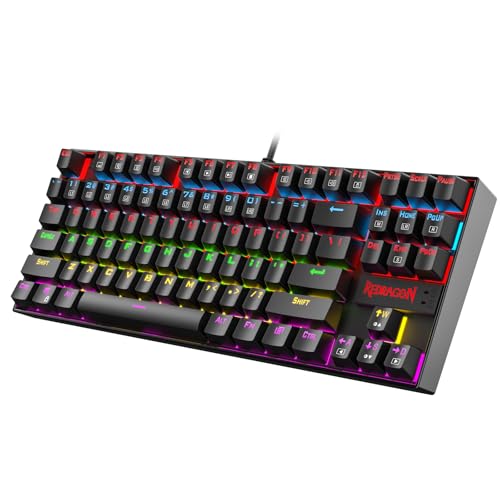
- Redragon K552 — the metal-frame tenkeyless starter board; fixed red switches and single-colour backlighting are the trade.
- Redragon K617 — a wired 60 percent board with hot-swap sockets and full RGB for players who live on layers.
- RK ROYAL KLUDGE RK61 — the remapping enthusiast’s budget pick, with QMK/VIA support that boards twice its tier often skip.
- RK ROYAL KLUDGE RK84 — the wireless option: triple-mode connectivity and a function row in a 75 percent frame.
- HyperX Alloy Origins Core — the established-brand tenkeyless, with an aluminium body and polished software polish.
- AULA F75 — the comfort pick, a gasket-style 75 percent board whose pre-lubed switches feel calm straight from the box.
How the picks were chosen
The shortlist started from a simple filter: a board had to be mechanical, had to come from a maker with a track record in this segment, and had to offer something specific — a metal frame, hot-swap sockets, wireless, serious remapping — rather than merely being cheap. Boards that hid their switch type, relied on vague marketing names for their switches, or locked buyers into a single undocumented variant were cut. What survived is a spread across three layouts and three connectivity styles, so the choice becomes about fit rather than about which board is least flawed.
Switch feel carried the most weight after layout. At the budget tier the stock switch decides whether a board feels crisp or scratchy for years, because most buyers at this level never swap a full set. Boards with factory-lubed switches or well-regarded house switches scored accordingly. Build details came next: frame material, stabiliser behaviour, cable quality and whether the keycaps are the kind that shine smooth within a month. Software was judged on whether it does the basics — remapping, macros, lighting profiles — without demanding an account or misbehaving after updates.
The picks in detail

Redragon K552 — Best first mechanical board
At a glance: 87-key tenkeyless layout; Redragon red linear switches; metal frame; LED backlighting; wired USB connection; anti-ghosting with full key rollover behaviour for gaming clusters.
The K552 has been the default answer to ‘what should my first mechanical keyboard be’ for years, and the reason is structural rather than fashionable: a metal frame at the entry tier changes how a board feels every single day. Where plastic budget boards flex and creak when you bottom out hard during a frantic retreat, the K552 stays planted and sounds like one object instead of a tray of loose parts. The tenkeyless layout keeps the arrow keys and navigation cluster that 60 percent boards sacrifice, which matters more than newcomers expect — spreadsheets, strategy games and even some flight titles lean on those keys constantly.
The red linear switches suit the gaming brief well. Linears travel straight down with no bump, so repeated strafing inputs and rapid double-taps feel consistent, and the board’s anti-ghosting design means a crowded handful of simultaneous movement, sprint and ability keys registers as intended. The backlighting is single-colour LED rather than full RGB, which some buyers will read as a limitation; in practice it is bright, even, and readable in a dark room, and it never asks you to install anything to control it. Everything adjusts from the keyboard itself with function combinations printed in the manual.
The honest compromises are the fixed switches and the wired-only connection. The switches are soldered in spirit — this is not the board to buy if you plan to experiment with switch types next month — and the cable, while sturdy, tethers you to the desk. Treat the K552 as a complete, finished tool rather than a project: it arrives, it works, it survives years of play, and it asks almost nothing of you in return. For a first mechanical board or a dependable spare, that completeness is exactly the point.
Strengths
- Metal frame gives a planted, flex-free feel rare at this tier
- Tenkeyless layout keeps arrows and navigation keys for mixed gaming and work
- Linear red switches suit fast, repeated gaming inputs
- No software required — lighting and settings live on the board
- A long production history means predictable, mature revisions
- Compact footprint frees real mouse room compared with full-size boards
Trade-offs
- Switches are not hot-swappable, so switch experiments need another board
- Single-colour backlighting rather than per-key RGB
- Wired only, with no wireless fallback for a couch or clean-desk setup
Best for: First-time mechanical buyers and tenkeyless fans who want a finished, durable board for gaming and everyday work.
Not suited for: Switch hobbyists planning swaps, or anyone who needs wireless.
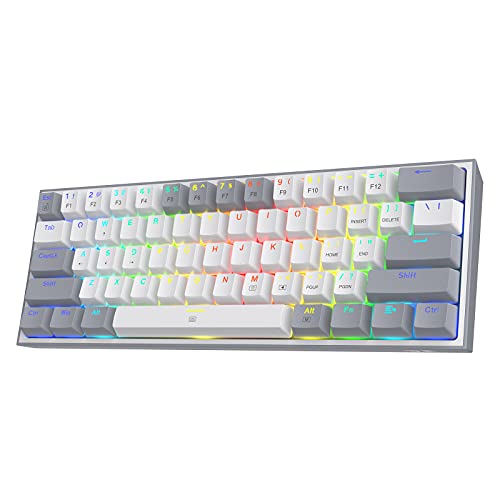
Redragon K617 — Best budget 60 percent
At a glance: 61-key 60 percent layout; hot-swappable sockets; RGB backlighting with many preset modes; wired connection; companion software support for remapping and macros.
The K617 is what happens when the budget segment absorbs the lessons of the enthusiast scene. A 60 percent board this inexpensive has no business offering hot-swappable sockets, yet here they are — and they transform the ownership story. A switch that starts to chatter in year two is a two-minute pull-and-replace instead of a funeral, and the curious can change the feel of the whole board one payday at a time, starting with the spacebar and the WASD cluster where fingers notice most. The wired connection keeps input latency simple and predictable, which suits the competitive players this size attracts.
Sixty percent is a commitment, and the K617 does not pretend otherwise. Arrow keys, the function row and the navigation cluster all live on a function layer, so your first week involves some fumbling for Delete and F5. Players who main first-person shooters tend to adapt fastest, because their left hand already lives in a small territory and the payoff — a huge, uninterrupted mouse field — is immediate and physical. The RGB implementation offers a wide menu of preset effects with onboard control, and the supported software adds remapping for those who want their layer arranged their own way rather than Redragon’s.
Build quality is honest plastic rather than the K552’s metal, and the stock stabilisers can sound hollow on the spacebar until you learn the easy foam-and-tape tricks the community swears by. None of that undermines the proposition: this is the cheapest sensible doorway into the modding side of the hobby attached to a board that plays competitive games perfectly well on day one. Buy it as a platform, not just a product, and it keeps giving long after a fixed board would have been replaced.
Strengths
- Hot-swappable sockets at an entry price — rare and genuinely useful
- Full RGB with many onboard effects plus software remapping
- 60 percent footprint maximises mouse space for low-sensitivity aim
- Wired connection keeps latency behaviour simple and consistent
- Light, portable frame suits LAN bags and small desks
- A natural first platform for learning switch and keycap swaps
Trade-offs
- No dedicated arrow keys or function row — everything rides the layer
- Plastic case sounds less solid than metal-frame rivals
- Stabilisers benefit from simple user tuning to sound their best
Best for: FPS players and budding modders who want maximum mouse room and a board they can grow into.
Not suited for: Anyone whose daily work needs a function row or dedicated navigation keys within reach at all times.
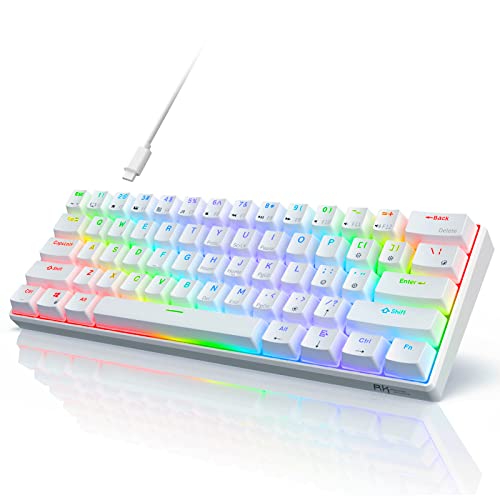
RK ROYAL KLUDGE RK61 — Best for remapping and layers
At a glance: 60 percent wired layout; QMK/VIA programmable firmware; hot-swappable sockets; pre-lubed red linear switches in this variant; RGB backlighting; works across Windows and Mac legends.
Most budget boards treat firmware as an afterthought. The RK61 wired edition treats it as the headline: QMK/VIA support means the same open remapping ecosystem used by far more expensive customs, with layers, tap-hold keys and macros editable in a visual tool and stored on the board itself. That changes what a 60 percent board can be. The missing arrow keys stop being a compromise when a held key turns your right hand’s home territory into a navigation cluster exactly where your fingers already rest, and a second layer can carry media controls, game-specific macros or a numpad for the one spreadsheet a month that demands one.
The hardware keeps pace with the firmware. Hot-swappable sockets accept the common switch types, and the pre-lubed red switches in this variant arrive smoother than the dry, scratchy linears that give budget boards a bad name. Typing feel is light and quick; gaming inputs are clean and repeatable. The white colourway in this listing shows off the RGB generously, and the legends are arranged for both Windows and Mac users, a small courtesy that dual-system households notice daily. Because the configuration lives in the keyboard, your layout follows you between machines without reinstalling anything.
The wired-only design and the learning curve are the prices of admission. VIA is friendly as firmware tools go, but it is still a tool — expect an evening of enjoyable fiddling before your layers feel like reflexes. The case is a lightweight plastic that travels well and sounds brighter than heavier boards. For the player who suspects they are becoming a keyboard person, no other board at this tier offers this much future: the RK61 is less a purchase than an apprenticeship, and it graduates with you.
Strengths
- QMK/VIA remapping — layers, tap-hold and macros stored on the board
- Hot-swappable sockets for standard switch types
- Pre-lubed red switches feel smooth out of the box
- Dual Windows and Mac legends suit mixed households
- Configuration travels with the keyboard between computers
- RGB backlighting with strong brightness through the white case
Trade-offs
- Wired only in this edition — no Bluetooth or 2.4 GHz fallback
- Getting the best from VIA takes an evening of setup
- Lightweight plastic case has a brighter, less damped sound
Best for: Tinkerers and layer-curious players who want enthusiast firmware at a starter price.
Not suited for: Plug-and-play buyers who never intend to remap a single key.
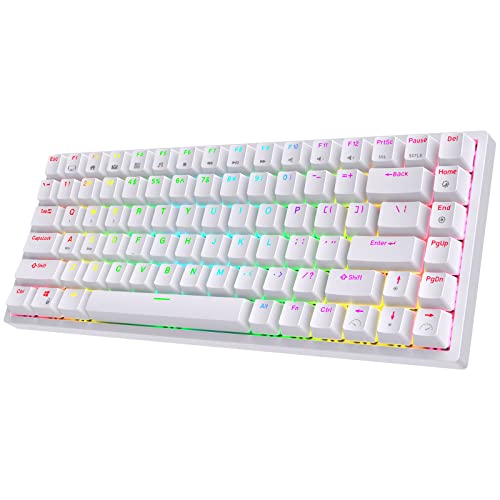
RK ROYAL KLUDGE RK84 — Best budget wireless pick
At a glance: 84-key 75 percent layout with function row; triple-mode Bluetooth 5.0, 2.4 GHz and USB-C wired; hot-swappable sockets; RGB backlighting; high-capacity rechargeable battery.
The RK84 answers the most common budget question — can I have wireless without giving up the keys I use — with a layout that keeps a function row and arrows inside a footprint barely larger than a 60 percent board. The 75 percent arrangement squeezes the navigation cluster into the right edge, so Delete and arrows sit a short reach away rather than on a layer. For players who split time between a gaming PC, a work laptop and maybe a tablet, the triple-mode connection is the real feature: the 2.4 GHz receiver handles gaming duty, Bluetooth pairs the other machines, and USB-C wired mode covers charging and zero-doubt competitive sessions.
Hot-swappable sockets and RK’s house switches keep the customisation door open, and the battery capacity is sized for weeks of ordinary use rather than days, so wireless stops feeling like a chore with a cable attached. RGB is present and configurable, and the companion driver support covers remapping for those who want it, though the board is perfectly usable with onboard controls alone. In games, the 2.4 GHz link behaves indistinguishably from wired for all but the most latency-obsessed players, and switching hosts is a key combination rather than a settings expedition.
Seventy-five percent layouts ask for one adjustment: the compressed right column means your fingers must relearn exactly where End and Delete live, and aftermarket keycap sets occasionally lack the exact sizes for the squeezed keys. The frame is plastic and sounds it next to metal rivals. Weighed against the freedom, though, the RK84 is the budget board that stops feeling like a compromise product — it is simply a well-judged wireless keyboard that happens to sit in the wallet-friendly tier.
Strengths
- Triple-mode connectivity covers gaming, work and tablet from one board
- Function row and arrows survive inside a compact 75 percent frame
- Large battery makes wireless ownership low-maintenance
- Hot-swappable sockets keep switch options open
- Wired mode available instantly for charging or competition
- Good stock typing feel for a board at this tier
Trade-offs
- Compressed right column takes a week of muscle-memory retraining
- Some keycap sets lack the exact sizes for squeezed keys
- Plastic frame lacks the heft and damping of metal rivals
Best for: Multi-device players who want one wireless board for the gaming desk and the work laptop.
Not suited for: Full-size loyalists who use a number pad daily.

HyperX Alloy Origins Core — Best established-brand tenkeyless
At a glance: Tenkeyless layout; aircraft-grade aluminium body; HyperX red linear switches; per-key RGB with software customisation and onboard memory; detachable USB-C cable.
Some buyers want the budget tier’s value with a mainstream brand’s accountability behind it, and the Alloy Origins Core is exactly that intersection. The full aluminium body is the first thing you notice — cold, rigid and completely indifferent to hard bottom-outs — and it gives this tenkeyless a planted, premium character that plastic rivals cannot imitate at any firmware version. HyperX’s own red switches are tuned for gaming with a short, responsive travel feel, and they have a consistency across the board that house switches at this tier do not always manage: the spacebar feels like the letter keys’ sibling, not a distant cousin.
The software side is similarly grown-up. Per-key RGB, macro recording and lighting profiles save to onboard memory, so your setup survives a move to a PC where the software is not installed — a detail tournament and LAN players value and budget boards routinely skip. The detachable USB-C cable packs flat, resists the fray-at-the-desk-edge failure that kills fixed cables, and can be replaced in seconds. Everything about the board suggests a design team that expected it to be carried, dropped in bags and used hard.
You pay for the polish with flexibility: the switches are fixed rather than hot-swappable, and there is no wireless mode at all. The board is a finished instrument, not a modding platform. Buyers who know they like a linear switch and a tenkeyless footprint will find nothing here that ages badly; buyers still discovering their preferences should take the hot-swap route instead. As a buy-once budget flagship, though, the Alloy Origins Core is the easiest board in this guide to recommend without caveats about build.
Strengths
- Full aluminium body — the most solid feel in this guide
- Consistent, gaming-tuned HyperX red linear switches
- Onboard memory keeps profiles when the software is absent
- Detachable USB-C cable packs and replaces easily
- Mature software for lighting and macros without account demands
- Tenkeyless layout keeps arrows and function row in reach
Trade-offs
- Switches are fixed — no hot-swap experimentation
- Wired only, which will rule it out for couch or clean-desk setups
- Premium positioning within the budget tier
Best for: Players who want mainstream build quality and support, and know they like linear switches.
Not suited for: Modders, and anyone who needs Bluetooth or 2.4 GHz wireless.

AULA F75 — Best-feeling budget board
At a glance: 75 percent layout with knob; gasket-style mounting; pre-lubed Reaper linear switches; hot-swappable sockets; triple-mode 2.4 GHz, Bluetooth 5.0 and USB-C; RGB backlighting.
The F75 is the board that made the wider gaming audience care about how a keyboard sounds. Its gasket-style mounting suspends the plate so each keystroke lands with a softened, cushioned bottom-out, and the pre-lubed Reaper switches arrive smooth and quiet enough that the board feels — and sounds — like something from a tier above. In shared rooms and late-night sessions that acoustic calm is not a luxury; it is the difference between playing and playing while apologising. The 75 percent layout keeps the function row and arrows, and the knob handles volume without a hand leaving position.
Connectivity matches the RK84’s triple-mode flexibility, so the F75 moves between a gaming rig on the 2.4 GHz receiver and a laptop on Bluetooth without ceremony. Hot-swappable sockets mean the creamy stock character is a starting point rather than a life sentence — owners regularly experiment with a few tactiles on the modifiers or a heavier spacebar switch. RGB is tasteful rather than blinding, and the two-tone colourway in this listing gives the board a desk presence that belies its tier.
The caveats are about ecosystem rather than quality. AULA’s software is functional but less refined than the big brands’, and the deepest configuration options reward patience. The soft mount also divides opinion: players raised on rigid boards sometimes read the gentle flex as imprecision for the first days, though most convert once their wrists notice the difference after a long session. If your budget stretches to one indulgence, spend it here — feel is the thing you touch ten thousand times a day.
Strengths
- Gasket-style mount and pre-lubed switches deliver a calm, cushioned feel
- Noticeably quieter than rigid budget boards — shared-room friendly
- Triple-mode wireless plus wired covers every setup
- Volume knob is genuinely useful in game and on calls
- Hot-swappable sockets for future switch experiments
- Attractive two-tone colourway with tasteful RGB
Trade-offs
- Software is less polished than the big gaming brands
- Soft mounting feels unfamiliar to players used to rigid boards
- Heavier configuration options take some digging to find
Best for: Players who care about sound and feel, share a room, or type as much as they game.
Not suited for: Buyers who want the simplest possible software experience.
Comparing the six side by side
Read across the six and a pattern emerges: the budget tier no longer forces a choice between features, only between priorities. The K552 and Alloy Origins Core spend their budget on structure — metal under your hands — and skip wireless and hot-swap. The K617, RK61 and RK84 spend theirs on sockets and firmware or radios, accepting plastic frames. The F75 spends on acoustics and feel. None of these is the wrong allocation; each is the right allocation for a different player, which is why the reviews above end in verdicts about fit rather than a league table.
Layout interacts with everything else. Tenkeyless boards (K552, Alloy Origins Core) keep the familiar key geography and suit players who also work at the same desk. The 75 percent pair (RK84, F75) compress that geography slightly in exchange for wireless freedom or acoustic comfort. The 60 percent pair (K617, RK61) delete the geography and hand the space to your mouse, which competitive FPS players feel as an immediate aiming upgrade and strategy players feel as a missing function row. Decide the layout argument first and the six become two, at which point switch feel and connectivity finish the job.
What budget switches actually feel like now
A decade ago the budget switch was the punishment tier: scratchy, wobbly, inconsistent from key to key. Factory lubrication changed that. The pre-lubed switches in the RK61 and F75, and the mature house switches in the HyperX and Redragon boards, deliver a clean, predictable stroke that most players will never feel the need to replace. The remaining differences are character, not quality — linear switches for speed and repetition, and the general truth that a heavier spacebar switch tames the loudest key on any board.
Hot-swappable sockets deserve emphasis because they convert switch feel from a purchase risk into a preference you can revise. If you are torn between two boards in this guide and one has sockets, that flexibility is worth real money over a three-year ownership span: tastes change, one switch can fail, and a ten-pack of replacements costs less than a pizza. Soldered boards like the K552 and Alloy Origins Core answer with structural solidity instead. Neither philosophy is wrong; they simply insure against different futures.
Keycaps, cables and the small print of budget boards
Budget boards ship with keycaps chosen for cost, and the material matters more than the legends printed on them. ABS caps feel smooth and are common on the established brands’ boards; they develop a shine on the most-used keys over a year or two, which is cosmetic rather than functional. PBT resists that shine and keeps its texture, which is why its presence on value boards gets celebrated in community discussions. Either material serves well at this tier — what you should avoid is judging a board by its stock caps at all, since every pick here with standard stems can wear a replacement set later, turning the one part you touch into a personal choice rather than a factory decision.
Cables deserve the same clear-eyed treatment. A detachable USB-C cable, as on the Alloy Origins Core and the triple-mode boards, is a repairability feature disguised as a convenience: the cable is the most-abused component in any wired setup, flexed at the desk edge daily, and replacing it should cost minutes rather than a new keyboard. Fixed cables on the K552 and K617 are sturdy examples of their kind, but they raise the stakes of cable care — route them without tight bends, and never wrap them tightly around the board for transport.
Gaming features that matter, and marketing that does not
Anti-ghosting and key rollover are real requirements: a board must register crowded simultaneous inputs — sprint, strafe, jump, ability — without dropping one, and all six picks handle gaming clusters properly. Per-key RGB is a preference, not a performance feature, though it earns its keep when you colour-code a MOBA’s ability row or dim everything except movement keys for a horror game. Macro keys and onboard profiles help MMO players specifically; the software-driven boards here cover that need without dedicated columns of extra keys eating desk space.
What you can safely ignore at this tier: polling-rate arms races beyond the standard gaming grade, switch actuation claims measured in fractions of a millimetre marketed to players whose games do not reward them, and any feature whose explanation requires the word ‘esports’ more than twice. The honest gaming upgrades in this guide are mouse room from compact layouts, consistent switches, and firmware that lets you put keys where your hands already are. Everything else is decoration, and decoration is fine — as long as you know that is what you are paying for.
Living with a budget board for three years
Ownership at this tier has a rhythm. The first month is adjustment — layers learned, stabilisers tuned, lighting settled. The first year is where hot-swap boards quietly prove themselves: a switch swapped here, a keycap set tried there, the board evolving with its owner. Fixed boards prove themselves differently, by disappearing into the routine entirely. Batteries in the wireless picks will want a charging habit — a cable kept at the desk and a top-up during a weekly download night keeps them from ever interrupting a session.
Cleaning is the maintenance item everyone skips and every board rewards. A monthly shake-out and brush, a quarterly keycap pull and wash for heavy users, and compressed air for the crevices keep switches feeling crisp and prevent the gritty stroke that owners misdiagnose as switch wear. Budget boards tolerate this care exactly as well as premium ones; the switches underneath are the same technology. Treat any of these six like an instrument rather than a consumable and the three-year mark arrives with the board still feeling like yours.
Two desks, two answers: worked examples
Consider the student desk: a laptop, a small monitor, a mouse that needs room for wide aiming strokes, and a roommate asleep three metres away after midnight. That desk resolves this guide quickly — the F75 for its quiet gasket manners, or the K617 if the budget is at its tightest and the modding itch is real. Both leave the mouse a continent to roam, both keep the peace acoustically, and both travel home for holidays without a packing strategy.
Now consider the family desk that games after the homework is done: shared with a parent who writes reports, lit by a lamp rather than RGB, and expected to survive juice-adjacent accidents of scheduling if not of spilling. That desk wants the K552 or the Alloy Origins Core — tenkeyless geography a non-gamer can sit down to without a tutorial, metal frames that shrug off years of mixed use, and wired connections that are simply always ready. The same six boards, two opposite answers: this is why fit outranks ranking, and why the verdicts in this guide are written as matches rather than scores.
How to choose: a buyer’s framework
Start with layout, because it cannot be upgraded
Every other attribute of a keyboard can be modified later — switches, keycaps, cables, even firmware behaviour — but the layout is cast in plastic. Full-size boards serve number-pad workers; tenkeyless serves the desk that games and works in equal measure; 75 percent serves the tidy desk that still wants a function row; 60 percent serves the aiming arm. Be honest about your least glamorous use case, not your most exciting one: the board that fits your Tuesday spreadsheet and your Saturday ranked session is the right board, and it is usually the layout you already know, one size down at most.
Linear, tactile or clicky on a budget
Budget guides often overcomplicate switch choice. For gaming-first buyers, linears remain the safe default — no bump to cross twice during rapid repeated inputs, and a smooth stroke that stays quiet enough for voice chat. Tactiles add a bump that typists and MOBA players who rest fingers on keys often prefer, since the bump confirms actuation without bottoming out. Clicky switches are a joy in a private room and a diplomatic incident in a shared one. Because three of the six picks are hot-swappable, a wrong first guess at this tier is an inconvenience, not a sentence.
Wired, 2.4 GHz or Bluetooth: match the radio to the game
Wired remains the zero-questions option: no battery, no pairing, no interference, and the K552, K617, RK61 and Alloy Origins Core all lean on that simplicity. A 2.4 GHz receiver is the wireless mode that behaves like wired for gaming purposes and is the one to use for anything competitive. Bluetooth is for the second and third machine — the laptop, the tablet, the work computer — where convenience outranks microseconds. If your desk hosts one machine, save the money and go wired; if it hosts three, the triple-mode boards earn their keep every single day.
The budget checklist nobody prints
Before ordering any board in this tier, confirm four unglamorous things on the listing: the exact switch variant selected, the layout language of the legends, whether the cable is detachable if that matters to you, and what the return window looks like if the layout turns out to be a size too small. Check whether stabiliser tuning supplies — a small tube of dielectric grease, a bandage for the classic mod — fit your willingness to tinker. And measure your desk: a tenkeyless board returns roughly a hand’s width of mouse room over full-size, and a 60 percent returns two. That space is a performance feature no specification table lists.
Setting up your budget board properly in the first evening
A budget board rewards a half hour of setup more than a premium one does, because the gains are concentrated in a few known places: stabilisers, firmware, and the physical arrangement of the desk. Work through these steps in order on the first evening and the keyboard you play on for the next three years will feel like a different, better product than the one that came out of the box.
Step 1: Unbox, inspect and test every key before customising anything
Open a keyboard tester in your browser and press every key, including the awkward ones — the right shift, the spacebar corners, the function combinations. On a budget board this five-minute audit is your quality gate: a dead switch on a hot-swappable board is a trivial swap, but you want to discover it inside the return window, not after it. Check the case for transit damage, confirm the cable or receiver matches the listing, and photograph the label on the underside; if you ever need support, that photograph answers half their questions instantly.
Step 2: Tune the stabilisers before judging the sound
Most budget-board noise complaints are stabiliser complaints. If your board’s spacebar or Enter key rattles, the classic remedies are cheap and reversible: a small amount of dielectric grease on the stabiliser wires, or the bandage mod — a strip of fabric plaster under the stabiliser housing — to soften the landing. Work on a towel, photograph the assembly before touching it, and change one stabiliser at a time so you can compare. On the F75 and other gasket boards this step is often unnecessary; on the metal Redragon it turns a good board into a quiet one.
Step 3: Set your layers and lighting once, properly
Decide your function layer on day one rather than living with the default by inertia. Put the arrow keys where your right hand expects them, media controls where your left hand can reach during a game, and — on QMK/VIA boards like the RK61 — consider a tap-hold arrangement that turns a resting key into a modifier. Set lighting to a static, moderate brightness for play; animated effects are fun for a week and distracting for a year. Save or export the configuration if the software allows it, because a future reinstall should not cost you your layout.
Step 4: Arrange the desk around the smaller footprint
The hidden dividend of these layouts is ergonomic. Slide the board left until your mouse arm can rest at a natural angle instead of reaching across a number pad’s worth of empty desk, and angle the board a few degrees if your wrists prefer it. Keep the mouse sensitivity matched to the new space — the extra room tempts players to drop sensitivity, which is often an improvement, but change it in small steps over days rather than in one heroic leap the night before a tournament.
Step 5: Plan the one upgrade that matters
Resist scattering small money across accessories. For most owners of these six boards, the single best later upgrade is either a quality coiled or aviator cable for the wired boards, a set of switches for the hot-swappable ones once tastes settle, or simply a wrist rest if long sessions leave your palms tired. Choose based on the complaint you actually have after a month of use, not the upgrade path a forum insists is mandatory. A budget board set up with intent beats a premium board left at defaults, and it is not particularly close.
Common mistakes to avoid
Buying the layout in the photograph instead of the layout on your desk
Compact boards photograph beautifully, and that is how strategy players end up on 60 percent boards hunting for F-keys mid-match. The layout decision deserves a boring audit: list the keys you pressed yesterday. If dedicated arrows, a function row or a Delete key appear more than a handful of times, honour that data over the aesthetic. Every size in this guide exists because some real player’s audit ends there; the mistake is letting someone else’s desk make your decision.
Chasing the lowest price past the point of sense
Below the tier these six boards occupy, the cuts stop being invisible: switches become inconsistent, cases hollow, cables fixed and frail, and the board becomes a consumable replaced yearly. The economics invert — three disposable boards cost more than one good budget board and deliver a worse experience throughout. The picks here sit at the floor of the durable tier, which is the correct definition of budget: the least money that still buys a finished tool.
Ignoring the switch variant on the listing
A single product page often hosts several switch options, and the difference between them is the entire feel of the keyboard. Buyers regularly order the clicky variant of a board they researched as linear because the option selector defaulted that way. Before checkout, read the selected variant aloud from the page and compare it with the review above. Thirty seconds of pedantry prevents the most common budget-keyboard return in the category.
Judging sound in the first ten minutes
A new board on a hard, empty desk sounds worse than it is. Desk mats, the board’s position, and even the room’s softness change the acoustic picture substantially, and stabiliser tuning changes it again. Give a board a week on your real setup before concluding it is loud or hollow — and if you record it to compare, keep the microphone in the same place, because moving it flatters whichever board was recorded closer.
Final recommendation
If one recommendation must stand for the whole guide, it is this: pick the layout with your head, then buy the best-feeling board in that layout. For most players that resolves to the RK84 for wireless flexibility or the K552 for wired simplicity, with the F75 as the indulgence for anyone who types long hours or shares a room. The Alloy Origins Core is the buy-once answer for brand loyalists, and the K617 and RK61 open the modding door for the lowest stakes in the hobby.
Whichever of the six lands on your desk, set it up properly on the first evening — test every key, tune the stabilisers, arrange your layers — and it will repay you daily for years. Budget done right is not a compromise you endure until you can afford better. For a great many players, it is simply where the value curve bends, and these six boards sit exactly on the bend.
A last word about timing. This segment refreshes constantly — a board that is the obvious pick this season gets a revised sibling next season — but keyboards are not phones, and last season’s good board does not become a bad one because a newer box exists. Buy the pick that fits your desk when you need it, verify the switch variant at checkout, and then stop shopping. The players who enjoy this tier most are the ones who spend their attention on their games and their craft, with a keyboard underneath that simply never gives them a reason to think about it. That is the real definition of a great budget board, and all six here meet it.
Frequently asked questions
Are budget mechanical keyboards good enough for competitive gaming?
Yes, provided the board offers full anti-ghosting on the gaming cluster and a switch you find consistent — which all six picks do. The performance differences that decide matches live in the player and the mouse long before a keyboard’s polling specification matters, and several of these boards add genuinely competitive features: the RK61’s remapping depth, the 60 percent boards’ mouse space, the triple-mode boards’ 2.4 GHz links. Spend the savings on the parts of your setup that are actually behind.
Should my first mechanical keyboard be hot-swappable?
It is the safer choice if you are unsure about switch feel, because a hot-swappable board forgives a wrong guess — a replacement switch set costs a fraction of a new keyboard. The RK61, K617, RK84 and F75 all offer that insurance. If you already know you like linears and you value structural solidity, the fixed-switch K552 and Alloy Origins Core trade the insurance for metal frames, which is an equally rational bargain. The mistake is buying fixed switches while still curious.
Is a 60 percent keyboard too small for everyday use?
For gaming, rarely; for mixed work, sometimes. Everything a 60 percent board removes lives on the function layer, so the question is whether you use arrows, function keys and navigation keys often enough that layering them becomes friction. Writers of code and players of shooters usually adapt within a week. Spreadsheet-heavy work and strategy titles with dense hotkeys argue for tenkeyless or 75 percent. The honest test: spend one day noticing how often your right hand leaves the home area for those keys.
How long should a budget mechanical keyboard last?
Years, if it is built like these six. Mechanical switches are rated for tens of millions of presses, metal and decent plastic frames do not wear out on any human timescale, and the realistic failure points are cables, batteries and individual switches — all replaceable on the detachable-cable and hot-swappable picks. The boards that die young are usually the ones below this tier, where fixed frail cables and inconsistent switches turn small faults into replacements.
Do I need software to use these keyboards?
No board here requires software for ordinary use — all six type, game and light up from onboard controls. Software earns its place for remapping, macros and finer lighting control, and in the RK61’s case the VIA tool is the entire point of the board. A good rule: install the software, configure the board once, save the profile to onboard memory where supported, and then forget the software exists until you want to change something.
Which of these is quietest for a shared room or late-night play?
The AULA F75, by a clear margin. Its gasket-style mounting and pre-lubed linear switches produce the softest, lowest sound of the six, and linear switches generally spare housemates the click bar’s chatter. The Alloy Origins Core and K552 linears are next, especially after stabiliser tuning, while any clicky variant of any board should be considered a private-room instrument. A desk mat under whichever board you choose is the cheapest quiet upgrade in the guide.
Related guides
Budget gaming is one corner of a wider hobby. These companion guides cover the layouts, custom builds and brand ranges that budget buyers most often explore next.
- how small layouts like the 65 percent format work in practice
- the 75 percent layout explained for compact-desk shoppers
- building your first custom keyboard from a kit
- five easy modifications that improve almost any mechanical keyboard
- whether wireless keyboards are good for gaming
- the Aula range decoded, including its gaming boards
- advanced modding techniques when the basics stop being enough