Disclosure: As an Amazon Associate, kajuandouglas.com earns from qualifying purchases. Links on this page are affiliate links; they cost you nothing extra. Prices and availability change often, so check the current Amazon listing before you buy.
Razer Keyboard Lineup Guide Which To Buy: The Map Before The Models
Anyone searching razer keyboard lineup guide which to buy is facing a catalog that has grown in three directions at once: the BlackWidow mechanical family in several sizes, the Huntsman optical family built for speed, and the DeathStalker low-profile line that borrows from laptop design. The names overlap, the prices overlap, and Razer’s own marketing rarely admits that different buyers should land in different families entirely. This guide fixes that. It explains the three families as philosophies first, then reviews six verified models, one per family branch and switch character, and finishes with a decision path by the kind of player or worker you actually are.
The one-sentence version: choose BlackWidow for traditional mechanical feel with modern features, Huntsman for optical speed features such as rapid-fire actuation behavior and high polling, and DeathStalker for a slim, quiet, low-profile board that suits work as much as play. Within BlackWidow, the 75 percent model is the modern sweet spot, the X is the value full-size with macro keys, the standard V4 is the clicky classic completed, and the V4 Pro is the flagship with the command dial. Every claim below is tied to the six models linked on this page, each confirmed against Amazon’s catalog data, so the guide can be specific where a generic lineup article would wave its hands.
The Three Families, As Philosophies
BlackWidow is the original line and still the center of gravity. Its switches are mechanical in the classic sense, with Razer’s color-coded personalities: Green for tactile and clicky, Yellow for linear and quiet, Orange for tactile and quiet. Modern BlackWidows add hot-swappable sockets on key models, media rollers, and wrist rests, which makes the family the default recommendation for anyone who wants a gaming keyboard that behaves like a complete product rather than a specialist tool.
Huntsman replaces the mechanical contact with optical actuation: a beam of light registers the press, which removes contact debounce from the equation and enables analog-style features on the flagship models, including adjustable actuation and rapid trigger behavior. The family’s audience is the competitive player who wants input hardware to be a performance variable, and its trade-offs are price and a typing feel some traditionalists find less characterful.
DeathStalker takes optical switches and puts them in a slim, low-profile chassis with short travel, closer to a premium laptop keyboard that grew up. It is the family for shared desks, offices, travel, and anyone whose wrists prefer a low typing plane. Around these three sit specialty lines worth a prose mention: Ornata, the membrane-mechanical hybrid for budget buyers who want the look and some of the feel; and the compact Huntsman Mini models, which shrink the optical idea to 60 percent for maximal mouse room. The six linked models below cover the decision space most buyers actually face.
In this guide
Quick Picks: The Lineup At A Glance
| Model | Family | Switch character | Size | Buy it if |
|---|---|---|---|---|
| BlackWidow V4 75% | BlackWidow | Orange tactile, hot-swap | 75 percent | You want the modern all-rounder |
| BlackWidow V4 X | BlackWidow | Yellow linear, quiet | Full-size | You want macros and value in a big board |
| BlackWidow V4 | BlackWidow | Green tactile clicky | Full-size | You love the classic click |
| BlackWidow V4 Pro | BlackWidow | Green tactile clicky | Full-size | You want the flagship dial and macro bank |
| Huntsman V2 TKL | Huntsman | Linear optical | Tenkeyless | You want optical speed without the flagship price |
| DeathStalker V2 | DeathStalker | Low-profile linear optical | Full-size slim | Your desk is for work as much as play |

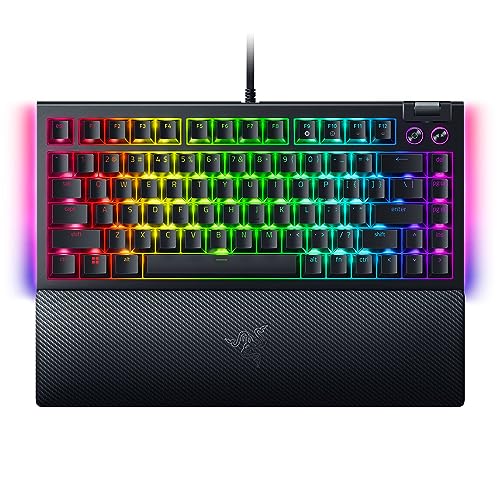
Razer BlackWidow V4 75% (Orange Switches, Black)
Badge: The lineup’s sweet spot. The compact flagship of the current generation: 75 percent layout with function row and arrows, hot-swappable Orange tactile switches, Chroma RGB, a multi-function roller with media keys, and an included wrist rest. It is the BlackWidow that absorbed the custom hobby’s lessons, and for a single-board desk it is the easiest Razer to recommend without caveats about size or missing controls.
- Layout: 75 percent
- Switches: Orange tactile mechanical, hot-swappable
- Extras: roller, media keys, wrist rest
- Positioning: premium compact tier
Strengths
- Hot-swap sockets make switch taste a changeable preference rather than a purchase gamble.
- The layout keeps every key most people use while freeing serious mouse space.
- Media hardware is dedicated, not layered, which daily use rewards constantly.
Trade-offs
- Wired only; the wireless version of this idea is a separate, pricier Pro model.
- No numpad, which data-heavy workers will feel immediately.
- ABS shine-through caps will polish with heavy use, though they swap easily.
Best for: one-board desks mixing ranked play and real work. Not suited for: numpad professionals or wireless-only setups. Check price on Amazon

Razer BlackWidow V4 X (Yellow Switches, Black)
Badge: The macro-friendly value flagship. The V4 X keeps the full-size frame, adds six dedicated macro keys down the left side, a roller with media controls, and Razer’s Yellow linear switches, the quiet, smooth option, with doubleshot ABS caps and Snap Tap support. It is aimed at MMO and MOBA players and streamers who bind everything, and at buyers who want current-generation features without the Pro’s price.
- Layout: full-size with 6 macro keys
- Switches: Yellow linear mechanical, quiet
- Extras: roller and media controls, Snap Tap
- Positioning: mid-to-premium full-size tier
Strengths
- Dedicated macro keys are hardware bindings streamers and MMO players actually use hourly.
- Yellow linears are the polite switch for shared rooms and microphones.
- The full layout asks no compromises of work software or older games.
Trade-offs
- The macro column shifts the whole board left; touch typists need a week to stop hitting M1 for Escape.
- Full-size footprint is the enemy of wide mouse swings.
- No hot-swap headline feature; switch choice is a commitment.
Best for: macro binders, streamers, and full-size loyalists. Not suited for: compact desks or switch experimenters. Check price on Amazon

Razer BlackWidow V4 (Green Switches)
Badge: The classic click, completed. The standard V4 is the full-size BlackWidow in its purest current form: Green tactile and clicky switches, six dedicated macro keys, Chroma throughout, a magnetic wrist rest, doubleshot ABS caps, and Snap Tap. This is the board for the player who hears a clicky switch and feels at home, and who wants the modern feature set wrapped around that sound rather than instead of it.
- Layout: full-size with 6 macro keys
- Switches: Green tactile and clicky mechanical
- Extras: magnetic wrist rest, macro bank
- Positioning: premium full-size tier
Strengths
- The Green switch delivers the definitive BlackWidow typing theatre: crisp bump, audible click, zero ambiguity.
- The magnetic wrist rest attaches and detaches like it was designed by someone who uses one.
- Macro keys plus full layout make it the strategy and MMO player’s complete deck.
Trade-offs
- Clicky switches are a household decision, not a personal one; open rooms and calls will hear you.
- Big footprint, same mouse-space cost as the X.
- Buyers who later tire of the click cannot swap it away on this model.
Best for: click devotees with a private room and a macro habit. Not suited for: shared spaces, offices, or quiet gaming. Check price on Amazon

Razer BlackWidow V4 Pro (Green Tactile Switches)
Badge: The flagship command deck. The V4 Pro tops the mechanical family: Green tactile clicky switches, a command dial, eight dedicated macro keys, doubleshot ABS caps, and Chroma with underglow that turns the desk edge into part of the lighting design. It is the board for the player whose setup is a cockpit and who uses every control a keyboard can offer.
- Layout: full-size with 8 macro keys
- Switches: Green tactile and clicky mechanical
- Extras: command dial, extensive macro bank, underglow
- Positioning: flagship tier
Strengths
- The command dial is a genuine productivity control for creative apps and system tweaks, not a gimmick.
- Eight macro keys plus dial make it the most bindable board in the lineup.
- Flagship build and lighting make it the centerpiece board of a Razer desk.
Trade-offs
- Flagship price buys controls that casual players will never bind.
- The largest footprint in this guide; measure your desk honestly.
- Clicky Greens carry the same shared-room warning as the standard V4.
Best for: power users, streamers, and cockpit-desk builders. Not suited for: minimalists or small desks. Check price on Amazon
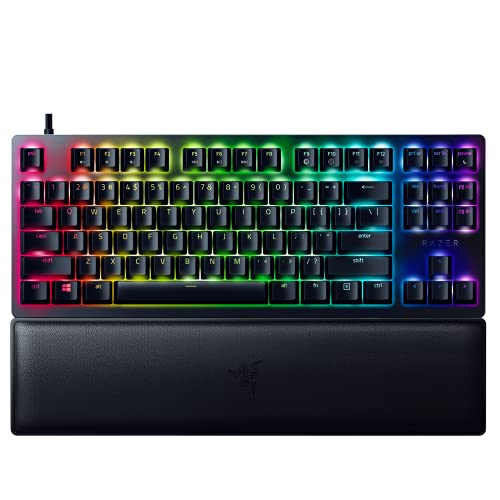
Razer Huntsman V2 TKL (Linear Optical)
Badge: Optical speed, tenkeyless sense. The Huntsman V2 TKL brings the optical family within reach: fast linear optical switches with sound dampeners, high polling behavior, a detachable USB-C cable, doubleshot PBT caps, and an ergonomic wrist rest, in the tenkeyless size competitive players favor. It is the Huntsman for buyers who want the actuation technology without stepping to the analog flagship models.
- Layout: tenkeyless
- Switches: linear optical, second generation, with sound dampeners
- Extras: detachable cable, wrist rest, PBT caps
- Positioning: premium optical tier
Strengths
- Optical actuation removes contact wear and debounce from the switch’s story, favoring speed and longevity.
- PBT caps from the factory answer the durability question on day one.
- The detachable cable and TKL size travel to events gracefully.
Trade-offs
- This generation is fast optical, not the fully analog, adjustable flagship experience of the V3 Pro models.
- Optical switches do not hot-swap like mechanical ones; the feel is the feel.
- Linear switches give no tactile confirmation, which some typists never forgive.
Best for: competitive players who want optical speed in a proven size. Not suited for: switch tinkerers or tactile loyalists. Check price on Amazon

Razer DeathStalker V2 (Low Profile Optical, Linear Red)
Badge: The slim professional. The DeathStalker V2 is the lineup’s answer to the work-from-home era: low-profile optical switches in linear red form, an aluminum top plate in a slim chassis, durable coated keycaps, and a multi-function roller with media button. It types at laptop height with gaming-grade actuation underneath, and it looks at home in a video call as much as in a ranked queue.
- Layout: full-size, low profile
- Switches: low-profile optical, linear
- Extras: roller and media button, aluminum top plate
- Positioning: premium slim tier
Strengths
- The low typing plane is kind to wrists across full workdays, no tall wrist rest required.
- Short travel and optical speed make it quietly fast for both prose and play.
- The slim silhouette suits minimalist and professional desks that gaming boards visually disrupt.
Trade-offs
- Low-profile feel is a taste; mechanical traditionalists may find the travel shallow.
- The keycap ecosystem for low-profile boards is narrower than the standard one.
- Full-size width returns the mouse-space question the compact models solved.
Best for: hybrid workers who game, and anyone who prefers laptop-height typing. Not suited for: deep-travel traditionalists or compact-desk gamers. Check price on Amazon
The Decision Path: Five Questions That Place You
One: how much desk can the board have? Compact answers point to the V4 75%; generous desks unlock the full-size macro boards and the DeathStalker. Two: what should a keypress sound like? Click points to Green-switch boards, the V4 or V4 Pro. Quiet tactile points to the Orange V4 75%. Quiet linear points to the V4 X’s Yellows or the DeathStalker’s reds. Three: do you bind macros for games or streaming? If yes, the X, V4, and Pro earn their macro columns; if no, those keys are desk tax. Four: is input technology your competitive edge? Optical speed argues for the Huntsman; analog flagship features argue for saving toward the V3 Pro generation beyond this guide’s linked set. Five: does the board work for a living? Full workdays argue for the DeathStalker’s low plane or the V4 75% with its wrist rest. Most buyers find two questions decide everything; the rest is confirmation.
Buying Guide: Switch Colors, Decoded Once
Razer’s switch colors are a personality chart, and learning it makes the whole lineup legible. Green means tactile with a click, the original gaming switch character, loved loudly and hated politely. Yellow means linear and quiet, the smooth press with no bump and no click, built for shared spaces and fast repeated inputs. Orange means tactile without the click, the bump you feel but the room does not hear, and it is the switch in the 75 percent model for exactly that diplomatic reason. Optical switches abandon the color chart for actuation physics: the linear optical in the Huntsman V2 TKL prioritizes speed and consistency, while low-profile optical in the DeathStalker prioritizes travel height. When a listing names a color, it is telling you the board’s sound and feel more honestly than any adjective in the marketing copy, so shop by color first and by model second.
How To Choose In A Store Or Listing, Step By Step
- Measure your desk’s keyboard zone and be honest about mousepad ambitions; let size eliminate half the lineup immediately.
- Decide your switch color by sound tolerance in your actual room, including the people in the next one.
- Count your macro habit truthfully: bindings you already use weekly justify macro keys; bindings you imagine using do not.
- Check whether the model you favor is hot-swappable if you suspect your switch taste will evolve; the V4 75% forgives, the fixed models commit.
- Decide whether optical speed is a need or a fascination, and price the Huntsman accordingly.
- Confirm the extras you will touch daily, roller, wrist rest, dial, because those outlast every specification in daily satisfaction.
Common Mistakes When Shopping The Razer Lineup
The commonest mistake is buying the flagship because it is the flagship, then never binding its dial or macros while resenting its size daily. The second is choosing a clicky board for a shared home because a demo sounded exciting for thirty seconds. The third is assuming all Huntsmans are analog flagships; the V2 generation here is fast optical, a different and still worthy proposition. The fourth is overlooking the DeathStalker because it does not look like a gaming board, when its actuation is gaming-grade and its manners are the best in the catalog. The fifth is treating the 75 percent as a lesser BlackWidow; in the current generation it is arguably the flagship idea, with the full-size Pro as the maximalist branch rather than the trunk.
Final Recommendation
Most buyers should start at the BlackWidow V4 75% and only leave it for a named reason: macros and full size pull you to the V4 X, the beloved click pulls you to the V4, the cockpit dream pulls you to the V4 Pro, optical speed pulls you to the Huntsman V2 TKL, and a working desk pulls you to the DeathStalker V2. That is the lineup, not as a price ladder, but as a set of answers to different questions. Ask yours honestly and the right Razer is the one that answers it. If you are still split between two finalists after everything above, split the difference with your calendar: count the hours each board’s specialty would actually be used in your next month, gaming sessions, macro-heavy work, calls, travel, and buy for the larger number. Keyboards are hourly tools wearing the disguise of exciting purchases, and the hours never lie about which model deserved the desk. Whichever of the six you choose, you are buying into a lineup mature enough that the choice can be about fit rather than about avoiding mistakes, and that maturity, more than any single model’s features, is the real answer to the question in this guide’s title.
The Models This Guide Mentions Only In Prose
Two branches deserve honest coverage without links, because they answer real budgets. The Ornata family uses a hybrid mecha-membrane switch that mimics mechanical feel over a membrane base, at prices well below the mechanical lines. It suits a first gaming desk, a child’s setup, or a buyer who wants the Razer look and a soft, quiet press without mechanical money; it does not suit anyone shopping this guide for switch character, because the hybrid feel is its own compromise and proud of it. At the other extreme, the Huntsman V3 Pro generation, including the Mini covered elsewhere on this site, adds fully analog optical switches with adjustable actuation and rapid trigger, the current flagship input technology. Buyers whose competitive titles reward those features should treat the V2 TKL in this guide as the optical on-ramp and the V3 Pro models as the destination, and budget accordingly rather than expecting V2 hardware to grow V3 features later.
Synapse And Chroma: The Ecosystem Tax And Dividend
Every board in this guide plugs into Razer’s Synapse software for remapping, macros, and Chroma lighting, and the ecosystem cuts both ways identically across the lineup, so it should inform the brand decision rather than the model decision. The dividend is depth: per-game profiles that switch automatically, macros of real complexity, and lighting that integrates with games and with other Razer gear on the desk. The tax is a substantial application that minimalists resent and that Linux users largely cannot pay at all. Onboard memory softens the tax by carrying essential profiles to other machines. If your desk is already a Razer desk, the dividend compounds and the lineup’s internal differences matter more than any rival’s offer. If you are platform-agnostic or software-averse, judge each model on its hardware virtues, which this guide has tried to state plainly enough to survive that test.
Price Tiers, In Qualitative Terms
The lineup’s money ladder is best understood as buying controls and technology, not typing quality. The entry tier of the linked set, the V4 X on most days, buys full size, macros, and current features with quiet linears. The middle buys specialization: the V4’s clicky completeness, the Huntsman’s optical actuation, the DeathStalker’s slim engineering. The upper tier buys either compact flagship completeness in the V4 75% or maximalist control in the V4 Pro. Notably, typing satisfaction does not climb the ladder in a straight line; a DeathStalker typist and a V4 click devotee are each at their personal summit at different prices. Spend on the branch that matches your answers to the five questions, not on the highest rung you can reach, because the lineup’s design makes lateral moves more satisfying than vertical ones.
By Game Genre: A Practical Matching
FPS and battle royale players should weight compactness and switch consistency: the V4 75% for mechanical feel with hot-swap freedom, the Huntsman V2 TKL for optical speed. MOBA players live on ability clusters and a few key macros; both serve, with the V4 X’s macro column earning its width in draft-heavy titles. MMO players are the macro boards’ natural constituency, and the Pro’s bank plus dial is built for their binding sprawl. Strategy and simulation players, who use every key a board owns and invent more, should stay full-size and treat compact models as travel boards. Fighting and rhythm players, whose inputs are percussive and repeated, tend toward the switch they can abuse happily for years, which argues for trying Green and Yellow in person where possible. Writers who game, the silent majority of this guide’s readers, should let the workday decide: DeathStalker for the low plane, V4 75% for the complete compact, V4 for the joy of the click in a private office.
Longevity And The Second-Board Strategy
Razer boards at these tiers are built to be kept, and the lineup rewards a two-board strategy over time more than most brands do, because its families are genuinely different instruments. A common mature setup pairs a DeathStalker or V4 75% as the daily driver with a Huntsman for the competitive title of the season, or keeps a clicky V4 as the private-office indulgence beside a diplomatic board for shared hours. Keycaps, profiles knowledge, and Synapse familiarity all transfer within the brand, which lowers the cost of the second board’s learning curve to nearly zero. If you are buying your first Razer with that future in mind, choose the branch you will use most hours per week, not the one for your most intense hour, because hours are where keyboards earn their keep.
Ergonomics Across The Lineup
The families make different comfort bets, and your wrists will vote. The DeathStalker bets on height: a low plane keeps wrists near neutral without accessories, which is why it wins long workdays. The BlackWidows bet on support: full-height switches paired with included or magnetic wrist rests that set a comfortable approach angle, with the 75 percent adding the shoulder benefit of a closer mouse. The Huntsman TKL bets on posture through size, freeing the mouse hand like the 75 percent while keeping standard height. None of these bets is universally right; they correspond to different bodies and desks. The practical test is your current pain, if any: wrist extension ache argues for the DeathStalker’s plane, shoulder reach fatigue argues for the compact boards, and finger fatigue argues for the lightest switch your accuracy tolerates, which in this lineup is a linear, Yellow or optical, over the clicky Greens.
Taking A Razer To Events And Other Desks
Travel separates the lineup cleanly. The Huntsman V2 TKL was practically designed for the tournament bag: tenkeyless size, detachable cable, PBT caps that shrug off transit, and a wrist rest that can stay home. The V4 75% travels nearly as well, trading the detachable cable story for a smaller footprint. The full-size boards are desk anchors by intention; moving them is a decision, not a habit. For the two-computer household, remember that all six linked models are wired and single-host in spirit, so a small USB switch or a second board is the honest solution, and the lineup’s lower tiers make that second board a reasonable purchase rather than an extravagance. Players who split time between a gaming den and a family desk often land exactly there: a flagship where the hours are, a V4 X or DeathStalker where the sharing is.
What To Verify In Your First Week With Any Model
Whichever branch you choose, run the same first-week audit. Confirm the switch character still pleases you at hour ten, not just minute ten, because novelty inflates clicky joy and deflates linear subtlety on the same schedule. Bind one real macro and use it daily to learn whether the macro hardware earns its space in your actual habits. Set two Synapse profiles, work and play, and switch between them until the lighting and bindings feel automatic. Test the board on your loudest call and your quietest night session to learn its manners in your real rooms. And if the board is hot-swappable, resist swapping anything until the week ends; you cannot judge a switch you never lived with, and the 75 percent’s forgiveness is best spent on an informed change rather than an impatient one. A board that passes this week rarely gets returned, and a board that fails it fails while returns are still painless, which is what the week is for.
A Short History Of How The Lineup Got This Shape
The BlackWidow began in 2010 as a single idea, a mechanical keyboard for gamers, when that was a novel sentence. The Huntsman arrived years later when optical actuation matured, splitting the catalog into feel and speed branches. The DeathStalker name, older than many fans realize, was revived for the low-profile era as remote work made the slim board a gaming category. The current V4 generation then did the quiet revolutionary work of absorbing enthusiast features, hot-swap, better caps, media hardware, into the mainstream line. Understanding that arc explains the lineup’s present logic: it is not three competing products but three answers developed across a decade to three different definitions of a gaming keyboard, feel, speed, and silhouette. Buyers who pick by which definition sounds like them rarely regret the model that follows.
Buying A Razer As A Gift, Without Guessing Wrong
Keyboards are personal, but the lineup contains a safe gift and several risky ones, and the difference is switch diplomacy. The safe gift is the V4 75%: compact enough for any desk, tactile without noise offenses, complete with its wrist rest, and hot-swappable so the recipient can evolve it. The DeathStalker V2 is the safe gift for a working adult whose gaming you know secondhand, because it flatters a professional desk. The risky gifts are the clicky boards, glorious if the love of click is confirmed and awkward if it is assumed, and the Pro, whose price makes a miss expensive. When in doubt, gift the forgiving board, include the receipt without embarrassment, and remember that a keyboard someone exchanges for the right switch color is still a successful gift, because you gave them the lineup, not a guess.
The Used Market And Hand-Me-Downs
Razer’s retail presence makes its boards common on the second-hand market, where the lineup knowledge in this guide converts directly into buying skill. Used BlackWidows should be checked for cap shine, which prices the board’s hours honestly, and for roller function, the one mechanical extra that wears. Used Huntsmans deserve a per-key actuation check, since optical boards fail by the switch rather than by the board. Used DeathStalkers should be inspected at the keycap coating, the model’s known cosmetic wear point. Sellers price famous models optimistically; the discipline is to pay for the branch and condition, not the logo, and to remember that a new V4 X sometimes competes with a tired used flagship at similar money, in which case new wins on warranty alone.
Accessories Worth Budgeting For
Whichever model you choose, three small purchases complete it more often than any fourth feature would. A proper desk mat unlocks the compact boards’ mouse-room promise and quiets every board in the guide by decoupling it from a hard desk. A PBT keycap set, Razer’s own doubleshot set being the ecosystem-native choice, is the year-one upgrade for the ABS-capped BlackWidows, timed for when shine appears. A wrist rest matters only where one is not included, which in this linked set is nowhere, a completeness worth noticing when comparing rival lineups whose rests are separate purchases. Budget those, skip the decorative extras until the board has earned them through months of use, and the total cost of the setup stays honest.
The Decision Matrix, In One Breath
If you want one board that does everything well and forgives your future taste, the V4 75%. If you bind macros and count value, the V4 X. If the click is the sound of home, the V4. If you will use every dial and key a board can grow, the V4 Pro. If actuation technology is your edge, the Huntsman V2 TKL. If your desk earns your living and games after hours, the DeathStalker V2. Six models, six sentences, and not one of them is the others’ consolation prize; that is what a mature lineup looks like, and it is why the guide could be written as a set of questions rather than a ranking.
Build And Materials Across The Families
The families spend their materials budgets differently, and hands can tell. BlackWidow boards spend on completeness: full frames, included rests, media hardware, and caps chosen for Chroma, with the Pro adding the dial and underglow as visible flagship signals. The Huntsman TKL spends on its actuation and on PBT caps, accepting a plainer silhouette. The DeathStalker spends on its slim aluminum top plate and low-profile engineering, achieving a density that surprises people who equate thin with flimsy. None of the six feels cheap in the hand, but they feel different in ways that map to their philosophies: the BlackWidows feel equipped, the Huntsman feels purposeful, the DeathStalker feels tailored. In a store, thirty seconds of holding each teaches more than a specification table, and the one your hand keeps returning to is data worth trusting alongside this guide’s logic.
When The Right Answer Is Not A Razer
A lineup guide earns trust by naming its exits. Leave the brand if you want a gasket-soft custom feel above all, because Razer’s boards are firmly built gaming instruments even at their most refined. Leave if you need wireless in a compact body at a mid price, because Razer reserves its best wireless for premium tiers. Leave if open-source firmware is a requirement, or if your desk runs on an operating system the software ignores and onboard profiles are not enough for your remapping ambitions. And leave if your budget is firmly entry-level, where the Ornata keeps one foot in the brand but honest mechanical value lives elsewhere. Every one of those exits is a preference, not a failure of the lineup, and the models above will be waiting, at their usual prices and personalities, if your preferences ever circle back.
How Each Model Ages
Project each board two years forward and the lineup’s characters sharpen. The V4 75% ages best in option value: its caps may shine, its switches may be swapped twice by a curious owner, and the board underneath remains current because its layout and controls were the point. The V4 X ages as infrastructure, its macros woven into routines until replacing it feels like moving house. The V4’s Greens keep their theatre indefinitely, and its owner’s loyalty usually outlasts the caps, which are the planned replacement. The V4 Pro ages as a cockpit does, accumulating bindings and dial habits that make its owner the least likely in the lineup to switch brands. The Huntsman V2 TKL ages on its actuation’s consistency, optical switches being notably indifferent to hours, with its PBT caps looking young longest of the group alongside it. The DeathStalker’s coated caps are its known cosmetic clock, while its slim chassis and quiet speed age gracefully in professional settings. None of these futures is a warning; they are the shapes of satisfaction each model sells, and choosing the future you want is the deepest form of the question this guide’s title asks.
Sound, Model By Model
Ears decide quickly, so here is the lineup’s acoustic order from loudest to quietest, with the caveat that rooms and desks modulate everything. The Green-switch boards, V4 and V4 Pro, are the loud ones by design, a crisp click layered over a tactile bottom-out that announces a gaming room. The Orange V4 75% sits in the civilized middle, tactile and muted enough for calls. The Huntsman V2 TKL’s damped linear optical switches press quietly with a smooth, low voice. The V4 X’s Yellow linears are similarly polite, with full-size case resonance adding a touch of body. The DeathStalker V2 is the quietest, short travel and low profile producing the least sound per keystroke of the six. If your household has a vote, cast it with this ordering in hand, because switch sound is the one specification that cannot be returned to the store of other people’s patience once spent.
Connectivity: The Lineup’s Honest Limitation
All six linked models are wired, and a modern guide should say plainly what that means in 2026-era desk culture. Wired means zero battery management, zero pairing friction, the lowest and most consistent latency story, and a cable across the desk that some setups cannot forgive. Razer sells wireless in other models, notably the Pro-tier 75 percent wireless sibling discussed in this site’s BlackWidow review, but within this guide’s six, the cable is part of the value equation: it is part of why these models cost what they cost. Buyers for whom wireless is non-negotiable should treat this guide as a map of what to look for in the wider catalog rather than as a shopping list, and buyers who sit at one desk should enjoy the quiet bargain that wired buyers currently get in features per dollar across the whole industry, not only here.
Macros And Profiles In Real Routines
Because three of the six boards sell macro hardware, it is worth describing what mature macro use actually looks like, so buyers can recognize themselves or not. The streamer runs scene switches, mute toggles, and clip markers on the macro column, hands never leaving the board mid-broadcast. The MMO player layers rotation helpers, mount and consumable chains, and target markers, with the dial or roller handling voice volume between pulls. The video editor maps shuttle, ripple delete, and render commands, turning the gaming board into the cheapest control surface in the studio. The ordinary professional maps text expansions, window management, and meeting controls, and quietly becomes the fastest person in the office at repetitive tasks. If none of those portraits resembles your week, macro keys will be sculpture on your desk, and the compact or slim models will serve you better; if one portrait is you verbatim, the macro boards are not upsells but tools, and the Pro’s dial completes the kit.
Trying The Lineup In Person: A Store Protocol
Razer’s retail footprint is an underused advantage: these boards sit on demo shelves in a way custom kits never will. Use the shelf properly. Type a real paragraph on each candidate rather than drumming the WASD cluster, because prose reveals switch character that gaming poses hide. Press the spacebar and the far corners to judge case solidity, roll the roller and turn the Pro’s dial with your eyes closed to feel whether the controls are blind-friendly, and rest your wrists as you actually sit rather than hovering in showroom posture. Compare the DeathStalker’s height against a BlackWidow with your own hands flat on the desk; the wrist angle difference is the whole ballgame for that family and no review text transmits it. Finally, listen in the store’s noise with humility, knowing your room will be quieter and every board louder there. Ten disciplined minutes at the shelf will confirm or overturn this guide’s placement of you, and either outcome is a successful shopping trip.
A Closing Word On Confidence
Lineup anxiety usually comes from the fear that a better Razer is hiding one rung away from the one in your cart. The structure of this catalog should cure that fear rather than feed it: the models differ by philosophy, not by a secret quality gradient, and the most expensive board in this guide is the wrong board for most of the people the cheapest one delights. Buy the branch that matches your room, your games, and your workday, set it up with the first-week audit described above, and then stop reading lineup guides, including this one. The keyboard’s job is to disappear under your hands for years, and every model linked here is capable of exactly that disappearance for the buyer it was built for.
Reading A Razer Listing Without Regret
Because this guide exists partly to prevent configuration mistakes, a compact literacy section is worth adding for buyers comparing listings across the lineup. Razer names encode three separate decisions, switch color, layout size, and connectivity tier, and a listing’s headline rarely foregrounds all three, so the disciplined buyer reads the specification block for each in turn before comparing prices across models. Yellow, green, and orange describe the mechanical switches’ personalities; analog and optical describe entirely different sensing families that happen to share shelf space; Pro, X, and the unmarked base name describe feature tiers rather than quality grades, and a base model is not a lesser keyboard so much as a narrower one. Colourway listings deserve the same care as model listings, since a white and black variant of one board are the same purchase while two similar names are not. Buyers who internalize that grammar stop needing guides like this one for future purchases, which is the quiet ambition of every good lineup guide: to make its reader independent of it.
Buying Used Or Previous-Generation Razer Boards
A lineup guide should acknowledge the market beside the market: previous BlackWidow and Huntsman generations circulate widely secondhand, and they complicate the new-buying decision honestly. The case for them is real, since Razer’s flagships age slowly and a prior generation at a discount can outgun a current mid-tier board at the same money. The case against is equally real: switch wear is invisible in photographs, software support horizons shorten with each generation, and the analog features that justify the Huntsman line depend on firmware and utilities whose support is a vendor’s promise rather than a physical fact. The balanced rule is generational distance: one generation back is a value play for informed buyers who can test before committing, while two or more generations back is a collector’s or gambler’s purchase. New buyers without a test bench should stay in the current lineup this guide covers, where every claim in these pages applies without translation.
Warranty, Support, And The Ownership Fine Print
A lineup decision made on features alone is half a decision, so this guide closes its buying layer with the ownership terms that apply across the families. Razer’s boards are supported through its standard channels and warranty terms for the region of purchase, and buyers should register the board and keep the receipt with the same care they would give any premium peripheral, because switch and stabilizer claims are the ones most likely to arise in the first months. The practical ownership differences between families are modest: analog and optical models depend more heavily on continued software support for their defining features, while the mechanical BlackWidow line’s core value is hardware and therefore ages more independently. None of this should frighten a buyer away from the advanced models, whose features are the point of the lineup, but it argues for buying them new, from authorized listings, with paperwork intact, rather than inheriting someone else’s support horizon secondhand. Keep the box as well; returns, claims, and eventual resale all move more smoothly with the original packaging accounted for.
Frequently Asked Questions
Which Razer keyboard is best for most people?
The BlackWidow V4 75% is the safest single answer: modern layout, hot-swappable tactile switches, dedicated media hardware, and a wrist rest, in a size that suits gaming and work. It lacks only a numpad and wireless, and buyers who need either have clear siblings waiting rather than compromises to endure.
What is the difference between BlackWidow and Huntsman?
Actuation. BlackWidow uses mechanical switches with physical contacts and Razer’s color-coded feels. Huntsman uses optical switches that register presses with light, removing contact debounce and enabling the family’s speed features. Choose BlackWidow for feel variety and modding, Huntsman for input technology.
Are Razer’s clicky Green switches too loud for an apartment?
They are audible through doors and very present on calls. In a solo room they are a joy; in shared living they are a negotiation. The Orange tactile and Yellow linear switches exist precisely for this constraint, and the DeathStalker is quieter still, so the lineup has a diplomatic option at every size.
Is the DeathStalker a real gaming keyboard?
Yes. Its low-profile optical switches actuate with gaming speed and its polling and rollover are built for play; only the silhouette is professional. Players who like short travel often prefer it outright, while deep-travel traditionalists are the ones who should look elsewhere in the lineup.
Which Razer should an MMO or MOBA player buy?
Start with the macro boards: the V4 X for quiet linear value, the V4 for the click, and the V4 Pro for the full eight-key bank and command dial. Bindings are these boards’ reason to exist, and players who maintain dozens of them will use the hardware every session.
Can I change switches later on these boards?
On the BlackWidow V4 75%, yes, thanks to hot-swappable sockets. The other linked models commit you to their switch character, which is why this guide insists on choosing by switch color first. If your taste is still forming, the 75 percent is the forgiving place to form it.
Should I buy for the games I play now or the setup I plan to build later?
Buy for the desk and games you actually have this season, because Razer boards differ most in size, switch feel and connection type, and those are present-tense decisions. A compact board bought for a future smaller desk can cramp a current setup that still needs a number pad for spreadsheets or strategy games. The safer future-proofing is boring: choose standard keycap sizing, a detachable cable where offered, and a layout your next desk can also accept. Those traits survive upgrades around the board. What does not survive well is paying for a specialist feature, such as analogue control, for a genre you have not started playing yet. If your plans change, a mainstream layout is also the easiest kind to resell or hand down.
How do I narrow the lineup down when two models feel almost identical in a shop?
Stop comparing the shared ninety percent and list the three moments that will repeat every day: how you connect the board, how you adjust volume or media, and how the spacebar sounds in a quiet room. Then test only those moments on both models, back to back, with the same short typing passage and the same game menu. Differences in wrist-rest attachment, knob placement or cable routing show up in that narrow test when broad impressions blur together. Also check what happens when the battery or cable is removed and reconnected, because pairing behaviour is part of ownership. Pick the board that wins your repeated moments, even if the other model has a longer feature list you will rarely open. That small, repeated-moment test is the one owners consistently wish they had trusted over a specification sheet.
Related Guides
Go deeper with the BlackWidow V4 75% full review and whether Razer keyboards are worth it, or compare across brands in Razer, Corsair and Logitech gaming keyboards compared. Switch shoppers may like the guide to SteelSeries keyboards and the Apex series, and upgraders should read the Razer doubleshot PBT keycap review plus the 75 percent layout guide.