Disclosure: As an Amazon Associate, kajuandouglas.com earns from qualifying purchases. Links on this page are affiliate links; they cost you nothing extra. Prices and availability change often, so check the current Amazon listing before you buy.
Ask what mechanical keyboards pro fortnite players use and the honest answer begins with a technology, not a brand: rapid trigger. Fortnite at the professional level is a game of frantic building and editing, where a wall must be replaced, an edit confirmed and a shot taken inside a rhythm of keystrokes that ordinary switches physically cannot repeat fast enough. The boards on pro desks therefore share a trait list, adjustable actuation, instant reset on key release, small footprints that leave the mouse a runway, and wired or fast wireless connections that never sleep at the wrong moment.
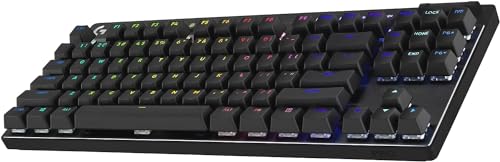
One name dominates the conversation, the Wooting 60HE, and this guide discusses it openly in prose: it popularised Hall effect rapid trigger for this exact game and remains a reference point on pro desks. It has no verified listing in the data this article is built from, so it carries no purchase link here, and nothing below pretends to be it. What follows instead are the verified alternatives that implement the same underlying technologies, from flagship magnetic boards to a budget Hall effect option, each framed honestly as what it is.
Read this as a technology guide with a shopping list attached. The sections explain why Fortnite rewards rapid trigger, what pros actually configure, and where the limits of equipment lie, because the uncomfortable truth of competitive gear is that a keyboard removes excuses rather than adding skill. Players still building their fundamentals should pair this with the keyboard latency input lag explained guide to understand the whole input chain before spending on any single link of it.
Key takeaways: Pros choose rapid trigger and adjustable actuation first, a compact layout second, and brand last. The Wooting 60HE set the template and is discussed here in prose only; the linked boards are verified alternatives using the same Hall effect or analog optical ideas, spanning flagship, compact and budget tiers.
Mechanical Keyboards Pro Fortnite Players Use: The Pattern Behind the Desks
Watch a professional Fortnite player’s desk and a pattern repeats across teams and sponsors: small board, angled sharply, pushed to the desk’s left edge, with a vast mouse pad consuming the rest of the surface. The angle is not theatre. Tilting the board lets the left hand rest naturally while the right arm gains a full sweep for building turns and target tracking, a posture explored in its own right by players who tilt for space rather than style. The small footprint is what makes the angle possible without surrendering the mouse.
The second pattern is invisible: nearly every board at that level now senses key position continuously rather than merely registering a press. Hall effect switches track a magnet, analog optical switches track light, and both let software decide, per key, exactly where a press counts and the instant a release resets it. That is the technological break from traditional mechanical boards, and it matters in Fortnite specifically because the game’s building and editing grammar is built from rapid, repeated, interrupted keystrokes.
The third pattern is restraint. Pro setups rarely feature towering keycaps, heavy artisan clusters or lighting spectacles, because the board is a tool photographed incidentally rather than a display piece. PBT caps, a plain case, a cable routed and forgotten: the aesthetic is athletic equipment, not furniture. Amateurs copying pro desks should copy that restraint first, since it is the part that costs nothing and the part most often skipped in favour of copying the price tag instead.
In this guide
Why Rapid Trigger Suits Fortnite’s Building and Editing
A traditional switch resets at a fixed point: the key must travel back up past its reset position before the next press counts. In ordinary typing that design is invisible. In a Fortnite edit sequence, where the same fingers strike, release and restrike keys in a staccato rhythm while the other hand aims, that fixed reset point becomes a metronome limiting the tempo. Rapid trigger removes the fixed point: the key resets the moment it begins rising, by an amount the player sets, so the next press can begin almost immediately.
Adjustable actuation is rapid trigger’s partner feature. Movement keys can be set to register at the slightest touch, so a strafe begins instantly, while a key bound to something consequential, a weapon swap or a reset, can be set deeper so a resting finger never triggers it accidentally. Pros tune these values per key and per role, then practise until the tuning disappears into muscle memory. The board stops being a uniform grid and becomes a shaped instrument, which is precisely what a traditional keyboard cannot be.
The honest limits deserve equal emphasis. Rapid trigger accelerates the repetition of inputs you already make correctly; it does not choose the right edit, track a target or teach piece control. A developing player gains more from a month of deliberate edit courses than from any switch technology, and pros themselves say versions of this in interviews with a consistency that marketing rarely quotes. Buy the technology to remove a ceiling you are actually touching, not to purchase the feeling of seriousness, because the feeling fades and the ceiling, unaddressed, remains.
The Wooting Question, Answered in Prose
No guide to this topic is credible without addressing the board that defined it. The Wooting 60HE earned its position by pairing Hall effect switches with software that made rapid trigger and per-key actuation genuinely configurable, in a sixty percent shell that suited the pro desk geometry described above. Its influence is measurable in the market: nearly every board reviewed below exists because the 60HE proved competitive players would reorganise their desks around a sensing technology rather than a switch brand.
This article links no listing for it, deliberately and transparently: the verified catalogue data behind this guide contains no confident match for that board, and inventing one would break the rule that every link here is earned by verification. Readers set on that specific board should buy it through its maker’s own channels, where configuration support and firmware come from the source. Readers open to the same technologies from other makers will find the verified alternatives below entirely legitimate, because the advantage lives in the sensing and the software discipline, not in a logo.
That framing also protects buyers from a subtler error: assuming that because pros use a board, the board explains the pros. The causal arrow mostly points the other way. Players at that level adopt whatever removes friction from inputs they have already mastered, and they would remain formidable on any board in this article. Equipment at the professional tier is about eliminating the last few percent of interference, and the last few percent only exists for players who have already built the first ninety-five.
The Verified Alternatives, Board by Board
Six boards follow, each verified against listing data before earning its link. They divide into three families: SteelSeries’ magnetic flagships in full-size and mini forms, Razer’s analog optical mini, and a trio of Hall effect boards from MelGeek, NuPhy and Aula that carry rapid trigger into enthusiast and budget territory. Read them as implementations of one idea at different sizes and tiers, and judge them by configuration depth, layout fit and software maturity rather than by spec-sheet theatre.
SteelSeries Apex Pro Gen 3: The Full-Size Magnetic Flagship
Flagship alternative — adjustable actuation with rapid trigger
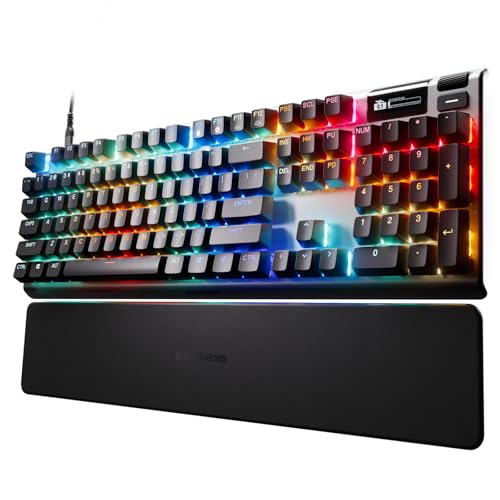
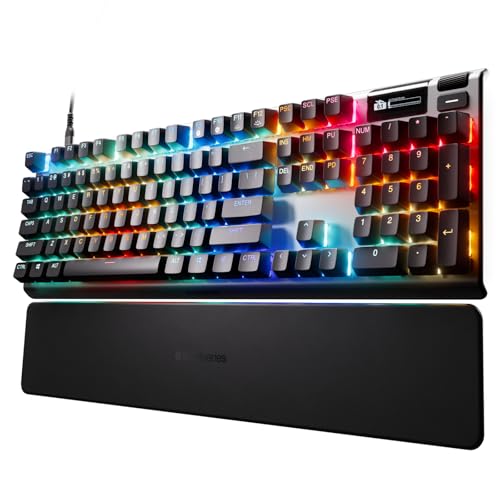
At a glance: Full-size layout, OmniPoint 3.0 HyperMagnetic switches, adjustable actuation, rapid trigger, Rapid Tap and Protection Mode features, OLED display, PBT keycaps, USB-C wired.
The Apex Pro Gen 3 is the mainstream flagship of the magnetic era: a full-size board whose switches report their position continuously, letting its software set actuation per key and reset presses dynamically in the rapid-trigger style Fortnite rewards. Its extra features aim squarely at competitive play, including a mode that guards against accidental actuations and a system for prioritising opposing movement keys, the exact scenario of a player counter-strafing between builds.
Its size is the honest debate. A full-size board on a pro-style desk surrenders mouse room that the sixty percent boards below protect, and many Fortnite players will prefer the Mini version for that reason alone. But players whose desks also do office work, or whose hands simply like a full deck, get the complete technology here without compromise, plus an OLED display that proves more useful for checking settings at a glance than its gimmick reputation suggests.
Strengths
- Deep per-key actuation configuration
- Rapid trigger suited to edit-heavy play
- Full layout for players who also work at the desk
Trade-offs
- Full-size footprint crowds the mouse
- Flagship tier pricing in its category
- Software depth takes an evening to learn
Best for: players who want magnetic rapid trigger without giving up a full layout. / Not suited for: small desks or players committed to the tilted mini-board posture.

SteelSeries Apex Pro Mini Gen 3: The Pro-Desk Shape
Compact flagship — the size class pro desks actually use
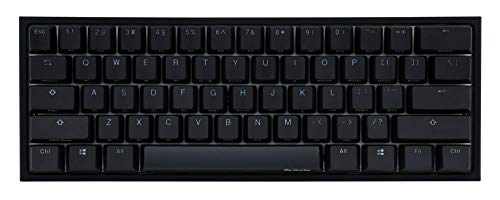
At a glance: Sixty percent layout, OmniPoint 3.0 HyperMagnetic switches, adjustable actuation, rapid trigger, Protection Mode, Rapid Tap support, RGB, USB-C wired.
The Mini takes the Gen 3 flagship’s sensing and software and cuts the shell down to the sixty percent footprint that defines the professional Fortnite desk. Everything the game needs survives the cut, because Fortnite’s keyboard grammar lives on the left hand’s home cluster, and everything the mouse needs is gained: a runway of pad that lets low-sensitivity players turn, build and track without lifting and resetting mid-fight.
The costs are the standard costs of the size, paid knowingly: no dedicated arrow keys, no function row, and a dependence on layers that takes a week to internalise. Players who also write, code or work at the same desk should test that dependence honestly before committing, ideally by remapping a current board first. For a dedicated gaming desk, though, this is the alternative in the list whose shape most faithfully matches what the professionals actually arrange in front of themselves.
Strengths
- Pro-style sixty percent footprint
- Same magnetic technology as the flagship
- Frees maximum mouse space for building turns
Trade-offs
- Layers replace the missing function row
- Compact size frustrates some work tasks
- Premium tier for a small board
Best for: dedicated Fortnite desks and low-sensitivity players who tilt their board. / Not suited for: players who need arrows and F-keys at work all day.

Razer Huntsman V3 Pro Mini: The Analog Optical Route
Optical alternative — analog sensing from the other technology family
At a glance: Sixty percent esports layout, analog optical switches, rapid trigger mode, adjustable actuation, Snap Tap feature, dual-purpose modifier keys, doubleshot PBT keycaps, wired.
Razer reaches the same competitive destination by a different road: its analog optical switches measure key position with light rather than magnetism, and the Huntsman V3 Pro Mini builds rapid trigger and adjustable actuation on that sensing. For the player, the experience converges with the magnetic boards: shallow, tuned movement keys, instant resets during edit sequences, and software-mediated priority for opposing directional inputs when strafing between builds.
The Mini’s dual-purpose modifiers deserve a mention, because they answer the sixty percent layout’s oldest complaint by letting keys serve two roles depending on tap or hold, softening the layer dependence that the SteelSeries Mini accepts. Razer’s ecosystem is the consideration: configuration lives in its software, and owners already inside that ecosystem will feel at home while others face another control panel to learn. As with the Wooting discussion above, judge this board as an implementation of an idea, and it stands up well.
Strengths
- Analog optical rapid trigger implementation
- Dual-purpose keys soften the small layout
- PBT caps fitted as standard equipment
Trade-offs
- Configuration tied to Razer’s software
- Optical feel differs subtly from magnetic boards
- Sixty percent limits remain for work use
Best for: players who prefer optical sensing or already use Razer’s ecosystem. / Not suited for: buyers avoiding additional gaming software suites.
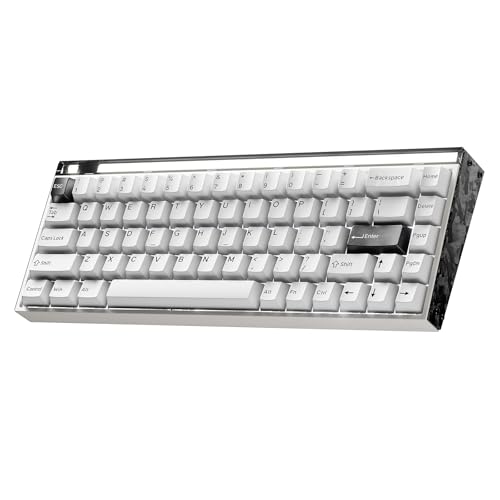
MelGeek MADE68 Ultra+: The Enthusiast Hall Effect Board
Enthusiast alternative — aluminium, hot-swap, rapid trigger
At a glance: Sixty-five percent layout, Hall effect magnetic switches, rapid trigger, adjustable actuation, hot-swappable, SOCD support, RGB lightbox design, aluminium case, wired.
MelGeek’s MADE68 Ultra+ approaches rapid trigger from the custom-keyboard side of the fence: an aluminium case, a design with genuine desk presence, and Hall effect internals tuned for first-person games. The sixty-five percent layout is a thoughtful compromise for this audience, restoring dedicated arrow keys that pure sixty percent boards sacrifice, which matters in menus, replay review and every non-game minute the desk sees.
It is wired, enthusiast-priced in spirit, and aimed at players who want their competitive board to also be an object they enjoy owning, a combination the stripped pro-style boards deliberately refuse. Buyers should note the framing carefully: this is an alternative that implements the same rapid-trigger idea in a more luxurious shell, not a replica of any pro’s specific board. Judged on those honest terms, it is one of the most complete packages in this list.
Strengths
- Aluminium case with real desk presence
- Arrow keys survive in the layout
- Hall effect rapid trigger for FPS play
Trade-offs
- Wired only, no wireless mode
- Heavier shell travels less happily
- Enthusiast positioning in its tier
Best for: players who want rapid trigger inside a premium custom-style board. / Not suited for: LAN travellers counting grams or wireless devotees.

NuPhy Field75 HE V2: Rapid Trigger With a Knob and a Function Row
Feature-rich alternative — seventy-five percent Hall effect
At a glance: Seventy-five percent layout with eighty-three keys, Hall effect switches, rapid trigger, adjustable actuation, high polling rate wired connection, hot-swappable, knobs and eight customisable keys, RGB.
The Field75 HE V2 is the maximalist’s rapid-trigger board: it keeps the function row, adds knobs and a cluster of customisable keys, and still delivers Hall effect sensing with adjustable actuation and rapid trigger for the game itself. For players who alt-tab between Fortnite, a stream dashboard and a chat window, those extra controls are not decoration; they are the difference between a board configured for a whole evening and one configured for a single match.
The trade is desk geometry again. A seventy-five percent board is wider than the mini boards the pros favour, and the tilted, mouse-runway posture gets tighter. Players with generous desks or higher mouse sensitivity will never feel the loss. Players copying a pro setup wholesale should measure first. This board suits the player who wants the technology without the monastic layout, and it makes that case more completely than anything else linked here.
Strengths
- Function row and knobs retained
- Hall effect rapid trigger onboard
- Customisable keys suit streaming desks
Trade-offs
- Wider than pro-style mini boards
- Busy layout will not suit minimalists
- Many features to configure initially
Best for: players wanting rapid trigger plus streaming and media controls. / Not suited for: minimalist tilted-desk setups with tight mouse space.

Aula WIN60 HE: The Budget Hall Effect Doorway
Budget alternative — rapid trigger at an entry tier
At a glance: Sixty percent layout, magnetic Hall effect switches, hot-swappable, adjustable actuation, rapid trigger mode, high polling rate wired connection, RGB.
The WIN60 HE exists to answer the most practical question in this article: how cheaply can a player honestly test whether rapid trigger suits their game? Aula’s answer is a sixty percent Hall effect board at a budget tier, with the essential features, adjustable actuation and rapid trigger, present and configurable, and the luxuries, case materials, software polish, accessory bundles, trimmed away to reach the tier.
Frame it exactly as that: a doorway, not a destination pretending otherwise. Its role in a player’s journey is to prove the technology’s value in their own hands over a season, after which the flagship boards’ refinements can be judged from experience rather than from hope. For younger players especially, whose budgets are real and whose skills are still compounding, that sequencing is not a compromise. It is the correct order of operations, and this board makes it available.
Strengths
- Essential rapid trigger features at entry tier
- Sixty percent pro-style footprint
- Hot-swap switches allow later experiments
Trade-offs
- Budget materials and finish throughout
- Software less polished than flagships
- Fewer extras in the box
Best for: players testing whether rapid trigger fits their game before investing more. / Not suited for: buyers wanting a flagship case and software today.
How Pros Configure Their Boards: Settings That Matter
Configuration begins with movement. Pros typically set the WASD cluster to actuate very shallow, so strafes and counter-strafes begin with minimal travel, and enable rapid trigger with a small reset distance so repeated taps during edits stay crisp. The exact numbers are personal and are tuned in creative maps, not copied from a screenshot: a setting that feels instant to one hand feels hair-triggered and error-prone to another, and accidental inputs are simply the tax on excessive enthusiasm here.
The second configuration is protection. Features that prioritise the most recent opposing key, or guard against accidental double inputs, exist because building fights involve deliberately chaotic fingers. Players should enable one such feature at a time, play real matches for a week, and keep only what survives contact with their own habits. Stacking every assist at once makes the board’s behaviour unpredictable, and unpredictability is the one trait no competitive player can afford in equipment.
The third configuration is the layout around the game. Binds for building pieces, editing, inventory and communication should sit where the hand already rests, with the board’s layers and dual-purpose keys absorbing overflow rather than forcing finger journeys. Pros treat their bind layout as a single system with the board’s actuation map: a key set shallow because it is struck in panic should also be a key placed where panic reaches naturally. Readers designing their first serious layout will find the discipline in how to choose first mechanical keyboard a useful foundation.
Buying Guide: Choosing Among the Alternatives
Choose by desk first. Measure the mouse runway your sensitivity needs, then let that measurement eliminate sizes: tight desks point to the sixty percent boards, generous desks reopen the seventy-five and full-size options. Choose by ecosystem second: configuration software is a long-term relationship, and a board whose software you hate will be a board whose best features you never configure. Choose by budget honesty third: the budget Hall effect board proves the concept, and the flagships refine it, so buy the proof before the refinement unless money is genuinely no object.
One more consideration separates Fortnite from other shooters: this game’s ceiling is mechanical in the building sense, and your keyboard time will be split between the game and the creative maps where mechanics are drilled. A board that is pleasant for an hour of edit courses, quiet enough for a household, and consistent enough to disappear is worth more than a board with a marginally faster specification and a personality you fight daily. Comfort across practice is a competitive feature, because practice volume is the real performance statistic.
How to Set Up a Rapid Trigger Board for Fortnite
Begin by updating the board’s firmware and software from the maker’s official source, then save a default profile before changing anything, so every experiment has a home to return to. Set movement keys shallow, enable rapid trigger on the keys your building and editing actually repeat, and leave utility keys at standard depth. Play creative edit courses for twenty minutes, noting every accidental input, then deepen the offending keys slightly rather than retraining your hands around a setting that fights them.
Next, arrange the desk before judging the board: tilt the keyboard to your natural hand angle, give the mouse its full runway, and route the cable so it never drags during a turn. Finally, freeze the configuration for two weeks of real matches. Competitive settings are a system, and systems need stable data. The player who retunes nightly is practising their settings menu, not their editing, and the pros whose desks inspired this article are, above all, players who stopped fiddling and started drilling.
Mistakes Fortnite Players Make When Buying
The first mistake is buying a logo’s reputation instead of a technology: a famous name on a traditional switch board delivers none of the rapid-trigger behaviour this article is about. The second is copying a pro’s exact actuation numbers without their hands, their practice volume or their bind layout, then concluding the technology is hype when the borrowed numbers misfire. The third is neglecting the mouse and pad while lavishing the whole budget on the keyboard, when the pro desk’s defining feature is the balance between the two.
A fourth mistake is subtler: treating the board as the ceiling-raiser while practising on default settings, in an untilted position, on a crowded desk. The professionals’ advantage is a stack of small, correct arrangements, and the board is one layer of it. Copy the stack, in order of cost, posture, space, settings, then hardware, and the hardware layer, when you reach it, will finally have something worth amplifying.
The Sensing Technologies, Compared for This One Game
Traditional mechanical switches know two facts about a key: up or down, decided at fixed points machined into the switch. Everything in this article exists because competitive Fortnite outgrew that binary. Hall effect switches place a magnet in the stem and a sensor on the PCB, so the board always knows the key’s position along its travel. Analog optical switches shine light through the stem’s path and infer position from interruption. Both convert the keystroke from an event into a stream, and software turns that stream into actuation points, reset points and priorities that the player controls.
The practical differences are subtler than the marketing war suggests. Magnetic sensing is the more common implementation and anchors most of the boards in this guide; optical sensing removes the electrical contact entirely and has its own loyal engineering tradition. Feel differs slightly because the switch mechanisms differ, and software maturity differs more than either, because a decade of configuration tools cannot be faked by a sensor. For Fortnite’s purposes, the question is never which physics wins, but which complete board, sensor plus software plus layout, fits your desk and your habits.
Durability arguments follow the same pattern. Contactless sensing removes one wear mechanism, the metal leaf, and marketing inflates that into immortality. In reality, boards retire from spilled drinks, worn keycaps, broken ports and changing tastes far more often than from sensing failure. Buy the technology for the behaviour it enables this season, rapid trigger and tuned actuation, and treat longevity claims as background comfort rather than the reason for the purchase.
The Desk Around the Board: Mouse, Pad, Monitor and Chair
A professional Fortnite desk is a system for producing accurate inputs under adrenaline, and the keyboard is one component among five. The mouse and its sensitivity define the game’s aiming language; the pad defines how much of that language can be spoken in one motion; the monitor’s height and distance define how long the neck survives a session; the chair defines whether the shoulders stay down and relaxed in hour three. Players who copy only the keyboard are copying the component that photographs best, which is a poor selection method for a system.
The pad deserves special emphasis because it is where the small keyboard earns its money. A sixty percent board on a small pad gains nothing; the same board on a wide pad transforms the right arm’s range. When budgeting, treat board and pad as one purchase with two line items, and if the total forces a choice, choose the cheaper board and the generous pad over the flagship board and the cramped one. The professionals’ desks make this argument silently in every photograph: the pad is enormous, and the keyboard is the thing that got out of its way.
Sound and household complete the system. Competitive boards are not quiet objects, and a bedroom-desk player sharing walls with family will negotiate volume nightly. A desk mat, a tactile or linear switch choice over a clicky one, and a door closed during matches are the practical stack. None of this appears in equipment lists, yet it decides whether the equipment gets used at full commitment or at apologetic half-volume, which is a performance variable no specification sheet will ever print.
Practice Architecture: Making the Equipment Earn Its Keep
Equipment this configurable demands a practice structure, or the configuration becomes the hobby. The professional pattern separates drilling from playing: creative maps and edit courses for mechanics, where new settings are tested in isolation, then real matches where settings are forbidden to change. That separation is what lets a player trust a new actuation depth; it was proven in the laboratory of the edit course before it was asked to perform under pressure. Amateurs who tune mid-match are running experiments and calling the confusion data.
A sane weekly structure might give one session to mechanics on frozen settings, several to ordinary play, and fifteen minutes at the week’s end to reviewing exactly one variable: a bind that felt far, a key that fired accidentally, a reset distance that felt sticky. One variable, changed once, then frozen again. This is slower than the nightly overhaul it replaces, and it compounds, because each change is actually learned. The board’s software makes a hundred changes possible; discipline makes three of them real.
Record yourself occasionally, because hands lie and video does not. A phone propped to film your left hand during an edit course will show hesitations, finger collisions and wasted motion that no setting can fix and that a coach, or your own eyes a week later, can. Professionals review their mechanics the way athletes review film. The keyboard’s job in that process is to be boringly consistent, which is the deepest reason pro boards look so plain: consistency is the feature, and plain is what consistency looks like from outside.
Archetypes: How Different Pro Styles Use the Same Technology
Without naming names, three archetypes recur at the top level, and each bends the technology differently. The aggressive builder plays at a tempo where edits are weapons, and tunes movement and build keys to the shallowest reliable settings, accepting occasional accidental inputs as the price of speed. The disciplined placer plays for positioning and endgame consistency, prefers slightly deeper, safer actuation, and treats rapid trigger as insurance for defensive edits rather than as an attacking tool. The all-rounder streamer splits the difference and adds the streaming layer: extra keys, quieter switches, a board that behaves on camera as well as in competition.
The archetypes matter to a buyer because they expose a truth the spec sheets hide: there is no professional setting, there are professional settings, plural, fitted to styles. Your own style, honestly assessed, is a better configuration guide than any champion’s screenshot. If you do not yet know your style, that is diagnostic too: it means the fundamentals are still forming, and the correct purchase is the versatile board and the budget-friendly doorway, not the extreme implementation of a style you have not grown into.
Coaches, where they exist in a player’s life, consistently push the same ordering this article has used: posture and space, then binds, then settings, then hardware. It is worth noticing that hardware comes last in the professional’s own account of professionalism. The board matters, genuinely, at the margin where matches are decided by frames and centimetres. Most players’ matches are decided by decisions and drills, and the kindest thing a gear guide can do is say so while still helping you buy well.
Buying Used, Buying Once and Knowing When to Stop
The second-hand market for competitive boards is active, because players upgrade with each sensing generation and last year’s flagship becomes this year’s bargain. Used buying suits this category unusually well: the boards are simple to test, every key either senses correctly or does not, and configuration software will reveal a board’s health in minutes. Check the cable port for wobble, test every key’s actuation in the software’s visualiser, and confirm the board holds a profile after a restart. Those three checks catch nearly everything that matters.
Knowing when to stop is the final skill. A player with a configured rapid-trigger board, a fitted desk and frozen settings owns the complete professional pattern, and further purchases are decoration wearing the costume of improvement. The culture of gear will always offer a next board; the discipline of the players this article describes is that they mostly decline it during the season that matters. Buy well, configure honestly, practise relentlessly, and let the board become the least interesting thing about your game, which is exactly what it is on every professional desk that inspired the question.
Wired at Events, Wireless at Home: The Connection Question
Every board linked in this article is wired, and that is not an accident of the data; it reflects the competitive reality that a cable is the one connection that cannot be interfered with, slept through a battery warning, or left in another bag. Event environments are dense with wireless signals, and the professional preference for a cable in competition is a risk decision, not a latency superstition. At home, the same players may happily use wireless boards for casual play, which tells you the cable is about stakes, not about capability.
For the home competitor, the wired life has its own small disciplines. Route the cable with enough slack that a full mouse sweep never drags it, keep a spare cable in the desk because cables fail at the worst moments, and prefer boards with detachable cables so a failure costs a cable rather than a keyboard. The Aula and MelGeek boards here, like the flagships, reward that discipline equally. Connection reliability is the least glamorous performance feature in this article and the one most likely to decide an actual match.
Polling rate belongs in this section because it is the connection statistic marketing loves most. The high polling figures quoted for several boards here are real, and at the professional margin they belong to the stack of small correct things. For developing players, the honest translation is that connection speed stopped being the bottleneck several generations ago; your monitor, your practice and your decisions all sit ahead of it in the queue of things that lose matches. Buy the fast connection as part of a complete board, never as the headline reason.
Keycaps, Switches and Sound for Competitive Play
Competitive players are conservative keycap users for practical reasons: standard profiles keep the fingers’ learned geography intact, PBT resists the shine that makes caps slippery mid-season, and textured surfaces help fingers locate keys without eyes during chaotic fights. Exotic profiles and sculptural artisan caps belong to the hobby desk, not the tournament desk, because a cap that surprises your finger in a build fight costs more than any aesthetic pays. When a board in this article ships with PBT caps, that is a competitive decision, not a materials footnote.
Switch choice within the sensing families follows the same conservatism. Most competitive players settle on one switch weight and stay, because the actuation tuning they practise against assumes a consistent resistance curve beneath it. Swapping switch weights mid-season is retuning the instrument and relearning the piece at once. The hot-swappable boards here make experimentation easy in the off-season, which is exactly when experimentation belongs, and the discipline is to freeze the hardware along with the settings when matches matter.
Sound is the one place the competitive desk and the household negotiate. Rapid, repeated keystrokes during edit drills are percussive by nature, and a player practising at midnight in a family home will meet the limits of everyone’s patience before the limits of the board. A desk mat, a board with a solid case that does not ring, and practice hours negotiated like any other household noise are the working solution. The Aula’s budget case will announce itself more than the MelGeek’s aluminium; that difference is part of what the tiers buy, and households should price it in.
Maintaining a Competitive Board
A board used for daily drilling accumulates the evidence: dust in the switches’ paths, shine on the movement keys, a cable jacket worn where it crosses the desk edge. Maintenance is light but real. Blow out the board weekly, wipe caps before they shine rather than after, and inspect the cable monthly, because the cable is the component with a genuine failure date. Magnetic and optical boards add one rule: keep the sensing honest by keeping the board clean, since debris is the enemy of any system that measures small movements.
Software maintenance matters as much. Keep one known-good profile exported and stored away from the board, so a corrupted update or a borrowed computer never costs you your configuration during a competition window. Update firmware in the quiet weeks, never on the eve of an event, because an update that changes a default can invalidate a season of muscle memory overnight. Professionals treat their settings file the way musicians treat their instrument’s setup: documented, backed up and boring.
Finally, know the board’s failure plan. A spare cable, a backup board of any kind, even the budget doorway board kept from an earlier season, converts a hardware failure from a crisis into an inconvenience. The linked Aula makes an unusually rational backup for owners of the flagships: same sensing family, same layout class, small money, and already familiar to your hands if you began there. Redundancy is a professional habit that amateurs can copy for almost nothing.
Deep Dive: What the Next Generation of Pro Boards Will Change
Tournament reality adds a footnote the highlight reels omit: professionals practise on their own boards for hundreds of hours before an event, and the familiarity is the performance feature. A board’s specifications can be compared in an afternoon, but the trust that lets a player stop thinking about equipment mid-match is accumulated, not purchased. Amateurs rotate gear too often to ever collect that trust, which is why the most professional habit available at any budget is choosing a good board and then keeping it long enough to disappear.
The spectator’s view misleads in one more way: broadcast desks show the keyboard but not the settings file, the practice routine or the years of creative-map drilling behind the hands. Copying the visible layer of a professional system while skipping the invisible layers produces the feeling of preparation without its substance. This article has tried to describe the invisible layers honestly, because they are where the actual advantage lives, and they are mostly free.
Younger players should hear one specific encouragement: the budget tier of this technology is historically new. A few years ago, rapid trigger existed only at flagship prices and on one maker’s board; today a Hall effect board at an entry tier implements the same core behaviour. The democratisation is real, and it means the order of investment for an aspiring player can finally be the correct one: time first, coaching and practice second, and equipment a comfortable third.
Finally, remember that Fortnite itself evolves: seasons change the meta, new mechanics reward new binds, and a board’s configurability is partly insurance against a game that refuses to sit still. Per-key actuation and remapping that seem excessive today become the tools that adapt your desk to next season’s technique without new hardware. Buy configurability the way you buy a good chair, as infrastructure for work you have not yet imagined, and it will keep paying rent long after the spec-sheet excitement fades.
Parents buying for a young competitor deserve a direct paragraph: the budget doorway board in this article is not a lesser gift but the correct first instrument, because a developing player’s ceiling is set by practice long before it is set by sensors. Money saved there is better spent on the unglamorous infrastructure of improvement, a proper pad, a chair that fits, and the time and encouragement that no shop sells. The flagship can be the reward for a milestone reached, which teaches the right lesson about what equipment is for.
And a word for the returning player, whose hands remember an older Fortnite and an older desk: the technology genuinely has changed, and a short trial of a rapid-trigger board in a shop or at a friend’s desk is worth more than any amount of reading, this article included. Feel is the argument. If the reset behaviour clicks with your building rhythm within one edit course, you have your answer; if it feels like a solution touring for a problem, keep your current board and your money with a clear conscience.
Spectators sometimes ask why professional players angle their boards so extremely, and the answer completes this article’s geometry lesson: the angle aligns the left forearm with the desk’s edge, opens the chest, and lets the right arm sweep from the shoulder rather than the wrist. It looks uncomfortable to anyone who types for a living and feels inevitable to anyone who builds for one. If you experiment with it, change the angle gradually across a week; posture, like actuation depth, is learned by the body on its own schedule.
There is a small economy of trust in competitive gear worth naming: players lend each other boards at events, swap settings files, and warn each other about firmware updates that changed a feel. That culture is why the same few boards recur on professional desks even across rival teams and sponsors. Reputation in that world is earned in the only currency that cannot be marketed into existence, which is a season of matches where the equipment simply never became the story.
If this article leaves you with one purchase-order rule, let it be this: the board is bought last in a professional system and configured first in a practice system. Arrange the desk, set the binds, freeze the settings, drill the mechanics, and the keyboard, whichever verified board you chose from this page, becomes what it is on the desks that inspired the question: invisible, trusted, and entirely beside the point of why its owner wins.
Final Recommendation
For a dedicated Fortnite desk, the Apex Pro Mini Gen 3 and the Huntsman V3 Pro Mini are the closest verified matches to the professional pattern: compact, rapid-triggered, configurable. For players who want the technology inside a fuller or finer board, the Apex Pro Gen 3, Field75 HE V2 and MADE68 Ultra+ each make a coherent case. For players still proving the concept, the Aula WIN60 HE is the honest doorway. And the Wooting 60HE remains what it was: the reference point, discussed here in prose, to be bought through its maker if your heart is set on the original.
Related Guides Worth Your Time
- the mechanical keyboard glossary
- optical vs mechanical keyboards
- keyboard polling rate explained
- why pro gamers tilt keyboards
- are wireless keyboards good for gaming
Mechanical Keyboards Pro Fortnite Players Use: Frequently Asked Questions
Do pro Fortnite players really use sixty percent keyboards?
Many do, because the size serves the desk geometry their mouse sensitivity demands, and the game’s keyboard needs concentrate on the left hand. Not all do: some professionals use seventy-five percent or tenkeyless boards and accept a smaller mouse area in exchange for dedicated keys. The pattern to copy is the reasoning, measure your mouse needs first, rather than the specific size a favourite player happens to use.
Is rapid trigger allowed in competitive Fortnite?
Rapid trigger and adjustable actuation are hardware and firmware features of mainstream retail keyboards, sold openly by major brands for competitive play, and they are a standard part of the professional equipment landscape this article describes. Rules for specific tournaments can change, and players entering an organised event should always check that event’s current equipment rules rather than relying on any guide, including this one.
Why is the Wooting 60HE not linked in this article?
Because every purchase link in this guide is backed by verified listing data, and no confident verified match for that board was available when the data was assembled. Rather than invent a link or substitute another board under its name, the article discusses the 60HE in prose as the category’s reference point and links verified alternatives that implement the same rapid-trigger technology. Readers who want that exact board should go through its maker’s own store.
Can rapid trigger make me a better Fortnite player?
It can remove a small mechanical delay from inputs you already perform well, which matters at high levels where edit races are decided in fractions. It cannot supply the decisions, aim or piece control those inputs express. Treat it as the final few percent of an input system, valuable once your fundamentals are strong enough to reach the ceiling it raises, and poor value as a substitute for the practice that builds those fundamentals.
Hall effect or optical: which should I choose?
For Fortnite’s purposes the two technologies converge: both sense key position continuously and both support rapid trigger and adjustable actuation. Choose by the board around the sensing: layout, software quality, keycap and case standards, and price tier. Players already invested in one maker’s software often stay for the familiarity, which is a legitimate reason, because configuration you understand beats configuration you avoid.
What actuation settings should I start with?
Start with movement keys noticeably shallower than default, rapid trigger enabled on your building and editing keys with a modest reset distance, and everything else at factory depth. Practise in creative maps, deepen any key that fires accidentally, and freeze the result for at least two weeks of matches before judging it. Settings are personal equipment, like sensitivity, and borrowed numbers are a starting hypothesis, never a conclusion.