Disclosure: As an Amazon Associate, kajuandouglas.com earns from qualifying purchases. Links on this page are affiliate links; they cost you nothing extra. Prices and availability change often, so check the current Amazon listing before you buy.
Razer Blackwidow V4 75 Keyboard Review: Verdict Up Front
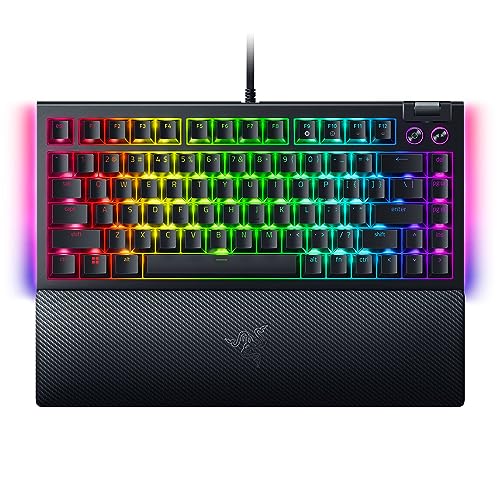
This razer blackwidow v4 75 keyboard review exists because the board marks a genuine change of direction for Razer’s longest-running keyboard line. The BlackWidow name was built on big, loud, gamer-first boards with fixed switches and plenty of desk presence. The V4 75% keeps the name and the Chroma glow, but shrinks to a compact 75 percent layout, adds a hot-swappable PCB, ships with a proper wrist rest, and includes a multi-function roller and media keys that used to be reserved for the full-size flagships. In short, Razer built the BlackWidow that the enthusiast community kept asking for, and the result is the most broadly recommendable BlackWidow in years: a board a competitive player can compete on and a keyboard hobbyist can actually modify.
The short verdict: if you want a compact gaming keyboard from a major brand that does not force you to choose between gaming features and custom-keyboard manners, this is the one to beat in Razer’s own catalog. Its Orange tactile switches are pleasant and quiet-running for a gaming board, the build feels dense and finished, and the roller is the kind of control you miss when you go back to a board without one. Its honest limitations are a wired-only connection at a moment when rivals go wireless, a price tier that invites comparison with very strong custom kits, and software that asks more of your system than minimalists prefer. The sections below take each part of the board in turn, then compare the alternatives verified for this review: the same model in white, the more expensive BlackWidow V4 Pro 75% Wireless as the higher-tier sibling, and Razer’s Huntsman V3 Pro Mini as the optical, rapid-trigger alternative.

In this guide
The Reviewed Model: Razer BlackWidow V4 75% (Black, Orange Switches)
Badge: The review subject. This is the exact configuration this review covers: the wired BlackWidow V4 75% in black with Razer’s Orange mechanical switches, hot-swappable design, Chroma RGB, a multi-function roller with media keys, and the included magnetic-feel wrist rest that the listing describes as comfortable. Everything in the deep-dive sections that follow refers to this board unless a comparison is explicitly named.
- Layout: 75 percent, compact with function row and arrows
- Switches: Razer Orange mechanical, tactile and quieter-running
- Hot-swappable: yes, standard enthusiast-style sockets
- Extras: multi-function roller, dedicated media keys, wrist rest included
- Lighting: Razer Chroma per-key RGB
- Connection: wired USB
Strengths
- Hot-swappable sockets finally bring the BlackWidow line into the modding era; switch changes need no soldering.
- The 75 percent layout keeps the function row and arrow keys that players and workers actually use, in a footprint that frees mouse space.
- The roller and media keys are genuinely useful daily, for volume, scrolling, and media control without leaving the game or document.
Trade-offs
- Wired only, which will rule it out for clean-desk and couch setups no matter how good the typing is.
- The Orange tactile switch is the personality of the board; linear lovers should budget for a switch swap or look at the alternatives below.
- Chroma’s best tricks live inside Razer’s software ecosystem, which not every user wants running.
Best for: players and typists who want one compact, modifiable, feature-complete board from a major brand. Not suited for: wireless-only setups or buyers who want analog rapid-trigger hardware. Check price on Amazon
Design And Build Quality
The V4 75% looks like a BlackWidow that went on a sensible diet. The case is compact without feeling hollow, the top has the line’s familiar angular confidence toned down to something that can sit on a work desk without shouting, and the whole board has the dense, no-creak feel that separates a finished product from a kit of parts. Razer includes a wrist rest that matches the board’s width, a detail that sounds minor until you have typed a long session on a 75 percent board floating at full height without one. The keycaps are doubleshot ABS in Razer’s usual style, chosen for crisp Chroma shine-through; they will eventually polish with heavy use, as ABS does, and the hot-swap design plus standard stems mean replacing them with PBT later is a ten-minute job rather than a new keyboard.
Details reward attention. The roller sits where your right hand can reach it without a stretch, and it has the detented, deliberate feel of a control meant to be used blind. Media keys are separate and labeled rather than buried in a function layer, which matters at the exact moment a call comes in mid-game. Cable routing is straightforward wired fare. Underneath, the board’s sound tells the build story best: this is a quieter BlackWidow than the name’s history suggests, with the Orange switches and the board’s internal damping producing a muted, rounded bottom-out instead of the line’s old hollow clack. Razer clearly tuned this board for the way people actually use compact keyboards now, close to microphones, in shared rooms, on streams.
The Orange Switches And The Typing Feel
Razer’s Orange switches are the tactile, quieter branch of its mechanical family: a noticeable bump on the press, no click bar, and a sound profile designed to stay polite. On this board they feel well matched to the case, with the tactility reading clearly at typing speed and the bottom-out landing soft rather than sharp. Tactile switches divide opinion more than any other kind, so the important structural fact is the hot-swap PCB: if you buy the board for its layout, roller, and build, and later decide you are a linear person, a full switch swap is an evening’s pleasant work with a switch puller, not a soldering project. The board accepts the standard switch ecosystem, which converts the switch question from a purchase risk into a tuning option.
For gaming, the Orange switches are consistent and fatigue-friendly across long sessions, with the tactile bump giving a small confirmation that ability keys have fired, which some players prefer to the guesswork of very light linears. What this board does not offer is the analog actuation and rapid-trigger behavior of Razer’s optical Huntsman line; keystrokes here are decisive single events rather than adjustable analog inputs. That is a genuine fork in Razer’s own catalog, and the Huntsman alternative below exists for players whose games reward that technology. For everyone else, the mechanical honesty of the V4 75% is a feature: it behaves like the best traditional boards, with modern manners.
Gaming Performance In Practice
A gaming keyboard review should separate what matters in matches from what matters in marketing. In matches, the V4 75% gives you a compact footprint that lets the mouse travel, a function row for games that bind it, arrow keys for menus and strategy titles, and switches that actuate consistently under off-center, hurried strikes. The board’s polling and rollover behavior are in the expected flagship class for a wired board, and the wired connection itself remains the zero-fuss option for latency-sensitive players: plug in, play, no battery anxiety before a tournament set, no wireless interference questions in a crowded venue. The roller earns its place here too, because mid-session volume changes and quick media control happen without alt-tabbing or reaching for headset controls.
Where the board’s gaming story needs honesty is the rapid-trigger question. A growing class of competitive titles rewards keyboards that can reset a key the instant it begins to rise, enabling faster repeated inputs and counter-strafing. That capability belongs to analog optical and Hall effect boards, including Razer’s own Huntsman V3 Pro line. The V4 75% is a superb traditional board, and for the large majority of players, including most ranked grinders, its consistency matters more than that specialized edge. But a player whose main title and technique specifically exploit rapid trigger should read the Huntsman section below before buying, because no switch swap can add analog sensing to this board later.
Software, Chroma, And Daily Life
Razer’s Synapse software handles remapping, macros, and Chroma lighting profiles, and the board stores enough onboard behavior to remain civilized on machines without it. Chroma remains the most developed lighting ecosystem on any keyboard platform, with per-key effects and game integrations that competitors still chase; if your desk already glows Razer green in other peripherals, this board completes the set with the least friction. The fair criticism is weight: Synapse is a substantial application, and minimalist users who want a keyboard to be a keyboard may resent keeping it installed for occasional tweaks. The practical workflow most owners settle into is to configure everything once, save profiles, and let the software idle or uninstall it, returning only when a new game or layout demands changes.
Daily-life details accumulate in the board’s favor. The wrist rest makes long writing sessions comfortable without buying accessories. The compact layout still fits a numpad-less desk with a large mousepad. The media keys handle the constant small interruptions of modern computer use, calls, videos, music between matches, with a directness that function-layer shortcuts never match. And the board’s relatively civilized sound means it can share a room, or a microphone, without apology, which older BlackWidows could not claim.

The Same Board In White: BlackWidow V4 75% (White, Orange Tactile)
Badge: The colourway alternative. This listing is the identical model in white with the Orange tactile switches: same 75 percent layout, hot-swappable design, Chroma RGB, roller and media keys, and wrist rest. Nothing in the review above changes except appearance and the way the board wears its life; white caps show dust and crumbs more honestly, while hiding the shine that dark ABS eventually develops a little better in photographs. Choose it for light-themed setups and because you prefer it, which is a complete reason. Check price on Amazon

The Higher-Tier Sibling: BlackWidow V4 Pro 75% Wireless
Badge: The upgrade path, not the reviewed model. To be precise about the family tree: this is a different, more expensive keyboard that shares the V4 75 name, not the board reviewed above. The Pro adds wireless connectivity at high polling rates over Razer’s dongle plus Bluetooth, an OLED display, a command dial in place of the simpler roller concept, hot-swappable Orange tactile switches of the newer generation, and the wrist rest and Chroma treatment in their fullest form. It is the answer to the reviewed board’s two main limitations, wireless and flagship extras, at a flagship price.
- Connectivity: 2.4 GHz wireless, Bluetooth, and wired
- Extras: OLED display, command dial
- Switches: hot-swappable Orange tactile, newer generation
- Positioning: premium tier within the BlackWidow family
Strengths
- Full wireless freedom without giving up the 75 percent layout or the media controls.
- The OLED and command dial add genuine utility for system info and quick adjustments.
- It keeps hot-swap, so the modding story survives the upgrade.
Trade-offs
- It costs meaningfully more than the reviewed board for connectivity and display features some users will rarely touch.
- More features mean more software involvement and more battery management.
- Players who sit wired at one desk pay for mobility they never use.
Best for: buyers who wanted the reviewed board but require wireless or love flagship extras. Not suited for: value-focused buyers or wired purists. Check price on Amazon

The Optical Alternative: Razer Huntsman V3 Pro Mini
Badge: The rapid-trigger route. The Huntsman V3 Pro Mini answers a different question: what if the switch itself is the performance feature? Its analog optical switches support adjustable actuation, rapid trigger behavior, and Razer’s Snap Tap for priority inputs, in a smaller 60 percent wired esports frame with doubleshot PBT caps. It gives up the function row, arrows, roller, and wrist rest that make the BlackWidow a daily driver, in exchange for the most input-focused hardware Razer sells.
- Layout: 60 percent esports
- Switches: analog optical with adjustable actuation and rapid trigger
- Extras: Snap Tap, dual-purpose mod keys
- Positioning: specialist competitive tier
Strengths
- Rapid trigger and adjustable actuation are real competitive tools in the titles that reward them.
- The tiny footprint maximizes mouse room completely.
- PBT caps from the factory answer the durability question out of the box.
Trade-offs
- Missing function row and arrows complicate work, strategy games, and everyday shortcuts.
- Optical switches are not hot-swappable in the mechanical sense; the modding path is narrower.
- It is a specialist tool that generalists will feel the edges of daily.
Best for: competitive players whose games reward analog input features. Not suited for: anyone who wants one board for both ranked play and office work. Check price on Amazon
Buying Guide: Deciding Inside The Razer Family
Start with the connection question, because it splits the family cleanly. If your board lives plugged into one desk, the reviewed V4 75% gives you the family’s best balance of features, feel, and price, and the white version is purely a matter of taste. If you move between desk and couch, pair with multiple machines, or simply refuse cables on principle, the V4 Pro 75% Wireless is the same idea completed at a higher price. Then ask the input question: does your main game reward rapid trigger and adjustable actuation enough to sacrifice the function row and media controls? If yes, the Huntsman V3 Pro Mini is the specialist’s choice; if no, and for most players the honest answer is no, the mechanical BlackWidow’s completeness wins. Finally, consider your other devices: an existing Razer ecosystem makes Chroma and Synapse feel like home, while a mixed desk makes the board’s onboard behavior and standard hot-swap compatibility the more relevant virtues, and on those the V4 75% still scores well.
How To Set Up And Customize The V4 75%
- Unbox and place the wrist rest first, aligning it with the board before connecting anything, so your typing posture is set from the first session.
- Connect the cable and let the board run stock for a day. Learn the roller, media keys, and layout as Razer intended before remapping anything.
- Install Synapse only when you are ready to configure: set your lighting, assign the roller’s secondary functions, and save a profile for work and one for play.
- After a week, judge the Orange switches honestly. If the tactile bump is not for you, order a switch set in your preferred style; the hot-swap sockets make the change a relaxed evening task with a puller.
- Pull switches straight up with a proper tool, seat replacements fully, and test each key before moving on, so a bent pin is caught immediately.
- Consider a PBT keycap set as the long-term upgrade once the stock ABS begins to shine; keep the original caps stored for resale completeness.
- Clean quarterly: caps off, gentle wash, full dry, and a brush-out of the case, which the compact layout makes quick.
Common Mistakes With This Board
The first mistake is buying it for wireless use it does not have; read the connection line, because the Pro sibling’s wireless halo sometimes drifts across the whole family in shoppers’ minds. The second is judging the Orange switches from a shop demo’s thirty seconds; tactile feel reveals itself over days of real typing, and the hot-swap design means a wrong first impression is correctable rather than fatal. The third is ignoring the wrist rest in the box and then blaming the board’s height for wrist fatigue the rest was designed to prevent. The fourth is leaving Synapse half-configured, with lighting profiles fighting each other, instead of spending twenty focused minutes setting profiles properly once. The fifth is comparing its price only against bare custom kits and forgetting that the roller, media keys, wrist rest, software ecosystem, and retail support are part of what the money buys.
Final Recommendation
The BlackWidow V4 75% is the BlackWidow for people who had stopped considering BlackWidows: compact, modifiable, civilized in sound, and complete in controls. Buy the reviewed wired model if your desk is its home and you value the family’s best balance. Step up to the Pro 75% Wireless if cables are your dealbreaker, and detour to the Huntsman V3 Pro Mini only if analog input features are your game’s language. For everyone in the wide middle, the board in black or white at the top of this review is the one to put on the desk. It earns that position the unfashionable way: by being complete. Every control you reach for exists, every switch can be changed, every cap can be replaced, and the board’s manners suit the shared, streamed, microphone-filled reality of modern desks. Razer spent a decade being told what the enthusiast community wanted; this model is what happened when the company finally built it under its most famous name, and the review practically writes itself once that is understood.
The 75 Percent Layout, Examined Closely
Layout is where compact boards succeed or fail in daily life, and the V4 75% makes the choices most users would make for themselves. The function row survives, which matters for games with F-key bindings, for BIOS and bootloader screens, and for anyone whose work software grew up around those keys. Arrow keys are present and findable by touch, and the navigation cluster is compressed rather than deleted, so Home, End, and their neighbors live on a layer or in squeezed positions that become automatic within a week. What you surrender versus a full-size board is the numpad and the spacious separation between clusters; what you gain is a right hand that travels inches less between keyboard and mouse across every hour of the day, a gain gamers feel in their shoulders and workers feel by Friday.
Compared with a 60 percent board such as the Huntsman Mini alternative in this review, the 75 percent layout is the difference between a board that asks nothing of your habits and a board that retrains them. Layers are a fine technology, but every layer is a small tax on speed and memory, and the V4 75% mostly declines to tax you. Compared with tenkeyless, it surrenders a little breathing room between clusters for a notably smaller footprint. For most desks, and especially for gaming desks where the mousepad keeps growing, 75 percent is the current sweet spot, and this board’s execution of it is one of its strongest arguments.
Sound Character And Microphone Manners
Older BlackWidows announced themselves through walls. This one was clearly tuned with streamers, calls, and shared rooms in mind. The Orange switches avoid the click bar entirely, the case avoids the hollow resonance that made earlier boards sound cheap on recordings, and the overall voice is a muted, mid-pitched tap that microphones tolerate well. It is not a silent board, and no mechanical board with this energy is; silent switches exist as a swap if your household demands them, and the hot-swap sockets make that a realistic weekend change. But as shipped, the V4 75% can sit in a bedroom-office, record a podcast, or join a work call without the keyboard becoming a character in the audio, which is a meaningful generational improvement for this product line and one of the first things returning BlackWidow owners notice.
Head-To-Head: The Four Boards In This Review
| Board | Layout | Switch character | Connection | Choose it when |
|---|---|---|---|---|
| BlackWidow V4 75% (reviewed) | 75 percent | Orange tactile mechanical, hot-swap | Wired | You want the complete, balanced board for one desk |
| BlackWidow V4 75% White | 75 percent | Orange tactile mechanical, hot-swap | Wired | Same needs, light-themed setup |
| BlackWidow V4 Pro 75% Wireless | 75 percent | Orange tactile mechanical, hot-swap | Wireless, Bluetooth, wired | Cables are the dealbreaker and budget stretches |
| Huntsman V3 Pro Mini | 60 percent | Analog optical, rapid trigger | Wired | Your game rewards analog input above layout completeness |
Long-Term Ownership: Six Months Later
Reviews written at unboxing miss the ownership arc, so consider what changes with time. The ABS caps begin to shine on the gaming cluster first; owners who care swap to PBT and often report the board sounds slightly deeper afterward, a bonus nobody promised. The roller becomes invisible infrastructure, used dozens of times a day and missed instantly on other boards. The wrist rest’s surface holds up well but rewards an occasional wipe-down, like any surface hands rest on for months. The switches settle: Razer’s Orange tactiles feel a touch smoother after a break-in period of real use, and the hot-swap sockets make the one-switch failure that eventually visits every heavy user a non-event. Software updates arrive, profiles persist, and the board’s identity resolves into what Razer presumably intended: not a novelty, but furniture, the keyboard your desk is organized around. Resale, if you ever upgrade, is helped by keeping the box, the rest, and the stock caps, and by the line’s name recognition, which the second-hand market rewards more reliably than boutique boards.
Who Should Skip This Board
Honest reviews name their non-audience. Skip the V4 75% if you need wireless and cannot stretch to the Pro; a cable you resent will sour every other virtue. Skip it if your competitive life is built on rapid-trigger technique, because the Huntsman exists precisely for you. Skip it if you are a numpad professional; no compact board will love your spreadsheet workflow back. Skip it if you want the deep, soft, gasket-cushioned feel of the current custom scene above all else, because this is a firmly built gaming board with manners, not a thock project. And skip it if you are happily served by a full-size BlackWidow already; the upgrade case is strongest for owners of older, louder, fixed-switch boards and for compact-curious players, not for everyone with a working keyboard.
Value, Considered Plainly
The V4 75% sits in the premium tier of mainstream gaming keyboards, and its value case rests on completeness rather than on any single specification. The roller and media keys are hardware you would otherwise buy as a separate control deck or do without. The wrist rest is an accessory other brands sell separately. Hot-swap converts future switch curiosity from a new keyboard into a modest parts purchase, and the standard layout protects your keycap options for years. Set against custom kits at similar money, the Razer trades some case exoticism for retail availability, warranty simplicity, and the Chroma ecosystem. Neither side of that trade is irrational; the board earns its price when the completeness is what you were shopping for, and it does not when you wanted a project. Knowing which shopper you are is the entire value question.
Chroma Lighting: More Than A Light Show
It is easy to dismiss per-key RGB as decoration, and on this board it is worth a more serious paragraph. Chroma’s practical uses are real: color-coding key groups for a new game’s bindings accelerates learning, a dim static profile turns the board into a low-light guide without a desk lamp, and reactive effects give streamers a desk that responds visibly to play. The doubleshot ABS caps are the right tool for this job, because their legends transmit light crisply; the same property that makes ABS the RGB material in the keycap comparison elsewhere on this site is working here. The lighting is also tastefully controllable down to fully off, and the board looks composed in the dark either way, which matters for the many owners whose gaming board doubles as their work board under office lighting and judgment.
Ergonomics And Posture On A Compact Board
The ergonomic story of a 75 percent board is mostly about the mouse: bringing the pointing hand closer to the body’s centerline reduces the shoulder reach that full-size boards impose for hours a day, and many users feel that difference more than any switch property. The included wrist rest sets the hands at a level approach to the keys, and the board’s standard height rewards a desk and chair adjusted so forearms float roughly parallel to the surface. Tactile switches contribute a small ergonomic good as well: the bump lets you register a press without bottoming out at full force, and typists who learn to ride the bump type with measurably less finger impact over a long day. None of this replaces breaks and posture basics, but the V4 75% is a board whose design decisions lean the right way on every one of these small levers at once.
Taking It To A LAN Or A Friend’s Desk
Wired compact boards travel well, and this one benefits from everything its design chose. The footprint fits the cramped per-player spaces of LAN tables, the cable removes pairing and battery from the checklist, and onboard profiles mean your settings arrive with the board rather than living in one PC’s software install. The wrist rest is the one piece to make a deliberate decision about: it is worth its bag space for a weekend of play, less so for an hour at a friend’s house. If you travel often, a simple sleeve case protects the caps and roller, and the board’s dense build tolerates the road better than lighter compacts that flex in a backpack. Players who tilt their boards at aggressive angles will find the compact width tilts naturally without the numpad end levering against the mousepad, a small competitive comfort that full-size boards cannot offer.
Switch Swapping, Worked Through Properly
Because hot-swap is this board’s invitation to the hobby, here is the swap done carefully. Buy a switch puller and a set of switches in the count your layout needs, plus a few spares for the inevitable dropped one. Work on a clear desk, pull the keycap first, then grip the switch’s release tabs with the puller and rock it straight up with patience rather than force; a switch that resists is usually being pulled at an angle. Inspect the removed switch’s pins and the new switch’s pins, straightening any bent pin gently before insertion. Align the new switch’s pins with the socket, press down evenly until it seats with a soft click of the housing, then replace the cap and test the key before moving to the next. Do the whole board in rows, keep the Orange switches stored in a labeled container, and you own two switch personalities for one keyboard: the tactile set it shipped with and whatever your taste grows into, which is precisely the flexibility this generation of BlackWidow was built to give you.
Where This Board Sits In BlackWidow History
Context sharpens a review. The original BlackWidow helped define the gaming keyboard category in the early 2010s: big, clicky, unapologetic. Successive generations added media controls, wrist rests, and refinement, but the formula stayed full-size and fixed-switch for a decade, even as the enthusiast world moved to hot-swap, gaskets, and compact layouts. The V4 generation is Razer’s convergence point, and the 75 percent model is its clearest statement: the mainstream flagship absorbed the hobby’s lessons without surrendering its identity. That is why this particular model draws review attention out of proportion to its size. It is the moment a legacy line stopped asking its buyers to choose between brand ecosystem and modern keyboard manners, and for owners of older BlackWidows, it is the first upgrade in years that feels like a generational change rather than a refresh.
The Roller And Media Keys, Taken Seriously
Reviewers often list the roller as a bullet point; owners experience it as the board’s second-most-used control after the spacebar. Volume is the obvious job, and a detented roller beats function-key volume in every dark-room, mid-game, mid-call moment. The roller’s configurable secondary roles, scrolling timelines, scrubbing, zooming in creative tools, extend it into work hours, and the dedicated media keys around it handle the play, pause, and track changes that punctuate a day at a computer. The deeper point is ergonomic honesty: these are controls for actions you perform constantly, given dedicated hardware, on a board category that usually hides them behind layers to save space. Razer spent board area on them when competitors were deleting them, and in daily use that spending looks wiser every month.
Pairing The Board With The Rest Of A Desk
A compact board invites a deliberate desk. Pair it with a large mousepad and the mouse room it creates becomes its best feature; pair it with a separate numpad on the left and data-heavy work stops being a compromise, since the numpad can live where your left hand is idle. A monitor light or a dim room flatters Chroma’s per-key glow, while a bright office flatters the white colourway’s clean look. If your work involves a second machine, know that this board is wired and single-host; the Pro sibling or a small USB switch solves the two-computer shuffle. And if you record or stream, place the microphone with the board’s muted voice in mind: it needs less isolation than older gaming boards, one more way the tuning choices compound across a whole setup rather than in isolation.
Scores By User Type, In Words
For the competitive player, this is a strong buy: consistent switches, compact footprint, zero connection fuss, with the rapid-trigger caveat named plainly. For the hybrid worker-player, it may be the single best fit in Razer’s catalog, because nothing about the workday feels like a compromise made for the evening. For the keyboard hobbyist, it is a respectable ready-made with genuine modding headroom, though the deepest hobby money still goes to kits. For the streamer, the muted sound and Chroma presence are both assets. For the value hunter, the case rests on completeness: count the accessories and controls you would otherwise buy separately before judging the number on the listing.
The Keycaps, In Detail
The stock caps deserve their own scrutiny because they are the surface you will touch for the board’s first year at least. They are doubleshot ABS, meaning each legend is a second molding of plastic rather than a print, so characters cannot fade, fill with grime, or wear smooth even as the surface around them eventually polishes. The font is Razer’s gaming style, legible and aggressive in equal measure, and the shine-through is even, without the blotchy hotspots that betray cheap translucent legends. The texture starts lightly matte and will smooth first on WASD and the spacebar, the universal ABS story told elsewhere on this site. Because the stems and sizes are standard, the entire enthusiast keycap market is open to this board, and many owners treat the stock set as the RGB set and add an opaque PBT set for work hours, swapping personalities with the seasons. That two-set lifestyle is only possible because Razer resisted proprietary sizing, a restraint worth naming in a review, since several rival gaming boards quietly lock owners into their own cap ecosystems with non-standard spacebars and bottom rows.
Your First Week: A Sensible Evaluation Plan
New boards deserve a structured trial, because first impressions overweight novelty. Day one, type and play entirely stock, resisting every urge to remap, and note what your hands reach for that is not there. Days two and three, configure Synapse profiles for your two main uses and set the roller’s behavior for each. Day four, play your most demanding title and pay attention to the switches rather than the scoreboard: is the tactile bump helping your confidence or interrupting your rhythm? Day five, do your longest normal writing session with the wrist rest in place and judge comfort at the end, not the start. Day six, test the board in your noisiest and quietest environments, a call and a late-night session, to learn its manners. Day seven, decide what, if anything, you will change: a switch set, a cap set, a remapped key. Owners who run a week like this rarely return boards, because every later annoyance was either discovered early, while returns are easy, or solved deliberately, which is what hot-swap and profiles are for.
Durability, Support, And The Ownership Safety Net
Mainstream flagships sell an unglamorous virtue that kit keyboards cannot easily match: a single manufacturer standing behind the whole object, with retail returns, warranty handling, and replacement parts channels that do not depend on a group-buy organizer’s inbox. For a board at this price, that safety net is part of the product. The board’s own durability signals are good: a dense case that does not creak, sockets that make the most failure-prone component replaceable in minutes, caps whose legends are structural rather than printed, and a cable-based design with no battery to swell or fade in year three. The realistic wear items are the cap surfaces, which shine on schedule, and the wrist rest’s finish, which asks for occasional cleaning. Neither requires the manufacturer’s help, which is exactly how a well-designed board should age: consumables wear, structure endures, and the owner handles the consumables cheaply.
If You Want It Quieter Or Deeper: Owner Tuning Paths
Some owners will want to push the board’s sound further, and its design cooperates. The first lever is keycaps: a thick PBT set deepens the voice noticeably and is the swap most owners describe as transformative. The second is switches: the market is full of quieter tactile and silent linear options that drop into the same sockets. The third is the desk itself; a mat under the board removes a surprising share of perceived harshness by decoupling the case from a hard surface. Work in that order, one change at a time, living with each for a few days. The board you end with is still recognizably the V4 75%, with its roller, layout, and lighting intact, which is the advantage of tuning a complete commercial board over building from parts: the identity survives the modifications.
Criterion Scores, Narrated
Rather than a number grid, here is the board’s report card in the language owners actually use. Build quality: dense, finished, and free of the creaks and hollow spots that haunt lesser gaming boards. Switches: a well-judged tactile with the escape hatch of hot-swap if your taste differs. Layout: the compact size most desks want, executed without stealing keys people use. Controls: best in class for the size, because the roller and media keys are hardware, not layers. Lighting: the industry’s most developed ecosystem, on caps built to show it. Sound: civilized and microphone-friendly, tunable deeper with caps. Software: powerful, heavier than minimalists like, and mostly needed only at setup. Connectivity: wired and proud of it, which is either a virtue or a disqualification depending on your desk, with the Pro sibling waiting if it is the latter. Value: premium-priced and completeness-justified. No single criterion is a miracle; the review’s conclusion comes from the absence of a weak one, which is rarer in this category than any headline feature.
Black Or White: The Only Cosmetic Decision
Since the two colourways are the same keyboard, the choice deserves a practical rather than aesthetic-only treatment. Black hides the evidence of a working desk: dust is less visible at a glance, snack evidence is discreet, and the eventual ABS shine reads as a sheen rather than a stain. White shows everything sooner, which some owners experience as a prompt to clean more often and others as a burden, but it photographs beautifully, brightens a dark setup, and pairs with the pastel and minimalist desks that black hardware visually anchors down. Chroma reads more theatrical on the white board, where the case itself catches colored light, and more focused on the black board, where only the keys glow. There is no performance difference, no price logic worth inventing, and no wrong answer; pick the one your desk wants, because you will look at it every day and type on it identically either way.
Long-Term Ownership: The Six-Month View
Reviews are written in weeks, but keyboards are lived with in years, so a forward look at ownership is worth its space. The V4 75 percent’s durable decisions age in its favor: hot-swap sockets mean a failed or merely tired switch is a five-minute replacement rather than a board-level event, the standard mounting means the keycap aftermarket stays open to it indefinitely, and the wired connection means no battery is quietly deciding the board’s lifespan in the background. The parts that will show age first are the ones every board shares, keycap surfaces if the stock set is kept, cable jacket at the strain relief, feet adhesive, and none of them is structural. Razer’s software dependency is the one ownership variable outside the hardware: as long as Synapse supports the board, its layers and lighting remain editable, and the board’s core typing needs nothing from the software at all, which is the correct failure mode for a peripheral meant to outlast fashion cycles. A buyer choosing this board as a multi-year desk anchor is making a defensible bet, and the review’s verdict would be the same written from month six as from week two.
Who Should Skip This Board Entirely
A review earns its credibility in its exclusions, so they are worth stating plainly. Wireless-first users should skip it, because no accessory converts a wired board’s nature. Numpad-dependent professionals should skip it, because layers are a poor substitute for dedicated keys used hourly. Deep custom builders should skip it, because its fixed plate and mainstream construction are the opposite of their hobby’s raw material. And bargain hunters should skip it at any configuration, because its price buys finish and switches rather than value density. Everyone outside those four groups, and specifically the mainstream gamer-typist it was designed for, is exactly who the rest of this review has been addressing.
Frequently Asked Questions
Is the BlackWidow V4 75% good for typing, or only for gaming?
It is genuinely good for both, which is the point of the design. The tactile Orange switches give clear feedback for long writing, the wrist rest supports full workdays, and the function row and arrows survive the shrink to 75 percent. Pure typists who want a softer, gasket-cushioned feel may still prefer an enthusiast board, but as a single board for a mixed desk, few gaming keyboards serve work this well.
Can I change the switches on the V4 75%?
Yes. The board is hot-swappable, so switches pull out and press in without soldering. That turns the Orange tactile feel into a starting point rather than a commitment, and it also makes replacing a single failed switch a two-minute job instead of a repair.
What is the difference between the V4 75% and the V4 Pro 75% Wireless?
The Pro is a higher-tier sibling, not a variant of the same board. It adds high-speed wireless and Bluetooth, an OLED display, and a command dial, at a higher price. The reviewed V4 75% is wired, simpler, and better value for a fixed desk. Choose by connection and extras, not by assuming the Pro types better; their core layouts and switch philosophy are siblings, not rivals.
Does the V4 75% have rapid trigger?
No. Rapid trigger requires analog sensing hardware, which lives in Razer’s optical Huntsman line, represented in this review by the Huntsman V3 Pro Mini. The BlackWidow’s mechanical switches register decisive presses with excellent consistency, but they cannot report partial key travel.
Will the keycaps shine over time?
The stock doubleshot ABS caps will eventually polish on the busiest keys, as ABS does, though their legends will not fade because they are molded through the cap. When shine appears, a standard-stem PBT set swaps on in minutes thanks to the board’s conventional layout and stems.
Is the wrist rest actually worth using?
Yes, and it is sized for this board rather than being a generic accessory. Compact boards sit at full mechanical height in a smaller footprint, and the rest restores the shallow wrist angle that keeps long sessions comfortable. It also keeps your hands at a consistent height, which quietly improves typing consistency.
How do I keep the V4 75% firmware and profiles tidy across two computers?
Install the companion software on the machine you game on most, save your core lighting and key assignments to the onboard profile slots, and then treat the second computer as a guest. The board remembers those onboard choices without the software running, which is ideal for a work laptop you cannot install personal programs on. Keep one profile deliberately plain, with standard legends and no macros, so switching contexts is a single deliberate change rather than an edit. When a firmware update appears, run it from the primary machine with the board wired, finish the restart it asks for, and test the media controls and knob before you rely on them in a session. That order avoids half-updated states between two machines.
What is the sensible first mod for this board, and what should I leave alone?
Start with the keycaps and the desk surface, not the internals. The stock switches and factory lubrication suit most owners, and opening a board this densely featured early on risks ribbon cables and the knob assembly for very small gains. A different cap profile changes finger reach and sound immediately and reverses in minutes if you dislike it. A firm desk mat also cleans up the low end without touching the case. Leave switch films, spring swaps and case surgery until you can name a specific fault, such as one rattly stabiliser or a hollow corner, and fix only that fault. Modding in response to a named problem ages better than rebuilding a new board on speculation.
Related Guides
See also whether Razer keyboards are worth it overall, Razer, Corsair and Logitech gaming keyboards compared, and the full Razer keyboard lineup guide. Keycap upgraders should read the Razer doubleshot PBT keycap review and the PBT vs ABS comparison, while layout shoppers may like the 75 percent keyboard layout guide.