Disclosure: As an Amazon Associate, kajuandouglas.com earns from qualifying purchases. Links on this page are affiliate links; they cost you nothing extra. Prices and availability change often, so check the current Amazon listing before you buy.
So, are razer keyboards worth it? The short answer is: are razer keyboards worth it for players who will actually use the things Razer charges for — optical or analogue switch technology, high polling, deep game integrations and a mature software ecosystem — and much harder to justify for everyone else. Razer sells some of the most technically ambitious gaming keyboards made, at premium-tier prices, alongside a long tail of ordinary boards wearing the same logo. This verdict guide separates the two. It explains what the premium buys in practice, where Razer genuinely leads, where rivals match it for less, and which buyer profiles should pay the Razer tax gladly, negotiate it down to specific models, or skip the brand entirely. No static prices appear anywhere below — tiers are described in words, because what matters is the gap between tiers, not a number that will be stale next month.
Key takeaways: Razer’s flagship analogue and optical boards are legitimately best-in-class tools for competitive players who use rapid trigger and adjustable actuation — for that buyer, worth it. The same money spent on a mid-tier Razer buys you mostly logo, because enthusiast rivals deliver better typing feel, keycaps and acoustics at that level. Typists, writers and mixed-use buyers get more keyboard per unit of money from the custom-keyboard world almost every time. And Razer’s software, Synapse, is both a genuine ecosystem advantage and the most common reason owners defect — decide how you feel about it before, not after, buying in.
Are Razer Keyboards Worth It? The Verdict by Buyer Type
Verdicts first, evidence after. If you play competitive shooters seriously and your current board lacks rapid trigger, a flagship Razer with analogue optical switches is one of the few upgrades that changes how movement and counter-strafing feel — worth it, full stop, provided you will spend the twenty minutes setting actuation per game. If you are a streamer or a multi-game player who lives inside RGB integrations, profiles and macros, Razer’s ecosystem is the deepest in the business and the premium is buying real convenience — worth it at the upper tiers. If you want a great-feeling keyboard for a mix of work and play, the honest answer is usually not Razer: the enthusiast brands deliver better keycaps, better acoustics and hot-swap freedom in the same tier, and this guide links a verified example below so the comparison is concrete rather than rhetorical. If you are buying a first mechanical keyboard on a budget, Razer’s entry tier is its weakest ground — the boards are competent, but the value brands beat them on switches, keycaps and stabilisers for the same money. And if you simply love the Razer aesthetic and the triple-headed snake completes your setup, that is a legitimate reason to buy almost anything in gaming — just buy the model whose hardware justifies its tier, not the cheapest board with the logo.
What the Razer premium actually buys
Strip away the branding and the flagship premium buys four concrete things. First, switch technology: Razer’s optical switches actuate by light, removing debounce delay and enabling the analogue features — adjustable actuation points and rapid trigger, where a key resets the instant it starts rising rather than at a fixed point. In movement-heavy games that translates into visibly tighter counter-strafes and peeks, the one keyboard feature competitive players consistently describe as a real edge rather than a preference. Second, polling and latency engineering at the top of the range, including true high-polling wireless on the flagship models. Third, build and support: flagship Razers are solidly built, widely stocked, and backed by mainstream warranty and returns channels that boutique brands cannot match in most countries. Fourth, the ecosystem: Synapse profiles, Chroma integrations in a long list of games, and interoperability with a desk already full of Razer mice, headsets and stream gear. Notice what is not on that list — typing feel, keycap quality and sound. On those enthusiast measures, flagship Razers are good rather than great, and that gap is the entire shape of the worth-it debate.
In this guide
Where Razer Genuinely Leads
Razer’s analogue optical line is the headline act and it deserves to be. Adjustable actuation lets a player set movement keys hair-trigger shallow and ability keys deeper against accidents, per game, per key. Rapid trigger rewards the fast, precise finger work that high-level play already trains. Rival implementations of the same ideas now exist — the Hall-effect and rapid-trigger category has grown quickly — but Razer’s remains among the most polished combinations of hardware, software and availability, and it arrives in full-size, tenkeyless and compact formats rather than a single halo model. The low-profile optical end of the range deserves its own mention: for players who prefer laptop-style short travel with genuine gaming latency, Razer’s slim boards are a category of roughly one at this level of distribution, and the verified pick below covers exactly that case. Finally, availability itself is a feature. A Razer can be tried in a shop, bought today, returned easily and warrantied locally in a way that a group-buy enthusiast board simply cannot, and for many buyers that certainty is worth a real premium on its own.
Where Razer Loses the Value Argument
The counter-case is just as concrete. Keycaps: too much of the range ships with thin ABS keycaps that shine with use, on boards whose tier should guarantee PBT — enthusiasts notice this in a month. Acoustics and feel: Razer tunes for speed and consistency, not for the deep, soft sound signature the custom scene prizes, and most Razer boards are not meaningfully moddable — switches are soldered or proprietary optical units, cases are not designed for the gasket-and-foam work described in the advanced keyboard modding techniques guide. Software: Synapse is powerful but heavy, account-flavoured and historically divisive; needing it running for full features is a cost some buyers refuse on principle. And the mid-range trap: Razer’s middle tier inherits the flagship’s prices more than its technology, which is precisely where rivals — including the verified enthusiast alternative linked below and the value logic in the akko keyboards guide — make their strongest case. A buyer who understands those four points can shop Razer’s range safely, because they will naturally land on the models where the premium is buying technology instead of lighting.
The Verified Shortlist: Razer Picks and the Honest Alternatives
Every board below was matched against the site’s own Amazon catalogue data before earning a link. The Razer picks are the models where the premium buys something real. The alternatives are not filler — each is the board this guide would hand to a specific buyer who asked the worth-it question and landed on “not for me”, so the comparison lives in products, not adjectives.

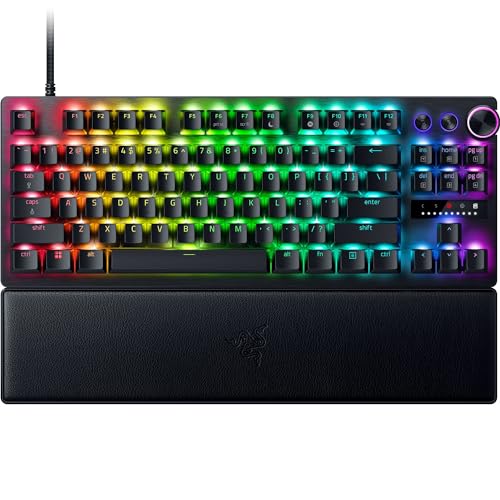
Razer Huntsman V3 Pro TKL — the one where the premium is real
Badge: Worth it — for competitive players. Analog optical switches with rapid trigger, adjustable actuation and Snap Tap, in a tenkeyless esports format with PBT keycaps and a wrist rest. This is the board the whole worth-it argument is about: every part of its premium tier maps to a feature a serious FPS or movement-game player can feel within one session.
- Layout: tenkeyless, esports format
- Switches: analog optical, rapid trigger and adjustable actuation
- Keycaps: doubleshot PBT
- Extras: media keys and dial, wrist rest, per the verified listing
Strengths
- Rapid trigger and per-key actuation are genuine competitive tools, not marketing
- PBT keycaps fix the usual Razer longevity complaint
- TKL size suits low-sensitivity mouse play
Trade-offs
- Wired, and priced at a flagship tier
- Typing feel is tuned for speed, not for the soft acoustics enthusiasts chase
- Full value only arrives if you actually configure actuation per game in Synapse
Best for: competitive players who will set up the analogue features properly. Not suited for: typists, casual players, or anyone who will never open the software.

Razer DeathStalker V2 Pro TKL — the low-profile case for Razer
Badge: Worth it — for low-profile wireless players. Low-profile optical switches in a slim tenkeyless board with HyperSpeed wireless and Bluetooth, Chroma RGB and long battery life per the verified listing. Slim gaming boards with this latency and distribution are close to a category of one, which is exactly the situation where a brand premium is easiest to defend.
- Layout: tenkeyless, low profile
- Switches: low-profile optical, linear in this configuration
- Connectivity: HyperSpeed wireless and Bluetooth
- Backlight: Chroma RGB
Strengths
- Genuine gaming latency in a laptop-style short-travel feel
- Wireless freedom without giving up competitive response
- Slim case suits minimalist and hybrid work-play desks
Trade-offs
- Low-profile feel divides people — try the travel depth before committing if you can
- Keycap and switch ecosystem is proprietary compared with standard MX boards
- Premium tier for a board whose charms are specific rather than universal
Best for: players who prefer short travel and want wireless without compromise. Not suited for: deep-travel typists or modders.

Razer BlackWidow V4 — the mainstream Razer, judged fairly
Badge: Worth it only on the right terms. The classic full-size Razer formula: tactile clicky mechanical switches in this configuration, six dedicated macro keys, a magnetic wrist rest, Chroma RGB and doubleshot ABS keycaps. For a macro-heavy MMO or productivity player inside the Razer ecosystem it earns its place; for a pure typing-feel buyer it is the model where this guide tells you to compare the alternatives below first.
- Layout: full-size with six dedicated macro keys
- Switches: Razer Green mechanical, tactile and clicky, in this configuration
- Keycaps: doubleshot ABS
- Extras: magnetic wrist rest, Chroma RGB
Strengths
- Dedicated macro keys and a full layout serve MMO and shortcut-heavy play
- The clicky switch is characterful and unmistakably mechanical
- Ecosystem integration is complete if your desk is already Razer
Trade-offs
- ABS keycaps at this tier remain the range’s weakest material choice
- Clicky switches are a household-noise commitment
- No analogue or rapid-trigger technology — the flagship argument does not apply here
Best for: ecosystem loyalists and macro users who want the classic board. Not suited for: buyers paying flagship money expecting flagship switch technology.

SteelSeries Apex Pro TKL Gen 3 — the rival that keeps Razer honest
Badge: The alternative for rapid-trigger shoppers. OmniPoint 3.0 analog magnetic switches with rapid trigger, an OLED display, PBT keycaps and USB-C, in a tenkeyless esports board. If your worth-it answer was “I want the technology, not the logo”, this is the head-to-head you owe yourself before buying either flagship — the feature sets are close enough that software preference and feel should decide it.
- Layout: tenkeyless
- Switches: OmniPoint 3.0 analog magnetic, rapid trigger
- Keycaps: PBT
- Extras: OLED display, USB-C, per the verified listing
Strengths
- Matches the flagship Razer feature for feature on rapid trigger and actuation
- OLED display makes on-board adjustment unusually direct
- PBT keycaps as standard
Trade-offs
- Its own software suite is its own commitment — you swap ecosystems, not escape them
- Same flagship tier, so the saving is fit, not money
- Magnetic switch feel differs subtly from optical; preference, not hierarchy
Best for: competitive players comparing the two analogue flagships on merit. Not suited for: buyers trying to spend a tier less.

Keychron Q1 Pro — the alternative when typing wins
Badge: The alternative for feel-first buyers. A full aluminium 75 percent board with hot-swap sockets, PBT keycaps, Bluetooth and wired connectivity and deep remapping. It has no rapid trigger and no esports pretensions; what it does with a flagship-tier budget instead is case, keycaps, acoustics and the freedom to change any switch in seconds. For the mixed work-and-play buyer, that is frequently the better spend — which is the entire point of this guide.
- Layout: 75 percent, full aluminium case
- Switches: hot-swappable, tactile switch in this configuration
- Keycaps: PBT
- Connectivity: Bluetooth and wired
Strengths
- Typing feel, sound and materials a clear step above gaming-brand boards
- Hot-swap freedom makes it a years-long platform, not a sealed product
- Excellent for a desk that works all day and games at night
Trade-offs
- No rapid trigger or analogue actuation for competitive play
- Heavy aluminium case is desk-bound
- Bluetooth rather than a gaming-grade dongle in this configuration
Best for: writers, programmers and mixed-use buyers at a flagship budget. Not suited for: competitive players who came for rapid trigger.
In prose only: Logitech’s G Pro X TKL Lightspeed is the other mainstream alternative worth a serious look for wireless esports reliability, and Razer’s own Huntsman Mini suits players who want the analogue technology in a 60 percent footprint — both are sensible shortlist additions judged by the same tier-for-tier logic, even though the linked shortlist above keeps to the five boards verified for direct comparison here.
Razer vs the Rivals, Criterion by Criterion
For competitive features, flagship Razer and the best rapid-trigger rivals are effectively tied at the top, with Razer ahead on software polish and availability. For typing feel and sound out of the box, the enthusiast brands win clearly — gasket mounts, tuned stabilisers and PBT keycaps are their whole pitch, as the boards in 75 mechanical keyboards compared illustrate. For wireless done well, both camps now offer low-latency 2.4 GHz and Bluetooth, and the difference is battery life and dongle behaviour rather than raw performance. For software, Razer offers the deepest game integration while demanding the most from your PC and your patience; enthusiast software is uglier and lighter. For modding and longevity, hot-swap enthusiast boards win outright: a tired switch is a ten-second swap, while a tired proprietary optical board is a warranty claim or a replacement. For support and returns, Razer and the big gaming brands win over boutiques in most regions. Score your own priorities against those six lines and the worth-it answer computes itself — which is exactly how a verdict should work. Players still choosing a size should settle that first with the 75 percent keyboard layout guide, since Razer’s best technology arrives in specific formats and a wrong-size flagship is still the wrong board.
How to buy Razer well, if you buy Razer
Four habits protect a Razer purchase. Buy the technology, not the tier name: confirm the exact switch type in the listing, because similar model names hide mechanical, optical and analogue variants. Buy from a channel with easy returns and judge the board inside the window, with Synapse installed and your real games configured, since the ecosystem is part of what you paid for. Set actuation and rapid trigger per game rather than globally; the defaults undersell the hardware you paid the premium for. And keep the receipt and serial record — premium boards justify themselves partly through warranty support, which only works if you can claim it. A practical setup note: spend the first session in one game you know deeply, changing one setting at a time, so improvements are attributable rather than placebo.
One more buying habit deserves emphasis because it costs nothing: time your purchase to the range’s rhythm rather than your impulse. Gaming hardware generations turn over on a predictable cycle, and the moment a successor is announced, the outgoing flagship — often the better-understood, better-reviewed board — quietly becomes the value pick of the entire range, carrying the same analogue technology this guide recommends at a friendlier tier. A buyer with a month of patience can therefore answer the worth-it question with a different board than a buyer with a weekend, and neither is wrong. Keep a shortlist of the exact family, switch technology and size you settled on, and let the market come to you; the discipline of knowing precisely what you are waiting for is worth more than any single discount, because it prevents the classic outcome of buying the wrong board quickly at a wonderful price.
Common Mistakes When Judging Razer’s Value
The first mistake is evaluating a flagship’s features on a mid-tier model — rapid trigger praise does not transfer down the range, and buyers who assume it does feel cheated by a board that never claimed the technology. The second is the reverse: dismissing the whole brand because an entry model felt ordinary, when the flagship technology is the actual product. The third is comparing headline prices instead of tiers; Razer’s premium is defensible at the top and fragile in the middle, so the comparison must be tier against tier. The fourth is ignoring the software commitment until after purchase. The fifth is buying for typing feel on Razer’s reputation for gaming — different scoreboard entirely. Avoid those five and the worth-it question stops being a brand argument and becomes what it should be: a match between specific technology and a specific player’s needs. If your needs turn out to be typing-first, the layout explainers such as the alice layout keyboards guide will serve you better than any gaming flagship.
Razer’s Switch Families, Translated
Razer’s range confuses buyers because the same colours and names recur across three different technologies. The mechanical line is the traditional one: Green switches are tactile and clicky in the classic gaming style, Yellow switches are linear and quieter for fast, smooth presses, and Orange-style tactiles, where offered, sit between them without the click. These boards behave like other good mechanical gaming keyboards and should be compared like-for-like with mechanical rivals — which, as the main verdict notes, is where Razer’s value case is weakest. The optical line replaces the metal contact with a light beam: actuation is fast and consistent, there is no contact to wear or debounce, and the switches come in clicky and linear flavours that echo the mechanical colours. The analogue optical line at the flagship tier is a different capability altogether, sensing how far a key is pressed rather than merely whether it crossed a point — that depth sensing is what enables adjustable actuation, rapid trigger and controller-style variable input. When you read any Razer listing, the first task is identifying which of the three families you are looking at, because a review of one family tells you almost nothing about another. A buyer who masters that one reading skill can navigate the entire range safely, and will notice immediately when a mid-priced board’s name is borrowing a flagship family’s reputation.
Polling Rates and Latency Claims, Without the Fairy Dust
Razer’s flagship marketing leans on polling rate — how often the keyboard reports to the PC — and the honest version of the story is worth knowing before you pay for it. Moving from a standard gaming polling rate to the high-polling flagship figures shaves a real but small amount of input delay, measurable in benchmarks and, for most players, buried under the far larger variables of monitor refresh, game engine and human reaction time. Elite players in fast titles can justify chasing it because their margins genuinely live in single milliseconds and their whole setup is built to that standard. Everyone else should treat high polling as a nice property of a flagship they are buying for its switches, not as a reason to climb tiers by itself. The same honesty applies to wireless claims across the industry: a good modern gaming wireless connection, Razer’s included, is functionally indistinguishable from wired for the overwhelming majority of play, and the decision between them should be made on desk preference and battery habits rather than fear. Latency is a system property, and the keyboard is rarely its weakest link — spend first where your own setup is actually slow, which for most readers is the display, not the board under their hands.
Genres Beyond the Shooter: Where Razer Earns and Loses Differently
The worth-it verdict changes with the games you play, because Razer’s technologies are not genre-neutral. Fighting-game players should know that simultaneous-opposite-direction input handling — the feature marketed under names like Snap Tap — is restricted or banned in some competitive rulesets and titles, so a tournament player must check their game’s current rules before treating it as a benefit rather than a liability. MMO and MOBA players get their value from a different shelf entirely: macro keys, profiles per game and the software ecosystem, which is why the BlackWidow-class boards in the shortlist can be the right buy for them even while this guide steers shooter players to the analogue flagship. Rhythm and precision-timing players benefit from optical consistency and should weight the optical line more heavily than its price suggests. Strategy, simulation and story-game players are, in latency terms, typists with cutscenes: the feel-first alternatives in the shortlist will serve them better for the same tier of money, and the money saved buys games. Naming your primary genre before shopping is the cheapest decision aid in this entire guide, because it tells you which Razer technology — analogue, optical, macro ecosystem or none — you are actually shopping for.
The Total Cost of Joining an Ecosystem
A flagship keyboard is rarely the whole purchase, and Razer ownership has a shape worth pricing in advance — in tiers and habits, not numbers. There is the software commitment: an account-flavoured suite running on your PC, updates on its schedule, and your profiles living inside it. There is the accessory gravity: a wrist rest, a matching mouse and headset, the Chroma-lit desk slowly standardising on one brand because mixing ecosystems means running two suites, which nobody enjoys. There is the replacement reality: proprietary optical and low-profile switches do not come from the open market, so long-term switch supply runs through the brand rather than the hobby’s shelves. None of these costs is hidden or unreasonable, and millions of owners pay them gladly for a setup that works as one system. But they are the reason this guide keeps returning to the same advice: decide about the ecosystem before the first purchase, because the second and third Razer products are where the first one’s value is either compounded or quietly taxed. The rival ecosystems make the same demand in their own currencies, and the enthusiast world’s answer — hot-swap, open firmware, standard keycaps — is precisely the refusal of that bargain, at the price of giving up the integrated polish.
Buying Second-Hand, and Knowing When to Walk Away
Razer’s wide distribution makes its boards common on the second-hand market, and a used flagship can be the smartest route into the analogue technology — with checks. Confirm the exact switch family in person or by the model code, because lookalike boards span all three technologies. Test every key with the software’s actuation settings visible, since analogue boards hide their value, and their faults, in configuration. Ask about the cable, dongle and wrist rest, which separate from boards easily and are disproportionately annoying to replace. Check keycap shine to gauge real usage better than any seller description. And know the walk-away signals: a board whose software no longer recognises it, intermittent keys the seller blames on dust, or a price close enough to a sale price on a new board that the warranty you are giving up costs more than the saving. New-versus-used is a tier decision like any other in this guide: the used flagship with verified analogue switches beats the new mid-tier board for a competitive player almost every time, while a feel-first buyer should put the same money toward the new enthusiast alternative and its full lifespan ahead of it.
The Razer Line, Mapped: Huntsman, BlackWidow, DeathStalker and Ornata
Razer’s keyboard families each answer a different question, and mapping them prevents the range’s most common buying error — paying one family’s price for another family’s product. The Huntsman line is the technology flagship: optical and analogue-optical switches, the rapid trigger and adjustable actuation this guide keeps returning to, in full-size, tenkeyless and mini formats. If you buy Razer for performance technology, you are buying a Huntsman, and the shortlist’s first pick is its current sweet spot. The BlackWidow line is the heritage mechanical range: full-size, macro-rich, ecosystem-complete boards that carry the brand’s classic identity, judged in the shortlist as the mainstream option whose value depends on how much of that identity you use. The DeathStalker line is the low-profile branch — slim cases, short-travel optical switches, wireless on the Pro models — serving players who prefer a laptop-style feel without giving up gaming latency. The Ornata line, at the entry end, uses mecha-membrane switches that imitate a mechanical feel over a membrane base; it is the one family this guide advises most buyers to skip, not because it is unpleasant to type on, but because genuine mechanical and optical boards from every brand, Razer included, have closed the gap beneath it. Read any Razer listing by first naming its family, then its switch technology, then its size, and the range becomes as navigable as any rival’s.
Synapse and Chroma, Judged as a Product
Since the software is half the purchase, it deserves a reviewer’s paragraph rather than a warning label. Synapse at its best is genuinely capable: per-game profiles that switch automatically, per-key actuation and rapid-trigger tuning presented visually, macro recording that non-programmers can actually use, and settings that follow you across a desk of Razer devices. Chroma’s game integrations — lighting that reacts to in-game events across a long catalogue of titles — are frivolous in the way that all beloved ambience is frivolous, and owners who love them should count them as real value rather than apologising for it. The costs are equally concrete: the suite is substantial, it updates on its own schedule, it prefers an account, and its history includes versions that owners remember the way sailors remember weather. The fair verdict is that Synapse is a reasonable price of admission for the flagship hardware’s features, and an unreasonable one for a basic board that could have stored its settings onboard. That asymmetry is, once again, the shape of the whole Razer question: the ecosystem earns its keep exactly where the hardware is most ambitious, and taxes you exactly where it is not. Decide which of those boards you are buying, and the software decision makes itself.
A Typist’s Blind Test: Razer Against the Enthusiast Board
Imagine the comparison this guide has been circling, done blind: a flagship Razer and the enthusiast alternative from the shortlist, side by side, logos covered, one hour of writing. The Razer feels fast, consistent and slightly clinical — every key identical, the sound bright and contained, the board clearly engineered around response. The enthusiast board feels softer and deeper — a cushioned bottom-out, a quieter, rounder sound, keycaps with more texture, and a faint sense of give in the mounting that the Razer deliberately does not have. Neither typist in this experiment is wrong about which they prefer, because they are reporting two different design philosophies honestly executed. Where the blind test becomes decisive is the second hour: the writer notices the enthusiast board’s keycaps still feel fresh while the gaming board’s smooth caps have begun to shine under their fingers, and the gamer, switching to a match, notices the enthusiast board’s honest but ordinary switch response where the Razer felt instant. The test’s real lesson is that “better keyboard” is an incomplete sentence. Razer’s flagships are better instruments for the scoreboard of speed and features; the enthusiast boards are better instruments for the scoreboard of feel and longevity. Your money should follow your scoreboard, and this guide’s shortlist is deliberately built with one strong entry on each side of that line so the choice is yours rather than the market’s.
The Decision, Compressed: A Five-Question Flowchart in Prose
If the full guide is more than you want to hold in your head at a checkout page, run these five questions in order. One: do you play competitive titles where rapid trigger and adjustable actuation change outcomes? If yes, buy the analogue flagship in your size — from Razer or its closest rival — and stop reading; the premium is worth it for you. Two: if not, is your desk already invested in one brand’s ecosystem, with its software already running? If yes, that brand’s upper tier is a defensible buy, because ecosystem value is real once it is already paid for. Three: is your keyboard day mostly typing, with gaming as the evening guest? If yes, spend the flagship budget on the enthusiast alternative and enjoy the better instrument for your majority hours. Four: are you buying your first mechanical board? If yes, skip every flagship, buy a tier down from a value-enthusiast brand, and let a year of use teach you which scoreboard you actually care about. Five: is the honest answer that you want the Razer because it is the Razer — the look, the logo, the setup it completes? Then buy the model in the range whose hardware justifies its tier, which in practice means the Huntsman or DeathStalker lines, and enjoy it without a shred of guilt. Five questions, five defensible answers, and not one of them is “it depends” — which is what a verdict guide owes you.
Support, Warranty and the Ownership Safety Net
One part of the worth-it equation rarely appears in reviews because it only matters on a bad day: what happens when the board fails. Here the big-brand premium buys something tangible. A flagship Razer is sold through mainstream channels with ordinary consumer returns, a documented warranty process and replacement stock that exists in your country — a chain of boring certainties that boutique and group-buy keyboards structurally cannot match, where a failed board can mean international shipping, long waits or a community repair thread. For a buyer whose keyboard is also their work tool, that safety net has a real value that belongs in the tier comparison alongside switches and keycaps, and it is the strongest argument for buying Razer at a tier where the hardware alone looks merely competitive. The net has limits worth knowing: keep proof of purchase, register the product if the brand offers it, and expect software-linked features to be supported on the software’s timeline rather than the hardware’s. Judge support as you judge everything else in this guide — as a feature with a tier-dependent value, most precious to the buyers who can least afford downtime, and largely invisible to hobbyists with three boards in rotation. Both judgements are rational; they are simply made by different owners.
When Owners Leave Razer — and Where They Go
The exit stories are as instructive as the buying stories, because they reveal what the premium could not buy. Owners who leave over typing feel go to the enthusiast world and rarely return, because the thing they wanted — gasket give, deep sound, PBT texture — is a philosophy Razer does not pursue. Owners who leave over software go in two directions: to rival gaming brands whose suites they dislike less, which is a lateral move with a honeymoon period, or to onboard-memory boards and open-firmware customs that end the suite question permanently. Owners who leave over a failed board and a support experience they disliked teach the opposite lesson to the section above: the safety net is a promise that has to survive contact with your actual claim, and reading recent owner reports for your region is worth ten minutes before a flagship purchase from any brand. And the largest group of all never leaves, because the ecosystem compounded exactly as designed — mouse, headset, keyboard and lighting behaving as one system, renewed a piece at a time. Knowing which future owner you are likely to be is the deepest form of the worth-it question, and no specification sheet can answer it for you. This guide’s contribution is narrower and, it hopes, sufficient: the technology is real, the tiers are uneven, the alternatives are strong, and the right answer has your name on it rather than a logo.
Buying a Razer for Someone Else
A Razer bought as a gift follows different logic from a Razer bought for yourself, and the difference saves returns. The logo carries genuine gift value — a Razer box lands with a teenager or a gaming partner in a way a boutique brand they have never heard of does not — so the usual feel-first reasoning weakens and the ecosystem reasoning strengthens, especially if the recipient’s desk already runs the same colours. What does not change is the tier discipline: a gift budget stretched across the range should land on the family whose technology the recipient will actually use, which for most young competitive players is the analogue flagship in miniature or tenkeyless form, and for a casual player is honestly better spent on the DeathStalker’s easy low-profile charm than on a mid-tier mechanical board chosen for its size. Buy from a channel with painless returns, keep the receipt in the box, and treat an exchange for a different size as a planned possibility rather than a failure — keyboard size is as personal as shoe size, and the best gift-buyers budget for the swap in advance. Given with that care, a Razer is an excellent gift; given by logo alone at a random tier, it is the purchase this entire guide was written to prevent.
The Two-Year View: What Razer Ownership Feels Like After the Honeymoon
Worth-it verdicts are usually written at unboxing, when every board is at its best. The fairer test is the second year, when coatings have met skin oils, software has updated itself a dozen times and the board has survived the desk’s ordinary accidents. This section looks at the three slow variables that decide whether a Razer bought with confidence is still earning its place long after the first month — none of which appear in a launch review.
Keycaps, coatings and cable wear over time
The wear pattern of a gaming board concentrates where play concentrates: the movement cluster and the spacebar take years of contact in months. On models shipping with ABS keycaps, that contact polishes the texture smooth and shiny in exactly those spots first — cosmetic, fully expected, and the reason the doubleshot PBT upgrade path discussed earlier in this guide matters to long-term owners. Plan for it as maintenance rather than defect: a cap swap in year two restores the board’s feel for a fraction of a replacement board’s cost. Detachable cables age at their connectors, not their middles, so a board that travels should travel with its cable unplugged and coiled loosely. Wrist rests lose their surface finish where palms rest; it changes nothing about function and everything about how old the setup looks, which matters to some owners and genuinely not at all to others.
Software updates and profile drift
A board governed by software lives in a house that occasionally rearranges itself. Updates to the control application can move settings, reset a lighting scheme, or change how profiles sync, and the owners who suffer least are those who treat their configuration as something to be documented rather than remembered: export or note your key assignments and lighting choices once, somewhere outside the application, and a surprise reset becomes ten minutes of restoration instead of an evening of reconstruction. Drift has a subtler form too — the slow accumulation of per-game profiles you no longer play and macros whose purpose you have forgotten. A twice-yearly tidy, deleting what you cannot explain, keeps the software feeling like a tool you run rather than a tenant you host. None of this is unique to Razer, but the deeper an ecosystem’s software reaches, the more this housekeeping is part of the true cost of ownership.
When a repair beats a replacement
Second-year faults on gaming boards are usually small: one switch that chatters or dies, a cable that fails at the connector, a keycap that cracks. Judge each fault by whether the board around it is still the board you want. A single failed switch on a model with replaceable switches is a minor repair; on a soldered board it is a workshop question, and its cost should be compared honestly against the board’s remaining life rather than against a new board’s headline figure. Cables and keycaps are consumables — replacing them is ownership, not defeat. The fault that argues for replacement is a pattern: several switches failing together, intermittent connection that survives a cable swap, or software support for the model quietly ending. Patterns mean the platform is ageing out; single faults mean a part did. Spending accordingly is how a premium board becomes a long-term one instead of a recurring expense.
The upgrade itch, scheduled
Gaming hardware manufactures a particular restlessness: a new switch generation, a higher specification, a rival’s launch. Razer owners feel it on schedule, because the brand releases on schedule. A useful discipline is to convert the itch into a calendar question — what, specifically, would a new board do in your current games that this one cannot? If the answer names a feature your library genuinely uses, the upgrade conversation is legitimate whenever the budget allows. If the answer is a specification you cannot connect to a moment in play, the itch is marketing doing its job, and the correct purchase is the keycap set or cable that makes your current board feel new again. Premium boards earn their keep across years; letting them do so is the final worth-it skill.
Frequently Asked Questions
Are Razer keyboards overpriced?
At the flagship tier, the price buys distinctive technology — analogue optical switches, rapid trigger, high polling — that few rivals package as completely, so “expensive” is fairer than “overpriced”. In the middle and entry tiers the same badge often buys ordinary hardware, and there the overpriced charge sticks. Judge model by model against the tier it sits in, never the logo against the market in general.
Which Razer keyboard is most worth it?
The analogue optical flagship in the size you prefer, if you play competitive titles that reward rapid trigger — that is the model where every part of the premium maps to a feature you can feel in game. For low-profile fans, the slim optical flagship is the other strong answer, being close to a category of one. The models to scrutinise hardest are the mid-tier mechanical boards, where rivals are strongest.
Razer optical vs mechanical switches — which should I choose?
Optical if gaming performance is the priority: faster actuation, no debounce behaviour to tune, and access to the analogue features on the flagship line. Mechanical if you value switch variety, typing feel and the ability to swap switches later — accepting that you are leaving Razer’s best technology on the table, which should in turn make you compare the mechanical Razer against enthusiast rivals before buying it.
Do Razer keyboards last?
The flagship boards are solidly built and the optical switches remove the contact wear that ages mechanical switches, so a well-kept Razer should serve for years of heavy play. The realistic wear points are keycap shine on ABS sets, cable and dongle care on wireless models, and software support horizons rather than the switches themselves. Buy the tier with PBT keycaps if longevity of feel matters to you.
Is Razer Synapse required?
Basic typing and gaming work without it, but the features that justify the premium — per-key actuation, rapid trigger tuning, deep profiles and Chroma integration — are configured there, and some settings live in the software rather than on the board. Treat Synapse as part of the purchase: if running a substantial background suite is a deal-breaker for you, it is a legitimate reason to choose a rival, and better decided now than discovered later.
What is the best alternative if Razer is not worth it for me?
It depends on which “no” you reached. No on price for gaming features: look at the rapid-trigger rivals from the big gaming brands, one of which is linked in the shortlist above. No because typing matters more: look at the gasket-mounted enthusiast boards from the value-premium brands, also linked above, where your money buys keycaps, acoustics and hot-swap freedom instead of esports technology. Either way, you are not settling — you are spending the same tier of money on the scoreboard you actually care about.
Can I use a Razer keyboard on a work computer without installing any software?
Yes, for everything the keyboard fundamentally is. Plugged in, a Razer board types, plays and lights up with its onboard behaviour, and the core gaming features that live in the hardware — the switch technology itself — work without any application present. What you lose without the software is the editing layer: remapping keys, recording macros, fine-grained lighting control and, on models that store only a limited set of onboard profiles, access to your full library of saved configurations. The practical arrangement for a shared or locked-down work machine is to configure the board once on your own computer, save what you need to the onboard memory where the model offers it, and then let the work machine see a well-behaved, ordinary keyboard — which, to your IT department’s considerable relief, is exactly what it is.
How loud are Razer keyboards in a shared room?
It depends entirely on which switch family you choose, and the spread inside the brand is wide enough that the brand name alone tells you nothing. The clicky mechanical models are honest about their purpose: they are audible through a door and unsuitable for shared bedrooms, late-night flats or open offices where your keystrokes become everyone’s soundtrack. The linear optical and low-profile models sit at the other end of the range — comparable to a quiet conventional board, especially played with a light touch — and the analogue models fall between, their volume set mostly by how firmly you bottom out. Judge by switch family, then by your own technique, in that order. If the room is shared and the hours are late, choose the quiet end of the range deliberately at purchase; no desk accessory fully civilises a clicky switch, and the people you live with will form their verdict on the board long before you finish forming yours.