Affiliate disclosure: this article contains affiliate links. If you buy through a link on kajuandouglas.com, the site may earn a commission at no extra cost to you.
This keyboard size guide exists because ‘how big is that keyboard’ is the first question of every purchase and the one answered worst by product photography, in which a 60 percent board and a full-size board can be made to look like siblings. Keyboard sizes are named by the share of a full-size board they retain — 100 percent down through tenkeyless, 96, 75, 65 and 60, to the 40 percent frontier — and each step down trades dedicated keys for desk space according to a logic this guide makes explicit: which keys vanish, where they go (a layer, a neighbour’s double duty, or nowhere), and what the trade costs the specific work you do. Size is the least reversible decision in a keyboard purchase, which is why it gets a guide of its own rather than a paragraph in someone else’s.
The guide proceeds size by size with measurements, key counts and honest use cases, then turns to the decision method: auditing your own key usage, measuring your desk and your mouse’s territory, and matching the two. Its sibling in this cluster, the keyboard sizes reference, tabulates the whole family for quick consultation; this guide is the deliberative companion that helps you choose from the table. Verified boards across the size range are reviewed in the middle, and the closing sections cover adaptation, the mistakes that strand buyers with the wrong footprint, and the questions that arise in every size debate.
Key takeaways
Full-size (104–108 keys) keeps everything including the pad. Tenkeyless (~87) drops the pad for mouse room. 96% compresses a pad into a near-TKL footprint. 75% (~82–84) keeps F-row and arrows in a tight block. 65% (~67–68) drops the F-row, keeps arrows. 60% (~61) drops arrows to a layer. 40% is a specialist’s instrument. Default advice: 75% for mixed use, TKL for gaming desks, full-size only when the pad is a daily tool.
In this guide
The Full-Size and Tenkeyless Standards
Full-size is the reference object: roughly 44 to 46 centimetres wide, 104 to 108 keys, four territories — alphas, navigation cluster, function row, number pad — each with its own keys, nothing shared, nothing layered. Its virtues are completeness and familiarity; its cost is geometry, because the number pad pushes the mouse hand far to the right, lengthening every journey between keyboard and mouse and setting the right shoulder at a wider angle than ergonomics prefers. The pad earns that cost for exactly one population — those who enter numbers for a living — and taxes everyone else for a tool they touch weekly. The how to choose a mechanical keyboard the buyers guide makes the audit the first step of buying for this reason: count your pad sessions honestly, in a real week, before inheriting the footprint.
Tenkeyless — TKL, 80 percent in the trade’s loose arithmetic — simply removes the pad: about 36 centimetres wide, 87 keys, everything else in its accustomed place. It is the conservative’s compact board, the size that asks nothing new of its owner while returning the mouse to a natural station, which is why it remains the gaming desk’s traditional standard and the office’s safest upgrade. Its one compromise is the pad itself, answered where needed by a separate pad peripheral that visits the desk only when numbers do — an arrangement many former full-size owners describe as the best trade they ever made, because the pad’s absence is permanent and its presence is optional.
Between them sits the 96 percent (1800-style) compression: the pad retained, the territories merged into a near-TKL footprint, at the cost of a navigation cluster squeezed into unfamiliar adjacency. The 96 vs 1800 keyboards guide on this site argues that family’s internal differences. For size-guide purposes its lesson is that footprint and completeness are not the only variables — familiarity is a third, and the 96’s keys are all present but not all where a lifetime put them. Buyers who touch-type their navigation should weigh that as seriously as the centimetres.
The Compact Mainstream: 75 and 65 Percent
At the market’s current centre of gravity sits the 75 percent layout, and its design is a negotiation: about 82 to 84 keys in roughly 32 centimetres, keeping the function row and the arrow keys as physical keys while compressing the navigation cluster into a column and a layer’s worth of diplomacy. Nothing essential hides behind a combination; what is lost is spacing and a few dedicated keys (Print Screen and its neighbours take turns on the layer). For mixed work — writing, code, spreadsheets of ordinary ambition, games — it is the size that concedes least per centimetre saved, which is why this cluster’s guides keep recommending it as the default and why the verified boards below are thick in this class.
The 65 percent takes the next honest step: the function row leaves, its duties moving to the number row’s layer, while the arrows — the keys even compact devotees refuse to surrender — stay physical, in a board of about 31 centimetres and 67 or 68 keys. The 65 keyboard layout guide on this site maps its layers in full. Its owners are typists who have made peace with one layer for F-keys and editing commands in exchange for the smallest footprint that still types like a keyboard rather than a puzzle. The step from 75 to 65 is the last step most professionals can take without their work noticing, and the guide’s advice is to take the sizes in order if you are travelling down — each size teaches whether the next one’s trade is yours to make.
What both sizes assume is a willingness to learn a modest layer system, and that assumption deserves its paragraph: layers are not a defect to be forgiven but a skill with a fortnight’s tuition, after which the function row’s absence stops registering. The keyboard firmware QMK VIA guide in this cluster is the skill’s manual, and its configurators let each owner place the layered functions where their own fingers vote. A compact board with a personal layer map is not a smaller keyboard; it is a keyboard whose second half lives in time rather than in space, and owners who grasp that stop describing their boards by what is missing.
The Small Frontier: 60 Percent and Below
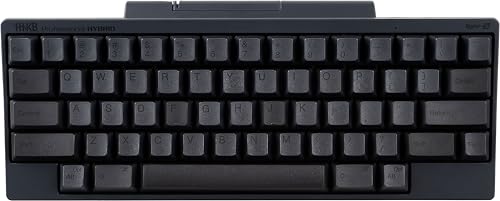
At 60 percent the arrow keys join the function row in the layer, and the board becomes 61 keys in about 29 centimetres — the alphas, the modifiers, and nothing else with its own key. This is the size of the HHKB Topre keyboards deep dive and of the travel keyboard par excellence: it fits in bags that reject everything else in this guide, leaves a desk mostly empty for notebooks and tablets, and demands of its owner a complete commitment to layered navigation. Its devotees are real and its dropout rate is also real; the difference between the populations is whether the owner’s work forgives the layer excursions — prose and code forgive, spreadsheet navigation and certain games do not — and whether the fortnight’s tuition was given honestly.
Below 60 lies the frontier the guide will map but not recommend blindly: 40 percent boards remove the number row itself, layering digits under the letters, in an instrument of 40-odd keys that serves a devoted subculture of layout designers and minimalists. Their existence proves the layer principle has no natural floor, and their owners’ fluency proves the human hand can learn almost any map it must. They are not, however, a size a buyer drifts into; they are a destination chosen with the same deliberation as an alternative letter layout, and the 40 percent keyboard guide already live on this site is their proper introduction. This guide’s frontier advice is simply that every step below 65 percent should be taken on purpose, with the layer tuition budgeted and a return path kept — which is to say, the larger board kept in a drawer until the verdict is in.
Ortholinear and split variants cross-cut the size axis and deserve their mention here rather than a size of their own: boards that arrange the same key counts in straight columns or in two halves change the geometry of typing without changing the census. They belong to the ergonomics conversation — the alice layout keyboards guide on this site covers the angled unibody branch — and the size shopper should know they exist as an orthogonal option before assuming the choice is only about how many keys to delete.
Keyboard Size Guide: The Shortlist
Verified boards mark the guide’s main stations: the 75 percent default, the 65 percent step, the near-full-size compression, and the 60 percent traveller. Every size’s representative below was checked against the site’s verified Amazon catalogue records.
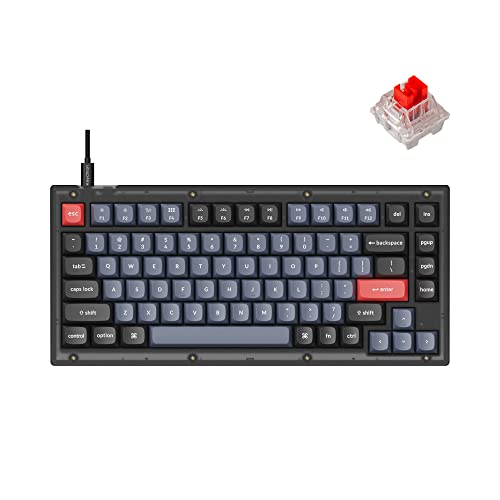
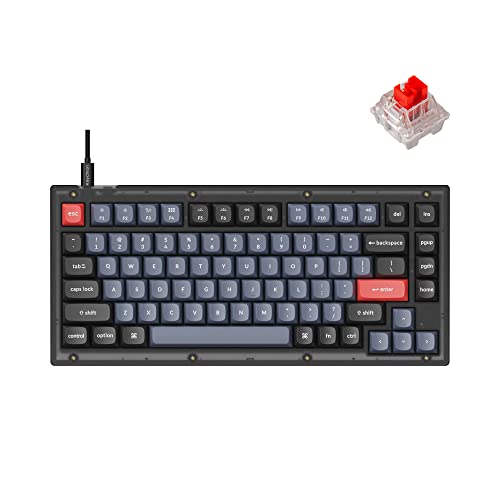
Keychron V1
75%: the default
- 75 percent, ~82 keys
- Function row and arrows present
- Hot-swap, QMK/VIA
- Compact ~32 cm class footprint
The V1 is the 75 percent thesis at its most accessible: every key a mixed workload needs, in a footprint that returns the mouse to its natural station, with the layer system present for the few exiled functions and open firmware to arrange them. For a buyer following this guide’s audit to the 75 percent conclusion, it is the lowest-risk embodiment of the size — the board whose ownership teaches whether the size is right, at a price that forgives a wrong answer. Its dimensions make it the reference for the class: measure your desk against its class footprint before ordering anything in the size.
Its compromises are the class’s (a compressed right column, navigation diplomacy) plus the entry tier’s (light case, basic caps). Neither set of compromises argues with the size decision, which is the guide’s point: choose the size on the audit, then choose the board within it on budget and taste. The V1 simply makes the most-chosen size the cheapest to test honestly.
Strengths
- The default size at the friendliest price
- Nothing essential layered
- Open firmware for the exiled keys
Trade-offs
- Compressed right column
- Entry-tier case and caps
- Wired focus in the base line
Best for: Mixed-use buyers landing on 75 percent.
Not suited for: Number-pad professionals.

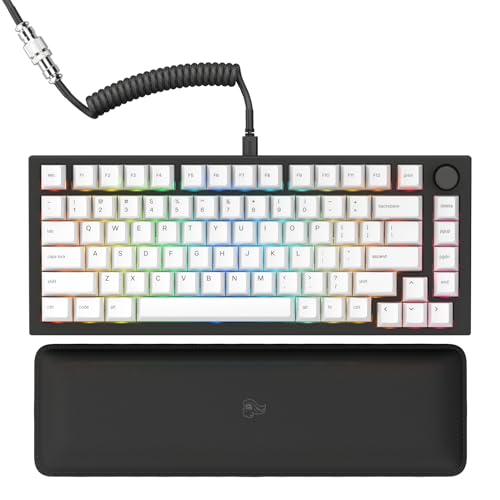
Drop ALT
65%: the connoisseur’s step
- 65 percent, 67 keys
- Dedicated arrows, layered F-row
- Hot-swap PCB
- Aluminium case
The ALT is the 65 percent layout in its classic enthusiast form: arrows kept, function row layered, a machined case that gives the small footprint a serious presence. It demonstrates the size’s essential bargain with unusual clarity — the board is barely wider than a 60 percent while typing, for most work, like a complete keyboard, because the one layer it demands (numbers-row functions) is the layer owners report forgetting they use. For the buyer whose audit says the F-row is a weekly guest rather than a daily resident, this is the size’s reference object.
Its ecosystem is the custom world’s — QMK underneath, per-key lighting, a modding literature of its own — and its price is the enthusiast tier’s. The size decision it embodies is the guide’s pivotal one, the step where layers stop being optional knowledge: buy it with the fortnight’s tuition budgeted and it will feel inevitable within the month.
Strengths
- Arrows without the F-row’s rent
- Machined case, enthusiast platform
- Compact without puzzle character
Trade-offs
- F-row layer must be learned
- Enthusiast pricing
- No knob or pad, by design
Best for: Typists stepping down from 75 with intent.
Not suited for: F-key-heavy professional software users.
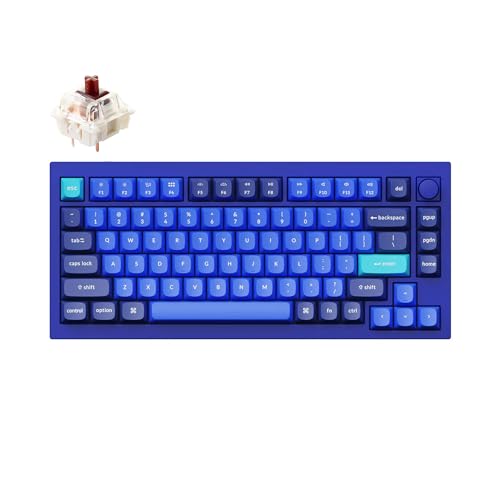
Keychron Q5
96%: the compression
- 96 percent layout with pad
- Near-TKL footprint
- Aluminium, gasket mount
- Hot-swap, QMK/VIA
The Q5 is the size guide’s diplomatic solution made physical: the number pad retained for the data-working owner, the footprint held near tenkeyless by merging the territories, the flagship build wrapped around the compromise. Its lesson for the size shopper is that the audit’s answer is sometimes ‘everything, closer together’ — and that this answer costs a relearning of the navigation cluster’s geography, a tuition smaller than a layer system’s but real. Owners who pay it report the board disappears into work within weeks, which is the compression’s whole ambition.
For the buyer torn between full-size completeness and TKL geometry, it is the board that ends the argument by refusing its premise. Confirm the variant and layout standard at purchase, per this cluster’s standing discipline, and let the centimetres fall where the audit decided.
Strengths
- Pad completeness in near-TKL space
- Flagship build and firmware
- Mouse geometry nearly TKL-good
Trade-offs
- Navigation geography relearned
- Premium price
- Heavier than its footprint suggests
Best for: Data workers who want their desk back.
Not suited for: Touch-typists whose nav cluster is sacred.

HHKB Professional Hybrid Type-S
60%: the traveller’s instrument
- 60 percent, ~60 keys
- Layered arrows and F-row
- Topre switches
- Bluetooth and USB-C
The HHKB closes the size tour at the frontier most owners actually reach: a 60 percent board whose layered completeness has been refined for decades, small enough for any bag, and serious enough for a career. Its inclusion in a size guide is a calibration — this is what the 60 percent commitment looks like when a maker designs for it without apology, and its owners’ fluency is the evidence that the size is a destination rather than a deprivation. The deep dive in this cluster covers its philosophy; here it stands for the size itself, honestly priced and honestly demanding.
Buyers testing whether 60 percent suits them should note the HHKB is the size’s most opinionated dialect — its Control placement and layer geography are its own — and that gentler 60s exist for the experiment. As the size’s reference object, though, it makes the guide’s closing point: at the small end, the board stops being furniture and becomes an instrument, carried, learned and kept.
Strengths
- The 60 percent idea, perfected
- Travels anywhere
- Topre feel, decade-grade build
Trade-offs
- Full layer commitment
- Premium price
- Its dialect must be learned as itself
Best for: Committed minimalists and travelling professionals.
Not suited for: Size experimenters — start at 75 or 65.
The Decision Method: Audit, Measure, Match
The audit comes first and it is empirical: for one working week, notice — genuinely notice, with a tally if necessary — your use of the number pad, the function row, the navigation cluster and the arrows. Most buyers discover a distribution they did not expect: the pad idle, the F-row ceremonial, the arrows constant. That distribution, not the desk photograph that seduced you, is the size specification. The second instrument is the tape measure: your desk’s depth and width, the mouse’s honest territory (trace its week’s travel if you doubt it), and the space your other work — notebooks, tablets, a second screen’s stand — actually occupies. Size is where the audit and the tape measure agree, and when they disagree, the audit wins, because keys are used daily and centimetres are merely seen.
Adaptation budgeting is the method’s third step, and it is what separates size changes that stick from size changes that get returned. Each step down costs a tuition — days for TKL’s missing pad to stop being reached for, a fortnight for a first layer system, a month for 60 percent fluency — and the tuition must be scheduled like the layout switch’s season in the keyboard layouts QWERTY Dvorak Colemak explainer: in a calm period, with the old board in a drawer rather than on the desk, and a verdict date set in advance. Buyers who keep both boards live alternate indefinitely and learn neither size; the drawer is a pedagogical instrument, and this guide prescribes it without irony.
One Desk, Two Sizes: the Multi-Board Reality
A confession the guide owes its readers: a large share of experienced owners end with two sizes — a complete board for the desk’s heavy work and a compact for travel, the couch, or the second machine — and the accessory and firmware ecosystems are built to make that arrangement graceful, with layouts carried between boards by the configurator and cables disconnected at the aviator’s click. The size question, seen from that future, relaxes: the first board should be the size of your main work, chosen by the audit, and the second — bought later, against a revealed need — covers the other life. Buyers paralysed between 75 and 65 are often really forecasting a two-board future and trying to make one board confess to both lives; the audit decides the main one, and time will decide the other.
The southpaw and split variants belong in this forward look as well: the left handed southpaw keyboards guide in this cluster describes boards that move the pad rather than delete it, and the split designs rearrange the same census across two halves. Size, in the mature market, is not a ladder with full-size at the top but a shelf of geometries, each fitted to a working life. The guide’s tour has walked the shelf in the order buyers meet it; the shelf itself has no wrong end, only wrong fits — and fits are discoverable, by audit, by tape measure, and by the fortnight’s honest trial.
The Census, Taken Properly: A Week With a Tally Sheet
The main guide introduces the usage census as this method’s foundation; this expansion turns it into an instrument you can actually run. The tally sheet — paper, beside the board, for five working days — has columns for the key groups your size decision turns on: the number pad, the F-row, the navigation cluster, Home and End, the Print Screen family, and any key you press by leaving the home position. Every time you use one, mark it; every time you reach for one that a smaller board would put on a layer, mark that too, in a second colour, because those are the presses whose cost the layer would tax. Five days is the minimum honest sample — it catches the weekly report, the monthly form’s rehearsal, the game’s different census on the weekend — and the sheet’s totals, not your impressions, are the decision’s evidence. Impressions remember the dramatic key presses; the sheet remembers the distribution, and size is a distribution decision.
The sheet has a second half that most censuses omit: the mouse’s territory. Mark, at the day’s end, where the mouse actually lived — its range’s right edge, measured from the board’s left — because the size decision’s ergonomic dividend is paid in that territory, and a board two centimetres narrower buys exactly two centimetres of it, no more. Buyers overestimate the dividend of dramatic downsizing and underestimate the compound interest of the modest one: the 96 percent board’s gift is not transformation but a permanent, small improvement in the mouse hand’s posture, collected hourly. Measure the territory, price the dividend honestly, and let the census’s two halves — keys and centimetres — make the decision together.
And the sheet has a final use after the decision: it is the new board’s layer design document. Every second-colour mark — every key the smaller board demotes — is a function the layer must place well, and the sheet’s frequencies rank them: the most-marked demoted key gets the layer’s best position, the least-marked gets the far corner it deserves. Owners who design layers from imagination fill them with the functions they think they use; owners who design from the sheet fill them with their working lives. The keyboard firmware QMK VIA guide teaches the placing; the census teaches the ranking, and the ranking is the part that cannot be downloaded.
The Mouse Hand’s Case, Made Carefully
The size argument’s ergonomic half deserves a careful statement, because it is real, frequently overstated, and entirely desk-specific. The mechanism is geometry: a right-handed mouse user reaches around the board’s right portion — the pad, on a full-size board, is sixteen centimetres of keyboard between the typing centre and the mouse’s home — and the shoulder’s angle, held for hours, is the posture the smaller boards exist to improve. Narrowing the board centres the alphas in front of the typist and brings the mouse toward the body’s midline; the dividend is genuine for the desk-bound, mouse-heavy worker whose current board exiles the mouse to the desk’s far country. This is a posture observation in the register this site keeps for such topics, and readers with pain belong in the ergonomic mechanical keyboards wrist pain guide’s professional territory, not in a size chart.
The overstatement to avoid is the universal prescription: the dividend depends on the desk’s whole geometry. A left-handed mouse user collects it in reverse and should shop the southpaw arrangements the left handed southpaw keyboards guide documents. A trackball or central pointing device abolishes the territory question entirely. A standing desk’s wider stance, a drawing tablet’s tenancy of the mouse’s country, a second monitor’s pull on the chair’s position — each re-draws the map the dividend is paid on. The size guide’s honest form is therefore a measurement, not a motto: sit at your desk, hands at work, and look at where the mouse lives and what the shoulder is doing. The board that fixes what you see is the right size, and it may be the size you already own, which is a conclusion censuses reach more often than retailers prefer.
And the dividend has a gaming form with the same geometry and higher stakes: the low-sensitivity player’s mouse needs territory the pad’s exile cannot offer, and the competitive migration to 65 and 75 percent boards is the census conducted by a population whose mouse usage is measured in metres per match. Their verdict is evidence for the mechanism, not a prescription for the typist — the typist’s mouse travels centimetres, and the dividend is priced accordingly. Evidence in this cluster is always graded by the population that produced it; the size decision, like every decision here, belongs to the desk that will live with it.
Living Small: The Layer as a Second Keyboard
For the reader the census points downward, this section describes the life honestly, because small boards are sold on their photographs and lived with on their layers. The layer is a second keyboard under a held key, and its mastery has a curriculum: the first week is lookup — the printed cheat sheet beside the board, the pauses while the hand consults it; the second week is the common functions becoming reaches rather than searches; the month is the layer’s geography sinking below attention, the F-row and the arrows arriving as fluently as the base layer’s own keys. Owners consistently report that the layer’s mastery was easier than feared and that its one permanent cost is social: the borrowed board, the colleague’s machine, where the layer does not exist and the hands keep reaching for a key that isn’t there — the small-board owner’s version of the layout convert’s tax, paid in the same currency.
The layer’s design decides whether the life is good, and the principles from the firmware guide apply with the census as their input: the demoted functions ranked by the tally sheet, the best layer positions given to the highest ranks, the layer’s access key placed where a strong finger holds it without disturbing the typing posture — under a thumb, ideally, which is why small boards and split spacebars court each other. A layer designed this way is not a compromise’s apology; it is a personal instrument that a full-size board’s fixed geography cannot match, and its owners’ loyalty is the loyalty of people whose keyboards fit their hands’ actual census rather than the standard’s assumption. The 40 percent keyboard guide documents the far end of this life; the 65 and 75 percent boards are its temperate zone, and most downsizers settle there permanently, which is data.
The honest debits complete the description. Number entry at length remains the pad’s unanswerable argument, and the small-board owner who meets a data-entry week will buy, borrow or layer-curse their way through it — the wireless numpad accessory exists for exactly this citizen, and it is a legitimate part of the small-board system rather than an admission of defeat. Games with hard-coded F-row bindings need the remapping diplomacy. And the layer is a single point of failure: a board whose firmware resets, borrowed by a guest, is a riddle. None of these debits outweighs a census that points down; all of them belong in the decision before the money, which is this guide’s whole method, stated one final time in its favourite form: measure, then buy, then adapt — in that order, at every size.
The 96 Percent Compromise, Interrogated
No size attracts more ambivalence than the 96 percent, and the ambivalence deserves analysis because it reveals what buyers actually want from a size. The 96 keeps nearly everything — pad, F-row, nav — in a footprint near tenkeyless, by compressing the geography: the nav cluster merges into the main block, the spacing between groups vanishes, and the board’s visual grammar becomes dense. Its devotees get the full census at the smaller desk price and consider the density a trivial cost. Its detractors report a specific, recurring experience: the finger that aims for Delete and lands on Insert, the arrow reached by geography rather than by the gap the hand expects — errors of a compressed map, persisting in some hands long after the adaptation window should have closed. Both reports are true, and the difference between the populations is how their hands navigate: by landmark (the gaps, the cluster edges) or by coordinate (the grid’s count). Landmark navigators suffer on the 96; coordinate navigators thrive on it, and most typists do not know which they are until a compressed board tells them.
The interrogation’s practical yield is a test: if your current board’s gaps and groups are how your hands find keys — if you can feel your way to Home in the dark by its cluster’s edge — you are a landmark navigator, and your sizes are the ones that keep their landmarks: full-size, TKL, the spaced 75s. If your hands count from the edges and type as happily on a laptop’s compressed geography as on a desktop’s, the 96 offers you the market’s best keys-per-centimetre ratio and you should take it without a qualm. The keyboard sizes catalogue lists the 96 among its families neutrally; this guide adds the temperament test that decides its fit, because the size’s controversy was never about the board. It was about the hands, and hands differ in a way no specification states.
And the 96 has a second, quieter virtue that its controversy obscures: it is the size that lets a pad professional work at a small desk, in a small flat, on a small tray — the geographies where the full-size board’s exile of the mouse is not a posture question but a physical impossibility. For that citizen the 96 is not a compromise at all but an enabling technology, and its density is the price of a working life that fits in the space available. Sizes, like layouts, are answers to lives; the catalogue’s job is to state the answers clearly, and the census’s job is to say which life is yours.
Size and the Shared Desk: Households, Offices, Guests
Keyboards are bought by individuals and lived with by households and offices, and the size decision’s externalities deserve their hearing. The shared home desk — two workers, one surface, alternating days — multiplies the territory question: the board that centres one typist’s alphas may exile the other’s mouse, and the household’s size decision is a negotiation the census should conduct for both parties, tally sheets side by side. The office’s hot desk is the harder case: the board provided is the board endured, and the worker whose census screams for a different size has one legitimate instrument — their own board, carried, in the case the accessories guides provide — whose size is then also a travel decision, closing the loop the keyboard accessories guide opens.
The guest’s experience is the size decision’s social audit, and small boards fail it most visibly: a visitor, a partner, a technician sits at the small board and cannot find the arrows, the F-row, the Delete — the layer is a private language and the guest does not speak it. Households solve this with the demoted second board, kept for guests and for the primary typist’s own layer-less days; offices solve it with standards. Neither solution is a reason to buy big; both are reasons to keep the old board when you buy small, which this cluster’s guides recommend for the bedding-in month anyway. The kept board’s second career — guest board, second desk, the household’s spare — is part of the size purchase’s real economics, and it softens the transition’s cost in money and in diplomacy alike.
And the shared desk reframes the aesthetic argument for small boards with a truth the photographs omit: a small board on a shared desk reads as considerate — territory left for the other life the desk hosts — while a full-size board on a small shared desk is a territorial claim. Desks are relationships as much as furniture. The size that fits the work and leaves the desk generous is doing social work no specification measures, and the households that thrive with their equipment tend to be the ones where such work was counted, quietly, in the purchase.
The Size Decision for the Second Board
Nearly every reader of a size guide is really shopping for a second board — the first having taught them what a size feels like from the inside — and the second decision has its own dynamics worth naming. The dominant pattern is the correction: the full-size owner buys the 75, the 60 percent owner buys back up to a TKL, each correcting the first board’s census error with evidence. The correction’s trap is overcorrection, the firmware guide’s warning in a new material: the pad’s exile avenged by a board too small for the data week’s reality, the layer’s frustrations avenged by a full-size whose mouse exile was the original complaint. The tally sheet is the correction’s governor — run it on the current board, in the current life, and let its totals, not the grievance, set the second size. Grievances are loud and specific; censuses are quiet and complete, and the second board should be bought by the complete account.
The second pattern is the specialisation: the second board bought not to replace but to complement — the small board for travel and the couch, the southpaw for the data season, the quiet board for the shared evenings. Specialisation is the mature form of the size question, because it dissolves the fiction that one size must serve every context, and its economics are kinder than the replacement cycle’s: two boards, each right somewhere, outlast three boards that were each almost right everywhere. The how to choose a mechanical keyboard the buyers guide makes the platform version of this argument; the size version is its most practical form, since size is the specification that contexts disagree about most.
And the second board’s decision has a freedom the first never had: it is made by hands that have lived the alternatives’ neighbourhood. The buyer’s tally sheet is now annotated with experience — the layer’s true cost, the pad’s true frequency, the mouse territory’s true dividend, all measured in their own working life rather than imagined from a catalogue. That is why second boards are kept so much longer than first boards, across every category in this cluster: the decision’s evidence improved. This guide’s final counsel to the second-board shopper is therefore trust — trust your census over the catalogue’s photography, your tally over the forum’s consensus, your hands’ year over anyone’s afternoon. The size is out there, it is probably one step from the board you own, and you already know its name.
Choosing Your Size in One Sitting
The audit compressed: answer with your real week, not your imagined one.
- Tally the pad: if number entry exceeds an hour a day, your shortlist is full-size, 96 percent, southpaw or TKL-plus-separate-pad. If it is weekly, the pad is a guest and should not hold a permanent room.
- Tally the function row: daily professional use (certain IDEs, trading and broadcast tools, legacy software) keeps it physical — 75 percent or above. Occasional use layers it happily at 65.
- Protect the arrows: unless your work is pure prose, treat dedicated arrows as near-mandatory and let 65 percent be your floor for a first compact board. The 60 percent step is taken from 65, after its layer is fluent, not from full-size in one leap.
- Measure the desk and the mouse’s territory, and let the surviving sizes compete on the remaining specifications — switches, firmware, case — in the buyers guide’s order.
- Schedule the tuition: buy in a calm fortnight, drawer the old board, set a verdict date a month out, and let the audit’s winner be judged by work, not by the first evening’s reaching for absent keys.
Size Mistakes and Their Returns Labels
Buying the photograph.
Compact boards are photogenic in exact proportion to their compromises’ invisibility. The 60 percent board in the styled shot does not show the layer excursion your spreadsheet will demand forty times a day. The audit is unglamorous and undefeated: buy the size your week measured, and let the photographs be of a board that fits your work.
Deleting the pad your job uses.
The mirror error, and the crueller one: a data worker seduced by TKL geometry discovers the pad was not furniture but tooling. Separate pads exist and rescue the purchase, but the rescue costs the desk space the deletion saved. Count the pad’s hours before its eviction, in writing, with a tally — impressions lie about repetitive work in both directions.
Stepping down two sizes at once.
Full-size to 60 percent in one purchase stacks two tuitions — the missing territories and the layer system — into one adaptation, and the combined dropout rate is the hobby’s quiet statistic. Take the ladder one rung per season; each size’s fluency is the next size’s tuition discount, and the intermediate board resells or becomes the travel board, so the ladder costs less than it appears.
Ignoring the mouse’s claim on the desk.
Size is a two-device negotiation: every centimetre the keyboard surrenders is the mouse’s range and the shoulder’s angle. Buyers who choose by the keyboard’s footprint alone discover the benefit only in the negative, months later, as a shoulder that no longer aches — or, choosing too large, never discover it at all. Measure both territories before the order, not after the ache.
Treating layers as a defect to apologise for.
The compact sizes’ layered functions are a design, not a compromise awaiting a bigger board, and owners who apologise for them never quite learn them. Commit the fortnight, personalise the map in the configurator, and the layer becomes what it is for the fluent: the reason the desk is empty and the work is not.
Choosing a size by the desk’s photograph rather than its work.
The small board’s clean look and the full-size board’s authoritative one are both photographs; the work is a census. Buyers who shop by the photograph discover the work’s opinion across the following month, at the return window’s mercy. The tally sheet takes five days and no money; the photograph takes five seconds and can cost a board. Spend the days.
Frequently asked questions
What is the most popular keyboard size now?
The 75 percent layout leads the enthusiast and mainstream-premium market, because it concedes the least per centimetre: function row and arrows present, footprint near a third smaller than full-size. Tenkeyless remains the gaming and office standard, and full-size still dominates prebuilt retail volume overall. Popularity is a hint about where the ecosystem’s centre sits — accessories, cases and keycap coverage all follow it — not a verdict on your desk, which the audit decides.
Is a 65 percent keyboard enough for office work?
For writing, email, browsing and most coding, yes, comfortably, once the function layer is fluent — the arrows, the honest sticking point, are physical keys at this size. Workflows heavy on function-key shortcuts or spreadsheet navigation may feel the F-row’s absence daily; those belong at 75 percent. The distinction is the audit’s, and it is why this guide refuses to crown a universal size.
Can I add a number pad later?
Yes — separate number pads are a mature accessory category, wired and wireless, some with their own layers and displays, and they let a compact board’s owner summon the pad for the data season and drawer it for the rest of the year. Many owners rate the arrangement above any fixed layout, because the pad’s position also becomes free: right side, left side per the southpaw logic, or absent. It is the size system’s modular answer, and it works.
How much desk space does each step actually save?
Roughly: full-size to TKL returns about 8–10 centimetres of width; TKL to 75 percent returns 4–5 more; 75 to 65 is small in width but real in depth perception; 65 to 60 removes another few centimetres and the last dedicated cluster. The mouse’s gain is the sum of the width returns on its side. Measure your own desk against the class footprints in the sizes reference — centimetres are cheap to verify and expensive to assume.
Are smaller keyboards worse for posture?
Not inherently — the posture variables are desk and chair height, board angle and the mouse’s position, and compact boards improve the last of those materially by bringing the mouse closer to the body’s centre. A smaller board typed on with the same geometry as its predecessor is posture-neutral to positive. The flat vs angled keyboard for typing comparison covers the angle question; size itself is a reach question, and reach is where compact boards quietly win.
What size should a programmer choose?
Most programmers settle at 75 or 65 percent: the arrows and editing keys stay close, the function layer carries the F-keys their debuggers want, and the configurator lets them place the symbols and shortcuts their stack demands. Those whose tools lean on dedicated function rows or pad-adjacent clusters stay at 75 or TKL. The honest answer is the audit’s, run on a debugging week rather than a writing week — programmers’ key usage is spikier than most, and the spikes decide.
Is a 75% keyboard big enough for office work?
For most office work, yes — the census decides, and most office censuses show the pad idle, the F-row occasional (and layer-friendly), and the nav cluster the only daily territory the 75 must keep, which it does. The exceptions are the pad professions and the spreadsheet-heavy roles, whose tallies name themselves within a day of the sheet. Run the week’s tally before concluding either way; the 75’s adequacy is an empirical property of your job, not a characteristic of the board.
Do smaller keyboards cause less strain?
They change the desk’s geometry in a direction many mouse-heavy workers find more comfortable — the mouse closer, the shoulder’s reach shorter — and that is the extent of the responsible claim. Strain is multifactorial, individual, and medical when it persists; a size change is a reasonable experiment within a broader ergonomic review, not a treatment. Readers with symptoms should use this site’s ergonomic guide as the doorway to proper assessment, and treat any size’s comfort reports — including the enthusiastic ones — as other people’s data.
Does keyboard size affect resale value?
Yes, through the size of the buyer pool: full-size and tenkeyless boards sell to everyone and move quickly at predictable prices, the 75 percent class has become nearly as liquid in the enthusiast market, and the smallest sizes sell to a devoted but narrower pool, at prices that hold well per buyer and take longer to find one. Limited and unusual sizes behave like all minority geographies in this cluster — priced by patience. If resale matters to the purchase, it belongs in the census as a minor term, never a governing one: a board kept for a decade has no resale problem worth optimising, and a board bought to be sold was never really bought.
Keyboard size is a negotiation between the keys your work uses and the desk your body shares with them, and like all good negotiations it rewards the party who counted first. The audit, the tape measure and the tuition budget — this guide’s whole method — convert a choice the market presents as taste into a decision your own week has already made. The sizes themselves are all honourable: the complete, the conservative, the compressed, the committed. What is not honourable is a footprint chosen from a photograph, and the returns system of every retailer holds the evidence of how often that happens anyway.
Run the tally, measure the desk, take one rung at a time, and give the winner its month. The board that results will fit your work the way a tool should — present where your hands expect, absent where your mouse needs the room, and quiet about its compromises because they were chosen rather than discovered. Size is the first decision in every keyboard purchase. This guide’s ambition is that, for its readers, it is also the last one they ever have to remake.