Affiliate disclosure: this article contains affiliate links. If you buy through a link on kajuandouglas.com, the site may earn a commission at no extra cost to you.
This hhkb topre keyboards deep dive is for the reader who has seen the Happy Hacking Keyboard mentioned in reverent tones for two decades and wants to know what, precisely, justifies the reverence — and the price. The HHKB is a small, expensive, deliberately opinionated keyboard built around Topre electro-capacitive switches, a layout designed with a Unix professor in the nineteen-nineties, and a philosophy that treats every unnecessary key as a small failure of nerve. It has no arrow cluster, no function row, no Windows key in the place your fingers expect, and a Control key where Caps Lock usually sits. Owners tend to describe all of that as the point.
What follows separates the machine from the mythology. We will look at how a Topre switch actually registers a keystroke, why the HHKB layout rearranges the keys it keeps rather than merely deleting the ones it drops, how the current model line divides between Hybrid, Classic and Type-S variants, and what the first fortnight of adaptation honestly feels like. Verified listings are reviewed further down for readers who decide the experiment is worth running, and the closing sections cover DIP-switch setup, remapping, the mistakes that make new owners give up too early, and the questions this keyboard provokes more reliably than any other in the hobby.
Key takeaways
The HHKB is a 60 percent board with roughly sixty keys, Topre electro-capacitive switches at a uniform weighting, and a layout that moves Control beside the A key and puts Backspace within easy reach of the right pinky. Hybrid models add Bluetooth and USB-C; Type-S models add silencing rings that soften the return stroke. Nothing about it is hot-swappable, backlit or programmable in the modern QMK sense — its configurability lives in six DIP switches and a modest remapping tool. Buyers are paying for key feel, layout logic and build restraint, in that order.
In this guide
The Lineage: A Professor, a Saddle and a Keyboard
The Happy Hacking Keyboard began with Eiiti Wada, a Japanese computer scientist who reportedly reasoned that horses and cars both outlive their accessories, while computers churn through keyboards as disposable parts — so a serious typist should own one excellent keyboard and carry it between machines. PFU, a Fujitsu subsidiary, turned that reasoning into hardware in 1996. The original HHKB shipped with rubber-dome-over-membrane switches and the layout that still defines the line; the Professional series that followed adopted Topre switches and made the design famous.
Understanding the lineage matters because the HHKB is not a product that iterates toward the market. Nearly thirty years on, the footprint, the key count and the layout philosophy are essentially unchanged, which is either integrity or stubbornness depending on the observer. What has changed is everything around the edges: Bluetooth arrived with the Hybrid generation, USB-C replaced older connectors, silenced Type-S variants joined the range, and a Windows-compatible keymap tool softened the board’s historically Mac-and-Unix-first posture. The centre held; the periphery modernised.
The cultural footprint is outsized for a niche product. The HHKB became a fixture in programmer lore, photographed on the desks of kernel hackers and carried in the bags of travelling consultants who refused to type on whatever a client office provided. That reputation cuts both ways for a modern buyer: it guarantees a deep well of community knowledge, keymap examples and long-term durability reports, but it also means a portion of the price is heritage. The sections below try to price the hardware on its merits and let the heritage be a bonus rather than the argument.
How a Topre Switch Actually Works
A Topre switch registers a keystroke without metal contacts meeting. Under each keycap sits a rubber dome over a conical spring, and beneath that a capacitive sensor on the printed circuit board. Pressing the key collapses the dome — which supplies the tactile event — and compresses the spring, changing the capacitance at that position; the board’s controller detects the change and reports a press. Because nothing strikes a contact leaf, there is no contact bounce to debounce and no leaf to fatigue, which is the engineering root of Topre’s reputation for longevity.
The feel follows directly from the mechanism. Resistance comes almost entirely from the rubber dome, so the force curve rises smoothly, peaks as the dome buckles, and then gives way in a soft collapse that enthusiasts describe with words like ‘pillowy’ and detractors describe with words like ‘mushy’. The return stroke is where the famous sound lives: the slider and housing produce a deep, muted thock on the way down and, on unsilenced boards, a noticeable clack on the way back up. Type-S models add factory silencing rings that cushion that return, trading a whisper of travel for a much quieter board.
Actuation depth is a Topre party trick worth knowing about, though the HHKB itself does not expose it: some Topre boards offer adjustable actuation points because the capacitive sensor can register position rather than a binary contact. On the HHKB the behaviour is fixed, tuned by PFU, and uniform across the board — every key is the same weighting, nominally around forty-five grams. There are no switch options to agonise over, no variants to collect, and no hot-swap sockets to populate. For readers coming from the MX world surveyed in our custom mechanical keyboard building guide, that closed ecosystem is the deepest philosophical divide in this entire deep dive.
The Layout Is the Product
Strip the HHKB to its essentials and the switches are only half the story; the other half is a layout that rearranges rather than merely shrinks. Control sits on the home row where Caps Lock normally idles, a placement inherited from the Unix workstations and early terminals the board was designed to evoke. For anyone who lives in Emacs, Vim with a Control-heavy configuration, tmux or a shell, that single change removes the daily pinky-stretch that the standard layout imposes thousands of times a week. Caps Lock itself is demoted to a function-layer combination, which most owners experience as no loss at all.
Backspace — labelled Delete, in the HHKB’s Mac-flavoured nomenclature — drops one row closer to the right pinky, sitting directly above Enter rather than marooned at the top-right corner. The bottom row sheds its parade of modifier keys: the spacebar is flanked by a small number of keys whose roles the DIP switches can rearrange, including the diamond-marked Meta keys. Arrow keys live on a function layer under the right hand, at the bracket and semicolon positions, and the function row exists only as that same layer across the number row. Everything a touch typist needs is within one key of the home position; everything else was judged, and found wanting.
The honest cost is the adaptation period, and any deep dive that skips it is advertising. Most experienced typists need several days before the relocated Control stops producing stray Caps Lock activations on other boards, and one to two weeks before the function-layer arrows stop requiring conscious thought. The curve is steepest for hunt-and-peck typists and for gamers whose muscle memory binds movement to a cluster the HHKB does not have. It is gentlest for programmers and writers — the audience Wada designed for — and the 65 keyboard layout guide on this site offers a useful comparison point for readers weighing a gentler step down in size.
Silencing, Weightings and the Things Topre Owners Argue About
Within the Topre world, arguments cluster around three variables: dome weighting, silencing, and slider condition. The HHKB keeps the first simple — one weighting across the board — while Realforce boards, Topre’s other famous line, offer variable and heavier options. Uniform weighting suits the HHKB’s carry-it-everywhere brief, and it means the buying decision collapses to silencing and connectivity rather than a matrix of switch choices. Readers who want the wider Topre landscape should browse our roundup of the 6 best Topre keyboards after this deep dive, since several of those boards answer needs the HHKB deliberately refuses to.
Silencing deserves a paragraph of its own because it changes the board’s character more than any other option. The Type-S silencing rings sit on the slider and absorb the upstroke impact, which removes the return clack that dominates an unsilenced board’s sound in a quiet room. The trade is a barely perceptible reduction in travel and a slightly softer top-out feel. Office workers and late-night households generally find the trade obviously worth it; purists who fell in love with recordings of unsilenced boards sometimes find the Type-S almost too polite. Neither camp is wrong — they are listening for different things.
Dome ageing is the third argument, and it is a slow one. Rubber domes stiffen marginally over many years, so a fifteen-year-old HHKB can feel a shade heavier than a new one, an effect owners variously mourn or celebrate as the board breaking in like boots. For a buyer, the practical implication is that second-hand impressions and reviews of very old units describe a slightly different instrument. It also means the board rewards long ownership: the HHKB is one of the few keyboards whose community routinely discusses decade-scale service, replacement dome sheets and lubrication of sliders as ordinary maintenance rather than restoration.
HHKB Topre Keyboards Deep Dive: The Shortlist
Deep dives still end at a checkout for many readers, so here are the current verified ways into the HHKB line, plus the two Topre relatives that most often cross-shop against it. Each board below was matched against the site’s own Amazon catalogue records, verified on the date shown in the sources file; availability of specific colour and legend variants drifts, so treat the variant named in each listing title as the one being reviewed.

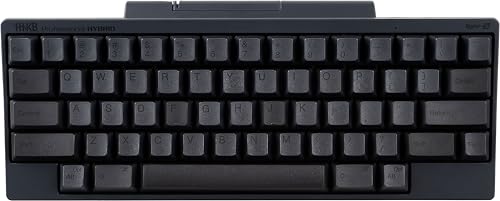
HHKB Professional Hybrid Type-S (Charcoal, Printed)
The default recommendation
- Topre electro-capacitive switches, uniform weighting
- Bluetooth and USB-C wired modes
- Factory silencing rings (Type-S)
- 60 percent layout, printed charcoal keycaps
If a single HHKB is to be bought blind, this is the one the community reaches for, and the reasoning is dull in the best way: it is the fullest expression of the current design. The Hybrid’s Bluetooth pairing covers the multi-device desk — laptop, tablet, the machine across the room — while USB-C handles the zero-fuss wired case, and the Type-S silencing keeps the board welcome in shared spaces and on late-night calls. The charcoal printed legends are legible without shouting, and the dark case hides the evidence of travel better than the white variants.
Living with it confirms the spec sheet’s implications. The sound is the deep, padded thock that sells Topre to skeptics, the key feel is uniform in a way that makes the layout’s logic easier to learn, and the battery life over Bluetooth is measured in months of office use rather than days. What it will not do is light up, remap beyond the official tool’s scope, or pretend to be a gaming board; rapid trigger it is not. It is a typist’s instrument, priced like one.
Strengths
- Silenced Topre feel suits offices and shared homes
- Bluetooth plus USB-C covers desk and travel
- Printed legends ease the layout learning curve
Trade-offs
- Premium price over every MX rival
- No backlighting for dark rooms
- Remapping limited to the official tool
Best for: Programmers and writers who want the canonical modern HHKB without a second decision.
Not suited for: Gamers, RGB enthusiasts, or anyone who needs a function row within the first week.
HHKB Professional Hybrid Type-S (Snow, Printed)
The desk-appearance pick
- Topre electro-capacitive switches, uniform weighting
- Bluetooth and USB-C wired modes
- Factory silencing rings (Type-S)
- Snow white case and printed keycaps
The Snow variant is mechanically the charcoal board’s twin, so this review is honestly about the one variable that differs: presence. The pale case and keycaps give the HHKB a completely different desk character — brighter, more deliberate, and considerably less forgiving of coffee-adjacent work habits. Buyers who photograph their setups, and the keyboard-photography article elsewhere in this cluster exists because that hobby is real, consistently gravitate to Snow for how it takes light.
Nothing about the typing changes, which is precisely the point of listing it separately: variant choice on the HHKB is an aesthetic and practical decision, not a performance one. Printed legends on the light keycaps stay readable in ordinary room light, the silenced switches keep the same padded signature, and Bluetooth behaviour is identical. Choose Snow because the desk wants it and the cleaning cloth is already in the drawer; choose charcoal because neither is true.
Strengths
- Identical silenced Hybrid mechanics in a brighter finish
- Photographs beautifully on light desks
- Printed legends remain easy to read
Trade-offs
- Shows grime and shine sooner than charcoal
- Same premium price as the dark variant
- White cable and case accessories match less widely
Best for: Desk-setup enthusiasts who want the full Hybrid Type-S experience in the light finish.
Not suited for: Commuters and heavy travellers, whose bags are unkind to white plastics.

HHKB Professional Classic Type-S (White, Printed)
The wired purist option
- Topre electro-capacitive switches, uniform weighting
- Wired USB-C connection only
- Factory silencing rings (Type-S)
- Classic HHKB layout, printed white keycaps
The Classic line is the HHKB with the wireless chapter torn out, and a certain kind of buyer prefers it exactly that way. Wired-only means no pairing menus, no battery to age, no Bluetooth quirks in strange offices — plug in the USB-C cable and the board is simply present, the way the 1996 original was present. The Type-S version adds the silencing rings, making this the quietest wired route into the layout, and the white printed finish keeps legends friendly while learning the board.
The savings against the Hybrid are real but modest, so the Classic Type-S argues from philosophy more than from budget: fewer subsystems, fewer failure modes, a keyboard that will work identically in fifteen years because there is nothing in it to expire. Desks with a permanent machine and a dislike of charging cables are its natural home. Desks that rotate between a laptop, a tablet and a phone are not, and no amount of purist satisfaction will pair it with a second device.
Strengths
- Simplest possible HHKB: no battery, no pairing
- Silenced switches keep it office-friendly
- Costs less than the Hybrid equivalents
Trade-offs
- Wired only, permanently
- No Bluetooth for tablet or phone use
- Still a premium price for a 60 percent board
Best for: Single-desk purists who want Topre feel and silence with zero wireless overhead.
Not suited for: Multi-device users, who will feel the missing Bluetooth within a day.

Topre Realforce R3
The full-size Topre alternative
- Topre electro-capacitive switches
- Full-size layout with number pad
- Bluetooth and USB-C on R3 models
- Adjustable actuation features on the R3 line
Every HHKB deep dive owes the reader the exit ramp, and the Realforce R3 is it: the same Topre switch technology in a board that keeps the number pad, the function row and the arrow cluster, and adds the adjustable-actuation tricks the capacitive mechanism makes possible. Readers who finished the layout section above with rising alarm — who need spreadsheet navigation today, not after a fortnight of retraining — lose remarkably little by choosing the R3 instead. The dome feel, the build seriousness and the longevity story all carry over.
What changes is the philosophy. The R3 is a comprehensive tool rather than a distilled one, sized for a permanent desk and priced accordingly, and its variable-weighting options on some variants answer typists who found the HHKB’s uniform keys heavy on the pinkies. Cross-shopping the two is the healthiest exercise in this whole article: it forces the question of whether the layout minimalism is a feature you want or a story you enjoyed reading about. Both answers are respectable; only one of them should get your money.
Strengths
- Topre feel without giving up any keys
- Actuation adjustment the HHKB does not offer
- Full-size layout suits data-heavy work
Trade-offs
- Desk footprint dwarfs the HHKB
- Loses the carry-anywhere appeal
- Premium pricing across the line
Best for: Topre-curious buyers who need a number pad and a function row every day.
Not suited for: Minimalists, travellers, or anyone drawn specifically to the HHKB layout.
Leopold FC660C
The middle path
- Topre electro-capacitive switches
- Compact layout with dedicated arrow keys
- Wired connection
- PBT keycaps with dye-sublimated legends
The FC660C occupies the diplomatic middle of the Topre world: a compact board that keeps dedicated arrow keys and an Insert/Delete column the HHKB banished to a layer, wrapped in Leopold’s famously sober build quality. For readers who want Topre’s dome feel as the main event and regard layout austerity as negotiable, this is frequently the board that ends the search — it asks for a weekend of adjustment rather than a fortnight, and its keycaps are among the best standard fittings on any production keyboard.
Its compromises are the mirror image of the HHKB’s. There is no Bluetooth, no silenced variant with the same ubiquity, and availability outside specialist retailers can be patchy, which is why the listing check matters for this model more than most. In exchange, the buyer gets a board that houseguests and coworkers can use without a tutorial. Deep-dive honesty requires saying plainly that for a large minority of readers, that trade is the correct one.
Strengths
- Dedicated arrows shorten the adaptation curve
- Excellent stock PBT keycaps
- Compact footprint with few sacrifices
Trade-offs
- Wired only
- Availability fluctuates by region
- Less layout character than the HHKB
Best for: Buyers who want Topre feel with training wheels left politely on.
Not suited for: Layout purists or Bluetooth-dependent multi-device desks.
Sound, Recordings and the Thock Question
No keyboard’s reputation travels by recording quite like the HHKB’s. Typing tests of the board accumulate enormous audiences, and the sound they chase — a deep, rounded, slightly hollow thock — is a genuine property of the design: rubber domes collapse softly, the case is a compact plastic shell with little internal volume, and the sliders return against housings that were never designed with acoustics as a primary goal, yet landed somewhere pleasing anyway. The Type-S variant trades a little of that character for quiet; the standard board keeps the full voice, including the upstroke clatter that recordings tend to flatter.
A warning belongs here, because recordings mislead in a specific direction. Microphones sit closer to keyboards than ears do, desks amplify or mute boards depending on their construction, and the mat under the keyboard changes the recording as surely as the switches do. Buyers who fall for a particular video’s sound should treat it as evidence of character rather than a promise of volume or exact tone. The keyboard sound test guide in this cluster explains how to evaluate recordings methodically, and its central advice applies with force here: compare several recordings of the same board, in different rooms, before believing any one of them.
Desk context completes the picture. On a bare wooden desk the HHKB speaks at full volume; on a desk mat it drops into the padded register most owners describe. In a shared office the unsilenced board is noticeable without being offensive — closer to a stapler’s social footprint than a buckling spring’s — while the Type-S is effectively anonymous. None of this is a reason to buy or reject the board alone, but it is a reason to choose the variant with your actual room in mind rather than the internet’s favourite room.
Long-Term Ownership: Domes, Sliders and Decade Thinking
Ownership economics separate the HHKB from the hobby’s churn cycle. There are no switches to collect, no keycap group buys that fit its sliders without adapters, and no annual model refresh rendering last year’s board obsolete — the design’s stability, infuriating to novelty-seekers, is a financial feature for everyone else. The consumables are modest: keycaps eventually shine, a cable eventually frays, and the rubber domes eventually stiffen by degrees over a span of years. Community maintenance culture covers all of it, from slider lubrication to dome-sheet replacement, with the calm of people servicing an appliance they expect to keep.
That expectation is the deepest answer this deep dive can give to the price question. Divided across a decade of daily typing — the service life owners routinely report — the HHKB’s cost per year undercuts the two mid-range boards a less committed buyer might cycle through in the same period. The arithmetic only works if the layout suits the typist, which is why every section above returns to fit rather than prestige. A board kept for ten years is a bargain at almost any price; a board abandoned in month two is expensive at any price, and the HHKB, more than most, is one or the other.
Topre Versus the Mechanical World: An Honest Translation
Readers arriving from mechanical boards ask what Topre feels like in the vocabulary they already own, and the translation deserves care because the lazy version — ‘like a tactile, but softer’ — misleads in both directions. A mechanical tactile concentrates its event at a point: the bump, then travel resumes. Topre distributes its event across the stroke: resistance builds as the dome loads, releases as it buckles, and the landing is the dome’s own cushion rather than a stem meeting a housing floor. The closest mechanical relatives are well-damped tactiles and the better rubber-dome boards of the 1990s, and neither relative is close enough to substitute for ten minutes on the switch itself. The keyboard sound thock clack guide places Topre’s voice on the spectrum; its feel has no equivalent placement, which is the entire reason this switch family sustains a premium market inside a hobby that measures everything.
The translation matters practically because it predicts satisfaction. Typists who love mechanical tactility for its event — the defined bump as information — sometimes find Topre’s distributed resistance vague, a sentence without punctuation. Typists whose pleasure is rhythm and flow, who type paragraphs the way pianists play scales, tend to convert completely and describe their mechanical boards afterwards as ‘busy’. Neither reaction is a verdict on the switch; both are verdicts on the match, and the match is only testable in person. This is why the deep dive keeps returning to the same unfashionable advice: the Topre decision is a hands decision, and every paragraph written about it, this one included, is a map of a country that must be visited.
Longevity completes the translation. Mechanical switches tire at their contact leaves and springs; Topre’s sensing is contactless and its dome, while not immortal, ages by softening gradually rather than by failing electrically — the keyboard chattering double typing fix catalogue of faults barely applies to it. A Topre board bought at thirty may type, slightly mellower, at forty. Against that, the ecosystem tax is real: keycap compatibility, layout choice and price all narrow sharply inside the Topre world. The switch is a commitment to a smaller, quieter, longer-lived country — and this guide’s position is that for the right typist it is the best-governed country in the keyboard world.
The HHKB Layout as a Daily Practice
Specifications describe the HHKB layout; only routine reveals it. The first week is a cartography exercise — Control found by the pinky’s new memory, Backspace relocated to the key the right pinky already visits, arrows living under a function layer that the left hand must learn to hold like a chord. What the second month reveals is the layout’s actual argument: the hands stop travelling. The nav cluster’s absence, which reads as deprivation on paper, becomes in practice a discipline of staying home — cursor movement by layer, editing by shortcut, the mouse demoted to graphical work only. Programmers in modal editors describe the sensation as the keyboard disappearing; writers describe it as the desk shrinking to the sentence. Both are reporting the same fact: the layout moves the work to the fingers’ strongest neighbourhood and keeps it there.
The practice has honest costs that routine also reveals. Shared machines become foreign country — the touch typist on a colleague’s board hunts for Control like a tourist. Games that hard-code key positions need remapping diplomacy. And the layout’s benefits are workflow-shaped: a user whose day is mouse-led design work gains the philosophy but not the mileage, which is why this guide sorts buyers by workflow before it sorts them by budget. The HHKB rewards the keyboard-centric day so specifically that recommending it outside that day is a category error, however fine the board is.
For the committed, the practice compounds. The DIP switches and remapping documented earlier let the layout be tuned to its owner’s editor, shell and habits until the board is less a product than a personal instrument — the end state the keyboard firmware QMK VIA guide pursues by software, reached here by twenty years of layout conservatism. Owners speak of their HHKB the way musicians speak of a kept instrument, and the second-hand market’s prices confirm that the attachment is not sentimentality but utility, capitalised.
Weightings, Silencing and the Variant Maze, Decoded Slowly
Topre’s variant vocabulary frightens new buyers more than any other in this cluster, so it gets a slow decoding. Weighting is the dome’s resistance: 45 grams is the balanced standard, 55 the firmer register for heavy hands and deliberate typists, 30 and 35 the light registers of some Realforce lines for fatigue-sensitive work, and variable weighting — the connoisseur’s option — assigns lighter domes to the weaker fingers across the board, a subtlety felt in long sessions as the absence of pinky fatigue rather than as any sensation at all. None of these is best; they are fits, and the fit is by hand strength and typing style, which is why the same tester discipline applies here as everywhere in the cluster.
Silencing is the second axis: silenced variants add dampening rings that quiet the upstroke’s return at a small cost in travel and a smaller one in the stroke’s crispness. For shared rooms the trade is obviously right; for the solitary connoisseur it is a genuine decision, because the unsilenced upstroke is part of the switch’s music. The third axis is the mundane one that strands the most purchases — layout region and legend printing — where the iso vs ansi keyboard layout and JIS keyboard layout guides in this cluster are the required reading, since Topre boards are sold in all three geographies and a wrong-region board is an expensive penance.
The decoding’s moral is the brand-level one this guide opened with: Topre boards are bought slowly because they are kept long, and the variant maze is not an obstacle to that purchase but its substance. Every axis — weighting, silencing, region, layout — is a decade-long property of the object. The buyer who treats the maze as homework graduates to an owner who never thinks about it again; the buyer who clicks the first listing spends the decade being reminded. Few purchases in the keyboard world repay patience as literally as this one.
Ownership Economics: Cost Per Decade
Topre boards are expensive in the only frame that makes them look expensive — the purchase — and cheap in the frame their owners use, which is the decade. The arithmetic deserves a paragraph because it reframes the whole deep dive: a board at the premium tier, typed on for ten years, costs its owner a trivial monthly figure, and it arrives there with its keycaps unworn, its switches unchattered and its resale value — should the decade end early — holding a share of its price that feature-led boards surrender in eighteen months. Against it, the mainstream path’s true cost is a sequence: the entry board, the upgrade it taught the owner to want, the keycaps, the switches, the second upgrade — a staircase whose total routinely exceeds the Topre ticket while delivering, at each landing, a board the owner already intends to replace.
The staircase is not waste for everyone: it is tuition, and the hobby’s pleasures live on it. The economics argument is narrower — for the buyer who already knows their destination (quiet, tactile, keyboard-centric, long-tenured), the staircase’s tuition buys nothing, and going directly to the destination is the frugal act wearing a luxury costume. This is the deep dive’s most practical sentence, so it is worth stating plainly: Topre is not the expensive way to buy a keyboard; it is the expensive-looking way to stop buying keyboards. The how to choose a mechanical keyboard the buyers guide reaches the same conclusion from the market’s other end.
Resale completes the economics. Topre boards, HHKB above all, hold value because their buyers are certain and their supply is steady rather than fashionable; a clean used example is a rational purchase in a way used feature-boards rarely are, with the dome’s graceful ageing doing the work. The used buyer’s checks are few — weighting confirmed, silencing as listed, region as needed — because the boards hide so little. An object whose second-hand market is this calm is an object whose first-hand price was never really the risk it appeared to be.
Carrying the Deep Dive Onto the Desk: A First Week With Topre
Advice columns end at the purchase; ownership begins there, and a first week with a Topre board has a shape worth describing for the buyer still deciding. Day one is dominated by comparison — the old board beside the new, alternating sentences, the fingers filing reports. By day three the comparison instinct fades and a quieter observation replaces it: the hands are less tired at the hour they usually begin to ache, not because Topre is therapy — this site makes no medical claims for any keyboard — but because a stroke that ends in a dome’s cushion instead of a hard floor asks less of the fingers’ braking muscles across ten thousand repetitions. By the end of the week the board has stopped being equipment and become furniture of the mind, which is the state its owners describe and its detractors find implausible until their own week happens.
The week’s other lesson is what does not happen. No tuning queue forms. No keycap tabs open. The customisation energy that mechanical boards absorb weekly has nowhere to go, and it either converts into the work the board was bought for or into a faint restlessness that sends a minority of buyers back to the project boards — the honest fork this deep dive has described from its first section. Knowing which person you are is worth more than any specification in this article, and the first week is simply where the knowledge becomes undeniable. The ergonomic mechanical keyboards wrist pain guide on this site covers the comfort question with the care it deserves, for readers whose hands are asking harder questions than a switch can answer.
Setting Up an HHKB: DIP Switches and First-Week Habits
The HHKB’s configuration lives on its underside, in a bank of six small DIP switches under a sliding cover, supplemented by PFU’s keymap tool for the Hybrid generation. Work through the setup deliberately once, then leave it alone — constant reconfiguration is the enemy of the muscle memory you are paying to build.
- Decide the board’s home operating system first. One DIP switch selects the Mac or Windows mode, which changes how the diamond Meta keys report; set it before anything else, because every later habit assumes it.
- Choose whether the left Meta key should behave as a function key. Many owners enable this so the Fn layer is reachable from both hands, which makes arrow-key navigation markedly more comfortable during the learning period.
- Set the Delete key’s behaviour. A DIP option swaps the key above Enter between Delete and Backspace behaviour; programmers who live in a shell usually want true Backspace, and changing it later costs a day of relearning.
- Decide the fate of the power and media functions if your workflow uses them, then close the cover and physically put the board’s manual in a drawer. The setup phase is over; the adaptation phase has begun.
- Install the official keymap tool only if a specific remapping need has already appeared — a missing key combination your software demands, for instance. Remapping speculatively, before the stock layout has had its fortnight, usually means remapping away the very placements the board exists to teach.
- Type on the HHKB exclusively for the first week if you possibly can. Alternating hourly with a conventional board doubles the adaptation period, because every return trip re-teaches the old Control position. Exclusive use is uncomfortable for roughly four days and then, for most typists, suddenly is not.
- Keep a short friction log. Note each recurring stumble — the layer combination you keep missing, the key you reach for that is not there — and review it at the end of week one. Patterns in the log tell you which single remapping, if any, is actually justified.
Where New HHKB Owners Go Wrong
Judging the board on day two.
The layout’s costs are front-loaded and its benefits are back-loaded, so any verdict reached inside the first seventy-two hours is measuring the learning curve rather than the keyboard. Owners who thrive almost universally describe a turning point somewhere in the second week; owners who quit almost universally quit before it. Rent the patience before you spend the money.
Buying blank keycaps for a first board.
Blank legends are the line’s iconic look, and they are a genuinely satisfying graduation present to give yourself in month three. As a starting point they sabotage the learning process, because every layer combination becomes a memory test with no safety net. Printed legends first; the blank set will still be there when your fingers no longer need it.
Treating it as a gaming purchase.
The HHKB’s rollover, fixed actuation and layer-based arrows are simply not the gaming feature set, and no devotion to its typing feel changes that. Readers whose evenings are competitive should keep a gaming board for gaming — the are wireless keyboards good for gaming explainer covers what that category actually demands — and let the HHKB be the work instrument it was designed as.
Skipping the silencing question until after purchase.
Type-S and standard models are different listings at different prices, and the silencing rings are a factory fitting, not an accessory to add later. Decide where the board will live — quiet office, sleeping household, solitary studio — before ordering, because that decision is effectively permanent.
Expecting QMK-style freedom.
There is no VIA screen waiting to welcome you. The HHKB offers DIP switches and a bounded official remapping tool, and owners who arrive expecting to rebuild the layout wholesale end up frustrated at a fence that was visible from the road. Read the keyboard firmware QMK VIA guide in this cluster if deep programmability is your priority, and buy accordingly.
Judging Topre by a thirty-second demo.
The switch’s virtues are session-shaped — rhythm, fatigue, the absence of annoyance at hour three — and a showroom poke measures none of them while overweighting the first impression’s novelty. Borrow, rent or buy inside a returns window and type real work for real hours; the demo’s job is to exclude the switch if it actively displeases, not to crown it.
Frequently asked questions
Is the HHKB worth it if I only write documents and email?
It can be, but the case is weaker than for programmers. The layout’s biggest wins — home-row Control, close Backspace, layer arrows — pay out most heavily in shells, editors and code. A writer who touches those tools rarely is buying mostly the switch feel, which is genuinely lovely but available in the less austere Topre boards reviewed above. Be honest about which half of the product you are paying for.
How long does the adaptation actually take?
For touch typists, basic comfort usually arrives within a week of exclusive use, and full fluency — layer arrows without thought, Control placement automatic — within two to three. Hunt-and-peck typists take longer because the board assumes home-row habits. The single strongest predictor is exclusivity: one board only, no alternating, until the new map sets.
What is the difference between Hybrid and Classic HHKB models?
Connectivity and little else. Hybrids add Bluetooth multi-device pairing and command a higher price; Classics are wired USB-C only. Switches, layout, keycaps and build are shared. The Type-S suffix, available on both lines, denotes factory silencing rings and is the more consequential choice for most buyers.
Can I game on an HHKB?
Casually, yes — strategy titles, RPGs and anything tolerant of layer-based arrows will run happily. Competitively, it is the wrong tool: no rapid trigger, no per-key actuation control, and movement clusters that fight established muscle memory. Most dual-purpose owners keep the HHKB for work and a dedicated board for play rather than forcing one board to be both.
Are Topre switches mechanical keyboards?
Not in the contact-switch sense, and the distinction is more than pedantry. Topre switches are electro-capacitive: a rubber dome provides the feel while a spring and sensor register the press without contact. The practical consequences — smoothness, longevity, the distinctive sound — matter more than the taxonomy, but buyers comparing against MX boards should know the mechanism genuinely differs, as the how to choose a mechanical keyboard buyers guide discusses when it places Topre alongside the contact families.
Will the HHKB work with Windows as well as Mac?
Yes. A DIP switch selects the operating-system mode, the official keymap tool supports Windows, and the board presents itself as a standard keyboard over USB or Bluetooth. The Mac heritage shows in small nomenclature — Delete labelling, the diamond Meta keys — rather than in any functional gap.
Is the HHKB worth it over a Realforce?
They answer different briefs with the same switch: the HHKB sells a layout philosophy in a compact travel body; Realforce sells the switch in conventional layouts with modern options like weighting choice and wireless. Keyboard-centric minimalists graduate to the HHKB and stay; typists who want Topre without relearning their geography choose Realforce and stay. The switch will not decide it — the layout will, which is why handling both, or honestly simulating the HHKB’s Control position for a week, is the research that matters.
Do Topre switches wear out?
They age by softening rather than by failing: the dome’s resistance mellows gradually over years of heavy use, and the contactless sensing does not develop the chatter faults of leaf-contact switches. A heavily used Topre board feels gently different from a new one rather than broken, and the boards’ decades-long service records in offices are the technology’s standing proof. Individual domes can be replaced by the committed, but most owners never meet the need.
Should I buy a Topre board if I game as much as I type?
Only if your gaming is the kind that forgives a considered keystroke: strategy, simulation, RPGs and slower competitive titles all play happily on Topre, and its NKRO and response are not the limitation. Fast competitive play built on rapid repeated actuation belongs to the rapid-trigger world this cluster covers elsewhere — Topre’s dome must travel and return, and no weighting makes it a Hall-effect switch. The dual-life answer used by many owners is two boards; the single-board answer is to let your main genre, not your secondary one, choose the switch.
How do Topre switches handle gaming mice-and-keyboard desks — do they wear faster under gaming?
Topre’s rated life is in the same tens-of-millions class as the mechanical switches it competes with, and its wear mode — the dome’s gradual mellowing — is gentler than a contact’s failure modes under any workload, gaming included. The gaming question for Topre is not durability but technique: the dome’s travel and return suit deliberate keystrokes, and the rapid repeated actuation of competitive movement play belongs to the analog technologies. A Topre board on a mixed desk will outlast the desk; it simply will not be the board the ranked matches are played on, and its owners have never asked it to be.
So the deep dive ends where the HHKB itself begins: with a refusal to be all things. This is a keyboard that looked at the modern feature checklist — hot-swap sockets, per-key lighting, software layers, rapid trigger — and declined nearly all of it in favour of a switch mechanism perfected decades ago and a layout argued into shape by a professor’s logic. The remarkable thing is not that a cult formed around it; it is that the cult’s central claim survives scrutiny. The feel is distinctive, the layout logic is real, and the build assumes a decade of service.
Whether it deserves your desk depends on a single self-knowledge question: do you type enough, in the kinds of software the layout serves, for a fortnight of retraining to pay compound interest for years? If the answer is yes, the Hybrid Type-S is the safest door in, the Classic Type-S is the purist’s, and the Realforce and Leopold above are honourable alternatives that keep the switches and soften the doctrine. If the answer is no, you have lost nothing by reading — you now know exactly what the reverence is about, and knowledge, unlike a keyboard, never needs a DIP switch.