Disclosure: As an Amazon Associate, kajuandouglas.com earns from qualifying purchases. Links on this page are affiliate links; they cost you nothing extra. Prices and availability change often, so check the current Amazon listing before you buy.
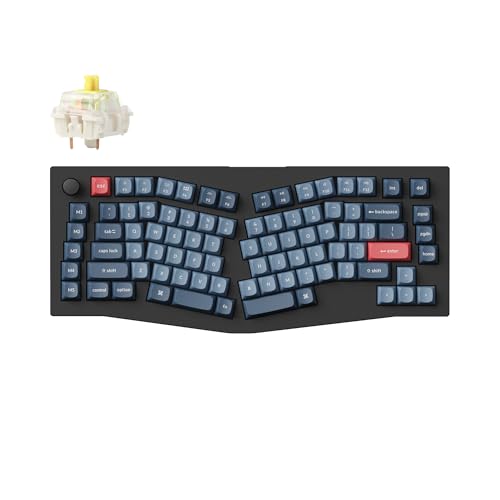
An alice layout keyboards guide has one job before it sells you anything: explain what the Alice layout actually is, because the name tells a newcomer nothing. An Alice board splits the keyboard into two angled halves joined in one case — the rows fan outward like a shallow V, the spacebar is divided, and a couple of extra B keys appear so both index fingers can reach one. This alice layout keyboards guide covers who that geometry genuinely helps, the honest learning curve (it is days, not the minutes some listings imply), what to check before buying, and the verified boards worth shortlisting if you decide the layout is for you. It is an ergonomic-adjacent topic, so the framing here is comfort only: a layout can make typing feel more natural for some people, and no keyboard in this guide is presented as treating or preventing any condition.
Key takeaways: Alice is the gentlest step into ergonomic layouts — same staggered rows you already know, just angled and split — so most touch typists adapt within a week. It suits people whose wrists bend outward on a straight board and who want a more relaxed shoulder and wrist posture without learning a new layout. It does not suit one-finger typists, heavy gamers who need a long left spacebar for a thumb cluster habit, or anyone who types with the wrong finger on B — the split exposes that habit immediately. Buy a mid-tier Alice first; the layout question must be answered before the premium-case question is worth asking.
Alice Layout Keyboards Guide: What the Layout Changes and What It Does Not
Start with the mechanics. On a straight keyboard, your hands point inward and your wrists bend outward to meet rows that run parallel to the desk edge. On an Alice board, each half is rotated so the rows roughly follow the natural angle of your forearms when your elbows rest comfortably apart. The halves are also separated by a small gap, so your hands sit a little wider. The result, for many typists, is a posture that simply feels less forced: wrists straighter, shoulders less rolled in, elbows at a more open angle. That is the whole promise, and it is a modest one — the layout does not move any letter to a new finger, does not change row stagger, and does not ask you to learn layers for basic typing. Compare that with fully split or columnar boards, which can change stagger, thumb clusters and key positions all at once, and Alice’s appeal is clear: it is the ergonomic idea with the smallest possible tuition fee.
What Alice does not do matters just as much. It does not tent the halves — most Alice boards are flat like a normal keyboard, so if your discomfort is about wrist extension or forearm rotation, a flat Alice may change less than you hope. It does not fix a bad desk setup; monitor height, chair height and keyboard distance still dominate your posture, and an Alice board on a badly set desk is a nicer keyboard in a bad setup. And it is not a medical intervention. If you have persistent pain, numbness or a diagnosed condition, the correct move is professional advice, and a keyboard purchase is at most a comfort experiment alongside that advice — never a substitute for it. Readers comparing layout families generally will find the format background in the 65 percent keyboard layout guide useful, because Alice boards borrow their sizes and layer logic from the same compact-layout world.
The small details that define an Alice board
Three details separate one Alice from another. The split angle varies: gentler boards angle the halves modestly and feel almost normal on day one, while more pronounced angles ask more of your habits and reward you with a more open posture. The spacebar arrangement varies too — two separate space keys, sometimes with an extra B on each half, sometimes a shared Fn key in the gap. And the case is one piece, which is Alice’s practical superpower: it sits on the desk like a normal keyboard, needs one cable or one wireless connection, travels in a normal bag, and does not require the desk commitment of two separate halves with a linking cable. If you have tried and abandoned a true split because of the faff, Alice exists precisely for you.
In this guide
The Learning Curve, Honestly
Most touch typists report the same arc. Day one feels clumsy: your index fingers hunt for B and the neighbouring keys, because the angle quietly changes where your hands expect the centre of the board to be, and the split spacebar makes your thumb land in the gap a few times. Days two and three improve quickly as the angle starts to feel like the thing your wrists always wanted. By the end of the first week, most people are at or near their old speed, and going back to a straight board for a paragraph is the moment they notice the difference the layout was making. Budget a real week, and do not judge the layout by an afternoon — the first hours measure your habits, not the board.
Who adapts fast, who struggles, and the B-key test
There is one reliable predictor of a hard transition: which finger you use for B. Correct touch-typing form gives B to the left index finger. Many fast, self-taught typists actually strike B with the right index, reaching across the centre. On a straight board that reach is invisible; on an Alice, the physical split puts a wall where the reach used to be, and those typists spend their first week unlearning one deeply grooved habit. Neither outcome is a character flaw — but knowing your B finger before you buy is the best five-second test in this guide. Type a few sentences containing words like “bring”, “about” and “number” on your current board and watch which finger lands on B. Left finger: expect a smooth week. Right finger: expect a slower, more deliberate retraining, and decide whether the comfort goal is worth it. Hunt-and-peck typists, who look at the keys and use few fingers, gain the least from Alice geometry and lose the most from the split, and are usually happier on a good conventional board such as those in 75 mechanical keyboards compared.
A seven-day adaptation plan that works
Day one and two: type slowly on purpose, accuracy over speed, in short sessions, and keep your old board plugged in for anything urgent so frustration never builds. Days three and four: switch to the Alice full-time for ordinary work, and do ten minutes of deliberate practice on centre-column words — B, G, H, N and the number row above them — where the angle changes your aim most. Days five to seven: stop thinking about the board; speed returns when attention leaves. Two rules protect the experiment. Do not change switches, keycaps or anything else during the week, or you will not know what you adapted to. And judge comfort at the end of a long day, not the start: the layout’s value, if it has any for you, shows up in how your hands feel at hour six. If a week of honest use leaves you slower and no more comfortable, that is a real answer too, and a board with a good returns path was the right way to learn it.
Who Alice Suits — and Who Should Skip It
Alice suits the long-form typist: writers, programmers, support and operations people who spend hours at one desk and have noticed their wrists drifting outward or their shoulders creeping inward on a straight board. It suits the ergonomics-curious who want a change they can evaluate in a week rather than a month. It suits households and offices where one desk serves normal use too, because visitors can type on an Alice with only mild puzzlement, unlike a columnar split that baffles guests completely. It also suits compact-desk users, since most Alice boards are built in 65–75 percent sizes with layers for the missing keys, in the same spirit as the formats covered by the 75 percent keyboard layout guide.
Skip Alice if you are a competitive gamer whose thumb lives on a long spacebar and whose movement keys assume a straight bottom row — the split space changes your jump key feel and the angled left cluster fights years of muscle memory. Skip it if you type one-handed often, for example while on calls with a hand on a phone or a notebook; the split assumes two hands. Skip it if your main complaint is wrist extension from a high desk, because a flat Alice does not address height — fix the desk first. And skip it as a first keyboard for a child or a new typist, who should learn standard geometry before a variant of it. None of these are close calls once stated plainly, which is the point of stating them: Alice is a good answer to a specific question, and this guide would rather talk you out of the wrong purchase than into any purchase.
The Verified Alice Shortlist
The boards below were each matched against the site’s own Amazon catalogue data before earning a link, and they span the sensible entry points: a value board for answering the layout question, a mainstream board for keeping, and a premium board for the convinced. If a well-known Alice model is missing, it is because it could not be verified confidently at the time of checking, and it is discussed in prose where relevant rather than linked on a guess.

Keychron V10 Max — the sensible first Alice
Badge: Best first Alice for most people. A 75 percent Alice board with a knob, gasket mounting, PBT keycaps and full wireless — 2.4 GHz, Bluetooth and wired — running QMK, so remapping the split spacebar and layers is properly supported. This configuration carries an early-tactile banana switch, a friendly middle ground for typists adapting to the angle. It answers the layout question at a keeping-it tier: good enough to live with if the answer is yes, not so premium that a no hurts.
- Layout: 75 percent Alice with knob
- Mount: gasket mount
- Connectivity: 2.4 GHz, Bluetooth and wired; 1000 Hz polling on 2.4 GHz per the verified listing
- Switches: hot-swappable, early-tactile banana switch in this configuration
- Keycaps: PBT
- Firmware: QMK
Strengths
- Complete modern spec — wireless, gasket, knob, QMK — in one mid-tier board
- Gentle, mainstream take on the Alice angle suits a first adaptation week
- Hot-swap sockets let you change switch weight if the posture prefers it
Trade-offs
- Plastic-class build rather than a metal case
- Tactile switch fitted here will not suit linear-only gamers
- Like every Alice, it needs the B-key habit check before ordering
Best for: touch typists making their first ergonomic-layout experiment. Not suited for: hunt-and-peck typists or players who need a long spacebar.

LEOBOG A75 — the value Alice
Badge: Best budget way to answer the layout question. A 75 percent split Alice board with tri-mode connectivity, a knob, hot-swap sockets and a gasket build, at the value end of the Alice market. If the seven-day plan in this guide is an experiment you are genuinely unsure about, this is the tier at which a “no” costs the least — and its creamy, cushioned stock tuning makes the week a pleasant test rather than a harsh one.
- Layout: 75 percent split Alice with knob
- Connectivity: Bluetooth, 2.4G and USB-C wired
- Switches: hot-swappable
- Mount: gasket
- Backlight: RGB
Strengths
- Lowest-risk entry price for a true Alice geometry
- Tri-mode wireless, which many value Alice boards skip
- Soft stock tuning flatters long adaptation sessions
Trade-offs
- Playful styling and keycap legends will not suit every office
- Software and long-term support are thinner than the big enthusiast brands
- Fit and finish are a tier below the Keychron boards here
Best for: the curious on a budget, and second-desk experiments. Not suited for: buyers who want one premium board to keep for years.

Keychron Q8 — the premium Alice for the convinced
Badge: Best Alice once you know the layout suits you. A 65 percent Alice in the Q series’ metal, double-gasket tradition, wired, with a knob, QMK/VIA remapping and hot-swap sockets. Buy this second, not first: it is the board for someone whose adaptation week already succeeded on a cheaper Alice and who now wants the case, weight and tuning depth of a premium build in the layout they have committed to.
- Layout: 65 percent Alice with knob
- Construction: metal Q-series build with double-gasket design, per the verified listing
- Connectivity: wired
- Switches: hot-swappable, clicky blue switch in this configuration
- Firmware: QMK/VIA programmable
Strengths
- Premium case and gasket work give the best sound and feel here
- Deep, well-supported remapping for split-spacebar layouts
- A long-term platform that responds well to switch and keycap tuning
Trade-offs
- Wired only, and heavy — a committed desk board
- The clicky switch in this configuration is loud for shared spaces; plan a swap if that is you
- Premium tier is the wrong place to discover your B finger fights the split
Best for: adapted Alice users upgrading to a keeper board. Not suited for: first-time Alice buyers or wireless-first setups.
In prose only: Akko’s ACR Pro Alice Plus is a well-regarded Alice board in enthusiast circles, but it could not be verified confidently against the catalogue at checking time, so it is mentioned here for completeness rather than linked — if you find it through a reputable listing, judge it by the same angle, spacebar and hot-swap checks this guide sets out.
How to Choose Between Alice Boards
Choose the angle by your ambition: a gentle angle for a first board, a stronger angle only if a gentle one already felt like not enough. Choose the size by your F-key and arrow habits, exactly as you would for any compact board. Prefer hot-swap sockets, because the adaptation week sometimes reveals that a different switch weight suits the angled posture better, and you want that change to be a swap, not a new board. Check the spacebar setup in the listing photos — whether you get two true space keys or a space plus a function key changes layer access more than any spec line. Wireless buyers should confirm the connection set as usual: a 2.4 GHz option matters if the board will also game. Finally, treat keycap compatibility gently: Alice boards need the extra B and split space keys in a set, so confirm a replacement set includes Alice-specific keys before falling in love with it — the keycap material background in ABS vs PBT keycaps and what the difference means will help you judge what a set is worth once compatibility is confirmed.
Desk setup for an Alice board
An Alice rewards a small amount of setup care. Place it centred on your body, not on the monitor, so both halves are equidistant; the angled halves make an off-centre board feel stranger than a straight one would. Keep it close enough that your elbows stay near your sides — the layout’s posture benefit evaporates if you reach forward for it. A thin wrist rest in front, used while pausing rather than while typing, is a reasonable comfort addition; pressing wrists into a rest while typing defeats the relaxed posture you bought the board for. If the board will share the desk with a tablet or a second machine, the multi-device habits in the best bluetooth keyboards for tablet apply unchanged.
Common Alice Buying Mistakes
The biggest mistake is buying premium first: answering an open layout question with an expensive aluminium board, then discovering your B finger fights the split. Answer the layout question at the tier where a “no” is cheap. The second mistake is judging the layout in an afternoon and returning a board on day two that would have clicked on day five. The third is expecting Alice to fix a desk problem — height, distance and chair still dominate, and no layout rescues a bad setup. The fourth is ignoring the spacebar arrangement and discovering your preferred thumb key is a function key. The fifth is buying for a mixed household desk without warning the other typist; put the old board in a drawer, not in the post, for the first month. Each of these is avoidable with the checks above, and each is far cheaper to avoid than to reverse.
Where Alice Came From, and Why It Looks Like That
The Alice layout is named after the board that popularised it in the enthusiast community in the late 2010s, and its shape is a deliberate compromise drawn from two older ideas. Fully split ergonomic boards had existed for decades, proving that angled, separated halves suit human arms — and proving equally well that most people would not accept two loose halves, a linking cable and a transformed layout on their desk. The Alice design took the split board’s geometry and froze it into a single, good-looking case with ordinary staggered rows, betting that eighty percent of the comfort idea could survive with twenty percent of the disruption. The bet largely worked, which is why Alice is now a layout category sold by mainstream brands rather than a hobbyist curiosity. Understanding that origin explains the layout’s quirks: the extra B keys exist because the original design served typists from both B-finger schools during the transition, the split spacebar follows split-board practice, and the gentle tent-less flatness is the price of a one-piece case. It also explains the layout’s ceiling, stated honestly in this guide: Alice is a compromise, and compromises inherit limits from both parents — less adjustable than a true split, less familiar than a straight board.
Alice for Programmers and Shortcut-Heavy Workers
Programmers ask a specific question about Alice: what happens to symbols, brackets and shortcuts when the board is also compact? The answer has two halves. The letters and the number row behave exactly as your fingers expect, so code itself types normally after the adaptation week. The work lives on the layers: brackets, backtick, tilde and function keys sit on a function layer on the smaller Alice boards, and your fluency depends on setting that layer up deliberately rather than accepting defaults. Put the symbols you use hourly under your strongest fingers, keep the layer key where your thumb or pinky can hold it without shifting your hand off the angled home position, and resist copying someone else’s layout wholesale — layer design is personal in the same way the B-key habit is personal. Shortcut chords deserve one warning: combinations that span the split, where one hand holds a modifier and the other reaches across the centre on a straight board, need rethinking, because the physical gap makes cross-centre reaches impossible rather than merely awkward. Most programmers adapt their chord habits within the same week as their letter habits, but if your workflow depends on a beloved cross-board chord, test it mentally against a photograph of the layout before you order. Writers face a lighter version of the same audit: em dashes, quotes and your editor’s shortcuts are the keys to locate on the layer map before the board arrives.
Switches and Keycaps on an Angled Board
Two equipment choices behave slightly differently on an Alice than on a straight board. Switch weight interacts with the angle: because your fingers strike the keys more squarely along their travel when the halves are angled to your arms, many typists find they can comfortably use a slightly lighter switch than usual without accidental presses, while others notice no change at all. The safe approach is to adapt on the switches the board ships with, then use the hot-swap sockets — one more reason they are non-negotiable in the buying checklist — if a weight change still sounds appealing after the adaptation week. Keycap profile matters more. Tall, sculpted profiles emphasise the angled geometry and most Alice users settle happily into them, but a very tall profile combined with the angle can make the outer columns feel like a reach for smaller hands. If your hands are small, a medium or low profile set is the kinder starting point, and Alice-compatible sets with the extra B and split space keys are the ones to shortlist, as the main guide notes. Neither choice is permanent, and both are cheaper to change than the board — the correct order is layout first, posture second, and equipment fine-tuning last.
How to Trial an Alice Without Regret
Because the layout question is genuinely open for every individual buyer, the trial strategy matters as much as the board choice. The cleanest path is a mid-tier or value board from a seller with a straightforward returns window, bought with the honest intention of a full week of full-time use — a trial you abandon on day two is not a trial, and it teaches you nothing except that new layouts feel new. If a workplace or a friend already owns an Alice, a borrowed weekend answers the B-key question and gives a rough comfort signal, though not the full adaptation picture. Keyboard meetups and enthusiast communities, where they exist near you, are the zero-cost option: ten minutes on three different Alice boards teaches more about angle preference than a month of photographs. What not to do is simulate the layout by angling a straight keyboard on the desk — the halves of a real Alice are angled relative to each other and separated, and a rotated straight board reproduces neither the wrist geometry nor the split spacebar, so the experiment misleads in both directions. Treat the trial as the purchase of information, keep the packaging until the week is done, and let the end-of-day comfort check described earlier cast the deciding vote.
The Rest of the Desk: Making Alice Work as a System
A keyboard is one component of a working posture, and an Alice board delivers its best results when the rest of the desk stops working against it. The chair and desk heights should let your forearms rest roughly level with the board, elbows bent comfortably, because the layout’s wrist geometry assumes your hands arrive at the keys in a neutral line — a board perched too high or too low reintroduces the bend the angle was meant to remove. The monitor belongs centred on the board’s midpoint, at a distance that keeps your shoulders settled rather than reaching or hunching toward the screen. Pointing devices matter too: a mouse parked far to the right of a wide board forces the right shoulder open on every reach, which is one quiet reason compact Alice boards pair well with a trackball or a centrally placed pointing device for some users. None of this requires buying anything beyond, at most, attention: adjust what you have, in the order chair, desk distance, monitor, board position, and only then judge the keyboard. Comfort advice generalises poorly and bodies differ, so treat this section as setup hygiene rather than prescription — and, as this guide has said from the start, persistent pain or numbness is a reason to seek professional advice, with any keyboard change as a side experiment rather than the plan.
Alice Sizes Compared: 65, 75 and the Larger Boards
Alice geometry repeats across sizes, and the size decision deserves the same care as the layout decision itself. The 65 percent Alice, like the premium pick in the shortlist, keeps the alphas, the split and a compact navigation presence, and pushes the function row onto a layer — the right choice for a small desk and a layer-confident user, and the wrong choice for someone whose work lives on F-keys. The 75 percent Alice, the size of the mainstream picks above, restores the function row and usually adds a knob, and it is the size this guide recommends by default because it asks the fewest compromises of a first-time Alice owner: you are learning one new thing, the angle, not two. Larger Alice boards exist at the edges of the market — near-full-size designs that add a number pad to the split — and they serve the narrow but real audience of number-heavy typists who want the posture without giving up the pad; they are wide, they are uncommon, and their keycap needs are the most specialised of all. Across every size, the checks from the main guide still govern: angle strength, spacebar arrangement, hot-swap sockets, and the B-key habit test. Size is a preference; those four are the substance.
Myths About Ergonomic Layouts, Retired Politely
Four myths follow Alice boards around, and each deserves a calm retirement. The first myth is that an ergonomic layout must hurt before it helps, like breaking in boots. In truth, the adaptation week should feel clumsy, not painful; pain during adaptation is information about your desk setup or your body, not a toll the layout charges, and it is a reason to pause and reassess rather than push through. The second myth is that a split layout automatically fixes posture. A layout changes where your hands point; it does nothing about chair height, screen distance or the hours you spend in the chair, and this guide’s setup section exists because the system matters more than the component. The third myth is that you will type faster on an Alice once adapted. Most typists return to roughly their previous speed; the layout’s honest dividend is comfort at the end of the day, not words per minute, and anyone selling it as a speed upgrade is selling. The fourth myth is the reverse snobbery — that Alice is a gimmick because it is only a half-measure. Half-measures that people actually adopt beat perfect solutions abandoned in a drawer, and the layout’s one-piece practicality is a feature engineered from real human behaviour, not a failure of nerve. Retire all four, and what remains is the true, modest claim this guide started with: for the right typist, an angled split in a normal case makes long days at the keys feel a little more natural.
Alice on the Road and on Shared Desks
Two use cases test an Alice board in ways a home desk does not. Travel first: a one-piece Alice travels like a normal keyboard, which is its structural advantage over true splits, but its angled footprint packs less neatly than a rectangular board and its sculpted keycaps sit a little taller in a bag, so a case or sleeve that fits by the board’s widest diagonal is the practical detail to check before a trip. In a hotel-room working session, the layout’s benefit survives the change of desk better than most ergonomic gear, because it depends on the board itself rather than on a carefully arranged workstation. Shared desks are the harder test. A partner, colleague or family member who occasionally uses your desk will manage an Alice for an email with mild commentary, which is more than can be said for a columnar split, but a genuinely shared workstation deserves either a conventional second board in a drawer or a household agreement — and the value pick in the shortlist makes that second-board solution cheap enough to be the sensible one. Hot-desking in an office follows the same logic: an Alice is personal equipment in a way a standard board is not, and most owners treat it as such, carrying it between desks rather than leaving it as shared infrastructure.
Gaming on Alice, in More Detail
The main guide gave gaming a cautious paragraph; competitive readers deserve the fuller picture. The left cluster is where the angle bites: movement keys sit rotated relative to your fingers’ expectations, and techniques that chord movement with the pinky and ring finger — crouch and lean combinations, for example — need their angles relearned, which most players manage in days and some never forgive. The split spacebar is the second factor: if your jump or dodge lives under a thumb that expects a long bar, the shorter right space key changes the contact patch, and remapping jump to the left space key is a legitimate experiment because the split gives you two distinct keys where a straight board has one bar — some players end up preferring a dedicated key per action, which is the split quietly paying them back. Genres divide predictably. Real-time strategy and MOBA play, with hands anchored and the mouse doing the travelling, adapt almost painlessly. Arena shooters and movement-heavy titles charge the highest tuition. Flight, racing and simulation rigs barely involve the keyboard at all. The sensible competitive pattern, used by more players than admit it, is two boards: the Alice for the working and writing day, a conventional board for ranked sessions — which is a perfectly respectable conclusion for an ergonomic experiment to reach, and another reason the guide steers first-time buyers toward the tiers where a two-board outcome is affordable.
Accessories That Help an Alice, and Those That Undo It
A short list of additions genuinely complements the layout. A keyboard case or sleeve sized to the angled footprint protects the board’s corners in transit, which matters more for an Alice than for a rectangle because its widest points are its corners. A second set of keycaps in a friendlier profile is a legitimate comfort experiment once the adaptation week is done, provided the set includes the Alice keys. A coiled or right-angled cable suits the centred, close-in desk position the layout prefers and keeps the desk visually calm. A thin wrist rest, used as a parking place for your palms between typing bursts rather than a platform during them, suits some users and is a matter of personal comfort rather than doctrine. Against those, two popular accessories work against the layout’s purpose. A keyboard tray or riser that lifts the board high reintroduces the wrist bend the angle removed, and a one-piece palm rest that forces your hands wider than the halves were designed for quietly fights the geometry you paid for. The principle is the same one running through this whole guide: judge every addition by whether it supports the posture the layout creates, and be suspicious of anything bought merely because it is sold next to ergonomic keyboards.
If Alice Is Not for You: The Alternatives Ladder
A failed Alice experiment is not a failed search — it is a data point, and it points somewhere specific depending on why it failed. If the angle felt right but the one-piece case felt limiting, the next rung is a true split board whose halves you can position and tent independently; you have validated the core idea and outgrown the compromise. If the split itself was the problem — the gap, the spacebar, the B wall — step back to a well-chosen conventional board without embarrassment, and take the comfort budget to the parts of the setup that were never the keyboard’s fault: chair, desk height and screen position. If the layout felt promising but the specific board disappointed in build, sound or switches, that is the easiest outcome of all: the premium tier of the same layout, represented in the shortlist, exists for exactly you. And if the whole experiment revealed that your hands were never uncomfortable to begin with, the correct purchase is no purchase — a conclusion buying guides rarely print and honest ones should. Whatever the outcome, the week cost you little at the tiers this guide recommends, and you now know something about your own typing that no review could have told you. That is a good week’s work by any measure.
Hand Size and the Alice Angle
One variable the listings never mention deserves a section of its own, because it quietly decides more Alice outcomes than switch choice ever will: the size of your hands relative to the board’s angle and column spacing. Smaller hands tend to prefer the gentler angles and the compact Alice sizes, where the outer columns stay within an easy arc of the home position and the split does not ask the pinky to travel for its keys. Larger hands often take to the layout immediately — the separation and angle give long fingers room they never had on a straight board — and can find the most compact boards slightly cramped across the number row. Neither tendency is a rule, and both are testable in the trial week this guide prescribes: if your adaptation stalls specifically on the outer columns rather than the centre split, the board’s size or angle is the suspect, not your technique, and a different Alice rather than no Alice is the likely answer. This is also why borrowing or trying more than one Alice, where the opportunity exists, teaches more than any specification: the geometry is a fit question, and fit is felt, not read.
Two-Hand Habits: Retraining the Keys That Moved Most
General adaptation advice treats the Alice learning curve as one smooth slope. In practice it is three separate habits learned at three speeds, because the layout moves three different things: where your thumbs land, how your hands share the middle of the board, and how far your fingers travel for numbers and symbols. Training them separately, in the order your errors actually occur, shortens the whole process more than any single drill.
The spacebar thumbs and the split bottom row
The split spacebar is the change your thumbs notice first and forgive fastest — usually within days — provided you let each thumb own its half completely. Problems linger when one thumb keeps reaching across the gap for the other side’s bar, a habit imported from standard boards where the bar is one long target. The corrective drill is unglamorous: type space-heavy text — ordinary prose is ideal — at half speed for a few short sessions, and notice which thumb strikes. Most typists discover their two thumbs were never equal partners; one did nearly all the work. Alice rewards balancing them, because the thumb that learns its own bar also becomes available for a layer or modifier role on boards that put extra keys beside the split. Give the weaker thumb deliberate work early and the bottom row stops being a topic within the first week.
The shared middle: B, Y and the keys both hands claim
Every typist has keys their hands argue over — most famously B, reached by either index depending on training, with a few number-row and symbol keys close behind. A standard board hides the argument; an Alice board settles it physically, because the angled split assigns the middle keys to a side. If your B belongs to the hand the layout disagrees with, expect that single key to account for a disproportionate share of your early errors, and do not mistake it for a verdict on the layout. The fix is targeted, not general: a few minutes a day of words dense in the contested letters, typed slowly enough that the correct hand wins every repetition. Retraining one key is a weekend project. Retraining your opinion of the board, once frustration has attached itself to the wrong cause, takes considerably longer — which is why identifying the specific contested keys in your first sessions matters more than total practice volume.
Numbers and symbols without looking down
The number row is where Alice’s angle changes geometry most subtly: the row follows the same split as the letters, so distances your fingers memorised on a straight board are preserved in pattern but rotated in space. Touch-typists who use the number row heavily — programmers reaching for symbols above the digits above all — should expect this to be the last habit to settle, and should plan their symbol-heavy work accordingly during the first fortnight. A useful exercise is typing your own most common symbol combinations — brackets, operators, the punctuation of your particular trade — as a short daily set, rather than generic typing tests that under-sample exactly the reaches you are relearning. Once the symbol layer of your work is automatic again, the layout has no remaining surprises: everything after that point is refinement, and refinement is the pleasant part.
Documenting your own adaptation
One habit separates owners who can judge the experiment fairly from owners who rely on mood: a few lines of notes. Record your typing speed and error impression on the first evening, again at one week, and again at a month, using the same test text each time so the numbers are comparable. Note which specific keys still cause errors rather than recording a general sense of difficulty, because the notes from week one usually reveal that the problem was never the layout as a whole — it was two keys, and they have names. If you abandon the experiment, those notes are what make the decision knowledge instead of folklore, and they transfer: the contested keys they identify will be the same keys to watch on any future ergonomic board you try.
Frequently Asked Questions
Is the Alice layout actually more comfortable?
For many typists, yes — the angled, slightly separated halves let wrists sit straighter and shoulders sit more open than a straight board does, and the difference is most noticeable at the end of long typing days. It is a comfort preference, not a medical claim: individual bodies and desks differ, and persistent pain or numbness deserves professional advice rather than a keyboard purchase. The honest test is a week of full-time use, judged at the end of the day.
How long does it take to learn the Alice layout?
Most touch typists are functional on day one, comfortable by days three to four, and back to full speed within about a week. The exception is typists who strike B with the right index finger, who must retrain that one habit and should allow closer to two weeks. No letters move and no new layers are needed for ordinary typing, which is why Alice adapts faster than fully split or columnar layouts.
Alice vs a fully split keyboard — what is the difference?
An Alice is one case with angled halves: it keeps standard row stagger, needs one connection, and sits and travels like a normal keyboard. A fully split board is two separate halves you can position and often tent independently, frequently with columnar stagger and thumb clusters — more adjustable, more to learn, more desk commitment. Alice is the right first step for most people; fully split is where you go if Alice helps and you want more of what it started.
Can you game on an Alice keyboard?
Casually, yes; competitively, it depends on your habits. The angled left cluster and split spacebar change the feel of movement and jump keys that many players have automated over years, and a week of adaptation in ranked play is a real cost. Strategy, simulation and slower-paced games feel fine once adapted. If competitive FPS is your main use, a conventional board remains the safer primary, with Alice as your typing board.
Do Alice keyboards need special keycaps?
Partly. The letters and standard keys are ordinary, but an Alice needs an additional B key and split spacebar keys that basic keycap sets do not include. Many sets now offer an Alice or ergonomics add-on kit; check for it before buying a set. Boards ship with everything fitted, so this only matters when you later want to change the board’s look or feel.
What size do Alice keyboards come in?
Most are compact — roughly 65 to 75 percent footprints with the function row present on the larger designs and layered on the smaller ones — because the layout’s audience overlaps heavily with the compact-keyboard audience. Full-size Alice boards exist but are uncommon. Choose the size by the same F-key and arrow questions you would ask of any compact board, then confirm the spacebar arrangement in the listing before ordering. If the experiment works and you want to tune the board further, the advanced keyboard modding techniques guide covers the gasket, switch and stabiliser work these boards respond to best.
Can I use a wrist rest with an Alice keyboard?
Yes, but choose and place it with the angle in mind. A straight rest designed for a conventional board leaves the two halves of an Alice at odds with its edge — one wrist supported, the other hovering near a corner. Split rests, or two small pads placed to match each half’s angle, follow the layout’s logic and are the comfortable answer for owners who rest their wrists while pausing. The more important point is what the rest is for: support during pauses, not a platform to type from. Typing with wrists planted and fingers reaching tends to undo the posture the layout was bought to create, whatever rest is underneath. If you type with floating hands already, you may find an Alice needs no rest at all — try the board bare for the first week before adding furniture to it.
What if my workplace uses standard keyboards everywhere else?
Then you will become bilingual, and it is less costly than it sounds. Most Alice owners who also type on standard boards — hot desks, colleagues’ machines, laptops on the move — report a short switching cost measured in moments: a few keystrokes at the start of a session while the hands confirm which geometry is underneath them. The cost rises if you fight it by trying to make the two experiences identical; it falls if you let each board keep its own habits and trust the first sentence of each session to load the right set. Keep your standard-board skills warm with ordinary use rather than drills. The realistic worst case is not confusion but preference: many owners simply begin choosing the Alice desk for long writing and the standard desk for everything brief, which is a sensible division of labour rather than a problem.