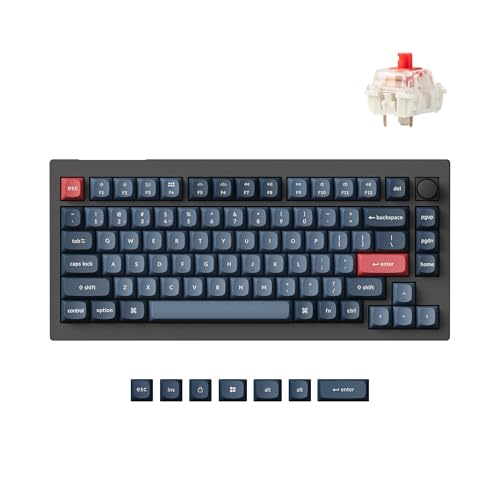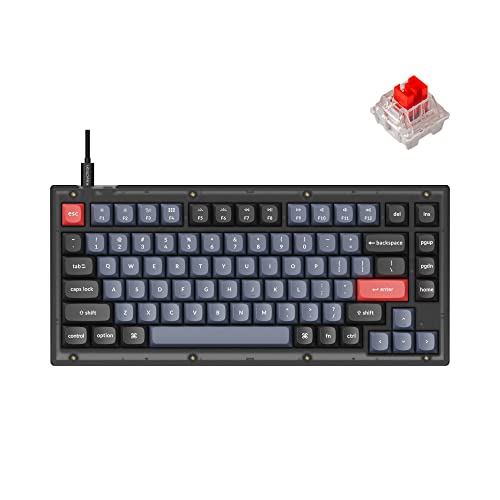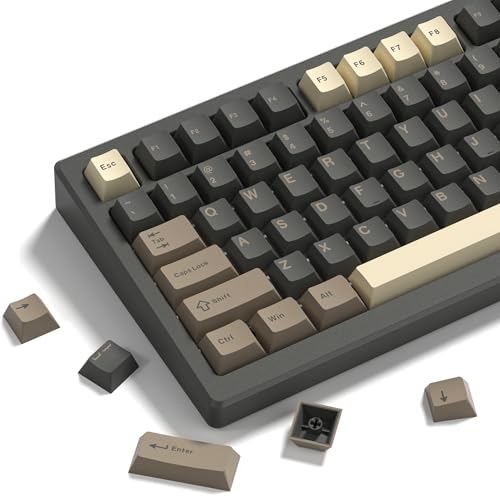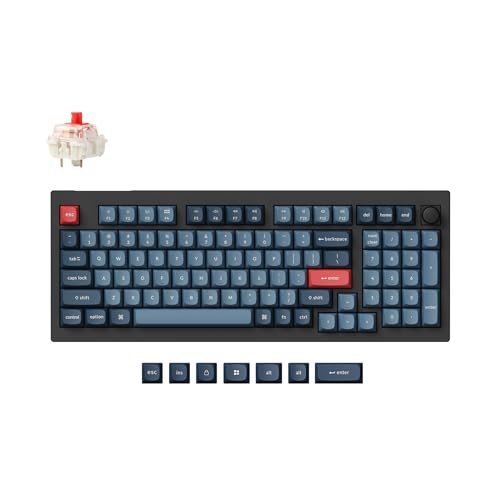
Disclosure: As an Amazon Associate, kajuandouglas.com earns from qualifying purchases. Links on this page are affiliate links; they cost you nothing extra. Prices and availability change often, so check the current Amazon listing before you buy.
96 Vs 1800 Keyboards Guide: The Quick Verdict
Anyone researching a 96 vs 1800 keyboards guide quickly discovers the open secret of this corner of the hobby: the two terms describe nearly the same idea — a full-size keyboard, number pad included, compressed until it occupies roughly the footprint of a tenkeyless board. The difference is heritage and execution rather than key count. “1800” is the older enthusiast term, named after a classic compact full-size design, and it usually signals a traditional interpretation: around 98 keys, a number pad merged tightly against the main cluster, arrow keys tucked beneath the pad, and often a more conservative case and feature set. “96 percent” is the modern retail term for the same compression, and boards sold under it tend to add the current enthusiast checklist — hot-swap sockets, gasket mounting, knobs, tri-mode wireless, and south-facing lighting.
So the verdict up front: if you want the layout in its modern, feature-complete form, buy a board sold as 96 percent. If you value the classic execution — proven switch options, superb stock keycaps, a board built like office equipment rather than a gaming peripheral — the traditional 1800-style boards remain excellent, and one famous example is linked below. Either way, you are choosing the layout family that refuses to delete the number pad, and the rest of this guide compares the two interpretations criterion by criterion, shows four verified boards that embody them, and ends with a decision framework based on how you actually use a number pad.
In this guide
Head-to-Head Comparison Table
| Criterion | 96 Percent (modern) | 1800 (classic) |
|---|---|---|
| Typical key count | About 96–100 keys | About 98 keys |
| Number pad | Full pad, compressed spacing | Full pad, compressed spacing |
| Arrow keys | Integrated under or beside the pad | Integrated under the pad |
| Hot-swap switches | Common, expected | Uncommon on classic models |
| Wireless | Commonly tri-mode | Rare; wired is the norm |
| Knob | Frequent | Rare |
| Case and mounting | Gasket mounts, foam, varied materials | Traditional tray or top mount, plastic or steel heritage |
| Keycaps | PBT common, many profiles | Excellent PBT on premium classics |
| Software | QMK or vendor suites | Often minimal or none |
| Best for | Gaming plus number work, modern desks | Traditionalists, office-first users |
Read the table as tendencies, not laws. Individual models break ranks in both directions — there are wired-only 96 percent boards and feature-rich boards with 1800 in their lineage. The criterion sections that follow explain why each tendency exists and how much it should weigh in your decision.
Criterion 1: Layout Geometry and the Number Pad Itself
Both interpretations solve the same geometry problem. A traditional full-size board wastes width on gaps between the main cluster, the editing cluster, and the number pad. Compress those gaps away, slide the arrows under the number pad’s lower rows, fold the editing keys into a slim column or a layer, and the board shrinks by roughly a fifth while keeping every function. The number pad that survives is complete — digits, operators, Enter, and usually a shortened or standard zero key — but its keys sit closer to the main block than on a full-size board, and the boundary between the letter block and the pad is a seam your fingers must learn.
Where the two interpretations diverge is spacing philosophy. Classic 1800 designs keep the pad’s internal geometry close to traditional, accepting a slightly wider board. Aggressive modern 96 percent designs compress harder, sometimes merging the pad’s left column against the main cluster with no visual break at all. The practical consequence shows up in your first week: data-entry users strike the seam keys — the pad’s left column and the main block’s right edge — with occasional cross-boundary errors on the tightest boards. Verdict on this criterion: a draw on capability, with classic 1800 boards slightly kinder to touch-typists who enter numbers by feel, and modern boards slightly smaller on the desk.
Criterion 2: Switches and the Ability to Change Them
This is the criterion where the generations separate most clearly. Modern 96 percent boards are built in the hot-swap era: sockets accept standard MX-style switches, factory options span linear, tactile, and silent families, and many boards arrive with pre-lubed switches that need nothing. Classic 1800-style boards come from the soldered era. Their switch menus — the famous example below offers a range of Cherry MX options — are chosen at purchase and are effectively permanent for anyone who does not solder.
Neither approach is foolish. A soldered board from a serious manufacturer is a stable, long-lived tool, and buyers who know their switch — the accountant who has typed on the same tactile switch for a decade — lose nothing. But buyers still discovering their preferences, gamers who want different switches on movement and ability keys, and anyone who has ever had a single switch fail will feel the hot-swap advantage immediately. Verdict: modern 96 percent wins this criterion decisively for most buyers in this guide’s audience.
Criterion 3: Connectivity and Gaming Performance
Classic 1800 boards are wired instruments. For a fixed office desk that is a feature: no batteries, no pairing, no radios, full stop. Modern 96 percent boards split into wired gaming models and tri-mode models that add 2.4 GHz and Bluetooth, letting the same board serve a gaming PC and a work laptop — a genuinely common pattern for the spreadsheet-by-day, ranked-by-night reader this layout suits best.
For gaming specifically, both wired classics and modern boards deliver full-key rollover and the polling behavior competitive play expects when used over a cable or a 2.4 GHz receiver. Bluetooth remains the casual mode on any board that offers it. The honest verdict: wired-only is perfectly sufficient for a single-desk life, and modern 96 percent wins only if your life has a second machine in it.
Criterion 4: Keycaps, Case, and Sound
Here the classics punch back. The best traditional 1800-style boards ship with thick PBT keycaps whose legends are dyed or double-shot to survive decades, mounted in cases tuned for a firm, businesslike feel. They sound like office equipment in the best sense — solid, muted, unembarrassed. Modern boards counter with variety: gasket mounting for a softer landing, foam packages for a deeper sound, knobs and occasionally screens, and case materials from plastic to aluminum. Quality varies more widely among modern boards, which is why the picks below were chosen from manufacturers with consistent execution. Verdict: premium classics win on stock keycaps and consistency; modern boards win on tuning, variety, and sound customization.
Criterion 5: Software, Layers, and Quality of Life
A compressed layout lives or dies by its small remapping decisions: which key owns the corner, where Delete and Print Screen went, how the pad’s top row behaves. Modern boards increasingly offer QMK or competent vendor software to settle those questions your way, plus extras like per-game profiles. Classic boards typically offer dip-switch-level adjustments or nothing, betting that the factory layout is correct — a bet that pays off for users whose habits match the factory choices and frustrates everyone else. Verdict: modern 96 percent, clearly, for anyone who remaps; a non-issue for anyone who does not.
Strengths and Trade-Offs: Each Side, Plainly
The 96 percent (modern) case
Strengths
- Hot-swap sockets, current switch options, and pre-lubed factory tuning.
- Tri-mode wireless on many models, serving gaming and work machines from one board.
- Knobs, gasket mounting, foam, and modern software as standard expectations.
- Wide model choice across budgets, including the three modern picks below.
Trade-offs
- The tightest designs compress the pad seam hard enough to cause early mis-presses.
- Quality and software polish vary by brand far more than among the classics.
- Feature stacking can mean weight, complexity, and drivers you must maintain.
The 1800 (classic) case
Strengths
- Proven, conservative engineering with excellent stock PBT keycaps on premium models.
- Traditional pad geometry that touch-typists adapt to fastest.
- Wired simplicity: nothing to charge, pair, update, or troubleshoot.
- A work-first aesthetic that suits offices and shared spaces.
Trade-offs
- Soldered switches on classic models make your purchase-day choice permanent.
- Wireless, knobs, and deep remapping are usually absent.
- Fewer models are sold each year, so choice and stock are thinner.
Four Verified Boards That Embody the Comparison
Each board below was verified against Amazon’s catalog data before being linked. The first three are the modern 96 percent interpretation at different priorities; the fourth is the classic 1800-style reference. A well-known Akko 98-key model was also researched for this guide, but no confident catalog match was confirmed at writing time, so it is mentioned here in prose only and carries no link — check the manufacturer’s current listings if that specific board interests you.

Keychron V5 Max — The Modern Interpretation, Complete
Badge: Best modern all-rounder. The V5 Max is what the 96 percent idea looks like fully updated: a 96 percent layout with number pad, a knob, tri-mode connectivity across 2.4 GHz, Bluetooth, and USB-C, QMK-based programmability through a web launcher, hot-swappable switches, and RGB. It serves the exact dual life this layout exists for — spreadsheets at full number-pad speed by day, games at full performance by night — and its programmability lets you fix the compressed layout’s small compromises yourself.
- Layout: 96 percent with number pad and knob
- Connectivity: 2.4 GHz, Bluetooth, USB-C wired
- Switches: Hot-swappable Gateron options
- Software: QMK with web-based Launcher
- Keycaps: PBT (as listed)
Strengths
- Complete modern feature set with no category left unaddressed.
- Programmability that survives across computers and operating systems.
- Wireless modes that genuinely suit a two-machine desk.
Trade-offs
- The compressed pad seam needs the standard adaptation week.
- Plastic case, while well executed, lacks the heft of metal rivals.
- Feature depth means a first evening spent configuring rather than just typing.
Best for: the dual-life user who wants one board for number work and gaming. Not suited for: traditionalists who want zero software in their lives. Check price on Amazon
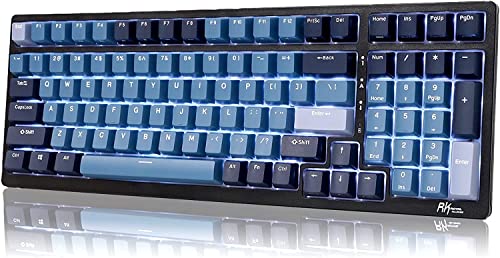
RK Royal Kludge RK98 — The Value Wireless Route
Badge: Best value. The RK98 proves the modern interpretation does not require a flagship budget: a 96 percent layout with a real number pad, triple-mode connectivity, hot-swap sockets with pre-lubed switch options, programmable software, and RGB. It is the board for the reader who ran the numbers — literally — and wants the pad, the wireless, and the switch freedom without paying for a knob or a metal case.
- Layout: 96 percent, full number pad
- Connectivity: Bluetooth, 2.4 GHz, USB-C wired
- Switches: Hot-swap, pre-lubed linear and brown options
- Battery: Rechargeable cell sized for multi-device use (see listing)
- Software: Vendor programming support
Strengths
- The full modern checklist — pad, wireless, hot-swap — at a value tier.
- Pre-lubed switches feel finished without an upgrade path detour.
- Multiple switch variants let you match the board to typing or gaming.
Trade-offs
- Vendor software is serviceable rather than best in class.
- Case acoustics trail gasket-mounted rivals.
- No knob, for readers who had their hearts set on one.
Best for: budget-conscious dual-life users. Not suited for: sound-first enthusiasts. Readers comparing across the compact spectrum may also enjoy our guide to 75 mechanical keyboards, which covers the pad-free alternative honestly. Check price on Amazon

RK Royal Kludge R98 Pro — The Sound-Tuned Wired Option
Badge: Best feel-first modern pick. The R98 Pro spends its budget on the typing experience instead of radios: a gasket-mounted 96 percent board with a number pad and volume knob, MDA-profile PBT keycaps, and hot-swappable pre-lubed linear switches, tuned for the creamy sound profile currently in fashion. Wired-only will read as a limitation to some and as focus to others; at a fixed desk it is simply one less system to manage.
- Layout: 96 percent with number pad and knob
- Connectivity: USB-C wired
- Switches: Hot-swappable pre-lubed linear
- Keycaps: MDA-profile PBT
- Mounting: Gasket mount
Strengths
- Gasket mounting and PBT caps produce a deep, soft sound stock.
- The knob restores the media control the layout otherwise layers away.
- Wired consistency for competitive play and all-day work.
Trade-offs
- No wireless modes for multi-device desks.
- MDA profile’s height and sculpting are a taste not everyone shares.
- Linear-only factory tuning in the verified listing narrows switch choice at purchase.
Best for: fixed-desk users who rank sound and feel above connectivity. Not suited for: laptop-and-PC switchers. Check price on Amazon

Leopold FC980M — The Classic 1800-Style Reference
Badge: The classic. Leopold’s FC980M is the board enthusiasts name when they explain what 1800-style means: 98 keys, a Cherry MX switch menu chosen at purchase, and thick PBT keycaps in a sober, impeccably built case. There is no knob, no wireless, no hot-swap — and for its audience, that is the point. It is a decade-scale tool for people who know their switch, type for a living, and regard keyboard features the way chefs regard novelty knives.
- Layout: 98-key 1800-style with number pad
- Connectivity: Wired
- Switches: Cherry MX options, soldered (chosen at purchase)
- Keycaps: PBT
- Character: Traditional case, office-first tuning
Strengths
- Stock keycaps and build consistency that modern boards aspire to.
- Traditional pad geometry that number typists adapt to immediately.
- A switch menu of proven Cherry MX options for buyers who know their preference.
Trade-offs
- Your switch choice is permanent without soldering skills.
- No wireless, knob, or meaningful remapping layer.
- Availability and variant stock fluctuate more than mass-market boards.
Best for: traditionalists and office-first typists who buy once and type for years. Not suited for: experimenters, wireless desks, or gamers who remap heavily. Check price on Amazon
Who Should Choose Which: The Decision Guide
Choose modern 96 percent if…
You split time between number-heavy work and gaming, you use more than one computer, you are still learning your switch preferences, or you expect a knob, wireless, and remapping as standard equipment on a modern peripheral. This is most readers of this guide, and the V5 Max is the default recommendation, with the RK98 as the value route and the R98 Pro as the feel-first wired alternative.
Choose classic 1800-style if…
You type for a living on one wired desk, you already know your exact switch, you value stock keycap quality and decade-scale consistency over features, and your games are the kind that never asked for a macro in their lives. The FC980M exists for you, and buying it is not nostalgia — it is a rational preference for a tool over a platform.
Choose neither if…
Your number-pad use is occasional — a few figures a week, the odd calculator session. In that case a 75 percent board plus a small standalone pad you can park, move, or store beats a permanently wider keyboard, and the 75 percent keyboard layout guide will help you judge the smaller layout. Conversely, if you are a full-time data-entry professional on a wide desk, a traditional full-size board’s uncompressed pad remains the ergonomic gold standard and no compressed layout should talk you out of it.
How to Adapt: The Number-Pad Workflow, Rebuilt for a Compressed Board
Whichever interpretation you buy, the first fortnight decides whether the compressed pad becomes invisible or stays annoying. Begin by slowing your number entry deliberately for two or three days and watching where your fingers land; the seam between the main block and the pad is where errors concentrate, and conscious reps re-teach the boundary quickly. Move your calculator and spreadsheet shortcuts onto the pad consciously — many users discover their software’s pad-specific shortcuts, from data-form navigation to audio and video timeline controls, only when they make a point of learning them. In games, audit which bindings assumed a full-size board: MMO players often park rarely used consumables and mounts on the pad, strategy players use it for control groups beyond the number row, and simulation players map entire instrument panels there — all of which survive compression intact once your hand learns the tighter geography.
Set the board’s small choices early. Decide where Delete lives and make it permanent in your remapping if the factory choice fights you. If your board has a knob, assign it before muscle memory assigns it for you. And give the arrows under the pad the same deliberate practice: a few spreadsheet sessions navigated entirely by keyboard will settle their position faster than a month of mixed mouse work. Adaptation to this layout family is measured in days, and it is the last layout change most buyers ever need to make — which is, in the end, the strongest argument for choosing it carefully between its two interpretations now. Owners who enjoy tuning the result can continue with easy modifications to improve your mechanical keyboard or go deeper with advanced keyboard modding techniques.
Where to Buy and What to Verify
Buy from the listings linked in the reviews above, and verify the variant in your cart with unusual care, because this category bundles switch options, colors, and sometimes wired and wireless versions under one page. Confirm the switch named in the selector, the connectivity included, whether the board is hot-swappable, and the keycap material — four facts that define the keyboard you will actually receive. Prices in this category move with sales and stock, which is why this guide links out with “Check price on Amazon” rather than printing numbers that would mislead within weeks. If a specific variant is out of stock, the manufacturer’s other colorways of the same model are the same keyboard; a different model with a similar name is not.
Final Verdict
96 percent and 1800 are two dialects of one excellent idea: keep every key, delete only the empty space. The modern dialect — hot-swap, wireless, knobs, software — is the right default for gaming-and-work readers, and the Keychron V5 Max expresses it most completely. The classic dialect — soldered certainty, superb caps, wired calm — remains the right answer for typists who buy tools, not platforms, and the Leopold FC980M is its standard-bearer. Decide which kind of owner you are, and the layout will serve you for years without asking you to delete a single key you actually use.
Where the 1800 Name Comes From, and Why It Stuck
The term traces back to a compact full-size keyboard design sold for years into offices, retail, and industrial settings, where desk space was scarce but the number pad was non-negotiable — think point-of-sale counters and cramped finance desks. Enthusiasts rediscovered the format when they realized it solved the home desk’s version of the same problem, and the name stuck as shorthand for the whole geometry: pad kept, gaps deleted, arrows folded underneath. The modern 96 percent label arrived later, when gaming and enthusiast brands needed a name that explained itself on a product page to buyers who had never heard the older term. Understanding that lineage explains the market you are shopping in: boards designed by people thinking about counters and offices tend toward the classic interpretation, and boards designed by people thinking about gaming desks tend toward the modern one, even when the key counts are identical. It also explains the secondhand market, where older 1800-format boards circulate among collectors — interesting as history, but the four picks in this guide are current, supported products for a reason.
Ergonomics and Desk Math for the Compressed Full-Size
Measure your desk before choosing, because this family asks a specific question: can you give back a few of the inches a 75 percent board saved, in exchange for the pad? In practice a 96 percent or 1800 board sits between a tenkeyless and a traditional full-size board in width — narrower than the board it replaces, wider than the compact layouts. Your mouse hand therefore lives slightly further right than with a 75. For most sensitivity settings that is irrelevant; for very low-sensitivity FPS play it is the one genuine cost of keeping the pad, and it is why the decision guide above steers pad-occasional players toward the modular route. Shoulder posture still improves versus a true full-size board, since the whole keyboard shifts left and centers the letter block closer to your body. If you use a keyboard tray, verify its width against the specific model’s dimensions on the listing — trays are where compressed boards most often surprise their owners, in both directions.
Genre and Job Deep Dive
Finance, accounting, and data work
This is the layout’s home crowd, and the classic interpretation deserves a serious look here: traditional pad spacing, sober looks, and wired reliability match the work. Modern boards win only when the same person games after hours or hot-desks between machines. Either way, avoid the tightest compact designs if your entry speed is measured professionally; a day of seam errors costs more than the desk space saves.
MMO and strategy gaming
The pad is a second binding bank that smaller layouts cannot replicate: mounts, consumables, camera groups, and control groups all live there without touching your WASD hand’s territory. Modern programmability multiplies the value — per-game layers on a QMK board turn the pad into a labeled instrument panel. This audience should default to modern 96 percent and never look back.
Simulation and creative work
Flight, space, and racing simulation players map entire panels to the pad, and video editors use it for timecode entry and shuttle shortcuts. Both groups care about the pad’s exact top-row arrangement, which varies by model; check the listing’s key map the way you would check a joystick’s button layout. Creators who also stream should weigh the modern boards’ knobs as timeline and volume controls.
Programming and system administration
Programmers are the split audience. Those who navigate by keyboard shortcuts and live in a modal editor often find the pad genuinely useful for macros and window management; those whose hands never leave the home row may prefer a smaller board and a layer. The tiebreaker is your own logs: if your current full-size board’s pad shows polished, shiny keys, you are a pad user and this family is yours.
Living With the Board: Setup, Switching, and Care
On a modern hot-swap model, your first-week routine mirrors any enthusiast board: set your connection, build your layers, place Delete and your screenshot key deliberately, and sample a different switch under your pad Enter key if you want to test a heavier press where mistakes are cheap. On a classic model the routine is shorter and stricter: confirm within the return window that the switch you chose is the switch you love, because that decision is the board’s identity. Both interpretations reward the same maintenance — monthly debris clearing, quarterly keycap washing for PBT sets, and a cable or charging routine that never interrupts a workday. The pad’s tighter spacing traps slightly more dust along its seam, so angle the board and blow along the seam line when you clean; thirty seconds that keeps the compressed corner feeling crisp. Keycap upgrades follow the layout’s one rule: the set must cover the pad and the board’s shortened or shifted units, so buy kits with full-size coverage — and if materials are your next question, our ABS vs PBT keycaps explainer is the natural follow-up, since this layout’s owners tend to keep boards long enough for cap material to matter.
Common Mistakes in This Category
- Assuming the two terms mean different key counts. They do not; shop the execution, not the label.
- Ignoring the pad seam. The tightest boards cost touch-typists real errors. If numbers are your job, favor traditional spacing.
- Buying a classic for a switch you have never tried. Soldered permanence demands certainty; sample switches first or choose hot-swap.
- Forgetting the tray and the mouse. Measure the full setup, not just the keyboard’s product dimensions.
- Expecting Bluetooth to game. On any wireless model here, ranked play belongs on the cable or the 2.4 GHz receiver.
How This Comparison Was Built
A note on method, because this category invites sloppy comparisons. The two labels were compared on the criteria a buyer can actually verify from a product page and a first week of ownership: geometry, switch system, connectivity, keycaps and case, and software. Every board linked here was checked against Amazon’s catalog data for identity — brand, model, and listing title — before inclusion, and specifications in the spec boxes are drawn from those verified titles plus facts that are universal to the category. Where a specification varies by variant, the text says so and sends you to the listing rather than guessing. No prices, ratings, or review counts are quoted anywhere in this guide, because all three change constantly and none of them distinguishes these two layout philosophies. The judgments — modern wins on switches and software, classic wins on stock caps and pad spacing — are argued from the designs themselves, and the decision guide is written so that a reader who disagrees with a judgment can still use the framework: identify your pad usage, your switch certainty, and your machine count, and the correct side of the comparison selects itself.
Long-Term Ownership: Parts, Repairs, and the Five-Year View
Compressed full-size boards are keepers — the layout ends the upgrade itch for most owners — so think in years. Modern hot-swap boards age gracefully: a failed switch is a two-minute swap, keycap sets with full coverage remain easy to find, and firmware updates arrive through the vendor or the QMK ecosystem. Their risk is software abandonment; a board whose driver stops updating still types perfectly, but its profiles stop evolving, which is one more argument for QMK-based models in this guide. Classic boards age the opposite way: there is almost nothing to abandon, because there is almost nothing digital to maintain, and their risk is mechanical permanence — a switch that develops faults years in is a repair, not a swap, though quality switches make that a rare event within any reasonable ownership window. Both sides share one longevity rule: the keycaps decide how old the board looks. Thick PBT sets, standard on the classic pick and common on the modern ones, shrug off years of gaming shine that would retire lesser caps, which is why cap material earns its own criterion in this comparison rather than a footnote.
Three Reader Scenarios, Resolved
The accountant who raids on weekends
Numbers forty hours a week, group content on Saturday. Buy the modern interpretation — specifically a tri-mode model — because the work laptop and the gaming PC both need the board, and because raid macros belong in layers that follow the board between machines. The pad seam costs two days of adaptation and returns years of dual service.
The novelist with a beloved switch
Types six hours a day, has used the same tactile switch for a decade, plays narrative games with a controller. Buy the classic. Wireless, knobs, and hot-swap sockets solve problems this reader does not have, while stock keycap quality and traditional spacing serve the work that fills the day.
The student in a dorm
Essays, spreadsheets for an economics course, shooters at night, one small desk, one laptop. Buy the value modern pick, use Bluetooth for the library and the receiver at the desk, and let the pad earn its width during exam-week problem sets. If the desk measurement fails, drop to a 75 percent board and a separate pad rather than forcing this family into a space it does not fit.
Two Details That Decide Daily Comfort: The Seam and the Arrows
Reviewers of this layout family talk about key counts; owners talk about two specific places. The first is the seam — the boundary where the main cluster’s right edge meets the number pad’s left column. On a traditional full-size board a visible gap and the editing cluster separate those zones, so your right hand always knows which territory it is in. Compressed boards narrow or erase that separation. The practical test when a board arrives: type a page of mixed text and numbers without looking down, and count seam errors on day one and day seven. A handful on day one that vanish by day seven is the normal, healthy pattern. Errors that persist usually mean the board’s seam is unusually tight for your hand size, or that your previous board trained an unusually wide reach — either way, the return window exists for exactly this discovery, and the classic interpretation’s gentler spacing is the alternative waiting if you need it.
The second place is the arrow cluster, folded beneath the pad’s lower rows. Gamers feel this in menus and strategy titles; everyone feels it in spreadsheets. The arrows are full, dedicated keys — that is the family’s promise — but they sit closer to the pad’s zero and decimal keys than a full-size owner expects, and the first week produces occasional pad presses when aiming for Right or Down. The fix is the same deliberate practice recommended earlier: a few keyboard-only navigation sessions. What you should not do is judge the family by a store demo of ninety seconds. This layout’s entire value proposition is that it becomes invisible with use while keeping every key; a demo can only ever show you the unfamiliar week, not the fluent years.
And What About Full-Size, Southpaw, and Other Alternatives?
Completeness demands naming the exits. A traditional full-size board remains the right buy for full-time number professionals on wide desks, and nothing in this guide argues otherwise. Southpaw boards — number pad on the left — serve left-handed pad users and right-handed mouse users who want the pad without the width on the mouse side; they are rarer, usually modern in execution, and worth a search if the seam discussion above made you realize your mouse hand is the constrained one. A 75 percent board plus a standalone pad remains the modular answer for occasional pad use. The 96 and 1800 family wins its specific reader: the person whose pad use is daily and real, whose desk is not unlimited, and who refuses to choose between a complete keyboard and a workable mouse area. If that sentence describes you, the only remaining question is the one this guide opened with — modern platform or classic tool — and by now you know which kind of owner you are.
The One-Page Checklist, If You Are Buying Today
Compress this entire guide into the five questions that actually decide the purchase. One: how many hours a week does your right hand spend on a number pad — daily hours mean this family, occasional minutes mean a smaller board plus a separate pad. Two: do you already know your switch with certainty — yes points classic, no points modern hot-swap. Three: how many machines must the board serve — more than one points to a tri-mode modern model. Four: what does your desk measure — confirm the tray and mouse area fit a board wider than a 75, using the listing’s dimensions rather than the layout’s reputation. Five: which will you do more, configure or simply type — configurers belong on QMK or strong vendor software, typists belong wherever the stock keycaps and spacing are best. Answer those five honestly and the four picks in this guide sort themselves: the V5 Max for the configuring multi-machine owner, the RK98 for the same owner on a budget, the R98 Pro for the feel-first single desk, and the FC980M for the certain typist. That is the whole comparison, and it was never really about the numbers 96 or 1800 at all.
A Final Note on Terminology When You Shop
Retailers use these labels loosely, so shop by the key map, not the headline. A board marketed as 96 percent may carry anywhere from the mid-nineties to just over a hundred keys; a board in the 1800 tradition may be listed simply as a 98-key model with no percentage at all. The reliable checks are the ones this guide returns to: count the number pad’s completeness in the listing photos, find the arrow keys’ position under the pad, confirm whether the editing keys are physical or layered, and verify hot-swap and connectivity in the specification list rather than the banner. Two boards with different labels and identical key maps are the same keyboard for every purpose that matters, and two boards sharing a label can differ in exactly the corner key you use daily. The map is the territory; the percentage is only the marketing department’s summary of it.
What Owners Say After a Year
Long-term reports from this layout family converge on a pattern worth trusting more than launch-week impressions. The seam errors everyone worries about are forgotten so completely that owners are surprised to be asked about them. The number pad, kept through deliberate compression, quietly becomes the reason owners decline to try smaller boards at meetups and in stores — they pick up a beautiful 75, enjoy it for ninety seconds, and put it down the moment a task asks for pad entry. And the modern-versus-classic split resolves into temperament rather than quality: owners who tinker are still tinkering happily with layers and switches a year on, and owners who bought the classic have simply typed, which was the entire point. Choose for the owner you will be in month twelve, not the shopper you are today.
One More Consideration: Buying for a Household, Not Just a Desk
Shared desks add a variable solo reviews ignore. A compressed full-size board serving two people — one a number-pad professional, one a gamer — argues strongly for the modern interpretation, because per-user layers and wireless slots let each person keep their configuration without disturbing the other’s. A board that belongs to one typist alone faces no such negotiation, and the classic’s simplicity becomes a household virtue of its own: it never needs pairing, profiles, or explanation. Match the board to the number of owners as honestly as to the number of keys.
The Compressed Number Pad, Key by Key
Comparisons in this category are usually argued in percentages and centimetres. The daily reality is smaller: a handful of pad keys that live in new places, and a hand that must relearn them. This section walks the pad itself, because the difference between the modern 96 percent arrangement and the classic 1800 pattern is ultimately a difference in where your right hand expects four or five specific keys to be.
Where the operators and Enter live, and why it matters
On a classic pad, the arithmetic operators form a familiar right-hand column and Enter is a tall, unmissable target at the pad’s edge. Compressed boards protect Enter — it is the key data entry cannot lose — but the operators are where the two philosophies diverge. Modern 96 percent designs typically fold the operator row above the digits or borrow positions from the navigation cluster, which keeps the pad narrow at the cost of breaking the column your hand memorised. Classic 1800-style boards keep the operator column’s shape and pay for it elsewhere, usually in the navigation keys. Neither is careless; they are different answers to the same shortage of width. If your number work is mostly entry — digits, Enter, repeat — the modern arrangement will feel native within days. If your work is calculation, with operators struck as often as digits, the classic column is not nostalgia; it is the tool’s working edge, and it deserves real weight in your decision.
Retraining the zero and the decimal point
Ask owners what actually took time, and two keys answer for almost everyone: zero and the decimal point. Full-size pads give zero a wide, double-width home under the thumb-side of the hand; compressed pads frequently shrink it to a single key and move the decimal point’s neighbour in the process. The retraining is mechanical and mercifully quick — a few sessions of deliberate entry, typing figures you copy rather than compose, so your attention can stay on your fingers. Errors during the transition cluster exactly where you would predict: a missed zero inside long numbers, which is why the first fortnight on a compressed pad deserves a proofreading habit for figures that matter. Check totals against source documents, not against your memory of typing them. Within a month the new positions are simply where the keys are, and the old pad, if you revisit one, will briefly feel like the strange arrangement.
Navigation keys squeezed above the pad
The keys nobody argues about are the ones compression quietly relocates: Home, End, Page Up, Page Down and Delete often end up in a shortened row above the pad, sharing space with the function row’s tail, or on a layer. For spreadsheet and document work this row matters more than its size suggests — it is how you move through the very files the pad is feeding. Before buying either style, list the two or three navigation keys your work uses hourly and find each one, physically, on the specific model you are considering. A board that keeps your personal two as dedicated keys and layers the rest is a better daily tool than a board with the opposite arrangement and a longer feature list. This is the least glamorous check in the whole comparison and, a year into ownership, very likely the one you will be happiest you made.
A word on resale and the second-hand route
Both styles hold their value respectably, because both serve a need that does not go out of fashion, but they sell to different second-hand audiences. Modern 96 percent boards appeal to buyers who want current wireless features and hot-swap convenience, so recent, complete examples with their receivers and cables move quickly. Classic 1800-style boards sell on condition and reputation: a well-kept example from a maker known for build quality attracts buyers who specifically want that older formula and cannot find it new. If you buy either style second-hand, the checks from the key-by-key section above become your inspection list — pad layout verified against the listing’s photographs, every navigation key accounted for, and the zero key’s size confirmed rather than assumed. Compression makes photographs evidence, not decoration.
Frequently Asked Questions
Are 96 percent and 1800 keyboards actually different?
In layout, barely: both compress a full-size board with number pad into roughly a tenkeyless footprint with about 96 to 100 keys. The terms differ in origin and typical execution — 1800 is the classic enthusiast name with more traditional features, while 96 percent is the modern retail name whose boards usually add hot-swap sockets, wireless, and knobs.
Is the number pad on these boards a real, full pad?
Yes. Digits, arithmetic operators, Enter, and the usual pad keys are all present as physical keys. What changes is spacing: the pad sits closer to the main cluster and the arrow keys move beneath it, which takes a few days of number work to feel natural.
Can I game competitively on a 96 percent keyboard?
Yes. Over a cable or a 2.4 GHz connection, modern models deliver the rollover and responsiveness competitive games expect, and the pad becomes extra binding space for MMOs, strategy, and simulation titles. The footprint is larger than a 75 percent board, so extreme low-sensitivity FPS players may still prefer the smaller layout for mouse room.
Why would anyone choose the classic 1800 style in 2026?
For stock keycap quality, traditional pad spacing, wired simplicity, and build consistency — and because a buyer who already knows their exact switch gains nothing from hot-swap sockets. It is a preference for a finished tool over a configurable platform, and for office-first typists it is often the correct one.
What keys, if any, do these layouts lose?
Almost none. The editing cluster is compressed into a column or a layer on most models, so one or two of Insert, Home, End, or Print Screen may live on a function layer rather than as dedicated keys. Programmable models let you restore whichever of those you actually use to a comfortable position.
96 percent or a 75 percent board plus a separate number pad?
Choose the integrated 96 percent if number entry is a daily, hours-long activity — one board, one connection, no desk Tetris. Choose the modular route if pad use is occasional or if you like parking the pad on your left, out of the mouse’s way, or in a drawer. Both are legitimate; your weekly number-entry hours decide.
Can I remap the compressed pad back to a classic arrangement?
Partly — and the honest limit is physical, not digital. On programmable models you can move any pad function to any existing key, so if the board has the keys, you can rebuild the classic operator column’s logic and put Enter, the operators and the decimal point where your hand expects them. What remapping cannot do is create keys the board does not have, change a single-width zero into a double-width one, or move a key across a gap that the case design filled. Judge a candidate board by its physical inventory first: count the pad-area keys, note their sizes from the listing’s layout diagram, and only then ask what the software allows. Owners who plan the remap before buying usually succeed completely; owners who discover a missing key afterwards own a compromise instead.
Do these boards fit standard keycap sets?
Mostly, with the same two troublemakers every compact layout shares. The alphanumeric keys, modifiers in common sizes and the pad digits are standard, and a comprehensive set covers them without drama. Check instead the keys compression made unusual: the shortened right Shift found on many modern 96 percent models, any single-unit key where a classic board had a wider one, and the navigation row above the pad, whose legends in a standard set may not match the functions the board assigns there. Classic 1800-style boards are generally the easier fit, since their compromises predate the current fashion for shrinking Shift. If new keycaps are part of your plan, open the set’s compatibility list before ordering either board — it takes two minutes and settles the question definitively, in a way general advice cannot.