Affiliate disclosure: this article contains affiliate links. If you buy through a link on kajuandouglas.com, the site may earn a commission at no extra cost to you.
This left handed southpaw keyboards guide untangles a term that confuses even its beneficiaries: in keyboard language, a ‘southpaw’ board is usually not a keyboard for left-handed people in the mirror-image sense, but a full-size board with its number pad moved to the left side. The arrangement serves two overlapping populations — left-handed users who want the pad under their dominant hand, and the much larger population of right-handed mouse users who want the pad out of the mouse’s way without giving it up. Both discover the same geometry: the pad vacates the right side, the mouse moves in close to the body’s centre, and the number entry hand becomes the left. It is one of the oldest layout ideas in computing and one of the least stocked, which is why it needs a guide rather than a listing filter.
The guide proceeds through the arrangement’s logic and its two audiences, the genuinely left-handed considerations that go beyond the pad (mouse hands, shortcut geography, ambidextrous design), the market’s actual offerings — integrated southpaw boards, separate left-side pads, and the programmable workarounds — and the adaptation the switch honestly costs. Verified products across those routes are reviewed in the middle. The closing sections give a decision method, the mistakes made by buyers who conflate ‘southpaw’ with ‘left-handed’ in either direction, and the questions that follow the pad’s migration home.
Key takeaways
Southpaw = number pad on the left. Winners: right-handed mouse users who keep the pad but reclaim mouse room; left-handed users who want pad entry with the dominant hand; data workers whose mouse hand stays home. Routes: an integrated southpaw board (Keychron Q12 class), a separate wireless pad placed left (the flexible favourite), or a compact board plus pad. Adaptation is real: pad fluency transfers slowly, so budget weeks, and keep data entry expectations modest until the left hand learns.
In this guide
The Geometry: Why the Pad Moved, and Who It Serves
The standard full-size board’s flaw is written in shoulders: the number pad extends the board to the right, pushing the mouse — for the right-handed majority — far from the body’s centre, so the mouse arm works at a wider angle for every hour of the day. The southpaw arrangement is the surgical correction: the pad relocates to the board’s left end, the alphas stay centred in front of the typist, and the mouse pulls in to the natural station the tenkeyless board achieves by deletion — except nothing has been deleted. Every key survives; only the geography changes. For data-heavy work this is the rare ergonomic intervention with no feature cost, and its scarcity in the market is a puzzle its users have complained about for decades, because the tooling argument (one more variant of every full-size board) always loses to the volume argument in manufacturers’ spreadsheets.
The right-handed beneficiary is the arrangement’s surprise majority: accountants, engineers, modellers and analysts whose right hand lives on the mouse and whose left hand, given the pad, learns entry faster than expected — because the alternative it replaces is not right-hand entry but the keyboard-mouse commute, the hand leaving the mouse, crossing to the pad, and returning, hundreds of times a day. Southpaw entry keeps each hand at its station: left enters numbers, right keeps the mouse, and the workflow’s rhythm changes audibly within a week. The keyboard size guide in this cluster frames size as a negotiation between keys and desk; the southpaw is that negotiation’s cleverest clause, keeping the keys and renegotiating only their address.
The left-handed beneficiary’s case is related but distinct: for a left-handed mouser, the standard board is doubly wrong — the pad sits beyond the alphas on the far side from their mouse hand, and the mouse itself often lives on the left in a market that designs mice right-handed first. A southpaw board gives the left-handed user the pad adjacent to their mouse side and under their dominant hand for entry, which is why the keyword’s two meanings — pad-left boards and left-handed typing — converge on the same product more often than the terminology suggests. The sections below keep the two audiences separate where their needs diverge, because a guide that serves both must know where they part.
Genuinely Left-Handed Considerations Beyond the Pad
Left-handed typing itself needs a clarifying paragraph, because it is widely misunderstood: the alphabetic keyboard is not a right-handed instrument. Both hands type symmetrically, QWERTY’s letter distribution is mildly left-loading if anything, and left-handed typists have no alphabetic disadvantage to correct — which is why there is no mirrored-QWERTY market and why ‘left-handed keyboard’ as a search resolves, correctly, to the southpaw arrangement and to ambidextrous design rather than to a flipped letter layout. The keyboard layouts QWERTY Dvorak Colemak explainer covers the letter geography; the left-handed user’s real battlegrounds are elsewhere: the pad (this guide’s subject), the mouse (a right-handed-default market where true ambidextrous and left-hand models are the minority worth hunting), and shortcut geography, where the left hand’s mouse duty collides with the left-hand shortcut cluster — a collision the southpaw pad does nothing about and layers, per the keyboard firmware QMK VIA guide, can genuinely relieve by moving the editing cluster under the right hand.
Ambidextrous and split designs form the second genuinely-left topic: boards whose geometry does not presume a dominant side — split boards that let each half sit under its own hand’s natural angle, columnar designs that mirror by construction. The alice layout keyboards guide on this site covers the angled unibody branch of this family. For left-handed users with comfort rather than pad concerns, these designs — plus a properly chosen left-hand or ambidextrous mouse — constitute the real ‘left-handed keyboard’ answer, and a guide that sold them a pad-left board for a wrist problem would be committing the terminology’s confusion in commercial form. Diagnose which left-handed need is yours — pad geography, mouse side, or typing geometry — because the three buy different products.
One more consideration belongs to shared and professional contexts: the southpaw board on a shared desk is a small act of territoriality, since colleagues’ muscle memory will strike the alphas’ left edge expecting letters and find arithmetic. Hot-desking environments, training contexts and support roles (where others must drive your machine) all tax the arrangement in ways the solo desk does not. The separate-pad route in the picks below exists partly as the diplomatic answer: the pad visits the left for your data hours and the desk returns to standard geography when it leaves — a flexibility the integrated board cannot offer, and a genuine criterion in the decision method that closes this guide.
The Market’s Three Routes, Priced Honestly
Route one is the integrated southpaw board: a full keyboard manufactured with the pad on the left. The category is small — a handful of models from makers who treat it as a speciality — and its champion class is represented in the picks by Keychron’s Q12, which brings flagship construction (aluminium, gasket mount, open firmware) to an arrangement that historically survived on budget boards. The integrated route’s virtues are unity (one device, one cable, one footprint decision) and permanence; its costs are choice (few models, few sizes, one standard’s availability to verify) and the shared-desk diplomacy already noted. Buyers whose requirement list is long should expect this route to be the shortest catalogue they have ever shopped.
Route two is the separate pad, placed left: any compact or TKL board, plus a standalone number pad — wired or wireless — stationed on the left. This is the route the market actually supports at scale, because pads are plentiful, cheap relative to boards, and increasingly sophisticated (their own layers, displays and wireless). Its virtues are flexibility (the pad comes and goes, the board stays standard, either component upgrades independently) and price; its costs are the two-device desk (two connections, two batteries if wireless, a seam in the setup’s unity) and a small daily discipline of placement. For most buyers this guide encounters, route two is the recommendation — not because the integrated board is lesser, but because flexibility wins ties, and the tie here is genuine.
Route three is the programmable workaround: a macro pad or a layer on the main board that places number entry under the left hand without dedicated hardware — the configurator’s answer, costing nothing and serving light data work honestly. Its ceiling is fluency: layered entry never reaches a physical pad’s speed for volume work, and the route should be understood as the trial rather than the destination — a way to learn, for free, whether left-hand entry suits your hands before route one or two asks for money. The decision method below begins exactly there, because the southpaw question, like every layout question in this cluster, is answered cheapest by experiment.
Left Handed Southpaw Keyboards Guide: The Shortlist
Verified products for the three routes: the integrated flagship southpaw, a standalone wireless pad for the flexible route, a compact board to pair it with, and the macro-pad trial. Each board in this guide was located in the Amazon catalogue data verified through this site before inclusion.
Keychron Q12
The integrated southpaw flagship
- 96 percent southpaw layout, pad on the left
- Aluminium case, gasket mount
- Hot-swap, QMK/VIA
- Knob in the line
The Q12 is the arrangement’s proof that it can be done without compromise: a machined aluminium, gasket-mounted board with open firmware and hot-swap sockets, whose only eccentricity is the one in its name — the pad lives on the left. For the committed southpaw user it ends the category’s historic bargain (accept budget construction or abandon the layout) by simply declining it, and its VIA support lets the pad and the nav cluster be finished to the owner’s workflow in software. As an ownership proposition it is the integrated route at its best: one beautiful object, correctly arranged, for a decade.
Its debits are the route’s own — a short catalogue means this is close to the only flagship answer, so its size and character must fit or the route itself must change — plus the adaptation this guide prices honestly in its own section. The verified listing in the sources file fixes its configuration; buyers should confirm layout standard as ever. For the southpaw-committed, it is not merely the best option in this guide; it is very nearly the option, and it is fortunate for the arrangement’s believers that it is a good one.
Strengths
- Flagship build in the southpaw arrangement
- Open firmware finishes the layout
- One-device unity
Trade-offs
- A catalogue of essentially one
- Adaptation period is real
- Shared desks beware
Best for: Committed southpaw users wanting no compromises.
Not suited for: The merely curious — trial first via route three.

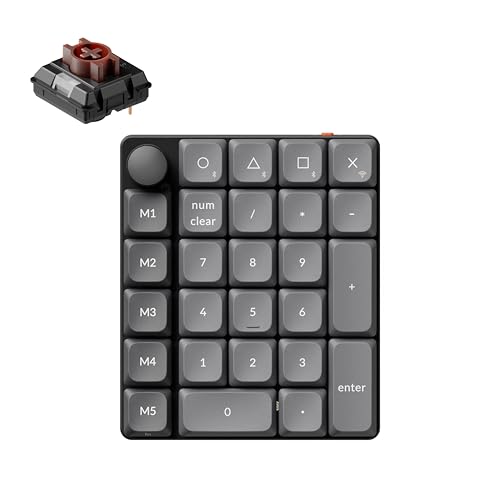
Keychron K0 Max Wireless Number Pad
The flexible route’s engine
- Standalone pad, Bluetooth/2.4 GHz
- Mechanical switches on quality models
- Rechargeable
- Placeable on either side
The standalone pad is the southpaw idea in its most practical modern form: a mechanical number pad with wireless freedom, stationed on the left for data hours and anywhere else — or nowhere — the rest of the time. Quality models bring real switches, hot-swap sockets and their own small firmware personalities, making the pad a miniature of the main board rather than a calculator’s cousin. Paired with the compact board below, it composes route two completely: TKL geometry for the mouse, left-side entry for the numbers, standard geography for guests, and a total price below the integrated flagship’s.
Buying notes are the pad category’s own: switch type should match or complement the main board’s (a jarring mismatch under the left hand slows the adaptation this guide budgets), wireless modes should cover your machines, and the pad’s footprint should be measured against the desk’s left territory, where mice and notebooks also make claims in left-mousers’ setups. Judged as the arrangement’s engine, it is the component that made southpaw a mainstream option rather than a speciality order.
Strengths
- Southpaw when wanted, standard when not
- Upgrades independently of the board
- Cheapest route to the arrangement
Trade-offs
- Two devices to charge and connect
- A seam in the setup’s unity
- Quality varies widely at the budget end
Best for: Route-two buyers and the adaptation-honest.
Not suited for: One-device purists.
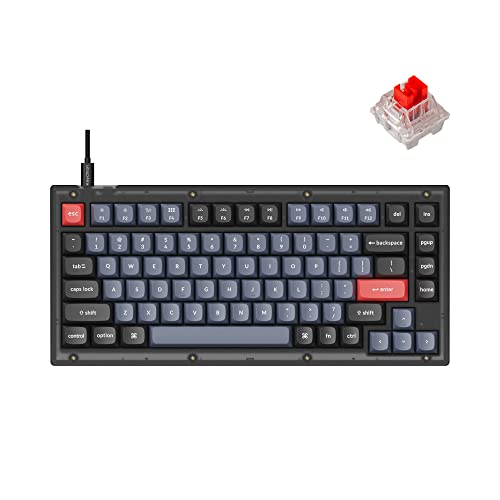
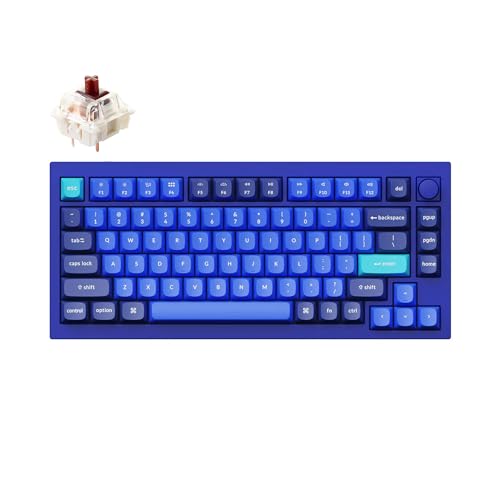
Keychron V1
The compact partner board
- 75 percent, hot-swap
- QMK/VIA firmware
- Complete F-row and arrows
- Entry price
Route two needs a main board whose right side is free for the mouse and whose own completeness needs no pad’s apology: the V1 is this guide’s standing nomination, a 75 percent board with the function row and arrows intact, open firmware for the shortcut geography discussed above, and an entry price that leaves budget for the pad beside it. The combination — V1 right, pad left — is the southpaw arrangement assembled from the market’s deepest shelves, with every component replaceable and the whole costing less than many single flagship boards.
Its role here also demonstrates the guide’s structural point: the southpaw outcome is a desk arrangement, not a product category, and it can be composed from mainstream parts. Owners who later commit to the integrated flagship lose nothing — the V1 becomes the travel board, the pad stays in service — which makes route two the low-regret on-ramp the decision method recommends starting from.
Strengths
- Completes route two at a fair total
- Open firmware for shortcut relief
- Nothing wasted if you later go integrated
Trade-offs
- Two-device desk
- Entry-tier case and sound
- Wired focus in the base model
Best for: Route-two composers and first southpaw trials at scale.
Not suited for: Buyers set on a single integrated object.
Acrylic Switch Tester
The trial instrument (route three’s cousin)
- Mounted switch samples
- Covers the main families
- Reference for pad and board matching
- Reusable across purchases
A tester earns its place in this guide through one specific job: matching the separate pad’s switch feel to the main board’s, so the left hand’s new territory does not feel like a foreign country. The adaptation the southpaw switch demands is geographical; it should not also be tactile, and ten minutes with a tester — comparing the pad candidates’ switches against your board’s — removes the second adaptation from the first’s budget. It is the same instrument the accessories guide keeps for switch shopping generally, moonlighting here as an adaptation smoother.
Beyond the matching job, it serves the trial route’s spirit: cheap knowledge before committed money. Owners who keep it find it consulted at every subsequent switch decision, which in a two-device southpaw setup arrives twice as often. Small tool, recurring dividend — the category this cluster’s guides keep recommending without embarrassment.
Strengths
- Matches pad feel to board feel
- Cheap insurance for the adaptation
- Serves every future switch decision
Trade-offs
- Feel in acrylic, not in the case
- One more drawer resident
- Samples age as switches launch
Best for: Route-two buyers composing a two-device desk.
Not suited for: Integrated-route buyers with matched everything.
The Adaptation, Priced Honestly
Left-hand number entry is a skill transfer, not a skill birth: the left hand already knows the pad’s geography in mirror, and touch-typists’ left hands are trained instruments — but the transfer is measured in weeks, and the first week’s entry speeds will embarrass anyone who budgets by hope. The realistic curve, from owner reports across the arrangement’s small literature: days one to five are deliberate and slow, with the right hand repeatedly emigrating toward a pad that is not there; weeks two to three bring working fluency for ordinary entry; the second month restores something like the old speed, with the workflow dividend (the mouse hand never commuting) visible from the first week even while raw entry lags. Data professionals should schedule the switch away from month-end, exactly as layout switchers schedule away from deadlines — the tuition is the same currency.
Two tactics ease the curve measurably. Keep the old geography impossible: no pad on the right, no falling back to the number row for volume entry, because alternation doubles the tuition as it does in every layout migration this cluster documents. And practise in drills rather than only in work — ten minutes of deliberate entry daily consolidates faster than a day of reluctant production typing, because the drill’s repetitions are the geography’s, unmixed with the work’s anxieties. The verdict date discipline applies too: judge the arrangement at six weeks, on the workflow’s total rhythm rather than on raw entry speed alone, since the dividend the arrangement pays is in the commute abolished, which speed tests do not measure.
Left-Handed Mousing and the Whole Desk’s Symmetry
A southpaw guide that ignored the mouse would be half a guide, because the pad’s migration is usually one move in a larger symmetry project. The left-handed mouser’s market is thinner than the right’s — true left-hand ergonomic mice are a handful of models, ambidextrous symmetrical mice (the lamzu atlantis pro keyboard article’s subject among them) are the practical mainstream — and the keyboard decisions interact: a left-mouser’s pad belongs on the right of the alphas by the standard arrangement’s logic (their mouse hand is the left, so the pad should serve the right hand’s entry)… unless their entry preference runs the other way, which is precisely why this guide refuses to prescribe by handedness label. The governing question is always the same: which hand enters, which hand mouses, and what does each hand’s station cost the workflow? Answer in those terms and the arrangement — standard, southpaw, or pad-free — selects itself.
The shortcut collision deserves the final word in this section because it is the left-mouser’s daily tax and the least discussed: the editing shortcuts live under the left hand, which for a left-mouser is the mouse hand, forcing either a hand swap per shortcut or a right-hand reach across. Layers that relocate the editing cluster to the right hand — a configurator afternoon, per the firmware guide — abolish the tax entirely, and for left-mousers this single remapping routinely outweighs every other item in this guide. Southpaw the pad if entry demands it; but layer the shortcuts regardless, because that is where the left-handed desk’s real friction lives.
The Left Hand’s Workload: An Honest Accounting
The main guide argues the southpaw case from desk geometry; this expansion argues it from workload, because the number pad’s migration changes more than the mouse’s address. Consider what the pad’s keys actually do across a data worker’s day: thousands of entries, each a small journey for the hand that performs them. On a standard board that journey belongs to the right hand — the same hand that must then travel to the mouse to confirm, correct or navigate, so the right hand commutes between two stations while the left hand’s shift ends early. The southpaw board reassigns the commute: the left hand takes the pad’s station permanently, the right hand keeps the mouse’s, and the day’s work parallelises between them in a way that its practitioners describe, consistently, as the layout’s real gift — not the mouse’s few centimetres but the division of labour itself. Accountants who have made the switch speak of it the way touch typists speak of their layout: as infrastructure, invisible and load-bearing.
The accounting has a second ledger: the mouse hand’s fatigue is the desk’s most rationed resource, because the mouse is the input device with no alternative station — the keyboard’s work can be shared, re-layered, remapped, but the pointer lives where it lives. Every duty that can be moved off the mouse hand extends that hand’s comfortable day, and the pad is the largest movable duty most desks have. This is a workload observation, offered in the register this site keeps for comfort topics, and it stops where it should: readers with pain belong in the ergonomic mechanical keyboards wrist pain guide’s professional territory. For the merely tired, the accounting stands: the southpaw layout is a load-balancing technology, and its adopters are engineers of their own days whether or not they use the word.
And the accounting explains the layout’s demographics better than the left-handed framing does: its citizens are disproportionately the pad professions — finance, data, logistics, the sciences’ bench workers — regardless of their handedness, because it was never really about which hand is dominant. It is about which hand is free. The guide’s title honours the popular name; its argument honours the actual mechanism, and the mechanism recruits from every handedness the census finds with a loaded right hand and an idle left.
The Learning Curve, Mapped Without Romance
The southpaw switch has a learning curve with a specific shape, and mapping it honestly serves the reader better than the enthusiasts’ ‘a weekend’ or the sceptics’ ‘never’. The pad’s migration is the easy half: number entry is a self-contained skill, practised in dense sessions, and the left hand’s pad fluency arrives in days for most switchers — the numbers were always a separate geography, and moving a geography is easier than redrawing one. The harder half is the nav cluster’s and modifiers’ small displacements on boards that rearrange more than the pad, and the mouse’s new intimacy with the board’s edge, which the shoulder learns in a week of small collisions. The curve’s total is best compared to the layout conversions elsewhere in this cluster: shallower than a Colemak switch by an order of magnitude, deeper than a size change by about the same — a fortnight to competence, a season to invisibility, with the first data-entry deadline of the season as the examination that should not be scheduled in week one.
The curve has a known accelerant: deliberate pad drills, ten minutes a day of pure number entry, which compress the pad’s half of the curve into the first week because the skill is narrow enough to drill completely. And it has a known trap: the hybrid desk, where the southpaw board at home and the standard board at the office keep both geographies half-installed, and the hands hesitate at both pads forever. The trap’s avoidance is the household counsel from the layout guides — standardise where the work is heaviest, and let the lighter station bear the conversion’s cost — or accept the hybrid tax knowingly as the price of two desks’ constraints. What does not work is expecting the hesitation to resolve while both geographies remain daily; the hands are faithful to frequency, and they will keep voting for whichever pad they used last.
And the curve’s far side has the converts’ consistent epilogue: the standard board becomes the strange one. The switcher, seated at a colleague’s full-size, reaches left for a pad that is not there and smiles — the layout has become the native geography, with all the belonging and all the exile that nativeness implies, in the small. Every deep preference in this cluster ends at that smile: the HHKB owner’s, the Dvorak typist’s, the southpaw’s. It is the sign that the conversion is complete and the infrastructure is laid, and it is worth the fortnight it costs, for the desks whose census called for it.
The Alternatives, Weighed Fairly: Separate Pads and Layers
A fair guide must weigh the southpaw board against its two rivals for the same job, because both are legitimate and one of them is often right. The separate pad — a standalone numpad, docked left, beside a tenkeyless or smaller board — offers the layout’s geography as a configuration rather than a commitment: the pad migrates for the data season and retreats for the writing season, docks on either side for either hand, and serves as the household’s shared pad for any board. Its costs are the seam (the hand crossing between two devices), the second connection to manage, and a combined price that can exceed the integrated board’s. For the worker whose pad use is seasonal or whose desk is shared, the separate pad is frequently the correct answer, and this guide says so without reluctance: it is the modular answer the size catalogue blesses, applied to the pad’s geography.
The layer answer — the pad on a programmable layer under the right or left hand, on a compact board — is the zero-hardware solution, and its honest grading is that it serves light pad use well and heavy pad use badly: a layer held or toggled for a column of figures is a convenience; a layer lived in for a data-entry day is a tax on every entry, paid in the layer key’s choreography. The census decides between the three answers with its usual authority: pad hours per week, seasonality, desk sharing. Heavy and constant: the integrated southpaw. Seasonal or shared: the separate pad. Occasional: the layer, and the money saved buys the switches. The guide’s picks stage the integrated answer because the keyword asks for it; this section exists so that the reader whose census names another answer leaves with it, served rather than converted.
And the three answers share a diagnostic that precedes all of them: confirm that the pad’s workload is real. A surprising population of southpaw-curious buyers discovers, on the tally sheet, that their pad use is a habit of reach rather than a volume of entry — the numbers typed on the pad out of geography’s loyalty, at volumes the number row would serve as fast. For that population the correct purchase is no purchase: the tenkeyless board they already want, the number row relearned in a week, and the mouse’s territory won by subtraction rather than by migration. The census, as ever, is the guide’s first product; the boards are its second.
Southpaw Beyond the Pad: Left-Side Design as a Philosophy
The pad’s migration is the southpaw idea’s most useful form, but the idea generalises into a small design philosophy that this section surveys, because its other forms serve other desks. Left-side navigation — the nav cluster mirrored to the board’s left — serves the worker whose right hand never leaves the mouse through long editing sessions, the left hand conducting the cursor’s geography in parallel. Left-side macro columns, the gaming and editing boards’ extra keys placed where the mouse hand is not, express the same division of labour. Even the humble left-handed mouse — the shaped mouse moulded for the left hand — belongs to the philosophy’s family, serving the desks that solve the territory problem by moving the mouse instead of the keys, a solution whose adherents cross hands with a fluency the rest of us find astonishing and whose existence proves the philosophy’s point: the desk’s geography should be assigned by the work, not inherited from a standard drawn for a right-handed century.
The philosophy’s limit is the ecosystem’s gravity, and it should be stated plainly: every left-side arrangement is a minority geography, stocked thinner, capped scarcer, and shared with fewer colleagues than the standard it mirrors. The keyboard sizes catalogue’s regional lesson applies in handedness’s dimension — the buyer of a minority geography prices the whole ecosystem, not the first board. Southpaw buyers accept this with the same open eyes as ISO’s and JIS’s citizens, and for the same reason: the geography fits their work, and fit, paid for knowingly, is the cluster’s definition of value. The philosophy does not need the majority’s permission; it needs its citizens to be counted, which the market, slowly, is doing.
And the philosophy has a quiet ambassador in every office: the left-handed colleague who has typed for decades on standard boards, moused right-handed by furniture’s decree, and never been offered the alternative. The southpaw board’s growing shelf is, among other things, that colleague’s first invitation. Guides like this one exist to extend it accurately — with the census, the curve and the costs attached — because an invitation with its terms stated is the only kind worth accepting, in keyboards as in everything else.
Gaming Southpaw: The Other Citizen
The southpaw board’s second population deserves its own section, because its reasons invert the first’s. The gaming left-hander — mouse in the left hand by nature — faces the standard desk’s mirror problem: the WASD cluster sits under the right hand’s territory while the mouse hand wants the desk’s left, and the standard board’s geography was drawn for the other population. The southpaw and mirrored arrangements, and the left-side pad’s extra bindings near the movement hand, serve this citizen directly; more commonly, the gaming left-hander’s answer is the compact board, whose symmetry-ish footprint lets the mouse live left and the keys centre, with bindings remapped to the right hand’s cluster — the IJKL school of movement, a small nation’s complete culture with its own forums and its own masters. The keyboard firmware QMK VIA guide‘s remapping is this nation’s founding technology, and its existence means the gaming southpaw’s board choice is freer than the data worker’s: any compact board can be naturalised, while the pad’s geography must be manufactured.
The two populations’ overlap is small but instructive: both are solving the standard geography’s assumption about which hand does what, and both find their answers at the market’s minority shelves. Their alliance is the southpaw category’s commercial future — the data worker’s volume and the gamer’s visibility together sustaining a shelf neither could stock alone. A buyer in either population should know the other exists, because the boards serve both and the reviews each population writes are the other’s evidence, read with the translation this section provides: the gamer’s ‘extra keys by the movement hand’ is the data worker’s ‘pad by the free hand’, one geography wearing two jobs’ clothes.
And the gaming citizen’s presence completes the guide’s argument about the name: ‘left-handed keyboards’ was always a small phrase for a large idea — that the keyboard’s geography is assignable, that the standard assignment is a historical default rather than a law, and that the hands’ owner, not the standard, should hold the pen. The data worker, the gamer, the left-handed colleague: three citizens of one idea, and the idea is the guide’s real subject. The boards are its current evidence. The census decides its relevance to your desk, as it decides everything here — but the idea, once seen, cannot be unseen, and every standard board you sit at afterwards will show you its assumptions, quietly, in the geography your hands already knew.
Buying Southpaw: Stock, Caps and Patience
The practical close: southpaw ownership’s logistics, stated once, completely. Stock is the first fact — the category’s boards are produced in smaller runs by fewer makers, and the model you choose may have a season’s wait in it; the prepared buyer decides the model and the switch in advance and buys in the availability window, the how to buy keyboard group buy guide‘s posture applied to a standing minority rather than a scheduled run. Keycaps are the second fact: a southpaw board’s caps are standard-profile, standard-stemmed — the pad’s relocation does not change the caps’ sizes, a mercy — but sets with pad legends in the right arrangement should be verified, since a set’s numpad kit assumes the standard geography’s numbers, which happily are the same numbers in the same grid, merely relocated with the board. The mercy is real: of all minority geographies, southpaw taxes the keycap shelf least.
Support and resale are the third fact, and they cut in opposite directions: the community is small and devoted, its knowledge concentrated and generous, while the resale market is thin — a southpaw board sells to a southpaw buyer, at the pace minorities dictate, and its price holds for the same reason its purchase may wait. Buy it as a keeper, then, with the keeper’s diligence: the switch chosen by tester, the model by the census, the board by the maker’s record. And keep the standard board it replaces, for the guests, the shared desk and the office’s hot desk days — the demoted board’s second career, which every conversion in this cluster ends up blessing.
And the logistics’ last fact is the pleasant one: southpaw owners report the category’s highest satisfaction in this guide’s reading of the community — not because the boards are better made, but because their buyers chose them from evidence, for a named workload, against an ecosystem’s friction. Deliberate purchases satisfy; that is the closest thing to a law this entire cluster has produced, and the southpaw shelf, which cannot be bought casually, is its purest demonstration. Run the census. If it names the left, buy the geography with both eyes open, and join the most satisfied minority in the keyboard world.
Trialling the Southpaw Arrangement Before Committing
The experiment ladder, from free to flagship, in the order this guide recommends climbing it.
- Run the free trial first: use your configurator or system tools to place a number layer under your left hand, or borrow any spare pad and station it left. Two weeks of real data work will teach your hands the arrangement’s premise at zero cost.
- Audit the workflow dividend during the trial, not just entry speed: count the mouse commutes abolished, notice the right shoulder’s new geography, and record whether the rhythm of data work changed in the ways the geometry promised.
- If the trial convinces, compose route two: the compact or TKL board you already own (or the V1 class) plus a standalone pad whose switches match your board’s feel, placed left with the desk measured for it.
- Give the composed arrangement its six-week verdict term, with drills in the first fortnight and no right-side fallback permitted. Judge at the date, on workflow rhythm and entry fluency together.
- Only then consider the integrated flagship, if the two-device seam genuinely irks and the catalogue’s single answer fits your size and standard. Buy it as the permanence it is, with the trial’s evidence as the brief.
Southpaw Mistakes in Both Directions
Buying the integrated board to cure a wrist problem.
The southpaw arrangement treats pad geography and mouse distance; it does not treat typing posture, and a wrist complaint routed to a pad migration is a diagnosis error with a price tag. Comfort cases belong to the ergonomics guide’s audit — heights, angles, split geometry — and the southpaw purchase should be made for entry and mouse reasons, in health, or not at all.
Assuming left-handed means pad-left, automatically.
Handedness labels do not decide stations; workflows do. Some left-handed users mouse right-handed and enter best with the standard arrangement; some right-handers are the southpaw’s perfect citizens. The trial exists because the answer is empirical and personal, and buying on the label — in either direction — skips the only step that knows.
Judging the adaptation in the first week.
Week one measures the tuition, and verdicts formed there condemn an arrangement whose dividend starts in week two and whose fluency lands in month two. The six-week term is not patience for its own sake; it is the interval the skill transfer actually takes, and abandoning at day five is the category’s most documented waste.
Forgetting the guests.
A southpaw desk in a shared or support-heavy environment taxes every other user, and the tax is paid in their errors at your machine. Integrated buyers in shared contexts should weigh route two’s diplomacy — the pad that leaves — as a first-class feature rather than an afterthought.
Matching nothing: pad switches from a different planet.
A two-device setup whose halves feel unrelated slows the adaptation and irritates daily. The tester in the picks exists for this: match the pad’s switch character to the board’s, and let the left hand learn one geography in one tactile language instead of two of each.
Buying southpaw to fix a mouse problem that a smaller board solves.
If the complaint is the mouse’s exile and the pad’s workload is light, the tenkeyless or 75 percent board wins the territory without moving a single key’s geography — the cheaper, shallower conversion. Southpaw is the answer to a workload, not to a footprint. Run the tally: pad hours first, territory second, and let the order of the evidence choose between subtraction and migration.
Frequently asked questions
Is a southpaw keyboard only for left-handed people?
No — its largest population is right-handed mouse users who want the number pad without the mouse-distance penalty. The arrangement serves anyone whose workflow divides labour as ‘one hand enters numbers, the other keeps the mouse’, regardless of which hands those are. Left-handed users are one constituency; data-working right-handers are the other, and by most accounts the bigger one.
How long does it take to get fast with a left-side pad?
Working fluency in two to three weeks of daily use, old-speed parity around the second month, with the workflow dividend (no mouse commuting) felt from the first week. Drills compress the curve; alternating with a right-side pad stretches it indefinitely. Schedule the switch away from your heaviest data deadlines, and judge at six weeks as this guide prescribes.
Can I just move my separate number pad to the left?
Yes — that is route two, the arrangement’s most popular modern form, and for most buyers the recommended one. Any standalone pad works on either side; wireless models make the placement cleanest. Pair it with a TKL or compact board so the right side stays clear for the mouse, match its switch feel to your board’s, and you have the southpaw desk without the speciality purchase.
Does the southpaw layout change the letters or shortcuts?
No — the alphas, function row and shortcut geography are untouched; only the pad’s address changes. Left-mousers with shortcut friction should look to layers for that separate problem, as this guide’s symmetry section explains. The southpaw claim is deliberately narrow: same keyboard, pad relocated, mouse restored to its natural station.
Are southpaw keyboards hard to find?
Integrated ones, yes — the category is a speciality, with the Q12 class as its flagship and a thin field behind it. The arrangement itself is easy to achieve via the separate-pad route, which is why the guide leads with flexibility. Buyers committed to the integrated form should expect a short catalogue, verify their layout standard carefully, and value the few makers who stock it.
Will a southpaw board confuse other people who use my computer?
Yes, mildly and predictably — guests reach for a pad that has moved, exactly as your own right hand did in week one. In solo and home offices this is a non-issue; in shared, training or support environments it is a real cost, and route two’s removable pad is the diplomatic answer. Your own adaptation, once complete, will make you bilingual in both geographies, which softens the problem from your side permanently.
Are southpaw keyboards only for left-handed people?
No — the majority of their owners are right-handed pad professionals whose left hand is the free one. The layout’s logic is workload division: the pad moves to the hand that is not mousing, which for a right-handed mouse user is the left. Left-handed mouse users are the second population, served by the same geography from the other direction. Handedness names the category in the shops; workload is what it actually sorts by, and the census in this guide measures workload.
Can I put the numpad on the left with a separate pad instead?
Yes, and for seasonal or shared pad use it is often the better answer: a standalone pad docks on either side of any board, migrates with the workload and retreats when the desk’s season changes. The integrated southpaw board wins when pad use is heavy and constant — no seam between devices, one connection, one object to keep. The guide’s alternatives section weighs the two fairly; the census’s pad-hours figure is the input that decides between them.
Will a southpaw keyboard help my shoulder or wrist?
It changes the desk’s geometry in a direction many mouse-heavy workers find more comfortable — the mouse closer to the body’s centre, the pad’s work moved to the other hand — and that is the extent of any responsible claim in a buying guide. Comfort is individual and multifactorial, and persistent pain is a matter for professional assessment, with this site’s ergonomic guide as the orientation. Treat the southpaw layout as a workload decision with a possible comfort dividend, and let any dividend that arrives be a bonus rather than the purchase’s promise.
Can I remap a normal keyboard into a southpaw?
The pad’s geography cannot be remapped into existence — the keys are physically on the right — but a programmable board can place a pad layer under the left hand’s home territory, which serves light entry honestly. It is the layer answer this guide weighs: free, immediate, and adequate below the workload threshold where the dedicated geography earns its shelf space. Try it for a month before buying anything; the experiment costs an evening and its verdict is the census’s own.
The southpaw arrangement is the keyboard world’s quiet proof that layout is a negotiation, not a fate: the pad’s address was a decision, made by typewriter-era inheritance, and it can be remade by anyone whose workflow argues otherwise. Its beneficiaries are defined not by which hand they favour but by how their work divides labour between entry and pointing — and for that division of labour, the pad’s migration is one of the few ergonomic changes that costs no features, asks only tuition, and pays its dividend in every data session for the life of the desk.
Trial it free, compose it flexibly, commit to it only on evidence, and give the adaptation its honest six weeks. The desk that results — alphas centred, mouse close, numbers under the hand that was free — will feel less like a speciality product and more like a correction the standard layout owed you all along. That is the southpaw’s whole argument, and for the right workflow, it is unanswerable.