Disclosure: As an Amazon Associate, kajuandouglas.com earns from qualifying purchases. Links on this page are affiliate links; they cost you nothing extra. Prices and availability change often, so check the current Amazon listing before you buy.
A fair logitech g series keyboards model comparison has to start by admitting that Logitech sells overlapping boards on purpose: a wireless esports tenkeyless, a low-profile wireless tenkeyless, a wired tournament board from an earlier generation, and two deliberately simple wired models that skip almost every gaming extra. The names blur together in a shopping tab, yet the keyboards suit very different desks. This comparison separates them by connection, switch behaviour, size and intended player, so the differences become decisions instead of marketing fog.
Six verified models anchor the discussion. At the top sit the G PRO X TKL Lightspeed and the two G515 Lightspeed TKL variants, one tactile in white and one linear in black. Below them, the original wired G PRO covers players who want a detachable cable and a proven tournament shape, while the G413 SE and G413 TKL SE strip the formula down to backlit wired essentials in full-size and tenkeyless shells. Every linked board below was matched against verified listing data before it earned a link.
Read the comparison in the order your desk demands. Connection comes first, because a cable you resent will annoy you longer than any switch. Size comes second, because mouse room changes aim more than backlighting does. Switch feel comes third, and only then should colour, lighting software and price tier enter the conversation. Readers who are still choosing a layout size in general can ground themselves with the keyboard size guide before returning here.
Key takeaways: Logitech G splits into three honest families: Lightspeed wireless boards for players who compete or hate cables, the wired G PRO for tournament simplicity, and the G413 SE pair for buyers who want mechanical keys and backlighting without software suites or wireless premiums. Pick the family first and the exact model usually chooses itself.
Logitech G Series Keyboards Model Comparison: The Range on One Page
Logitech organises its gaming keyboards less by generation than by promise. The PRO name promises equipment shaped with competitive players in mind: compact footprints, fast and dependable input, restrained styling that travels well. The numbered G500-series names promise modern convenience, in this case low-profile keys and wireless in a slim board. The G413 name promises the opposite of novelty: a brushed aluminium top plate, white backlighting, tactile switches and a fixed cable, sold as a tool rather than a toy.
That naming logic explains why a spec-sheet race misleads. The G413 SE is not a failed PRO board; it deliberately omits hot-swappable switches, per-key RGB and wireless so its cost can go into the metal plate and the switches themselves. The G515 is not a cheaper PRO X either; its low-profile switches change the entire typing posture, shortening travel and flattening the board so wrists rest lower. Comparing them as rivals misses that they answer different questions.
One more axis matters before any model detail: who services the board over its life. The PRO X TKL uses standard-style mechanical switches in a board built for years of play, the G515 commits you to its low-profile switch ecosystem, and the G413 SE models ask almost nothing of you beyond cleaning. Owners who enjoy swapping switches and keycaps should weigh that hobby cost honestly, because a board that fights modification will frustrate an enthusiast even when it types beautifully on day one.
In this guide
Connection and Latency: Lightspeed, Wired, and What Actually Feels Different
Lightspeed is Logitech’s proprietary 2.4 GHz wireless link, and on the PRO X TKL and G515 models it is the connection competitive players actually use, with Bluetooth kept for a laptop or tablet and a cable for charging or a wired fallback. In practice the wireless link is not the weak point in the chain; a congested desk, a receiver buried behind a metal PC case, or a dying battery causes more stutters than the protocol itself. Place the receiver on the included extension near the board and the connection behaves like a cable you cannot trip over.
Wired boards remove that whole category of worry. The original G PRO even makes its cable detachable, which matters more than it sounds: the cable is the part that frays, snags and fails first, and replacing a cable beats replacing a keyboard. The G413 SE pair use fixed cables, a quiet cost decision that suits a board expected to live on one desk. If your setup moves between a home desk, an office and a LAN bag, detachable or wireless stops being a luxury and becomes the feature that decides whether the board survives the lifestyle.
Battery behaviour separates the two wireless models in daily life. A tenkeyless board used with full lighting drains far faster than the same board with lighting dimmed, and both wireless models reward owners who treat brightness as a setting rather than a default. Players who forget charging cables exist should prefer the wired G PRO or a G413 SE; players who charge a mouse and headset already will fold a keyboard into that routine without thinking. The honest question is not which connection is fastest on paper, but which failure mode you personally tolerate.
Size and Desk Geometry: Full-Size, Tenkeyless and Low-Profile
Only one board in this comparison keeps a number pad: the G413 SE full-size. Accountants, sim pilots who bind pad keys, and spreadsheet-heavy workers should not let gaming fashion talk them out of it. Everyone else gains real mouse room by dropping to tenkeyless, and the gain is largest for low-sensitivity shooter players whose mouse sweeps would otherwise end at the keyboard’s edge. The four tenkeyless models here differ in height and key profile far more than in width, so posture, not footprint, is the true separator among them.
Low-profile design is the G515’s whole argument. Its keys sit lower, its switches travel less, and the board can be typed on comfortably without a wrist rest for many people. That posture suits mixed work-and-play desks, laptop-style typists, and anyone whose wrists ache on tall boards. It suits tinkerers less, because low-profile switches and caps follow their own ecosystem. The taller PRO boards feel more traditional, with deeper travel and a more pronounced keystroke that many mechanical loyalists still prefer for long writing sessions.
Weight tells a travel story the spec table hides. The PRO line was shaped for players who carry their board to events, and the original G PRO’s compact shell and detachable cable make it the easiest of the six to throw in a bag. The G413 SE full-size is a stay-at-home board by temperament as much as by cable. Before choosing, measure your desk, your mouse pad and your bag; the right keyboard is the one whose dimensions fit all three, and no switch technology rescues a board that physically crowds your aim. For a broader grounding in formats, the 75 percent keyboard layout guide explains what smaller layouts trade away.
The Six Models, Reviewed One by One
Each review below follows the same discipline: what the board is, who it serves, where it compromises. Variant listings count as separate models only where the switch or colour genuinely changes the buying decision, which is why the two G515 listings appear individually while their shared design is discussed once, in depth, at the first of them.

Logitech G PRO X TKL Lightspeed: The Wireless Tournament Board
Flagship pick — wireless tenkeyless for competitive play
At a glance: Tenkeyless layout, Lightspeed wireless with Bluetooth and wired fallback, tactile switches in this listing, LIGHTSYNC RGB, double-shot PBT keycaps, carry-friendly compact shell.
The PRO X TKL Lightspeed is the board Logitech aims at players who compete, stream, or simply refuse to manage a cable across the desk. The tactile switch variant listed here gives a noticeable bump on each press, which many players like for deliberate ability keys and typists like for rhythm. PBT keycaps matter at this tier: they resist the shine that makes older boards look tired, and their texture stays grippy through long sessions.
Its compromises are the compromises of its class. There is no number pad, no dedicated media cluster beyond shared keys, and the wireless flagship tier asks a premium over every wired board in this comparison. Battery care becomes part of ownership. Buyers who play one game at one desk and never move the board are paying for travel virtues they will never use, and the wired G PRO further down this page may serve them better for far less commitment.
Strengths
- Lightspeed wireless that competitive players trust daily
- PBT keycaps that resist shine and wear
- Compact shell that frees genuine mouse room
Trade-offs
- Premium tier within the G range
- Tactile bump will not suit linear loyalists
- No number pad for data-heavy work
Best for: competitive players and streamers who want one wireless board for desk and travel. / Not suited for: number-pad dependents or buyers who never intend to use wireless.

Logitech G515 Lightspeed TKL (White, Tactile): The Low-Profile Wireless Option
Low-profile pick — slim wireless for mixed work and play
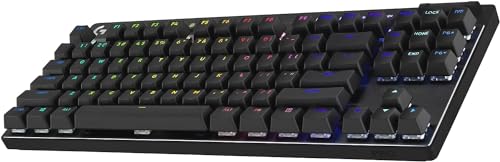
At a glance: Tenkeyless low-profile layout, Lightspeed wireless, tactile low-profile mechanical switches, double-shot PBT keycaps, thin chassis in white, LIGHTSYNC RGB.
The G515 rethinks the G formula around height. Everything sits lower: the case, the switches, the caps. Typing on it feels closer to a good laptop keyboard that grew mechanical confidence, with a short, snappy stroke and a tactile bump scaled to the reduced travel. For desks that split the day between documents and games, that posture is a genuine ergonomic argument, and the white finish suits lighter setups that black gaming boards visually dominate.
The trade is ecosystem. Low-profile switches and caps are their own world, so the vast standard keycap market mostly passes this board by, and owners who love deep travel will find the stroke abrupt. It is also a considered purchase rather than an impulse one. Choose it because you want low-profile specifically, not because it happens to be wireless; the PRO X above is the safer default for a purely gaming desk.
Strengths
- Slim posture that many wrists prefer
- Wireless freedom in a work-friendly design
- PBT caps unusual at this profile height
Trade-offs
- Low-profile parts limit keycap swapping
- Short travel divides mechanical purists
- White finish shows desk grime sooner
Best for: mixed work-and-play desks that want wireless and a lower typing posture. / Not suited for: keycap collectors or players who love long, deep keystrokes.

Logitech G515 Lightspeed TKL (Black, Linear): The Smooth-Stroke Variant
Variant pick — same slim board, linear switches, black finish
At a glance: Tenkeyless low-profile layout, Lightspeed wireless, linear low-profile mechanical switches, double-shot PBT keycaps, thin chassis in black, LIGHTSYNC RGB.
This listing is the G515’s other personality: linear switches in a black shell. Linear travel suits rapid repeated presses, quiet shared rooms and players who bottom out keys in shooters without wanting a bump interrupting the stroke. Side by side with the tactile white version, the difference is entirely in the finger: no bump, a smoother descent, and a slightly greater risk of accidental presses while resting your hands, which lighter typists notice in the first week.
Treat the choice between the two G515 listings as a switch decision, not a model decision, and let colour follow the switch rather than the reverse. Players who write for a living usually land tactile; players who game first usually land linear. If you are genuinely unsure, tactile is the more forgiving teacher, because the bump tells your fingers a press registered before the key reaches the bottom of its short travel.
Strengths
- Smooth linear stroke for rapid play
- Black finish hides wear gracefully
- Same slim wireless platform as its sibling
Trade-offs
- Easy to trigger accidental presses early on
- Shares the low-profile parts ecosystem limits
- No tactile feedback for touch typists
Best for: shooter players who want low-profile comfort with a smooth, fast stroke. / Not suited for: writers who rely on a tactile bump to type accurately.

Logitech G PRO (Wired, Clicky): The Original Tournament Board
Wired classic — detachable cable, proven shape
At a glance: Tenkeyless layout, wired connection with detachable micro USB cable, clicky switches in this listing, LIGHTSYNC backlit keys, ultra-portable tournament shell.
The original G PRO earned its reputation the slow way, on tournament desks, and its virtues are unfashionable ones: a cable that detaches for travel and replacement, a compact shell with no wasted border, and backlighting that serves visibility before spectacle. The clicky variant listed here adds an audible snap to each press. That sound is feedback some players adore and every nearby human being will hear, so household diplomacy is a real specification for this model.
Age shows in the details rather than the typing. The connector is micro USB rather than the newer standard, there is no wireless at any price, and the feature list stops where newer boards keep going. None of that stops it being the rational buy for a wired desk: it does the competitive essentials properly, travels well, and asks for no charging routine, no receiver management and no battery anxiety during a long session.
Strengths
- Detachable cable extends working life
- Tournament-proven compact shape
- Zero battery or receiver management
Trade-offs
- Clicky switches are loud for shared spaces
- Older micro USB connector standard
- Wired only, with no wireless option
Best for: wired-desk competitors and travellers who value a replaceable cable. / Not suited for: open-plan offices, shared bedrooms, or wireless devotees.

Logitech G413 SE: Full-Size Simplicity in Brushed Aluminium
Full-size pick — number pad, metal plate, no software fuss
At a glance: Full-size layout with number pad, wired connection, tactile mechanical switches, black aluminium top plate, white backlighting, anti-ghosting for gaming use.
The G413 SE is the board for buyers who looked at gaming keyboards, disliked the theatre, and still wanted mechanical keys. The aluminium top plate gives it a planted, businesslike feel, the backlight is a single practical white, and the tactile switches suit typing as much as play. The number pad stays, which settles the question for anyone whose work runs through spreadsheets, accounting tools or simulation bindings.
Simplicity is both the pitch and the ceiling. The cable is fixed, the lighting does not do colour, and the board offers little to customise beyond using it. Gamers chasing per-key effects or macro layers should look at the PRO models instead. But as a durable, good-feeling keyboard that happens to game well, rather than a gaming keyboard that tolerates typing, the G413 SE occupies its niche with unusual honesty.
Strengths
- Number pad kept for real work
- Aluminium plate feels solid and planted
- Tactile switches suit typing and play
Trade-offs
- Fixed cable cannot be replaced alone
- White-only backlighting, no colour effects
- Large footprint crowds smaller desks
Best for: number-heavy workers and gamers who want one straightforward board. / Not suited for: small desks or buyers who want lighting customisation.
Logitech G413 TKL SE: The Same Idea, Tenkeyless
Compact value pick — SE essentials without the pad
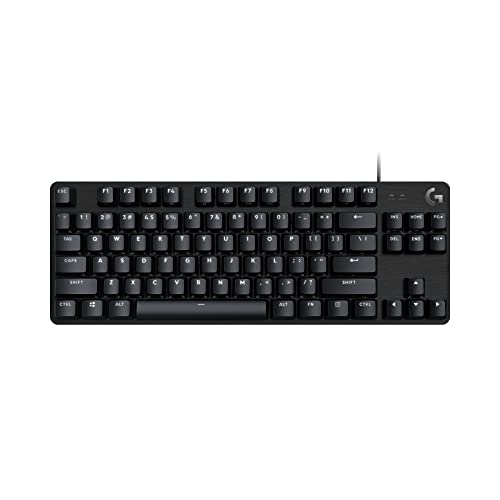
At a glance: Tenkeyless layout, wired connection, tactile mechanical switches, black aluminium top plate, white backlighting, anti-ghosting, Windows and macOS compatibility.
Everything the full-size G413 SE believes, this board believes in a smaller shell. The pad goes, the mouse room arrives, and the aluminium plate, tactile switches and white backlight stay. It is arguably the most balanced desk upgrade in this whole comparison for a first mechanical keyboard: no software suite to learn, no battery to manage, no lighting programme to configure, just a solid board that makes a laptop keyboard feel broken by comparison.
Its limits mirror its sibling’s. The fixed cable and single-colour lighting are deliberate economies, and players who later fall for the customisation hobby will outgrow it faster than a PRO board. Judge it as a finished appliance rather than a platform. For a study desk, a first gaming setup or a work computer that also plays, that appliance framing is exactly right, and the tenkeyless shape keeps the desk honest.
Strengths
- Tenkeyless footprint frees mouse space
- Same metal-plate solidity as the full-size
- No software or battery overhead at all
Trade-offs
- Fixed cable, like its larger sibling
- Lighting limited to white only
- Little room to grow into modding
Best for: first-time mechanical buyers and tidy gaming desks on a sensible budget tier. / Not suited for: enthusiasts planning switch and keycap experiments.
Side by Side: Where the Six Models Really Differ
| Model | Connection | Size and profile | Switch in listing | Best audience |
|---|---|---|---|---|
| G PRO X TKL Lightspeed | Lightspeed wireless | Tenkeyless, standard height | Tactile | Competitive wireless players |
| G515 Lightspeed TKL | Lightspeed wireless | Tenkeyless, low profile | Tactile (white) | Mixed work and play desks |
| G515 Lightspeed TKL | Lightspeed wireless | Tenkeyless, low profile | Linear (black) | Low-profile shooter players |
| G PRO | Wired, detachable cable | Tenkeyless, standard height | Clicky | Wired tournament traditionalists |
| G413 SE | Wired, fixed cable | Full-size, standard height | Tactile | Number-pad workers who game |
| G413 TKL SE | Wired, fixed cable | Tenkeyless, standard height | Tactile | Simple, solid first boards |
The table compresses the comparison to its skeleton, and the skeleton says something useful: Logitech is really selling three decisions wearing six badges. The first decision is wireless or wired. The second is standard height or low profile. The third is whether a number pad earns its desk space. Switch flavour matters, but it is a refinement applied after those three structural choices, and buyers who reverse the order usually end up returning a good keyboard for structural reasons while blaming the switches.
How to Choose Within the G Range: A Buying Guide
Start with your week, not your wishlist. Count how often the keyboard would move, how many devices it must serve, and how much of your day is typing versus play. A board that serves a work laptop by day and a gaming PC by night argues for the G515’s wireless and low posture or the PRO X’s wireless and standard keys. A board bolted to one gaming desk argues for wired value. This unglamorous audit predicts satisfaction better than any feature list, because keyboards are furniture you touch for hours.
Next, be honest about noise. Clicky switches in a shared flat are a relationship decision. Tactile switches are the diplomatic middle: feedback for your fingers, modest sound for the room. Linear switches are the quietest of the three families here and the favourite of fast-paced players, at the cost of accidental presses while you learn them. If other people sleep, study or take calls near your desk, let that fact rank alongside latency in your decision, because you will hear the keyboard far more often than you will measure its response time.
Then consider the software question. Logitech’s hub software unlocks lighting profiles, macros and per-game settings on the boards that support them, and some players build real workflows inside it. Others resent any background application at all. The G413 SE pair are the refuge for the second group: they light up, they type, they game, and they ask nothing. Decide which group you are in before paying for features whose control panel you will open twice and resent weekly.
Finally, think in years. PBT keycaps age gracefully, detachable cables fail replaceably, and aluminium plates shrug off desk knocks. The cheapest board that meets your structural needs is rarely the cheapest ownership if it needs replacing when a cable frays or caps shine smooth. Readers comparing Logitech against the wider field should also read corsair vs razer vs logitech gaming keyboards compared for the cross-brand picture before committing.
Setting Up a G Board Properly: A Short How-To
Step one is placement. Centre the letter cluster, not the whole board, in front of your chair; tenkeyless and full-size boards both tempt owners to centre the entire shell, which pushes the mouse shoulder wide. Step two is the receiver: on wireless models, use the extension cable so the dongle sits on the desk near the board rather than behind a metal tower, and interference complaints mostly evaporate. Step three is height: set chair and desk so forearms rest roughly level, adding a wrist rest only if you actually rest on it between bursts rather than planting wrists while typing.
Step four is lighting discipline. Set brightness for the room you actually play in, because full brightness costs battery and adds glare in dark rooms. Step five is firmware and software hygiene: install updates from the official source, then close or trim background features you do not use. Step six is a cleaning rhythm: shake out debris weekly, pull keycaps for a proper clean a few times a year with a puller rather than fingernails, and keep drinks at a distance that respects how much you paid. None of this is glamorous, and all of it is the difference between a board that feels new in year three and one that feels tired in month nine.
Mistakes Buyers Make Inside This Range
The commonest mistake is buying the flagship for a wired life: paying the wireless premium, then leaving the cable plugged in forever because charging feels like chores. The second is choosing clicky switches from a video’s sound test, recorded through a microphone that flatters them, and discovering the real sound across a quiet room. The third is treating low-profile as a minor variant rather than a different posture; the G515 will not feel like a shorter PRO X, and expecting it to guarantees disappointment in one direction or the other.
A subtler mistake is ignoring the second computer. Many desks now hold a work laptop beside a gaming PC, and a board that cannot hop between them gracefully becomes the friction point of every evening. If that is your desk, wireless with multiple connection modes is not a luxury line item. Conversely, single-desk buyers sometimes pay for multi-device features and then spend ownership annoyed by a mode switch they brush accidentally. Match the connection story to the desk you have, not the desk in an advertisement.
Deep Dive: Living With a G Board for a Year
A year of ownership teaches lessons no unboxing covers. Wireless boards develop a charging rhythm that either fits your life or grates weekly, and the owners who thrive are the ones who charge during a fixed ritual, such as a Sunday desk reset, rather than waiting for the low-battery warning mid-match. Wired owners trade that ritual for cable management, and the detachable cable on the original G PRO quietly becomes the most appreciated feature on the board after the first frayed-cable scare is avoided by simply unplugging for travel.
Keycap wear separates the range slowly. The PBT caps on the PRO X and G515 models keep their texture and legends crisp long after cheaper caps would shine, which matters because shine is not cosmetic only: a polished cap is a slippery cap, and slippery caps change aim in small, annoying ways. The G413 SE boards aim at a different longevity, structural rather than surface-level, where the aluminium plate and simple electronics promise a board that still works, unchanged, when fancier boards have been through two software generations.
Software is the other slow variable. Lighting profiles, macros and firmware all live in an application that will be updated, redesigned and occasionally broken across the board’s life. Owners of the simpler SE models are insulated from that churn entirely, which some buyers only learn to value after a favourite profile vanishes in a redesign. If you build elaborate per-game lighting and macro setups, the PRO ecosystem rewards you; if you set a colour once and never return, buy the board whose hardware makes that indifference painless.
Resale and hand-me-down value follow the same logic. Tournament-shaped tenkeyless boards hold their appeal because competitive fashion changes slowly, while themed or highly specialised boards date faster. A PRO board bought today is an easy gift to a younger player in three years, still relevant and still supported. That horizon rarely appears in buying decisions, yet for households where gear cascades between siblings and desks, it is a real part of what the premium buys.
Finally, remember that a keyboard is one third of an input system. The best G board cannot rescue a mouse that does not fit your hand or a monitor height that wrecks your posture. Budget and attention spent balancing the whole desk outperform the same resources spent climbing one product line. The comparison above is about finding the G board that fits your system, and the system, honestly assessed, should always outrank the badge.
Travel deserves its own paragraph because the PRO name promises it. A tenkeyless board in a padded sleeve, a detachable or absent cable, and a receiver that lives in the board’s storage or the laptop bag: that is the whole system. The G413 SE models should stay home, not because they are fragile but because their size and fixed cables make them clumsy travellers. Players who attend local events monthly will feel this difference twelve times a year, which converts a minor specification into a major one.
Final Recommendation
For most competitive players, the G PRO X TKL Lightspeed is the range’s centre of gravity: wireless done properly, PBT caps, a travel-ready shell. For mixed desks, the G515 in your preferred switch is the more thoughtful buy. For wired purists the original G PRO still makes its case, and for everyone who wants mechanical typing without gaming theatre, the G413 SE pair are the quiet heroes. Choose the family honestly and the G range rewards you; choose by badge and it will happily sell you the wrong board at three different prices.
Switch Feel, Explained Through These Six Boards
Tactile, linear and clicky stop being abstract once they are attached to these specific models. The tactile switches in the PRO X TKL and the G413 SE pair deliver their bump early in the stroke, so your finger knows the press counted before the key bottoms out; that suits deliberate inputs and touch typing alike. On the low-profile G515, the same idea is compressed into a shorter stroke, and the bump feels snappier and more abrupt, which is why some typists adore it and others describe it as busy.
Linear switches, fitted to the black G515 in this comparison, remove the bump entirely. The press is one smooth descent, which fast players prefer for repeated strafing keys and rapid double-taps, because nothing interrupts the return and repeat. The cost appears at rest: fingers sitting lightly on home keys can register unintended presses until your hands learn the board’s sensitivity. That learning curve is days, not weeks, but buyers should expect it rather than mistaking it for a defect.
Clicky switches, in the wired G PRO listing here, add a deliberate sound mechanism to the tactile bump. The feedback is the best of the three families and the noise is the worst, and both facts are the same fact. In a private room with a door, clicky is a joy that makes typing feel mechanical in the oldest, most satisfying sense. Through a wall, on a call, or beside a sleeping partner, it becomes the board everyone else in the home has an opinion about.
Software, Lighting and the G Hub Question
Logitech’s software is where the PRO and G515 boards keep their second feature list: per-key lighting, macro recording, game-specific profiles that load automatically, and actuation-adjacent settings where supported. Used well, it turns one keyboard into several, with a quiet work profile and a loud game profile living side by side. Used badly, it becomes another launcher demanding updates. The honest middle path is to configure two or three profiles you genuinely need, export or note them, and then ignore the software for months at a time.
The G413 SE boards sit outside that world almost entirely, and their owners should understand this as a designed virtue. White backlighting with brightness control is the whole lighting story. There is nothing to sync, nothing to break in an update, and nothing to reinstall when a computer is replaced. For a work desk, a family computer or a second machine, that independence is worth real money, and it is why the SE models keep being recommended to people who bounced off gaming software before.
Lighting itself deserves a sober paragraph. Per-key RGB helps in exactly two situations: learning a new game’s bindings, where colour-coding groups of keys teaches your hands faster, and dark-room visibility, where a dim glow beats a bright one. Everywhere else it is decoration, which is fine, provided decoration is not the reason a structurally wrong board won. Decide size, connection and switch first, as this comparison keeps insisting, and let lighting be the tiebreaker it deserves to be.
Which G Board for Which Kind of Play
Fast-paced shooters reward the tenkeyless boards and punish the full-size one, simply through mouse geometry: a low-sensitivity player needs sweep room the G413 SE cannot offer on a normal desk. Between the wireless PRO X and the wired PRO, the difference is ritual rather than results for most players, and the G515’s low profile enters the conversation for players whose wrists prefer the flatter posture during long sessions. Game genre rarely demands a specific board; desk geometry and posture demand it constantly.
Strategy, simulation and MMO players live differently. Extra keys are bindings, number pads become control groups and flight controls, and the full-size G413 SE stops looking old-fashioned and starts looking purpose-built. These genres also forgive size because the mouse moves less frantically. A hybrid player who splits evenings between a shooter and a strategy title should weight the shooter when choosing size, because mouse room cannot be improvised, while pad bindings usually can be remapped to a layer.
Creative and streaming desks add a third pattern: the keyboard shares space with a microphone arm, a control deck and a second screen’s worth of notes. Compact tenkeyless boards earn their keep by leaving room for that equipment, and wireless earns its keep by letting the board move when the desk reconfigures for recording. This is the desk the PRO X TKL was born for, and buyers building a streaming setup should read its premium as desk-space money rather than gaming money.
Durability, Cleaning and the Three-Year Test
Keyboards fail in boring ways: a cable frays, a stabiliser starts to rattle, a spacebar shines smooth, a switch goes scratchy. The G range’s better models defend against the boring failures in order. Detachable cables and PBT caps cover the first and third, solid plates cover the feel of the second, and reputable switches cover the fourth as well as any brand can. What no model survives is neglect: crumbs, dust and spilled drinks do more cumulative damage than any tournament.
Cleaning technique matters more than cleaning products. A keycap puller, a soft brush, compressed air used sparingly and a slightly damp cloth for caps will maintain any board in this comparison. The low-profile G515 needs gentler handling around its caps, and every board should be unplugged or switched off before caps come off, because a keyboard interprets cleaning as enthusiastic typing. Ten minutes a month is the entire maintenance budget of a well-kept G board, which makes skipping it difficult to excuse.
Stabilisers deserve one specific mention, because the spacebar and other large keys are where cheaper boards announce themselves. A board that rattles on the spacebar will irritate its owner thousands of times a day. The models in this comparison are consistently respectable here, with the PRO line ahead, and buyers comparing in a shop should press the spacebar and shift keys first. It is the fastest honest test of build care available without opening the case.
Ownership Notes, Model by Model
Living with the PRO X TKL means living wirelessly with intent: a receiver placed well, a charging habit, and a board that disappears under your hands. Owners consistently describe the same arc, where the first week is about features and the fiftieth week is about never thinking about the keyboard at all. That disappearance is the actual flagship product, and it is why the board justifies itself to players who stopped reading spec sheets years ago.
Living with the G515, in either switch flavour, means committing to its posture. Owners who came from laptops settle instantly; owners who came from tall custom boards take longer and occasionally never convert. The board rewards the converted with a desk that feels calmer and more modern, and wrists that end long days less tired. The white tactile version additionally demands a cleaning habit, because light finishes publish every crumb, while the black linear version hides a multitude of desk sins.
Living with the wired G PRO is living with a tool that predates current fashion and ignores it. The clicky switches will define your household’s soundscape, the detachable cable will quietly save you once, and the absence of wireless will be felt only when you try to use the board from a sofa it was never meant to visit. Owners tend to keep these boards for years as second-desk fixtures even after upgrading a main setup, which is its own verdict.
Living with the G413 SE pair is the simplest story in this comparison: you place the board, you type, and the board declines to become a hobby. The full-size serves households and offices where the number pad is infrastructure, and the tenkeyless serves the same temperament on a smaller desk. Their owners rarely post photographs of their keyboards, which in this hobby is close to a compliment: the equipment has become invisible through reliability.
Value Tiers Without Price Tags
Because prices move constantly, judge this range by tiers rather than numbers. The SE boards occupy the sensible tier, where money buys structure and switches. The wired PRO sits a step above, buying tournament shape and a detachable cable. The wireless boards occupy the premium tier, buying connection freedom and, in the G515’s case, a distinct posture. Moving up a tier should always answer a named need; moving up for a badge is how good budgets die.
The second-hand and hand-me-down market adds a footnote: Logitech’s popularity means cables, receivers and keycap sets are easy to source years later, and a used G board is a safer gamble than a used exotic. Buyers on a tight budget can reasonably shop the previous owner market for the wired models especially, checking switch feel and spacebar condition in person where possible. Longevity is a feature, and this range’s installed base quietly proves it.
Ergonomics: Wrists, Height and the Low-Profile Question
Wrist comfort on these boards is decided less by accessories than by the height of the front edge and the angle of the board. Standard-height models like the PRO boards and the G413 SE pair present a taller face, and many typists do best with the feet folded flat rather than raised, because raising the rear tilts the keys away and bends the wrists upward. A palm rest helps when it supports the palms during pauses; it harms when it becomes a ledge your wrists lean on while reaching for the top row.
The G515 changes that geometry by simply being lower. Its owners often find they can skip the palm rest entirely, because the hands float less and the forearms stay closer to level with an ordinary desk. That is a posture argument, not a medical promise: anyone with persistent pain should treat equipment changes as experiments and seek proper advice. But as an experiment, board height is the cheapest variable in the whole ergonomic puzzle, and this comparison conveniently contains both settings of it.
Chair and desk height still dominate everything the keyboard does. Elbows near a right angle, feet supported, screen at a height that keeps the neck neutral: with those set, the difference between a good board and a great board becomes feel rather than health. Buyers sometimes purchase a flagship keyboard to fix a posture problem owned by a forty-dollar chair. Set the furniture first, then let this comparison choose the board that suits the corrected desk.
Sound in Real Rooms
Keyboard sound is a product of switch, case, desk and room acting together, which is why the same board sounds different in every video. A hollow desk amplifies, a desk mat absorbs, and a small room with hard walls returns every click to its maker. The models here span the realistic range: the clicky G PRO announces itself, the tactile boards converse politely, the linear G515 murmurs, and the SE boards keep their voices down without trying to be silent products.
If sound matters to your household, manage it with environment before hardware. A desk mat under any of these boards removes a surprising share of the perceived noise, and keeping feet flat rather than raised settles case resonance. Owners chasing true quiet for a bedroom desk should accept that none of these gaming boards is a silent product by design, and should weight the linear and tactile options accordingly rather than expecting accessories to perform a transformation.
Microphone users have a sharper version of the same problem, because a microphone hears the keyboard from inches away and broadcasts it. Streamers and remote workers on calls should prefer the tactile or linear models here, position the microphone close to the mouth and far from the desk, and test a recording before assuming the setup works. The clicky G PRO can absolutely be streamed with, but it becomes a personality feature of the stream, whether intended or not.
Buying Used, Buying Twice and Avoiding Returns
Most returns inside this range are not defects; they are mismatches discovered too late, and they follow the patterns this comparison has mapped: a clicky board in a quiet home, a low-profile board bought by a deep-travel loyalist, a full-size board on a small desk, a wireless flagship left cabled forever. Each is avoidable in the shop or the first evening by testing the structural variables honestly, which is why the article keeps returning to size, connection and posture before switches and lighting.
Buyers who can, should type one full paragraph and play one familiar game scene on a candidate before judging it. Novelty flatters every new board for an hour; familiarity exposes it. If a shop visit is impossible, order from a seller with a sane returns policy and make the decision within the first week, while the mismatch is obvious and the packaging is intact. Indecision is the expensive outcome, because a board kept past its return window becomes a board resented at full price.
And if you do land on the wrong model, the G range forgives mistakes better than most: the boards are popular, parts and receivers are findable, and a nearly-new PRO or SE model finds a second home easily within a family or a local marketplace. That liquidity is a hidden part of the brand’s value. It should not encourage carelessness, but it does mean a considered gamble between two finalists, such as the two G515 switch variants, is a low-stakes way to learn your own preference.
Related Guides Worth Your Time
- the mechanical keyboard glossary
- the mechanical keyboards ultimate guide
- optical vs mechanical keyboards
- how to choose a first board
- keyboard polling rate explained
Logitech G Series Keyboards Model Comparison: Frequently Asked Questions
Is Lightspeed wireless fast enough for competitive play?
For the overwhelming majority of players, yes: the wireless link on the PRO X TKL and G515 is built for competitive use, and receiver placement matters more than the protocol. Put the dongle on its extension near the board, keep the battery charged, and the connection stops being a variable you think about. Players at the very top of a ladder may still prefer wired for ritual and certainty, which is a legitimate preference rather than a technical necessity.
Which G board is best for typing all day?
The G413 SE models and the tactile G515 are the strongest typing candidates here, for different reasons. The SE boards offer a traditional full-travel tactile stroke on a solid plate, with the full-size keeping its number pad. The G515 lowers the posture and shortens the stroke, which suits laptop-style typists. Heavy writers should avoid the clicky G PRO variant unless the sound is welcome in their space.
Does the G515’s low profile change which keycaps I can buy?
Yes, and this is the G515’s most important hidden specification. Low-profile switches and caps follow their own sizing, so the huge standard keycap market largely does not apply. If collecting and swapping keycaps is part of your hobby plan, choose a standard-height board such as the PRO X TKL instead. If you will type on the stock caps for years, the limitation never becomes real.
Should I buy the wired G PRO or the wireless PRO X TKL?
Buy the PRO X TKL if the board will travel, serve multiple devices, or share a desk where a cable genuinely gets in the way. Buy the wired G PRO if it will live on one desk, you value a detachable replaceable cable, and you would rather not manage batteries. The typing quality gap is far smaller than the lifestyle gap, so let the lifestyle decide.
Are the G413 SE boards good enough for gaming?
Yes, for the way most people actually game. They have mechanical switches, anti-ghosting and a solid plate, which covers the fundamentals completely. What they omit is the competitive garnish: no wireless, no per-key colour, no deep macro software. If your gaming is evenings and weekends rather than ranked ladders, the omissions are features, because they remove cost and complexity you were never going to use.
Tactile, linear or clicky: which switch should a first-time buyer pick?
Tactile is the safest first choice because the bump teaches your fingers when a press registered, which helps both typing accuracy and game inputs. Linear suits fast repeated presses and quiet rooms once your hands are trained. Clicky is a deliberate lifestyle choice: wonderful feedback, considerable noise. When in doubt between tactile and linear on the G515, choose tactile first; the short low-profile stroke makes the bump especially useful.