Affiliate disclosure: this article contains affiliate links. If you buy through a link on kajuandouglas.com, the site may earn a commission at no extra cost to you.
Figuring out how to choose first mechanical keyboard purchases is harder than it should be, because the hobby explains itself in jargon and the shops sort by everything except what matters to a beginner. Strip away the vocabulary and a first board asks only four questions: how much desk do you have, what do your fingers want to feel, will you ever want to change your mind, and how much can the whole experiment cost if it goes wrong? Answer those and the market shrinks from thousands of listings to a handful of sensible boards — several of them reviewed below from this site’s verified catalogue.
This guide is deliberately narrower than a general buyer’s guide. It assumes you have never owned a mechanical keyboard, that terms like hot-swap and gasket mount are new, and that your real risk is not buying a bad board — the mainstream market is too good for that now — but buying a board whose one wrong choice you cannot undo. Every recommendation here is filtered through that lens: reversible decisions are encouraged, irreversible ones are flagged, and the total cost of the experiment is kept where a lesson, if it comes to that, stays affordable.
Key takeaways
For a first board: choose a 75 percent or tenkeyless layout unless your work demands a number pad, pick tactile switches if you type for a living and linear if you mostly game, insist on hot-swap sockets so the switch choice can be revised cheaply, and keep the whole purchase in the entry-to-middle tier. Everything else — aluminium, knobs, screens, exotic keycaps — is a second board’s conversation.
In this guide
Start With Your Desk and Your Day, Not the Catalogue
Your first decision is size, and it should be made by looking at your desk rather than at product photographs. Measure the width your current keyboard occupies and the room your mouse actually uses; then picture your work honestly. A number pad used twice a month is luggage; a number pad used for two hours of daily data entry is a tool, and no amount of minimalism will make layered numbers pleasant at that volume. The keyboard sizes reference in this cluster shows every common layout with its key count, and the keyboard size guide companion translates percentages into centimetres and consequences.
For most first-time buyers the answer lands in one of two places. The 75 percent layout keeps the function row and arrow keys as physical keys while shrinking the footprint dramatically — nothing essential hides behind a key combination, which matters while you are still learning what a mechanical board feels like. Tenkeyless is the conservative alternative: a familiar layout, merely without the pad, and the easiest possible transition from a membrane board. The smaller layouts — 65 and 60 percent — are wonderful second boards and slightly cruel first ones, because they ask you to learn layers and a new switch feel in the same fortnight.
One more desk question deserves asking before money moves: where does the board live relative to other devices? A keyboard that serves one desktop can be wired and done. A keyboard that rotates between a work laptop, a personal machine and a tablet wants Bluetooth multi-pairing, and discovering that need after purchase is the most common avoidable regret in the category — more common, even, than choosing the wrong switches, because switches at least can be swapped.
Switches for Beginners: the Only Choice That Feels Like a Gamble
Switches decide what every keystroke feels and sounds like, and they are the choice beginners most fear getting wrong. The families are three: linear switches press in one smooth stroke, tactile switches add a small bump your finger can feel as the key registers, and clicky switches add an audible click to that bump. For a first board used mainly for typing, a medium-weight tactile is the statistically safest start — the bump teaches your fingers the actuation point, which lightens your typing and reduces the habit of slamming every key to the bottom. For a board used mainly for gaming, a medium linear’s smoothness is the conventional wisdom, and it is correct.
The fear of choosing wrong is largely obsolete, and the reason is a feature to insist on: hot-swap sockets. A hot-swappable board lets you pull its switches out with a small tool and press different ones in, no soldering, in about twenty minutes. That single feature converts the scariest decision in the purchase into the cheapest experiment in the hobby — a replacement switch set costs a fraction of a board — and it is why this guide treats hot-swap as close to non-negotiable for a first keyboard. The broader how to choose a mechanical keyboard the buyers guide makes the same point for all buyers; for first-timers it is the whole ballgame.
Weight is the refinement inside the family choice. Switches are described by the force they require, and beginners should start in the middle of the range: very light switches punish the resting weight of your fingers with accidental presses, and very heavy ones turn a long writing day into forearm exercise. If a listing offers a choice between a standard and a silent variant of the same switch, know that silent switches trade a little crispness for a lot of neighbourliness — the right trade in shared rooms and open offices, and an unnecessary muffling in a solitary one.
The Features That Matter at First (and the Ones That Can Wait)
Beyond size, switches and sockets, a short list of features genuinely affects a first year of ownership. Remapping support — ideally the open QMK/VIA system explained in this cluster’s keyboard firmware QMK VIA guide — lets you move the keys your software needs and disable the ones your fingers hit by accident, and it grows more valuable the longer you own the board. A detachable cable sounds trivial and is not: cables are the most commonly damaged component, and a board whose cable unplugs can be repaired for the price of a coffee. Reasonable stock keycaps with clear legends matter while you learn a layout; you will know when you have outgrown them.
Then there is the list that can safely wait, and it is most of what product pages shout about. Aluminium cases are lovely and heavy and entirely optional. Rotary knobs are pleasant. RGB lighting is decoration whose value is personal and whose cost is real. Rapid trigger and exotic polling rates serve competitive gaming niches examined in the keyboard polling rate explained explainer — if you do not already know you need them, you do not. A first board is a teacher; the features above are tuition, and the features in this paragraph are the school dance. Fund the tuition first.
Budget framing completes the section. The entry tier of reputable boards now includes hot-swap sockets, decent switches and honest build quality; the middle tier adds case materials, better keycaps and quieter stabilisers. The sensible first purchase sits at the top of entry or the bottom of middle — enough money that nothing essential is missing, little enough that the board’s lessons, whatever they turn out to be, were cheaply bought. The verified boards below are arranged along exactly that band.
How to Choose First Mechanical Keyboard: The Shortlist
Three verified boards cover the sensible first-purchase territory — the value all-rounder, the wireless budget favourite, and the step-up board for buyers whose budget and certainty are both higher — plus the switch tester that removes the last excuse for guessing. Every board in this shortlist passed a listing check against the site’s own verified Amazon records.
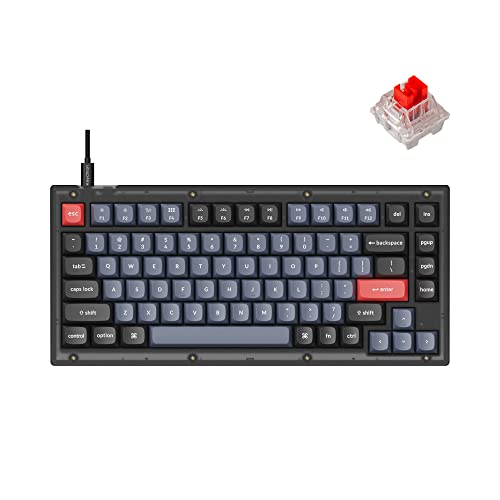
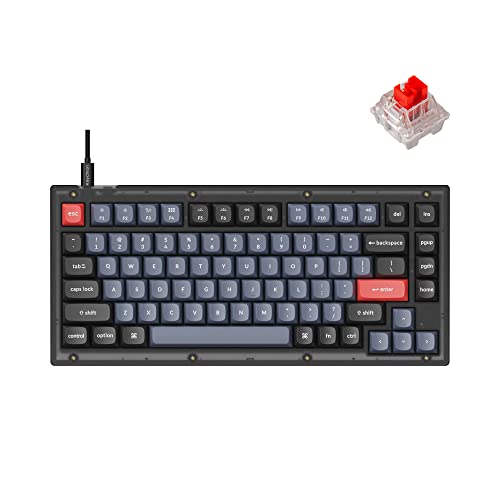
Keychron V1
The safest first board
- 75 percent layout with function row and arrows
- Hot-swap sockets
- QMK/VIA remapping
- Assembled with switches and keycaps
The V1 is the board this guide would put in a sealed envelope labelled ‘open if overthinking’: a 75 percent layout that hides nothing, hot-swap sockets that forgive the switch decision, open firmware that grows with you, and a price that keeps the experiment honest. It arrives assembled and ready, which matters for a first board — your first mechanical experience should be typing, not troubleshooting — and its lightness, a demerit in flagship comparisons, is a quiet virtue for anyone whose desk is also a dining table.
Choose the tactile switch option if your days are writing-shaped and the linear if they are game-shaped; choose either with the confidence that a switch set, later, revises the decision for a fraction of the board’s cost. What the V1 will not give you is the heavy, machined presence of aluminium boards or a particularly memorable sound. First boards are not for that. They are for learning what you like, and no board in its class teaches more per unit of currency.
Strengths
- Every beginner-critical feature present
- Forgiving price if tastes change
- Light and easy to move or store
Trade-offs
- Plastic case, modest sound
- Stock keycaps are functional, not luxurious
- No wireless on the base configuration
Best for: First-time buyers who want the lowest-risk route into the hobby.
Not suited for: Buyers certain they want a heavy aluminium board from day one.
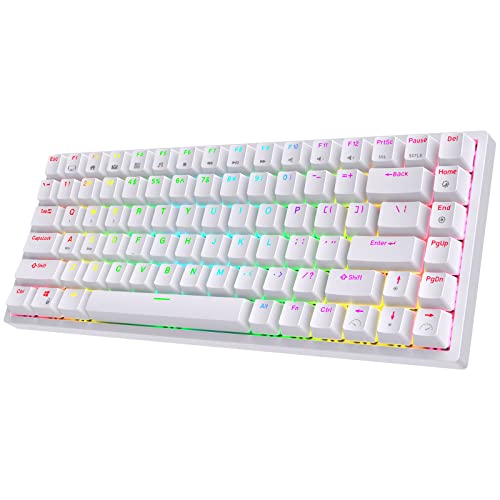
RK Royal Kludge RK84
The wireless budget favourite
- 75 percent layout, 84 keys
- Tri-mode: Bluetooth, 2.4 GHz and wired
- Hot-swap sockets
- Integrated hub pass-through on the frame
The RK84 answers the multi-device question that the V1 leaves open: it connects by cable, by Bluetooth to several devices, or by a low-latency 2.4 GHz dongle, and switches between a work laptop and a personal machine with a keystroke. For the first-time buyer whose desk is a rotation of machines — an increasingly normal desk — that flexibility is not an extra but the point, and the RK84 delivers it at a price that still respects the experiment’s budget. Hot-swap sockets keep the switch decision revisable, completing the beginner checklist.
Its compromises are software and finish. The companion software is functional rather than elegant, and the stock keycaps and stabilisers are a half-step behind the class leaders — both are the standard taxes of the budget wireless tier, and both are partially improvable later. Judged as a first board for a multi-device life, though, it asks the right price for the right features, which is the entire assignment.
Strengths
- Three connection modes at a budget price
- Hot-swap sockets included
- Good battery for wireless use
Trade-offs
- Software is merely adequate
- Stock stabilisers can tick
- Keycaps are the first upgrade most owners make
Best for: Multi-device beginners who need wireless on a budget.
Not suited for: Firmware tinkerers who want open remapping tools.
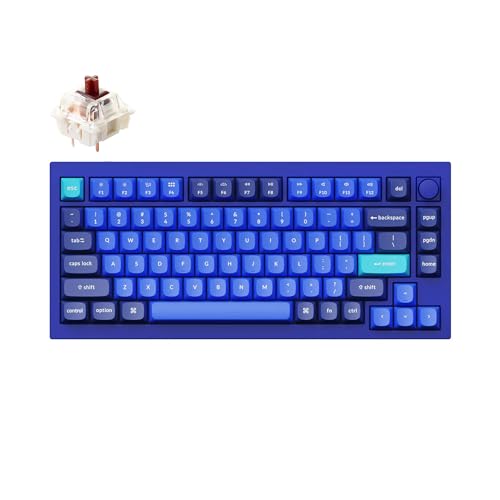
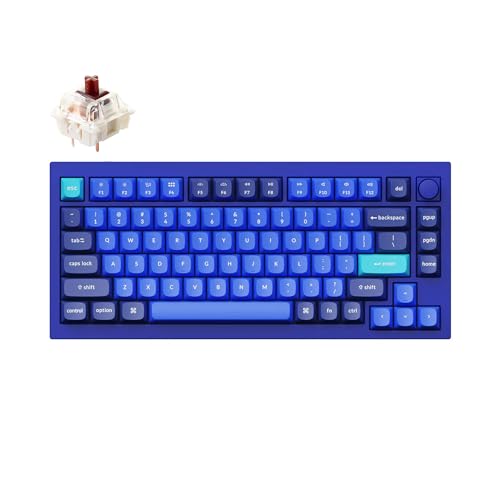
Keychron Q1
The buy-once step up
- 75 percent aluminium case
- Gasket-mounted, hot-swap
- QMK/VIA firmware
- Assembled and barebones versions
Some first-time buyers know themselves well enough to skip the entry tier: they keep things for a decade, they have the budget, and they would rather learn on the board they intend to keep. The Q1 is that board — machined aluminium, gasket-mounted, open firmware, hot-swap — and as a first purchase it trades the entry tier’s cheap lessons for a different kind of safety: there is nothing about it you will outgrow. Every upgrade path the hobby offers (switches, keycaps, plates, mods) remains open from a very high base.
The cautions are weight and commitment. It is heavy enough that the desk becomes its home, and its price means the size and layout audit in this guide’s first section deserves to be run with real care — at this tier, the reversible decisions are the switches, not the board. Buyers who have run that audit honestly will find the Q1 the rare first board that is also, plausibly, the last.
Strengths
- Nothing to outgrow
- Case and build a clear tier up
- Every modification path open
Trade-offs
- Price demands certainty about size
- Heavy; desk-bound
- Overkill for the merely curious
Best for: Committed first-time buyers with a buy-once temperament.
Not suited for: Experimenters still unsure the hobby is for them.
Acrylic Switch Tester
The twenty-minute education
- Grid of mounted switches in popular families
- Press each switch to feel its character
- Reusable reference for future purchases
- Often bundled with a keycap set
A switch tester is a small acrylic grid holding one of each popular switch, and pressing your way across it teaches more about your own fingers than a hundred reviews can. Beginners agonise over switch descriptions because feel does not transmit through prose; twenty minutes with a tester converts the linear-versus-tactile question from theology into observation. Buy it before the board if your uncertainty is genuine, or alongside it — testers remain useful for years as the reference shelf for every later switch purchase.
Its limits are honest ones: a tester switch sits in acrylic, not in your board’s case, so it teaches feel faithfully and sound only approximately. It also samples stock switches, while your eventual board may use a variant. Neither limit dents the core value, which is discovering — cheaply, privately, reversibly — what your hands actually prefer, rather than what the internet prefers on their behalf.
Strengths
- Settles the switch question by touch
- Costs a fraction of a wrong board
- Stays useful for future purchases
Trade-offs
- Teaches feel, not in-board sound
- Samples may not match your board’s exact variant
- One more parcel in the experiment
Best for: Undecided beginners who learn by touching.
Not suited for: Buyers already certain of their switch family.
Your First Fortnight: Habits That Make the Board Feel Right
The first two weeks with a mechanical keyboard involve a small, predictable adjustment that has nothing to do with quality. Membrane keyboards train their users to press every key to the bottom with conviction, because the key only registers at the end of its travel. A mechanical switch registers partway down — that is the tactile bump’s whole message — and the typist who learns to trust it types faster with less effort and far less finger fatigue. The learning is unconscious and takes most people ten days or so; the board feels ‘too sensitive’ and then, one afternoon, simply fast. Knowing the curve is coming prevents the most common first-fortnight error, which is concluding the switches are wrong and ordering replacements for a problem that was scheduled to solve itself.
Set the board up plainly for that fortnight. Use the stock keycaps, skip the decorative extras, and resist modifying anything until your hands have a baseline opinion — the tuning world surveyed in our 5 easy modifications to improve your mechanical keyboard article will still be there in month two, and its advice lands better on a typist who knows what they are tuning away from. If wrist angle bothers you, the flat vs angled keyboard for typing comparison addresses the geometry honestly; most discomfort in week one is unfamiliar height, and most of that resolves as posture adjusts.
When the First Board Is Wrong Anyway
Sometimes, despite the audit, the board is simply wrong — the layout fights your software, the switches fatigue your hands, the size crowds your mouse. The hobby’s infrastructure makes this a recoverable event rather than a catastrophe, and knowing the recovery paths in advance lowers the stakes of the whole purchase. Switches swap on a hot-swap board. Keycaps resell. Boards themselves have a healthy second-hand market, because one buyer’s wrong size is another’s exact search, and a well-kept board from a known maker holds its value respectably.
The discipline is diagnostic: before selling anything, name the wrongness precisely. ‘Too loud’ is a switch, keycap or desk-mat problem, all cheaper than a board. ‘Too high’ is a wrist-rest or low-profile conversation. ‘Missing keys’ is a layout verdict and the one genuine board-level error — which is why this guide spends its first section on size and treats it as the decision to make slowly. A first board that teaches you your exact requirements has done its job even if it is not the board you keep; tuition is only wasted when the lesson goes unrecorded.
The First Month: A New Typist’s Diary, Generalised
Week one with a first mechanical keyboard is a festival of small discoveries, and knowing its script in advance makes it more useful. The sound will be louder than expected — every first board is — because your ears have a decade of membrane-board quiet as their baseline and because you are listening, deliberately, the way you never listened before. The fingers will overshoot and undershoot: keys will be missed at the board’s edges where the old board’s different spacing put them, and the spacebar will be struck off-centre until the thumb recalibrates. None of this is the board’s fault or yours; it is two motor systems renegotiating, and it resolves on a schedule measured in days. The buyers who return boards in week one are returning the negotiation, not the keyboard.
Week two is when the board’s actual character files its report. The sound at hour three, not minute three, is the sound you bought. The one key that feels different — there is often one, a stabiliser’s mood or a switch’s variation — either beds in or becomes a genuine small project with the cluster’s fix guides as its manual. The layout’s layer, if your board has one, stops being a diagram and starts being a reach. And the first honest comparison with the old board becomes possible: not the festival comparison of day one, but the work comparison — a real document, typed at real speed, with real fatigue as the data. This is the comparison on which the purchase should be judged, and it is available no earlier.
By week four the board has either become furniture of the mind — the state every guide in this cluster describes as ownership’s destination — or it has revealed a misfit that no bedding-in will cure: a layout fighting your work’s census, a switch weight your hands vote against daily, a sound your room amplifies wrongly. The distinction between negotiation and misfit is the month’s whole curriculum, and it cannot be rushed, which is why this guide insists on returns windows and kept predecessors. A first keyboard’s job is to teach; the month is the lesson; and the tuition is only wasted if the student leaves before it ends.
Learning to Type on It: Technique Adjustments That Pay
A mechanical board rewards a technique adjustment that membrane boards trained out of you: stop bottoming out. Membrane keys must be pressed to their floor to register; mechanical switches register mid-travel, and the remaining travel is a landing your fingers pay for in impact, noise and fatigue. The adjustment — pressing to the actuation point and releasing, letting the switch’s spring do the return — is learnable in a week of deliberate practice and pays permanently: quieter typing, faster recovery between keystrokes, and hands that arrive at hour six noticeably fresher. It is the single highest-value skill a first-board owner can acquire, it costs nothing, and no purchase in this guide’s price range delivers as much. This is a technique observation, not a health claim — the ergonomic mechanical keyboards wrist pain guide covers the comfort territory with proper care.
The second adjustment is stabiliser awareness: the wide keys — spacebar above all — sound and feel best struck near their centre, where the stabiliser’s wire is balanced, and a thumb that migrates to the spacebar’s edge will coax a tick from even a well-tuned board. The third is layer literacy for smaller boards: the function layer is not a compromise to endure but a second keyboard under your thumbs, and the owners who thrive on 65 and 75 percent boards are the ones who spent one deliberate hour learning their layer rather than a resentful month discovering it. The keyboard firmware QMK VIA guide teaches the remapping that makes the layer yours; the first-board version of that lesson is simply to learn the layer you have before redesigning it.
None of these adjustments is homework in the dreary sense — they are the board becoming yours, the process by which an object turns into an instrument. First-time buyers sometimes fear they have bought a hobby when they wanted an appliance. The truth is kinder: the appliance arrives in the box, and the instrument is available, optionally, at the price of a few hours’ attention spread over a month. Take the hours. They are the best-value upgrade in this entire article, including all the products.
The Switch Question, Revisited After Purchase
First-board advice always ends at choosing a switch; ownership begins there, and the switch’s story continues in ways worth preparing for. The first development is preference drift: the switch that tested perfectly in week one may, by month two, feel light or heavy by five grams of pure perception, because your fingers have recalibrated to it and now grade it against itself. This drift is normal, is not a defect, and — on a hot-swap board — is exactly what the socket system exists for: a second switch set, bought cheaply, turns the drift from a regret into a comparison. The how to choose a mechanical keyboard the buyers guide calls this the platform dividend, and first-board owners collect it sooner than they expect.
The second development is the discovery of the board’s worst switch. In any set of seventy-odd switches, one or two will feel or sound fractionally off — a spring’s voice, a housing’s tolerance — and on a hot-swap board the fix is a two-minute swap with a spare, which is why experienced owners keep the extras from every switch set rather than selling them on. On a soldered board the same discovery is a decision: live with it (most do, happily, within a week) or learn the iron. Either way, the discovery is a rite of passage, and forewarned owners greet it as one rather than as a betrayal by the product page.
The third development is taste formation — the moment, somewhere in the first season, when you press a key on someone else’s board and have an opinion. Not a preference copied from a video, but a judgement your own fingers authored: too scratchy, too light, the bump in the wrong place. That opinion is the first board’s true deliverable. Everything this guide recommended — the tester, the hot-swap platform, the kept budget — was scaffolding for producing it, because a typist with an authored opinion can shop the entire market in an afternoon, forever, without guides at all. Including this one. That is not a failure of the guide; it is the guide’s graduation ceremony.
Care and Feeding of a First Board
A mechanical keyboard asks for little maintenance, but the little has a schedule, and first-time owners benefit from hearing it once, completely. Monthly: a shake and a blast of air for the debris that migrates under caps, and a wipe of the case with a cloth that owes nothing to solvents. Quarterly: the keycap bath — caps off with the puller, warm water, a denture tablet or a whisper of dish soap, dried fully before reassembly — the ritual the how to remove mechanical keyboard keys guide walks through key by key. Yearly, for the devoted: a look under the board at the foam and the cable’s strain relief, and the stabiliser check — a press of each wide key, listening for the tick that announces a lube refresh is due.
The cable deserves its own sentence because it is the first board’s most common casualty: a detachable cable fails at its connectors, from being yanked, coiled too tight, or used as the board’s carrying handle. Treat it as a cable and it will outlast the board; the custom USB cables for your keyboard guide covers the upgrade path when the survivor’s guilt of a working stock cable finally loses to aesthetics. Spills are the other casualty, and the protocol is speed: unplug first, invert, drain, dry for longer than feels necessary, and only then test. More boards are killed by the impatient re-plug than by the coffee.
None of this maintenance is the hobby’s deep end — no lubing, no filming, no foam surgery is required by ownership, and this guide’s position is that a first board should be maintained, not modified, for its first season. The modifications are all waiting, documented across this cluster, for the day the owner wants a project. A first board that is simply kept clean and typed on will deliver its full design life; the project’s turn comes when the owner, not the marketing, says so.
When the First Board Is Wrong: The Graceful Exit
Some first boards are wrong, and this guide’s final service is to make leaving one a procedure rather than a defeat. The diagnosis comes first, and it must be specific: not ‘I don’t like it’ but the census item it fails — the layout fights the work, the switch weight loses the daily vote, the sound loses the room. Specificity matters because it converts the exit into the second purchase’s specification, and a buyer who can state their first board’s failure in one sentence will not repeat it. Vague dissatisfaction, by contrast, is portable: it follows the buyer to the next board and the next, and it is the true engine of the expensive staircase every guide in this cluster warns about.
The exit itself has a ladder. Inside the returns window, return — that is what it is for, and a month of honest typing is exactly the use retailers anticipate. Outside it, the used market for current boards is liquid and kind to sellers who kept the box and accessories. And there is a third rung buyers forget: demotion. A first board that fails as a daily driver may succeed as the household’s second board, the office board, the partner’s upgrade — roles in which its specific flaw does not operate. The graceful exit is the one that extracts the board’s remaining value, in money or in service, rather than abandoning it to a drawer as a monument.
What the exit is not is evidence about the buyer. The hobby’s forums are full of first-board purchases that missed — by veterans, by reviewers, by the authors of guides — because fit is empirical and empiricism has a failure rate no research abolishes. The first board that misses has still done its deepest work: it produced the authored opinion, the specific diagnosis, the knowledge of your own census that no amount of pre-purchase reading could have supplied. Buyers who understand that do not shop more cautiously the second time. They shop more precisely — which looks identical from outside, and is entirely different from inside.
The Second Purchase, Foreseen
It is not too early, in a first-board guide, to describe the second purchase — because the first board’s choices decide whether the second is an upgrade or a restart. The hot-swap platform’s owner upgrades in place: switches, caps, a cable, each a small purchase that moves the board toward the authored opinion, and many discover the second board never needs to happen because the first became it, part by part. The soldered-board owner’s second purchase is the platform itself, bought with the diagnosis in hand. Both paths are honourable; they differ in cost curve, and the buyer who understood this guide’s platform argument will recognise their own path in the description and feel no regret about it — the choice was made with open eyes, which is all any guide can arrange.
The second purchase also has a characteristic error worth pre-empting: the overcorrection. The owner of a too-loud board buys the market’s quietest; the owner of a too-light switch buys its heaviest; the layout that was too small is replaced by one too large for the desk. Overcorrection is the diagnosis applied without dosage, and it produces the second board that is wrong in the opposite direction — the staircase’s cruellest landing, because the buyer now owns evidence for two extremes and no experience of the middle where their board actually lives. The remedy is the tester discipline, applied again, at the second purchase’s smaller scale: grade the candidates against the first board’s known quantity, in five-gram and one-variable steps.
And when the second purchase lands — in place or as a board — the first board’s owner becomes the thing this guide has been quietly building: an experienced buyer. The census is known, the opinions are authored, the market’s traps are visible. The hobby will now try to sell them a third board, a fifth set of caps, a switch collection. Some of that selling is the hobby’s genuine pleasure, and this guide has never argued against pleasure. It has argued for sequence: fit first, taste second, collection last. The graduate of a first board, bought and lived with honestly, has the sequence in their hands — literally, ten times a thousand times a day.
Gift-Giving and Buying for Someone Else’s Hands
A first mechanical keyboard is often a gift, and buying for another person’s hands changes the method in ways worth stating, because the census — this guide’s foundation — cannot be run on someone else’s typing. The gift buyer’s substitutes are observation and safety. Observation: the recipient’s current board and its complaints, overheard across months, are the census’s shadow — the colleague who curses their mushy keys, the partner who types at midnight in a shared room, the gamer whose spacebar rattles through calls. The gift that answers an overheard complaint lands as thoughtfulness itself, because it proves the listening happened. Safety: where observation runs out, buy the platform over the preference — hot-swap over soldered, the middle switch weight over the characterful one, the size that matches their current board’s census rather than the size that would correct it. A gift is not the occasion to convert its recipient to your layout religion; it is the occasion to give their existing habits a better instrument, and let their own first-board journey — the one this guide maps — begin from their shore, not yours.
The gift’s second decision is the budget’s shape: one board, complete, at the tier the five-year arithmetic blesses — or the board plus the beginnings of its ecosystem, the puller and the switch tester that turn a product into a hobby’s doorway. For the recipient who might love the hobby, the doorway version is the greater gift, because it includes the permission to experiment. For the recipient who wants an appliance, the complete board alone respects their intent. And the gift’s final discipline is the receipt, kept and quietly offered: a first board is an audition, as this guide has argued throughout, and the gift that cannot be returned has made its recipient the prisoner of the giver’s guess. The graceful giver says the quiet part aloud — try it for the month, and if it is wrong we will swap it — and thereby gives the thing the guide actually recommends, which was never a keyboard. It was a well-run decision, with the exit kept open, at someone else’s desk.
The First-Board Checklist, in Purchase Order
Work down the list in order; each step assumes the ones above it are settled.
- Measure your desk and audit your keys: number pad, function row, arrows — daily, weekly or never. Let the answers pick the size class, defaulting to 75 percent or tenkeyless when the audit is mixed.
- Decide the device count. One machine means wired is fine; several machines mean Bluetooth multi-pairing or tri-mode moves from luxury to requirement.
- Choose the switch family by your dominant activity — tactile for typing-led days, linear for gaming-led ones, clicky only if your roommates have been consulted and have consented in writing.
- Filter every candidate by hot-swap sockets. This is the step that makes step three safe, and it is the step discount listings most often quietly fail.
- Set the budget ceiling for the whole experiment — board, plus a possible switch set later — and shop inside it, preferring sellers with a genuine returns window for this first purchase.
- On arrival, type for a full fortnight before modifying or judging. Then, and only then, write down what you would change; that list is your second purchase’s specification, whether the second purchase is switches, keycaps or a board.
First-Board Mistakes With Long Tails
Buying the smallest, prettiest layout first.
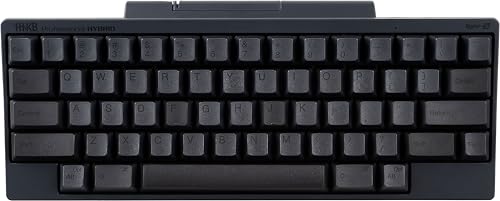
The 60 percent board in the photograph is adorable, and its missing arrows and function row are a daily tax on a beginner who has not yet learned layers. Compact layouts are a destination many typists happily reach; they are a poor airport to land at. Start with the keys present, shrink later if the layers call to you.
Choosing clicky switches for a shared space.
The click is charming in a shop and in week one. In an open office or a thin-walled flat it is a social instrument played at colleagues and family for eight hours a day. Shared spaces get tactile or silent switches; the clicky board is a home-desk pleasure, and the distinction has ended more ownerships than any defect rate.
Spending the switch-set money on lighting instead.
RGB is visible in the listing photograph and switches are not, which is exactly backwards relative to ownership: you will feel the switches ten thousand times a day and notice the lighting when the room is dark. On a fixed budget, the hierarchy is switches, then keycaps, then everything that glows.
Skipping the returns policy because the price was good.
A first board is the purchase most likely to need returning in the entire hobby, because it is the one made with the least information. A slightly higher price with a thirty-day window is, for this purchase specifically, the better bargain — you are buying information about your own hands, and the window is how the information arrives.
Assuming discomfort means defect.
New height, new travel, new actuation point — the first fortnight’s strangeness is adaptation, not evidence. Buyers who return a board on day three for feeling ‘weird’ will find the replacement weird in the same way. Give the curve its ten days; judge at the end of it, with the checklist, like the methodical person this guide is trying to make of you.
Judging the board in the first three days.
Week one is negotiation between your hands and a new geography, and its discomforts are scheduled to resolve — while its novelties are scheduled to fade. Buyers who return boards on day two have measured the transition, not the keyboard. The month is the unit of judgement; the returns window, chosen with that month in mind, is the protection that makes patience affordable.
Frequently asked questions
What is the best size for a first mechanical keyboard?
For most people, 75 percent or tenkeyless. Both keep the function row and arrow keys as real keys while freeing desk space, and neither forces layer-learning during the same fortnight your fingers are learning switches. Stay full-size if a number pad is a daily tool; go smaller only once you know you enjoy layers.
Tactile or linear switches for a beginner?
Tactile, if typing dominates your day — the bump teaches economical typing and gives feedback silent rooms appreciate. Linear, if gaming dominates. Clicky only for solitary desks. And because your first board should be hot-swappable, treat the choice as a first draft: a replacement switch set is the cheapest revision in the hobby.
How much should a first mechanical keyboard cost?
Enough to include hot-swap sockets, reputable switches and a returns window; not so much that being wrong would sting. For most buyers that is the entry-to-middle band where the boards reviewed above live. Spending flagship money before you know your size and switch preferences buys materials, not certainty.
Do I need a wrist rest with my first board?
Not automatically. Mechanical boards sit higher than membrane ones, and the correct first response is to check your desk and chair height and keep wrists floating while typing, resting only between bursts. If discomfort persists after the adaptation fortnight, the wrist-rest discussion in our ergonomic mechanical keyboards and wrist pain guide will help you choose deliberately rather than desperately.
Wired or wireless for a first board?
Wired if the board serves one desk and simplicity appeals — no batteries, no pairing, nothing to charge. Wireless if the board must rotate between machines or the desk is shared with other activities. The middle path, a tri-mode board like the RK84 above, costs a little more and postpones the decision indefinitely, which for a first purchase is often worth it.
What if I type in a language that needs an ISO layout?
Then the layout standard outranks every other preference in this guide: filter for ISO boards and keycaps from the start, because legends and the Enter shape are daily realities. The JIS keyboard layout and ISO explainers in this cluster cover the regional standards; the mainstream makers all offer ISO variants of their popular boards, so the constraint narrows the shortlist without emptying it.
Is a mechanical keyboard better for typing speed?
It can be, indirectly: a switch whose actuation you can feel or hear confirms registration without a glance, and a board fitted to your hands removes the small frictions that tax long sessions. But the board does not supply speed — technique and practice do, and the same typist on a decent membrane board will out-type a beginner on any flagship. Buy the mechanical board for feel, sound, durability and fit; let speed be the dividend of the practice the board makes pleasant, which is the honest version of the claim.
How long will my first mechanical keyboard last?
The switches are rated in tens of millions of presses, the quality keycaps resist years of shine, and the realistic lifespan of a well-kept board is a decade or more of daily service. What usually ends a board’s tenure is not failure but its owner — a changed census, a formed preference, a new desk. That is a good problem, and it is why this guide weights fit and platform over raw durability: the board will outlast your certainty about it, so buy the one that can change as your certainty does.
Should a first keyboard be wireless?
If the desk it will live on values the clean surface and the board will be charged with any regularity, yes — modern tri-mode wireless costs the typing nothing and the connection little, and the freedom to move the board for drawing, gaming or guests is a daily pleasure. If the desk is a battlestation that never moves, wired is simpler and cheaper, and the money saved belongs in the switches. The error is buying wireless as a specification rather than as a desk’s answer — decide by the desk’s life, not by the feature list’s length.
What if I type all day for work — is a gaming keyboard suitable?
Entirely, if its switch and layout suit the typing: the gaming label describes its marketing and its polling rate, not a typing defect, and many gaming boards are excellent typing instruments with fast switches and sound construction. The checks are the typist’s own — switch weight across a long day, the layout’s census against your documents, the sound against your room and calls. Judge any board by those, and the gaming and office labels become what they are: shelf signs, not specifications.
A first mechanical keyboard is best thought of as a question you ask your hands, and the art of choosing one is the art of keeping that question cheap to re-ask. Size chosen by audit rather than photograph, switches chosen by activity rather than hype, sockets that let the answer change, a seller who will take the board back if the answer is no — assemble those and the purchase is nearly incapable of going badly wrong. The worst realistic outcome is a board you resell having learned exactly what you want, which is not a failure state. It is the hobby’s normal first chapter.
So run the audit, pick from the sensible band, and give the board its fortnight. Somewhere in the second week the typing will stop feeling like an experiment and start feeling like an upgrade you should have made years ago — and when friends ask how to choose theirs, you will find yourself saying what this guide said, in your own words, with the confidence of someone whose hands have voted. That is the moment the first board has finished its work, whatever you decide to buy second.