Wireless gaming mice have reached the point where the cable is a choice rather than a requirement, and the best wireless gaming mouse video guide starts from that fact. The mice in this guide use fast wireless connections that match or beat wired latency, sensors that track accurately at high speeds, and batteries that last through long sessions, so the only thing the cable took away was freedom of movement. Whether the mouse is for competitive video games, long single-player sessions, or streaming, the qualities that matter are the same: a sensor that does what the hand asks, a weight that disappears during play, and a connection that never drops at the wrong moment.
Kaju and Douglas may earn an affiliate commission when you buy through links on this page. That commission funds the research behind guides like this one and never changes the price you pay. Every pick below was selected from manufacturer specification sheets, product documentation, and published technical references, and the comparisons throughout rest on those documented figures rather than on headline numbers copied from retail boxes.
The word video in this guide means what it sounds like: video games, and the video that streamers and content creators record while playing them. A mouse that is good for gaming is good for streaming for the same reasons, because both demand precise control, a comfortable shape over hours, and a connection that does not stutter while the audience watches. The six mice below were chosen for that combined job, and they differ mainly in shape, weight, and the trade-offs between battery life and polling rate.
In this guide
Quick picks: best wireless gaming mouse video
| # | Product | Where to buy |
|---|---|---|
| 1 | Logitech G Pro X Superlight 2 | Check on Amazon |
| 2 | Razer Viper V3 Pro | Check on Amazon |
| 3 | Razer DeathAdder V3 Pro | Check on Amazon |
| 4 | Logitech G502 Lightspeed | Check on Amazon |
| 5 | SteelSeries Aerox 3 Wireless Gen 2 | Check on Amazon |
| 6 | Corsair Dark Core RGB Pro SE | Check on Amazon |
How the picks were chosen
The selection started from the sensor, because a gaming mouse lives or dies on tracking. Every pick below documents a modern optical sensor with a high maximum sensitivity and accurate tracking at speed, and none of them uses an outdated sensor that would show up as jitter, acceleration, or missed flicks. Sensitivity figures are often quoted as the headline, but what matters is the sensor's accuracy at the sensitivity actually used, and the picks here are all proven designs rather than untested newcomers.
The second filter was the wireless connection itself. A wireless gaming mouse needs a dedicated low-latency radio link, and every pick here offers one alongside Bluetooth for travel use. Polling rate matters too: the fastest mice in this guide poll at 8000Hz, which reduces the delay between hand movement and on-screen response, while the others poll at the standard 1000Hz that is already fast enough for most players. A mouse that only offers Bluetooth, or that drops its connection under load, was excluded.
The third filter was weight and shape. Modern gaming mice are light, and the picks here range from the mid-fifties to the low eighties in grams, which is the range where the mouse disappears in the hand rather than dragging it. Shape matters as much as weight: the guide includes symmetrical mice, ergonomic right-handed mice, and a heavier multi-button design, so that palm, claw, and fingertip grips are all covered. Finally, each pick had to be a genuine wireless gaming mouse with a documented battery life, rather than a wireless office mouse with a gaming label.
What to look for in a wireless gaming mouse
Sensor accuracy and sensitivity
The sensor is the heart of the mouse, and the figures to check are maximum sensitivity, tracking speed, and the polling rate. Sensitivity, measured in DPI or CPI, is the least important of the three for most players, because almost nobody plays at the maximum: a sensor rated at 30,000 DPI is used at a fraction of that figure in real games. What matters is that the sensor tracks cleanly at the sensitivity chosen, without jitter or angle snapping, and the sensors in this guide all do that. Polling rate is the more meaningful number: 1000Hz means the mouse reports its position a thousand times a second, and 8000Hz means eight thousand, which reduces input delay in a way that fast players can feel.
Do not buy a mouse on the sensitivity headline. Buy it on the sensor's reputation and the polling rate, and then set the sensitivity to a value that suits the games played: lower for precise aiming, higher for fast movement across a large screen. The picks below all allow that adjustment through their software, and the software is worth a look before buying, because a mouse whose settings are hard to reach will stay at its defaults.
Weight and balance
Weight is the specification that has changed most in gaming mice over the last few years. The lightest mice in this guide weigh in the mid-fifties of grams, and even the heaviest is under ninety, which would have been remarkable a decade ago. Light matters because the hand moves the mouse thousands of times in a session, and every gram saved is effort saved. But weight is not everything: balance matters as much as the number, and a mouse that is light at the front and heavy at the back will feel worse than a slightly heavier mouse that is balanced.
The right weight also depends on the game. Fast competitive games reward the lightest mice, where flicks are quick and frequent, while slower games and productivity work suit a slightly heavier mouse that feels planted. The picks here cover the range, and the notes on each one say where it sits, so the choice can match the games played rather than a single number.
Battery life and charging
Battery life is the practical question that decides whether wireless is pleasant or annoying. The mice in this guide document battery lives from around ninety hours to two hundred hours, and the difference comes down to polling rate: a mouse polling at 8000Hz drains its battery far faster than one polling at 1000Hz. Most players will get weeks of play from a charge at standard settings, and the mice here all charge over USB-C, which means the same cable that charges a phone can top up the mouse.
Charging habits matter more than the headline figure. A mouse that is charged overnight or between sessions will never run dry, and a mouse with a low-battery warning will not die mid-game without notice. Some of the picks here are compatible with charging mousepads, which keep the battery topped up during play, and that is worth knowing for players who never want to think about charging at all.
Shape, grip, and buttons
Shape is personal in a way no specification sheet can settle, and it is the reason this guide includes several shapes rather than one. Symmetrical mice suit fingertip and claw grips and both hands, ergonomic right-handed mice suit palm grips, and the heavier multi-button designs suit players who want more controls under the thumb. The honest advice is to match the shape to the grip: palm grippers need a longer, taller mouse that fills the hand, claw grippers need a shorter mouse with a defined hump, and fingertip grippers need a small, light mouse that moves with the fingers alone.
Buttons deserve a check too. Five buttons are the standard for gaming, and the extra buttons on the multi-button designs are genuinely useful for MMOs and for productivity shortcuts, but they add weight and complexity. Switches matter as well: optical switches last longer and avoid double-clicking, while mechanical switches have a more familiar feel. The picks below use the switches their manufacturers document, and the notes say which is which.
The six best wireless gaming mice

Top pick
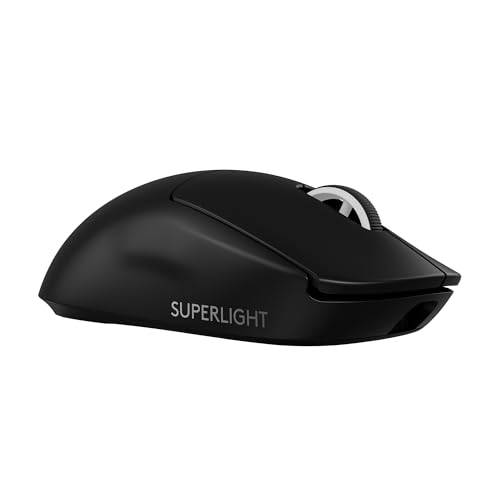
1. Logitech G Pro X Superlight 2, Black
The Logitech G Pro X Superlight 2 is the mouse this guide measures the others against, and its listing documents the combination that made the line the default choice in competitive play: a HERO 2 sensor rated at 32,000 DPI, LIGHTFORCE hybrid switches, five programmable buttons, USB-C charging, and a lightweight design built for Mac and PC gaming. The HERO 2 sensor is the heart of the mouse, tracking accurately at high speeds without the jitter that cheaper sensors show during fast flicks, and the LIGHTFORCE switches combine the speed of optical actuation with the feel of a mechanical click. Five buttons is the standard competitive layout: two main clicks, a scroll wheel click, and two thumb buttons, with nothing extra to get in the way.
Specs: HERO 2 sensor, 32,000 DPI; LIGHTFORCE hybrid switches; 5 programmable buttons; USB-C charging; lightweight design; Mac and PC gaming.
Strengths:
- The HERO 2 sensor is one of the most accurate in this guide, and it shows in fast, precise aiming.
- LIGHTFORCE switches give a crisp, fast click without the double-click failures that wear out mechanical switches.
- USB-C charging means the same cable that charges a phone tops up the mouse.
Trade-offs:
- Five buttons is the minimum for this guide, so MMO players who want more thumb controls should look elsewhere.
- The minimalist design has no RGB lighting to speak of, which suits competitive players and disappoints those who want their desk to glow.
- The lightweight, symmetrical shape suits claw and fingertip grips better than a full palm grip.
This mouse fits the competitive player who wants the proven sensor and the lightest practical design, and who values accuracy over extra buttons and lighting.
Best for: competitive play and precise aiming. Not suited for: MMO players who need many thumb buttons, or palm grippers who want a tall ergonomic shape.
Check price on Amazon: Logitech G Pro X Superlight 2

2. Razer Viper V3 Pro, Black
The Razer Viper V3 Pro is the lightest mouse in this guide at 54 grams, and its listing documents a specification set built for speed: a 35K DPI optical sensor, Gen-3 optical switches, eight programmable controls, a 95-hour battery, and an 8000Hz polling rate. The polling rate is the headline here, because eight thousand reports a second cuts input delay to a level that fast players can feel, and the 95-hour battery is the price of that speed, documented honestly in the listing. Eight programmable controls give more flexibility than the five-button standard, and the symmetrical shape suits claw and fingertip grips.
Specs: 54g lightweight; 35K DPI optical sensor; Gen-3 optical switches; 8 programmable controls; 95-hour battery; 8000Hz polling rate.
Strengths:
- At 54 grams it is the lightest mouse in this guide, and the difference is felt in every flick.
- The 8000Hz polling rate gives the lowest input delay here, which matters in fast competitive games.
- Eight programmable controls cover more shortcuts than the five-button standard without adding bulk.
Trade-offs:
- The high polling rate drains the battery faster than standard settings, so the 95-hour figure is the trade for speed.
- The symmetrical shape is less comfortable for palm grippers than an ergonomic right-handed design.
- The minimalist design keeps the focus on performance, with little in the way of styling extras.
This mouse fits the competitive player who wants the lightest body and the fastest polling rate available, and who plays fast shooters where milliseconds decide rounds.
Best for: fast competitive shooters and the lightest feel. Not suited for: palm grippers, or players who want maximum battery life.
Check price on Amazon: Razer Viper V3 Pro

3. Razer DeathAdder V3 Pro, Faker Edition
The Razer DeathAdder V3 Pro in its Faker Edition is the ergonomic pick in this guide, and its listing documents the specification set that defines it: 63 grams, a Focus Pro 30K optical sensor, Gen-3 optical switches, HyperSpeed wireless, five programmable buttons, and a 90-hour battery. The DeathAdder shape is the classic ergonomic right-handed design, with a tall body that fills a palm grip and a hump positioned under the palm, and this version keeps that shape while cutting the weight to a level that would have been remarkable a few years ago. The Faker Edition is a special finish of the same mouse, marking the player whose name it carries, and the mouse underneath is the standard DeathAdder V3 Pro.
Specs: 63g lightweight; Focus Pro 30K optical sensor; Gen-3 optical switches; HyperSpeed wireless; 5 programmable buttons; 90-hour battery; Faker Edition finish.
Strengths:
- The ergonomic right-handed shape is the most comfortable in this guide for palm grippers.
- The Focus Pro 30K sensor tracks accurately at speed, and the HyperSpeed link keeps latency low.
- Gen-3 optical switches avoid the double-click failures that end the life of mechanical-switch mice.
Trade-offs:
- The ergonomic shape is right-handed only, so left-handed players should look at the symmetrical picks.
- Five buttons is the standard layout, with no extra thumb controls for MMO players.
- At 63 grams it is light but not the lightest here, and the difference is felt in the fastest flicks.
This mouse fits the palm gripper who wants an ergonomic shape without giving up a light body and a top sensor, and who plays long sessions where comfort decides the outcome.
Best for: palm grip and long comfortable sessions. Not suited for: left-handed players, or MMO players who need extra buttons.
Check price on Amazon: Razer DeathAdder V3 Pro

4. Logitech G502 Lightspeed, Black
The Logitech G502 Lightspeed is the multi-button pick in this guide, and its listing documents the features that define it: RGB lighting, adjustable weights, eleven programmable buttons, POWERPLAY compatibility, and on-board memory, for PC and Mac. Eleven buttons is more than double the standard layout, and the adjustable weights let the player tune the feel from light to planted, which is the opposite philosophy from the ultralight mice above it here. POWERPLAY compatibility means the mouse can charge wirelessly from a compatible mousepad, so the battery question disappears entirely for players who buy into that system. On-board memory carries the settings with the mouse, so the configuration survives a move to another computer.
Specs: RGB lighting; adjustable weights; 11 programmable buttons; POWERPLAY compatible; on-board memory; PC and Mac.
Strengths:
- Eleven programmable buttons give MMO and strategy players the controls the lighter mice cannot offer.
- Adjustable weights let the player tune the feel instead of accepting a fixed weight.
- POWERPLAY compatibility removes charging from the routine entirely for players with the mousepad.
Trade-offs:
- The multi-button design is heavier and more complex than the ultralight mice, and fast flicks feel the difference.
- The shape is distinctive and ergonomic, which suits some grips and fights others.
- POWERPLAY charging needs the separate mousepad, which is an extra purchase.
This mouse fits the MMO and strategy player who wants buttons and tuning over minimum weight, and who values a mouse that can do productivity work as well as games.
Best for: MMOs, strategy games, and button-heavy play. Not suited for: competitive shooter players who want the lightest mouse, or fingertip grippers.
Check price on Amazon: Logitech G502 Lightspeed

5. SteelSeries Aerox 3 Wireless Gen 2, Ghost
The SteelSeries Aerox 3 Wireless Gen 2 in Ghost is the endurance pick in this guide, and its listing documents a specification set built around battery life and durability: 68 grams, a 26K DPI optical sensor, a 200-hour battery, IP54 water resistance, switches rated for 80 million clicks, RGB lighting, and 100 percent PTFE feet. Two hundred hours is the longest battery life in this guide by a wide margin, and it means the mouse can go weeks between charges at standard settings. IP54 water resistance protects against splashes and dust, which is a genuine advantage for a mouse that lives on a desk with drinks nearby, and the PTFE feet glide smoothly on a mousepad.
Specs: 68g super-light; 26K DPI optical sensor; 200-hour battery; IP54 water resistant; 80-million-click durability; RGB lighting; 100% PTFE feet.
Strengths:
- The 200-hour battery is the longest in this guide, and it removes charging from the weekly routine.
- IP54 water resistance is rare in gaming mice and genuinely useful on a busy desk.
- PTFE feet and a 68-gram body make the mouse glide easily across the pad.
Trade-offs:
- The 26K DPI sensor is capable but sits below the top sensors here on headline figures.
- The holey shell design that keeps the weight down also lets dust and crumbs inside, and needs occasional cleaning.
- At 68 grams it is light but not the lightest, and the fastest players will feel the difference.
This mouse fits the player who wants to charge rarely, plays near drinks, and values durability and battery life over the last few grams of weight.
Best for: battery life and durability. Not suited for: players who want the lightest mouse, or who dislike the holey shell design.
Check price on Amazon: SteelSeries Aerox 3 Wireless Gen 2
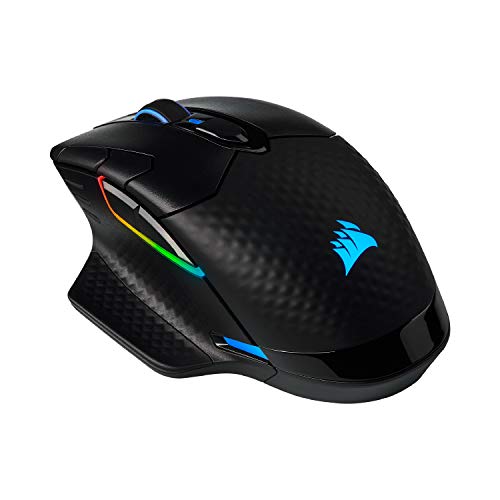
6. Corsair Dark Core RGB Pro SE, Black
The Corsair Dark Core RGB Pro SE is the versatile pick in this guide, and its listing documents a specification set that covers more platforms than any other mouse here: Qi wireless charging, an 18,000 DPI sensor, eight programmable buttons, sub-1ms wireless, iCUE software compatibility, and support for PC, Mac, PS5, PS4, and Xbox. Qi charging means the mouse can charge on any Qi pad, which is a convenience no other pick here offers, and the console support makes it the right choice for players who game on more than one platform. Eight programmable buttons sit between the five-button standard and the eleven-button maximum, giving flexibility without the weight of a full multi-button design.
Specs: Qi wireless charging; 18,000 DPI; 8 programmable buttons; sub-1ms wireless; iCUE compatible; PC, Mac, PS5, PS4, Xbox.
Strengths:
- Qi charging works with any Qi pad, which is the most flexible charging in this guide.
- Console support covers PC, Mac, and the current consoles, so one mouse serves every platform.
- Eight programmable buttons give more control than the standard layout without the bulk of an MMO mouse.
Trade-offs:
- The 18,000 DPI sensor sits below the top sensors here on headline figures, though it is more than enough in practice.
- The feature set adds weight and size compared with the ultralight picks.
- iCUE software is powerful but heavy, and some players will find it more than they need.
This mouse fits the multi-platform player who games on PC and console, and who wants Qi charging and extra buttons without stepping up to a dedicated MMO mouse.
Best for: multi-platform play and Qi charging. Not suited for: competitive players who want the lightest mouse, or minimalists who dislike heavy software.
Check price on Amazon: Corsair Dark Core RGB Pro SE
The six at a glance
The table below compresses the differences that matter into the terms used throughout the guide. It describes positioning rather than ranking: the right row is the one whose weight, shape, and battery life match the grip and the games. Read it alongside the pick sections rather than instead of them, because the table cannot carry the caveats about configuration and polling rate that decide between close mice.
| Mouse | Weight | Sensor | Polling / Battery | Buttons | Best for |
|---|---|---|---|---|---|
| Logitech G Pro X Superlight 2 | Lightweight | HERO 2, 32,000 DPI | — / USB-C | 5 | Competitive accuracy |
| Razer Viper V3 Pro | 54g | 35K DPI optical | 8000Hz / 95 hr | 8 | Fastest flicks |
| Razer DeathAdder V3 Pro | 63g | Focus Pro 30K | — / 90 hr | 5 | Palm grip comfort |
| Logitech G502 Lightspeed | Adjustable | — | — / POWERPLAY | 11 | MMOs, tuning |
| SteelSeries Aerox 3 Wireless Gen 2 | 68g | 26K DPI optical | — / 200 hr | — | Battery life |
| Corsair Dark Core RGB Pro SE | — | 18,000 DPI | Sub-1ms / Qi | 8 | Multi-platform |
Matching a wireless mouse to your grip and your games
Start with the grip, because it decides the shape before anything else. Palm grippers rest the whole hand on the mouse and need a longer body with a high hump; the ergonomic right-handed picks here are built for that. Claw grippers arch the fingers and need a shorter mouse with a defined hump under the palm; the symmetrical lightweight picks suit them. Fingertip grippers control the mouse with the fingertips alone and need the smallest, lightest mouse available, because the hand does the least work. Getting the grip wrong makes even the best sensor feel awkward, and getting it right makes a mid-range mouse feel excellent.
Then think about the games. Competitive shooters reward the lightest mice with the highest polling rates, because flicks and tracking are everything and a gram saved is a millisecond earned. MMOs and strategy games reward buttons over weight, because the thumb controls abilities and the mouse rarely flicks across the screen. Single-player games reward comfort over both, because the session is long and the mouse is in the hand for hours. The picks here cover all three, and the notes on each one say which game it suits best.
Streaming adds one more consideration: silence and reliability. A mouse that clicks loudly will be heard on the stream, and a mouse that drops its connection will be seen by the audience. The mice in this guide use quiet switches where documented and dedicated low-latency wireless links, so the stream hears the game rather than the hardware.
Setup, charging, and care
Setting up a wireless gaming mouse takes minutes, and the details matter. Plug the wireless receiver into a front USB port or use the included extender to bring it close to the mousepad, because a receiver buried behind the computer case will have a weaker link than one sitting on the desk. Install the manufacturer's software, set the sensitivity and polling rate to the values that suit the games played, and save the settings to the mouse's onboard memory where the model supports it, so the settings travel with the mouse.
Charging should become a habit rather than an emergency. Charge the mouse overnight once a week, or whenever the battery indicator shows low, and do not leave it plugged in permanently, because a lithium battery kept at full charge ages faster. If the mouse supports a charging mousepad, that removes the habit entirely, but it is an extra purchase rather than a requirement.
Care is simple: wipe the mouse with a dry cloth, keep food and drink away from it, and replace the mouse feet when they wear smooth, because worn feet drag and make the sensor work harder. A mousepad should be cleaned regularly too, because dust on the pad is the most common cause of tracking problems that get blamed on the mouse.
Common mistakes when buying a wireless gaming mouse
The most common mistake is buying on weight alone. A mouse that is a few grams lighter is not automatically better, and a mouse that is too light for the grip will feel skittish and hard to control. Match the weight to the grip and the games, and remember that balance matters as much as the number on the scale.
The second mistake is ignoring the receiver. A wireless mouse is only as good as its link, and a receiver plugged into a crowded USB hub behind a metal case will underperform. Use the extender, keep the receiver close, and the wireless connection will be as reliable as a cable.
The third mistake is setting the polling rate to maximum and forgetting about it. The highest polling rate drains the battery several times faster, and most players cannot feel the difference between 1000Hz and 8000Hz. Set the polling rate to the value that suits the games, and save the battery for the sessions that need it.
The fourth mistake is buying a shape without knowing the grip. A mouse that is perfect for a palm gripper will be miserable for a fingertip gripper, and no sensor can fix a shape that fights the hand. Know the grip, measure the hand if needed, and choose the shape first.
Wireless versus wired: what the cable actually cost
For years the advice was simple: competitive players used wired mice, and everyone else could go wireless. That advice is now out of date, and understanding why helps explain the picks in this guide. A decade ago wireless mice were slower, heavier, and less reliable than wired ones, because the radios were slow, the batteries were heavy, and the sensors were a generation behind. The mice above close every one of those gaps: the radios report at up to 8000Hz, the batteries last weeks, and the sensors are the same designs used in the best wired mice. The result is that a modern wireless gaming mouse is not a compromise; it is a wired mouse without the cable drag.
Cable drag is the cost that wired players pay without noticing it, because it is always there. The cable catches on the edge of the desk, pulls against the hand during a flick, and needs a bungee or careful routing to stay out of the way. Wireless removes all of that, and the freedom shows up most in fast games where the hand moves constantly. The remaining cost of wireless is the battery, and that cost has shrunk to a weekly charge that takes seconds to start. Players who charge the mouse overnight will never notice it.
There are still reasons to buy wired. A wired mouse never needs charging, it is usually cheaper than the wireless version of the same design, and it is lighter because it carries no battery. Players on a strict budget, or players who never move the mouse from one desk, will find wired mice excellent value. But the performance argument for wired is gone, and the mice in this guide are the proof: they match wired mice on latency, beat them on freedom, and ask only a weekly charge in return.
One practical note for players who switch: the first week with a wireless mouse feels strange, because the hand expects the resistance of the cable and finds none. Give it a week before judging the weight or the feel, and set the sensitivity and polling rate deliberately rather than leaving the defaults. Most players who switch never go back, and the reason is not the specifications; it is the feeling of a mouse that moves exactly with the hand and nothing else.
More gaming mouse guides on this site
Readers comparing mice will find the neighbouring guides useful. The wired gaming mouse guide covers the cabled alternatives, while white gaming mice with RGB LEDs covers styling. Players who want a mouse that does not look like a gaming mouse should read gaming mice that do not look like gaming mice, and palm grippers will find gaming mice for palm grip directly relevant.
Frequently asked questions
Is wireless as fast as wired for gaming?
Yes, with a modern low-latency wireless link. The dedicated 2.4GHz connections in this guide match or beat wired latency in practice, and the fastest mice poll at 8000Hz, which is faster than most wired mice. Bluetooth alone is not fast enough for competitive play, which is why every pick here offers a dedicated wireless link alongside Bluetooth.
How long does a wireless gaming mouse battery last?
It depends on the polling rate and the lighting. At standard settings the mice in this guide document roughly ninety to two hundred hours of play, which is weeks of normal use. At the highest polling rate with lighting on, that figure drops sharply. Charge weekly, keep the lighting modest, and the battery will never be a problem.
What is the best grip for a wireless gaming mouse?
There is no best grip, only the grip that suits the hand. Palm grip suits longer, ergonomic mice; claw grip suits shorter mice with a defined hump; fingertip grip suits small, light mice. The guide includes shapes for all three, and the right choice is the one that matches the hand rather than the one with the best headline figures.
Do I need an 8000Hz polling rate?
Most players do not. A 1000Hz polling rate is already fast enough for the vast majority of games, and the higher rate drains the battery much faster. Competitive players who play fast shooters at a high level can feel the difference; everyone else should save the battery and use the standard rate.
Does a wireless mouse lag in competitive games?
Not with a modern dedicated wireless link. The 2.4GHz connections in this guide report at 1000Hz or 8000Hz, and their latency matches or beats a wired connection in practice. The lag that players remember from early wireless mice came from slow radios and low polling rates, and neither is present in the mice here. Bluetooth alone is slower, which is why competitive play should always use the dedicated receiver rather than Bluetooth.
Can I use a wireless gaming mouse for work as well as games?
Yes, and the mice in this guide are good at it. Bluetooth mode pairs with a laptop for travel, the low weight suits long days, and the programmable buttons can carry productivity shortcuts. The only caveat is the shape: a mouse built for gaming may feel less comfortable for eight hours of office work than a dedicated office mouse, so the grip still matters.
A wireless gaming mouse is one of the few upgrades that changes how every game feels, because the hand is in contact with it for every minute of play. Choose the shape that matches the grip, the weight that matches the games, and a connection that never drops, and the cable will not be missed, which is the whole point of going wireless.