The best computers with Nvidia graphics cards are the desktops that make a graphics card the centre of the machine. A prebuilt desktop with a GeForce card inside is the fastest way to a gaming PC that simply works: the processor, memory, storage, and cooling are already chosen and assembled, and the graphics card is ready to drive games the moment the machine is plugged in. The six desktops below were picked from the site’s own product lookup because their listings describe complete computers with an Nvidia GeForce graphics card, a stated processor, and a stated memory and storage allowance.
The graphics card is the part that decides how a desktop plays games, but it is not the only part that matters. A strong card paired with a weak processor will stutter, a fast machine with too little memory will slow down when several programs are open, and a small drive will fill up after a few games. The listings behind these picks state all four details plainly: the GeForce card, the processor, the memory, and the storage, which is what makes an honest comparison possible.
Every listing behind these picks comes from the site’s own product lookup, and each one was checked in full before it earned a link: the brand and the complete model name had to match exactly, and any listing marked as renewed or used was set aside. The list runs from a compact RTX 4060 desktop to a liquid-cooled RTX 3060 Ti tower and two RTX 5070 machines, so there is a computer here for a buyer furnishing a first gaming desk and for one who wants a powerful machine for work as well as play.
In this guide
Quick picks: best computers with nvidia graphics cards
| # | Product | Where to buy |
|---|---|---|
| 1 | HP OMEN 45L RTX 3060 Ti | Check on Amazon |
| 2 | Lenovo Legion Tower 5 RTX 5070 | Check on Amazon |
| 3 | Alienware Aurora RTX 5070 | Check on Amazon |
| 4 | Acer Predator Orion 3000 RTX 3070 | Check on Amazon |
| 5 | MSI Codex R2 RTX 4060 | Check on Amazon |
| 6 | Skytech Archangel 5 RTX 5060 | Check on Amazon |
How the picks were chosen
A real Nvidia card came first. A computer earned a place here when its listing described a complete desktop with a named GeForce graphics card, from the RTX 3060 Ti to the RTX 5070. Machines whose listings described an AMD graphics card, an integrated graphics chip, or a graphics card with no model named were not considered, because this article is about computers with Nvidia graphics cards.
The whole machine came second. A graphics card is only as good as the processor, memory, and storage around it, so each desktop was weighed as a complete system: a modern processor, at least 16GB of memory, and at least 1TB of storage. The picks mix 16GB and 32GB machines, 1TB and 2TB drives, and processors from Intel and AMD, so the list covers different budgets and different workloads.
Every listing was verified in full before linking. The brand and the complete model name in the listing had to match the computer described, including the model code that separates one OMEN or Legion Tower from another. Listings marked as renewed or used were dropped, and any listing whose title described a different model was set aside even when it looked close at first glance.
Quick comparison
| Product | Standout feature | Best for |
|---|---|---|
| HP OMEN 45L | Liquid cooling with 32GB of memory | liquid-cooled tower with 32GB of memory |
| Lenovo Legion Tower 5 | RTX 5070 with a 7800X3D processor | newest RTX 5070 with a Ryzen 7 7800X3D |
| Alienware Aurora ACT1250 | 2TB SSD with Wi-Fi 7 and 2.5Gb Ethernet | newest RTX 5070 with a 2TB drive and Wi-Fi 7 |
| Acer Predator Orion 3000 | 16-core i7 with an RTX 3070 | 16-core processor with an RTX 3070 |
| MSI Codex R2 | RTX 4060 with an 80+ Gold PSU | most accessible desktop with a current-gen card |
| Skytech Archangel 5 | RTX 5060 with a 750W Gold PSU | newest entry-level RTX 5060 with DDR5 6000 |

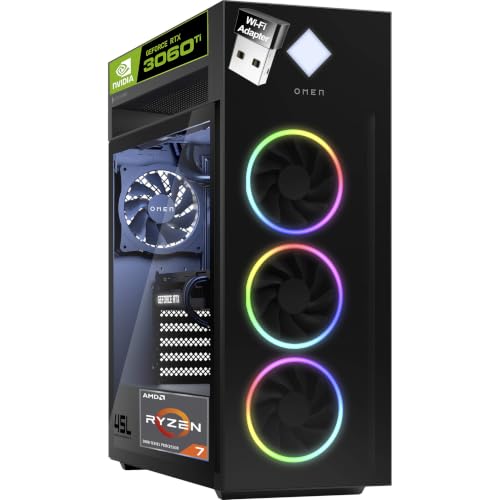
HP OMEN 45L Gaming PC (RTX 3060 Ti)
The HP OMEN 45L is the liquid-cooled tower on this list, and its listing states the combination plainly: a gaming PC with 32GB of RAM, a 1TB SSD, liquid cooling, an RTX 3060 Ti with 8GB of memory, an AMD Ryzen 7 5700X 8-core processor, an 800W power supply, RGB tempered glass, a WiFi adapter, and Windows 11 Home. Liquid cooling is the detail that sets this machine apart, because it keeps the processor cool under sustained load without the noise of a large air cooler.
Thirty-two gigabytes of memory is the second detail that matters. Games, a browser full of tabs, and a chat app can all stay open together without the machine slowing down, and the 1TB SSD leaves room for a game library alongside work files. The 800W power supply gives the machine headroom for upgrades, and the RGB tempered glass shows the components inside, which suits a desk where the computer is meant to be seen.
For a buyer who wants a liquid-cooled tower with generous memory and a proven graphics card, the OMEN 45L is the pick. The cooling, the memory, and the RTX 3060 Ti cover gaming and everyday work together. It is the computer to buy when the priority is a cool, quiet machine with room to grow.
Key specifications: HP OMEN 45L gaming PC; 32GB RAM; 1TB SSD; liquid cooled; RTX 3060 Ti 8GB; AMD Ryzen 7 5700X 8-core; 800W PSU; RGB tempered glass; WiFi adapter; Windows 11 Home.
This computer fits a buyer who wants a liquid-cooled tower with 32GB of memory and a proven Nvidia card.
Strengths
- Liquid cooling keeps the processor cool under sustained load.
- 32GB of memory keeps many programs open at once.
- The 800W power supply leaves headroom for future upgrades.
Trade-offs
- The RTX 3060 Ti is a previous-generation card.
- The large tower needs desk or floor space.
- It is a premium tower, so it sits above the budget picks on cost.
The OMEN 45L suits a player who games for long stretches and wants a cool, quiet machine. It fits anyone who values cooling and memory over the latest graphics generation.
Best for: liquid-cooled tower with 32GB of memory / Not suited for: a buyer who wants the latest graphics card or a compact case
Check price on Amazon: HP OMEN 45L RTX 3060 Ti

Lenovo Legion Tower 5 (RTX 5070)
The Lenovo Legion Tower 5 is the newest-generation desktop on this list, and its listing states the combination plainly: a gaming desktop with an NVIDIA GeForce RTX 5070, an AMD Ryzen 7 7800X3D processor, 32GB of memory, 1TB of storage, and Windows 11 Home, in Eclipse Black, with three months of PC Game Pass included. The Ryzen 7 7800X3D is the processor detail that matters most, because its large cache makes it one of the strongest gaming processors available.
The RTX 5070 is the graphics half of the same story. It is the newest generation among the picks here, and it pairs with the 7800X3D to make a machine that handles demanding games at high settings without either part holding the other back. Thirty-two gigabytes of memory and a 1TB drive complete a balanced system, and the included Game Pass gives the buyer games to play on arrival.
For a buyer who wants the newest graphics card and one of the strongest gaming processors in one machine, the Legion Tower 5 is the pick. The RTX 5070, the 7800X3D, and the 32GB of memory cover the most demanding games together. It is the computer to buy when the priority is current-generation performance.
Key specifications: Lenovo Legion Tower 5-2026 gaming desktop; NVIDIA GeForce RTX 5070; Ryzen 7 7800X3D; 32GB memory; 1TB storage; Windows 11 Home; Eclipse Black; 3 months PC Game Pass.
This computer fits a buyer who wants the newest Nvidia card and a top gaming processor in one balanced desktop.
Strengths
- The RTX 5070 is the newest graphics generation here.
- The Ryzen 7 7800X3D is one of the strongest gaming processors.
- 32GB of memory and 1TB of storage complete a balanced system.
Trade-offs
- It is a premium machine, so it sits above the budget picks on cost.
- The listing states no power supply rating.
- The tower is a full-size desktop, so it needs floor or desk space.
The Legion Tower 5 suits a player who wants current-generation performance without assembling a machine. It fits anyone who would rather buy once and buy the newest hardware available.
Best for: newest RTX 5070 with a Ryzen 7 7800X3D / Not suited for: a buyer who wants the lowest cost or a compact case
Check price on Amazon: Lenovo Legion Tower 5 RTX 5070

Alienware Aurora ACT1250 (RTX 5070)
The Alienware Aurora ACT1250 is the best-connected desktop on this list, and its listing states the combination plainly: a gaming desktop with an Intel Core Ultra 7 265KF processor, an NVIDIA GeForce RTX 5070, 32GB of DDR5 RAM, a 2TB PCIe NVMe SSD, a Killer 2.5Gb Ethernet port, Wi-Fi 7, a Dell wired keyboard, and Windows 11 Home. Two terabytes of storage is the largest drive on this list, and it leaves room for a large game library without a second drive.
Wi-Fi 7 and the 2.5Gb Ethernet port are the connectivity details that set this machine apart. A wired connection at 2.5Gb is faster than the standard gigabit port on most desktops, and Wi-Fi 7 is the newest wireless standard, so the machine stays fast whether it is plugged in or not. The 32GB of DDR5 memory is the current memory standard, faster than the DDR4 in older machines, and the Ultra 7 processor covers both gaming and work.
For a buyer who wants the newest graphics card, the largest drive, and the fastest connectivity in one machine, the Aurora ACT1250 is the pick. The RTX 5070, the 2TB SSD, and the Wi-Fi 7 cover performance, storage, and networking together. It is the computer to buy when the machine should be ready for anything.
Key specifications: Alienware Aurora gaming desktop ACT1250; Intel Core Ultra 7 265KF; NVIDIA GeForce RTX 5070; 32GB DDR5 RAM; 2TB PCIe NVMe SSD; Killer 2.5Gb Ethernet; Wi-Fi 7; Dell wired keyboard; Windows 11 Home.
This computer fits a buyer who wants the newest Nvidia card, the largest drive, and the fastest networking in one desktop.
Strengths
- The 2TB SSD is the largest drive on this list.
- Wi-Fi 7 and 2.5Gb Ethernet give the fastest connectivity here.
- 32GB of DDR5 memory is the current memory standard.
Trade-offs
- It is a premium machine, so it sits above the budget picks on cost.
- The listing states no power supply rating.
- The Aurora design is distinctive, which will not suit every desk.
The Aurora ACT1250 suits a player who downloads large games and plays online, and who wants the machine to stay fast for years. It fits anyone who values storage and connectivity as much as graphics.
Best for: newest RTX 5070 with a 2TB drive and Wi-Fi 7 / Not suited for: a buyer who wants the lowest cost or a plain design
Check price on Amazon: Alienware Aurora RTX 5070

Acer Predator Orion 3000 (RTX 3070)
The Acer Predator Orion 3000 is the proven mid-range desktop on this list, and its listing states the combination plainly: a gaming desktop with a 13th Gen Intel Core i7-13700F 16-core processor, an NVIDIA GeForce RTX 3070, 16GB of DDR5 memory, a 1TB PCIe Gen 4 SSD, Intel Wi-Fi 6E, and a keyboard and mouse included. Sixteen processor cores is the most on this list, and it makes this machine strong for work that uses many threads, such as video editing or streaming.
The RTX 3070 is a proven graphics card that still handles demanding games at high settings, and the 1TB Gen 4 SSD loads games quickly. Sixteen gigabytes of DDR5 memory is enough for gaming and everyday work, though it is less than the 32GB machines here, so a buyer who keeps many programs open may notice the difference. The included keyboard and mouse mean the machine is ready to use on arrival, which matters for a first desktop.
For a buyer who wants a strong processor, a proven graphics card, and a complete setup in one box, the Predator Orion 3000 is the pick. The 16-core processor, the RTX 3070, and the included peripherals cover gaming and work together. It is the computer to buy when the processor matters as much as the graphics card.
Key specifications: Acer Predator Orion 3000 PO3-650-UR14; 13th Gen Intel Core i7-13700F 16-core; NVIDIA GeForce RTX 3070; 16GB DDR5; 1TB PCIe Gen 4 SSD; Intel Wi-Fi 6E; keyboard and mouse included.
This computer fits a buyer who wants a many-core processor and a proven Nvidia card, with peripherals included.
Strengths
- The 16-core i7-13700F is the most cores on this list.
- The RTX 3070 still handles demanding games at high settings.
- A keyboard and mouse are included, so it is ready on arrival.
Trade-offs
- It has 16GB of memory, less than the 32GB machines here.
- The RTX 3070 is a previous-generation card.
- The 1TB drive fills faster than the 2TB drive here.
The Predator Orion 3000 suits a player who also edits video or streams, and who wants a complete setup in one box. It fits anyone who values processor cores alongside graphics.
Best for: 16-core processor with an RTX 3070 / Not suited for: a buyer who needs 32GB of memory or the latest card
Check price on Amazon: Acer Predator Orion 3000 RTX 3070
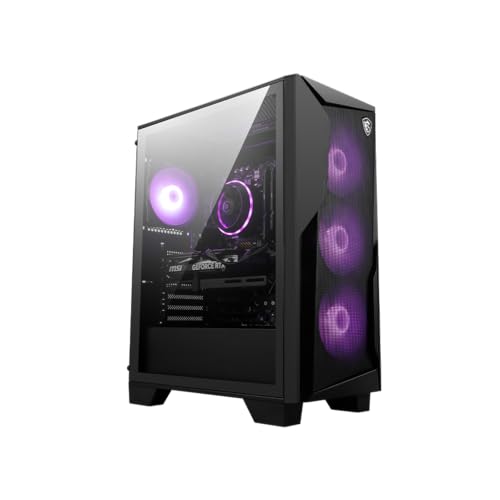
MSI Codex R2 (RTX 4060)
The MSI Codex R2 is the most accessible desktop on this list, and its listing states the combination plainly: a gaming desktop with an Intel Core i5-14400F processor, a GeForce RTX 4060, 16GB of DDR5 memory, a 1TB m.2 NVMe SSD, an 80+ Gold power supply, WiFi, a keyboard and mouse, and Windows 11 Home, in a DIY-friendly design. An 80+ Gold power supply is the efficiency detail that matters: it wastes less electricity as heat, which keeps the machine cooler and quieter.
The RTX 4060 is the current-generation entry-level card, and it handles most games at high settings without the cost of the stronger cards here. Sixteen gigabytes of DDR5 memory and a 1TB NVMe drive cover everyday gaming and work, and the DIY-friendly design means the case is easy to open for upgrades later. The included keyboard and mouse mean the machine is ready on arrival, which matters for a first desktop.
For a buyer who wants a current-generation Nvidia card in the most accessible complete desktop here, the Codex R2 is the pick. The RTX 4060, the efficient power supply, and the included peripherals cover the brief for the least money. It is the computer to buy when the priority is a solid gaming desktop without a premium budget.
Key specifications: msi Codex R2 gaming desktop A14NUC5-232US; Intel Core i5-14400F; Geforce RTX 4060; 16GB DDR5; 1TB m.2 NVMe SSD; 80+ Gold PSU; WiFi; keyboard and mouse; DIY friendly; Windows 11 Home.
This computer fits a buyer who wants a current-generation Nvidia card in the most accessible complete desktop here.
Strengths
- The 80+ Gold power supply wastes less electricity as heat.
- The DIY-friendly design makes future upgrades easy.
- A keyboard and mouse are included, so it is ready on arrival.
Trade-offs
- The RTX 4060 is the entry-level card among the picks here.
- It has 16GB of memory, less than the 32GB machines here.
- The 1TB drive fills faster than the 2TB drive here.
The Codex R2 suits a player buying a first gaming desktop, or anyone who wants a solid machine without a premium budget. It fits a buyer who plans to upgrade the machine later.
Best for: most accessible desktop with a current-gen card / Not suited for: a buyer who wants a stronger card or 32GB of memory
Check price on Amazon: MSI Codex R2 RTX 4060

Skytech Archangel 5 (RTX 5060)
The Skytech Archangel 5 is the newest entry-level desktop on this list, and its listing states the combination plainly: a gaming PC desktop with an Intel i5 14400F processor, an RTX 5060, 16GB of RAM, a 1TB SSD, Windows 11, an NVMe SSD, DDR5 6000 memory, a 750W Gold power supply, and Wi-Fi 5. The RTX 5060 is the newest generation among the entry-level cards here, and the 750W Gold power supply gives the machine headroom for upgrades.
DDR5 6000 memory is the speed detail that sets this machine apart from the other 16GB desktops. Faster memory helps the processor feed the graphics card, which keeps frame rates steadier in demanding games. The 1TB NVMe drive loads games quickly, and the 750W Gold power supply is generously sized for a machine at this tier, which means a stronger graphics card could be fitted later without replacing the power supply.
For a buyer who wants the newest entry-level Nvidia card with fast memory and a strong power supply, the Archangel 5 is the pick. The RTX 5060, the DDR5 6000 memory, and the 750W Gold supply cover gaming now and upgrades later. It is the computer to buy when the priority is a new-generation card with room to grow.
Key specifications: Skytech Gaming PC Desktop Archangel 5 Series; Intel i5 14400F; RTX 5060; 16GB RAM; 1TB SSD; Windows 11; NVMe SSD; DDR5 6000; 750W GOLD PSU; Wi-Fi 5.
This computer fits a buyer who wants the newest entry-level Nvidia card with fast memory and upgrade headroom.
Strengths
- The RTX 5060 is the newest entry-level card here.
- DDR5 6000 memory is the fastest memory among the 16GB picks.
- The 750W Gold power supply leaves room for upgrades.
Trade-offs
- It has 16GB of memory, less than the 32GB machines here.
- Wi-Fi 5 is an older wireless standard than Wi-Fi 7 here.
- The 1TB drive fills faster than the 2TB drive here.
The Archangel 5 suits a player buying a first gaming desktop who wants a new-generation card and a power supply that supports upgrades. It fits anyone who plans to keep the machine for years.
Best for: newest entry-level RTX 5060 with DDR5 6000 / Not suited for: a buyer who needs 32GB of memory or Wi-Fi 7
Check price on Amazon: Skytech Archangel 5 RTX 5060
Best computers with Nvidia graphics cards: what matters most: what matters most
The graphics card is the first check, because it decides how the computer plays games. The desktops here carry GeForce cards from the RTX 3060 Ti to the RTX 5070, and a newer card generally means better performance and newer features. But the card number alone is not enough: an RTX 5070 in a machine with too little memory will still stutter, so the card must be judged with the rest of the system.
The processor is the second check. A gaming desktop needs a processor that can keep up with its graphics card, and the listings here describe processors from a 16-core i7-13700F to a Ryzen 7 7800X3D. A many-core processor helps with streaming and editing as well as gaming, while a processor with a large cache, such as the 7800X3D, helps specifically with games. Match the processor to the work the machine will actually do.
Memory and storage are the third check. Sixteen gigabytes is enough for gaming and everyday work, while 32GB is better for a buyer who keeps many programs open at once. A 1TB drive holds a reasonable game library, while a 2TB drive holds a large one without a second purchase. Check both numbers in the listing, because a machine with a strong card and a small drive will need an upgrade sooner than expected.
Finally, check the listing itself. A complete desktop listing should state the graphics card, the processor, the memory, the storage, and the operating system. Confirm the brand and model name match exactly, because similar model names can hide different cards or processors, and check that the listing is new rather than renewed. A careful check at this stage avoids the most common disappointment: a computer that is almost right.
Buying guide: choosing computers with Nvidia graphics cards
Start by listing the games and programs the computer must run. A machine for competitive games at high refresh rates needs a stronger graphics card than a machine for casual games, and a machine for video editing needs more processor cores and memory. Write the list first, then match the desktop to it, rather than buying the strongest machine and hoping it fits.
Next, decide between a tower and a smaller case. A full tower such as the OMEN 45L has room for cooling and upgrades, while a compact desktop fits a small desk but leaves less room to grow. Measure the space where the computer will sit, including ventilation around it, because a desktop pushed against a wall will run hotter and louder.
Then weigh the graphics card against the rest of the system. A balanced machine, where the processor, memory, and storage all match the card, will feel faster than a machine with a strong card and weak companions. The picks here are ordered so that the balanced machines come first, which makes the comparison easier.
Finally, confirm the listing before ordering. Read the full title and check the graphics card, processor, memory, and storage against the computer being bought, because similar model names can hide different cards. Check that the listing is new rather than renewed, that Windows is included, and that a keyboard and mouse are included if they are needed. A careful check avoids the most common disappointment: a computer that arrives without something essential.
Using and caring for your computers with Nvidia graphics cards
Set the desktop up with space around it for air. A gaming desktop draws in cool air and pushes out warm air, so it needs clearance on all sides, especially at the back and the top. Do not push it against a wall or into a closed cabinet, because trapped heat makes the fans louder and the machine slower.
Keep the machine updated and the dust out. Update Windows and the Nvidia graphics driver regularly, because driver updates fix performance problems and add support for new games. Clean the dust filters monthly if the case has them, and keep the desk around the machine clear so air can reach the intake.
Use the storage wisely. Install the games played most often on the fast SSD, and move older games or large files to a second drive if one is fitted. A drive that is nearly full slows the machine down, so leave some free space on the main drive. Back up important files regularly, because a gaming desktop holds more than games.
Common mistakes to avoid
The most common mistake is buying a desktop for its graphics card alone and ignoring the processor and memory. A strong card with a weak processor will stutter, and a fast machine with too little memory will slow down when several programs are open. Judge the whole machine, not the card in isolation.
The second mistake is choosing a case without measuring. A full tower that does not fit the desk ends up on the floor, where it collects dust and its ports are hard to reach. Measure the space, check the ventilation, and then choose the size.
The third mistake is buying a renewed desktop without noticing. A renewed machine may have a worn drive or a tired cooler, and its listing says so in the title. Read the full title for the word renewed, and check the brand and model name against the computer being bought. A new machine with a stated specification is the safer purchase.
Budget and value
The value desktops on this list cover the brief for the least money, and the difference between them is mostly the graphics card and the memory. A 16GB machine with an RTX 4060 or RTX 5060 costs less than a 32GB machine with an RTX 5070 and covers most games at high settings, so it is the better value for most buyers. The RTX 5070 machines cost more, and they earn that difference only for a player who needs the strongest performance.
A practical budget is to spend the least that buys a named Nvidia card, a modern processor, 16GB of memory, and a 1TB SSD, then put any remaining money toward a monitor or a headset. The monitor matters as much as the computer: a strong graphics card deserves a display that can show what it renders. The picks above are ordered so that the balanced machines come first, which makes the trade-off easy to see.
Remember that a desktop is a long-term purchase. A machine with a strong power supply and a DIY-friendly case can be upgraded later, while a machine with a weak power supply cannot. Judge the purchase on several years of use, not on the day it arrives, and the upgradeable machine will usually prove the cheaper choice.
Final recommendation
The Lenovo Legion Tower 5 is the recommendation for most buyers: its listing states the newest graphics card on this list in the RTX 5070, one of the strongest gaming processors in the Ryzen 7 7800X3D, and a balanced 32GB of memory with a 1TB drive. It covers gaming and work together, without asking for the largest budget here, and it is the computer to buy when the priority is current-generation performance.
A buyer who wants the largest drive and the fastest connectivity should choose the Alienware Aurora ACT1250 instead, because its 2TB SSD and Wi-Fi 7 are unmatched here. A buyer on a tighter budget should choose the MSI Codex R2, and a buyer who wants liquid cooling should choose the HP OMEN 45L. Each of these computers has a real Nvidia graphics card and a complete specification; the right one depends on the games, the work, and the desk.
Frequently asked questions
What graphics card do I need in a gaming desktop?
It depends on the games. An RTX 4060 or RTX 5060 handles most games at high settings, an RTX 3060 Ti or RTX 3070 covers demanding games, and an RTX 5070 covers the most demanding games. Match the card to the games actually played.
How much memory should a gaming computer have?
16GB is enough for gaming and everyday work, while 32GB is better for a buyer who keeps many programs open at once or who streams and edits video. The desktops on this list offer both, so the choice depends on the workload.
Is a prebuilt desktop better than building my own?
A prebuilt desktop is ready to use on arrival, with the parts chosen and assembled and Windows installed. Building your own can cost less and allows exact part choices, but it takes time and carries the risk of a part that does not fit.
What is the difference between an RTX 5060 and an RTX 5070?
The RTX 5070 is the stronger card, with more performance for demanding games at high settings. The RTX 5060 is the entry-level card of the same generation, and it covers most games at high settings for less money.
Do these computers come with Windows installed?
Yes, according to their listings. The desktops on this list state Windows 11 Home, so they are ready to use on arrival. Check the listing for the operating system before ordering, because some listings sell a machine without one.
What should I check before buying a computer with an Nvidia card?
Check that the listing names the exact GeForce card, processor, memory, and storage, and that the brand and model name match. Confirm the listing is new rather than renewed, and that Windows and any needed peripherals are included.
Can I upgrade a prebuilt desktop later?
Usually, yes. Most prebuilt desktops accept more memory, a larger drive, or a stronger graphics card, provided the case has room and the power supply can feed the new part. The MSI Codex R2 on this list is described as DIY-friendly, which means its case is easy to open for upgrades.
Monitors and the graphics card
A graphics card deserves a monitor that can show what it renders. A strong card paired with an old low-resolution display will look no better than a weaker card, because the display is the bottleneck. Match the monitor to the card: a 1080p high-refresh display suits an RTX 4060 or RTX 5060, while a 1440p display suits an RTX 5070. The monitor is part of the system, not an afterthought.
Refresh rate matters as much as resolution. A card that renders a game at high frame rates needs a display that can show them, or the extra frames are wasted. Check the monitor refresh rate when budgeting for a desktop, and put aside money for a display that matches the card. A balanced setup, where the card and the display agree, feels faster than a mismatched one.
Cooling and noise in a gaming desktop
A gaming desktop makes noise, and how much depends on its cooling. Liquid cooling, as in the HP OMEN 45L on this list, keeps the processor cool with less fan noise than a large air cooler, which matters in a quiet room or a shared space. Air cooling is simpler and easier to maintain, and a well-designed air-cooled tower can be nearly as quiet.
Placement affects noise as much as cooling design. A desktop on the floor under a desk sounds louder than the same machine on the desk, because the floor reflects sound and traps heat. Give the machine space to breathe, keep its intake clear, and clean the dust filters regularly. A cool machine is a quiet machine, and a quiet machine is one that gets used more.
More guides from KajuanDouglas
Best gaming laptops for under 500 with Nvidia Best laptops with Nvidia RTX Best 8GB RAM Nvidia gaming laptops under 500 Best graphics cards for gaming laptops