The best wired gaming mouse linus search points to a simple idea: a wired mouse that never drops a click, never needs charging, and feels right after hours of play. Linus Tech Tips videos and the discussions around them keep coming back to the same handful of wired mice, and this guide gathers six of them in one place. Each pick below is a wired gaming mouse with a named sensor, a stated button layout, and a shape that suits a real grip style.
A wired connection still has real advantages for gaming. There is no battery to manage, no wireless receiver to lose, and no charging dock taking up desk space. The cable is the trade-off, and modern paracord-style cables and light shells have made that trade-off much smaller than it used to be. What matters most is the sensor, the switches, the weight, and whether the shape fits your hand.
The six mice below cover the main shapes and budgets that come up in this search. There is a heavy adjustable classic, a light esports shape, a budget starter, and a palm-friendly ergonomic option. All six are wired models with their brand and model named in the listing, so you can match the mouse to the exact version you want.
In this guide
Quick picks: best wired gaming mouse linus
| # | Product | Where to buy |
|---|---|---|
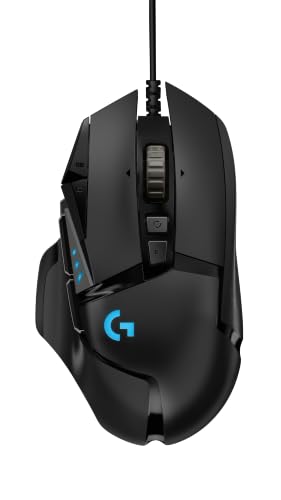
| 1 | Logitech G502 HERO | Check on Amazon |
| 2 | Razer DeathAdder V3 | Check on Amazon |
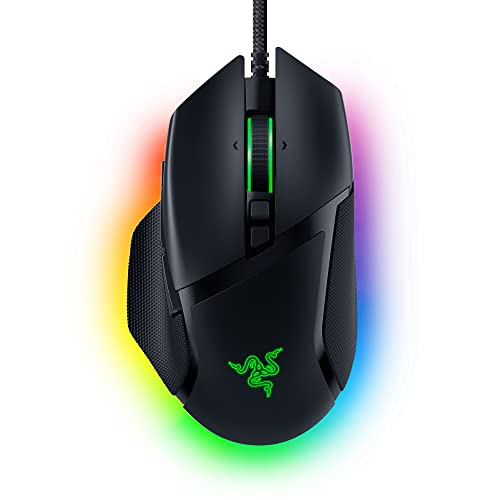
| 3 | Razer Basilisk V3 | Check on Amazon |
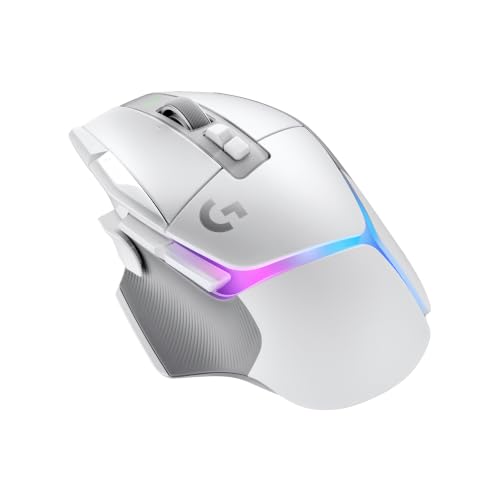
| 4 | Logitech G502 X | Check on Amazon |
| 5 | Razer DeathAdder Essential | Check on Amazon |
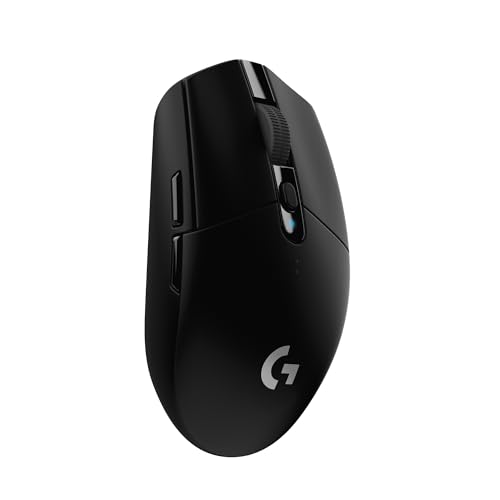
| 6 | Logitech G203 | Check on Amazon |
| 7 | Razer Cobra | Check on Amazon |
How the picks were chosen
The picks were chosen from the site's own product lookup, using only listings that name the exact brand and model. A mouse made the shortlist only if its listing states that it is wired, names its sensor or DPI range, and describes its button layout. Wireless-only versions of the same model lines were left out, because this guide is about wired mice.
Shape and weight were weighed next. A mouse that is too heavy causes fatigue in long sessions, while a mouse that is too light can feel unstable for players who rest their whole palm on it. The shortlist mixes right-handed ergonomic shapes with ambidextrous designs, and weights from the high fifties in grams up to the adjustable-weight class, so different hands can find a fit.
Finally, each pick had to cover a clear use. One is the best all-rounder, one is the lightest, one is the cheapest way in, and the rest fill the gaps between them. No pick here is an accessory, a bundle, or a different generation wearing a similar name. Where a listing was unclear about the model, the mouse was not used.
Quick comparison
| Product | Standout feature | Best for |
|---|---|---|
| Logitech G502 HERO Wired Gaming Mouse | Adjustable weights with HERO 25K sensor | players who want an adjustable, full-featured wired mouse |
| Razer DeathAdder V3 Wired Gaming Mouse | 59 grams with 8KHz polling and Focus Pro 30K sensor | competitive players who want a light wired esports mouse |
| Razer Basilisk V3 Customizable RGB Wired Ergonomic Gaming Mouse | Ergonomic thumb-rest shape with Chroma RGB | players who want an ergonomic wired mouse with a thumb rest |
| Logitech G502 X Wired Gaming Mouse | 13 buttons with optical switches and infinite scroll | players who want the G502 shape with optical switches |
| Razer DeathAdder Essential Ergonomic Wired Gaming Mouse | DeathAdder shape with 6400 DPI sensor at a low cost | buyers who want the DeathAdder shape at the lowest cost |
| Logitech G203 Wired Gaming Mouse | Compact 8,000 DPI mouse with six buttons | small hands and compact laptop setups |
| Razer Cobra Wired Gaming Mouse | 58 grams with Chroma RGB underglow | players who want a light ambidextrous wired mouse with underglow |

Logitech G502 HERO Wired Gaming Mouse
The Logitech G502 HERO is the classic adjustable wired gaming mouse, built around the HERO 25K sensor with a stated range up to 25,600 DPI. The listing names RGB lighting and an adjustable weight system, and the mouse is made for PC and Mac. It is the reference point that other wired gaming mice are measured against.
Key specifications: HERO 25K sensor, up to 25,600 DPI, RGB lighting, adjustable weights, wired USB, PC and Mac.
In daily use the G502 HERO feels planted and deliberate. The thumb rest and the wide right-handed body support a palm grip, and the two main buttons have a firm, defined click. The scroll wheel switches between notched and free-spinning modes, which is handy for browsing long pages as well as for weapon switching in games.
Plug it in and it works as a standard mouse at once. Logitech's software lets you remap the buttons, tune the DPI steps, and set the lighting, and the weight tuning system uses small metal weights that sit in a tray under the body. Add or remove weights until the balance feels even under your palm.
Strengths
- HERO 25K sensor with a wide stated DPI range
- Adjustable weights let you tune the balance to your hand
- Many programmable buttons plus a dual-mode scroll wheel
Trade-offs
- Heavier than the light esports mice in this guide
- Right-handed shape only, so left-handed players should look elsewhere
- The wide body can feel large for small hands
This mouse fits players who want one wired mouse for everything: competitive games, work, and browsing. It suits palm grippers and players who like a solid, weighted feel under the hand.
Best for: players who want an adjustable, full-featured wired mouse / Not suited for: players who want the lightest possible mouse or a left-handed shape
Check price on Amazon: Logitech G502 HERO

Razer DeathAdder V3 Wired Gaming Mouse
The Razer DeathAdder V3 is a light wired esports mouse at 59 grams, with an 8KHz polling rate and a Focus Pro 30K optical sensor. The listing names Gen-3 optical switches and six programmable buttons. It is the lightest mouse in this guide and the one built most directly for fast competitive play.
Key specifications: 59 grams, 8KHz polling rate, Focus Pro 30K optical sensor, Gen-3 optical switches, 6 buttons, wired USB.
In daily use the DeathAdder V3 feels almost weightless. The ergonomic right-handed shape fills the palm without forcing the fingers into a cramped position, and the light shell makes fast flicks and long tracking movements easier on the wrist. The cable is flexible enough that it rarely pulls the mouse off line.
Plug it in and set your DPI in Razer's software, where you can also remap the six buttons and tune the polling rate. The 8KHz polling rate is the headline feature, but it only shows its value on a system that can keep up with it, so a high refresh rate display pairs well with this mouse.
Strengths
- Very light at 59 grams for fast movement
- Focus Pro 30K sensor with 8KHz polling
- Comfortable ergonomic shape for long sessions
Trade-offs
- Only six buttons, fewer than the G502 models here
- Right-handed shape only
- No adjustable weights for players who like a heavier mouse
This mouse fits competitive players who use a palm or claw grip and want the lightest wired option. It suits fast-paced shooters where quick flicks and tracking matter most.
Best for: competitive players who want a light wired esports mouse / Not suited for: players who need many side buttons or a heavy mouse
Check price on Amazon: Razer DeathAdder V3

Razer Basilisk V3 Customizable RGB Wired Ergonomic Gaming Mouse
The Razer Basilisk V3 is a wired ergonomic gaming mouse with Chroma RGB lighting and a customizable layout. The listing calls out the fastest gaming mouse switch design and a shape built for right-handed players. It sits between the heavy G502 HERO and the light DeathAdder V3, with a thumb rest and a focus on control.
Key specifications: Wired USB, ergonomic right-handed shape, Chroma RGB lighting, optical mouse switches, customizable buttons.
In daily use the Basilisk V3 feels secure and controlled. The thumb rest gives the thumb a place to sit, and the side buttons fall naturally under the thumb for games that need extra binds. The RGB lighting runs around the base and the scroll wheel, and it can be toned down or switched off in software.
Plug it in and open Razer's software to remap the buttons, adjust the DPI steps, and set the lighting. The sniper button on the side drops sensitivity while held, which is useful for scoped weapons. Keep the lighting subtle if you play in a dark room and find bright LEDs distracting.
Strengths
- Comfortable ergonomic shape with a thumb rest
- Chroma RGB lighting that can be customized or switched off
- Side sniper button for temporary sensitivity drops
Trade-offs
- Heavier than the DeathAdder V3
- Right-handed shape only
- The extra buttons take a few days to learn
This mouse fits players who want an ergonomic wired mouse with good side-button access. It suits first-person shooters and games where a thumb button for aiming or abilities helps.
Best for: players who want an ergonomic wired mouse with a thumb rest / Not suited for: left-handed players and players who want the lightest shell
Check price on Amazon: Razer Basilisk V3

Logitech G502 X Wired Gaming Mouse
The Logitech G502 X is the newer wired version of the G502 line, with optical switches, 13 buttons, and an infinite scroll wheel. The listing states PC and macOS compatibility. It keeps the G502 shape and button count while moving to optical switches and a lighter build than the original HERO model.
Key specifications: Optical switches, 13 buttons, infinite scroll wheel, wired USB, PC and macOS.
In daily use the G502 X feels like a refined G502. The 13 buttons cover macros, DPI shifting, and extra game binds without reaching, and the infinite scroll wheel is useful for long documents and fast inventory scrolling. The optical switches give a crisp click with no double-click wear to worry about.
Plug it in and use Logitech's software to set the DPI steps and remap the 13 buttons. The infinite scroll wheel has a toggle, so set it to notched mode for games where each scroll step should count, and free-spinning mode for browsing. The mouse works on PC and macOS.
Strengths
- 13 buttons for macros and game binds
- Optical switches with a crisp click
- Infinite scroll wheel with a notched mode
Trade-offs
- Still a large right-handed mouse
- Costs more than the original G502 HERO
- The button layout takes time to memorize
This mouse fits players who liked the G502 shape but want optical switches and a lighter body. It suits MMO and strategy players who use many binds, as well as anyone who wants one mouse for games and work.
Best for: players who want the G502 shape with optical switches / Not suited for: players with small hands or anyone who wants a simple six-button mouse
Check price on Amazon: Logitech G502 X

Razer DeathAdder Essential Ergonomic Wired Gaming Mouse
The Razer DeathAdder Essential is the budget entry in the DeathAdder line, with a 6400 DPI optical sensor, five programmable buttons, and rubber side grips. The listing names the ergonomic wired design in black. It gives you the DeathAdder shape and a reliable sensor at the lowest cost in this guide.
Key specifications: 6400 DPI optical sensor, 5 programmable buttons, rubber side grips, wired USB, ergonomic shape.
In daily use the DeathAdder Essential is simple and comfortable. The ergonomic shape supports the palm, the rubber grips keep the fingers in place, and the five buttons cover the basics without clutter. The 6400 DPI sensor is more than enough for the sensitivity most players use.
Plug it in and it works at once, with no software needed for basic use. Razer's software lets you remap the five buttons and set the DPI if you want to tune it. This is the easiest mouse in the guide to hand to someone who just wants a good wired mouse without a learning curve.
Strengths
- Lowest cost way into the DeathAdder shape
- Comfortable ergonomic body with rubber grips
- Simple five-button layout with no learning curve
Trade-offs
- 6400 DPI sensor is more basic than the others here
- Only five programmable buttons
- No RGB lighting or extra features
This mouse fits first-time gaming mouse buyers and anyone who wants a comfortable wired mouse without paying for features they will not use. It suits palm and claw grips in equal measure.
Best for: buyers who want the DeathAdder shape at the lowest cost / Not suited for: players who need a high-end sensor or many extra buttons
Check price on Amazon: Razer DeathAdder Essential

Logitech G203 Wired Gaming Mouse
The Logitech G203 is a compact wired gaming mouse with an 8,000 DPI sensor, six programmable buttons, and a rainbow optical lighting effect. The listing states it is made for laptop and computer use in black. It is the smallest mouse in this guide and the best fit for small hands and travel bags.
Key specifications: 8,000 DPI sensor, 6 programmable buttons, rainbow optical lighting, wired USB, compact shape.
In daily use the G203 feels light and nimble. The compact body suits fingertip and claw grips, and the six buttons cover the essentials without crowding the shell. The rainbow lighting is subtle and adds a bit of color to a plain desk without being distracting.
Plug it in and it works at once. Logitech's software lets you remap the six buttons and tune the DPI steps. Because it is compact and light, it also works well as a travel mouse in a laptop bag, where a big ergonomic mouse would take up too much room.
Strengths
- Compact and light, good for small hands
- 8,000 DPI sensor covers normal play
- Six programmable buttons in a simple layout
Trade-offs
- Too small for large palm-grip hands
- No adjustable weights
- The lighting effect cannot be shaped into complex patterns
This mouse fits players with small hands, fingertip grippers, and anyone who wants a compact wired mouse for a laptop setup. It also works well as a second mouse for travel.
Best for: small hands and compact laptop setups / Not suited for: players with large hands who palm-grip their mouse
Check price on Amazon: Logitech G203

Razer Cobra Wired Gaming Mouse
The Razer Cobra is a light wired gaming mouse at 58 grams, with Gen-3 optical switches and an 8500 DPI optical sensor. The listing names Chroma RGB lighting with underglow and a wired design in black. It is the lightest ambidextrous mouse in this guide and the only one here that suits left-handed players as well as right-handed ones.
Key specifications: 58 grams, Gen-3 optical switches, 8500 DPI optical sensor, Chroma RGB underglow lighting, wired USB.
In daily use the Cobra feels quick and easy to move. The ambidextrous shell suits left and right hands, and the underglow lighting adds a soft ring of color under the mouse without lighting up the whole desk. The Gen-3 optical switches give a light, crisp click that stays consistent over long sessions.
Plug it in and open Razer's software to set the DPI steps and the underglow lighting. The 8500 DPI sensor covers normal play with room to spare, and the six buttons can be remapped for your main games. Because the shell is ambidextrous, left-handed players can set it up the same way right-handed players do.
Strengths
- Very light at 58 grams for fast movement
- Ambidextrous shape suits left and right hands
- Gen-3 optical switches with a crisp click
Trade-offs
- 8500 DPI sensor is more basic than the DeathAdder V3
- Fewer buttons than the G502 models
- The underglow may be too bright for some players
This mouse fits players who want a light ambidextrous wired mouse and do not need a sculpted right-handed shape. It suits claw and fingertip grips and works well for both gaming and general computer use.
Best for: players who want a light ambidextrous wired mouse with underglow / Not suited for: players who want a heavy palm-filling ergonomic mouse
Check price on Amazon: Razer Cobra
Best Wired Gaming Mouse Linus: What Matters Most
Sensor accuracy matters more than the biggest DPI number on the box. Every mouse in this guide lists a sensor with a stated DPI or CPI range, and all of them track cleanly at the sensitivity most players actually use. A sensor rated to 25,600 DPI is useful because it stays precise at lower settings, not because anyone plays at maximum sensitivity.
Switches decide how clicks feel and how long they last. Optical switches avoid the double-click wear that mechanical switches can develop, while good mechanical switches give a crisp, defined click. The picks below state their switch type in the listing, so you know which kind you are getting before you buy.
Weight and balance change how a mouse feels more than any software setting. Light mice near 60 grams suit fast flicks and low-sensitivity arm aiming, while heavier mice with adjustable weights suit players who like resistance under the palm. Try to match the weight to your grip: palm grippers usually prefer a fuller, heavier body, while fingertip grippers prefer a light shell.
Cable quality is the one wired-only concern. A stiff cable drags and pulls the mouse off line, while a flexible cable disappears under your hand. If your desk setup lets the cable hang freely or run through a bungee, even a basic cable stops being a problem. All six picks below use standard USB connections and work on PC and Mac unless the listing says otherwise.
Polling rate decides how often the mouse reports its position, and it matters most on high refresh rate displays. A 1000 Hz rate is standard and feels smooth for most players, while an 8000 Hz rate like the DeathAdder V3 offers can feel smoother still on a fast system. Do not chase the highest rate if your display runs at 60 Hz, because you will not feel the difference there.
Buying guide: best wired gaming mouse linus
Start with your grip. Hold your current mouse and notice where your palm sits: a full palm grip needs a larger ergonomic body like the G502 HERO or the DeathAdder V3, while a fingertip grip works better with a compact shell like the G203. A claw grip sits in between and suits most of the mice in this guide. Grip matters more than DPI, because a mouse that fights your hand will feel wrong no matter how good its sensor is.
Check the sensor rating against how you actually play. All six mice here list sensors from 6400 DPI to 30,000 DPI, and any of them tracks cleanly at normal sensitivity. A higher maximum matters mainly for players who use very high sensitivity or very high polling rates. For most players, the difference between a 6400 DPI sensor and a 25,600 DPI sensor is invisible in play.
Count the buttons you will really use. Six buttons cover left, right, middle click, two side buttons, and a DPI switch, which is enough for most shooters. Thirteen buttons suit MMO and strategy games where every ability needs a bind. More buttons are only useful if you can reach them without shifting your grip, so a mouse with buttons you cannot find by touch is worse than a simpler one.
Think about weight in grams, not in marketing words. The DeathAdder V3 at 59 grams and the G203 feel quick and light, while the G502 models feel planted and deliberate. If you play low-sensitivity games with big arm movements, a light mouse reduces fatigue. If you play high-sensitivity games with wrist movements, a heavier mouse can feel more stable and controlled.
Look at the cable and the desk. A wired mouse needs a cable path that does not drag, so leave slack in the cable or run it through a bungee. Check that the USB plug fits your setup, especially on a laptop where ports sit close together. All six mice here use a standard USB connection and work on PC, with macOS support stated for the Logitech models.
Check the polling rate, which is how often the mouse reports its position to the computer. A 1000 Hz polling rate is standard and suits most players, while an 8000 Hz rate like the DeathAdder V3 offers can feel smoother on high refresh rate displays. A higher polling rate uses more system resources, so it only helps if your computer and display can keep up with it.
Set up profiles in the software for your main games. Most makers let you save a profile per game, with its own DPI steps, button mapping, and lighting. A profile for a shooter might use a low DPI with a sniper button, while a profile for a strategy game might map extra buttons to unit commands. Profiles save you from changing settings every time you switch games.
Using and caring for your wired gaming mouse
Keep the sensor lens clean. Dust and hair on the sensor window cause skipping and jitter, so wipe the underside with a dry cloth once a week and check the lens after playing on a dusty desk. A clean sensor tracks better than any software setting can fix.
Use a mouse pad that suits the feet. Hard pads give fast glide and suit light mice, while cloth pads give control and suit heavier mice. Replace a worn pad when the surface feels rough or the mouse starts to catch, because a rough pad wears down the mouse feet and changes how the mouse glides.
Store the cable loosely. Do not wrap it tightly around the mouse or kink it at the plug, because a damaged cable is the most common reason a wired mouse fails. Coil it loosely when you travel, and keep it away from chair wheels and desk edges that can pinch it.
Clean the buttons and wheel with a dry cloth. Skin oils build up on the main buttons and make them slippery, and dust in the scroll wheel makes scrolling feel gritty. A quick wipe every week keeps the click feel consistent and the wheel smooth.
Replace worn mouse feet when the glide changes. The small pads under the mouse wear down over months of use, and worn feet make the mouse feel rough and slow. Replacement feet are cheap and easy to fit, and a fresh set restores the glide of a new mouse without buying a new one.
Common mistakes to avoid
Buying on the biggest DPI number alone is the most common mistake. A 30,000 DPI sensor does not make you aim better, and most players use between 400 and 1600 DPI. Pick the shape and weight first, then check that the sensor covers the range you use.
Ignoring hand size is the second mistake. A large mouse forces a small hand to stretch, and a small mouse leaves a large hand cramped. If you can, hold the mouse before buying, or at least compare its length and width with a mouse you already find comfortable.
Choosing a wireless version by accident is easy with these model lines. Several mice here have wireless siblings with nearly identical names, so check the listing title for the word wired before you buy. The picks in this guide are the wired versions.
Skipping the software setup wastes the mouse. The DPI steps, button mapping, and lighting are all set in the maker's software, and the default settings are rarely the best for your games. Spend ten minutes setting up profiles for your main games after the mouse arrives.
Buying a mouse without checking its size against your hand is a common mistake. Mice in this guide range from the compact G203 to the wide G502 models, and the same shape can feel perfect for one hand and cramped for another. Compare the length and width with a mouse you already like before you order, and check the return policy if you cannot try it first.
Budget and value
The DeathAdder Essential and the G203 cover the basics at the lowest cost in this guide, and either one is enough for casual play. You pay more for a better sensor, optical switches, and extra buttons, not for a different shape. If your budget is tight, start with one of these two and upgrade later when you know which grip and weight you prefer.
The middle of the range is where the value sits for most players. The Basilisk V3 and the G502 X add real features over the budget picks: better switches, more buttons, and a more refined shape. The DeathAdder V3 is the pick for players who know they want the lightest mouse and are willing to pay for it.
A wired mouse is a long-term purchase. There is no battery to wear out, and the only parts that age are the cable and the feet, both of which are cheap to protect with a little care. Spending a bit more on a shape that fits your hand pays off over years of daily use.
Think about how long you will keep the mouse. A wired mouse has no battery to wear out, so a well-chosen mouse can last for years. The extra cost of a better sensor and better switches pays off over that time, while a mouse that does not fit your hand will be replaced quickly no matter how little it cost.
Final recommendation
If you want one wired mouse that does everything, the Logitech G502 HERO is the safe pick: an adjustable, full-featured mouse with a proven sensor. If you play competitive shooters and want the lightest option, the Razer DeathAdder V3 is the better choice. If your budget is tight, the DeathAdder Essential and the Logitech G203 both give you a comfortable wired mouse without paying for features you will not use. Pick the shape that fits your grip first, and the rest of the decision gets easy. Whichever one you choose, give yourself a week to get used to it before judging the fit, because a new shape always feels strange on the first day.
Frequently asked questions
What does best wired gaming mouse linus mean?
It is the search people use when they want a wired gaming mouse of the kind that shows up in Linus Tech Tips videos and the discussions around them. The mice in this guide are the wired models that come up most often in that search: Logitech G502 models, Razer DeathAdder models, and similar well-known wired gaming mice.
Is a wired gaming mouse better than a wireless one?
A wired mouse never needs charging and has no battery to wear out, and the connection is as direct as it gets. Wireless mice have closed the gap on latency, so the real difference is practical: wired suits a fixed desk setup, while wireless suits players who move their mouse between machines or hate cables.
What DPI should I use for gaming?
Most players use between 400 and 1600 DPI with in-game sensitivity tuned to match. A higher DPI setting does not improve aim on its own. Set the DPI so that a comfortable arm or wrist movement turns your character the amount you expect, then leave it alone and let muscle memory build.
How heavy should a gaming mouse be?
It depends on your grip and sensitivity. Light mice near 60 grams suit low-sensitivity play with big arm movements, while heavier mice suit high-sensitivity play with wrist movements. If you are unsure, a mouse with adjustable weights like the G502 HERO lets you try different weights before you commit.
Do I need software for a wired gaming mouse?
No, every mouse in this guide works as a standard mouse when you plug it in. The maker's software is only needed to remap buttons, tune DPI steps, and set lighting. It is worth installing once, because the default settings are rarely the best for your games.
Can I use these mice on a laptop?
Yes. All six are standard USB mice that work on laptops as well as desktops. The compact Logitech G203 is the easiest to carry in a laptop bag, while the larger ergonomic models suit a laptop used at a desk with an external mouse pad.
What is polling rate and does it matter?
Polling rate is how often the mouse reports its position to the computer, measured in hertz. A 1000 Hz rate reports a thousand times per second, which is smooth for most players. An 8000 Hz rate reports eight thousand times per second and can feel smoother on high refresh rate displays, but it only helps if your system can keep up.
Are wired mice good for FPS games?
Yes. Wired mice are a common choice for first-person shooters because the connection is direct and the cable never runs out of charge mid-match. The DeathAdder V3 and the Cobra are the lightest picks here and suit fast flicks, while the G502 models suit players who like a heavier, more planted feel.
Does the mouse pad matter for a wired gaming mouse?
A mouse pad matters more than most people expect, because the surface decides how the mouse glides. A cloth pad gives control and suits heavier mice, while a hard pad gives speed and suits light mice. A worn or dirty pad makes any mouse feel rough, so replace the pad when the surface feels uneven and keep it clean with a damp cloth.
More guides from KajuanDouglas
Best White Gaming Mouse with RGB LEDs Best Gaming Mouse for Palmer Best Gaming Mouse for Laptops