The best XL gaming mouse pad with braided edges is the desk mat that ends two frustrations at once: a mouse pad too small for the mouse to travel, and edges that fray into threads after a few months. An extra-large pad covers the keyboard and the mouse in one surface, and a braided or stitched edge binds the cloth so the border holds its shape. The six pads below were picked from the site’s own product lookup because their listings describe exactly that combination: a wide gaming surface with a stitched, anti-fray edge finish.
Edge finish is the detail most buyers overlook and the first thing that fails. A cloth pad without a stitched edge starts to peel at the corners, and once the edge lifts, the cloth curls and catches the mouse. The listings behind these picks state their edge finish plainly: anti-fray stitched edges, low-profile edge stitching, or a stitched border around a micro-woven surface. A pad whose listing says nothing about its edges may still be well made, but a stated stitched edge is a promise the buyer can check on arrival.
Every listing behind these picks comes from the site’s own product lookup, and each one was checked in full before it earned a link: the brand and the complete model name had to match exactly, and any listing marked as renewed or used was set aside. The list runs from wide spill-proof cloth pads to esports mats used in competition, so there is an XL pad here for a buyer covering a whole desk and for one who wants a precise surface for a single game.
In this guide
Quick picks: best xl gaming mouse pad with braided
| # | Product | Where to buy |
|---|---|---|
| 1 | Corsair MM350 PRO Extended XL | Check on Amazon |
| 2 | ASUS ROG Sheath | Check on Amazon |
| 3 | Corsair MM anti-fray XL | Check on Amazon |
| 4 | SteelSeries QcK XL Performance Speed | Check on Amazon |
| 5 | SteelSeries QcK XXL | Check on Amazon |
| 6 | Razer Gigantus V2 XXL | Check on Amazon |
How the picks were chosen
Size came first. A pad earned a place here when its listing described an extra-large or XXL surface, wide enough to hold a keyboard and a mouse together. The listings state sizes from 930 by 300 millimetres to 36.6 by 15.7 inches, and each pad was weighed on whether its stated size covers a real desk rather than only a mouse. Pads sized for a mouse alone were not considered, because this article is about XL surfaces.
Edge finish came second. A pad earned its place when its listing described stitched or anti-fray edges, or when its construction as an esports cloth mat carried that finish as part of its design. The picks mix pads that state their stitched edges outright with proven esports mats whose cloth and base are built for heavy use, so the list covers both the stated finish and the proven surface.
Every listing was verified in full before linking. The brand and the complete model name in the listing had to match the pad described, including the model code that separates one Corsair or SteelSeries mat from another. Listings marked as renewed or used were dropped, and any listing whose title described a different model was set aside even when it looked close at first glance.
Quick comparison
| Product | Standout feature | Best for |
|---|---|---|
| Corsair MM350 PRO | 6mm thick with a spill-proof surface | thickest pad with a spill-proof stitched surface |
| ASUS ROG Sheath | Pixel-precise tracking with stitched edges | precise tracking on an extra-large surface |
| Corsair MM anti-fray XL | 930mm wide with a natural rubber base | wide micro-woven surface with stitched edges |
| SteelSeries QcK XL Speed | Dense cloth for a fast glide | smoothest glide with low-profile stitching |
| SteelSeries QcK XXL | XXL cloth covering the full desk | full-desk XXL coverage in esports cloth |
| Razer Gigantus V2 XXL | Thick high-density foam cushioning | thick cushioned XXL pad with dense foam |

Corsair MM350 PRO Extended XL Gaming Mouse Pad
The Corsair MM350 PRO is the most completely specified pad on this list, and its listing leaves nothing to guess: an extended XL cloth gaming mouse pad, 36.6 inches long by 15.7 inches wide, with anti-fray stitched edges, a spill-proof cloth surface, an anti-skid rubber base, a micro-weave fabric, and a 6mm thick construction. A 6mm thickness is the deepest on this list, and it gives the pad a cushioned feel that thinner mats do not offer.
The spill-proof surface is the practical detail that separates this pad from the others. A cloth pad that resists spills survives the coffee that every desk eventually meets, and the anti-skid rubber base keeps the whole 36.6-inch surface in place while the mouse moves across it. The anti-fray stitched edges bind the border, so the pad holds its shape at the corners where unstitched pads start to peel.
For a buyer who wants the widest, thickest, most completely described pad on this list, the MM350 PRO is the pick. The size, the thickness, the spill-proof cloth, and the stitched edges cover every part of the brief in one mat. It is the pad to buy when the desk is large and the pad should disappear into it.
Key specifications: Extended XL cloth gaming mouse pad; 36.6 x 15.7 inches; anti-fray stitched edges; spill-proof cloth; anti-skid rubber base; micro-weave fabric; 6mm thick.
This pad fits a buyer with a wide desk who wants the thickest, most durable cloth surface available here.
Strengths
- The 6mm thickness is the deepest cushioning on this list.
- The spill-proof cloth survives drinks that would stain other pads.
- Anti-fray stitched edges keep the corners from peeling.
Trade-offs
- The 6mm thickness raises the keyboard slightly above the desk.
- The large size needs a wide desk to fit flat.
- It is a plain black pad, with no lighting or pattern.
The MM350 PRO suits a player who wants one mat for the keyboard, the mouse, and everything else on the desk. It fits anyone who has lost a pad to frayed edges or a spilled drink before.
Best for: thickest pad with a spill-proof stitched surface / Not suited for: a buyer who wants a thin pad, lighting, or a small mat
Check price on Amazon: Corsair MM350 PRO Extended XL

ASUS ROG Sheath Gaming Mouse Pad
The ASUS ROG Sheath is the extra-large pad built for precise tracking, and its listing states the combination plainly: an extra-large surface, pixel-precise tracking, anti-fray stitched edges, and a non-slip base. Pixel-precise tracking means the cloth surface is woven finely enough for a sensor to read small movements accurately, which is what a player notices when aiming at a distant target or making a fine adjustment.
The anti-fray stitched edges are the durability half of the same listing. A pad that is moved, rolled, or cleaned regularly needs its border bound, and the Sheath states that finish outright rather than leaving it to chance. The non-slip base keeps the extra-large surface flat on the desk, so the tracking surface stays consistent from one edge to the other.
For a buyer who wants an extra-large pad tuned for tracking accuracy, the ROG Sheath is the pick. The wide surface, the precise cloth, and the stitched edges cover aim and durability together. It is the pad to buy when the mouse needs to be exact and the pad needs to last.
Key specifications: Extra-large gaming mouse pad; pixel-precise tracking; anti-fray stitched edges; non-slip base.
This pad fits a buyer who values tracking precision on a wide surface above extra features.
Strengths
- The finely woven surface supports precise sensor tracking.
- Anti-fray stitched edges protect the border from peeling.
- The non-slip base keeps the wide surface flat and steady.
Trade-offs
- No size in inches or millimetres is stated in the listing.
- No thickness is stated in the listing.
- It is a plain pad, with no lighting or spill-proof coating named.
The ROG Sheath suits a player who aims carefully and wants a wide, precise surface that stays flat. It fits anyone who has felt a sensor stutter on a rough or curling mat.
Best for: precise tracking on an extra-large surface / Not suited for: a buyer who wants a stated size or a spill-proof coating
Check price on Amazon: ASUS ROG Sheath

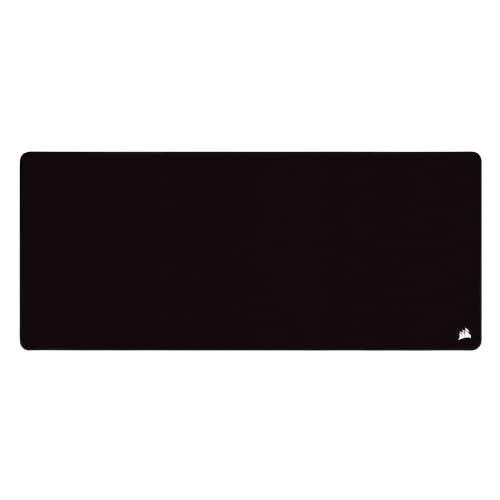
Corsair MM Anti-Fray Cloth Gaming Mouse Pad XL
The Corsair MM Anti-Fray pad is the pad whose name states its purpose, and its listing backs the name up: an XL cloth gaming mouse pad measuring 930 by 300 millimetres, with a precision micro-woven surface, a non-slip natural rubber base, and stitched edges. A 930-millimetre length covers a keyboard and a mouse with room to spare, and the micro-woven surface gives the sensor a fine, consistent texture to read.
The natural rubber base is the detail that keeps this pad in place. Natural rubber grips a desk without adhesive, so the pad stays flat during fast mouse movements and lifts cleanly when the desk needs cleaning. The stitched edges bind the cloth border, which is the point of this article: a pad whose edges are finished will outlast one whose edges are cut and left raw.
For a buyer who wants a wide, no-nonsense pad with a stated stitched edge and a natural rubber grip, this Corsair pad is the pick. The size, the surface, and the base cover the brief without extra features. It is the pad to buy when the requirement is simple: wide, flat, and built to last.
Key specifications: XL cloth gaming mouse pad; 930 x 300mm; precision micro-woven surface; non-slip natural rubber base; stitched edges.
This pad fits a buyer who wants a wide micro-woven surface with a stitched edge and a natural rubber base.
Strengths
- The 930mm length covers a keyboard and mouse together.
- The micro-woven surface gives the sensor a consistent texture.
- The natural rubber base grips without adhesive.
Trade-offs
- It is a plain black pad, with no lighting or pattern.
- No thickness is stated in the listing.
- The XL size is wide but not the widest on this list.
This Corsair pad suits a player who wants a straightforward XL mat that stays put and does not distract. It fits anyone who values the edge finish more than extra features.
Best for: wide micro-woven surface with stitched edges / Not suited for: a buyer who wants lighting, a pattern, or the largest size
Check price on Amazon: Corsair MM anti-fray XL

SteelSeries QcK XL Performance Speed Gaming Mousepad
The SteelSeries QcK XL Performance Speed is the pad built for glide, and its listing states the combination plainly: extra density for a smooth glide, low-profile edge stitching, a non-slip neoprene rubber base, and a size of 15.75 by 34.43 inches. Extra density means the cloth is packed tighter, which gives the mouse a smoother, faster travel across the surface, and the low-profile stitching keeps the edge flat so the wrist does not catch on a raised border.
The neoprene rubber base is the same material used in wetsuits, and on a desk it means grip without stiffness: the pad stays flat and planted, yet it rolls up for travel without creasing. The 34.43-inch length is among the longest on this list, so the pad covers a full keyboard, a mouse, and the space a low-sensitivity player needs for wide sweeps.
For a buyer who wants the smoothest, fastest surface on this list with a flat stitched edge, the QcK XL Performance Speed is the pick. The density, the stitching, and the length cover speed and comfort together. It is the pad to buy when the mouse should glide and the wrist should never feel the edge.
Key specifications: XL performance speed gaming mousepad; extra density for a smooth glide; low-profile edge stitching; non-slip neoprene rubber base; 15.75 x 34.43 inches.
This pad fits a buyer who wants a fast, smooth surface with a flat stitched edge and a very long mat.
Strengths
- The dense cloth gives the mouse a smooth, fast glide.
- Low-profile edge stitching keeps the border flat under the wrist.
- The 34.43-inch length is among the longest here.
Trade-offs
- The fast surface suits speed more than control.
- No thickness is stated in the listing.
- It is a plain black pad, with no lighting or pattern.
The QcK XL Performance Speed suits a player who moves the mouse quickly and widely, and who notices friction. It fits anyone whose wrist has caught on a raised stitched edge before.
Best for: smoothest glide with low-profile stitching / Not suited for: a buyer who wants a slower control surface or a smaller mat
Check price on Amazon: SteelSeries QcK XL Performance Speed

SteelSeries QcK XXL Gaming Mouse Pad
The SteelSeries QcK XXL is the full-desk pad on this list, and its listing describes it as an XXL cloth mat with peak tracking and stability, a never-slip base, and full desk coverage. Full desk coverage means the pad is not a mouse mat that happens to be large, but a desk surface in itself: the keyboard, the mouse, and the wrists all rest on the same cloth, which keeps the feel consistent across the whole working area.
Peak tracking and stability are the two promises that matter on a pad this large. A wide cloth surface must read the sensor the same way at its centre and at its edges, and it must not bunch or slide when the mouse moves fast. The never-slip base addresses the second promise, holding the XXL cloth flat so the tracking surface stays true from one side of the desk to the other.
For a buyer who wants the entire desk covered in one esports cloth, the QcK XXL is the pick. The size, the tracking, and the grip cover a whole-desk setup without a second mat. It is the pad to buy when the desk itself should become the mouse pad.
Key specifications: XXL cloth gaming mouse pad; peak tracking and stability; esports mousepad; never-slip base; full desk coverage.
This pad fits a buyer who wants one cloth covering the entire desk, keyboard and mouse included.
Strengths
- The XXL size covers the whole desk in one cloth.
- The esports cloth is built for consistent sensor tracking.
- The never-slip base keeps the large surface flat.
Trade-offs
- No edge finish is stated in the listing.
- No size in inches or millimetres is stated in the listing.
- The full-desk size needs a large, clear desk.
The QcK XXL suits a player who wants the desk to feel like one continuous surface. It fits anyone setting up a dedicated gaming desk from scratch.
Best for: full-desk XXL coverage in esports cloth / Not suited for: a buyer who wants a stated edge finish or a smaller mat
Check price on Amazon: SteelSeries QcK XXL
Razer Gigantus V2 Cloth Gaming Mouse Pad XXL
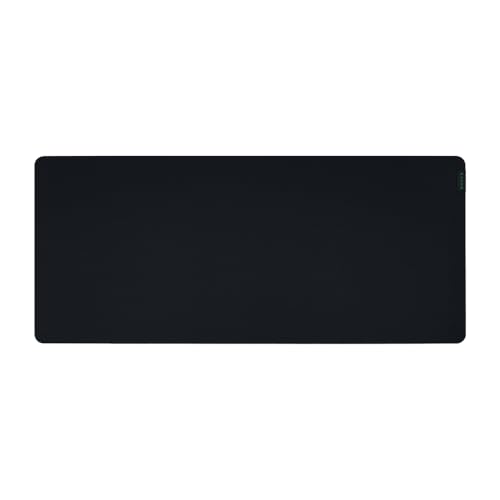
The Razer Gigantus V2 XXL is the thick pad on this list, and its listing states the combination plainly: an XXL cloth gaming mouse pad, thick, with a non-slip base and high-density foam. Thickness matters on a cloth pad because it cushions the wrist and absorbs the small unevenness of a desk, so a thick pad feels softer and more forgiving than a thin one during a long session.
The high-density foam is the detail that gives the pad its feel. Dense foam supports the wrist without sinking, and it returns to shape after pressure, so the surface stays even across the whole XXL area. The textured micro-weave cloth surface, described in the wider listing, gives the sensor a consistent texture, which keeps tracking steady from the centre to the edge.
For a buyer who wants a thick, cushioned XXL pad from a gaming brand, the Gigantus V2 is the pick. The thickness, the foam, and the non-slip base cover comfort and stability together. It is the pad to buy when the wrist wants cushioning and the desk wants coverage.
Key specifications: XXL cloth gaming mouse pad; thick; non-slip base; high-density foam; textured micro-weave cloth surface.
This pad fits a buyer who wants a thick, cushioned XXL pad with a consistent cloth surface.
Strengths
- The thick high-density foam cushions the wrist.
- The XXL size covers keyboard and mouse together.
- The non-slip base keeps the large pad planted.
Trade-offs
- No edge finish is stated in the listing.
- No size in inches or millimetres is stated in the listing.
- The thick construction raises the keyboard above the desk.
The Gigantus V2 suits a player who games for long stretches and wants wrist cushioning. It fits anyone who finds thin pads hard on the wrist after an hour.
Best for: thick cushioned XXL pad with dense foam / Not suited for: a buyer who wants a stated edge finish or a thin pad
Check price on Amazon: Razer Gigantus V2 XXL
Best XL gaming mouse pad with braided edges: what matters most: what matters most
Size is the first measurement to check, because an XL pad that does not cover the keyboard and the mouse is not an XL pad in practice. The listings here state sizes from 930 by 300 millimetres to 36.6 by 15.7 inches, and the right size depends on the desk: measure the space, leave room for the monitor stand, and then choose the largest pad that fits flat. A pad that hangs over the desk edge will curl and catch the mouse.
Edge finish is the second check, and it is the point of this article. A stitched or braided edge binds the cloth border so it resists fraying, while a cut edge will peel with use. The listings here state anti-fray stitched edges, low-profile edge stitching, or a stitched border, and a stated finish is worth preferring. Run a finger along the edge when the pad arrives: a good stitch lies flat and even, with no loose threads.
Surface and thickness decide how the pad feels. A micro-woven cloth gives the sensor a fine texture for precise tracking, while a denser cloth gives a smoother, faster glide. Thickness from 3mm to 6mm changes the cushioning under the wrist: thicker pads are softer, thinner pads keep the keyboard closer to the desk. There is no single right answer, only the feel the buyer prefers.
Finally, check the base and the listing. A non-slip rubber or neoprene base keeps a wide pad flat, and a spill-proof cloth survives drinks. Confirm the brand and model name match exactly, because similar model names can hide different sizes, and check that the listing is new rather than renewed. A careful check at this stage avoids the most common disappointment: a pad that is almost the right size.
Lighting and pattern are the last consideration, not the first. An RGB-lit pad looks striking on a desk, but it needs a USB port and a cable, which partly defeats the clean look of a wide cloth mat. A patterned pad hides stains better than a plain black one, which matters on a desk where drinks and snacks are common. Choose lighting or pattern only after size, edge, surface, and base are settled, because those four decide how the pad performs every day.
Buying guide: choosing XL gaming mouse pads
Start by measuring the desk, including the monitor stand and any items that sit on it. An XL pad needs a flat rectangle, and a pad that is wider than the desk will hang over the edge and curl. Measure the width and the depth, then compare the numbers with the sizes stated in the listings. The pads here range from 930 millimetres to over 36 inches long, so there is a size for most desks, but only a measurement finds it.
Next, decide how much cushioning is wanted. A 6mm pad feels soft under the wrist and forgives a slightly uneven desk, while a thinner pad keeps the keyboard at desk height and feels more direct. Players who rest their wrists on the pad usually prefer thicker, while players who hover their wrists often prefer thinner. There is no wrong choice, only a preference worth testing with a hand on the pad.
Then weigh surface against edge. A micro-woven surface tracks precisely, a dense surface glides faster, and a stitched edge protects both. If the choice is between a pad with a stated stitched edge and one without, choose the stated edge: it is the part of the pad that fails first, and a listing that names it is a listing that can be held to it.
Finally, confirm the listing before ordering. Read the full title and check the brand, model, and size against the pad being bought, because similar model names can hide different sizes or different edge finishes. Check that the listing is new rather than renewed, and that the size stated is the size expected. A careful check avoids the most common disappointment: an XL pad that turns out to be merely large.
Using and caring for your XL gaming mouse pads
Lay the pad flat and let it settle before the first session. A pad that arrives rolled needs time to flatten, and weighting the corners overnight helps it lie true. A pad that is used while still curled will lift at the edges and catch the mouse, which gets blamed on the pad rather than on the roll.
Clean the cloth regularly with a damp cloth and mild soap, then let it dry flat. Dust and skin oils build up on a cloth surface and change how the sensor reads it, so a monthly clean keeps tracking consistent. Avoid harsh cleaners, which can break down the coating on a spill-proof pad, and never put a cloth pad in a washing machine unless the listing says so.
Keep the edges dry and flat. The stitched border is the most durable part of the pad when it is cared for, and the first part to fail when it is soaked or bent. Wipe spills from the edge promptly, do not fold the pad sharply, and roll it loosely for travel with the cloth facing outward. These habits cost nothing and keep the pad looking new for longer.
Common mistakes to avoid
The most common mistake is buying an XL pad without measuring the desk. A pad that is too long hangs over the edge, curls, and catches the mouse, while a pad that is too narrow leaves the keyboard half on the desk and half on the cloth. Measure first, then buy, and remember the monitor stand takes space too.
The second mistake is ignoring the edge finish. A cheap unstitched pad looks identical to a stitched one on arrival, and the difference only appears months later when the corners fray. Choose a pad whose listing states a stitched or anti-fray edge, and check the stitching when it arrives.
The third mistake is choosing a surface for its looks rather than its feel. A patterned pad that glides too fast or too slow will frustrate a player far more than a plain pad that feels right. If possible, test the surface with the mouse before committing, or choose a proven esports cloth whose feel is well understood.
Budget and value
The plain XL pads on this list cover the brief for the least money, and the difference between them is mostly size and edge finish. A pad with a stated stitched edge costs little more than an unstitched one and lasts far longer, so it is the better value for most buyers. The premium esports mats cost more, and they earn that difference through a tuned surface and a brand that supports competitive play.
A practical budget is to spend the least that buys a stated size and a stitched edge, then put any remaining money toward a better mouse or a wrist rest. Size and edge finish are worth more than lighting or a pattern, because they decide how the pad performs and how long it lasts. The picks above are ordered so that the most completely specified pads come first, which makes the trade-off easy to see.
Remember that a good pad is a long-term purchase. A cloth pad with stitched edges can last years with basic care, while an unstitched pad may need replacing within months. Judge the purchase on a year of use, not on the day it arrives, and the stitched edge will usually prove the cheaper choice.
Final recommendation
The Corsair MM350 PRO is the recommendation for most buyers: its listing states the largest size, the thickest construction at 6mm, a spill-proof cloth, and anti-fray stitched edges. It covers every part of the XL pad brief in one mat, and it is the pad to buy when the desk is wide and the pad should simply work.
A buyer who wants the smoothest glide should choose the SteelSeries QcK XL Performance Speed instead, because its dense cloth and low-profile stitching are built for fast mouse movement. A buyer who wants the whole desk covered should choose the QcK XXL, and a buyer who wants cushioning should choose the Razer Gigantus V2. Each of these pads is extra-large and built for gaming; the right one depends on the desk, the hand, and the game.
Frequently asked questions
What does a braided edge mean on a gaming mouse pad?
On a mouse pad, a braided edge means the cloth border is bound with stitching, usually described as stitched or anti-fray edges. The stitching stops the cloth from fraying at the corners, which is where unstitched pads fail first.
What size is an XL gaming mouse pad?
XL pads on this list range from about 930 by 300 millimetres to 36.6 by 15.7 inches, large enough to hold a keyboard and a mouse together. Measure the desk before ordering, because a pad that is wider than the desk will hang over the edge and curl.
Is a thicker mouse pad better?
It depends on preference. A thicker pad, such as the 6mm Corsair on this list, cushions the wrist and forgives a slightly uneven desk. A thinner pad keeps the keyboard closer to desk height and feels more direct. Neither is better for everyone.
How do I clean a cloth gaming mouse pad?
Wipe it with a damp cloth and mild soap, then let it dry flat. Avoid harsh cleaners, which can damage a spill-proof coating, and do not machine wash a cloth pad unless the listing says it is safe to do so.
Do stitched edges really make a pad last longer?
Yes. The edge is where a cloth pad starts to fail, as the cut cloth frays and lifts. A stitched or anti-fray edge binds the border, so the pad holds its shape far longer than an unstitched one under the same use.
Can an XL mouse pad work on a small desk?
Only if it fits flat. Measure the desk first: an XL pad that hangs over the edge will curl and catch the mouse. On a small desk, a smaller pad that fits flat is a better choice than an XL pad that does not.
Does an XL pad replace a wrist rest?
Partly. A thick XL pad cushions the wrist across the whole desk, which helps during long sessions, but it does not raise the wrist the way a dedicated rest does. A player with wrist discomfort may still want a separate rest alongside the pad.
Desk mats and keyboard placement
An XL pad changes where the keyboard sits, because the keyboard now rests on cloth instead of on the desk. That softens the sound of typing slightly and keeps the keyboard from sliding, which most players prefer. It also means the keyboard height rises by the thickness of the pad, so a 6mm pad lifts the keys a little more than a thin one. Players with wrist discomfort sometimes find the lift helpful, while others prefer a thinner mat.
Placement matters too. Centre the pad on the sitting position rather than on the desk, so the mouse has equal room to the left and right. A pad that is pushed to one side leaves the mouse cramped on the other, which defeats the purpose of buying wide. Take a moment to position the pad, the keyboard, and the monitor together, and the whole setup will feel more settled.
Mouse sensitivity and pad size
Pad size and mouse sensitivity are linked, because a low-sensitivity player moves the mouse further for the same on-screen turn. A player who uses a low DPI setting needs a wide pad simply to complete a turn without lifting the mouse, while a high-sensitivity player can manage on a smaller surface. If the mouse is lifted and repositioned often during play, the sensitivity is probably too low for the pad, or the pad is too small for the sensitivity.
The surface matters here too. A fast, smooth cloth suits a low-sensitivity player who moves the mouse in wide arcs, because the mouse glides with little resistance. A slower control surface suits a high-sensitivity player who makes small, precise movements. The pads on this list cover both: the dense SteelSeries cloth glides fast, while the micro-weave Corsair surfaces track with more control. Match the surface to the sensitivity, and the pad will feel like an extension of the mouse rather than a constraint on it.
One last tip: give a new pad a day to settle before judging it. A fresh cloth surface feels different after a few hours of use, once the fibres relax and the mouse has worn a path across it. A pad that feels slightly fast or slightly slow on arrival often feels right by the second day, so avoid returning a pad after a single session.
More guides from KajuanDouglas
Best wireless mouse for laptops Best wireless mouse for gaming Best gaming mouse for laptops Best keyboard and mouse position