A gaming laptop used to announce itself from across the room: thick, heavy, covered in vents and angles, and unmistakable as a machine built for one purpose. The best sleek gaming laptops keep the graphics power and lose the bulk, packing a current graphics card, a fast high-refresh display, and a capable processor into a chassis thin enough to carry every day and quiet enough to open in a meeting. That combination is harder to build than a thick desktop replacement, because every millimetre removed makes cooling harder and every gram saved takes engineering, so the machines that do it well deserve a closer look than the ones that merely look thin in a photograph.
Kaju and Douglas may earn an affiliate commission when you buy through links on this page. That commission funds the research behind guides like this one and never changes the price you pay. Every pick below was selected from manufacturer specification sheets, product documentation, and published technical references, and the comparisons throughout rest on those documented figures rather than on headline numbers copied from retail boxes.
Sleek is a promise about daily life as much as about design. A thin laptop that is loud under load, hot on the lap, or dead after two hours away from a charger is not sleek in any sense that matters; it is a thick laptop that went on a diet and lost the wrong things. The six machines in this guide were judged on the whole package: the graphics card and processor that decide what games run well, the display that decides how those games look, the cooling that decides whether the performance survives a long session, and the battery and build that decide whether the laptop is pleasant to carry and use away from the desk.
In this guide
Quick picks: best sleek gaming laptops
| # | Product | Where to buy |
|---|---|---|
| 1 | Razer Blade 14 2025 | Check on Amazon |
| 2 | Razer Blade 16 2025 | Check on Amazon |
| 3 | ASUS ROG Zephyrus G14 | Check on Amazon |
| 4 | ASUS ROG Zephyrus G16 | Check on Amazon |
| 5 | Alienware x14 R2 | Check on Amazon |
| 6 | MSI Stealth 16 AI+ | Check on Amazon |
How the picks were chosen
The selection started from the graphics card, because a sleek laptop that cannot run current games at its own screen resolution is a good ultrabook with the wrong badge. Every pick below carries a current-generation graphics card documented in its listing, paired with a processor and memory configuration that will not bottleneck it: sixteen gigabytes of memory at minimum, a solid-state drive of at least a terabyte in most cases, and a processor from the current generation of mobile chips. A machine that met the graphics bar but paired it with too little memory or a slow drive was set aside, because the bottleneck would show up in exactly the games the buyer wanted to play.
The second filter was the display, since the screen is the part of a gaming laptop you look at for every minute of use. The picks here use high-refresh OLED or high-refresh IPS panels with the resolutions their graphics cards can actually drive: 3K OLED on the fourteen-inch machines, QHD+ OLED on the sixteen-inch machines, and fast 165Hz panels where the resolution is lower. A display that is dim, washed out, or slow would undo the work of the graphics card, and none of the picks below makes that compromise.
The third filter was the chassis itself: thickness, weight, and build quality. Sleek means thin and light enough to carry daily without thinking about it, and the machines here are the ones that achieve that while keeping a metal chassis and a keyboard that survives daily typing. Plastic-bodied machines that flex, and thin machines that achieve their dimensions by shrinking the battery to nothing, were excluded. Finally, each pick had to be a genuine gaming laptop rather than a thin office machine with a modest graphics chip; the distinction is the graphics card and the cooling that lets it run at full speed.
What sleek really means in a gaming laptop
Thickness, weight, and the daily carry
The first thing to check is the weight you will actually carry, not the weight in the marketing headline. Manufacturers quote the lightest configuration, and the charger adds weight that is rarely mentioned in the same sentence: a thin laptop with a heavy power brick is less portable than the headline suggests. The machines in this guide are all built to be carried, with fourteen-inch models that slip into a normal bag and sixteen-inch models that stay manageable, but the honest test is the total travel weight of laptop plus charger plus the bag itself. If the laptop travels daily, a gram saved on the chassis and a charger that is not a brick both matter.
Thickness interacts with the bag as well as with the hand. A laptop under twenty millimetres thick fits in a sleeve and a backpack laptop compartment without a fight, while a thicker machine needs a dedicated padded section and leaves less room for everything else. The picks here are all in thin-laptop territory, and the differences between them are measured in millimetres that matter mainly at the margins: the fourteen-inch machines are the easiest to carry, and the sixteen-inch machines trade a little thickness for a larger screen and more cooling headroom.
Cooling in a thin chassis
Cooling is where thin gaming laptops succeed or fail, and it is the specification buyers most often ignore. A graphics card that throttles after ten minutes of play delivers the performance of a much weaker card, and a laptop that sounds like a hair dryer under load is unpleasant in a shared room. The machines below handle this in different ways: vapour chambers, dual fans, and chassis designs that pull air from underneath and exhaust it at the rear. What matters is the result rather than the mechanism: sustained performance in a long session, and fan noise that stays reasonable when the game gets demanding.
There is a real trade-off here that no engineering entirely removes. A thin laptop cannot cool as effectively as a thick one with the same components, so manufacturers tune the graphics card to a lower power limit and rely on efficient components. That is a fair trade for most buyers, because the tuned card still runs current games well at the laptop's own resolution, and the machine is pleasant to carry and use. The mistake is to compare a thin laptop's graphics card to the same card in a desktop or a thick laptop and expect identical numbers; compare it instead to what the laptop actually sustains over an hour of play.
The display decides how games look
OLED has become the display technology of choice for sleek gaming laptops, and the reasons are visible the moment a game loads: perfect blacks, vivid colour, and response times that make fast motion look clean. The fourteen-inch picks in this guide use 3K OLED panels at 120Hz, and the sixteen-inch picks use QHD+ OLED at 240Hz, which is the combination that suits their graphics cards. A high refresh rate matters most in fast competitive games, while resolution and colour matter most in single-player games, and the picks here cover both without asking the buyer to choose between them.
Brightness and colour coverage deserve a look too, because an OLED panel that is dim outdoors or a panel with narrow colour coverage will disappoint outside of gaming. The listings for the picks below document bright panels with wide colour coverage, which is what makes the same laptop pleasant for photo work, video, and everyday use. A laptop that is only good at games is a poor daily machine; the picks here are good at both, which is the point of buying sleek rather than buying a dedicated gaming brick.
Battery life and the unplugged hours
No gaming laptop plays demanding games for long on battery, and any listing that suggests otherwise should be read sceptically. What battery life does decide is the rest of the day: browsing, office work, video, and light tasks away from the charger. The picks here carry batteries sized for that job, and the efficient processors and OLED panels help them stretch further than older gaming laptops did. Expect several hours of light use and well under two hours of demanding play, and treat anything beyond that as a bonus rather than a promise.
The charger matters as much as the battery. A laptop that charges over USB-C can top up from a compact travel charger, while a laptop that needs its proprietary brick is tied to a heavy accessory. Check the charging options before buying, and remember that the battery will degrade over years of use; a laptop whose battery is easy to replace, or whose manufacturer offers a replacement service, will last longer as a daily machine than one whose battery is sealed away permanently.
The six best sleek gaming laptops

Top pick
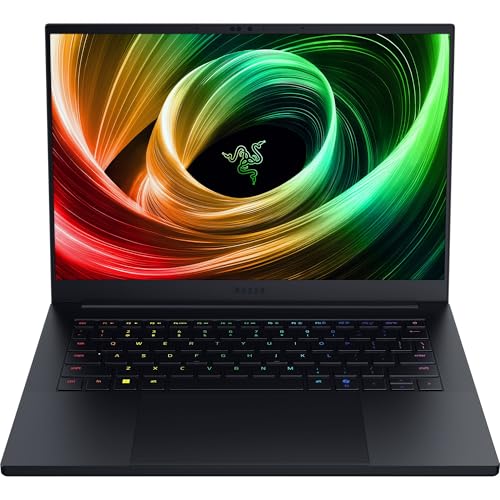
1. Razer Blade 14 (2025), RTX 5060, Black
The Razer Blade 14 in its 2025 configuration is the fourteen-inch pick this guide measures the others against, and the listing documents why: a GeForce RTX 5060 graphics card, an AMD Ryzen AI 9 365 processor, sixteen gigabytes of DDR5 memory, a terabyte of storage, and a 3K 120Hz OLED display, all in a thin and lightweight chassis with Chroma RGB lighting. That is the whole sleek proposition in one machine: a current graphics card and a bright, vivid OLED screen in a body that disappears into a bag. The fourteen-inch size is the point. It is the laptop for the player who carries the machine every day and games at a desk in the evening, rather than the player who wants the biggest screen possible.
Specs: 14-inch 3K 120Hz OLED display; GeForce RTX 5060; AMD Ryzen AI 9 365; 16GB DDR5 RAM; 1TB storage; thin and lightweight; Chroma RGB.
Strengths:
- The 3K OLED display gives the fourteen-inch size a picture that larger, cheaper panels cannot match: deep blacks, vivid colour, and fast response.
- Sixteen gigabytes of DDR5 memory and a terabyte of storage are the right floor for a current gaming laptop, with room for a real game library.
- The thin, lightweight chassis is genuinely portable, which is the reason to buy a fourteen-inch machine at all.
Trade-offs:
- The RTX 5060 is the entry card in this guide, so the most demanding games will need reduced settings at the native 3K resolution.
- Fourteen inches is a compact screen for long single-player sessions, and some players will miss the extra inches.
- The thin chassis leaves less room for cooling, so sustained loads will run warmer and louder than on a thicker machine.
This laptop fits the player who travels daily, works from the same machine, and wants the best fourteen-inch gaming experience available rather than the most powerful machine at any size.
Best for: daily carry and a superb OLED screen in a small body. Not suited for: players who want maximum graphics power or the largest screen.
Check price on Amazon: Razer Blade 14 2025

2. Razer Blade 16 (2025), RTX 5090, Black
The Razer Blade 16 in its 2025 configuration is the most powerful machine in this guide, and the listing leaves no doubt about it: a GeForce RTX 5090 graphics card, an AMD Ryzen AI 9 HX 370 processor, thirty-two gigabytes of DDR5 memory, two terabytes of storage, and a QHD+ 240Hz OLED display, in a Copilot+ PC chassis with Chroma RGB lighting. The 240Hz OLED panel is the display this graphics card deserves, because the card can actually drive high frame rates at the native resolution, and the combination makes fast games look and feel exceptional. Thirty-two gigabytes of memory and two terabytes of storage mean the machine is not compromised anywhere else either.
Specs: 16-inch QHD+ 240Hz OLED display; GeForce RTX 5090; AMD Ryzen AI 9 HX 370; 32GB DDR5 RAM; 2TB storage; Copilot+ PC; Chroma RGB.
Strengths:
- The RTX 5090 is the strongest graphics card in this guide, and the 240Hz OLED display can show what it produces.
- Thirty-two gigabytes of memory and two terabytes of storage remove the two upgrades buyers most often regret skipping.
- The sixteen-inch chassis gives the cooling system more room than the fourteen-inch machines, which helps sustain performance.
Trade-offs:
- This is the most expensive tier of the guide, and the extra graphics power is only visible on the most demanding games.
- Sixteen inches and a top-tier card mean more weight and a larger charger than the fourteen-inch picks.
- Battery life under load will be short, as with any high-performance laptop, so the charger travels with the machine.
This laptop fits the player who wants the strongest sleek machine available and is willing to pay for it, and who plays demanding games on a display that can keep up.
Best for: maximum power in a sleek sixteen-inch body. Not suited for: buyers on a budget, or players who prioritise portability above all else.
Check price on Amazon: Razer Blade 16 2025

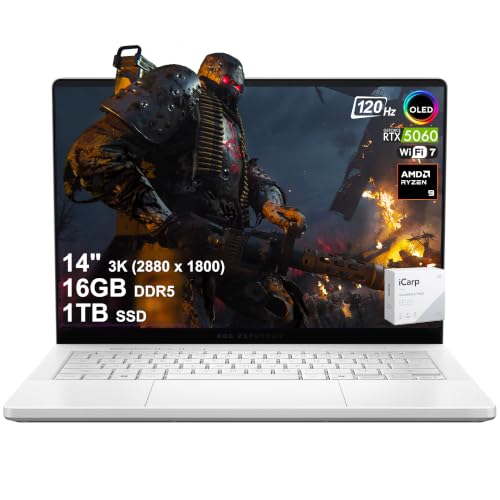
3. ASUS ROG Zephyrus G14, Ryzen 9 270, RTX 5060
The ASUS ROG Zephyrus G14 is the long-running benchmark for thin gaming laptops, and this configuration shows why the line has kept that reputation: a fourteen-inch 3K 120Hz OLED display rated at 500 nits with full DCI-P3 colour, an eight-core AMD Ryzen 9 270 processor, sixteen gigabytes of DDR5 memory, a 512GB solid-state drive, and a GeForce RTX 5060 graphics card, with RGB backlighting, WiFi 7, and Windows 11. The display is the star here: 500 nits of brightness and full DCI-P3 coverage make it as good for creative work and video as it is for games, which is exactly what a sleek laptop that does double duty needs.
Specs: 14-inch 3K 120Hz OLED display, 500 nits, 100% DCI-P3; AMD 8-core Ryzen 9 270; 16GB DDR5 RAM; 512GB SSD; GeForce RTX 5060; RGB backlit; WiFi 7.
Strengths:
- The bright, colour-accurate OLED display is the best in this guide for work that needs accurate colour as well as games.
- WiFi 7 and a current processor keep the machine current for years of use.
- The Zephyrus line has years of refinement behind it, and the fourteen-inch size is genuinely easy to carry.
Trade-offs:
- Five hundred and twelve gigabytes of storage fills fast once several large games are installed.
- The RTX 5060 is the entry card here, so demanding games need reduced settings at native resolution.
- The fourteen-inch screen is compact for players who prefer a larger view.
This laptop fits the player who wants a thin machine that is equally good for creative work and gaming, and who values display quality over raw graphics power.
Best for: display quality and a proven thin design. Not suited for: players who need a terabyte of storage or the strongest graphics card.
Check price on Amazon: ASUS ROG Zephyrus G14

4. ASUS ROG Zephyrus G16, Ultra 9 285H, RTX 5070
The ASUS ROG Zephyrus G16 pairs a sixteen-inch 2.5K OLED display running at 240Hz with an Intel Core Ultra 9 285H processor and a GeForce RTX 5070 graphics card, with sixteen gigabytes of LPDDR5X memory, a terabyte of PCIe 4.0 storage, and Wi-Fi 7. The 240Hz OLED panel is the feature that defines this machine: it makes fast motion visibly smoother than the 120Hz panels on the fourteen-inch picks, and the RTX 5070 has the power to drive it in competitive games. The sixteen-inch size gives the display room to breathe and the cooling system room to work, while the chassis stays thin enough to carry.
Specs: 16-inch 2.5K OLED 240Hz display; Intel Core Ultra 9 285H; GeForce RTX 5070; 16GB LPDDR5X RAM; 1TB PCIe 4.0 SSD; Wi-Fi 7.
Strengths:
- The 240Hz OLED display is the best in this guide for fast competitive games.
- The RTX 5070 is a meaningful step up from the entry cards here, and it pairs well with the 2.5K resolution.
- A terabyte of fast storage and current wireless keep the machine practical for daily use.
Trade-offs:
- Sixteen inches is less portable than fourteen, and the charger adds to the travel weight.
- LPDDR5X memory is fast but soldered, so it cannot be upgraded later.
- The higher refresh rate matters most in competitive games; single-player games benefit less.
This laptop fits the competitive player who wants a high-refresh OLED display and a graphics card that can use it, in a machine that still travels well.
Best for: competitive games on a 240Hz OLED display. Not suited for: buyers who need the smallest, lightest machine, or upgradeable memory.
Check price on Amazon: ASUS ROG Zephyrus G16

5. Alienware x14 R2, i7-13620H, RTX 4060, Lunar Silver
The Alienware x14 R2 is the most portable machine in this guide, and its listing documents a balanced configuration: a fourteen-inch QHD+ display at 165Hz with G-Sync, an Intel Core i7-13620H processor, a GeForce RTX 4060 graphics card with eight gigabytes of memory, thirty-two gigabytes of system memory, a terabyte of storage, and an AlienFX backlit keyboard, finished in Lunar Silver. The thirty-two gigabytes of memory stand out at this tier, and they matter for buyers who keep many applications open alongside a game. G-Sync on the display keeps motion smooth when the frame rate varies, which is the honest reality of gaming on a thin laptop.
Specs: 14-inch QHD+ 165Hz G-Sync display; Intel Core i7-13620H; GeForce RTX 4060 8GB; 32GB RAM; 1TB SSD; AlienFX backlit keyboard; Lunar Silver.
Strengths:
- Thirty-two gigabytes of memory is generous for this tier and removes a common bottleneck.
- G-Sync smooths variable frame rates, which suits a thin laptop whose performance moves with temperature.
- The fourteen-inch chassis and Lunar Silver finish make it the most travel-friendly and distinctive machine here.
Trade-offs:
- The RTX 4060 is a generation behind the 50-series cards in this guide, so it will age sooner.
- The QHD+ display is IPS rather than OLED, so blacks and contrast are a step behind the OLED picks.
- Fourteen inches and a thin chassis mean the cooling works hard under sustained load.
This laptop fits the player who wants maximum portability with generous memory, and who values a smooth, tear-free display over the deepest blacks.
Best for: portability with 32GB of memory. Not suited for: buyers who want the newest graphics card or an OLED display.
Check price on Amazon: Alienware x14 R2

6. MSI Stealth 16 AI+, Ultra 9 386H, RTX 5070 Ti, Charcoal Black
The MSI Stealth 16 AI+ rounds out this guide with a strong sixteen-inch configuration: a 240Hz QHD+ OLED display, an Intel Core Ultra 9 386H processor, a GeForce RTX 5070 Ti graphics card, thirty-two gigabytes of DDR5 memory, a terabyte of NVMe storage, Wi-Fi 7, and Windows 11 Home, in a charcoal black chassis. The RTX 5070 Ti sits a step above the 5070 in the Zephyrus G16, and the 240Hz OLED panel gives it the display to match. Thirty-two gigabytes of memory and a terabyte of fast storage complete a machine with no obvious weak point, and the Stealth line has always been MSI's answer to the question of how thin a powerful laptop can be.
Specs: 16-inch 240Hz QHD+ OLED display; Intel Core Ultra 9 386H; GeForce RTX 5070 Ti; 32GB DDR5 RAM; 1TB NVMe SSD; Wi-Fi 7; Charcoal Black.
Strengths:
- The RTX 5070 Ti and 240Hz OLED display are a well-matched pair for demanding and competitive games alike.
- Thirty-two gigabytes of DDR5 memory and a terabyte of NVMe storage cover multitasking and a real game library.
- Wi-Fi 7 and a current processor keep the machine current for years.
Trade-offs:
- Sixteen inches and a high-end card mean this is not the lightest machine in the guide.
- The charcoal black finish shows fingerprints and dust more readily than a lighter colour.
- Battery life under gaming load will be short, so the charger is part of the travel kit.
This laptop fits the player who wants near-top graphics power and a high-refresh OLED display without stepping up to the most expensive machine in the guide.
Best for: strong graphics power with a 240Hz OLED display. Not suited for: buyers who need the lightest machine, or who play mostly undemanding games.
Check price on Amazon: MSI Stealth 16 AI+
The six at a glance
The table below compresses the differences that matter into the terms used throughout the guide. It describes positioning rather than ranking: the right row is the one whose size, display, and graphics card match the way the laptop will actually be used. Read it alongside the pick sections rather than instead of them, because the table cannot carry the caveats about configurations, variants, and thermals that decide between close machines.
| Laptop | Display | Graphics | Memory / Storage | Size | Best for |
|---|---|---|---|---|---|
| Razer Blade 14 (2025) | 14-inch 3K 120Hz OLED | RTX 5060 | 16GB / 1TB | 14-inch, thin | Daily carry |
| Razer Blade 16 (2025) | 16-inch QHD+ 240Hz OLED | RTX 5090 | 32GB / 2TB | 16-inch | Maximum power |
| ASUS ROG Zephyrus G14 | 14-inch 3K 120Hz OLED, 500 nits | RTX 5060 | 16GB / 512GB | 14-inch, thin | Display quality |
| ASUS ROG Zephyrus G16 | 16-inch 2.5K 240Hz OLED | RTX 5070 | 16GB / 1TB | 16-inch | Competitive play |
| Alienware x14 R2 | 14-inch QHD+ 165Hz G-Sync | RTX 4060 | 32GB / 1TB | 14-inch, thin | Portability, memory |
| MSI Stealth 16 AI+ | 16-inch QHD+ 240Hz OLED | RTX 5070 Ti | 32GB / 1TB | 16-inch | Power and display |
Matching a sleek laptop to how you work and play
A sleek gaming laptop is two machines in one, and the balance between them decides which pick fits. The player who games at a desk in the evening and carries the laptop to work or class during the day needs the quiet, professional side of the machine to be as good as the gaming side: a keyboard that types well, a trackpad that tracks accurately, and a chassis that does not look out of place in a meeting. The fourteen-inch picks here are the strongest on that side, because their size reads as a normal laptop and their weight disappears into a bag.
The player who games mostly at home and travels occasionally can trade a little portability for a bigger screen and more graphics power. The sixteen-inch picks here are the right call for that buyer: the larger display makes single-player games more immersive, the larger chassis gives the cooling more room to work, and the machine is still thin enough to carry when it needs to travel. The trade is real but small, and it is worth making if the laptop rarely leaves the house.
Think about the games themselves as well. Fast competitive games reward the high-refresh displays on the sixteen-inch picks, where 240Hz makes motion visibly smoother, while story-driven and open-world games reward the colour and contrast of OLED at any size. A buyer who plays one genre almost exclusively should weight the display accordingly; a buyer who plays a bit of everything will be happy with any pick here, because all six pair a strong display with a graphics card that can drive it.
Living with a thin laptop: heat, battery, and care
A thin gaming laptop asks a little more care than a thick one, and the habits that keep it fast are simple. Keep the vents clear: a laptop that draws air from underneath will throttle on a bed or a sofa, so use a hard surface or a stand when gaming, and clean the vents every few months with compressed air. Dust is the quiet enemy of thin cooling, and a laptop that slowly gets louder over a year is usually a laptop whose fans are fighting a layer of dust rather than a laptop that is failing.
Battery care is the second habit. Lithium batteries age fastest when kept at full charge and high temperature, so a laptop that spends its life plugged in at a desk will lose capacity sooner than one that is allowed to discharge regularly. Many manufacturers now offer a battery care mode that caps charging below full; turning it on for a desk-bound laptop is the single easiest way to keep the battery healthy for years.
Physical care matters too, because a thin metal chassis dents and scratches more easily than a thick plastic one. A sleeve is cheap insurance, and a laptop that travels daily should live in one. Keep liquids away from the keyboard, and remember that a spill on a thin laptop reaches the internals faster than on a thick one. None of this is onerous; it is the ordinary care that any expensive portable machine deserves, and it pays off in a laptop that still feels fast and looks good in its third year.
Common mistakes when buying a sleek gaming laptop
The most common mistake is buying the thinnest laptop without checking what was sacrificed to get there. A machine that is thin because its battery is small, its cooling is weak, or its keyboard is cramped is not sleek; it is compromised. Check the battery size, the sustained graphics power, and the keyboard layout before admiring the thickness figure, because those are the specifications that decide whether the laptop is pleasant to live with.
The second mistake is overbuying the graphics card for the screen. A top-tier graphics card in a laptop with a 1080p display spends most of its power drawing frames the screen cannot show, while the same money spent on a better display or more memory would be visible every day. Match the graphics card to the resolution: the 3K and QHD+ panels in this guide are the right partners for the cards they carry, and the balance is the point.
The third mistake is ignoring the memory and storage configuration. Sixteen gigabytes is the floor for a gaming laptop now, and thirty-two is the comfortable choice for buyers who keep many applications open or who play the most demanding games. Storage matters too: a terabyte fills faster than expected once a few large games are installed, and a laptop with a single drive slot cannot be expanded without replacing the drive. Check both figures on the specific configuration being bought, because the same model name can hide several very different configurations.
The fourth mistake is forgetting the charger and the ports. A laptop with too few USB ports, no video output, or a charger that weighs as much as a second laptop will frustrate daily use in ways no specification sheet warns about. Count the ports against the devices that will actually be plugged in, check whether the laptop charges over USB-C, and weigh the charger before the laptop goes in the bag for the first time.
More sleek laptop guides on this site
Readers comparing sizes and brands will find the neighbouring guides useful. The gaming laptops guide covers the wider field, while Max-Q gaming laptops explains the efficiency technology behind thin gaming machines. Players who want a machine that stays cool will find gaming laptops that stay cool directly relevant, and mid-range gaming laptops covers the value end of the same market.
Frequently asked questions
Are sleek gaming laptops as powerful as thick ones?
Not watt for watt, and the honest answer matters. A thin chassis cannot cool as much power as a thick one, so the same graphics card runs at a lower power limit in a sleek laptop. In practice the difference is smaller than the numbers suggest, because the tuned card still runs current games well at the laptop's own screen resolution, and the sleek laptop is far more pleasant to carry and use every day. Buyers who need maximum performance above all else should buy thick; buyers who need a laptop that does everything well should buy sleek.
Do thin gaming laptops overheat?
They run warm under load, which is normal, and they throttle when the cooling cannot keep up, which is by design. Overheating in the damaging sense is rare in current machines, because thermal limits protect the components. The practical concern is comfort and noise rather than damage: a laptop that is hot on the lap and loud in a quiet room is unpleasant even if it is not harmed. Using a hard surface, keeping vents clear, and choosing a machine with a good cooling design are the fixes that work.
Is OLED worth it on a gaming laptop?
For most buyers, yes. OLED brings perfect blacks, vivid colour, and near-instant response times, which make games look noticeably better than on a conventional IPS panel. The trade-offs are a risk of burn-in with static content over many years, and a higher cost. Buyers who leave the same desktop on screen for hours every day should know about the burn-in question; buyers who mostly play games and watch video will simply enjoy the better picture.
How much memory and storage should a sleek gaming laptop have?
Sixteen gigabytes of memory is the floor and thirty-two is the comfortable choice, especially for buyers who multitask or play demanding games. A terabyte of storage is the practical minimum, because modern games are large and a smaller drive fills quickly. Check the specific configuration before buying, since the same model name can be sold with several memory and storage combinations, and upgrading later is not always possible in a thin chassis.
Can a sleek gaming laptop replace a desktop?
For most players, yes, with one caveat: the laptop will always cost more than a desktop with the same performance, and it cannot be upgraded as freely. What the laptop gives in return is portability, a built-in display and keyboard, and a machine that works anywhere. Players who game in one place and never move the machine are better served by a desktop; players who move, travel, or want one machine for everything will find the laptop the better buy.
Sleek gaming laptops exist because most players do not want to choose between a machine that plays well and a machine that travels well, and the six machines in this guide are the ones that refuse that choice most successfully. Pick the size that matches the bag and the desk, match the graphics card to the display, and the laptop will do its job quietly for years, which is the highest praise a thin machine can earn.