The best gaming laptops color gamut picks start from a simple idea: a gaming laptop is only as good as the screen you look at. The graphics card renders the world, but the display decides what that world looks like, and a panel with narrow colour coverage makes every game look flatter than the artists intended. Colour gamut is the measure of that range: a display that covers 100% of sRGB shows the full standard colour range, and one that covers 100% of DCI-P3 shows the wider cinema range used by films and modern games.
Gamut matters beyond games too. A laptop with a wide-gamut display shows photographs the way they were taken, videos the way they were graded, and design work the way it will print or publish. A narrow-gamut panel hides those differences, so a photo that looks fine on the laptop can look wrong everywhere else. For a buyer who games and creates on the same machine, the display’s colour coverage is not a luxury, it is the specification that ties the two jobs together.
Every laptop below was picked because its listing states its colour coverage plainly: 100% sRGB or 100% DCI-P3, written in the product title itself. No pick on this list asks the buyer to take the display on trust. Every listing comes from the site’s own product lookup, each one was checked in full before it earned a link, and any listing marked as renewed or used was set aside.
In this guide
Quick picks: best gaming laptops color gamut
| # | Product | Where to buy |
|---|---|---|
| 1 | ASUS TUF Gaming A15 FA507NV-EH74 | Check on Amazon |
| 2 | MSI Vector 16 HX | Check on Amazon |
| 3 | MSI Crosshair 18 HX | Check on Amazon |
| 4 | Dell Alienware 16X Aurora | Check on Amazon |
| 5 | ASUS ROG Strix G18 G815 | Check on Amazon |
| 6 | HP OMEN 16 | Check on Amazon |
How the picks were chosen
Stated colour coverage came first. A laptop earned a place here only when its listing named its gamut in the title: 100% sRGB or 100% DCI-P3. Listings that described a good-looking screen without naming a gamut figure were not considered, because this article is about verifiable colour coverage, not marketing adjectives. Portable monitors, stands, and other accessories that appeared in the search results were set aside, because the article is about laptops.
The picks were checked for the whole package, not the panel alone. A wide-gamut display is only useful if the graphics card can drive it and the processor can keep up, so display resolution, refresh rate, graphics, memory, and storage were all weighed. The list mixes 15-inch, 16-inch, and 18-inch machines, and each listing states its display, processor, graphics, memory, and storage plainly so the comparison is honest.
Every listing was verified in full before linking. The brand and the complete model name in the listing had to match the laptop described, including the model code that separates one configuration from another. Listings marked as renewed or used were dropped, and any listing whose title described a different model was set aside even when it looked close at first glance.
Quick comparison
| Product | Standout feature | Best for |
|---|---|---|
| ASUS TUF Gaming A15 FA507NV-EH74 | Full 100% sRGB colour at a sensible tier | affordable colour-accurate gaming and photo work |
| MSI Vector 16 HX | 100% DCI-P3 display with RTX 5070 Ti graphics | wide DCI-P3 colour with high-end graphics |
| MSI Crosshair 18 HX | 18-inch 100% DCI-P3 display with 2TB storage | big-screen immersive gaming with full DCI-P3 colour |
| Dell Alienware 16X Aurora | 100% DCI-P3 display with 2TB SSD in a premium build | premium wide-gamut gaming and creative work with 2TB storage |
| ASUS ROG Strix G18 G815 | 64GB of memory with an 18-inch 100% DCI-P3 display | maximum memory and screen with full DCI-P3 colour |
| HP OMEN 16 | Full 100% sRGB colour with RTX 5070 and DLSS 4 | balanced full-sRGB gaming and creative work |

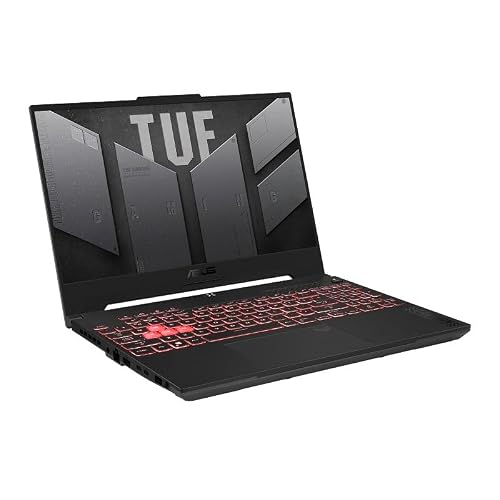
ASUS TUF Gaming A15 FA507NV-EH74
The ASUS TUF Gaming A15 opens this list as the affordable route to a colour-accurate screen. Its listing describes model FA507NV-EH74, a 2023 design with a 15.6-inch Full HD 144Hz display covering 100% sRGB, a GeForce RTX 4060 graphics card, an AMD Ryzen 7 7735HS processor, 16GB of DDR5 memory, a 1TB PCIe SSD, Wi-Fi 6, and Windows 11. Full sRGB coverage at this tier is the point: colours are accurate without paying for a flagship.
The 100% sRGB figure is the detail that defines this laptop for colour work. A display that covers the full sRGB range shows photographs, videos, and web content the way they were made, so editing on this screen translates reliably to other screens. The RTX 4060 and Ryzen 7 pairing handles modern games at Full HD, and the 144Hz refresh rate keeps motion smooth while the colour stays true.
For a buyer who wants a wide-gamut display without a premium budget, the TUF A15 is the pick. It is an earlier design, and that is exactly why it belongs here: the colour coverage is stated plainly, the hardware is proven, and the 1TB SSD leaves room for a photo library alongside a game library.
Key specifications: Model FA507NV-EH74 (2023); 15.6-inch FHD 144Hz display, 100% sRGB; GeForce RTX 4060; AMD Ryzen 7 7735HS; 16GB DDR5; 1TB PCIe SSD; Wi-Fi 6; Windows 11.
This laptop fits a buyer who wants verified full sRGB colour on a sensible budget, with proven gaming hardware behind it.
Strengths
- Full 100% sRGB coverage gives accurate colour at an affordable tier.
- The RTX 4060 and Ryzen 7 pairing handles modern games at Full HD.
- A 1TB SSD leaves room for photos and games on one drive.
Trade-offs
- It is a 2023 design, so it lacks the newest connectivity of the latest models.
- The Full HD resolution is lower than the sharper panels below.
- The TUF build is practical rather than slim or premium-looking.
The TUF A15 suits a student, a hobbyist photographer, or a gamer on a budget. It fits anyone who wants colour they can trust without paying flagship money.
Best for: affordable colour-accurate gaming and photo work / Not suited for: a buyer who wants a sharper-than-Full-HD display or the newest hardware
Check price on Amazon: ASUS TUF Gaming A15 FA507NV-EH74

MSI Vector 16 HX
The MSI Vector 16 HX is the wide-gamut workhorse of this list. Its listing describes a 16-inch WQXGA 240Hz display covering 100% DCI-P3, an Intel 20-core Ultra 7 255HX processor, a GeForce RTX 5070 Ti graphics card, 32GB of DDR5 memory, a 1TB SSD, RGB backlighting, Wi-Fi 7, Thunderbolt, and Windows 11 Pro. DCI-P3 coverage is the wider cinema standard, and a laptop that states it plainly is built for buyers who notice colour.
The 100% DCI-P3 figure is the detail that lifts this display above the sRGB picks. DCI-P3 covers a wider range of reds and greens than sRGB, so films, modern games, and photographs show richer, more lifelike colour, and the WQXGA resolution gives that colour more detail to work with. The 240Hz refresh rate keeps fast motion clean, and the RTX 5070 Ti has the power to drive the high-resolution panel properly.
For a buyer who wants the widest colour range with serious graphics power behind it, the Vector 16 HX is the pick. The 32GB of memory and the 20-core processor handle creative work and heavy multitasking as easily as games, and the Thunderbolt port adds the connectivity a creative desk setup needs.
Key specifications: 16-inch WQXGA 240Hz display, 100% DCI-P3; Intel 20-core Ultra 7 255HX; GeForce RTX 5070 Ti; 32GB DDR5; 1TB SSD; RGB backlit keyboard; Wi-Fi 7; Thunderbolt; Windows 11 Pro.
This laptop fits a buyer who wants the widest stated colour range with the graphics power to use it, for games and creative work alike.
Strengths
- Full 100% DCI-P3 coverage shows the wider cinema colour range.
- The RTX 5070 Ti drives the high-resolution panel with real headroom.
- 32GB of memory and a 20-core processor cover creative work and games.
Trade-offs
- It is a 16-inch machine, so it is not the lightest option here.
- The high-end display and graphics put it in the premium tier.
- DCI-P3 colour is most useful when the content is made for it.
The Vector 16 HX suits a creator who games, or a gamer who edits video and photos. It fits anyone who can see the difference a wider gamut makes and wants it every day.
Best for: wide DCI-P3 colour with high-end graphics / Not suited for: a buyer who wants the lightest laptop or the lowest cost
Check price on Amazon: MSI Vector 16 HX

MSI Crosshair 18 HX
The MSI Crosshair 18 HX is the biggest screen on this list, and its listing states the case plainly: an 18-inch QHD+ 240Hz display covering 100% DCI-P3, an Intel 24-core Ultra 9 275HX processor, a GeForce RTX 5070 graphics card, 32GB of DDR5 memory, a 2TB SSD, RGB backlighting, Thunderbolt, and Windows 11. An 18-inch panel with full DCI-P3 coverage is a canvas, not just a screen, and it changes how games and films feel.
The size and the gamut work together. A large panel shows more of the game world at once, and full DCI-P3 coverage fills that panel with richer colour than a standard display can show. The 2TB SSD is the practical detail that matches the screen: a machine with a display this good will collect games, films, and project files, and 2TB leaves room for all of them without constant tidying.
For a buyer who wants the largest, most colourful display on this list and the storage to match, the Crosshair 18 HX is the pick. It is a big laptop that belongs mostly on a desk, and it should be bought with that in mind, but for immersive games and big-screen creative work it is the most impressive machine here.
Key specifications: 18-inch QHD+ 240Hz display, 100% DCI-P3; Intel 24-core Ultra 9 275HX; GeForce RTX 5070; 32GB DDR5; 2TB SSD; RGB backlit keyboard; Thunderbolt; Windows 11.
This laptop fits a buyer who wants the biggest, most colourful screen available here, mostly used at a desk.
Strengths
- The huge 18-inch panel with full DCI-P3 colour is the most immersive display here.
- A 2TB SSD leaves room for a large game and media library.
- The 24-core processor and 32GB of memory handle anything alongside games.
Trade-offs
- The 18-inch body is the heaviest and least portable pick on this list.
- It is a desk-first machine, not a daily travel laptop.
- The large screen and high-end hardware put it in the premium tier.
The Crosshair 18 HX suits a buyer who treats the laptop as a desktop replacement with a cinema-sized screen. It fits an immersive gamer, a film watcher, or a creator who wants room to work.
Best for: big-screen immersive gaming with full DCI-P3 colour / Not suited for: a buyer who needs a portable laptop for daily travel
Check price on Amazon: MSI Crosshair 18 HX

Dell Alienware 16X Aurora
The Dell Alienware 16X Aurora brings the Alienware design language to this list. Its listing describes a 16-inch WQXGA 240Hz display covering 100% DCI-P3, an Intel 24-core Ultra 9 275HX processor, a GeForce RTX 5070 graphics card with 8GB of memory, 32GB of RAM, a 2TB SSD, a backlit keyboard, Wi-Fi 7, Thunderbolt, and Windows 11. The combination of a premium brand, a wide-gamut panel, and a large SSD makes it the most polished machine here.
The 100% DCI-P3 display is the headline, but the 2TB SSD is the detail that makes the laptop easy to live with. Games, creative projects, and media libraries all fit without the constant juggling a smaller drive forces, and the 24-core processor keeps the machine responsive when several heavy programs run together. The WQXGA resolution gives the wide colour range plenty of detail, and the 240Hz refresh rate keeps motion smooth.
For a buyer who wants a premium wide-gamut laptop with generous storage and a distinctive design, the Alienware 16X Aurora is the pick. It is the most expensive class of machine on this list, and it should be bought for its display, its storage, and its build rather than for raw value. For a buyer who wants one polished machine for games and creative work, it delivers.
Key specifications: 16-inch WQXGA 240Hz display, 100% DCI-P3; Intel 24-core Ultra 9 275HX; GeForce RTX 5070 8GB; 32GB RAM; 2TB SSD; backlit keyboard; Wi-Fi 7; Thunderbolt; Windows 11.
This laptop fits a buyer who wants a premium, wide-gamut machine with generous storage and a distinctive design.
Strengths
- Full 100% DCI-P3 coverage in a premium Alienware design.
- A 2TB SSD leaves room for games, projects, and media without juggling.
- The 24-core processor keeps heavy multitasking responsive.
Trade-offs
- It is the premium tier, so it costs more than the value picks.
- The 16-inch body is heavier than the smaller laptops on this list.
- The distinctive design will not suit buyers who prefer a plain look.
The Alienware 16X Aurora suits a buyer who wants one polished laptop for games and creative work. It fits a design-conscious gamer or a creator who values the display above all.
Best for: premium wide-gamut gaming and creative work with 2TB storage / Not suited for: a buyer who wants the lowest cost or the lightest laptop
Check price on Amazon: Dell Alienware 16X Aurora

ASUS ROG Strix G18 G815
The ASUS ROG Strix G18 is the memory and screen heavyweight of this list. Its listing describes model G815, an 18-inch 2560×1600 240Hz display covering 100% DCI-P3, an Intel 24-core Ultra 9 275HX processor, a GeForce RTX 5070 graphics card, 64GB of RAM, a 2TB SSD, RGB backlighting, and Windows 11 Pro. Sixty-four gigabytes of memory is twice what most of the list offers, and it changes what the laptop can do alongside games.
The 100% DCI-P3 display is the headline, but the 64GB of memory is the detail that makes this machine different. A creator can run a game, a video editor, a browser full of references, and a chat app at the same time without the laptop slowing down, and the 18-inch panel gives every one of those windows room to breathe. The RTX 5070 drives the high-resolution display with headroom, and Windows 11 Pro adds the management features a work machine benefits from.
For a buyer who wants the widest colour range, the largest screen, and the most memory on this list, the Strix G18 is the pick. It is a big, powerful machine that belongs on a desk, and it should be bought with that in mind. For immersive games, heavy creative work, and serious multitasking, it is the most capable laptop here.
Key specifications: Model G815; 18-inch 2560×1600 240Hz display, 100% DCI-P3; Intel 24-core Ultra 9 275HX; GeForce RTX 5070; 64GB RAM; 2TB SSD; RGB backlit keyboard; Windows 11 Pro.
This laptop fits a buyer who wants maximum memory, maximum screen, and full DCI-P3 colour in one desk-first machine.
Strengths
- 64GB of memory is the most on this list, for the heaviest multitasking.
- The 18-inch 100% DCI-P3 display is huge and colour-rich.
- A 2TB SSD and Windows 11 Pro suit a serious work-and-play machine.
Trade-offs
- The 18-inch body is the least portable pick on this list.
- It is a premium machine, so it sits at the top of the budget range.
- The large screen and strong hardware ask for a larger bag and desk.
The Strix G18 suits a creator who runs many heavy programs at once, or a gamer who wants the biggest, most colourful display with memory to spare. It fits anyone who multitasks at the highest level.
Best for: maximum memory and screen with full DCI-P3 colour / Not suited for: a buyer who needs a portable laptop or the lowest cost
Check price on Amazon: ASUS ROG Strix G18 G815

HP OMEN 16
The HP OMEN 16 closes this list as the balanced wide-gamut pick. Its listing describes a 16-inch WQXGA 240Hz IPS display covering 100% sRGB, an AMD Ryzen AI 9 365 processor, 32GB of DDR5 memory, a 1TB SSD, and a GeForce RTX 5070 graphics card with 8GB of GDDR7 memory and DLSS 4, plus an RGB backlit keyboard, Wi-Fi 6E, and Windows 11 Pro. Full sRGB coverage with a modern graphics card is the combination most buyers actually need.
The 100% sRGB figure is the detail that matters for everyday colour work. The sRGB range is the standard for the web, for most photographs, and for most games, so a display that covers it fully shows content the way it was made. The RTX 5070 with DLSS 4 support gives the graphics headroom to keep frame rates smooth at the panel’s high resolution, and the 32GB of memory keeps creative apps and games running side by side.
For a buyer who wants verified full sRGB colour with current graphics hardware and no excess, the OMEN 16 is the pick. It does not chase the wider DCI-P3 range, and for most content that is the right call: sRGB is the standard almost everything is made for, and this laptop covers it completely while pairing it with a strong, current specification.
Key specifications: 16-inch WQXGA 240Hz IPS display, 100% sRGB; AMD Ryzen AI 9 365; GeForce RTX 5070 8GB GDDR7 with DLSS 4; 32GB DDR5; 1TB SSD; RGB backlit keyboard; Wi-Fi 6E; Windows 11 Pro.
This laptop fits a buyer who wants verified full sRGB colour with current graphics hardware, for games and everyday creative work.
Strengths
- Full 100% sRGB coverage matches the standard most content is made for.
- The RTX 5070 with DLSS 4 keeps frame rates smooth at high resolution.
- 32GB of memory covers creative apps and games running together.
Trade-offs
- It covers sRGB, not the wider DCI-P3 range of the picks above.
- It is a 16-inch machine, so it is not the lightest option here.
- The premium graphics and memory put it above the budget tier.
The OMEN 16 suits a buyer who wants a balanced, current wide-gamut laptop without chasing the widest range. It fits a gamer, a photographer, or anyone who works with web and photo content.
Best for: balanced full-sRGB gaming and creative work / Not suited for: a buyer who needs the wider DCI-P3 cinema range
Check price on Amazon: HP OMEN 16
Best gaming laptops color gamut: what matters most: what matters most
Colour gamut is a measurement, not a feeling, and it pays to understand the two numbers that matter. sRGB is the standard range for the web, for most photographs, and for most games: a display that covers 100% of sRGB shows all of it. DCI-P3 is the wider range used by cinema and by modern high-end content: a display that covers 100% of DCI-P3 shows colours that sRGB cannot show at all, especially in reds and greens. Every pick on this list states one of these two figures in its listing.
Resolution and refresh rate work with gamut, not instead of it. A wide-gamut display at low resolution still shows muddy detail, and a sharp display with narrow colour still shows flat colour. The picks on this list pair their gamut figures with high resolutions and fast refresh rates, so the colour has detail and motion to work with, and the graphics cards behind them are strong enough to drive the panels properly.
Panel type shapes how the gamut looks in practice. OLED panels, such as the one on the Zephyrus G14 in the companion all-round list, show deep blacks alongside wide colour, while high-quality IPS panels, such as the ones on most of the picks here, show consistent colour from wide viewing angles. Neither is wrong; the right choice depends on whether deep blacks or viewing angles matter more for the work planned.
Brightness matters as much as coverage. A display rated at 500 nits stays readable and vivid in a bright room, while a dim panel washes out no matter how wide its gamut is on paper. The listings on this list state brightness where it is part of the specification, and a buyer comparing two wide-gamut panels should weigh the brighter one for a bright workspace.
The graphics card and the processor must keep up with the display. A wide-gamut, high-resolution, high-refresh panel asks a lot of the graphics card, and a weak card will leave the display underused. The picks here pair their panels with RTX 4060-class graphics and above, so the colour, the resolution, and the refresh rate are all properly served.
Buying guide: choosing gaming laptops color gamut
Start with the gamut figure in the listing, and accept nothing vaguer. A listing that says 100% sRGB or 100% DCI-P3 is making a verifiable claim; a listing that says only vivid colours or rich display is making a promise that cannot be checked. Every pick on this list states its figure plainly, and any laptop being considered should do the same.
Decide between sRGB and DCI-P3 based on the content, not the headline. If the work is web content, photography for the web, and most games, full sRGB coverage is the right target and the sensible buy. If the work is cinema, video grading, or modern high-end games made for wider colour, full DCI-P3 coverage is worth paying for. Buying DCI-P3 for sRGB content adds nothing visible.
Check the resolution and refresh rate alongside the gamut. A wide-gamut panel at Full HD is a different machine from the same gamut at WQXGA or 3K, and a 60Hz panel shows motion very differently from a 144Hz or 240Hz one. The listing should state all three figures, and a buyer should compare them together rather than chasing one number alone.
Read the full listing, not just the headline. The model code, the exact processor, the memory size, and the storage size are what separate one configuration from another, and two laptops with the same model name can differ in all of them. Confirm the listing states the configuration wanted, and set aside any listing marked as renewed or used unless that is explicitly what is being bought.
Think about the screen size as part of the colour decision. A wider gamut shows more on a larger panel, and an 18-inch display makes the most of DCI-P3 colour, while a 15-inch or 16-inch panel is the practical size for a laptop that still travels. Match the size to the life the laptop will lead.
Using and caring for your gaming laptops color gamut
Calibrate the display once, then leave it alone. A wide-gamut panel benefits from being set to the right colour profile for the work at hand: sRGB for web and photo work, DCI-P3 for cinema and wider-gamut content. The operating system’s display settings hold these profiles, and a few minutes spent choosing the right one pays off every time the laptop is used.
Keep the screen clean and out of direct sunlight. A wide-gamut display shows dust and smudges more clearly than a dim panel, and direct sunlight washes out even the brightest screen. A soft, dry cloth for cleaning and a desk position away from harsh glare keep the colour looking its best.
Give the laptop air, as with any gaming machine. A wide-gamut panel does not change the cooling needs, and a machine used on a soft surface will run hotter and louder than the same machine on a desk. A flat, hard surface helps the cooling system do its job and keeps performance steady during long sessions.
Use the display’s strengths where they count. A wide-gamut panel rewards high-quality source material: films graded for DCI-P3, photographs shot in wide colour, and games with rich art direction all look better on it than on a standard panel. Low-quality, compressed video will not magically improve, so the benefit shows most with good content.
Common mistakes to avoid
Trusting colour adjectives instead of gamut figures is the most common mistake. Vivid, rich, and stunning are marketing words; 100% sRGB and 100% DCI-P3 are measurements. A laptop that does not state a gamut figure in its listing has not made a claim that can be checked, and it should not be bought for colour work on the strength of adjectives alone.
Buying DCI-P3 for sRGB content is the second mistake. The wider range only shows when the content is made for it, so a buyer whose work is entirely web and sRGB photography gains nothing visible from a DCI-P3 panel and pays for range that stays unused. Match the gamut to the content, not to the headline.
Ignoring resolution and refresh rate is the third mistake. A wide-gamut display at low resolution or a slow refresh rate is still a compromise, and the colour cannot rescue detail or motion that the panel cannot show. Compare all three figures together before deciding.
Skipping the full listing check is the fourth mistake. The model code, the exact processor, and the memory and storage figures are what make a configuration, and a listing that does not state them plainly is not a bargain, it is a question mark. Set aside listings marked as renewed or used unless that is the deliberate choice.
Budget and value
Colour coverage is one of the specifications where spending more buys something visible. The step from a narrow-gamut panel to full sRGB coverage changes how every photograph, video, and game looks, and it is worth paying for if the laptop is used for anything visual. The step from sRGB to DCI-P3 is worth paying for when the content is made for the wider range, and not before.
The value pick on this list, the TUF A15, shows that full sRGB coverage does not need a flagship budget. An earlier-generation laptop with a stated 100% sRGB panel is a genuine colour-accurate machine, and for most buyers it is the sensible way to get verified colour without stretching the budget.
The premium picks on this list are premium because their panels, graphics, memory, and storage are all top tier together. A buyer who pays for DCI-P3 should also get the resolution, the refresh rate, and the graphics to use it, and the Vector, Crosshair, Alienware, and Strix picks all deliver that complete package.
Final recommendation
If one laptop has to be named, it is the MSI Vector 16 HX. Its stated 100% DCI-P3 coverage, its sharp WQXGA 240Hz panel, and its RTX 5070 Ti graphics with 32GB of memory make it the most convincing wide-gamut machine here: a display that shows the widest colour, driven properly by hardware that can keep up. For a buyer who wants the best colour on this list, it is the safest recommendation.
Buyers with different priorities should look elsewhere without hesitation. The TUF A15 is the better choice for verified colour on a sensible budget, the Crosshair 18 HX is the better choice for the biggest screen, the Strix G18 is the better choice for maximum memory and multitasking, and the OMEN 16 is the better choice for balanced full sRGB colour with current hardware.
Whichever pick is chosen, the rule that matters is the same: buy the stated gamut figure, check the full listing, and match the range to the content. A wide-gamut display earns its keep every time the laptop is switched on, and the right one is the one whose colour figure matches the work it will actually do.
Frequently asked questions
What does colour gamut mean for a gaming laptop?
Colour gamut is the range of colours a display can show. A panel covering 100% of sRGB shows the full standard colour range used by the web, most photos, and most games, while a panel covering 100% of DCI-P3 shows the wider cinema range with richer reds and greens. A wider gamut makes games, films, and photographs look more lifelike.
Is 100% sRGB enough, or do I need 100% DCI-P3?
Full sRGB coverage is enough for web content, most photography, and most games, because that content is made for the sRGB range. Full DCI-P3 coverage is worth having for cinema, video grading, and modern content made for the wider range. The right choice depends on the content, not on which number sounds bigger.
Does a wide-gamut display help with photo editing?
Yes, because a display that covers the full sRGB or DCI-P3 range shows photographs the way they were taken, so editing decisions translate reliably to other screens. A narrow-gamut panel hides colour differences, so a photo that looks fine on the laptop can look wrong everywhere else.
Do I need a powerful graphics card for a wide-gamut display?
A wide-gamut panel is usually paired with a high resolution and a fast refresh rate, and driving all three properly needs a capable graphics card. The picks on this list pair their panels with RTX 4060-class graphics and above, so the colour, the resolution, and the refresh rate are all properly served.
Can a budget gaming laptop have a good colour gamut?
Yes, as the TUF A15 on this list shows: an earlier-generation laptop with a stated 100% sRGB panel is a genuinely colour-accurate machine at a sensible tier. The key is the stated gamut figure in the listing, not the age or the tier of the laptop.
Best gaming laptops color gamut for photo editing
Photo editing is where a stated gamut figure earns its keep most clearly. A photograph contains colours that a narrow display simply cannot show, so edits made on such a screen are guesses: a sky that looks right on the laptop may look wrong on a phone, a print, or a client’s screen. A panel that covers 100% sRGB removes that guesswork for web and print work, and a DCI-P3 panel extends it to wider-gamut photography.
The picks on this list that suit photo editing best are the ones that pair full gamut coverage with a sharp, high-resolution panel and enough memory for editing software. The Vector 16 HX and the OMEN 16 are the natural choices here, with WQXGA panels, 32GB of memory, and graphics that keep editing smooth. The TUF A15 is the sensible budget route to the same verified sRGB coverage.
Calibration is the habit that completes the picture. Even a wide-gamut panel benefits from being set to the right colour profile for the work, and the operating system’s display settings hold the sRGB and DCI-P3 profiles needed. A few minutes spent choosing the right profile pays off in every edit that follows.
Best gaming laptops color gamut for watching films
Films are graded for wide colour, and a DCI-P3 display is the way to see them as intended. Modern films and streaming shows are mastered for the wider range, and a panel that covers 100% DCI-P3 shows the reds, greens, and skin tones the colourists chose, while a standard panel flattens them into the narrower sRGB range.
The large-screen picks on this list are the natural film choices. The Crosshair 18 HX and the Strix G18 pair full DCI-P3 coverage with 18-inch panels, so films fill a big, colourful screen, and their high refresh rates keep motion smooth. The Alienware 16X Aurora is the more portable film machine, with the same DCI-P3 coverage in a 16-inch body.
Brightness matters for film watching too. A display rated at 500 nits stays vivid in a bright room, while a dim panel washes out even the widest gamut. The listings on this list state brightness where it is part of the specification, and a buyer setting up a bright viewing room should weigh it alongside the gamut figure.
More guides from KajuanDouglas
gaming laptops with touch screen 4K gaming laptops for 1500 18-inch gaming laptops gaming laptops with 16GB RAM