Disclosure: As an Amazon Associate, kajuandouglas.com earns from qualifying purchases. Links on this page are affiliate links; they cost you nothing extra. Prices and availability change often, so check the current Amazon listing before you buy.
The best keyboards for music production audio engineers live a double life that gaming and office boards never face: they are editing tools for ten hours and potential noise sources for the ten seconds when a microphone is live in the same room. A production keyboard has to drive a DAW’s shortcut universe fluently, sit comfortably in the crowded real estate between a MIDI controller and a pair of nearfield monitors, stay quiet enough not to bleed into a vocal take, and survive the particular rhythm of studio work — long arrangement sessions, frantic mix revisions, and clients watching over your shoulder. This guide works through those demands first, then recommends five keyboards, each verified against Amazon catalogue data before being linked, that serve producers and engineers at different desk sizes and budgets.
Key takeaways: Shortcut fluency beats raw typing feel in a DAW — a real function row, sensible clusters and macro support matter most. Silence is a recording feature, not a comfort feature, so switch noise is a professional variable here. Tenkeyless and compact layouts earn their place because studio desks are shared with controllers and monitors. And the humble volume knob or dial turns out to be a genuine production tool for monitoring level discipline.
Best Keyboards For Music Production Audio Engineers: What a DAW Actually Asks of a Keyboard
Open any serious digital audio workstation and the keyboard stops being a typing device. It becomes the transport’s second home, the editor’s scalpel and the mixer’s remote control. Play, stop, record and return-to-zero live under your fingers; zooming, trimming, splitting, fading and nudging clips are shortcut chords fired hundreds of times a session; markers, groups and automation views are summoned from the function row and the number pad. A keyboard serves this work when nothing essential hides behind an Fn layer, when the modifier keys are full-size and where a decade of muscle memory expects them, and when the board’s layout is standard enough that the shortcut charts taped to studio walls — which assume a conventional layout — still describe your desk.
The number pad question splits the profession. Engineers raised on Pro Tools-style editing use the pad as a transport and memory-location controller and will not surrender it; producers working in loop-based DAWs, often with a piano controller already occupying the desk’s centre, happily trade the pad for space. Neither is wrong, and this guide’s picks deliberately span both camps, with the layout consequences spelled out in each review. What neither camp can compromise is the function row: DAW shortcuts lean on F-keys heavily, and a board that makes F-keys a secondary function is taxing every session it serves.
Then there is the acoustic demand, unique to this profession. A keyboard in a studio is a percussion instrument auditioning for every recording made in the room. Clicky switches are not merely annoying here; they are a bleed risk on quiet vocal and acoustic takes, a distraction in client sessions, and a fatigue multiplier across a ten-hour mix. The boards below therefore favour tactile, linear and scissor mechanisms with controlled sound — and the recording scenario later in this guide treats the problem in full. Desk space is the final demand: the production desk is a negotiated territory between monitors, an audio interface, a MIDI keyboard and coffee, and every centimetre of keyboard width is a centimetre something else loses. It is why compact boards that would be wrong for the finance desk — the subject of the companion guide to the best keyboards for accountants and finance professionals — are right at home here.
In this guide
Quick Picks for the Studio Desk
| Keyboard | Layout | Connection | Character | Studio job |
|---|---|---|---|---|
| Logitech MX Keys S | Full-size, low profile | Bluetooth / Logi Bolt, 3 devices | Quiet, precise, macro-capable | The all-round production desk |
| Keychron K8 Pro | Tenkeyless | Bluetooth, wired | Hot-swappable tactile, QMK macros | The shortcut architect’s board |
| Logitech Craft | Full-size, low profile | Bluetooth / receiver, 3 devices | Creative input dial for parameter control | The dial-driven editor |
| Keychron K3 | 75 percent, low profile | Bluetooth, wired | Compact, quiet, portable | The small project-studio desk |
| Das Keyboard 4 Professional | Full-size | Wired with USB hub | Cherry MX Brown, volume knob | The permanent mix-room fixture |
How the Picks Were Chosen
Selection began with the DAW’s demands rather than with brands: an uncompromised function row, standard clusters, macro or remapping support, switch options that keep a microphone’s respect, and layouts spanning the pad-versus-space divide. Every linked board was then verified in Amazon’s catalogue data through the site’s Creators API connection on 2026-11-23, so the listings below are the exact configurations checked. Two adjacent tools appear in prose only, deliberately: dedicated control surfaces and macro pads are excellent studio purchases, and Logitech’s MX Creative Console in particular tempts producers, but they are companions to a keyboard rather than keyboards, and this guide keeps its links honest by treating them as discussion, not picks. Similarly, DAW-specific printed keycap sets — the colour-coded shortcut overlays sold for individual applications — are discussed in the setup section as an accessory strategy rather than linked as products.

Logitech MX Keys S — the all-round production desk
Badge: Best overall for producers and engineers
- Layout: full-size with number pad, low profile
- Connection: Bluetooth and Logi Bolt receiver, up to 3 devices
- Keys: quiet scissor keys with smart backlighting
- Software: Logi Options+ with Smart Actions macros
- Battery: USB-C rechargeable
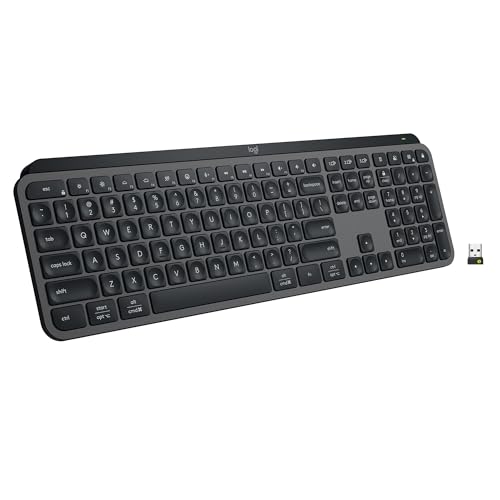
The MX Keys S earns the top spot in a studio guide for reasons that start with silence: its scissor keys are the quietest in this line-up, which makes it the safest board to keep beside a live microphone and the politest board for shared production rooms and late-night home studios with thin walls. The full-size layout keeps the number pad that Pro Tools-style editors treat as a transport, the function row is honest, and Logitech’s Smart Actions give it a macro system that requires no firmware adventure — record the multi-step sequences your DAW repeats (bounce settings, export chains, window layouts) and fire them from a key. The three-device pairing suits the modern studio pattern of a main workstation, a laptop and a streaming or reference machine sharing one desk.
Its limits are the familiar MX ones: the switches are not mechanical and cannot be changed, and low-profile travel is a taste some engineers never acquire. In a studio context those limits matter less than elsewhere, because the board’s job is editing fluency rather than typing romance — and on fluency, the combination of pad, macros, backlight that wakes as your hands approach during a dim mix session, and absolute quiet is hard to beat.
- Strengths: quietest board here — microphone-safe by design
- Strengths: full layout with pad transport and friendly macro software
- Strengths: three-device pairing matches multi-machine studios
- Trade-offs: not mechanical; feel is fixed for life
- Trade-offs: full-size width competes with wide MIDI controllers
- Trade-offs: premium pricing
Best for: producers and engineers who record in the same room they edit in. Not suited for: mechanical-switch devotees or the very smallest desks.

Keychron K8 Pro — the shortcut architect’s board
Badge: Best for custom DAW keymaps
- Layout: tenkeyless
- Connection: Bluetooth, USB wired
- Switches: hot-swappable Gateron G Pro Brown tactile (variant listed)
- Software: QMK/VIA remapping and macros, stored on the board
- Extras: Mac and Windows keycaps included
The K8 Pro is the board for the engineer who treats a keymap as part of their craft. QMK and VIA support mean every key can be remapped and layered at firmware level: build a layer for editing, a layer for mixing, a layer for tracking, with macros for the command sequences your DAW makes you repeat — and because the map lives in the board, it follows you to any studio machine you plug into, a virtue no software profile can match for engineers who work in multiple rooms. The tenkeyless layout returns desk width to the controller and the mouse, and the Brown tactile switches in the listed variant keep the sound profile civilised.
The compromises are real and should be chosen knowingly. There is no number pad, so pad-transport editors should look to the MX Keys S or the Das Keyboard instead. The wireless mode is Bluetooth only — entirely adequate for editing work, where the latency conversation that dominates gaming barely applies — and engineers who prefer a cable for the main rig can simply run it wired, where it behaves as a fully wired board. And QMK’s power comes with a learning curve: the first keymap takes an evening, though every subsequent one takes minutes.
- Strengths: deepest remapping and macro system in the guide
- Strengths: hot-swap switches let you tune feel and noise
- Strengths: tenkeyless width suits controller-centred desks
- Trade-offs: no number pad for pad-transport workflows
- Trade-offs: Bluetooth-only wireless
- Trade-offs: keymap power requires an evening of setup
Best for: engineers and producers who customise their DAW workflow deeply. Not suited for: number-pad transport users or plug-and-forget buyers.
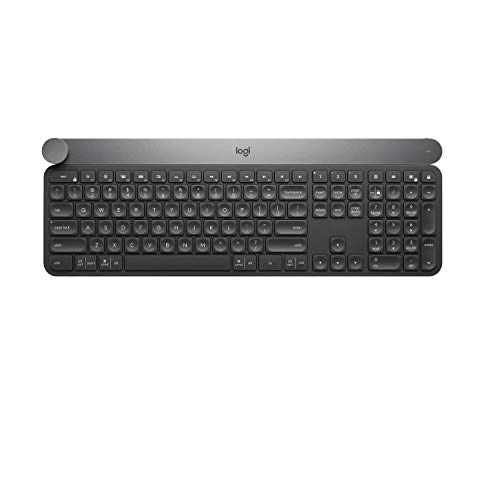
Logitech Craft — the dial-driven editor
Badge: Best for parameter tweaking and creative apps
- Layout: full-size with number pad, low profile
- Connection: Bluetooth and receiver, up to 3 devices
- Signature feature: creative input dial (the Crown) with app-aware profiles
- Keys: quiet scissor keys, smart backlighting
- Software: Logi Options with per-application dial profiles
The Craft’s reason to exist is its Crown — a substantial aluminium dial at the top-left that adapts to the application in focus. In supported creative applications it adjusts parameters contextually: brush sizes, sliders, values, zoom — the endless small increments that otherwise mean dragging a mouse with false precision. For production work its value is situational but real: engineers who split their time between the DAW and the surrounding creative toolchain — artwork, video for releases, documents — get a control surface that follows them across all of it, and within audio work the dial serves as a smooth, satisfying secondary control alongside the board’s conventional strengths: full-size layout, pad, quiet keys, three-device pairing.
Honesty about the dial’s limits belongs in a professional guide. Its deepest integrations are with the creative applications Logitech profiles for it; DAW support is more generic, and no producer should buy the Craft expecting it to replace a proper control surface or a motorised fader. Buy it as an excellent, quiet, full-size keyboard whose dial is a genuine bonus across a creative workflow — the framing its many long-term owners use — and it will not disappoint. The full comparison with its MX Keys sibling is simple: the Craft is the dial and an older platform; the MX Keys S is the newer, macro-richer board without one.
- Strengths: the dial is a real creative-work accelerant
- Strengths: quiet, full-size, pad-equipped and multi-device
- Strengths: premium build that suits client-facing rooms
- Trade-offs: dial integration varies by application; DAW support is generic
- Trade-offs: an older platform than the MX Keys S
- Trade-offs: you pay for the Crown whether or not your apps use it
Best for: producer-creators whose work spans audio, visuals and documents. Not suited for: DAW-only engineers who would never touch the dial.

Keychron K3 — the small project-studio desk
Badge: Best compact board for tight studios
- Layout: 75 percent, low profile
- Connection: Bluetooth for up to 3 devices, USB-C wired
- Switches: low-profile mechanical, Brown tactile variant listed
- Backlight: white LED
- Extras: Mac/Windows support, slim travel-friendly case
Project studios are exercises in negotiation: a desk, two monitors on stands, an interface, a 49-key controller that already eats the centre, and somewhere in the remaining geography a computer keyboard must live. The K3’s answer is to be small in every dimension — 75 percent layout, low-profile switches, a slim case that can slide under a monitor stand or perch on a controller’s edge — while keeping the keys production actually needs, function row included. Its Bluetooth pairing covers the laptop-based mobile rig as happily as the home desk, which makes it the natural board for producers who split work between a project studio and everywhere else.
The costs of small are the usual ones, and in this profession they are specific: no number pad, so pad-based transport habits must be relearned or remapped; a compressed right cluster that takes a week of editing sessions to become invisible; and low-profile travel that some engineers find less authoritative for long arrangement work. None of these is a defect — they are the price of the space the board returns, and on a genuinely tight desk the exchange is obviously correct. The wider travel context for boards of this size is covered in the best travel keyboards for laptops and mobile work.
- Strengths: smallest footprint here; fits desks nothing else can
- Strengths: tactile low-profile switches stay reasonably quiet
- Strengths: doubles as a travel board for laptop production
- Trade-offs: no number pad; compressed right cluster
- Trade-offs: Bluetooth-only wireless
- Trade-offs: low-profile feel is a compromise for long sessions
Best for: project studios, bedroom producers and mobile rigs. Not suited for: pad-transport editors or full-size traditionalists.

Das Keyboard 4 Professional — the permanent mix-room fixture
Badge: Best wired board for a fixed studio
- Layout: full-size, 104 keys
- Connection: wired USB with a built-in 2-port USB 3.0 hub
- Switches: Cherry MX Brown tactile
- Signature feature: oversized volume knob
- Case: aluminium top panel
Every studio has equipment that never moves and never gets questioned, and the Das Keyboard 4 Professional is built to join that category. Its studio case rests on three pillars. The oversized volume knob is a monitoring tool: fast, precise, eyes-free level adjustments during tracking and mixing, the kind of control engineers otherwise buy a monitor controller to get. The built-in USB hub swallows the dongles, license keys and drives that studio machines accumulate, right at the desk’s centre. And the full-size layout with Cherry MX Brown switches gives pad-transport editors their complete traditional toolkit in a board heavy enough to stay exactly where it was put.
The brand’s full range — and how this model sits against the Model S and the Mac-specific MacTigr — is mapped in the Das Keyboard complete guide. Within this guide its caveats are: wired only, which is a virtue in a fixed room and a disqualification in a mobile one; Browns that are audible, though far from clicky, so the most microphone-critical rooms should still favour the MX Keys S; and no backlight, which dim mix rooms may miss during late sessions.
- Strengths: the volume knob is a genuine monitoring control
- Strengths: USB hub absorbs studio dongle clutter
- Strengths: full pad-and-function layout for traditional editors
- Trade-offs: wired only; belongs to one room
- Trade-offs: tactile switches are audible on very quiet takes
- Trade-offs: no backlighting for dark rooms
Best for: fixed mix rooms and pad-transport engineers. Not suited for: mobile producers or silent-tracking purists.
The Microphone Problem: Keyboard Noise as a Recording Variable
Every other profession in this cluster of guides treats keyboard noise as a courtesy issue. In production it is a signal-chain issue, and it deserves a scenario. You are tracking a quiet vocal: a sensitive condenser microphone, a singer working close and soft, gain set generously. Between phrases, from the engineer’s position, comes the sound of a keyboard — a note typed to the producer, a marker dropped, a take renamed. On a loud board that sound prints to the recording, faintly but audibly, and it will be there in every chorus the take is comped into. The fixes are layered, and the keyboard is only the first: choose a quiet board (the MX Keys S is this guide’s answer, with the K3’s low-profile tactiles a respectable second); position the engineer’s desk and microphone with the null of the mic’s pickup pattern doing some work; use a talkback-and-type discipline where non-urgent typing waits for playback; and keep a cheap, silent membrane board in the room as the tracking-day keyboard if your main board is mechanical — a trick professional rooms have used for years, because the best editing keyboard and the best tracking keyboard are not always the same object.
There is a second, quieter acoustic cost: fatigue. Mechanical sound that is charming for an hour becomes a texture your brain must filter for ten, and mix decisions made by tired ears are the ones that get revised tomorrow. Engineers who mix long should weight the sound sections of the reviews above as seriously as the shortcut sections — your keyboard is the instrument you hear most in a session, including your own music.
Building a DAW Shortcut System That Survives Contact With Real Sessions
Hardware chosen, the productivity is in the system, and building one is a method rather than a talent. Start by auditing a real session: work a normal project for an hour and note every command you reach for more than five times and every sequence you repeat. That list — not a forum’s list — is your customisation backlog. Assign the top commands to single keys or simple layers first: in QMK terms, a layer key held by the left thumb can turn the right hand’s home row into a bank of editing commands without moving your hands from position, which is where the K8 Pro’s architecture pays its rent. Give macros only to true sequences — three or more steps, always identical — and resist macro-ing single commands, which wastes the resource you actually run out of, which is memory: yours. Print or save your keymap somewhere visible for the first month; fluency arrives faster with a reference than by bravado. Finally, back the map up. A firmware-level map exports as a file; a software profile lives in the app; either way, the hour you invested should never be hostage to a replaced board or a reinstalled machine.
Two supporting habits complete the system. Keep the DAW’s own shortcuts as your foundation and customise around them rather than replacing them wholesale, because tutorials, collaborators and other studios all speak the stock language — the same reason the adjacent guide for the best keyboards for video editors and content creators gives editors the same advice in a different accent. And review the map quarterly, deleting what you stopped using; a keymap, like a mix template, accretes cruft that slows the very work it was built to speed up.
Keyboard, Control Surface or Macro Pad: Where the Money Goes First
Producers upgrading a desk often ask whether the keyboard is even the right purchase, when control surfaces promise faders and macro pads promise buttons. The honest ordering is: keyboard first, because it is the device every session uses for everything, including all the work that is not mixing — naming, searching, arranging, communicating. A control surface transforms mixing specifically and earns its place second, once the keyboard foundation is fluent; faders are glorious and useless for renaming two hundred audio clips. A macro pad is the third purchase, valuable when your shortcut audit shows more high-frequency commands than a layered keyboard comfortably holds, and it pairs naturally with a compact board like the K3, where the pad effectively becomes the missing number pad and macro bank in one. Producers who reverse this order — surface first, keyboard never — commonly end up with beautiful faders in front of a terrible keyboard, driving a workflow that is ninety percent keyboard through the worst tool on the desk. Fix the foundation first; the glamorous equipment will still be there, and it will work better when it arrives, because the sessions it joins will already be fluent.
Common Mistakes in Studio Keyboard Buying
The first mistake is importing a gaming board wholesale — clicky or aggressively tactile switches, a lightshow where a backlight should be, and software that fights the DAW for system resources — because a streamer you admire uses one. The second is the reverse snobbery: assuming any quiet office board will do, then discovering mid-session that its function row is a media row and its shortcuts require an Fn key your chord does not have a finger for. The third is forgetting the room: buying a board whose sound you love in a shop and whose sound the microphone loves rather less. The fourth is layout amnesia — selling a pad-transport workflow down the river for a compact board’s looks, or the opposite, defending a full-size board on a desk where it pushes the MIDI controller into another postcode. And the fifth is neglecting the unglamorous layer entirely: no keymap audit, no macro for the export chain, no backup of the profile — owning a capable board at a fraction of its capability, which is the most common studio keyboard failure of all.
Mac Rooms, Windows Rooms and the Engineer Who Works in Both
Studios are platform-loyal in a way offices are not: a room is a Pro Tools-on-Mac room or a Windows workstation room, and its peripherals are expected to speak the local language natively. For the engineer who works in one room, the instruction is simple — buy the board whose legends and modifier layout match the house platform, so that the Command-versus-Control translation never enters your head mid-session. For the growing population of engineers and producers who carry work between platforms — tracking in a Mac room, mixing at home on Windows, delivering from a laptop that could be either — the boards in this guide were partly chosen for their bilingualism. The Keychron boards ship with keycaps for both operating systems and a hardware mode switch, which is the correct way to solve the problem: the board changes, not your hands. The Logitech boards handle both platforms gracefully through their software and dual-printed legends. What you should not do is dedicate one platform’s board to the other platform’s machine and rely on a remapping utility to paper over it; it works until a modifier-heavy shortcut exposes the translation at the worst possible moment, usually with a client watching.
There is a related portability point for engineers who guest in other rooms. A board whose keymap lives in its own firmware — the K8 Pro pattern — turns any house workstation into your workstation within a minute of plugging in, while a board whose customisation lives in software on your machine leaves your workflow at home. Engineers who make their living across rooms should weight that difference heavily; it is the studio equivalent of the session-file discipline that lets your mixes travel, and it is why the shortcut-architect pick in this guide is a firmware board rather than a software one.
Latency, Wireless and the Studio: A Calmer Version of the Gaming Debate
Production forums periodically import the gaming world’s latency anxiety, so let us settle the studio version plainly. The tasks a computer keyboard performs in a DAW — transport commands, editing shortcuts, naming, navigation — are human-paced: the difference between a wired board and a Bluetooth board is measured in milliseconds, while the tasks themselves are measured in tenths of seconds, and no edit in history has failed because a split command arrived eight milliseconds late. The one apparent exception, playing a software instrument from the typing keyboard, is a practice tool rather than a performance method, and even there the dominant delays are the audio interface’s buffer and the instrument’s own response, not the keyboard link. Engineers who want the full physics can read the gaming-focused analysis in are wireless keyboards good for gaming, where the millisecond budgets are examined in earnest; the studio conclusion is that connection choice here should be made on convenience — desk tidiness, multi-machine pairing, cable management in a room full of cables — rather than on speed. Buy the connection that suits your room. Your edits will not know the difference.
Long Sessions: The Engineer’s Hands Across a Ten-Hour Mix
Mixing is a marathon performed sitting down, and the keyboard’s contribution to surviving it is mostly about not adding strain to a day already full of it. The principles mirror those in any high-repetition work — neutral wrists, a front edge that does not force your hands upward, a desk height that lets your forearms rest level — but the studio adds two specifics. The first is that engineers lean: toward the monitors, over the controller, back for the wide listen — and a board that is light enough to slide between those postures, or compact enough not to need sliding, serves the day better than a fixed monument; this is a quiet argument for the K3 and K8 Pro in working rooms. The second is that mix work alternates intense keyboard bursts with long mouse-and-fader stretches, so the board must be comfortable to return to cold, fifty times a day, without a warm-up — a point in favour of familiar, standard layouts over exotic ones, however clever. Engineers with existing wrist or forearm complaints should treat the question more seriously than a keyboard guide can, and the dedicated treatment of split layouts and tenting in ergonomic mechanical keyboards and wrist comfort is the right next read; within this guide, every pick keeps the wrists in a conventional, neutral posture, which is the correct default for uninjured hands.
A Session-Day Checklist for Your Keyboard Setup
Professional rooms run on checklists, and the keyboard earns a small one. Before a tracking day: confirm the board is charged or cabled, confirm the quiet board or quiet mode is in place for the microphone’s sake, and confirm the talkback computer — if it is a separate machine — is paired to the right device slot so a mid-take message does not require a pairing ritual. Before a mix day: load the session’s keymap layer if you use per-project maps, verify your export macro still points at the right chain after any software update, and set your monitoring discipline — the knob or dial you will ride, at a known starting position. Weekly: back up the keymap or profile, wipe the board down (studio dust is largely skin, coffee and regret), and check the cable or dongle has not migrated behind the rack where cables go to be forgotten. None of this takes five minutes. All of it is the difference between a keyboard that is studio infrastructure and a keyboard that is studio scenery — and when a board eventually does misbehave mid-session, the diagnostic order in the keyboard not working troubleshooting guide will get you back to work faster than swapping boards in a panic.
Printed Shortcut Keyboards and Overlays, Given a Fair Hearing
No studio keyboard guide is complete without addressing the colour-coded elephant: keyboards and keycap sets printed with a specific DAW’s shortcuts, sold by specialist makers for each major application. Their promise is seductive — the shortcut language, printed on the keys, learnable at a glance — and for a defined audience they deliver it. A student learning a DAW, an editor crossing over from video, or a facility training assistants will all genuinely move faster with the answers printed under their fingers. The honest limitations are about time and depth. Fluency makes printing redundant: within a few months of daily work, your hands know the map and the legends become decoration. The printing also freezes one application’s language onto a general-purpose tool, in a profession where the same desk often runs two DAWs and a dozen other applications that now wear the wrong labels. And the boards beneath the printing are usually ordinary — you are buying tuition, not hardware.
The synthesis most experienced engineers land on is to separate the reference from the tool. Buy the keyboard on its merits from this guide. Then, if you are learning or relearning a DAW, use a printed overlay, a silicone cover or a simple reference card for exactly as long as it teaches you something, and retire it when your hands stop consulting it. That sequence gets the tuition without mortgaging the tool — and if you later switch DAWs, as careers tend to require, your board comes with you and only the card changes. Facilities standardising a room should apply the same logic at scale: identical, unprinted boards everywhere, printed references at the assistant’s position, and a house keymap document that survives staff turnover better than any individual’s memory.
Home Rig, Commercial Room: One Buyer, Two Standards
Many readers of this guide work in both worlds — a commercial room with standards and clients, and a home rig with neither — and the keyboard decision differs between them in instructive ways. The commercial room rewards invisibility: standard layouts any engineer can sit down at, quiet operation, equipment that looks maintained and serious, and spares that swap in without ceremony. That is MX Keys S and Das Keyboard territory, and it is why facilities buy boring on purpose. The home rig rewards personality and optimisation: your keymap, your layout experiments, your compact board arranged around your controller and your cat. That is K8 Pro and K3 territory, where customisation compounds daily because only one pair of hands must understand it. The mistake is confusing the two standards — imposing a personal, heavily layered keymap on a shared room’s board, where the next engineer inherits your cleverness as their obstacle; or, at home, buying the facility board out of habit and never building the workflow that would have made your own room faster. Own both standards consciously, keep the shared room stock and the home room personal, and if budget forces one board to serve both, choose the stock-friendly one and keep your customisations in a layer you can switch off when the board travels to the shared room.
Budget framing follows the same split. A commercial room should price keyboards as infrastructure — the premium tier’s support, spares and uniformity are worth their cost against billable hours — while a home producer should price them as instruments, where the mid tier’s customisation per pound spent is the value peak and the money saved belongs in monitoring, treatment and time. Neither framing is the other’s poor relation; they are two correct answers to two different questions, and recognising which question you are answering is most of buying well.
The Final Matrix: Matching the Board to the Bottleneck
| If your bottleneck is… | Buy | The reasoning in one line |
|---|---|---|
| Keyboard noise reaching the microphone | Logitech MX Keys S | The quietest capable board here, with macros and a pad included |
| Shortcut speed and workflow customisation | Keychron K8 Pro | Firmware keymaps and layers that travel with the board |
| Parameter tweaking across creative apps | Logitech Craft | The dial earns its place in a multi-application workflow |
| Desk space in a project studio | Keychron K3 | Full editing capability in the smallest footprint here |
| A fixed room that wants a permanent fixture | Das Keyboard 4 Professional | Monitoring knob, USB hub and a complete traditional layout |
Notice what the matrix assumes: that you know your bottleneck. The engineers who buy keyboards badly are rarely wrong about products — they are wrong about their own constraint, buying customisation when their problem was noise, or silence when their problem was a shortcut system held together with hope. Spend one session honestly observing where your current board slows you, annoys you or endangers a take, and the correct row of that table selects itself. Then invest the difference — the money and attention a wrong purchase would have consumed — in the unglamorous multipliers: the keymap audit, the reference card, the charging habit, the spare silent board for tracking days. Studios are systems, and a keyboard is the component your hands touch most; the win is never the board alone, but the board correctly matched to the room it serves, set up with intent, and then left alone to disappear into the work. That disappearance — hours of editing where the tool never once enters your thoughts — is the real specification every pick in this guide was chosen to meet.
Keeping a Studio Keyboard Alive: Dust, Coffee and Spares
Studios are hostile environments for keyboards in slow motion: dust from acoustic treatment, the occasional coffee placed exactly where a keyboard lives, and a working life measured in sessions rather than months. The maintenance that matters is brief and regular. Keep drinks on a side surface as a house rule — the single most effective keyboard preservation policy ever devised, and the one most often honoured in the breach. Brush and blow out the board weekly; studio dust is fibrous and accumulates under keys faster than office dust, and a key that begins to feel inconsistent is more often dirty than broken. Wipe caps monthly, and if your board has removable caps, give the high-traffic keys a proper clean each quarter — in a studio, the spacebar, the transport cluster and the modifier keys carry visible evidence of every session. Protect the board in transit if it travels between rooms: a sleeve or case costs little and prevents the cracked corner and bent cable that end more travelling boards than electronics ever do.
Spares deserve a facility-minded sentence even for home producers: a keyboard failure mid-session costs more in momentum than a spare board costs in money, and the spare does not need to be good — it needs to be present, charged and standard. Keep the board your current one replaced, or an inexpensive silent board of the kind suggested for tracking days, in a drawer with its receiver. When the day comes — and across a career, the day always comes — the session continues in two minutes and the broken board becomes a problem for a quieter afternoon, when the diagnostic sequence can be worked through calmly and, if the board is a hot-swappable model, quite possibly fixed with a single switch. That is the whole philosophy of this guide in miniature: the professional setup is not the one that never fails, but the one whose failures have already been planned for.
The Adjacent Desks: Podcasting, Streaming and Voice Work
A growing share of the readers of a guide like this one do not mix records at all: they record podcasts, stream, or cut voice work, and their keyboard lives permanently within microphone range while they themselves are the talent. The priorities reorder themselves instructively. Silence stops being one factor among several and becomes the product: a keyboard typed on while speaking into a condenser microphone must be quiet in an absolute sense, which pushes this audience firmly toward the MX Keys S end of this guide and away from anything with a mechanical event, however soft. Shortcut needs shrink — the work is transport, markers and a handful of editing commands — while reliability and invisibility grow: a board that sleeps, disconnects or demands attention mid-recording is a production incident, not an inconvenience. And the desk is often also the set, which makes a clean, low-profile board a visual asset in a way no mix room ever required. If that description matches your work, read this guide’s noise sections as its main text, take the quietest pick, keep a wired connection if your setup allows it for one less variable, and spend the money you saved on the room and the microphone, where your audience will actually hear it.
Reading a Studio Keyboard Listing Critically
Before the questions, a short buyer’s defence kit, because keyboard listings are written for gamers and office buyers rather than for engineers. When a listing says “quiet”, ask quiet compared to what — the honest evidence is the switch type: scissor and low-profile tactile designs are quiet by construction, while a standard mechanical board calling itself quiet usually means quieter than its clicky sibling. When a listing advertises macros, check where they live: software macros vanish when the software is not running, while firmware macros, as on the K8 Pro, travel with the board. When a listing shows a function row, confirm the F-keys are primary rather than shared with media functions, or that the default can be switched — the spec you need is sometimes one line in the manual rather than the product page. And when a listing promises multi-device pairing, confirm the switching is a dedicated key rather than a key combination you will fumble in the dark. Thirty seconds of this scepticism, applied to any board beyond this guide’s five, will sort studio-suitable keyboards from studio-adjacent ones more reliably than any star-free summary could.
A Final Note for Composers and Beat-Makers
Composers and beat-makers sit slightly apart from the engineering audience this guide has addressed, and their keyboard calculus has one extra term: the typing keyboard shares the desk, and sometimes the hands, with a piano-style controller, and the two must not fight. In practice this means compact or tenkeyless boards score higher for this group than raw editing power would suggest, because the controller owns the centre of the desk and the computer keyboard lives to one side, used in bursts for naming, searching and arrangement commands between passes at the keys. It also means the board’s job includes a lot of one-handed use — the other hand on the controller or the mod wheel — which favours layouts where the essential clusters sit under the free hand and argues for a layer or macro for the handful of commands that otherwise demand two hands. If that is your workflow, weight the K3 and K8 Pro sections of this guide most heavily, set your macros for one-handed operation from the start, and accept the number pad’s absence as the correct price for a desk where the music keyboard, rightly, is the main instrument.
Frequently Asked Questions
What layout is best for music production: full-size or tenkeyless?
It depends on your DAW habits. Editors who use the number pad as a transport and memory-location controller — the Pro Tools tradition — should stay full-size. Producers whose desks centre on a MIDI controller and whose DAW work is loop- and piano-roll-based usually prefer tenkeyless or compact boards and the space they return. Both workflows are fully professional; choose by your shortcut audit, not by fashion.
Are mechanical keyboards too loud for recording studios?
Clicky mechanical switches, yes — keep them away from live microphones. Tactile and linear mechanical switches are a judgement call that depends on the room, the microphone and the material; many engineers track happily with a tactile board positioned sensibly. Scissor-key boards like the MX Keys S are the zero-risk option, and keeping an inexpensive silent board for tracking days is a common professional compromise.
Do I need a keyboard with a volume knob for production?
You do not need one, but engineers who have one use it constantly for monitoring level — it is faster and more precise than reaching for the interface or a software slider, and it encourages the healthy habit of riding listening level deliberately. Treat it as a strong preference in a fixed room (the Das Keyboard’s knob is the exemplar) rather than a requirement.
Is Bluetooth latency a problem for DAW work?
For editing, arranging and mixing, no — the latencies involved are far below anything those tasks can expose. For playing software instruments live from the computer keyboard itself, any wireless link adds a little delay, but musicians doing that seriously use a MIDI controller, which is a separate device with its own connection. The keyboard’s connection is not the weak link in a production chain.
Should I buy a DAW-specific printed keyboard or keycap set?
They are genuinely useful for learning a new DAW’s shortcut language, and many engineers keep one as a reference even after fluency arrives. As a long-term primary board they are a compromise — you are buying the printing, not the keyboard — so the stronger route is a good board from this guide plus, if you want the visual aid, a printed overlay or reference card you can retire as your hands learn.
How do I stop my keyboard shortcuts from conflicting with the DAW?
Build your custom layer around the DAW’s stock map rather than over it: audit which chords the DAW already owns, assign your macros and layers to combinations it does not use, and keep a written record of your assignments. Firmware-level tools like VIA show you the whole map at a glance, which makes conflicts visible before a session discovers them for you.
Buy for the session you actually run: quiet enough for your microphone, fluent enough for your shortcuts, sized for the desk your controller already owns. The five boards above cover that space from the silent all-rounder to the keymap architect’s platform — choose the one whose strengths match your bottleneck, build the shortcut system it deserves, and the keyboard will repay you every session for years.