Disclosure: As an Amazon Associate, kajuandouglas.com earns from qualifying purchases. Links on this page are affiliate links; they cost you nothing extra. Prices and availability change often, so check the current Amazon listing before you buy.
Finding the best budget linear switches under 30 cents is really an exercise in arithmetic and honesty: the arithmetic of dividing a pack’s price by its switch count at the listing, and the honesty to admit that the cheapest tier of the switch market is far better than it has any right to be. This guide prints no per-switch prices — listings move too often for a printed figure to stay true — but it teaches you exactly how to run the division yourself, which switches in the budget tier deserve the money, and where the bottom of the market genuinely does cut corners. The six verified picks below are the lines that budget builders reach for again and again.
Best Budget Linear Switches Under 30 Cents: What the Budget Tier Actually Means
A generation ago, an inexpensive switch meant a scratchy, wobbly compromise that you tolerated until the real switches arrived. The modern budget tier is a different animal. Large-scale manufacturing, fierce competition among a handful of factories, and the hot-swap boom have pushed genuinely smooth, factory-lubed linears down into bulk-pack territory where the per-switch cost — once you do the division at the listing — lands in the bracket this article’s title names. What separates today’s budget switches from premium ones is rarely basic competence. It is refinement: tighter stem tolerances, quieter springs, better lubricant consistency, fancier housing materials, and quality control that catches the occasional dud before it ships.
That distinction matters because it tells you what your money buys as you climb. At the budget tier you are purchasing a switch that types and games perfectly well. Each step up purchases polish, not function. For a first custom build, a board for a second desk, a macropad experiment, or a full-size keyboard where the switch count alone multiplies every saving, the budget tier is not a compromise at all — it is the rational default, and the premium tier is the indulgence. The picks below are ordered roughly from the most celebrated budget linear of the moment down to the workhorses, but any of them can anchor a build you will be happy with.
In this guide
How to check the per-switch maths yourself
Since this guide prints no prices, here is the thirty-second method it recommends instead. Open the listing, note the pack’s current price and its switch count, and divide. Then sanity-check the result against three things: whether the count in the headline matches the count in the box (variations exist within one listing), whether the switches are the pin type your board needs, and whether a larger pack of the same switch changes the division enough to matter — it frequently does, which is why full-size builders should always price the biggest box first. If the quotient lands in the budget bracket and the switch is one of the proven lines below, you have found the deal the title promises, whatever the calendar says.

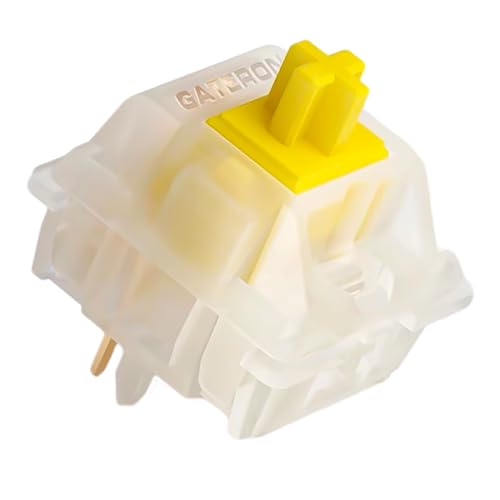
Gateron Milky Yellow Pro V2 — the budget linear everyone measures against
Badge: Best overall in the budget tier; the default recommendation.
- Type: linear, pre-lubed, 5-pin
- Weight: 50 gf class operating force
- Pack: 72 switches
- Housing: milky housing, known for a deep, soft sound signature
The Milky Yellow Pro’s reputation is the worst-kept secret in the hobby: a budget switch that enthusiasts with far more expensive boards keep coming back to. The milky housing lends the keystroke a deep, muted voice that sounds like money, the factory lubrication is applied with unusual care for the tier, and the stem’s manners — modest wobble, no scratch worth naming — shame switches in brackets above it. In the V2 revision the line tightened its tolerances further. If this guide were allowed only one pick, this would be it, and the fact that it lives in the budget tier at all is the strongest evidence for the tier’s quality.
Strengths
- Deep, pleasant sound that flatters almost any case
- Factory lubrication good enough that most users never open a switch
- Versatile weight that suits typing and gaming equally
Trade-offs
- Milky housings diffuse backlighting rather than transmitting it crisply
- So popular that listings occasionally sell through in popular counts
- Its softness of voice will not suit players chasing a sharp, clacky build
Best for: nearly any budget build, especially sound-focused ones. Not suited for: shine-through RGB showcases that need clear housings.

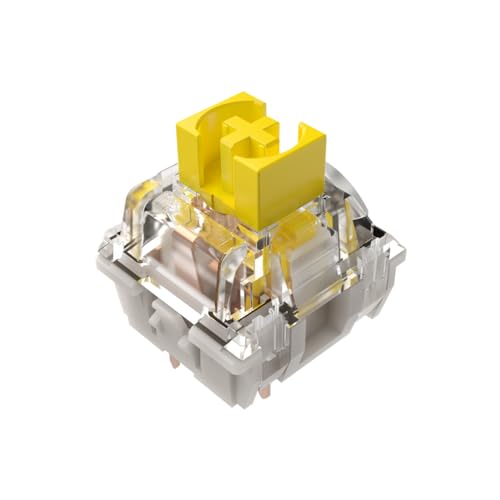
Akko V3 Creamy Yellow Pro — the smooth all-rounder with a dustproof stem
Badge: Best for builders who want budget pricing with a polished, modern feel.
- Type: linear, 5-pin, dustproof stem design
- Weight: 50 gf class
- Pack: 45 switches
- Character: creamy is the marketing word; smooth and stable is the reality
Akko’s V3 Pro generation dragged the company’s switch line firmly into the enthusiast conversation, and the Creamy Yellow Pro is its linear standard-bearer. The boxed, dustproof stem is the headline engineering: by guiding the stem more completely, it trims wobble to a level that makes the whole board feel a bracket more expensive, and it shrugs off the dust that open desks accumulate. The stroke is even, the spring is quiet, and the overall impression is of a switch designed recently, by people who had read the community’s complaints about every earlier budget switch and addressed them in order.
Strengths
- Boxed stem keeps wobble impressively low for the tier
- Consistent, modern feel across a whole board’s worth of switches
- Dustproof design suits open, real-world desks
Trade-offs
- Pack size means full-size boards need multiple boxes
- The stable stem can feel slightly less lively than looser rivals
- Less of a sound signature than the Milky Yellow; more neutral than characterful
Best for: tidy, modern budget builds and anyone sensitive to stem wobble. Not suited for: builders who want the deepest, thockiest voice above all else.

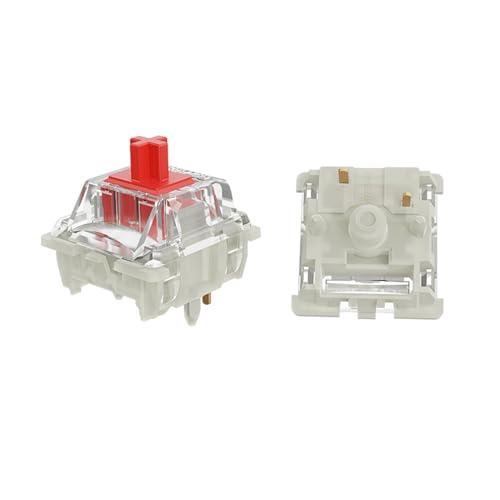
Outemu Red — the bulk-pack workhorse of the budget world
Badge: Best for big boards and big counts, where the division matters most.
- Type: linear, 3-pin, dustproof design
- Weight: 45 gf class — the lightest touch in this line-up
- Pack: 65 switches
- Character: simple, light, and entirely serviceable
Outemu’s Red is the switch that has quietly populated more budget keyboards than any other in this guide, both as a loose pack and pre-installed in inexpensive boards around the world. Judged against the Milky Yellow it is the plainer instrument: a touch more spring noise, a slightly less refined landing, a voice with less depth. Judged on its own terms — a light, honest linear sold in a generous count — it is exactly what the budget tier is for. The light spring makes it a friendly gaming switch, and the sheer number of these in circulation means keycap and socket compatibility is as proven as anything in the hobby.
Strengths
- Generous pack count keeps the per-switch division friendly
- Light actuation suits fast, relaxed gaming hands
- Enormous installed base; behaviour in any board is a known quantity
Trade-offs
- Less polished landing and spring manners than the Gateron and Akko picks
- 3-pin mounting only
- Scratch can be present on some switches out of the box; lubricant helps
Best for: full-size conversions, first builds, and boards for second desks. Not suited for: sound-obsessed custom builds where every nuance is the point.

KTT Kang White V3 — the enthusiast’s budget secret
Badge: Best for builders who read switch forums and want the connoisseur’s cheap pick.
- Type: linear, 3-pin, factory lubed
- Weights: offered in lighter and firmer spring variants within the line
- Pack: 90 switches in this listing
- Materials: nylon housing with a POM stem, per the maker’s description
KTT’s Kang White built its name the slow way, through community sound tests and word of mouth, and the V3 is the version that reached the big listings. The nylon-and-POM material pairing gives it a distinctive, rounded voice that enthusiasts describe with the vocabulary usually reserved for boutique switches, and the factory lubrication in recent batches has been respectably even. It is the pick for the builder whose budget is firm but whose ears are not: the division at the listing stays in this article’s bracket while the typing experience wanders well above it.
Strengths
- Characterful, rounded sound that enthusiasts genuinely prize
- Large pack suits full layouts in a single purchase
- Spring variants let you tune the board’s weight without changing lines
Trade-offs
- Availability and batch consistency vary more than the big brands’
- 3-pin only, which some premium plates dislike
- Its voice is distinctive enough that you should hear a sound test first
Best for: sound-chasing budget builds and community-recommended starter kits. Not suited for: buyers who want the most predictable, uniform option available.

Gateron G Pro 3.0 Red — the name-brand budget linear
Badge: Best for buyers who want a major maker’s polish at a bulk-pack division.
- Type: linear, pre-lubed, 5-pin
- Format: RGB-friendly housing for backlit boards
- Pack: 35 switches
- Character: the classic Gateron smoothness, in the line’s current generation
The G Pro 3.0 generation is Gateron’s answer to a fair criticism of its older budget lines: that the smoothness was real but the consistency wandered. The 3.0 switches arrive with improved moulds, a more even factory lubricant film, and a cleaner stem fit, and the Red is the line’s straight-ahead linear — no gimmick, no exotic material, just the company’s core competence at a friendly division. For a backlit board it has the practical edge over its Milky sibling: the housing treats LED light properly, so legends glow instead of smearing.
Strengths
- Current-generation consistency from the biggest name in the tier
- Backlight-friendly housing suits gaming boards
- Smooth stroke that needs no further work from most users
Trade-offs
- Smaller pack means the division rewards compact layouts most
- Voice is brighter and less deep than the Milky Yellow Pro’s
- Less character than the KTT for sound-focused builders
Best for: backlit gaming builds on a budget and Gateron loyalists. Not suited for: full-size boards bought one small pack at a time.

Kailh Box Red — the rugged budget linear in a very big box
Badge: Best for spill-prone desks and the largest single-pack conversions.
- Type: linear, box-stem design, 3-pin
- Weight: 45 g class actuation
- Protection: IP56 dust and water resistance rating for the switch design
- Pack: 120 switches
Kailh’s Box design wraps the contact mechanism in a sealed-ish box and guides the stem through a collar, and the Box Red brings that engineering to the budget tier in the largest pack in this guide. The practical dividends are stability — box stems wobble very little — and resilience: the design’s dust and water resistance is a genuine comfort on desks where coffee happens. The feel is a shade crisper and the voice a shade brighter than the Gateron picks, which some gamers prefer. When the board is full-size and the pack is this large, the division at the listing is where this switch makes its whole argument, and it makes it well.
Strengths
- Largest pack here; one purchase covers any layout with spares
- Box stem stability and the design’s spill resistance
- Crisp, lively feel that suits gaming boards
Trade-offs
- Brighter voice will not please deep-sound chasers
- Very old keycaps with tight stems deserve a cautious first fitting on box stems
- 3-pin mounting, like the other bulk picks
Best for: full-size builds, shared or messy desks, and one-and-done purchases. Not suited for: hushed, deep-voiced custom builds.
Where the budget tier cuts corners — and where it does not
Honesty about the bottom of the market requires naming the real compromises. Quality control is the first: a budget line’s tolerance band is wider, so in a box of ninety you may meet one switch that pings, one that feels a gram heavier, one with a slightly lazy spring. Premium lines buy narrower bands, not different physics. Lubricant consistency is the second: factory lube at this tier is good and improving, but it is applied at production speed, and the occasional dry switch is the tax. Housing materials are the third: budget switches use proven, ordinary plastics, where premium lines experiment with POM, UHMWPE, and proprietary blends that genuinely change friction and sound.
Now the equally important list of what is not compromised. Actuation reliability is not: a budget linear registers presses with the same boring dependability as any switch, because the contact mechanism is a mature, standardised design. Lifespan is not meaningfully compromised either; these switches are rated for the same order of service as the hobby’s flagships. Keycap fit, socket fit, and repairability are identical. In other words, the budget tier sells you the same machine with less jewellery. For a great many builds — arguably most builds — that is the correct purchase, and the premium tier’s polish is best bought later, deliberately, when you know exactly which refinement your fingers are asking for. The wider landscape of the Gateron line alone is mapped in gateron switches complete guide, and the boutique end of the market gets its own treatment in durock jwk tecsee boutique switches guide.
Buying guide: matching the pick to the build
Start with the board’s size, because it decides which pack divisions reward you. Compact layouts forgive small packs; full-size boards punish them, so the ninety and one-hundred-twenty-count boxes exist for a reason. Next, decide your sound direction before choosing: deep and soft points to the Milky Yellow or the Kang White; bright and lively points to the Box Red or the G Pro 3.0; neutral points to the Akko. Then check pins — if your plate demands 5-pin stability, the Gateron and Akko picks are your shortlist — and backlighting, which rules the milky housing in or out.
Weight is the last dial. The lighter switches here, in the mid-forties class, suit gaming and relaxed typing; the fifty-gram class suits writers who want a little more intention per press. None of these differences is large, and that is the budget tier’s final lesson: within a set of proven lines, there is no wrong answer, only answers tuned slightly differently. Buy the one whose compromises you care about least, and spend the savings on the parts of the build you will actually see — keycaps, a case, a coiled cable, a desk mat. The economics of a first custom board are explored from the case up in build your first custom keyboard guide.
How to build with budget switches, step by step
Step 1: Sort and inspect before installing
Tip the pack onto a tray and roll each switch once between your fingers. You are feeling for the occasional outlier — a scratchy stroke, a lazy spring — while the pack is still a pile rather than a keyboard. Set outliers aside as spares; every budget pack quietly expects this small act of quality control, and it takes five minutes.
Step 2: Test a row before committing the board
Install one row, cap it, and type on it in the actual case. Sound and feel are properties of the whole build, and a row tells you nearly everything a board will, while the cost of changing your mind is still twelve switches.
Step 3: Seat carefully, pin by pin
Budget switches forgive a lot, but not a folded pin. Align, press straight, and if a switch resists, lift it out and look at its legs before trying again. A keyboard tester open on screen during installation catches every seating mistake while it is still cheap to fix.
Step 4: Lube only if a specific switch asks for it
Most of these lines arrive factory-lubed well enough to use as they are. Reserve your lubricant for the one or two outliers from step one, rather than opening ninety switches out of habit — the technique is covered in how to lube keyboard switches for when it is genuinely needed.
Step 5: Keep the spares
A budget pack’s leftovers are a maintenance kit: replacements for the inevitable spill, the dropped board, the one switch that dies in year three. Label the bag with the switch name and the board it belongs to, and future you will be grateful.
Common mistakes in the budget tier
The classic error is dividing by the wrong number: comparing packs by their headline price without checking the count inside, which is comparing nothing at all. The second error is buying the absolute cheapest no-name switch available anywhere rather than a proven budget line — the bracket this guide covers is populated by established makers for a reason, and below it the scratch, wobble, and dead-on-arrival rates climb steeply. The third is ignoring pin type and discovering, mid-build, that a plate wants legs your switches do not have. The fourth is lubing an entire factory-lubed set into inconsistency, turning ninety uniform switches into ninety individual experiments.
Fifth: judging a budget switch in a bare, echoing case and condemning it, when the case was the problem — several picks in this guide sound a full tier better in a foam-filled build. Sixth: assuming budget means disposable and treating the switches roughly during installation, bending pins that a moment’s care would have saved. The budget tier rewards exactly the same good habits as the premium tier; it simply charges less tuition while you learn them. For the general foundations, keyboard switches explained for beginners remains the friendliest starting point, and outemu switches are they good takes a longer look at the workhorse brand in this line-up.
Budget linears for typing versus gaming
Although all six picks share a category, they lean in two directions. For gaming, the lighter springs and livelier voices — Outemu Red, Kailh Box Red, G Pro 3.0 Red — keep repeated presses effortless and give the board an alert, responsive character that pairs naturally with fast play. For typing, the slightly weightier and deeper-voiced switches — Milky Yellow Pro, Creamy Yellow Pro, Kang White — reward the longer session: a little more intention per press, a calmer soundtrack, and a landing that stays pleasant at hour four. Mixed-use boards can split the difference by zoning, putting the livelier switches under the gaming cluster and the calmer ones under the letters, a trick hot-swap sockets make trivially easy and one that the budget tier’s pack sizes quietly encourage, since a second small pack costs little commitment.
Whichever direction you lean, avoid the trap of judging a typing switch by a gaming test or the reverse. A linear that feels deliciously light during a match can feel vague during a long draft, and a switch that feels composed at the desk can feel sluggish mid-fight. The picks here are inexpensive enough, in the qualitative sense this guide keeps returning to, that owning one pack of each temperament across two boards is a realistic end state for an enthusiast — and a far better use of money than one ultra-premium set asked to be two things at once.
The second-hand and spares economy of cheap switches
An underappreciated virtue of the budget tier is liquidity. Proven budget lines are the hobby’s small change: everyone knows them, everyone can use them, and a leftover pack is trivially gifted, traded, or sold on to the next builder. They populate macropads, switch testers, loaner boards, and the practice builds of friends you are recruiting into the hobby. A premium switch bought wrong is a small financial event; a budget switch bought wrong is a teaching aid. This is also why the budget tier is the right place to learn switch skills — pulling, seating, lubing, filming — because the cost of a ruined switch is a shrug rather than a wince, and the skills transfer unchanged to any switch you will ever own.
What reviewers mean by “scratch”, “ping”, and “wobble” at this tier
Budget switch reviews lean on three words of criticism, and a buyer deserves translations calibrated to this tier. Scratch is a faint roughness felt through the stroke, caused by friction between stem and housing; at the budget level it is usually a whisper rather than a grind, present on some switches and absent on their neighbours in the same box, and it responds well to lubricant or simply to a week of use as surfaces polish each other. Ping is the spring’s faint metallic song after a press, most audible in a quiet room and in an empty case; it varies by spring batch and is the flaw most easily cured, with lubricant on the spring ends or a foam-filled case that refuses to amplify it. Wobble is the stem’s side-to-side play, felt as keycap looseness; the boxed and guided stems in this guide exist to minimise it, and even the plainest picks here wobble far less than the budget switches of five years ago.
The calibration that matters is this: at the budget tier, these are seasoning, not spoilage. A switch can carry a trace of all three and still type beautifully for years. The premium tier’s promise is not the absence of flaws but their reduction to a level where you need instruments, or a very quiet room and a very critical mood, to find them. Knowing that converts the budget buyer’s question from “is it perfect?” — unanswerable at any tier — to “is it proven?”, which this guide’s six picks answer comfortably.
Final recommendation
For most builders, the Gateron Milky Yellow Pro V2 is the budget linear to buy first: it sounds expensive, feels expensive, and divides at the listing like the budget switch it is. Choose the Akko Creamy Yellow Pro for the tidiest stem manners, the KTT Kang White for the most characterful voice, the G Pro 3.0 Red for backlit polish from a major maker, the Outemu Red for honest bulk value, and the Kailh Box Red when the board is big, the desk is messy, and one large box should end the shopping. Run the division yourself at the listing, buy the pack size that matches your layout, and enjoy the hobby’s best-kept open secret: at this tier, the switches are not the compromise in your build. They are the clever part of it.
How the budget tier got this good: a short history
The cheap switch’s reputation was earned in an era when one maker’s patents defined the market and everyone else’s copies were visibly worse — scratchier, wobblier, shorter-lived. Three changes dismantled that world. The patents expired, letting competent factories build to the MX pattern legally and openly. The hot-swap revolution turned switches into a consumer product with reviews, comparisons, and reputations, instead of a component buried inside a keyboard. And a wave of community scrutiny — force curves, sound tests, slow-motion stem cameras — made quality visible and therefore saleable at every tier. The result is the market this guide shops in: one where a factory’s budget line is a flagship of volume, engineered carefully because millions of buyers will compare it, switch by switch, against rivals in the same bracket.
That history carries a practical moral for buyers. The names in this guide are not cheap because they are careless; they are cheap because they are enormous, standardised, and competing in public. The genuinely risky purchases live below the proven tier, in unbranded listings with no community trail — no sound tests, no teardowns, no second reviews. The distance between a proven budget line and an anonymous one is small in the division and large in everything else, and it is the most important distance in this article.
Spring weights in the budget tier, explained for real hands
Budget linears cluster in a narrow weight band — the mid-forties to about fifty grams of operating force — because that is where most hands are happiest, but the small differences inside the band are worth understanding. A lighter spring returns the key faster relative to its resistance and asks less of the fingers over a long session; it also forgives less, registering presses from fingers that are merely resting. A firmer spring in this band adds a sense of intention and control, and many typists find their accuracy improves slightly because each press is a small decision. Neither is a gaming or typing weight in itself; both appear in boards used for both jobs, and preference splits by hand strength and habit more than by activity.
Two subtleties reward attention. Bottom-out force — what your finger feels at the end of the stroke — runs higher than the headline operating force, and it is the number your joints actually meet thousands of times a day. And spring length matters as much as spring weight: a longer spring, pre-compressed in the housing, makes a switch feel snappier and more uniform through the stroke, a trick several budget lines have adopted from the boutique world. When two budget switches quote similar weights but feel different, spring length and lubricant are usually the hidden authors of the difference.
Films, foam, and other cheap upgrades that love budget switches
Budget switches respond beautifully to the hobby’s inexpensive modifications, which is part of their charm. Switch films — thin shims that tighten the join between housing halves — can remove the faint rattle some budget housings have, at the cost of an evening and a pair of tweezers. A whisper of lubricant on a spring’s ends silences the occasional ping. Case foam, plate foam, and a desk mat lift the whole build’s sound by more than any single component swap. None of these is necessary; all of them are cheap in effort compared with their effect, and the budget tier is where most enthusiasts learn them, precisely because experimenting on these switches carries so little financial fear.
The ordering matters, though. Live with the switches stock for a week first, so you learn their actual character rather than a modified guess at it. Then change one thing at a time — foam before films, films before lubricant — and keep notes. The goal is a build tuned to your ears, and tuning is impossible if three variables move at once. This discipline, learned cheaply here, is the same one the boutique builders use; the tier differs, the method does not.
Budget switches inside prebuilt keyboards
Many readers will meet these switches not in a pack but inside an inexpensive prebuilt board, and it is worth knowing that the loose-pack and prebuilt worlds overlap heavily. The same Outemu and Gateron lines in this guide ship inside budget boards from dozens of brands, which cuts both ways: a prebuilt board you already own may contain switches worth keeping when you upgrade its case or caps, and a loose pack you buy may be auditioning, in effect, for a board you have already typed on. If you own a budget prebuilt and are wondering whether its switches are “real”, the answer is very likely yes — pull one and read the housing. The hobby’s entry level is unusually honest in this respect, and more than one enthusiast’s journey began with discovering that the cheap board’s switches were the same ones the forums recommended by name.
What to do when a budget pack contains a dud
It will happen eventually: one switch in a large pack that scratches, pings, or feels off. The budget tier’s social contract includes this moment, and handling it well is a skill. First, confirm the problem is the switch and not the seating — pull it, inspect the pins, reseat it in a different socket, and see whether the fault travels with the switch or stays with the socket. Faults that stay with the socket are seating or board issues; faults that travel are the switch’s own. Second, try the cheap remedies in order: a touch of lubricant for scratch, a dab on the spring ends for ping, a film for housing rattle. Third, if the switch is simply a bad sample, retire it to the spares bag without resentment — this is precisely what the pack’s margin is for, and it is why this guide recommends buying a count above your board’s strict needs.
What not to do is judge the line by the dud. A pack of ninety switches with one outlier has performed at a level most manufactured goods would envy, and the premium tier’s narrower tolerance band reduces, but does not abolish, the same phenomenon. The builders who stay happy in this hobby are the ones who treat a single imperfect switch as a rounding error with a remedy, not as evidence about a brand.
Budget linears and the road upward
Finally, a word about where the budget tier sits in a longer hobby. Many enthusiasts treat these switches as a first chapter: learn the board, learn your preferences, learn what “deep” and “bright” and “scratch” mean in your own hands — then, if curiosity persists, spend upward with knowledge instead of hope. Others discover that the first chapter was the book: that a Milky Yellow in a decent case satisfies them completely, and the premium tier holds nothing they need. Both outcomes are successes, and both are cheaper to reach starting here. The one outcome to avoid is starting at the top on a stranger’s recommendation and never learning what your own fingers would have chosen. In a hobby built out of feel, the budget tier is not the shallow end. It is the classroom.
Reading a budget switch listing like an enthusiast
Listings reward a practised eye. The details that matter are the switch count, the pin count, the generation or version of the line, whether the switches are factory-lubed, and the housing type — milky, transparent, or opaque — because that decides your backlighting. The details that matter less are the adjectives, which are free. Cross-check the version especially: several lines in this guide exist in multiple generations under nearly identical names, and the newest is usually the one the community’s praise actually refers to. When a listing is ambiguous about generation, the photographs of the housing and stem usually settle it. A minute of this reading, plus the division from the how-to section, is the entire skill set of budget switch shopping — the rest is taste, and taste you can only acquire by typing.
Layout by layout: where the savings compound
The case for budget switches strengthens with every key on the board. On a compact sixty-percent layout, the switch count is small enough that even premium switches are a modest line item, and the budget tier’s advantage is real but gentle. On a tenkeyless board the count climbs and the division starts to matter. On a full-size board — or a southpaw layout, or a board with a full function row and a numpad — the switch bill is the difference between tiers multiplied by the largest number in the hobby, and the budget lines in this guide move from “sensible” to “obvious”. Builders of large layouts should read pack sizes as seriously as switch feel: the ninety and one-hundred-twenty-count boxes exist precisely for them, and buying two mid-size packs to cover a full-size board is the classic way to pay more for the same switches.
The compounding works in the other direction too. A builder planning two boards — a home board and an office board, or a main board and an experiment — doubles every saving and gains a spares pool shared between them. Budget switches make the two-board household realistic for people who would never buy two premium sets, and there is a genuine quality-of-life argument for the office board being as good as the home one: your hands spend their weekdays there. Several readers will find that the most persuasive sentence in this guide is simply that arithmetic, applied to their own desk count.
A note on counterfeit and grey-market packs
Popularity invites imitation, and the best-known budget lines are occasionally copied or sold through channels where the box’s contents do not match its branding. The defences are ordinary: buy through the listing this guide links, check that the housing moulding carries the maker’s name cleanly, and be suspicious of divisions that undercut the proven tier by an implausible margin — in a market this competitive, a price far below the known lines usually means the product is not the known product. A genuine budget switch is a marvel of legitimate scale. A fake one is just a bad switch wearing a good switch’s name, and the small saving it offers is the worst bargain in the category.
Budget switches for a first build: a worked example in words
Picture the most common reader of this guide: a first-time builder with a hot-swappable seventy-five-percent kit, a set of keycaps chosen with more enthusiasm than the switch budget, and a firm ceiling on the whole project. The switch decision is where that ceiling is won or lost. Choosing the Milky Yellow Pro keeps the build’s total in the sensible zone while giving the finished board a sound and feel its owner will proudly demonstrate to sceptical friends. Choosing the Akko instead trades a little of that sound for tidier stem manners and a more modern spec sheet. Choosing the Outemu or the Box Red frees the most room in the budget for the case and caps, at a small cost in refinement that a first-time builder is honestly unlikely to detect until their second build teaches them. There is no losing move in that paragraph — which is the entire point. The budget tier has matured to where a beginner’s switch choice is a matter of flavour, and the money saved is better spent making the rest of the build worthy of the switches.
Picture, at the other extreme, the experienced builder assembling a board for a relative — a student heading to a dorm, a parent curious about the hobby. Here the budget tier is not an economy but a kindness: switches good enough that the gift feels generous, inexpensive enough that the gift is actually given. More keyboards enter more lives through this tier than through all the group buys in the hobby combined, and the hobby is healthier for it.
Environmental footnote: switches as the reusable part
One last, unfashionable virtue deserves recording. A mechanical switch is among the most reusable objects in consumer electronics: it pulls out of one board and works in the next, it survives its keycaps and its case, and a pack bought today may serve three successive builds across a decade. Budget switches extend that virtue by lowering the cost of keeping a healthy spares pool, which is what keeps old boards in service instead of in landfill. Buying a proven line, keeping its spares labelled, and passing leftovers to the next builder is a small, real form of stewardship — and it is only practical at prices where a spare switch is a triviality. The budget tier, once again, turns out to be the thoughtful tier as well.
Frequently asked questions
How do I work out the cost per switch?
Take the pack’s current price on its listing and divide by the number of switches in that pack. Check the count carefully — the same switch is often sold in several pack sizes with different divisions — and prefer the largest pack your layout can use, since the division usually improves with size. This guide deliberately prints no figures, because listings change; the method stays true even when the numbers move.
Are budget linear switches good enough for a custom keyboard?
Yes — for most custom builds they are not merely good enough but genuinely good. The modern budget tier offers factory lubrication, stable stems, and pleasant sound that would have been premium features a few years ago. What extra money buys is refinement: tighter consistency, exotic materials, and quieter springs. A first or second custom build loses very little by starting here.
Which budget linear sounds the best?
Sound is a property of the whole build, but the switches with the deepest reputations are the Gateron Milky Yellow Pro, whose milky housing lends a soft, deep voice, and the KTT Kang White, whose material pairing gives a rounded, characterful tone. In a foam-filled case either can sound startlingly premium; in a hollow case, no switch can save the acoustics.
Do I need to lube budget switches?
Usually not. Every pick in this guide arrives factory-lubed to a usable standard, and most owners type on them as they come. Lubricant earns its effort on individual outlier switches — a scratchy one, a pingy spring — rather than across a whole set. If you do lube, work switch by switch and keep the film thin and even.
3-pin or 5-pin: does it matter for budget switches?
It matters for fit, not quality. Five-pin switches seat more rigidly in boards and plates that accept them; three-pin switches fit almost everything but rely more on the socket for stability. Check what your board accepts before ordering, and remember that a 5-pin switch’s extra legs can be trimmed for a 3-pin board, while the reverse is not possible.
Can budget switches handle a spill or a dusty desk?
Ordinary switches tolerate dust better than folklore suggests, provided the board gets an occasional blast of air, but the standouts here are the designs built for hostile desks: Kailh’s Box Red, whose box mechanism carries a dust and water resistance rating, and Akko’s dustproof-stem Creamy Yellow Pro. If your desk hosts coffee, crumbs, or a cat, let those two lead your shortlist and treat the rest of the line-up as fair-weather options.
When should I skip the budget tier entirely?
Skip it when you already know, from experience, the exact refinement you are paying for — a particular boutique material, a specific spring curve, a sound you have heard in person and cannot unhear. Skip it, too, for a board being built as a gift for an enthusiast whose preferences are already formed. For everyone still forming theirs, the budget tier is not a waiting room on the way to real switches. It is where real switches are identified.
Do budget linear switches work for a work-from-home keyboard?
They are arguably the ideal work-from-home switch: smooth, undemanding, quiet enough in ordinary (non-silent) form for a private room, and inexpensive enough that the home board and the office board can match. Writers on deadlines and analysts in spreadsheets ask for consistency above all, and consistency across a hundred switches is exactly what the big budget lines manufacture at scale. If your calls demand true quiet, step sideways to the silent category instead; for ordinary home working, these linears are the sensible default.
Which budget linear should a heavy-handed typist choose?
Choose from the firmer end of this line-up — the fifty-gram-class switches, the Milky Yellow Pro and the Creamy Yellow Pro — whose slightly weightier springs give a heavy hand something to lean against and reduce accidental presses from resting fingers. Pair them with a board that has some flex in its mounting and the combination stays comfortable through long sessions. The lightest picks here are better saved for relaxed, hovering typing styles and for gaming, where a heavy hand bottoms out regardless of the spring.
Why are some budget switches sold in such large packs?
Because the economics of the tier reward volume and the layouts of real keyboards demand it. A full-size board needs more than a hundred switches, and a maker who sells them ninety or a hundred and twenty at a time is matching the product to the project — one box, one build, spares included. Large packs also suit the way these switches are used beyond keyboards: macropads, testers, and gifts all draw from the same pool. When you run the division, the large pack is usually where the bracket in this article’s title is most comfortably met.
Are budget switches a false economy in the long run?
Only if they were the wrong switches for your hands, which is a fit problem rather than a price problem. A proven budget line that suits you can serve for the life of the board, and its spares keep it serviceable for years. The false economy in this market is the opposite one: paying premium prices for refinement you have not yet learned to perceive, then replacing the set anyway when your taste develops. Start where the learning is cheap.
Can I mix budget switches from different brands on one board?
You can, and zoning by brand is a legitimate way to give a gaming cluster and a typing area different characters. Keep the boundary clean — whole zones, not a checkerboard — and expect the sound to vary slightly across the boundary, since housing materials differ between lines. Many builders keep one brand per board for uniformity and use a second board, rather than a second zone, for the contrasting feel.
How many switches should I buy for my keyboard?
Count your board’s keys, then add a margin for spares and the occasional outlier — a handful extra is wise. Compact layouts are covered by the mid-size packs in this guide; tenkeyless and full-size boards are served best by the ninety and one-hundred-twenty-count boxes. Buying one pack size up is almost always the better division.
Related reading: are silent switches worth it · frankenswitches complete guide · best clicky switches for your mechanical keyboard · cherry mx switches complete guide