Disclosure: As an Amazon Associate, kajuandouglas.com earns from qualifying purchases. Links on this page are affiliate links; they cost you nothing extra. Prices and availability change often, so check the current Amazon listing before you buy.
Here is the short version before the long one: are silent switches worth it when the person in the next room, the colleague at the next desk, or the microphone on your call can hear every keystroke you make? Almost always, yes — the quiet is real, and it arrives without giving up the mechanical feel that made you buy the board. Are they worth it when you type alone in a room of your own and love the sound of your keyboard? Almost always, no — you would be paying, in money and in a softer keystroke, to remove something you enjoy. This guide unpacks that trade properly: how silencing works, what it costs the fingertips, and which of the five verified silent switches below fits which kind of quiet.
Are Silent Switches Worth It? What the Silencing Actually Does
A mechanical switch makes noise in three places. The loudest is usually the bottom-out: the stem slamming into the floor of the housing at the end of the press. The second is the top-out: the stem snapping back up and striking the underside of the housing lid on release. The third, quieter layer is spring ping and case resonance, which belong more to the keyboard than to the switch. Silent switches attack the first two directly, with small pads of silicone or rubber moulded into the stem where it would otherwise strike plastic. The press lands on a cushion instead of a floor, and the return is caught by the same kind of cushion.
That single design decision explains everything people love and dislike about the category. The noise genuinely drops — not to silence, despite the name, but to a soft, low thud that rarely travels through a wall or into a headset microphone. And the landing genuinely changes: the last fraction of the stroke feels padded, which some typists describe as comfortable and others describe as mushy. There is no version of the technology that removes the sound while leaving the landing untouched, because the sound and the landing are the same event. Deciding whether silent switches are worth it is deciding whether you like how a cushioned landing feels, in a room where the quiet matters.
In this guide
The evidence set: five silent switches, five temperaments
Silent switches are not one product with five labels. The five verified picks below span a light silent linear, Cherry’s reference silent linear in its current MX2A generation, a factory-lubed silent tactile from Akko, a strongly tactile silent switch from Durock, and a budget silent linear from Outemu. Reading them as a group teaches the category faster than any single review can.

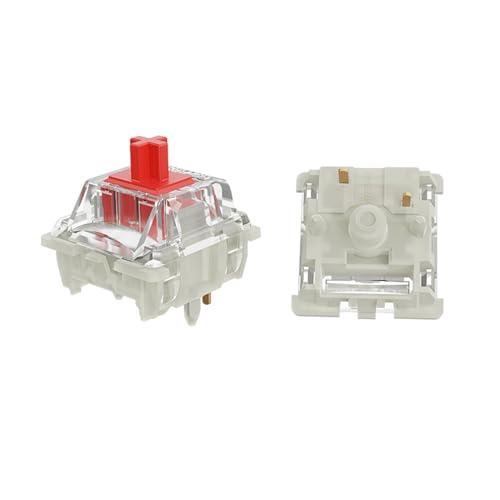
Gateron KS-9 2.0 Silent Red — the easy first step into quiet
Badge: Best starting point for gamers and typists converting a first board.
- Type: silent linear, pre-lubed, 5-pin
- Pack: 35 switches, RGB LED compatible housing
- Character: light, smooth, and noticeably hushed on both press and release
- Stem: standard MX cross, fits mainstream keycaps
Gateron’s silent red is the switch many people meet first, because it asks the least of them. The spring is light, the stroke is smooth from the factory lubricant, and the silencing pads do their work without turning the keystroke into a sponge. In a late-night gaming session the difference against a normal linear is immediate: ability keys stop announcing themselves to the household, and the rapid tapping of a movement key becomes a murmur rather than a rattle. For shared offices it has the additional virtue of looking and behaving like an ordinary switch — nothing about it asks colleagues to have an opinion.
Strengths
- Balanced silencing that keeps a recognisable linear feel
- Factory lubrication keeps the stroke smooth without a modding session
- 5-pin legs seat firmly in compatible sockets and plates
Trade-offs
- The cushioned landing is still detectable if you dislike soft bottom-outs
- Light springs punish resting fingers with the occasional accidental press
- Pack size suits compact and tenkeyless boards better than full-size ones
Best for: first-time silent converts, night gamers, and anyone quieting a home-office board. Not suited for: typists who judge a switch by a crisp, hard landing.

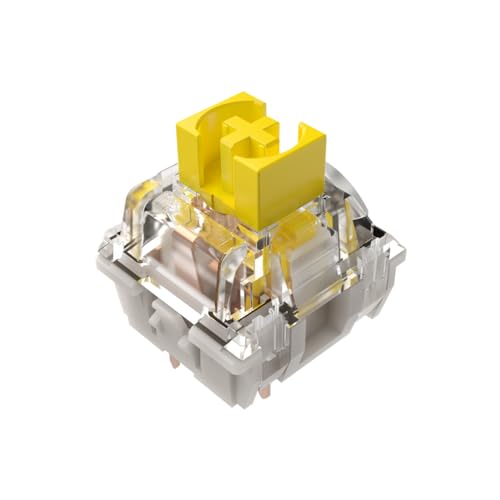
CHERRY MX2A Silent Red — the original recipe, current generation
Badge: Best for buyers who want the reference silent linear from the maker that defined it.
- Type: silent linear, smooth and quiet by design
- Pack: 36-switch kit, RGB housing version
- Generation: MX2A, Cherry’s current MX switch platform
- Character: measured, consistent, and a fraction firmer in feel than the Gateron
Cherry’s Silent Red has been the category’s benchmark for years, and the kit sold today is its MX2A-generation form, with the line’s updated housing and factory finish. The personality is distinct from the Gateron beside it: where the KS-9 feels eager and light, the Cherry feels deliberate — the same silencing idea executed with a touch more restraint, the way a German engineer might specify quiet. Stem wobble is tightly controlled, the sound is a low, dry hush, and the consistency from switch to switch is the quiet selling point that only becomes obvious when a whole board is built from them and no single key feels like a stranger.
Strengths
- Benchmark consistency across a full set of switches
- Silencing that reads as refinement rather than softness
- MX2A generation brings the line’s current housing and lubrication standard
Trade-offs
- A slightly firmer landing than the softest rivals, which cuts both ways
- Kit count means full-size conversions need more than one box
- Less factory slipperiness than the most heavily lubed boutique options
Best for: professionals quieting a work board they intend to keep for years. Not suited for: bargain hunters converting a full-size board on the smallest possible outlay.

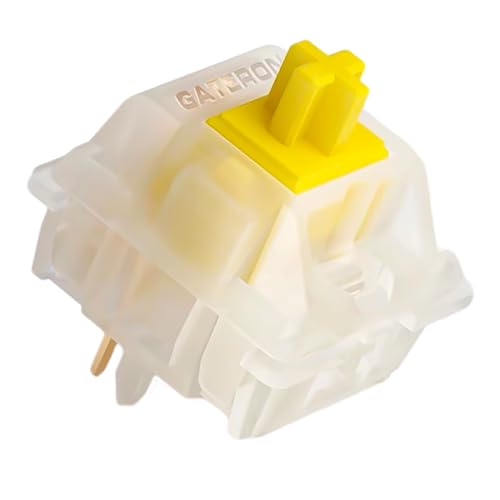
Akko V3 Penguin — silent tactility with a friendly bump
Badge: Best for typists who want feedback they can feel but nobody can hear.
- Type: silent tactile, pre-lubed, 5-pin
- Operating force: around 50 gf class, per the maker’s listing
- Pack: 45 switches
- Character: a rounded, gentle bump wrapped in quiet
Most silent switches are linear, because silencing a tactile switch without dulling its bump is the harder engineering problem. The Penguin is Akko’s answer: a tactile stem whose bump survives the silencing treatment in a softened, rounded form. Typists who think in keystrokes rather than sounds often prefer this — the finger still receives a small confirmation at actuation, so the hand learns to stop pressing early instead of relying on the bottom-out as a signal. In an open-plan office that makes the Penguin doubly polite: quiet to everyone else, and informative to the person typing.
Strengths
- Real tactile feedback in a switch the next desk cannot hear
- Pre-lubed from the factory, so the bump feels clean rather than scratchy
- Moderate weight suits long writing sessions without finger fatigue
Trade-offs
- The bump is gentler than a non-silent tactile’s; purists may find it shy
- Tactile silent switches still make slightly more noise than silent linears
- Less suited to gaming styles built on feather-light repeated taps
Best for: writers, programmers, and office workers who type by feel. Not suited for: competitive players who want the lightest possible linear press.

DUROCK Silent Shrimp T1 — the strong, silent tactile
Badge: Best for enthusiasts who want a pronounced bump and near-library manners.
- Type: silent tactile with patented silencing rings, pre-lubed
- Weight: 67 g class — firmly on the heavier side
- Pack: 90 switches, 5-pin, hot-swappable
- Character: a decisive T1 bump landing on a hush
The Silent Shrimp takes the opposite brief from the Penguin. Instead of softening the tactile event to protect the quiet, Durock keeps the T1’s assertive bump — the kind you feel in the fingertip as a small, clean ledge — and wraps the landing in silencing rings. The heavier spring is part of the personality: presses feel intentional, accidental activation is rare, and the whole board acquires a grave, deliberate rhythm that some typists find addictive. It is the silent switch most likely to be chosen by someone who has already owned tactiles and knows exactly what their fingers want.
Strengths
- The most distinct tactile feedback in this line-up, delivered quietly
- Heavier spring all but eliminates stray presses from resting hands
- Large pack covers any layout with switches to spare
Trade-offs
- The firm spring tires some fingers over very long sessions
- Its deliberate feel is wasted on feather-touch gaming styles
- Boutique positioning means it asks more of the budget than the Outemu below
Best for: tactile devotees in quiet homes, studios, and shared workspaces. Not suited for: light-fingered players or anyone with tired hands at day’s end.

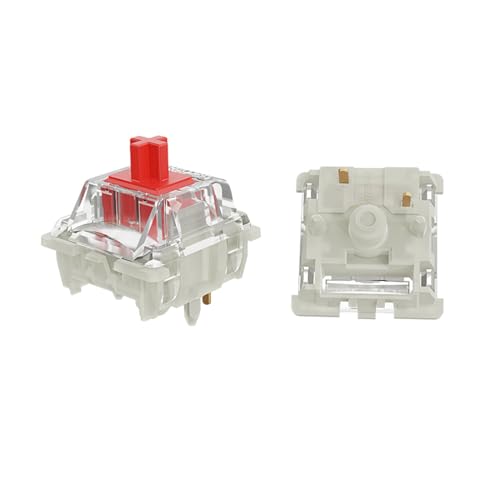
OUTEMU Silent White — quiet on a budget, honestly delivered
Badge: Best for testing the silent life before spending boutique money.
- Type: silent linear, quiet 45 gf class
- Pack: 20 switches, 3-pin
- Character: soft, simple, and unmistakably cushioned
- Role: the low-commitment audition switch
Every category needs an inexpensive way in, and Outemu’s Silent White is this one’s. Twenty switches will not rebuild a keyboard, but they will rebuild a WASD cluster and a row of letters — enough to learn, within one evening, whether your ears love the quiet and whether your fingers forgive the padding. The feel is the softest in this group, the silencing the most literal: this is the switch that most clearly trades landing crispness for hush. Judged as a trial instrument rather than a final destination, it is excellent value in the qualitative sense that matters here — it answers the title question for your specific hands at the lowest commitment in the set.
Strengths
- Small pack size makes it a genuine experiment rather than a commitment
- Noticeably quiet, even beside the other silent switches here
- Light actuation keeps it friendly for gaming clusters
Trade-offs
- The softest, least defined landing of the five
- 3-pin mounting is less secure in loose sockets than 5-pin rivals
- Twenty switches means a second purchase is certain if the trial succeeds
Best for: the undecided, and for quieting one zone of a board first. Not suited for: buyers who already know they want silent switches everywhere, permanently.
The mush question, answered honestly
Every discussion of silent switches eventually arrives at the word “mushy”, so let us give it a fair hearing. The silencing pads compress at the end of the stroke; compression is, physically, a soft event. If your mental model of a perfect keystroke ends with a hard, definite stop — the way a quality piano key or a good camera shutter confirms itself — then a silent switch will always feel like a small compromise, because it is one. The interesting question is how large the compromise is, and there the range surprises people. The firmest switches in this guide land with a muted but readable stop. The softest land like a key pressed into felt. Most users adapt to the middle of that range within days and stop noticing; a minority never do, and for that minority the correct purchase is not a different silent switch but a louder room arrangement — a door, a different desk, a headset with a better microphone.
There are partial escapes worth knowing. A silent switch in a solid, heavy case feels crisper than the same switch in a hollow plastic shell, because the case stops contributing its own echo and wobble to the event. Thick keycaps similarly firm up the perceived landing. And a board with a softer mounting style can blur the landing further — pleasant if you want maximum hush, counterproductive if you are fighting the mush. Treat the build as a dial: switch pads set the base level of softness, and case, caps, and mounting trim it in either direction. Readers deep in that territory will find the broader picture in keyboard switches explained for beginners and in the dedicated silent-tactile review at gazzew boba u4 silent tactile switch review.
Where silent switches earn their money
The strongest case is the shared workspace. Open offices, dorm rooms, and kitchen-table desks all punish keyboard noise socially long before they punish it acoustically — a loud board marks you as the room’s weather system. Silent switches defuse that completely, and they do it without the typing compromises of a flat membrane keyboard, which is the alternative most people are actually choosing between. The second-strongest case is the microphone. Streamers, podcasters, and anyone who lives on calls will find that a silent board removes an entire category of audio housekeeping: no gate fighting the keystrokes, no apologetic muting while typing notes, no percussive soundtrack under a presentation.
The third case is the household at night. Mechanical keyboards are at their most antisocial after midnight, when every other sound in a home has stopped and a bottom-out carries through a doorway like a dropped spoon. Silent switches turn a gaming session or a late writing sprint back into a private activity. Parents of sleeping infants, partners of light sleepers, and housemates in thin-walled buildings consistently rate this category as the best money they have spent on their setup — ahead of monitors, chairs, and the keyboards themselves.
The weakest case is the solo studio: one person, one room, a door that closes. There, keyboard sound is often a pleasure rather than a problem — part of the ritual of work, like a fountain pen’s scratch. Silencing it buys nothing and costs the landing feel. This guide’s verdict is therefore conditional in a way switch marketing never is: silent switches are worth it exactly to the extent that other ears, or a microphone, share your keystrokes.
How to convert a board to silent switches
Step 1: Confirm the board is hot-swappable
Silent switches are a drop-in upgrade only where switches can be pulled. Check the board’s specification or pull one switch gently with a switch puller; if it resists like it is glued, it is soldered, and the project becomes a desoldering job instead — possible, but a different weekend.
Step 2: Quiet the loudest zone first if you are unsure
The letter keys and the spacebar’s neighbours generate most of a board’s noise. Converting the alphas plus your gaming cluster covers the bulk of the benefit and leaves the function row as a control group your ears can compare against.
Step 3: Do not forget the stabilisers
On many boards the loudest single key is the spacebar, and its noise comes from the stabiliser, not the switch. A silent switch under a rattling spacebar changes little. Check stabiliser rattle while the board is apart; a balanced wire and a touch of lubricant at the contact points finish the job the switches started.
Step 4: Record before and after
Put a phone at the position of the nearest other person — the next desk, the doorway, the pillow — and record thirty seconds of honest typing on the old switches, then on the new. Judging from your own chair flatters every keyboard; judging from the listener’s chair is the entire point of the exercise.
Step 5: Give the landing a week
Decide about the feel after several days, not several minutes. The hush impresses instantly; the cushioned landing takes longer to evaluate, and many first impressions — in both directions — reverse by day five.
For the mechanical side of swapping, how to remove and replace switches on a hot swappable keyboard covers pullers, pins, and seating in detail, and how to lube keyboard switches explains the optional extra step that can smooth a silent switch further — though with factory-lubed switches like most of this guide’s picks, additional lubricant is usually unnecessary and can even dull a tactile bump if overdone.
Silent linears versus silent tactiles: the real fork in the road
Choosing between the Gateron, Cherry, and Outemu linears on one side and the Akko and Durock tactiles on the other is the decision that actually shapes your days. Silent linears are the quieter family in absolute terms, because there is no bump event adding its small sound to the stroke, and they suit gaming and fast, light typing. Their weakness is informational: with no bump and a padded landing, the keystroke gives the finger very little news, and some typists respond by pressing harder and travelling further, ironically making more noise at the desk surface itself.
Silent tactiles answer that weakness. The bump tells the finger the press has registered, so a trained hand lifts early and barely touches the silencing pads at all — the quietest possible technique, available only to tactile users. The cost is a whisper of extra complexity in the sound and a feel that divides people: the Penguin’s bump is a gentle swell, the Silent Shrimp’s a distinct ledge, and both are softer-edged than their non-silent equivalents. If you type for a living and your accuracy depends on feeling actuation, start tactile. If you game, or type lightly and quickly, start linear. Either way, the silencing itself is the smaller half of the decision.
Common mistakes when going quiet
Mistake one is expecting silence. These are quiet switches, not mute ones; keys still land, a spacebar still speaks, and a desk still conducts vibration into the room below. Setting expectations at “library” rather than “vacuum” prevents most disappointment. Mistake two is silencing the switches and ignoring the desk: a hollow desk amplifies everything, and a desk mat under the board often removes as much perceived noise as the switch swap itself. Mistake three is buying a full set before testing one zone — the Outemu pack exists precisely to prevent that error.
Mistake four is mixing silent and standard switches randomly across a board, which produces a maddening patchwork where some keys thud and others clack; zone deliberately, by area, if you mix at all. Mistake five is assuming silent switches are fragile because they contain silicone: the pads are moulded into the stem and rated for the same service life as the rest of the switch. Mistake six is judging a silent tactile’s bump in the first hour, before your fingers have recalibrated to a quieter, softer-edged signal — tactile silent switches are the category’s slow burn, and their fans are made in week two, not minute two.
What quiet costs, in feel and in money
Qualitatively, silent switches occupy the same broad budget territory as their standard equivalents from the same makers, with boutique silent tactiles at the upper end and Outemu’s small packs at the lower. The real cost is rarely the switches; it is the landing feel described throughout this guide, paid on every keystroke. That is why the trial-first approach recurs here: a twenty-switch audition tells you whether the hush delights you and whether the padding bothers you, and it does so before the full-board money and the full-board afternoon are committed. If the trial fails, the switches remain perfectly usable in a secondary board or a macropad, and the lesson — that your ears were never the problem — is worth the small outlay on its own.
It is also worth pricing the alternatives honestly. A quieter room arrangement, a better microphone with a tighter pickup pattern, or a membrane board for calls are all legitimate competitors to a silent switch set, and each solves a slightly different problem. Silent switches win when the goal is to keep a mechanical board — its feel, its layout, its keycaps, its repairability — and simply lower its voice. That is a specific and very common goal, which is why the category keeps growing.
A word for the person on the other side of the wall
Most switch guides are written for the buyer, but silent switches are unusual in being bought largely for someone else — and that someone else is the best judge of whether the purchase worked. If you convert a board, ask your listener after a week, not after an hour. First impressions on both sides of the wall are inflated by novelty; a week of ordinary evenings is the real data. Listeners reliably report two things: that the typing stopped registering as an event in the room, and that they had not realised how much it had registered before. That second report is the one that settles the title question for most households. Noise you have learned to ignore is still noise you are spending attention on, and a silent board refunds that attention to everyone in earshot, including — though it takes longer to notice — the typist.
There is a courtesy dimension too. Choosing a quieter board is one of the few equipment decisions that reads, to the people around you, as consideration rather than consumption. In shared homes and shared offices that signal is worth something separate from the acoustics, and it may be the most durable benefit of all: keyboards get replaced, but the reputation of being the person who thought about the room tends to stick.
Final recommendation
Are silent switches worth it? If anyone besides you can hear your keyboard — a colleague, a partner, a microphone, a sleeping household — then yes: start with the Gateron KS-9 Silent Red for a linear conversion or the Akko V3 Penguin for a tactile one, step up to the Cherry MX2A Silent Red for benchmark consistency or the Durock Silent Shrimp when you know you want a serious bump, and use the Outemu Silent White to audition the whole idea cheaply. If your keyboard’s sound is a private pleasure in a private room, keep your crisp landings and spend the money elsewhere. Quiet is a feature with an address: it matters where other ears live, and it is wasted only where no other ears ever will.
Anatomy of keyboard noise: what your neighbours actually hear
It helps to rank a keyboard’s noises by how far they travel, because silent switches only address the top of the list. Furthest-travelling is the bottom-out strike, a sharp transient that doors and walls transmit surprisingly well. Next is the top-out snap on release, which fast typists produce in a continuous patter. Below those sit stabiliser rattle — a loose, metallic edge on the big keys — and spring ping, a faint ringing that stays mostly at the desk. Last and least is case echo, which colours everything without adding much volume of its own.
Silent switches remove most of the first two, which is why their effect feels disproportionate to their modest engineering. But the ranking also predicts the common complaint that a converted board is “quieter but still not quiet”: the listener is now hearing rank three and four, previously masked. The fix is the unglamorous trio from the conversion section — stabiliser tuning, a desk mat, and case foam — which together bring the remaining noises down toward the new floor the switches established. Think of the switch swap as lowering the ceiling and the board work as lowering the floor; a genuinely hushed setup needs both.
There is one more noise with no switch-based cure at all: the desk itself. A keyboard transmits vibration through its feet into the desktop, and a hollow desk returns that energy as a low drumbeat audible in the room below. If your listener is downstairs rather than beside you, a thick desk mat or a towel under the board during late sessions may matter more than any switch. Diagnosing which noise is actually reaching your listener — with the phone-recording method from the conversion steps — is worth ten minutes before any purchase, because it tells you which layer of the problem your money should attack.
Silent switches on calls, streams, and recordings
Microphones change the verdict in an interesting way: they are less forgiving than human ears about sharp transients and more forgiving about low thuds. A standard mechanical board under a condenser microphone produces a stream of clicks that noise gates and suppression tools struggle with, because each keystroke looks, to the software, like a tiny percussive event worth keeping. A silent board’s softened landing slips under most gates entirely, and what little remains is low-frequency enough for basic high-pass filtering to tidy away. Podcasters and streamers who type live — taking notes, running chat commands, playing games that involve a keyboard — describe the switch swap as removing a whole category of production worry.
For ordinary calls the benefit is social as much as technical. Typing while a colleague speaks reads, through a laptop microphone, as not listening, even when you are taking notes on their own words. A silent board makes note-taking acoustically invisible, which changes meeting dynamics more than any mute-button discipline. If your work involves support calls, interviews, or teaching, this alone can justify the conversion, and it is the reason so many of this guide’s picks end up in offices rather than gaming rooms.
The five picks, compared head to head
Set side by side, the five switches divide cleanly. For pure quiet per keystroke, the Outemu Silent White and the Gateron KS-9 Silent Red lead, with the Outemu softer and the Gateron smoother. For the most standard, keep-it-for-years character, the Cherry MX2A Silent Red is the reference: nothing about it is extreme, and that is its virtue. For feedback, the Akko Penguin offers the approachable bump and the Durock Silent Shrimp the emphatic one, with a clear weight difference between them — the Penguin suits average hands all day, the Shrimp rewards strong, deliberate typing.
Pack economics differ too, in the qualitative way this guide is allowed to discuss: the Durock’s ninety-count box is a one-purchase full conversion for almost any layout; the Cherry and Gateron kits in the mid-thirties suit compact boards or two-zone conversions; the Akko’s forty-five covers most compact and tenkeyless layouts; and the Outemu’s twenty is deliberately a sampler. None of these is a flaw. They are five answers to five different sizes of intention, and matching the pack to the plan is the whole of the buying skill in this category.
Buying guide: choosing your quiet
Begin with the listener, not the switch. Identify whose ears the purchase serves — a partner through a wall, a team through a microphone, a baby through a door — and let that set the priority: maximum hush, call-friendliness, or feel preservation. Next, decide linear versus tactile using your typing style, as the fork section above describes. Then check the mundane compatibilities: hot-swap sockets, pin count, and whether your board’s LEDs need a light-friendly housing, which the Gateron and Cherry kits here both accommodate.
Finally, choose the size of the commitment. The audition path — a small pack, one zone, one week — suits anyone still reading comparison guides. The full-conversion path suits anyone who has already lived with a silent board and knows the landing suits them. There is no wrong door, but there is a wrong order: full sets bought on spec, before a single silent keystroke has been typed, account for most of the disappointment in this category, and they are entirely avoidable.
Care and lifespan of silent switches
Silencing pads do not ask for special care. The switches pull, seat, and clean like any others; the pads are part of the stem moulding, not a coating that wears away or a gel that dries out. Dust remains the ordinary enemy, and a board kept covered or blown out occasionally will keep its switches sounding as they did on day one. If a single key grows louder over time, suspect seating first — a switch that has crept slightly out of its socket loses the pads’ alignment with the housing — and reseat it before suspecting the part itself.
Lubricant deserves a caution. Most of this guide’s picks arrive factory-lubed, and adding more lubricant to a silent switch is a delicate business: a little on the spring can tame ping, but lubricant wandering onto the silencing pads changes their behaviour, and lubricant inside a tactile’s bump path can round it off. If you are new to switch maintenance, leave factory-lubed silent switches exactly as they arrive; the makers have already made the decisions you would be second-guessing.
Shortcuts that promise quiet, honestly assessed
Before spending on switches, most people meet the shortcuts, and they deserve fair trials rather than dismissal. Rubber O-rings slipped onto keycap stems shorten the stroke and muffle the landing — genuinely, measurably — but they do nothing for the top-out snap, they shorten travel in a way many typists dislike, and on some cap and switch combinations they interfere with backlighting. They are a reasonable experiment and a poor destination. Foam pads under keycaps and switch films inside housings each shave a little noise at the cost of an afternoon. Typing more gently is free and surprisingly effective, but it is a discipline, not a device, and it evaporates the moment a deadline or a firefight arrives.
The pattern across all shortcuts is the same: each attacks one noise source partially, while the pads inside a silent switch attack the two loudest sources directly, at the point of impact, on every press, without asking anything of the typist. That is the whole technical case for the category, and it is a strong one. The shortcuts retain one advantage — reversibility without parts — which is why the sensible order is mat first, technique second, switches when the first two have shown you their limits.
Do silent switches change typing speed or accuracy?
Expect a short adjustment, not a permanent change. In the first days, the unfamiliar landing costs most people a little accuracy, because the finger’s usual confirmation signal has gone quiet in both senses. The tactile users recover fastest, retraining onto the bump; linear users take a few days longer, learning to trust a lighter touch. After the adjustment, there is no consistent reason for speed to differ — the actuation points and springs are ordinary — and some writers report a small genuine improvement, because the softer landing encourages a lighter, faster hand rather than a hammering one.
The exception is the deliberate bottom-out typist: someone whose rhythm is built on striking through every key. For that technique, a silent switch removes the metronome. Such typists either retrain — most do, within a fortnight — or conclude, correctly, that the category is not for them. Knowing which kind of typist you are is, once again, the cheapest research in this entire guide: type one paragraph, watch your own hands, and notice whether your fingers stop at actuation or drive through to the desk.
Three households, three outcomes
Consider a graduate student in a shared flat, gaming after midnight. For her, the Gateron conversion is close to pure gain: the household sleeps, the games feel unchanged by week two, and the only cost was one evening with a switch puller. Consider a court transcriber who works from a home office with the door open to a partner’s. The silent tactile — Penguin or Shrimp, depending on hand strength — protects both the household peace and the tactile feedback her accuracy is built on; this is the category’s most complete use case. Consider, finally, a hobbyist with a dedicated study, a beloved clicky board, and no listener within two closed doors. Every silent switch in this guide would be, for him, a solution shopping for a problem, and the money is better spent on the keycaps he has been eyeing. The switches did not change across those three stories. The rooms did. That is the entire thesis of this guide, and it is why its verdict is a question about your address before it is an answer about a product.
Gaming on silent switches, in more depth
Gamers sometimes assume silent switches are a typing product that tolerates games, when the reality is closer to the reverse: the linear members of this family are gaming switches that happen to be quiet. Their actuation and reset behaviour is conventional, their springs are in the familiar light-to-medium band, and nothing about the silencing interferes with rapid repeated presses — the pad compresses and recovers at speeds no finger approaches. What changes in play is peripheral: teammates on voice chat stop hearing your inputs, a sleeping household stops factoring into session length, and the board’s own soundtrack drops out of your concentration. Several players report that last effect as the real upgrade, because a loud board under a fast game is one more stream of noise competing with footsteps and callouts.
The tactile silent switches ask a little more thought from players. A bump is a commitment device: it rewards a full, deliberate press and slightly punishes the feathered, half-travel tapping that some techniques rely on. For ability keys pressed decisively, that is fine, even satisfying. For movement keys feathered constantly, most players prefer the linears. The zoned board resolves this neatly — silent linears under the left hand’s gaming cluster, silent tactiles under the letters for the day’s writing — and hot-swappable boards make the zoning a five-minute experiment rather than a philosophy. If your board supports it, that hybrid is the single most satisfying configuration this guide can recommend to the work-and-play reader.
What about silent switches wearing a “gaming” label versus an “office” one?
Labels in this category describe marketing intent more than mechanism. A silent linear sold to gamers and one sold to offices may differ in housing colour, LED friendliness, and spring weight, but the silencing itself — pads on the stem, cushioning both ends of the stroke — is the same idea executed by the same handful of factories and designers. Shop the specifications that matter to your hands and your board: type, weight, pin count, housing, and pack size. Ignore the room pictured on the box. The switch cannot tell whether the desk it lands on holds a spreadsheet or a ranked match, and neither, in the end, can your ears.
Measuring quiet yourself, without believing anyone’s numbers
Manufacturers and reviewers quote noise figures for switches, but those numbers are hostages to the test rig: the case, the caps, the desk, the microphone distance, and the force of the robotic or human finger doing the pressing. A figure measured on an aluminium custom board tells you little about the same switch in a hollow plastic one. The only measurement that predicts your life is the one taken in your room, which is why this guide keeps returning to the phone-recording method. Record the same sentence typed at the same effort, from the listener’s position, before and after any change — a mat, a shortcut, a switch swap — and compare the recordings at the same playback volume. Your ears, given a fair A/B, are better instruments than any specification sheet, because they are measuring the actual quantity you care about: how much of your typing reaches another person.
Two refinements make the test honest. First, type something real — an email you actually need to write — rather than performing careful test taps, because real typing is louder and faster than demonstration typing. Second, test at the hour that matters. A room at noon, with traffic and appliances running, forgives almost any keyboard; the same room at one in the morning forgives nothing. Most “my silent switches were not worth it” stories are really “I tested at noon for a midnight problem” stories, and most delighted ones are the reverse. Match the test to the complaint and the category will judge itself.
Room acoustics: the silent variable
Bare rooms make honest keyboards sound rude. Hard floors, empty walls, and a desk against a corner multiply reflections, and in such a room even a silent board can seem present. Soft furnishings — a rug, curtains, a bookshelf — absorb exactly the frequencies keyboards produce, which is why the same setup sounds civilised in a furnished study and stark in a spare room. None of this is an argument against silent switches; it is an argument for reading your result correctly. If a converted board still seems loud, check the room before blaming the pads. Often the remaining problem is a rattling stabiliser or a resonant desk, both cheaper to fix than a second set of switches bought in frustration.
Frequently asked questions
Are silent switches completely silent?
No switch with moving parts is completely silent. What the silencing pads remove is the sharp plastic-on-plastic strike at the bottom and top of the stroke, which is most of what carries across a room. What remains is a soft thud plus whatever noise your keycaps, stabilisers, case, and desk contribute — which is why the conversion steps in this guide treat the whole board, not just the switches.
Do silent switches feel mushy?
They feel cushioned, which is the honest word; whether that reads as comfortable or mushy depends on the switch and the typist. Firmer silent switches land with a muted but definite stop, while the softest feel like pressing into felt. A heavy case and thick keycaps firm the sensation up noticeably, and most users stop noticing the difference within a week of daily typing.
Are silent switches good for gaming?
Silent linears are excellent for gaming, particularly in shared spaces and on microphone. They behave like ordinary linears — smooth, fast, consistent — with the volume turned down. Silent tactiles suit slower, deliberate play styles. The only players who may prefer standard switches are those who rely on the sound of bottoming out as a timing cue, a real but uncommon habit.
Can I make my existing keyboard quieter without changing switches?
Partly. A desk mat, foam inside the case, tuned stabilisers, and softer typing technique all reduce noise, and together they can take the edge off a loud board. They cannot match the effect of silencing pads inside the switch, because the loudest event — the stem striking the housing — happens where only the switch’s own design can cushion it.
Silent linear or silent tactile for office typing?
For long-form typing, a silent tactile usually serves better: the bump confirms each press, so your fingers learn to stop early and the typing gets quieter still. Choose the gentler Akko Penguin for a friendly bump or the heavier Durock Silent Shrimp for a pronounced one. Choose a silent linear if your office work mixes heavy gaming or rapid shortcut work into the day.
What is the quietest combination in this guide?
For the lowest volume per keystroke, a silent linear — the Gateron KS-9 Silent Red or the Outemu Silent White — inside a heavy, foam-filled case, on a desk mat, with tuned stabilisers, is the quietest arrangement these parts can make. For the quietest typing technique, add a silent tactile’s bump and a hand trained to stop at actuation. The difference between a merely converted board and a fully hushed one is almost entirely in those supporting details.
Are silent switches a good choice for a first mechanical keyboard?
They can be, provided the quiet is solving a real problem in your living situation — a dorm room, a shared flat, a partner working nights. A first-time buyer in a private room may be better served by standard switches, whose crisper landing teaches typing technique more clearly and whose sound many people come to love. The good news is that on a hot-swappable board the choice is not permanent in either direction: switches are the one part of a keyboard designed to be changed your mind about.
Do silent switches need special keycaps?
No. Every pick in this guide uses the standard MX cross stem, so the keycaps you already own will fit. Keycap choice still influences the result — thicker caps deepen and soften the sound, thinner ones keep it brighter — but that is tuning, not compatibility. If you convert a board and want to adjust the landing afterwards, caps are the easiest dial to turn.
How long do the silencing pads last?
The pads are moulded as part of the stem rather than applied as a separate insert, so there is nothing to peel, dry out, or fall off in normal use. They are expected to last the service life of the switch itself. If a board gradually grows louder over years of use, the likelier causes are dust, a loosening case, or stabilisers drying out — all maintainable — rather than the pads giving up.
Can I silence only the loudest keys?
Yes, and it is a sensible strategy. The spacebar’s switch, the Enter and Backspace keys, and the gaming cluster contribute a disproportionate share of a board’s noise. Converting those positions first — with stabiliser tuning for the big keys — captures much of the benefit at a fraction of the cost, and leaves the rest of the board available for a later, fuller conversion if the trial convinces you.
Will silent switches fit my keyboard?
They fit any hot-swappable board that takes standard MX-style switches, with the usual pin caveat: 5-pin switches may need their extra legs trimmed for 3-pin-only boards, and 3-pin switches fit almost everywhere but sit less rigidly in loose sockets. Low-profile, optical, and magnetic boards use different formats and cannot take them.
Related reading: are cherry kailh speed switches worth it · best budget linear switches under 30 cents · durock jwk tecsee boutique switches guide · outemu switches are they good