Disclosure: As an Amazon Associate, kajuandouglas.com earns from qualifying purchases. Links on this page are affiliate links; they cost you nothing extra. Prices and availability change often, so check the current Amazon listing before you buy.
Whats the Best Ducky Keyboard Ducky One 2 Mini vs One 2 SF vs TKL RGB vs Mecha Mini vs Miya Pro
So, whats the best ducky keyboard ducky one 2 mini vs one 2 sf vs tkl rgb vs mecha mini vs miya pro — the question names five members of one beloved family and asks for a winner, and the family’s whole charm is that each member exists because a different typist needed a different answer. The One 2 Mini distilled the 60 percent idea into an icon. The One 2 SF added back the arrows and Delete key its sibling exiled. The TKL RGB kept the tenkeyless working layout and lit it. The Mecha Mini rebuilt the Mini’s idea in cast aluminium. And the Miya Pro wandered off toward themed, compact artistry with a larger layout and a collaborator’s soul.
This comparison honours that family structure with a verification rule stated up front. The One 2 Mini and its current Pro Mini descendants could be confirmed in catalogue data, and they appear below with links in the switch variants actually verified. The SF, the TKL RGB, the Mecha Mini, and the Miya Pro could not be confidently verified that way, so they are compared in full prose — layouts, construction, and ideal owners — with no links and, crucially, no Pro Mini listing dressed up as any of them. A comparison that blurred that line would be selling you a different keyboard under a famous sibling’s name.
Read the family as a decision tree. Start with layout, because size decides your daily relationship with arrows and layers; proceed to construction, because plastic and cast aluminium age and sound differently; finish with switch and lighting, the personality layer. By the end you will know which Ducky your desk has been describing — and, if it is one of the prose models, exactly how to hunt it through a specialist retailer with its name verified in writing.
Where to Buy and How the Picks Were Chosen
Verification for this head-to-head followed the standard applied across this program: a model receives a link only when its listing could be confirmed against catalogue data, with the exact switch variant taken from the verified title. The original One 2 Mini in Cherry MX Silent Red passed, as did One 2 Pro Mini listings in Silent Red and Brown and a One 2 Mini Pro in Classic Black with Cherry Blue. Those Pro models are the current generation of the Mini idea and are reviewed as themselves — successors within the family, never as stand-ins for the SF, TKL, Mecha, or Miya models discussed in prose.
Comparison criteria stay constant across all nine keyboards in this article, linked or not: layout and its sacrifices, case construction and weight, switch character and room manners, lighting, programmability, and the desk each was designed for. Where a trait belongs to a prose model’s established design rather than to a current listing, the text says so by framing, because a family’s reputation is evidence about its designs, not a promise about today’s stock.
In this guide
Quick Picks
- The original icon, verified: Ducky One 2 Mini (Cherry MX Silent Red) — the classic 60 percent One 2 Mini with RGB and quiet Silent Red switches.
- The Mini, modernised quietly: Ducky One 2 Pro Mini (Cherry Silent Red) — the Pro generation of the Mini in Silent Red, a 60 percent gaming board with RGB.
- The Mini, modernised with tactility: Ducky One 2 Pro Mini (Cherry Brown) — the Pro Mini in Cherry Brown, adding a tactile bump to the compact gaming formula.
- The Mini with a click: Ducky One 2 Mini Pro Classic Black (Cherry Blue) — a Classic Black Mini Pro with RGB and clicky Cherry Blue switches.
Detailed Reviews
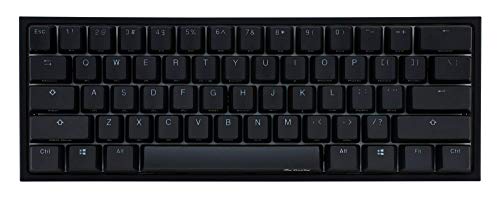
Ducky One 2 Mini (Cherry MX Silent Red) — The original icon, verified
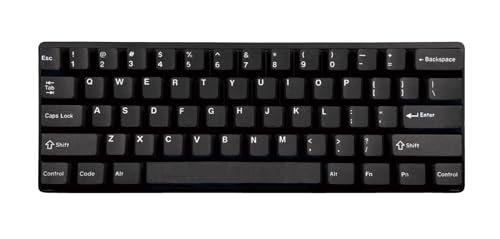
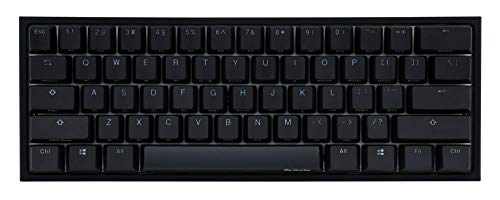
The One 2 Mini earned its icon status by executing the 60 percent idea with unusual completeness: a tidy bezel-less case, PBT caps in Ducky’s colours, RGB that made the little board glow like a jewel, and onboard macro and mouse-function tricks that let a keyboard with sixty-odd keys impersonate a much larger one. In this verified Silent Red configuration it also solves the 60 percent board’s social problem, trading the clicky soundtrack for a hushed linear press that shared rooms and late nights can forgive.
Living with it still means living on layers for arrows, function keys, and navigation — the Mini never pretended otherwise — and its defenders consider that the tuition for the cleanest desk in the family. The Silent Red choice suits that philosophy: a board this small is often bought for a shared or portable life, and quiet switches travel politely. If the family’s founding idea is the one you want, in the form that made it famous, this verified listing is the family’s front door.
At a glance:
- Layout: 60 percent
- Lighting: RGB
- Switches: Cherry MX Silent Red
- Character: the original Mini formula
Strengths
- The definitive Mini design, buyable as verified
- Silent Reds suit shared rooms and travel
- RGB and onboard tricks exceed its size
Trade-offs
- Layers for arrows and function keys
- Silent linears give no tactile feedback
- Compact rows crowd larger hands at first
Best for: a compact devotee who wants the original Mini with room-friendly switches.
Not suited for: a buyer who needs dedicated arrows or a tactile bump.

Ducky One 2 Pro Mini (Cherry Silent Red) — The Mini, modernised quietly
The Pro Mini line is Ducky’s answer to a fair question: what should the Mini become once its idea has conquered the market? This Silent Red Pro keeps the 60 percent footprint and the RGB identity while presenting itself explicitly as a gaming keyboard, tuned for the audience that adopted the Mini most fervently. For a buyer who wants the family’s compact flagship in its current form rather than its founding form, this is the verified route, with the same hushed linear manners that make the original Silent Red listing so livable.
Choose between this and the original by temperament toward generations. The original carries the classic’s exact character and the satisfaction of buying the icon itself; the Pro carries the line forward for buyers who prefer current production and gaming positioning. Neither is the SF, the Mecha, or the Miya, and this guide will not let their shared Mini DNA blur those distinctions — they are the Mini branch, fully realised, and the other branches are compared in prose below on their own terms.
At a glance:
- Layout: 60 percent Pro Mini
- Lighting: RGB LED
- Switches: Cherry Silent Red
- Positioning: current-generation Mini
Strengths
- Current-generation Mini with gaming focus
- Silent Red switches keep rooms peaceful
- RGB identity preserved in compact form
Trade-offs
- Still a layer-based 60 percent layout
- Pro naming can confuse variant shoppers
- Linear silence will not please tactile fans
Best for: a gamer who wants the Mini idea in its current, quiet form.
Not suited for: a tactile typist or an arrow-key traditionalist.
Ducky One 2 Pro Mini (Cherry Brown) — The Mini, modernised with tactility
Brown switches change the Pro Mini’s contract with its owner: every press now reports back through a tactile bump, which writers and hybrid players often experience as the difference between a keyboard that serves typing and one that merely permits it. In the Mini’s compact frame that feedback matters more, not less, because layers already ask the fingers to trust memory; a bump that confirms each press helps that trust form faster during the adaptation fortnight.
This is the verified Mini to choose when the board must hold a day job — documents, code, messages — and still report for gaming duty at night, in rooms where a click would be unwelcome but silence is not required. Its trade-offs mirror its sibling’s: layers for the missing keys, a compact learning curve, and a gaming wardrobe of features in a typist’s switch. Within the Mini branch, Brown versus Silent Red is the whole decision, and it should be made by your fingers and your room, in that order.
At a glance:
- Layout: 60 percent Pro Mini
- Lighting: RGB LED
- Switches: Cherry Brown, tactile
- Positioning: current-generation Mini
Strengths
- Tactile feedback suits typing-heavy days
- Current Pro Mini platform and RGB
- Brown manners suit most shared spaces
Trade-offs
- Bump is subtle for lovers of strong tactility
- Layers remain the layout’s tuition
- Not the arrow-equipped SF it is sometimes confused with
Best for: a hybrid worker-player who wants one compact board for both lives.
Not suited for: a buyer who needs physical arrows or who prefers silent linears.
Ducky One 2 Mini Pro Classic Black (Cherry Blue) — The Mini with a click
Every family needs its loud member, and in the verified Mini line it is this Classic Black Pro on Cherry Blue switches. The click is deliberate, rhythmic, and for its devotees inseparable from the pleasure of typing — an audible confirmation that turns a paragraph into percussion. In black with RGB it also carries the most traditional gaming-desk look of the four linked picks, a little black rectangle that glows and announces itself with every sentence.
Buy it with your room’s consent, because Blue switches are a broadcast medium. In a private gaming room or a solo office, this is the most characterful verified Mini in the guide; in a shared flat it is a diplomatic incident with excellent keycaps. The Mini Pro platform underneath the noise remains the family’s compact gaming formula, so the decision here is purely about whether your life has a stage for the click — a decision this guide keeps returning to because it is the one owners most often get wrong in both directions.
At a glance:
- Layout: 60 percent Mini Pro
- Colour: Classic Black
- Lighting: RGB
- Switches: Cherry Blue, clicky
Strengths
- Clicky feedback with genuine ceremony
- Classic Black suits traditional gaming desks
- Mini Pro platform in its boldest switch
Trade-offs
- Click will test every shared room
- Not a subtle board in any dimension
- Still layers for arrows and functions
Best for: a solo-room gamer or typist who loves an audible press.
Not suited for: anyone whose keyboard shares walls, hours, or a microphone with others.
The One 2 SF in Prose: The Mini That Repented, Slightly
The One 2 SF exists because the Mini’s most common complaint had a name: the missing arrow keys and the missing Delete. The SF answers by growing the Mini’s footprint just enough — into the 65 percent class — to restore a dedicated arrow cluster and a navigation column while keeping the board unmistakably compact. For programmers, writers who edit as they go, and spreadsheet travellers, that restoration changes the board from a layer exercise into a daily tool that asks almost nothing be relearned.
In the family’s decision tree, the SF is the branch for buyers who loved everything about the Mini except its sacrifices, and it is the model this guide most often expects to be a reader’s true answer. It is therefore discussed with particular care and linked not at all, because no confident verified listing supported one: hunt it through specialist Ducky retailers, confirm the exact SF name and switch variant in writing, and beware listings that quietly substitute a Mini or a Pro Mini, which are different boards answering different prayers.
Against the TKL below, the SF keeps the compact desk dividend; against the Mini, it spends a little of that dividend buying back the keys working typists touch hourly. That is not a compromise so much as a calibration, and calibrations are what mature product families are for.
The One 2 TKL RGB in Prose: The Family’s Working Suit
The tenkeyless member of the family keeps the full working layout — function row, navigation cluster, arrows — and removes only the number pad, which is why TKL boards became the default recommendation for gaming desks that also hold jobs. Ducky’s TKL RGB brought the brand’s build discipline and lighting to that format, serving players who wanted the family’s quality without any layer tuition whatsoever: every key present, every key where a lifetime of keyboards taught your hands to expect it.
Its buyer is the family’s pragmatist, and its absence from the linked picks follows the same verification rule as the SF’s: no confident listing, no link, and no permission for the verified Minis to impersonate it. A TKL hunter should shop specialist channels with the full model name, check switch variant and layout standard carefully, and consider the guide’s linked Minis only if the compact philosophy itself — not merely the Ducky name — is what the desk actually wants.
Compared with the Mecha Mini, the TKL trades exotic construction for working completeness; compared with the Miya Pro, it trades artistry for neutrality. Those trades define the family’s spread better than any ranking could: Ducky sells the same underlying quality pointed at four different definitions of a good keyboard, and the TKL’s definition — everything present, nothing wasted — remains the easiest to recommend to a stranger.
The Mecha Mini in Prose: The Mini as an Object
The Mecha Mini asks what happens when the Mini’s layout is kept and everything around it is elevated: a cast aluminium case with real heft, a higher stance, and a presence that turns a 60 percent board into the desk’s centrepiece rather than its space-saver. Owners describe it less as a smaller keyboard than as a denser one — the same compact map, machined into an object that feels permanent. For the enthusiast who had already decided on 60 percent and wanted the finest available expression of it, the Mecha was the family’s flagship in spirit.
Its costs are the honest companions of its virtues: weight that ends any travel ambitions, a price tier above its plastic siblings, and the same layer-based layout, now carrying higher expectations. It is compared here in prose under the same rule — no verified listing, no link — and the aluminium-curious reader should hunt it through specialist channels, verifying the Mecha name precisely, since the ordinary Mini’s fame makes it the family member most often impersonated by careless listings.
Set against the standard Mini, the Mecha is not an upgrade so much as a material argument: that a keyboard can be jewellery and tool in the same object, and that some owners will pay for that argument gladly every time their hand rests on cold metal. Set against the Miya Pro, it is the family’s minimalist luxury against the Miya’s expressive luxury — two kinds of special, neither of which a ranking can settle.
The Miya Pro in Prose: The Family’s Artist
The Miya Pro came from Ducky’s collaboration with Varmilo, and it shows: a larger compact layout than the Mini’s, themed aesthetics executed with unusual care, and a personality that treats the keyboard as a designed object first and a peripheral second. Where the Mini strips away, the Miya composes — colour, artwork, and a layout with more breathing room — and its audience is the desk that wants its tools to have faces. It is the family member least interested in winning a specification comparison and most interested in being loved at first sight, then justified by perfectly competent typing afterward.
Prose is its treatment here for the by-now familiar reason, with the same hunting advice: specialist retailers, exact name, written variant confirmation, and a firm refusal of substitutes wearing adjacent names. Themed boards attract the market’s most creative listing photography and its loosest descriptions, so the Miya’s buyer should be the family’s most careful verifier of all.
In the decision tree, the Miya answers the reader whose first question is not about arrows or aluminium but about whether the keyboard makes the desk feel like theirs. That is a legitimate first question — arguably the one all the others serve — and the family’s inclusion of an artist among its engineers is precisely why a five-way comparison like this one cannot end in a single crowned winner. Ducky keyboards complete guide traces the wider family’s history for readers who want the full genealogy.
Comparison Table
| Pick | Key fact | Best for |
|---|---|---|
| Ducky One 2 Mini (Cherry MX Silent Red) | Layout: 60 percent | a compact devotee who wants the original Mini with room-friendly switches. |
| Ducky One 2 Pro Mini (Cherry Silent Red) | Layout: 60 percent Pro Mini | a gamer who wants the Mini idea in its current, quiet form. |
| Ducky One 2 Pro Mini (Cherry Brown) | Layout: 60 percent Pro Mini | a hybrid worker-player who wants one compact board for both lives. |
| Ducky One 2 Mini Pro Classic Black (Cherry Blue) | Layout: 60 percent Mini Pro | a solo-room gamer or typist who loves an audible press. |
Step by Step: Choose Your Ducky in Four Decisions
Step 1: Decide arrows first, because they divide the family cleanly
If dedicated arrows and navigation keys are non-negotiable, your Ducky is the SF or the TKL, both hunted through specialist channels under this guide’s verification advice. If layers are acceptable or even welcome, the verified Mini branch opens, with its choice of original or Pro and of Silent Red, Brown, or Blue. This single decision does more sorting than every other specification combined, so make it from an honest audit of your working week rather than from a photograph of a tidy desk.
Step 2: Decide construction second: plastic, cast aluminium, or artistry
The standard Mini’s lighter case travels and tucks away; the Mecha’s cast aluminium anchors and endures; the Miya’s themed construction expresses. Construction decides weight, sound, and the board’s presence in the room for years, so choose it by the life the board will lead — carried, anchored, or displayed — and let that answer veto otherwise tempting siblings whose bodies belong to a different life.
Step 3: Decide the switch by room and by work
Silent Red for shared and portable lives, Brown for tactile working days, Blue for private rooms that enjoy ceremony — the verified Mini listings conveniently span all three, which makes the Mini branch the easiest place in the family to execute this decision. For the prose models, carry the same order of preference into the specialist hunt and refuse a variant that fails your room merely because it is the one in stock. how to choose your first mechanical keyboard explains switch temperaments in full.
Step 4: Verify the exact model name at purchase, in writing
This family’s names are a thicket — Mini, Pro Mini, Mini Pro, SF, Mecha Mini — and the market’s listings do not always respect the distinctions this guide has drawn. Before paying anywhere, confirm the full model name and switch in the listing’s text, and if a linked Mini is your choice, confirm the variant selected on the page matches the review you read. Ninety seconds of literacy is the toll this family charges, and it is worth every second.
Step 5: Commit to the layout for a fortnight
Whichever branch you choose, give it two weeks of exclusive use before judging, because every Ducky in this comparison except the TKL asks something of your habits, and habits answer slowly. Keep a layer map nearby for the compact boards, let speed return on its own schedule, and schedule the verdict for day fourteen. Most of this family’s owners converted somewhere in the second week and never looked back at the larger boards they came from.
Common Mistakes to Avoid
Treating the five names as trim levels of one keyboard
Mini, SF, TKL, Mecha, and Miya differ in layout, construction, and intent — they are five answers, not five prices of one answer. Reading this comparison as a ladder and buying the highest rung you can afford is the family’s classic error, because the rungs lead to different rooms. Match first, spend second, and let the match veto the budget’s enthusiasm whenever they disagree.
Accepting a Mini when you hunted an SF
The verified Mini listings in this guide are excellent boards and entirely wrong purchases for a buyer whose work needs the SF’s arrows, because no switch variant or Pro suffix restores a physical key that the layout omits. Substitutions fail silently at checkout and loudly on the first working day. If your Ducky is a prose model, hunt it as a prose model, with patience, through channels that can prove its name.
Choosing Blue switches for the family’s look
The Classic Black Mini Pro’s Blue configuration is the most photogenic verified pick and the least forgiving in a shared home, and buyers regularly choose it for its completeness on paper while its click dismantles their evenings. Switch sound is a household treaty, not a styling decision. Consult the room before the catalogue, always.
Ignoring layout standards and regional variants
Ducky sells into many regions, and a listing’s layout standard, legends, and switch availability vary by market in ways a product photograph will not confess. Confirm the standard your fingers expect — particularly when hunting the prose models through international specialist channels — because a beautiful board in the wrong layout is a pen pal, not a keyboard.
How the Mini Changed the Whole Market’s Sense of Size
Before the One 2 Mini’s rise, a 60 percent keyboard was an enthusiast’s eccentricity; after it, compact became a default option on gaming desks worldwide, and rival brands rushed their own little boards into the space Ducky had proven. That history matters to a buyer today because it explains the family’s confidence: these are not experiments but the reference designs of a category, refined across generations while the market copied their homework. Buying a Mini in any variant is buying into the original argument that small, done properly, is a feature.
The argument’s terms are worth restating for a new generation of shoppers. A compact board centres the hands, frees the mouse, travels without drama, and — through layers — hides a larger keyboard inside a smaller one for owners willing to learn the hiding places. The SF, TKL, Mecha, and Miya each renegotiate one clause of that argument, which is why the family rewards comparison rather than impulse: somewhere in its five answers is the precise clause your own desk would renegotiate too.
And the market’s imitation carries one practical warning this guide has sounded throughout: famous compact names attract careless listings, near-name variants, and outright impersonation. The more iconic the Mini became, the more valuable its exact name grew — and the more carefully a buyer should verify that the name on the listing, the name on the box, and the name in this comparison are the same name, letter for letter.
Living With Each Branch: Owners’ Patterns Worth Borrowing
Mini owners tend to become layer authors, gradually moving the board’s hidden keys until the map matches their own habits so precisely that borrowing another keyboard feels like typing in a stranger’s house. That authorship is the compact format’s hidden dividend, and the Pro generation’s gaming audience has embraced it for profiles as much as for prose. If you buy any Mini variant, budget an evening in the first week for that authorship; a default layer map is a starting draft, not a finished text.
SF hunters who succeed describe a quieter satisfaction: a board that stopped asking questions. With arrows and Delete restored, the SF disappears into work in a way the Mini, for all its virtues, never quite does for editing-heavy typists, and its owners’ reviews read like relief rather than excitement. There is a lesson in that for the whole comparison — the best keyboard for a working life may be the one that generates the fewest stories, and the SF’s storylessness is a design achievement, not a lack of character.
Mecha owners, by contrast, collect stories about an object: the cold weight in the hand, the way the board ends desk arguments about what a keyboard can be, the visitors who pick it up and revise their assumptions. Miya owners collect a different set, about a desk that finally looks like its occupant. Both are legitimate relationships with a tool, and a buyer honest about wanting an object or an artwork should let that honesty rank the family’s branches as firmly as any layout audit would.
Ducky Ownership Over Years: Caps, Colours, and Continuity
Ducky built a second identity on keycaps and colourways — annual editions, collaborations, and caps that owners swap like seasonal clothing — and that ecosystem changes the ownership maths for the whole family. A Mini bought today can wear a different personality next year without a new keyboard underneath it, which spreads the board’s cost across several distinct pleasures and keeps a good layout in service while tastes rotate above it. When you choose a branch, you are also choosing citizenship in that cap culture, and standard layouts hold the broadest citizenship of all.
Continuity is the quieter virtue beneath the colour. The family’s models have remained recognisably themselves across generations, so skills, layer maps, and accessories transfer when an owner moves from a Mini to a Pro or adds an SF beside a TKL. In a market that renames its products annually to escape its own reviews, a family whose names mean stable things — even confusingly similar stable things — is offering its owners a form of respect that only becomes visible across a second purchase.
That continuity also sustains a healthy second-hand market where exact names carry known meanings, provided buyers keep the verification discipline this guide has preached. A used Ducky described precisely is a known quantity in a way few used electronics are, and the family’s careful shoppers — the ones who confirm switch, standard, and suffix in writing — are the market’s immune system as much as its customers.
The Comparison, Compressed for a Reader Standing in a Shop
If this entire article had to fit on a card in your pocket, it would say: arrows needed daily means SF or TKL, hunted carefully; arrows negotiable means Mini, bought today, in the switch your room approves — Silent Red for peace, Brown for work, Blue for ceremony; aluminium longing means Mecha, themed longing means Miya, both hunted like collectibles. Beneath those branches, one rule governs every purchase in the family: the name must survive verification from listing to box, because in this thicket of similar names, the name is the product.
Carry the card, but keep the article’s spirit with it: the family was designed so that no member embarrasses another, and the embarrassment available to its buyers is only ever a mismatch — a loud switch in a quiet home, a layer board under an editor’s hands, an artwork bought by a minimalist. Mismatches are prevented by the audits in these pages, each of which takes less time than the return it prevents. Ducky did its part by building five honest answers; the buyer’s part is knowing which question was theirs.
What to Do While Hunting the Prose Models
A deliberate hunt for an SF, a TKL, a Mecha, or a Miya can take weeks, and the wise hunter types meanwhile on a board that does not pretend to be the quarry. If a current keyboard serves, let it serve; the family’s prose models reward patience with exact matches, and a rushed substitute teaches the wrong lessons about the layout you actually wanted. Set alerts with specialist retailers, state the full model name in every enquiry, and treat any seller’s vagueness about suffixes as the answer it is.
When the quarry is found, buy it the collector’s way: written confirmation of model and switch, photographs of the actual unit where the channel allows, and the packaging kept until the board has passed its fortnight. The family’s names will still be confusing on the day it arrives — they are confusing by design and by history — but the board in your hands will be the right confusion, which is all a careful buyer can ask of a famous family.
Switch Generations and the Cherry Question in This Family
Ducky’s classic identity is bound up with Cherry MX switches, and the verified listings in this guide stay inside that tradition — Silent Red, Brown, and Blue covering the family’s three temperaments in their reference forms. Cherry’s versions of these switches are the ones the family’s reputation was built on: a restrained tactility in Brown, a hushed linearity in Silent Red, a click in Blue that prioritises ceremony. Buyers who know they prefer the wider modern switch market’s more exotic tactiles should note that the classic Mini branch is a Cherry household, and decide whether the family’s other virtues outweigh a switch catalogue they may find conservative.
That conservatism has a practical upside for a first buyer: the three verified switches behave exactly as their reputations describe, with decades of owner testimony behind each, so the decision among them is unusually well informed. Choose by the room-and-work audit, trust the family’s long calibration of these switches in its cases, and postpone exotic switch adventures to a hot-swappable board later in the collection, where experimentation costs a set of switches rather than a whole keyboard.
A Family Reunion: Placing Two Duckys on One Desk
Many owners end the five-way argument by refusing it, pairing two branches for two jobs: a Mini that travels and games, an SF or TKL that holds the working desk; or a Mecha that anchors the home studio beside a Miya that brightens a second room. The family’s shared design language makes such pairings feel intentional rather than accumulated, and the shared switch temperaments mean the hands commute between boards without renegotiating their habits each morning.
If a pair is your destination, sequence the purchases by certainty: buy first the branch your audit is surest of — for most readers, a verified Mini in the right switch — and let its fortnight of service specify the second board’s brief precisely. Collections sequenced by evidence grow into instruments; collections bought in one enthusiastic weekend grow into duplicates. The family is patient, and its five answers will still be five when your second question is ready to be asked properly.
The Last Word Belongs to the Layout Audit
Every path through this long comparison returns to one small, unglamorous exercise: a day spent noticing your own hands. Count the arrows, feel the edits, watch where the mouse wishes the keyboard ended, and listen to the room that will host the sound. That audit, performed honestly, names your Ducky more reliably than any review — including the family’s own marketing and including this guide — because the five models were designed from five different audits, and yours is the only one that will be typed on.
Perform it, verify the name it names, and commit the fortnight. The family’s best keyboard is the one whose compromises you chose with your eyes open, and on the evidence of its owners across a decade, a Ducky chosen that way tends to stay chosen — through cap swaps, desk moves, and the arrival of newer suffixes — for a very long time indeed.
Postscript for the Reader Who Wanted a Single Name
Guides owe their impatient readers a direct answer, so here it is, with its conditions attached like a label that must not be removed. If you must buy one Ducky today, from a verified listing, for the widest range of lives, buy the One 2 Mini branch in Brown if your days are typed, or in Silent Red if your rooms are shared — and accept its layers as the family’s founding tuition. Every other answer in this article is a refinement of that one for a specific desk, and refinements are where satisfaction actually lives, so the impatient answer should be treated as the starting point of the audit rather than as its replacement.
And a Note on Patience as a Feature
Notice how often this family’s correct purchases involve a small act of patience — a fortnight’s adaptation, a specialist hunt, a variant verified rather than assumed. That is not friction in the buying process; it is the family’s design philosophy expressed in its retail life, the belief that a keyboard chosen deliberately will be kept durably. In an era of one-click everything, a product family that rewards deliberation is offering a unfashionable service, and its owners’ decade-long loyalty suggests the service is worth more than the convenience it costs.
Bring that patience to the checkout and the fortnight alike, and whichever branch you join will repay it in the family’s own currency: a small keyboard, exactly named, that your hands stop noticing as equipment and start trusting as furniture of the mind — present every day, questioned never, and missed immediately on any desk that lacks it.
That trust is the real best in the title’s question, and every model in this comparison, linked or prose, was designed by its makers to earn a share of it.
Earn yours the way the family’s owners have always earned theirs: by choosing the branch that fits, verifying the name that names it, and then typing — through the adaptation, past the novelty, into the long, quiet years where a well-matched keyboard stops being a purchase and becomes simply the way your thoughts reach the screen.
Begin tonight, if you like, with the audit alone — a pencil, a working day, and the honesty to record what your hands actually do — because that small document will still be making your keyboard decisions correctly long after the details of any single model in this comparison have been revised, renamed, and lovingly argued about by the family’s next generation of owners.
And when the audit names your branch, do not let the family’s thicket of suffixes frighten you out of the purchase — the thicket is only the visible sign of how seriously one maker took the idea that different typists deserve different keyboards, which is, after all, the premise you arrived believing.
Believe it, verify it, buy it once, and type on it for years — the family’s entire history argues that a Ducky chosen in that spirit is rarely replaced for any reason except the arrival, someday, of another Ducky chosen the same way.
That pattern — loyalty earned by fit rather than by novelty — is the family’s quiet rebuke to the wider market’s churn, and joining it is as simple as one careful purchase, made with your own audit in one hand and the exact model name, verified twice, in the other.
Do those two things and the question in this article’s title quietly retires itself, replaced in your household by a statement — this is my keyboard — which is the only verdict the family ever really competed for.
Say it about the right branch, bought under its true name, and you will understand why owners of these small, stubborn, characterful boards answer the title’s question with a smile and a story instead of a single word.
Your story starts with the audit, continues through the fortnight, and settles, as theirs did, into the long contentment of a keyboard that was never the best in the abstract and was always the best on the desk it was chosen for.
Choose that desk’s board well, verify its name twice, and type happily ever afterward, together, always, contentedly.
Final Recommendation
The family’s verdict is a matching, not a medal. The verified One 2 Mini in Silent Red is the icon, buyable today, for the compact purist in a shared world; its Pro descendants serve the same idea in current gaming form, quietly in Silent Red, tactiley in Brown, and gloriously loudly in Classic Black and Blue. The SF is the working compact to hunt deliberately, the TKL RGB the family’s complete working suit, the Mecha Mini its aluminium object of desire, and the Miya Pro its artist. Know which of those sentences describes your desk, verify the name like a collector, and the Ducky you buy will be the best one — for the only judge whose verdict the family was ever designed to win.
Frequently Asked Questions
What is the difference between the One 2 Mini and the One 2 SF?
Size and keys. The Mini is a 60 percent board that places arrows, function keys, and navigation behind layers; the SF grows into the 65 percent class to restore dedicated arrows and a Delete key while staying compact. Typists who edit and navigate constantly usually prefer the SF’s physical keys, while compact purists prefer the Mini’s smaller footprint and cleaner desk. The SF is discussed in prose in this guide because no verified listing supported a link for it.
Are the Pro Mini models the same as the Mecha Mini or Miya Pro?
No, and the distinction matters enough that this guide built its verification section around it. The Pro Mini listings verified here are the current generation of the Mini line — 60 percent gaming boards in Silent Red, Brown, and Blue variants. The Mecha Mini is a separate cast-aluminium model and the Miya Pro a separate themed collaboration model; neither could be verified for linking, neither is represented by any Pro Mini listing, and a buyer hunting either should require its exact name in writing from a specialist seller.
Which Ducky is best for office work?
For a buyable-today answer, the Pro Mini in Brown gives tactile working feedback in a compact frame, while the Silent Red models suit the quietest rooms. For the family’s most natural office board, the SF’s dedicated arrows and Delete make it the working compact to hunt, and the TKL remains the complete-layout option. Office suitability is mostly arrows plus switch manners, so decide those two and the model follows.
Is the One 2 Mini still worth buying now that Pro models exist?
Yes, when the original’s exact character is what you want: the founding design, verified here in a Silent Red configuration that remains one of the most livable compact boards in the family. The Pro models suit buyers who prefer current production and gaming positioning. Generations in this family are branches rather than replacements, and the right question is which branch’s temperament matches yours, not which suffix sounds newest.
Why are some Ducky models only described and not linked here?
Because this guide links only listings it could verify against catalogue data, and the SF, TKL RGB, Mecha Mini, and Miya Pro produced no confident verified match at the time of writing. They are compared in prose so your decision can still include them, with explicit advice to source them through specialist retailers who can confirm the exact model in writing. A missing link here is a statement about verification, never about a model’s worth.
What switches should a first Ducky buyer choose?
Brown for the balanced start — tactile feedback for typing, manners for shared rooms — with Silent Red the better choice when quiet is a hard requirement and Blue reserved for private rooms that will enjoy the ceremony. The verified Mini branch conveniently offers all three temperaments, which makes it the family’s easiest classroom: choose the switch by room and work, then let the layout decision choose the model around it.
How does typing feel differ between the aluminium Mecha case and the plastic models?
The case changes the board under your fingers more than most first-time buyers expect. An aluminium case adds real weight, so the board stays planted when you type energetically, flexes very little when you press hard in the corners, and returns a firmer, denser sound that many people describe as more solid. A plastic case is lighter to carry, gives very slightly under enthusiastic typing, and tends toward a softer, quieter character that suits shared rooms and late nights. Neither is automatically better: the Mecha style rewards a fixed desk and a typist who likes a board that feels carved from one piece, while the plastic models reward anyone who moves rooms, travels, or simply prefers a gentler feel. If you can, type the same sentence on both styles before deciding, and notice your shoulders and wrists as much as the sound, because the board you relax into is the one you will type best on.
How do you live without a dedicated function row during games that use those keys?
Plan the layer before the match starts rather than improvising mid-game. Most players map the function row onto the number row through the board’s second layer, then practise reaching those combinations in a low-stakes session until the movement stops requiring thought. Games that use function keys only for menus, saves, or occasional abilities tolerate a layered press perfectly well, while titles that demand them constantly in combat are telling you something honest about layout choice. In that case the SF layout, with its easier reach and extra keys, or the full TKL model removes the problem entirely instead of asking you to adapt forever. A middle path also works: keep a compact Ducky as your main board, and bind the game’s most frantic function-key actions to mouse buttons or a small macro pad. The goal is a setup you trust under pressure, and a week of deliberate practice reveals which option that is.