Disclosure: As an Amazon Associate, kajuandouglas.com earns from qualifying purchases. Links on this page are affiliate links; they cost you nothing extra. Prices and availability change often, so check the current Amazon listing before you buy.
Vortex Keyboards Guide Core Race 3 Pok3r Compared
This vortex keyboards guide core race 3 pok3r compared sets out to untangle one of the most confusing little families in mechanical keyboards, because Vortex built its reputation on compact boards whose names sound like siblings yet whose layouts serve genuinely different typists. The Core shrinks the keyboard to a 40 percent sliver, the Race 3 stretches a 75 percent layout into an almost full-size skill set, and the Pok3r distils the classic 60 percent formula in an aluminium case with onboard programming — three philosophies wearing one brand’s badge.
Honesty about availability shapes this guide from the first paragraph. The Pok3r line could be verified in current catalogue data and appears below with links, alongside a Poker 3 RGB variant and Vortex’s current Multix TKL as the brand’s modern tenkeyless option. The Race 3 and the Core could not be confidently verified that way, so they are compared here in prose — their layouts, strengths, and ideal owners described fully, with no purchase link and no other model dressed up as a substitute for them. That distinction protects you from the most common disappointment in niche keyboard shopping: ordering a famous name and receiving a different board.
What follows is therefore both a comparison and a buying method. You will learn how each Vortex design thinks about space, layers, and desk presence; how the verified Pok3r models differ from each other; where the Multix TKL fits for a buyer who wants Vortex character without compact compromises; and how to decide which of these small boards — if any — matches the way your hands actually work.
Where to Buy and How the Picks Were Chosen
Verification followed the rule this program applies everywhere: only listings confirmed against catalogue data receive a link, with the model identity taken from the verified title itself. The New Pok3r in black aluminium with Cherry MX Brown switches and the Poker 3 RGB with its stated switch configuration both passed that test, as did the Multix TKL. The Race 3 and Core did not produce a confident match, so this guide treats them the way a careful specialist shop assistant would — discussed knowledgeably, sold never, and flagged as models to hunt through specialist retailers where the exact board can be confirmed at checkout.
Comparison criteria were kept consistent across all five boards, linked or not: layout and what it sacrifices, case construction, switch choice, programmability without a computer attached, keycap quality, and the kind of desk each board was born for. Where a fact belongs only to the prose-discussed models’ established designs, it is described as design character rather than as a current listing’s promise, because a guide earns trust by separating what is known about a keyboard from what is merely hoped about its stock.
In this guide
Quick Picks
- The classic Pok3r, verified: Vortex New Pok3r (Black Aluminium, Cherry MX Brown) — a 60 percent aluminium Pok3r with double-shot PBT caps and tactile Cherry MX Brown switches.
- The illuminated Pok3r variant: Vortex Poker 3 RGB — a Poker 3 with RGB backlighting and clicky blue-style switches in a white configuration, per its verified listing.
- The current Vortex tenkeyless alternative: Vortex Multix TKL — a hot-swappable, programmable tenkeyless Vortex with Cherry-profile doubleshot caps and Mac and Windows support.
Detailed Reviews

Vortex New Pok3r (Black Aluminium, Cherry MX Brown) — The classic Pok3r, verified
The Pok3r is the board that taught a generation of enthusiasts that small did not mean compromised. Its aluminium case gives a 60 percent board an anchor’s weight, its double-shot PBT caps refuse to shine or fade, and its onboard programmability — layers configured through the keyboard itself, stored in the keyboard itself — means your keymap travels to any computer without software permission. In this verified configuration, Cherry MX Brown switches provide the gentle tactile bump that made the model a default recommendation for typists who game and gamers who type.
Living with a Pok3r means living on layers for arrows, function keys, and navigation, and the model’s devotees regard that as a feature: the hands never leave the home area, and the desk gains a wide, clean field for the mouse. Its critics want dedicated arrows and a delete key that does not require a chord. Both are right, which is why this guide compares rather than crowns. As the verified, buyable expression of Vortex’s founding idea, this is the board against which the prose-only Race 3 and Core should be measured in your imagination.
At a glance:
- Layout: 60 percent
- Case: black aluminium
- Keycaps: double-shot PBT
- Switches: Cherry MX Brown in this listing
Strengths
- Aluminium case gives compact size real substance
- Onboard layers need no software on the host
- Double-shot PBT caps age gracefully
Trade-offs
- No dedicated arrows or function row
- Layer life is not for every typist
- Cherry Browns divide opinion on tactility
Best for: a compact purist who wants the original Vortex idea in a verified, buyable form.
Not suited for: a buyer who needs dedicated arrows daily and resents layers on principle.

Vortex Poker 3 RGB — The illuminated Pok3r variant
The Poker 3 RGB takes the same compact gospel and dresses it for a gaming desk, adding the backlighting the classic Pok3r famously lived without. For players whose rooms run dark and whose legends must be readable at a glance, that single addition changes the board’s daily usefulness more than any specification further down the sheet. The verified listing’s blue switch configuration brings an audible, deliberate click to each press — a sound its fans experience as confirmation and its neighbours may experience as a discussion topic, so choose it with your room in mind.
Think of this model as the Pok3r idea translated for a different tribe rather than as an upgrade over the aluminium Brown model above. The choice between them is a choice of switch personality, lighting need, and desk aesthetic, not of quality tier. Buyers who want the classic’s sober character should stay with the first pick; buyers building a lit gaming station who still want Vortex’s compact discipline will find this variant speaks their language fluently.
At a glance:
- Layout: 60 percent Poker format
- Lighting: RGB backlit
- Switches: blue switch configuration stated
- Positioning: gaming-leaning variant
Strengths
- RGB suits dark gaming setups
- Clicky switches give unmistakable feedback
- Keeps the compact Poker layout discipline
Trade-offs
- Clicky switches are poor diplomacy in shared rooms
- Backlighting adds nothing in bright offices
- Still a layer-based 60 percent layout
Best for: a gamer who wants Vortex compactness with light and an audible click.
Not suited for: a shared-office typist or anyone whose household votes against clicky boards.
Vortex Multix TKL — The current Vortex tenkeyless alternative
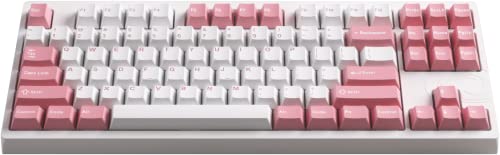
The Multix TKL answers the question many Vortex admirers eventually ask: what if the brand’s build quality came in a size that keeps dedicated arrows and a function row? Its tenkeyless layout ends the layer negotiation entirely, its hot-swap sockets invite switch experiments the soldered classics never allowed, and its programmability plus stated Mac and Windows support make it the most flexible citizen in this guide. Cherry-profile doubleshot caps keep the typing surface low and durable, and the pink Spring colourway gives the board a desk presence the sober Pok3r models never attempted.
Frame it honestly: the Multix is not a Pok3r, a Race 3, or a Core, and this guide does not present it as one. It is the verified current route to owning a Vortex when your work genuinely needs the keys the compact models omit, or when hot-swappable modernity matters more than heritage. Many readers will conclude that is exactly the right trade; purists will stay with the 60 percent picks and accept their layers with a smile. Both conclusions are respectable, and the comparison sections below exist to help you discover which person you are.
At a glance:
- Layout: tenkeyless
- Sockets: hot swappable
- Keycaps: Cherry profile double shot
- Switches: Gateron G Pro Brown in this listing
Strengths
- Dedicated arrows and function row end layer compromises
- Hot-swap sockets welcome switch changes
- Mac and Windows support suits mixed desks
Trade-offs
- Larger footprint gives back the compact models’ desk space
- Less heritage character than the classic line
- Pink colourway will not suit every desk
Best for: a Vortex fan whose work needs tenkeyless keys and modern hot-swap freedom.
Not suited for: a compact-format devotee for whom smallness is the entire point.
The Race 3 in Prose: The Compact That Refused to Compromise
The Race 3 remains the most intellectually interesting board Vortex ever made, because it asks why a compact keyboard should surrender anything at all. Its 75 percent layout keeps a function row, dedicated arrows, and navigation keys, then compresses the spacing between clusters until the whole board occupies barely more desk than a 60 percent model. Owners describe the result as a full skill set in a small coat, and for programmers and spreadsheet workers who need real F-keys and real arrows, that description has kept the model desired long after its retail presence thinned.
Its compromises are ergonomic rather than functional. The compressed clusters crowd fingers that expect tenkeyless breathing room, the non-standard key sizes in its compact rows can complicate replacement keycap shopping, and newcomers sometimes hunt for keys that a spacious layout would have placed more obviously. None of that diminishes the design’s achievement; it defines the audience. The Race 3 suits a typist who values capability per centimetre and is willing to learn a denser map — and because no verified listing could be confirmed for this guide, that typist should hunt it through specialist channels with the model name checked character by character at purchase.
Compared with the Pok3r, the Race 3 is the answer for the reader who loved everything about Vortex except the missing keys. Compared with the Multix TKL, it is the answer for the reader who wants those keys without surrendering compactness. Its absence from the linked picks is a statement about verification, not about worth, and this guide would rather leave a gap in the shopping list than fill it with a substitute wearing borrowed credentials.
The Core in Prose: Life at 40 Percent
If the Race 3 asks why compact boards surrender keys, the Core asks why they keep so many. At roughly 40 percent of a full layout, it retains the letters, a minimal set of modifiers, and little else, pushing numbers, symbols, arrows, and punctuation onto layers stacked like the floors of a very small building. To its devotees this is not deprivation but purification: the hands barely move, the board can travel in a coat pocket’s neighbourhood, and the desk becomes mostly empty space in which a mouse, a notebook, or a coffee can live.
The honest price of that purity is a learning curve with a reputation. The first week on a Core-class board humbles fast typists, because familiar characters have moved behind layer keys and the number row — that reliable top strip of every keyboard since childhood — simply is not there. Writers of prose often adapt beautifully, since letters dominate their work; programmers, whose daily bread is symbols, brackets, and digits, face the steepest climb and should audition the layout philosophy carefully, perhaps on a programmable 60 percent board’s layers first, before committing to hardware this small.
Like the Race 3, the Core is presented here in prose because no confident verified listing supported a link, and no other Vortex model — certainly not the 60 percent Pok3r — should be passed off as its equivalent. Readers who fall for the idea should source it deliberately from specialist retailers, confirm the exact model and switch variant in writing, and budget the adaptation fortnight as part of the purchase price, payable in patience rather than money.
Pok3r Versus the Field: What the Classic Still Teaches
The Pok3r’s longevity teaches a lesson the wider market keeps relearning: a keyboard with a clear philosophy, executed in durable materials, outlives keyboards with longer feature lists and weaker convictions. Aluminium, PBT, onboard layers, and a refusal to chase trends gave the model an identity that owners can describe in one sentence, and identity is what a buyer is really shopping for in a niche brand. When you compare Vortex models, compare their sentences: the Core says smaller, the Race 3 says denser, the Pok3r says enough, and the Multix says modern. Your desk needs one of those sentences, not all of them.
Programmability deserves its own emphasis in the Pok3r’s case, because its onboard approach — configuration stored in the board, summoned by key combinations, indifferent to the host computer’s operating system — anticipated the portability that modern web-based configurators now deliver differently. A Pok3r set up once behaves identically on a work laptop, a home desktop, and a borrowed machine, which is a professional virtue disguised as an enthusiast quirk. Buyers who hot-desk between systems should weigh that trait heavily, whichever compact board they choose.
65 keyboard layout guide is a useful detour for readers torn between these compacts, since the 65 percent format splits the difference the Race 3 and Pok3r argue about, keeping arrows while trimming nearly everything else. Vortex’s family is best understood as one side of that wider layout conversation, not as a sealed world.
Comparison Table
| Pick | Key fact | Best for |
|---|---|---|
| Vortex New Pok3r (Black Aluminium, Cherry MX Brown) | Layout: 60 percent | a compact purist who wants the original Vortex idea in a verified, buyable form. |
| Vortex Poker 3 RGB | Layout: 60 percent Poker format | a gamer who wants Vortex compactness with light and an audible click. |
| Vortex Multix TKL | Layout: tenkeyless | a Vortex fan whose work needs tenkeyless keys and modern hot-swap freedom. |
Step by Step: Decide Which Vortex Layout Your Hands Want
Step 1: Audit your real key usage for one working day
Keep a tally, honestly, of how often you touch arrows, function keys, Delete, and the number row during ordinary work and play. Most people guess wrong in both directions: some discover their arrow use is constant and structural, others realise the function row is a rumour in their lives. That tally, not a photograph of a tidy desk, should nominate your layout — Pok3r or Core for the layer-comfortable, Race 3’s philosophy for the key-hungry, Multix for those whose tally reads like a tenkeyless manifesto.
Step 2: Simulate layers before buying a layer-based board
If you own any programmable board, map an arrow cluster onto a layer and live with it for three days; if you own none, borrow the experience by using a laptop’s function combinations deliberately. The simulation will not replicate a Pok3r exactly, but it will reveal your temperament — whether layers feel like a secret language you enjoy or a toll you resent — and temperament, once known, makes the Vortex decision almost automatic. how to choose your first mechanical keyboard generalises this temperament test.
Step 3: Check keycap implications before falling for a layout
Compact and compressed layouts often use non-standard key sizes, which narrows future keycap shopping to sets with the right compatibility kits. If you already dream of a particular cap set, verify it can dress the board you are courting — especially the Race 3’s dense rows and any shortened keys — before the courtship becomes a purchase. The Pok3r’s standard 60 percent rows enjoy the widest cap wardrobe in this family, a practical advantage that compounds over years of ownership.
Step 4: Buy the verified board, or hunt the prose board deliberately
For the Pok3r models and the Multix, the links in this guide lead to listings whose identities were confirmed, so the remaining work is choosing switch and colourway. For a Race 3 or a Core, shop like a collector: specialist retailers, exact model names, written confirmation of variant, and patience with stock that comes and goes. Never accept a similarly named substitute silently; in this family, similar names are different keyboards with different philosophies.
Step 5: Give the chosen board a fortnight of exclusive use
Compact layouts cannot be judged in rotation with a full-size board, because the layers never become reflexes while an easier alternative sits within reach. Commit the new board to every task for two weeks, keep a small layer map visible for the first days, and let speed return on its own schedule. Most desertions of compact boards are really desertions of the adaptation period, and most conversions to them happen quietly around day ten, when an arrow chord fires without conscious thought.
Common Mistakes to Avoid
Assuming similar Vortex names mean similar keyboards
Core, Race 3, and Pok3r are not trim levels of one product; they are three different answers to how much keyboard a person needs, with layouts that will shape every working day differently. Reading a comparison as a ranking rather than as a matching exercise is the foundational mistake with this brand, and it is why this guide describes owners before it describes switches.
Buying a 40 percent board as a first mechanical keyboard
The Core’s philosophy is exhilarating for experienced compact users and genuinely punishing as an introduction to the hobby, because it demands layer fluency before the new owner has even formed switch preferences. Begin at 60 or 65 percent, learn what your hands think of layers on forgiving hardware, and let the 40 percent board be a destination you choose with evidence rather than a cliff you discover with a receipt.
Accepting a substitute when the named model is unavailable
Unverified stock situations tempt sellers and shoppers alike toward near-enough alternatives, and in this family near enough is a different keyboard. This guide models the correct behaviour: the Race 3 and Core are discussed with respect and linked never, because no verified listing supported them. Apply the same standard in every shop you visit, and require the exact model name to survive from product page to checkout to parcel.
Ignoring switch character while debating layout
Layout arguments are so absorbing in the Vortex world that buyers forget the switches will mediate every keystroke the layout delivers. The verified picks here span tactile Brown and clicky blue-style configurations with opposite personalities and opposite social consequences in shared rooms. Decide the sound and feel your life can host before the layout debate consumes the whole budget of attention.
Vortex and the Compact Idea: A Short Appreciation
Vortex arrived when full-size gaming boards with macro columns were the market’s centre of gravity, and it argued — in aluminium, at 60 percent — that a keyboard could be smaller, heavier, and more serious all at once. That argument looks obvious now because it won: compact boards anchor enthusiast desks everywhere, and the layouts Vortex championed are the layouts the whole hobby debates. Reading the Core, Race 3, and Pok3r together is reading three drafts of that winning argument, each edited toward a different reader.
The brand’s restraint is part of the lesson. Where rivals added screens, gimmicks, and companion bloat, the classic Vortex boards kept their feature lists short enough to memorise and their configuration onboard, and the restraint aged well. In a market that refreshes annually, a design that owners keep for a decade is a form of evidence no launch event can manufacture, and it is why a guide like this one still treats these small boards as living options rather than as museum pieces.
That legacy also explains the verification gap this guide refuses to hide. Niche, beloved, intermittently stocked products are exactly where catalogue data gets muddy and substitutes creep in wearing famous names. Loving a brand well means insisting on the genuine article through channels that can prove it, which is a slower kind of shopping — and the only kind worthy of the keyboards themselves.
Living Small: A Week-by-Week Account of Compact Adaptation
Day one on any of these Vortex boards is an exercise in humility, because your fingers keep travelling to places where keys used to live and finding either a layer chord or empty intention. The Delete key is the usual first grief, followed by arrows during document editing, followed by the function row the first time a familiar shortcut falls flat. None of this indicates a bad purchase; it indicates a map being redrawn, and maps redraw at their own pace regardless of enthusiasm.
By day four the chords that survive are the ones you actually use, and an interesting simplification occurs: your personal layout emerges from the manufacturer’s default like a path worn across a lawn. Owners typically end up fluent in perhaps a dozen layered keys and gloriously ignorant of the rest, which is fine — a compact board does not demand total mastery, only that your dozen keys be exactly where your hands look for them. This is why programmability matters more than any default arrangement printed in a manual.
By day ten most owners report the small epiphany the format promises: the mouse hand and the typing hands stop competing for territory, the shoulders sit squarer, and the desk feels like it has been quietly enlarged by a renovation nobody performed. That physical ease is the compact format’s real product, and it explains why converts defend these boards with an energy that puzzles full-size loyalists. The keyboard did not just save space; it changed the posture of the whole working day.
Deserters exist and their testimony is equally valuable. They tend to share a profile: work built on spreadsheets, data entry, or constant function-key shortcuts, where layers are not a dozen friendly chords but a hundred daily tolls. For them the Race 3’s density or the Multix’s honest tenkeyless layout is not a compromise but the correct tool, and a wise guide — like a wise shop — would rather sell them the larger board than win an argument and lose a customer’s trust.
Switch Stories From the Vortex World
Vortex’s classic boards are inseparable from Cherry MX’s switch catalogue in enthusiasts’ memories, because the brand’s prime coincided with Cherry’s dominance, and the Brown-versus-Blue-versus-Red debate was fought on Pok3r cases in forums across the internet. Brown’s quiet tactility made it the diplomat’s choice for shared spaces, Red’s linearity won the gamers who wanted nothing between intention and input, and Blue’s click remained the extrovert’s signature, beloved and banned in roughly equal measure depending on the room.
Modern Vortex buying adds the hot-swap question the classics never faced. A soldered Pok3r asks you to choose its switches the way you choose a tattoo’s location — carefully, because revision is surgery — while the Multix’s sockets treat switches as a wardrobe. Neither philosophy is obsolete: commitment produces boards owners bond with for a decade, while swapability produces boards that evolve with their owners’ tastes. Know which relationship you want before the layout debate even begins.
Whichever switch family you choose, remember that compact boards amplify switch character. With fewer keys and a smaller case, each keystroke is a larger share of the board’s total voice, and a scratchy or pingy example that might hide inside a full-size board’s chorus will solo on a 60 percent stage. Buy switches from reputable batches, test a few before committing a whole board, and let the small keyboard’s honesty work in your favour by revealing quality early.
Desk Setups That Flatter Each Vortex Board
The Pok3r flatters the minimalist desk: a wide mouse mat, a monitor on an arm, and a small aluminium rectangle holding the centre like a paperweight with opinions. Its lack of backlighting in classic form suits bright rooms and daylight workers, and its weight keeps it planted when a cable is tugged. Pair it with a wrist rest only if your posture floats low; the case’s height is moderate, and wrists should hover rather than rest while typing in any case.
The Race 3’s natural habitat is the dense workstation: dual monitors, reference documents, a notebook crowding the margins, and a typist who needs every key the format smuggled in. Its compressed clusters repay a centred position directly before the main screen, where its small footprint lets documents sit closer to the hands than a tenkeyless board would allow. In that habitat its compromises read as engineering rather than as absence.
The Core belongs to the travelling desk and the deliberately empty one: café tables, co-working hot desks, studio benches where the keyboard shares space with tools and sketches. Its owners tend to pair it with a pointing device given unusual prominence — a large mouse, a trackball — because the board’s gift is precisely the territory it surrenders. Judge the Core by what its emptiness enables, and it stops looking like a keyboard with keys missing.
The Multix, finally, is the Vortex for the conventional beautiful desk: tenkeyless proportions that photograph like the gaming setups its audience admires, hot-swap modernity underneath, and in its Spring colourway a deliberate accent around which a room’s palette can organise. It asks nothing exotic of its owner, which is exactly its offering to buyers who admired the brand from a distance and want in without the initiation rites.
Buying Vortex Second-Hand and Old Stock Without Regrets
Beloved niche boards develop lively second-hand markets, and Vortex’s classics are no exception. A used Pok3r can be an excellent purchase — aluminium and PBT age gracefully — provided you test every key, inspect the cable port for looseness, and confirm the onboard layers reset and reprogram correctly. Ask the seller which switch variant the board carries and treat vague answers as a reason to negotiate or walk, because switch identity is half the product on a soldered board.
Old stock sold as new deserves the same discipline: confirm the exact model name, the case material, and the switch in writing before paying, and photograph the listing in case the parcel disagrees with it. In a family where names blur together in casual speech, paperwork is the difference between a collector’s find and a cautionary tale. The verification standard this guide applied to its own links is available to every buyer willing to spend five minutes on it.
Finally, price a used compact against the verified new alternatives in this guide rather than against nostalgia. A classic in perfect order with your preferred switches may well be worth a premium to you, and that is a legitimate collector’s decision — as long as it is made knowingly, with the Multix and the current Pok3r listings as the factual floor beneath the negotiation.
The Wider Lesson Vortex Teaches Every Keyboard Buyer
Strip the brand away and the Vortex family is a teaching collection about constraint. Every keyboard you will ever buy is a negotiation between the keys you want present and the space you want free, between features built in and simplicity left alone, between the board as it ships and the board as your layers remake it. Vortex simply conducts that negotiation in public, at sizes small enough that every trade is visible. A buyer who learns to read those trades here can read any keyboard’s spec sheet afterward with x-ray clarity.
That is why this guide spent prose on two boards it cannot sell you. The Race 3 and the Core complete the map of choices, and a map with the interesting territories blanked out would fail its reader even if every remaining link were perfect. Shopping guides earn their keep by the quality of the decisions they enable, including the decision to hunt elsewhere, to wait, or to want something the current catalogue cannot verify. Vortex, fittingly, rewards exactly that kind of deliberate reader.
So let the family’s three sentences echo while you decide — smaller, denser, enough — and notice which one your own working day keeps repeating. The board that matches that sentence, bought under its true name from a seller who can prove it, is the right Vortex for you, whether it leaves through this page’s links or through a specialist’s careful parcel.
Questions Owners Ask After the First Month
Around week five, Pok3r owners typically stop thinking about layers and start thinking about keycaps, because the layout argument has been settled by their fingers and the customisation instinct moves to the surface. The good news is that the standard 60 percent rows welcome the hobby’s widest wardrobe; the caution is that tall profiles change the compact board’s wrist geometry enough to deserve the same fortnight of honest trial the layout itself received. Change one variable at a time and the board remains a known instrument throughout its evolution.
Race 3 hunters who succeed usually report a different fifth week: relief that the dense map has become fluent, and a particular affection for having function keys and arrows inside a footprint guests mistake for a toy. Their recurring warning to newcomers concerns keycap shopping, where the compressed rows demand attention to non-standard sizes, and their recurring advice is to buy the board’s caps deliberately rather than discovering the constraint mid-checkout with a beloved set.
Core owners, by the second month, have either become evangelists or sellers, with very little middle ground — the format is a genuine fork in typing philosophy. Evangelists describe a board that disappears, leaving only text and a great deal of desk; sellers describe a fortnight of hunting for a number row that was never coming back. Both reports are honest, and together they make the strongest case in this guide for auditioning the layout philosophy on programmable hardware before the Core itself is purchased.
Multix owners’ month-two story is quieter, which suits the board: switches have been swapped once, the keymap tweaked twice, and the keyboard has become infrastructure — noticed mainly when it visits another machine and behaves perfectly there too. In a family of strong personalities, the Multix is the one content to be competent, modern, and out of the way, and for many buyers that temperament is not the consolation prize but the entire point of the purchase.
If You Buy Only One Vortex, Buy the One That Matches Your Excuses
Every keyboard purchase is defended afterward with a story, and the Vortex family offers unusually distinct stories to choose from. The Pok3r owner’s story is about discipline rewarded — space reclaimed, layers mastered, a small heavy board that outlasted trends. The Race 3 hunter’s story is about refusal — a keyboard that would not choose between small and complete, tracked down through specialist channels because the easy options all compromised somewhere. The Core owner’s story is about courage at 40 percent, and the Multix owner’s story is about a brand growing up alongside its audience’s real working lives.
Notice that none of those stories is about a specification. Nobody reminisces about a polling figure at a keyboard’s five-year anniversary; they reminisce about the board’s character and whether the character matched the life it was bought into. Use the specifications in this guide to eliminate the impossible, use the verified links to buy the buyable honestly, and then let character — yours first, the keyboard’s second — cast the deciding vote between the survivors.
And if the honest conclusion is that none of the four matches, the layout education this family provides still leaves with you, applicable to every other brand’s compact line. That is the mark of a guide worth its length: it improves decisions it does not complete, and it respects the reader enough to say so plainly at the end.
A Practical Checklist Before Any Vortex Purchase
Write down, in this order, the model name in full, the layout size, the switch variant, the case material, and whether the board’s configuration lives onboard or in software. Refuse to proceed past any seller — marketplace, specialist, or second-hand — who cannot confirm all five in writing, because in this family each of those five facts has a near-twin that would change your daily experience while wearing a similar name. The checklist takes ninety seconds and has saved more buyers than any review ever written.
Then decide where the board will live for its first fortnight and clear that desk for exclusive use, because compact boards judged in rotation are compact boards returned. Tell your hands the experiment is real, keep the layer map where your eyes can cheat honestly, and schedule the verdict for day fourteen rather than day one. Vortex’s little boards have converted generations of sceptics on exactly that schedule, and they deserve the same fair hearing from you.
The Sound of Small Aluminium: One More Consideration
Compact aluminium boards have a voice of their own — dense, focused, and less forgiving of rattly stabilisers than a large plastic case that absorbs its own sins. Pok3r owners learn quickly that the spacebar’s tune is the board’s signature, and that ten minutes of stabiliser care at setup pays out on every sentence thereafter. That intimacy between owner and board, where small adjustments are audible immediately, is part of why these keyboards inspire maintenance habits that owners of lesser boards never develop.
If you prefer a softer voice, the remedies are the hobby’s usual kindnesses — a desk mat beneath, foam inside where the design allows, switches chosen for smoothness over volume — applied with the knowledge that a small case responds dramatically to each. The Vortex classics reward that attention out of proportion to their size, which may be the family’s final lesson: a keyboard this small leaves nowhere for carelessness to hide, and nowhere for care to go unrewarded either.
Small Boards, Long Careers: Why Owners Keep Them
Ask long-term Vortex owners why the same board has survived a decade of tempting new releases and the answers converge on fit rather than features: the board fits the desk, fits the hands, fits a keymap that has become personal handwriting. Keyboards are replaced when they chafe, and a board chosen by philosophy — as this guide has urged from its first comparison — chafes least, because its compromises were accepted knowingly at purchase rather than discovered resentfully afterward.
That is the standard to hold your own decision to. Whichever Vortex you pursue, you should be able to state its compromise in one sentence and your reason for accepting it in the next. A buyer who can do that is not really gambling on stock, switches, or shipping at all; they are simply collecting a keyboard whose terms they have already agreed to, and such keyboards tend to stay.
Keep that one-sentence compromise somewhere you will see it during the adaptation fortnight, because on day three, when your fingers are homesick for a full-size board, the sentence will remind you that the difficulty was chosen, priced, and temporary — three facts that carry most owners through to the fluency waiting on the other side of the second week.
And when fluency arrives, as it reliably does for buyers who matched the philosophy to their real work, the little board stops being an experiment and becomes the standard against which larger keyboards feel faintly absurd — which is precisely the conversion Vortex has been quietly performing on desks for years.
Choose the sentence, verify the name, commit the fortnight, and the smallest keyboards in this guide will repay you with the largest desks you have ever owned.
That exchange — a little patience for a lot of room — has been the family’s honest offer from the beginning, and it remains, board after board, an offer worth reading very carefully indeed before you decide.
Final Recommendation
Choose by philosophy and verify by name. The Pok3r in aluminium and Brown is the classic compact, buyable and verified, for the typist who accepts layers in exchange for desk space and onboard manners. The Poker 3 RGB serves the lit gaming desk that wants the same discipline with a click. The Multix TKL is Vortex modernised for buyers who need real arrows and hot-swap freedom. And the Race 3 and Core remain what they have always been — brilliant, specific designs to be hunted deliberately through specialist channels, never impersonated by a substitute. A guide that tells you when not to click may be the most useful kind.
Frequently Asked Questions
What is the difference between the Pok3r and the Poker 3 RGB?
They share the compact Poker layout philosophy, but they address different desks. The verified New Pok3r here wears an aluminium case, double-shot PBT caps, and tactile Cherry MX Brown switches in a sober, software-free package aimed at typists. The Poker 3 RGB adds backlighting and arrives in a clicky blue-switch configuration aimed at gaming setups. Treat them as siblings with different personalities rather than as a base model and its upgrade, and choose by switch sound, lighting need, and room.
Why are the Race 3 and Core not linked in this guide?
Because no listing for either model could be confidently verified against current catalogue data, and this guide links only what it can verify. Both models are compared in prose on their established designs, so you can decide whether either suits you, but purchasing one should happen through a specialist retailer where the exact model can be confirmed in writing at checkout. Substituting another board under their names would mislead you, and this guide refuses the substitution on principle.
Is a 60 percent keyboard like the Pok3r practical for office work?
For many office workers, yes, provided their work is prose, email, and documents rather than spreadsheet navigation or data entry. The layer-based arrows become automatic within a fortnight of exclusive use, and the reclaimed desk space is a daily dividend. Workers who live in spreadsheets, use function keys constantly, or share the board with colleagues should choose the Race 3’s denser philosophy or the Multix TKL’s full tenkeyless layout instead of fighting a tool that mismatches the job.
What switches should a first Vortex buyer choose?
Tactile Brown switches, as in the verified Pok3r and Multix picks, are the safest introduction: quiet enough for most shared rooms, tactile enough to feel mechanical, and versatile across typing and gaming. Clicky blue-style switches, as in the Poker 3 RGB listing, delight their owners and test their neighbours, so buy them only when your room’s other occupants have been consulted or your gaming space is truly your own. Switch choice is a social decision disguised as a mechanical one.
Can I replace the keycaps on these Vortex boards easily?
The Pok3r’s standard 60 percent layout enjoys the widest keycap compatibility in the family, with mainstream sets fitting its rows without exotic extras. The Multix TKL likewise follows tenkeyless conventions. Compressed designs like the Race 3 demand more care, since non-standard key sizes require sets with the right compatibility kits — one more reason to check a cap set’s contents diagram against your exact board before ordering, whatever the board’s brand.
Does onboard programmability matter if I use one computer?
Less than it matters to hot-deskers, but it is not worthless: a board that stores its own layers cannot lose them to a software update, a reinstalled operating system, or a configuration application’s disappearance. It also keeps working identically on a guest machine, a games console’s menus, or a work laptop where installing software is forbidden. Treat onboard memory as insurance and independence rather than as a headline feature, and the Pok3r’s long reputation for it makes sense.
How do the three boards handle the missing arrow keys in daily use?
Each model answers the same problem differently, and the answer shapes daily comfort more than switch choice does. The Race 3 keeps dedicated arrow keys by squeezing them into its wider layout, so spreadsheet navigation and cursor work feel close to a conventional board with almost no learning curve. The Pok3r hides arrows on a layer, typically reached with a function key, which feels awkward for the first week and then surprisingly natural for touch typists who rarely look down. The Core goes furthest, folding nearly everything into layers, which rewards owners who enjoy learning a compact system and frustrates anyone who only occasionally needs a symbol or navigation key. A useful self-test is to notice how you already work: if you constantly nudge a cursor through documents or code, dedicated or easily reached arrows matter; if your hands stay on the home row for long stretches of prose, a layered approach stops feeling like a compromise very quickly.
Which of these Vortex boards travels best between home and office?
All three are wired, compact, and easy to carry, but they suit different travel habits. The Core is the natural commuter board: it disappears into a laptop sleeve, leaves room for a notebook on a cramped train table, and asks only that you remember its layers when you arrive. The Pok3r is the better choice when the destination desk is where you will actually spend the day, because its standard keycap spacing and familiar sixty percent layout feel immediately normal for long documents. The Race 3 travels well in a backpack yet earns its extra width only if you use its navigation cluster once you arrive. Whichever you carry, use a hard case or at least a padded sleeve, since exposed switches and caps take the knocks in a bag, and coil the cable separately rather than wrapping it tightly around the board. Arriving with an undamaged board and a cable that has not been strained is the whole goal.