Disclosure: As an Amazon Associate, kajuandouglas.com earns from qualifying purchases. Links on this page are affiliate links; they cost you nothing extra. Prices and availability change often, so check the current Amazon listing before you buy.
Which HyperX Mechanical Keyboard Is the Best
Deciding which hyperx mechanical keyboard is the best starts with noticing that HyperX built its keyboard reputation on a single, disciplined idea: an aluminium-framed gaming board with its own switches, its own software, and no wasted space, repeated at several sizes. The Alloy line is therefore less a sprawling catalogue than a set of variations on a theme, and the best one for you is decided mostly by how much keyboard your desk and your games actually need — tenkeyless, sixty-five percent, sixty percent, or the newer seventy-five percent hot-swappable generation that signals where the line is heading.
Four verified models carry this comparison. The Alloy Origins Core is the tenkeyless reference design, the board against which the others are measured. The Alloy Origins 65 and the Alloy Origins 60 shrink that design for players who want their mouse hand closer and their desk emptier. The Alloy Rise 75 breaks the pattern productively, adding hot-swappable switches and a seventy-five percent layout for buyers whose taste will evolve. One famous sibling is absent from the links on purpose: the Alloy Elite 2, with its media bar and full-size sprawl, could not be confidently verified, so it is discussed in prose and never impersonated by an Origins model.
Each review names its player plainly, and the sections afterward compare sizes, explain HyperX’s own switch line, and cover the NGENUITY software that ties the family together. By the end, the question in the title should feel less like a riddle and more like a measurement you have taken of your own desk.
Where to Buy and How the Picks Were Chosen
Every linked board was verified against catalogue data before drafting, with model, size, and switch taken from the verified listing titles themselves. The Origins Core, Origins 65, and Origins 60 listings verified in their linear Red switch forms, and the Alloy Rise 75 verified as the line’s hot-swappable seventy-five percent model. The Alloy Elite 2 produced no confident match, so it receives the prose treatment this program reserves for unverifiable models: discussed on its established design, linked never, and substituted by nothing.
Comparison criteria are the family’s own axes: layout size and what it surrenders, frame construction, switch character, keycap quality, software depth, and the gaming desk each board was born for. Prices run through Check price on Amazon links, because gaming peripherals are discounted on a rhythm that makes printed figures unreliable narrators.
In this guide
Quick Picks
- Best HyperX for most gaming desks: HyperX Alloy Origins Core — a tenkeyless aluminium board with linear HyperX Red switches, RGB, and macro customisation through software.
- Best compact HyperX with arrows: HyperX Alloy Origins 65 — a 65 percent board with dedicated arrows, doubleshot PBT caps, linear Reds, and NGENUITY support.
- Best HyperX for minimal desks and travel: HyperX Alloy Origins 60 — an ultra-compact 60 percent board with doubleshot PBT caps, RGB, and linear HyperX Red switches.
- Best HyperX for switch experimenters: HyperX Alloy Rise 75 — a hot-swappable 75 percent board with RGB and NGENUITY, the line’s customisable new generation.
Detailed Reviews

HyperX Alloy Origins Core — Best HyperX for most gaming desks
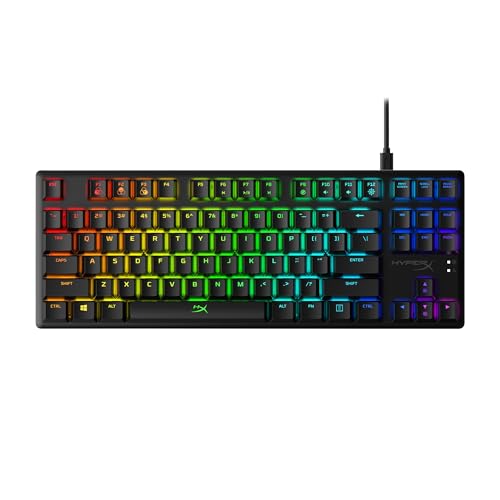
The Origins Core is the Alloy idea at its most balanced, and for most gaming desks it remains the family’s correct answer. Tenkeyless keeps the function row, arrows, and navigation cluster physically present while removing the number pad that pulled the mouse hand wide, and the aluminium body gives the compact frame a planted, premium stability that plastic rivals at this size rarely match. HyperX’s own Red switches deliver the smooth linear stroke competitive players default to, with a consistency across the board that makes movement keys feel like instruments rather than buttons.
Its software story — lighting and macros handled through NGENUITY — suits the player who wants profiles without turning configuration into a hobby. The Core does not hot-swap its switches, does not pretend to be a travel board, and does not apologise for either: it is a fixed-desk gaming instrument, finished properly. Buyers torn between the family’s sizes should start here and let a specific need — smaller, or swappable — argue them away from the reference design, rather than starting small and discovering the missing keys later.
At a glance:
- Layout: tenkeyless
- Frame: compact aluminium-bodied design
- Switches: linear HyperX Red
- Software: lighting and macro customisation stated
Strengths
- Tenkeyless layout keeps every gaming key present
- Aluminium body feels planted and premium
- Linear Reds are consistent across the board
Trade-offs
- Switches are not hot-swappable
- No number pad for data-heavy work
- Wired, fixed-desk character
Best for: the mainstream gaming desk that wants the Alloy formula without compromises or experiments.
Not suited for: a switch experimenter or a traveller needing the smallest possible board.

HyperX Alloy Origins 65 — Best compact HyperX with arrows
The Origins 65 is the family’s answer to the player who wants compactness without the layer tuition, and its specification shows HyperX listening carefully: dedicated arrows survive the shrink, doubleshot PBT caps replace the standard set with legends that cannot fade and a surface that resists shine, and the linear Red switches keep the family’s gaming character intact. It is the small Alloy for people whose games and whose editing both use arrows hourly, which in practice is most people who have ever tried to live at sixty percent and come back with stories.
The compromises are the format’s honest ones: the function row lives on a layer, the right side of the bottom rows is compressed in ways that take a week to stop noticing, and replacement keycap shopping must respect its compact rows. None of that diminishes the design’s central achievement, which is proportion — the board feels like an Origins that was tailored rather than amputated. For the small-desk player who refuses to surrender arrows, this is the HyperX to buy, and it is not close.
At a glance:
- Layout: 65 percent with arrow keys
- Keycaps: double shot PBT
- Switches: linear Red
- Software: NGENUITY compatible stated
Strengths
- Dedicated arrows survive the compact shrink
- Doubleshot PBT caps age gracefully
- Keeps the family’s aluminium gaming character
Trade-offs
- Function row is layered
- Compressed right side takes adaptation
- Keycap sets must match compact rows
Best for: a small-desk gamer who uses arrows constantly and hates layers for them.
Not suited for: a function-row power user or a number-pad professional.

HyperX Alloy Origins 60 — Best HyperX for minimal desks and travel
The Origins 60 takes the family to its smallest defensible size, and it does so without diluting the formula: doubleshot PBT caps, RGB, the line’s linear Red switches, and a body that still feels like a HyperX rather than like a toy. What changes is the philosophy of access — arrows, functions, and navigation move behind layers, and the desk gains the wide, centred emptiness that low-sensitivity players and minimalist setups are actually buying when they buy a 60 percent board.
Its natural habitats are the tournament bag, the small apartment desk, and the setup where the mouse’s territory is sacred. Its unnatural habitat is the spreadsheet. Buyers should choose it the way the family’s other small boards demand to be chosen: after an honest audit of arrow and function use, with a fortnight’s adaptation budgeted, and with the knowledge that its PBT caps and solid build will reward the commitment long after the layers become reflexes. As the family’s extreme, it is superb; as a first keyboard for an undecided buyer, it is a cliff edge wearing a friendly face.
At a glance:
- Layout: 60 percent, ultra compact
- Keycaps: double shot PBT
- Switches: linear HyperX Red
- Software: NGENUITY compatible stated
Strengths
- Smallest Alloy with the formula intact
- Doubleshot PBT suits heavy gaming use
- Frees maximum mouse territory
Trade-offs
- Everything beyond letters is layered
- Adaptation fortnight is mandatory
- Poor fit for navigation-heavy work
Best for: a competitive player or minimalist whose desk and bag both reward smallness.
Not suited for: a beginner unsure about layers or a worker who edits documents all day.

HyperX Alloy Rise 75 — Best HyperX for switch experimenters
The Rise 75 is the Alloy line looking toward the enthusiast future, and its headline is the two words the Origins boards never offered: hot-swappable. Switches become a wardrobe rather than a destiny, so the board can begin life as a gaming instrument on linears and evolve — for a new job, a new taste, a quieter room — without being replaced. The seventy-five percent layout keeps a function row and arrows in a compressed block, which makes the Rise the family’s most complete small board as well as its most changeable one.
For buyers whose switch taste is still forming, that combination outranks every other consideration in this comparison, because it converts the riskiest decision in keyboard buying into a reversible experiment. The Rise also suits the player who expects their desk to change — a move to shared housing, a shift from gaming to hybrid work — since the board can be re-voiced for each chapter. It is the HyperX for the reader who suspects, correctly, that they are not finished becoming a keyboard person yet.
At a glance:
- Layout: 75 percent
- Sockets: hot-swappable
- Lighting: RGB
- Software: NGENUITY stated
Strengths
- Hot-swap sockets make switch taste reversible
- 75 percent keeps functions and arrows
- NGENUITY ties it into the family ecosystem
Trade-offs
- Compressed clusters take a short adaptation
- Newer line, so fewer years of owner lore
- Enthusiast direction may exceed a simple desk’s needs
Best for: a player whose taste is evolving and who wants one board to evolve with it.
Not suited for: a buyer who wants the classic fixed Origins formula exactly as established.
The Alloy Elite 2 in Prose: The Family’s Big Sibling
The Elite 2 represents the Alloy line’s maximalist branch: a full-size board with a dedicated media bar, a volume wheel, passthrough convenience, and the sprawling presence of a flagship built for a battlestation that never travels. Its audience is the player who wants every control physically present — media, macros, number pad, the works — and whose desk has the territory to host that completeness without crowding the mouse into a corridor. In the family’s history it is the board that proved HyperX could play at the flagship table, not only at the disciplined midrange where the Origins line thrives.
It appears in this comparison without a link because no confident verified listing supported one, and the rule that governs this program is absolute on the point: the Origins models above are not Elite substitutes, and no wording here should be read as selling them under its name. A buyer whose heart is set on the Elite’s media-bar formula should hunt it through specialist gaming retailers, confirming the full model name and switch variant in writing, the way this guide’s Ducky and Vortex chapters advised for their own prose models.
Its existence still informs the linked decision usefully, as a boundary marker. If reading about the Elite’s completeness makes the Origins Core feel sparse, your desk is a full-size desk and the honest move is to hunt the Elite properly rather than to buy a tenkeyless board and resent it. If the Elite’s sprawl sounds like clutter, the Origins line’s discipline is your family’s centre, and the only remaining question is size.
Sizes in the Alloy Line: A Measurement, Not a Ranking
Lay the four linked boards side by side and the family’s logic becomes visible as pure geometry. The Core’s tenkeyless frame is the largest linked option and the only one that asks nothing be relearned. The Rise 75 compresses the same key count into a tighter block, trading breathing room for a function row that survives. The Origins 65 surrenders the function row to keep its arrows, and the Origins 60 surrenders both to keep only the core and the desk’s emptiness. Each step trades a physical key for physical space, at an exchange rate set by your own hands.
The right way to shop that geometry is the audit this program keeps prescribing: one working week, honestly observed, counting arrows, function keys, navigation, and number-pad touches. HyperX’s line is unusually well suited to the audit’s outcomes because it holds switch, frame, and software nearly constant across sizes, so the size decision can be made cleanly, without a change of brand personality confounding it. Few families let a buyer isolate the size variable this purely, and it is one of the strongest reasons to shortlist the line at all.
75 percent keyboard layout guide and 65 keyboard layout guide each walk one of these sizes through a full working day, and readers torn between the Rise and the Origins 65 in particular should let those day-in-the-life accounts cast the deciding vote.
HyperX’s Own Switches and the NGENUITY Thread
HyperX designs its own switches rather than buying a famous name off the shelf, and the family’s Red linear is the character most owners meet: a smooth, consistent press tuned for gaming, with a slightly eager actuation that rewards quick, repeated inputs. The consistency matters more than any single specification, because a board whose switches vary subtly from key to key teaches the fingers distrust, while the Alloy line’s uniformity — a benefit of one maker’s switch across the whole board — is the quiet foundation of its gaming reputation.
NGENUITY, the family’s software, is the other thread: lighting, macros, and profiles managed in one place, with the boards’ onboard memory carrying settings between machines on the models that support it. Its role in your decision should be proportional — a genuine convenience for players with several games and profiles, a minor note for the single-game typist. Software ecosystems reward loyalty mildly and punish switching mildly, and the Alloy line’s is best treated as a pleasant tiebreaker between sizes rather than as a reason to choose the family over a board your hands prefer.
The Rise 75’s hot-swap sockets loosen the switch story in the healthiest way, admitting the wider switch market into a HyperX frame for the first time in this comparison. Owners can begin on the family’s own linears and graduate to tactiles, silents, or heavier springs as their taste declares itself, which makes the Rise the family’s bridge to the enthusiast world the other chapters of this cluster keep visiting.
Comparison Table
| Pick | Key fact | Best for |
|---|---|---|
| HyperX Alloy Origins Core | Layout: tenkeyless | the mainstream gaming desk that wants the Alloy formula without compromises or experiments. |
| HyperX Alloy Origins 65 | Layout: 65 percent with arrow keys | a small-desk gamer who uses arrows constantly and hates layers for them. |
| HyperX Alloy Origins 60 | Layout: 60 percent, ultra compact | a competitive player or minimalist whose desk and bag both reward smallness. |
| HyperX Alloy Rise 75 | Layout: 75 percent | a player whose taste is evolving and who wants one board to evolve with it. |
Step by Step: Set Up an Alloy Board for Your Games
Step 1: Build your first profile around your main game
Install the family’s software once, by cable, and create a profile for the game you actually play most: its macros, its lighting at a brightness your eyes approve in your room’s real light, and any key assignments your hands keep requesting. Resist building profiles for hypothetical games; a profile per real game, maintained, beats a library of intentions, and the board’s memory is better spent on the two or three titles that own your evenings.
Step 2: Place the board for the mouse, not for symmetry
Centre the alphanumeric block before your body and let the board’s right edge fall where the size you chose dictates, then give the mouse the territory the layout freed. Small Alloy boards exist to fund that territory, so spend it deliberately: a wider, lower-sensitivity sweep is the dividend, and collecting it requires resisting the urge to recentre the whole setup for a photograph. are wireless keyboards good for gaming covers the wider setup questions competitive players ask next.
Step 3: Learn the small boards’ layers before ranked play
On the Origins 60 and 65 and the Rise, spend casual sessions internalising the arrow and function layers until they fire without narration, because a layer hunted for consciously in a ranked match is a small disaster with your name on it. Print or save the layer map for the first week, then remove it and let the reflexes certify themselves. The fortnight rule applies to this family as to every compact line in this cluster.
Step 4: On the Rise, plan your first switch experiment properly
If the Rise 75 is your board, treat its sockets as a laboratory with rules: change one area at a time, keep the original switches bagged and labelled, and give each experiment a week of real play before judging. A switch puller used gently, pins aligned before pressure, and notes kept on what changed and why — that discipline turns hot-swapping from a novelty into the education it promises to be.
Step 5: Maintain the board like the instrument it is
Caps off and crumbs out on a seasonal rhythm, the aluminium frame wiped rather than soaked, and settings backed up when the software offers the chance. HyperX boards are built for long service, and their owners’ main contribution to that service is housekeeping. A board that is cleaned and whose profiles are saved can survive computer changes, desk moves, and game rotations without ever needing to be reintroduced to its owner.
Common Mistakes to Avoid
Buying the 60 for its looks before auditing your arrows
The Origins 60 photographs like a jewel and lives like a commitment, and buyers who choose it for the photograph spend their first month discovering every arrow key their work ever used. The audit exists to prevent exactly this honeymoon, and the Origins 65 — arrows intact, barely larger — is standing by as the family’s own correction for it.
Assuming the Elite 2 and the Origins Core are interchangeable
They share a brand and a design language, but the Elite’s full-size, media-bar formula and the Core’s tenkeyless discipline serve different desks, and this guide’s refusal to link the Elite is not an invitation to treat the Core as its understudy. Decide which formula your desk wants, then buy that formula under its true name, from a listing that can prove it.
Ignoring switch fixity on the Origins boards
The classic Origins models ask you to choose their switches at purchase, because the sockets do not swap. A buyer whose taste is unsettled should either sample first or choose the Rise, whose whole purpose is reversibility. Buying a fixed board on a guess and disliking the guess is the family’s most preventable disappointment, and it is prevented by one honest question about your own certainty.
Letting software features outrank fit
Profiles, lighting, and macros are weekly pleasures; size and switch are hourly ones. A board whose software dazzles and whose layout cramps will be replaced by a board whose layout fits, whatever its software lacks. Use NGENUITY as the tiebreaker it is good at being, never as the reason a wrong-sized board gets to stay.
The Alloy Line’s Design Discipline, and Why It Ages Well
Gaming peripherals are a fashion industry wearing an engineering costume, and most designs date by their gimmicks. The Alloy line’s restraint — an aluminium frame, a compact footprint, house switches, restrained lighting — reads today like a deliberate refusal of that cycle, and it is why an Origins board on a desk does not announce its model year the way its more theatrical contemporaries do. For a buyer, that restraint is a form of longevity no specification can promise: the board will look correct in five years because it never chased this year’s idea of exciting.
That discipline extends to the family’s naming, which this guide’s verification process came to appreciate. Origins, a size, a switch — the listings verified here describe exactly the board in the box, in a market where rival listings bury the same facts under adjectives. A family whose names behave is a family whose second-hand market stays honest, whose variants stay distinguishable, and whose buyers can use the thirty-second variant check this cluster keeps recommending without a translator.
None of this makes an Alloy the right board for every reader — the enthusiast who wants gasket flex, exotic switches from the factory, or a knob will shop elsewhere happily — but it makes the line the right answer to a specific and common prayer: a serious gaming keyboard, properly built, that will neither embarrass nor surprise its owner. Prayers that specific deserve answers this disciplined.
Ownership Patterns: How Alloy Boards Settle Into a Setup
Origins Core owners tend to report the least eventful satisfaction in this comparison, and that is a compliment of the highest order for a fixed-desk instrument. The board arrives, the profile is built, and then the keyboard vanishes from conscious thought for years at a time, surfacing only when a visitor asks about it or a lesser board at a friend’s desk reminds its owner what the aluminium frame at home feels like. Equipment that disappears into service is equipment that was specified correctly, and the Core’s whole design conspires toward that disappearance.
Origins 65 owners tell a livelier story, because their board keeps being noticed — by its size on a small desk, by its arrows surviving where guests expect layers, by caps that still look new while other boards shine. The 65 is the family’s conversation piece at the size where compact boards usually apologise, and its owners’ recurring theme is that they stopped explaining the layout to anyone, because the layout explains itself the moment an arrow key is needed.
Rise owners’ stories are still being written, which suits a board designed for change. Their pattern is experimentation in chapters: a tactile phase for a writing job, a silent phase for a shared flat, a return to linears when a new game takes over the evenings. Each chapter costs a set of switches rather than a keyboard, and each leaves the owner more literate about their own hands. If the Origins boards are answers, the Rise is a method — and methods compound in value every year they are practised.
HyperX in the Wider Gaming Market: Where the Line Wins and Concedes
Against the wider gaming market, the Alloy line wins on build seriousness at its sizes, on the consistency of its house switches, and on a design language that will not embarrass a desk shared with professional life. It concedes, happily, the territories this cluster’s other chapters celebrate: the magnetic actuation experiments of the rapid-trigger boards, the gasket-tuned sound chasing of the enthusiast compacts, and the wireless freedom of the tri-mode generation. A buyer should hear those concessions as a map, not as an apology — every family in this program is a specialisation, and HyperX’s is the disciplined wired gaming board.
That specialisation makes the line an unusually good first serious purchase, because its compromises are all in the direction of focus rather than of quality. A new player who buys an Origins learns their size preference, their switch temperament, and their software appetite on a board with no weak fundamentals, so that any later move — to a Rise, to an enthusiast compact, to a full-size flagship like the Elite hunted properly — is an informed migration rather than a rescue. First purchases that educate are worth more than their specifications, and this family educates gently.
It also makes the line a safe gift and a safe recommendation, the two transactions where keyboard advice usually goes wrong. A recommender who names an Origins Core for a mainstream gaming desk is unlikely to be cursed at Christmas, because the board’s demands are zero and its virtues are immediate. In a hobby of strong opinions and stronger suffixes, that reliability is a genuine product feature, and it is not an accident that HyperX’s name travels so well by word of mouth.
The Decision, Compressed to a Card
Pocket version, for the reader standing in a shop or a checkout line: complete layout, no experiments — Origins Core. Small desk, arrows sacred — Origins 65. Smallest desk, layers welcomed — Origins 60. Taste unfinished, future unwritten — Alloy Rise 75. Full-size flagship with a media bar — the Elite 2, hunted by its exact name through a specialist, never substituted. Five sentences, four links, one deliberate prose hunt, and a family’s whole philosophy preserved in the compression.
What the card cannot carry is the audit, and the audit remains the price of satisfaction: a week of noticing your own arrows, functions, and mouse territory, recorded honestly enough to survive a beautiful product photograph’s attempt to overrule it. HyperX built a line clean enough that the audit’s answer maps onto a model almost mechanically. Perform the audit, trust the mapping, and the best HyperX for your desk will be the one that arrives — which is the only definition of best this guide has ever endorsed.
Care, Longevity, and the Aluminium Advantage
An aluminium-framed board forgives a working life that plastic absorbs as damage: the frame resists flex, shrugs off the desk’s small collisions, and keeps its finish with a wipe where painted surfaces scar. Combined with doubleshot PBT on the smaller models and replaceable standard parts throughout, the family’s physical longevity is the substrate beneath its reputation — these are boards that can be handed down, resold honestly, or kept through several computers without a cosmetic apology at any point.
Care asks little in return: crumbs out seasonally, the frame wiped rather than drenched, profiles backed up, and on the Rise, switch pins treated with the gentleness sockets deserve. Owners who keep that small rhythm report the peculiar satisfaction of a gaming board that ages like a tool instead of like a toy, still tight, still consistent, still correctly coloured, while the games it serves rotate through eras above it.
A Note on Wired Loyalty in a Wireless Decade
Every linked board in this comparison is a wired, fixed-desk instrument, and in a decade marketing wireless as the default future, that deserves a defence rather than an apology. A wire never sleeps, never pairs, never runs down mid-match, and never asks its owner to maintain a charging ritual or a receiver census. For the single-desk gaming life most of these boards will actually lead, wired connection is not the absence of a feature but the presence of a certainty, and certainty is a competitive specification in its own right.
The buyer whose life genuinely spans machines and rooms should shop the wireless chapters of this cluster with this guide’s blessing, because fit outranks loyalty in every comparison here. But the buyer whose desk is one desk, whose machine is one machine, and whose evenings are ranked should let the Alloy line’s wired discipline read as what it is: a family that declined to spend its owners’ money on radios their lives would never switch on.
The Final Measurement
Stand at your desk and perform the comparison’s last exercise physically. Rest your hands where they type, look at where the number pad would be and ask when it last earned its territory, slide your mouse through its real arc and notice where a smaller board would let it travel, and imagine your next year — new games, perhaps a new room, perhaps a new taste in switches still forming. The desk answers all of it, silently and correctly, and its answers correspond to models in this guide with unusual precision.
Then buy the board the desk described, under its exact verified name, and give it the fortnight every compact in this family deserves. The best HyperX was never a secret the internet was keeping from you; it was a measurement you had not yet taken, of a desk you know better than any reviewer ever will.
What Owners Upgrade First, and What That Teaches New Buyers
Ask Alloy owners what they changed first and the answers cluster instructively: a desk mat before anything, because the frame’s voice settles beautifully on one; a wrist rest matched to the board’s height for long sessions; and, on the fixed-switch models, nothing at all inside the board for a remarkably long time, because the house switches were chosen well enough that the upgrade urge travels outward to the desk instead of inward to the sockets. A product whose owners upgrade its surroundings rather than its substance has passed the market’s most honest review.
Rise owners invert the pattern delightfully, upgrading inward — a switch set here, a spacebar’s character there — while their desks stay untouched for seasons. Neither pattern is superior; they are the two shapes satisfaction takes in this family, settled and exploratory, and a new buyer can use them as a final self-test. If the settled pattern sounds like peace, buy an Origins and be done. If the exploratory pattern sounds like fun, buy the Rise and begin. The family, characteristically, has a board for the answer either way.
In Defence of the Reference Design
Every product family needs a centre, and the Origins Core’s role as this one’s reference is worth a closing word, because reference designs are undervalued in a market that rewards novelty. The Core is the board the family’s other models are deviations from — smaller, swappable, or sprawling — and deviations only make sense against a known centre. A buyer who starts at the centre and migrates with reasons will understand their own collection forever; a buyer who starts at an extreme owns a deviation without a baseline, and every later judgement wobbles for lack of one.
So even readers certain they want the 65, the 60, or the Rise should read the Core’s review twice: once as a product, and once as the family’s statement of what a gaming keyboard owes its owner before any specialisation begins — every key present, a frame that feels like equipment, switches that behave identically under every finger, and software that serves without demanding. Whatever you finally buy, hold it to that statement, and you will have used this comparison the way it was written to be used.
Closing the Comparison Without Closing the Question
Comparisons end; desks continue. The board you choose from this family will be judged not by this article’s criteria but by a thousand evenings of small evidence — a movement key that never doubted, a profile that loaded, a frame that never flexed during an argument with a boss fight. The Alloy line’s promise, kept across four verified models and one prose flagship, is that the small evidence will accumulate in its favour, quietly, at whichever size your audit selected.
Take the audit, trust the family’s discipline, verify the name at checkout as this program has taught you to do with every famous line, and then stop comparing. The best HyperX is the one that disappears into your game, and disappearance — of the board, of the shopping, of the question itself — is the final feature this guide has been selling all along.
Disappearance takes a fortnight to arrange — the profile built, the layers learned, the desk measured around its new centre — and then it holds for years, through game launches and operating systems and the slow evolution of the player at the keys. Few purchases in a gaming life offer that ratio of brief effort to long peace, and none of the four boards in this guide offers it more honestly than the one your own audit selected.
Select it, then, and let the family’s aluminium discipline do what it has quietly done on a generation of desks: hold still, register faithfully, and leave the glory to the player.
The glory, after all, was the point of the desk, the game, and the question — and a keyboard that understands its supporting role this completely has earned its place in the title’s answer, whichever of its sizes your measurement finally names as the best.
One More Consideration: The Second Machine in Your Life
Before the order is placed, spare a thought for the machine this guide has not discussed — the laptop, the work computer, the console in the other room — because an Alloy board’s wired loyalty means it will serve exactly one desk at a time, and households often discover a second desk’s needs a month after the first is gloriously solved. That discovery is not a failure of the purchase; it is the normal biography of a good first board, which teaches its owner what the second board should be, and the family’s own sizes make excellent second boards for one another.
Plan for that biography with the calm this cluster has recommended throughout: keep the first board’s box and cable, note its profile settings somewhere durable, and let the second purchase — when the second desk declares itself — be made with the same audit and the same verification discipline. Collections assembled that way, one honest measurement at a time, are the ones that still make sense five years later, when the fashions that tempted their owners have been replaced twice over.
Five years is the right horizon for judging any of these boards, and on that horizon the family’s virtues compound while its compromises fade into furniture. Choose for the five-year desk, not for this season’s game, and the Alloy you buy will still be answering the title’s question — correctly, for you — when the games that prompted it have become nostalgia.
Nostalgia, in fact, is where well-bought keyboards end their careers — not in a drawer of failures, but in the fond recollection of a setup that worked, attached to a board that often still works, waiting in reserve for the day a friend’s desk needs rescuing and an old Alloy gets to be somebody else’s first serious keyboard.
Buy the board that deserves that afterlife: measured to your desk, verified by its exact name, and chosen from a family whose discipline has never once asked its owners to apologise for it in company.
Then set it up once, properly, with its profile built and its place on the desk measured rather than approximate, and let the long, quiet accumulation of flawless evenings begin — the accumulation by which every owner in this family’s history has eventually answered the title’s question without needing to ask it again.
Questions retired by good equipment are the best kind, because they free their owners to ask more interesting ones — about games, about work, about the next chapter of a setup that has stopped being a problem and become a platform.
Stand on that platform, then, and play — with the board beneath your hands doing the one job this entire comparison has asked of it, which is to be so reliably itself that you never have to think about it again.
That thoughtlessness, earned by a correct measurement and a verified name, is the family’s final gift to its owners — and it is available at four sizes, for four kinds of desk, starting the evening the right box is opened.
Open yours when the audit says so, and not a moment of comparison-shopping longer than the audit requires.
The games are waiting, the desk is measured, and the family, as it has for years, is ready when you are.
Pick the size, trust the frame, and play on, confidently, tonight, together, always, well.
Final Recommendation
The family’s answer is a measurement. Most gaming desks should take the Origins Core, the reference Alloy, and stop shopping. Small desks that live by their arrows take the Origins 65; minimalists and travellers take the Origins 60 with their eyes open; evolving players take the hot-swappable Rise 75 and let it grow with them. And the full-size faithful should hunt the Elite 2 by its exact name through specialist channels, because no Origins — however good — is that board. Measure the desk, audit the week, and the best HyperX names itself.
Frequently Asked Questions
Which HyperX is best for a first gaming keyboard?
The Alloy Origins Core, for most first-time buyers, because its tenkeyless layout asks nothing be relearned while delivering the family’s full character — aluminium frame, linear house switches, software profiles. Buyers with small desks can start at the Origins 65 without fear, provided arrows matter more to them than a physical function row. The Origins 60 and the Rise are better second decisions than first guesses, one for its layers and the other for its experiments.
What is the difference between the Origins 65 and the Origins 60?
Five percent of layout and one philosophy of access. The 65 keeps dedicated arrow keys and a small navigation presence, layering mainly the function row; the 60 layers everything beyond the alphanumeric core in exchange for the smallest footprint in the family. Both verified listings carry doubleshot PBT caps and linear Red switches, so the choice is purely about which keys your hands demand in physical form — an audit question, not a quality question.
Is the Alloy Rise 75 better than the Origins boards?
It is different in the way that matters most to a specific buyer: its hot-swap sockets make switch choice reversible, and its 75 percent layout keeps functions and arrows in compressed form. For a settled player who knows they love the family’s linear Reds, an Origins board’s fixed, proven formula may be the better buy. For an evolving player, the Rise’s reversibility outranks seniority. Better follows the buyer, as it has throughout this comparison.
Why is the Alloy Elite 2 not linked in this guide?
No listing for it could be confidently verified against catalogue data at the time of writing, and this guide links only what it can verify. The Elite 2 is discussed in prose on its established design — full-size, media bar, flagship sprawl — so the decision can include it, with advice to source it through specialist retailers who confirm the exact model in writing. Its absence from the links is a verification statement, not a quality judgement.
Are HyperX’s own switches good compared with famous switch brands?
The family’s linear Red is a well-regarded gaming switch whose chief virtue is consistency across the board and across years of production, which is what competitive play actually consumes. Famous switch brands offer broader variety — more tactilities, weights, and novelties — which is precisely the variety the Rise 75’s sockets admit. Judge the house switch as an excellent default and the Rise as the family’s door to the wider catalogue, and both judgements can be true at once.
Can these HyperX boards be used for work as well as gaming?
The Core and the Rise 75 hold day jobs comfortably, with the Core’s complete tenkeyless layout suiting document and code work and the Rise adding switch flexibility for changing rooms. The Origins 65 works well for editing-light roles, while the Origins 60’s layers tax navigation-heavy work. All four are wired, fixed-desk boards in character, so the working question is layout, not legitimacy — and on layout, the audit you ran for gaming answers the office too.
How does a detachable cable and compact frame help at a LAN or tournament desk?
Event desks are smaller, busier, and less forgiving than the desk at home, and a compact board with a cable that unplugs earns its keep there. You can pack the board flat in a bag without a fixed cable straining against its socket during the journey, then route the separate cable around whatever monitor stand and power strip the venue provides. If a cable is damaged in transit, swapping in a spare restores the board in seconds, which beats nursing a frayed fixed lead through a whole event. The smaller footprint also leaves genuine room for wide mouse movements, the practical reason compact boards dominate competitive desks in the first place. Once seated, angle the board to match your natural hand position and keep the cable routed so it cannot drag against the frame when you adjust it. Small logistics like these decide whether your familiar home setup still feels familiar under event lighting.
What maintenance keeps these boards feeling consistent over time?
A little routine care prevents the gradual drift where one key feels scratchy and another sounds hollow. Every few months, pull the keycaps with the supplied puller, shake out the debris that collects under them, and wipe each cap with a cloth slightly dampened with water and mild soap before drying them fully. Use a soft brush around the exposed switches rather than liquid cleaners, and never flood a switch with lubricant in the hope of fixing a gritty key, because excess lubricant creates new problems and complicates any warranty conversation. Check the cable at both ends for strain, especially where it leaves the board, and store the board somewhere dust does not settle into it daily if you play in bursts. If a single key begins to feel different, note which one and when it started; that record turns a vague complaint into a precise support conversation. Consistency, not novelty, is what long sessions reward.