Disclosure: As an Amazon Associate, kajuandouglas.com earns from qualifying purchases. Links on this page are affiliate links; they cost you nothing extra. Prices and availability change often, so check the current Amazon listing before you buy.
Where to buy: Linked picks go to their Amazon listings — confirm the exact variant (weighting, layout, colour) before ordering. Prose-only picks are bought through specialist keyboard retailers.
Any honest list of the 6 best topre keyboards has to explain the paradox of the category first: Topre is not a brand of keyboard but a switch technology — an electro-capacitive design from Japan that pairs a rubber dome with a conical spring and a capacitive sensor, producing a typing feel that enthusiasts describe with words usually reserved for food and weather. There is a soft, rounded landing, a smooth resistance curve that builds and releases like a deep breath, and a low, muted sound — the famous “thock” — that no Cherry-style switch quite reproduces. People who love it tend to stop shopping. People who do not, bounce off within a week and wonder what the fuss was about.
That polarising feel is why this roundup is organised the way it is. The six boards below span the real Topre landscape: the two HHKB models that define the minimalist end, two Realforce boards that define the professional end, and the two Leopold capacitive models that enthusiasts cross-shop constantly — included in prose because their retail availability is too inconsistent to link responsibly. Read the buying guide even if a pick has already caught your eye: with Topre, choosing the right weighting and layout matters more than choosing the “best” board, because the switch feel is the product and it cannot be swapped later the way an MX switch can.
Key Takeaways
- Topre switches are electro-capacitive: a rubber dome over a conical spring, sensed capacitively — no metal contact leaves, a famously smooth and quiet action, and no hot-swap ecosystem.
- HHKB means a 60% minimalist layout with a Unix-style modifier arrangement; Realforce means conventional layouts (TKL and full-size) built for offices; Leopold’s C-series splits the difference with compact layouts and superb keycaps.
- Weighting is destiny: 30g feels feather-light and favours long gentle typing, 45g is the all-round default, and variable weighting gives fingers lighter keys than index fingers on some Realforce models.
- Topre boards sit in the premium tier of the keyboard market as category framing — budget for a considered purchase, and buy from listings whose variant details you can verify.
- You cannot meaningfully mod your way into Topre feel on an MX board; if the feel is what you want, the honest path is a Topre board.
In this guide
6 Best Topre Keyboards: Quick Picks
| Pick | Best for | Layout | How to buy |
|---|---|---|---|
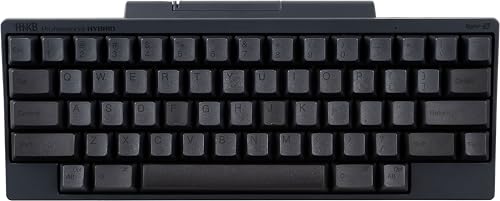
| HHKB Professional Hybrid Type-S | Best overall Topre experience | 60%, HHKB layout | Check price on Amazon |
| Realforce R3 | Best for office professionals | Full-size class, conventional | Check price on Amazon |
| Realforce R3S TKL | Best tenkeyless | TKL, 45g | Check price on Amazon |
| HHKB Professional Classic | Best wired purist option | 60%, HHKB layout | Check price on Amazon |
| Leopold FC660C | Best compact with arrows | 65%, capacitive | Prose-only — specialist retailers |
| Leopold FC980C | Best near-full-size compact | 98-key compact, capacitive | Prose-only — specialist retailers |
How These Picks Were Chosen
The Topre catalogue is small enough that reputation is earned slowly and lost rarely, so selection started from the models the community has bought, kept and recommended across many years rather than from novelty. Each candidate was checked for a current, verifiable retail presence; products with a confident match in the marketplace data available to us received links, and products whose listings are inconsistent received full prose coverage instead — the coverage is identical, only the buying route differs. Within the list, we prioritised coverage of the real decision space: both switch weightings in common use, both layout philosophies (HHKB-minimal and conventional), wired and wireless options, and the compact-with-arrows niche that Leopold owns. We did not include electro-capacitive clones from other switch makers; they are interesting, some are good, but a buyer searching for Topre deserves the genuine mechanism first and can explore the imitators afterwards with this reference point in hand. Finally, a disclosure of method: we do not claim hands-on testing we did not perform. Feel descriptions synthesise the documented characteristics of the Topre mechanism and long-standing community consensus, and specifications come from the manufacturers’ published information and current listings.
What Makes Topre Different (Read This Before the Reviews)
A conventional mechanical switch closes a metal contact to register a keypress. A Topre switch never touches anything: pressing the key compresses a rubber dome and a conical spring beneath it, and a capacitive sensor detects the spring’s approach to the PCB. The dome provides the tactility — a smooth, rounded bump that builds early and collapses gently — and the spring provides the registration. Because there is no contact to wear, bounce or oxidise, Topre boards are known for long, consistent service lives, and because the dome absorbs the landing, the sound is a low thock rather than a clack. The trade-offs are structural: the switches are not hot-swappable in the MX sense, keycap stems are Topre-specific (which shrinks the custom keycap market dramatically, though adapters and Topre-stem sets exist), weighting is chosen at purchase by the dome sheet fitted at the factory, and the boards cost what they cost — the mechanism is made by one company in Japan, and the market reflects that. Every review below should be read with that frame in mind: you are choosing a feel ecosystem, not a spec sheet.

1. HHKB Professional Hybrid Type-S — Best Overall Topre Keyboard
Badge: Best overall
- Switch: Topre electro-capacitive, 45g class, silenced (Type-S)
- Layout: 60% HHKB layout — Control in the home row, Unix-style arrangement
- Connectivity: Bluetooth wireless and USB wired
- Keycaps: PBT, printed legends (charcoal variant listed)
The Happy Hacking Keyboard is the board Topre is famous for, and the Hybrid Type-S is its most complete form: the classic 60-key HHKB layout with Bluetooth for multi-device desks, USB for zero-latency work, and the Type-S silencing that makes this the quietest factory Topre experience in the line. The layout is the story as much as the switch. Control sits where Caps Lock wastes space on normal boards, Backspace shrinks and moves a row closer, and the function layer is designed — arrows under your right fingers, F-keys across the number positions — rather than appended. Programmers and writers who adopt it describe a genuine before-and-after in hand movement; the layout asks two weeks of adaptation and repays it for years.
Strengths
- The definitive Topre feel in its quietest factory form — Type-S silencing suits offices and shared homes.
- Bluetooth plus wired flexibility with multi-device pairing for desk-hopping between machines.
- DIP switches and key remapping let you adapt the layout’s edges to your operating system and habits.
Trade-offs
- The HHKB layout is a commitment: no dedicated arrows, a relocated Control, and a learning curve that defeats casual users.
- Premium tier pricing for a 60% board will always look stark next to larger MX boards.
- Topre-stem keycaps limit cosmetic customisation compared with the MX universe.
Best for: programmers, writers and touch typists ready to adopt the HHKB layout as a long-term home. / Not suited for: anyone who needs dedicated arrows and a number pad daily, or who shares the board with non-enthusiasts.

2. Realforce R3 — Best Topre Keyboard for Office Professionals
Badge: Professional pick
- Switch: Topre electro-capacitive, 30g weighting on the listed variant
- Layout: Conventional full layout with dye-sublimated PBT keycaps
- Connectivity: Bluetooth wireless and wired
- Extras: Actuation-point adjustment (APC) across the R3 family
Realforce is Topre’s own keyboard brand, and the R3 is its modern flagship for people who type for a living and want nothing about their keyboard to be a conversation piece. The layout is entirely conventional — the board a colleague would not look at twice — while underneath sit Topre switches in a light 30g weighting on this variant, dye-sublimated PBT caps that will outlast the desk, and the R3 generation’s party trick: adjustable actuation points, letting you set how deep a press must travel before it registers, per the model’s software support. The 30g weighting deserves respect rather than dismissal: for high-volume gentle typists it is the least fatiguing Topre configuration made, though heavy-handed typists will bottom it out and call it mushy — weighting is personal, and this is the light end of the range, chosen deliberately.
Strengths
- Conventional layout means zero adaptation — Topre feel with an office keyboard’s manners.
- Adjustable actuation is a genuine functional edge no HHKB offers.
- Dye-sub PBT keycaps and Realforce build quality target a decade of service, not a product cycle.
Trade-offs
- 30g will feel too light for heavy-handed typists; confirm the weighting on the listing before ordering.
- The styling is deliberately plain — this is a tool, not a desk ornament.
- Full-size footprint gives back the desk space compact boards save.
Best for: professionals who type all day, value quiet and longevity, and want zero layout learning curve. / Not suited for: compact-desk setups, or typists who already know they prefer a firmer 45g press.

3. Realforce R3S TKL — Best Tenkeyless Topre Keyboard
Badge: Best TKL
- Switch: Topre electro-capacitive, 45g weighting
- Layout: Tenkeyless — full function row and navigation cluster, no number pad
- Connectivity: Wired
- Keycaps: PBT
The R3S TKL is the Topre board for people who looked at the HHKB, admired it, and sensibly declined to relearn their keyboard. Tenkeyless keeps everything except the number pad: a real function row for software that lives on F-keys, a real navigation cluster for editing, real arrow keys — and the 45g weighting that most experienced Topre users call the default done right, firm enough to rest fingers on without accidental presses, light enough for all-day work. The S-line R3S boards are the wired, focused members of the family: no wireless radios, no pairing menus, just a cable and the mechanism. For a fixed desk with one computer, that simplicity is a feature, and it usually comes with the family’s most accessible positioning.
Strengths
- 45g weighting is the community’s consensus sweet spot for mixed typing.
- TKL layout preserves F-row and navigation — the easiest Topre adoption path for professionals.
- Wired focus means no batteries, no pairing, no wireless troubleshooting, ever.
Trade-offs
- No wireless option in this model; multi-device desks should look at the R3 above.
- Still a substantial desk footprint compared with the 60–65% boards on this list.
- Number-pad users must add a separate pad or choose the full-size R3.
Best for: TKL loyalists, F-key-heavy software users, and first-time Topre buyers who want the safest possible configuration. / Not suited for: wireless-only desks or number-pad-dependent work.

4. HHKB Professional Classic — Best Wired Purist Topre Keyboard
Badge: Purist pick
- Switch: Topre electro-capacitive, 45g class
- Layout: 60% HHKB layout
- Connectivity: Wired USB-C
- Keycaps: PBT, printed legends (white variant listed)
The Classic is the HHKB distilled: the same layout and Topre mechanism as the Hybrid, with the radios removed and the price of entry lowered accordingly. What you keep is everything that makes an HHKB an HHKB — the home-row Control, the considered function layer, the compact footprint that parks your mouse close, and the standard (non-silenced) Topre sound, which many purists actively prefer: the Type-S is quieter, but the Classic’s fuller thock is the sound that built the legend. USB-C wired connectivity suits a single-machine desk perfectly and removes battery management from your life. If your keyboard never leaves your desk and never serves a second device, the Classic is not the compromise HHKB — it is the correct one, and the savings versus the Hybrid are real money toward the keycap set or the wrist rest.
Strengths
- The full HHKB layout and feel at the line’s most accessible tier.
- Standard Topre sound profile — the classic thock, unsilenced.
- Wired USB-C simplicity: no pairing, no charging, works in BIOS and boot menus without fuss.
Trade-offs
- No Bluetooth — laptop-and-tablet hoppers will miss it daily.
- Louder than the Type-S in shared spaces; “classic sound” is a diplomatic phrase at 1 a.m.
- Same HHKB layout learning curve as the Hybrid; the savings do not buy an easier layout.
Best for: single-desk purists who want the authentic HHKB experience and sound. / Not suited for: multi-device users or quiet-shared-space typists, who should take the Hybrid Type-S.
5. Leopold FC660C — Best Compact Topre With Arrow Keys (Prose-Only)
Badge: Compact complete
- Switch: Topre electro-capacitive, 45g class
- Layout: 65% — dedicated arrow keys and a small navigation column
- Connectivity: Wired
- Keycaps: Dye-sublimated PBT, widely praised in the community
The FC660C answers the question HHKB owners hear constantly — “but where are the arrow keys?” — by keeping them. Leopold’s 65% capacitive board fits dedicated arrows and a minimal navigation column into a footprint barely larger than an HHKB, wraps it in Leopold’s famously sober casework, and tops it with dye-sublimated PBT keycaps that many owners rank as the best stock caps fitted to any Topre board. The feel is the full Topre experience with none of the layout ideology: this is the Topre board you can hand to a skilled colleague and watch them use immediately. We cover it in prose because its marketplace availability is inconsistent — it moves through specialist keyboard retailers in waves, and a fixed retail link would misrepresent how it is actually bought. Specialist availability also means colour and variant choice varies; buy the weighting (45g is standard) from a retailer whose returns you trust.
Strengths
- Dedicated arrows in a near-HHKB footprint — the compact Topre with no compromises to explain.
- Leopold’s stock keycaps and case finishing are best-in-class for the category.
- Conventional layout makes it the easiest compact Topre to share or resell.
Trade-offs
- Availability is episodic; expect to buy through specialist retailers and possibly to wait.
- Wired only, in a market segment that increasingly expects wireless.
- No remapping culture around it comparable to the HHKB’s DIP-switch flexibility.
Best for: compact-desk users who refuse to layer their arrow keys. / Not suited for: buyers who need a board this week from a mainstream retailer, or wireless devotees.
6. Leopold FC980C — Best Near-Full-Size Topre (Prose-Only)
Badge: Everything, compressed
- Switch: Topre electro-capacitive, 45g class
- Layout: 98-key compact — number pad retained, spacing compressed
- Connectivity: Wired
- Keycaps: Dye-sublimated PBT
The FC980C is the Topre board for the spreadsheet-adjacent: a 98-key layout that keeps the number pad, the function row and the arrows, and wins its compactness by deleting the gaps between clusters rather than deleting keys. The result is barely wider than a TKL while functionally complete — the only board on this list a data-entry professional could adopt without an adaptation conversation. Leopold’s execution matches the FC660C’s: sober case, excellent dye-sub PBT caps, and the standard 45g Topre weighting. Like its smaller sibling, it is covered in prose because availability runs through specialist channels in waves rather than stable mainstream listings. If your work needs a number pad and your desk resents a full-size board, this is the Topre answer, and it has very little competition — the near-full-size capacitive niche is essentially Leopold’s private property.
Strengths
- Number pad, F-row and arrows in a near-TKL footprint — functionally complete Topre.
- Same Leopold keycap and case quality as the FC660C.
- 45g standard weighting suits the mixed typing-and-data work it is built for.
Trade-offs
- Compressed spacing between clusters takes a short adjustment, especially for the arrow cluster.
- Specialist-channel availability, as with the FC660C — plan the purchase, do not impulse-buy it.
- Wired only, and the heaviest board here in daily desk presence.
Best for: number-pad professionals who want Topre feel without giving up a single function. / Not suited for: minimal-desk fans, wireless users, or anyone whose “number pad need” is actually twice a month.
Comparison Table: The Six Side by Side
| Model | Layout | Weighting | Wireless | Silenced | Buy route |
|---|---|---|---|---|---|
| HHKB Hybrid Type-S | 60% HHKB | 45g class | Yes | Yes | Amazon link above |
| Realforce R3 | Full, conventional | 30g (listed variant) | Yes | Variant-dependent | Amazon link above |
| Realforce R3S TKL | TKL | 45g | No | Variant-dependent | Amazon link above |
| HHKB Classic | 60% HHKB | 45g class | No | No | Amazon link above |
| Leopold FC660C | 65% | 45g class | No | No | Specialist retailers |
| Leopold FC980C | 98-key | 45g class | No | No | Specialist retailers |
Read the table as a decision tree rather than a ranking. Layout first — it decides your daily gestures. Weighting second — it decides your fatigue curve. Wireless and silencing third — they decide where the board can live. Price, honestly, decides last among these six, because all six sit in the same premium tier of the market and the cost of choosing the wrong layout dwarfs the differences between them over years of ownership.
How to Choose a Topre Keyboard: The Buying Guide
Step 1 — Choose your weighting before your model
Topre domes come in weightings, most commonly 30g, 45g and 55g, plus variable boards that mix them across the board. This choice is permanent — domes are not a user swap in any practical sense — so it outranks every other decision. 30g is feather-light: superb for gentle, high-volume typists and for anyone whose fingers fatigue, risky for heavy-handed typists who will slam through it and find it vague. 45g is the default recommendation and the weighting most of this list uses: defined tactility, honest resistance, all-day sustainable. 55g, found on some Realforce variants, is the firm, snappy end — loved by deliberate typists, tiring for others, and the least forgiving of a wrong guess. Variable weighting (lighter under pinkies, standard under index fingers) sounds like a compromise and genuinely suits some typists, but it makes a board harder to evaluate second-hand and harder to resell. If you have never typed on Topre, 45g is the statistically safest first dome, and it is no accident that it anchors this list.
Step 2 — Choose your layout philosophy
The HHKB layout is an ideology: Control in the home row, arrows on a layer, the desk footprint of a paperback. Adopt it if you are a touch typist who enjoys systems and types prose or code all day; our layout guides for 65% keyboards and 40% keyboards will help you judge your appetite for layered keys before you commit. Conventional layouts (Realforce, and Leopold’s two boards) ask nothing of you: pick TKL if you never touch a number pad, the FC980C’s compressed layout if you need the pad without the sprawl, and full-size if desk space is free. There is no prestige in the HHKB layout that compensates for hating it — owners who thrive on it and owners who sold theirs in a month are both telling the truth about themselves.
Step 3 — Decide on silencing and wireless
Type-S silencing (HHKB) and silent variants elsewhere trade a whisper of key feel for a large drop in noise; in shared offices, call-heavy homes and late-night households, take the silenced version without regret. Wireless matters exactly as much as your device count: one fixed desk computer makes the wired boards simpler and cheaper; a laptop-plus-desktop life makes the Hybrid Type-S and R3 worth their premium. Neither feature changes the fundamental Topre feel, so decide them on logistics, not anxiety.
Step 4 — Budget framing and where the money goes
As category framing only: Topre boards occupy the premium tier of the keyboard market, with the wired HHKB Classic and R3S at the tier’s entry edge and the Hybrid Type-S at its top. The money buys the mechanism’s consistency and longevity — these boards are famous for feeling the same in year five as in week one — rather than features, lighting or materials theatre. A useful sanity check: if the price of the board you want feels painful, the correct response is the entry model of the same layout family, not a non-Topre substitute, because substitutes do not scratch the same itch at all. And if you are Topre-curious but commitment-shy, the second-hand market for all six models here is liquid for a reason — buy the weighting you want, and know the board will find a next owner easily if your fingers vote no.
Step 5 — Check region, legends and layout variant before you pay
Topre boards are Japanese products sold worldwide, and the variant matrix is where buyers most often stumble. HHKB models come in US (ANSI) and Japanese (JIS) layouts that look similar in thumbnail photos and type very differently; legends come printed or blank, and blank is a commitment only confident touch typists should make. Realforce models vary by weighting, silencing and connection type under near-identical names — R3, R3S and their suffixes encode real differences, so match the full model string, not just the family name. Leopold’s C-models vary by weighting less but by availability more, and grey-market imports may carry warranty terms that do not travel. The discipline is simple and worth the two minutes: on the exact listing you are about to pay for, find the weighting, the layout region, the legend style and the silencing variant written out, and confirm each against the pick description above. In a category where returns can involve international shipping, variant verification is the highest-value two minutes in the entire purchase.
Getting the Most From a Topre Board: Practical How-To
Week one: change nothing. Type on the board exactly as it arrived. Topre’s resistance curve rewards a lighter touch than MX habits teach — most newcomers bottom out every key with force the mechanism never asked for. By the end of the first week, consciously experiment with pressing to the actuation point and releasing rather than slamming to the desk; the dome’s collapse does the work, and your speed and quietness both improve when you stop fighting it.
Set up the details. On an HHKB, spend twenty minutes with the DIP switches and the manual: operating-system mode, the behaviour of the bottom-row keys, and the function-layer layout should match your machine before muscle memory forms around a wrong setting. On a Realforce R3, install the software and experiment with actuation-point settings on a per-application basis if your work mixes gaming and typing. On any Topre board, a desk mat underneath is the cheapest sound upgrade available, and a wrist rest sized to the board’s height keeps the light-touch technique comfortable across long sessions.
Care is minimal and specific. Topre boards need no switch maintenance — there are no contacts to clean and nothing to lube from the factory design’s perspective (the modding path in our five easy mechanical keyboard modifications applies to MX boards; leave a Topre board’s internals alone unless you are an experienced dome-swap hobbyist). Dust with a brush, lift keycaps occasionally with a proper puller for a crumb clean, and keep liquids at the usual respectful distance. That is the whole maintenance contract, and it is part of what the premium buys.
Common Mistakes Topre Buyers Make
- Choosing 30g or 55g as a first board to be different. The extremes are for people who already know their preference. First Topre: 45g, unless your hands have a specific, articulated reason.
- Buying an HHKB for its looks while needing arrows hourly. The layout is a daily practice, not an aesthetic. The FC660C exists precisely for you.
- Expecting MX-style customisation. Topre stems, domes and layouts are a closed garden. Buy the board as it is; if the keycap ecosystem matters to you, that is a genuine reason to choose MX instead.
- Judging the feel in one day. Topre’s learning curve is about touch, not layout (excepting HHKB). A fair trial is two weeks of real work, the same standard we apply in our 40 percent keyboard guide.
- Ordering without verifying the variant. Weighting, silencing, layout region and legend printing all vary by listing. Read the exact variant on the listing page before paying — returns of imported boards are nobody’s idea of fun.
Topre vs MX vs Other Electro-Capacitive Boards
Buyers cross-shopping this list usually ask three comparison questions, and they deserve direct answers. Topre versus a premium MX board: the MX board wins on everything countable — switch choice, keycaps, layouts, wireless features, price spread — and loses on the one thing that is not countable, which is the feel of the press itself. If you have typed on both and prefer MX, believe yourself and spend happily in that ecosystem; if you have typed on both and keep thinking about the Topre board, that preference does not fade, and the MX board becomes the expensive detour. Topre versus electro-capacitive alternatives: other makers now sell capacitive boards with MX-compatible stems and friendlier prices, and some are genuinely pleasant. They differ in the dome and housing design, and experienced Topre users consistently describe the originals as smoother and quieter; newcomers without the reference point may be perfectly satisfied by the alternatives. The honest framing is that genuine Topre is the reference standard of the category, priced like it, and the alternatives trade a measure of refinement for compatibility and cost. Topre versus a good membrane or scissor board: the comparison sounds insulting and is not — Topre’s dome is why the feel is closer to a perfected dome board than to a clicking mechanism, and typists coming from excellent laptop keyboards often adapt to Topre faster than typists coming from MX. What you gain over any laptop board is the full key travel, the engineered resistance curve, the keycaps, and a board built to be repaired and kept rather than replaced with the next laptop.
One more comparison hides inside the list itself: HHKB versus Realforce is the fork every Topre buyer actually faces. They share the mechanism and differ in philosophy. HHKB says the keyboard should be small, opinionated and centred on the typist’s hands; Realforce says the keyboard should be complete, conventional and invisible in a professional environment. Neither is the “real” Topre. Your desk, your software and your willingness to relearn three key positions decide between them, and the large number of enthusiasts who eventually own one of each is the market’s way of saying the fork is real.
Buying a Topre Keyboard Second-Hand: What to Check
Because these boards are durable and hold their appeal, the second-hand market is an entirely respectable route in — many owners’ first Topre was someone else’s experiment. Check five things. Weighting: confirm it from the seller and the model label; listings confuse 30g, 45g and variable boards constantly, and weighting is the one attribute you cannot change. Dome condition: aged domes can feel slightly firmer or less uniform; ask how heavily the board was used, and prefer boards described as rotated or lightly used over a decade-long daily driver at the same price. Keycaps: check for shine on the spacebar and home row in photos — printed legends wear visibly, dye-sublimated caps (Realforce, Leopold) age far more gracefully. Variant details: region layout (ANSI versus JIS is a real and common trap in this market), silenced versus standard, and printed versus blank legends on HHKB models. Cables and extras: HHKB and Realforce boards use standard connections, so a missing cable is a small cost — but a missing HHKB keycap puller, box or documentation tells you something about the owner’s care, and in this market care is the product. Buy from sellers who answer weighting questions precisely; vagueness about the one specification that matters is the only red flag you need.
Living With Topre: Sound, Feel and Desk Presence
Specifications cannot tell you what these boards are like at 9 a.m. on a deadline, so consider the lived details. Sound: every board here is quiet by mechanical standards, but they are not silent and they do not sound alike. The HHKB Classic has the fullest voice — a rounded thock with a hint of spring character on the return. The Type-S trades some of that body for near-office invisibility; in a quiet room you hear fingertips as much as keys. Realforce boards sound deeper and more muted than HHKBs in standard form, a consequence of their larger cases and plate design, and Leopold’s boards sit between the two families. If sound is a household issue — thin walls, sleeping children, a partner on calls in the next room — the silenced variants are not a luxury; they are the difference between a board that lives on your desk and one that lives in a drawer after 9 p.m.
Feel across a working day: Topre’s fatigue profile is its quiet superpower. MX tactility asks your fingers to overcome a bump thousands of times a day; Topre’s dome asks for one smooth collapse per press, and many long-form typists report that the difference shows up at hour six rather than minute six. This is also why weighting errors compound: a 55g board that feels “snappy and precise” in a five-minute test can feel like typing uphill by Friday, and a 30g board that feels vague in a shop becomes invisible under your fingers by the second week. Judge these boards the way you would judge a chair — by the end of the day, not the first sit.
Desk presence: the HHKBs free a striking amount of desk — your mouse hand moves in by several centimetres, notebooks fit where a keyboard used to sprawl, and the whole setup photographs like a magazine. The Realforce boards occupy a normal professional footprint and look like serious office equipment, which in many workplaces is a social feature: nobody asks why your keyboard costs what it costs when it looks like the R3. The Leopolds split the difference visually — compact, sober, unmistakably enthusiast-grade only to those who already know. None of this should decide a purchase alone, but all of it is real, daily, and absent from spec sheets.
Topre Terminology, Translated
Electro-capacitive: the sensing method — the board detects the conical spring’s position by capacitance change, so nothing electrical is touched or worn by the press. Dome: the rubber cup under each key that creates Topre’s tactility and most of its feel; domes define weighting and are factory-fitted. Type-S: HHKB’s silenced variant, using silencing rings that slightly reduce key travel in exchange for much lower noise. APC (adjustable actuation point): Realforce R3-family feature that changes how deep a press must go before registering — useful for mixing typing and gaming profiles. Dye-sublimated PBT: keycaps whose legends are dyed into the plastic itself; they cannot wear off, which is why Realforce and Leopold caps age so well. Variable weighting: a dome sheet that gives different keys different weights, typically lighter under the weaker pinky fingers. Thock: the community’s word for the low, rounded sound a Topre board makes — the acoustic signature buyers are often, without admitting it, actually shopping for.
Final Recommendation
For most readers, the answer is the HHKB Professional Hybrid Type-S if you are ready for the layout — it is the most complete expression of what Topre is for — and the Realforce R3S TKL if you are not, because it delivers the same mechanism in the market’s safest weighting with zero adaptation demanded. Office professionals who type at volume should look seriously at the light-touch Realforce R3, purists on a fixed desk should save money with the HHKB Classic, and the two Leopolds — FC660C for arrow-key loyalists, FC980C for number-pad professionals — reward the patience their specialist availability requires. Whichever you choose, choose the weighting first and the layout second; get those two right and any of these six will explain, within a fortnight, why Topre owners stop browsing keyboard shops.
Topre Weighting Clinics: Matching the Dome to the Job
The buying guide above treats weighting as a specification to choose. This section treats it as a workload question, because the same hands can want different resistance at nine in the morning and nine at night. Topre domes do not adjust, so the match between weighting and work is made once, at purchase — which is why it deserves a slower look than any other line in the listing.
Long-form writing and editing
Writers and editors hold a key down mentally long after pressing it: the work is continuous, revisions are constant, and fatigue arrives as a slow loss of accuracy rather than a dramatic slowdown. Lighter and variable weightings suit this work because they ask less of the pinkies, which carry more of the editing load — modifiers, punctuation, navigation clusters — than most writers realise until those fingers tire first. A variable board’s lighter outer keys are not a gimmick for this audience; they are an acknowledgement that hands are not symmetrical machines. Writers who draft in short, intense bursts rather than long sessions can happily use a uniform medium weighting, and many prefer its consistency when every keystroke is deliberate. The honest test is your own archive: if your longest documents show errors clustering late in sessions, weighting is part of that story.
Mixed office work and calls
Office work is interrupted work. You type in fragments between calls, messages and meetings, and the board shares the desk — and often the room’s acoustics — with a microphone. Silenced models earn their place here twice over: the softened upstroke keeps you off the call’s audio, and the slightly cushioned landing forgives the heavier, distracted keystrokes that fragmented work produces. Weighting matters less than silencing for this reader, but very light domes can feel vague when you return to the board mid-thought and need certainty about what you pressed. A medium, uniform weighting with silencing is the combination that disappears most completely into an office day, and disappearance is the correct goal: office equipment should be noticed when it fails, not while it works.
Gaming on Topre, honestly
Gaming asks a keyboard for two things Topre provides unevenly: rapid repeated presses on a small cluster of keys, and long holds. The dome’s smooth, full-travel press feels wonderful for movement holds and deliberate ability keys, and the lack of a harsh bottom-out keeps long sessions comfortable. Rapid tapping is where the design’s character shows: the dome must fully rebound before the next press registers cleanly, and players coming from very light mechanical or optical switches sometimes read that as heaviness during the fastest exchanges. It is a feel question, not a defect, and it is title-dependent — strategy, simulation, RPG and most single-player gaming suit Topre beautifully, while the highest-tempo competitive play is where the minority who notice the difference will notice it. If your library spans both, the Topre board as your main and a small, fast board for one or two titles is a legitimate arrangement rather than an admission of failure.
When your weighting needs change
Domes cannot be adjusted after purchase, but hands change anyway: workloads grow heavier, an injury makes one hand cautious, or a new role doubles your daily keystrokes. Before concluding the board itself is wrong, adjust everything around it. Desk and chair height change how much of each press comes from the fingers versus the arm, and a lighter effective load often follows from geometry alone. Keycap profile changes the contact angle and can soften how a firmer dome presents itself. If the mismatch survives those adjustments, it is real — and it is also useful information rather than a buying failure, because you now know your weighting from experience instead of from a listing. A board that no longer suits you retains strong second-hand demand precisely because the next owner’s hands may be the ones it was weighted for.
Frequently Asked Questions
What does Topre actually feel like compared with a mechanical switch?
Smoother and rounder. A mechanical switch’s tactility comes from a plastic bump sliding past a leaf; Topre’s comes from a rubber dome collapsing, so the resistance builds like pressing into a firm cushion and releases without any scratch or sharp edge. The landing is cushioned and the sound is a low thock. Typists who prize crisp, snappy tactility sometimes find Topre too soft; typists who type for hours usually find it restful. It is a genuine fork in taste, which is why the weighting advice in this guide matters so much.
Are Topre keyboards worth it over a good MX board?
If you value the specific feel, yes — there is no MX configuration that reproduces it, including rubber-dome hybrids and “thocky” tuned builds, which approximate the sound but not the resistance curve. If you value customisation, hot-swap experimentation or backlighting ecosystems, an MX board gives you more of what you value for the same money. Worth is personal here in a way it is not for most tech: the mechanism either matches your hands or it does not.
Which Topre weighting should a beginner choose?
45g, for the reasons in the buying guide: it is the middle of the range, the most common weighting across this list, the easiest to resell if the feel does not suit you, and the reference point against which you can later judge whether you want lighter or firmer. Choose 30g only if you already know you type with a very light touch, and 55g only if you already know you like firm, deliberate keys.
Can I change the keycaps on a Topre keyboard?
Yes, within a smaller ecosystem. Topre stems are not MX stems, so you need keycaps made for Topre (the stock caps on every board here are already quality PBT, which reduces the urge considerably), or stem adapters that let MX caps sit on Topre sliders with some added height. The boards in this list ship with caps good enough that most owners never shop for replacements — a quiet financial mercy of the category.
Do Topre keyboards work for gaming?
Casually and even competitively for many genres, yes — the mechanism is fast and consistent, and the R3 family’s adjustable actuation is a real gaming feature. The caveats are practical: no per-key RGB ecosystems, layouts like the HHKB’s that layer the F-row, and no rapid-trigger technology of the kind dedicated gaming boards now offer. If gaming is your primary use and Topre feel is a curiosity, buy a gaming board first and a Topre board for work; if typing is primary, any board here games perfectly well in the evenings.
How long do Topre keyboards last?
The mechanism’s design life is one of its selling points: with no electrical contacts to wear and a dome-and-spring system rated for very high cycle counts by the manufacturer, Realforce and HHKB boards are known in the community for many years of unchanged feel. The realistic wear items are the same as any premium board’s — keycap legends on printed (not dye-sub) sets, cable strain on wired models, and battery ageing on wireless ones — all manageable, none structural.
A closing note on expectations: a Topre board will not make you a faster typist, a better writer or a happier programmer by itself. What it does — and what justifies this entire category — is remove a small, constant friction from an action you perform tens of thousands of times a week, and replace it with a small, constant pleasure. Whether that trade is worth a premium price is a question only your own hands can answer, but they can only answer it after a fair trial on the right weighting and the right layout. This list exists to make sure the trial you run is the right one.
And if you are still torn between two models on this list after all of the above, apply the tiebreaker experienced owners use: buy the one whose layout matches the desk you actually have and the software you actually run, from the channel whose returns you actually trust, and then stop reading keyboard content for a month. Topre boards reward commitment and punish comparison-shopping after the fact, because the feel grows on you precisely when you stop auditioning alternatives. Give whichever of the six you choose a fair month, and let your hands file the final review.
Do Topre keyboards need lubing or other maintenance?
Far less than enthusiast mechanical boards, and that restraint is part of the ownership appeal. The domes and sliders are not a user-serviceable tuning system in the way a hot-swap mechanical board is, and opening a Topre board to experiment usually trades away the factory consistency that justified the purchase. Routine care is external: keep crumbs and dust out from under the caps, wipe the case, and pull keycaps occasionally for a proper clean if your environment is dusty. Silenced models can develop a faint change in sound over years as parts settle; it is gradual, harmless and best left alone. Treat a Topre board like a good instrument rather than a project — maintained by cleanliness, not by modification — and it will hold its feel for a very long time.
Can I use one Topre keyboard with both a Mac and a Windows PC?
Yes, and the models in this guide anticipate exactly that arrangement, but plan the details before the board arrives. Check how the specific model handles the modifier order difference between the two systems — some offer a switch or a software setting, others expect you to adapt — and decide whether you will swap keycap legends, use a board whose legends already cover both, or simply learn the positions and ignore the printing. Bluetooth models make the two-machine desk physically simple; wired models ask for a switcher or a cable habit. The one arrangement to avoid is remapping in one operating system only, because your hands will learn whichever system you use most and then trip on the other. Consistency across both machines, even at the cost of a slightly unusual choice on one of them, is the setup that disappears.