Affiliate disclosure: this article contains affiliate links. If you buy through a link on kajuandouglas.com, the site may earn a commission at no extra cost to you.
This keyboard chattering double typing fix guide is for the moment a trustworthy keyboard starts betraying its owner in print: a single press of E produces ‘ee’, the spacebar doubles at random, and backspacing through the evidence becomes part of every sentence. Chattering — also called key bounce, double typing or ghost repeats — is one of the most common mechanical keyboard faults, and one of the most misdiagnosed, because at least four different causes produce the identical symptom: a degrading switch contact, debris inside the switch, a firmware debounce setting that no longer matches the hardware, and, occasionally, a connection or software problem wearing the switch’s clothes. Each cause has its own cure, and applying the wrong one wastes an evening.
The guide works the diagnosis in the correct order — prove which keys chatter, separate switch faults from board faults with one swap test, then apply the cure ladder from software settings through cleaning to contact treatment and switch replacement. Verified products for the repair are reviewed in the middle, including the contact cleaner that gives this fault its most famous fix. The closing sections give the full procedure, the mistakes that turn a chattering key into a dead board, and the questions owners ask when the doubles come back. Most chattering boards are one evening from perfect health; this is the evening, organised.
Key takeaways
Chattering is usually one switch’s contact bouncing — the press registers twice because the metal leaves vibrate instead of settling. Diagnose by key: if the fault follows the switch when swapped, it is the switch; if it stays at the position, suspect firmware or the board. Cure ladder: raise the debounce in firmware if available, clean the switch, treat the contact with DeoxIT, replace the switch. On hot-swap boards the swap test and the replacement are both five-minute jobs.
In this guide
What Chattering Actually Is: the Bouncing Contact
Inside every mechanical switch, a press brings two metal contacts — leaves — together, and physics makes their meeting imperfect: the leaves strike, rebound microscopically, and settle, generating a burst of make-and-break signals over a few milliseconds instead of one clean press. Every keyboard ever made has this bounce; healthy ones hide it with debouncing, a small delay in the firmware that waits for the signal to settle before believing it. Chattering is what becomes visible when the bounce outgrows the debounce — because the leaves have oxidised, worn, weakened or collected debris, their settling time stretches until the firmware’s patience expires mid-bounce and a second press is registered. The key has not been pressed twice. It has been believed twice.
This mechanism explains the fault’s signatures, which the diagnosis uses. Chattering starts on one key — usually a high-use vowel or the spacebar — because wear is local. It worsens gradually, then intermittently: temperature, typing force and sheer luck move a marginal contact across the threshold, which is why the fault hides during demonstrations and flourishes during deadlines. And it afflicts switches by mechanism — optical and Hall-effect switches, which sense without contact, are immune to this specific failure, a fact the keyboard latency input lag explained explainer’s technology survey makes relevant when replacement boards are eventually considered. Contact switches chatter eventually the way brake pads wear: not as a defect of character, but as a property of the design’s physics.
One more signature separates chatter from its impostors, and it is worth learning before any tool is lifted: true chatter repeats the same key, instantly, with no other symptom. Missed presses alongside the doubles suggest debris or a dying switch of a different kind; whole rows misbehaving suggests the board or its cable; doubles that appear only in one application belong to that application. The next section turns these distinctions into a procedure, because the cure for a bouncing leaf will do nothing for a faulty USB hub, and both have been tried, at length, by owners who skipped the diagnosis.
The Diagnosis: Isolating the Fault to a Switch, a Position or a System
Begin with a census. Open a keyboard tester or a plain document and type slowly through every key twenty times, noting which keys double and roughly how often. Most chattering boards indict one to three keys; a board where every key doubles is telling a different story — firmware, connection or power — and should skip ahead to the system checks. Record the census somewhere durable, because the cure’s success will be measured against it and memory is an unreliable instrument that improves every result it remembers.
The swap test is the diagnosis’s decisive experiment, and hot-swap boards make it trivial: exchange a chattering key’s switch with a healthy key’s switch — E with F9, say — using the technique from the how to remove mechanical keyboard keys guide, then retype both positions. If the doubling follows the switch to its new home, the switch is convicted and the cure ladder below applies to it personally. If the doubling stays at the original position with a known-good switch installed, the position itself — its socket, its solder joint, its firmware row — is the suspect, and switch-level cures should not be wasted on it. Soldered boards cannot run the swap, which is one of the quiet arguments for hot-swap that the how to build a keyboard guide makes; their owners proceed by probability, treating the switch first because the switch is usually guilty.
System checks close the diagnosis for the widespread cases: try the board on a second computer or port, replace the cable, and check whether a firmware update or a changed debounce setting coincides with the fault’s birthday. Wireless boards add their own chapter — interference and low battery produce dropped and repeated inputs that mimic chatter — covered in this site’s fix keyboard not working troubleshooting guide; wired chatter in a quiet radio environment is the mechanical fault this guide treats. Diagnosis complete, the ladder below is climbed in order, and most climbs end on the first two rungs.
The Cure Ladder: Debounce, Cleaning, Contact Treatment, Replacement
Rung one is firmware, where the board offers it: QMK and VIA-based boards expose debounce settings, and raising the debounce time by a few milliseconds gives an ageing contact room to settle — a legitimate, reversible cure that trades an imperceptible slice of latency for correctness. The keyboard firmware QMK VIA guide in this cluster shows where such settings live. Boards with proprietary software sometimes expose an equivalent ‘response’ or ‘anti-ghosting’ tuning; boards with neither skip to rung two with no shame — the ladder is ordered by convenience, not by virtue.
Rung two is cleaning, because a meaningful share of chatter is debris — dust, a crumb’s descendant, the fibre of a desk’s life — lodged where the leaves meet. Compressed air through the switch (keycap off, board tilted) is the first pass; a switch opened and inspected is the thorough one. Rung three is the famous one: contact cleaner, specifically a deoxidising treatment such as DeoxIT, applied in a drop to the switch’s contact area, which dissolves the oxidation film that stretches bounce time and restores the leaves’ clean meeting. It is applied sparingly, worked by pressing the switch repeatedly, and allowed to dry — the how-to section gives the full ritual, and the product review below explains why this particular chemistry owns the category.
Rung four is replacement, and on a hot-swap board it is barely a rung at all: pull the convicted switch, press in a new one, and the key is reborn for the price of a single switch. This is the correct destination for switches whose leaves are physically worn or bent, which no chemistry can un-wear. Soldered boards face the iron for the same cure, which is a learnable job and a bigger evening. The ladder’s philosophy is escalation with evidence: each rung is attempted because the previous one’s result — measured against the census — said the fault lives deeper. Owners who start at rung four for every fault end with a drawer of innocent switches; owners who refuse to climb past rung one live with doubles forever. The census decides.
Keyboard Chattering Double Typing Fix: The Shortlist
The verified repair kit: the contact treatment itself, a switch-opening service kit for the cleaning and replacement rungs, and a fresh set of switches for the faults that end at rung four. Every product in the ladder below was checked against Amazon catalogue data verified through this site.
DeoxIT D5 Contact Cleaner
The famous fix
- Deoxidising contact cleaner and conditioner
- Needle or precision applicator versions
- A drop per switch suffices
- Standard treatment for switch contacts
DeoxIT D5 is the name this fault’s folklore runs on, and its mechanism matches the diagnosis exactly: the formula dissolves the oxidation layer on metal contacts and leaves a protective film that improves the connection’s quality, which for a chattering switch means leaves that meet cleanly and settle fast — the bounce shrinks back inside the firmware’s patience and the doubles stop. Applied to the switch’s contact point and worked in with repeated presses, it has resurrected switches by the thousand, and a single small container treats more switches than any owner will meet in a decade.
Application discipline is the whole review: a drop, not a flood; the board powered off; time given to dry before the census is re-run. It is a treatment for contact faults, not a lubricant for the switch’s moving parts, and it does not belong on stems or springs — the how to fix keyboard spring ping noise guide’s lubricants own that territory, and confusing the two chemistries is the one error this product’s reputation cannot survive. Used as directed, on a convicted switch, it is as close to a magic trick as electronics repair honestly gets.
Strengths
- Treats the actual cause of contact chatter
- One container lasts for years of repairs
- Works without opening most switches
Trade-offs
- Useless for worn or bent leaves
- Must be kept off stems and plastics’ finishes
- A chemical to store responsibly
Best for: Chattering switches convicted by the swap test.
Not suited for: Debris faults, which want cleaning, or dead switches, which want replacing.

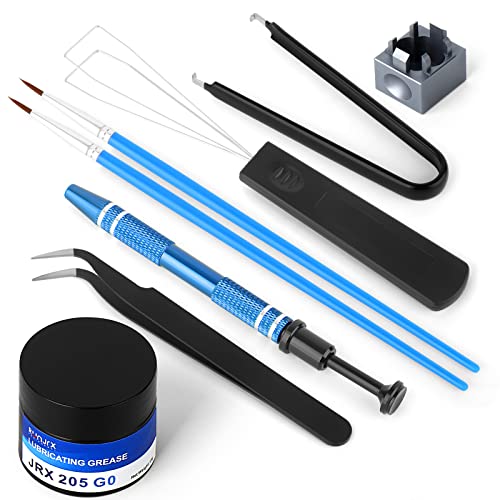
RUNJRX Keyboard Lube Kit
The opening and service kit
- Switch opener for MX housings
- Keycap and switch pullers
- Brushes and stem holder
- Supports cleaning and replacement rungs
The cure ladder’s middle rungs — opening a switch to clean it properly, extracting it for replacement — are tool jobs, and this kit is the toolbox: the opener that parts housings without scarring them, the pullers that strip the board, and the holder that keeps a disassembled switch’s four small parts in a row instead of in the carpet. For a chattering board, its moment comes when air and contact treatment have not fully cured a switch and the leaves themselves need inspection — bent, dirty or tired, each with its own verdict that only eyes can deliver.
As with every bundle this site reviews, the durable value is the tooling; the included lubricant serves the servicing rungs where a switch, once open, might as well be refreshed. Owners of soldered boards should note the kit does not change their replacement rung — that remains an iron’s job — but the diagnosis and cleaning rungs use these tools identically on any board whose switches can be opened in place or after desoldering.
Strengths
- Enables the inspection rung safely
- Both pullers included
- Serves every future switch service
Trade-offs
- More kit than a DeoxIT-only cure needs
- Opener fits standard MX housings
- Soldered replacement still needs an iron
Best for: Owners climbing past the contact-treatment rung.
Not suited for: A single chattering key on a hot-swap board — swap it first.

Gateron Milky Yellow Pro Switches
The replacement rung
- Linear switches, factory pre-lubed
- Fresh contacts, full rated life
- Hot-swap ready
- Packs sized for full boards
Replacement is the ladder’s top rung and its most certain cure: a new switch has new leaves, factory-clean and correctly tensioned, and a chattering position fitted with one simply stops being a topic. This set is the guide’s standing recommendation for the job on boards whose owners are content with a smooth linear feel — factory-lubed, consistent, and priced so that replacing a full ageing set, when chatter has become a population rather than an individual, is a rational evening rather than an extravagance. Single-switch needs are served from the same packs, with the remainder becoming the spares drawer every long-term board eventually wants.
The honest boundary: replacement cures switch faults, and the swap test exists to prove the fault is the switch’s before a set is ordered. A position-level fault wearing a new switch will chatter with the new switch, and the diagnosis — not the parts cannon — is what prevents that purchase. When the test has convicted the switch, though, no rung above this one exists, and none is needed.
Strengths
- The definitive cure for worn switches
- Factory lube and consistency
- Spares remain for future faults
Trade-offs
- A feel change if your old set differed
- Full-set cost when only one switch failed
- Cannot cure position or firmware faults
Best for: Convicted switches and ageing full sets.
Not suited for: Faults the swap test acquitted the switch of.
Preventing the Sequel: Switch Care and Realistic Lifespans
Chattering is wear made audible, and while no care regime makes contact switches immortal, the environment writes the timeline. Dust is the accelerant: boards that live uncovered in dusty rooms, boards eaten over daily, boards sharing desks with pets, all feed their switches the debris that rung two exists to remove. A cover or a case during the board’s off hours — the keyboard cases guide materials types companion covers the travel side of that protection — and a brush-down on the cleaning schedule of the how to remove mechanical keyboard keys guide will stretch a switch set’s clean years considerably. Typing force matters less than folklore claims; the leaves are engineered for bottoming out, and gentle typists chatter on schedule too, merely later.
Realistic expectations complete the section: quality contact switches are rated in tens of millions of presses, and a heavy-use vowel key accumulates presses at a rate that makes a five-to-eight-year chatter horizon normal rather than scandalous. The board is not failing when one switch tires in year six; it is amortising. Hot-swap design turns that amortisation into a five-minute, single-switch event, which is the deepest reason this site recommends sockets to every buyer who asks. A chattering switch, properly seen, is a consumable announcing itself — and consumables are a maintenance budget, not a betrayal.
When Chatter Is Not Chatter: the Wider Differential
A fix guide earns trust by naming the faults it does not treat. Doubles that arrive with missed presses and whole-key dropouts suggest a failing switch of a different pathology or a socket losing contact — the swap test separates them, since socket faults stay with the position. Doubles across many keys after a spill belong to the spill protocol, not this ladder: power off, dry thoroughly, and expect contact treatment to be part of a longer story. Doubles only while wireless point at the radio environment and battery, and the troubleshooting guide linked earlier owns them. And doubles that began the day a heavy macro or remapping tool was installed belong to that tool’s settings — the keyboard is faithfully reporting a software that presses twice.
The pattern to carry away is that ‘my keyboard types double letters’ is a symptom with a differential diagnosis, and the census plus the swap test resolve nearly all of it in fifteen minutes. The ladder then cures the mechanical majority completely. What remains — position faults, board faults, spill damage — is genuinely rarer, and identifying it cleanly is itself a result worth the evening, because it converts an annoying mystery into a specific repair, a warranty claim with evidence, or a justified replacement decision. Certainty is a fix too; it is merely the kind that precedes the others.
The Contact’s Story: What Chatter Actually Is
Chatter begins at a scale no eye can see, inside the switch, where two metal leaves meet. A mechanical contact does not close cleanly: it bounces, microscopically, several times in the first milliseconds — a physical fact of sprung metal that every switch ever made exhibits. Firmware exists to forgive this: the debounce window, a few milliseconds in which repeated closures are read as one press, is the treaty between the contact’s physics and the typist’s intention. Chatter is what happens when the bounce outlives the treaty — when wear, oxidation, debris or a weakening spring stretches the contact’s settling time past the window the firmware allows, and the second closure is promoted to a second letter. The doubled character on your screen is thus a timing measurement, taken by your keyboard, reporting that a contact’s health has crossed a threshold. Read that way, chatter is not a glitch but a diagnosis the board performs on itself, in public, one letter at a time.
The contact’s enemies are the ones the main guide’s ladder treats: oxidation builds an insulating film that makes closures erratic; debris — the desk’s archaeology again — lodges where leaves meet; the leaf itself fatigues across tens of millions of cycles and loses the snap that made its closures decisive. Each enemy stretches the settling time by its own mechanism, which is why the ladder’s rungs are ordered as they are: cleaning addresses debris, contact treatment addresses the film, replacement addresses fatigue. A rung skipped is an enemy unaddressed, and the chatter that returns after a cleaning was telling its owner, in the only language available, that the film or the fatigue was the author all along.
There is a fourth author the ladder treats with appropriate suspicion: the firmware itself, whose debounce window can be set too tight by an enthusiast seeking speed — the keyboard latency input lag explained guide’s territory, where debounce is a line item in the latency budget and shaving it buys milliseconds at the price of exactly this fault. The owner who shortened their debounce and acquired chatter has not broken a switch; they have renegotiated the treaty below the contact’s ability to comply. The cure is the number restored, and the lesson generalises: every performance figure in a keyboard is a treaty with a physical process, and the process always collects its side.
Debounce, Explained for Owners
Since debounce decides chatter, its mechanics deserve a plain-English pass. The firmware polls the switch matrix many times per second; when it sees a closure, it must decide whether the closure is a press or a bounce. The classical method waits a fixed window — commonly around five milliseconds — and accepts the press only if the contact is still closed, and quiet, at the window’s end. Variants exist (eager algorithms that report instantly and suppress the echoes, per-key adaptive windows), and the enthusiast firmware world, documented in the keyboard firmware QMK VIA guide, exposes the choice and its parameters to the owner. The trade is structural: a longer window forgives older, bouncier contacts and costs latency so small that only instruments and the fastest players can find it; a shorter window buys those milliseconds with the currency of doubled letters on any contact less than perfect.
The owner’s practical position follows. If your board’s firmware exposes debounce, its default is a considered value set by people who tested the switches they shipped; changing it is a legitimate experiment for latency hunters on new switches and a false economy on old ones. If chatter appears on a board whose debounce you have never touched, the firmware is the last suspect, not the first — the ladder’s order exists because contacts age and defaults do not. And if a board offers no debounce control at all, the ladder’s other rungs carry the whole cure, which they are designed to do: the window was set at the factory to forgive a healthy contact, and restoring the contact’s health restores the treaty’s peace.
One more debounce fact repays knowing: the window applies to release as well as press, and a contact that bounces on its way open can produce the rarer fault of a press that registers, releases and registers again as the finger lifts — experienced by the typist as a double that happens on the way up. The diagnosis is the same, the ladder is the same, and the recording tools the main guide recommends — the key-event logger that timestamps every registration — will show the signature plainly to anyone who reads it: two events, milliseconds apart, where the finger swears there was one. Trust the logger over the finger. The finger is the interested party.
Cleaning Science: What the Air and the Alcohol Actually Do
The ladder’s cleaning rungs work by mechanisms worth understanding, because the same mechanisms explain their limits. Compressed air removes what is loose and dry — the crumbs, the hair, the dust that has not yet married the contact’s surfaces — and its limit is adhesion: anything filmed, oxidised or wedged is merely rearranged by weather. The contact cleaner’s chemistry goes further: a solvent that dissolves the organic films, carries the debris out in its flood, and evaporates without residue, while exercising the contact — pressing the switch repeatedly while wet — scrubs the leaves against each other through the solvent, which is the actual cleaning event. The flood without the exercise is a bath; the exercise without the flood is grinding. The ladder prescribes both because the mechanism requires both.
Isopropyl alcohol, the household substitute, is a weaker solvent for the contact’s specific films and leaves the exercise to do more of the work — which is why the guide ranks it below the dedicated cleaner while keeping it on the ladder: it is available tonight, and a fault treated tonight at eighty percent is better than a fault treated next week at a hundred, provided the owner knows which percentage they bought. What neither solvent does is restore metal: a leaf whose spring has fatigued, whose plating has worn through, will bounce in clean solvent exactly as it bounced in dust, and the owner who has cleaned thoroughly and still chatters has received the ladder’s clearest message — the fault is the switch’s body, and the next rung is replacement.
There is a cleaning frontier the ladder deliberately does not cross: opening the switch. On a hot-swap board, a switch can be opened with the opener from the keyboard accessories guide’s drawer, its leaves inspected, its interior cleaned and lubed at a level of intimacy the flood cannot reach. This is real and effective — and it is a build skill, governed by the build guide’s disciplines, with the switch’s warranty and the owner’s patience as its costs. The ladder places it honestly: beyond replacement in effort for a single switch (a new switch is cheaper than the hour), and below replacement in sense only for the switch that cannot be replaced — the soldered board’s resident, the rare switch, the one whose board the owner loves. Know which situation you are in before the opener comes out.
Soldered Boards: The Ladder With One Rung Missing
Everything in the main guide assumes the final rung — replacement — is a two-minute swap, and for a large population of boards it is not. The soldered board’s owner faces the ladder with its top rung priced in ironwork: desoldering a switch without lifting a pad, soldering its replacement without bridging its neighbours, skills that are learnable, equipment that is purchasable, and a first attempt that should never be made on the board one loves. This section exists so that the soldered owner climbs the lower rungs with the thoroughness their situation rewards — the cleaning, the contact treatment, the firmware checks, each given its full chance — because for them the ladder’s order is not a preference but an economy.
The soldered owner’s strategic options deserve plain statement. The first is the technician: keyboard repair is a small trade, and a single switch replacement by a practiced hand costs less than the iron, the practice boards and the weekend the skill’s acquisition honestly requires — unless the owner wants the skill, in which case the faulty board is not the classroom and a thrift-store board is. The second is the workaround tier: remapping the faulty key’s function to a neighbour through the firmware, retiring the chattering switch to a rarely used position by swapping its role with a quiet one — a software solution that costs nothing and can carry a board for years if the faulty key’s new home is chosen with the census’s honesty. The third is the platform conclusion: a soldered board that begins to chatter at several switches is delivering its owner’s next purchase specification, and the how to choose first mechanical keyboard guide’s hot-swap argument is that specification’s first line.
None of this makes the soldered board a mistake — the Leopold doctrine elsewhere in this cluster defends soldered permanence as a philosophy, and its owners accept the iron as its price with open eyes. The sin is only the surprise: the buyer who did not know their board was soldered until the ladder’s top rung demanded an iron. Listings state it; this guide’s readers check it; and the chattering fault, when it comes, finds them prepared with either the skill, the technician’s number, or the philosophy that made the board worth its terms.
Chatter’s Impostors, Revisited
The main guide opens by separating chatter from its lookalikes; this expansion gives the lookalikes their fuller portraits, because misdiagnosis wastes the ladder’s climbs. The firmware ghost — a board that doubles only in one application, or only after a driver update — belongs to the software layer entirely, and its tell is its selectivity: a dying contact does not know which program you are typing in. The wireless dropout’s double is a different creature: a press lost and retransmitted, arriving as a pair after a perceptible hesitation, in a pattern that follows the connection’s bad hours — the dongle’s placement, the neighbour’s router — rather than the switch’s identity. Its cure lives in the bluetooth vs 2 4ghz keyboards tri mode explained guide’s connection discipline, not in any solvent. And the typist’s own double — the finger that genuinely strikes twice on a light switch at a shallow actuation — is the impostor nobody wants to interview, identifiable by its migration: it follows the typist to other boards, other switches, while true chatter stays home with its switch.
The event logger is the courtroom where impostors are separated, and its evidence deserves a reading lesson. True contact chatter shows pairs separated by single-digit milliseconds, clustered on one switch, worsening across weeks. Firmware and connection faults show pairs at stranger intervals, distributed by software logic rather than by contact physics. The typist’s double shows intervals at human scale — tens of milliseconds and upward, with the variance of a hand rather than the signature of a spring. Five minutes with a logger and this paragraph will sort nearly every case that reaches a forum, and the sorting is the repair’s true first rung: the ladder is only ever climbed correctly by a fault that has been identified, and identification is a reading skill before it is a repair skill.
There is a humility clause to close the section: intermittent faults lie. A chatter that vanishes for the logger’s five minutes and returns for the document’s five hours is still chatter; the logger must be left running across a real working session, not a demonstration. Diagnosis, like the bedding-in periods elsewhere in this cluster, has a minimum duration below which its verdicts are theatre. Give the fault its hour of observation. It will use it to confess.
Prevention and the Long Game
Chatter is an ageing fault, and like most ageing faults it has a prevention regime — modest, unglamorous, and effective in proportion to its consistency. The board kept clean on the how to remove mechanical keyboard keys calendar denies debris its role. The board kept dry — drinks at their distance, spills answered with the unplug-invert-dry protocol at speed — denies oxidation its accelerant. The board whose switches are not abused by bottom-out violence ages its leaves at their designed rate rather than at a multiple of it. None of this grants immortality; it grants the rated lifespan, which for quality switches is measured in decades of ordinary typing, and that is all any owner may fairly ask of a prevention regime.
The long game has a purchasing corollary that this fix guide is well placed to state: chatter resistance is a property of switch quality that no listing states and every owner discovers. The switches from the established makers, with their plated contacts and tested leaves, chatter late and rarely; the budget tier’s switches chatter on a schedule their price predicted. A buyer choosing switches for a board they intend to keep should weigh the contact’s pedigree as heavily as the feel — the feel is graded daily, but the contact is graded eventually, and eventually arrives. The keyboard sound thock clack guide grades switches by voice; this guide adds the second axis, and the two together are most of what a switch is.
And when chatter finally comes for a well-kept board — as, given enough decades, it comes for every contact ever sprung — it should be received as the board’s service interval announcing itself, not as its death. A switch is a consumable with a very long life, priced in the small change of the hobby, replaceable by the methods this guide ladders. The boards that die of chatter die of their owners’ despair, not of their contacts. Climb the ladder, replace what is tired, and type on: the sentence you are reading was written through switches that will one day double a letter, and whose owner will fix them, in an afternoon, with this guide open beside the board.
A Word for the Board That Chatters at One Key Only
The single chattering key is the fault’s most common presentation and its most instructive, because it isolates every variable the general case confuses. One key, one switch, one contact: the ladder can be climbed for that key alone, in minutes, with the rest of the board as the control group — the same model switch, the same age, the same life, typing cleanly on either side of the fault. That control group is diagnostic gold: it acquits the firmware’s global settings, the connection and the typist in a single glance, and it tells the owner that the cause is local and physical before a single tool is lifted. The single key’s cure is therefore the ladder at its most confident — clean it, exercise it, treat its contact, and replace the one switch if the fault survives, with the spare from the set’s own extras so the replacement matches its siblings in feel and sound.
The single key also teaches the fault’s etiquette of escalation: it is not, by itself, a verdict on the board, the brand or the switch family, and owners who treat one tired contact as a catastrophe will replace good boards for the price of one switch. Contacts are consumables with decade-scale lives, and a board that presents its first tired contact in year six has kept its contract exactly. Note it in the fault log, cure it with the ladder, stock the spares the cure consumed, and let the board’s record show a service performed rather than a decline begun — because that is what it was, and the distinction, kept clearly, is the difference between an owner and a worrier.
Applying the Contact Treatment, Step by Step
The DeoxIT rung, performed properly. The board is powered off and unplugged throughout.
- Complete the census and the swap test first, so the switches to be treated are convicted rather than suspected. Mark them — a sticky note on the keycap — because a board of identical switches forgives no memory lapses.
- Remove the keycap from the first convicted switch. If the switch can be treated in place (most can, through the stem’s gaps), proceed; if your switch design seals its contacts, open it with the kit’s opener and treat the leaves directly.
- Apply one drop of contact cleaner to the switch’s contact area — on an unopened switch, at the point where the stem meets the housing’s leaf side, letting capillary action draw it in. One drop. The flood is the enemy of every neighbouring component.
- Work the switch: press it thirty to fifty times at working force, distributing the treatment across the leaves’ meeting surfaces. You may hear and feel the switch’s character steady as the oxidation film dissolves.
- Wait for the treatment to dry and flash off — give it the minutes the product’s own directions specify — then refit the keycap, reconnect, and re-run the census on the treated keys at working speed.
- Judge against the census numbers, not against hope. A cured key doubles zero times in a hundred presses. A halved rate means a second application or the next rung; an unchanged rate means the leaves are worn and replacement is the honest cure.
Chatter-Fix Mistakes That Escalate the Fault
Flooding the switch with cleaner or lubricant.
Excess liquid migrates to the PCB, the stem’s rails and the neighbouring switches, converting one key’s fault into a neighbourhood’s weirdness. The treatment is measured in drops because the contact area is measured in millimetres. More chemistry is not more cure; it is more cleanup, and some of it — lubricant on contacts — actively causes the fault it was poured to fix.
Treating every switch before diagnosing any.
The parts-cannon approach: a whole board dosed, a whole set replaced, and the fault — which lived in a firmware setting — untouched throughout. The census and swap test cost fifteen minutes and aim every subsequent dollar. Skipping them is how a debounce setting’s fix becomes a hundred-dollar switch set that changes nothing.
Raising debounce and declaring victory over a dying switch.
Firmware patience can mask a degrading contact for a season, and the masking is legitimate — until the wear crosses the new threshold mid-deadline. Use debounce as the cure it is for marginal switches, but read a rising chatter rate as a prognosis: order the spare switch while the board still types, not after it stops.
Pressing the treated switch before the cleaner dries.
Impatience reconnects the board with wet contacts, and the census taken in that state measures the solvent, not the cure. The drying minutes are part of the procedure, printed on the product for reasons written by other people’s mistakes. Let it dry; re-run the census on a board that is actually finished.
Ignoring a chatter that follows a spill.
Liquid ingress corrodes contacts progressively, and a chatter treated cosmetically while corrosion continues underneath returns as a dead row. Spill boards get the full protocol — power off, open, clean, dry, then diagnose — in that order. The ladder in this guide assumes a dry board; honour the assumption.
Replacing the switch before reading the logger.
A doubled letter has at least four authors — contact, firmware, connection, finger — and only one of them lives in the switch. Owners who swap first and diagnose later sometimes fix the fault by coincidence and sometimes perform surgery on a healthy switch while the dongle blinks innocently across the desk. Five minutes of logged evidence, read against this guide’s signatures, is the cheapest rung on the entire ladder, and it is the one most often skipped.
Frequently asked questions
Is chattering covered by warranty?
Usually, yes, when the board is within its warranty period — a switch that doubles within its rated life is a defect in most makers’ terms, and the census you recorded is exactly the evidence a support claim wants. The calculus is time: a warranty replacement may take weeks while a hot-swap switch swap takes five minutes and a few coins. Many owners fix it themselves and keep the warranty for larger failures; either route is rational, and the diagnosis serves both.
Can software fix chattering without touching the board?
Sometimes, completely: if the board’s firmware exposes debounce adjustment, raising it cures marginal switches outright, and operating-system accessibility settings that filter rapid repeats can mask the symptom at the system level. These are real tools with real limits — they treat the belief, not the bounce — and a switch degrading physically will eventually outgrow them. Use software first where it exists; keep the ladder for when it stops sufficing.
Why does only my spacebar chatter?
Because the spacebar lives the hardest life: it is struck most often, with the most force, frequently off-centre, which works its switch and its stabiliser asymmetrically. Spacebar chatter also has a stabiliser-adjacent impostor — a loose spacebar assembly can produce double-feeling inputs — so include the bar’s seating in the inspection. The cure ladder applies unchanged once the switch is convicted.
Will new switches chatter too, eventually?
Contact switches carry the physics with them: bounce exists in every press, and wear stretches it across years of use. A quality set’s horizon is measured in tens of millions of presses per key — years of heavy typing — and optical or Hall-effect switches sidestep the mechanism entirely for buyers who want the fault class abolished rather than managed. For contact-board owners, the answer is a spares drawer and the five-minute swap, which together reduce chatter from a crisis to a chore.
My keyboard is soldered. Is replacement realistic for a beginner?
It is the honest stretch goal of the repair ladder: desoldering one switch and soldering its replacement is among the gentlest introductions to the iron, with two joints and a forgiving target, and the cluster’s building guides treat the skill kindly. The pragmatic path for most soldered owners runs through the ladder’s earlier rungs first — debounce, cleaning, contact treatment cure the majority — and reserves the iron, or a repair shop’s, for the convicted and the stubborn.
How do I tell chatter from a key that is just sensitive?
By the census pattern: chatter produces doubles at ordinary, deliberate typing speeds, on specific ageing keys, worsening over months. A uniformly light, fast board — high-polling gaming models especially — can register a genuinely accidental second contact from a finger’s tremor or a key’s return bounce against a resting finger, evenly across new keys, from day one. The first is wear; the second is setup, answered by switch weight and technique rather than by this guide’s ladder.
Can chatter spread from one switch to others?
Not by contagion — each contact ages independently — but a board whose switches came from one production batch, lived one life and drank one spill will often present its second and third chattering switches within a season of the first, because the causes were shared. Treat the first chatter as the batch’s announcement: stock the spare switches, expect the siblings, and consider a full-set decision — replace as they fail, or refresh the set — with the board’s age and your patience as the inputs.
Is it worth repairing a cheap keyboard that chatters?
The ladder’s lower rungs — air, exercise, contact cleaner — cost little and are worth climbing on any board you otherwise like. Replacement economics split by platform: on a hot-swap budget board, a switch costs pennies and the repair is rational; on a soldered budget board, the iron’s hour may exceed the board’s value, and the honest answer is that the fault has become the upgrade’s justification. Sentiment is a legitimate input — a cheap board can be a loved board — but it should be entered in the ledger as sentiment, not disguised as arithmetic.
Chattering feels like betrayal because typing is trust made physical — the hand presses, the letter appears, ten thousand times a day without negotiation. The fault’s repair restores that trust by a satisfyingly mechanical route: a bouncing contact, a measured census, a convicted switch, a drop of chemistry or a fresh set of leaves. Nothing in the ladder requires genius, and the most advanced tool it demands of most owners is a switch puller. The board that emerges types the way it did when the trust was new, because in the only way that matters — clean contacts, settling instantly — it is new.
Keep the census habit after the cure. A board whose keys are counted twice a year never surprises its owner mid-deadline; its wear announces itself in the numbers while the fix is still a choice of evening rather than an emergency. That is the mature relationship with a mechanical instrument this whole cluster of guides is quietly arguing for: not the absence of faults, but a standing, unhurried competence in meeting them — one key, one rung, one evening at a time.