Affiliate disclosure: this article contains affiliate links. If you buy through a link on kajuandouglas.com, the site may earn a commission at no extra cost to you.
The jis keyboard layout is the Japanese national standard for keyboards, and to eyes trained on American or European boards it looks like a familiar landscape after a small earthquake: the spacebar has shrunk to a fraction of its usual width, flanked by keys that convert between character sets; the Enter is the tall ISO shape; extra keys crowd the bottom row and gather around Backspace; and the legends carry two writing systems at once, Latin letters sharing their caps with hiragana. Every one of those differences is a considered answer to a real problem — how to type a language that uses thousands of characters with a keyboard of about a hundred keys — and understanding the JIS layout means understanding those answers.
This explainer walks the layout key by key and idea by idea: the conversion keys that manage Japanese input, the punctuation rearrangements that trip up visiting typists, the shortened spacebar and its thumb-key logic, and the relationship between the physical JIS standard and the input-method software that does the actual linguistic work. It also covers the practical questions for readers outside Japan — whether a JIS board can serve an English typist, what to check before importing one, and how it compares with the ANSI and ISO standards detailed in this cluster’s ISO vs ANSI keyboard layout comparison. A small set of verified products for the JIS-curious is reviewed along the way.
Key takeaways
JIS is a physical standard (JIS X 6002 lineage) with roughly 109 keys on full-size boards: tall Enter, short spacebar flanked by Muhenkan, Henkan and Kana keys that control Japanese input conversion, and dual Latin/kana legends. The layout serves the Japanese input method editor (IME), which converts phonetic typing into kanji. English can be typed on JIS hardware, but punctuation positions differ from ANSI and the spacebar demands retraining. Buy JIS because you type Japanese — or knowingly, as a specialist instrument.
In this guide
Why Japan Needs More Keys: the Input Problem
Start with the linguistic fact that shapes everything: written Japanese mixes three scripts — hiragana and katakana, each with dozens of characters, and kanji, with thousands in ordinary use. No keyboard can hold a key per character, so Japanese typing is a two-stage process. The typist enters phonetic sounds, and an input method editor — software, not hardware — offers candidate words and kanji for conversion. The keyboard’s job in this system is not merely to carry characters but to carry the controls of the conversion process itself, and that is what JIS’s extra keys are: dedicated hardware for driving the IME.
The three keys flanking the shortened spacebar are the heart of it. On the left sits Muhenkan — ‘non-conversion’ — which commits the phonetic text as typed, unconverted. On the right, Henkan — ‘conversion’ — triggers the transformation of the phonetic string into kanji candidates, and beside it the Kana key toggles direct kana input modes. Around them, the spacebar itself doubles as a conversion control, since in the rhythm of Japanese typing, striking space to convert the pending string is as fundamental as striking it to separate words is in English. The layout is therefore best read as a control panel for a software process, and its logic becomes obvious the moment a typist’s actual workflow — type sounds, convert, confirm, continue — is kept in view.
The dual legends tell the same story on the keycaps: each alphanumeric cap carries its Latin character and its kana, because the IME offers both romaji input (typing Latin letters that the software reads as Japanese sounds) and direct kana input (each key producing its printed kana). Most Japanese typists use romaji input; the kana legends persist as the standard’s other native mode. For the foreign observer, the crowded caps are the layout’s most exotic visual feature. For its users they are simply the keyboard telling the truth about serving two systems at once.
The Physical Layout, Key by Key
A full-size JIS board carries about 109 keys — several more than ANSI’s 104 or ISO’s 105 — and the additions concentrate in two neighbourhoods. The bottom row is the crowded one: the spacebar shrinks to roughly a third of its ANSI width, surrendering territory to Muhenkan on its left and Henkan and the Kana key on its right, with the Alt and other modifiers rearranged around them. Typists’ thumbs, in the JIS system, are not idle spacebar strikers but active conversion operators, and the row is designed for thumbs that select among several nearby keys with intent. This single change is the one English typists feel most violently on contact, because the spacebar is struck more than any key on the board and its target has moved and narrowed.
The Enter is the tall, two-row ISO shape, which makes JIS and ISO cousins on that side of the board. Around Backspace and along the number row, the second neighbourhood of differences gathers: extra keys for the yen sign and the backslash’s Japanese counterpart, the underscore’s relocation, and punctuation positions that differ from both Western standards — the @ and brackets and apostrophe live in places that ANSI muscle memory will miss for weeks. The right Shift is often shortened to admit another key. None of these rearrangements is arbitrary: each either serves the IME, serves a Japanese punctuation frequency, or fits a character the language needs at key level rather than behind a modifier.
Smaller JIS boards compress the same philosophy rather than abandoning it: the conversion keys survive into compact layouts with a loyalty that tells you their importance, while the number pad and function rows yield first. The enthusiast market’s JIS offerings — from makers like Realforce and HHKB’s Japanese home lines — treat the standard as the default rather than a variant, a useful inversion for the Western reader accustomed to ISO being the afterthought. In Japan, it is ANSI that is the import curiosity, sold for programmers who want the American arrangement for code — a niche the how to choose a mechanical keyboard the buyers guide would call a variant market, with the standards’ roles reversed.
JIS in Practice: Typing Japanese, Typing English
Watching a fluent Japanese typist is watching the conversion keys work as a rhythm section: phonetic strings flow in, the thumb strikes conversion, candidates appear, a selection is confirmed with Enter or a number, and the text that accumulates is kanji-dense prose produced at speeds that rival any alphabet’s typists. The system’s intelligence lives in the IME’s dictionary and prediction, which have improved for decades; the keyboard’s contribution is that every control of that intelligence sits under the thumbs and the right hand without chorded modifiers. JIS is, in this light, an early and thorough example of a layout designed around its software — a philosophy the programmable-board world would later generalise with layers, as the keyboard firmware QMK VIA guide in this cluster describes.
English on JIS hardware is entirely possible and genuinely compromised, and both halves deserve emphasis. The letters sit in QWERTY order, so prose flows; but the punctuation migration — apostrophe, @, brackets, the backslash-yen exchange — taxes exactly the characters that programming and precise writing use constantly, and the narrow spacebar taxes the thumb’s oldest habit. Operating systems let a JIS board be driven with an English layout mapping, which restores the characters to ANSI positions at the cost of the legends lying about several keys. English-first typists who adopt JIS boards usually do so for a specific board (a Topre model sold only in JIS, a design they love) and accept the punctuation tax knowingly, sometimes remapping their way partly out of it.
The reverse journey is more common and more consequential: Japanese typists confronting ANSI boards abroad lose their conversion keys and must drive the IME through spacebar and function-key substitutes, which every IME supports and no JIS native enjoys. The symmetry with the ISO-ANSI divide is exact and worth noticing: in all three standards, the hardware encodes a language’s workflow, and the typist’s fluency is stored in the shapes. Layouts are not interchangeable skins over typing; they are the typing, which is the deepest thing this cluster’s layout guides collectively have to say.
JIS Keyboard Layout: The Shortlist
Verified products for readers whose interest is practical: a genuine JIS board from Topre’s home line, the HHKB in its Japanese context, and a programmable board whose layers can emulate parts of the JIS control scheme for experimenters. Inclusion in this shortlist followed a listing-by-listing check of the site’s verified Amazon catalogue data.

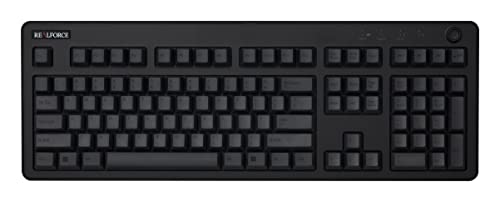
Topre Realforce R3 (JIS variants in the line)
The home-market flagship
- Topre electro-capacitive switches
- Full-size and TKL formats
- JIS production for the Japanese market
- Bluetooth/USB-C on R3 models
Realforce is the JIS layout’s flagship citizen: Topre’s own board line, designed in Japan for the home standard, with the conversion keys present as a matter of course and the build seriousness the line is known for. For a reader who types Japanese professionally, this is the reference object — the board against which JIS implementations are judged — and its Topre switches add the feel dimension explored in this cluster’s HHKB Topre keyboards deep dive. Variants within the line span sizes and weightings, and JIS models are the line’s home production rather than an export afterthought.
The buying reality for readers outside Japan is import logistics: JIS variants surface through importers and marketplace sellers with varying markup and warranty sense, and the listing verified for this article is the line’s confirmed catalogue entry — buyers should confirm the specific unit’s layout in the listing text, since the same model family ships in ANSI for export. The standard, as ever, is a variant-level fact, and on a cross-border purchase it deserves the written confirmation the mistakes section prescribes.
Strengths
- The reference JIS implementation
- Topre feel with home-market authenticity
- Serious build for professional use
Trade-offs
- Import pricing and warranty friction abroad
- Variant must be confirmed in writing
- Full-size footprint in most JIS stock
Best for: Japanese professional typists and Topre devotees.
Not suited for: English-first buyers seeking a casual experiment.

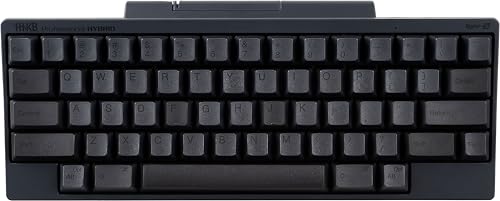
HHKB Professional Hybrid Type-S
The minimalist’s Japanese answer
- Topre switches, 60 percent layout
- ANSI-style HHKB arrangement for export
- Bluetooth and USB-C
- Silenced Type-S switches
The HHKB appears in a JIS explainer as the instructive contrast: a Japanese-designed board that answers the input problem by radical subtraction rather than by added conversion keys — its Unix-derived layout relies on the IME being driven through a minimal key set, and Japanese programmers are among its most devoted users. Its export form follows the HHKB’s own layout philosophy rather than the full JIS standard, which demonstrates a truth the explainer wants on record: even within Japan, the standard is a mainstream solution, not a monopoly, and specialist communities route around it with intent.
For the JIS-curious English typist, the HHKB is also the pragmatic middle path — a Japanese board with a layout an ANSI user can learn in a fortnight, carrying the Topre feel that motivates most cross-border keyboard curiosity in the first place. It will not teach the conversion-key workflow, and it is not a JIS board. It is what many readers actually wanted when they searched for one, and an honest explainer says so.
Strengths
- Japanese design and Topre feel, export-friendly layout
- Bluetooth multi-device for mixed desks
- Deep community knowledge in English
Trade-offs
- Not a true JIS layout
- No dedicated conversion keys
- Premium price
Best for: Topre-curious buyers who want Japanese hardware without the JIS tax.
Not suited for: Typists who need genuine conversion keys.
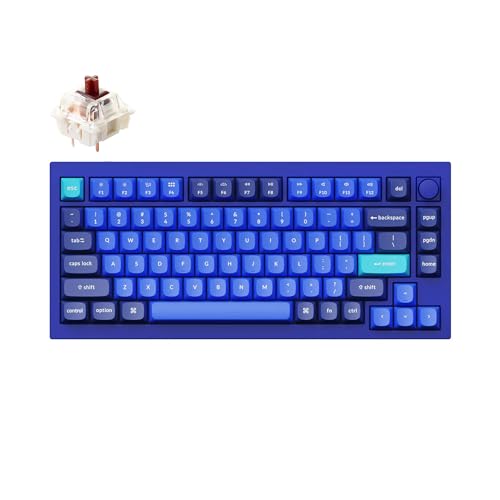
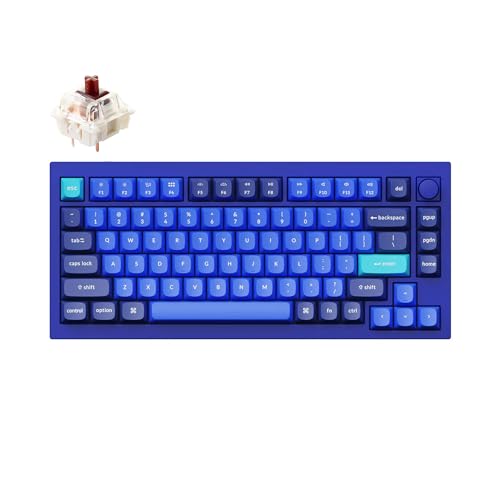
Keychron Q1
The emulation platform
- 75 percent aluminium board
- Fully programmable QMK/VIA firmware
- Hot-swap switches
- Remappable bottom row for thumb-key experiments
A programmable ANSI board cannot become a JIS board — the spacebar’s physical width alone forbids it — but it can emulate the JIS philosophy closely enough to teach an experimenter whether the philosophy suits them: the bottom row’s keys beside a split or shortened space arrangement can carry conversion and non-conversion functions, and the IME does not care whether its commands arrive from dedicated keys or remapped ones. For the reader whose JIS interest is really an interest in thumb-driven input control, the Q1 is the laboratory, and the experiment costs an evening of remapping rather than an import.
Its limits define the honest boundary of emulation: the true JIS spacebar is a different physical target, the extra keys around Backspace have no homes to be remapped into, and the dual legends are absent. What the Q1 offers is the concept, testable tonight, on hardware that remains a first-class ANSI board whatever the experiment concludes. In a cluster full of standards that must be bought to be tried, that is a genuinely useful property.
Strengths
- Tests the thumb-key philosophy without importing
- Remains a flagship ANSI board regardless
- Open firmware makes the emulation real
Trade-offs
- Emulation, not the standard itself
- Spacebar geometry cannot be replicated
- Requires remapping effort to set up
Best for: Experimenters curious about conversion-key workflows.
Not suited for: Anyone who needs actual JIS hardware.
JIS, ANSI and ISO: a Three-Way Orientation
Set side by side, the three standards read as three answers to three different pressures. ANSI optimises for the simplicity of a single-language market at continental scale: fewest keys, widest Enter target, the ecosystem gravity that scale creates. ISO adds one key and a taller Enter in service of many languages’ characters, accepting a more complex left Shift row as the price. JIS adds several keys and rebuilds the bottom row entirely, because its language’s input is not a character set but a conversion process needing controls. The progression is not from worse to better; it is from less linguistic machinery to more, and each standard’s users experience the others’ extra keys as clutter and their own as necessities — the surest sign that layouts are fitted to languages rather than ranked in the abstract.
For the collector and the curious, the practical summary is a sentence per standard. ANSI: buy freely, everything fits. ISO: filter by the Enter and the extra key, and the market mostly cooperates. JIS: buy from Japanese-market channels, confirm variants in writing, and expect keycap replacement to be a specialist pursuit — JIS keycap sets exist, beautifully, within Japan’s own enthusiast scene, and the how to buy keyboard group buy guide skills transfer directly to hunting them. The standards are three doors into the same hobby, of three different widths.
Should You Import a JIS Board? A Decision Aid
The honest decision tree has three branches. If you type Japanese daily, the question answers itself — JIS is your professional instrument, and the only decisions are board and budget. If you type English exclusively, a JIS board is a specialist instrument bought for love of a specific model or of the layout’s ideas, and the punctuation migration plus the narrow spacebar should be priced into that love with eyes open; the emulation route above exists precisely for the not-yet-sure. If you are a programmer drawn by reports that JIS suits coding, examine the claim closely: its truth is that certain symbol placements please certain programmers, and its cost is relearning every placement — a trade a QMK board’s layers can often replicate at home, as the keyboard layouts QWERTY Dvorak Colemak discussion of layout experimentation suggests.
Whichever branch you land on, the import mechanics deserve their sentence: buy through channels that state the layout unambiguously, expect warranty service to be complicated by distance, and remember that a JIS board’s resale market in an ANSI country is thin — the purchase is closer to permanent than most. None of that has ever stopped the right buyer. It has merely, and usefully, stopped the casual one, which is what decision aids are for.
The Thumb Keys: JIS’s Gift to Keyboard Design
The main guide introduces the Muhenkan, Henkan and Kana keys as the JIS layout’s conversion machinery; this expansion argues they are something larger — the first mainstream appearance of an idea the whole enthusiast world later adopted. A thumb key is a modifier operated by the hand’s strongest, idlest digit, and JIS put three of them on the spacebar’s row a generation before the enthusiast community began splitting spacebars to achieve the same thing. The 40 percent keyboard guide‘s survival strategy — layers under the thumbs — is the JIS bottom row’s philosophy generalised, and the split-spacebar builds in the how to build a keyboard guide routinely place layer keys exactly where Henkan and Muhenkan have always sat. Design ideas migrate slowly across the keyboard world’s regions; this one took thirty years and arrived as an innovation.
The thumb keys’ second lesson is about what a layout can assume. JIS assumes its typist switches input modes constantly — between kana and romaji, between full and half width — and gives that switching dedicated, thumb-operated, modeless-feeling controls. Western layouts assume mode switching is rare and bury it in combinations. Neither assumption is wrong; they describe different writing systems’ daily physics. But the JIS assumption generalises beautifully to the layered, modal way enthusiasts now use small boards, which is why the layout repays study even by buyers who will never type a word of Japanese: it is a worked example of a keyboard designed around its language’s actual behaviour, rather than around the previous keyboard’s shape.
For the JIS buyer, the practical consequence is that the bottom row is a feature to shop for, not a standard to assume. Boards that truncate the thumb keys to fit a Western-style long spacebar into a JIS-market product have removed the layout’s best idea while keeping its compromises — the worst trade available, and one the listings do not announce. The census for a JIS board therefore includes the bottom row’s photograph, key by key, and the presence of the full conversion cluster is a mark of a board designed in the layout’s spirit rather than merely stamped with its legends.
Kana Entry Versus Romaji Entry: The Two Japanese Methods
Japanese can be typed two ways, and the JIS board serves both, which makes it a layout with a built-in fork that buyers should understand before choosing boards or caps. In romaji entry, the typist spells Japanese phonetically on Latin letters and the input method converts; the keyboard’s Latin legends do the work and the kana legends are a reference rarely consulted. In kana entry, each key produces a kana character directly — the layout printed on the keycaps’ faces — and the typist’s hands learn a second geography as demanding as the first. Romaji entry dominates modern Japanese computing for the same reason QWERTY dominates English: the skill transfers from every other Latin-alphabet task, and the conversion software has become superb. Kana entry persists among its trained devotees, who type Japanese at speeds and rhythms romaji cannot match, on a layout that is theirs alone.
The fork matters to hardware because it decides what the keycaps are for. A romaji typist’s JIS board needs the conversion keys and the JIS punctuation geography, but its kana legends are decorative — which opens the door to the enthusiast keycap market’s JIS-supporting sets and to a degree of legend freedom the kana typist does not have. A kana typist needs the kana legends printed, correctly, on the correct keys, which narrows the keycap market to the genuinely JIS-manufactured sets and makes the how to buy keyboard group buy guide‘s international-kit discipline into a way of life. The same physical board is thus two different products to its two populations, and listings that do not say which population a keycap set serves are withholding the purchase’s central fact.
It also matters to the conversion story the main guide tells. The Western typist adopting JIS for its thumb keys will use romaji entry or no Japanese at all, and the kana legends will be furniture. The Japanese typist adopting a Western enthusiast board faces the fork’s hard version: romaji entry survives the move (the Latin letters are all present), kana entry does not (the legends and several positions are gone), which is one more reason the enthusiast market’s centre of gravity sits where it sits, and why Japanese-made boards — the Realforce and HHKB lineages in this cluster — carry a design authority that imports cannot imitate.
The Short Spacebar and the Hands’ New Geography
Every account of JIS mentions the short spacebar as a cost; this section examines what the cost actually buys and how hands adapt, because the spacebar is the most-pressed key on any layout and its resizing is not a detail. The JIS spacebar is roughly a third of the ANSI bar’s length, centred under the thumbs’ natural rest. What the removed length purchases is the thumb cluster — but the purchase has a second effect nobody lists: it disciplines the thumb. On a long bar, the thumb strikes anywhere along a wide target, and its aim is correspondingly vague. On the short bar, the target is precise, the strike is centred, and the stabiliser’s behaviour — the bar being short enough to need no wire at all on many boards — becomes perfectly even. Owners routinely report the short bar as the JIS feature they would keep if the rest were negotiable, which is not the verdict its reputation predicts.
The adaptation curve is real and short. The thumbs overshoot into the conversion keys for the first days — harmless presses, since Muhenkan and Henkan in the wrong moment mostly do nothing dramatic in most applications — and recalibrate within the fortnight that every layout change in this cluster is budgeted. What does not adapt is the hybrid desk: the typist who alternates JIS and ANSI boards daily pays a small tax at every switch, forever, because the thumbs’ targets genuinely differ. The iso vs ansi keyboard layout guide’s household counsel applies with the spacebar’s emphasis added: standardise the household’s bottom rows where you can, because the thumbs are the least diplomatic fingers.
For builders, the short spacebar has a keycap corollary worth knowing: JIS spacebars are a size the Western kit system barely stocks, and the JIS board’s owner shopping Western sets will find spacebar kits that offer everything except the one bar their board needs. The JIS-manufactured sets and the genuine JIS-supporting kits are the reliable sources — the recurring theme of this guide, that JIS is a complete ecosystem that must be bought into knowingly, from its boards to its bars. Half-measures in JIS are punished by its geography with unusual consistency, because the layout’s differences are structural rather than decorative.
JIS in the Enthusiast Market: Boards, Caps and Imports
The practical map of buying JIS as an enthusiast divides into three territories with different rules. The first is Japan’s domestic market itself: the fullest JIS selection on earth, in boards and caps, priced in yen, described in Japanese, and shipped — by the major retailers — internationally with a competence that makes the territory less foreign than it first appears. The second is the international brands’ JIS variants: the Realforce and HHKB lines above all, where JIS is a first-class citizen of the catalogue rather than an export afterthought, stocked by the brands’ global channels in the main sizes. The third is the Western enthusiast market’s JIS support: group-buy kits with JIS add-ons, a small shelf of boards, and a used market thin enough that patience is a line item. The buyer’s territory determines their prices, their waits and their keycap future, and choosing it consciously is most of JIS ownership’s strategy.
Imports carry the usual homework with JIS-specific footnotes. The board’s stated layout must be verified as true JIS — the full bottom row, the correct punctuation positions — rather than an ANSI board with Japanese legends printed for atmosphere, a product that exists and disappoints exactly as this guide’s census predicts. Warranty and returns across borders are the importing buyer’s accepted cost, priced against the domestic alternative’s premium. And the operating system’s side must be configured with the Japanese input method’s own settings, which the keyboard firmware QMK VIA guide’s remapping world can imitate but not replace: the conversion keys’ behaviour is an OS partnership, and a board is only half of it.
The used market deserves the final word because JIS boards hold their value with unusual fidelity — the domestic market’s size, the layout’s loyal population, and the boards’ typical build quality (the Japanese enthusiast tradition does not manufacture junk) combine into resale prices that make the import’s premium recoverable. A JIS board bought well is closer to a deposit than an expense. That is the ecosystem working as it should, and it is the last piece of evidence for this guide’s thesis: JIS is not a variant of the keyboard world. It is one of its three complete civilisations, and it rewards the buyer who treats it as one.
What Western Design Borrowed, and What It Still Hasn’t
A closing survey of the JIS layout’s influence makes the guide’s respect concrete. Borrowed, and now universal in the enthusiast tier: thumb-operated layer and mode keys, via split spacebars and small boards’ bottom rows. Borrowed, and still spreading: the compact-with-arrows philosophy that the FC660 lineage and the 65 percent category embody, which Japanese makers were shipping while the West was still debating tenkeyless. Borrowed in spirit: the idea that a keyboard should be designed from its language’s behaviour outward — the principle behind every ergonomic experiment in the ergonomic mechanical keyboards wrist pain guide’s territory, whether or not its designers know the precedent. The Western market’s self-image as the keyboard world’s inventor does not survive a walk through a Tokyo electronics store in 1995, and this guide is content to say so.
Not yet borrowed, and worth watching: the JIS market’s comfort with dense legends — keys that advertise three functions without embarrassment — and its manufacturers’ willingness to serve a single language completely rather than the world approximately. The global market’s boards increasingly ship as platforms for the user’s own configuration, which is a philosophy; the JIS tradition ships finished instruments for a known typist, which is the leopold keyboards doctrine in another geography. The two philosophies are converging from opposite ends, and the meeting point — configurable depth under a finished surface — is where the next decade’s best boards will live, in all three layouts.
For the reader whose journey here was curiosity rather than need, the survey’s takeaway is the cluster’s recurring one in a new accent: layouts are answers to languages, and the world has three great answers because it has three great typing civilisations. Learn the one your language gave you deeply, respect the others accurately, and let the boards you buy be citizens of a civilisation rather than tourists in all of them. The JIS board on a Japanese desk is not an exotic object. It is the local form of the same right answer this whole cluster pursues — a keyboard that fits its typist so completely that it disappears into the work.
Buying Your JIS Board: The Final Checklist Compressed
The guide’s counsel compresses into the sitting in which a JIS board is actually chosen. First, the entry method: romaji or kana, because it decides the keycaps’ requirements and halves the catalogue at a stroke. Second, the bottom row’s photograph: the full conversion cluster present, the spacebar’s length as designed, no Western substitutions wearing JIS legends. Third, the size by the census method every size guide in this cluster teaches, with the JIS market’s particular strength in compact boards noted and its full-size options — the Realforce line above all — priced in their territory. Fourth, the territory itself: domestic purchase, brand channel or import, with warranty and shipping accepted as the chosen territory’s terms rather than resented as surprises.
Fifth, the keycap future: the sets that will dress this board in year three, verified to exist in the chosen entry method’s legends, because a board whose caps cannot be replaced in its own language is a board with an expiry date its switches never set. Sixth, the operating system’s configuration, planned alongside the hardware: the input method’s settings, the conversion keys’ assignments, the language switching’s place in the workflow. JIS is the layout where the software half of the purchase is largest, and buyers who plan it with the hardware get a system; buyers who plan it afterwards get a fortnight of small mysteries.
And seventh — the item every checklist in this cluster ends with — the month’s patience, budgeted in advance. A JIS adoption, whether by a Japanese typist upgrading or a Western enthusiast converting, rearranges the hands’ oldest habits at the spacebar, the punctuation and the mode keys simultaneously. The fortnight’s errors are the tuition, the month’s fluency is the degree, and the decade’s invisible geography is the career it qualifies you for. Pay the tuition gladly. It is the cheapest part of the entire purchase, and the only part that cannot be refunded, resold or regretted by anyone who finished paying it.
Romaji Input’s Settings: The Software Half of the Board
A JIS board’s behaviour is half decided by the input method’s settings on the host, and buyers who treat the board as the whole purchase inherit a fortnight of small mysteries that this section exists to prevent. The Japanese input method — on any operating system — carries settings for the conversion keys’ assignments, the candidate window’s behaviour, the punctuation style, and the default mode the system wakes in, and each of them presents, when wrong, as a keyboard fault: the conversion key that seems dead (it is assigned to a function you are not invoking), the punctuation that arrives in the wrong width (a style setting, not a layout error), the system that starts every session in the wrong mode (a default, faithfully obeyed). The keyboard typing wrong characters fix guide in this cluster teaches the bisection that assigns such faults to their layer; on a JIS desk the IME’s settings page is the layer where they most often live, and it should be read — all of it, once, with the manual’s patience — on the day the board arrives.
The settings also hold the JIS board’s quality of life: the learned dictionary that makes conversion feel intelligent is a document that accumulates, syncs and can be exported, and it deserves the backup discipline this cluster applies to keymaps, because a decade of learned conversions is a typist’s capital and its loss to a reinstall is a bereavement out of proportion to its file size. The bilingual desk’s settings — the switching shortcut, the per-application memory — decide whether the two languages feel like one desk or two, and they repay the same deliberate configuration the firmware guide teaches for layers: designed once, from the workflow’s evidence, rather than accumulated by accident.
And the settings complete the JIS purchase’s checklist from the buying guide: board, caps in the entry method’s legends, territory, and now the host’s configuration, planned and backed up. A JIS setup is a system in the fullest sense this cluster uses the word — hardware, layout, input method and dictionary in one composition — and the buyers who compose it deliberately get the civilisation’s full benefit, while the buyers who assemble it by accident get its full mystery. The board was never the whole product. It was the visible half, and this section is the other half’s receipt.
Setting Up a JIS Board on a Western Computer
For owners who have taken the plunge: the configuration that makes a JIS board behave as its designers intended.
- Connect the board and let the operating system detect it; then, before typing a word, set the keyboard’s hardware layout to Japanese in the system settings, so the legends and the outputs agree — most JIS confusion is a board being driven with an ANSI mapping by default.
- Install and enable the Japanese input method (the system’s built-in Japanese IME suffices) and add it to your input sources alongside your existing language, with a switching shortcut you can strike without looking.
- Learn the conversion trio physically: Muhenkan commits raw, Henkan converts, and the spacebar converts the pending string during Japanese input. Type a page of phonetic text and convert it sentence by sentence until the thumb’s new geography stops requiring thought.
- Decide the English-typing arrangement deliberately: either type English through the Japanese IME’s direct-input mode (keeping one input source and its punctuation), or switch sources for English and accept the second punctuation map. Drifting between the two unconsciously is where most frustration breeds.
- Remap one thing at most in the first month — the key your hand keeps missing — and only through the operating system’s tools or the board’s firmware if it offers it. The layout’s logic reveals itself through use; premature remapping edits a book you have not finished reading.
JIS Mistakes Made by Importers and the Curious
Assuming JIS is ‘ANSI with extra keys’.
The punctuation migration and the rebuilt bottom row make JIS a genuinely different instrument, and buyers who discover this at the desk rather than in an explainer experience it as betrayal by a product that never hid anything. Read the layout before the listing; the differences are the product.
Buying a JIS board for its looks alone.
Dual legends photograph beautifully, and the board then taxes its owner’s apostrophes for years. Aesthetic JIS ownership is legitimate — collectors do it knowingly — but it should be a decision, not a surprise, and the spacebar’s width is the detail to stare at longest before paying.
Driving a JIS board with the wrong OS mapping.
Half the ‘broken JIS board’ reports in forums are a Japanese board being interpreted as American by a default setting, producing punctuation chaos that no hardware deserves blame for. The setup sequence above exists because the fix is ninety seconds in the system settings, once known.
Expecting Western keycap sets to fit.
The JIS bottom row and spacebar alone exile nearly every ANSI and ISO set ever made. Replacement caps for JIS boards come from the Japanese market’s own makers and group buys. Buyers for whom keycap customisation is half the hobby should weigh that ecosystem honestly before importing.
Judging the layout in a day.
JIS fluency is a thumb retraining measured in weeks. The conversion rhythm that looks like overhead in week one becomes, in week four, the fastest text-entry system its user owns. Verdicts formed at the demo desk — in either direction — are measuring novelty, not the layout.
Assuming a board with Japanese legends is a JIS board.
Legends are printing; layout is geometry. Boards exist — particularly at the budget tier and in novelty keycap sets — that print kana on ANSI geometry, delivering neither the thumb keys nor the punctuation positions that make JIS JIS. Verify the bottom row and the punctuation keys in the product’s photographs and specifications; the conversion cluster’s presence is the layout’s passport, and it cannot be faked by ink.
Frequently asked questions
Can I type English normally on a JIS keyboard?
The letters are standard QWERTY and prose flows normally, but ‘normally’ needs an asterisk: several punctuation marks sit in non-ANSI positions and the spacebar is much narrower, so English typing is fluent-with-errors until the new map is learned. With the OS set to a Japanese layout, what you press is what the legends promise; the adjustment is your fingers’, and it takes weeks, not days.
What do the keys beside the spacebar actually do?
Muhenkan (left) commits the phonetic input unconverted; Henkan (right) triggers conversion of the pending string into kanji candidates; the Kana key toggles kana input modes. Together with the spacebar’s conversion role, they are the hardware controls of the Japanese input method — the feature the entire layout is organised around.
Is JIS compatible with Mac and Windows?
Yes — both systems include Japanese layouts and input methods natively, and a JIS board is a standard USB or Bluetooth keyboard electrically. The setup requirement is configuration, not drivers: set the hardware layout to Japanese and enable the IME, per the how-to above. The board’s conversion keys then function as designed on both platforms.
Why is the JIS spacebar so short?
Because Japanese typing gives the thumbs more jobs. Space itself is needed less as a word separator (Japanese text does not space between words) and the conversion commands are needed constantly, so the layout spends the bottom row’s prime territory on three conversion keys and keeps a spacebar sized for its reduced role. It is the layout’s clearest statement that it was designed for Japanese first.
Are there JIS mechanical keyboards for enthusiasts, or only office boards?
A genuine enthusiast scene exists in Japan: Topre’s Realforce lines, JIS variants of major makers’ boards, and a domestic custom and keycap culture with its own group buys and events. Access from abroad runs through importers and proxy buying — the same vendor mechanics this cluster’s group buy guide explains, applied to a different market.
JIS or ISO for a European learning Japanese?
For Japanese study, JIS, without hesitation — the conversion keys are the workflow, and learning them on real hardware builds the authentic skill. Your European typing can live on the same board through input-source switching, accepting the punctuation differences, or on a second board. What does not work is expecting an ISO board to teach JIS habits; the keys that matter are not there.
Can I use a JIS keyboard to type only English?
Yes — the Latin letters sit in their QWERTY positions and the board types English without ceremony. You will live with the JIS punctuation geography (the apostrophe and symbols sit at Japanese positions), the short spacebar and the extra thumb keys, which most English-only users either ignore or remap to layers and macros through the firmware — turning the layout’s conversion cluster into a private shortcut row. It is a legitimate reason to buy JIS hardware, practised by more Western enthusiasts than the market assumes.
Does JIS have a number pad and function row?
On the boards that have room for them, yes — full-size JIS boards carry the pad and the F-row in their standard positions, and the layout’s differences concentrate in the main cluster’s punctuation, the bottom row and the key beside Enter. Compact JIS boards make the same layer decisions as their Western counterparts. The layout is a variation of the main cluster’s geography, not a different species of keyboard, which is why the size census transfers to it unchanged.
Can I use a JIS keyboard layout setting with an ANSI board for Japanese?
You can enable the Japanese input method with any board — the IME converts romaji keystrokes regardless of the hardware’s legends — and many learners do exactly that on ANSI boards, accepting that the punctuation positions follow the host layout’s setting and the conversion keys do not exist. Setting the host to a JIS layout on ANSI hardware remaps several punctuation keys to their JIS positions, which works if the typist learns the positions by touch. It is a legitimate path for the romaji learner; the JIS board becomes necessary when the kana entry method or the true bottom row enters the brief.
The JIS layout rewards the reader who approaches it as a designed answer rather than a curiosity. Its crowded bottom row is a control panel for one of the world’s most sophisticated input systems; its shrunken spacebar is a rational budget spent on conversion; its dual legends are two writing systems sharing hardware with complete matter-of-factness. Judged by the standards of its own language, it is not an eccentric variant of the Western keyboard. It is a different and equally coherent idea of what a keyboard is for.
Whether it belongs on your desk depends, as with every standard in this cluster, on the language your fingers serve. If that language is Japanese, the layout is home, and the boards in its market are among the finest made anywhere. If it is not, JIS remains worth understanding — because it proves, more vividly than any other layout, that the keyboard is not a neutral grid but a piece of linguistic machinery, fitted to its tongue as precisely as a glove to a hand.