Disclosure: As an Amazon Associate, kajuandouglas.com earns from qualifying purchases. Links on this page are affiliate links; they cost you nothing extra. Prices and availability change often, so check the current Amazon listing before you buy.
The best keyboards for writers authors can trust are not gaming boards with the lighting turned down. Writing is a distinct physical discipline: thousands of words a day, every day, in sessions measured in chapters rather than matches, by hands that must be as fresh at the end of a deadline week as at its start. The keyboard a writer needs is the one that disappears — consistent switches that never surprise a fast sentence, keycaps whose texture survives a manuscript’s worth of oils, a sound the household and the writer’s own concentration can live with, and a layout that keeps every key the craft uses within the reach it expects. The six boards in this guide were chosen by writers’ criteria alone, and they divide into clear schools.
There is the full-size professional school — Das Keyboard and Filco — built around genuine Cherry switches and the number pad that nonfiction, research and production work still use. There is the compact-efficiency school, where Leopold’s 98-key layout keeps the pad while shedding the width. There is the low-profile school — Keychron’s K3 and Logitech’s MX Keys S — for writers whose wrists prefer a shallow deck and whose desks double as cafés and trains. And there is the HHKB, the minimalist’s instrument, whose layout generations of writers and programmers have adopted as a philosophy. Your genre, your desk and your hands will pick among them; this guide’s job is to make the picking honest.
Key takeaways: Writers should buy for consistency over novelty: the same keystroke, ten thousand times a day, without surprises. Tactile switches and PBT keycaps are the profession’s default for good reason. Sound is a working condition, not a preference — choose for the room you write in. And the layout question is really a question about your genre: number pads serve nonfiction and production; compact boards serve the travelling drafter. Test any candidate at both of writing’s tempos — a page of fresh drafting and a page of heavy editing — because a board that serves only the first will tax every single revision pass the work demands.
Where to buy and how this guide handles best keyboards for writers authors
Every keyboard linked below was confirmed in this site’s verified catalogue data before earning its place, and each review ends with a Check price on Amazon link to that exact listing. Writers should note the variant discipline this category demands: several picks are sold in more than one switch under a single page — the Leopold FC980M listed here, for example, is the Cherry MX Blue variant, a clicky board, while the same range offers quieter options elsewhere — so the switch named in each review is the switch in that listing, and it should be matched against the option you select before ordering.
One promise about method: this guide contains no hands-on-testing theatre. The judgements here rest on the verifiable facts of each board — its switches, keycaps, layout, construction and configuration story — read against what the writing life actually demands of a keyboard across a book’s worth of days. Where feel is described, it is described as the known character of a switch family and a construction type, the same basis on which experienced writers have always bought keyboards between the rare chances to type on one first.
In this guide
Quick picks: Best Keyboards For Writers Authors
Six carefully chosen boards for six distinct, real, working, daily writing lives. If you know your genre and your room, the shortlist resolves quickly; the long reviews defend each placement against the others, and the framework that follows covers the questions — switches, sound, layout, longevity — that every writer-buyer eventually asks.
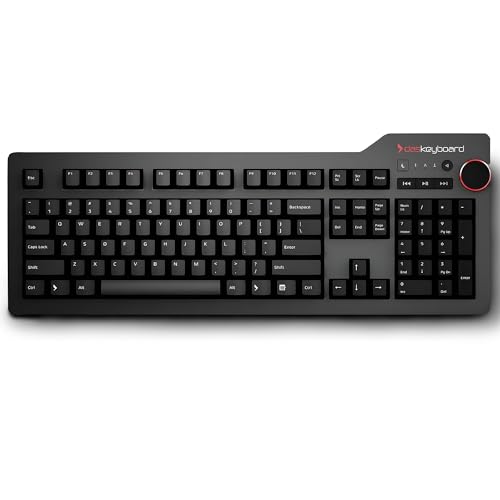
- Das Keyboard 4 Professional — the full-size author’s desk standard: Cherry MX Brown, an aluminium top and a volume knob like a ruler’s straight edge.
- Leopold FC980M — the 98-key efficiency play, Cherry MX Blue click in this listing, with the number pad kept and the width shed.
- Keychron K3 Version 2 — the low-profile traveller: shallow, wireless and light enough to draft anywhere.
- Logitech MX Keys S — the quiet professional: fluid low-profile typing, smart backlight and three-device pairing.
- HHKB Professional Classic — the minimalist’s Topre instrument, wired and uncompromising, in white.
- FILCO Majestouch 3 — the purist’s full-size: double-shot PBT, Cherry MX Brown, and nothing else at all.
How the picks were chosen
The shortlist was built from the writing desk outward. Switch consistency came first — a writer’s speed depends on a keystroke that never varies across the deck or across the year, which favoured established switch families with long production histories. Keycaps came second: PBT and double-shot legends scored heavily because a writer polishes ABS smooth within a single book and deserves legends that outlast the work. Sound was judged as a working condition — the room, the household, the recording of notes and interviews — rather than as a hobbyist’s pleasure, which is why the clicky pick here is flagged as the private-room choice it is.
Layout coverage was the structural decision: the guide keeps two full-size boards, one 98-key, two low-profile travellers and one 60 percent minimalist, because writing lives differ more than writing advice admits. Configuration weight was deliberately light — writers, as a class, do not want a hobby between them and the page — so boards needing constant software attention were cut in favour of hardware that arrives finished. What remains is a set where every board can carry a career, and the choice among them is about the shape of your days rather than the size of your budget.
The picks in detail

Das Keyboard 4 Professional — Best full-size author’s board
At a glance: Full-size 104-key layout; Cherry MX Brown tactile switches; aluminium top panel; oversized volume knob; 2-port USB 3.0 hub; dedicated media controls; wired.
The Das 4 Professional is the keyboard equivalent of the heavy desk dictionary: full-size, aluminium-topped, and specified by people who expect equipment to outlast assignments. Its Cherry MX Brown switches are the writing profession’s default for a reason — a gentle tactile bump that confirms each keystroke without demanding bottom-out force, quiet enough for a home office, consistent enough that a fast drafter’s rhythm never stumbles on a key that feels different from its neighbour. Across a ten-thousand-word day, that consistency is not a specification; it is the difference between thinking about sentences and thinking about typing.
The details serve a working writer’s actual desk. The oversized volume knob — famously doubling as a ruler-straight edge — runs interview recordings, dictation playback and focus playlists without a hand leaving the board’s neighbourhood. The USB hub takes the flash drive of research and the recorder’s cable. The full layout keeps the number pad for the nonfiction writer’s budgets, timelines and footnote counts, and the media keys handle the transcription pauses that structure a research-heavy day. It is a board that assumes your writing involves sources, numbers and audio, because most professional writing does.
Its costs are presence and fixity: a wide, wired, desk-anchored board whose switches are not swappable. Writers who draft in cafés will leave it at home, which its buyer will consider correct behaviour. As the anchor instrument of a serious writing desk — the board the manuscripts actually get written on — the Das 4 remains the recommendation this guide would defend in any company of working authors.
Strengths
- Cherry MX Brown tactiles — the profession’s proven all-day switch
- Full-size layout with the number pad research work uses
- Oversized volume knob serves transcription and playback daily
- USB hub absorbs the writer’s desk peripherals
- Aluminium top and serious build for a decade of drafts
- Dedicated media keys keep hands on the board
Trade-offs
- Wide and wired — an anchor, not a traveller
- Switches are fixed rather than hot-swappable
- Commanding presence on smaller desks
Best for: Professional writers and authors with a permanent desk and research-heavy work.
Not suited for: Writers who draft primarily away from home.

Leopold FC980M — Best compact-with-number-pad
At a glance: 98-key compact layout with number pad; Cherry MX Blue clicky switches in this listing; PBT keycaps; sound-dampened case; wired.
The FC980M is the layout invention writers did not know they were waiting for: everything a full-size board offers — number pad included — compressed into a footprint barely wider than a tenkeyless, by arranging the pad and navigation keys with a tailor’s economy. For the writer whose desk is small but whose work is not — the novelist with sales spreadsheets, the journalist with expense claims, the academic with data — it resolves the category’s oldest trade-off. Your mouse returns to a humane position, your shoulders centre, and not one key your craft uses has been sacrificed to get them there.
This listing’s variant carries Cherry MX Blue switches, and the review must be plain about what that means: a crisp tactile bump with an audible click, the typewriter’s descendant, beloved by solo writers for the rhythm it gives a drafting session — many authors genuinely write faster to a sound that confirms every word — and unsuitable for shared rooms, open microphones and sleeping households. Leopold’s execution flatters the switch: the case is sound-dampened so the click stays tight and mechanical rather than rattly, the PBT caps keep their texture, and the stabilisers are tuned with the brand’s customary care, so the big keys sound like the small ones’ family.
Buyers who love the layout but not the click should know the FC980M range exists in other switch variants — verify any listing’s selected switch with care, because under this guide’s discipline only the Blue variant is the verified pick here. Wired-only connection and fixed switches complete the honest ledger. For the private-room writer who wants the full key set in a compact frame and a click that keeps the sentences coming, this is the most distinctive board in the guide.
Strengths
- 98-key layout keeps the number pad in near-TKL width
- Leopold build: dampened case, tuned stabilisers, PBT caps
- Cherry MX Blue click gives drafting a confirming rhythm
- Mouse position and shoulder posture both improve
- A finished, configuration-free professional tool
- Compact enough for desks that full-size boards dominate
Trade-offs
- This variant is clicky — a private-room instrument
- Wired only
- Switches are fixed; other variants are separate listings
Best for: Solo writers who want every key, a compact desk, and a clicky rhythm.
Not suited for: Shared rooms, recording work and quiet households.

Keychron K3 Version 2 — Best low-profile travel board
At a glance: 75 percent low-profile layout; wireless Bluetooth 5.1 for up to three devices plus USB-C wired; low-profile Red linear switches in this variant; QMK support; white backlight; Mac and Windows compatible.
Some writers’ desks have wheels. The K3 V2 is built for the drafting life that happens in cafés, trains, libraries and other people’s houses: a low-profile 75 percent board slim enough to slide into a laptop sleeve’s neighbourhood, light enough to forget in the bag, and wireless across three devices so the laptop, tablet and phone rotation of a modern writing day is one key combination rather than a pairing ritual. The low-profile Red switches travel a short, quiet stroke — closer to a good laptop keyboard’s manners than to a desktop board’s — which makes the transition between the laptop’s own deck and this board almost seamless when you alternate.
The 75 percent layout is the traveller’s correct compromise: function row and arrows survive, the number pad is honestly surrendered, and QMK support means the layers and remaps a writer relies on — the em-dash key, the smart-quote shortcuts, the word-count macro — live on the board and work identically on every machine it meets. White backlighting keeps library corners and evening trains typeable. For the writer whose first drafts happen wherever the day puts them, this is the board that makes the anywhere-desk feel like the home desk’s sibling rather than its poor relation.
Low profile is a feel with loyalists and detractors, and the honest note is that writers raised on full-travel boards may find the short stroke abrupt for the first week; the countervailing truth is that many wrist-complainers find the shallow deck and low front height immediately kinder. Battery life across long writing days is good rather than endless, so the USB-C cable earns its place in the bag. As the portable half of a two-board writing life — or the only board of a genuinely nomadic one — the K3 V2 is the pick that respects the road.
Strengths
- Slim, light and genuinely portable without feeling fragile
- Bluetooth for three devices plus wired — every writing machine covered
- QMK layers carry a writer’s shortcuts to every desk
- Low front height suits wrists that dislike tall decks
- Function row and arrows survive the compact layout
- White backlight for libraries, trains and evening work
Trade-offs
- Short low-profile stroke divides full-travel loyalists
- Battery needs the cable in the bag for long trips
- No number pad — nonfiction number work needs the layer or the desk board
Best for: Travelling writers and café drafters who want one light board for every device.
Not suited for: Writers who want a full-travel, full-size anchor board.

Logitech MX Keys S — Best quiet professional board
At a glance: Full-size low-profile layout; spherically dished quiet keys; smart backlighting that adapts and senses hands; pairs three devices via Bluetooth or Logi Bolt receiver; USB-C rechargeable; graphite.
The MX Keys S is the board for the writer whose work shares a room, a house or a recording schedule. Its low-profile keys are spherically dished — each fingertip lands in a shallow bowl that centres it — and the stroke is fluid, precise and conspicuously quiet, the closest thing in this guide to typing on a held breath. For the author dictating in the next room’s pauses, the podcaster who edits at the same desk, or the writer whose partner sleeps one wall away from a deadline, that quietness is not a luxury feature; it is the condition of working at all, and no mechanical board here can match it.
The professional manners run deep. Smart backlighting wakes as your hands approach and adapts to the room, so the board is lit exactly when looked at and dark when not. Three-device pairing with easy switching serves the writer whose draft lives on the desktop, whose research lives on the laptop and whose notes live on the tablet. The full-size layout keeps the number pad. Logitech’s software adds per-application shortcuts for those who want them, while the board remains entirely itself without it. Battery stretches across many days of writing, recharging over USB-C while you work.
The trade is feel philosophy: this is not a mechanical board, and writers who draw energy from a mechanical stroke’s feedback will find the MX Keys S serene to the point of neutrality. Its keycaps are not the replaceable kind, and its long-term story is a battery’s story. Judge it as its intended owners do — as the quiet, fluid, multi-device professional instrument that lets the work happen anywhere in the house at any hour — and it has no rival in this guide. Some writers keep it as the night board beside a mechanical day board, which may be the most honest verdict of all.
Strengths
- The quietest typing in this guide — household and microphone safe
- Dished keys centre fingertips and feel fluid at speed
- Smart backlight wakes on approach and adapts to the room
- Three-device pairing across the writer’s whole desk
- Full-size layout keeps the number pad
- Recharges over USB-C while in use
Trade-offs
- Not mechanical — a different feel philosophy entirely
- Keycaps are not user-replaceable
- Long-term life is tied to its rechargeable battery
Best for: Writers in shared homes, recording households and multi-device desks.
Not suited for: Mechanical loyalists who write for the stroke’s feedback.

HHKB Professional Classic — Best minimalist instrument
At a glance: 60 percent Unix layout; Topre electro-capacitive switches; wired USB-C; Control beside A; DIP-switch configuration; printed legends; white.
The HHKB Classic is the writing instrument as haiku: sixty percent of a keyboard, Topre switches, a wired connection, and a layout that has been argued about, adopted and defended by writers and programmers for decades. Control sits beside A, where the little finger reaches it without a stretch — a placement that serves the editor shortcuts and terminal commands woven through a digital writer’s day. The Topre stroke is the connoisseur’s tactile: a smooth, rounded resistance that collapses into a soft, deep landing, quiet enough for any room and consistent in a way that makes very fast drafting feel like gliding.
Writers who convert to the HHKB describe the same arc: a fortnight of reaching for keys that have moved, then a layout their hands prefer to the standard one, then a mild evangelism they must consciously restrain. The board’s smallness is part of the method — hands stay home, the mouse sits close, the desk clears — and the white Classic with printed legends has the further virtue of looking like what it is: a tool from a tradition that values the sentence over the specification. DIP switches configure its few options in hardware, legible to every computer ever made, which suits a board bought for a decade.
The ledger of costs is the familiar HHKB one, unsoftened: a premium price for sixty percent of a keyboard, arrows and function keys on a layer, a keycap ecosystem of its own, and no backlight for the dark. Writers whose work is shortcut-light and layout-conservative will find the conversion cost buys them little. Writers whose days are keyboard-driven — drafting in modal editors, navigating by keystroke, living in the terminal between chapters — will find the board this guide’s most personal recommendation: not the best keyboard for writers in general, but the best keyboard for a particular, numerous kind of writer, completely.
Strengths
- Topre switches: smooth, deep and quiet at drafting speed
- Unix layout puts Control where shortcut-heavy work wants it
- Hands stay home — the minimalist’s posture advantage
- Hardware DIP configuration, decade-proof and OS-proof
- Compact footprint frees the desk and the mouse
- A design tradition with generations of writer loyalty
Trade-offs
- Premium price for a 60 percent board
- Arrows and F-keys on a layer — a fortnight of relearning
- Topre keycap choices are narrow
- No backlighting
Best for: Modal-editor and terminal-fluent writers who want the minimalist instrument.
Not suited for: Writers who need a number pad or dedicated function row.

FILCO Majestouch 3 — Best purist full-size board
At a glance: Full-size layout; Cherry MX Brown tactile switches; double-shot PBT keycaps; media functions via Fn; wired; Japanese professional construction.
Filco is the brand for writers who believe a keyboard should do one thing perfectly and then be quiet about it — in the Majestouch 3’s case, not even quiet about it, just silent: no hub, no knob, no lighting, no software, no companion anything. What remains when the features are stripped away is the typing itself, and Filco’s reputation rests on how seriously that remainder is taken. The Cherry MX Brown switches sit in a deck tuned by a maker obsessed with stabiliser feel and case solidity, wearing double-shot PBT keycaps whose legends cannot fade and whose texture will outlast the manuscript, the sequel and the memoir after both.
For the writer, that purity has practical consequences. There is nothing to configure, nothing to update, nothing to distract — the board is a full-size, number-padded, utterly standard layout that any touch-typist’s hands already know completely, connected by a cable and ready at any machine including the ancient laptop kept for distraction-free drafting. The Browns give the same all-day tactility as the Das pick; the difference is everything around them, or rather the absence of everything around them. Writers who find modern keyboards’ feature lists a form of noise will recognise this board as the quiet room of the category.
The absences are the trade, and they should be chosen rather than discovered: no volume knob for the transcription workflow, no hub for the desk’s peripherals, no backlight for the dark, no wireless for the café. The Das 4 exists in this guide for the writer who wants those things. The Filco exists for the writer who has noticed that wanting them is optional — and who would rather the money and the engineering went entirely into the keystroke. On that single criterion, it is arguably the finest board here.
Strengths
- Double-shot PBT keycaps — legends and texture for a career
- Cherry MX Brown tactiles in a deck tuned for feel
- Absolutely standard full-size layout — zero learning curve
- Nothing to configure, update or distract
- Japanese professional build with a decades-deep reputation
- The purist’s value: every cost is in the keystroke
Trade-offs
- No hub, knob, backlight or wireless
- Wired only
- Switches are fixed
Best for: Purist writers who want the keystroke and nothing but the keystroke.
Not suited for: Writers who rely on a volume knob or desk hub.
Switches for ten thousand words a day
A gamer presses keys in bursts; a writer presses them like weather. That volume changes the switch calculus in two ways. First, actuation weight compounds: a switch that feels pleasantly firm in a shop becomes a finger workout across a deadline week, which is why the profession’s defaults — Cherry MX Brown and its tactile kin, Topre’s rounded collapse — sit in the middle weights and confirm the press with a bump rather than demanding a bottom-out. Second, consistency compounds: a single scratchy or pinging key is a pebble in the shoe of every session, so established switch families with long, stable production runs dominate this guide over fashionable newcomers.
Sound is the variable writers most often buy wrong, because it is social. The clicky board that feels like productivity at noon is a household negotiation by the third evening, and a recording setup’s enemy in any hour. The honest taxonomy in this guide: the MX Keys S for shared air, the Topre HHKB and the Brown-switch boards for the private office at civilised volume, and the FC980M’s Blues for the solo room where the click is a metronome the writer personally enjoys. Buy for the room’s other occupants first and your own romance second; you will keep the board longer.
Keycaps: the surface a writer actually touches
Ask a writer in year three what they would change about their keyboard and the answer is rarely the switches — it is the keycaps, polished smooth and shining where the home row lives. PBT resists that polishing for years, which is why the Filco’s and Leopold’s stock caps are career equipment rather than starter kit, and why double-shot legends — moulded through the cap rather than printed on it — matter to people whose boards will see a million keystrokes: the letters you navigate by cannot wear away beneath you. Writers buying boards with lesser stock caps should budget a PBT set as the first and possibly only upgrade, fitted before the shine makes the home row a skating rink.
Layout by genre: a working map
Fiction drafting is the most layout-forgiving work in writing: prose needs letters, punctuation and little else, which is why novelists thrive on everything from the HHKB’s sixty percent to the K3’s travel deck. Nonfiction and journalism add the research layer — numbers, dates, tables, transcription controls — and reward the full-size boards’ pads and knobs. Academic writing adds citation machinery and symbol work, favouring programmable layers or a compose-key habit. Production and self-publishing add the spreadsheet seasons of a book’s afterlife. Read the picks against your genre’s full calendar, not its drafting days alone; the board must serve the launch spreadsheet as faithfully as the first chapter.
There is also the two-board pattern, which this guide endorses without embarrassment: an anchor board at the desk — Das, Filco, Leopold — and a traveller in the bag — K3, or the MX Keys S in a dual role. Writers’ lives genuinely have two geographies, and forcing one board to serve both usually means the café gets the anchor’s weight or the desk gets the traveller’s compromises. If the budget forces one board, buy for the geography where the deadline work happens, and let the other geography make do.
The writing desk around the keyboard
A writer’s keyboard earns its keep inside a small ecosystem: the document open, the reference to the side, the notebook that catches what the screen should not. Position the board close and centred by its letters, keep the manuscript’s window at eye height so the neck is not the price of the chapter, and let the mouse sit where a compact board leaves it — another quiet argument for the FC980M’s layout or the HHKB’s smallness on reference-crowded desks. Lighting deserves a writer’s attention too: the MX Keys S’s adaptive backlight and the HHKB’s deliberate lack of it are both answers to the same evening room, chosen by whether you read your keys or your screen at that hour.
Longevity: buying for the fifth book, not the first
Writing careers are long and keyboards are consumable only if bought that way. The boards here were chosen for decade-scale service: switches rated in the tens of millions of presses, keycaps that cannot fade, cables and connections that ask nothing exotic of the future, and — in the Keychron’s case — sockets that let a single tired switch be replaced in minutes in year six. The MX Keys S is the exception that proves the rule’s shape: its battery defines its horizon, and its buyers trade that horizon knowingly for quiet and fluidity. Whichever you choose, keep the box and the spare parts; the writer’s second decade is served by the first decade’s housekeeping.
Drafting versus editing: one board, two tempos
Writing has two physical tempos and a good board serves both without being asked. Drafting is flow: speed, rhythm, a keystroke that confirms and vanishes, which is the tactile bump’s whole career. Editing is deliberation: cursor keys, selections, the navigation cluster worked like a shuttle, shortcuts layered over text — the tempo that punishes layouts which exiled the arrows and rewards the full-size and 98-key boards’ completeness. Writers auditioning a board should test both tempos honestly: one timed page of fresh drafting, and one page of heavy revision on an old draft. A board that wins only the first test will tax every second, third and fourth pass the work demands, and books are mostly made in the passes.
This is also where the writer’s shortcut layer earns its keep twice over. In drafting it removes punctuation journeys; in editing it removes selection journeys — jump-to-heading, mark-paragraph, the placeholder for the fact to check. The programmable boards here carry those layers in hardware, and the fixed boards pair with system expansion tools to the same end. The board beneath should disappear in both tempos; the writer who notices their keyboard mid-revision is a writer whose equipment is spending attention the prose had already budgeted.
How to choose: a buyer’s framework
Decide your switch by room, then by hand
Work through the sound decision first because it eliminates boards fastest: shared room or recording work means the MX Keys S or a quiet tactile; a private office opens the Browns and Topre; a solo room where rhythm matters admits the FC980M’s click. Then the hand decision: if you type with a light, fast touch, the mid-weight tactiles will confirm without tiring; if you rest heavy fingers on the keys, a linear or a firmer tactile prevents accidental letters. Writers between certainties should choose the tactile default — it is the profession’s default because it has served the median writing hand for decades.
Full-size, 98-key, compact or low-profile: the honest audit
Count your number pad’s genuine working days in a month. Daily: full-size or the FC980M’s 98-key compression of it. Weekly: the 98-key still, or a 75 percent with a pad layer you will actually use. Rarely: compact and low-profile boards open up, and the desk gains the mouse room and posture that come with them. Then audit your travel: a writer whose first drafts happen in motion should weight the K3’s portability as a primary feature rather than a bonus, because a board that is present for the drafting hour is worth more than a superior board at home.
What to skip: the feature list writers do not need
Gaming’s headline features — rapid trigger, per-key actuation theatre, lighting ecosystems — do no work for prose, and paying for them taxes the budget that should go to switches and keycaps. Macros are the honourable exception, in the modest form of text-expansion for the phrases, citations and formatting strings your genre repeats; QMK boards and good software both serve it. The writer’s feature list is short enough to write on the box: consistent switches, durable caps, the right layout, a sound your room accepts, and a connection that never makes you think about it. Judge every candidate against those five and the market sorts itself.
Buying for a writer who is not you
Keyboards are personal enough that gifting one is an act of knowledge. The safe gifts are the standard-layout professionals — the Das 4 or the Filco — whose feel is the profession’s consensus and whose layout asks nothing new of the recipient. The HHKB and the clicky Leopold are gifts only for the writer you know well enough to be sure of: they are love letters in a specific dialect. When in doubt, gift the anchor board and keep the receipt’s window in mind; a writer’s hands will file their verdict within the first chapter, and the right board is the one still on the desk for the second.
Setting up a writer’s keyboard for the long manuscript
A writer’s setup is measured in chapters, not evenings, but it is built in one: the session below arranges the board, the shortcuts and the room so that the next ten thousand words meet as little friction as equipment can arrange. Do it before a drafting day, not during one, and let the work itself grade the result.
Step 1: Place the board for the writing posture
Centre the keyboard by its letter keys in front of your manuscript’s window, close enough that your elbows rest at your sides and your wrists float straight over the home row. Fold the rear feet away unless your desk height argues otherwise; a flat board at elbow height is the posture a long session can hold. If you use a wrist rest, assign it its correct shift — pauses and re-reading only — and keep the drafting hands floating. Set the chair so the chapter’s third hour finds the same posture as its first; writing fades many things, and a creeping slouch should not be one of them.
Step 2: Build the writer’s shortcut layer
On programmable boards, spend twenty minutes on the handful of insertions your genre repeats until they are reflexes: the em dash and en dash, curly quotes as a pair, the ellipsis, your citation skeleton, the chapter-heading format, the placeholder you type when a fact must be checked later. Put them on a layer or a macro key where the left hand can reach them without leaving the home row’s neighbourhood. On fixed boards, the same work belongs to your system’s text-expansion tools. The measure of success is a drafting session in which punctuation stops being a journey — every shortcut you build is a small door removed between the sentence in your head and the sentence on the screen.
Step 3: Set the sound and light for the room’s real hours
Write one page at your usual working hour with the house in its usual state, and listen as its other occupants: if the board narrates your drafting to the next room, that is data, and the remedies range from a desk mat’s damping to the honest conclusion that your board belongs to a different room arrangement. Set backlighting — where your board has it — to the level your evening room needs and no more; the MX Keys S will manage itself, and the fixed boards ask only that you decide once. A writing setup should be acoustically and visually boring, so the prose can be neither.
Step 4: Arrange the reference orbit
Place the day’s references where the board’s layout leaves room: the notebook on the side of your non-dominant hand, the reference screen or book where a glance — not a posture change — reaches it, the recorder or phone where the Das’s knob and the media keys can run it without a hunt. Compact-board owners will feel their purchase pay here, in desk surface returned to the work’s paper trail. The test is a research-heavy hour in which your hands leave the keyboard only for ideas, never for logistics.
Step 5: Schedule the board’s maintenance like a professional
Put two small rituals on the calendar the manuscript already keeps. Monthly: shake out and brush the board, wipe the caps, and check the cable’s desk-edge bend. Per book: pull the keycaps for a proper wash, inspect the home row for the shine that announces a PBT upgrade’s turn, and — on hot-swappable boards — rotate or replace any switch whose key has started to feel like a stranger. A writer’s keyboard is maintained like a writer’s notebooks: routinely, unceremoniously, and always before the small neglect becomes the lost afternoon.
Common mistakes to avoid
Buying a gaming board for the writing desk
The gaming board’s virtues — speed features, lighting, aggressive styling — are not vices, but they are expenditures a writer makes instead of the things prose actually consumes: switch consistency, keycap durability and quiet. Worse, gaming layouts and software assume a second hobby’s worth of configuration appetite. Writers who arrive at this guide from a gaming shortlist should re-run their choice against the five-item writer’s list in the framework above; the boards that survive it look like the six here, and the ones that do not were never going to survive the second chapter.
Choosing the click for a shared room
Clicky switches are bought by the writer and experienced by the household. The FC980M’s Blues are recommended in this guide with their condition printed in the same breath — a private room — because the alternative is the most predictable return in the category: a superb board exiled by its own soundtrack within the month. If your writing room has a door that closes and a household that keeps different hours, enjoy the metronome. If not, the tactiles give you the confirmation without the broadcast, and your draft keeps its only audience until it is ready for more.
Ignoring keycap material until the home row shines
New writers judge a board by its first week, when every keycap in the world feels fine. The fifth month files the real report: ABS caps polished to a shine, fingertips skating on the home row, legends thinning on the busiest keys. PBT and double-shot construction — standard on the Filco and Leopold here — postpone that report for years. If you already own a board you love with lesser caps, the fix is a keycap set, not a new keyboard; if you are buying now, let the caps’ material vote early, because your fingers will be reading them long after the box is recycled.
Forcing one board onto two geographies
The anchor board dragged to cafés and the travel board asked to carry deadline weeks are the same mistake in opposite directions: one instrument, two jobs, both done at a discount. Writing lives have a desk geography and a road geography, and the honest solutions are a board for each or a deliberate choice of which geography gets the good board. The K3’s existence in this guide — and the MX Keys S’s dual citizenship — are there so the choice can be made knowingly rather than by luggage.
Final recommendation
For the permanent writing desk, the Das 4 Professional and the Filco Majestouch 3 are the twin summits — one fully featured, one purely focused, both built on the profession’s favourite switch and a decade’s worth of mornings. The FC980M serves the compact desk that refuses to surrender its number pad, the HHKB serves the minimalist tradition completely, and the K3 and MX Keys S carry the writing life into cafés, trains and quiet shared houses. Six boards, six writing lives, no wrong answers among them — only fits and misfits, which your genre, room and hands can now judge.
Choose the board whose compromises are the ones your days will never notice, set it up once with the care the how-to describes, and then forget it exists. That forgetting is the product every pick here is really selling: a keyboard that never interrupts a sentence. The manuscripts will supply their own difficulties. Their instrument should supply none.
Frequently asked questions
Are mechanical keyboards really better for writing?
For most high-volume writers, yes — not because mechanical is fashionable, but because a consistent, durable switch with a defined actuation serves a ten-thousand-word day better than a membrane deck whose feel drifts as it wears. The tactile confirmation helps fast typists keep rhythm without bottoming out, and the repairability suits a career-length tool. The honest exception stands in this guide: the MX Keys S’s low-profile quiet fluidity serves shared-room writers better than any mechanical board can, which is why feel philosophy, not mechanism loyalty, should make the final call.
Which switch is best for long writing sessions?
The mid-weight tactile is the profession’s settled answer — Cherry MX Brown in four of these six picks, Topre’s refined tactile in the HHKB — because it confirms each press at a bump your fingers can ride without slamming to the bottom, keeping long sessions light. Heavy-handed typists may prefer a firmer spring; very light typists sometimes choose linears like the K3’s Reds. What to avoid at volume is extremes: very heavy switches tax the day, and clicky switches tax the room. When in doubt, Brown is not a compromise; it is a consensus.
Do I need a number pad as a writer?
By genre. Fiction-only writers rarely touch it and can bank the desk space a compact board returns. Nonfiction, journalism, academic and self-publishing workflows use it in seasons — budgets, data, production spreadsheets, page-count arithmetic — and for those writers the full-size picks or the FC980M’s 98-key layout earn their width honestly. The audit is a month of your real work, not your drafting days alone; the pad’s busiest week of the year, not its average day, should cast the deciding vote.
How loud is too loud for a home writing setup?
Too loud is a property of the room, not the board: if your typing is audible through the door during the household’s quiet hours, it is too loud for that house, whatever its merits at noon. The ranking in this guide runs from the MX Keys S’s near-silence through the Topre and Brown boards’ civilised office volume to the FC980M’s deliberate click. A desk mat, a closed door and a board chosen for the room’s worst hour solve nearly every case; the unsolvable case is the clicky board bought for a shared space, which is why this guide labels it every time it appears.
Should a writer learn the HHKB layout?
If your writing life runs through modal editors, terminals and keyboard-driven tools, the HHKB’s Control placement and home-row discipline repay their fortnight of relearning for decades — its owners’ loyalty is the evidence. If your work is prose in a graphical word processor with conventional shortcuts, the same fortnight buys much less, and the standard-layout picks serve you without the tuition. The question is not whether the layout is better in the abstract but whether your daily shortcut vocabulary is the one it was designed around; writers can answer that from a single day’s work, honestly observed.
How long should a writer’s keyboard last?
A career chapter rather than a product cycle: the switches in these boards are rated for tens of millions of presses, the PBT and double-shot caps for years of texture, and the constructions for a decade of desks. The realistic ends are a battery’s horizon in the rechargeable pick, a cable’s fray on a mistreated wired board, and a layout outgrown by a changed writing life — all manageable, none sudden. Buy the board as the long-term tool it is, maintain it on the schedule the how-to suggests, and expect it to see several books out the door.
Related guides
Writers’ keyboards connect to the wider hobby through layouts, switches and the other professions’ desks. These guides cover the questions authors most often explore after choosing a board.
- the 75 percent layout behind the K3 and other compact boards
- Topre boards explored beyond the HHKB
- keyboards for video editors and other content creators
- ABS versus PBT keycaps and the shine question
- Cherry versus OEM keycap profiles compared
- travel keyboards for the drafting road
- the 96 percent layout family the FC980M belongs to