kajuandouglas.com is reader-supported. When you buy through links on our site, we may earn an affiliate commission.
Where to Buy
The best digital cameras for film look are not the sharpest cameras you can buy, and that is the first thing to understand before spending anything. The film look is a bundle of small mercies: highlights that roll off instead of clipping to white, grain that sits in the shadows like texture rather than noise, colours that lean warm in the skin and cool in the shade, and edges that are resolved without being etched. For decades the only route to it was a film stock, a lab, and patience. Modern digital bodies chase it two ways — with in-camera film simulations and colour recipes baked into the JPEG at the moment of capture, and with the dynamic range and bit depth to build the look later in an editor. This guide is about the first route and the cameras that do it most convincingly straight out of camera, because the photographers asking this question usually want the photograph to arrive finished, not to schedule an evening with a raw converter.
That distinction shapes every pick below. A camera can be a magnificent raw machine and still be a poor film-look camera if its JPEG engine renders skin like plastic and its colour modes are an afterthought. Conversely, a modest body with a beloved simulation, a grain effect that behaves, and a lens that flatters can produce files that make strangers ask which film stock you used. We ranked for the straight-out-of-camera experience first — simulations, recipes, grain, highlight behaviour — and treated raw flexibility as the supporting act, useful for rescue work but not the headline.
Buyers should also know that the film look has quietly become a hiring criterion. Couples booking wedding photographers ask to see it by name, brands brief it for campaigns that must feel handmade, and editors commission it for stories about craft, food, and place. A camera that produces it natively is therefore not merely a pleasure purchase; for working photographers it is increasingly a line in the portfolio that clients request before they ask about resolution.
One honesty note before the list: no digital simulation is film. What the best of these cameras offer is a disciplined, repeatable interpretation of film’s manners, delivered instantly, without the cost per frame that made film photographers deliberate. For weddings, travel, family archives, and the daily photography that fills a life, that trade is not a compromise. It is the reason the look survived the medium that created it.
Key Takeaways
- The Fujifilm X100VI is the purest film-look instrument here — its simulations, grain, and fixed lens commit you to the photograph the way a film camera does.
- The Fujifilm X-T5 gives the same simulation library interchangeable lenses and the resolution to crop, making it the flexible Fujifilm choice.
- The Panasonic LUMIX S5II takes the opposite path: load your own LUTs into the camera and shoot your personal film stock in stills and video alike.
- The Nikon Z50 II treats colour as a downloadable recipe culture, with Imaging Recipes that let the community author your looks.
- The Sony ZV-E10 II offers the most approachable Creative Looks for shooters who want a mood without learning a colour science degree.
- The Canon EOS R50 is the gentlest entry point — Picture Styles and creative filters that forgive beginners while they learn to see in a look.
Read the badges as philosophies rather than rankings. There are two honest roads to a film look in a digital body: the camera maker’s own simulations, refined over a decade of feedback from photographers who missed specific film stocks, and the open road of LUTs and recipes, where the look is yours to build, borrow, and break. The Fujifilm pair walk the first road better than anyone. The Panasonic and Nikon walk the second. Sony and Canon offer the scenic route for people who want the destination without the pilgrimage.
In this guide
Quick Picks
| Badge | Pick | Why it stands out |
|---|---|---|
| Purest Film Experience | Fujifilm X100VI | Twenty simulations, real grain behaviour, and a fixed lens that makes every frame a decision. |
| Most Flexible Fujifilm | Fujifilm X-T5 | The full simulation library with interchangeable lenses and a high-resolution sensor. |
| Build Your Own Stock | Panasonic LUMIX S5II | Real Time LUT loads your chosen look into the camera itself, for stills and video. |
| Recipe Culture Pick | Nikon Z50 II | Downloadable Imaging Recipes turn colour into a community library. |
| Easiest Mood, Instantly | Sony ZV-E10 II | Creative Looks a beginner can apply in one menu dive and trust on faces. |
| Gentlest Way In | Canon EOS R50 | Picture Styles and filters that flatter while you learn, in Canon’s friendliest body. |
Notice what is absent: the flagship sports bodies and the medium-format monuments. Resolution and frame rate do not make a film look; colour decisions do. Every camera in the table was chosen because its maker treated the JPEG as a finished photograph rather than a preview of a raw file, and because its look can be lived with daily — the true test of a simulation is whether you still love it on the four-hundredth frame of a holiday, not whether it dazzles on the first.
How We Chose These Picks
Our evaluation shot the way film-look photographers actually shoot: JPEG-first, simulations engaged, grain settings varied deliberately, in the light where the look lives — window light in old rooms, late sun on skin, neon and tungsten in evening streets, and the flat grey mornings that separate honest colour from brochure colour. Each camera was judged on how its files felt at the moment of review on the rear screen, because that moment of minor joy is the product being bought.
Highlight behaviour got its own test series. The film look dies at the clipping point, so we shot toward bright windows, white shirts in sun, and skies over rooftops, then compared how gracefully each engine surrendered the brightest tones. Grain was assessed the same unsentimental way: at the settings a photographer would actually leave switched on, does the texture read as grain at normal viewing sizes, or does it dissolve into digital mush and chroma noise at the first crop?
Skin decided the ties. Every colour science flatters something, and the film stocks these simulations honour were, most of them, portrait stocks in spirit. We photographed the same faces across the range of skin tones in mixed light and ranked the cameras by how rarely we reached for the raw file to fix a face. The six below are the ones whose JPEGs we kept.
What Actually Makes a Photograph Look Like Film?
Strip the romance away and the film look is four technical habits. First, highlight rolloff: film’s shoulder compresses bright tones gradually, so a sunlit cheek keeps texture instead of blowing to featureless white, and digital engines imitate this with tone curves that bend early. Second, grain: a random, luminance-based texture, strongest in shadows and midtones, that unifies the frame and forgives a multitude of digital perfections. Third, colour crosstalk: film stocks shift hues in ways no accurate sensor would — greens go a little teal, reds deepen, skin picks up warmth — and simulations encode those beloved errors as recipes. Fourth, halation and softness at the extremes: bright points bloom faintly, corners give up a little sharpness, and the image feels breathed on rather than rendered.
The practical consequence is that the film look is mostly decided before the raw converter ever opens. A camera that applies a thoughtful curve, honest grain, and a tuned colour recipe at capture gives you ninety percent of the effect in the JPEG. Post-processing can imitate the same four habits on any file — photographers did it for years with presets — but the in-camera route changes the shooting itself. You compose for the look you can see, you expose for the rolloff you trust, and the photograph is finished when the shutter closes, which is precisely the discipline film imposed and digital convenience dissolved.
That is also why this guide weighs the viewing experience — the rear screen and viewfinder showing the simulation live — as a feature in its own right. Seeing the finished look while you shoot is not a gimmick. It is the difference between imagining a photograph and making one.
Should You Shoot the Look In-Camera or Build It Later?
The in-camera camp argues from joy and volume. A holiday produces nine hundred frames; a wedding, three thousand. A look baked in at capture means the archive is finished as it is made, shareable from the camera, and consistent in a way that batch-editing at midnight rarely achieves. The simulations on this page are also, not incidentally, the work of colour scientists who studied the original film stocks frame by frame — a head start no weekend with a preset pack reliably matches.
The build-it-later camp argues from reversibility, and it has a point worth honouring: a baked JPEG cannot unbake. The working compromise most film-look photographers settle into is to shoot raw plus JPEG, live in the JPEG, and keep the raw as the negative for the handful of frames that deserve a second interpretation. Every pick in this guide supports that belt-and-braces workflow, and the cameras differ mainly in how seldom the belt is needed.
Video complicates the answer in a way that favours two of our picks. A film look for moving images means LUTs, log profiles, and grain overlays — a heavier craft — unless the camera loads the look internally. The Panasonic’s Real Time LUT and Fujifilm’s film simulations in video mode both exist because filmmakers asked for the stills photographer’s shortcut: decide the look in prep, watch it on the monitor, and hand the editor footage that already feels like the film it wants to be.

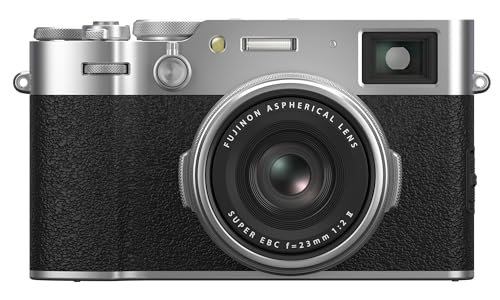
Fujifilm X100VI — Purest Film Experience
The X100VI is less a camera with film simulations than a film camera that happens to record to a card. Its fixed 23mm lens — the classic reportage focal length — removes the zoom dithering that digital abundance encourages, and its simulation dial invites the ritual film shooters remember: choose your stock before you leave the house. Classic Chrome for the overcast city, Nostalgic Neg for sunlit family afternoons, Eterna for the evening that deserves cinema’s restraint. The choice is a commitment, and the commitment is the pleasure.
The grain implementation is the detail rivals still chase. Fujifilm’s grain effect adds size-selectable texture that sits in the image the way silver halide clumps sat in emulsion — visible in midtones, honest in shadows, never the coloured confetti of cheap noise. Paired with the sensor’s high resolution, which gives the grain something fine to live on, the files at normal sizes have a tactile quality that makes people reach out and touch the print. The hybrid viewfinder completes the spell: frame through glass like a rangefinder, or switch to the electronic view and see the simulation exactly as the JPEG will keep it.
Its limits are the honest price of the concept. One lens, one focal length, a queue of admirers that has kept it scarce, and a body that asks to be carried daily rather than deployed professionally. But for the film look as a way of shooting — deliberate, committed, finished at the shutter — nothing else on this page is as coherent. It does not offer the film look as a feature. It is organised around it.
- Simulations: the full Fujifilm library, including Nostalgic Neg and Reala Ace
- Grain: size and strength adjustable, applied with filmic manners
- Lens: fixed 23mm f/2, leaf-quiet and always with you
- Viewfinder: hybrid optical/electronic — frame by glass or by the look itself
- Extras: in-body stabilisation and a built-in ND for bright-day slow work
Strengths
- The most convincing straight-out-of-camera film files in the guide
- Fixed lens discipline produces a coherent, personal archive
- Hybrid finder serves both the romantic and the precise mood
Trade-offs
- One focal length is a philosophy some photographers will chafe against
- Availability has been famously tight since launch
- No zoom means your feet are the telephoto, in weather and in crowds
Best for: daily-carry photographers who want the film ritual and finished JPEGs from a single beloved focal length. Not suited for: shooters who need focal-length range, or professionals billing for maximum flexibility.

Fujifilm X-T5 — Most Flexible Fujifilm
If the X100VI is a vow, the X-T5 is a library. It carries the same simulation stable — the accumulated colour wisdom of Fujifilm’s film century, digitised — and bolts it to an interchangeable-lens body with a high-resolution sensor, proper dials for shutter and exposure compensation, and the weather sealing that lets the look go out in the rain it photographs so beautifully. Every recipe the community writes for Fujifilm’s system, every custom setting bank shooters trade like mixtapes, runs here at full strength.
The resolution changes the film-look equation in an underappreciated way: it lets you crop into the frame the way darkroom printers cropped negatives, and the grain, applied across a denser canvas, reads finer and more photographic. Paired with Fujifilm’s characterful primes — the compact f/2 series that owners call Fujicrons — the X-T5 builds a kit that covers the classic focal lengths with lenses whose own rendering leans gentle at the edges, adding the fourth film habit, a whisper of softness, at the optical level rather than in software.
Choose it over its fixed-lens sibling when your photography has assignments: the wedding that needs a telephoto for the vows, the trip that wants a wide for the cathedral, the portrait session that lives at 56mm. The X-T5 is the film look with its working clothes on — the same soul, employable.
- Simulations: the complete current Fujifilm set, plus deep custom recipe banks
- Sensor: high-resolution APS-C, kind to grain and generous to cropping
- Controls: dedicated dials keep the look adjustable without menus
- Body: weather-sealed for the conditions film looks love
- Video: film simulations carry into respectable movie modes
Strengths
- Full simulation library with a real lens system behind it
- Resolution flatters grain and forgives imperfect framing
- Dials make recipe-driven shooting fast and tactile
Trade-offs
- The recipe rabbit hole can eat the time the shooting should
- APS-C depth of field needs faster glass for the full-frame glow
- Body and lenses together cost more than the fixed-lens romance
Best for: Fujifilm devotees who need the simulation library across real focal lengths and working conditions. Not suited for: minimalists who want one camera, one lens, no decisions.

Panasonic LUMIX S5II — Build Your Own Stock
The S5II answers a question the simulation cameras cannot: what if the film look you want is one nobody’s colour scientists have bottled? Its Real Time LUT system lets you load lookup tables — your own, a colourist’s, a community favourite modelled on a beloved stock — into the camera and shoot stills and video with that look applied, monitored live, and recorded as the finished file. The camera stops being a menu of other people’s tastes and becomes a developing tank for yours.
The full-frame sensor underneath gives the project serious raw material: highlight range that protects the rolloff every film emulation depends on, and low-light manners that keep evening grain photographic rather than electronic. L-mount lenses, including the characterful glass from partners in the alliance, supply the optical softness and flare behaviour that no LUT can synthesise after the fact. And because the same LUT discipline serves its video, the S5II is the pick for the hybrid shooter whose stills and films must match — one stock, both mediums, no translation errors between them.
The honest cost is effort. A simulation is a gift; a LUT library is a garden. You will test, tweak, and occasionally ruin a weekend’s frames with an experimental look you should have previewed. Photographers who enjoy that tinkerer’s loop will find the S5II the most personal camera here. Those who want to be handed the look should take the Fujifilm road and never feel lesser for it.
- Real Time LUT: custom looks loaded, monitored, and baked in-camera
- Sensor: full-frame, with the highlight headroom film emulation feeds on
- Hybrid strength: identical look discipline across stills and video
- Stabilisation: strong in-body system for handheld evening work
- Mount: L-mount alliance lenses, including character glass
Strengths
- Your look, not the manufacturer’s — infinitely extensible
- Full-frame rolloff gives emulations a truthful foundation
- Stills and video share one colour identity
Trade-offs
- Demands the time to build and test a LUT library
- No beloved built-in stock to fall back on at first
- Full-frame kit weight exceeds the APS-C picks
Best for: hybrid shooters and tinkerers who want one personally authored look across stills and film. Not suited for: photographers who want the look chosen for them, beautifully, in advance.

Nikon Z50 II — Recipe Culture Pick
Nikon arrived late to the film-look party and compensated with an idea the others are now eyeing: treat colour looks as a living, downloadable culture. The Z50 II’s Imaging Recipes — Nikon’s own and a growing community shelf — load into the camera as complete colour personalities, many of them openly modelled on film stocks and film-era rendering. Where Fujifilm curates a canon, Nikon hosts a scene, and the scene moves fast: a recipe that catches the mood of a particular discontinued stock can be on your camera the week a stranger perfects it.
The body beneath the culture is a properly sorted APS-C all-rounder — a fine sensor, subject-detection autofocus that keeps faces where the look needs them, and handling that disappears under the photography. Its Flexible Color Picture Control gives the recipes a deep editing bench: hue, contrast curves, and clarity can be tuned in-camera with a granularity that lets a downloaded recipe become your recipe after a Sunday of adjustments. Grain is handled more simply than Fujifilm’s, which is this pick’s honest gap, but the colour work — the first and third film habits — is thoroughly convincing.
Cast it as the film-look camera for the connected generation: shooters who already live in shared presets, who trust a community’s taste as a starting point, and who want a capable modern body whose looks will keep arriving long after the box is recycled.
- Imaging Recipes: downloadable colour personalities, maker and community authored
- Picture Control bench: deep in-camera tuning of hue, tone, and clarity
- Autofocus: modern subject detection keeps the look on the right face
- Video: recipes and a creator-friendly feature set for hybrid diaries
- Size: compact APS-C body that travels like the X-series it rivals
Strengths
- A look library that grows by community effort, free
- Deep in-camera tuning turns downloads into personal stocks
- Modern autofocus and handling underneath the romance
Trade-offs
- Grain treatment is plainer than Fujifilm’s benchmark
- Recipe quality varies — the scene needs curation by you
- The film-look identity is newer and less proven than the leaders’
Best for: socially connected shooters who enjoy discovering and tuning shared looks on a modern body. Not suited for: purists who want one authoritative stock, perfected by the manufacturer.

Sony ZV-E10 II — Easiest Mood, Instantly
Sony’s colour reputation was built on accuracy, which makes the ZV-E10 II’s Creative Looks a quietly subversive pleasure: a row of moods — soft high-key, nostalgic sepia-tinged, vivid film-adjacent palettes — applied with a single selection and tuned, if you like, in contrast, saturation, and sharpness until the mood is yours. For the creator whose photography lives on a feed and whose film look must survive being shot between video takes, this is the lowest-friction route on the page.
The camera’s creator-first design serves the look in practical ways. The product-showcase and background-defocus conveniences matter less here than the simple fact that the live view always shows the finished mood, the touchscreen makes recipe-tweaking a thumb’s work, and the files — stills and video sharing the same Creative Look — arrive consistent across a day’s mixed shooting. Skin rendering in the softer looks is kind in the way film stocks were kind: a gentle contrast curve and forgiving highlights do for faces what a diffusion filter used to.
It will not satisfy the grain connoisseur — texture must be added later or forgone — and its looks are moods rather than stock portraits. But most people asking for a film look want a feeling, not a filmography, and this camera hands them the feeling before the manual is opened.
- Creative Looks: one-tap moods with per-look tuning of the essentials
- Consistency: the same look governs stills and video
- Interface: touchscreen-first, built for speed over ceremony
- Autofocus: Sony’s tracking keeps subjects placed inside the mood
- Size: genuinely pocketable with the compact kit lenses
Strengths
- The fastest path from unboxing to a coherent personal mood
- Stills and video match without any post work
- Forgiving skin rendering in the softer looks
Trade-offs
- No in-camera grain — texture is a post-production errand
- Looks evoke film moods rather than emulating specific stocks
- No viewfinder on a body some photographers will want one on
Best for: creators who want an attractive, consistent mood across photos and clips with zero colour-science homework. Not suited for: grain obsessives and stock-by-stock emulation hunters.

Canon EOS R50 — Gentlest Way In
The R50 is where the film look meets the first-camera buyer, and Canon — whose colour science has flattered more family photographs than any rival — gives the beginner two honest tools: Picture Styles with deep customisation for the methodical, and Creative Filters for the playful, including grainy black-and-white and soft-focus effects that teach the eye what texture and diffusion do to a scene. A new photographer can grow through this camera’s looks the way film students grew through stocks: play first, understand later, keep the frames that taught you something.
Canon’s rendering of skin is the quiet argument underneath. The film stocks being emulated everywhere in this guide were loved, above all, for faces, and the R50’s JPEG engine carries that priority in its DNA — warm, clean, forgiving colour straight from the camera, in the mixed household light where beginners actually shoot. The guided interface explains settings in plain language, so the look controls are discovered rather than buried, and the raw files wait patiently for the day the photographer wants to build looks in an editor instead.
It is the least specialised instrument here — no grain artistry to rival Fujifilm, no LUT loading, no recipe cloud — and that is precisely its recommendation. The film look begins as a taste before it becomes a technique, and the R50 cultivates the taste at the friendliest price of admission on this page.
- Picture Styles: Canon’s flattering colour with full custom slots
- Creative Filters: grainy mono and soft effects that teach by playing
- Skin: the warmest, most forgiving rendering for family photography
- Guidance: an interface that explains itself to genuine beginners
- Growth path: raw capture ready for editor-built looks later
Strengths
- Faces look right immediately, in real household light
- Friendly enough that the look controls actually get used
- The natural first step into Canon’s full system
Trade-offs
- Film emulation is a starting point here, not a speciality
- Fewer community recipes than the Fujifilm and Nikon scenes
- Entry body limits — dials, sealing — appear as skills grow
Best for: first-camera buyers and family photographers who want film-flavoured warmth without a learning cliff. Not suited for: emulation specialists who already know exactly which stock they miss.
Comparison Table
| Pick | Look system | Grain | Best habitat |
|---|---|---|---|
| Fujifilm X100VI | Manufacturer film simulations | Best in class, in-camera | Daily carry, street, travel |
| Fujifilm X-T5 | Simulations plus custom recipes | Best in class, in-camera | Weddings, assignments, trips |
| Panasonic LUMIX S5II | Real Time LUT — your own looks | Via LUT and post | Hybrid stills/film projects |
| Nikon Z50 II | Downloadable Imaging Recipes | Basic in-camera | Community-driven everyday shooting |
| Sony ZV-E10 II | Creative Looks | Post-production only | Creator feeds, mixed stills/video days |
| Canon EOS R50 | Picture Styles and filters | Filter effect for mono | Family photography, first cameras |
Which Mistakes Flatten a Film Look?
The commonest is chasing the look with the wrong lever: cranking a preset’s intensity until the photograph looks processed rather than photographed. Film’s manners were always relative to a scene — the same stock looked gentle at noon and moody at dusk — and a simulation applied at full strength to every frame flattens that responsiveness into a filter’s monotone. Learn one look at moderate settings and let the light do the varying; a stock is a personality, not a paint.
The second mistake is mixing looks inside one story. A wedding album that wanders between three simulations reads as three weddings. Film photographers carried one stock per event for practical reasons and bequeathed us the aesthetic benefit: coherence. Pick the look per project, not per frame, and let the outtakes that break the rule stay outtakes.
Third, neglecting exposure because the look feels forgiving. Rolloff is generous, not infinite, and grain settings cannot rescue a face exposed two stops under and dragged back. The film era’s discipline — meter for the skin, let the highlights land where the curve puts them — is the cheapest upgrade available to any camera in this guide. And a fourth, modern mistake: judging the look on a phone at full brightness in a bright room. Print a few frames, or at least view them in the dim conditions photographs are actually lived with, before declaring a simulation too flat or too strong.
How Do You Choose One Stock and Actually Learn It?
Spend a month with a single simulation the way a film photographer spent a season with a single emulsion. Shoot it in the rain and at the beach, on your family and on strangers’ architecture, at dawn and under the kitchen’s worst bulb. By the end of the month you will know — in your hands, not from a forum — where its rolloff gives up, which colours it flatters, and how its grain behaves at the sizes you print. That knowledge is the real film look, and no camera menu sells it; the menu only sells the stock, and the learning is the photographer’s part of the bargain.
Keep a small notebook of settings and light, unfashionable as that sounds. Film shooters wrote on film-box ends for a century because memory lies about exposure. Three lines per outing — the look, the grain setting, the light — turns a month of wandering into an education, and turns the camera’s custom banks from a museum of other people’s recipes into your own short shelf of stocks you genuinely command.
Final Recommendation
Choose by how you want the look to enter your life. If you want it as a daily discipline — chosen in the morning, trusted all day, finished at the shutter — the Fujifilm X100VI is the purest instrument we have tested, and the X-T5 is its answer when the work demands lenses. If you want the look to be your own composition, the Panasonic S5II’s LUT bench and full-frame foundation reward the effort like nothing else here. The Nikon Z50 II suits the photographer who treats looks as a living library, the Sony ZV-E10 II serves the creator who needs the mood by lunchtime, and the Canon R50 remains the kindest first door into the whole idea.
Whichever body you choose, honour the bargain the film era made with its photographers: pick a stock, learn it in real light, and let finished photographs — not settings menus — be the hobby. The look was never really in the camera. It is in the habit of deciding, before the shutter, what the photograph is for — and the right camera is simply the one that makes that decision feel like a pleasure again.
How Does Digital Grain Differ From Real Film Grain?
Film grain is the photograph’s physical substance made visible: clumps of developed silver or dye clouds, distributed by chemistry, finer in bright areas where exposure was plentiful and more assertive in the shadows where the emulsion was starved. Digital grain effects imitate that distribution with noise shaped to mimic it — luminance texture that swells in the midtones and shadows and stays out of the highlights. The better implementations, Fujifilm’s foremost among them, also vary the texture’s apparent size, because real grain has a scale that interacts with the image’s own detail: fine grain on a portrait setting, coarse grain on a pushed-stock setting, each with its own mood.
Where digital grain still betrays itself is uniformity. Real grain is clumpy and chaotic at the microscopic level; a digital effect laid evenly across a flat sky can look like a screen placed over the photograph rather than a texture inside it. The working defences are simple: choose the larger grain size at higher strengths so the texture reads as structure, avoid heavy grain on images dominated by empty sky or studio backdrops, and judge the result at the size the photograph will actually be seen. At print sizes and screen sizes, the best of these engines pass the only test that matters — viewers respond to the photograph, not to the effect.
There is a subtler benefit nobody puts on the box. Grain forgives. It softens the transition where a JPEG’s compression would band, it takes the clinical edge off a very sharp lens, and it unifies frames from different cameras in one album the way a common stock unified a film photographer’s mixed bodies. Many photographers who began adding grain for nostalgia keep adding it for this peacekeeping work long after the nostalgia fades.
What About Black and White — Is a Monochrome Look Easier or Harder?
Monochrome is the film look’s sternest examination, because colour can no longer flatter a weak tonal curve. A great black-and-white simulation must decide how each colour becomes a grey — the panchromatic decisions the old stocks encoded in their sensitivity — and must carry texture without the distraction of hue. Fujifilm’s Acros, modelled with a distinctive grain structure that tightens at high sensitivity, is the benchmark the others are measured against, and it is a genuine argument for the Fujifilm picks if your heart is in monochrome. The in-camera filter simulations — the yellow, orange, red, and green filters of the darkroom era — teach the tonal craft directly: watch a red filter darken a sky and lighten lips in the live view and you have learned in an afternoon what film students learned in a term.
The discipline monochrome demands is exposure honesty. Colour can hide a stop of error inside a pleasant palette; grey cannot. Photographers who take the monochrome route on any camera in this guide should shoot with the histogram closer to their heart than the preview’s mood, and should print early and often, because monochrome lives or dies on paper. A frame that glows on a backlit screen can sit dead in a print, and the film era’s masters were print judges above all.
If monochrome is your primary country rather than a holiday, weight your choice toward the bodies with the deepest monochrome tooling and the grain engines to match — and consider that the fixed-lens X100VI, with its leaf shutter silence and rangefinder manners, is the closest digital relative the classic monochrome reportage cameras have.
How Do You Print a Digital Film Look Without Losing It?
The print is where the film look completes its impersonation, because paper has its own rolloff and texture that conspire kindly with grain and soft highlights. Matte and baryta-style papers flatter the look most: their surfaces scatter light the way the era’s prints did, deepening shadow texture and taking the last digital shine off the highlights. Glossy paper, by contrast, can make a simulation look like what it is — a digital file with an effect — by restoring the clinical contrast the look was designed to escape.
Two practical rules protect the illusion. First, print at the size the grain was set for: a frame grained for a hand-held print will look crunchy across a wall, so for large prints choose finer grain settings or re-render from the raw with the print size in mind. Second, soften nothing in the print pipeline. The simulation’s micro-contrast decisions are the look; an enthusiastic sharpening pass in the print driver will etch them away. Send the file to paper as the camera finished it, and let the paper do the last, oldest part of the work.
Keep a small reference set: the same three frames printed on every paper you try. Within a month you will have a paper wardrobe matched to your stocks — one for the chrome-bright travel work, one for the soft portrait look — and your digital film practice will have acquired the final habit of the analog one, which is thinking about the photograph’s physical destination before the shutter, not after it.
Which Settings Should You Change First on Any of These Cameras?
Begin with the tone curve’s two quiet levers, highlight tone and shadow tone, because they steer the rolloff that defines the whole enterprise. Most film-look photographers soften highlights by a step or two and lift or deepen shadows according to the stock they are honouring — portrait looks lift them toward that airy, forgiving floor, while the chrome-style looks let shadows fall to a richer floor. Change one lever at a time and shoot the same doorway at the same hour for a week; the doorway will teach you faster than any tutorial, because its light repeats while your settings vary.
Next, set sharpening down and clarity down with it. Digital defaults are tuned to impress at one hundred percent magnification, which is precisely the viewing distance the film look exists to abolish. A simulation with its sharpening softened lets edges behave the way lenses and emulsion let them behave — resolved, present, unetched. Noise reduction deserves the same suspicion: at the high sensitivities where grain settings live, an aggressive noise-reduction default will smear the very texture you asked the camera to add, so photographers who shoot grain often lower luminance noise reduction and let the grain engine be the only texture in charge.
Finally, assign the look to a physical control if your body allows it — a custom bank, a dial position, a function button. The film era’s great ergonomic lesson was that the stock choice happened before the camera reached the eye. Every menu dive between intention and frame leaks photographs; the photographers who live in a look are the ones whose cameras wake up already wearing it.
What Role Does the Lens Play in a Convincing Film Look?
More than the forums admit and less than the collectors claim. A lens contributes three things a simulation cannot fully synthesise: flare behaviour when light enters the frame, the softening of edges and corners at wide apertures, and the rendering of out-of-focus highlights — the discs and swirls that audiences read, without knowing why, as cinema. Older and character-first lenses supply these generously, which is why adapted vintage glass has become the film-look shooter’s open secret: a forty-year-old prime on a modern body gives genuine halation and honest imperfections that no grain slider can counterfeit.
The counterweight is discipline. Character wide open becomes mere softness stopped carelessly, and a lens whose flare floods every backlit frame will impose one mood on photographs that wanted several. The practical wardrobe most photographers settle on pairs one modern, well-behaved prime for the dependable work with one character lens for the frames that ask for weather in the glass. Both Fujifilm’s compact primes and the L-mount alliance’s growing shelf support that two-lens logic, and the fixed lens of the X100VI is itself a considered answer — a modern lens tuned gentle, chosen by the same people who tuned the simulations behind it.
Judge a lens for this work the way you judge the simulations: on skin, against the light, at the aperture you will actually use at dusk. The lens that flatters those three tests will serve the look for a decade, whatever its test-chart numbers say.
How Does Shooting a Film Look Change an Ordinary Day of Photography?
It slows the first ten minutes and speeds up everything after. Because the look is chosen in advance and visible in the finder, the photographer stops auditioning exposures against a neutral preview and starts reading light the way the stock will read it — noticing that the café window will blow out gently rather than harshly, that the subject’s coat is the exact green the simulation deepens, that the shadow under the awning has the blue the chrome looks were born for. Photographers consistently report shooting fewer frames and keeping more of them, not from any imposed rationing but because the preview’s honesty makes weak frames recognisable before the shutter rather than after it.
The archive changes character too. A year shot in one or two stocks coheres: birthdays, trips, and Tuesdays share a colour climate, and the family book assembled from them feels authored rather than accumulated. This is the benefit nobody lists in a specification table and the one owners mention most after a year — the film look, sustained, turns a camera roll back into an album. It is also why the choice of camera matters beyond any single frame’s quality: you are not buying an effect, you are hiring the colourist your next several years of memories will be graded by.
There is a social effect worth naming. Subjects relax in front of these cameras. The rangefinder-styled bodies look like the cameras in family photographs rather than the apparatus of a production, and the instant, finished preview — shown on the rear screen to a subject who asks — carries the warmth of the Polaroid ritual: the photograph exists now, it flatters, and the sitting becomes a collaboration instead of an extraction. Wedding and family photographers, who trade in exactly that relaxation, noticed long before the rest of the market did.
Can a Film Look Survive Social Media Compression?
Mostly, and the survivors share a trait: their looks rest on tone and colour rather than on fine texture alone. Platform compression attacks exactly the high-frequency detail that grain is made of, smearing delicate grain into a faint haze at small sizes. The working countermeasures are unglamorous — export at the platform’s favoured dimensions rather than letting it rescale a huge file, choose the coarser grain size when the destination is a phone feed, and accept that the print, not the post, is where the full texture lives. Photographers who publish the same work in both places often keep two exports: the honest grain for print and the slightly bolder one for the feed.
The encouraging news is that the look’s other three habits — rolloff, colour crosstalk, and gentle edges — compress beautifully, because they are broad tonal decisions rather than fine detail. A well-simulated frame reads as film on a phone at arm’s length even after the platform has had its way with the file, which is why the aesthetic has flourished precisely in the compressed era rather than despite it.
Related guides
- Best Digital Cameras for Shooting on Sunny Days: Six Cameras That Beat Glare, Heat and Harsh Light
- Best Digital Cameras for Videography: Six Production Bodies From Weddings to Pocket Gimbals
Frequently Asked Questions
Can any digital camera produce a film look with presets in an editor?
Mostly, yes — the four habits of rolloff, grain, colour shift, and softness can all be imitated in post, and a good preset on a good raw file gets close. What the cameras in this guide add is the experience and the consistency: the look visible while you shoot, applied identically to every frame without an editing session, and rendered by colour scientists working from the original stocks. If your volume is low and your patience high, post alone may serve. If you shoot daily life by the hundred frames, in-camera wins on time alone.
Is the film look just a filter for people who never shot film?
No — it is a set of rendering decisions with a century of portraiture behind them. The simulations honoured here descend from stocks that professionals chose deliberately for how they treated skin, sky, and highlight. Plenty of working film photographers shoot these digital bodies as their daily cameras precisely because the rendering respects what they know. Nostalgia may bring people to the door; colour science is what keeps them in the room.
Does grain in-camera damage the file for later editing?
It commits the JPEG, which is the point, but it need not commit you: shoot raw plus JPEG and the untouched raw remains your negative for any frame you later want to reinterpret. The grain itself, at the moderate settings most photographers settle on, survives normal printing sizes gracefully. The discipline is to set grain for the print you imagine, not for the pixel-peeped crop you will never make.
Which film look suits weddings and family work best?
The softer, warmer simulations — the ones modelled on portrait stocks — flatter mixed skin tones and forgive reception-hall lighting, which is why the Fujifilm pair and the Canon R50 dominate working photographers’ bags for this work. Shoot one look for the whole event, expose for faces, and keep raw backups of the ceremony itself. The coherence of a single stock across an album is worth more than any individual frame’s cleverness.
Do I need a special lens for a film look?
You need a lens whose rendering does not fight the simulation: fast primes with gentle wide-open manners flatter the look, and older adapted glass can add genuine halation and corner softness that software only imitates. But the look is primarily colour and tone — a modern kit zoom under a well-chosen simulation will read as film to every viewer who is not actively hunting for the lens’s signature. Buy the body for its colour first; let the lens romance develop at its own pace.
Should beginners learn photography on a film-look camera, or a neutral one?
Learn on the camera that makes you shoot every day, and for many beginners that is the one whose pictures already please them. The neutral-camera argument — master accurate colour first, stylise later — sounds principled but ignores how people actually persist at a craft: early delight funds later discipline. The safety net is the raw file. A beginner shooting raw plus a simulation JPEG gets the motivating finished picture today and keeps the neutral negative for the day their education wants to revisit it. That is not a shortcut around learning; it is the order in which learning survives contact with real life.
Related Guides
Photographers building the rest of a film-flavoured kit should see our best cameras for low light photography for the bodies that keep the mood after dark, and the best digital cameras for landscape pictures for colour that serves mountains as faithfully as faces. If the look has pulled you toward moving images, the best digital cameras for filmmaking covers the same colour discipline at twenty-four frames per second.


