kajuandouglas.com is reader-supported. When you buy through links on our site, we may earn an affiliate commission.
Where to Buy
The best digital cameras for videography are not stills cameras that happen to record; they are cameras whose entire design has been bent toward moving images — toward the take that runs for twenty minutes without overheating, the autofocus that breathes a face into focus without hunting, the stabilisation that turns a walking shot into a glide, and the colour science that lets two shooting days cut together as one. Videography is a marathon discipline disguised as a sprint specification, and this guide ranks its cameras accordingly.
The audience here spans the working spectrum: the wedding filmmaker shooting a twelve-hour day, the documentary maker interviewing in available light, the commercial creator whose client work must look expensive, the serious hobbyist whose travel films have outgrown a phone. What unites them is that video punishes weaknesses stills photography forgives. A stills camera can hide a mediocre screen, a fussy menu, a battery that fades — it needs one good sixtieth of a second at a time. The video camera must sustain everything, perfectly, for the length of a speech, a ceremony, a take.
So the criteria in this guide are the unglamorous ones that decide real shoots: recording endurance and thermal composure, autofocus that can be trusted with an unrepeatable moment, stabilisation for the handheld reality of most production, audio pathways that respect the fact that audiences forgive soft pictures sooner than bad sound, and files that give the edit room to grade, match, and rescue. Resolution headlines appear, but in their proper place — as servants of those five masters.
Key Takeaways
- The Panasonic LUMIX S5II is the videographer’s benchmark — endurance, stabilisation, and filmmaker-first design in one body.
- The Sony Alpha 7 IV is the hybrid professional’s choice, with autofocus trust and a lens bench for every production.
- The Canon EOS R6 Mark II brings beautiful colour and speed to weddings and events where moments cannot be repeated.
- The Fujifilm X-T5 offers filmic colour and a photographer’s soul for creators who grade their footage like stills.
- The Sony ZV-E10 II is the compact production starter — interchangeable lenses and creator tools at an accessible scale.
- The DJI Osmo Pocket 3 is the gimbal in your pocket, stabilising walking shots no handheld body can match.
Notice what the list refuses: no pick here is a stills champion moonlighting. Every camera below was chosen because a working videographer could build a practice on it, and the reviews are explicit about which production each one owns — and which production would expose it by lunchtime.
In this guide
Quick Picks
| Badge | Pick | Why it stands out |
|---|---|---|
| Videographer’s Benchmark | Panasonic LUMIX S5II | Cool-running endurance and class-leading stabilisation for long takes. |
| Hybrid Professional | Sony Alpha 7 IV | Autofocus you can trust with a vow, a speech, and a first look. |
| Wedding Colour Artist | Canon EOS R6 Mark II | Beloved skin tones and speed for unrepeatable event coverage. |
| Filmic Creator’s Body | Fujifilm X-T5 | Film-inspired colour and dial-driven shooting for graded footage. |
| Compact Production Starter | Sony ZV-E10 II | Interchangeable lenses and creator polish in a small, keen body. |
| Gimbal in a Pocket | DJI Osmo Pocket 3 | Mechanical stabilisation that turns walking into gliding. |
The spread runs from a pocket gimbal to full-frame production bodies because videography itself has stretched to cover that range — the solo creator’s walking tour and the two-camera wedding are the same craft at different scales of consequence. The reviews that follow keep the scales separate and honest.
How We Chose These Picks
Testing imitated production rather than reviewing it. Each candidate shot a full mock wedding day — preparations in a bright flat, a ceremony in mixed light, speeches in a dim hall, dancing in near darkness — plus an interview setup, a walking city sequence, and a product demonstration. Recording ran long on purpose: ceremonies and speeches are where thermal limits and battery truths announce themselves, and several fashionable cameras revealed, at minute forty of a simulated take, opinions about heat that their specification sheets had kept private.
Autofocus was graded on faces in motion — a bride turning, a speaker swaying, a child crossing the frame — because video focus failure is not a soft frame but a ruined, unrepeatable ten seconds. We watched for hunting, for the tell-tale pulse as a system re-decides, and for how gracefully each camera transfers focus between subjects when the director’s tap or the subject detection hands the moment over. Trust is the product here; a videographer who must babysit focus cannot watch the story.
Stabilisation was walked, literally: the same route through a market and down a flight of stairs with every camera, handheld, at a working pace. Audio was treated as a first-class citizen — each body’s microphone inputs, monitoring options, and handling of an external recorder were assessed, because professional videography is half sound and the camera is the sound department’s front door.
Finally, the files went to the edit. Colourists’ questions were asked of them: can two cameras’ footage intercut, does the grade hold when the exposure is lifted, do the skin tones survive a long day of mixed lighting? A camera whose files fight the edit taxes every production forever; the six below were chosen partly for how politely their footage behaves at midnight in the edit suite.
Why Does Video Punish Cameras That Stills Forgive?
Duration is the first answer. A sensor and processor loafing through individual frames must, for video, work at full stretch continuously — reading, processing, compressing, writing — and the heat that work generates has nowhere to go in a sealed body. Hence the defining videography question that stills photographers never ask: not “how good is the image?” but “how good is the image at minute ninety, in a warm room, on the third battery?” The picks here were ranked by their answers at minute ninety.
Continuity is the second answer. A stills photographer chooses the best frame from twenty; the videographer must defend every frame of a twenty-second take, including the focus transitions, the exposure’s response to a cloud, and the stabilisation’s behaviour on the stair. Video exposes systems rather than moments — the whole chain of sensor, focus, colour, and sound performing together, in public, without an edit to hide behind until later.
And consequence is the third. Much professional videography is unrepeatable by definition: the vow, the verdict, the product launch, the grandmother’s speech. A camera for this craft is therefore bought the way pilots buy instruments — for the behaviour on the bad day, not the brochure day. Every review below returns, deliberately, to that standard.
What Does a Videographer Actually Watch While Recording?
Not the picture, primarily — the picture is being made by preparation. The working videographer’s attention cycles through a quiet checklist: the audio meters, because sound fails silently and forever; the focus confirmation, a glance at whether the system’s confidence matches the subject’s eyes; the recording indicators and remaining media, because a card filling mid-vow is a career story told at other people’s weddings; and the frame’s edges, where boom shadows, stray cables, and wandering guests enter uninvited.
This is why the ergonomics of monitoring matter so much in the rankings. A screen that shows audio levels, focus aids, and recording status legibly — in sunlight, at arm’s length, at a glance — is not a convenience but the instrument panel of the whole production. The S5II’s filmmaker-first interface and the Sonys’ customisable displays earned their marks here, while cameras that bury the meters behind menus were marked down regardless of their sensors.
Headphone monitoring deserves its own sentence, because it separates productions from gambles. The videographer who hears the take as it records catches the air-conditioning hum, the rustling lavalier, the refrigerator that starts mid-interview — while there is still time to fix them. Bodies that treat monitoring as an afterthought transfer that risk to the edit, where it becomes permanent. Every pick in this guide respects the ears as much as the eyes.

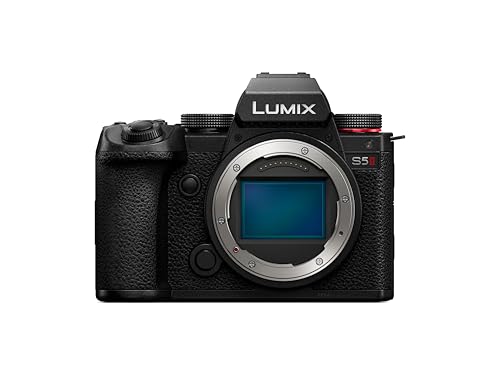
Panasonic LUMIX S5II — Videographer’s Benchmark
The S5II is what happens when a manufacturer asks working videographers what they need and then believes the answers. Its defining virtue is endurance with composure: active cooling lets it record long takes in warm rooms without the thermal anxiety that haunts sleeker rivals, which for a wedding or documentary shooter converts directly into confidence — the ceremony will be captured, whole, at the chosen quality, and the camera will not become the story of the day.
Its stabilisation writes the second paragraph. Panasonic’s in-body system, refined over generations of video-first bodies, smooths handheld work to a degree that changes production economics: the walking interview, the preparations captured in a flowing orbit, the reception filmed without a gimbal’s footprint in a crowded room. Add a filmmaker’s interface — monitoring tools surfaced rather than buried, audio taken seriously, colour profiles that grade with real depth — and the S5II becomes the body around which small production companies standardise.
The honest costs are ecosystem and emphasis. The L-mount lens bench, while growing and shared across makers, is younger than Sony’s or Canon’s at the exotic end, and stills-first photographers will find bodies elsewhere that flatter their priorities. For videography — the actual subject of this guide — the S5II is the benchmark against which the others are measured, and several of them know it.
- Cooling: active thermal management for long, warm takes
- Stabilisation: class-leading in-body smoothing for handheld work
- Interface: monitoring and audio tools surfaced for production
- Files: grading depth that rewards a colourist’s attention
- Build: a working body designed to live on rigs and tripods
Strengths
- Records the whole ceremony without thermal negotiation
- Handheld footage smooth enough to skip the gimbal often
- Filmmaker-first details throughout the interface
Trade-offs
- Lens bench younger than Sony’s or Canon’s at exotic lengths
- Stills photographers may prefer rivals’ emphasis
- Serious production features demand a learning investment
Best for: wedding and documentary professionals, small production teams. Not suited for: casual video or stills-first buyers.

Sony Alpha 7 IV — Hybrid Professional
The Alpha 7 IV’s videography case rests on a single word: trust. Its autofocus — eye detection that finds the speaker’s eye and keeps it through turns, gestures, and crossing guests — lets a solo shooter run a two-camera interview or a ceremony with the confidence that the A-camera’s focus is a solved problem. In unrepeatable work, that trust is worth more than any resolution figure, and it is why so many working hybrid shooters standardised on this body.
Looked at from the production-system angle, the Sony’s lens bench completes the argument. Every focal length a videographer dreams about exists natively, at every price stair, with third-party makers crowding in — and lenses are where video kits actually live, since bodies rotate every few years while glass serves for a decade. The files grade consistently, the colour matches across Sony’s wider creator ecosystem for multi-camera productions, and the body’s hybrid excellence means the same camera covers the client’s photography requests without a second system in the bag.
The debits are thermal and tactile. Long takes at the highest quality settings in hot conditions ask more of this body than of the actively cooled Panasonic, and the menu system rewards the owner who invests an evening in customisation. Professionals make both trades knowingly; the A7 IV remains the hybrid default for a reason.
- Focus: eye-tracking trusted with unrepeatable moments
- Lenses: the deepest native bench for video production
- Colour: consistency across Sony’s multi-camera ecosystem
- Hybrid: stills excellence riding in the same body
- Audio: proper inputs and monitoring for production sound
Strengths
- Autofocus that frees the shooter to watch the story
- A lens for every production, at every budget stair
- One body for the client’s video and photography alike
Trade-offs
- Thermal limits trail the cooled Panasonic on long hot takes
- Menus require setup time to become fast
- Rolling shutter asks care with fast pans
Best for: hybrid professionals, interview and event producers, Sony-system builders. Not suited for: marathon recording in hot rooms as a daily diet.

Canon EOS R6 Mark II — Wedding Colour Artist
Ask wedding filmmakers why they shoot Canon and the answer arrives before the question finishes: the colour. Skin — in church light, in marquee light, in the blue hour’s last glow — renders from the R6 Mark II with a warmth and forgiveness that reduces grading hours and flatters every face the day contains. For a craft whose entire product is people looking their best on the most scrutinised day of their lives, that rendering is not a preference; it is a business model.
Beyond colour, the body brings an event professional’s toolkit: autofocus that tracks a couple through a confetti storm, stabilisation that steadies the handheld preparations, and a burst-capable stills side for the photographer-videographer hybrids who deliver both crafts from one bag. Its low-light files hold the evening reception together — first dance under practical lights, speeches in a wood-panelled gloom — with a cleanliness that lets the filmmaker stay invisible rather than lighting the room into a studio.
The watch-items are recording stamina at the most demanding settings and a resolution ceiling that spec-sheet rivals exceed. Wedding filmmakers, who deliver emotion rather than pixel counts, have voted on those trade-offs with their wallets for years. For event videography with people at its centre, this remains the colour artist’s instrument.
- Colour: skin rendering that weddings are built on
- Focus: subject tracking through confetti and crowds
- Low light: clean files for receptions and evening venues
- Stabilisation: steady handheld coverage of preparations
- Hybrid: professional stills for dual-craft deliverables
Strengths
- Faces look the way the day felt — its defining gift
- Event-proof autofocus and low-light composure
- One body for the film and the photography package
Trade-offs
- Longest, hottest takes belong to the cooled Panasonic
- Resolution trails spec-led rivals for heavy cropping
- Professional RF video glass is a serious investment
Best for: wedding and event filmmakers, people-centred commercial work. Not suited for: all-day continuous recording in hot venues.

Fujifilm X-T5 — Filmic Creator’s Body
The X-T5 approaches videography from the colourist’s chair. Fujifilm’s film simulations — colour philosophies refined from a century of emulsion — give footage a finished, filmic character straight from the camera, and creators whose aesthetic is their brand shoot entire channels on that rendering. For the videographer who grades like a photographer, who thinks of a video frame as a still that happens to move, no other body in this guide speaks the language as fluently.
Its working personality is dial-driven deliberation. Shutter and exposure sit on physical controls; the tilting screen suits the tripod-and-gimbal workflow of considered shots; the high-resolution sensor gives editors reframing room that narrative and commercial work quietly exploits. Travel filmmakers and essayists, whose shooting ratios are low and whose every frame is composed, find in the X-T5 a body that rewards their patience with footage of unusual beauty.
The limits are production-practical rather than artistic. Autofocus, while capable, does not carry the unrepeatable-moment trust of the Sony; long-form recording is not its native habitat; and the APS-C format asks more of available light than the full-frame picks. Deployed as an aesthetic instrument rather than an event workhorse, it produces the most recognisable footage in this guide.
- Colour: film simulations with a finished, filmic signature
- Controls: physical dials for deliberate, composed shooting
- Resolution: reframing room for narrative and commercial edits
- Screen: tilting design for tripod and gimbal work
- Character: a photographer’s body that happens to film beautifully
Strengths
- Footage with an identity clients and audiences recognise
- Rewards composed, deliberate production styles
- Stills excellence for the hybrid essayist
Trade-offs
- Event autofocus trust trails the Sony and Canon
- Not built for marathon continuous recording
- Low light concedes ground to full-frame bodies
Best for: travel filmmakers, essayists, aesthetic-led commercial creators. Not suited for: weddings and unrepeatable live events as a sole camera.

Sony ZV-E10 II — Compact Production Starter
Every production career starts somewhere, and the ZV-E10 II is engineered to be that somewhere without embarrassment. It packages Sony’s creator thinking — dependable face and eye focus, a flip screen that faces the presenter, product-showcase manners for the review channel — into a compact interchangeable-lens body whose price leaves budget for the microphone and lights that will improve a beginner’s footage more than any body upgrade.
Its production logic is the upgrade path. The E-mount lens fitted for a first client job serves on the Alpha bodies the career grows into; the colour language matches the professional Sony ecosystem, so the starter’s B-camera footage intercuts with a future A-camera’s; the skills learned on its menus transfer upward. Studios buy it as the locked-off second angle; solo creators buy it as the first serious instrument. Both are buying into a system rather than a gadget.
The compromises are the starter’s usual ones — no viewfinder, thermal and weather limits that professional bodies outgrow, stabilisation that asks for a gimbal or a tripod’s help on moving shots. Within its station, it is not a cut-down camera but a correctly sized one, and this guide recommends it to beginners with more confidence than any rival at its scale.
- Focus: creator-grade face and eye detection
- System: E-mount lenses that serve a whole career
- Screen: flip design for presenters and product work
- Size: compact enough for a one-bag production kit
- Value: budget left over for audio and lighting
Strengths
- The correct first body for a Sony-system career
- Professional colour language at a starter’s scale
- B-camera manners for growing production teams
Trade-offs
- No viewfinder for bright-location monitoring
- Moving shots want a gimbal’s assistance
- Weather and thermal limits are starter-class
Best for: beginning professionals, creator channels, studio B-camera duty. Not suited for: harsh locations or marathon event recording.

DJI Osmo Pocket 3 — Gimbal in a Pocket
The Osmo Pocket 3 performs one trick so well that it has become a standard item in professional bags: it stabilises. A true mechanical gimbal, miniaturised into a wand that fits a jacket pocket, turns walking footage — the establishing prowl through a venue, the property tour, the travel film’s connective tissue — into smooth, floating movement that no in-body stabilisation fully imitates. Videographers who once hired a gimbal operator for such shots now reach into a pocket.
Its intelligence serves the solo shooter specifically. Subject tracking keeps a presenter centred during a walking piece to camera; the rotating screen flips between horizontal production and vertical delivery; the low-light performance from its generous sensor surprises everyone who files it under “gadget.” Travel filmmakers build entire films on it, wedding shooters keep it for the dance floor’s energy, and commercial teams use it for the shots a full rig cannot reach — through doorways, over tables, inside the product itself.
The boundaries are physical and professional: a fixed wide lens, a battery sealed into the body, audio that wants the wireless microphone companion for serious work, and a fragility — gimbals are precision instruments — that asks for its case. As the second or third camera of a production, it has no rival in this guide; as a philosophy, it argues that the best videography tool is sometimes the one that removes the tripod from the equation entirely.
- Stabilisation: true mechanical gimbal in a pocket wand
- Tracking: subject lock for walking pieces to camera
- Screen: rotating design for horizontal and vertical delivery
- Sensor: low-light ability beyond its gadget appearance
- Role: the production’s reach-anywhere second camera
Strengths
- Walking footage no handheld body can match
- Deploys in seconds — the shot is never missed
- Solo creators gain an invisible camera operator
Trade-offs
- Fixed wide lens limits composition choices
- Sealed battery demands a charging rhythm
- Gimbal mechanics ask for case-kept care
Best for: travel films, property tours, wedding B-roll, solo creators. Not suited for: primary coverage of formal events or telephoto work.
Comparison Table
| Pick | Production home | Signature strength | Watch-item |
|---|---|---|---|
| Panasonic LUMIX S5II | Weddings, documentaries | Endurance plus stabilisation | Younger lens bench |
| Sony Alpha 7 IV | Hybrid professional work | Autofocus trust, lens depth | Heat on longest takes |
| Canon EOS R6 Mark II | Events and weddings | Skin colour, low light | Recording stamina at extremes |
| Fujifilm X-T5 | Essays and travel films | Filmic colour identity | Event autofocus trust |
| Sony ZV-E10 II | Creator productions | System entry, creator tools | Needs support for movement |
| DJI Osmo Pocket 3 | Movement and B-roll | Mechanical gimbal glide | Fixed lens, sealed battery |
Which Mistakes Do New Videographers Make With Good Cameras?
The first is recording the picture and neglecting the sound — filming a beautiful interview against a refrigerator’s hum, with the microphone still the one built into the camera across the room. Audiences abandon bad audio in seconds and forgive soft focus for minutes; the professional’s budget order — microphone, then light, then lens, then body — exists because of that asymmetry. The second mistake is trusting autofocus without rehearsing it: every system in this guide has a personality, and the ceremony is the wrong place to learn that yours prefers the best man’s face to the bride’s.
The third error is shooting everything handheld because stabilisation exists. Stabilisation forgives shake; it does not create intention. The tripod shot, the locked frame, the deliberate pan — these remain the grammar of professional footage, and the cameras here were chosen partly for how gracefully they work on support. The fourth mistake is ignoring the second angle: a single camera at an unrepeatable event is a single point of failure and a single, monotonous perspective. Even the modest ZV-E10 II as a locked-off wide transforms both the risk and the edit.
The fifth is under-lighting and over-grading — starving the sensor on the day, then demanding miracles at midnight. Every file in this guide grades better when it was fed light generously at capture. Buy the lamp before the lens upgrade; the footage will testify.
How Should a Solo Shooter Run a Two-Camera Event?
With choreography decided in advance. The A-camera — the S5II, A7 IV, or R6 Mark II — stays in the shooter’s hands for the narrative coverage: faces, reactions, the moving story. The B-camera, very often the ZV-E10 II or a second body, locks off on a tripod for the unmissable wide: the ceremony’s full frame, the speech’s safety shot, the angle that guarantees the edit always has somewhere to cut. Audio is recorded redundantly — a recorder at the lectern, a lavalier on the key speaker, the cameras’ own tracks as backup — because sound is the element that cannot be faked in post.
Synchronisation is the unglamorous hinge: a clap, a flash, a shared timecode habit — something at the start of each segment that lets the edit align the angles in seconds rather than minutes. Colour matching is prepared the same way, with both cameras set to compatible profiles and a grey card filmed at each new lighting setup. These rituals sound like overhead until the first time they save a wedding film, after which they are simply called professionalism.
The solo shooter also plans their own stamina as equipment. Batteries rotate on a schedule, cards are swapped at natural breaks rather than at capacity, and the kit bag lives in one known place. An event is a long performance by the person behind the cameras as much as by the people in front of them, and the bodies in this guide were chosen to reduce the operator’s load — reliable focus, honest monitoring, endurance — so that attention can stay where it belongs: on the story unfolding once, and only once.
Final Recommendation
Working videographers building a practice should start from the Panasonic LUMIX S5II — its endurance, stabilisation, and filmmaker-first design make it the safest professional foundation in this guide. Hybrid shooters who deliver stills alongside film, and who value autofocus trust above all, should take the Alpha 7 IV; wedding specialists seduced by colour should take the R6 Mark II and never apologise. The X-T5 is the aesthete’s instrument, the ZV-E10 II the correct first step into a system, and the Osmo Pocket 3 the second camera every one of the other five’s owners should also carry.
Whichever body anchors the kit, spend the next increment on sound, then light, then glass — in that order — and rehearse the unrepeatable before it happens. Videography rewards the prepared with a cruelty and generosity no other photographic craft matches, and every camera here is ready when its owner is.
What Does the Edit Suite Ask of the Camera?
Editors are the camera’s second customers, and their requests are specific: files that hold a grade without banding in the sky, skin that can be matched across two bodies and two hours, highlight roll-off that forgives a bright window behind a speaker, and metadata honest enough to organise a thousand clips. The full-frame picks earn their prices substantially in this room — the S5II’s and A7 IV’s footage accepts a colourist’s ambition, while the starter bodies produce honest files that grade kindly within their limits.
Consistency is the edit’s deepest need. A camera whose colour wanders with the light, whose exposure breathes, whose white balance improvises, multiplies the matching work on every cut. This is why professionals lock settings the way the stop-motion animators in our companion guide lock theirs, and why the bodies here were tested across a full day’s changing light rather than a single flattering hour. The footage that cuts together is the footage that gets used; the rest is expensive archive.
Plan the edit before the shoot and the camera choices clarify themselves: delivery resolution decides how much reframing the files must survive, the platform decides the aspect and the vertical second version, and the colour pipeline decides the profiles both cameras must share. Videography is the only photographic craft where the last room determines the first purchase — and the six bodies above were chosen to satisfy that last room.
How Does Lighting Change When the Picture Moves?
Stills photographers light a moment; videographers light a duration, and the difference reorganises everything. A subject who walks through the frame crosses the light, so the lighting must be designed as a landscape to travel through rather than a portrait’s single perfect angle. Practical lamps in the scene — the table lamp, the shop window, the string lights at the reception — become collaborators rather than contamination, and the cameras with the cleanest high-sensitivity files, the R6 Mark II and S5II among them, let a filmmaker build with those practicals instead of fighting them.
Continuity across takes is lighting’s second video discipline. The interview filmed before lunch must match the insert filmed after, so professionals note lamp positions, dimmer levels, and the sun’s betrayals with the same notebook rigour the animators use. Daylight is the great saboteur: a morning’s cool window light is an afternoon’s warm shaft, and productions either schedule around the change, curtain it out, or embrace it as the scene’s own time passing. The camera’s contribution is a fixed white balance and a colour profile that does not improvise between takes.
Finally, video light must flatter motion. A stills portrait can survive a harsh shadow that a moving face cannot, because the shadow crawls as the subject turns. Softer, larger sources — bounced, diffused, placed with the subject’s movement in mind — are the videographer’s default kindness, and the modest lamp bought before the lens upgrade, as this guide keeps insisting, is where that kindness is purchased.
What Do Log Profiles and Colour Modes Actually Buy You?
A log profile records the scene the way a negative held information: flat, desaturated, and deliberately unfinished, preserving highlight and shadow detail that a baked-in look would discard, at the cost of demanding a grade in post. For the wedding filmmaker delivering a signature look, the documentary maker matching three shooting days, or the commercial creator whose client has a palette, that trade is the profession’s normal arithmetic — and the full-frame picks here record log with the depth to grade it properly.
The opposite choice is equally honourable in its place. A baked colour mode — Fujifilm’s simulations are the connoisseur’s version — delivers finished footage at the cost of flexibility, and for fast-turnaround work, event highlights delivered the same night, and creators whose look is their brand, finished-at-capture is a business decision rather than a compromise. The error is not choosing either; it is choosing accidentally, or mixing profiles across a two-camera shoot and paying the matching tax at midnight.
Beginners should learn on a gentle middle path: a mild, forgiving profile that tolerates small exposure errors and grades without expertise, while shooting one practice project in log to learn what the deep end feels like. The cameras here all offer that staircase. What none of them offers is an escape from the underlying law — colour is decided by the shooter, on the day or in the suite, and the only unforgivable option is letting the camera decide it differently in every clip.
How Do Frame Rates Shape the Feel of a Film?
The delivery frame rate is the film’s heartbeat — the cadence audiences read as “cinematic,” “broadcast,” or “online” without knowing why — and the capture rate is the filmmaker’s tool for bending time. Slow motion, shot fast and played at the delivery rate, is the most abused and most glorious of those tools: glorious when it lingers on the confetti’s fall or the athlete’s effort, abused when it pads a film that lacks content into a montage of meaningful glances. The picks here all offer genuinely useful high frame rates at quality settings, and the professional’s discipline is rationing them to the moments that earn the emphasis.
Shutter discipline rides with frame rate. The classic convention — a shutter near double the frame rate — produces the motion blur audiences perceive as natural; violate it carelessly and movement stutters or smears. This is why videographers live with neutral-density filters in daylight, subtracting light so the shutter can stay honest at noon — a small glass tax that separates considered footage from the oversharp, video-game look of a runaway shutter speed.
Plan rates per scene, not per day. The interview at the delivery rate, the preparations with a whisper of slow motion in reserve, the dance floor fast and fluid — a shot list that names its rates is a shot list that edits itself. And whatever the plan, both cameras in a two-body setup must share it, because mixed cadences are the subtlest way to make a film feel wrong in a manner no viewer can name and every viewer can feel.
What Does a Working Video Rig Include Beyond the Body?
Walk a professional’s bag from the camera outward. The cage that protects the body and gives handles and mounting points their geometry; the top handle and side grip that turn handheld work from a wrestle into a carry; the monitor that lets a director, a client, or simply a taller angle see the frame; the microphone in its shock mount, cabled with strain relief; the batteries — plural, labelled, rotated — and the media wallet that treats cards like exposed film. None of it photographs anything. All of it decides whether the photographing survives the day.
Rigging philosophy divides into two churches. The minimalists build the smallest rig that covers the shoot, prizing the camera’s own stabilisation and their freedom to move through a crowd unnoticed — the S5II and R6 Mark II serve this church beautifully. The maximalists build a cinema instrument, accepting weight for monitoring, power distribution, and repeatability — and the same bodies, caged and accessorised, serve them too. The error is drifting between churches mid-career, owning half of two systems and the whole of neither.
Audio’s rig deserves the last word, because it is the most neglected: a recorder that keeps running when a camera stops, headphones that are actually worn, spare cables for the one that will fail at the speeches. The videographer whose sound rig is as deliberate as their camera rig is recognisable by a simple trait — their films are watched to the end.
How Do You Deliver One Shoot to Many Screens?
The modern production is filmed once and published in a crowd of shapes: the widescreen film, the vertical cut for the feeds, the square teaser, the thirty-second trailer. Cameras have begun answering with open-gate recording and frame guides, and the thoughtful shooter composes with the crops in mind — subjects placed so the vertical version survives, headroom that forgives the square. The X-T5’s resolution headroom and the Sonys’ guide overlays serve this reality; the Osmo Pocket 3 was practically born into it, flipping its screen and its sensor’s allegiance in a twist.
The discipline that saves the multi-format shoot is hierarchy. One version is the film — composed first, graded first, defended in every compromise — and the others are honoured derivatives rather than equal citizens. Shoots that try to serve every rectangle equally serve none, producing frames that are merely adequate in all directions. Decide the primary screen in the production meeting, and let the crops be planned around it.
Delivery also reaches backward into settings: the production that knows its platforms can choose frame rates, profiles, and resolutions that post will thank it for, instead of a maximal-everything default that fills cards and hard drives with options nobody uses. Videography at a professional level is an exercise in decisions made early — and the cameras in this guide, all of them, reward the decisive.
How Should a Videographer Direct People Who Are Not Actors?
Most professional videography is performed by amateurs — brides, executives, grandparents, chefs — and the camera operator is also, unavoidably, the director of their ease. The craft is largely verbal and largely kind: give people a task rather than a pose, talk while the camera settles so the first recorded seconds are not their most self-conscious, and never announce the red light like a warning. The cameras with silent operation and unobtrusive profiles — the Pocket 3 at a family gathering, the S5II on a small rig at a wedding — lower the temperature of being filmed, which is a directorial feature no specification sheet lists.
Interviews deepen the same skill. The subject should speak to a person, not a lens, so the interviewer sits beside the camera at its height and the conversation flows across it; the operator’s job reduces to the monitoring cycle this guide described, plus the discipline of not reacting audibly to answers. When a subject dries up, the rescue is a specific question about a concrete memory, never a request to “say something about” a topic. Footage of real people being genuinely themselves is the profession’s entire treasure, and it is mined with patience rather than with equipment.
Children and the elderly deserve their own sentence in every director’s notebook: children perform for exactly four minutes and should be filmed first, while the elderly often give their best material once the camera has been present long enough to be forgotten. Schedule for those truths and the footage improves without a single purchase — the recurring moral of this guide, arriving this time in director’s clothing.
Why Do Professionals Scout a Venue Before the Shoot Day?
Because videography’s failures are scheduled in advance by rooms. The scout discovers the ceremony hall’s humming air-conditioning that will haunt the audio, the west-facing window that will blast the vows at four o’clock, the single power outlet behind the lectern, the load-in door that locks at six. Each discovery becomes a line in the shoot plan — a recorder placed differently, a curtain requested, a battery strategy, a parking permit — and the shoot day unfolds with the eerie calm that civilians mistake for luck.
The scout is also where the two-camera choreography is truly decided: where the locked wide can live without blocking a guest’s view, which aisle the A-camera may use, where the light falls for the preparations. Photographs taken on the scout, with the actual production camera where possible, let the whole plan be rehearsed at a desk. The bodies in this guide differ in many specifications, but they share the trait that matters here: in a scouted room, with a plan, every one of them can deliver a professional film. In an unscouted room, the finest of them is gambling.
What Does a Sustainable Videography Practice Look Like Over Years?
Cameras age, but practices compound. The videographer who standardises on one mount, one colour pipeline, one audio workflow, and one media ritual finds that each year’s productions start further ahead — the kit is known, the settings are saved, the edit presets exist, and creative energy goes to the story rather than the machinery. This is the deeper reason this guide keeps recommending systems over bodies: the S5II’s owner is buying Panasonic’s next decade as much as this year’s camera, and the ZV-E10 II’s beginner is buying a staircase rather than a step.
Maintenance is the practice’s quiet half. Sensor cleaning before it becomes visible in a sky, firmware updated between productions rather than during them, cables retired at the first intermittency rather than the first failure, batteries dated and rotated out as their stamina fades — a small liturgy of care that keeps the unrepeatable days uneventful. The videographers whose gear never fails in public are not lucky; they are boring in private, on schedule.
And the practice includes the archive. Every production backed up in two places before the cards are formatted, project files kept with their footage, the finished films stored at delivery quality — because a videographer’s back catalogue is their showreel, their referral engine, and occasionally a client’s desperate rescue years later. The camera starts the chain; the practice is the chain. Choose the body that fits the practice you intend to keep, and the question this guide opened with answers itself for years.
Frequently Asked Questions
How important is 4K for professional videography?
It is the current professional baseline for acquisition, less for its own sake than for the options it buys: reframing in a high-definition delivery, stabilisation headroom, and future-proofing for clients’ archives. What matters more than the resolution figure is what accompanies it — the colour depth, the frame rates your work actually uses, and whether the camera sustains that quality for the length of your longest take. Every pick here was judged on the whole package, not the badge.
Can one camera really shoot a wedding alone?
One camera can, and the S5II or A7 IV in practiced hands covers a wedding honourably — but the professional standard is a second angle for the unrepeatable minutes and a backup body against the day equipment chooses violence. The two-camera method in this guide, with a modest B-camera locked off, is achievable by a solo shooter and transforms both the film and the risk. Solo is a starting configuration, not a destination.
What microphone setup should a beginner buy first?
A wireless lavalier system for people speaking and a camera-top shotgun for everything else cover the overwhelming majority of real production, and together they will improve a beginner’s footage more than any other purchase in this guide’s universe. Record a separate safety track on a small recorder when the words matter. Then learn placement — a microphone’s position matters more than its price — before upgrading anything.
How do I stop my footage from looking shaky and amateur?
Support first, stabilisation second, technique third. Put the camera on a tripod for anything static, let the in-body systems of the S5II or R6 Mark II smooth the deliberate handheld work, and use the Osmo Pocket 3 when the shot must walk. Then practise the operator’s crafts: the slow pan with a held breath, the walk with bent knees, the discipline of letting subjects move within a frame instead of chasing them. Amateur footage is usually not under-equipped; it is under-decided.
Do I need a gimbal if my camera has stabilisation?
For most handheld production, modern in-body stabilisation suffices, and the S5II demonstrates how far it has come. A gimbal — or the Pocket 3’s built-in one — earns its place for sustained walking shots, architectural glides, and any movement longer than a few steps, where in-body systems eventually show their working. Rent or borrow for the production that needs it before buying; many shooters discover the Pocket 3 covers their gimbal cases at a fraction of a full rig’s fuss.
What is the most common reason professional footage gets rejected by clients?
Rarely the camera. Client rejections cluster around sound that cannot be rescued, coverage with no second angle for the edit, and colour that cannot be matched across the day — the three failures this guide’s method sections exist to prevent. A mid-range body inside a disciplined production will be accepted every time over a flagship inside a careless one, which is the most liberating fact a beginning professional can learn: the market is buying reliability and taste, and both are available at every price in this list long before they are available at any price outside it.
Should I rent before I buy a production body?
For the full-frame picks, emphatically yes when the budget allows a weekend’s rental: videography bodies reveal their personalities across a real shoot day — the menu logic at speed, the monitor in sunlight, the rig’s balance at hour six — in ways no showroom handling predicts. Rent the lens you intend to own as well, because the partnership is the product. Many professionals also rent to cover peak season rather than owning a third body that idles eleven months a year, which is a reminder that the correct fleet size is an accounting question as much as a photographic one.
How long can these cameras record continuously?
Long enough, in the picks chosen for endurance, to cover ceremonies and speeches whole — but the honest answer is conditional: quality settings, ambient temperature, and airflow all move the limit, and it should be tested with your settings, in a warm room, before an unrepeatable event depends on it. The actively cooled S5II exists precisely to make that answer boring. Treat every other body’s limit as a number to verify, not to assume.
Related Guides
Videographers widening their craft will find the frame-by-frame chapters in our best digital cameras for stop motion animation, where several of these bodies work at the opposite tempo. The creator’s path continues in the best digital cameras for vlogging 400, and those filming their journeys should compare the best digital cameras for travel point and shoot for the pocket half of the kit.


