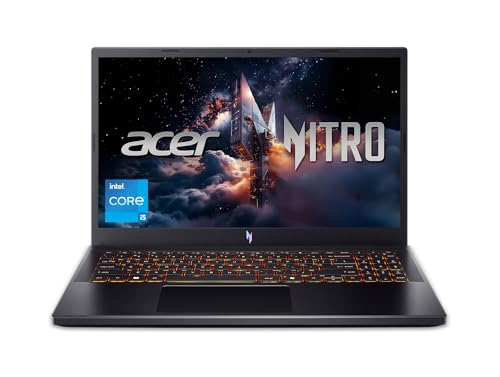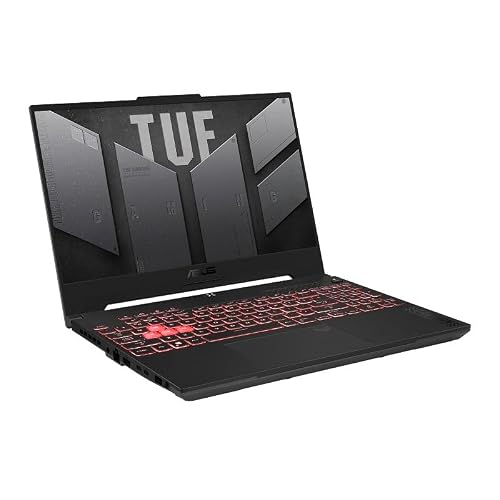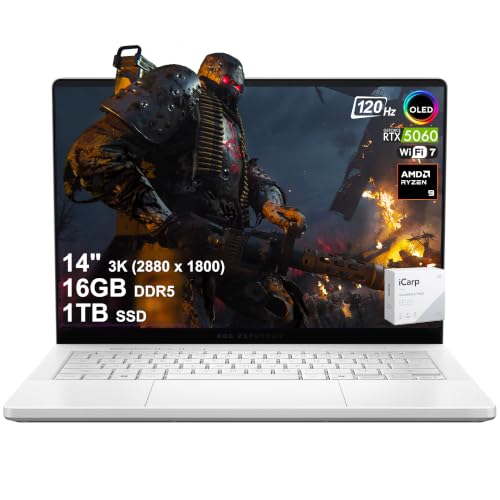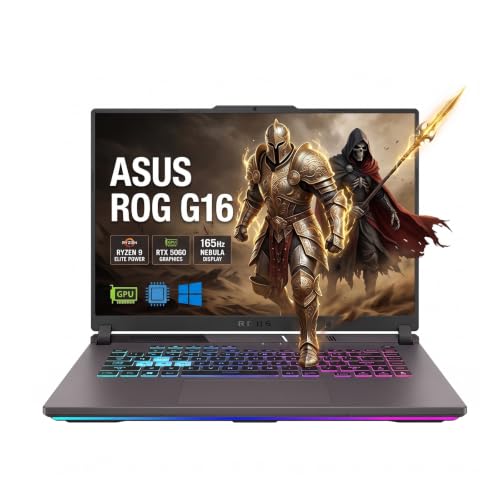
The best mid range gaming laptops are the ones that play modern games smoothly without charging flagship money for the privilege. The mid range in this guide means a current RTX 4050, 5050, 5060, or 5070 graphics card, a fast high-refresh display, and enough memory and storage to run games and everyday work side by side. That combination handles 1080p gaming at high settings and 1440p gaming at sensible settings, which is where most players actually live.
What separates a good mid-range laptop from a disappointing one is balance. A strong graphics card paired with too little memory stutters, a fast display paired with a weak card cannot reach its refresh rate, and a cramped drive forces constant uninstalls. The six laptops below were chosen because each one is balanced: the processor, graphics, memory, storage, and display fit together, so no single component holds the rest back.
This guide also keeps the focus on machines that work as daily laptops, not just game machines. Every pick runs Windows, handles browsing, office work, and media, and carries the ports and wireless connectivity a normal laptop needs. Read the comparison table first, then the detailed reviews, and use the buying guide to weigh the trade-offs that decide value: graphics against display, memory against storage, and portability against cooling. The goal is a laptop that still feels fast in two years, not one that impresses for a month.
In this guide
Quick picks: best mid range gaming laptops
| # | Product | Where to buy |
|---|---|---|
| 1 | ASUS ROG Strix G16 | Check on Amazon |
| 2 | GIGABYTE Gaming A16 | Check on Amazon |
| 3 | HP Omen 16 | Check on Amazon |
| 4 | HP Omen 16 Slim | Check on Amazon |
| 5 | ASUS TUF Gaming A16 | Check on Amazon |
| 6 | HP Victus Gaming 15 | Check on Amazon |
How the Picks Were Chosen
Each pick was checked against the same standard: a current-generation graphics card, at least 8GB of memory, a solid-state drive, and a display with a refresh rate above 60Hz. Those four requirements filter out the machines that look like gaming laptops but play like office laptops. A laptop that fails any one of them cannot deliver the smooth experience the mid range promises, no matter how good its other specifications look.
Balance was the second filter. The strongest card in this guide, the RTX 5070, appears in laptops with 32GB of memory and a 1TB drive, while the entry pick pairs an RTX 3050 with 8GB and a 144Hz display at the value end. That matching matters more than any single specification: a laptop is only as fast as its slowest component in the workload that matters, and these six are matched to their graphics tier.
Build and thermals were the final filters. A gaming laptop that overheats throttles, and a throttled laptop is slow no matter what the specification sheet says. The picks here come from established gaming lines, ASUS ROG Strix and TUF, HP Omen and Victus, and Gigabyte Gaming, all of which have the cooling designs and chassis quality that sustained gaming demands. Every pick is a complete laptop, not a specification list with a keyboard attached.
Quick Comparison
| Laptop | Display | Memory and Storage | Graphics | Standout Feature |
|---|---|---|---|---|
| ASUS ROG Strix G16 | 16-inch 1920 x 1200 | 32GB DDR5, 1TB SSD | RTX 5060 | Ryzen 9 9955HX with 32GB DDR5 |
| GIGABYTE Gaming A16 | 16-inch 165Hz WUXGA | 32GB DDR5, 1TB SSD | RTX 5070 | RTX 5070 with a 165Hz display |
| HP Omen 16 | 16-inch WQXGA 240Hz | 32GB RAM, 1TB SSD | Ryzen AI 9 365 | 240Hz display with 500 nits brightness |
| HP Omen 16 Slim | 16-inch WUXGA IPS 144Hz | 32GB RAM, 1TB SSD | RTX 5070 | RTX 5070 in a slim chassis |
| ASUS TUF Gaming A16 | 16-inch Full HD+ 145Hz | 16GB DDR5, 512GB SSD | RTX 4050 | Durable TUF build with RTX 4050 |
| HP Victus Gaming 15 | 15.6-inch FHD 144Hz | 8GB RAM | RTX 3050 | Lowest-cost entry to real gaming |

1. ASUS ROG Strix G16
The ASUS ROG Strix G16 is the performance anchor of this guide, and it earns that position with a combination that is rare at this tier: a Ryzen 9 9955HX processor, an RTX 5060 graphics card, 32GB of DDR5 memory, and a 1TB SSD in a 16-inch body. That is a specification set that handles demanding games at high settings and still has headroom for streaming, recording, and heavy multitasking. The 16-inch 1920 x 1200 display gives more vertical space than a standard 1080p panel, which helps in games and in everyday work alike.
The 32GB of DDR5 memory is the detail that separates this Strix from most mid-range laptops. Sixteen gigabytes is enough for gaming today, but 32GB removes memory as a concern entirely: games, a browser full of tabs, voice chat, and recording software can all run together without the system paging to the drive. The 1TB SSD holds a real game library without constant uninstalls. For buyers who want the strongest all-round machine in this guide, the Strix G16 is the pick.
The ROG Strix line also brings the build quality that long gaming sessions demand. The chassis is designed for airflow, the keyboard is built for extended play, and the machine is meant to sit on a desk for hours without throttling. It is not the lightest laptop here, but it is the one that feels most like a purpose-built gaming machine, and that focus shows in sustained performance rather than in short bursts.
Key specifications: ASUS ROG Strix G16 gaming laptop; Ryzen 9 9955HX processor; NVIDIA RTX 5060; 32GB DDR5 RAM; 1TB SSD; 16-inch 1920 x 1200 display.
Strengths:
- Ryzen 9 9955HX and RTX 5060 handle demanding games at high settings.
- 32GB of DDR5 memory removes multitasking limits for gaming plus streaming and recording.
- 1TB SSD holds a real game library without constant uninstalls.
Trade-offs:
- A high-performance 16-inch chassis is heavier and less portable than a slim ultrabook.
- The powerful hardware needs good airflow, so the fans work hard under load.
- Battery life on a gaming laptop of this class is short when gaming away from the charger.
This laptop fits serious gamers who want the strongest machine in this guide, with headroom for streaming, recording, and heavy multitasking alongside gaming.
Best for: demanding games at high settings plus streaming and multitasking / Not suited for: travelers who need a light laptop with all-day battery life
The Strix G16 also suits buyers who plan to keep the laptop for several years. The 32GB of memory and the current-generation processor and graphics card mean the machine will still feel fast as games get more demanding, while laptops with 16GB and last-generation hardware will age sooner. Buying headroom now is cheaper than replacing a laptop early, and this Strix is the best long-term value in the guide for that reason.
Check price on Amazon: ASUS ROG Strix G16

2. GIGABYTE Gaming A16
The GIGABYTE Gaming A16 is the graphics leader of this guide, pairing an RTX 5070 with an Intel i7-13620H processor, 32GB of DDR5 memory, and a 1TB SSD. The RTX 5070 is the strongest graphics card here, and it shows in the games that stress a GPU hardest: high-detail scenes, ray-traced lighting, and high resolutions. The 16-inch 165Hz WUXGA display is the right partner for it, refreshing fast enough to show the frame rates the card produces.
The 165Hz refresh rate deserves emphasis, because it changes how games feel. At 165Hz, motion stays smooth and clear in fast games, and the advantage is visible the moment the laptop is compared with a 60Hz screen. The 1920 x 1200 resolution keeps text and interfaces sharp, and the extra vertical pixels help outside games too. Combined with 32GB of memory and a 1TB drive, this is a machine that does not ask the owner to compromise on any single specification.
The i7-13620H processor keeps up with the graphics card, so the CPU is not the bottleneck in demanding titles or in productivity work such as video editing and compiling. For buyers who care most about raw graphics performance and display speed, the Gaming A16 is the pick, and the RTX 5070 is the reason.
Key specifications: GIGABYTE Gaming A16 laptop; Intel i7-13620H; GeForce RTX 5070; 16-inch 165Hz 1920×1200 WUXGA display; 1TB SSD; 32GB DDR5 RAM.
Strengths:
- RTX 5070 is the strongest graphics card in this guide for demanding games.
- 165Hz display shows high frame rates smoothly with clear fast motion.
- 32GB DDR5 and 1TB SSD match the graphics card, so nothing holds it back.
Trade-offs:
- The powerful GPU and fast display draw more power, so battery life while gaming is short.
- A 16-inch gaming chassis is a desk-first machine rather than a travel-first one.
- The high-end graphics tier costs more than the value picks in this guide.
This laptop fits gamers who prioritize graphics performance and display speed above all, and who play demanding titles where the RTX 5070 makes a visible difference.
Best for: graphics-heavy games and fast competitive play on a 165Hz display / Not suited for: buyers on a tight budget or travelers who need a light, long-lasting laptop
The A16 also works well for creators who game. The i7 processor and 32GB of memory handle video editing, streaming, and 3D work alongside gaming, and the fast display makes editing timelines and previewing footage more pleasant. A laptop that serves both gaming and creative work is better value than two separate machines, and the A16 covers both roles without compromise.
Check price on Amazon: GIGABYTE Gaming A16

3. HP Omen 16 Gaming Laptop
The HP Omen 16 stands out in this guide for its display: a 16-inch WQXGA panel running at 240Hz with 500 nits of brightness and full sRGB coverage. That is a screen built for competitive play and for accurate color, and it is the fastest display here by a clear margin. The AMD 10-core Ryzen AI 9 365 processor brings AI acceleration to the package, with 32GB of RAM and a 1TB drive completing a specification set that is as strong for work as it is for play.
The 240Hz refresh rate is the headline for competitive gamers. In fast shooters, the difference between 144Hz and 240Hz is visible in tracking and flick shots, and the 500-nit brightness keeps the image clear in bright rooms. Full sRGB coverage means colors are accurate enough for photo and video work, so the same laptop that wins games can also edit the footage of them. That dual capability is rare at this tier and makes the Omen 16 unusually versatile.
The Ryzen AI 9 processor adds a forward-looking element. AI features in Windows and in creative software run on the neural processing unit, which keeps them fast and local. For a buyer who will keep the laptop for years, that AI capability is a form of future-proofing, and it arrives here without sacrificing any gaming specification.
Key specifications: HP Omen 16 Gaming AI Laptop; 16-inch WQXGA 240Hz display, 500 nits, 100% sRGB; AMD 10-core Ryzen AI 9 365; 32GB RAM; 1TB SSD.
Strengths:
- 240Hz WQXGA display is the fastest screen in this guide, with bright 500-nit output.
- Full sRGB coverage makes the display accurate enough for photo and video work.
- Ryzen AI 9 brings on-device AI acceleration alongside strong gaming performance.
Trade-offs:
- A 240Hz display and a 10-core processor need power, so battery life is limited.
- The premium display and processor place this laptop toward the top of the mid-range budget.
- The 16-inch chassis is built for the desk more than for the backpack.
This laptop fits competitive gamers who want the fastest display in the guide, and creators who need color accuracy and AI acceleration in the same machine.
Best for: competitive play at 240Hz and color-accurate creative work / Not suited for: casual gamers who would not notice the difference above 144Hz
The Omen 16 also deserves a note for its display brightness. Five hundred nits is bright enough for gaming near a window or in a well-lit room without washing out, which is a real-world advantage that specification sheets often hide. Many gaming laptops are dim by comparison, and a bright screen is something the owner notices every single day, not just in benchmarks.
Check price on Amazon: HP Omen 16

4. HP Omen 16 Slim Gaming Laptop
The HP Omen 16 Slim answers the most common complaint about gaming laptops: they are too thick and heavy to carry. This machine fits an RTX 5070, a 16-core Intel Ultra 9 285H processor, 32GB of RAM, and a 1TB SSD into a slim 16-inch body with a WUXGA IPS display running at 144Hz. The result is a laptop that plays demanding games at high settings and still fits in a normal bag without dominating it.
The slim design does not mean a weak machine. The RTX 5070 is the same graphics tier as the strongest cards in this guide, and the 16-core processor handles gaming and productivity without strain. The 144Hz IPS display is fast enough for competitive play and color-accurate enough for everyday work, and the 32GB of memory keeps multitasking smooth. For buyers who carry their laptop daily, the Slim is the most portable serious gaming machine here.
Cooling in a slim chassis is always the question, and the Omen line addresses it with a design built for sustained loads. Owners should still expect fan noise under heavy gaming, which is true of every slim gaming laptop, but the machine is designed to hold its performance rather than throttle after a few minutes. That sustained performance is what separates a real gaming laptop from a thin laptop with a gaming badge.
Key specifications: HP Omen 16 Slim Gaming AI Laptop; 16-inch WUXGA IPS 144Hz display; Intel 16-core Ultra 9 285H; 32GB RAM; 1TB SSD; GeForce RTX 5070.
Strengths:
- RTX 5070 graphics in a slim, portable 16-inch chassis.
- 16-core Ultra 9 processor handles gaming and productivity together.
- 32GB RAM and 1TB SSD match the graphics tier, with no weak link.
Trade-offs:
- A slim chassis runs warmer and louder under sustained gaming than a thick one.
- The 144Hz display is fast, but not as fast as the 240Hz Omen 16.
- Slim gaming laptops cost more per unit of performance than thicker ones.
This laptop fits gamers who carry their machine daily and want flagship-tier graphics without the weight and bulk of a traditional gaming laptop.
Best for: portable high-end gaming and daily carry with RTX 5070 power / Not suited for: desk-only gamers who would benefit more from a thicker, cooler chassis
The Omen 16 Slim also works well as a work laptop that games after hours. The slim body, the IPS display, and the 16-core processor suit office work, video calls, and creative tasks, and the RTX 5070 is there when the workday ends. Buyers who need one laptop for everything, rather than a separate work machine and gaming machine, will find the Slim the most convincing single-device answer in this guide.
Check price on Amazon: HP Omen 16 Slim

5. ASUS TUF Gaming A16
The ASUS TUF Gaming A16 is the durability pick of this guide. The TUF line is built to military-grade toughness standards, and it shows in a chassis that tolerates being carried daily, bumped, and used hard. Inside, a Ryzen 7 7445HS processor and an RTX 4050 graphics card drive a 16-inch Full HD+ display at 145Hz, with 16GB of DDR5 memory and a 512GB SSD. That is a balanced mid-range specification set that plays modern games at 1080p on high settings.
The 145Hz display is the right match for the RTX 4050. The card can reach high frame rates at 1080p in most titles, and the display shows them smoothly, which is the combination that makes games feel responsive. The 16GB of DDR5 memory is enough for gaming plus voice chat and a browser, and the 512GB SSD holds the operating system and a rotating set of games. Owners who need more storage can manage their library, but the 512GB drive is the one real compromise in this package.
The TUF build is the reason to choose this laptop over a similarly specified machine. The chassis, hinges, and keyboard are designed for hard use, and the laptop is meant to be carried to school, to work, and to a friends house without babying. For buyers who are rough on their gear, that toughness is worth more than a slightly faster graphics card.
Key specifications: ASUS TUF Gaming A16 laptop; AMD Ryzen 7 7445HS; NVIDIA GeForce RTX 4050; 16-inch Full HD+ 145Hz display; 16GB DDR5 RAM; 512GB SSD.
Strengths:
- TUF durability handles daily carrying and hard use better than most gaming laptops.
- RTX 4050 with a 145Hz display delivers smooth 1080p gaming at high settings.
- Ryzen 7 processor and DDR5 memory keep the system responsive in games and work.
Trade-offs:
- 512GB of storage fills quickly with modern games and needs regular management.
- The RTX 4050 is the entry graphics tier here, so demanding games need lower settings.
- The tough chassis is heavier than slim ultrabooks.
This laptop fits students and younger gamers who carry their laptop everywhere and need a tough machine that plays modern games well.
Best for: durable everyday gaming for school, travel, and hard daily use / Not suited for: buyers who want maximum graphics power or a large game library installed at once
The A16 also suits buyers who want a gaming laptop that does not look like one. The TUF design is restrained compared with flashier gaming machines, so it works in a classroom or an office without drawing attention. That understated look, combined with the tough build, makes it the most versatile laptop in the guide for owners who game and work in the same machine in public places.
Check price on Amazon: ASUS TUF Gaming A16

6. HP Victus Gaming 15
The HP Victus Gaming 15 is the value entry of this guide, and it proves that real gaming does not require a mid-range budget. An Intel 8-core i5-13420H processor and an NVIDIA RTX 3050 graphics card drive a 15.6-inch Full HD display at 144Hz, which is the combination that defines entry-level gaming: 1080p play at medium to high settings, smooth motion on a fast display, and a machine that handles everyday work without complaint.
The 144Hz display is the standout feature at this tier. Many budget laptops still ship with 60Hz screens, which waste the frame rates the graphics card produces. The Victus shows the game smoothly, and that smoothness is the difference between a laptop that feels like a gaming machine and one that merely runs games. The 8-core i5 processor is also stronger than the chip in most budget laptops, so the machine stays responsive in work and in games alike.
The compromise is memory: 8GB is the minimum for modern gaming, and it means the owner should keep background applications light while playing. It is a fair trade for the lowest-cost real gaming laptop in this guide, and the Victus is the right choice for buyers who want to start gaming now and upgrade later, rather than waiting to afford a more expensive machine.
Key specifications: HP Victus Gaming 15 laptop; 15.6-inch FHD 144Hz display; Intel 8-core i5-13420H; NVIDIA GeForce RTX 3050; 8GB DDR4 RAM.
Strengths:
- Lowest-cost path to real 1080p gaming with an RTX graphics card.
- 144Hz Full HD display shows games smoothly instead of wasting frame rates.
- 8-core i5 processor keeps the laptop responsive for work as well as play.
Trade-offs:
- 8GB of memory is the minimum for modern gaming and limits background multitasking.
- The RTX 3050 needs lower settings in the most demanding new titles.
- The value build uses more plastic and less premium material than the higher picks.
This laptop fits first-time gamers, students on a budget, and anyone who wants genuine gaming performance at the lowest cost in this guide.
Best for: entry-level 1080p gaming and first gaming laptops on a budget / Not suited for: buyers who play the most demanding titles at high settings or multitask heavily while gaming
The Victus also makes sense as a second machine for a household that already owns a desktop. It plays the same games on the go, handles school and office work, and costs far less than a second high-end system. For families buying a first gaming laptop for a younger player, the Victus is the sensible starting point, with an upgrade path later when the player outgrows it.
Check price on Amazon: HP Victus Gaming 15
What Mid Range Really Means in a Gaming Laptop
Mid range is the most misunderstood tier in gaming laptops, because the label covers a wide spread of hardware. At the bottom, an RTX 3050 laptop plays modern games at 1080p on medium settings and costs the least. In the middle, RTX 4050 and 5050 machines handle 1080p at high settings and 1440p at medium. At the top, RTX 5060 and 5070 laptops push high settings at 1440p and stay smooth in demanding titles. All six picks in this guide sit inside that range, and the right choice depends on the games the buyer actually plays, not on the highest number on the box.
The display decides how much of the graphics card the owner ever sees. A 144Hz or 165Hz screen shows the frame rates a mid-range card produces, while a 60Hz screen throws them away. Resolution matters too: 1080p is easier for the card and looks fine at 15 inches, while 1440p looks sharper but demands more from the GPU. The picks here pair each card with a display it can actually drive, which is why the RTX 4050 machines use 1080p-class panels and the RTX 5070 machines use faster, higher-resolution ones.
Memory and storage are where mid-range laptops most often disappoint, and this guide filtered for them. Sixteen gigabytes is the practical minimum for gaming plus a browser and voice chat, and 32GB is the comfortable level for streaming and creation. Storage matters because modern games are large: a 512GB drive holds a handful of big titles, while 1TB holds a real library. Buyers should treat 16GB and 512GB as the floor and 32GB and 1TB as the target.
Cooling is the hidden specification. Two laptops with the same graphics card can perform very differently if one throttles and the other does not, and the difference comes down to chassis design and fan capacity. Established gaming lines such as ROG Strix, TUF, Omen, Victus, and Gigabyte Gaming exist precisely because they solve cooling, and every pick in this guide comes from one of those lines. A no-name laptop with the same card on paper is not the same machine in practice.
Buying Guide: Getting the Most Gaming Laptop for the Money
Start with the graphics card, because it decides which games run well and at what settings. An RTX 3050 suits 1080p medium settings, an RTX 4050 or 5050 suits 1080p high, and an RTX 5060 or 5070 suits 1440p and demanding titles. Buyers should match the card to the games they play most: competitive shooters need frame rate more than detail, while single-player epics need detail more than frame rate, and the right card differs between the two.
Next, check the display against the card. The refresh rate should be at least 120Hz, and the resolution should be one the card can drive at high frame rates. A 240Hz display on an entry card is wasted, and a 60Hz display on a strong card is equally wasted. The picks here are matched, and buyers comparing other laptops should apply the same test before buying.
Memory and storage come third. Aim for 16GB of memory as a minimum and 32GB for comfort, and prefer a 1TB SSD over 512GB when the budget allows, since modern games are large and reinstalling is slow. Check whether the memory and storage are upgradeable, because a laptop that can take more memory later is a better long-term buy than one that is sealed.
Finally, weigh portability against cooling. Slim laptops travel well but run warmer and louder, while thick laptops stay cooler and quieter but weigh more. Buyers who carry the laptop daily should favor the slim picks, while buyers who mostly play at a desk should favor the thicker, cooler machines. Either way, plan for a cooling stand or a hard desk surface, since gaming on soft bedding blocks the vents on every laptop.
How to Use and Care for a Gaming Laptop
Keep the vents clear, because heat is the enemy of gaming performance. Use the laptop on a hard, flat surface, never on a bed or a blanket that blocks the intake, and clean the vents with compressed air every few months. Dust buildup is the most common cause of a laptop that slowly gets slower, and a few minutes of cleaning restores it.
Manage the battery honestly. Gaming laptops are designed to be plugged in while gaming, and the battery is for portability between sessions, not for hours of unplugged play. Keep the charge between roughly 20 and 80 percent when the laptop sits plugged in for long periods, and avoid leaving it at full charge in a hot room. Good battery habits extend the useful life of the machine by years.
Protect the display and keyboard. Close the lid gently, keep food and drinks away from the keyboard, and wipe the screen with a soft cloth rather than paper towels. Update graphics drivers regularly, since driver updates often improve performance in new games, and keep the operating system patched. A gaming laptop that is cleaned, updated, and used on a hard surface will stay fast far longer than one that is neglected.
Common Mistakes to Avoid
The most common mistake is buying on the graphics card alone and ignoring the display. A strong card paired with a 60Hz screen cannot show the frame rates it produces, and the owner paid for performance they will never see. Always check the refresh rate before buying, and match it to the card. The second mistake is buying too little memory: 8GB is the minimum, and buyers who multitask while gaming will regret it within a year.
The third mistake is gaming on a soft surface. Beds, blankets, and laps block the vents, the laptop overheats, performance drops, and the hardware ages faster. A hard desk or a cooling stand is not optional equipment for a gaming laptop. The fourth mistake is filling the drive completely: a solid-state drive that is nearly full slows down, so keep at least a tenth of the drive free and uninstall games that are not being played.
The final mistake is ignoring thermals when comparing laptops. Two machines with the same card can perform very differently, and the difference is cooling. Read reviews that measure sustained performance, not just short benchmarks, and favor established gaming lines with proven cooling designs over unknown brands with the same card on paper.
Final Recommendation
For most buyers, the ASUS ROG Strix G16 is the best all-round pick: a Ryzen 9 processor, RTX 5060 graphics, 32GB of memory, and a 1TB drive make it the strongest balanced machine in this guide. Buyers who want the fastest display should choose the HP Omen 16 with its 240Hz screen, and buyers who want maximum graphics power in a portable body should choose the HP Omen 16 Slim with its RTX 5070.
Budget buyers should start with the HP Victus Gaming 15, which delivers real 1080p gaming at the lowest cost here, and durability-first buyers should choose the ASUS TUF Gaming A16. Whichever pick fits, the principle is the same: match the card to the games, the display to the card, and the memory to the multitasking, and the mid range will deliver far more than its cost suggests.
Frequently Asked Questions
What graphics card do I need for 1080p gaming?
An RTX 4050 or 5050 handles 1080p at high settings in most modern games. An RTX 3050 manages 1080p at medium settings and is the budget entry, while an RTX 5060 or 5070 is overkill for 1080p and better suited to 1440p.
Is 16GB of RAM enough for gaming?
Yes, for gaming plus a browser and voice chat. 32GB is better for streaming, recording, and heavy multitasking, and it is the more future-proof choice if the budget allows. 8GB is the minimum and limits background applications while gaming.
Does a higher refresh rate display matter?
Yes. A 144Hz or higher display shows the frame rates a gaming graphics card produces, making motion smoother and games more responsive. A 60Hz display wastes those frame rates, so the refresh rate should be matched to the graphics card.
Can a mid-range gaming laptop be used for school or work?
Yes. Every pick in this guide runs Windows and handles browsing, office work, and media alongside gaming. The slim picks are the most portable for daily carrying, while the thicker picks suit desk use.
How much storage do I need for games?
A 512GB drive holds the operating system and a handful of large games, while 1TB holds a real library. Modern games are large, so 1TB is the more comfortable choice and avoids constant uninstalling.
Do gaming laptops overheat?
They run hot under load, which is normal, but good cooling designs keep performance steady. Use the laptop on a hard surface, keep the vents clean, and avoid gaming on beds or blankets that block airflow.
Related reading on Kajuandouglas: Best Aorus Laptops, Best Low Cost Laptops, and Best Laptops for College Student Business Major.