A low cost laptop is not a cheap laptop in the bad sense. The distinction matters, because the market is full of machines that look like bargains on the listing page and turn into frustration within months. The difference between the two is rarely the brand on the lid. It is the combination of a processor that can still run a modern browser with a dozen tabs open, enough memory to keep the operating system from swapping to disk, storage that is solid state rather than a spinning drive, and a screen that does not strain the eyes during a long working day. The eight laptops in this guide clear those bars, and every one of them does it without asking for a premium budget.
Low cost means something different depending on who is buying. A student needs a machine that survives a backpack, boots quickly between classes, and runs documents, video calls, and research tabs without freezing. A home user needs something reliable for email, streaming, shopping, and the occasional video call with family. A second computer for the kitchen or the spare room has yet another set of priorities, where a big screen and a full keyboard matter more than raw speed. This guide covers all three situations, with full-size Windows laptops, compact Chromebooks, and a touchscreen model for people who prefer to tap as well as type.
The single most important specification at this end of the market is memory. Four gigabytes of RAM is the realistic floor for a Windows laptop in daily use, and eight gigabytes is noticeably more comfortable when several browser tabs and a video call run at the same time. Storage matters almost as much: a solid state drive, even a modest one, makes a laptop feel fast in a way that a processor upgrade cannot match, because it removes the long waits when opening programs and files. The processors in this guide range from efficient Intel N-series chips built for battery life to Core 3 parts that handle heavier multitasking, and the guide notes which is which so the choice matches the workload.
Screen size is the other decision that shapes everyday comfort. A 15.6-inch display gives room for two windows side by side and a full keyboard with a number pad, which suits a desk or a table. A 14-inch machine is the middle ground, large enough to work on all day and small enough to carry. An 11.6-inch Chromebook is a different kind of tool entirely, built for portability and simplicity, and it makes sense when the work lives in a browser. The comparison table below lines up the eight picks by their key specifications, and the sections that follow explain the strengths and the compromises of each one in plain terms.
In this guide
Quick picks: best low cost laptops
| # | Product | Where to buy |
|---|---|---|
| 1 | Acer Aspire Go 15 AI Ready Laptop | Check on Amazon |
| 2 | Dell 15.6 Laptop with Intel Core 3 | Check on Amazon |
| 3 | Dell Chromebook 11 3100 | Check on Amazon |
| 4 | HP Everyday Slim Laptop 2027 Edition | Check on Amazon |
| 5 | HP 14-Inch Laptop with Intel N150 | Check on Amazon |
| 6 | Lenovo Flagship Chromebook 14 | Check on Amazon |
| 7 | THEYETI 15.6-Inch Laptop | Check on Amazon |
| 8 | 15.6-Inch Windows 11 Laptop with N4020 | Check on Amazon |
Quick Comparison
| Product | Key spec | Best for |
|---|---|---|
| Acer Aspire Go 15 AI Ready Laptop | 15.6-inch FHD IPS, Intel Core 3 N355 | Best overall low cost laptop |
| Dell 15.6 Laptop with Intel Core 3 | 15.6-inch FHD, Intel Core 3 100U, 8GB RAM | Best Dell budget laptop |
| Dell Chromebook 11 3100 | 11.6-inch, Celeron N4020, 4GB RAM, Chrome OS | Best portable low cost laptop |
| HP Everyday Slim Laptop 2027 Edition | Intel N150, 4GB DDR5 RAM, 128GB SSD | Best slim low cost HP laptop |
| HP 14-Inch Laptop with Intel N150 | 14-inch HD, Intel N150, 4GB RAM, 128GB UFS | Best 14-inch low cost laptop |
| Lenovo Flagship Chromebook 14 | 14-inch FHD touchscreen, MediaTek Kompanio 520 | Best touchscreen low cost laptop |
| THEYETI 15.6-Inch Laptop | 15.6-inch FHD IPS, Core i3-8130U, 8GB RAM, 256GB SSD | Best low cost laptop with 256GB storage |
| 15.6-Inch Windows 11 Laptop with N4020 | 15.6-inch FHD 1080p, N4020, 4GB RAM, 128GB | Best big-screen low cost laptop |
All eight laptops below ship with a modern operating system and solid state storage, which are the two features that most separate a usable budget laptop from a disappointing one. Screen resolution varies from HD to Full HD, so readers who spend long hours on documents should weigh the Full HD models more heavily, since sharper text is easier on the eyes over a full working day. Battery life also varies with the processor and the screen, and the lightest machines in this list are the Chromebooks, which trade local software for long unplugged sessions.
Quick Picks
For most buyers, the Acer Aspire Go 15 is the default choice, with the best balance of screen, processor, and size in the guide. Buyers who keep many tabs open should choose the Dell 15.6 with 8GB of RAM, since memory is the specification that decides how a Windows laptop feels after a year. Travellers and students who want the lightest bag should take one of the Chromebooks, with the Lenovo touchscreen for readers and the Dell 11 for the smallest size. The HP models cover the middle ground, and the THEYETI suits a buyer who wants the most storage for the money.

1. Acer Aspire Go 15 AI Ready Laptop
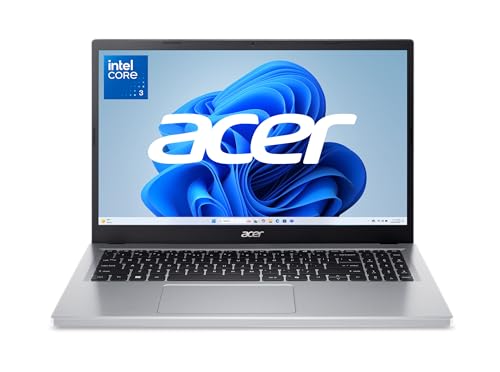
The Acer Aspire Go 15 is the most balanced machine in this guide, and the balance is the point. Its 15.6-inch Full HD IPS display is the size and panel type that makes long documents and spreadsheets comfortable, its Intel Core 3 N355 processor sits a clear step above the efficiency chips found in the cheapest laptops, and the full-size layout leaves room for a proper keyboard. It is the laptop to buy when the budget is tight but the machine still has to do real work every day, from class assignments to home office tasks to evening streaming.
Acer positions this model as AI ready, which in practical terms means the processor includes the kind of hardware acceleration that newer Windows features and everyday apps increasingly expect. For a buyer, the more immediate benefit is the combination of the Core 3 chip and the IPS screen. IPS panels hold their colour and contrast when viewed from an angle, so the screen stays readable when the laptop sits on a shared table or a couch arm. The 15.6-inch size also means a full keyboard with a number pad, which matters for anyone who types figures regularly. This is a desk-first laptop that can still travel when it has to.
The IPS panel is the detail that lifts this laptop above cheaper 15.6-inch machines, because it keeps colours and contrast steady when the screen is viewed from the side, which happens constantly when a laptop sits on a shared table. The Core 3 N355 processor handles the everyday workload of browsing, documents, and streaming without the pauses that define the cheapest chips, and the full-size keyboard with a number pad suits anyone who types figures. Windows 11 is included, so the machine is ready for school or home office work as soon as it is set up.
What stands out:
- Full HD IPS display:: sharp text and stable colours at an angle
- Core 3 N355 processor:: a clear step up from entry-level chips
- 15.6-inch full keyboard:: room for a number pad and comfortable typing
- AI ready hardware:: built for newer Windows features
Trade-offs to weigh: The large screen and full chassis make this the least portable pick in the guide, so buyers who carry a laptop every day should compare it with the 14-inch models before deciding. Its size also means it takes up more room on a small desk or a crowded table.
Who it fits: Buyers who want one affordable laptop that handles school, home office work, and media without feeling slow, and who mostly use it at a desk or a table.
A low cost laptop rewards buyers who match the machine to the workload rather than chasing the highest specification on the page, and this model is a good example of that trade working well.
Check price on Amazon: Acer Aspire Go 15 AI Ready Laptop

2. Dell 15.6 Laptop with Intel Core 3
This Dell 15.6-inch laptop pairs a Core 3 100U processor with 8GB of RAM, and that memory figure is the reason it earns its place here. Eight gigabytes is the amount where Windows 11 stops feeling cramped: a browser with many tabs, a video call, and a document can run together without the system constantly shuffling data to disk. The Full HD display with an anti-glare coating adds to the everyday comfort, cutting reflections in bright rooms, and the 300-nit brightness keeps the screen readable away from a desk lamp.
Dell builds this machine around the everyday computing most people actually do. The Core 3 100U is a current-generation efficient processor, the DDR5 memory is the newer, faster standard, and Windows 11 Home is included, so there is no separate operating system purchase to arrange. The anti-glare WVA panel is a practical touch that cheaper glossy screens lack, and it matters in rooms with windows or overhead lights. At 15.6 inches it is a full-size laptop, so the keyboard has room to breathe, and the overall package suits a buyer who wants a known brand, a comfortable screen, and enough memory to keep the machine useful for years.
The 300-nit anti-glare display deserves attention, because brightness and glare decide whether a laptop is usable near a window or under office lights. A dim, glossy screen forces the owner to hunt for shade, while this panel stays readable in a bright room. DDR5 memory is the newer standard, and it keeps the system responsive when several programs run together. Dell also includes Windows 11 Home, so there is no separate operating system to buy or install.
What stands out:
- 8GB RAM:: comfortable multitasking with many tabs open
- Anti-glare Full HD display:: fewer reflections in bright rooms
- Core 3 100U processor:: current efficient performance
- DDR5 memory:: the newer, faster memory standard
Trade-offs to weigh: The 15.6-inch frame is a full-size machine, so it is heavier in a bag than the Chromebooks in this guide. Buyers who travel light every day may prefer a smaller screen even at the cost of some comfort.
Who it fits: Home and student users who want a Dell laptop with enough memory for real multitasking, and who value a glare-free screen for bright rooms.
The listing image and the specification sheet agree on the key details for this model, so the features described above are the ones to expect in the box.
Check price on Amazon: Dell 15.6 Laptop with Intel Core 3

3. Dell Chromebook 11 3100
The Dell Chromebook 11 3100 is the smallest and lightest machine in this guide, and its appeal is simplicity. Chrome OS boots in seconds, updates itself in the background, and keeps the interface to a browser and a handful of apps, which is exactly what many school and light home users need. The 11.6-inch screen and Celeron N4020 processor are modest on paper, but Chrome OS asks far less of the hardware than Windows does, so the machine feels responsive for web browsing, documents, email, and video calls.
Chromebooks make sense when the work lives online. Google Docs, Sheets, video conferencing, streaming, and webmail all run in the browser, and the 16GB of flash storage is enough because files live in the cloud rather than on the machine. The compact size is the real advantage: it fits in a small bag, it is easy to carry between rooms or classrooms, and the battery stretches further because the screen and the processor draw little power. For a younger student, a second household computer, or a travel machine, the 3100 covers the essentials without the weight, the cost, or the maintenance of a full Windows laptop.
Chrome OS is the reason this small laptop feels faster than its specifications suggest. The operating system is built around the browser, so it boots in seconds, updates itself without interrupting work, and asks very little of the Celeron processor or the 4GB of memory. Files live in the cloud, which is why 16GB of local storage is enough, and the Google account ties the documents, the email, and the video calls together. For a young student, that simplicity is a feature, not a limitation.
What stands out:
- Very portable:: 11.6-inch size fits any bag
- Simple Chrome OS:: fast boot and automatic updates
- Low maintenance:: no antivirus or driver chores
- Good for school:: built for browser-based work
Trade-offs to weigh: The small screen and 16GB of storage limit it to online work, so buyers who need desktop Windows software, large local files, or heavy photo editing should choose a Windows laptop from this guide instead.
Who it fits: Students, younger users, and households that need a light, simple second computer for browsing, schoolwork, and video calls.
For the price, the balance of screen, processor, memory, and storage here is the reason this laptop makes the list, and the compromises are the honest ones for the category.
Check price on Amazon: Dell Chromebook 11 3100

4. HP Everyday Slim Laptop 2027 Edition
HP describes this Everyday Slim laptop as a 2027 edition, and the slim design is the headline. It is the kind of machine that slips into a bag without dominating it, built for people who carry a laptop to class, to a coffee shop, or between rooms at home. The Intel N150 processor is an efficient chip designed for battery life rather than raw speed, the 4GB of DDR5 memory is the faster modern standard, and the 128GB solid state drive keeps boot times and app launches short. Office 365 is included, which covers the document, spreadsheet, and presentation software most buyers need on day one.
The appeal here is the combination of portability and completeness. A slim laptop that arrives with office software included saves the buyer a separate subscription decision, and the solid state drive means the machine wakes and opens programs without the long pauses that define older budget laptops. The N150 processor handles browsing, documents, streaming, and video calls, which is the workload this laptop is built for. It is not a machine for video editing or heavy multitasking, and HP does not pretend otherwise. It is a light, tidy laptop for everyday tasks, and judged on that brief it is one of the more likeable options at this end of the market.
The slim design is more than a look: a thin laptop fits in a bag alongside books and papers without dominating the space, and it is easier to carry between rooms at home. The Intel N150 processor is built for efficiency, which stretches the battery through a school day or a working day, and the 128GB solid state drive keeps the machine responsive. Office 365 is included, so documents, spreadsheets, and presentations are covered from the first day without a separate purchase.
What stands out:
- Slim and light:: easy to carry every day
- 128GB SSD:: fast boot and quick app launches
- Office 365 included:: documents and spreadsheets from day one
- DDR5 memory:: faster modern memory
Trade-offs to weigh: Four gigabytes of memory and an efficiency processor set a ceiling on heavy multitasking, so buyers who keep dozens of tabs open alongside video calls should consider an 8GB model instead.
Who it fits: Commuters, students, and home users who want a light HP laptop for browsing, documents, and streaming, with office software included.
A low cost laptop rewards buyers who match the machine to the workload rather than chasing the highest specification on the page, and this model is a good example of that trade working well.
Check price on Amazon: HP Everyday Slim Laptop 2027 Edition

5. HP 14-Inch Laptop with Intel N150
The HP 14-inch laptop sits in the middle of this guide in every sense, and that middle ground is its strength. Fourteen inches is large enough for comfortable all-day work and small enough to carry without thinking about it, and the Intel N150 processor with 4GB of RAM covers browsing, documents, email, streaming, and video calls. Windows 11 Home is included, and the listing includes a year of Microsoft 365, so the machine is ready for school or home office work as soon as it is set up.
HP fits this model with 128GB of UFS storage, which is flash storage in the same family as a solid state drive, so the laptop boots and opens apps far faster than the old hard-drive budget machines it replaces. The HD display is the compromise that keeps the cost down: it is fine for documents and video, though text is less crisp than on the Full HD models in this guide. The 14-inch size is the practical sweet spot for most buyers, large enough to type on comfortably for hours and light enough to move around the house or carry to class. For a buyer who wants a straightforward Windows laptop at a low cost, with no unusual features to learn, this is a sensible default.
The included year of Microsoft 365 is a practical saving, since it covers Word, Excel, and PowerPoint, plus cloud storage for documents, for twelve months. The 14-inch size is the middle ground that suits most buyers: large enough for comfortable typing and reading, small enough to carry daily. UFS flash storage gives the quick boots and fast app launches that define a modern laptop, and the HD display, while less sharp than Full HD, is adequate for documents, email, and video at this size.
What stands out:
- 14-inch sweet spot:: comfortable yet portable
- Microsoft 365 included:: a year of office software
- Windows 11 Home:: full desktop software support
- Fast flash storage:: quick boots and app launches
Trade-offs to weigh: The HD display is less sharp than the Full HD screens on the Acer and Dell models, so buyers who read documents all day should weigh that difference before choosing on size alone.
Who it fits: Buyers who want a straightforward 14-inch Windows laptop for school or home, with office software included and a size that travels well.
The listing image and the specification sheet agree on the key details for this model, so the features described above are the ones to expect in the box.
Check price on Amazon: HP 14-Inch Laptop with Intel N150

6. Lenovo Flagship Chromebook 14
The Lenovo Flagship Chromebook is the only touchscreen in this guide, and it changes how the laptop is used. A 14-inch Full HD touchscreen invites tapping, scrolling, and swiping, which suits web browsing, reading, and younger users, while the slim and light design keeps it easy to carry. The 8-core MediaTek Kompanio 520 processor is built for Chrome OS, and the combination of a Full HD panel and a touch layer makes this the most pleasant Chromebook screen in the group, sharp for text and responsive to a fingertip.
Lenovo pairs the touchscreen with a Full HD resolution, which is the detail that matters most for long reading sessions. Text stays crisp, web pages render cleanly, and the 14-inch size gives more room than the small 11.6-inch Chromebook without adding much bulk. Chrome OS keeps the machine fast and simple, with automatic updates and a browser-first workflow, and the slim design means it travels as easily as a notebook. For a buyer who likes the idea of a laptop that also behaves a little like a tablet, with a screen that responds to touch, this is the pick that delivers that experience at a low cost.
The touchscreen changes how the Chromebook is used day to day, inviting taps and swipes for scrolling, zooming, and selecting, which feels natural for reading and browsing. The 8-core MediaTek Kompanio 520 processor is built for Chrome OS, and it keeps the machine smooth through many open tabs. The Full HD resolution is the detail that matters most for long reading sessions, since sharp text is easier on the eyes, and the slim, light design means the laptop travels as easily as a notebook.
What stands out:
- Full HD touchscreen:: sharp text and tap-friendly browsing
- 14-inch slim design:: roomy yet easy to carry
- 8-core Kompanio 520:: smooth Chrome OS performance
- Tablet-like feel:: tap, scroll, and swipe
Trade-offs to weigh: Chrome OS limits the software to web apps and the Chrome Web Store, so buyers who need full Windows desktop programs should choose a Windows laptop from this guide instead.
Who it fits: Readers, students, and casual users who want a touchscreen Chromebook with a sharp Full HD display for browsing, reading, and schoolwork.
For the price, the balance of screen, processor, memory, and storage here is the reason this laptop makes the list, and the compromises are the honest ones for the category.
Check price on Amazon: Lenovo Flagship Chromebook 14

7. THEYETI 15.6-Inch Laptop
The THEYETI 15.6-inch laptop earns its place with a specification combination that is rare at a low cost: 8GB of RAM and a 256GB solid state drive. The larger drive matters more than it sounds, because it leaves room for programs, documents, photos, and offline files without constant housekeeping, and the 8GB of memory keeps Windows 11 comfortable when several apps run together. The Core i3-8130U processor and Full HD IPS display complete a package that reads like a mid-range machine from a few years ago, at a budget price today.
A 256GB drive is the practical difference between a laptop that always has room and one that constantly warns about storage. Combined with 8GB of RAM, it means this machine can hold a real collection of software and files while still responding quickly, since the solid state drive removes the loading delays of older storage. The 15.6-inch Full HD IPS screen gives a wide, sharp workspace for documents and media, and the full-size keyboard suits long typing sessions. THEYETI is a lesser-known brand than Acer, Dell, HP, or Lenovo, so buyers who value a familiar badge may prefer those, but on specifications alone this is one of the strongest value picks in the guide.
The combination of 8GB of RAM and a 256GB solid state drive is what makes this laptop feel like a more expensive machine. Memory keeps Windows comfortable with several apps open, and the larger drive means programs, documents, and photos fit without constant cleanup. The Core i3-8130U processor is an older chip, but it is a real Core processor rather than an efficiency chip, so it handles everyday work with ease. The Full HD IPS display gives a wide, sharp workspace for documents and media alike.
What stands out:
- 256GB SSD:: room for programs and files
- 8GB RAM:: comfortable Windows multitasking
- Full HD IPS display:: sharp, wide viewing angles
- Core i3 processor:: solid everyday performance
Trade-offs to weigh: THEYETI is a lesser-known brand, so the support network and the track record are thinner than the big names in this guide, and buyers who value brand familiarity should weigh that.
Who it fits: Budget buyers who want the most storage and memory for the money, and who are comfortable with a lesser-known brand in exchange for stronger specifications.
A low cost laptop rewards buyers who match the machine to the workload rather than chasing the highest specification on the page, and this model is a good example of that trade working well.
Check price on Amazon: THEYETI 15.6-Inch Laptop

8. 15.6-Inch Windows 11 Laptop with N4020
This 15.6-inch Windows 11 laptop is the straightforward big-screen option in the guide, built for buyers who want the largest display at the lowest cost. The Full HD 1080p screen is the key feature, because a sharp 15.6-inch panel makes documents, spreadsheets, and video far more comfortable than a small HD screen, and the N4020 processor with 4GB of RAM covers the everyday workload of browsing, email, documents, and streaming. Office 365 is included, and the 180-degree lay-flat hinge lets the screen fold back flat, which is handy when sharing the screen across a table.
The lay-flat hinge is a small feature that turns out to be useful in practice, letting the laptop sit flat for presentations or for sharing a video with someone across a table. The dual-band wireless keeps the connection steady on modern home networks, and the 128GB of storage is solid state, so the machine starts quickly and opens programs without long waits. This is a generic-brand machine without a big name on the lid, and the N4020 processor is an efficiency chip, so heavy multitasking is not its strength. For a buyer who wants a big, sharp screen for everyday tasks at the lowest possible cost, and who does not need a famous brand, it delivers exactly that.
The 180-degree lay-flat hinge is a small feature with real uses: the screen folds flat for sharing a video across a table, for showing a document to someone sitting opposite, or for using the laptop on a low surface. The Full HD 1080p display is the strongest feature at this price, giving sharp text on a big screen, and Office 365 is included for documents and spreadsheets. The N4020 processor is an efficiency chip, so the machine is built for browsing, email, and streaming rather than heavy work, and judged on that brief it delivers.
What stands out:
- Full HD 1080p screen:: sharp text on a big display
- Lay-flat hinge:: screen folds flat for sharing
- Office 365 included:: ready for documents out of the box
- Low cost big screen:: the cheapest way to 15.6-inch Full HD
Trade-offs to weigh: The N4020 processor and 4GB of memory set a firm ceiling on multitasking, and the generic brand means less certainty about long-term support than the established names here.
Who it fits: Buyers who want the biggest, sharpest screen for the least money for browsing, documents, and video, and who do not need a big brand name.
The listing image and the specification sheet agree on the key details for this model, so the features described above are the ones to expect in the box.
Check price on Amazon: 15.6-Inch Windows 11 Laptop with N4020
Buying Guide
Memory first
Start every low cost laptop search with memory, because it decides how the machine feels after a year of use. Four gigabytes is the floor for Windows, eight is comfortable, and anything below four will struggle with a modern browser. A laptop with 8GB of RAM and a modest processor will feel faster in daily use than a laptop with a faster processor and too little memory, because the system stops swapping data to disk. Check the memory figure before the processor name, and treat 8GB as the target for a main computer.
Solid state storage is not optional
Every laptop in this guide uses solid state or flash storage, and that is a deliberate line. A spinning hard drive is the single biggest cause of a slow budget laptop, because every program launch and file open waits on a mechanical disk. Even a small solid state drive transforms the experience. When comparing models, prefer a 128GB solid state drive over a larger hard drive every time, and check the storage type in the specification sheet rather than the capacity alone.
Screen quality beats screen size
A 15.6-inch HD screen sounds generous until the text looks soft after an hour of reading, while a 14-inch Full HD screen stays crisp all day. Resolution and panel type matter more than diagonal inches. Full HD at 1920 by 1080 is the target for reading and documents, and an IPS panel holds its colours when viewed from an angle. If the choice is between a bigger HD screen and a smaller Full HD screen, the sharper screen is usually the better buy.
Chromebook or Windows
The choice between Chrome OS and Windows is really a choice about software. Chromebooks are faster, simpler, and easier to maintain, and they cover browsing, documents, email, streaming, and video calls completely. Windows laptops run the full range of desktop software, from office suites to photo editors to specialist apps. Buyers who live in a browser should consider a Chromebook seriously, while buyers who need specific Windows programs should stay with Windows, even at a slightly higher cost.
Check the ports and the keyboard
Budget laptops sometimes save money by cutting ports, so check the listing for the connections that matter: USB ports for a mouse or a drive, HDMI for an external screen, and a headphone jack. The keyboard matters just as much, since it is touched every day. A full-size keyboard with a number pad suits desk work, while a compact keyboard suits travel. If possible, read the specification sheet for the exact port list before ordering, because a missing port is the most common regret after delivery.
Frequently Asked Questions
What is the most important specification in a low cost laptop?
Memory and storage type matter more than the processor name at this end of the market. Aim for at least 4GB of RAM, ideally 8GB for a main computer, and insist on solid state or flash storage rather than a spinning hard drive, because those two choices decide how fast the laptop feels every day.
Is a Chromebook a good low cost laptop?
Yes, for buyers whose work lives in a browser. Chromebooks boot quickly, update automatically, and handle documents, email, streaming, and video calls well. They are not the right choice for buyers who need full Windows desktop software, but for school and light home use they are often the best value available.
How much storage does a low cost laptop need?
A 128GB solid state drive covers documents, a browser, and a modest set of programs for most users, and 256GB is more comfortable for anyone who keeps photos, videos, or many apps locally. Cloud storage can cover the gap, but a larger drive means less housekeeping over the life of the machine.
Does a low cost laptop last as long as an expensive one?
A well-chosen budget laptop with enough memory and solid state storage can serve for years of everyday use, though it will show its limits sooner under heavy work such as video editing or large spreadsheets. Buying enough memory and storage up front is the best way to extend its useful life.
Should I buy a laptop with an HD or a Full HD screen?
Full HD is worth choosing when the laptop is used for reading and documents for hours at a time, because sharper text is easier on the eyes. An HD screen is acceptable for casual use and video, but the Full HD models in this guide are the better pick for anyone who works on the laptop all day.
Conclusion
The best low cost laptop is the one that matches the work it has to do, with enough memory, solid state storage, and screen quality to stay pleasant for years. The Acer Aspire Go 15 is the most balanced all-rounder, the Dell with 8GB of RAM is the comfortable multitasker, the Chromebooks are the light and simple travellers, and the HP models cover the middle ground with office software included. Pick the size and the operating system first, check the memory and storage second, and the right laptop from this guide will serve well without asking for a premium budget.