Disclosure: As an Amazon Associate, kajuandouglas.com earns from qualifying purchases. Links on this page are affiliate links; they cost you nothing extra. Prices and availability change often, so check the current Amazon listing before you buy.
Every mechanical keyboard conversation eventually becomes a conversation about one family, which is why this cherry mx switches complete guide exists: Cherry’s MX line is the original pattern from which the modern switch world descends, the colour system by which it describes itself, and — in its current MX2A generation — still one of the most sensible purchases in the hobby. This guide walks the whole family: the linears, the tactile, the clicky, the silent option, and the sampler box Cherry sells for the undecided, then explains the generations, the terminology, and the choosing, so that a reader who arrives knowing only a colour leaves knowing what the colour means. Six verified products anchor the tour.
Cherry Mx Switches Complete Guide: The Family at a Glance
Cherry’s system is a small masterpiece of naming. The stem colour is the recipe: Red is the light linear, Black the firm linear, Brown the light tactile, Blue the clicky, and the Silent and Speed variants declare themselves in their names. Learn those five or six recipes and you can read any Cherry keyboard’s specification at a glance — and, because the industry imitates the system, you can read most competitors’ catalogues too, allowing for their variations. Under the colours, the architecture is shared: an MX-pattern housing, a cross-shaped stem that the entire keycap world is built around, gold crosspoint contacts, and — in the kits sold today — the MX2A platform, Cherry’s current generation with its updated housing geometry and factory lubrication.
That shared architecture is the family’s real legacy. A Cherry switch from any era fits the sockets and caps of the whole ecosystem, which is why the line functions as the hobby’s reference standard: other switches are described as smoother than a Cherry, heavier than a Cherry, quieter than a Cherry. The sections below take each colour in turn, with the guide’s six verified kits as the exhibits, and then step back for the generations, the buying logic, and the questions everyone asks.

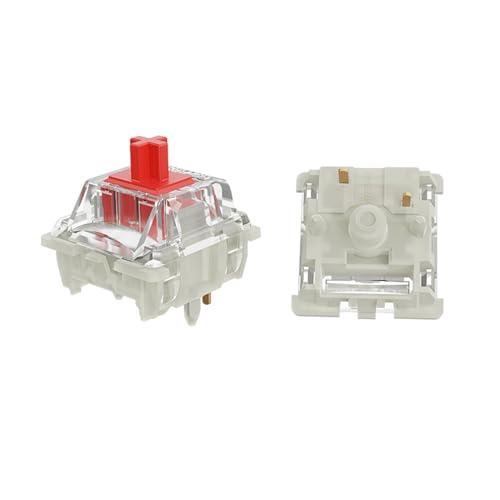
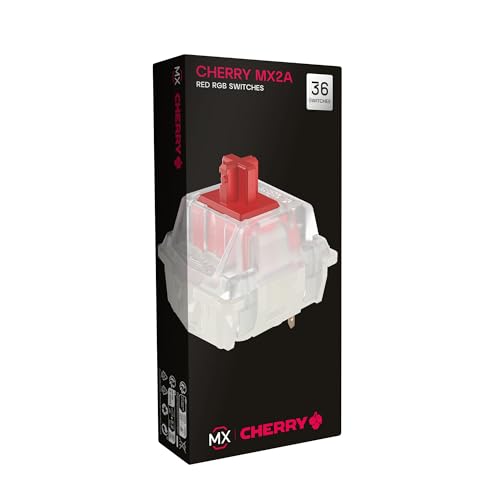
CHERRY MX2A Red — the light linear, and the family’s front door
Badge: The default Cherry switch; start here if you start anywhere.
- Type: linear, smooth and direct, no bump, no click
- Force: light class, around 45 g operating
- Actuation: standard depth, around 2.0 mm, in a full-length stroke
- Kit: 36 switches, RGB housing version
The Red is the switch the gaming era made famous: an effortless linear that asks nothing of the fingers and forgives almost everything except resting on it. Its stroke is the family’s baseline experience — smooth, quiet for a mechanical switch, and fast in the uncomplicated sense that there is nothing in the way. In MX2A form it is smoother than its reputation from a decade ago, the current housing and factory finish having removed the faint scratch older samples carried. Most Cherry journeys begin with the Red, and a great many end there too, which is not a failure of curiosity but a sign of a well-aimed default.
Strengths
- Effortless press that keeps hands fresh across long days
- The most versatile member of the family across work and play
- Quiet, smooth, and compatible with every build style
Trade-offs
- Light spring invites accidental presses from resting fingers
- No tactile feedback for typists who type by feel
- Heavy strikers may find the landing abrupt
Best for: gamers, fast typists, and first-time Cherry buyers. Not suited for: heavy-handed users who lean on the keys while thinking.

CHERRY MX2A Brown — the tactile middle way
Badge: The office-safe all-rounder with a whisper of feedback.
- Type: tactile, no click — a bump you feel and nobody hears
- Force: light class, similar spring territory to the Red
- Character: focused and noticeable, per the maker’s description
- Kit: 36 switches, RGB housing version
The Brown is the diplomat of the family: it offers the tactile bump that feel-typists need, at a volume an office can ignore. The bump itself is modest — a small ledge early in the stroke rather than an event — and that modesty is the subject of the family’s longest-running argument. Devotees of strong tactility call the Brown a scratchy Red; its defenders reply that a gentle bump is exactly what an eight-hour day wants, present enough to type by, quiet enough to forget. Both are describing the same switch accurately. In MX2A dress the stroke is cleaner than the Browns of legend, and for the mixed work-and-occasional-game desk, it remains the easiest recommendation in the catalogue.
Strengths
- Tactile confirmation without a click’s social cost
- Light spring keeps long sessions comfortable
- The family’s most natural fit for shared workspaces
Trade-offs
- The bump is subtle; strong-tactile seekers will want more
- Less crisp for gaming than the linears
- Its middle character satisfies purists of neither camp completely
Best for: office typists, programmers, and mixed-use desks. Not suited for: tactile connoisseurs chasing a pronounced bump.

CHERRY MX2A Blue — the clicky original
Badge: The family’s voice; feedback for fingers and ears alike.
- Type: tactile with click, via the click-jacket mechanism
- Character: loud and noticeable, by the maker’s own cheerful admission
- Force: a firmer press than the Brown, with a definite actuation event
- Kit: 36 switches, RGB housing version
The Blue is where the family’s history lives loudest: the click jacket’s snap is the direct descendant of the sounds that made mechanical keyboards beloved, and the MX2A Blue delivers it in the line’s current form. Typing on Blues is a rhythmic, deliberate pleasure — every keystroke confirmed twice, once in the fingertip and once in the ear — and it is equally a household negotiation, because the confirmation is audible through doors. Writers with private rooms form lifelong attachments to this switch. Everyone else should read the etiquette discussion in this cluster’s clicky roundup before ordering, and mean it.
Strengths
- The most complete feedback of any family member
- A deliberate stroke that many writers find rhythm-setting
- The classic clicky character from its original maker
Trade-offs
- Genuinely loud; the room must consent
- The deliberate press is less suited to rapid gaming inputs
- Unsuitable for calls, open offices, and shared bedrooms
Best for: solo writers and click devotees with a door that closes. Not suited for: any shared or recorded environment.

CHERRY MX2A Black — the firm linear with an industrial past
Badge: The deliberate linear for heavy hands and high-stakes keystrokes.
- Type: linear, powerful and direct
- Force: firm class, around 60 g operating, rising through the stroke
- Format: 36 switches, 5-pin, RGB housing version
- Heritage: the family’s elder, from industrial and point-of-sale service
The Black predates the gaming era and carries its values: resistance as a safety feature, deliberateness as a virtue. Its spring holds a firm line between resting and pressing, which makes accidental actuations rare and each keystroke feel chosen. Heavy strikers find it transformative, because the spring absorbs force that lighter switches surrender to; light-fingered users find it a tax on every press. The full comparison with its sibling lives in cherry mx red vs black linear switch compared, and it is the family’s most instructive head-to-head, because everything differs through a single spring.
Strengths
- Accidental presses all but vanish under resting fingers
- Composed, cushioned landing under heavy striking
- A deliberate feel that precision work rewards
Trade-offs
- Fatiguing for light hands across long sessions
- Rapid repeated presses cost more than on the Red
- Its firmness is wasted on feather-touch playing styles
Best for: heavy typists, precision work, and shared boards. Not suited for: light, fast players or tired fingers.

CHERRY MX2A Silent Red — the family’s quiet diplomacy
Badge: The Red, hushed for shared rooms and microphones.
- Type: silent linear, with silencing pads cushioning the stroke’s ends
- Character: smooth and quiet, per the maker
- Kit: 36 switches, RGB housing version
- Generation: MX2A platform, like the rest of this guide’s kits
The Silent Red takes the family’s most popular recipe and pads the landing and the return, trading a measure of crispness for a dramatic drop in volume. It is the Cherry answer to the open office, the sleeping household, and the live microphone, and in MX2A form it is the smoothest execution of the idea the line has offered. The landing is cushioned rather than hard — the eternal silent-switch trade — and the fuller discussion of whether that trade suits you lives in are silent switches worth it. Within the family, this is the switch that lets a Cherry board go anywhere.
Strengths
- Reference-grade consistency with genuine quiet
- Keeps the Red’s light, versatile character
- Call-friendly and household-friendly in a way no standard switch is
Trade-offs
- The cushioned landing divides typists permanently
- Less auditory feedback for rhythm-typists
- Kit count means full-size boards need several boxes
Best for: shared offices, streamers, and night-time households. Not suited for: typists who judge a switch by a hard, crisp stop.
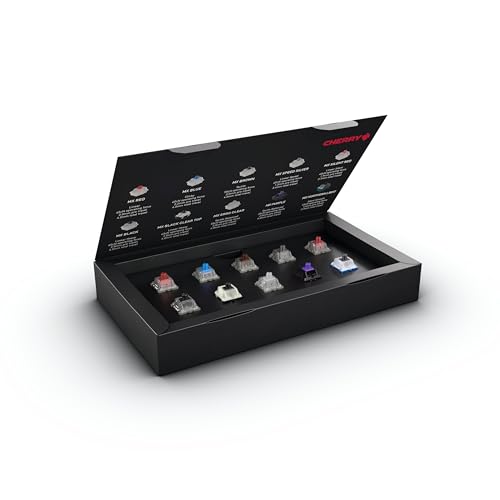
CHERRY MX2A Experience Box — the family, sampled
Badge: The audition instrument; ten switches that settle arguments.
- Contents: a sample set spanning the family’s linear, tactile, and clicky types
- Purpose: a tester for buyers who want evidence before a full kit
- Format: 10 switches, official Cherry presentation
- Role: the cheapest education in the catalogue
Every guide in this cluster prescribes trials, and the Experience Box is Cherry’s own instrument for them: a curated handful of the family’s types, ready to be pressed, compared, and capped with your own keycaps in your own room. It will not build a keyboard. It will do something more valuable — it will tell you which full kit to buy, with your own fingers as the witnesses, and it will do it before the full-kit money is committed. For a first-time Cherry buyer, this small box is arguably the most rational purchase in the entire guide, and its existence says something good about the maker: Cherry would rather sell you ten switches and the right kit than the wrong kit first.
Strengths
- The whole family’s character, comparable in one sitting
- Official samples of the current MX2A generation
- Prevents the most expensive mistake in the category: the wrong full set
Trade-offs
- A tester, not a build quantity — a second purchase follows by design
- One switch per type cannot show board-level character
- Availability varies more than the main kits’
Best for: undecided buyers and first-time Cherry customers. Not suited for: anyone who already knows their colour — buy the kit instead.
In this guide
The generations: MX, and what MX2A changed
Cherry’s MX design is decades old, and its longevity is the point: the pattern became the standard because it was good, and it stayed the standard because the ecosystem — sockets, keycaps, community knowledge — compounded around it. The MX2A generation is the line’s current platform, a refinement rather than a reinvention: updated housing geometry, a revised stem and barrel arrangement, and factory lubrication applied across the range. Owners of older Cherry boards who try an MX2A kit consistently report the same mild surprise — the character is identical, the smoothness is not — which is exactly what a good generational update should feel like. The practical guidance is simple: when buying Cherry today, buy MX2A kits like the ones in this guide, because they are the current production and the best-executed version of each recipe. Older stock is not bad; it is merely older, and the colour promises the same character in either case.
Two other family branches deserve a mention for completeness. The Speed line — represented in this cluster by the Speed Silver — shortens the actuation geometry for gaming, and gets its own full comparisons in cherry mx red vs speed silver switches. And Cherry’s low-profile and other specialist formats exist for boards built around them; they are not interchangeable with the standard MX switches in this guide, and a buyer with a low-profile board should shop that format specifically rather than assume the family name guarantees a fit.
How to choose your colour
Work through three questions in order. First, the room: if anyone else must live with the board, the Silent Red and the Brown lead; if the room is yours alone, the whole family is available. Second, the feedback: if your fingers type by feel, the Brown’s bump or the Blue’s full ceremony; if your fingers type by flow, the linears. Third, the hand: light and fast points to Red, heavy and deliberate to Black, with the Speed Silver waiting for the competitive specialist. Answer those three honestly and the colour chooses itself — which is the elegance of Cherry’s system, and the reason a “complete guide” to it can be shorter on verdicts and longer on understanding than most. For the brand-level view beyond Cherry, cherry mx vs gateron switches which is better and the five-brand comparison at cherry mx vs gateron vs kailh vs outemu vs razer switches which is best take the argument wider.
How to buy and install, step by step
Step 1: Sample before you commit, if you are new
The Experience Box exists for this step. Press the family, cap the samples with your own keycaps, and let your fingers vote before a full kit is ordered.
Step 2: Count your keys and buy the count honestly
Thirty-six-switch kits cover compact boards and clusters; tenkeyless and full-size layouts need multiples. Add a small margin for spares — a Cherry board is a decade-long object, and its spares should be bought while its generation is current.
Step 3: Confirm the socket before the switches arrive
Standard MX switches need standard MX sockets. Hot-swappable boards accept them directly; soldered boards make the swap a project; low-profile and optical boards take different formats entirely.
Step 4: Install a row, type on it, then commit
A single row in the real case, with your real keycaps, predicts the board’s character better than any review. Only then build the rest, testing each key as you go.
Step 5: Keep the family’s spares labelled
Cherry switches invite zoning and future experiments; a labelled spares box turns today’s leftovers into next year’s options instead of next year’s mystery parts.
Common mistakes when buying Cherry
The first is reading the colour as a quality rank — Silver above Red, Black above Brown — when the colours are recipes, not tiers; the mistake ships specialists to generalists and firm springs to tired hands. The second is assuming every switch with an MX-style stem is a Cherry: the pattern is universally imitated, and imitations range from excellent to dreadful, while the name on the housing is the only guarantee of the recipe inside. The third is buying old-generation stock unknowingly when the current MX2A kits are the ones this guide’s descriptions refer to. The fourth is lubing a brand-new MX2A kit out of habit before typing on it — the current factory finish deserves a hearing first, and lubricant added in haste is difficult to remove in regret.
Fifth: expecting one colour to serve every key. The family system invites zoning — Silent Reds where the household listens, Blues where the writer works, Blacks standing guard on the resting keys — and owners who treat the catalogue as a palette rather than a ballot report the highest satisfaction. Sixth: forgetting that the switch is one ingredient. A Cherry in a hollow case will sound and feel cheaper than a Cherry in a solid one, and blaming the colour for the case’s sins has ended more Cherry journeys than any defect in the switches themselves.
Cherry in the wider world: why the reference matters
It is worth understanding what you own when you own the reference standard. Every keycap set in the hobby is sculpted for the MX stem. Every socket in every hot-swap board is a descendant of the MX pattern. Every competing switch is reviewed against a Cherry of the same colour, and the comparison is understood by every reader because the reference is stable. That stability has a practical cash value: Cherry switches are the easiest in the hobby to resell, regift, troubleshoot, and find advice about, and a board built on them can be maintained by any future owner without archaeology. Rivals beat Cherry on individual axes — a smoother stroke here, a deeper sound there, a friendlier division of price by count elsewhere — and this site’s other guides say so where it is true. But the family’s combined virtues of character, consistency, availability, and permanence are why it remains the first name in the category, and why a complete guide to it is the natural foundation for the whole cluster’s switch coverage, from the best budget linear switches under 30 cents roundup to the boutique end of the market.
Final recommendation
New to Cherry: buy the Experience Box, then the colour your fingers chose — which, for the statistical majority, will be the Red for play, the Brown for work, or the Silent Red for shared life. Returning to Cherry: buy the MX2A kit of the colour you already love, and enjoy the generation’s smoothness. Building something deliberate: treat the family as a palette and zone the board. The complete guide’s last word is the family’s own design philosophy — a small set of honest recipes, clearly named, made consistently for decades. In a hobby of monthly revolutions, that is a radical product.
Inside the switch: anatomy for the curious
A complete guide should open the housing once. Inside every MX switch are four actors: the stem, whose shape decides whether the stroke is linear, tactile, or clicky; the spring, whose weight decides how the press feels from first touch to landing; the metal contact leaves, whose meeting is the keystroke’s electrical truth; and the housing, whose materials and tolerances decide the sound and the wobble. Every Cherry colour is a casting decision among those four: the Blue’s stem carries the click jacket, the Brown’s stem carries the bump, the Black’s spring is the firm’s, the Silent Red’s stem carries the pads. Understanding the anatomy converts the catalogue from a list of colours into a system you can reason about — and it explains the hobby’s favourite pastime, the frankenswitch, in which stems and springs are recast across housings to build recipes no maker sells. That craft has its own guide in this cluster, and it begins exactly here, with the family’s parts laid out on the table.
The anatomy also explains the family’s consistency. Because the contact system and housing pattern are shared, a Cherry switch’s reliability story does not vary much by colour; what varies is theatre — bump, click, silence, speed. Buyers who internalise that stop asking which colour is “best made” and start asking the only question the catalogue poses: which theatre do my hands want to perform in, eight hours a day?
The family at work: matching colours to real desks
Picture the family’s working week across five desks. The competitive player’s board is Red or Speed Silver, zoned by hand, in a case built for speed. The novelist’s board is Blue behind a closed door, or Brown where the household votes. The support engineer’s board is Black on the editing keys and Red on the letters, because her errors have consequences and her prose has deadlines. The streamer’s board is Silent Red under a microphone that no longer hears it. The undecided cousin’s board — the one being built as a gift — began with the Experience Box and a note asking the recipient’s fingers to report back. No desk in that paragraph is using the family wrong. That breadth of correct answers, from one small catalogue of colours, is the strongest evidence that Cherry’s system is a language rather than a product line: it lets very different people say very precise things about what their hands need.
Sound of the family, colour by colour
Because switches are heard as much as felt, a complete guide owes the family an acoustic census. The linears are the quiet citizens: the Red lands with a soft, neutral note that the case largely composes, and the Black answers a half-shade deeper, its firmer spring returning the key with a more solid top-out. The Brown adds the faintest texture — no click, but a tactile event you can sometimes hear in a silent room as a whisper of friction. The Blue is the family’s brass section, unmistakable and unapologetic. The Silent Red is the family’s library voice, the landing and return both padded into a low thud. None of these descriptions survives contact with a different case unchanged — a hollow board will coarsen every colour, a solid foam-filled one will civilise most — but the ranking among the colours is stable across builds, and a buyer choosing on sound should choose on the ranking and then tune with the build.
Cherry versus its imitators, stated fairly
The MX pattern’s patent expiry opened the design to the world, and the world responded with everything from superb rivals to shameless copies. A fair guide states the landscape plainly: several rival makers now produce switches that beat individual Cherry colours on individual axes — smoothness, sound, spring options, value — and this site’s brand comparisons name them where they win. What no rival offers is the whole system at once: the colour language, the decades of availability, the certainty that a kit bought in five years will match the kit bought today. There are also poor imitations trading on the pattern, with scratchy strokes and wandering tolerances, and the defence against them is the same as it ever was — the maker’s name moulded on the housing, bought through a listing you trust. Cherry’s premium, where it exists, is the price of a standard that behaves like one.
Modding Cherry switches: what the family tolerates
Cherry switches are the hobby’s traditional modding substrate, and the MX2A generation changes the advice in one respect: lube less, later. The current factory finish means most owners should type for a month before opening a switch, and many will never open one. For those who do, the family’s tolerances reward care — a thin, even lubricant film on the stem rails, a trace on the spring, films only where a housing genuinely rattles. Spring swaps are the highest-value modification in the family, because they rewrite a switch’s character without touching its identity: a Red housing with a mid-weight spring is the middle linear Cherry does not sell, and the Black’s housing accepts lighter springs just as gracefully. The clicky Blue is the exception to the modding welcome — its jacket mechanism should be left dry and alone, because lubricant on the click parts muffles the very event the switch exists to make.
The family’s economics, in the qualitative terms that matter
Cherry kits sit in the market’s honest middle: above the budget lines whose divisions this cluster’s budget roundup celebrates, below the boutique switches whose materials and small batches command their premiums. What the middle buys is the system — the recipes’ stability, the generation’s current execution, the permanence of the ecosystem. Whether that is the right spend depends on the board’s intended lifespan. A keyboard being built for a season of experimentation is better served by the budget tier’s liquidity; a keyboard being built as a five-year fixture amortises Cherry’s virtues across every one of those years’ keystrokes. The Experience Box deserves a final economic mention: as insurance against a wrong full-kit purchase, it is the cheapest risk management in the catalogue, and buyers who skip it to save a small sum occasionally pay the larger one instead.
Reading a Cherry listing like an insider
Four details separate an informed purchase from a hopeful one. The generation comes first: MX2A in the title means current production. The format comes second: kit counts vary, and the count in the box — not the count in the headline photograph — is what arrives. The housing version comes third: RGB housings pass backlight cleanly, while opaque housings mute it, and the right choice depends on your board’s lighting rather than on any hierarchy. The pin count comes fourth, for the familiar reason that 5-pin switches seat most rigidly where boards accept them. A listing that answers all four clearly is a listing written by someone who knows the product, which is itself a small quality signal in a market where vague listings and wrong photographs are common enough to plan around.
A short glossary for the rest of the catalogue
Complete guides should leave the reader fluent. Actuation is the moment the press registers, measured in millimetres of travel and in grams of force. Bottom-out is the end of the stroke, where the stem meets the housing floor. Tactility is a bump engineered into the stem’s path; click is a sound engineered alongside it in the Blue’s case. Pre-lubed means the factory has applied lubricant, as the MX2A line does, and hot-swappable means your board’s sockets let switches be pulled and replaced without solder. With those six terms, every other switch description in this cluster — and most in the hobby — becomes readable, which is the real product a complete guide sells: not a verdict, but literacy.
The Cherry board as a long-term object
Most switch guides end at the purchase; a complete one should end at the decade. A board built on Cherry switches has a particular old age: the keycaps shine and are replaced, the case gathers the archaeology of desks it has known, cables come and go — and the switches, barring accident, simply continue, their colours still legible, their recipes still in production if a replacement is ever needed. That continuity changes how the purchase should be judged. The relevant question is not whether a rival switch is smoother in a sound test this month; it is whether the whole arrangement — switch, spares, knowledge, ecosystem — will still be serviceable when the board is the oldest object on your desk. Cherry’s entire modern history argues that it will, and the MX2A generation’s job is to make the present-day version of that promise feel as good as it sounds. Buy the family for the long term and it behaves like the long term: undramatic, available, and there when you reach for it.
What this guide deliberately left out
Completeness has edges, and honesty requires marking them. Cherry’s catalogue includes specialist branches this guide touches only in passing — low-profile formats for slim boards, and other variants tied to specific hardware — because they are not interchangeable with the standard switches the kits above represent, and treating them as footnotes would mislead the very readers a guide exists to protect. Similarly, the family’s vintage history, rich as it is, matters to collectors more than to buyers, and the modern purchaser is served by the current generation rather than by archaeology. What remains — the five working recipes, the sampler, the generations, the choosing — is the part of Cherry that a person shopping today can act on, which is the completeness that counts.
Frequently asked questions
What do the Cherry MX colours mean?
Each colour is a recipe. Red is a light linear, Black a firm linear, Brown a light tactile without a click, and Blue a tactile with a click; named variants like Silent Red and Speed Silver modify the base recipe as their names suggest. The system lets you read any Cherry board’s feel from its specification, and most rival brands use similar colour language with their own variations.
What is the difference between MX and MX2A?
MX2A is the current generation of the MX platform: updated housing geometry and factory lubrication across the range, with each colour’s character unchanged. Fresh MX2A kits generally feel smoother than older production of the same colour. When buying today, the MX2A kits are the ones to choose; the recipes are identical, the execution is current.
Which Cherry switch is best for typing?
For most typists, the Brown — its gentle bump supports typing by feel at office-safe volume — or the Red for light, fast, flow typists. Heavy-handed typists often prefer the Black’s resistance, and writers with private rooms form deep attachments to the Blue. The Experience Box exists because this question has four correct answers, one per pair of hands.
Which Cherry switch is best for gaming?
The Red is the family’s gaming default, and the Speed Silver its competitive specialist, with an earlier actuation point for fast play. The Black serves heavy-handed players who suffer accidental presses on light switches. All three are linears; the choice among them is about spring weight and actuation depth, the subjects of this cluster’s two Cherry head-to-heads.
Are Cherry switches compatible with other brands’ keyboards?
They fit any board built for standard MX-pattern switches, which is most mechanical keyboards, and they accept the entire MX keycap ecosystem. They do not fit low-profile, optical, or magnetic boards, which use their own formats. When in doubt, pull one switch from your board and compare its underside with the standard pattern before ordering a kit.
What is the single most important thing a complete guide can tell a Cherry buyer?
That the colour is a recipe rather than a rank, and the right purchase is the recipe that matches a room, a feedback preference, and a pair of hands — in that order. Every other fact in this guide is commentary on that sentence.
Can a Cherry board be both a work and a gaming board?
Yes — that dual life is the family’s home ground. The Red serves both masters outright; zoned layouts serve them better, with a gaming geometry on the left hand and a working character on the right. The catalogue’s breadth exists precisely because one desk keeps asking it two questions, and Cherry’s colours are two answers that fit in the same sockets.
Where does the Speed Silver fit in this guide?
It is the family’s gaming specialist — the Red’s recipe with its actuation point moved high in the stroke — and it earns its own comparisons elsewhere in this cluster rather than a pick here, because this guide’s kits represent the family’s core line. Readers whose interest is competitive play should read this guide for the foundations and the speed comparisons for the specialism; the two together cover the whole Cherry argument.
Should I choose 3-pin or 5-pin Cherry switches?
Choose by your board: 5-pin switches seat most rigidly in boards and plates drilled for them, and the Black kit in this guide uses that format; 3-pin switches fit the widest range of boards, including older and plate-mount designs. A 5-pin switch’s extra legs can be trimmed for a 3-pin board with flush cutters. The switch’s character is identical either way — this is a mounting decision, not a feel decision.
What is the best Cherry switch for a quiet home office that still takes calls?
The Silent Red is the purpose-built answer: it keeps a mechanical board’s feel while removing the keystroke noise that microphones exaggerate and colleagues comment on. The Brown is the runner-up for typists who need tactile feedback on calls. Either lets a home office keep one board for both the work and the talking, which is the arrangement most home workers are actually trying to achieve.
Is the Cherry premium mainly about the name?
No — though the name is part of what is being bought, in the legitimate sense that a stable standard is worth money. The rest of the premium is measurable: set-to-set consistency, the current generation’s factory finish, and tolerances that make a hundred switches behave like one switch a hundred times. Anonymous switches can match a single Cherry on a good day; matching a full set, and matching it again in five years, is the trick the premium pays for.
How do Cherry switches handle a spill or dust?
Like all open mechanical switches, they prefer a clean life: dust is managed with air and a cover, and a spill means power off, caps off, and patience while everything dries. The family’s saving grace is serviceability — switches pull individually, so a single drowned key is a single replacement rather than a dead board. Prevention remains cheaper than cure, and a desk habit of keeping drinks behind the board’s line has saved more Cherry switches than any other measure.
Does Cherry make a switch for people who cannot decide?
Indirectly, yes — that is the Experience Box’s whole purpose, and behind it stands the Brown, the family’s traditional answer for the undecided: tactile enough to inform, quiet enough for any room, light enough for any hand. More first boards have been happily built on Browns by people who could not decide than on any other colour, and a good fraction of those owners never feel the need to decide afterwards.
What should I do if one switch in a kit feels different?
First, reseat it — a switch sitting slightly high in its socket feels and sounds like a different part. If the difference travels with the switch when you swap its position, try it in the board’s least-used corner for a week; many small inconsistencies polish themselves out with use. If it persists, retire it to the spares bag and install a fresh one. Even the reference line’s tolerances are bands rather than points, and the kit’s margin exists for exactly this.
Are Cherry switches a good gift for a keyboard enthusiast?
A kit in the recipient’s colour is one of the hobby’s safest gifts, because the colour system makes the preference legible — ask what they type on, or look at their board’s stems, and the answer is printed there. For a recipient whose colour you cannot learn, the Experience Box is the thoughtful choice: it gives them the family’s whole argument and lets their own fingers deliver the verdict, which is more respectful than guessing.
How many switches does a full keyboard need?
Count the keys: compact layouts need sixty-some, tenkeyless boards eighty-some, and full-size boards a hundred and more. The thirty-six-count kits in this guide therefore cover compact builds outright and serve larger boards in multiples — or as zoned sets, clusters, and spares pools. Buy the count for the layout you are actually building, plus a small margin; a half-switched board waiting on a second delivery is the hobby’s most avoidable frustration.
Do Cherry switches work with any keycaps?
They work with the entire MX-stem keycap world, which is effectively the whole aftermarket: every profile, material, and legend style in the hobby is built around this cross-shaped stem. The only cautions are universal rather than Cherry-specific — very old or unusually tight caps deserve a gentle first fitting on any switch, and stabilised keys need their inserts seated properly regardless of the switch beneath them.
What is the difference between Cherry’s tactile switches?
Within this guide’s kits, the tactile choice is between the Brown’s quiet bump and the Blue’s bump-plus-click. The Brown’s bump is a small, early ledge you feel and the room does not hear; the Blue pairs a more pronounced tactile event with the click jacket’s snap, doubling the feedback and the volume together. Typists who want information choose between them by room, not by finger — the finger would happily take either, the household rarely would.
Which Cherry switch should a programmer choose?
Most programmers land on the Brown for its feel-typing at office volume, or the Red for flow-state speed, with a minority choosing the Black for the editing hand where a stray keystroke carries consequences. Code is a mixture of prose and surgery, and the zoned board — tactile or firm where the surgery happens, light where the prose flows — is the configuration this guide hears about most from working developers.
Are Cherry switches worth it over cheaper MX-style switches?
For a board you intend to keep, generally yes: the consistency across a full set, the current generation’s finish, and the permanence of the ecosystem are worth their premium over anonymous alternatives. For an experiment, a loaner board, or a first build on a strict budget, the proven budget lines in this cluster’s budget roundup are the rational purchase — and many of their owners graduate to Cherry with their preferences already formed, which is the cheapest way to arrive here.
How do I identify a genuine Cherry switch?
Look at the housing: Cherry’s name is moulded into the top of genuine switches, cleanly and consistently, and the stem colour will match the recipe the switch claims to be. Buy through listings that show the product clearly, and be wary of switches sold under the family’s colour names with no maker named at all — the pattern is public, but the recipe is Cherry’s, and the moulding is where the promise is printed.
Can Cherry switches be repaired, or only replaced?
They open with a switch opener, and their parts — stems, springs, housings — can be cleaned, swapped, and recombined, which is the basis of the hobby’s modding culture. A switch with a bent pin is straightened in seconds; a switch with a tired spring can be re-sprung. True contact failure is the rare fault that ends a switch’s life, and the spares in your kit exist for that day.
Why do so many keyboards ship with Cherry switches?
Because board makers value what buyers value: a known feel, a stable supply, and a name customers can read. A keyboard specified with Reds or Browns communicates its character instantly to anyone who knows the colour language, which is most of the market. That ubiquity feeds itself — the more boards ship with Cherry, the more typists learn the language, and the more valuable the language becomes to the next board maker.
What does the RGB housing version mean?
It means the housing is made to let a board’s backlighting pass through or around the switch cleanly, so illuminated legends and underglow effects survive the switch choice. On a non-backlit board the distinction is invisible; on a showcase board it is the difference between lighting that works and lighting that smears. Choose the housing for the board you own, not for an abstract hierarchy — there is none.
What is the Cherry MX2A Experience Box for?
It is Cherry’s official sampler: a small set of switches spanning the family’s types, sold so a buyer can press the recipes before committing to a full kit. Use it with your own keycaps, in your own room, at your working hours — the three conditions that make any switch verdict trustworthy. It is the purchase this guide recommends first to anyone who cannot yet name their colour.
Are all Cherry switches the same size?
The standard MX switches in this guide share one footprint and fit the same sockets and keycaps across the family. Cherry also makes low-profile and other specialist formats under related names; those are different physical standards for different boards and are not drop-in substitutes. If your board is a slim or low-profile model, confirm its format before ordering any kit.
Which Cherry switch is quietest?
The Silent Red, by design — its stem carries silencing pads that cushion both the landing and the return. Among the standard switches, the linears are quieter than the Brown, and the Blue is in a category of its own at the loud end. Remember that the case composes much of a board’s voice: a Silent Red in a hollow case can still sound present, while a Red in a solid, foam-filled case can sound remarkably civilised.
Can I mix Cherry colours on one board?
Yes, and the family system encourages it: the housings and stems share one pattern, so colours can be zoned by area — linears for gaming, tactiles for typing, a Silent Red under the keys nearest a sleeping household. Keep zones clean, keep the layout documented, and keep the spacebar’s switch as its own deliberate decision, because stabilised keys feel different from letter keys under the same colour.
Are Cherry switches good for a first mechanical keyboard?
They are the canonical first keyboard’s switches, and the reasons are practical: standard fit everywhere, a colour for every temperament, and an ocean of community knowledge for every question a beginner can ask. The Brown and the Red cover most first-time hands between them, and the Experience Box settles the choice between them with evidence instead of opinion.
Do Cherry switches need to be lubed?
The current MX2A kits arrive factory-lubed and should be typed on as they come; most owners will never need to open one. Enthusiasts chasing a specific sound can add a thin film later, switch by switch, keeping lubricant away from the Blue’s click mechanism and from every switch’s contact leaves. Lubrication is a refinement of this family, not a requirement of it.
How long do Cherry MX switches last?
They are rated for very long service lives and routinely outlast the boards they are installed in; the switches in this guide should be treated as decade-scale parts. Keep dust and liquids away, keep a few spares from your kit, and a Cherry board’s switch heart is a problem you will likely never have to solve twice.
Related reading: keyboard switches explained for beginners · gateron switches complete guide · kailh box switches complete guide