Disclosure: As an Amazon Associate, kajuandouglas.com earns from qualifying purchases. Links on this page are affiliate links; they cost you nothing extra. Prices and availability change often, so check the current Amazon listing before you buy.
What Is the Best Redragon Mechanical Keyboard
Asking what is the best redragon mechanical keyboard is really asking which corner of a very wide range deserves your desk, because Redragon sells mechanical boards the way a good diner sells breakfast: something for everyone, at prices that invite experimentation, in sizes from full battlestations with macro columns to a gasket-mounted compact that sounds like boards costing far more. The range’s breadth is its charm and its trap, since the best Redragon for an MMO player and the best Redragon for a travelling writer share almost nothing except the logo.
Five verified models map that range in this guide. The K580 appears twice, in its clicky blue and tactile brown switch forms, because that full-size macro board is the range’s traditional flagship for gamers who use every key. Its wireless successor, the K580 PRO, adds tri-mode connection and swap-ready sockets. The K673 PRO represents the new Redragon — gasket mounting, layered dampening, a control knob, and an eighty percent layout — while the K556 PRO brings an aluminium full-size wireless board with quiet linear switches for the typing-first buyer.
Each review states its owner plainly, because with a range this wide the honest answer to the title’s question is a matching exercise, not a coronation. The buying sections afterward compare switch characters, explain where Redragon’s value concentrates, and walk through setup and care, so that whichever model you choose arrives as a decision rather than as a gamble on a famous budget name.
Where to Buy and How the Picks Were Chosen
All five models were verified against catalogue data before drafting, with identities, switch variants, and headline features taken from their verified listing titles. Two listings here are the same K580 board in different switch configurations, and the reviews treat them as the genuine alternatives they are, because switch choice on a board you cannot easily change is a purchase-level decision. Every link uses Check price on Amazon wording, since Redragon’s range is promoted and discounted so frequently that any printed figure would be obsolete on arrival.
Selection favoured the models a shopper actually cross-examines: the macro-heavy wired flagship in both its personalities, its wireless evolution, the modern gasket compact, and the aluminium typist’s board. Smaller novelties and near-duplicate variants were left aside so the comparison could stay deep rather than wide, and every pick had to answer a distinct buyer’s question better than its siblings could.
In this guide
Quick Picks
- Best for MMO and macro-heavy gaming: Redragon K580 (Blue Switch) — a full-size wired board with five onboard macro keys, a media wheel, and classic clicky blue switches.
- Best K580 for shared spaces: Redragon K580 (Brown Switch) — the same macro flagship with tactile brown switches tuned for long typing sessions.
- Best wireless macro board: Redragon K580 PRO Wireless — the K580 formula with tri-mode wireless, macro G keys, a media wheel, and swap-ready sockets.
- Best modern Redragon for most people: Redragon K673 PRO — an 81-key gasket-mounted wireless board with a scroll knob and five-layer noise dampening.
- Best Redragon for typing-first buyers: Redragon K556 PRO — a full-size aluminium wireless board with quiet linear red switches and tri-mode connection.
Detailed Reviews
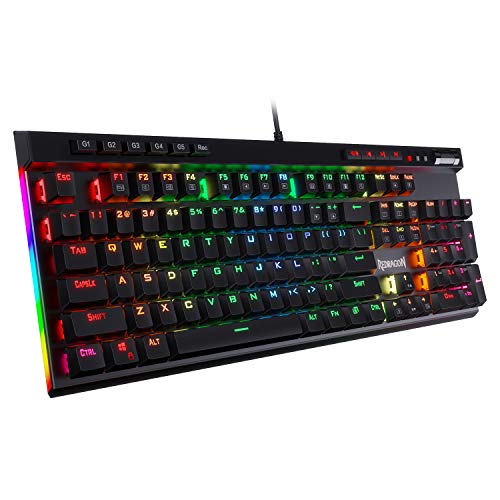
Redragon K580 (Blue Switch) — Best for MMO and macro-heavy gaming
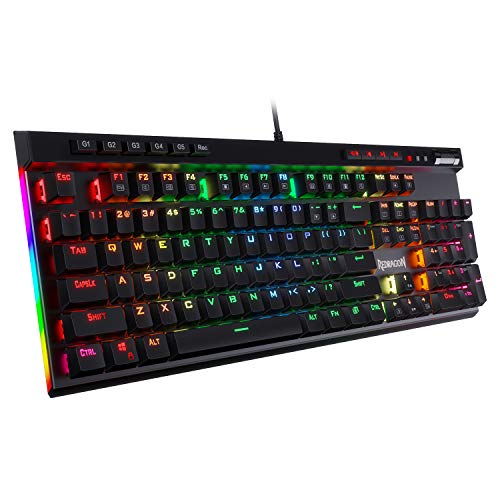
The K580 in blue is the Redragon of popular imagination: big, lit, unapologetically mechanical, and built around the MMO and MOBA player whose rotations spill onto dedicated macro keys. Those five onboard keybinding buttons are the board’s thesis — abilities and sequences stored in the keyboard itself, available without software negotiations — and the media wheel keeps volume under the hand during play rather than behind a function chord. For a battlestation that never travels, wired certainty and this much dedicated control remain a compelling package.
The blue switches define its social life. Their click is the classic, hype-typing soundtrack the listing promises, thrilling to the player and clearly audible to everyone else in the building’s quieter hours. In a private gaming room that is a feature; in a shared flat it is a negotiation. Choose this variant when the room is yours and the macros are real, because a macro column you use nightly is worth more than any specification that merely photographs well.
At a glance:
- Layout: full-size with macro column
- Extras: media wheel and dedicated media controls
- Macros: five onboard keybinding buttons
- Switches: tactile blue, clicky
Strengths
- Dedicated macro keys serve complex game rotations
- Media wheel is genuinely useful in play
- Onboard storage keeps macros with the board
Trade-offs
- Clicky switches test shared rooms
- Full-size footprint crowds the mouse
- Wired only, so the desk is permanent
Best for: an MMO or MOBA player with a private gaming space who will truly use macro keys.
Not suited for: a shared-room typist or a small-desk player who needs the mouse territory back.
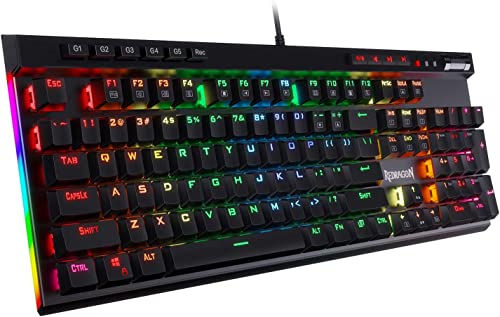
Redragon K580 (Brown Switch) — Best K580 for shared spaces
Everything structural said about the blue K580 applies here — the macro column, the wheel, the onboard storage, the wired full-size presence — and the brown switches rewrite its personality for a different life. Tactility without the click bar’s announcement makes this the K580 that can hold a day job: gaming flagship by night, plausible work keyboard by day, with a bump your fingers can ride through long documents and a voice a household can live beside.
That dual citizenship is this variant’s whole argument, and it is a strong one for the many players whose desk is also their office. The trade is the loss of the blue’s theatrical feedback, which some typists genuinely use as rhythm. If your typing is long-form and your gaming is macro-rich, this is the K580 to buy; if your gaming is the main event and your room is private, its blue sibling remains the range’s extrovert champion.
At a glance:
- Layout: full-size with macro column
- Extras: media wheel and media controls
- Macros: five onboard keybinding buttons
- Switches: tactile brown, quieter character
Strengths
- Macro hardware with a room-friendly switch
- Tactile bump suits long typing days
- One board can serve work and play
Trade-offs
- Less dramatic feedback than the clicky variant
- Same large footprint as its sibling
- Wired connection only
Best for: a player who works at the same desk they game at, in company.
Not suited for: a pure gamer in a private room who wants the full clicky ceremony.

Redragon K580 PRO Wireless — Best wireless macro board
The K580 PRO asks what the flagship would become if it grew up in the wireless era, and answers thoroughly: tri-mode connection for a desk that also serves a laptop and a tablet, macro G keys and combo storage for the MMO faithful, the family media wheel retained, and swap-ready sockets that finally let a K580 owner change switch character without changing keyboards. It is the range’s most complete gaming board on paper and, for multi-device players, in practice.
Its size remains a battlestation commitment, and wireless freedom on a board this large is mostly about a clean desk and device switching rather than travel. Buyers should also plan the charging ritual a big lit wireless board requires, since RGB and radios together spend batteries faster than a dim typist’s board. For the player whose setup spans machines and whose macros are non-negotiable, no other Redragon assembles the same combination, and that specificity is exactly what a best-of guide exists to identify.
At a glance:
- Connection: tri-mode wireless plus wired
- Macros: G keys and five onboard combo keys
- Extras: media wheel
- Sockets: swap-ready for switch changes
Strengths
- Tri-mode connection serves several machines
- Macro hardware survives the wireless move
- Swap-ready sockets future-proof switch taste
Trade-offs
- Large board gains little portability from wireless
- Battery care is part of ownership
- Over-equipped for simple typing needs
Best for: a multi-device gamer who needs macros and hates cables in equal measure.
Not suited for: a minimalist or traveller who should take the compact pick below.

Redragon K673 PRO — Best modern Redragon for most people
The K673 PRO is where Redragon’s range turns toward the enthusiast mainstream, and it is the model this guide expects to suit the most readers. Gasket mounting suspends the typing assembly so keystrokes land with a cushioned give, five layers of internal dampening chase the deep, creamy sound the listing advertises, and the eighty percent layout keeps arrows and function keys while returning desk space to the mouse. A scroll knob that doubles as a control wheel finishes a specification that reads like a checklist of what modern buyers ask for.
Its tri-mode wireless suits the hybrid life — receiver for the gaming desk, Bluetooth for the laptop, cable for charging and certainty — and the compact body actually benefits from that freedom, moving between rooms and machines as its size intended. What it surrenders against the K580 line is the macro column and the full-size sprawl, which most modern players, honestly audited, never used. For a first Redragon or a first serious board at this end of the market, the K673 PRO is the range’s centre of gravity.
At a glance:
- Layout: 81 keys, compact 80 percent class
- Mounting: gasket with five-layer dampening
- Connection: tri-mode wireless
- Extras: scroll knob and control wheel functions
Strengths
- Gasket mount and dampening give a refined sound
- Compact layout keeps essential keys
- Knob is useful far beyond volume
Trade-offs
- No macro column for MMO specialists
- No number pad for data entry
- Creamy tuning will not suit lovers of a sharp clack
Best for: most buyers: a modern, compact, wireless board for mixed gaming and work.
Not suited for: a macro-dependent MMO player or a full-time number-pad user.

Redragon K556 PRO — Best Redragon for typing-first buyers
The K556 PRO is the Redragon for the buyer whose keyboard works for a living. A full-size aluminium body gives the board planted, rock-solid manners on the desk, quiet linear red switches keep long typing days smooth and socially painless, and tri-mode connection lets the same board serve a desktop, a laptop, and a tablet across a working week. Its listing’s emphasis on durability suits its role: this is infrastructure, bought to disappear into reliable service.
Gamers are not excluded — linear switches are a gaming staple and the board carries RGB and wireless pace enough for most play — but the design’s centre of gravity is the workday, and its size keeps the number pad that data-heavy work demands. If your Redragon must earn its place from nine to five and merely visit games afterward, this is the model whose priorities match yours, and its aluminium calm will still be pleasing you when louder boards have become tiresome.
At a glance:
- Layout: full-size 104 keys
- Case: aluminium
- Connection: tri-mode Bluetooth, 2.4 GHz, USB-C
- Switches: quiet linear red
Strengths
- Aluminium full-size body feels planted and durable
- Quiet linears suit shared workspaces
- Tri-mode connection fits multi-device work
Trade-offs
- Full-size footprint is a desk commitment
- Linear feel gives typists no tactile bump
- Less gaming theatre than the K580 line
Best for: a typing-first professional who wants one full-size board for work and play.
Not suited for: a compact-desk gamer who needs mouse room more than a number pad.
How to Read the Redragon Range Without Drowning in Model Numbers
Redragon’s naming rewards a simple decoding habit: the letter and numbers identify a family and size class, while suffixes such as PRO describe a generation’s ambitions rather than a different species. Within a family, variants usually differ by switch and connection, which is why this guide treats the two K580 listings as one board with two personalities and the K580 PRO as that family’s wireless evolution. Reading the range by family first and variant second converts a bewildering catalogue into a handful of comprehensible decisions.
Size is the second decoding key. Redragon sells the same gaming ideas at full-size, eighty percent, and smaller footprints, and the right size is determined by two honest questions: do you use a number pad weekly, and how much territory does your mouse hand need? Macro columns and number pads are wonderful servants and terrible landlords — each takes desk that a low-sensitivity mouse would otherwise own — so let your actual week, not a feature list, arbitrate between the K580’s abundance and the K673’s compact discipline.
Finally, decode by era. The wired K580 represents the range’s classic gaming formula, executed completely; the PRO models represent its modernisation — wireless modes, swap-ready sockets, gasket mounting, and dampening borrowed from the enthusiast world. Neither era is a trick. Classic boards are proven and often discounted as the range renews itself, while modern boards cost their premium in features many buyers genuinely use daily. Your budget and your device count, between them, know which era your desk belongs to.
Switch Choice Across the Five Picks
The five listings span clicky blue, tactile brown, and quiet linear red personalities, plus the K673’s creamy-tuned gaming switches and the PRO’s swap-ready freedom to change your mind later. Treat that spread as the guide’s real comparison, because on boards at this end of the market the switch is the daily experience while the feature list is the weekly one. A macro wheel delights you when you reach for it; a switch delights or disappoints you on every one of the day’s ten thousand presses.
Blue’s click is a commitment to a sound, brown’s bump is a commitment to feedback without theatre, and red’s linearity is a commitment to smoothness that some typists experience as freedom and others as vagueness. There is no hierarchy among them, only fit — to your games, your typing volume, and your room’s other occupants, in that order of honesty. Where a board offers swap-ready sockets, as the K580 PRO does, the commitment softens into an experiment, which is worth real money to a buyer whose switch taste is still forming.
how to choose your first mechanical keyboard generalises this switch-first thinking for readers comparing beyond one brand, and its advice applies unchanged inside the Redragon range: sample if you can, decide by room and work, and let features break ties between boards whose switches you already approve.
Comparison Table
| Pick | Key fact | Best for |
|---|---|---|
| Redragon K580 (Blue Switch) | Layout: full-size with macro column | an MMO or MOBA player with a private gaming space who will truly use macro keys. |
| Redragon K580 (Brown Switch) | Layout: full-size with macro column | a player who works at the same desk they game at, in company. |
| Redragon K580 PRO Wireless | Connection: tri-mode wireless plus wired | a multi-device gamer who needs macros and hates cables in equal measure. |
| Redragon K673 PRO | Layout: 81 keys, compact 80 percent class | most buyers: a modern, compact, wireless board for mixed gaming and work. |
| Redragon K556 PRO | Layout: full-size 104 keys | a typing-first professional who wants one full-size board for work and play. |
Step by Step: Set Up Your Redragon for Work and Play
Step 1: Store your macros and profiles in the board where possible
Boards with onboard macro storage, like the K580 family, reward five minutes of setup with years of portability: record the sequences you actually use, name them by game or task in your own notes, and test each one in a low-stakes session before it matters. A macro that misfires in a ranked match or a work presentation teaches the same lesson at different prices, so rehearse where failure is free.
Step 2: Assign the wheel and knob before a game assigns them for you
Media wheels and control knobs are most useful when their jobs are chosen deliberately — volume for one, zoom or scroll or brush size for another where the board allows remapping. Set those roles on day one and your hand will learn them as reflexes; leave them at defaults you never examined and the hardware’s best trick becomes a decoration you occasionally bump by accident.
Step 3: Choose connection modes per machine and label them
On tri-mode models, dedicate each mode to one machine — receiver to the gaming desktop, Bluetooth slots to the laptop and tablet — and keep a small note of the assignments until they are reflexes. Wireless confusion is almost always assignment confusion, and it evaporates once every device owns a mode. Keep the cable in the desk for charging and for the wired certainty a firmware update deserves. bluetooth vs 2.4 GHz keyboards explained explains the modes’ trade-offs.
Step 4: Tune the lighting for the room, then stop
Set a brightness and pattern your eyes approve at the hours you actually play and work, favouring legibility over spectacle in dark rooms, and then leave it alone for a month. Constant lighting redesign is the hobby’s most charming time sink, and a board whose glow is settled becomes part of the room rather than a project on it. Typists sharing a room should treat brightness as a courtesy setting as much as an aesthetic one.
Step 5: Give the board a month before judging its switches
New switches, a new layout size, and possibly a new macro habit all need adaptation, and Redragon’s value proposition includes the freedom to learn on a board that did not consume the whole budget. Type and play through the month, note the one thing you would change, and only then consider whether that thing is a setting, a switch swap on the socketed models, or a different model entirely. Most first-month complaints are settings wearing a disguise.
Common Mistakes to Avoid
Buying the macro flagship for a game that needs no macros
Dedicated macro keys serve rotations and sequences in specific genres; a player whose games live on WASD and a few abilities gains a wider, more expensive desk ornament and loses mouse territory to it. Audit your games’ real key demands before coveting the K580’s column, and let the K673’s compactness win whenever the audit comes back modest, as most audits honestly do.
Choosing clicky blue switches for a shared home
The blue K580’s sound is a household decision made by one person, and households outvote keyboards eventually. If other people’s sleep, work, or patience shares your walls, the brown variant exists precisely for you, and choosing it is not a compromise of the board’s gaming soul — the macros, wheel, and layout survive intact. Only the announcement changes.
Assuming wireless models are travel models
Tri-mode connection on a full-size aluminium board buys a clean desk and device switching, not portability, and buyers who picture the K556 PRO in a laptop bag will be disappointed by physics. Match the wireless benefit to the board’s body: compact models travel, large models declutter. Both are valuable, and confusing them is how good boards earn unfair reviews.
Ignoring the socket question at this price tier
Whether a board lets you change switches later decides its lifespan as your taste evolves. The K580 PRO’s swap-ready sockets and the K673’s modern construction extend their owners’ options, while a soldered board asks for a surer first decision. Neither is a defect, but the buyer who knows their taste is unsettled should weight sockets heavily, because a switch swap is cheaper than a successor board.
Redragon’s Place in the Market, and Why Its Fans Stay
Redragon built its following by refusing the idea that mechanical keyboards must begin at enthusiast prices, and its range’s real product is permission: permission to try a mechanical board, to own a second one for another room, to give one as a gift without a financial ceremony. That permission has introduced more people to the category than many premium brands combined, and the introductions stick because the boards, chosen well, are honest tools rather than disposable novelties.
The modern PRO models show the range listening to its own graduates. Owners who began on a classic wired board asked for wireless freedom, better sound, gasket manners, and switch flexibility, and the K580 PRO and K673 PRO answer those requests inside the same value philosophy. A brand that grows with its customers’ taste, instead of abandoning them to other brands at the next tier, earns the loyalty Redragon enjoys — and gives a guide like this one a range worth mapping carefully rather than a single bargain worth naming.
For the buyer, the practical moral is to shop Redragon by fit with unusual confidence at the modest end and unusual care about variants, because the range’s breadth means the right board is almost certainly in there, wearing a model number one digit away from the wrong one. Use the family-and-variant reading method in this guide, verify the switch on the exact listing you order, and the range’s famous value becomes yours rather than somebody else’s review’s.
Ownership Diaries: How Each Pick Ages Into a Setup
The blue K580 ages like a favourite arcade cabinet: its macro column accumulates rituals, its wheel becomes the hand’s default route to volume, and its click settles into the room’s soundtrack for exactly as long as the room remains the player’s own. Owners who move it into shared space usually do not sell it; they reassign it to the private desk and buy its brown sibling for the common one, which tells you the board’s hold is about identity as much as utility.
The K673 PRO ages in the opposite direction, disappearing into competence. Its knob acquires jobs across applications, its wireless modes divide the household’s machines between them without further thought, and its cushioned voice becomes the sound owners unconsciously expect from keyboards, so that other boards begin to sound harsh by comparison. That quiet normalisation is the modern design’s victory: not excitement, but a raised baseline.
The K556 PRO ages like office furniture of the better kind — unnoticed, uncomplaining, and faintly resented by the lesser equipment around it. Aluminium and quiet linears do not date the way gaming theatre dates, and a board bought for a workday in one year is still correctly dressed for the workday five years later. Professionals who measure purchases in cost per year of unremarkable service will find this pick’s diary the most persuasive in the guide.
What Redragon Ownership Teaches About the Wider Market
Living with a range this broad teaches a transferable lesson: at the modest end of the mechanical market, the differences that matter are the same differences that matter at the top — switch fit, layout fit, sound fit — while the differences that fade are the ones spec sheets enlarge. A buyer who learns that lesson on a Redragon carries it into every later purchase, immune to both snobbery and its opposite, and the range can fairly claim to have educated its owner as well as equipped them.
It also teaches the value of the second board. Because Redragon’s pricing permits a household to own a gaming board and a typing board, or a desk board and a travel board, owners discover specialisation earlier than single-board premium buyers do. That discovery — that two fitted tools beat one compromised flagship for many lives — is one of the hobby’s open secrets, and this range is its most accessible doorway.
Finally, the range teaches variant discipline, the unglamorous skill of confirming that the listing in the basket is the switch, size, and connection you decided on. Redragon’s model numbers differ by digits and its variants by a word, and every owner has either made or narrowly avoided the wrong-variant purchase. The habit of checking, formed here, will protect every technology purchase you make afterward, which is a strange and genuine dividend from a budget keyboard.
A Short Guide to Gifting a Redragon
Redragon’s accessibility makes its boards natural gifts, and the range’s breadth makes gifting a matching exercise rather than a price decision. For a young gamer, a K580 variant in the switch the household can host; for a student, the K673 PRO’s compact wireless manners suit dorm desks and library trips alike; for a parent setting up a home office, the K556 PRO’s calm aluminium professionalism says the gift was chosen by an adult. Each choice announces that the giver studied the recipient’s life, which is the actual content of any good gift.
Include the unglamorous accessories of success: a note naming the switch and how to change modes, the receipt kept accessible for an exchange that should be offered without offence, and perhaps a desk mat to complete the landing. A keyboard gift fails socially when its recipient must troubleshoot it alone on the first evening, so a giver who spends ten minutes setting the board up — or who buys from a seller with painless returns — has understood that the product being given is a good first week, not a box.
And if the recipient’s taste is entirely unknown, gift the middle of the range’s personality rather than its extremes: tactile over clicky, compact over sprawling, modern over classic. The K673 PRO exists in this guide’s top position for most people precisely because it is the board least likely to be wrong for a stranger, and a gift that cannot be wrong is a gift that will be used — which is, in the end, the only review a giver should care about.
The Upgrade Path From a First Redragon
Few Redragon owners treat their first board as their last keyboard, and the range is unusually kind to that evolution. Switch taste formed on a K580 can be explored properly on the PRO’s sockets; layout lessons from a full-size board can be applied to a K673’s compact discipline; a K556’s owner who discovers gaming can add a macro board as a second citizen rather than replacing a professional tool that still serves its day. Each step reuses knowledge rather than discarding equipment, which is how collections grow sensibly.
The wider hobby waits beyond the range with the same logic at higher tiers, and a Redragon graduate arrives there unusually well prepared: they know their switch family, their layout size, their volume tolerance, and their feature habits from lived evidence. Money spent later is therefore spent precisely, on the one or two qualities the Redragon could not provide, rather than on rediscovering preferences. Judged as tuition with a keyboard attached, the range may be the best-value education in the entire category.
Sound and Feel, Model by Model, in Plain Words
Line the five picks up by voice and the range’s story tells itself. The blue K580 speaks loudest and proudest, a board whose typing is an announcement. The brown K580 lowers that voice to a murmur with a bump, suitable for conversation. The K580 PRO’s voice depends on the switches its sockets are hosting, which is its modern charm. The K673 PRO speaks in the deep, cushioned register its dampening was built for, and the K556 PRO, on quiet linears in aluminium, is the range’s librarian — present, smooth, and determined not to interrupt anyone’s thoughts.
Feel follows a parallel map. Click and tactility give the fingers events to navigate by; linearity gives them an unobstructed road; gasket mounting gives the whole board a forgiving suspension under every event or road. A buyer choosing among these five is really choosing a texture for their working day, and should choose it the way they would choose a chair’s firmness — by imagining the thousandth hour, not the first minute in the showroom.
Desk Space Economics Across the Range
Measure the five picks against a mouse’s ambitions and another story emerges. The full-size models spend desk width on keys some owners use hourly and others use never, and the honest audit of the number pad and macro column — how many times last week, really — is the cheapest research in this entire guide. Players who discover their macros are aspirational should let the K673’s reclaimed territory host a wider mouse sweep and enjoy the aim that follows, because desk space spent on unused keys is not neutral; it is actively taxed from the hand that games.
Conversely, the professional whose afternoon is spreadsheets should defend every centimetre of the K556’s full layout against compact fashion, because a number pad used hourly is not bulk but equipment. The range contains both truths without contradiction, which is why this guide refuses to crown a single winner: Redragon’s best keyboard is a function of a particular desk’s economy, and the audit that reveals yours takes one honest week of noticing.
Care and Feeding for a Hard-Working Budget Board
Redragon boards earn their keep in busy rooms, and a small care rhythm protects the investment: caps off and crumbs out a few times a year, the cable’s strain relief treated gently, wireless models charged before they beg, and macro configurations noted somewhere outside the board in case a reset ever clears them. None of this is specialist work, and all of it is the difference between a board that ages into a trusted tool and one that drifts into a drawer of almost-working electronics.
When a single key tires on a socketed model, replace the switch and continue; when a wired board’s cable frays, replace the cable where the design allows; when a stabiliser begins to rattle, a few minutes of lubrication restores the peace. The range’s standard parts make these small rescues realistic for ordinary owners, and performing one teaches the pleasant lesson that a keyboard is a maintainable object rather than a sealed consumable — a lesson worth more than the board that taught it.
The Verdict, Restated for Readers in a Hurry
In a hurry, the range compresses to three questions. Do you need macros? Then a K580, in the switch your room allows, or its PRO evolution if your machines are many. Do you need a number pad and a professional manner? Then the K556 PRO. Do you need neither, which describes most modern desks? Then the K673 PRO, the range’s present tense, with its gasket manners and its knob and its compact good sense. Answer the three questions honestly and the famous breadth of this catalogue stops being a maze and becomes what it was designed to be: a board for your exact life, at a price that leaves money for the games.
Why This Guide Trusts the Range at Its Word, Carefully
Every claim in the reviews above traces to a verified listing — the macro counts, the wheel, the tri-mode connections, the gasket and its layers, the aluminium body — because a value range attracts sloppy descriptions from resellers, and sloppy descriptions are how buyers receive the wrong variant with the right name. The discipline this guide applied to itself is available to you at checkout: read the title of the exact listing in your basket, confirm the switch word and the size word, and let no photograph overrule the text. Redragon’s range rewards that thirty seconds of literacy on every single order.
Do that, choose by the three questions, set the board up with the care its setup section describes, and the keyboard that arrives will be the keyboard this guide described — which is the entire, unglamorous foundation on which the range’s reputation for value actually stands.
A Last Thought on Value
Value is the word this range is famous for, and it deserves a precise definition before the guide closes: value is not the lowest price in a category, but the most fitted keyboard per unit of money, where fitted means matched to a real desk, a real room, and a real set of games. A K580 bought by a macro-less typist is poor value at any discount, and a K673 bought by the compact wireless user it was designed for is excellent value at its ordinary figure. The range contains both outcomes in abundance, separated only by the quality of the matching — which is to say, by the quality of the buyer’s honesty in the audit this guide has asked for repeatedly.
Perform that audit, and Redragon’s sprawling catalogue becomes the friendliest shelf in the mechanical keyboard world: deep enough to contain your exact board, priced so the experiment of finding it does not require a loan, and modern enough, in its PRO generation, to grow with the taste the experiment creates. That is as much as any range can promise, and this one, chosen carefully, keeps the promise.
Before You Order: The Thirty-Second Variant Check
Open the listing you intend to buy and read its title aloud, word by word, the way this guide read its five. Find the model, find the switch, find the connection, and find the size, and if any of the four differs from the decision you made while reading, stop — because the range’s only real hazard lives in that gap between the board you chose and the board in the basket. Sellers bundle variants under one page, thumbnails lag behind selections, and the wrong Redragon is always one sleepy click away from the right one.
Then order with the calm of a buyer who has done the work: the audit performed, the room consulted, the switch chosen, the variant verified. The board that arrives will slot into a life that was actually examined, and that fit — more than any macro, wheel, gasket, or knob in this long guide — is what will make it, for you, the best Redragon mechanical keyboard.
Keep the listing’s title in your order confirmation and compare it against the box when the parcel lands, while the exchange window is at its widest and the correction costs nothing but a label. Owners who build that tiny verification habit into every technology purchase stop telling stories about receiving almost the right thing, and start telling the better story — the one this guide has been assembling — about equipment that matched the life it was bought for from the very first evening.
That story, repeated across a desk over years, is the real product Redragon sells beneath its model numbers.
Buy it fitted, set it up deliberately, give it its month of honest service, and the sprawling catalogue that once looked like a maze will resolve, in retrospect, into a single well-lit shelf with your name on exactly one box — the box you chose on purpose, for reasons you can still recite, attached to a keyboard your hands approved before your opinions finished forming.
That retrospective clarity is available to every buyer in this range at no extra charge; it is collected simply by deciding slowly at the start, in the manner this guide has modelled from its first comparison to its final checklist, and then by typing happily ever after on the result.
Slow at the start, happy ever after — as mottos for keyboard shopping go, a buyer could do considerably worse, and a range this wide, navigated this deliberately, will do considerably better by you than by the shopper who arrived by price alone and left with whichever dragon the algorithm fancied that afternoon.
Choose like the former, and the board on your desk a year from now will still be earning the small, daily compliment every good tool earns: being reached for without a moment’s hesitation, by a hand that trusts it completely.
Trust, accumulated keystroke by keystroke across a working year, is the final specification no listing can print and no rival range can copy — and it begins, as everything in this guide has begun, with the right board chosen for the right reasons.
Make that choice now, while the audit is fresh and the three questions are still written where you can see them, and let the range do the rest.
Your desk, your room, and your games have already voted; the order form is merely where their decision gets faithfully and finally, happily, permanently, gratefully recorded.
Final Recommendation
Match the board to the life, and the range rewards you at every tier. Macro-driven gamers in private rooms take the blue K580; the same gamers in shared homes take its brown twin without losing a single macro. Multi-device players take the K580 PRO, most modern buyers take the gasket-mounted K673 PRO, and typing-first professionals take the aluminium K556 PRO. That is the honest answer to which Redragon is best: the one whose column of strengths is the column your week actually uses.
Frequently Asked Questions
Which Redragon is best for a first mechanical keyboard?
For most first-time buyers, the K673 PRO, because its compact layout, gasket-tuned sound, wireless flexibility, and knob match how modern desks are actually used, without demanding macro habits or a full-size footprint. Gamers certain about macros should start with a K580 variant instead, and number-pad professionals with the K556 PRO. A first board should fit the buyer’s real week rather than an imagined one, and the K673’s week is the most common one.
Is the K580 PRO worth choosing over the wired K580?
When its additions map onto your life, yes: tri-mode wireless for several machines, and swap-ready sockets for evolving switch taste, are daily-useful upgrades rather than spec-sheet garnish. If your board will live wired on one gaming desk forever, the classic K580 delivers the macro experience without paying for radios you will never switch on. The decision is a census of your devices, not a ranking of the boards.
Blue or brown switches on the K580?
Blue if your gaming space is private and you love an audible, deliberate press; brown if the board shares walls, hours, or a job with other people. The boards are otherwise the same macro flagship, so the choice is purely about sound and feel. New buyers who cannot sample should default to brown, because tactility without the click is the variant households forgive and the one most easily lived with while taste forms.
Does the K673 PRO’s gasket mounting really change anything?
Yes, in the two ways owners actually notice: the typing surface gains a slight cushioned give that long sessions appreciate, and the board’s voice deepens and softens under its layered dampening, producing the creamy character its listing describes. It will not transform a room’s acoustics or a player’s rank, but as daily feel and sound it is the most tangible difference between Redragon’s classic and modern designs, and the main reason the K673 anchors this guide’s recommendations.
Can these Redragon boards be used for office work?
The brown K580, the K673 PRO, and especially the aluminium K556 PRO all hold office jobs respectably, with the K556’s quiet linears and full layout making it the natural professional of the five. The blue K580 is the exception that proves the rule: its macros would serve an office happily, but its click belongs to private rooms. Choose by the room’s tolerance first and the feature list second, and any of these boards can earn a living.
How long will a Redragon board last?
These are mechanical boards built around replaceable switches and standard parts, and with ordinary care — crumbs kept out, cables treated kindly, batteries charged on a rhythm for the wireless models — owners should expect years of service rather than seasons. The models with swap-ready sockets extend that horizon further, since a change of taste or a single tired switch becomes a small part swap instead of a new keyboard. Longevity at this end of the market is one of the range’s strongest arguments.
How do hot-swap sockets on these boards limit replacement switches?
Hot-swap sounds universal, but socket design sets real boundaries worth knowing before you order a bag of switches. Many boards in this price class use sockets shaped around one family of switch pins, and switches from other families may fit loosely, refuse to seat, or need their legs trimmed before they sit securely. Pin count matters as well: a switch with extra locating pins often needs those pins clipped to sit flat in a plate designed for fewer, which is easy with flush cutters but irreversible. The safe method is to test one switch in a corner position, check that it sits level, registers reliably, and can be removed without a fight, before committing to a full swap. Keep the original switches in a labelled bag rather than discarding them, because they remain your known-good spares for troubleshooting and your fallback if a fashionable replacement disappoints. Treated as a compatibility question instead of an assumption, switch swapping stays the cheap, enjoyable upgrade it should be.
What should I check first if one key starts chattering or dropping inputs?
Work from the cheapest explanation upwards. Pull the keycap and reseat the switch firmly in its socket, because a switch that has crept slightly upward makes intermittent contact that perfectly imitates a failing board. If the socket is hot-swappable, swap that switch with one from a rarely used key: if the problem follows the switch, you have found your culprit and a single replacement fixes it; if the problem stays on the same key, the socket or board needs attention instead. Blow out dust and hair from around the socket with the board unplugged, since debris in a hard-working gaming cluster is common. Test the key in a different program and, if possible, on a second computer, to rule out a software remap or a game setting swallowing the input. Only after those steps should you suspect the board itself, and by then you can describe the fault precisely if you contact support.