Affiliate disclosure: this article contains affiliate links. If you buy through a link on kajuandouglas.com, the site may earn a commission at no extra cost to you.
This keyboard typing wrong characters fix guide is for the peculiar horror of watching your keyboard betray language itself: you press the key labelled @ and a quotation mark appears; the backslash key produces a hash; a row of letters emerges shifted, substituted or doubled into nonsense; or — the connoisseur’s version — everything types perfectly except when it matters, in one application, under one moon. Wrong characters feel like hardware possession and are, in the overwhelming majority of cases, a disagreement about maps: the operating system’s input layout, the board’s own layer state, a regional standard mismatch, or a remapping tool’s quiet persistence. The keyboard is almost certainly typing exactly what it has been told to type. The fix is finding out who told it, and what they said.
The guide works the differential in the order of probability: the input-language mismatch that causes most cases (and announces itself through the @ and quote swap), the board-side causes — active layers, numlock states on compact boards, firmware layout settings — the application-specific causes, and the genuinely physical faults, which exist and are rarer than their drama suggests. Verified products for the physical end are reviewed briefly in the middle. The closing sections give the full diagnostic sequence, the mistakes that make owners reinstall operating systems over a settings toggle, and the questions that arrive with every exorcised keyboard.
Key takeaways
The @ / ” swap means your OS input language does not match your keycap legends (US vs UK is the classic pair) — fix it in the input settings, not on the board. Letters shifted or substituted in patterns point to an active layer or a remapping tool. Numbers appearing instead of letters on a compact board is an embedded numpad layer (NumLock) state. Whole-row nonsense after a spill or on one machine only separates hardware faults from settings. Diagnose by pattern: which keys, in which apps, on which computers.
In this guide
The Map Problem: Input Languages and Legend Lies
Every keystroke’s journey ends with a translation: the keyboard sends a position code — ‘the key in the third row, second from the left’ — and the operating system’s active input layout decides which character that position means. Keycap legends are merely a printed prediction of that decision, made by whoever manufactured the caps, for the layout they assumed. When the prediction and the setting disagree, the keyboard types ‘wrong’ characters with perfect mechanical fidelity, and the pattern of the wrongness is the diagnosis: the famous @ and double-quote swap is the US and UK layouts exchanging two keys’ meanings; a backslash that yields a hash and a tilde that wanders are the same border dispute; accented characters appearing where punctuation should be announces a European layout holding an American board’s leash.
The fix is a settings visit, and its location varies by system — the input language indicator in the taskbar or menu bar, often switchable by a shortcut (which is also how the fault usually begins: an accidental shortcut press during a game or a paste, and the layout rotates silently to the next in the list). The methodical cure has three parts: set the layout to match your legends, remove the unused layouts from the list so the shortcut has nothing to rotate to, and disable or learn the rotation shortcut so the change becomes a decision rather than an accident. Owners who stop at the first part meet the fault again within the season; the list and the shortcut are where the fault lives, and evicting it requires all three.
Regional hardware adds the chapter the ISO vs ANSI keyboard layout comparison in this cluster owns: a board physically built to one standard, with its extra or missing keys, driven by another standard’s layout, produces a pattern of wrongness concentrated around the Enter and the left Shift — keys that do not exist sending nothing, keys that do sending neighbours’ characters. The JIS keyboard layout explainer covers the deepest version. The diagnostic tell is geography: map problems cluster where layouts differ, and hardware problems do not respect such borders. Read the pattern before touching a setting, and the pattern will usually have named the culprit already.
The Board’s Own Opinions: Layers, NumLock and Firmware States
Modern boards carry maps of their own, and a board in an unexpected state types wrong characters with the same innocence as a mismatched operating system. The layer state is the first suspect on any programmable or compact board: a toggled layer — struck accidentally, or left active by a macro — remaps the board wholesale, and its signature is pattern-rich wrongness (letters producing numbers in a neat block, arrows where letters should be) that survives application changes but dies the moment the layer is toggled back or the board is power-cycled. The keyboard firmware QMK VIA guide in this cluster explains the layer system these states belong to; the fix here is simply to know your board’s layer keys and to check them before suspecting anything deeper.
The embedded numpad is the layer’s most famous special case: compact and laptop-style boards carry a number pad overlaid on the right-hand letters, governed by NumLock, and when that state is active — toggled by a stray keystroke, a BIOS default, or an external pad’s command — the letters U, I, O and their neighbours type 4, 5, 6 and their neighbours, in a pattern so regular it is practically a signature. Whole forum threads of ‘my keyboard types numbers instead of letters’ resolve at this single toggle. Mac-mode and Windows-mode switches on dual-system boards form the third state family: a board in the wrong OS mode swaps its modifier meanings (the Command and Option dance), producing wrong shortcuts rather than wrong letters — a subtler betrayal, cured at the board’s mode switch or DIP setting.
Remapping software completes the board-side census: configurators, macro tools and accessibility utilities all hold maps that outlive their owners’ memories of creating them. A board that types wrongly on one computer and correctly on another has confessed that the map lives in the first computer — in its layout settings, its remapping tools, or its per-application profiles — and the second computer’s innocence is the diagnostic gift that separates the map problems from the machine problems with a single cable move. Use it early; it is the cheapest experiment in this entire guide.
When It Really Is the Hardware
Physical faults do produce wrong characters, and their patterns differ from the map problems’ in ways worth learning. A failing switch matrix or a damaged trace typically corrupts a geometric region — a diagonal or a column of keys producing neighbours’ characters, gibberish or nothing — because the controller is misreading positions electrically. Liquid damage writes the most dramatic version: conductive residue bridges the matrix, and the board types phantom characters unpressed, chords when single keys are struck, and whole sentences of static when the humidity rises. The keyboard chattering double typing fix guide treats the related contact faults; the spill protocol — power off immediately, dry thoroughly, clean before judging — precedes any diagnosis, because a wet board’s testimony is unreliable and its condition is still changing.
Interference and connection faults form the last physical family: a failing cable or a wireless link under attack can drop and duplicate events, though these present as missing and repeated characters more than substituted ones, and the substitution pattern almost always acquits them. The honest summary of the physical census is that it is short, patterned geometrically or chaotically, and preceded usually by an event — a spill, a drop, a repair — that the owner remembers once the settings causes have been cleared. The diagnostic sequence below therefore runs settings first not from optimism but from base rates: maps cause most wrongness, states cause most of the rest, and hardware, when its turn comes, announces itself in patterns the earlier rungs have taught you to read.
One more software family deserves mention before the sequence, because it mimics hardware with real artistry: text-expansion and automation tools, dictation software in a listening mood, and malware in the keylogger’s sense — each capable of substituting characters by design or by malfunction. The pattern that betrays them is application or context specificity: wrongness that follows a programme, a text field type or a time of day belongs to the software census, and the clean-boot test (does it happen in a fresh user account, in safe mode, with utilities closed?) is their swap test. A guide that sent every such case to a repair bench would be a parts cannon with chapters; the sequence exists to aim better.
Keyboard Typing Wrong Characters Fix Guide: The Shortlist
Wrong-character faults are cured in settings, so this guide’s verified products serve only the physical end: a known-good cable for the swap test, a replacement switch set for convicted positions, and a programmable board whose map you fully govern. Each switch, cable and board below passed a check of the Amazon catalogue records this site verified.
Braided USB-C Cable
The swap-test instrument
- USB-C, full data specification
- Braided, durable
- Desk-appropriate lengths
- Known-good reference for diagnosis
Every diagnostic sequence in this cluster eventually says ‘swap the cable’, and wrong-character cases are no exception: a damaged cable’s dropped and garbled events can imitate faults far above its station, and eliminating it costs one minute and one known-good lead. This braided cable is the guide’s standing reference — full data specification, honestly built — kept in the drawer precisely so that the swap test’s verdict can be trusted. A test performed with a second suspect cable is not a test, and the drawer that holds one verified cable holds the beginning of every diagnosis.
If the swap cures the board, retire the convicted cable completely rather than demoting it to charging duty on another device, where it will garble a future diagnosis. If it does not, the cable was never the fault and the sequence proceeds upward with one suspect permanently cleared — which is what diagnostic instruments are for.
Strengths
- Makes the swap test trustworthy
- Cures the cable’s share of cases outright
- Serves every future diagnosis on the desk
Trade-offs
- Cannot fix a map problem
- Length must suit the desk
- A drawer resident between cases
Best for: Any owner mid-diagnosis, and every desk thereafter.
Not suited for: Boards already proven wrong on two computers with two cables.
Gateron Milky Yellow Pro Switches
For convicted positions
- Linear switches, factory pre-lubed
- Fresh contacts and springs
- Hot-swap ready
- Packs for full boards or spares
When the sequence convicts hardware at a position — a key that substitutes, doubles or fires its neighbour because its switch or its contacts have failed — the cure on a hot-swap board is a fresh switch, and this set is the guide’s standing spare: smooth, consistent, and priced so a board’s owner can keep a few in the drawer against exactly this evening. A single switch swap is a five-minute repair that returns a position to factory behaviour, and it is the correct terminus for the small residue of wrong-character cases that are genuinely a switch’s fault.
The discipline is the conviction: the swap test (the suspect switch exchanged with a healthy position’s, per the chatter guide’s method) must show the fault following the switch before a set is ordered in its name. Position faults — socket, trace, matrix — wear new switches without improving, and the test is what tells the two apart for the price of ten minutes.
Strengths
- Definitive for switch-level faults
- Spares serve the whole board’s future
- Factory consistency
Trade-offs
- Cannot cure matrix or socket faults
- A feel change if the set differs from yours
- Requires the swap test’s conviction first
Best for: Hot-swap boards with a convicted switch.
Not suited for: Map problems wearing a hardware costume.
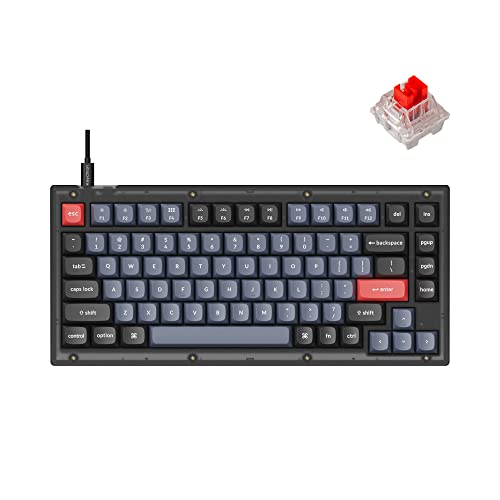
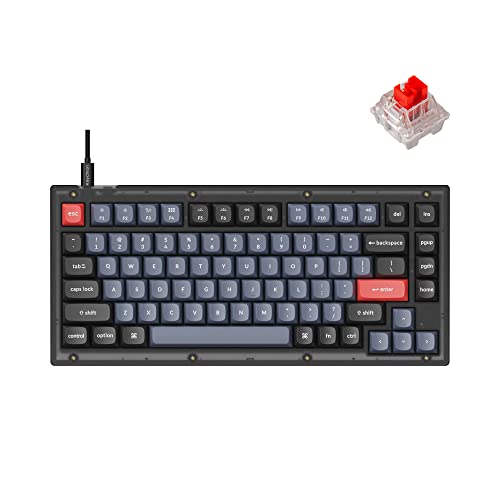
Keychron V1
The map you govern
- 75 percent, hot-swap
- QMK/VIA: the keymap is yours
- Layer states visible in the configurator
- Factory reset to a known map
A small class of wrong-character misery is really governance misery: boards whose maps live in forgotten proprietary utilities, half-remembered macro tools and profiles no one can inspect. The V1 is the guide’s answer for that class — a board whose entire map lives in the open configurator, where every key’s meaning, every layer and every macro can be seen, edited and reset to a known default in minutes. A map you can inspect cannot haunt you, and a board that can be returned to factory truth at will ends the ‘is it the board or the computer’ question permanently: reset the board, and whatever wrongness remains belongs to the computer by elimination.
As a keyboard it is the cluster’s familiar value benchmark, which makes the governance upgrade an inexpensive one. It will not fix an operating system’s layout list — no board can — but it removes the board itself from the suspect list forever, and in a fault category defined by suspicion, that removal is the product.
Strengths
- Fully inspectable, resettable map
- Ends board-side suspicion permanently
- Entry price
Trade-offs
- OS layout faults remain the OS’s
- Migration effort from an existing setup
- Entry-tier hardware
Best for: Owners haunted by uninspectable remapping stacks.
Not suited for: Anyone whose fault is a simple layout toggle.
The Pattern-Reading Skill: a Short Casebook
Fluency in this fault is pattern literacy, so the guide closes its teaching with the casebook form. Case one: ‘My @ is on the wrong key and the quotes moved.’ Verdict: input language mismatch, US against UK, cured in the layout list — the single most common case in the category’s history. Case two: ‘The right side of my keyboard types numbers.’ Verdict: embedded numpad active, one NumLock toggle, usually on a compact board whose owner did not know the pad existed. Case three: ‘Everything is shifted by one key, but only in my game.’ Verdict: the game’s own binding layer or a remapping profile bound to the application — the board and the system are innocent, the profile is the map. Case four: ‘It types letters by itself, worse since Tuesday’s coffee.’ Verdict: the spill, and the protocol is power, dry, clean, then diagnose.
Case five: ‘My shortcuts are wrong but my letters are fine.’ Verdict: the board’s OS mode or a modifier remapping — check the mode switch before the map. Case six: ‘Half the board types the neighbouring keys, since the move.’ Verdict: physical — a connector, a ribbon, a cracked trace from the journey — and the repair bench, not the settings panel, is the destination. Six patterns cover the overwhelming majority of the category’s presentations, and the reader who can recite them owns the diagnostic skill the sequence below merely formalises. Wrong characters are a language; learn its six common sentences and the keyboard stops seeming possessed and starts seeming misconfigured, which it nearly always is.
Preventing the Sequel: Map Hygiene
The cured board stays cured under a small doctrine of map hygiene. Keep the operating system’s input list to the layouts you actually use — ideally one — so the rotation shortcut has nowhere to rotate to, and disable the shortcut itself if your system allows. Learn your board’s layer and mode keys the way you learn its brightness keys, and treat an unexplained pattern change as a state to check before it is a fault to fear. Export your configurator maps and keep the factory reset procedure noted; a known state you can return to is worth more than any single customisation. And when a new remapping tool joins the desk, write down that it did — the future diagnostician, who is you in four months with no memory of the installation, will be grateful for the note.
The doctrine’s spirit is the cluster’s recurring one: keyboards are governed systems, and their mysteries are governance mysteries — maps stacked on maps, each layer innocent, their sum occasionally absurd. Hygiene is simply keeping the stack short and documented. Do that, and the wrong-characters fault becomes what it should be: a two-minute settings visit, remembered as the day you learned where your computer keeps its languages, rather than as the week the keyboard seemed to forget how to spell.
The Layer Trap: When Your Keyboard Has More Than One Country
The main guide’s commonest modern culprit — the unnoticed layer — deserves a fuller portrait, because layer faults impersonate hardware failure with an actor’s commitment. The mechanism is innocent: a momentary layer key brushed by a palm, a toggle layer latched by a double-tap’s timing, a board that wakes in the layer it slept in after the computer’s reboot reordered its state. The symptoms follow the layer’s design — numbers where letters should be, symbols colonising the top row, an F-row that types media commands into a document — and their signature is coherence: the wrong characters are systematically wrong, a whole geography shifted, which no dying switch produces. A single key’s chaos is a contact; a region’s consistent alternative identity is a layer, and the distinction, once seen, cannot be unseen. The cure is the layer key itself, pressed deliberately, and the prevention is configuration: know your board’s layer indicators — the LED that changes, the underglow that tints — and let the keyboard firmware QMK VIA guide‘s literacy make your own keymap’s countries legible to you.
The layer trap has a subtler form that survives even experienced owners: the application-specific remapping performed by software on the host — the gaming suite that rebinds per game, the macro utility with its profiles, the accessibility tool with its sticky modifiers — each capable of changing what a key sends without the keyboard’s knowledge or consent. The diagnostic signature is the fault’s address: wrong characters in one application and correct ones in another acquit the keyboard entirely, and the investigation moves to the host’s profile list, where a forgotten per-app profile is usually found ruling a program it was never meant for. The guide’s master rule applies with its usual force: a fault that respects software boundaries lives in software, and no amount of switch replacement will evict it.
And the trap’s final form is the borrowed configuration: the board bought used with its previous owner’s keymap aboard, the office board inherited with a departed colleague’s layers, the demo unit with a retailer’s showpiece mapping. These boards type wrong characters with total confidence because they are typing exactly what they were told to — by someone else. The factory reset, early on this guide’s ladder for inherited boards, is not a troubleshooting step but a change of ownership in the only registry that matters: the configuration. Reset first, diagnose second, and let the board’s strangeness be your own from then on.
Dead Keys Walking: The Regional Pattern
When wrong characters arrive in a pattern with a geography — a column, a diagonal, a cluster — the fault has left the switch’s scale and entered the matrix’s, and this section teaches the reading. The keyboard’s matrix wires keys in rows and columns, and a fault in one line — a cracked trace, a failed diode’s neighbourhood, a connector’s pin — silences or corrupts every key that shares it, producing the diagonal silences and column-wide chaos that owners misread as multiple simultaneous switch deaths. Switches do not die in formation; wiring fails in formation, and the formation is the diagnosis. The test is the matrix map: mark every faulty key on a diagram of the board, and let the pattern announce its level — scattered singles are switches, a straight line is a wire, a region is a connector or a controller’s pin, the whole board is power or firmware.
The matrix fault’s commonest author, in the age of hot-swap, is not the matrix at all but the socket field: a socket’s bent leaf or a switch’s pin folded under its housing can take its key out, and a board that has suffered a careless switch session can present several such casualties in a pattern that follows the session’s geography rather than the wiring’s. The reseat rung of the ladder — each suspect switch lifted, its pins inspected, its socket examined — is therefore promoted, on any board whose fault followed a swap, to the ladder’s first position. The keyboard pcbs guide types features guide’s socket literacy is the background; the pattern reading is the skill; and the combination acquits more matrices than any other paragraph in this guide.
True matrix failures, when they come, are board-level events with board-level remedies — the technician’s trace repair, the PCB’s replacement in the kit ecosystem, the board’s retirement if its economics say so. They are also rare, and their rarity is the section’s point: the regional pattern frightens owners into imagining them first, when the ladder’s order — reseat, reset, test on another machine — acquits the wiring in the overwhelming majority of cases. Patterns are evidence, not verdicts, and the calm reading of them is this guide’s whole curriculum in miniature.
The Host’s Layout Stack: Three Places a Character Can Change
A keystroke’s character is decided in more places than the keyboard, and the host’s layout stack deserves its map because a large share of wrong-character faults live there, innocent of the hardware entirely. The first place is the operating system’s input language — the setting that a stray shortcut rotates, leaving the board’s punctuation speaking French or its letters wearing a Dvorak accent, the classic fault the main guide opens with. The second is the input method editor, the layer that serves languages whose characters outnumber keys: a composition left half-finished, a mode toggled between direct and converted input, produces wrong characters with a logic that is flawless and invisible to anyone who doesn’t know the IME is awake — the jis keyboard layout guide’s conversion keys exist to govern exactly this layer, and its accidental states are the JIS desk’s version of the layer trap. The third place is the application itself: the terminal’s encoding, the game’s rebinding, the remote session whose host applies its own layout to your keystrokes at a distance of a thousand miles, so that the character is wrong in the session and right everywhere else — the signature that acquits everything local.
The stack’s diagnostic is a bisection: type the same keys in the operating system’s own text field, in a second application, and on a second machine, and let the fault’s boundaries draw its address. A fault present everywhere lives in the board or its configuration. A fault in one application lives in that application’s layer of the stack. A fault on one machine lives in that machine’s settings. Three tests, five minutes, and the wrong characters have been assigned to their country with a certainty that part-swapping never achieves. This is the troubleshooting method the whole cluster teaches, and the wrong-character fault is its purest classroom, because the stack here has exactly three storeys and every fault lives on one of them.
And the stack has a memory problem that explains the fault’s most maddening presentation — its intermittence by time of day. The operating system’s per-application layout memory means the same board can type correctly in the morning’s document and wrongly in the afternoon’s spreadsheet, because the setting is kept per window and the shortcut that changed it was pressed in one of them. Owners chase this ghost through three switch replacements a year. The stack map catches it in one bisection. Learn the stack, and the ghost becomes a setting with a checkbox, which is what it always was.
Sticky, Filter and Toggle: The Accessibility Impostors
An entire family of wrong-character faults is authored by the operating system’s accessibility features, switched on by their own shortcuts, in the middle of ordinary typing — and they impersonate hardware decay so faithfully that they deserve their own section. Sticky Keys latches modifiers: the letter that arrives capitalised, the click that becomes a chord, the shortcut that fires from a single key, because a Shift pressed five times in an excited minute asked the system a question and the system answered yes. Filter Keys eats repetition: the double letters that vanish, the held key that will not repeat, the typist’s rhythm read as an accident and corrected away. Toggle Keys merely sings at the locks, the innocent of the family. Each feature is a genuine service to the users it was built for; each is a haunting to the user who summoned it unknowingly, and their exorcism is a settings page, not a soldering iron.
The diagnostic signature is the fault’s texture: accessibility faults are consistent, system-wide, and keyed to behaviours (repetitions eaten, modifiers latched) rather than to keys. A fault that follows the typist to a second keyboard on the same machine has confessed its address; a fault that began after a gaming session’s excited key-mashing has confessed its author. The fix keyboard not working troubleshooting guide ladder includes the settings check for total failures; this guide promotes it for character failures, where the accessibility family’s fingerprints are most often found. Check the settings before the switches — the order costs two minutes and has saved more keyboards than any solvent.
There is a prevention worth institutionalising: learn the shortcuts that summon these features on your system, and either disable the shortcuts (the features remain available in settings, where intentions live) or learn to recognise their arrival banners, which the system displays and the excited typist never sees. The deeper prevention is the troubleshooting temperament itself — the reflex that asks ‘what changed, and where does this fault live?’ before asking ‘what shall I replace?’ Every guide in this cluster is that reflex, written out long. The wrong characters are simply its most frequent examination, and the accessibility impostors are the question it most often catches owners failing.
When the Cure Is a New Dictionary: Autocorrect and Its Cousins
A modern wrong-character fault may be authored after the keystroke entirely, by the software whose job is to improve your typing — and its products are the hardest to suspect because they look like your own errors reflected back. Autocorrect changes whole words at the spacebar’s press; text replacement expands abbreviations you defined in another decade and forgot; the predictive keyboard’s learned dictionary, trained on your messages, begins finishing words in your documents with your slang. The signature is linguistic rather than mechanical: the wrongness is at the word level, grammatically plausible, and absent in applications that do not offer the service — the password field’s honesty is the control experiment, since it accepts keystrokes raw. A fault that never occurs in a password field but flourishes in documents lives in the text services, and its cure is a dictionary audit, not a keyboard’s.
The audit’s method mirrors the firmware guide’s: list what the system has learned and defined — the replacements, the learned words, the per-app exceptions — and evict the entries whose authors you do not recognise as yourself. Shared machines accumulate other people’s dictionaries; migrated profiles carry the replacements of jobs and machines long gone; the sync services propagate a phone’s casual abbreviation into the desktop’s formal documents with a fidelity that feels like sabotage and is only loyalty, misaddressed. The keyboard layouts QWERTY Dvorak Colemak guide treats the layout as the deepest software layer of typing; the dictionary is deeper still, and less examined, because it presents itself as your own voice. Audit it annually, with the keymap and the cables, and let the voice be yours on purpose.
And the section’s closing distinction protects the innocent: genuine keyboard faults do not respect applications, do not produce plausible words, and do not spare password fields. The wrong character that is a neighbour key’s character, a doubled letter, a symbol from another row — those are the hardware and layout faults this guide’s ladder climbs, and they will be there in the password field, confessing. Let the fault’s own behaviour assign its country before any cure is bought. It always confesses, if the tests are arranged so it can.
A Calm Protocol for the Next Time
This guide’s expansions converge on a protocol, and stating it whole is the right close, because wrong characters will visit every typist again and the visit’s cost is set entirely by the response’s order. Minute one: notice the pattern, not the instance — one key or a region, one application or all, since when, after what change. Minute two: the layer check and the language check, the two toggles that author most of the fault’s population, each a single keystroke or a glance at an indicator. Minute three: the bisection — a second application, the password field’s honesty test, a second machine if the fault survives. Minute five: the settings — accessibility, per-app layout memory, the text services — read with the fault’s signature in mind. Only then, with the software countries acquitted, does the ladder turn to the hardware: the reseat, the swap test, the cleaning, the ladder the main guide builds, climbed in its order with the logger as witness.
The protocol’s power is that it is finished before most owners have finished panicking, and its steps are free. Its deeper power is that it teaches the machine’s geography by using it: after three applications of the protocol, the typist owns a mental map of the stack — board, configuration, host settings, application — that makes every future fault, of any kind, a shorter mystery. That map is the real deliverable of every troubleshooting guide in this cluster, and the wrong characters, for all their annoyance, are its most reliable teacher, because they visit often, confess clearly, and forgive the student who reads them calmly. Keep the protocol by the board. The next visit is already scheduled; only its date is unknown.
And when the fault does prove to be hardware — a tired switch, a loosening socket — receive it with the perspective the chattering guide teaches: a component at the end of an honest service, replaceable at the hobby’s small prices, on a board whose every other system has just been audited and found sound. The wrong characters will have done you the service of a full inspection, which is more than most faults offer. Fix the switch, close the protocol, and type — the characters will be the right ones, in the right order, which is all any of this was ever for.
Keeping a Fault Log: The Document That Ends Arguments
Every troubleshooting guide in this cluster assumes a witness — the logger, the recording, the photograph — and this expansion adds the humblest and most useful: the fault log, a dated note of what the keyboard did, when, in which application, and after what change. Wrong-character faults are intermittent by nature, and intermittence is where memory lies most fluently: the owner swears the fault began after the update, the log shows it began a week before; the owner swears it is spreading, the log shows the same three keys confessing in rotation. A log kept for one week converts the fault from a haunting into a dataset, and datasets get diagnosed while hauntings get exorcised at retail prices. The log’s format matters less than its existence — a note in the phone, a file by the board — but its fields should be the protocol’s: pattern, place, time, change. Four fields, ten seconds per entry, and the next troubleshooting session starts at the evidence instead of at the suspicion.
The log has a second use that outlives the fault: it is the board’s medical record, and it travels with the board to the technician, the warranty claim and the buyer. A fault described from a log gets repaired; a fault described from an impression gets reproduced-or-not at the bench and returned with the industry’s most frustrating sentence attached. Sellers, too, are served by it — the board with a documented, cured fault and the log to prove the cure sells with a confidence that ‘it works fine now’ cannot buy. And the log’s third use is the subtlest: it teaches its keeper the machine’s rhythms, the correlation of faults with heat, with humidity, with the laptop’s dock and the game’s launch — the system’s weather, which no guide can publish because it is local to one desk. Keep the log. It is the cheapest instrument in this entire cluster, and the one whose absence is most often regretted at the exact moment it would have spoken.
The Diagnostic Sequence, in Order
Stop at the rung that cures it, and note the rung — recurrence along the same line is common and the note is the shortcut next time.
- Read the pattern and write it down: which keys are wrong, what they produce instead, in which applications, since when, and after what event. Compare it against the casebook in this guide before touching a setting.
- Check the operating system’s active input layout against your keycap legends. Set it correctly, then remove unused layouts from the list and disable the rotation shortcut if the system permits.
- Power-cycle the board and check its states: layer toggles returned to base, NumLock (including the embedded pad) off unless wanted, OS mode switch set to your system. Retest in a plain text editor.
- Test on a second computer if one is available. Correct there means the map lives in the first machine — audit its remapping tools, per-application profiles and accessibility utilities with the board acquitted.
- Swap the cable for a known-good one and try a direct port. Garbled-event faults die here or are acquitted here; both outcomes are progress.
- If the wrongness is geometric (a column, a diagonal, a region) or follows a spill or impact, treat it as hardware: spill protocol if liquid is involved, the switch swap test for single positions, and warranty or repair for matrix patterns.
Wrong-Character Mistakes That Waste Weekends
Reinstalling the operating system over a layout toggle.
The nuclear option has been taken, historically, against faults that a taskbar indicator would have explained in one glance. The sequence’s order is the protection: maps and states before software, software before hardware, and reinstalls essentially never — a fresh system restores the same default layout list, and the fault, in a final irony, often returns with it.
Buying a new keyboard for a settings fault.
The replacement board types the same wrong characters on the same misconfigured machine — owners have learned this at retail prices — because the map was never in the board. The second-computer test exists to prevent exactly this purchase: ten minutes of elimination before any money is discussed.
Removing the wrong layout and keeping the shortcut.
Setting the correct layout while leaving the rotation shortcut armed and the list full is a cure with a scheduled relapse. The fault’s mechanism is the rotation, not the current selection; disarm the mechanism or the season will re-run the episode, usually during a presentation.
Forgetting the embedded numpad exists.
Compact boards’ invisible pads have generated more panic per key than any other feature in the category. If the wrongness is numbers on the right hand, the answer is NumLock, and the time to learn your board has one is now — in this guide — rather than mid-incident with a document half-typed in digits.
Drying a spill board by typing on it.
Power through a wet matrix is how a cleanable spill becomes a corroded board. The protocol is absolute: unplug first, dry completely, clean, then diagnose. Every character the wet board types while powered is evidence being destroyed and damage being done simultaneously.
Replacing switches for a layout fault.
The wrong characters that follow the operating system’s language toggle will survive any number of switch replacements, because the switches were never their address. The pattern tests in this guide — the bisection, the password field, the second machine — cost five minutes and assign the fault to its country before a single part is bought. Owners who skip them own drawers of healthy switches and a fault that outlives every one.
Frequently asked questions
Why does my keyboard type @ when I press the quote key?
Because your operating system’s input layout and your keycap legends disagree — classically, a US layout setting driving UK-printed caps, or the reverse; those two layouts swap exactly that pair. Set the input language to match your legends, and clear the other layout from the list so the switch cannot recur by shortcut. The keyboard itself is blameless and always was.
Why do letters on the right side type numbers?
Your board’s embedded number pad is active. Compact boards overlay a pad on the U, I, O block and its neighbours, governed by NumLock or an Fn combination; while it is on, those keys are the pad. Toggle it off and the letters return. If it reactivates at every boot, a BIOS or firmware default is setting it — change the default and the haunting ends.
My keyboard types wrong characters only in one program. Why?
Because that program holds its own map: application-specific remapping profiles, the program’s own keybinding layer, or a utility (text expander, macro tool) that targets it. The board and the system are proven innocent by every other program’s correctness. Audit the program’s settings and any tool that names it, and the map will be found holding the pen.
Can a virus make a keyboard type wrong characters?
Malware can intercept and alter input in principle, and substitution is within its abilities — but it is the rarest cause in this guide’s differential by a wide margin, behind layouts, layers, states and spills. Run the sequence first; if the wrongness survives a clean boot and a second computer with the board reset, then security scanning joins the differential with the settings causes honestly exhausted.
The wrong characters started after I spilled coffee. What do I do?
Unplug it now if it is still connected. Let it dry completely — days, not hours, ideally opened and cleaned per the maintenance guides — and only then test. Liquid bridges the switch matrix and produces exactly the phantom and substituted characters you describe; many boards recover fully if they were powered off promptly and dried honestly, and many are ruined by being typed on wet. The sequence cannot begin until the board is dry.
How do I stop the input language from switching by itself?
Remove every layout you do not use from the system’s input list, and disable or change the layout-rotation shortcut (commonly a Windows-key or Alt-Shift combination that games and pastes keep striking accidentally). With one layout installed, the shortcut has nothing to rotate to and the fault class is abolished rather than managed — the strongest form of the cure, and the one this guide recommends to every single-language typist.
My keyboard types numbers instead of letters on the right side. What happened?
You have almost certainly met the embedded number pad: many compact and laptop keyboards map a numpad onto the right-hand letters behind a Num Lock or layer state, so U, I, O and their neighbours become 4, 5, 6 and their siblings. The signature is unmistakable once seen — the ‘wrong’ characters are the pad’s digits in the pad’s geography. The cure is the Num Lock or layer key that summoned the state; the prevention is knowing your board has the feature, which the manual states and this answer now confirms. No component is faulty, and nothing needs replacing but the state.
Why does only one program get the wrong characters?
Because the fault lives in that program’s layer of the stack: its own keybindings, its input encoding, a per-application layout the operating system remembers for it, or a profile in a remapping utility targeted at it. The keyboard is acquitted by the fault’s selectivity — hardware cannot know which program is in front. Audit the program’s settings and the utility’s profile list, in that order, and the culprit will be found holding the character set it has been feeding you.
My keyboard types the right characters but with a delay before they appear. Is that this fault?
It is a cousin rather than the fault itself: the characters are correct, so the layout and switch layers are acquitted, and the delay lives in the chain between the board and the screen — a distressed wireless connection, a host under load, or an application rendering slowly. The latency explainer in this cluster is the correct guide, and its first test is this guide’s first test too: try the board wired in a plain editor, and let the result assign the delay to its country before anything is replaced.
A keyboard typing wrong characters is almost never a keyboard failing; it is two or more maps disagreeing about what a key means, each map faithfully applied by a system doing its job. That is genuinely good news disguised as a haunting: maps can be inspected, lists can be pruned, states can be reset, and the whole fault class can be abolished for a single-language desk by removing the spare layouts and their shortcut. The diagnostic sequence in this guide is short because the causes are few, patterned and known — and the casebook’s six sentences will resolve most readers’ incidents before the sequence is even opened.
So read the pattern, check the language indicator before the repair bench, and keep your maps few and documented. The keyboard on the other side of the fix is the same one that seemed possessed an hour ago — which is the deepest comfort this guide can offer: the instrument was never broken, only mistranslated, and translation, unlike hardware, can always be set right in settings.