Disclosure: As an Amazon Associate, kajuandouglas.com earns from qualifying purchases. Links on this page are affiliate links; they cost you nothing extra. Prices and availability change often, so check the current Amazon listing before you buy.
What Are Mechanical Keyboards Explained
A mechanical keyboard is a keyboard in which every key sits on its own complete switch — a small self-contained machine with a spring, a stem, and electrical contacts — rather than on a shared rubber membrane. Press a key and you are not squashing a dome until two sheets touch; you are driving a mechanism through a designed journey, with a beginning you can feel, a middle where the press registers, and an end you can choose to visit or avoid. That individuality per key explains everything else about the category: the feel, the sound, the durability, the repairability, and the price.
The distinction sounds technical, yet your fingers understand it instantly. On a membrane board, every key is a location on one continuous sheet, and the typing feel is the sheet’s feel — uniform, soft, and slightly vague about the exact moment a press counted. On a mechanical board, every key is an event with its own mechanics, and the moment of registration can be felt, heard, and learned, which is why typists describe mechanical boards as precise in a way that has nothing to do with their spelling.
This explainer stays deliberately free of product links, because the question in its title is a concept question and concepts should not be sold. Instead it builds the idea from the switch outward: how a keystroke works, how switch families differ, why sizes and layouts multiply, what the vocabulary means, how the boards are built and maintained, and how a beginner should choose a first one when the explanation ends and the shopping begins.
In this guide
Inside a Single Keystroke
Begin with one key under one finger. At rest, the switch’s spring holds its stem raised, and the keycap sits on that stem like a hat on a post. As your finger presses, the stem travels downward against the spring’s rising resistance, and partway down, metal contacts meet — or, in optical and magnetic designs, a sensor notices the stem’s position — and the keyboard reports the letter to the computer. That registration point is called actuation, and it happens before the key reaches the bottom of its travel, a fact with large consequences for how typing can feel.
Because actuation lives partway down, a practiced typist can register a key without slamming it into its housing, and the remaining travel becomes a cushion of overrun that absorbs the finger’s momentum. Continue pressing and the stem bottoms out with a sound whose character depends on the switch, the keycap, and the case beneath. Release, and the spring returns the stem, resetting the contacts so the key can fire again. Every sentence you have ever typed is thousands of these small journeys, and a mechanical board lets you choose the vehicle for each one.
The switch is also where the board’s personality is manufactured. Change the spring’s weight and the key feels heavier or lighter; shape a small bump on the stem’s legs and the press gains a tactile event at actuation; add a click mechanism and the press announces itself; line the housing with dampeners and the journey quiets at both ends. Membrane boards offer one personality per model. Mechanical boards offer a catalogue, and the hobby that surrounds them is largely the art of matching that catalogue to a pair of hands.
The Three Switch Families Everyone Starts With
Linear switches travel in a smooth, uninterrupted line from top to bottom, with no bump and no built-in click, so the press feels like pushing against a spring and nothing else. Gamers often favour them because repeated presses and partial holds feel predictable, and typists who dislike surprises in the stroke choose them for the same reason. Their sound is purely the sound of travel — the bottom-out and the return — which makes them the easiest family to quieten and the hardest to blame for noise.
Tactile switches insert a bump into the journey at the actuation point, a small rise and fall of resistance your finger can feel as confirmation that the press counted. That bump lets typists type without bottoming out, riding from bump to bump, and it is the family most often recommended to writers and programmers who want feedback without volume. The bump’s size and placement vary enormously between designs, which is why tactile is a continent rather than a country, and why sampling matters more here than in any other family.
Clicky switches add a deliberate sound mechanism — historically a jacket or bar that snaps at actuation — producing the sharp, typewriter-evoking click that defines the public image of mechanical keyboards. Their fans experience the click as rhythm and confirmation; their colleagues experience it as weather. Clicky switches are a wonderful choice for a private room and a diplomatic incident in a shared one, and no amount of build quality changes that social arithmetic, so this family should always be chosen with the room, not just the finger, in mind.
Beyond the Big Three: The Wider Switch Zoo
Once the three families make sense, the rest of the switch world reads as variations on their themes. Silent switches are linears or tactiles with internal padding that softens the landing and the return, trading a slightly gentler feel for a dramatically better-mannered voice. Speed switches actuate higher in the travel for players who want registration at the first intention of pressure. Heavy and light versions of familiar switches change only the spring, yet transform long sessions, since finger fatigue is a spring’s biography written across an afternoon.
Newer sensing technologies extend the family tree in a different direction. Optical switches register with light, removing physical contact wear from the actuation event; magnetic Hall effect switches measure the stem’s position continuously, enabling adjustable actuation points and rapid-reset behaviours that games increasingly exploit. These are genuinely mechanical-feeling boards with non-traditional registration, and the honest explainer admits the category’s border is now a gradient — what matters to the buyer is not the label’s purity but the feel, features, and switch ecosystem each design offers.
Topre deserves its customary footnote: a rubber-dome-over-spring design with a capacitive sensor, beloved for a soft, rounded tactility unlike anything in the MX world, and priced and sized like the specialist equipment it is. It is not a mechanical switch in the classic sense, yet no map of premium keyboards is complete without its territory marked, if only because so many enthusiasts’ journeys end there after years of travel through the families above.
Sizes and Layouts: Why Keyboards Come in Percentages
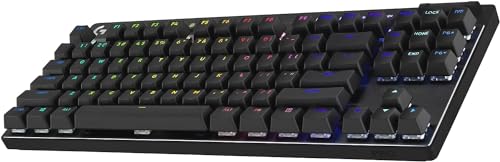
Mechanical keyboards are sold by the fraction of a full layout they keep, and the percentages are a buyer’s first map. A full-size board keeps everything, including the number pad. A tenkeyless board removes the pad and keeps the rest. A 75 percent board compresses the function row, arrows, and navigation into a tight block; a 65 percent board keeps arrows and surrenders the function row to a layer; a 60 percent board keeps only the alphanumeric core and puts everything else behind modifier chords. Smaller still, 40 percent boards layer even the number row away.
Each step smaller trades immediate access for space and posture. Removing the number pad lets the mouse sit where the shoulder prefers, which is why tenkeyless became the default enthusiast recommendation for gaming desks. Going smaller still centres the hands and empties the desk, at the cost of learning layers — holding a key to reveal a second keyboard beneath the first. Layers sound like a compromise until they become reflexes, at which point many owners find a big board’s dedicated keys oddly wasteful, like a house with rooms nobody enters.
Layout standards complicate the map’s edges. ANSI and ISO differ in the Enter key’s shape and a few key positions, following regional conventions; some boards split their spacebars, shift their arrows into the main block, or adopt ortholinear grids where keys stand in straight columns rather than staggered rows. None of these is a gimmick category — each is a hypothesis about hands, tested daily by its owners — and a beginner should treat the mainstream sizes as the safe mainland from which expeditions into stranger layouts are launched after the first board teaches its lessons. 75 percent keyboard layout guide charts one popular province in detail.
Keycaps, Cases, and the Parts You Can Change
Above every switch sits a keycap, the keyboard’s clothing and its fingertip interface in one. Caps differ by profile — their height and sculpting — by material, chiefly PBT and ABS plastics, and by how their legends are made, and each variable is audible and tactile as well as visual. Because caps mount on a standard cross stem across most of the mechanical world, they are the easiest part of a board to change and the most common first upgrade, capable of altering a keyboard’s sound, feel, and appearance in a single evening without touching its electronics.
Beneath the switches, the case and the internal mounting decide the board’s voice and rigidity. Heavy aluminium cases sound dense and stay planted; plastic cases sound lighter and travel better; gasket mounting suspends the inner assembly on soft strips so the whole typing surface gains a forgiving flex, while tray mounting bolts it firmly down. Foam layers inside absorb echo. None of these choices is visible in a photograph of a finished desk, yet together they explain why two boards with identical switches can feel like different species.
The deepest customisation is the build-it-yourself tier, where case, PCB, plate, stabilisers, switches, and caps are bought as separate citizens and assembled into a keyboard no shop sells. That tier is optional — most mechanical keyboards are bought whole and enjoyed for years — but its existence shapes the whole market, because parts standards created for builders also make ordinary boards repairable and upgradeable. A hobby where the flagship skill is assembly produces consumer products that can be opened, and openness is a consumer virtue in itself.
Why People Pay More: The Honest Case for Mechanical Boards
The first reason is feel, and it should not be apologised for. Typing is a physical act repeated for hours, and a tool whose every use returns a small, designed satisfaction is worth money to the person whose work and play both flow through it — the same logic that sells good knives to cooks and good boots to walkers. Mechanical switches let that feel be chosen rather than assigned, matched to finger strength, typing style, and taste, and kept consistent across every key and every year of the board’s life.
The second reason is longevity with repairability. Individual switches are rated for very long service, and when one does fail on many boards it can be replaced alone rather than retiring the keyboard; keycaps can be renewed when legends fade; cables detach and are replaced for the price of a coffee. A membrane board is a sealed unit whose decline is total and whose repair is a replacement. Over a decade, the mechanical board’s arithmetic often wins even before pleasure enters the ledger, and its waste stream is unmistakably smaller.
The third reason is fit. Mechanical boards come in more sizes, layouts, switch weights, and connectivity combinations than any other keyboard category, so people whose needs are unusual — small desks, large hands, quiet rooms, loud games, multiple computers, minority operating systems — can usually find or assemble an exact answer instead of tolerating a near one. Fit is a form of respect for the user’s actual life, and it is the reason the category keeps converting people who arrived for the sound and stayed for the ergonomics.
The Honest Costs and Drawbacks
Mechanical keyboards cost more at the door, and pretending otherwise would insult the reader. The engineering that puts a complete switch under every key cannot match the price of a printed membrane sheet, and the category’s enthusiast tier climbs into sums that demand justification. The justification exists — longevity, repairability, fit, feel — but a buyer whose needs are a spare keyboard for a guest room is allowed to conclude that a membrane board is the rational purchase there, and this explainer will not argue.
They can also be loud, heavy, and tall. Loud by mechanism and by culture, since enthusiastic typing on a resonant case is a sound with a following and a opposition party in every shared building. Heavy by material, since aluminium and dense plastics do not travel like a membrane sheet in a laptop bag. Tall by geometry, since a switch needs vertical room a scissor mechanism does not, and wrists may need a rest or a lower profile design to stay neutral. Each drawback has mitigations — silent switches, travel boards, low-profile lines — but a buyer should meet the category with eyes open about which mitigations their life requires.
Finally, the hobby itself is a cost centre with excellent marketing. A first board can be a complete and satisfying purchase, yet it arrives in a world of keycap sets, switch testers, desk mats, and second boards for other rooms, all genuinely delightful and none strictly necessary. Enter with a budget for the board and a separate, smaller budget for curiosity, and the hobby stays a pleasure. Enter without the second budget and curiosity will simply help itself to the first, as it has done to generations of enthusiasts before you.
Step by Step: Choose and Try Your First Mechanical Keyboard
Step 1: Decide the job before the board
Write down where the keyboard will live, what it will type most — prose, code, games, spreadsheets — and who else will hear it. Those three answers eliminate most of the catalogue honestly: size follows the desk and the spreadsheet question, switch family follows the work, and volume follows the room. A first board chosen against a written job description satisfies far more often than one chosen against a photograph. how to choose your first mechanical keyboard turns this into a complete buying routine.
Step 2: Sample switches if you possibly can
A switch tester — a small block holding one of each popular switch — is the cheapest education in the hobby, because descriptions of tactility are metaphors while a press is evidence. Failing a tester, buy from a seller with kind returns and treat the first board as a audition with a verdict date. What you are testing is not quality but fit: bump or no bump, light or heavy spring, click welcomed or exiled.
Step 3: Start mainstream on size and layout
A tenkeyless or 75 percent board in your region’s standard layout is the beginner’s sweet spot: small enough to gain the posture benefits, complete enough that nothing essential hides behind a layer while you learn. Exotic sizes are wonderful second boards, chosen with the authority of experience. The mainstream start also keeps keycap and accessory shopping easy, since standard rows are the ones every set remembers to include.
Step 4: Set the board up for your body
Place the alphanumeric block centred before you, keep wrists floating or lightly supported rather than planted and bent, and adjust chair and desk so forearms run roughly level. If the board’s height asks for a wrist rest, add one for resting between bursts of typing rather than as a typing surface itself. A mechanical board’s taller geometry rewards this ten minutes of ergonomics for years. 65 keyboard layout guide helps if a smaller board joins the household later.
Step 5: Live with it for a month, then judge
New switches, new sounds, and possibly new layers all need an adaptation period, and first-week verdicts are famously unreliable in both directions. Type real work, play real games, and let the people who share your rooms deliver their honest reviews. At a month, you will know whether the board fits your life — and you will also know, precisely, what you would change, which is the beginning of the hobby whether you planned it or not.
Common Mistakes to Avoid
Choosing a clicky board for a shared room
The most common beginner regret in the category is social, not mechanical: a delightful click that a partner, colleague, or microphone cannot forgive. Rooms vote on switches, and their vote is binding. When a space is shared, begin with tactile or linear switches, add silent models to the shortlist, and let a private-room luxury like a clicky board wait for a room that is yours.
Buying the smallest layout first
A 60 or 40 percent board is a specialist tool whose layers reward experience, and as a first board it can convince a beginner that mechanical keyboards are hostile when the truth is narrower: that layout was. Start where the keys you need are physically present, learn your layer temperament on forgiving hardware, and shrink later if the idea still calls.
Judging the whole category by one cheap board
A poorly made mechanical board — scratchy switches, a hollow case, rattling stabilisers — is a bad ambassador, and the category’s budget floor contains some ambassadors who should never have been sent. If a first experience disappoints, suspect the specimen before the species, and if possible type on one well-regarded board before writing the concept off. The difference between a bad mechanical board and a good one is larger than the difference between categories.
Ignoring the cost of the second week
New owners reliably want things by week two: a wrist rest, a desk mat, a different cable, perhaps a keycap set seen in a photograph. None of this is failure, but it should be budgeted as the hobby’s natural second instalment rather than discovered as a surprise. A board bought with a small accessories allowance set aside leads to a calmer desk and a calmer bank account.
A Brief History: From Typewriters to the Modern Revival
The mechanical keyboard is older than the personal computer, because the typewriter’s banked keys and decisive mechanisms are its direct ancestors, and early computer terminals inherited that engineering wholesale. The celebrated boards of the nineteen-eighties — heavy, buckling-spring and Alps-switch machines built for data entry departments — established the feel that enthusiasts still chase, before the nineteen-nineties cost revolution replaced individual switches with membrane sheets and keyboards became the disposable items bundled free with computers.
The revival began in the two-thousands among gamers and programmers who had kept or rediscovered the old boards, then accelerated as manufacturers realised a generation of computer users had never been offered a keyboard worth wanting. Gaming brands industrialised the category, Asian makers democratised it, and the custom scene elevated it into a craft with group buys, artisan caps, and machined cases. The result is the market this explainer maps: simultaneously a practical tool category and a hobby with its own aesthetics, vocabulary, and strong opinions about springs.
Understanding that history explains the category’s peculiar mixture of nostalgia and innovation — boards that look like nineteen-eighties terminals running firmware that responds to a key’s analogue position, keycaps styled after typewriters driving software written last year. The mechanical keyboard survived its own obsolescence by being, at its core, a better answer to a question the membrane era stopped asking: what should typing feel like, if feeling were the point?
The Vocabulary, Gathered in One Place
Newcomers drown in terms, so here is the working glossary in plain order. Actuation is the moment a press registers. Bottoming out is pressing through to the end of travel. A switch’s weight describes the force its spring demands. Hot-swappable means switches pull out and plug in without solder. A layer is a second set of key functions revealed by holding a modifier. NKRO, n-key rollover, means many simultaneous presses all register, which games require and cheap boards sometimes fake. A stabiliser is the wire mechanism that keeps wide keys level.
Keycap words matter equally: profile is a cap’s height and shape, PBT and ABS are its plastics, doubleshot and dye-sub are its legend methods, and shine-through means the legends pass light. Case words complete the set: a plate holds the switches, a PCB carries the electronics, gasket and tray describe how the assembly mounts, and foam is what quietens the echo inside. With those twenty terms, a beginner can read nearly any listing in the category and know which claims are specifications and which are weather.
Keep this glossary beside you for your first month in the hobby’s forums and shops, because fluency arrives faster than confidence and the two are easily confused. The test of understanding is not repeating the words but predicting a board from them: given switch, caps, case, and mounting, you should be able to sketch how an unseen keyboard will feel and sound — and be right often enough to trust your own shopping. advanced keyboard modding techniques is where that fluency eventually leads.
Mechanical Keyboards at Work in Different Lives
Watch a programmer’s desk and the keyboard’s job description changes: symbols matter as much as letters, layers become a private language for brackets and navigation, and a board that keeps the hands near the home row is a board that keeps the mind inside the code. Many developers settle on tactile switches and a compact layout, not from fashion but because their editor’s shortcuts and their board’s layers grew up together into one fluent system no product page could have predicted.
Watch a writer’s desk and the priorities rearrange again toward rhythm and endurance. Writers type in long, unbroken weather, and the switch that serves them is the one whose thousandth press of the afternoon feels like the first — usually a tactile of moderate weight in a board whose sound the writer finds companionable rather than impressive. For this tribe the keyboard is closer to a musical instrument than to an input device, and they shop for it with a musician’s suspicion of specifications that ignore feel.
On a gaming desk the board shares territory with a mouse given unusual freedom, which is why compact layouts dominate there even among players who type little. The keyboard’s gaming virtues — consistent switches, rollover that never drops a chord of movement keys, a cable or wireless link that never sleeps — are mostly about absence: absence of doubt. A player mid-match should never think about the keyboard at all, and the best gaming boards are the ones that achieve that invisibility at speed.
In a shared family home the same category of product becomes a diplomatic object, passed between homework, invoices, and games, expected to please a child’s small hands and a parent’s large ones in the same evening. There the winning board is rarely the most specialised; it is the medium-sized, medium-volume, medium-priced board whose compromises were chosen for peace. The category’s breadth is what allows all four of these desks to be served by one concept — a real switch under every key — tuned four different ways.
How a Mechanical Keyboard Is Made, and Why It Can Be Repaired
Manufacturing begins with the switch, itself an assembly of housing, stem, spring, and contacts, produced by the million yet designed to be individually replaceable. Switches mount to a plate or directly to the PCB, where they are soldered or seated in hot-swap sockets; the PCB carries a controller that scans the key matrix and speaks to the computer; stabilisers are fitted to the wide keys; and the whole assembly is closed into a case that may be plastic, aluminium, or occasionally wood or acrylic, before keycaps complete the surface.
That layered construction is why repair is realistic. A dead key is usually one switch, and one switch is a small, cheap, standardised part; a worn spacebar is one stabiliser or one cap; a failed cable is a cable. Compare the membrane board, whose failure is a sheet you cannot buy and a case never designed to open, and the mechanical board’s higher price reads differently — it is partly a down payment on every repair it will ever make easy.
Owners extend that repairability into stewardship: periodic cleaning with caps removed, switches replaced as singles rather than sets, a board refreshed with new caps instead of replaced. In a consumer electronics landscape built on sealed units and short cycles, a product designed to be opened by its owner is almost a political statement, and it is one of the quiet reasons the mechanical keyboard community defends its category with unusual loyalty.
Trying the Concept Without Buying the Hobby
A curious reader does not need to spend enthusiast money to test this explainer’s claims. Borrow a board for a week if any friend owns one, because borrowed typing is honest typing. Visit a shop that lets customers press display boards and spend ten unhurried minutes comparing a linear, a tactile, and a clicky switch with your eyes closed, letting your fingers vote before your opinions form. Or buy one mainstream board from a seller with a fair returns window and treat the month as tuition with a refund option.
During the trial, type the material of your real life — your work documents, your messages, your game’s movement — rather than test sentences, because the concept succeeds or fails inside your routines, not inside a typing test. Notice whether your error pattern changes, whether your hands tire differently, and whether the sound pleases or taxes you at the hours you actually keep. Those three observations are the entire purchase decision wearing work clothes.
And if the verdict is no, let it be no without embarrassment. A good membrane or scissor board that suits your hands and your rooms is a better keyboard for you than a mechanical board bought to satisfy an article’s enthusiasm — including this one. The explainer’s job is to make the choice informed, and an informed refusal is as successful an outcome as an informed conversion.
Wireless, Wired, and the Modern Mechanical Board
Connectivity deserves a place in any modern explainer, because the mechanical keyboard now lives in both worlds. Wired boards offer the simplest contract in computing — plug, type, forget — with no batteries to manage and no radios to negotiate, which is why competitive and troubleshooting-minded users still swear by them. Wireless boards answer with freedom: a clean desk, a board that moves between laptop and tablet, a sofa typing position no cable would permit, at the cost of charging rituals and connection modes to understand.
The mature position is that connection is a lifestyle specification, not a quality tier. A tri-mode board that serves a desktop by receiver, a laptop by Bluetooth, and a dead-battery evening by cable is not a better keyboard than a wired board that serves one desk perfectly; it is a keyboard for a different geography of work. Choose by counting the machines and rooms the board must serve, and the right answer usually announces itself before any switch is discussed.
Battery life on modern wireless mechanical boards is measured in weeks of typical use, which changes the ownership feeling from gadget management to occasional hospitality — plug it in some evenings, the way you water a plant. Backlighting is the great variable in that arithmetic, since a board lit like a festival drains in days what a dark board spends in a month, and owners who love light learn to love the charging cable’s company as part of the aesthetic bargain.
Sound, Described Properly for Beginners
Keyboard sound vocabulary baffles newcomers, so here is the translation service. A board described as thocky produces low, rounded keystrokes; a clacky board speaks in higher, sharper attacks; a marbly board lands somewhere dense and smooth between. Ping is an unwanted metallic spring resonance, scratch is friction you can hear inside a switch’s travel, and rattle belongs to loose stabilisers on wide keys. None of these words is a quality grade — they are flavours, and your favourite flavour is a fact about you, not about the board’s price.
What shapes the flavour is the whole system: switch design, spring, keycap thickness and height, plate material, case volume and material, internal foam, and the desk acting as a sounding board beneath everything. That is why two boards sharing a switch can sound unrelated, and why chasing a recording’s exact voice requires copying its entire build rather than its headline part. Beginners should treat sound as a direction to lean — deeper or brighter, quieter or livelier — rather than as a destination a purchase can guarantee.
Children, Beginners, and the Keyboard as a Teacher
There is an underappreciated argument for mechanical boards in households with young typists: the defined actuation point teaches honest touch typing better than a membrane’s vagueness, because the finger receives a clear event to learn from. A child who can feel the exact moment a letter registers builds the confidence to stop watching their hands sooner, and a board with swappable caps can grow with them — legends today, blanks when the training wheels bore them, a new colourway as a reward that costs less than a new device.
Durability argues the same way. A board that survives being opened, cleaned, and repaired teaches a relationship with objects that sealed electronics cannot: things can be understood, maintained, and kept. More than one adult enthusiast traces their technical confidence to a keyboard they were allowed to take apart, and a household that buys repairable tools is quietly buying that education along with the typing.
The Environmental Ledger of a Repairable Keyboard
Keyboards are small electronics, yet they are bought by the hundred million, and their end-of-life story matters in aggregate. A membrane board’s story is short — a few years of service, then a sealed unit in the waste stream with its sheet, its controller, and its case inseparable. A mechanical board’s story can be edited repeatedly: switches replaced as singles, caps renewed, cables swapped, the whole board resold or handed down because its standards make it useful to a second and third owner.
None of that makes a mechanical board an environmental hero — aluminium cases and shipped group buys carry their own footprints — but longevity is the greenest specification a product can have, and repairability is longevity’s mechanism. A reader who keeps one good board for a decade has outperformed, environmentally, a reader who buys three virtuous disposables, and the same arithmetic flatters the wallet in a way that needs no ideology to appreciate.
What a Mechanical Keyboard Cannot Do
Honesty about limits completes any explainer. A mechanical board will not fix posture by itself, because a wonderful keyboard at a badly arranged desk still bends wrists and hunches shoulders; it will not make a slow typist fast, because speed is a skill the board can only stop obstructing; and it will not rescue a workflow whose problems live in software, deadlines, or a chair. It is a tool with a defined jurisdiction — the quality of each keystroke — and within that jurisdiction it can be superb while the rest of the desk’s problems wait patiently for their own solutions.
It also cannot be all things in one unit. The board optimised for silent shared offices is not the board optimised for a click lover’s private studio; the travel board is not the machined desk anchor; the 40 percent layer machine is not the spreadsheet worker’s full layout. The category’s promise is not one perfect keyboard but a keyboard fitted to a life, and fitting means choosing which virtues to maximise and which to release. Readers who accept that bargain tend to be satisfied; readers shopping for a board without trade-offs tend to keep shopping.
The One-Paragraph Version to Carry Away
If this entire explainer had to survive as a single paragraph in your memory, let it be this one. A mechanical keyboard puts a complete, individual switch under every key, so each press has a designed feel, a detectable moment of registration, and a sound you can choose by choosing the switch. Around that switch, sizes, layouts, keycaps, cases, and connections let the same idea serve a gamer, a writer, a programmer, and a household in four different forms. It costs more than a membrane board and repays the difference in feel, fit, longevity, and repair — provided the specific board is matched to the specific life, which is the only shopping rule the category truly insists on.
A Final Word for the Still-Undecided
Undecided readers often imagine the decision is about money, when the evidence of owners suggests it is about attention: whether you notice your keyboard at all. People who type without ever thinking about the tool will gain least from this category and should spend their money where their attention actually lives. People who already notice — who wince at a mushy spacebar, who have opinions about a laptop’s keys, who type enough that the tool’s character enters the day’s mood — are the mechanical keyboard’s natural citizens, and for them the category is less a purchase than a recognition.
So borrow, press, listen, and let your own attention cast the vote. If it votes yes, begin mainstream, choose the switch your room can host, and give the board its month. The concept explained in these pages will then stop being an explanation and become the thing under your hands while you work — which is where every keyboard idea either proves itself or politely disappears.
Postscript: The Questions This Explainer Hopes You Now Ask Differently
A reader who arrived asking whether mechanical keyboards are worth it should leave asking a better question: worth it for whom, doing what, in which room, at what volume, for how many years? Those five qualifiers convert a marketing argument into a personal specification, and they can be carried into any shop, any listing, and any friend’s recommendation, where they will quietly filter out the boards that were never candidates and illuminate the two or three that genuinely are.
Carry also the habit of pressing before believing. Every claim in this explainer — the bump, the bottom-out, the spring’s return, the case’s voice — is testable by one finger on one display board in one unhurried minute. A category that can be understood by touch asks to be understood by touch, and the reader who obliges will shop with a confidence no review, including this one, can confer second-hand.
And if, a month from now, you find yourself explaining all of this to a curious friend — switch families, percentages, the social life of clicky boards — with the friend pressing keys on your desk while you talk, then the explainer has completed its real work, because the category perpetuates itself exactly that way: one informed pair of hands introducing another.
Welcome, in advance, to the side of the conversation that answers questions at meetups, lends boards to sceptics, and keeps a spare switch tester in a drawer for precisely such occasions.
Until that day, type well on whatever board is in front of you, and remember that every keyboard — membrane, mechanical, or something stranger — is ultimately judged by the same jury: the hands that must live with it, reporting their verdict one ordinary working day at a time.
Their testimony, gathered patiently over weeks rather than minutes, is the only review that has ever finally mattered in this category — and it is the one review every reader is fully qualified, starting today, to write for themselves.
Begin that testimony with a single honest week of typing, and let the board, not the brochure, make its full, unhurried, honest, complete, persuasive case.
Final Recommendation
A mechanical keyboard is, in the end, a simple proposition: a real machine under every key, chosen by you, repairable by you, and built to be typed on for years rather than replaced on a cycle. Understand the switch and you understand the category; match the switch, size, and sound to your actual life and the category will repay you every working day. The shopping can begin whenever you are ready — and it will go better now that the words on the listings are a language you speak.
Frequently Asked Questions
Are mechanical keyboards better for typing than regular keyboards?
Better is personal, but the advantages are real: a defined actuation point your fingers can feel, consistent keys that do not vary across the board, and switch weights matched to your hands can all make long typing feel more controlled and less tiring. Many typists also make fewer errors once they learn to ride the actuation point instead of pressing to the bottom. None of that is automatic — a badly chosen mechanical board can be worse than a good membrane one — which is why this explainer emphasises matching over category loyalty.
Why are mechanical keyboards so loud?
They are not inherently loud; they are inherently audible, because a mechanical keystroke involves moving parts, springs, and housings that can be struck at the bottom and the top of travel. Clicky switches add deliberate noise, hollow cases amplify it, and hard desks broadcast it. Silent switches, cushioned builds, desk mats, and gentler technique can make a mechanical board quieter than many ordinary office keyboards, so volume is a specification to choose, not a fate to accept.
How long does a mechanical keyboard last?
Individual switches are engineered for very long service lives, and the board around them usually ages through its keycaps, cable, and cosmetics rather than its core mechanism — all of which are replaceable on many models. A well-kept mechanical board serving a decade is unremarkable, and boards twice that age remain in daily use in the enthusiast community. Longevity is one of the category’s strongest economic arguments, provided the board was worth keeping in the first place.
Can you use a mechanical keyboard for work in an office?
Yes, and thousands do, provided the switch choice respects the room. Tactile or silent linear switches in a solid case, on a desk mat, produce a working sound most offices absorb without comment, while a clicky board in an open plan is a diplomatic incident with keys. Hot-desking workers also value compact sizes and multi-device wireless models. The office question is never mechanical or not; it is which mechanical, at what volume, in whose company.
What size mechanical keyboard should a beginner buy?
A tenkeyless board is the safest start for most people, with 75 percent a close alternative for smaller desks: both keep arrows and function keys physically present while removing the number pad most home users rarely touch. Spreadsheet-heavy workers should keep the full-size board and its pad without apology. Smaller formats are excellent later purchases, once you know from experience — rather than from optimism — how your hands feel about layers.
Are mechanical keyboards worth it for gaming?
For many players, yes: consistent actuation, durable switches, layouts that free mouse space, and in newer designs adjustable actuation and rapid-reset behaviour all serve real games. The advantage is not magic and will not substitute for practice, but the keyboard stops being a limiting or inconsistent part of the setup. Players on a budget should know that a modest mechanical board already captures most of the benefit, with exotic sensing technologies refining the last few percent.
What does switching from a laptop keyboard feel like at first?
Expect a short, slightly clumsy adjustment rather than instant delight. A standalone mechanical board sits higher than a laptop deck, so your wrists and forearms meet it at a new angle, and its keys travel further before they register and bottom out. Most people over-press for the first few days, striking keys with laptop force and making more noise than the board needs to make. Lighten your touch gradually, let the switch do the work, and consider a palm rest if the taller front edge leaves your wrists bent upward. Typing speed usually dips, then recovers within a week or two as the longer travel becomes automatic, and many people then find their old laptop board feels flat and vague by comparison. Give the change a fair trial across real work, not just a ten-minute test, and judge it by how your hands feel at the end of a long day rather than by first impressions.
What should I do if liquid is spilled on a mechanical keyboard?
Act quickly and calmly. Unplug the keyboard or switch it off straight away, because power running through a wet board does more harm than the liquid itself. Turn it upside down over a towel and let gravity pull the spill out the way it came in, resisting the urge to shake it violently or to keep testing keys. If the drink was sugary or milky, a careful rinse of the affected area with clean water, after unplugging, is often less damaging than leaving sticky residue to dry inside the switches, but only do this if you are comfortable letting the board dry for a long time afterwards. Leave it inverted in a warm, ventilated place for at least a full day, longer for sweet drinks, before reconnecting it. Mechanical boards survive spills more often than membrane ones because individual switches can sometimes be cleaned or replaced, yet patience during drying is what decides the outcome.