Few messages chill a creator like the temperature warning mid-take, which is why knowing how to fix camera overheating when filming matters to anyone recording longer than a few minutes. Modern mirrorless cameras pack enormous processing into small bodies with no fans: 4K and higher resolutions, high frame rates, oversampling and stabilisation all generate heat, and the camera protects itself by warning, then shutting down. The fix is rarely one trick — it is a combination of settings that reduce the thermal load, handling that helps the body shed heat, and planning that keeps important moments safe.
This guide works from the least disruptive fixes upward: menu settings first, then shooting technique, then accessories, and finally the honest conversation about when a task simply needs a different class of camera. Every step is safe and warranty-friendly — no opening cases, no exotic cooling hacks that risk condensation inside the body. If your camera is a mirrorless model, the companion guide how to fix mirrorless camera overheating covers the same ground with mirrorless-specific detail.
Disclosure: As an Amazon Associate, kajuandouglas.com earns from qualifying purchases. Links to Amazon on this page are affiliate links; they cost you nothing extra. Listing details such as price and availability change often, so check the current Amazon listing before you buy.
Likely Causes, Most Common First
Overheating is heat in versus heat out; the usual contributors, most common first, are:
- High-resolution, high-frame-rate modes (4K60, high-bitrate codecs) driving the sensor and processor at full load
- Hot environments and direct sun — the body starts warm and cannot shed heat into hotter air
- Long continuous takes with no pauses for the body to cool
- IBIS and autofocus working constantly, adding motor and processing heat
- A tight grip, case or cage insulating the body; screens folded against the body trapping warmth
- Slow memory cards making the processor work longer per clip, and ageing batteries running hot
In this guide
Step-by-Step Fixes in Safe Order
Start at Step 1 and stop when your typical take lengths run clean — most creators solve their problem within the first three steps.
Step 1: Reduce the recording load in the menus
Heat scales with data. If you record long takes, choose the lightest mode that still serves the project: 4K30 instead of 4K60 halves the sensor readout work, and standard bitrates run cooler than maximum-quality codecs. Many cameras offer a high-temperature threshold setting that trades a later shutdown warning for warmer operation — if yours does, enabling it (within the manual’s guidance) is a legitimate, designed-in option. Turn off features you are not using: pre-recording buffers, high-frame-rate standby and unnecessary Wi-Fi/Bluetooth radios all sip power and shed heat.
Step 2: Give the body air and shade
Flip the screen out away from the body rather than leaving it folded against it — the screen is both a heat source and an insulator. Remove tight silicone cases for long sessions, open battery and port doors where the manual permits, and keep the camera out of direct sun: a small white cloth or reflective shade over a static camera makes a measurable difference. Indoors, even gentle airflow from a room fan across the body extends recording times significantly. Never use cold packs directly on the body — condensation inside the camera is a worse fault than heat.
Step 3: Shoot in segments and rotate batteries
Build cooling into the shoot: several shorter takes with brief pauses let the body shed heat between clips, and most content edits happily from segments. Swap batteries at natural breaks — a fresh battery is a cool battery, and the removed one cools while resting. For static long-form work like interviews, power the camera from a mains adapter or high-capacity USB power bank (if your model supports USB power delivery while recording), which moves a major heat source — the battery under load — outside the body entirely.
Step 4: Match the card and keep firmware current
Use memory cards rated comfortably above your codec’s requirement. A card at its limit keeps the processor and card controller working at maximum for every second of the take, adding heat and risking buffer stalls. Format cards in-camera rather than deleting files, keeping the file system efficient. Check the manufacturer’s firmware page: overheating behaviour is one of the most commonly improved areas in updates, with several well-known models gaining substantially longer record times through firmware alone.
Step 5: Offload work to accessories for demanding jobs
For genuinely long or mission-critical recordings, move heat-generating work out of the camera. An external recorder takes the encoding load and its own heat elsewhere while giving you a larger monitor. Small camera-cooling fan accessories, made for popular mirrorless models, attach over the body’s rear and extend record times markedly in tests — use reputable ones and follow their fitting instructions. A cage with metal contact can act as a modest heatsink, though cages that wrap tightly can also insulate; judge by results on your model.
Step 6: Re-plan the shoot around the camera’s honest limits
Every camera has a real thermal envelope, discoverable by testing at home under your worst expected conditions — same mode, same ambient temperature — before the day it matters. If your envelope is 40 minutes and the event is a 90-minute ceremony, the professional answer is a second body alternating takes, a dedicated camcorder or cinema camera with active cooling, or an agreed recording plan with the client. Discovering limits in rehearsal is craft; discovering them during vows is catastrophe. Log your test results so future shoots start from knowledge.
Why Some Cameras Overheat and Others Do Not
It is not a defect unique to one brand; it is physics meeting fashion. Small, sealed, weather-resistant bodies shed heat poorly, while their processors perform work that once required a fan-cooled camcorder. Dedicated video and cinema cameras solve it with size, vents and fans — which is why they look like boxes with handles. Action cameras accept shorter takes and tiny sensors. When a hybrid camera overheats, it is usually performing at the edge of what a stills-sized body can thermally sustain, and the settings in Step 1 move you back inside that envelope rather than fighting it.
Ambient conditions dominate more than owners expect: the same camera that records indefinitely in a cool studio may warn within twenty minutes on a summer beach. Plan summer and tropical shoots defensively — shade, airflow, lighter modes — and treat manufacturer record-time claims as cool-lab figures. Your own worst-case test, per Step 6, is the only number that matters.
Gear That Can Help
For action coverage, an action camera is built around heat-tolerant, short-take design; for controlled sets, a video-focused hybrid with sensible modes runs cooler per minute of footage:

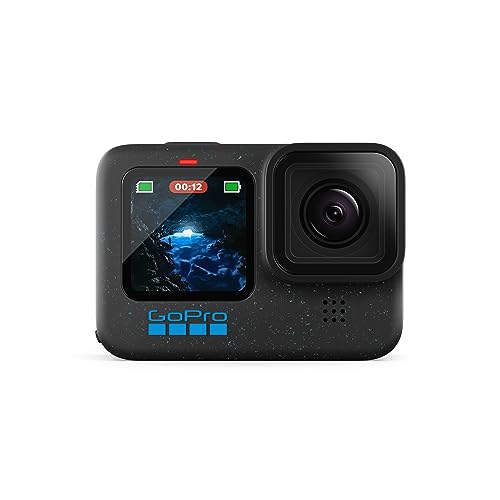
GoPro HERO12 Black Action Camera — Check price on Amazon. A solid, widely available option that fits this guide; confirm the exact kit contents and lens mount on the listing before ordering.

Panasonic LUMIX G100 4K Mirrorless Camera — Check price on Amazon. A solid, widely available option that fits this guide; confirm the exact kit contents and lens mount on the listing before ordering.
When to Get Professional Repair or Replace It
Seek service if the camera overheats unusually fast in mild conditions and light modes — for example, warning within a few minutes of 1080p recording in a cool room — or if shutdowns arrive without the graded warnings the manual describes. That pattern suggests a fault: a failing internal component, a damaged battery, or blocked internal heat paths from a previous knock or liquid exposure. Stop using a battery that becomes very hot, swells or smells; those are replacement items, not troubleshooting subjects.
Replace your expectations, not the camera, when testing shows the body performs exactly as its class does but your work has outgrown it — all-day 4K recording, outdoor summer events, multicam streaming. That is the signal to add a fan-cooled video body or camcorder to the kit while keeping the hybrid for stills and short-form work, a division of labour most production kits eventually adopt.
How to Prevent It Next Time
Prevention is rehearsal plus defaults: keep your long-take mode preconfigured (lighter codec, temperature threshold set, radios off), test new firmware and cards before important shoots, and carry shade and airflow in your standard kit — a white cloth and a small USB fan weigh nothing. Log ambient temperature against record times for your main modes once, and you will never be surprised on location again. Finally, protect the camera from heat at rest too: a body stored in a hot car starts every shoot thermally handicapped, as how to protect a camera warns.
How to Fix Camera Overheating When Filming Weddings, Talks and Long Events
Long-form event work is where overheating stops being theoretical, so it deserves a dedicated playbook. Run two bodies if the budget allows and alternate them by segment — speeches on one while the other cools, ceremony coverage split at natural pauses. Where only one body exists, assign it the light-mode continuous role (1080p or 4K30 standard codec, external power, screen out, shade and airflow arranged before guests arrive) and shoot any high-quality inserts as short clips that never threaten the thermal budget. Brief the client or organiser on the plan; professionals present this as production design, not apology.
Build the environment during setup, not during the crisis: position the camera out of sunbeams that will move across it mid-ceremony, route a small fan’s airflow across the tripod position, keep spare batteries and the second card outside the warm camera bag, and test the exact configuration for the event’s longest segment during rehearsal. Events forgive many things; a missing vow exchange is not among them, and thermal planning is now simply part of event craft.
Overheating Myths That Waste Money
Three myths drain wallets. First, that a bigger cage always cools: metal in contact can conduct heat away, but wrap-around cages also block the body’s radiating surfaces and trap air — results vary by model, and only a timed test with your camera settles it. Second, that maximum-bitrate codecs are necessary for ‘professional’ results at every event: for talks, ceremonies and most online delivery, standard codecs are visually indistinguishable after platform compression, while running markedly cooler — save the heavy modes for work that will be graded and projected. Third, that a camera which overheats is faulty and must be replaced: most are performing exactly at their class’s physics, and the settings-plus-workflow fixes in this guide recover the majority of real-world cases for free.
The honest spend, when money must move, ranks as follows: external power for static work, a faster card if yours is marginal, a reputable cooling fan for a body you love, and only then a fan-cooled second body. Each step is testable before the next is bought — which is the difference between a thermal strategy and a shopping spree.
Reading Your Camera’s Heat Behaviour Before It Matters
Every hybrid camera has a personal heat profile, and the time to learn yours is at home, not at an event. Run a simple mapping exercise for each recording mode you depend on: set the camera up as you would for real work, in a room at a normal temperature, and record until the warning appears or a sensible limit is reached, noting the time, the mode and the ambient conditions. Repeat the important modes with the screen flipped out and the battery door or dummy battery arrangement you actually use, because configuration changes the result. Write the figures down. You now own the single most valuable document in overheating management: a truthful table of what your camera can do, in your conditions, which converts every later decision, mode choice, segment length, second-camera planning, from hope into arithmetic. Manufacturers’ published limits are a starting point for this exercise, not a substitute for it, because firmware, cards and rooms vary.
The warning signs, in the order they appear
Cameras usually negotiate before they shut down, and learning the negotiation saves recordings. A temperature icon or warning message is the first stage, and it is information, not yet an emergency: finish the thought, the vow, the sentence, and use the next natural pause to swap a battery, open a door, move the camera into shade or drop the mode. Rising fan noise on fan-equipped bodies, a body noticeably warm to the hand, and, on some models, a countdown or a restriction of available modes follow. The shutdown itself, when it comes, is protective and not a failure of the camera’s character; files up to the shutdown are normally saved correctly, because the camera closes the recording before it stops. The operator’s failure mode is ignoring the first warning until the shutdown chooses the moment for you, mid-sentence and mid-ceremony. Treat the first icon as a director’s note and you will rarely meet the last stage at all.
Heat Management for Specific Jobs
Weddings concentrate every risk: long continuous ceremonies, warm venues, no retakes, and a professional obligation that outranks any camera’s limits. The working pattern from the main guide, a wide camera in a light continuous mode and a second camera for high-quality short clips, is the industry’s answer, supplemented by ceremony-specific habits: start the continuous camera as late as courtesy allows, position it out of direct sun through windows and away from radiators and stage lights, and have the mode-dropping and battery-swapping moves rehearsed rather than improvised. Interviews fail differently, through accumulation across takes in a warm room under lights; build cooling pauses into the conversation’s natural rhythm, flip the screen out, open the doors between takes, and keep the subject’s water and your camera’s temperature managed by the same breaks. Streaming and long talks from a desk are the easiest case to engineer properly, with mains power arrangements, airflow and a mode chosen for endurance rather than spectacle, and they deserve that engineering once, permanently, rather than weekly improvisation.
Travel and outdoor filming add the sun as a direct opponent. A dark camera body in direct tropical sun can reach its limits standing still, before recording begins. Shade the camera whenever it waits, use a light-coloured cover or a simple cloth between shots, and treat midday continuous recording as a specialist problem needing the full toolkit from this guide: the lightest mode that serves, segments, airflow and rotation of bodies if you have them. Outdoor creators also learn to schedule around heat, filming long pieces in the morning and evening and using the fierce hours for short clips, stills and planning, which is both a thermal strategy and, not coincidentally, a lighting one.
When overheating is a symptom, not a personality
A camera that newly overheats in modes it once handled has changed, and the change is diagnostic. Check the simple causes first: a slower or counterfeit card making the camera work harder, a firmware change, a clogged vent or a case or cage fitted since that traps heat, a battery ageing into inefficiency. Restore the configuration that worked and retest at home. If a previously capable camera still shuts down early in a cool room in a light mode, that is no longer thermal management; it is a service conversation, and it should happen before the camera is trusted with unrepeatable work. Cameras, like the photographers using them, are entitled to an off day in extreme heat. A pattern of them, in gentle conditions, is a message.
Cards, Readers and the Heat Nobody Blames on Media
Recording media participate in thermal behaviour more than most operators realise. A card that is too slow for the chosen mode makes the camera’s processor work at its limit continuously, buffering and retrying, and the heat shows up as an overheating problem with a media cause. Counterfeit and ageing cards behave the same way, degrading gradually until a camera that once recorded happily begins warning early. The fix is boring and decisive: use cards that comfortably exceed the mode’s requirements, bought from reputable sources, formatted in the camera, and retired when their behaviour changes. Card choice also interacts with workflow heat, because a camera that must stay powered on, tethered and writing while files are copied in the field accumulates heat before the next take. Build file management into the cooling pauses and the two problems solve each other.
Cages, cases and accessories that trap heat
Accessories fitted for good reasons can quietly insulate a camera. Tight cages, silicone skins, weather covers and even a hand gripping the body for a long static take all reduce the airflow and surface radiation the designers counted on. None of this argues against cages or covers, which protect and rig cameras valuably; it argues for thermal awareness when they are fitted, testing your real rig at home in the modes you depend on, exactly as the mapping exercise in this guide prescribes, rather than testing the bare camera and being surprised by the dressed one. Small changes help: standoff mounts that leave the body’s vents clear, removing a skin for long static recordings, and choosing the rig’s configuration with the same care as the camera’s settings.
Firmware, Fans and the Improving Picture
Overheating behaviour is one of the areas where firmware genuinely changes a camera after purchase, because makers can retune thermal thresholds, fan behaviour and mode efficiency as field data accumulates. Keeping firmware current is therefore part of thermal management, with the professional’s caution of not updating on the eve of important work. Fan accessories and fan-equipped bodies have also changed the landscape for dedicated video work, moving air across the body in a way passive designs cannot, and for creators whose work is dominated by long recordings they are a legitimate architectural answer rather than an accessory indulgence. The honest summary is that the industry’s centre of gravity is moving toward cameras that manage heat as a designed system, and buyers for whom long recording is the core job should weight thermal design, tested recording times and fan options as primary specifications, as important as resolution and ahead of almost everything else.
Building a Heat-Resilient Kit From the Start
Creators who film long-form work regularly eventually stop managing heat incident by incident and design it out of their kit. The design principles follow from everything in this guide. Choose the body for its tested recording endurance in your main mode, not its headline resolution. Build the rig for airflow, with mounts that leave vents and surfaces clear. Power it in the way that produces the least internal heat for your setup, which your home testing, not general advice, will reveal. Carry the second body or the lighter-mode plan as a designed fallback rather than an improvisation. And standardise on cards and batteries whose behaviour you have verified, so no component is an unknown variable on the day. A kit designed this way makes overheating a rare, anticipated event with a rehearsed response, instead of a recurring surprise, and the difference shows in the work: long recordings stop being gambles and become appointments the equipment simply keeps.
Heat and image quality: the cost of pushing on
There is a subtler reason to respect thermal limits than the shutdown itself. As sensors run hot, their noise increases, and footage recorded in the minutes before a warning can carry visibly noisier shadows than the same settings produced when the camera was cool, particularly in low light. Creators who grade their footage notice this as a slow drift in quality across a long take that no setting explains. Managing heat is therefore also managing consistency: the cool camera at the end of the event produces footage that matches the cool camera at the start, and matching footage is what editing rooms quietly depend on. This is one more argument for the segment-and-rotate discipline in the main guide, because it protects the look of the work as well as its completion.
Teaching the Second Operator: Heat Habits for Teams
Where filming is a team activity, a school production, a house of worship’s volunteer rota, a small production company, overheating management becomes a shared protocol or it becomes nobody’s job. Write the essentials where the camera lives: the modes approved for long recording, the warning response in order, the battery and card rotation, and the home-test figures for the main setups. Brief every operator on the first-warning rule, that the icon is an instruction to act at the next natural pause, not a decoration to mention afterwards. Teams lose recordings to the gap between the person who saw the warning and the person who knew what it meant, and a one-page protocol closes that gap permanently. Equipment managed by a rota deserves the same respect as equipment managed by its owner, and a written protocol is how a rota provides it.
Overheating Myths, Examined One by One
Folklore accumulates around any common frustration, and separating it from fact saves money and recordings. It is said that removing the battery between takes is the main cure; battery swaps help modestly on some models, because the battery is a heat source and a warm one can be exchanged, but the sensor and processor heat dominates most shutdowns. It is said that recording to an external recorder always solves overheating; it can reduce the internal encoding load on some cameras and merely change nothing on others, and only your home test of your model settles it. It is said that a camera that overheats once is damaged; a single protective shutdown in hard conditions is the system working as designed, and the pattern to respect is early shutdowns in gentle conditions. It is said that the highest mode should be usable indefinitely because it exists; menus offer peaks, not promises, and professional practice has always matched the mode to the duration. Each myth contains a grain of somebody’s real experience, generalised past its truth, which is why this guide keeps returning to the same authority: your camera, your modes, your rooms, tested at home and written down.
Cold packs, compressed air and other improvisations, judged
Improvised cooling deserves a careful verdict rather than enthusiasm or scorn. External airflow from a small fan is safe, effective and recommended in this guide’s spirit. Cold packs and ice are a different matter: they invite condensation on and inside a warm camera as surfaces cross the dew point, and moisture is a worse enemy than heat, so improvised refrigeration is a risk traded against a shutdown and generally a poor one. Blasts of compressed air into vents can drive dust deeper and chill surfaces unevenly, and are not a cooling strategy. The line is simple: move air, shade the body, lighten the mode, rotate the work. Cooling methods that respect the camera’s design help; methods that fight physics with ice usually present their bill later, in a repair shop, denominated in corrosion.
Choosing Your Next Camera With Heat in Mind
If long recording is central to your work, thermal behaviour belongs on your shortlist criteria alongside the sensor and the mount, and it can be researched properly. Look for tested continuous recording times in the modes you need, measured by reviewers in realistic temperatures, rather than launch claims. Favour designs that treat heat as architecture: fan-equipped bodies for dedicated video, bodies with generous thermal mass and venting, and systems whose makers publish honest limits. Test any candidate with the rental discipline used elsewhere in these guides, running your exact mode in a warm room before committing. A camera that records your longest real take, in your hottest realistic room, with margin to spare, is worth more to a working videographer than a resolution tier they will never deliver in, and buying on that evidence is how overheating stops being a recurring chapter in your working life.
Heat, Batteries and Power: The Full Picture
Power arrangements influence heat in ways worth mapping for your own setup, because the options interact. Internal batteries generate heat as they discharge, more so as they age, and a battery near the end of its life can contribute measurably to early warnings; rotating in a fresh battery at a pause is therefore both a power move and a thermal one. External power by USB or a dummy battery moves the discharge heat outside the body for the battery portion, though it adds the camera’s own charging or power circuitry to the equation on some models, which is why general rules fail and home testing rules. Mains-powered desk setups should be tested in their final form, lights on, room warm, duration real, because that is the only configuration whose figures you will actually live by. The principle across all of it is the one this guide has applied to modes and cards as well: the rig you test is the rig whose limits you know, and surprises belong to untested combinations.
Recovering gracefully when a shutdown happens anyway
Even managed shoots meet the shutdown eventually, and the recovery is a craft of its own. Note what was being recorded and confirm the file closed correctly, because your first job is knowing what you still have. Give the camera real cooling time, powered off, doors open, out of the sun, rather than the impatient minute that produces a second shutdown in the next take. Use the pause to change the plan, not just the battery: drop the mode, shorten the segments, bring the second camera forward, and tell anyone depending on the recording what the new arrangement is, because a calm, explained adjustment reads as professionalism while a silent struggle reads as chaos. Then log the incident with its conditions while they are fresh, because that log entry is what turns one bad afternoon into a permanent improvement in your mapping table.
The Operator’s Mindset: Heat as Information, Not Adversary
The deepest change this guide asks for is attitudinal. Operators who treat heat as a personal adversary improvise angrily, hide warnings from clients, and repeat the same shutdown at the next event. Operators who treat heat as information, about the mode, the room, the rig and the plan, adjust early, communicate calmly and convert each incident into a better mapping table. The camera, for its part, is neither fragile nor stubborn; it is a small computer performing heavy mathematics in a sealed box, reporting its thermal state honestly and protecting itself when its reports are ignored. Working with that honesty, rather than against it, is the whole discipline. Filmmakers who internalise it stop asking how to defeat overheating and start designing shoots in which the question rarely arises, which is the only victory this particular opponent ever offers, and, properly understood, the only one a professional needs.
There is a quiet satisfaction available at the end of this process as well. A creator whose kit has been mapped, whose rig breathes, whose modes are chosen for the durations they must serve and whose warnings trigger rehearsed responses rather than panic, films long work with a calm that clients and collaborators feel without ever knowing its source. The recordings finish. The footage matches from first take to last. The camera, that small sealed computer doing heavy mathematics in warm rooms, is treated as a partner with known limits instead of a mule with unknown ones. That partnership, tested at home and honoured in the field, is the complete answer this guide can give to the problem of overheating, and it is, in practice, more than sufficient.
A note on ambient temperature and honest expectations
Every figure in your mapping table belongs to the room in which it was measured, and ambient temperature moves those figures more than most operators expect. A camera that records indefinitely in a cool studio may warn in half that time in a summer venue, a sunlit room or a crowded space warmed by lights and people. Re-run your key test in the warmest conditions you realistically work in, or apply a honest discount to the cool-room figures when planning hot work, and never promise a client a duration you measured only in your own comfortable room. Professionals sound confident about recording times because their numbers were earned in conditions at least as hard as the job. Earn yours the same way, and heat will stop being the variable that surprises you in public.
Finally, keep the whole topic in its proper proportion. Overheating feels like a betrayal in the moment because it interrupts, but it is one of the most manageable constraints in modern filming: predictable, measurable at home, and answerable with modes, segments, airflow and planning that this guide has laid out in full. Cameras will keep getting faster and hotter in smaller bodies, and the operators who thrive will not be those with the coolest equipment but those with the clearest maps of their own equipment’s behaviour. Draw your map, trust your warnings, design your shoots, and the red icon that once ended your recordings becomes what it was designed to be: a helpful colleague, tapping your shoulder in good time.
The shortest honest summary
Your camera converts work into heat in a sealed body, and every model has tested limits that your own home mapping, not the brochure, should establish. Film within them by choosing modes for the duration they must serve, giving the body air, shade and honest pauses, rotating batteries, cards and cameras on long jobs, and treating the first temperature warning as an instruction rather than a surprise. Design the rig and the schedule around the heat and the shutdown will visit rarely, briefly and never again in the middle of the moment that mattered. That is the whole discipline, and it works.
Go and run your camera’s first mapping test now, while the method is fresh, in the mode you depend on most, and write the figure down where the camera lives. That single measurement, performed once with this guide open beside you, is worth more than the guide itself, because it converts everything you have read into the only form in which thermal knowledge survives: a number you have actually earned, in your own room, with your own rig, ready for the day the work is unrepeatable.
And remember that the creators whose long recordings never seem to fail are not using secret equipment. They are using tested equipment, in tested configurations, on schedules designed around honest numbers, and they learned those numbers the same unglamorous way this guide prescribes: at home, in advance, with a notebook. Their calm on the day is not temperament. It is preparation, and preparation, unlike the weather in the venue, is entirely yours to arrange.
Start tonight, with the mapping test. It takes less time than a single lost recording costs, and unlike a warning ignored in a warm venue, it changes the facts you will plan with for every shoot that follows, permanently and for the better.
One last distinction: limits versus faults
Everything in this guide can be read as an argument for telling limits and faults apart. A limit is a camera behaving exactly as its design and your conditions predict, and it is managed with planning. A fault is a camera departing from its own established behaviour, and it is managed with a service visit. Confusing the two wastes money in both directions: servicing healthy cameras that were simply asked for the impossible, and planning around sick cameras that needed repair. Your mapping table is what tells them apart, which is why this guide treats one honest home test as the foundation of everything else.
Tested numbers, a breathing rig, a schedule with margins. That is the whole prescription, and your future recordings, finished calmly and completely in warm rooms on long days, will thank you for it every single time you press the button and trust the camera to keep its side of the partnership you have finally, properly, arranged.
Film long, film calmly, and let the heat be the best-managed part of the production, planned at home, rehearsed in the rig, and forgotten, exactly as it should be, the moment the real filming finally begins in earnest, with confidence and with margin to spare.
Related Guides
- best cameras for filming under 300
- best cameras for filmmaking under 1000
- best cameras for youtube
- best cameras for videography
- best cameras for live streaming
Frequently Asked Questions
Is it bad for my camera to overheat occasionally?
An occasional thermal shutdown is the protection system working as designed and is not, by itself, damaging. Chronic overheating is worth avoiding: repeated high heat stresses batteries (which age faster hot) and is miserable for reliability on paid work. If warnings appear on most shoots, apply this guide’s settings and workflow changes rather than accepting shutdowns as normal.
Does recording to an external recorder stop overheating?
It often helps substantially, because the camera no longer performs the encoding work and writes less data internally — though the sensor and processor still run, so it extends rather than guarantees recording time. Many cameras also disable some internal limits when outputting over HDMI. Test your specific model: the improvement varies, and clean HDMI output settings matter for the recorder to take over fully.
Why does my camera overheat indoors but not outdoors, or vice versa?
Airflow and ambient temperature decide. A breeze outdoors can cool a body better than still air-conditioned air indoors, while direct sun outdoors can overwhelm any breeze. Tripod interviews indoors are the classic trap: maximum continuous load, no hand movement, no airflow. The fixes differ by case — shade outside, a small fan inside — which is why Step 2 treats air and shade as primary tools.
Will a cooling fan accessory damage my camera?
Reputable model-specific fans that clip or mount externally and blow air across the body’s rear are safe and widely used; they do not open the camera or interfere with seals beyond the area they cover. Avoid improvised cooling involving cold packs or refrigeration, which create condensation risk inside the body. As with any accessory, follow the maker’s fitting instructions and remove it before wet-weather shooting.
What recording settings are coolest for long events?
1080p at standard frame rates is the coolest mode on virtually every hybrid camera, followed by 4K30 at standard bitrates. Save 4K60 and high-bitrate codecs for short, deliberate clips. For ceremonies and talks, many creators record the wide camera in a light mode continuously and shoot high-quality short clips on a second camera — full coverage, no shutdowns, and better editing material.
How long should my camera record before overheating?
There is no universal figure: it depends on the model, mode, firmware and ambient temperature, from under fifteen minutes in worst-case combinations to effectively unlimited in light modes in cool rooms. Manufacturers publish approximate limits for common modes, and firmware has improved several famous cases. Your own worst-case home test is the reliable number — run it once per mode you depend on.
Does filming in short clips really help, or does total time matter?
Short clips help when the pauses between them let the camera shed heat, because temperature is a balance between generation and dissipation over time. Back-to-back clips with seconds between them behave almost like one long recording. Segments separated by real pauses, battery changes and repositioning give the dissipation side its chance. This is why the segment strategy in this guide is paired with cooling habits at the pauses; the structure only works if the gaps are allowed to do their job.
Will a small fan pointed at the camera look unprofessional on a shoot?
No. Working sets are full of quiet, practical engineering, and a small fan managing a camera’s temperature is unremarkable beside the lights, cables and stands of any real production. What reads as unprofessional is a recording lost mid-ceremony for want of a simple precaution. Keep the fan out of the microphone’s air path, secure it so it cannot topple into shot, and treat it as what it is: part of a rig that was designed, at home and in advance, to finish the job.
Is it safe to keep filming after the temperature warning appears?
For a short, deliberate finish, generally yes: the warning is staged well before any risk to the camera, and completing a sentence or a vow before acting is reasonable professional judgement. What is not wise is treating the warning as the new normal and continuing indefinitely, because the shutdown will then choose your moment. Use the warning as this guide directs, as a prompt to act at the next natural pause, and the camera will keep its side of the bargain.


