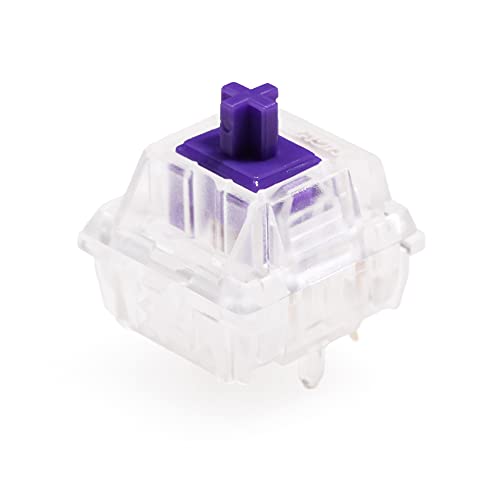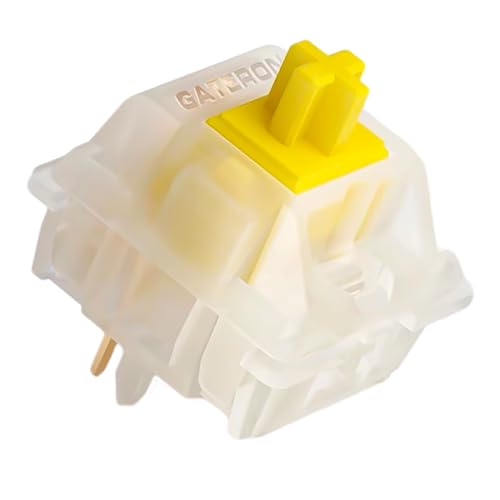
Disclosure: As an Amazon Associate, kajuandouglas.com earns from qualifying purchases. Links on this page are affiliate links; they cost you nothing extra. Prices and availability change often, so check the current Amazon listing before you buy.
If one phrase has carried more beginners into the custom keyboard hobby than any other, it is gateron switch guide budget friendly and smooth — because that is precisely Gateron’s reputation and precisely what most people want from their first switch purchase: a keystroke that feels polished rather than scratchy, at a price that lets you fill a whole board without wincing. Gateron built that reputation by manufacturing switches with smoother stock travel than the pricier incumbents they undercut, and then widening the range until it became genuinely confusing. Reds, Yellows, Browns, Milky housings, G Pro generations, Oil Kings, Smoothies — the catalogue rewards a guide, and this is that guide: the line-up explained by feel rather than by marketing, six verified picks reviewed in depth, a buying framework, a fitting and tuning walkthrough, and the mistakes that turn a budget-friendly purchase into a disappointing one.
Every linked pick below was verified against Amazon’s own catalogue data for this site, with its official product image shown beside its review. Where a Gateron variant could not be verified that way — the KS-9 Silent Yellow is the notable case — it is discussed in prose only, honestly labelled as such, because a guide you can trust about the switches it links is worth more than a longer list of links you cannot.
Key Takeaways
- Gateron’s identity is smoothness per unit of money: factory lubrication and polished moulds make most of the range feel good with no modification.
- Milky Yellow Pro is the default recommendation for a smooth linear on a budget; Oil King is the premium-feeling upgrade within the same family.
- Choose by feel family first — linear, tactile, or silent — then by spring weight, then by housing and generation details.
- Check pin count against your board before ordering: 5-pin switches fit 3-pin boards with a simple clip, and the reverse needs care.
- Buy a small test quantity of any new switch before filling a board with it; springs and bumps are personal in ways specifications cannot settle.
Why are Gateron switches the budget-and-smooth default?
Gateron’s rise rested on a manufacturing observation: the scratchiness that plagued early mechanical switches came from mould texture and dry plastic-on-plastic travel, and both could be improved with better moulds and a whisper of factory lubricant without doubling the price. The result, across most of the range, is a switch that travels smoothly out of the packet — not perfectly, not indistinguishably from a hand-tuned switch, but far enough that the majority of owners never feel the need to open one. That is the budget-friendly part of the equation that matters: not merely a low purchase price, but a low total cost of ownership, because the lube, films, and hours that other switches demand are optional extras here rather than admission fees.
The range’s breadth is the second half of the story. Gateron manufactures its own designs, generations of the KS lines, the G Pro series with its progressively refined stems and springs, premium-feeling flagships like the Oil King, and a long tail of variants made with partner brands. A beginner can start with a bag of Milky Yellows, a gamer can chase the G Pro line’s consistency, and an enthusiast can end up comparing Gateron-manufactured designer switches against the very boutiques Gateron supplies. The guide’s job is to keep those journeys separate, because the right switch depends entirely on which of them you are on.
In this guide
Quick Picks: the verified Gateron shortlist
- Gateron Milky Yellow Pro V2 — the smooth budget linear most beginners should start with.
- Gateron Oil King — the deep, polished linear for owners upgrading within the family.
- Gateron G Pro 3.0 Red — the light, classic linear for fast, low-effort keystrokes.
- Gateron G Pro 3.0 Brown — the gentle tactile for typing-first boards.
- Gateron G Pro 3.0 Yellow — the middle-weight linear that splits the Red and Milky difference.
- Gateron Smoothie — the full-POM, dual-stage-spring linear for a snappier return.
How these were chosen: each pick had to be a genuine Gateron switch with a verified Amazon listing and official image, the set had to cover the three feel families a budget buyer actually shops among, and no two picks could be the same switch in a different bag. Variants that failed verification were excluded from linking no matter how often they are recommended elsewhere.
How were these picks chosen?
Three filters did the work. Verification came first: a switch earns a link only when its exact listing was confirmed, with the product image to match, so what you see is the switch the review describes. Coverage came second: the shortlist spans light and middle-weight linears, a tactile, and the family’s premium and experimental edges, because a guide that recommends six near-identical Yellows serves nobody. Value came third, in the specific sense this keyword demands — smoothness delivered per switch without mandatory modification — and it is why factory-lubricated Pro generations dominate the list: their stock feel is the entire point.
Detailed reviews: which Gateron switch suits which board?

Gateron Milky Yellow Pro V2 — the default smooth linear
Badge: Best starting point. The Milky Yellow Pro earned its position as the hobby’s default recommendation honestly: a linear switch with a middle-weight spring, a milky housing that diffuses backlighting softly, and factory lubrication that makes its travel smooth in the way beginners mean when they say the word. The V2 revision continues the formula. In a board it feels composed — no drama on the way down, a clean return, a bottom-out that sounds deeper than its price suggests — and it flatters both typing and gaming because its weight sits in the middle where most fingers are happiest.
- Type: Linear, 5-pin
- Operating force: around 50gf (per listing)
- Factory lube: Yes, pre-lubed
- Pack: 72 pieces (per listing)
Strengths
- Smooth stock travel that needs no modification to enjoy
- Middle-weight spring suits mixed typing and gaming
- Milky housing softens and spreads RGB light pleasantly
Trade-offs
- So popular that its feel is almost generic — little character for enthusiasts
- Milky housing mutes shine-through legends compared with clear housings
- Spring is a fixed personality; those wanting very light or heavy linears should look at siblings
Best for: first-time switch buyers who want one safe, smooth linear for a whole board. / Not suited for: owners chasing a distinctive, characterful switch or maximum RGB clarity.

Gateron Oil King — the premium-feeling upgrade
Badge: Smoothest in the family. The Oil King is what Gateron makes when it aims at the enthusiast end from inside its own catalogue: a linear switch with a notably polished travel, a deep and muted sound profile, and a slightly firmer spring that gives its keystroke a deliberate, cushioned quality. Owners upgrading from Milky Yellows describe the same discovery repeatedly — the family resemblance is clear, and so is the extra refinement, in the stem’s stability and in a bottom-out that lands like a soft knock rather than a click of plastic.
- Type: Linear, pre-lubed
- Operating force: around 55g (per listing)
- Housing: dark, light-diffusing style
- Pack: 108 pieces (per listing)
Strengths
- Exceptionally smooth, stable travel for a stock switch
- Deep, muted sound that suits shared spaces
- Firm spring gives a controlled, deliberate keystroke
Trade-offs
- Costs more per switch than the budget core of the range
- Firmer spring tires some typists over very long sessions
- Dark housing is a poor choice for bright RGB builds
Best for: owners who love the Gateron linear feel and want its most refined expression. / Not suited for: strict budgets, light-spring devotees, or bright RGB showcases.

Gateron G Pro 3.0 Red — the light classic linear
Badge: Lightest touch. The Red is the original linear personality — light spring, straight travel, minimal resistance — and the G Pro 3.0 generation polishes it with the line’s refined stem tolerances and factory lubrication. The result is a switch that disappears under fast fingers: gaming inputs feel immediate, and long typing sessions ask very little of the hands. Its lightness is also its dividing line, because fingers that rest heavily will bottom it out constantly and occasionally trigger it by accident.
- Type: Linear, 5-pin, RGB-friendly housing
- Feel: light spring, classic Red weight class
- Factory lube: Yes, pre-lubed
- Pack: 35 pieces (per listing)
Strengths
- Very light actuation for fast, low-effort input
- G Pro 3.0 refinements smooth the classic Red travel
- Forgiving, familiar feel for newcomers from membrane boards
Trade-offs
- Easy to actuate accidentally with resting fingers
- Bottom-out feels abrupt for heavy-handed typists
- Less feedback than any tactile for touch-typing confidence
Best for: gamers and light-touch typists who value speed and low effort. / Not suited for: heavy-handed typists or anyone who wants feedback at actuation.

Gateron G Pro 3.0 Brown — the gentle tactile
Badge: Typing-first pick. Browns are the tactility of diplomacy — a small bump at actuation that confirms the keystroke without the noise or the drama of stronger tactiles — and the G Pro 3.0 Brown delivers that bump with Gateron’s smoothness underneath it. For a budget guide it matters because it is the range’s honest answer for office typists: feedback you can feel, manners your colleagues can live with, and a price that keeps a full-size board affordable.
- Type: Tactile, 3-pin (per listing)
- Operating force: around 55gf (per listing)
- Factory lube: Yes, pre-lubed
- Pack: 108 pieces (per listing)
Strengths
- Gentle, clear-enough bump for touch typing
- Quiet enough for shared workspaces
- Smooth travel beneath the bump, unlike scratchy budget tactiles
Trade-offs
- Bump is subtle — strong-tactile fans will call it mushy
- 3-pin format needs a check against some boards’ sockets
- Less satisfying for gaming styles that prefer zero feedback
Best for: typing-first owners who want quiet confirmation of each keystroke. / Not suited for: enthusiasts seeking a pronounced, snappy tactile event.
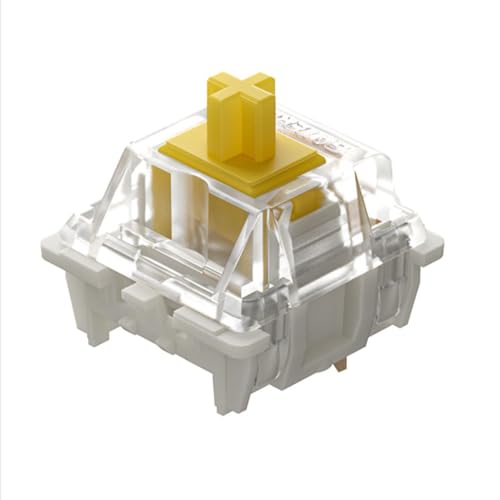
Gateron G Pro 3.0 Yellow — the middle-weight all-rounder
Badge: Balanced linear. The Yellow sits between Red lightness and the firmer linears, and the G Pro 3.0 version is the modern, factory-lubed expression of the switch that built Gateron’s name. Its keystroke is the family’s centre of gravity: enough spring to return crisply and resist accidental presses, not so much that long sessions fatigue. If the Milky Yellow Pro is the guide’s default, this is its closest alternative — clearer housing, the KS-9 lineage, and a feel many long-time owners still prefer.
- Type: Linear, 5-pin
- Factory lube: Yes, pre-lubricated
- Stem: pin-enhanced design (per listing)
- Pack: 70 pieces (per listing)
Strengths
- Balanced spring weight suits almost every use
- Clearer housing than Milky variants for RGB builds
- Long-proven design with predictable behaviour
Trade-offs
- Overlaps heavily with the Milky Yellow Pro — few need both
- Stock sound is brighter than the Milky’s deeper tone
- Character is competence rather than distinction
Best for: mixed-use boards where one linear must do everything well. / Not suited for: owners seeking either extreme of spring weight or a deep, muted sound.

Gateron Smoothie — the full-POM experiment
Badge: Snappiest return. The Smoothie is Gateron’s materials experiment sold at a friendly price: a full-POM construction — housing and stem in the same self-lubricating plastic — with a long dual-stage spring that makes the return stroke feel eager and the bottom-out feel crisp. Its travel is slick in a way that feels different from lubed smoothness, more gliding than cushioned, and its lighter spring makes it the range’s choice for owners who found the Yellows a touch heavy and want liveliness instead.
- Type: Linear, 5-pin, RGB LED compatible
- Operating force: around 40gf (per listing)
- Spring: 22mm dual-stage (per listing)
- Material: full POM construction
Strengths
- Distinctly slick, gliding travel from the POM pairing
- Dual-stage spring gives a lively, confident return
- Light weight suits fast, relaxed typing
Trade-offs
- Crisp bottom-out is louder than the Milky or Oil King style
- Light spring will not suit heavy-handed owners
- Feel divides opinion — sample before committing a board
Best for: owners who want a light linear with an eager, snappy personality. / Not suited for: quiet-first builds or anyone who dislikes a crisp bottom-out.
Comparison: how do the six picks differ at a glance?
Read the shortlist as three decisions nested inside each other. The first decision is feel family: five of the six are linears because that is where Gateron’s budget smoothness is most famous, and the Brown stands as the tactile alternative for owners who type for a living and want confirmation under their fingers. The second decision is spring weight, running from the Smoothie’s lightness and the Red’s classic light touch, through the two Yellows in the middle, to the Oil King’s deliberate firmness; weight, more than any other single variable, decides whether a board feels effortless or tiring across a month of use. The third decision is character: the Milky’s soft light diffusion and deeper sound, the G Pro Yellow’s clarity, the Smoothie’s glide and snap, the Oil King’s hush. Owners who work through the three decisions in that order rarely buy wrong, because each step discards most of the catalogue on grounds they can actually feel.
Two prose-only mentions complete the family’s map. The KS-9 Silent Red, verified and linked in this cluster’s silent coverage, shows Gateron’s budget smoothness in a damped, quiet form for offices and night desks. The KS-9 Silent Yellow was seen in search results during this guide’s research but could not be verified to the standard its links require, so it is mentioned here without a link: it exists, it applies the Yellow recipe with silent damping, and it should be bought, if at all, with the listing checked carefully against the genuine article. The Cap Gold V2 line, a milky-housed variant with a firmer spring, gets its full treatment in the dedicated Yellow guide alongside the other Yellow family members.
How do you choose a Gateron switch — the buying guide?
Begin with your board, because compatibility is a gate, not a preference. Confirm the board is hot-swappable if you want painless experimentation, and confirm its sockets: 5-pin switches fit 5-pin boards natively and 3-pin boards after clipping the two extra plastic legs, a ten-second job per switch with flush cutters, while 3-pin switches in 5-pin boards sit slightly less firmly and rely on the plate for stability. Then be honest about your typing: heavy-handed owners who bottom out hard should start in the middle weights, light-touch owners can enjoy the Reds and Smoothies, and anyone whose board lives in a shared room should price the silent branch before falling for a loud one.
Spring weight deserves its own paragraph because it is the specification beginners most often misjudge from numbers alone. Operating force figures describe the push at actuation, not the whole journey, and two switches with the same headline figure can feel different because their springs differ in length and staging — the Smoothie’s dual-stage spring being the catalogue’s own proof. Treat the numbers as a map of neighbourhoods rather than addresses, and let a small sample purchase settle the street. Which leads to the guide’s firmest buying rule: whatever switch seduces you, buy the smallest sensible quantity first, live with it on your most-used keys for a week, and only then fill the board. The budget in this keyword is protected less by cheap switches than by not buying ninety of the wrong ones.
Generation literacy saves money too. G Pro generations improved stem tolerances, springs, and factory lubrication step by step, so a G Pro 3.0 at a friendly price is usually a better buy than an older generation at a trivially lower one; the smoothness you are paying for lives in exactly those refinements. Housings, by contrast, are mostly about light: milky for diffusion, clear for shine-through legends, dark for mood and depth of sound. Buy housings with your eyes, generations with your head, and springs with a sample under your fingers.
How do you fit and tune Gateron switches?
Fitting is a gentle procedure that rewards alignment over force. Pull the old switch with a proper switch puller, gripping its north and south clips, rocking rather than wrenching. Inspect the new switch’s metal pins before insertion — they ship straight but bend in transit — and straighten any wanderer with tweezers, because a bent pin is the cause of nearly every “dead switch” panic in a fresh build. Align the pins with the socket, press straight down with even pressure until the switch seats, and test the key before moving on; a switch that works when its key is pressed but sits visibly crooked should be reseated now, not discovered at the spacebar stage of the build.
Tuning, for this range, is deliberately optional, and the order of operations matters for owners who choose it. Live with the switches stock for at least a week, because factory lube settles and your fingers calibrate, and many boards need nothing more. If you proceed, films help the few housings with perceptible wobble, a careful spring or stem lube deepens smoothness further, and the techniques are covered in this site’s lube and films guides. The budget discipline is to tune the switches you already love rather than buying accessories to rescue switches you do not — no film ever made a wrong spring weight right.
the ultimate guide to lubing your switches
What mistakes do Gateron buyers make?
The first is buying by colour name across generations, assuming a Yellow is a Yellow, when the KS-9, G Pro, G Pro 3.0, Milky Pro, and Cap variants are distinct switches sharing a spring-weight neighbourhood and a colour. The second is filling a board unsampled, already covered, and worth repeating because it is the hobby’s most expensive beginner habit. The third is ignoring pin format until the switches arrive, turning an evening’s build into a clipping session or a returns process. The fourth is chasing the cheapest listing for a famous switch name without checking what the listing actually contains, because lookalike and mixed-stock listings exist for every popular Gateron model; the verified listings in this guide exist precisely to remove that gamble.
The fifth mistake is over-modifying on day one — filming and relubing switches whose factory state the owner never actually experienced, then being unable to say whether the hours helped. The sixth is choosing a switch for a sound heard in a video, recorded on a different board, plate, and desk; sound belongs to the whole build, and the same Milky Yellow is deep in one board and bright in another. Buy for feel, which travels with the switch, and treat sound as the board’s contribution to negotiate afterwards.
How does the wider Gateron catalogue fit around these picks?
The six reviewed picks are the centre of the catalogue, and a good guide should sketch the edges so you know what you are not buying and why. Beyond the linears reviewed here sit the clicky members of the family — switches with a click mechanism for owners who type by ear — which this budget-and-smooth guide passes over because their sound excludes them from the shared spaces most budget buyers type in. Beyond them sit the silent lines, represented in this cluster’s silent coverage by the verified KS-9 Silent Red, which apply damping to the same smooth travel for offices and night desks. And beyond those sit the partner and designer collaborations Gateron manufactures for other brands, where the Gateron smoothness is dressed in other people’s spring choices, colours, and price temperaments — fascinating territory, and deliberately not this guide’s, because a budget buyer is served by the core range’s value rather than by the collaborations’ variety.
There is also a generational edge worth sketching. Older Gateron stock circulates at attractive prices, and some of it is excellent value; but the smoothness this keyword promises lives disproportionately in the newer generations’ moulds and factory lubrication, so a suspiciously cheap bag of an old generation may deliver the name without the experience. The verified picks in this guide are current, documented listings for exactly that reason: in a catalogue this wide, the discipline of buying the identified switch, in the identified generation, from an identified listing, is most of what “budget friendly” actually requires of you. Cheap is a price. Budget friendly is a result — the right switch, once, with nothing to rebuy.
What does a sensible first Gateron purchase look like, start to finish?
Walk through the canonical first purchase, because it concentrates every rule in this guide into one story. The owner has a hot-swappable board, types and games in roughly equal measure, and shares a home but not a room. The board’s sockets are checked — 5-pin — and the key count is taken: a tenkeyless board, plus spares, so a pack in the seventies covers it. The feel decision comes first and lands on linear, because the owner’s games punish bumps and their typing has never missed feedback. The weight decision samples two candidates — the Milky Yellow Pro and the G Pro 3.0 Red — ten switches each on the most-used keys across a working week. The Red is delightful for an evening and fatiguing in its lightness by the fourth day, with accidental presses appearing in documents; the Milky’s middle weight disappears, which is the highest praise a switch can earn. The full pack is ordered from the verified listing, the pins are inspected on arrival, the board is built in an evening with each key tested as it is seated, and the remaining switches go into a labelled container as the board’s reserve.
Six months later the board has needed nothing. That anticlimax is the product. Notice what the story did not contain: no lube station, no film session, no second and third purchase correcting the first, no drawers of rejected switches. The budget in “budget friendly” was protected not by the price of the chosen switch but by the sequence — compatibility, feel family, sampled weight, verified listing, spares — and that sequence is transferable to every other member of the catalogue, which is why this guide spent more words on it than on any single switch.
How do Gateron switches compare with the other big switch families?
Beginners often ask whether choosing Gateron means settling, so the comparison deserves a straight answer. Against Cherry’s MX line — the original design from which the whole ecosystem descends — Gateron’s modern generations compete on smoothness and price, the two axes of this guide’s keyword, while Cherry competes on heritage, consistency of its newest MX2A generation, and the confidence of a specification known to every board maker alive. Against Kailh, whose Box designs add dust resistance and whose speed switches court gamers, Gateron competes on the breadth and polish of its linear and tactile catalogue. Against the budget houses such as Outemu, Gateron is usually the step up: a little more money, a visibly smoother and more consistent result. And against the boutique designers — some of whose switches Gateron itself manufactures — the core Gateron range competes on value, offering most of the travel quality at a fraction of the commitment, while conceding the exotic spring choices, materials, and characters that make boutiques fascinating.
The honest summary is that Gateron’s core range is not the best at any single exotic thing, and is the best default at the ordinary things: smoothness, consistency, availability, and price, in combination. Defaults win households. A beginner who starts with Gateron and later specialises — into tactiles with a designer bump, into a silent line, into a clicky with a particular voice — does so from a calibrated baseline, knowing what a good switch feels like and therefore what the specialisation is actually buying. That educational role is an underrated part of the family’s value, and one more reason this guide is comfortable recommending it as the first purchase rather than merely the cheapest.
How should you care for a Gateron board over its life?
The care regime is light, because the switches arrive finished. Keep the board free of dust and grit with a brush and occasional air, since smoothness is a surface quality and grit is its natural enemy. Keep drinks at the distance drinks deserve; a spill into a board of factory-lubed switches is a cleaning project that no owner enjoys, and prevention is a coaster’s work. If a single switch ever develops a fault — a chatter, a grit, a fading spring — this site’s diagnosis guide walks the fault in order, and the Gateron advantage appears again: replacements are available, affordable, and identical, so a single tired switch is a five-minute swap from the spares you bought with the original pack rather than a board-level crisis.
Across years, expect the board to change less than your taste does. Springs do not meaningfully tire within a typing lifetime, factory lube endures ordinary use, and the switches you sampled and chose will feel next year much as they feel today. What changes is the owner’s calibration — the second board is chosen with the first board’s education behind it — and a Gateron first board is precisely the education the second choice deserves.
What do the specifications actually mean — a plain-language glossary for buyers?
Gateron listings speak a compressed dialect, and a budget buyer deserves its translation. Operating force is the push needed at the moment the switch actuates, expressed in grams-force; bottom-out force is the larger push at the end of travel, and the gap between the two numbers describes how much resistance grows through the keystroke. Pre-travel is the distance before actuation — shorter feels more immediate, longer more deliberate — and total travel is the whole journey to the housing floor. A switch described as pre-lubed has factory lubricant on its moving surfaces; a switch described as 5-pin carries two extra plastic legs for stability in compatible boards, and 3-pin omits them. Housing words are about light and sound: milky diffuses, clear transmits, and dark housings deepen the register while swallowing the glow. Spring language — single-stage, dual-stage, long spring — describes how the resistance builds and how eagerly the key returns, and it is the specification with the largest gap between its dry wording and its felt importance, which is why this guide keeps returning spring questions to the sampling bench, where they belong.
Two specification traps deserve naming. The first is comparing operating forces across makers as if they were measured identically; they are close enough to sort switches into neighbourhoods and not close enough to choose between neighbours, so let them shortlist and let your fingers decide. The second is the lifespan figure, which every maker states in the tens of millions and which no typist in history has exhausted on a board they still loved — treat it as a quality signal, not a decision variable, and spend your attention on the specifications your hands will actually meet: force, travel, spring character, and the housing’s behaviour with your board’s light.
How do you plan a second Gateron board, once the first has taught you?
The second board is where Gateron’s range becomes a playground rather than a default, and the first board’s education should be spent deliberately. You now know your weight neighbourhood, your feeling about feedback, and your room’s acoustic demands; the second board can explore one axis the first held constant — a tactile if the first was linear, a silent line if the household has changed, a firmer spring class if your fingers grew stronger opinions. Keep the exploration to one axis, because a board that changes everything teaches nothing, and keep the first board intact and in use: it is your reference instrument, the calibrated baseline against which every new switch’s claims are measured, and owners who sell their reference board spend years re-buying the knowledge it held. The Gateron catalogue, read with a reference board beside you, stops being a bewildering range and becomes what it was designed to be — a set of known variations on a smoothness you already understand, priced so that curiosity is affordable.
What does the range offer gamers, specifically?
Gaming makes two demands that this guide’s typing-centred picks should be re-examined against: the fastest, most reliable actuation under repeated, urgent presses, and springs that let fingers rest on movement keys without firing them. The G Pro 3.0 Red answers the first demand in its purest form — the lightest spring in the shortlist, travel with nothing in its way — and its accidental-press tendency, a typing flaw, is a smaller matter on a gaming board whose keys are struck with intent. The middle Yellows answer the combined demand, which is why they dominate gaming boards in the wild: firm enough to rest on, smooth enough to spam, and consistent enough that a key behaves identically in the first minute and the fifth hour. The Oil King’s firmer spring and deep sound suit the gamer whose sessions are long and whose room is shared, and the Smoothie’s eager return has its own gaming advocates, who prize the reset speed of its dual-stage spring in rhythm and movement-heavy titles. The Brown, honestly, is the shortlist’s weakest gaming answer and the strongest typing one, and a gamer who types more than they play should still choose it without embarrassment — the best gaming switch is the one on the board you actually keep on your desk.
One gaming-specific caution belongs in a Gateron guide: rapid-trigger and analogue features belong to Hall-effect and optical switches, a different technology from everything reviewed here, and no mechanical Gateron — however light or smooth — offers them. Gamers for whom those features are the point should shop that technology deliberately, in this site’s wider gaming coverage, rather than expecting a mechanical switch to approximate it. For the far larger population whose games ask for reliability, consistency, and feel, the mechanical range in this guide is not a compromise at all.
How do you set up a Gateron board for a shared home or office?
The shared-space Gateron board is a small exercise in diplomacy conducted through parts choices, and the range serves it better than its loud reputation suggests. Start with the switch’s own voice: the Milky-housed members and the Oil King speak in the family’s deepest register, and a board built from them, on a desk mat, under a set of well-fitted keycaps, is a board most housemates classify as furniture noise rather than as an intrusion. Attend to the stabilisers next, because in shared spaces it is the spacebar’s rattle, not the letters’ travel, that carries through walls and into calls. Choose the board’s mount and case with the same ear — gasket mounts and foamed cases are the shared home’s friends — and if the space is truly sensitive, an office with calls or a bedroom desk, take the honest step to the family’s silent branch, represented in this cluster’s verified silent coverage, rather than asking a loud switch to whisper. The budget framing survives the diplomacy intact: every one of those choices is available inside the Gateron ecosystem at the range’s ordinary prices, which is, in the end, the family’s whole argument — not merely that its switches are smooth and affordable, but that the affordable smoothness is available in a form for nearly every room a keyboard can live in.
What does the troubleshooting chapter look like for a Gateron board?
Even the smoothest range meets the ordinary faults of mechanical boards, and a Gateron owner’s troubleshooting has the same shape as the diagnosis guide in this cluster teaches, with the family’s own footnotes. A dead key on a new Gateron build is a bent pin until proven otherwise, because the range’s pins travel in bags and bags are not gentle; inspect before you theorise. A key that chatters months in is contacts, treated by the ladder of cleaning and, where needed, a swap from the spares. A switch that feels scratchier than its neighbours is often simply the pack’s one outlier, and the correct response is the unglamorous one — replace it from the reserve and let the board’s consistency return, rather than lubing ninety switches to match one. And a board whose sound disappoints is rarely the switches’ fault at all: it is the stabilisers, the case, the caps, in that order, and the Gateron owner’s advantage is that the switch layer can be acquitted early and cheaply, because its behaviour is so well documented by the family’s enormous installed base. Keep the spares, keep the log, and the budget board stays a budget board across its whole life — which was, from the first paragraph of this guide, the entire proposition.
What is the final word on value — what does a Gateron board really cost across its life?
Add the whole story up, because the keyword’s promise is ultimately an accounting claim. The purchase itself, sampled and verified, is a boardful of switches at the range’s ordinary prices, plus a handful of spares. The bench work the range demands is, for most owners, none: the factory state is the product, and the lube station stays in the drawer of good intentions. The maintenance across years is a brush, an occasional blow-out, and a switch or two from the spares as the board’s population ages at different rates. The failures are the ordinary ones of any mechanical board, met with the cheapest and most available replacements in the hobby. And the resale or hand-me-down value of a Gateron board is propped by the same fame that made it a safe first purchase: the next owner knows exactly what these switches are. Set against the alternatives — the premium range whose boardful costs several times more for refinements many fingers cannot detect, the bargain bin whose savings are repaid in scratch, inconsistency, and rebuys — the Gateron proposition is not that it is the cheapest way to fill a board. It is that it is the cheapest way to fill a board once, well, and for years. Budget friendly and smooth turns out to be a complete sentence after all: the smoothness is what makes it friendly, because smoothness is what makes it final.
How do you explain this range to a newcomer in one minute?
The one-minute version, for the friend standing at your desk asking why your keyboard feels like that: these are Gateron switches, the ones the hobby buys when it wants smoothness without a second mortgage or a weekend of bench work. They come in families — linears that travel straight, tactiles with a bump, silents with the volume removed — and in weights from light to firm, and the art is only in matching the family and the weight to your hands and your room, which a handful of samples on your most-used keys will do in a week. Buy them from listings that name the exact switch and generation, keep a few spares, and then forget about them for years, because forgetting them is the experience they were designed to produce. Everything else in this guide — the generations, the housings, the tuning paths, the troubleshooting ladders — is footnotes to that minute, there for the day you want them. Most owners never need the footnotes. The ones who do are glad they are written down.
What do you do when your first Gateron board disappoints?
Treat the disappointment as data before treating it as a verdict, because a first board’s letdown is almost never the range’s failure — it is a mismatch with a name, and naming it is the whole recovery. Too light or too firm is a spring answer, found by sampling the neighbouring weight in a test row rather than by replacing the board’s population on a hunch. Too loud is usually the board’s answer — stabilisers, case, caps — with the switches acquitted by the simple test of hearing one in a tester or a different board. Too scratchy, in a current generation, is often a single outlier switch or a boardful of dust from the build itself, cured by the diagnosis ladder rather than by a new purchase. And too plain — the switch that does everything well and excites nothing — is the one honest verdict against the range’s centre, and its cure is the catalogue’s edges: a tactile with a bump to ride, a clicky with a voice, a designer switch with a personality, sampled this time with the education the first board provided. Disappointment, handled this way, is the tuition the hobby charges once. Handled by rebuying blindly, it is a subscription.
What is the shortest honest summary of this whole guide?
Gateron earned its place by making smoothness ordinary: switches that travel cleanly out of the packet, in every feel family and weight a normal typist or gamer could want, at prices that let a whole board be an ordinary purchase. The buyer’s whole job is matching — family to purpose, weight to hands, generation to value, listing to the exact switch intended — and then sampling before committing, because every specification in the catalogue is a neighbourhood and only fingers can choose the street. Do those things and the range will do what it has done for a decade of owners: disappear under the work, for years, at a price that never becomes a story. That disappearance, purchased cheaply and kept indefinitely, is the smoothest thing Gateron sells.
Gateron Switch Guide Budget Friendly And Smooth — Frequently Asked Questions
Which Gateron switch is smoothest out of the box?
Within this verified shortlist, the Oil King offers the most polished stock travel, with the Milky Yellow Pro close behind at a friendlier price. Both are factory-lubricated linears designed to be enjoyed unmodified, which is the practical meaning of smoothest for a budget-minded buyer.
Are Gateron switches good for typing, or mainly gaming?
Both, with the choice made by family and weight. The G Pro 3.0 Brown gives typists gentle feedback, the middle-weight Yellows suit long mixed days, and the light Red favours fast gaming input. Gateron’s smoothness serves typists particularly well because scratchiness is a fatigue you feel across thousands of keystrokes.
Will 5-pin Gateron switches fit my 3-pin board?
Yes, after clipping the two extra plastic stabilising legs on each switch, a quick job with flush cutters. The electrical pins are the same. Going the other way, 3-pin switches fit 5-pin boards but sit less firmly, relying on the plate for stability.
How many switches do I need for my keyboard?
Count your board’s keys and add a few spares for the inevitable bent pin or lost switch. Compact boards need roughly sixty to seventy, tenkeyless boards the mid-eighties, and full-size boards a little over a hundred. Pack sizes in the listings above are stated per product, so match the pack to your count before ordering.
Do Gateron switches need lubing?
The Pro generations and the premium linears in this guide are factory-lubricated and satisfying stock. Lubing remains an enthusiast option that can deepen smoothness further, but it is not the admission fee it once was, and this guide’s picks were chosen so that skipping it costs you nothing essential.
What is the difference between Milky Yellow and G Pro Yellow?
They are cousins, not twins: the Milky Yellow Pro pairs the Yellow weight class with a milky, light-diffusing housing and a deeper sound, while the G Pro 3.0 Yellow keeps a clearer housing and the KS-9 lineage’s brighter character. Feel is close; light behaviour and sound separate them, and the dedicated Yellow guide compares the family in full.
The gateron switch guide budget friendly and smooth promise, kept properly, is simple: a switch that feels polished the day it arrives, at a price that leaves room in the budget for the board around it. Start with the Milky Yellow Pro if you want the safest pair of hands in the catalogue, the Brown if your fingers type for a living, the Oil King if you are upgrading within the family — and sample first, always, because the best budget decision is the one you only make once.