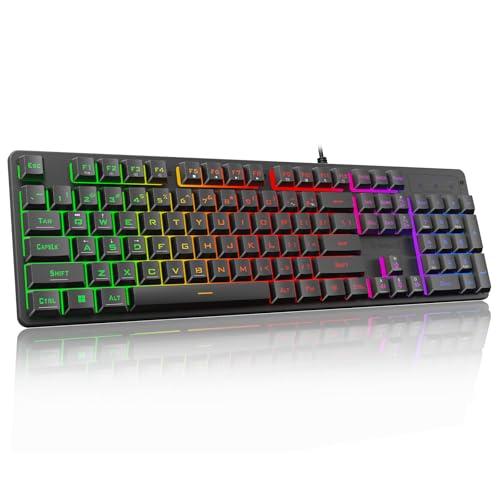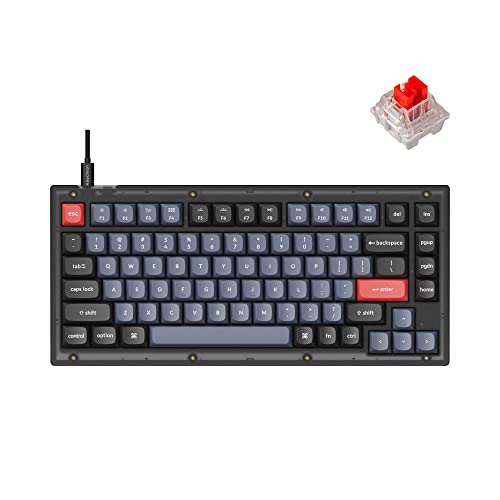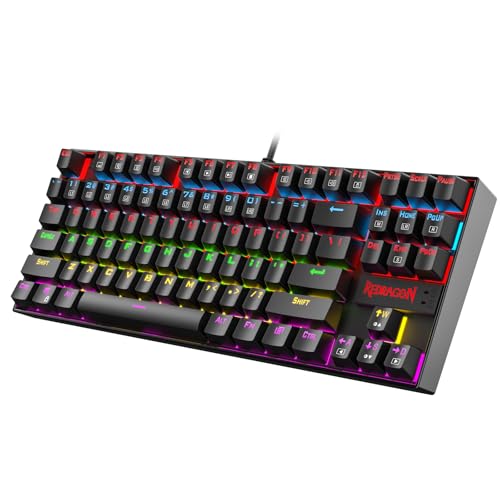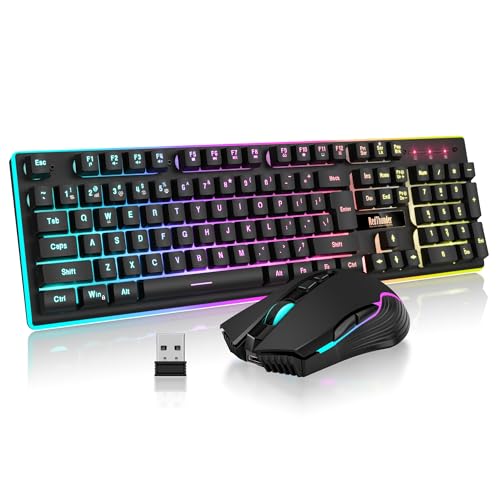
The best wireless mouse and keyboard rechargeable gaming combos solve the oldest annoyance on a gaming desk: the cable tangle. A matched keyboard and mouse that both run wireless and recharge from a cable give a player the freedom to move the mouse without dragging a cord and to push the keyboard back when the game needs room, all without keeping a drawer full of spare batteries. The six sets below were picked from the site’s own product lookup because their listings describe exactly that combination: a wireless keyboard and a wireless mouse sold together, with a rechargeable battery and a gaming feature set.
Rechargeable matters more than it first sounds. A combo that runs on disposable batteries is cheap to buy and expensive to live with, because the mouse is always the first thing to die in the middle of a match. A rechargeable set tops up over the same cable most desks already have, and the better listings state the battery capacity outright, so a buyer can tell a 3800mAh set from a 2000mAh one before ordering. The listings behind these picks state their battery, their lighting, and their connection modes plainly, which is what makes an honest comparison possible.
Every listing behind these picks comes from the site’s own product lookup, and each one was checked in full before it earned a link: the brand and the complete model name had to match exactly, and any listing marked as renewed or used was set aside. The list runs from affordable RGB sets with large batteries to a premium esports bundle, so there is a rechargeable wireless gaming combo here for a buyer furnishing a first desk and for one upgrading a setup that already works.
In this guide
Quick picks: best wireless mouse and keyboard rechargeable gaming
| # | Product | Where to buy |
|---|---|---|
| 1 | RedThunder K10 | Check on Amazon |
| 2 | Rainbow backlit wireless gaming combo | Check on Amazon |
| 3 | RGB backlit wireless gaming combo | Check on Amazon |
| 4 | 60% wireless gaming keyboard and mouse combo | Check on Amazon |
| 5 | Wireless keyboard and mouse combo with media knob | Check on Amazon |
| 6 | Razer esports gaming bundle | Check on Amazon |
How the picks were chosen
Rechargeable first. A set earned a place here when its listing described a wireless keyboard and mouse that recharge rather than run on disposable cells. Five of the six listings state a rechargeable battery outright, including the battery capacity, and the sixth is a premium wireless bundle whose two devices are both built to run cable-free. Sets whose listings described only a keyboard or only a mouse were not considered, because this article is about matched pairs.
Gaming features came second. A rechargeable office set with quiet keys and no lighting would not belong here, so each pick was weighed on the features a player actually notices: backlighting, anti-ghosting, a mouse sensor rated in DPI, and a connection that stays stable at 2.4GHz. The picks mix full-size keyboards with number pads, compact 60 percent boards, and one premium bundle, so the list covers different desk sizes and hand sizes.
Every listing was verified in full before linking. The brand and the complete model name in the listing had to match the set described, including the model code that separates one Redragon or RedThunder set from another. Listings marked as renewed or used were dropped, and any listing whose title described a different model was set aside even when it looked close at first glance.
Quick comparison
| Product | Standout feature | Best for |
|---|---|---|
| RedThunder K10 | Rechargeable 3800mAh battery, the largest here | longest battery life in a wireless gaming set |
| Rainbow backlit gaming combo | 3800mAh battery with a metal panel | big battery plus a metal panel and hand rest |
| RGB backlit gaming combo | Works across PC, Mac, and consoles | one rechargeable set for PC, console, and laptop |
| 60% wireless gaming combo | Compact board that frees mouse space | compact 60 percent layout for small desks |
| Tri-mode combo with media knob | Bluetooth, 2.4GHz, and USB-C in one set | tri-mode connections plus a media knob |
| Razer esports bundle | 8KHz mouse with a TKL keyboard | fastest wireless performance: 8KHz mouse, 1KHz keyboard |

RedThunder K10 Wireless Gaming Keyboard and Mouse Combo
The RedThunder K10 is the most clearly specified rechargeable set on this list, and its listing leaves little to guess: a wireless gaming keyboard and mouse combo with LED backlighting, a rechargeable 3800mAh battery, a mechanical-feel anti-ghosting keyboard, and a 7D mouse rated at 3200 DPI. A 3800mAh battery is the largest capacity stated anywhere on this list, and it is the detail that makes this set the natural first pick for a buyer who hates charging.
The mechanical feel and anti-ghosting in the listing are the gaming side of the same package. Anti-ghosting means the keyboard keeps up when several keys are held at once, which is exactly what happens in a game when movement, sprint, and an ability key are pressed together. The 3200 DPI mouse is fast enough for most games without being so sensitive that it is hard to control, and the LED backlighting keeps the keys readable in a dark room.
For a buyer who wants a rechargeable wireless gaming set and does not want to think about batteries again, the K10 is the pick. The large battery, the backlit keyboard, and the matched mouse cover the whole brief in one box, and the full-size layout means no keys are missing. It is the set to buy when the priority is a long stretch between charges rather than a brand name.
Key specifications: Wireless gaming keyboard and mouse combo; LED backlit; rechargeable 3800mAh battery; mechanical-feel anti-ghosting keyboard; 7D mouse, 3200 DPI.
This set fits a buyer who wants the longest time between charges and a straightforward gaming keyboard and mouse in one box.
Strengths
- The 3800mAh rechargeable battery is the largest capacity on this list.
- Anti-ghosting keys keep up when several keys are held down at once.
- The LED backlit keyboard stays readable in a dark room.
Trade-offs
- The mouse tops out at 3200 DPI, below the fastest sensors here.
- The set is a value pick, so its materials are simpler than the premium bundle.
- It is a full-size keyboard, so it needs a wide desk.
The RedThunder K10 suits a player furnishing a first gaming desk, or anyone replacing a wired set and a drawer of batteries at the same time. It fits a buyer who values a big battery over a famous badge.
Best for: longest battery life in a wireless gaming set / Not suited for: a buyer who wants a compact keyboard or a top-tier sensor
Check price on Amazon: RedThunder K10
Rainbow Backlit Wireless Gaming Keyboard and Mouse Combo
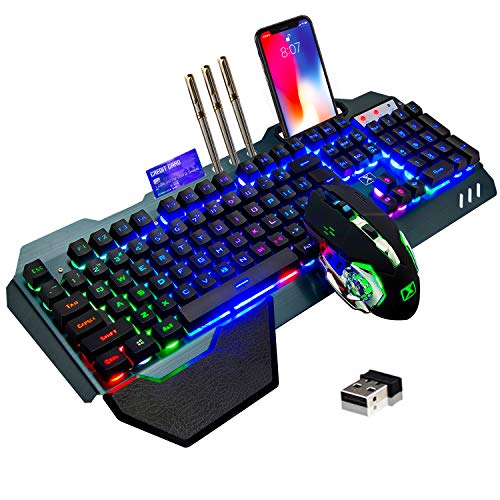
This rainbow backlit set matches the K10 on the number that matters most: its listing also states a rechargeable 3800mAh battery. It adds a metal panel to the keyboard, a removable hand rest, a mechanical-feel keyboard, and a 7-colour gaming mouse described as mute, which means its clicks are quieter than a typical gaming mouse. The combination of a metal panel and a hand rest is unusual at this tier, and it is what lifts this set above a plain plastic combo.
The rainbow backlighting is the visual centrepiece, and the listing describes a keyboard and mouse that light up together, which matters on a desk where mismatched lighting looks unfinished. The removable hand rest is the practical detail: it supports the wrists during long sessions and comes off when the desk needs the space, so the set adapts to the player rather than the other way round.
For a buyer who wants the big battery and a keyboard that feels more solid than its price suggests, this set is the pick. The metal panel, the hand rest, and the 3800mAh battery cover comfort, durability, and charging in one purchase. It is the set to choose when the desk is also a workspace and the keyboard needs to look and feel considered.
Key specifications: Wireless gaming keyboard and mouse combo; rainbow backlit; rechargeable 3800mAh battery; metal panel; removable hand rest; mechanical-feel keyboard; 7-colour mute gaming mouse.
This set fits a buyer who wants a big battery, a metal keyboard panel, and a hand rest without paying for a brand name.
Strengths
- The rechargeable 3800mAh battery matches the largest capacity on this list.
- The metal panel and removable hand rest add comfort and solidity.
- The quieter mute mouse suits shared rooms and late-night play.
Trade-offs
- The listing carries no brand name, so support depends on the seller.
- No DPI figure is stated for the mouse in the listing.
- The rainbow lighting is fixed in style, with no software named.
This combo suits a player who games in a shared room and wants quiet clicks, a solid-feeling keyboard, and a battery that lasts. It fits a buyer who judges a set by its materials, not its badge.
Best for: big battery plus a metal panel and hand rest / Not suited for: a buyer who wants a named brand or a stated DPI rating
Check price on Amazon: Rainbow backlit wireless gaming combo

RGB Backlit Wireless Gaming Keyboard and Mouse Combo
This RGB backlit set states its rechargeable battery in the listing title, and it pairs that battery with the features a player looks for first: mechanical-feel anti-ghosting keys, a side button on the mouse, and compatibility with Windows, Mac, PlayStation, and Xbox. That wide compatibility is the detail that separates it from sets built for one system only, and it makes this the pick for a household where the same desk serves a PC and a console.
The side button on the mouse is a small detail with an outsized effect in games, because it puts a frequently used action under the thumb instead of on the keyboard. The anti-ghosting keyboard keeps up with multi-key presses, and the RGB backlighting keeps the board readable when the room lights are low. Together they make a set that is ready for a game the moment it is unboxed.
For a buyer whose desk serves more than one machine, this set is the pick. The rechargeable battery, the cross-platform compatibility, and the gaming features cover a PC, a console, and a laptop without a second purchase. It is the set to buy when one keyboard and mouse have to do everything.
Key specifications: Wireless gaming keyboard and mouse combo; RGB backlit; rechargeable battery; mechanical-feel anti-ghosting keyboard; mouse with side button; compatible with Windows, Mac, PS4, PS5, Xbox One.
This set fits a buyer whose keyboard and mouse must work across a PC and a console as well as a laptop.
Strengths
- The rechargeable battery removes disposable cells from the desk.
- It works across PC, Mac, PlayStation, and Xbox from one set.
- The mouse side button puts a game action under the thumb.
Trade-offs
- No battery capacity is stated in the listing, so run time is unconfirmed.
- No DPI figure is stated for the mouse in the listing.
- The listing carries no brand name, so support depends on the seller.
This combo suits a player with a mixed setup: a PC for some games, a console for others, and one desk for both. It fits anyone who wants a single rechargeable set for every machine.
Best for: one rechargeable set for PC, console, and laptop / Not suited for: a buyer who wants a stated battery capacity or a named brand
Check price on Amazon: RGB backlit wireless gaming combo

60% Wireless Gaming Keyboard and Mouse Combo
The 60 percent set is the compact pick on this list, and its listing states the two things that define it: an RGB backlit rechargeable keyboard and mouse, and a 60 percent layout that drops the number pad and the navigation cluster. A smaller keyboard leaves more room for the mouse, which is exactly what a low-sensitivity player needs, because the mouse travels further across the pad during a flick or a turn.
The LED lighting is the other half of the appeal. The listing describes light-up keys and a wireless gaming mouse, which means the set looks like a gaming setup even though it takes up barely more desk space than the mouse pad itself. It works with Xbox, PlayStation, PC, and laptop, so the compact board is not limited to one machine.
For a buyer with a small desk or a player who moves the mouse in wide arcs, this 60 percent set is the pick. The rechargeable battery, the compact layout, and the lighting cover the brief without wasting a centimetre of desk. It is the set to buy when space is the constraint and the mouse needs room to breathe.
Key specifications: 60% wireless gaming keyboard and mouse combo; RGB backlit; rechargeable; LED light-up keys; wireless gaming mouse; for Xbox, PS4, PS5, PC, laptop.
This set fits a buyer with a small desk or a low-sensitivity player who needs mouse room above all.
Strengths
- The compact 60 percent layout frees desk space for wide mouse movement.
- The rechargeable battery removes disposable cells from a small desk.
- It works across Xbox, PlayStation, PC, and laptop.
Trade-offs
- The 60 percent layout has no number pad, which some buyers miss.
- No battery capacity is stated in the listing.
- No DPI figure is stated for the mouse in the listing.
This combo suits a player on a compact desk, a dorm room, or a shared table where every centimetre counts. It fits anyone who moves the mouse in wide arcs and wants the keyboard out of the way.
Best for: compact 60 percent layout for small desks / Not suited for: a buyer who needs a number pad or a full-size board
Check price on Amazon: 60% wireless gaming keyboard and mouse combo
Wireless Keyboard and Mouse Combo with Media Knob
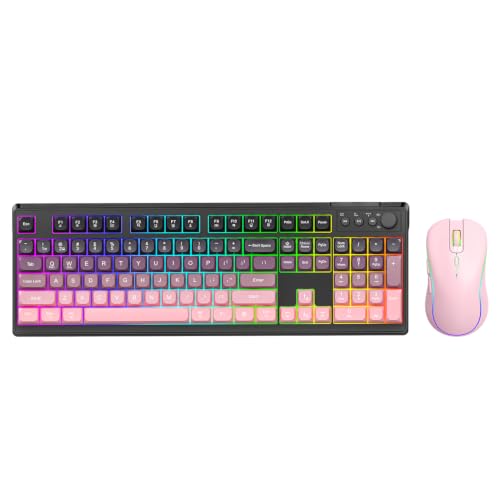
This tri-mode set is the most flexible connector on the list. Its listing describes a rechargeable 2000mAh battery, tri-mode Bluetooth, 2.4GHz, and USB-C connections, an RGB backlit media knob, and a creamy custom keyboard. Tri-mode means the set can talk to a desktop over 2.4GHz, to a laptop over Bluetooth, and to anything else over a USB-C cable, which makes it the pick for a desk with more than one machine.
The RGB backlit media knob is the feature that sets this set apart from the others. A knob that controls volume or media without reaching for the keyboard keeps a player in the game during a call or a song change, and the backlighting keeps it visible in a dark room. The 2000mAh battery is smaller than the 3800mAh sets here, so this set trades some run time for its connection flexibility and its knob.
For a buyer who switches between machines and wants a volume knob on the desk, this set is the pick. The tri-mode connection, the rechargeable battery, and the media knob cover a multi-device desk in one purchase. It is the set to buy when the keyboard is also a media controller.
Key specifications: Wireless keyboard and mouse combo; RGB backlit; rechargeable 2000mAh battery; tri-mode Bluetooth, 2.4GHz, USB-C; custom creamy keyboard; RGB backlit media knob.
This set fits a buyer with several machines on one desk who also wants a media knob within reach.
Strengths
- Tri-mode Bluetooth, 2.4GHz, and USB-C cover several machines at once.
- The RGB backlit media knob controls volume without leaving the game.
- The rechargeable 2000mAh battery tops up over USB-C.
Trade-offs
- The 2000mAh battery is smaller than the 3800mAh sets on this list.
- The creamy keyboard styling will not suit every desk.
- No DPI figure is stated for the mouse in the listing.
This combo suits a player who works and games on the same desk, switching between a desktop and a laptop. It fits anyone who changes volume often and wants the control on the keyboard.
Best for: tri-mode connections plus a media knob / Not suited for: a buyer who wants the largest battery or a stated DPI rating
Check price on Amazon: Wireless keyboard and mouse combo with media knob

Razer PC Esports Gaming Bundle: DeathAdder V4 Pro + Huntsman V3 Pro TKL
The Razer bundle is the premium pick on this list, and its listing names the two devices that make it so: a DeathAdder V4 Pro wireless 8KHz gaming mouse and a Huntsman V3 Pro TKL 1KHz gaming keyboard. An 8KHz polling rate means the mouse reports its position eight thousand times a second, which is the kind of responsiveness competitive players pay for, and the tenkeyless keyboard leaves the desk clear for the wide mouse sweeps that a high polling rate invites.
The pairing matters as much as the parts. Buying a mouse and a keyboard as a matched bundle means the two devices were chosen to work together, and the listing presents them as a single esports setup rather than two separate purchases. The DeathAdder shape is the ergonomic half of the pair, built for long sessions, while the tenkeyless Huntsman is the compact half, keeping the mouse hand free.
For a buyer who wants the best-performing wireless gaming mouse and keyboard on this list and is willing to pay for it, the Razer bundle is the pick. The 8KHz mouse, the 1KHz keyboard, and the matched pairing cover competitive play at a level the value sets do not attempt. It is the set to buy when performance is the priority and the budget allows.
Key specifications: Razer PC Esports Gaming Bundle; DeathAdder V4 Pro wireless 8KHz gaming mouse; Huntsman V3 Pro TKL 1KHz gaming keyboard; black.
This bundle fits a competitive player who wants the fastest wireless mouse and a compact keyboard in one matched purchase.
Strengths
- The 8KHz wireless mouse reports position far faster than standard mice.
- The tenkeyless keyboard leaves room for wide mouse movement.
- The matched bundle pairs two esports devices in one purchase.
Trade-offs
- It is the premium pick, so it sits above the value sets on cost.
- The tenkeyless layout has no number pad.
- No battery capacity is stated in the listing.
The Razer bundle suits a player who competes or aspires to, and who notices polling rates and response times. It fits anyone who would rather buy one premium pairing than assemble a set piece by piece.
Best for: fastest wireless performance: 8KHz mouse, 1KHz keyboard / Not suited for: a buyer who wants a number pad or the lowest cost
Check price on Amazon: Razer esports gaming bundle
Best wireless mouse and keyboard rechargeable gaming: what matters most: what matters most
Battery capacity is the first number to check, because it decides how often the set needs a cable. The listings here state capacities from 2000mAh to 3800mAh, and a larger number means a longer stretch between charges when the lighting and the connection are the same. A listing that states no capacity at all is not necessarily a bad set, but it leaves the buyer guessing, so a stated capacity is worth preferring when two sets are otherwise equal.
Connection mode is the second check. A set that offers 2.4GHz, Bluetooth, and a wired USB-C mode can serve a desktop, a laptop, and a console without a second purchase, while a 2.4GHz-only set is tied to the machine with its receiver. Tri-mode sets cost a little more and ask a little more of the battery, so the choice is between flexibility and run time, and the right answer depends on how many machines share the desk.
Keyboard layout decides how the set fits the desk. A full-size board with a number pad suits a player who also works with numbers, while a 60 percent or tenkeyless board suits a player who moves the mouse in wide arcs and needs the space. The mouse matters just as much: a DPI figure tells a buyer how sensitive the sensor is, and a side button adds a game action under the thumb. Lighting is the last check, not the first: backlighting helps in a dark room, but it also drains the battery faster.
Finally, check that the listing describes a matched set, not a keyboard alone or a mouse alone, and that the model name matches exactly. A listing that says a set is rechargeable should state the battery or the charging method; a listing that says nothing about charging may still be rechargeable, but the buyer cannot confirm it before ordering. The picks above were chosen because their listings state these details plainly.
Buying guide: choosing rechargeable wireless gaming combos
Start by measuring the desk. A full-size keyboard and a large mouse pad need more width than a compact board, and a set that looks right in a listing can crowd a small desk in practice. Measure the space the keyboard will occupy, leave room for the mouse to travel, and then choose between a full-size, tenkeyless, or 60 percent layout. The layout decision narrows the list faster than any other choice.
Next, decide how many machines the set must serve. A single desktop needs only a 2.4GHz receiver, while a desk with a desktop, a laptop, and a console benefits from tri-mode Bluetooth and USB-C. If the set will move between machines, check the listing for a stated switching method, because a set that is awkward to switch will spend its life on one machine anyway.
Then weigh battery against lighting. A 3800mAh battery with the lighting off lasts far longer than the same battery with bright RGB running, so a buyer who games in a lit room can turn the lighting down and stretch the charge. Ask whether the listing states a capacity: a stated number is a promise the buyer can hold the seller to, while an unstated one is a guess.
Finally, confirm the listing before ordering. Read the full title and check the brand and model code against the set being bought, because similar model names can hide different batteries or layouts. Check that the listing is new rather than renewed, and that the keyboard layout matches the language and size expected. A careful check at this stage avoids the most common disappointment: a set that is almost right.
Using and caring for your rechargeable wireless gaming combos
Charge the set before the first long session, even if it arrives partly charged. A full first charge lets the battery settle and gives a true sense of how long it lasts, and it avoids the mid-game low-battery warning that a half-charged set delivers at the worst moment. Keep the charging cable where it is easy to reach, so topping up becomes a habit rather than a chore.
Keep the receiver close and the desk clear. A 2.4GHz receiver works best with a clear path to the keyboard and mouse, so avoid burying it behind a metal case or a tangle of cables. A clean desk also helps the mouse sensor track smoothly, which matters more than most buyers expect: dust and crumbs under a sensor cause the stutter that gets blamed on the mouse.
Turn the lighting down when it is not needed. Backlighting is the largest drain on a rechargeable set after the wireless connection itself, so dimming it in a lit room can add hours between charges. Most sets keep their lighting settings through a restart, so a single adjustment lasts. Wipe the keys and the mouse with a dry cloth regularly, and keep drinks away from the keyboard, because a spill is the fastest way to end a rechargeable set.
Common mistakes to avoid
The most common mistake is buying a set for its lighting and ignoring its battery. A bright RGB set with a small battery spends more time on a cable than on the desk, which defeats the purpose of buying wireless. Check the stated capacity first, and treat lighting as a bonus rather than the reason to buy.
The second mistake is choosing a layout without measuring. A full-size keyboard on a small desk pushes the mouse off the pad, and a compact board without a number pad frustrates a buyer who enters numbers all day. Measure the desk, count the keys that are actually used, and then choose the layout.
The third mistake is assuming every wireless set is rechargeable. Some wireless keyboards and mice still run on disposable batteries, and their listings say so only in the fine print. Read the listing for a rechargeable battery or a charging cable before ordering, and check the full title for the word renewed, because a renewed set may arrive with a tired battery.
Budget and value
The value sets on this list cover the rechargeable wireless gaming brief for the least money, and the difference between them is mostly battery size and materials. A 3800mAh set with a metal panel costs little more than a basic set and lasts longer between charges, so it is the better value for most buyers. The premium Razer bundle costs several times as much, and it earns that difference only for a player who can feel an 8KHz polling rate.
A practical budget is to spend the least that buys a stated battery capacity and a matched mouse, then put any remaining money toward a mouse pad or a headset. A large battery is worth more than extra lighting modes, and a metal panel is worth more than a brand name. The picks above are ordered so that the value sets come first and the premium bundle last, which makes the trade-off easy to see.
Remember that a rechargeable set saves money over time by removing disposable batteries from the shopping list. A set that costs a little more but states a large battery will usually cost less across a year of use than a cheaper set that eats through cells. Judge the purchase on a year of use, not on the day it arrives.
Final recommendation
The RedThunder K10 is the recommendation for most buyers: its listing states the largest battery on this list at 3800mAh, and it pairs that battery with a backlit anti-ghosting keyboard and a matched mouse. It covers the rechargeable wireless gaming brief completely, without asking for a premium budget, and it is the set to buy when the priority is a long stretch between charges.
A buyer with a small desk should choose the 60 percent set instead, because its compact layout frees the mouse room that a full-size board would take. A buyer who switches between machines should choose the tri-mode set with the media knob, and a competitive player who wants the fastest response should choose the Razer bundle. Each of these sets is rechargeable, wireless, and built for games; the right one depends on the desk, the machines, and the player.
Frequently asked questions
Do rechargeable wireless gaming combos need batteries?
No. The sets on this list recharge from a cable, so no disposable batteries are needed. The listings state rechargeable batteries, with capacities from 2000mAh to 3800mAh where the listing gives a figure.
What does tri-mode mean on a wireless keyboard and mouse set?
Tri-mode means the set connects three ways: 2.4GHz wireless, Bluetooth, and a wired USB-C connection. It lets one set serve a desktop, a laptop, and another device without re-pairing each time.
Is a 60 percent keyboard good for gaming?
Yes, for many players. A 60 percent board drops the number pad and navigation keys, which frees desk space for wide mouse movement. It suits low-sensitivity players best, while players who need a number pad should choose a full-size board.
How long does a rechargeable gaming combo last between charges?
It depends on the battery capacity and the lighting. A set with a 3800mAh battery lasts longer than one with a 2000mAh battery under the same use, and turning the backlighting down extends the time between charges.
Can a wireless keyboard and mouse set work with a console?
Some can. The picks on this list that state compatibility with PlayStation and Xbox work with those consoles, while others are built for PC use. Check the listing for the systems it names before ordering.
What should I check before buying a wireless gaming combo?
Check that the listing describes a matched keyboard and mouse set, that it states a rechargeable battery, and that the brand and model name match exactly. Confirm the listing is new rather than renewed, and that the layout fits the desk.
Are wireless gaming combos as responsive as wired ones?
For most players, yes. A 2.4GHz wireless connection is fast enough that the difference from wired is hard to notice in ordinary play, and the premium bundle on this list uses an 8KHz mouse polling rate that exceeds most wired mice. Competitive players who notice tiny delays should look for a stated polling rate in the listing.
Rechargeable batteries and desk setup
A rechargeable set changes how a desk is arranged, because the charging cable becomes part of the setup rather than an emergency measure. Keep a short USB-C cable routed to the front of the desk, so the keyboard or mouse can top up during a break without moving anything. A cable that is always within reach turns charging into a background habit, and the set rarely runs flat in the middle of a game.
Battery care is simple but worth doing. Avoid leaving a set fully drained for days, because a deeply discharged battery recovers more slowly, and avoid charging it in a hot spot such as on top of a warm console. These habits cost nothing and keep the battery holding its charge for longer, which is the whole point of buying rechargeable in the first place.
A matched set also simplifies the desk in a way two separate purchases do not. One receiver can serve both devices on some sets, which frees a USB port, and a single charging cable can top up the keyboard and the mouse in turn. When the set is chosen well, the desk has fewer cables, fewer batteries, and fewer things to go wrong, which is the real benefit of buying a matched rechargeable pair.
More guides from KajuanDouglas
Are wireless keyboards good for gaming? Best wireless mouse for laptops Best wireless mouse for gaming Havit keyboard and mouse combo review