Disclosure: this article contains affiliate links. If you buy through a link on this page, we may earn an affiliate commission at no extra cost to you.
In this guide
Quick picks: best gaming keyboards under 100 dollars
| # | Product | Where to buy |
|---|---|---|
| 1 | Keychron V1 | Check on Amazon |
| 2 | SteelSeries Apex 3 | Check on Amazon |
| 3 | HyperX Alloy Origins Core | Check on Amazon |
| 4 | Razer Ornata V3 | Check on Amazon |
| 5 | Logitech G413 SE | Check on Amazon |
| 6 | Redragon K552 | Check on Amazon |
Gaming Keyboards Have Gotten Genuinely Good at This Level
Not long ago, shopping for a gaming keyboard in the entry tier meant choosing between a flimsy membrane board with rainbow backlighting and a mechanical keyboard built so cheaply that the switches felt like they were grinding through sand. That is no longer the situation. The segment below the flagship tier has become the most competitive corner of the entire keyboard market, and the pressure from smaller enthusiast brands has forced the big gaming names to offer real mechanical switches, solid frames, and usable software at prices that used to buy you rubber domes and regret.
What changed is manufacturing. Mechanical switches are now produced at enormous scale by several makers, hot-swap sockets have become cheap enough to appear on budget boards, and gasket-mounted plates — a construction trick that used to belong to custom keyboards costing several times more — have started showing up in this bracket. The result is that a careful buyer can now get a keyboard that types well, games well, and survives years of daily use without stepping into premium territory.
That said, this tier still involves trade-offs, and the marketing does its best to hide them. Some boards spend their budget on lighting and bundle a mediocre set of switches. Others nail the typing feel but ship with software you will want to uninstall within a week. A few cut corners on keycaps, so the legends shine through unevenly and the spacebar sounds like a hollow plastic drum. Knowing where each keyboard spends and where it saves is the whole game at this level.
This guide compares six keyboards that represent the main strategies in this segment: an enthusiast-style hot-swappable board, a whisper-quiet membrane model built for shared spaces, a compact aluminium esports deck, a hybrid mecha-membrane board, a restrained full-size mechanical from a mainstream brand, and an ultra-budget tenkeyless that has become a default recommendation for first-time mechanical buyers.
One promise before we start: we will not quote specific prices in the body of this article, because prices in this segment swing constantly with sales and stock. Each pick is positioned in words — entry level, mid-pack, or the top of this bracket — and each review ends with a prompt to check price on Amazon so you always see the current figure rather than a stale one printed here.
What to Look for in a Gaming Keyboard at This Level
Mechanical vs Membrane: The First Real Decision
The oldest divide in gaming keyboards is between mechanical switches and membrane or rubber-dome designs, and at this price level it is still the decision that shapes everything else. A mechanical keyboard gives each key its own physical switch with a spring and metal contacts. The press feels distinct, the actuation point is consistent, and when a switch eventually wears out on a hot-swappable board, you can replace that single switch instead of the whole keyboard. Mechanical boards also tend to hold up better over years of heavy use, which matters if you type as much as you game.
Membrane keyboards press a rubber dome down onto a membrane sheet. The feel is softer and mushier, the bottom-out is less defined, and rollover — the ability to register many simultaneous keys — is historically weaker, although modern gaming membrane boards handle anti-ghosting far better than office membranes of the past. What membrane genuinely wins on is noise and spill resistance. A membrane board is dramatically quieter, which matters in shared bedrooms, dorms, and open-plan homes, and sealed membrane designs shrug off the drink spills that would kill a mechanical board.
Between the two camps sit hybrid or “mecha-membrane” designs that put a tactile click mechanism over a membrane base. They try to deliver the sound and feedback of a mechanical board with the softness and quiet of membrane. Whether that compromise appeals to you depends on whether you value the crisp, separated feel of true mechanical switches or prefer something gentler. Our honest advice: if you play competitive games where rapid, repeated key presses matter, go mechanical. If your keyboard shares a room with someone who sleeps while you play, membrane or hybrid deserves a serious look.
Switches: Feel, Sound, and the Hot-Swap Question
Within mechanical keyboards, the switch type decides the personality of the board. Linear switches press straight down with no bump — smooth and fast, favoured by many FPS players. Tactile switches add a small bump you can feel at the actuation point, which many people prefer for typing accuracy and for games where you want confirmation without looking down. Clicky switches add an audible click on top of the bump; they are fun and deeply annoying to everyone else in the room. Colour names vary by manufacturer, but the three families are consistent across brands.
The more important question at this level is whether the switches are hot-swappable. A hot-swap board has sockets instead of solder, so you can pull a switch out with the included tool and push a new one in — no soldering iron, no warranty-voiding surgery. That matters for three reasons. First, you can change the feel of the board later by buying a different switch set instead of a new keyboard. Second, a single failing switch becomes a two-minute repair rather than a dead board. Third, enthusiasts can lubricate or film switches one at a time as a hobby project. Not every pick in this guide is hot-swappable, and we flag it clearly where it is not, because for many buyers it is the single feature most worth prioritising.
A related construction detail is gasket mounting, where the plate sits on soft gasket strips instead of being screwed rigidly to the case. The result is a slightly softer, deeper typing feel and a less harsh sound. A couple of years ago this was custom-keyboard territory; now it appears in this segment, and if you type for hours every day, it is a comfort feature you will notice within the first paragraph.
Linear, Tactile, or Clicky: Picking a Feel You Will Not Tire Of
Because switch feel is the thing your fingers will judge ten thousand times a day, it deserves its own moment. Linear switches travel in one smooth motion from top to bottom with no interruption. They are the easiest to press repeatedly and the quietest of the mechanical families, which is why they dominate competitive play — but some typists find them imprecise, because there is no physical signal telling your finger the key has registered, and accidental presses on resting fingers are common in the first week.
Tactile switches interrupt the travel with a rounded bump at the actuation point. That bump is information: your finger learns exactly when a press has counted, which reduces bottoming-out, softens the impact on your joints over long sessions, and makes touch-typing more accurate. For a single keyboard that must game at night and produce essays, code, or emails by day, tactile is the safest recommendation in this guide, and it is no accident that the Logitech ships tactile-only. Clicky switches add a deliberate click mechanism to the bump — a small bar or jacket that snaps and rings. They are the most characterful and the most divisive: delightful alone in a room, indefensible in a shared one. If you have never lived with a clicky board, hear one in person before ordering, because no video conveys how far that sound travels through a quiet house at midnight.
Two practical notes. First, switch weight matters as much as family: lighter switches fatigue less over long sessions but invite typos, heavier ones feel deliberate but can tire smaller hands. Most boards here sit in the comfortable middle, which suits the widest range of players. Second, feel is learnable. Almost any switch family becomes home within two weeks of daily use, so do not agonise — choose based on your room and your noise constraints, and let your fingers adapt.
Polling Rate and Anti-Ghosting: What Actually Matters
Polling rate describes how often the keyboard reports its state to the PC. The long-standing standard is 1000 Hz — one report every millisecond — and nearly every wired gaming keyboard in this guide meets it. You will occasionally see higher figures advertised on premium boards, but the practical difference between 1000 Hz and anything faster is far below what a human can perceive, and it should never be the reason you choose one board in this tier over another. What matters is that a wired board holds a stable 1000 Hz, which all of our mechanical picks do.
Anti-ghosting and key rollover matter more in daily play. Ghosting is when a combination of keys fails to register, or registers a phantom key, because of the way the keyboard matrix is wired. N-key rollover means every key can register simultaneously; 6-key rollover covers the vast majority of real gaming combinations. Every pick here offers full or effectively full rollover over a wired connection, so this is a box you can tick and move on — but it is worth understanding, because bargain-bin boards without proper anti-ghosting still exist, and they are exactly the ones that will drop your ability input mid-fight.
One caveat applies to wireless modes. Several boards in this class offer Bluetooth or 2.4 GHz connections, and polling behaviour differs by mode: Bluetooth is fine for typing and casual play but adds latency, while 2.4 GHz with a dongle is close to wired. Since most picks here are wired-first designs, we treat wireless as a convenience feature rather than the main event, and we say so in each review.
Layouts: 75%, Tenkeyless, and Full-Size
Layout decides how much of your desk the keyboard owns and how much room your mouse gets. A full-size board keeps the number pad, which is genuinely useful if you enter data, use spreadsheet shortcuts, or play games that bind the numpad — but it pushes your mouse hand far to the right, and many gamers find the wider stance less comfortable over long sessions. Tenkeyless (TKL) boards drop the numpad and keep the arrow keys and navigation cluster, which is why TKL became the default esports layout: everything a game needs, nothing it does not.
The 75% layout goes further, compressing the function row and navigation keys into a tight block beside the main cluster. It frees the most desk space and looks clean, but the compressed layout takes a few days of adjustment, and dedicated keys you use without thinking — Delete, Print Screen, sometimes Home and End — may move behind a function layer. If you split your time between gaming and writing or coding, think honestly about which keys you touch constantly before choosing the smallest board. Our picks cover all three families so you can match the layout to your habits rather than forcing your habits to match the layout.
Keycaps: PBT vs ABS, and Why Your Spacebar Sounds Hollow
Keycaps are the part of the keyboard you actually touch, and they are where budget boards most often save money. ABS keycaps are cheaper to produce and can carry bright, sharp legends, but ABS develops a shine on heavily used keys and the surface turns smooth and slightly greasy-feeling over time. PBT is denser and more resistant to shine and heat; PBT caps keep their texture for years and produce a deeper, less plasticky sound. In this segment, PBT keycaps are a genuine quality signal — when a board at this level ships with PBT, the maker spent money where it counts.
Legends matter too. Double-shot keycaps mould the legend from a second plastic colour, so it can never wear off; dye-sublimated legends are printed into the surface and are nearly as durable; pad-printed legends sit on top of the cap and will fade. If the keyboard has backlighting, check whether the legends are shine-through — otherwise the light glows around the keys but the letters stay dark, which looks fine in photos and is useless in a dark room. Finally, sound: a hollow, pingy spacebar usually comes from thin caps and an unlubricated stabiliser rather than the switches themselves, and it is one of the first things owners of budget boards end up modifying.
Software, Lighting, and the Small Print
Nearly every gaming brand ships configuration software for remapping keys, recording macros, and controlling lighting. The quality varies wildly. The best implementations let you set everything once, save it to the keyboard’s onboard memory, and never open the app again. The worst demand an account, run constantly in the background, and reset your settings after updates. Where a board offers onboard profiles or a web-based configurator, we count that as a real advantage, because your settings should belong to the keyboard, not to a login.
Lighting itself is the least important feature on this list for performance and the most visible one in marketing. Per-key RGB looks great and can serve a purpose — colour-coding keybinds per game is genuinely handy — but it should be the last tiebreaker, not the first. A board with excellent switches, PBT caps, and simple white backlighting will serve you better than a light show mounted on mediocre switches. Keep that order of priorities in mind as you read the picks below.
Connectivity: Wired, 2.4 GHz, and Bluetooth
Most keyboards in this segment are wired, and for gaming that remains the safest default: a cable gives you the full polling rate, zero battery anxiety, and no interference in a room full of wireless devices. The cost is desk clutter and a board that stays where it is. A detachable cable — offered by the Keychron and HyperX here — is the best version of wired, because a damaged cable becomes a cheap replacement instead of a dead keyboard, and the board is far easier to pack for a LAN or a trip.
Where wireless appears at this level, understand the two flavours. A 2.4 GHz connection through a USB dongle is fast enough for competitive play and behaves almost like a cable. Bluetooth is slower and better suited to typing, casual games, and pairing with a tablet or laptop on the couch. If you plan to play anything reaction-based, treat Bluetooth as a convenience mode and keep the cable or dongle for serious sessions. Battery claims also deserve scepticism: backlighting drains a wireless board far faster than the headline figures suggest, which are usually measured with the lights off.
Stabilisers, Foam, and Why Two Identical Switches Can Sound Different
The large keys — spacebar, Enter, Shift, Backspace — do not sit on a single switch. They rest on stabilisers, wire-and-housing assemblies that keep the key level when you strike its corner. Stabilisers are the single biggest source of rattle, tick, and hollow noise on budget boards, and they explain why two keyboards with identical switches can sound completely different. Better boards ship with stabilisers that are pre-lubricated or at least tightly toleranced; cheaper ones leave you with a spacebar that clatters like a loose fence panel.
The good news is that stabilisers respond well to simple, reversible attention: a small amount of dielectric grease or switch lubricant on the wire ends quiets most rattle in minutes, and a strip of foam or a few layers of tape inside the case — the kind of sound-damping material some boards here already include — deepens the sound profile noticeably. None of this is required. But if you buy a board in this tier and find one key that annoys you, it is almost certainly a stabiliser, and it is almost certainly fixable. This is also where hot-swappable boards pull further ahead, because the whole keyboard invites this kind of light customisation rather than resisting it.
The Picks: Six Gaming Keyboards Worth Your Money at This Level
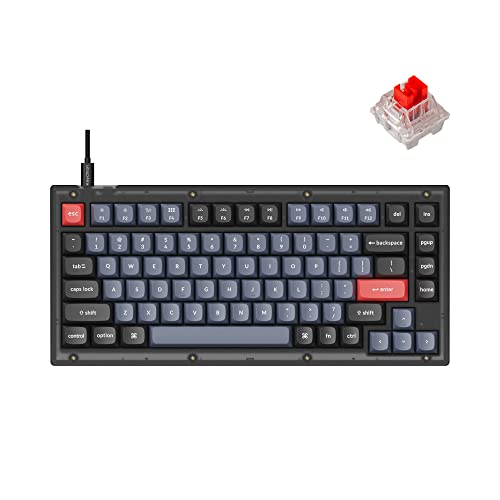
1. Keychron V1 — The Enthusiast Board That Happens to Game
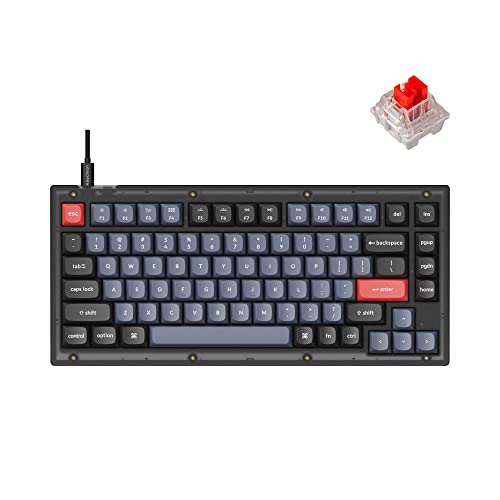
The Keychron V1 comes from the custom-keyboard world rather than the gaming world, and that heritage shows in every decision it makes. It is a 75% board with hot-swappable switches, a gasket-friendly design philosophy, PBT keycaps, and support for QMK and VIA — the open-source firmware ecosystem that lets you remap any key, build layers, and record macros from a clean web interface with no bloated software suite and no account. For players who also type for a living, that combination is very hard to find elsewhere in this segment.
Strengths. The hot-swap sockets accept both 3-pin and 5-pin switches, so the board can grow with you: start with the stock switches, then try a different set months later for the cost of the switches alone. The stock typing experience is unusually refined for the tier — the board has a softer, quieter sound profile than most gaming decks thanks to its construction and the included silicone damping. The PBT keycaps have a pleasant texture and legends that will not fade, the south-facing RGB is bright without being garish, and the board works equally happily over its wired connection with a detachable cable that makes it easy to move between a gaming PC and a work laptop. VIA support means your remaps live on the board itself and travel with it.
Trade-offs. The case is plastic rather than aluminium, so it lacks the dense, planted feel of the metal board later in this list, and it can flex slightly if you twist it. The 75% layout compresses the navigation cluster, which takes adjustment if you live on dedicated Home, End, and Delete keys. Keychron’s stock switches are good rather than great, and keen typists will eventually want to swap them — although the fact that you can is rather the point. There is no wireless on the standard version, so if you need a cable-free desk, look at the other picks or the board’s wireless siblings.
Who it suits. The V1 is the pick for the player who games in the evening and writes, codes, or studies all day on the same desk — someone who values typing feel, customisation, and long-term repairability over esports branding. If the idea of trying different switches sounds fun rather than exhausting, this is your board. It sits in the middle of this segment’s pricing, and you can check price on Amazon.
Check price on Amazon: Keychron V1

2. SteelSeries Apex 3 — The Quiet One for Shared Spaces
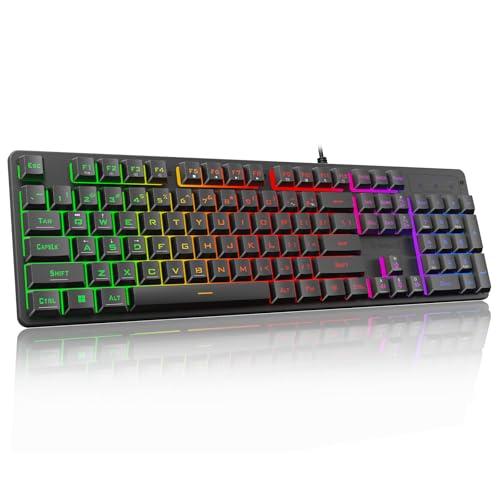
The SteelSeries Apex 3 takes the opposite approach to almost everything else in this guide: it is a full-size membrane keyboard, and it treats silence as a headline feature. SteelSeries calls its switches Whisper Quiet, and for once the marketing name undersells nothing — this is one of the quietest gaming keyboards you can buy at any level, with soft, cushioned key presses that will not carry through a bedroom wall or across a dorm room at 2 a.m. It also carries an IP32 water-resistance rating, which means the inevitable spilled drink is an inconvenience rather than a funeral.
Strengths. The quietness is the whole story, and it delivers completely: late-night sessions, shared flats, and home offices where a partner works three feet away all become easier. Beyond that, the Apex 3 is a polished mainstream product — the build feels tidy, the dedicated media controls and clickable volume roller are genuinely convenient, the RGB lighting is tasteful with reactive effects, and the included magnetic wrist rest is comfortable for long sessions. Anti-ghosting covers the key combinations games actually use, so despite the membrane design, it does not drop inputs in normal play. For typing, the soft bottom-out is easy on the fingers during long, light workloads.
Trade-offs. There is no getting around the membrane feel: key presses are softer and less distinct than any mechanical board here, rapid repeated presses on the same key feel less precise, and competitive players in fast titles will notice the difference in movement-heavy games. The switches are not replaceable, so when the board eventually wears, the whole keyboard goes. It is also a full-size layout, which costs mouse room, and there is no hot-swap, no PBT, and none of the enthusiast customisation of the Keychron. You are trading the mechanical experience for quiet and convenience, and you should make that trade with your eyes open.
Who it suits. The Apex 3 suits the gamer whose environment matters more than switch feel: students in dorms, players in shared bedrooms, anyone whose household has made clear that clicky switches are a relationship issue. It is also a kind pick for younger players whose setups share family space. It sits toward the accessible end of this segment, and you can check price on Amazon.
Check price on Amazon: SteelSeries Apex 3

3. HyperX Alloy Origins Core — The Aluminium Esports Deck
If the Keychron is the typist’s board and the Apex 3 is the diplomat’s, the HyperX Alloy Origins Core is the competitor’s. It is a tenkeyless keyboard built around a full aluminium body that gives it a dense, immovable feel on the desk — the board simply does not budge during frantic play, and the whole deck has the cold, solid quality you associate with hardware costing far more. HyperX fits its own mechanical switches, which are rated for long service life and tuned with a slightly shorter actuation than classic designs, a detail aimed squarely at players who want inputs to fire as early in the press as possible.
Strengths. The build quality leads this segment: the aluminium frame resists flex entirely, the keycaps sit low and stable, and the board has a reassuring weight without being a burden to move. The HyperX switches feel crisp and consistent across the board, with a clean bottom-out that suits fast, repeated inputs in shooters and MOBAs. The detachable braided cable connects at an angle and can be routed to either side, which sounds minor until you have fought a fixed cable across a crowded desk. Onboard memory stores profiles so your lighting and remaps travel to a LAN or a friend’s PC without software, and the per-key RGB is bright and even. The TKL footprint gives your mouse the room it deserves for low-sensitivity aim.
Trade-offs. The switches are soldered, not hot-swappable, so the switch type you choose at purchase — linear or tactile in most listings — is the switch type you keep, and a failed switch is a repair job rather than a two-minute swap. The stock keycaps are ABS rather than PBT, so heavy users will eventually see shine develop on the WASD cluster, though replacement cap sets are an easy upgrade later. HyperX’s NGENUITY software does the job but has historically been less polished than the VIA experience on the Keychron. There is no wrist rest in the box, and the aluminium deck’s firmness, while great for gaming, is less forgiving for all-day typing than the softer-mounted boards here.
Who it suits. The Origins Core is for the competitive player who wants a board that feels like tournament hardware and intends to keep the same switches for years. If you play ranked shooters, value a rock-solid deck, and do not care about customising switch feel, this is the most focused gaming tool in the guide. It sits toward the upper part of this segment, and you can check price on Amazon.
Check price on Amazon: HyperX Alloy Origins Core

4. Razer Ornata V3 — The Hybrid for People Who Cannot Decide
The Razer Ornata V3 exists for the buyer who reads the mechanical-versus-membrane debate and wants both answers at once. Its mecha-membrane switches place a tactile, clicky mechanism over a soft rubber dome, producing a key press that clicks audibly like a mechanical board but lands softly like a membrane one. Wrapped around that hybrid heart is a slim, low-profile full-size deck with Razer’s Chroma lighting, dedicated media keys, and a plush magnetic wrist rest that many owners end up liking more than the keyboard itself.
Strengths. The hybrid feel genuinely splits the difference: you get audible and tactile feedback that makes gaming inputs feel confirmed, with a cushioned bottom-out that is kinder during long typing sessions than most entry mechanical boards. The low-profile keycaps reduce finger travel and give the board a sleek, modern look that suits tidy desks. The wrist rest is excellent — soft, supportive, and magnetic — and the media keys and multi-function roller handle volume and playback without alt-tabbing. Chroma lighting is bright and integrates with a wide ecosystem of games and peripherals for players already invested in it. As a membrane-based design, it is also quieter than any true mechanical board here, click mechanism notwithstanding.
Trade-offs. Purists on both sides will find fault: it does not feel as crisp or as separable as a real mechanical switch, and it is not as quiet as a true membrane like the Apex 3. The switches are not replaceable and there is no hot-swap, so longevity is bounded by the membrane’s lifespan. The keycaps are ABS and will shine with time. Razer’s Synapse software is powerful but heavyweight, and some users resent needing it for full control. Finally, the click is a matter of taste — if you share space with light sleepers, the Ornata’s click bar will still announce every keystroke, just more softly than a clicky mechanical board.
Who it suits. The Ornata V3 suits the undecided and the comfort-seekers: players who like the sound and feedback of mechanical boards but type all day and want a softer landing, or households that need something quieter than mechanical without going fully silent. It sits in the lower-middle of this segment’s pricing, and you can check price on Amazon.
Check price on Amazon: Razer Ornata V3

5. Logitech G413 SE — The Restrained Full-Size Professional
The Logitech G413 SE is what happens when a mainstream brand decides to make a gaming keyboard for people who do not want their keyboard to look like a gaming keyboard. It is a full-size mechanical board with a brushed aluminium-magnesium top plate, a single-colour white backlight instead of an RGB light show, and a design that would pass unnoticed in a law office. Under that restraint sits a proper mechanical switch set, PBT keycaps — a welcome sight at this level — and the build consistency of one of the largest peripheral makers in the world.
Strengths. The PBT keycaps are the headline: they resist shine, keep their texture, and immediately lift the G413 SE above the many boards in this tier that ship with thin ABS. The aluminium top plate gives the deck a firm, premium feel, and the full-size layout keeps the numpad for players who bind it or workers who need it. Logitech’s tactile mechanical switches are consistent and inoffensive in the best sense — a defined bump, moderate noise, no surprises — and the white backlight is clean and readable in the dark without turning your desk into a nightclub. Logitech’s support network and warranty handling are also the most established of any brand in this guide, which matters if you are buying for a younger player or a shared family PC.
Trade-offs. The switches are soldered in place, so there is no hot-swap flexibility, and the tactile-only switch choice means linear fans should look at the HyperX or Keychron instead. The single-colour backlight will disappoint players who want per-key RGB effects — this board deliberately does not do that. There is no wrist rest, no detachable cable, and no dedicated media keys beyond function-layer shortcuts, so the convenience list is shorter than the Razer’s or SteelSeries’. The typing sound is on the hollow side compared with the damped Keychron, a consequence of the open aluminium design. None of these are flaws so much as evidence of a clear priority list — and customisation was not on it.
Who it suits. The G413 SE suits the adult gamer, the work-from-home professional who games after hours, and anyone buying a first mechanical keyboard they intend to keep for many years without modifications. If your taste runs to quiet competence rather than features, this is your board. It sits in the middle of this segment, and you can check price on Amazon.
Check price on Amazon: Logitech G413 SE

6. Redragon K552 — The Ultra-Budget Starter That Earned Its Reputation
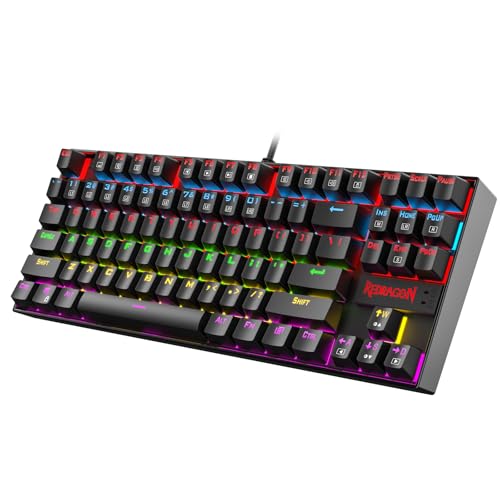
Every category has one product that becomes the default answer to “what should I buy first?”, and in budget mechanical keyboards that product is the Redragon K552. It is a compact tenkeyless board with a metal-reinforced frame, mechanical switches, and a price position at the very bottom of this segment — the kind of purchase you make to find out whether you like mechanical keyboards at all, before committing real money. Thousands of first-time buyers have started here, and the board’s longevity in the market is itself a form of evidence.
Strengths. For its position in the segment, the K552 gets the fundamentals surprisingly right. The frame is stiff, the switches feel genuinely mechanical with a satisfying tactility or click depending on the variant, and full anti-ghosting means it does not drop inputs in real games. It is compact enough to travel to a friend’s house or a LAN in a backpack, the build shrugs off the abuse that starter gear inevitably receives, and the backlighting — red on the classic version, RGB on others — is functional in a dark room. Perhaps most importantly, it is cheap enough that upgrading later does not sting: it becomes the spare, the travel board, or the hand-me-down, and it is sturdy enough to survive all three roles.
Trade-offs. The compromises are exactly where you would predict. The keycaps are basic ABS and the legends and finish feel a step below the Logitech and Keychron. The stock switches are louder and scratchier than the refined options higher in this guide, and switch consistency varies more from key to key. There is no hot-swap on the standard model, no software suite worth the name, no detachable cable, and the sound profile is unapologetically hollow and pingy — the classic budget-board soundtrack. The K552 is a starting point, and it knows it; judging it against the aluminium HyperX on feel would miss the reason it exists.
Who it suits. The K552 suits first-time mechanical buyers, younger players on a strict allowance, and anyone building a second setup for a spare room or a child’s first PC. It is also the rational pick if you are genuinely unsure mechanical keyboards are for you — it answers that question for the smallest possible commitment. It sits at the very entry point of this segment, and you can check price on Amazon.
Check price on Amazon: Redragon K552
Quick Comparison: The Six Picks Side by Side
| Keyboard | Layout | Switch Type | Hot-Swap | Keycaps | Best For |
|---|---|---|---|---|---|
| Keychron V1 | 75% | Mechanical (choice of feel) | Yes | PBT | Typing feel and customisation |
| SteelSeries Apex 3 | Full-size | Quiet membrane | No | ABS | Shared spaces and silence |
| HyperX Alloy Origins Core | Tenkeyless | Mechanical (linear or tactile) | No | ABS | Competitive play, solid build |
| Razer Ornata V3 | Full-size | Mecha-membrane hybrid | No | ABS | Comfort and middle-ground feel |
| Logitech G413 SE | Full-size | Mechanical (tactile) | No | PBT | Understated, durable, office-friendly |
| Redragon K552 | Tenkeyless | Mechanical (various) | No | ABS | First mechanical keyboard |
Read the table as a map of priorities rather than a ranking. If customisation and typing feel lead your list, the Keychron stands alone here — it is the only hot-swappable board and the only one with enthusiast firmware. If build solidity for competitive play leads, the HyperX is the obvious counterpart: fixed switches, but an aluminium deck that feels a class above. The two full-size mainstream boards split on feel — the Logitech gives you true mechanical switches and PBT caps with a restrained look, while the Razer trades mechanical purity for a softer landing and the best wrist rest in the group. The SteelSeries is the specialist: nothing else here is remotely as quiet, and nothing else shrugs off spills. The Redragon is the gateway, priced so that the decision barely needs justifying.
A practical way to choose: start with your environment, not your games. A shared room points to the Apex 3 or the Ornata. A dedicated desk you control points to the mechanical boards. Then choose your layout by measuring your desk and being honest about numpad use. Finally, decide whether you are the kind of owner who tinkers — if yes, hot-swap is worth structuring the whole purchase around; if no, spend the same money on build quality instead, which is precisely the HyperX and Logitech argument.
What We Left Out, and Why
A guide is defined as much by its exclusions as its picks, so here is the honest reasoning. We left out the wave of ultra-compact 60% boards that flood this segment, not because they are bad, but because losing dedicated arrow keys is a real daily cost for the mixed gaming-and-work use most buyers actually have; players who already know they want a 60% board do not need this guide’s permission. We also left out several white-label boards with impressive specification sheets and no meaningful warranty presence — a keyboard is a five-year purchase, and a maker you cannot contact is a hidden cost no discount offsets.
Wireless-first boards were mostly set aside for a simpler reason: at this level, adding a battery, a dongle, and a radio usually means subtracting something from the switches, caps, or frame, and the cable costs most desk setups nothing. If your setup genuinely demands wireless — a living-room PC, a laptop that moves rooms — the honest move is to treat wireless as the headline requirement and shop a dedicated wireless shortlist rather than accepting it as a bonus feature on a wired-first board. And we excluded boards whose entire pitch is lighting. RGB is a finish, not a foundation; when a product leads with its light show and buries its switch type, it is telling you where the money went.
A final word on timing, stated in words rather than figures because the figures refuse to sit still: this segment discounts aggressively around the big seasonal sales events and whenever a successor model is announced, and last year’s board at a seasonal reduction is often the smartest purchase on the page. If your current keyboard still works, there is rarely a reason to buy in a hurry — set your shortlist from the six above, then let the calendar do part of the paying for you.
Matching a Keyboard to the Games You Actually Play
Different genres lean on a keyboard in different ways, and it is worth running your own library through this filter before choosing. Competitive shooters reward short, consistent actuation and a layout that frees mouse space, which is the HyperX argument in one sentence — linear or fast tactile switches, tenkeyless footprint, nothing between your hands that you do not use. If ranked FPS is your main game, prioritise switch consistency and the TKL layout over every other feature on this page, including lighting and software.
MMOs, MOBAs with deep keybind webs, and simulation games reward the opposite: more keys, reachable modifiers, and macro support. Full-size boards and strong remapping software matter here, and this is where the Keychron’s layers quietly shine — a VIA layer can hold an entire second keymap for one game and vanish for another, which is macro power without a macro pad. Strategy and grand-strategy players, who pause more than they sprint, should weight typing comfort highest of all, because their keyboard hours look a lot like writing hours.
Rhythm games and fighting games played on keyboard are the edge case that exposes rollover and switch consistency most brutally: rapid alternating presses and simultaneous chords will find any ghosting or chatter a board has. Every pick here handles full rollover over a wired connection, but if these are your genres, favour the mechanical boards with the most consistent switches — the HyperX and Keychron — and avoid membrane, whose softer registration is the first thing you will feel on fast alternating patterns. Finally, if your gaming is mostly single-player and story-driven, be honest that almost any board here will delight you, and let comfort, noise, and looks decide without guilt.
Setup, Care, and the Upgrades Worth Doing Later
A few small habits will make any of these keyboards feel better than its price. Set the board’s angle with its feet and check your wrist height: your forearms should float roughly level rather than bending sharply up or down, and a wrist rest — included with the SteelSeries and Razer here, an easy addition for the others — should support your palms between keystrokes, not prop your wrists while you type. In your game’s settings, confirm that the keyboard is running in its gaming mode if it has one, so the Windows key cannot eject you from a match at the worst possible moment.
One more habit belongs in the first week, while returns are still easy: test the board properly before you settle in. Open any keyboard test page or a plain document and press every key once, including the function row and the navigation cluster, watching for dead switches and for chatter — the fault where one press registers twice, which usually announces itself on fast-typed double letters. Roll your fingers across the large keys and strike the corners of the spacebar, Enter, and Shift; a stabiliser that binds or rattles badly out of the box is a reason to exchange the unit, not a personality trait to live with. Play one familiar game and deliberately hold the crowded combinations your genre uses — sprint, strafe, jump, ability — and confirm nothing drops. Ten unglamorous minutes of this saves the far more annoying discovery, three months later, that a rarely used key never worked at all.
Care is simple and mostly about crumbs. Turn the board over and shake it out monthly, blast the gaps with compressed air if you have it, and wipe keycaps with a slightly damp microfibre cloth. Keycaps pull off with an inexpensive puller — several boards here include one — and a wash in warm soapy water, dried completely, restores a grimy deck to near-new. Keep drinks at a distance unless your board is the spill-resistant SteelSeries; a single sugary spill is the most common cause of death for mechanical keyboards, and sugary liquid inside a switch is rarely worth repairing.
When upgrade itch arrives, spend in this order. First, keycaps: a decent PBT set transforms the feel and sound of the ABS-capped boards here for a fraction of a new keyboard’s cost. Second, on a hot-swap board, switches: a single new set changes the entire personality of the Keychron for less than any other upgrade on this list. Third, stabiliser lubricant and a desk mat, which together quiet more noise than most people expect. A new keyboard should be the last resort, not the first — the whole point of buying well at this level is that the board underneath your hands can grow instead of being replaced.
Frequently Asked Questions
Is a mechanical keyboard really better for gaming than membrane?
For most players, yes — mechanical switches actuate more consistently, register repeated presses more reliably, and give clearer feedback, which adds up in fast games. But “better” depends on your environment. A membrane board like the Apex 3 is far quieter and more spill-resistant, and in casual or story-driven games you may never feel the difference. Choose mechanical for performance and longevity; choose membrane for silence and shared spaces, and do not let anyone tell you one answer fits every desk.
What does hot-swappable actually get me?
Three things: choice, repair, and longevity. You can change the feel of the whole keyboard later by swapping in a different switch set instead of buying a new board. You can replace a single failing switch in minutes with the included puller. And you can experiment — a heavier switch on the spacebar, a quieter one on the Enter key — without soldering anything. If you tend to keep gear for years or enjoy tinkering, it is the feature most worth paying for in this segment.
Which layout should I choose: 75%, tenkeyless, or full-size?
Choose by desk and habit. Full-size keeps the numpad and suits data entry and games that bind it, but pushes your mouse further out. Tenkeyless is the balanced default for gaming — it keeps arrows and navigation keys while freeing mouse room. A 75% board frees the most space and looks the cleanest, but compresses navigation keys behind layers and takes a few days to learn. If you write or code all day, tenkeyless is usually the sweet spot; if your desk is small and your mouse sensitivity is low, 75% earns its learning curve.
Does polling rate matter at this level?
Not much. A wired 1000 Hz connection — one report per millisecond — is the standard across this guide and is faster than human input by a wide margin. Higher advertised rates on premium boards are real but imperceptible in practice, and Bluetooth modes are slower but fine for typing and casual play. Spend your attention on switch feel, build, and keycaps instead; those are differences you will notice every single day.
PBT or ABS keycaps — is the difference worth caring about?
Over years, yes. ABS caps gradually shine and feel slick on your most-used keys, and printed legends can fade. PBT keeps its texture, resists shine, sounds deeper, and — in double-shot or dye-sublimated form — keeps its legends indefinitely. In this segment, PBT is one of the clearest signals that a maker spent money on longevity rather than shelf appeal, which is why the Keychron and Logitech earn credit for including it where rivals did not.
The Bottom Line
Every keyboard in this guide proves the same point from a different direction: the entry tier is no longer a compromise you endure until you can afford the real thing. Pick the Keychron V1 if you want a board that can evolve with your taste, the HyperX Alloy Origins Core if you want a fixed, tournament-solid tool, the Logitech G413 SE if you want quiet competence that outlasts trends, the Razer Ornata V3 if comfort is king, the SteelSeries Apex 3 if your household values silence, and the Redragon K552 if you are simply finding out whether mechanical keyboards are for you. Match the board to your room, your layout habits, and your willingness to tinker, and any of these six will serve you well. Choose the keyboard that fits the desk you actually have and the hours you actually play, and it will quietly become the part of your setup you never think about again — which is the highest compliment a keyboard can earn.