Wireless gaming mice used to be a compromise. They were heavier, slower, and more expensive than wired mice, and competitive players would not touch them. That era is over. Modern wireless gaming mice match wired mice on latency, weigh less than many wired models, and last for weeks or months on a charge. Reddit’s gaming and mouse communities — some of the most detail-obsessed corners of the internet — now recommend wireless mice without hesitation, and the models below are the ones that come up most often.
The mice here span the whole range: Logitech’s workhorse G305 and G703, the feature-packed G502 X Plus, Razer’s lightweight Viper and ergonomic Basilisk lines, and Redragon’s budget options. They differ in weight, shape, sensor, and battery life, and those differences matter more than the brand name. A mouse is the most personal part of a gaming setup — it lives in your hand for hours — so fit and feel matter more than any specification.
When reading Reddit’s mouse threads, three factors dominate. Weight is first: lighter mice are easier to move quickly and cause less fatigue, which is why the 49-gram and 82-gram models here are so popular. Sensor performance is second, though every mouse here has a sensor far beyond what human hands can use — the differences are in the fine details. And battery life is third, because a mouse that dies mid-game is a mouse that gets replaced. Keep those three in mind, and the right mouse for your grip and your games becomes clear.
Before the details, a word on how to choose between mice that look similar on paper: hold them, if you can. A mouse’s shape, weight distribution, and button placement are felt, not read, and two mice with identical specifications can feel completely different in the hand. If you cannot try them in a store, buy from a seller with a good return policy and give the mouse a full week of real use before deciding — the first hour is not a reliable test.
In this guide
Quick picks: best wireless mouse gaming reddit
| # | Product | Where to buy |
|---|---|---|
| 1 | Redragon M810 PRO Wireless Gaming Mouse | Check on Amazon |
| 2 | Logitech G305 LIGHTSPEED Wireless Gaming Mouse (Black) | Check on Amazon |
| 3 | Razer Basilisk V3 Pro 35K Wireless Gaming Mouse | Check on Amazon |
| 4 | Logitech G703 LIGHTSPEED Wireless Gaming Mouse | Check on Amazon |
| 5 | Logitech G502 X Plus Wireless Gaming Mouse | Check on Amazon |
| 6 | Razer Viper V3 HyperSpeed Wireless Gaming Mouse | Check on Amazon |
| 7 | Razer Basilisk V3 X HyperSpeed Wireless Gaming Mouse | Check on Amazon |
| 8 | Redragon M612 Wireless Gaming Mouse | Check on Amazon |
Quick Comparison
| Product | Key spec | Best for |
|---|---|---|
| Redragon M810 PRO Wireless Gaming Mouse | 10,000 DPI, remappable keys, RGB | Best budget wireless gaming mouse |
| Logitech G305 LIGHTSPEED Wireless Gaming Mouse (Black) | HERO 12K sensor, 12,000 DPI, lightweight | Best all-round wireless mouse |
| Razer Basilisk V3 Pro 35K Wireless Gaming Mouse | 35K DPI, 140-hour battery, HyperScroll | Best feature-packed wireless mouse |
| Logitech G703 LIGHTSPEED Wireless Gaming Mouse | HERO 25K sensor, lightweight, PowerPlay compatible | Best ergonomic wireless mouse |
| Logitech G502 X Plus Wireless Gaming Mouse | 13 buttons, RGB, optical switches, infinite scroll | Best mouse for many buttons |
| Razer Viper V3 HyperSpeed Wireless Gaming Mouse | 82 g, 30K DPI, up to 280-hour battery | Best lightweight wireless mouse |
| Razer Basilisk V3 X HyperSpeed Wireless Gaming Mouse | Mechanical switches Gen-2, 5G 18K optical sensor | Best affordable Razer mouse |
| Redragon M612 Wireless Gaming Mouse | 8,000 DPI, remappable keys, RGB | Best ultra-budget wireless mouse |
Grip style matters: palm grip users want a larger, fuller mouse like the Basilisk or G703, claw grip users suit mid-size mice like the G502 X Plus, and fingertip grip users usually prefer the lightest mice like the Viper V3 HyperSpeed.

1. Redragon M810 PRO Wireless Gaming Mouse
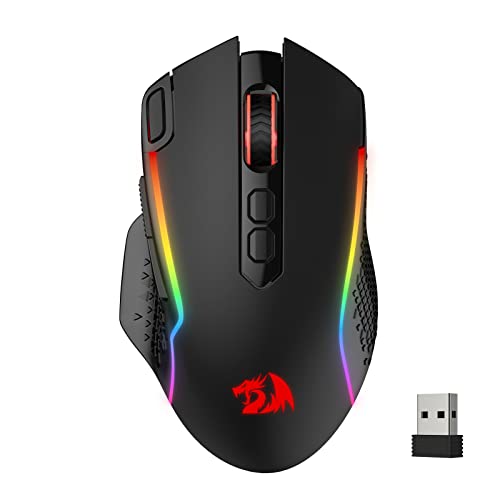
The Redragon M810 PRO is the budget pick: a wireless RGB gaming mouse with 10,000 DPI, remappable keys, and macro support, offering the wireless gaming experience for a fraction of the big brands’ prices. It is the mouse Reddit users recommend when someone asks for wireless gaming on a tight budget.
Redragon’s formula is to offer most of the features at a much lower price, and the M810 PRO follows it: a capable sensor, programmable buttons with macro support, RGB lighting, and a cable-free connection that the listing describes as having no perceptible delay. It is heavier and less refined than the Logitech and Razer models here, but it is also a fraction of their price — and for casual and mid-level gaming, the difference in feel is smaller than the difference in cost.
What stands out:
- Very affordable: wireless gaming with a programmable sensor and RGB for far less than the big brands charge.
- Remappable keys and macros: programmable buttons with macro support for games that reward custom bindings.
- 10,000 DPI sensor: more than enough sensitivity for any game, with room to tune it to personal preference.
Trade-offs to weigh: It is heavier than the lightweight mice here, and the switches, sensor, and build quality are a step behind Logitech and Razer. Competitive players who notice small differences in click feel and weight will feel them here — it is a budget mouse, and it behaves like one.
Who it fits: Budget buyers, casual gamers, and anyone trying wireless gaming for the first time. The low-risk way to find out whether wireless suits you.
Polling rate is the specification most people overthink. A 1000 Hz polling rate — the standard on these mice — reports the mouse position a thousand times per second, which is far beyond what matters in play. Higher rates exist and can help marginally in competitive play, but they also drain the battery faster. For most players, 1000 Hz is the right balance, and the money is better spent on shape and weight than on a higher polling rate.
Compared with the Logitech G305 LIGHTSPEED Wireless Gaming Mouse (Black) elsewhere in this roundup, the Redragon M810 PRO Wireless Gaming Mouse takes a different approach: where the Logitech G305 LIGHTSPEED Wireless Gaming Mouse (Black) emphasizes HERO 12K sensor, 12,000 DPI, lightweight, this one leans on 10,000 DPI, remappable keys, RGB. Neither approach is better in the abstract — the right choice depends on whether best budget wireless gaming mouse matters more to you than best all-round wireless mouse. If you are torn between the two, start with the one whose strength matches the thing you do most often, since that is the difference you will notice every single day.
Check price on Amazon: Redragon M810 PRO Wireless Gaming Mouse

2. Logitech G305 LIGHTSPEED Wireless Gaming Mouse (Black)
The Logitech G305 LIGHTSPEED is the most recommended wireless gaming mouse on Reddit, and it is not close. It pairs Logitech’s HERO 12K sensor with the LIGHTSPEED wireless connection, six programmable buttons, and a lightweight body, at a price that makes it the default answer to almost any mouse question.
The G305’s appeal is that it does everything well and nothing badly. The HERO 12K sensor is accurate and efficient, the LIGHTSPEED connection is effectively indistinguishable from wired play, the shape suits most grip styles, and the battery lasts for months on a single AA cell. It is not the lightest mouse here, nor the most feature-packed, but it is the one that the most people buy, keep, and recommend — and that track record is its own argument.
What stands out:
- HERO 12K sensor: an accurate, efficient sensor that delivers precise tracking without draining the battery.
- LIGHTSPEED wireless: a wireless connection with latency low enough that competitive players use it without hesitation.
- Months of battery life: a single AA battery lasts for months of regular use, so charging is rarely a thought.
Trade-offs to weigh: It uses a AA battery rather than a rechargeable cell, which some users dislike, and its shape is a safe middle ground rather than a specialized ergonomic or lightweight design. Players who want the lightest possible mouse or the most buttons should look at the Viper or the G502 X Plus instead.
Who it fits: Almost everyone. If you want one safe, affordable, widely recommended wireless gaming mouse, this is it — the default choice for a reason.
A good mousepad is the cheapest upgrade for any mouse. It gives the sensor a consistent surface, improves glide, and protects the mouse feet from wear. A large cloth pad that covers the keyboard area as well is the most popular choice in the communities that recommend these mice, and it costs less than the price difference between two mice. Buy the pad before upgrading the mouse.
It is worth comparing the Logitech G305 LIGHTSPEED Wireless Gaming Mouse (Black) with the rest of this roundup before deciding, because the differences are in the details rather than the headline specifications. The HERO 12K sensor, 12,000 DPI, lightweight here suits best all-round wireless mouse, while other picks in this list trade that strength for different priorities — a lower price, a different size, or a different feature set. Read the trade-offs for two or three finalists side by side, and the right choice usually becomes obvious: it is the one whose weaknesses you care about least.
Check price on Amazon: Logitech G305 LIGHTSPEED Wireless Gaming Mouse (Black)

3. Razer Basilisk V3 Pro 35K Wireless Gaming Mouse
The Razer Basilisk V3 Pro is the feature-packed flagship: a wireless gaming mouse with a 35K DPI optical sensor, a 140-hour battery, and Razer’s HyperScroll tilt wheel. It is the mouse for players who want every feature — high sensitivity, long battery, a scroll wheel that does more — in an ergonomic shape that fits the hand for hours.
The Basilisk line has always been Razer’s ergonomic answer to the lightweight Viper, and the V3 Pro is its most complete version. The 35K DPI sensor is far beyond what any hand needs, which means it tracks flawlessly at any sensitivity a player actually uses. The 140-hour battery lasts for weeks of heavy play, and the HyperScroll wheel — which can switch between smooth free-spin and tactile steps, and tilt sideways — is genuinely useful in games and in everyday browsing alike.
What stands out:
- 35K DPI optical sensor: a top-tier sensor with flawless tracking at any sensitivity a player will actually use.
- 140-hour battery: weeks of heavy use between charges, so the mouse is ready whenever the game starts.
- HyperScroll tilt wheel: a scroll wheel that free-spins or clicks, and tilts for extra bindings — useful in games and in work.
Trade-offs to weigh: It is heavier and more expensive than the lightweight mice here, and its ergonomic shape is designed for right-handed palm and claw grips — left-handed players and fingertip grippers should look elsewhere. The feature list is also deeper than most players need, so some of what you pay for may go unused.
Who it fits: Players who want every feature in one ergonomic mouse, and anyone who values a great scroll wheel and long battery life. The flagship for right-handed palm and claw grips.
Software is part of the mouse. Logitech’s and Razer’s software lets you remap buttons, adjust DPI stages, and save profiles to the mouse itself, so settings travel between computers. It is worth installing once and configuring properly rather than using defaults — a mouse with its DPI stages and buttons set to your preferences feels like a different, better device.
One way to judge the Razer Basilisk V3 Pro 35K Wireless Gaming Mouse is to ask what you would miss if you chose the cheapest option in this roundup instead. The answer is usually the 35K DPI, 140-hour battery, HyperScroll and the best feature-packed wireless mouse that define this model. If those matter for how you use it, the step up is worth it; if they do not, the budget pick will serve you just as well. That test — what would I actually miss — is the most reliable way to avoid both overspending and regret.
Check price on Amazon: Razer Basilisk V3 Pro 35K Wireless Gaming Mouse
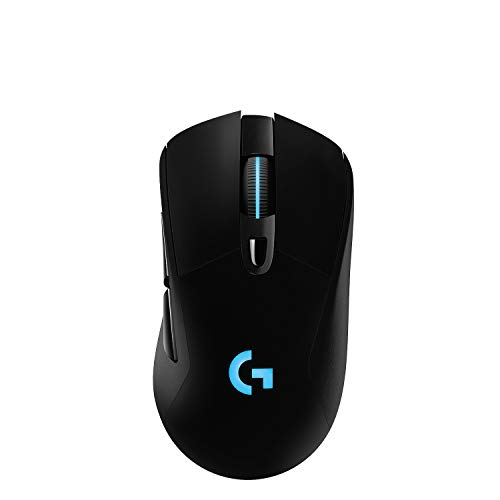
4. Logitech G703 LIGHTSPEED Wireless Gaming Mouse
The Logitech G703 LIGHTSPEED is the ergonomic pick: a lightweight wireless gaming mouse with the HERO 25K sensor and PowerPlay compatibility, shaped for palm grip players who want comfort over a long session. It is the mouse for people whose hand cramps on smaller, flatter mice.
The G703’s shape is its defining feature: a full, rounded body that fills the palm, with a comfortable curve that suits long sessions better than the flat, low-profile mice in this roundup. The HERO 25K sensor is Logitech’s high-end tracking hardware, the LIGHTSPEED connection keeps latency negligible, and PowerPlay compatibility means it can charge wirelessly on a compatible mousepad — never needing a cable at all. It is the comfortable mouse in this lineup.
What stands out:
- Ergonomic palm shape: a full, rounded body that fills the hand and stays comfortable through long sessions.
- HERO 25K sensor: Logitech’s high-end sensor with precise, efficient tracking.
- PowerPlay compatible: charges wirelessly on a PowerPlay mousepad, so it never needs to be plugged in.
Trade-offs to weigh: It is heavier than the Viper models and has fewer buttons than the G502 X Plus, so players who want the lightest mouse or the most bindings should look elsewhere. PowerPlay charging also needs a separate mousepad purchase, so the cable-free dream costs extra.
Who it fits: Palm grip players and anyone whose hand tires on smaller mice. The comfortable, ergonomic wireless mouse in this roundup.
Polling rate is the specification most people overthink. A 1000 Hz polling rate — the standard on these mice — reports the mouse position a thousand times per second, which is far beyond what matters in play. Higher rates exist and can help marginally in competitive play, but they also drain the battery faster. For most players, 1000 Hz is the right balance, and the money is better spent on shape and weight than on a higher polling rate.
Compared with the Logitech G502 X Plus Wireless Gaming Mouse elsewhere in this roundup, the Logitech G703 LIGHTSPEED Wireless Gaming Mouse takes a different approach: where the Logitech G502 X Plus Wireless Gaming Mouse emphasizes 13 buttons, RGB, optical switches, infinite scroll, this one leans on HERO 25K sensor, lightweight, PowerPlay compatible. Neither approach is better in the abstract — the right choice depends on whether best ergonomic wireless mouse matters more to you than best mouse for many buttons. If you are torn between the two, start with the one whose strength matches the thing you do most often, since that is the difference you will notice every single day.
Check price on Amazon: Logitech G703 LIGHTSPEED Wireless Gaming Mouse

5. Logitech G502 X Plus Wireless Gaming Mouse
The Logitech G502 X Plus is the button king: a wireless RGB gaming mouse with 13 buttons, optical switches, and an infinite scroll wheel. It is the mouse for MMO players, MOBA players, and anyone whose games reward having a dozen actions under the thumb.
The G502 line has been Logitech’s most popular gaming mouse for a decade, and the X Plus is its wireless flagship. Thirteen buttons cover abilities, items, and macros without touching the keyboard; the optical switches are fast and durable; the RGB lighting is customizable; and the infinite scroll wheel spins freely for long documents or locks into steps for precise weapon switching. It is heavier than the lightweight mice here, but that weight is the price of its features — and for the games that need those buttons, it is worth paying.
What stands out:
- 13 programmable buttons: more bindings than any other mouse here, ideal for MMOs, MOBAs, and complex games.
- Optical switches: fast, consistent clicks with a long rated lifespan.
- Infinite scroll wheel: a wheel that free-spins or clicks, for fast scrolling and precise weapon switching alike.
Trade-offs to weigh: It is one of the heavier mice here, so fast-paced shooter players who flick constantly may prefer a lighter model. Its shape is also distinctly ergonomic and right-handed, which suits palm and claw grips but not fingertip players or left-handed users.
Who it fits: MMO and MOBA players, and anyone whose games need many bindings. The most capable mouse here for complex games.
A good mousepad is the cheapest upgrade for any mouse. It gives the sensor a consistent surface, improves glide, and protects the mouse feet from wear. A large cloth pad that covers the keyboard area as well is the most popular choice in the communities that recommend these mice, and it costs less than the price difference between two mice. Buy the pad before upgrading the mouse.
It is worth comparing the Logitech G502 X Plus Wireless Gaming Mouse with the rest of this roundup before deciding, because the differences are in the details rather than the headline specifications. The 13 buttons, RGB, optical switches, infinite scroll here suits best mouse for many buttons, while other picks in this list trade that strength for different priorities — a lower price, a different size, or a different feature set. Read the trade-offs for two or three finalists side by side, and the right choice usually becomes obvious: it is the one whose weaknesses you care about least.
Check price on Amazon: Logitech G502 X Plus Wireless Gaming Mouse

6. Razer Viper V3 HyperSpeed Wireless Gaming Mouse
The Razer Viper V3 HyperSpeed is the lightweight pick: an 82-gram wireless PC gaming mouse with a 30K DPI optical sensor and a battery that lasts up to 280 hours. It is the mouse for fast-paced shooters, where every gram matters and a light mouse moves faster with less fatigue.
Eighty-two grams is light for a wireless mouse, and the difference is felt immediately — flicks are faster, long sessions tire the wrist less, and the mouse feels like an extension of the hand rather than a weight in it. The 30K DPI sensor tracks flawlessly, the battery lasts for months of regular play, and the symmetrical shape suits claw and fingertip grips. It is the mouse that competitive shooter players reach for, and the one that makes heavier mice feel sluggish by comparison.
What stands out:
- 82-gram weight: one of the lightest wireless gaming mice available, for fast movement and less fatigue.
- Up to 280-hour battery: months of use between charges, so the mouse is always ready.
- 30K DPI optical sensor: precise tracking at any sensitivity, with no smoothing or acceleration to fight.
Trade-offs to weigh: It has fewer buttons than the G502 X Plus or the Basilisk, so players who need many bindings should look elsewhere. The symmetrical shape is also less supportive for palm grip players who want a mouse that fills the hand.
Who it fits: Competitive shooter players, claw and fingertip grippers, and anyone who wants the lightest wireless mouse that still has a great sensor and battery.
Software is part of the mouse. Logitech’s and Razer’s software lets you remap buttons, adjust DPI stages, and save profiles to the mouse itself, so settings travel between computers. It is worth installing once and configuring properly rather than using defaults — a mouse with its DPI stages and buttons set to your preferences feels like a different, better device.
One way to judge the Razer Viper V3 HyperSpeed Wireless Gaming Mouse is to ask what you would miss if you chose the cheapest option in this roundup instead. The answer is usually the 82 g, 30K DPI, up to 280-hour battery and the best lightweight wireless mouse that define this model. If those matter for how you use it, the step up is worth it; if they do not, the budget pick will serve you just as well. That test — what would I actually miss — is the most reliable way to avoid both overspending and regret.
Check price on Amazon: Razer Viper V3 HyperSpeed Wireless Gaming Mouse

7. Razer Basilisk V3 X HyperSpeed Wireless Gaming Mouse
The Razer Basilisk V3 X HyperSpeed is the affordable Basilisk: a customizable wireless gaming mouse with mechanical switches Gen-2 and a 5G 18K optical sensor, offering the Basilisk’s ergonomic shape and Razer’s wireless performance at a lower price than the V3 Pro.
The V3 X keeps the parts of the Basilisk that matter most — the ergonomic shape, the wireless performance, the customizable buttons — and trims the parts that cost the most, like the highest-end sensor and the HyperScroll wheel. The result is a mouse that feels like a Basilisk, plays like a Basilisk, and costs meaningfully less. The mechanical switches Gen-2 are rated for long life, and the 18K sensor is far more than any player needs.
What stands out:
- Ergonomic Basilisk shape: the comfortable, right-handed shape that makes the Basilisk line popular, at a lower price.
- Mechanical switches Gen-2: durable, consistent clicks rated for long service life.
- Customizable buttons: programmable controls that adapt the mouse to different games.
Trade-offs to weigh: The sensor and scroll wheel are a step behind the V3 Pro, so players who want the absolute best specifications should pay the premium. Battery life is also shorter than the V3 Pro’s, though it remains ample for regular play.
Who it fits: Players who want the Basilisk’s ergonomic shape and Razer’s wireless quality without the flagship price. The value Basilisk.
Polling rate is the specification most people overthink. A 1000 Hz polling rate — the standard on these mice — reports the mouse position a thousand times per second, which is far beyond what matters in play. Higher rates exist and can help marginally in competitive play, but they also drain the battery faster. For most players, 1000 Hz is the right balance, and the money is better spent on shape and weight than on a higher polling rate.
Compared with the Redragon M612 Wireless Gaming Mouse elsewhere in this roundup, the Razer Basilisk V3 X HyperSpeed Wireless Gaming Mouse takes a different approach: where the Redragon M612 Wireless Gaming Mouse emphasizes 8,000 DPI, remappable keys, RGB, this one leans on Mechanical switches Gen-2, 5G 18K optical sensor. Neither approach is better in the abstract — the right choice depends on whether best affordable razer mouse matters more to you than best ultra-budget wireless mouse. If you are torn between the two, start with the one whose strength matches the thing you do most often, since that is the difference you will notice every single day.
Check price on Amazon: Razer Basilisk V3 X HyperSpeed Wireless Gaming Mouse

8. Redragon M612 Wireless Gaming Mouse
The Redragon M612 is the ultra-budget pick: a wireless RGB optical gaming mouse with 8,000 DPI and remappable keys, offering wireless gaming for the price of a takeaway meal. It is the mouse for the tightest budgets, for a second PC, or for anyone who needs a wireless mouse today and cannot wait.
The M612’s appeal is its price. For less than the cost of a single game, it delivers a wireless connection, a programmable sensor, RGB lighting, and macro support — the core of the wireless gaming experience. The sensor tops out at 8,000 DPI, which is more than enough for most players, and the remappable keys let it adapt to different games. It will not match a Logitech or Razer mouse on refinement, but it does not need to at this price.
What stands out:
- Extremely affordable: the cheapest wireless gaming mouse here, by a clear margin.
- Remappable keys and macros: programmable buttons for games that reward custom bindings.
- RGB lighting: customizable lighting that makes even a budget setup look considered.
Trade-offs to weigh: Build quality, sensor precision, and switch feel are all a step behind the bigger brands, and the 8,000 DPI ceiling is lower than the competition — though few players use more than that in practice. It is a budget mouse, and its limits show in competitive play.
Who it fits: The tightest budgets, second PCs, and first-time wireless buyers. The cheapest way to get a wireless gaming mouse that works.
A good mousepad is the cheapest upgrade for any mouse. It gives the sensor a consistent surface, improves glide, and protects the mouse feet from wear. A large cloth pad that covers the keyboard area as well is the most popular choice in the communities that recommend these mice, and it costs less than the price difference between two mice. Buy the pad before upgrading the mouse.
It is worth comparing the Redragon M612 Wireless Gaming Mouse with the rest of this roundup before deciding, because the differences are in the details rather than the headline specifications. The 8,000 DPI, remappable keys, RGB here suits best ultra-budget wireless mouse, while other picks in this list trade that strength for different priorities — a lower price, a different size, or a different feature set. Read the trade-offs for two or three finalists side by side, and the right choice usually becomes obvious: it is the one whose weaknesses you care about least.
Check price on Amazon: Redragon M612 Wireless Gaming Mouse
Buying Guide
Weight: lighter is faster, but not for everyone
Weight is the most discussed specification in mouse communities, and for good reason: a lighter mouse moves faster, stops faster, and tires the wrist less over a long session. The 49- to 82-gram mice here are the current fashion for competitive shooters. But weight is also personal — some players prefer a heavier mouse for stability and control, particularly in slower games. If you have never used a lightweight mouse, try one before deciding; the difference is larger than the numbers suggest.
Sensor: every mouse here is good enough
Sensor specifications have become a marketing contest, with DPI numbers climbing into the tens of thousands. The honest truth is that every mouse in this roundup has a sensor far beyond what human hands can use — the differences between a 12K and a 35K sensor are invisible in actual play. What matters is that the sensor tracks accurately without smoothing, acceleration, or spin-outs, and every mouse here does that. Buy the shape and weight, not the DPI number.
Battery life and charging
Battery life ranges from weeks to months across these mice, and the differences matter in practice. A mouse that lasts 280 hours can be forgotten about; a mouse that lasts 40 hours needs a charging routine. Consider how the mouse charges too: some use a cable, some use a AA battery, and some support wireless charging on a compatible pad. A mouse that charges over USB-C is the most convenient; a mouse that takes a AA battery is the simplest to keep running forever.
Grip style: palm, claw, or fingertip
Grip style determines which mouse shape works. Palm grip — the whole hand resting on the mouse — suits larger, fuller mice like the Basilisk and G703. Claw grip — the palm raised, fingers arched — suits mid-size mice like the G502 X Plus and the G305. Fingertip grip — only the fingertips touching — suits the lightest, smallest mice like the Viper V3 HyperSpeed. Hold your current mouse and notice how your hand sits on it; that tells you which shape to buy.
Switches and buttons
Mouse switches determine click feel and lifespan. Optical switches, found on the G502 X Plus, are fast and durable because they use light instead of metal contact. Mechanical switches, like Razer’s Gen-2, are the traditional choice with a familiar click. Button count matters for the games you play: shooters need few buttons, MMOs and MOBAs need many. Count the actions you actually use before paying for buttons you will not touch.
Mouse feet and maintenance
The small pads under a mouse — the feet — determine how smoothly it glides, and they wear down over months of use. Keep the mousepad clean, wipe the feet occasionally, and replace them when the glide becomes rough; replacement feet are inexpensive and widely available. A mouse that glides poorly is usually a mouse with dirty or worn feet, not a mouse with a bad sensor.
Frequently Asked Questions
Is wireless as fast as wired for gaming?
Yes, with modern wireless technology. Logitech’s LIGHTSPEED and Razer’s HyperSpeed connections have latency so low that it is effectively indistinguishable from a wired connection in blind tests. Competitive players use wireless mice at the highest levels. The difference that remains is not latency but battery life — a wireless mouse needs power, a wired one does not.
What DPI should I use for gaming?
Most experienced players use between 400 and 1,600 DPI, combined with in-game sensitivity settings. Very high DPI numbers are a marketing feature rather than a practical one — accuracy comes from the combination of DPI and sensitivity, not from the DPI number alone. Start at 800 DPI, adjust the in-game sensitivity until aiming feels natural, and leave it there.
How long does a wireless gaming mouse battery last?
It varies widely: from around 40 hours on some high-performance models to 280 hours or more on efficient ones like the Viper V3 HyperSpeed. Battery life depends on the polling rate, the RGB lighting, and how much the mouse is used. Turning off RGB and using a lower polling rate extends life significantly.
What is the best wireless gaming mouse for small hands?
Lightweight, symmetrical mice like the Razer Viper V3 HyperSpeed tend to suit smaller hands, particularly with a claw or fingertip grip. The Logitech G305 is also a safe choice — its mid-size shape fits most hands. Avoid the largest ergonomic mice like the Basilisk if your hands are small, since their shape assumes a larger palm.
Do I need a mousepad for a wireless gaming mouse?
A good mousepad helps any mouse, wired or wireless: it provides a consistent tracking surface and a smooth glide. Optical sensors work on most surfaces, but a desk with a rough or reflective finish can cause tracking issues. A large cloth mousepad is the cheapest upgrade that improves any mouse.
Should I buy a wired mouse instead?
A wired mouse is lighter, cheaper, and never needs charging — and for a desk setup where the cable can be managed with a bungee, it remains a good choice. Wireless has caught up on performance and surpassed wired on convenience, but if budget is tight or the mouse never leaves the desk, a wired mouse delivers the same sensor and switches for less money.
Conclusion
The best wireless gaming mouse depends on your hand and your games. For most people, the Logitech G305 is the default answer — affordable, reliable, and recommended by more owners than any other mouse here. Competitive shooter players should look at the Razer Viper V3 HyperSpeed for its light weight and long battery, while MMO and MOBA players will get more from the Logitech G502 X Plus and its thirteen buttons. The Basilisk V3 Pro is the feature-packed ergonomic flagship, the G703 is the comfortable palm-grip pick, and the Redragon M810 PRO and M612 prove that wireless gaming does not need a big budget. Pick the shape that fits your grip, the weight that suits your games, and the battery life you can live with — and the sensor will take care of itself.
The last word belongs to the communities that recommended these mice: try the mouse before you commit, give it a full week of real games, and do not be afraid to return it if the shape is wrong. A mouse is the most personal part of a gaming setup, and no review — including this one — can tell you how it will feel in your hand. The right mouse is the one you forget you are holding, and when you find it, the specifications stop mattering entirely.