Disclosure: As an Amazon Associate, kajuandouglas.com earns from qualifying purchases. Links on this page are affiliate links; they cost you nothing extra. Prices and availability change often, so check the current Amazon listing before you buy.
The best keyboards couch lap tv shoppers can buy solve a problem desk keyboards never face: the computer is three metres away, the lights are low, there is no surface but your knees, and the thing you are controlling might be a PC, a smart TV, a streaming box or a game console’s browser — sometimes all four in one evening. The tool for that job is a specific species: a wireless keyboard with a built-in touchpad, media keys where your thumbs expect them, and a shape that balances on a lap without sliding into the cushions. Four verified examples anchor this guide, and they divide neatly by philosophy — the dependable classic, the illuminated premium, the colourful value pick and the metal-bodied dual-mode traveller.
A couch keyboard is judged by different laws than a desk keyboard. Nobody cares about its switch feel at typing-test depth; everybody cares whether the touchpad tracks smoothly from the sofa’s far end, whether the connection survives the coffee table’s interference, whether the keys can be read in a dark room during a film, and whether it wakes instantly when you grab it to pause. This guide applies those laws pick by pick, then widens into the buying framework for the whole category — including two famous models that are discussed in prose because no verified listing for them could be confirmed when this guide was prepared.
Key takeaways: A couch keyboard is a remote control first and a keyboard second: touchpad quality, wireless reliability at sofa distance and dark-room readability outrank typing feel. Built-in touchpad beats carrying a separate mouse across every lap and cushion. And decide what you are controlling — a connected PC, a smart TV’s own apps, or both — because compatibility, not comfort, is where couch keyboards actually fail. Give the board a permanent home within reach of the main seats, set the pointer faster than your desk habit, and test the connection from the farthest seat on the first evening, while the fix is still a cable’s length away.
Where to buy and how this guide handles best keyboards couch lap tv
The four linked keyboards below were each confirmed in this site’s verified catalogue data, and each review ends with a Check price on Amazon link to that exact listing. Two well-known models appear in this guide without links, deliberately: the Logitech K600 TV and the Corsair K83 Wireless were both searched during preparation, and neither returned an exact verified match, so they are covered in prose in a dedicated section — what they are, who they suit, and what to verify if you find them through another channel. A guide that links substitutes under a famous name teaches its readers to distrust every other link on the page.
Compatibility language in this category needs translating. A keyboard that works with a smart TV means it can drive the TV’s own interface and apps over Bluetooth or a USB receiver — subject to the TV maker’s own support, which varies by model year in ways no keyboard can fix. A keyboard for a PC-connected TV assumes a computer is the source and the television is merely the big screen, which is the more capable and more predictable arrangement. The reviews below are explicit about which world each pick was built for, because buying for the wrong world is the category’s signature disappointment.
In this guide
Quick picks: Best Keyboards Couch Lap TV
Four boards, four answers to the same sofa. If your setup is already clear in your mind — PC-driven or TV-native, dark room or lit, one device or three — this shortlist resolves the guide in a paragraph each. The reviews that follow put hands and evenings behind every claim, and the framework after them explains the category-wide questions — worlds, batteries, light and laps — that decide between genuinely close household buying calls.
- Logitech K400 Plus — the dependable classic: big touchpad, media keys on the left, and a decade of living rooms behind it.
- Logitech K830 — the illuminated premium pick, with backlit keys and a rechargeable battery for dark-room control.
- Arteck Universal Backlit — the colourful value option: seven backlight colours, Bluetooth and a slim stainless-backed frame.
- Rii Wireless Keyboard — the dual-mode metal traveller: Bluetooth 5.1 plus 2.4 GHz in an aluminium-alloy body.
How the picks were chosen
The shortlist began with the category’s non-negotiables: a built-in touchpad (a couch keyboard without one is a desk keyboard on a field trip), wireless designed for metres rather than centimetres, and media controls reachable without looking down. Models were then sorted by the device world they serve — PC-connected televisions, smart TV interfaces, or genuinely both — because a recommendation that ignores that divide is a coin flip wearing a lab coat. Battery strategy mattered too: replaceable cells that a household can swap at midnight score differently from rechargeable packs that ask for planning.
Two judgement calls deserve stating. First, typing feel was weighted last, deliberately: couch keyboards are used in bursts — a search term, a password, a chat message, a URL — and in bursts, layout familiarity and touchpad manners outrank switch character every time. Second, longevity of the model line counted in a board’s favour. Living-room gear lives for a decade beside a television, and a keyboard whose design has been in production for years brings spare-part availability, known behaviour and a manual your future self can still find. The K400 Plus’s long production life is not nostalgia; it is evidence.
The picks in detail

Logitech K400 Plus — Best all-round couch keyboard
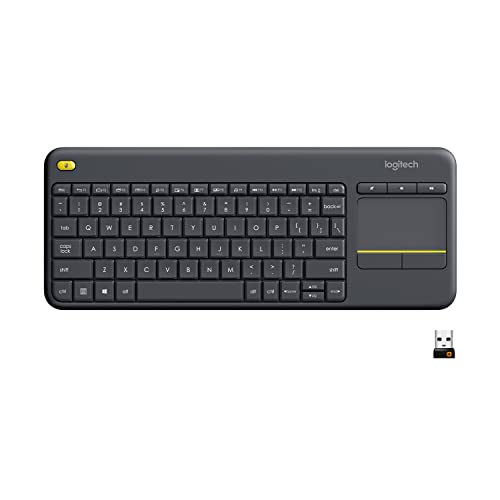
At a glance: Wireless touch keyboard for PC-connected TVs; built-in touchpad; media controls including a left-side volume cluster; USB receiver connection; works with Windows, Android and Chrome OS devices.
The K400 Plus is the couch keyboard against which the category is measured, for one unglamorous reason: it was designed by people who watched how living rooms actually behave. The touchpad sits large and centred-right where a thumb falls; the media keys — play, pause, volume — are duplicated on the left edge, so the hand that is not mousing can run the film; and the whole board is light, slightly flexible and utterly unbothered by being tossed onto a cushion, sat beside, or stored vertically between the sofa and the side table for a month. It is furniture-grade technology, and that is a compliment this category should hand out more often.
Its working world is the PC-connected television: plug the small USB receiver into the computer — or the many Android and Chrome OS devices it supports — and the board simply drives it, at sofa distances, without pairing rituals. The keys are a quiet membrane-style deck, low and forgiving, entirely adequate for searches, passwords, chat and the occasional email, and silent enough that typing during a quiet scene does not announce itself to the room. Battery life from replaceable cells stretches across the kind of timescales that make you forget batteries are involved, which is the correct relationship between a living room and its remotes.
The compromises are the absence of backlighting and of Bluetooth. In a fully dark room you will navigate by touch and touchpad rather than by sight — the layout is familiar enough that most owners adapt within a week, but the K830 below exists for those who will not. And a receiver-driven board needs a free USB port and does not pair natively with televisions that lack one. Neither flaw dents the central fact: for the classic HTPC and laptop-to-TV household, this is the board that has ended more searches than any other in the category, and it ends them by disappearing into the furniture.
Ownership details reward a sentence. The receiver stores inside the board, so it travels and stores without a loose part to lose. The function keys double as media controls in the arrangement living rooms want. And because the model has been produced for years, replacement receivers, documentation and community knowledge are all one search away — the quiet infrastructure that separates a product from a platform. Buy it once, and the living room’s keyboard question stays answered through several televisions.
Strengths
- Purpose-built living-room layout with left-side media keys
- Large, well-mannered touchpad for sofa-distance pointing
- Receiver connection is instant and pairing-free
- Replaceable batteries last across very long intervals
- Light, tossable build that survives real sofas
- A long production history means support and spares exist
Trade-offs
- No backlighting for fully dark rooms
- No Bluetooth — needs a USB receiver port
- Membrane-style keys are quiet and adequate, not delightful
Best for: PC-connected TV households that want the proven, zero-fuss couch standard.
Not suited for: Dark-room viewers who need illuminated keys, and receiver-less smart TV setups.

Logitech K830 — Best for dark rooms
At a glance: Illuminated living-room keyboard with built-in touchpad; backlit keys with ambient light sensing; rechargeable battery; easy-access media and shortcut keys; for Windows or Android devices.
The K830 answers the K400’s one real weakness with light. Its keys are backlit, with an ambient sensor that brings the illumination up as the room darkens and dims it when the lamps return — a small automation that feels luxurious every single evening, because it removes the one moment of friction in couch computing: hunting for a key by the television’s glow during the scene you are trying not to miss. The backlighting is even and white, the legends stay readable at arm’s length on a lap, and the board wakes with its light ready when you pick it up mid-film.
The rest of the design is the K400’s philosophy in a more tailored suit. The built-in touchpad handles sofa pointing with the same calm manners, media and shortcut keys are placed for eyes-up use, and the rechargeable battery trades the Plus’s replaceable cells for a slimmer profile and a cable top-up every long interval. The typing deck is low-profile and quiet, tuned for bursts rather than essays, and the board’s slightly more substantial build sits on a lap with a steadiness that suits its premium positioning. It is recognisably the connoisseur’s version of the same idea.
Its world is Windows and Android devices — the HTPC, the laptop, the Android box — rather than the smart TV’s own interface, and buyers should map it to that world honestly. The rechargeable battery also asks for a household habit: a cable near the sofa, and the discipline to plug in when the indicator suggests it rather than during the finale. Neither caveat survives contact with the right buyer. If your viewing happens in a properly dark room and your source is a computer, the K830 is not an upgrade to the standard pick; it is the standard pick, finished.
A note on longevity: illuminated boards live or die by their battery discipline, and the K830’s generous interval between charges makes that discipline easy to keep. Owners who top it up during a weekly tidy will simply never meet its low-battery warning. Pair that with Logitech’s living-room pedigree and the board becomes the rare premium version that is also the low-maintenance one — the light is the only thing it asks you to notice.
Strengths
- Backlit keys with ambient sensing — made for dark rooms
- Rechargeable battery with long intervals between charges
- Touchpad and media keys arranged for eyes-up control
- Slightly more substantial build sits steadily on a lap
- Quiet, low-profile keys suit typing during films
- Premium finish on the proven living-room formula
Trade-offs
- Rechargeable battery needs a charging habit
- Built for Windows and Android devices rather than TV-native control
- Premium positioning within the category
Best for: Dark-room viewers driving a PC or Android source who want illuminated control.
Not suited for: Households that prefer replaceable batteries and zero charging routines.

Arteck Universal Backlit TV Keyboard — Best value with backlighting
At a glance: Bluetooth touch TV keyboard; seven-colour backlighting; built-in touchpad; easy media controls; slim frame with stainless backing; for TV-connected computers, smart TVs, laptops, tablets and HTPCs.
The Arteck makes the case that the couch keyboard’s two premium features — backlighting and Bluetooth — should not require a premium commitment. Seven backlight colours are on offer, and while the sensible money picks one calm colour and keeps it, the choice itself matters in a category where most boards offer darkness or white. The Bluetooth connection skips the receiver entirely, pairing directly with the sprawling device list this board courts: smart TVs with Bluetooth support, tablets, laptops, TV-connected computers and the rest of the modern living room’s menagerie.
The frame is the surprise: slim, light, with a stainless steel back that gives it a rigidity its price tier rarely manages, so it neither flexes across a lap nor feels like a toy when a child commandeers it. The touchpad is integrated cleanly, media controls are present and sensibly placed, and the whole board has the grab-and-go manners the category demands. Typing is a low-profile, quiet affair — again, a bursts keyboard, and honest about it. For households whose television itself is the computer, this is the board that connects to it without adapters or apologies.
Bluetooth ownership carries its standing caveats, and they apply here with full force: pairing is a ritual the receiver boards never ask for, the connection depends on the television’s own Bluetooth implementation — which varies by maker and model year — and a board paired to the TV must be re-paired when it visits the laptop. Buyers should confirm their television’s Bluetooth keyboard support before ordering, because that support, not this keyboard, is the usual point of failure. Within those honest limits, the Arteck delivers the illuminated, receiver-free couch experience at the friendliest tier in this guide.
One more household consideration in its favour: colour choice is a peace treaty. In a living room where two viewers disagree about everything from brightness to what counts as a film, a keyboard whose glow can be set to someone’s favourite colour — or dimmed to near-invisibility — removes a small nightly negotiation. Features are sometimes social, and this board understands the room it lives in.
Strengths
- Seven-colour backlighting at a value tier
- Bluetooth connection — no receiver to plug or lose
- Slim frame with a rigid stainless back
- Broad device compatibility across TVs, tablets and computers
- Integrated touchpad and sensible media controls
- Light and genuinely grab-and-go
Trade-offs
- Bluetooth pairing and TV-side support vary by television
- Re-pairing when moving between devices
- Low-profile typing is for bursts, not long writing
Best for: Smart TV and multi-device households that want backlighting without a receiver.
Not suited for: Buyers who want plug-and-play receiver simplicity above all.

Rii Wireless Keyboard with Touchpad — Best dual-mode metal traveller
At a glance: Dual-mode wireless: Bluetooth 5.1 and 2.4 GHz receiver; aluminium alloy body; built-in touchpad; portable compact frame; for computers, tablets, Android TV boxes, smart TVs, Windows and Mac.
Rii built its name on mini keyboards and remote-shaped oddities, and this board is the company’s grown-up answer: a full keyboard with touchpad in an aluminium alloy body that feels machined rather than moulded. The dual-mode connection is the strategic feature — Bluetooth 5.1 for the tablet and the television, a 2.4 GHz receiver for the computer that wants plug-and-play — so one board can be the household’s universal donor, moving between the TV box, the laptop and the media PC with a mode switch rather than a re-pairing ceremony. In homes where the couch keyboard is really the everything keyboard, that flexibility is the product.
The metal body changes the lap experience in a way plastic cannot imitate: the board sits flat and stays put, its cool rigidity reading as quality every time you pick it up. The touchpad is sized for navigation rather than precision work, which matches living-room reality, and the layout keeps media control within the function layer where a practised thumb finds it. Typing is compact-deck typing — entirely serviceable for the searches, passwords and messages that are the couch keyboard’s true workload — and the board’s portability means it doubles as the travel keyboard for the laptop bag, a second job the plastic picks do less gracefully.
The honest notes: a compact frame means compact keys, and large hands on long messages will feel the difference from a full-size deck; and Rii’s documentation and software manners are a step behind Logitech’s polish, so setup rewards the patient. Neither matters much against the proposition. If your living room’s keyboard must also be your travel keyboard, your spare keyboard and your TV box’s keyboard — and you would like it to feel like a piece of equipment while doing all three — this is the pick that was designed for your household’s actual logistics.
Durability deserves the last word here, because living-room gear dies by accident more than by age: sat on, spilled near, dropped between cushions onto hard floors. An alloy shell is not invincibility, but it is the difference between a drop that ends a keyboard and a drop that becomes a story. Households with children, dogs or lively film nights should weight that difference honestly when choosing among these four.
Strengths
- Bluetooth 5.1 plus 2.4 GHz receiver — one board for every device
- Aluminium alloy body sits flat and survives living-room accidents
- Compact and portable enough to double as a travel keyboard
- Built-in touchpad matched to navigation workloads
- Broad compatibility: TV boxes, smart TVs, Windows and Mac
- Mode switching avoids re-pairing between regular devices
Trade-offs
- Compact keys are tighter for large hands and long messages
- Documentation and setup polish trail Logitech
- Touchpad is navigation-sized rather than precision-sized
Best for: Multi-device households that want one metal-bodied keyboard for TV, laptop and travel.
Not suited for: Buyers who want the largest keys and the most polished setup experience.
The two models this guide could not link: K600 TV and K83 Wireless
Two famous couch keyboards belong in any complete account of this category, and both are covered here in prose because the verified catalogue checks behind this guide returned no exact match for either. The Logitech K600 TV is the K400 family’s smart-TV-native sibling: it adds a circular D-pad designed for television interfaces, a pointer-style touchpad arrangement, and multi-device switching aimed at households whose keyboard serves a smart TV, a computer and a phone in one evening. If your television’s own apps are your main screen, it is the Logitech designed for you — verify the exact listing and its current compatibility carefully if you source one, because TV-side support is where its promise is kept or broken.
The Corsair K83 Wireless is the category’s gaming-grade outlier: a low-profile mechanical-feel board with an aluminium frame, backlighting, and a joystick-style navigation cluster beside its touchpad, built for the player whose couch setup runs a real PC and real games. It treats the living room as a battlestation with better seating, and for that household it has no true substitute among the linked picks. As with the K600, treat any listing you find with a verifier’s care — check the model name exactly, confirm the connection types, and read the compatibility notes against your own devices before money moves.
Touchpads from the sofa: what good looks like at three metres
A couch touchpad’s job is not the desk touchpad’s job. Precision matters less than predictability: the pointer should move at a speed that crosses a television screen in one comfortable thumb stroke, clicks should land where the thumb already rests, and scrolling through a streaming catalogue should feel like turning pages rather than negotiating. All four picks size their pads for navigation, and the differences between them are matters of surface feel and click placement that owners adapt to within days. What cannot be adapted to is a connection that stutters — which is why wireless behaviour, covered next, outranks pad dimensions in every verdict in this guide.
A practical tip that transforms couch pointing: raise the pointer speed one notch beyond your desk preference. Television interfaces are built from enormous targets — film posters, menu tiles, search letters — and a faster pointer with a relaxed hand beats a precise pointer with a busy thumb across a three-metre evening. The on-screen keyboard is the other half of couch typing, and the board whose search key and media keys you can find blind will save you more time than any specification on its box.
Wireless at sofa distance: receivers, Bluetooth and interference
Living rooms are hostile radio territory: the source hides behind a television, the path crosses coffee tables and bodies, and the air carries Wi-Fi, Bluetooth and the microwave’s opinions. Receiver-based boards like the K400 Plus handle this with a dedicated link and one underused trick — a short USB extension that moves the receiver from behind the TV to a line-of-sight spot, which cures nearly every reported case of couch lag. Bluetooth boards like the Arteck and the Rii’s second mode depend on the television’s own radio manners, which is why their reviews insist on checking your TV’s support first: the keyboard is rarely the weak half of that handshake.
Range claims in this category should be read as open-field numbers; your real range is whatever survives your room. The practical test on arrival day: sit in the farthest seat you actually use, run a search, scroll a catalogue, and play a minute of something with the board on your lap. Every pick here passes that test in a normal living room when its connection is set up as its maker intended — receiver visible to the room, Bluetooth paired to a supported host. Failures almost always trace to a receiver entombed behind a metal-backed television, which is an installation error, not a product verdict.
Battery strategies for a device you will forget to charge
Couch keyboards sip power — they sleep aggressively and work in bursts — so battery life in this category is measured in months, and the real choice is philosophical. Replaceable cells, as in the K400 Plus, make the board immortal in a drawer of AAs: it can never be caught dead, only caught needing a thirty-second swap during an advert. Rechargeable packs, as in the K830 and the Arteck class, remove the battery drawer from the equation and ask instead for a cable near the sofa and a household that tops up during a tidy rather than during a finale.
Neither strategy is superior; they suit different homes. The forgetful household with a battery drawer should buy replaceable cells. The minimalist household that hates drawers of batteries should buy rechargeable and build the cable into the side table’s furniture. What no household should buy is a board whose battery behaviour they have not thought about at all, because the couch keyboard’s defining moment is being grabbed, mid-film, by someone who expects it to work — and the battery is the only part that can betray that expectation silently.
What are you controlling? The three living-room worlds
World one: a computer drives the television — an HTPC, a laptop on an HDMI cable, a desktop in the media cabinet. This is the most capable world, where every streaming service, file and game lives behind one interface, and it is the K400 Plus and K830’s home ground. World two: the smart TV is the computer, its own apps behind its own interface, and the keyboard is a better remote for searching and signing in — the Arteck’s and the Rii’s Bluetooth world, gated always by the TV maker’s keyboard support. World three: a streaming box or console mediates — Android TV boxes behave like world one with an accent; consoles accept keyboards for text and some navigation while reserving play for controllers.
Most households live in two worlds at once and switch by input button, which is the argument for the dual-mode Rii and for multi-device boards generally: the keyboard that follows you across the input switch is the one that stays on the coffee table, while the single-world board migrates to a drawer. Map your worlds honestly before buying. The category’s returns are dominated by excellent keyboards bought for the wrong world, and no amount of backlighting redeems a board that cannot talk to the screen you are watching.
Living with a couch keyboard: storage, spills and sharing
Couch keyboards live dangerously and should be stored like it: a consistent home — the side table’s shelf, the slot between sofa and wall, a basket that is always the basket — because a board that must be hunted is a board that will be sat on. All four picks tolerate the life, with the Rii’s alloy shell the most accident-proof and the Arteck’s slim frame the easiest to slide into a media unit. Wipe-downs matter more than any other maintenance: a slightly damp cloth weekly keeps the touchpad’s surface honest, and crumbs are the true enemy of every low-profile deck in this guide.
Sharing is the other reality. A couch keyboard is a household instrument, passed between hands with different habits, dropped by guests, and borrowed by children for the television’s browser. This argues for the simple boards — the K400 Plus’s nothing-to-configure manners, the Arteck’s one-button colour peace treaty — and against turning the living room’s keyboard into a finely tuned personal instrument. Set it up once, in the most standard configuration, and let the whole household’s muscle memory compound in the same direction.
The couch keyboard as the household’s second remote
It helps to think of the purchase the way the household will: not as a keyboard at all, but as the television’s second remote — the one that types. Remotes succeed by being findable, grabbable and instantly awake, and they fail by needing explanation. That is why this guide weights instant receiver connections, blind-findable media keys and a permanent storage home so heavily, and typing specifications so lightly. A household that internalises the second-remote idea stops asking whether the couch board is a good keyboard and starts asking whether it is a good citizen of the room, which is the question its evenings will actually grade.
The second-remote framing also explains the category’s tolerance for compromise. Nobody’s favourite keyboard lives on the coffee table; everybody’s most-used one does. The board that is simply there — charged or celled, connected, familiar to every hand in the house — delivers more value across a year than a superior instrument that lives in a drawer being protected from the life it was bought for. Buy for the room’s habits, set it up once, and let familiarity do the compounding.
How to choose: a buyer’s framework
Decide your world before your keyboard
Write down what the keyboard must control, in order of frequency: the media PC, the TV’s own apps, the streaming box, the laptop that visits the television. Then buy for the first item and verify the second. Receiver boards rule the PC world; Bluetooth boards rule the TV-native world; dual-mode boards straddle. This single decision eliminates most of the category’s disappointments, because couch keyboards almost never fail at being keyboards — they fail at being connected to the screen their owner actually watches.
Touchpad or separate mouse on the couch?
A lap is not a desk, and a mouse on a cushion is a mouse negotiating with upholstery. The built-in touchpad wins the couch for the same reason it wins the aeroplane tray: it travels with the board, works on any surface including your own leg, and never slides off anything. Desk habits die hard, and some households keep a wireless mouse on the side table for the PC world’s precision tasks — a legitimate hybrid, provided the keyboard still carries its own pad for the evenings the mouse is missing, charging or commandeered. Never buy a couch keyboard without a pad and plan to improvise; improvisation is how mice end up in the sofa’s archaeological layers.
Backlighting: need, luxury or peace treaty?
If your viewing room goes properly dark — projector rooms, film-night households, anyone who watches with the lamps off — backlighting graduates from luxury to equipment, and the K830 or Arteck earn their places. If your evenings are lamplit, the K400 Plus’s unlit deck costs you nothing after the first week’s familiarity. Judge by your worst-lit regular scenario, not your brightest, and remember the Arteck’s colour choice doubles as household diplomacy: in shared rooms, the ability to set the glow to a mutually acceptable colour and brightness is a feature with genuine nightly value.
Size, weight and the lap test
A couch keyboard should be light enough to pass one-handed, rigid enough not to flex when it is picked up by a corner, and sized to balance across a lap without its edges digging in. All four picks pass, with the Rii’s alloy frame the most planted and the Arteck the most waif-like. If your household includes small children as regular operators, weight and survivability climb the priority list; if the board will live in a laptop bag as often as on the sofa, the Rii’s travel manners argue for themselves. The lap test is literal: imagine each board on your knees for a two-hour film, being grabbed, typed on, set down and grabbed again — the one that disappears in that film is the right one.
Setting up a couch keyboard properly on the first evening
Couch setup is an evening’s light work with an outsized payoff, because the category’s failures are nearly all installation failures. Work through the connection, the receiver placement, the pointer settings and the household conventions below, and your board will simply work for years — which is the highest praise living-room technology can earn.
Step 1: Connect in the right order and test from the far seat
Pair or plug in while sitting at the television, then carry the board to the farthest seat you actually use and test there first: run a search, scroll a catalogue, type a password-length string. Far-seat testing catches the connection problems that near-seat testing hides, while the evening is young and the packaging is still open. If a receiver board falters, apply the extension trick before judging it — move the receiver out from behind the television on a short USB extension cable until it can see the room. Nine living-room connection complaints in ten die at exactly this step.
Step 2: Set pointer speed and scrolling for television-sized targets
Open the host device’s pointer settings and raise the speed a notch beyond your desk habit, then scroll a long catalogue to check the direction and pace feel natural. Television interfaces reward a fast pointer and forgive imprecision; your thumb will cover the screen in one stroke instead of three, and the evening’s hundred small navigations will each cost less. If the household shares the board, set the speed at the faster end of everyone’s comfort — the slower-preference users adapt in days, while a sluggish pointer taxes every user on every action.
Step 3: Learn the media keys blind, and teach the household
Spend five deliberate minutes with the lights low: find play and pause, volume, mute and search by touch alone, on whichever edges your board keeps them. Then teach the household the same five, because a couch keyboard’s value multiplies when everyone can drive it and divides when one person becomes the remote. The K400 Plus’s left-side media cluster and the K830’s shortcut row exist for exactly this blind fluency. A board the whole room can operate is infrastructure; a board only you can operate is a gadget.
Step 4: Give the board a home and a battery routine
Choose the board’s permanent home tonight — a shelf, a basket, a slot — within reach of the main seats and out of the sitting zones. For rechargeable boards, route a charging cable to that home so topping up happens where the board lives, not where someone remembers. For replaceable-cell boards, put spare batteries in the same drawer as the television’s remote batteries, because that is where future-you will look. These tiny logistics, decided once, are the difference between a keyboard that is always ready and one that is always being searched for, usually during the opening scene.
Step 5: Run the two-world check if you switch inputs
If your television serves both a computer and its own apps — the common modern arrangement — walk the board through an input switch: control the PC, change input, control the TV, change back. Note what reconnects automatically and what needs a mode switch, and if your board is single-world, decide which world owns it and let the other world’s remote keep its job. Households that make this decision consciously stop fighting their equipment; the board has one clear post, the television’s remote has the other, and the coffee table achieves the peace that this entire category exists to provide.
Common mistakes to avoid
Buying a desk keyboard for the couch
A desk keyboard on the couch fails in every direction at once: no touchpad, so a mouse joins it on the cushions; a cable or a desk-range wireless link that stutters at three metres; a layout whose media controls are an afterthought; and a weight and rigidity designed for a surface it will never meet. The couch species exists because the environment is genuinely different. Buy the tool shaped for the room — touchpad built in, media keys forward, wireless made for distance — and the whole category of complaints simply never occurs.
Ignoring the television’s own keyboard support
Smart televisions decide for themselves whether a Bluetooth keyboard may drive them, and support varies by maker, model and year in ways that have nothing to do with the keyboard’s quality. The returns in this category are full of excellent boards exiled by an uncooperative television. Before ordering a Bluetooth-first board for TV-native use, check your exact television model’s keyboard support in its manual or menus. If support is absent or doubtful, the receiver route through a streaming box or computer is not a compromise — it is the architecture that works.
Burying the receiver behind the television
The classic installation error: the receiver plugged into the back of a large metal-and-glass screen, asked to hear a keyboard through the television itself. The resulting lag and dropouts get blamed on the board in reviews the board does not deserve. A short extension cable, a front or side port, or a media PC positioned with its ports visible to the room — any of these restores the line of sight the link was designed for. Judge every couch keyboard only after its receiver can see the sofa, because that is the test its maker designed it to pass.
Expecting essay-grade typing from a couch board
Couch keyboards are burst instruments — searches, passwords, messages, the occasional address — and their low-profile, quiet decks are tuned for exactly that. Buyers who expect to write a novel from the sofa will be disappointed by every pick in this guide and should instead give the living room a second, typing-grade board for the laptop sessions, keeping the couch board for control. Matching the tool to the session length is not lowering standards; it is how every other room in the house already works, kitchens included.
Final recommendation
For the classic living room — a computer behind the television and a household that wants the question answered for years — the K400 Plus remains the category’s foundation, with the K830 as its illuminated, rechargeable refinement for dark rooms. The Arteck brings backlighting and receiver-free Bluetooth to the friendliest tier, and the Rii’s alloy dual-mode design serves the household whose one keyboard must do every job including travel. Choose by world first, by light second, by battery philosophy third — in that order, the right board selects itself.
And if your heart belongs to the K600 TV’s television-native design or the K83’s gaming-grade couch ambition, pursue them with the verifier’s habits this guide modelled: exact model, confirmed compatibility, a listing you have read twice. The couch deserves a keyboard chosen as carefully as the desk’s — it is, after all, where the day ends, and the right board makes the evening’s last technology feel like furniture instead of equipment.
Set the board up on its first evening — receiver in sight of the room, pointer speed raised, media keys learned blind, a home chosen and a battery routine agreed — and then stop thinking about it entirely. That disappearance is the product. A year from now the right couch keyboard will have no stories attached to it at all: no lag during the finale, no dead board during the match, no hunting through cushions. Just an evening, a screen, and a board that was there. That is what the best in this category means, and all four picks here can deliver it to the household they fit.
Frequently asked questions
Can one keyboard control both my smart TV and my PC?
Yes, if it speaks both worlds’ languages. Dual-mode boards like the Rii — Bluetooth for the television, a receiver for the computer — switch between hosts without re-pairing, and multi-device boards generally are built for exactly this household. The standing caveat is the television’s own Bluetooth keyboard support, which the TV maker controls: verify your model accepts keyboard input before building your setup on it. Where TV support fails, route around it — a streaming box or the PC itself becomes the keyboard’s host, and the television returns to being a screen.
Why do couch keyboards have touchpads instead of trackballs or pointers?
Because the lap is the surface, and the touchpad is the only pointing device that brings its own surface with it. It works on a leg, a cushion or thin air’s edge, it has no ball to lose and no roller to gum up with living-room life, and it keeps the whole instrument in one piece that can be passed around the sofa. Trackballs had their living-room era and lost it to exactly these logistics. For television-sized targets, a decent touchpad’s precision is never the limiting factor — the interface was designed for a remote’s D-pad, and a thumb on a pad outperforms that from the first evening.
How far from the TV can I sit and still control it reliably?
In a normal living room, every pick here covers the realistic distances — the full length of the sofa arrangement — provided the connection is installed as designed. Receiver boards want line of sight or something near it; give the receiver an extension out from behind the television and the farthest seat in the house becomes unremarkable. Bluetooth range depends on the television’s radio as much as the keyboard’s. Test from your farthest real seat on the first evening, while adjustments are easy, rather than discovering a dead corner during a film with guests.
Are backlit keys worth it on a couch keyboard?
In a dark viewing room, unambiguously — the K830’s ambient-sensing backlight exists because hunting for keys by screen-glow is the couch keyboard’s most common friction. In a lamplit living room, the same feature is a luxury you will stop noticing in a week, and the unlit K400 Plus serves identically. Decide by your darkest regular viewing, and consider the household dimension: the Arteck’s colour options let a shared room agree on a glow everyone tolerates, which in practice settles more arguments than the light itself.
Can I game on a couch keyboard?
Casually and happily, within limits. Couch keyboards handle strategy, adventure, simulation and any game whose pace forgives a low-profile deck and a touchpad’s navigation; the K83 Wireless, discussed in prose above, exists for players who want gaming-grade construction in this form. Fast competitive play belongs to the desk guides in this series, with their gaming switches and mouse fields — a touchpad is not an aiming device and no couch board pretends otherwise. The honest split: the couch board runs the living room’s computer beautifully, and the desk keeps the ranked matches.
How long do couch keyboards last?
Years — typically longer than the television they serve, because their workload is bursts rather than marathons and their enemies are accidents rather than wear. Longevity strategy is mostly storage discipline: a consistent home out of the sitting zones, a weekly wipe of the touchpad, and a battery routine the household actually keeps. The K400 Plus’s long production run is itself a longevity feature, since receivers and documentation remain findable; the Rii’s alloy shell insures against the drop that ends plastic boards. Buy the board whose failure modes your household can manage, and it will outlast several streaming services.
Related guides
The living room connects to the rest of the keyboard world at the desk’s edge, and most couch buyers own a desk setup too. These guides cover the wireless questions, connection types, layouts and travel boards that couch buyers most often read next, each written to help the two setups share devices, habits and hard-won lessons sensibly.
- Bluetooth versus 2.4 GHz and tri-mode connections explained
- whether wireless keyboards are good for gaming
- travel keyboards that double as living-room boards
- the 75 percent layout for desks that share the room
- keyboards for video editors working on big screens
- building a first custom keyboard for the desk instead